In a nutshell
Your cluster runs on machines — nodes. Pods are the little workloads that need room on those machines. When more pods show up than the current nodes can hold, Kubernetes does not go and buy more machines on its own; it just leaves the extra pods stuck with nowhere to run (status Pending). A node autoscaler is the piece that notices those stuck pods, goes to AWS, and buys more nodes — then removes them again when the work is gone so you stop paying. This lesson builds that machine-buyer in Terraform, two different ways, and shows you how to switch it off cleanly.
Picture your cluster as a warehouse and pods as goods that need shelf space. Cluster Autoscaler is a manager who can only reorder a few crate sizes agreed on in advance: when the shelves fill, it orders another crate of exactly the same kind (a pre-defined Auto Scaling Group), and ships empties back when a shelf clears. Karpenter is a just-in-time buyer: it looks at precisely what is waiting to be stored right now, buys the single container shape that fits this batch best and costs least — a small van for a small delivery, a lorry for a big one — bolts the goods in tightly, and later repacks everything into fewer containers as deliveries clear. Same trigger (goods with nowhere to go), completely different buying strategy.
That difference is why Karpenter is the modern default: it right-sizes each purchase, packs tighter, and uses cheap interruptible Spot capacity well, while Cluster Autoscaler is the older tool you will still meet running existing clusters. Neither one scales your pods — that is the Horizontal Pod Autoscaler’s job, and the two layers relay: the pod autoscaler makes more pods, the node autoscaler makes somewhere for them to land. You want both. Here you will build both node autoscalers, watch real nodes appear and vanish, and learn the one teardown order that stops Karpenter leaving instances running over the weekend.
Level: Expert · Time: ~61 min read
Prerequisites: the cluster from Provisioning an EKS Cluster: VPC, Managed Node Groups and the keyless pod identity from EKS OIDC & IRSA; the pod-scaling companion is EKS Pod Autoscaling: Metrics Server, HPA & VPA. Comfort with terraform apply, Helm, and reading kubectl get output is assumed.
After this lesson you can: explain why a Pending pod needs a node autoscaler and not the HPA; install Cluster Autoscaler in Terraform with an IRSA role and the ASG discovery tags; stand up Karpenter’s controller IRSA, node role, instance profile, SQS interruption queue and EventBridge rules via the terraform-aws-modules submodule; write v1 NodePool and EC2NodeClass manifests that run spot-first and consolidate; choose between the two for a given workload; and destroy the whole stack without orphaning a single instance.
There are two completely different questions hiding inside the phrase “my cluster is out of capacity,” and confusing them wastes more Kubernetes-team afternoons than any other single mistake. The first is “I have too much traffic for the pods I’m running” — the answer is more pods, and the Horizontal Pod Autoscaler handles it. The second is “I have pods that can’t be scheduled because no node has room for them” — the answer is more nodes, and that is a job neither the HPA nor Kubernetes itself will do for you. Kubernetes will happily leave a pod Pending forever with the event 0/3 nodes are available: Insufficient cpu. Something outside the scheduler has to notice that, go to AWS, and buy more machines. That something is a node autoscaler, and on EKS you have two choices: the venerable Cluster Autoscaler and the modern Karpenter. This lesson is about the node layer — and about building both, correctly, in Terraform.
The distinction matters because the two node autoscalers work in opposite directions. Cluster Autoscaler is pool-first: you pre-define Auto Scaling Groups with fixed instance types, and CAS’s only lever is to nudge each group’s desired count up or down. Karpenter is pod-first: it reads the actual CPU and memory the pending pods asked for, then calls the EC2 Fleet API directly to launch the cheapest instance type that happens to fit — no ASG in the picture at all — bin-packing pods onto it and later consolidating away the waste. That architectural difference cascades into everything: how you install each one, what IAM they need, how fast they react, how well they use Spot, and — the part that bites hardest at cleanup time — what happens to the nodes when you run terraform destroy. We will treat all of it as first-class, with real HCL you can paste and run, because a node autoscaler you half-understand is a node autoscaler that leaves twelve orphaned Spot instances running over a weekend.
By the end you will have a complete, copy-pasteable configuration you run yourself: an EKS cluster, the Karpenter controller with its IRSA role, node IAM role, instance profile, SQS interruption queue and EventBridge rules (built with the terraform-aws-modules/eks//modules/karpenter submodule so you see both the plumbing and the shortcut), a NodePool and EC2NodeClass telling Karpenter what it may launch, and a scale test that makes real nodes appear in front of you and then disappear as consolidation kicks in. You’ll run init → plan → apply → verify (kubectl get nodeclaims) → destroy, and you’ll learn the one destroy ordering — remove Karpenter’s nodes before you destroy the cluster — that separates a clean teardown from a support ticket. Every knob is laid out in reference tables: the CAS IRSA permissions and discovery tags, the Karpenter component list, the NodePool/EC2NodeClass fields, the CAS-vs-Karpenter matrix, and a troubleshooting table for the failures that actually happen.
What you’ll build
The scenario is the one every platform team reaches the first time a batch job or a traffic spike leaves pods stuck Pending: an EKS cluster that can grow its own compute on demand and shrink it back down when the load is gone, without anyone editing a desired-count in the console at 2 a.m. You will build that twice — once the Cluster Autoscaler way (so you understand the incumbent and can maintain the clusters that still run it) and once the Karpenter way (the design you’d choose for anything new). The centrepiece demo is the Karpenter build: a small managed node group runs the platform add-ons and Karpenter itself, and Karpenter then provisions everything else — right-sized, spot-first EC2 nodes — the instant workloads need them.
This lesson stands on two you should have already: the cluster, its VPC and its baseline node group come from Provisioning an EKS Cluster: VPC, Managed Node Groups, and the keyless pod-to-AWS identity mechanism both autoscalers rely on comes from EKS OIDC & IRSA: IAM Roles for Service Accounts. The other half of autoscaling — scaling pods rather than nodes — is its companion, EKS Pod Autoscaling: Metrics Server, HPA & VPA; the two layers are designed to work together, and it helps to hold the whole picture in your head:
| Layer | Autoscaler | Scales | Trigger | Unit added |
|---|---|---|---|---|
| Pod | Horizontal Pod Autoscaler | Replicas of a Deployment | A metric (CPU%, custom, external) crosses a target | A pod |
| Pod | Vertical Pod Autoscaler | CPU/memory requests of a pod | Recommender sees under/over-provisioning | A resized pod |
| Node | Cluster Autoscaler | Desired count of an ASG | Unschedulable (Pending) pods |
A node (from a fixed ASG) |
| Node | Karpenter | EC2 instances directly | Unschedulable (Pending) pods |
A right-sized node (any fitting type) |
The relationship is a relay: the HPA makes more pods, and when those extra pods don’t fit, the node autoscaler makes more nodes for them to land on. Run the HPA without a node autoscaler and your new replicas sit Pending; run a node autoscaler without the HPA and your one replica happily runs on an ever-larger node it doesn’t need. You want both. Here is the whole node-scaling build as a table of moving parts, so you can see the shape before the code:
| Piece | Terraform | Role in node autoscaling |
|---|---|---|
| VPC + subnets | terraform-aws-modules/vpc/aws |
Where nodes launch; tagged for discovery |
| EKS cluster | terraform-aws-modules/eks/aws |
Control plane + a small managed node group for add-ons |
| OIDC provider | (module output) | Trust anchor for IRSA on both autoscalers |
| Cluster Autoscaler IRSA | iam-role-for-service-accounts-eks |
Lets CAS call the Auto Scaling APIs |
| CAS Helm release | helm_release |
The cluster-autoscaler deployment |
| Karpenter submodule | .../eks//modules/karpenter |
Controller IRSA + node role + instance profile + SQS queue + EventBridge |
| Karpenter Helm release | helm_release |
The Karpenter controller (v1.x) |
NodePool |
kubectl_manifest |
What Karpenter may launch (types, spot, limits, disruption) |
EC2NodeClass |
kubectl_manifest |
The AWS specifics (AMI, subnets, SGs, role, disk) |
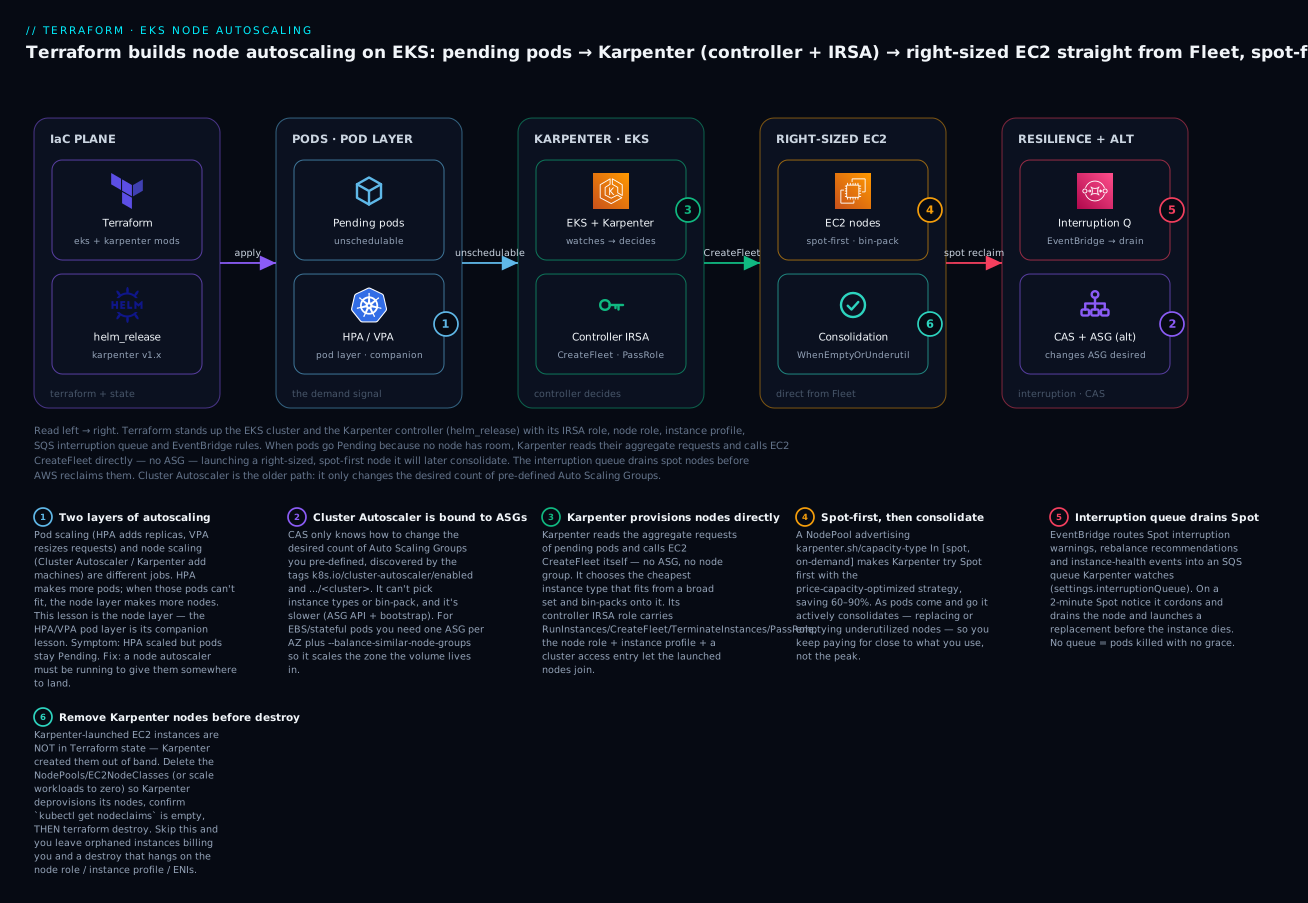
Read the diagram left to right: Terraform applies the cluster and the Karpenter controller (badge 3 — it provisions nodes directly), which watches for Pending pods produced by the pod layer (badge 1 — HPA/VPA is the companion), and answers them by calling CreateFleet to launch spot-first, bin-packed EC2 nodes (badge 4) that it later consolidates (badge 6 — and which you must delete before destroy). An SQS interruption queue (badge 5) drains Spot nodes before AWS reclaims them, and Cluster Autoscaler bound to ASGs (badge 2) is the alternative on the right. The six legend entries are the six decisions the rest of this lesson makes in code.
Cluster Autoscaler: how it watches pods and drives ASGs
Cluster Autoscaler is a control loop with a very narrow job. Every few seconds it lists the pods that are Pending specifically because no node can schedule them (the scheduler has emitted a FailedScheduling / Insufficient cpu|memory event, not a taint or affinity mismatch it can’t fix by adding a node). For each such pod it asks: is there a node group I know about whose instance shape could fit this pod? If yes, it increments that group’s desired capacity and lets the ASG do the rest — the ASG launches an instance, the kubelet joins it to the cluster, and the scheduler finally places the pod. In the other direction, when a node has been underutilized past a threshold (--scale-down-utilization-threshold, default 0.5) for long enough (--scale-down-unneeded-time, default 10m) and its pods can be rescheduled elsewhere, CAS drains it and decrements the desired count.
The word doing all the work there is ASG. Cluster Autoscaler does not launch instances; it moves a number on an Auto Scaling Group you already created, and the ASG launches the instance. That single fact explains every one of its strengths and limits:
| CAS step | What happens | Consequence |
|---|---|---|
| 1. Watch | Lists unschedulable pods every scan interval | Reacts to Pending, not to CPU% |
| 2. Simulate | Checks which discovered ASG could fit the pod | Only ASGs it has discovered are candidates |
| 3. Pick | The --expander chooses among fitting ASGs |
You tune this; default is random |
| 4. Scale out | SetDesiredCapacity +1 on the chosen ASG |
ASG launches one instance of its fixed type |
| 5. Scale in | Drains + TerminateInstanceInAutoScalingGroup |
Slow, deliberately gentle, respects PDBs |
Because CAS’s unit of action is “one more instance of whatever type this ASG launches,” it cannot right-size. If your ASG is a m5.large group and a pod needs 8 vCPU, CAS adds m5.larges until the pod fits across the sum — it will not reach for an m5.2xlarge because that is a different ASG. Getting good bin-packing out of CAS means pre-defining many ASGs of different shapes and hoping the expander picks well, which is exactly the toil Karpenter was built to delete.
Two behaviours you must configure deliberately. First, --balance-similar-node-groups: when several ASGs are “similar” (same instance type and labels, differing only by subnet/AZ), this flag makes CAS keep their sizes balanced instead of piling every new node into one group. Second, the --expander, which decides which eligible ASG to grow when more than one could satisfy the pending pods:
--expander |
Picks the ASG that… | Use when |
|---|---|---|
random |
…is chosen at random (default) | You genuinely don’t care |
most-pods |
…schedules the most pending pods | You want to drain the queue fastest |
least-waste |
…leaves the least idle CPU/memory after scale-up | You want tighter bin-packing (common default) |
price |
…is cheapest (needs pricing info) | Cost-sensitive, mixed types |
priority |
…ranks highest in a cluster-autoscaler-priority-expander ConfigMap |
You want explicit ordering (e.g. spot before on-demand) |
You can chain expanders as a tie-breaker list — --expander=priority,least-waste first honours your priorities, then breaks ties by waste. A very common production pattern is a priority ConfigMap that ranks a Spot ASG above an on-demand ASG so CAS reaches for cheap capacity first and only falls back to on-demand when Spot is unavailable.
The one-ASG-per-AZ rule for stateful and EBS workloads
Here is the CAS gotcha that produces the most baffling “the autoscaler is broken” tickets, and it is not a bug — it is physics. An EBS volume lives in exactly one Availability Zone. A pod with an EBS-backed PersistentVolumeClaim can therefore only run on a node in that same AZ. Now suppose you gave CAS a single ASG spanning three AZs. When such a pod is Pending, CAS increments that ASG’s desired count — but the ASG’s own balancing logic, not CAS, decides which AZ the new instance lands in, and it may well pick the wrong one. The pod stays Pending, CAS sees it’s still unschedulable, and you get a stuck workload with a cluster that looks like it “won’t scale.”
The fix is structural: create one ASG per AZ, each pinned to a single-AZ subnet, and let --balance-similar-node-groups keep them even. Now when an EBS pod in us-east-1b is pending, CAS scales the us-east-1b ASG specifically, and the node lands where the volume is. This is the canonical reason EKS Cluster-Autoscaler node groups are so often defined per-AZ:
| Topology | Stateless pods | EBS/stateful pods |
|---|---|---|
| One ASG spanning 3 AZs | Fine | ⚠️ Node may land in the wrong AZ; pod stays Pending |
One ASG per AZ + --balance-similar-node-groups |
Fine (balanced) | ✅ CAS scales the exact AZ the volume needs |
Karpenter sidesteps this entirely: it reads the pod’s zone requirement (or its volume’s zone) and launches an instance in the correct AZ directly, because it isn’t constrained to pre-shaped groups. Hold that thought — it’s a preview of why the newer tool is the default.
Installing Cluster Autoscaler with Terraform: IRSA, Helm & ASG discovery tags
CAS needs three things from Terraform: an IRSA role so the pod can call the Auto Scaling and EC2 APIs without static keys, discovery tags on the ASGs so it knows which groups it owns, and a Helm release to deploy the controller. Take them in order.
The IAM permissions split into read (which ASGs exist, what shapes) and write (change the count, terminate an instance). You could hand-write the policy, but the community IAM module already ships a correct, tightly-scoped version behind a boolean:
module "cluster_autoscaler_irsa" {
  source  = "terraform-aws-modules/iam/aws//modules/iam-role-for-service-accounts-eks"
  version = "~> 5.0"

  role_name                        = "cluster-autoscaler-${local.name}"
  attach_cluster_autoscaler_policy = true
  cluster_autoscaler_cluster_names = [module.eks.cluster_name]

  oidc_providers = {
    main = {
      provider_arn               = module.eks.oidc_provider_arn
      namespace_service_accounts = ["kube-system:cluster-autoscaler"]
    }
  }
}
That attach_cluster_autoscaler_policy = true generates a policy whose write actions are conditioned on the cluster’s ownership tag, so CAS can only resize ASGs that belong to this cluster — least privilege without you assembling the JSON. For reference, this is what it grants:
| Permission | Access | Why CAS needs it |
|---|---|---|
autoscaling:DescribeAutoScalingGroups |
read | Enumerate candidate ASGs |
autoscaling:DescribeAutoScalingInstances |
read | Map instances to groups |
autoscaling:DescribeLaunchConfigurations / ec2:DescribeLaunchTemplateVersions |
read | Understand each group’s instance shape |
autoscaling:DescribeScalingActivities / DescribeTags |
read | Discovery + progress tracking |
ec2:DescribeInstanceTypes |
read | Know CPU/mem of each type when simulating |
autoscaling:SetDesiredCapacity |
write | Scale a group out or in |
autoscaling:TerminateInstanceInAutoScalingGroup |
write | Remove a specific drained node |
autoscaling:UpdateAutoScalingGroup |
write | Adjust group bounds when needed |
The discovery tags are how CAS decides which ASGs are “its.” With auto-discovery (the only sane mode), CAS is launched with --node-group-auto-discovery=asg:tag=k8s.io/cluster-autoscaler/enabled,k8s.io/cluster-autoscaler/<cluster-name> and scans for ASGs carrying both tags:
| Tag key | Value | Meaning |
|---|---|---|
k8s.io/cluster-autoscaler/enabled |
true |
“This ASG is a candidate for autoscaling” |
k8s.io/cluster-autoscaler/<cluster-name> |
owned |
“…and it belongs to this cluster” |
EKS managed node groups apply both tags to their underlying ASG automatically, so a managed group is discovered with no extra work. For self-managed node groups you must set them yourself — in the EKS module that’s autoscaling_group_tags on the group. You also want the min/max on the ASG to bracket where you’ll let CAS take you:
# In terraform-aws-modules/eks — a self-managed group CAS will discover:
self_managed_node_groups = {
  cas = {
    min_size     = 1
    max_size     = 10
    desired_size = 2
    instance_type = "m5.large"

    autoscaling_group_tags = {
      "k8s.io/cluster-autoscaler/enabled"          = "true"
      "k8s.io/cluster-autoscaler/${local.name}"    = "owned"
      # Hints so CAS can simulate scale-from-zero correctly:
      "k8s.io/cluster-autoscaler/node-template/label/workload" = "general"
    }
  }
}
Finally, the Helm release. The chart lives in the Kubernetes autoscaler repo; you point it at the cluster, hand it the IRSA role via the service-account annotation, and pass the two behaviour flags from the previous section:
resource "helm_release" "cluster_autoscaler" {
  name       = "cluster-autoscaler"
  namespace  = "kube-system"
  repository = "https://kubernetes.github.io/autoscaler"
  chart      = "cluster-autoscaler"
  version    = "9.46.0" # pin; track the chart's appVersion to your K8s minor

  set {
    name  = "autoDiscovery.clusterName"
    value = module.eks.cluster_name
  }
  set {
    name  = "awsRegion"
    value = var.region
  }
  set {
    name  = "rbac.serviceAccount.name"
    value = "cluster-autoscaler"
  }
  set {
    name  = "rbac.serviceAccount.annotations.eks\\.amazonaws\\.com/role-arn"
    value = module.cluster_autoscaler_irsa.iam_role_arn
  }
  set {
    name  = "extraArgs.balance-similar-node-groups"
    value = "true"
  }
  set {
    name  = "extraArgs.expander"
    value = "least-waste"
  }
}
One version discipline note that trips people: the CAS image version must match your cluster’s Kubernetes minor version. A cluster on 1.30 runs a cluster-autoscaler image tagged v1.30.x; run a mismatched image and you get subtle scheduling-simulation bugs. The Helm chart’s appVersion tracks this, so pin the chart to the release built for your cluster minor and bump both together at upgrade time. That coupling — one autoscaler build per Kubernetes minor — is itself a small maintenance tax that Karpenter, which is decoupled from the Kubernetes version, does not charge.
CAS’s limits, gathered in one place so the contrast with Karpenter lands:
| Limit | Detail |
|---|---|
| ASG-bound | Can only scale groups you pre-defined; can’t invent instance types |
| No bin-packing | Adds “one more of the ASG’s type,” not the type that fits best |
| Slower | ASG SetDesiredCapacity → launch → join; typically minutes |
| Per-AZ toil | Needs one ASG per AZ for EBS/stateful correctness |
| Version-coupled | Image minor must match cluster minor |
| Spot is clumsy | Spot means a mixed-instances ASG or a priority-expander ConfigMap, hand-tuned |
Karpenter: right-sized nodes straight from EC2
Karpenter throws out the ASG. When a pod is Pending, Karpenter doesn’t look for a group to grow — it computes the aggregate resource requests of all the pending pods it could batch together, then asks a single question: what is the cheapest EC2 instance (from the broad set this NodePool allows) that fits this batch? It calls the EC2 Fleet CreateFleet API directly, launches exactly that instance, and the pods schedule onto it seconds later. No desired-count, no pre-shaped pool, no expander heuristics. The instance type is chosen fresh every time from live capacity and pricing.
That pod-first, group-free design gives Karpenter four properties CAS structurally cannot have:
| Property | How Karpenter does it | Payoff |
|---|---|---|
| Right-sizing | Picks the instance type that fits the pending batch best | Fewer, better-packed nodes; less idle spend |
| Bin-packing | Considers all pending pods together, packs onto one node | Higher utilization than “add one ASG node” |
| Consolidation | Continuously replaces/empties underutilized nodes | Cost tracks load down, not just up |
| Spot-first | Diversifies across many types, price-capacity-optimized |
60–90% savings, resilient to Spot scarcity |
Consolidation is the feature that changes the economics. CAS only removes a node when it’s almost entirely empty; Karpenter actively looks for opportunities to do better — it will notice that three half-full m5.larges could be replaced by one m5.xlarge (or that a node’s pods now fit on existing capacity) and perform the swap, draining the old nodes gracefully. You set the appetite for this with a disruption policy: WhenEmpty (only remove genuinely empty nodes — conservative) or WhenEmptyOrUnderutilized (actively re-pack — cheaper, more churn). The trade-off between savings and churn is a dial you turn, and getting it wrong in the aggressive direction is a real failure mode we’ll cover.
Spot-first is the other big lever. Because Karpenter chooses the instance type at launch time, a NodePool that says “I’ll take Spot from any of these 200 instance types” lets AWS’s price-capacity-optimized allocation pick from the deepest, cheapest pools — which is exactly what makes Spot survivable. And because it launches directly, Karpenter is fast: the loop from “pod is Pending” to “node is Ready” is often under a minute, versus several for the ASG round-trip. The cost of all this power is that Karpenter is AWS-specific (it speaks EC2 Fleet, not a cloud-agnostic ASG abstraction) and that its lifecycle sits outside Terraform state — the single most important operational fact about it, which is why the destroy ordering gets a whole section later.
The capacity-type choice is where most of the Spot savings live, and it’s a single requirement in the NodePool:
| Capacity type | karpenter.sh/capacity-type |
Price | Reclaim risk | Use for |
|---|---|---|---|---|
| Spot | spot |
60–90% off on-demand | AWS reclaims on a ~2-min notice | Stateless, batch, replicated, fault-tolerant |
| On-demand | on-demand |
Full price | None | Stateful singletons, latency-critical, controllers |
| Both listed | ["spot", "on-demand"] |
Spot when available | Falls back to on-demand | The default — cheapest-first with a safety net |
A note on versions, because Karpenter’s API changed meaningfully. Karpenter went GA as v1.0 in August 2024, and the v1 APIs (karpenter.sh/v1 for NodePool, karpenter.k8s.aws/v1 for EC2NodeClass) differ from the old v1beta1/Provisioner era. If you’re copying a pre-2024 blog, translate it:
| Old (v1beta1 / v1alpha5) | Current (v1) | Note |
|---|---|---|
Provisioner |
NodePool |
Renamed and restructured |
AWSNodeTemplate |
EC2NodeClass |
AWS-specific config split out |
amiFamily: AL2 alone |
amiSelectorTerms: [{ alias: al2023@latest }] |
amiSelectorTerms now required in v1 |
consolidationPolicy: WhenUnderutilized |
WhenEmptyOrUnderutilized |
Renamed |
spec.provider / inline subnet IDs |
subnetSelectorTerms (tags/ids) |
Selector-based discovery |
namespace karpenter |
namespace kube-system |
v1 chart default moved |
Machine CR |
NodeClaim CR |
The per-node object you watch |
Provisioning Karpenter with Terraform: controller IRSA, node role, SQS & EventBridge
Karpenter has more moving parts than CAS, and they all have to line up or nodes silently fail to launch or fail to join. Here is the full component list — build it once by hand in your head, then let the module build it for real:
| Component | Terraform (module output) | What it does |
|---|---|---|
| Controller IRSA role | module.karpenter.iam_role_arn |
The Karpenter controller’s AWS permissions: CreateFleet, RunInstances, TerminateInstances, CreateLaunchTemplate, ec2:PassRole (to the node role), SSM (AMI lookup), pricing, SQS |
| Node IAM role | module.karpenter.node_iam_role_name |
The role the launched nodes assume: worker + CNI + ECR-read + SSM policies |
| Instance profile | module.karpenter.instance_profile_name |
Wraps the node role so EC2 can attach it |
| Cluster access entry | (module, create_access_entry) |
Maps the node role into the cluster so nodes are allowed to join (EC2_LINUX) |
| SQS interruption queue | module.karpenter.queue_name |
Receives Spot interruption / rebalance / instance-health events |
| EventBridge rules | (module, enable_spot_termination) |
Route those EC2 events into the queue |
| Helm release | helm_release.karpenter |
The controller Deployment itself (v1.x) |
The subtle one is ec2:PassRole: the controller launches instances that assume the node role, and AWS requires the launching principal to explicitly hold PassRole for the role it’s handing to the instance. Miss it and Karpenter logs is not authorized to perform: iam:PassRole. The module wires it for you — which is the argument for using the module rather than hand-rolling seven resources.
The Karpenter submodule
terraform-aws-modules/eks//modules/karpenter builds the controller role, node role, instance profile, access entry, SQS queue and EventBridge rules from a handful of inputs. This is the recommended path; you get the plumbing right and still see every knob:
module "karpenter" {
  source  = "terraform-aws-modules/eks/aws//modules/karpenter"
  version = "~> 20.0"

  cluster_name = module.eks.cluster_name

  # Use IRSA for the controller (the classic path this lesson teaches).
  # The module also supports EKS Pod Identity — see the note below.
  enable_irsa                     = true
  irsa_oidc_provider_arn          = module.eks.oidc_provider_arn
  irsa_namespace_service_accounts = ["kube-system:karpenter"]
  create_pod_identity_association  = false

  # Karpenter v1 needs the v1 IAM permission set:
  enable_v1_permissions = true

  # Give the launched NODES the policies they need to join + be managed:
  node_iam_role_additional_policies = {
    AmazonSSMManagedInstanceCore = "arn:aws:iam::aws:policy/AmazonSSMManagedInstanceCore"
  }

  # The SQS interruption queue + EventBridge rules are created by default
  # (enable_spot_termination = true). Leave them on — this is how Spot drains.

  tags = local.tags
}
The module inputs worth knowing:
| Input | Purpose |
|---|---|
cluster_name |
Which cluster this Karpenter serves |
enable_irsa + irsa_oidc_provider_arn + irsa_namespace_service_accounts |
Build the controller role as an IRSA role trusting kube-system:karpenter |
create_pod_identity_association |
true (default) uses EKS Pod Identity instead of IRSA — the newer path; set false when using IRSA |
enable_v1_permissions |
Emit the Karpenter v1 IAM policy (not the v0.3x one) |
node_iam_role_additional_policies |
Extra managed policies for launched nodes (SSM here) |
enable_spot_termination |
Create the SQS queue + EventBridge rules (default true) |
create_access_entry |
Map the node role into the cluster so nodes can join (default true) |
IRSA vs Pod Identity: this lesson wires IRSA (
enable_irsa = true) because it’s what most existing clusters run and it’s the mechanism the OIDC/IRSA lesson teaches. EKS Pod Identity is the newer, simpler alternative — no OIDC-provider annotation on the service account, an association resource instead — and it’s the module’s default. To use it, drop the threeirsa_*inputs, setcreate_pod_identity_association = true, and omit theserviceAccount.annotationsin the Helm values below. Both are keyless and production-grade; pick one.
Tagging subnets and security groups for discovery
Karpenter’s EC2NodeClass finds the subnets and security groups to launch into by tag, so the VPC subnets and the cluster security group must carry a discovery tag. Set it once in the VPC and EKS modules:
module "vpc" {
  source  = "terraform-aws-modules/vpc/aws"
  version = "~> 5.0"
  # ... cidr, azs, subnets ...

  private_subnet_tags = {
    "karpenter.sh/discovery" = local.name # Karpenter launches into private subnets
  }
}

module "eks" {
  source  = "terraform-aws-modules/eks/aws"
  version = "~> 20.0"
  # ... cluster config, a small managed node group for add-ons + Karpenter ...

  node_security_group_tags = {
    "karpenter.sh/discovery" = local.name # so the EC2NodeClass finds the node SG
  }
}
Forget these tags and the symptom is precise and common: Karpenter logs no subnets found or no security groups found and never launches a thing, even though the controller is healthy. The karpenter.sh/discovery = <cluster-name> convention is what stitches the Kubernetes-side EC2NodeClass to the Terraform-side network.
Installing the controller with helm_release
With the module’s outputs in hand, the Helm release is small. Karpenter v1 ships from the public ECR OCI registry and defaults to the kube-system namespace:
resource "helm_release" "karpenter" {
  namespace  = "kube-system"
  name       = "karpenter"
  repository = "oci://public.ecr.aws/karpenter"
  chart      = "karpenter"
  version    = "1.2.1" # pin to the current 1.x

  # public ECR is anonymous-pullable; no registry login needed
  values = [yamlencode({
    serviceAccount = {
      # IRSA: annotate the SA with the controller role. (Omit for Pod Identity.)
      annotations = {
        "eks.amazonaws.com/role-arn" = module.karpenter.iam_role_arn
      }
    }
    settings = {
      clusterName       = module.eks.cluster_name
      interruptionQueue = module.karpenter.queue_name # <-- the SQS queue
    }
    controller = {
      resources = {
        requests = { cpu = "1", memory = "1Gi" }
        limits   = { memory = "1Gi" }
      }
    }
  })]
}
Two things earn their place here. settings.interruptionQueue = module.karpenter.queue_name is what connects the controller to the SQS queue the module built — without it, Karpenter never learns about Spot interruptions and your Spot nodes die abruptly. And Karpenter itself must run on capacity it doesn’t manage (it can’t provision the node it lives on), which is why the cluster has a small managed node group: the controller pods run there, and Karpenter provisions everything else.
NodePool and EC2NodeClass: telling Karpenter what to launch
The Terraform above gives Karpenter permission to launch nodes; two Kubernetes custom resources give it policy — the guardrails for what it may launch and how it should behave. A NodePool describes the shape of acceptable nodes and the disruption behaviour; an EC2NodeClass describes the AWS-specific launch details. They reference each other, and you always deploy them as a pair.
Start with the EC2NodeClass — the “how to build the instance” half:
apiVersion: karpenter.k8s.aws/v1
kind: EC2NodeClass
metadata:
  name: default
spec:
  role: "KarpenterNodeRole-kv-eks-dev"   # module.karpenter.node_iam_role_name
  amiSelectorTerms:
    - alias: al2023@latest               # REQUIRED in v1 — pin a version in prod
  subnetSelectorTerms:
    - tags:
        karpenter.sh/discovery: "kv-eks-dev"
  securityGroupSelectorTerms:
    - tags:
        karpenter.sh/discovery: "kv-eks-dev"
  metadataOptions:
    httpTokens: required                 # IMDSv2 only
    httpPutResponseHopLimit: 1
  blockDeviceMappings:
    - deviceName: /dev/xvda
      ebs:
        volumeSize: 50Gi
        volumeType: gp3
        encrypted: true
  tags:
    karpenter.sh/discovery: "kv-eks-dev"
    managed-by: "karpenter"
Now the NodePool — the “what shapes are acceptable, and when to disrupt” half:
apiVersion: karpenter.sh/v1
kind: NodePool
metadata:
  name: default
spec:
  template:
    spec:
      requirements:
        - key: kubernetes.io/arch
          operator: In
          values: ["amd64"]
        - key: kubernetes.io/os
          operator: In
          values: ["linux"]
        - key: karpenter.sh/capacity-type
          operator: In
          values: ["spot", "on-demand"]      # spot-first: Karpenter prefers spot
        - key: karpenter.k8s.aws/instance-category
          operator: In
          values: ["c", "m", "r"]
        - key: karpenter.k8s.aws/instance-generation
          operator: Gt
          values: ["4"]                        # gen 5+ only — newer, cheaper, faster
      nodeClassRef:
        group: karpenter.k8s.aws              # v1 requires group + kind, not just name
        kind: EC2NodeClass
        name: default
      expireAfter: 720h                        # rotate nodes at most every 30 days
  limits:
    cpu: "1000"                                # hard ceiling on this pool's total vCPU
    memory: 1000Gi
  disruption:
    consolidationPolicy: WhenEmptyOrUnderutilized
    consolidateAfter: 1m
  weight: 10
Read the two together and the division of labour is clean: the NodePool is scheduling and lifecycle policy (which instance families, spot or on-demand, how much total, how aggressively to consolidate), the EC2NodeClass is machine build spec (which AMI, which subnets/SGs, which IAM role, what disk). Here’s each field decoded:
| Resource · field | Controls | Notes |
|---|---|---|
NodePool requirements |
Allowed instance shapes | Keys like instance-category, instance-generation, capacity-type, arch, zone |
capacity-type In [spot, on-demand] |
Spot vs on-demand | Listing both makes Karpenter prefer Spot, fall back to on-demand |
instance-generation Gt 4 |
Minimum generation | Excludes old, pricey m4-era hardware |
nodeClassRef |
Which EC2NodeClass | v1 requires group + kind + name |
expireAfter |
Max node lifetime | Node rotation for patching/hygiene |
limits |
Ceiling on the pool’s total CPU/mem | Your cost + blast-radius guardrail |
disruption.consolidationPolicy |
WhenEmpty vs WhenEmptyOrUnderutilized |
Conservative vs cost-optimizing |
disruption.consolidateAfter |
Wait before consolidating | Higher = calmer, less churn |
weight |
Tie-break between NodePools | Higher wins when several match |
EC2NodeClass role |
Node IAM role | Or instanceProfile; from the module |
amiSelectorTerms |
Which AMI | Required in v1; alias: al2023@latest / bottlerocket@latest / an id |
subnetSelectorTerms |
Where to launch | Tag or id discovery |
securityGroupSelectorTerms |
Which SGs | Tag or id discovery |
blockDeviceMappings |
Root/data EBS | gp3, size, encrypted: true |
metadataOptions |
IMDS | httpTokens: required = IMDSv2 |
tags |
Tags on launched instances | Cost allocation, discovery |
The NodePool requirements are expressed with well-known keys Karpenter understands; these are the levers you reach for most, from broad (“any c/m/r, gen 5+”) to surgical (“only these vCPU counts in this zone”):
| Requirement key | Example | Selects |
|---|---|---|
kubernetes.io/arch |
In ["amd64"] / ["arm64"] |
Architecture — arm64 = Graviton (cheaper) |
kubernetes.io/os |
In ["linux"] |
Node OS |
karpenter.sh/capacity-type |
In ["spot","on-demand"] |
Purchase option (spot-first) |
karpenter.k8s.aws/instance-category |
In ["c","m","r"] |
Family class (compute/general/memory) |
karpenter.k8s.aws/instance-family |
In ["c6g","m5"] |
Specific instance family |
karpenter.k8s.aws/instance-generation |
Gt "4" |
Minimum hardware generation |
karpenter.k8s.aws/instance-cpu |
In ["4","8","16"] |
Exact vCPU counts |
topology.kubernetes.io/zone |
In ["ap-south-1a"] |
Constrain to specific AZs |
And the EC2NodeClass amiSelectorTerms — mandatory in v1 — accepts several forms; the alias form is the ergonomic one, but production pins a version:
amiSelectorTerms form |
Example | Meaning |
|---|---|---|
alias: al2023@latest |
Amazon Linux 2023, newest | Convenient; drifts as AWS ships AMIs |
alias: al2023@v20250601 |
Pinned AL2023 build | Reproducible — use in prod |
alias: bottlerocket@latest |
Bottlerocket | Minimal, container-optimized host OS |
alias: windows2022@latest |
Windows Server 2022 | Windows workloads |
id: ami-0abc123... |
A specific AMI id | Fully custom / golden AMI |
tags: { Name: "my-eks-*" } |
Discover by tag | Your own AMI-build pipeline |
The disruption block deserves its own table, because it’s where you balance savings against stability, and where “consolidation churn” comes from if you over-tune it:
| Control | Effect | Guidance |
|---|---|---|
consolidationPolicy: WhenEmpty |
Only remove fully-empty nodes | Safest; least savings |
consolidationPolicy: WhenEmptyOrUnderutilized |
Also re-pack underutilized nodes | Best savings; watch for churn |
consolidateAfter: 1m |
Wait 1 min of stability first | Raise to 5–15m for spiky workloads |
expireAfter: 720h |
Force-replace nodes after 30d | Patching / drift hygiene |
Pod annotation karpenter.sh/do-not-disrupt: "true" |
Never voluntarily disrupt this pod’s node | Long batch jobs, stateful singletons |
PodDisruptionBudget |
Cap simultaneous evictions | The right tool for “keep N available” |
budgets (in NodePool disruption) |
Rate-limit disruptions (e.g. nodes: "10%") |
Smooths large-fleet consolidation |
Deploying the manifests from Terraform
These are custom resources on a live cluster, which reintroduces the plan-time problem you met with any in-cluster resource: the CRDs (nodepools.karpenter.sh, ec2nodeclasses.karpenter.k8s.aws) don’t exist until the Karpenter Helm release is applied. Your options, and the honest trade-off:
| Method | Provider | Plan-time behaviour | Verdict |
|---|---|---|---|
kubernetes_manifest |
hashicorp/kubernetes |
Server-side dry-run against the API at plan — CRD must already exist | Strict; needs a split apply or a pre-existing cluster |
kubectl_manifest |
gavinbunney/kubectl (or alekc/kubectl) |
Defers to apply; tolerates not-yet-created CRDs | ✅ Robust for Karpenter CRs |
helm_release of a tiny chart |
hashicorp/helm |
Renders + applies at apply-time | ✅ Good for bundling CRs as a unit |
The pragmatic choice for Karpenter CRs is kubectl_manifest with an explicit depends_on the Helm release, because it deploys at apply-time and doesn’t demand the CRD exist during plan:
resource "kubectl_manifest" "ec2_node_class" {
  yaml_body  = templatefile("${path.module}/karpenter/ec2nodeclass.yaml", {
    cluster_name   = module.eks.cluster_name
    node_role_name = module.karpenter.node_iam_role_name
  })
  depends_on = [helm_release.karpenter]
}

resource "kubectl_manifest" "node_pool" {
  yaml_body  = file("${path.module}/karpenter/nodepool.yaml")
  depends_on = [kubectl_manifest.ec2_node_class] # class before pool
}
If you prefer to stay on first-party providers only, bundle the two CRs into a minimal local Helm chart and deploy them with a second helm_release that depends_on the Karpenter release — same effect, using hashicorp/helm. Avoid kubernetes_manifest here unless you split into two states (cluster first, CRs second), because its plan-time API contact makes “cluster and its NodePool in one apply” fragile — the same split-apply rule that governs any in-cluster Terraform resource.
Cluster Autoscaler vs Karpenter — and migrating between them
You now know both well enough to choose. The honest comparison, dimension by dimension:
| Dimension | Cluster Autoscaler | Karpenter |
|---|---|---|
| Scaling unit | Desired count of a pre-defined ASG | Individual EC2 instances via Fleet |
| Instance selection | Fixed per ASG | Chosen per-launch from a broad set |
| Bin-packing | No (adds one ASG node) | Yes (packs the pending batch) |
| Consolidation | Scale-down of near-empty nodes only | Active re-packing of underutilized nodes |
| Speed | Minutes (ASG round-trip) | Often < 1 min (direct launch) |
| Spot | Mixed-instances ASG / priority expander | Native, diversified, price-capacity-optimized |
| AZ / EBS correctness | One ASG per AZ + balance flag | Automatic (launches in the right AZ) |
| Config surface | ASGs + tags + flags | NodePool + EC2NodeClass CRs |
| Version coupling | Image minor must match K8s minor | Decoupled from K8s version |
| Cloud portability | Multi-cloud abstraction | AWS-only |
| Terraform setup | IRSA + Helm + ASG tags | Controller IRSA + node role + instance profile + SQS + EventBridge + Helm + CRs |
| Best for | Existing clusters, multi-cloud tooling, simple/steady | New clusters, cost optimization, diverse/spiky workloads, heavy Spot |
The short version: choose Karpenter for anything new on EKS. It bin-packs, right-sizes, uses Spot properly, and reacts faster, and the extra components (queue, node role) are one module call. Keep Cluster Autoscaler when you have an existing fleet already standardised on it, when you need the same autoscaler abstraction across clouds, or when your workload is so steady that the sophistication buys nothing.
Migrating CAS → Karpenter is done live, not big-bang, and the ordering keeps you safe:
| Step | Action | Why |
|---|---|---|
| 1 | Keep a small static/managed node group | Karpenter’s controller + CoreDNS need a home it doesn’t manage |
| 2 | Install Karpenter (module + Helm + a NodePool) | New capacity starts flowing through Karpenter |
| 3 | Scale the CAS-managed ASGs’ max down gradually | Stop CAS adding new nodes; Karpenter picks up the slack |
| 4 | kubectl cordon + drain old ASG nodes in batches |
Pods reschedule onto Karpenter nodes |
| 5 | Uninstall Cluster Autoscaler; remove its ASGs | Cutover complete |
Run both simultaneously only briefly and never let them fight over the same nodes: exclude the CAS ASGs from Karpenter’s world (they’re not tagged for Karpenter discovery anyway) and stop CAS from touching Karpenter nodes by not tagging Karpenter’s instances with the CAS discovery tags. They coexist because each only acts on the resources it owns.
Hands-on: build it with Terraform
Time to run the real thing. This is a complete, self-contained Karpenter build — cluster, the Karpenter module (controller IRSA + node role + instance profile + SQS queue + EventBridge), the Helm release, and a NodePool/EC2NodeClass — followed by a scale test that makes nodes appear and consolidate, and a destroy in the safe order. ⚠️ This provisions real, billable resources (an EKS control plane, a NAT gateway, EC2 nodes). Do the destroy at the end, and do it in the order shown.
Assumes your AWS auth and an S3/DynamoDB remote backend are set up per Getting Started on AWS: Provider Auth & S3/DynamoDB Backend. Create a directory eks-karpenter/ and add these files.
Step 1 — versions.tf (providers + backend)
terraform {
  required_version = ">= 1.6"

  required_providers {
    aws        = { source = "hashicorp/aws", version = "~> 5.60" }
    helm       = { source = "hashicorp/helm", version = "~> 2.17" }
    kubernetes = { source = "hashicorp/kubernetes", version = "~> 2.35" }
    kubectl    = { source = "gavinbunney/kubectl", version = "~> 1.19" }
  }

  backend "s3" {
    bucket         = "kv-tfstate-eks-demo"     # your state bucket
    key            = "eks-karpenter/dev.tfstate"
    region         = "ap-south-1"
    dynamodb_table = "kv-tfstate-lock"          # your lock table
    encrypt        = true
  }
}

provider "aws" {
  region = var.region
}

# Configure the k8s-facing providers FROM the cluster (provider chaining).
provider "helm" {
  kubernetes {
    host                   = module.eks.cluster_endpoint
    cluster_ca_certificate = base64decode(module.eks.cluster_certificate_authority_data)
    exec {
      api_version = "client.authentication.k8s.io/v1beta1"
      command     = "aws"
      args        = ["eks", "get-token", "--cluster-name", module.eks.cluster_name]
    }
  }
}

provider "kubernetes" {
  host                   = module.eks.cluster_endpoint
  cluster_ca_certificate = base64decode(module.eks.cluster_certificate_authority_data)
  exec {
    api_version = "client.authentication.k8s.io/v1beta1"
    command     = "aws"
    args        = ["eks", "get-token", "--cluster-name", module.eks.cluster_name]
  }
}

provider "kubectl" {
  host                   = module.eks.cluster_endpoint
  cluster_ca_certificate = base64decode(module.eks.cluster_certificate_authority_data)
  load_config_file       = false
  exec {
    api_version = "client.authentication.k8s.io/v1beta1"
    command     = "aws"
    args        = ["eks", "get-token", "--cluster-name", module.eks.cluster_name]
  }
}
Step 2 — variables.tf and locals
variable "region" {
  type    = string
  default = "ap-south-1" # Mumbai
}

variable "cluster_version" {
  type    = string
  default = "1.30"
}

locals {
  name = "kv-eks-dev"
  azs  = ["ap-south-1a", "ap-south-1b", "ap-south-1c"]
  tags = {
    environment = "dev"
    managed_by  = "terraform"
    course      = "terraform-zero-to-hero"
  }
}
Step 3 — main.tf (VPC, EKS, Karpenter, CRs, scale-test target)
# ---- VPC -------------------------------------------------------------------
module "vpc" {
  source  = "terraform-aws-modules/vpc/aws"
  version = "~> 5.0"

  name = "${local.name}-vpc"
  cidr = "10.0.0.0/16"
  azs  = local.azs

  private_subnets = ["10.0.1.0/24", "10.0.2.0/24", "10.0.3.0/24"]
  public_subnets  = ["10.0.101.0/24", "10.0.102.0/24", "10.0.103.0/24"]

  enable_nat_gateway = true
  single_nat_gateway = true # one NAT for the lab; HA = one per AZ

  public_subnet_tags  = { "kubernetes.io/role/elb" = 1 }
  private_subnet_tags = {
    "kubernetes.io/role/internal-elb" = 1
    "karpenter.sh/discovery"          = local.name # Karpenter subnet discovery
  }
  tags = local.tags
}

# ---- EKS cluster + a small managed group for add-ons/Karpenter -------------
module "eks" {
  source  = "terraform-aws-modules/eks/aws"
  version = "~> 20.0"

  cluster_name    = local.name
  cluster_version = var.cluster_version

  cluster_endpoint_public_access = true
  enable_cluster_creator_admin_permissions = true

  vpc_id     = module.vpc.vpc_id
  subnet_ids = module.vpc.private_subnets

  eks_managed_node_groups = {
    # Karpenter's controller + CoreDNS run here; Karpenter provisions the rest.
    bootstrap = {
      instance_types = ["t3.large"]
      min_size       = 2
      max_size       = 3
      desired_size   = 2
    }
  }

  # So the EC2NodeClass can discover the cluster/node security group:
  node_security_group_tags = {
    "karpenter.sh/discovery" = local.name
  }
  tags = local.tags
}

# ---- Karpenter: controller IRSA + node role + instance profile + SQS + EventBridge
module "karpenter" {
  source  = "terraform-aws-modules/eks/aws//modules/karpenter"
  version = "~> 20.0"

  cluster_name = module.eks.cluster_name

  enable_irsa                     = true
  irsa_oidc_provider_arn          = module.eks.oidc_provider_arn
  irsa_namespace_service_accounts = ["kube-system:karpenter"]
  create_pod_identity_association = false

  enable_v1_permissions = true

  node_iam_role_additional_policies = {
    AmazonSSMManagedInstanceCore = "arn:aws:iam::aws:policy/AmazonSSMManagedInstanceCore"
  }
  tags = local.tags
}

# ---- Karpenter controller (Helm, v1.x) -------------------------------------
resource "helm_release" "karpenter" {
  namespace  = "kube-system"
  name       = "karpenter"
  repository = "oci://public.ecr.aws/karpenter"
  chart      = "karpenter"
  version    = "1.2.1"

  values = [yamlencode({
    serviceAccount = {
      annotations = { "eks.amazonaws.com/role-arn" = module.karpenter.iam_role_arn }
    }
    settings = {
      clusterName       = module.eks.cluster_name
      interruptionQueue = module.karpenter.queue_name
    }
    controller = { resources = { requests = { cpu = "1", memory = "1Gi" }, limits = { memory = "1Gi" } } }
  })]
}

# ---- NodePool + EC2NodeClass (deployed at apply-time via kubectl) -----------
resource "kubectl_manifest" "ec2_node_class" {
  yaml_body = templatefile("${path.module}/karpenter/ec2nodeclass.yaml", {
    cluster_name   = module.eks.cluster_name
    node_role_name = module.karpenter.node_iam_role_name
  })
  depends_on = [helm_release.karpenter]
}

resource "kubectl_manifest" "node_pool" {
  yaml_body  = file("${path.module}/karpenter/nodepool.yaml")
  depends_on = [kubectl_manifest.ec2_node_class]
}
Put the two manifests from the previous section in karpenter/ec2nodeclass.yaml and karpenter/nodepool.yaml (the EC2NodeClass uses ${cluster_name} and ${node_role_name} placeholders that templatefile fills). Add outputs.tf:
output "cluster_name"       { value = module.eks.cluster_name }
output "region"             { value = var.region }
output "karpenter_queue"    { value = module.karpenter.queue_name }
output "karpenter_node_role" { value = module.karpenter.node_iam_role_name }
Step 4 — init, plan, apply
terraform init
terraform plan  -out=eks.plan
Plan: 63 to add, 0 to change, 0 to destroy.

  # module.eks.aws_eks_cluster.this[0] will be created
  # module.karpenter.aws_iam_role.controller[0] will be created
  # module.karpenter.aws_sqs_queue.this[0] will be created
  # module.karpenter.aws_cloudwatch_event_rule.this["spot_interrupt"] will be created
  # kubectl_manifest.node_pool will be created
  # ... vpc, node group, instance profile, event rules, helm release ...
Apply — the cluster is the long pole at ~10–12 minutes:
terraform apply eks.plan
module.eks.aws_eks_cluster.this[0]: Still creating... [9m40s elapsed]
module.eks.aws_eks_cluster.this[0]: Creation complete after 10m21s
module.karpenter.aws_sqs_queue.this[0]: Creation complete after 3s
helm_release.karpenter: Creation complete after 48s
kubectl_manifest.ec2_node_class: Creation complete after 4s
kubectl_manifest.node_pool: Creation complete after 3s

Apply complete! Resources: 63 added, 0 changed, 0 destroyed.
Step 5 — verify Karpenter is live
Point kubectl at the cluster and confirm the controller, the CRs, and (crucially) that no Karpenter nodes exist yet — there’s no pending demand:
aws eks update-kubeconfig --name "$(terraform output -raw cluster_name)" \
  --region "$(terraform output -raw region)"

kubectl get pods -n kube-system -l app.kubernetes.io/name=karpenter
kubectl get nodepool,ec2nodeclass
kubectl get nodeclaims          # empty — nothing to provision yet
kubectl get nodes -L karpenter.sh/nodepool
NAME                             READY   STATUS    RESTARTS   AGE
karpenter-6c9f7d8b9-abcde        1/1     Running   0          2m
karpenter-6c9f7d8b9-fghij        1/1     Running   0          2m

NAME                            NODECLASS   NODES   READY   AGE
nodepool.karpenter.sh/default   default     0       True    2m

No resources found              # <-- nodeclaims: none yet
Two bootstrap nodes (the managed group) and zero Karpenter nodes — exactly right.
Step 6 — the scale test: watch nodes appear
Deploy the classic Karpenter “inflate” workload — pods that do nothing but reserve CPU — starting at zero replicas, then scale it up and watch Karpenter answer:
kubectl apply -f - <<'EOF'
apiVersion: apps/v1
kind: Deployment
metadata:
  name: inflate
spec:
  replicas: 0
  selector: { matchLabels: { app: inflate } }
  template:
    metadata: { labels: { app: inflate } }
    spec:
      terminationGracePeriodSeconds: 0
      containers:
        - name: inflate
          image: public.ecr.aws/eks-distro/kubernetes/pause:3.7
          resources:
            requests:
              cpu: "1"
EOF

# Demand 5 vCPU of pods that won't fit on the bootstrap group:
kubectl scale deployment inflate --replicas=5

# Watch Karpenter react in real time:
kubectl get nodeclaims -w
NAME            TYPE         CAPACITY   ZONE          NODE                        READY
default-2xk9p   c6g.2xlarge  spot       ap-south-1b   <pending>                   Unknown
default-2xk9p   c6g.2xlarge  spot       ap-south-1b   ip-10-0-2-51.ec2.internal   True
Within about a minute a single NodeClaim appears — Karpenter looked at 5 vCPU of pending pods, chose one right-sized Spot instance (a c6g.2xlarge, not five tiny nodes), launched it via Fleet, and bin-packed all five pods onto it. Confirm and inspect Karpenter’s reasoning:
kubectl get nodes -L karpenter.sh/nodepool,karpenter.sh/capacity-type,node.kubernetes.io/instance-type
kubectl logs -n kube-system -l app.kubernetes.io/name=karpenter | grep -i "launched\|registered"
NAME                        NODEPOOL   CAPACITY-TYPE   INSTANCE-TYPE
ip-10-0-2-51.ec2.internal   default    spot            c6g.2xlarge
Step 7 — watch consolidation remove nodes
Now scale the demand away and watch consolidation reclaim the node — the half of the loop CAS barely does:
kubectl scale deployment inflate --replicas=0
kubectl get nodeclaims -w    # the node is drained and removed within ~consolidateAfter
default-2xk9p   c6g.2xlarge  spot   ap-south-1b   ip-10-0-2-51...   True
default-2xk9p   c6g.2xlarge  spot   ap-south-1b   ip-10-0-2-51...   True   (disrupting)
# ...NodeClaim deleted; node gone
Karpenter noticed the node was now empty, cordoned and drained it, terminated the instance, and deleted the NodeClaim — your bill drops back to just the bootstrap group. Run the smoke-test checklist to be sure every piece worked:
| Check | Command | Expect |
|---|---|---|
| Controller running | kubectl get pods -n kube-system -l app.kubernetes.io/name=karpenter |
2 × Running |
| CRs healthy | kubectl get nodepool,ec2nodeclass |
READY True |
| Scales out | kubectl scale deploy inflate --replicas=5 then kubectl get nodeclaims |
a new NodeClaim in < 2 min |
| Right-sized + Spot | kubectl get nodes -L ...capacity-type,...instance-type |
one node, spot, a fitting type |
| Consolidates | kubectl scale deploy inflate --replicas=0 |
NodeClaim removed shortly after |
| Interruption wired | aws sqs get-queue-attributes --queue-url <url> |
the queue exists + receives events |
Step 8 — destroy, in the safe order ⚠️
This is the step that separates a clean lab from a surprise bill. Karpenter’s nodes are not in Terraform state — Karpenter launched them out of band — so a naive terraform destroy tears down the cluster and IAM while leaving orphaned EC2 instances, and often hangs because the node role, instance profile, or leftover ENIs are still referenced. Delete Karpenter’s workloads and CRs first so Karpenter deprovisions its own nodes, confirm they’re gone, then destroy:
# 1. Remove the workload so nothing keeps a Karpenter node alive:
kubectl delete deployment inflate

# 2. Delete the CRs so Karpenter drains + terminates every node it owns:
kubectl delete nodepool --all
kubectl delete ec2nodeclass --all

# 3. Prove there are zero Karpenter nodes left BEFORE destroying:
kubectl get nodeclaims          # must be: No resources found

# 4. Now Terraform can cleanly tear everything down:
terraform destroy -auto-approve
Destroy complete! Resources: 63 destroyed.
Because you removed the NodePool/EC2NodeClass first, Karpenter had already terminated its instances and released their ENIs, so the node role, instance profile, security groups and subnets all delete without a fight. Skip step 2–3 and you’ll be hunting stray c6g instances in the EC2 console and force-detaching ENIs by hand.
Variables, outputs & making it reusable
The demo hard-codes one NodePool; a real platform runs several — a Spot pool for stateless batch, an on-demand pool for stateful singletons, maybe a GPU pool — and drives them from data with for_each. Because the NodePool/EC2NodeClass are YAML, the clean pattern is a map of pool definitions rendered through templatefile:
variable "node_pools" {
  description = "Karpenter NodePools to create"
  type = map(object({
    capacity_types = list(string)
    categories     = list(string)
    cpu_limit      = string
    consolidation  = optional(string, "WhenEmptyOrUnderutilized")
    weight         = optional(number, 10)
  }))
  default = {
    default = { capacity_types = ["spot", "on-demand"], categories = ["c", "m", "r"], cpu_limit = "1000" }
    ondemand = { capacity_types = ["on-demand"], categories = ["m", "r"], cpu_limit = "200", weight = 5 }
  }
}

resource "kubectl_manifest" "node_pools" {
  for_each  = var.node_pools
  yaml_body = templatefile("${path.module}/karpenter/nodepool.tftpl", {
    name           = each.key
    capacity_types = jsonencode(each.value.capacity_types)
    categories     = jsonencode(each.value.categories)
    cpu_limit      = each.value.cpu_limit
    consolidation  = each.value.consolidation
    weight         = each.value.weight
  })
  depends_on = [kubectl_manifest.ec2_node_class]
}
Now adding a pool is a map entry, not a new file. Wrap the VPC + EKS + Karpenter + pools into a module with clear inputs and you have a reusable “EKS with Karpenter” building block — the discipline from Authoring Terraform Modules. On the roll-your-own-vs-registry question, the calculus mirrors the AKS lesson:
| Consideration | Roll your own | terraform-aws-modules/eks + Karpenter submodule |
|---|---|---|
| Control / transparency | Total | Abstracted behind inputs |
| Correctness of IAM/queue/access-entry | You own every line (and every bug) | Battle-tested, kept current with Karpenter |
| Surface area | Only what you need | Large; many optional features |
| Upgrade churn | You track Karpenter’s API changes | Module version bumps |
| Best for | Learning, opinionated platforms | Fast, correct standardisation |
The honest recommendation: use the Karpenter submodule for the IAM/queue/EventBridge plumbing (it’s fiddly and security-sensitive — exactly what you want tested), and keep the NodePool/EC2NodeClass in your own YAML where the policy decisions live. See Module Sources & Composition for pinning modules safely.
Common mistakes and troubleshooting
The failures below are the ones that actually page people. Scan the table, then read the prose on the five nastiest.
| Symptom | Likely cause | Fix |
|---|---|---|
Pods Pending, no new nodes (Karpenter) |
No NodePool matches, requirements too tight, or limits hit |
kubectl get nodepool; check karpenter logs for “incompatible”; relax requirements, raise limits |
Pods Pending, no new nodes (CAS) |
ASG at max, missing discovery tags, or IRSA missing perms |
Raise ASG max; confirm both k8s.io/cluster-autoscaler/* tags; check CAS logs |
| Karpenter nodes launch but never join | Node role not mapped into the cluster | Ensure the module’s access entry (create_access_entry) / EC2_LINUX mapping exists |
Karpenter logs no subnets found / no security groups found |
Missing karpenter.sh/discovery tags |
Tag private subnets and the node SG with karpenter.sh/discovery = <cluster> |
EC2NodeClass rejected / AMI error |
v1 requires amiSelectorTerms |
Add amiSelectorTerms: [{ alias: al2023@latest }] |
Karpenter logs iam:PassRole denied |
Controller role can’t pass the node role | Use the module (wires PassRole), or add it to the controller policy |
| Spot nodes killed with no drain | Interruption queue not wired | Set settings.interruptionQueue; confirm EventBridge rules + SQS exist |
| Nodes constantly replaced (churn) | consolidateAfter too low / disruption too aggressive |
Raise consolidateAfter; add PDBs / do-not-disrupt; use disruption budgets |
CAS scales, but EBS pod stays Pending |
Single multi-AZ ASG picks the wrong AZ | One ASG per AZ + --balance-similar-node-groups |
Leftover EC2 instances after destroy |
Karpenter nodes weren’t deleted first | kubectl delete nodepool --all; wait for empty nodeclaims; then destroy |
Karpenter AccessDenied in controller logs |
Wrong SA annotation / trust namespace | Check iam_role_arn, the eks.amazonaws.com/role-arn annotation, and kube-system:karpenter |
helm OCI pull fails |
Wrong repo path | oci://public.ecr.aws/karpenter + chart karpenter; public ECR needs no login |
kubernetes_manifest → connection refused at plan |
CRD not live at plan time | Use kubectl_manifest, or split into two states |
Nodes not scaling is the number-one Karpenter first-day failure, and it’s almost always over-constrained requirements or a hit limit, not a broken controller. Read the controller logs — Karpenter is unusually chatty about why it didn’t launch (“all requested instance types were unavailable,” “would exceed limits,” “incompatible with nodepool”). If the NodePool caps instance-generation Gt 4 and instance-category In [c] but your pod needs a g-family GPU, nothing matches and the pod sits forever. Relax the requirements or add a second NodePool that does match.
ASG discovery tags are the CAS equivalent: CAS silently ignores any ASG missing both k8s.io/cluster-autoscaler/enabled=true and k8s.io/cluster-autoscaler/<cluster>=owned. Managed node groups tag themselves; self-managed groups don’t, so if your hand-rolled ASG “won’t autoscale,” check the tags first — it’s discovery, not permissions, nine times out of ten.
Karpenter IRSA and the queue fail as a pair. If the controller logs AccessDenied, the service-account annotation, the role trust policy’s namespace (kube-system:karpenter), and enable_v1_permissions are the suspects — a v1 controller against a v0.3x permission set is denied on newer actions. If instead Spot nodes vanish with pods killed mid-request, the permissions are fine but the queue isn’t wired: settings.interruptionQueue must equal module.karpenter.queue_name, and the EventBridge rules (enable_spot_termination = true) must be routing Spot-interruption and rebalance events into it. The whole point of the queue is the ~2-minute grace to drain and replace before the instance dies.
Consolidation churn is the failure mode of success — you turned on WhenEmptyOrUnderutilized with a low consolidateAfter and now Karpenter is endlessly re-packing a spiky workload, evicting pods every few minutes. The fixes, in order: raise consolidateAfter to smooth transient dips, add PodDisruptionBudgets so critical apps keep a floor of replicas, annotate genuinely disruption-averse pods with karpenter.sh/do-not-disrupt: "true", and use disruption budgets (e.g. nodes: "10%") to rate-limit churn across a big fleet. Consolidation should save money quietly, not thrash.
Leftover nodes on destroy is the one that costs actual money. Because Karpenter’s instances live outside Terraform state, terraform destroy neither knows about them nor waits for them; it will delete the cluster and then fail (or hang) trying to remove the node IAM role and instance profile those orphaned instances still use, and meanwhile the instances keep billing. The discipline is non-negotiable and simple: delete the NodePools/EC2NodeClasses (or scale all workloads to zero) and confirm kubectl get nodeclaims is empty before you run terraform destroy. Bake it into a Makefile target or a pre-destroy script so no one forgets at 6 p.m. on a Friday.
Cost, cleanup & production notes
The EKS control plane bills whether or not anything runs on it — about $0.10/hr (~₹8.6/hr, ~₹6,300/month) per cluster — so an idle demo cluster is not free. The rest tracks what Karpenter launches. Rough Mumbai (ap-south-1) pay-as-you-go for this lab:
| Component | Rate (approx) | Left running ~24h |
|---|---|---|
| EKS control plane | ~₹8.6/hr | ~₹207 |
| NAT gateway (single) | ~₹4/hr + data | ~₹100+ |
2 × t3.large bootstrap nodes |
~₹7/hr each | ~₹340 |
| Karpenter Spot node during the test | ~₹5–8/hr (Spot) | a few ₹ (short-lived) |
| SQS interruption queue | per-request (tiny) | ~₹0 |
| Rough total (idle demo) | — | ~₹650–800/day |
The single biggest lever is not leaving it running — terraform destroy (in the safe order) when you finish. In production, Karpenter’s whole value proposition is cost: spot-first NodePools save 60–90% on interruptible workloads, and consolidation keeps utilization high so you pay for close to what you use. Five production-hardening notes beyond the demo:
- Pin the AMI, don’t float
@latestin prod.amiSelectorTerms: [{ alias: al2023@latest }]is convenient in a lab but means a new AWS AMI can trigger node drift/replacement unannounced. Pinal2023@v20250601(or an id), test AMI bumps, and roll them deliberately. - Guard consolidation with PDBs and
do-not-disrupt. Every disruptable workload should have aPodDisruptionBudget; long jobs and stateful singletons getkarpenter.sh/do-not-disrupt. This is what makes aggressive consolidation safe. - Cap every NodePool with
limits. A NodePool with no CPU/memory ceiling can, under a runawayPendingflood (or a bad HPA), launch an eye-watering fleet. Limits are your cost and blast-radius fuse. - Separate Spot and on-demand pools by workload. Stateless/batch → a Spot NodePool (with
weightfavouring it); stateful/latency-critical → an on-demand NodePool. Don’t put a database on Spot. - Keep state remote, encrypted, and tag everything. The cluster’s kubeconfig-equivalent access flows through IAM, but state still holds sensitive wiring — use the S3 + DynamoDB backend from the getting-started lesson, and run scheduled
terraform planin CI to catch drift (including someone hand-editing a NodePool).
Going deeper
You have built both autoscalers; here is what is actually happening when they run — the mechanics that decide whether a node appears, when it is taken away, and why.
Cluster Autoscaler internals: what pins a node, and scaling from zero
CAS’s scale-up is simple (increment an ASG); its scale-down is where the surprises live, because CAS refuses to remove a node if even one pod on it is “unmovable.” A pod blocks its node’s scale-down when it is not backed by a controller (a bare Pod), uses local storage (emptyDir/hostPath), is a kube-system pod with no PodDisruptionBudget, or carries the annotation cluster-autoscaler.kubernetes.io/safe-to-evict: "false". The classic “my cluster will not scale down” ticket is one Prometheus or CI pod with an emptyDir sitting alone on an otherwise-idle node — CAS is behaving correctly, protecting that pod. The levers: annotate genuinely-safe pods safe-to-evict: "true", give kube-system workloads PDBs, and tune the two delays — --scale-down-unneeded-time (default 10m a node must sit under-utilized) and --scale-down-delay-after-add (default 10m of quiet after any scale-up before any scale-down). Utilization is measured against --scale-down-utilization-threshold (default 0.5, i.e. 50%).
Then scale-from-zero. CAS can grow an ASG that currently has zero nodes only if it can guess what a node there would look like — and with no running node to inspect, it reads hint tags on the ASG: k8s.io/cluster-autoscaler/node-template/resources/<name>, .../label/<key>, and .../taint/<key>. These let it simulate the phantom node’s capacity, labels and taints during scheduling. Omit them and a scale-from-zero ASG is invisible to the simulation and never grows. Karpenter never needs any of this — it computes the instance from the pod, not from a template.
Inside Karpenter’s provisioning loop
When pods go Pending, Karpenter does not react to each one instantly — it opens a short batching window (roughly a one-second idle timer, up to a ~10-second cap) so it can consider a burst of pods together and pack them onto shared nodes rather than one node per pod. It then solves a bin-packing problem: across every instance type the NodePool’s requirements allow, which single instance (or few) most cheaply holds the batch, honouring each pod’s requests, node affinities, topology spread and any hostPort? For on-demand it picks the cheapest fitting type; for Spot it hands EC2 Fleet a diversified set and lets the price-capacity-optimized strategy choose from the deepest, least-interrupted pools — which is exactly why a Spot NodePool should allow many instance types, not three. That is why the demo turned 5 one-vCPU pods into a single c6g.2xlarge instead of five tiny nodes. Every node Karpenter makes is stamped with well-known labels you can select on — karpenter.sh/nodepool, karpenter.sh/capacity-type, node.kubernetes.io/instance-type, topology.kubernetes.io/zone — which is what the verify commands read back.
Disruption, consolidation types, and drift
Karpenter’s disruption engine acts for three reasons, and v1 lets you govern each independently:
| Reason | What triggers it | Typical control |
|---|---|---|
| Empty | A node has no non-DaemonSet pods left | Cheapest to allow; governed by consolidationPolicy |
| Underutilized | Nodes could be repacked onto fewer/cheaper ones | WhenEmptyOrUnderutilized + consolidateAfter |
| Drifted | A node no longer matches its NodePool/EC2NodeClass (spec edit or a new AMI under @latest) |
Rolls nodes to converge; pair with expireAfter |
Consolidation itself comes in two shapes: single-node (replace one node with a cheaper one that still fits its pods) and multi-node (delete several under-full nodes and repack their pods onto fewer). Drift is how a spec change propagates: Karpenter hashes the NodePool/EC2NodeClass, and when a live node’s hash no longer matches — you changed the disk size, or alias: al2023@latest resolved to a newer AMI — it marks the node Drifted and rolls it. expireAfter (default 720h) forces replacement past a maximum age even without drift, for patch hygiene. To keep all this from thrashing a live fleet, disruption budgets cap how much voluntary disruption may happen at once, and in v1 a budget can be scoped by reasons and gated by a schedule + duration:
disruption:
  consolidationPolicy: WhenEmptyOrUnderutilized
  consolidateAfter: 1m
  budgets:
    - nodes: "10%"                       # never disrupt >10% of the pool at once
    - nodes: "0"                         # ...and during business hours,
      reasons: ["Underutilized", "Drifted"]
      schedule: "0 9 * * mon-fri"        # 09:00 Mon-Fri
      duration: 8h                       # ...block voluntary re-packing entirely
A companion safety valve is spec.template.spec.terminationGracePeriod on the NodePool: a hard cap on how long a node may take to drain before Karpenter force-terminates it, so one stuck pod cannot block a Spot replacement forever. Pair budgets with PodDisruptionBudgets and the karpenter.sh/do-not-disrupt: "true" pod annotation and consolidation saves money without evicting your critical pods mid-flight.
What actually flows through the interruption queue
The SQS queue the module builds is not only for Spot reclaims. EventBridge routes four classes of EC2 event into it, and Karpenter answers each by cordoning, draining and pre-launching a replacement:
| Event | Notice | Karpenter’s response |
|---|---|---|
| Spot interruption warning | ~2 min | Cordon + drain + launch a replacement now |
| Rebalance recommendation | Earlier, softer | Proactively start a replacement before the 2-min notice |
| Instance state-change (stopping/terminating) | Immediate | Clean up the NodeClaim, reschedule its pods |
| Scheduled change / health event | Hours–days | Drain ahead of AWS maintenance |
The honest caveat: two minutes is often not enough to reschedule a stateful pod with a slow shutdown, which is the real reason Spot is for replicated, fault-tolerant work — the queue makes Spot graceful, not safe for anything.
Node-bootstrap gotchas: startupTaints and dedicated taints
A freshly launched node reports Ready before the VPC CNI, kube-proxy and other critical DaemonSets are truly up, so an ordinary pod can land and then fail its network setup — a flaky, hard-to-reproduce race. spec.template.spec.startupTaints fixes it by tainting new Karpenter nodes so only tolerating system DaemonSets schedule until they signal ready, at which point the taint is removed and normal pods flow in. Plain taints do the opposite job — dedicating a pool (a GPU pool, or a team’s nodes) to pods that explicitly tolerate them:
template:
  spec:
    startupTaints:
      - key: node.cilium.io/agent-not-ready   # CNI-specific; shown here for Cilium
        value: "true"
        effect: NoExecute
    taints:
      - key: nvidia.com/gpu                    # dedicate this pool to GPU pods
        effect: NoSchedule
Choosing between them, by scenario
The full dimension-by-dimension matrix is earlier in the lesson; here is the same decision compressed to “what do you have?”:
| If your situation is… | Reach for… |
|---|---|
| A brand-new EKS cluster | Karpenter — right-sizing + Spot pay for themselves on day one |
| Heavy Spot, spiky or diverse workloads | Karpenter — diversified Fleet + sub-minute launch |
| An existing fleet already standardised on CAS | Cluster Autoscaler — migrate only when there is a reason |
| The same autoscaler needed across AWS, Azure, GCP | Cluster Autoscaler — Karpenter is AWS-only |
| Steady, uniform load that rarely changes shape | Either — CAS’s simplicity is fine; Karpenter still bin-packs |
| Stateful/EBS pods spread across many AZs | Karpenter — it launches in the volume’s AZ automatically |
Practice challenges
Six exercises, roughly easiest to hardest. Try each before opening the solution — the one-line why is the part worth remembering.
1. (Beginner) CAS ignores a self-managed node group. You created a self-managed node group and Cluster Autoscaler never scales it. What two tags must its ASG carry, and where do you set them in the EKS module?
<details><summary>Solution</summary>
self_managed_node_groups = {
  cas = {
    # ...instance_type, sizes...
    autoscaling_group_tags = {
      "k8s.io/cluster-autoscaler/enabled"       = "true"
      "k8s.io/cluster-autoscaler/${local.name}" = "owned"
    }
  }
}
Why: CAS auto-discovery only adopts ASGs carrying both tags; managed node groups add them automatically, self-managed ones do not. </details>
2. (Beginner) A spot-first Graviton NodePool. Write the NodePool requirements for a pool that prefers Spot with an on-demand fallback and only ever launches Graviton (arm64) nodes.
<details><summary>Solution</summary>
requirements:
  - key: kubernetes.io/arch
    operator: In
    values: ["arm64"]
  - key: karpenter.sh/capacity-type
    operator: In
    values: ["spot", "on-demand"]
Why: listing both capacity types makes Karpenter prefer Spot and fall back to on-demand; arm64 selects Graviton, typically ~20% cheaper for equivalent work.
</details>
3. (Intermediate) Stop production AMI drift. Your prod EC2NodeClass uses alias: al2023@latest and nodes keep rolling whenever AWS ships an AMI. Make it reproducible.
<details><summary>Solution</summary>
amiSelectorTerms:
  - alias: al2023@v20250601   # pin a specific AL2023 build
Why: @latest resolves to a moving AMI, so a new release changes the desired hash and marks every node Drifted; a pinned build makes AMI bumps a deliberate, reviewable change.
</details>
4. (Intermediate) Protect a long batch job. A six-hour batch job must not have its node consolidated out from under it mid-run. What is the minimal change?
<details><summary>Solution</summary>
Annotate the pod template:
metadata:
  annotations:
    karpenter.sh/do-not-disrupt: "true"
Why: Karpenter will not voluntarily disrupt (consolidate/drift/expire) a node hosting a do-not-disrupt pod; it still yields to involuntary events like a Spot reclaim, so keep long jobs on on-demand too.
</details>
5. (Advanced) A time-scoped disruption budget. Write a disruption budget that blocks underutilized consolidation and drift rolls during business hours (09:00–17:00, Mon–Fri) but always lets Karpenter reclaim genuinely empty nodes.
<details><summary>Solution</summary>
disruption:
  consolidationPolicy: WhenEmptyOrUnderutilized
  consolidateAfter: 1m
  budgets:
    - nodes: "0"
      reasons: ["Underutilized", "Drifted"]
      schedule: "0 9 * * mon-fri"
      duration: 8h
Why: a budget only constrains the reasons it lists during its active window, so Empty (unlisted) is never blocked; outside 09:00–17:00 the window is inactive and normal consolidation resumes.
</details>
6. (Advanced) Make terraform destroy safe by construction. A teammate keeps leaking Karpenter instances by forgetting the manual pre-step. Sketch Terraform that deletes the CRs and waits for zero NodeClaims automatically on destroy.
<details><summary>Solution</summary>
resource "null_resource" "karpenter_predestroy" {
  triggers = {
    cluster = module.eks.cluster_name
    region  = var.region
  }
  provisioner "local-exec" {
    when    = destroy
    command = <<-EOT
      aws eks update-kubeconfig --name ${self.triggers.cluster} --region ${self.triggers.region}
      kubectl delete nodepool --all --ignore-not-found
      kubectl delete ec2nodeclass --all --ignore-not-found
      until [ -z "$(kubectl get nodeclaims -o name 2>/dev/null)" ]; do sleep 5; done
    EOT
  }
  depends_on = [helm_release.karpenter, module.eks]
}
Why: Karpenter’s nodes are not in state; deleting the CRs first makes Karpenter terminate them before Terraform removes the node role/instance profile they depend on. A destroy-time provisioner may only read self.triggers, hence the copied values.
</details>
Common beginner mistakes
These are misconceptions — the wrong mental model that produces the error — not the error messages themselves. (For symptom → cause → fix, use the troubleshooting table above; this table fixes the belief.)
| Belief | Reality | Right mental model |
|---|---|---|
| “The HPA will add nodes when I run out of capacity.” | The HPA only adds pods; with no room they sit Pending forever. |
HPA and the node autoscaler relay — one makes pods, the other makes nodes for them to land on. Run both. |
| “Karpenter replaces the HPA too.” | Karpenter is a node autoscaler; it never changes a Deployment’s replica count. | Keep the HPA/VPA for the pod layer; Karpenter only answers Pending pods with nodes. |
| “Karpenter is installed, so I can delete the managed node group.” | Karpenter cannot provision the node its own controller runs on (nor CoreDNS’s). | Keep a small managed/static group for the control add-ons; Karpenter provisions everything else. |
“Tighter NodePool requirements are safer.” |
Over-constraining (one family, one AZ, generation Gt 6) means nothing matches and pods hang. |
Start broad (“any c/m/r, gen 5+”) and constrain only for a concrete reason; read the controller log when nothing launches. |
| “Spot is just cheaper on-demand.” | Spot can be reclaimed on roughly two minutes’ notice. | Spot is for replicated, fault-tolerant, stateless work; put databases and singletons on on-demand. |
“terraform destroy cleans up everything.” |
Karpenter’s nodes are launched out-of-band and are not in Terraform state. | Delete the NodePools/EC2NodeClasses, confirm kubectl get nodeclaims is empty, then destroy. |
Cheat-sheet
| Task | HCL / command |
|---|---|
| CAS IRSA | module "..." { source = ".../iam-role-for-service-accounts-eks"; attach_cluster_autoscaler_policy = true } |
| CAS Helm | helm_release chart cluster-autoscaler from https://kubernetes.github.io/autoscaler |
| CAS discovery tags | k8s.io/cluster-autoscaler/enabled=true + k8s.io/cluster-autoscaler/<cluster>=owned |
| CAS balance | extraArgs.balance-similar-node-groups = true |
| CAS expander | extraArgs.expander = least-waste (or priority,least-waste) |
| Karpenter plumbing | module "karpenter" { source = ".../eks//modules/karpenter"; enable_irsa = true; enable_v1_permissions = true } |
| Karpenter Helm | helm_release chart karpenter from oci://public.ecr.aws/karpenter, ns kube-system |
| Wire the queue | settings.interruptionQueue = module.karpenter.queue_name |
| Subnet/SG discovery | tag with karpenter.sh/discovery = <cluster> |
| NodePool CR | apiVersion: karpenter.sh/v1 kind: NodePool |
| EC2NodeClass CR | apiVersion: karpenter.k8s.aws/v1 kind: EC2NodeClass |
| Spot-first | karpenter.sh/capacity-type In ["spot","on-demand"] |
| Consolidation | disruption: { consolidationPolicy: WhenEmptyOrUnderutilized, consolidateAfter: 1m } |
| Deploy CRs | kubectl_manifest (defers to apply) with depends_on = [helm_release.karpenter] |
| Watch scaling | kubectl get nodeclaims -w |
| Scale test | kubectl scale deployment inflate --replicas=5 |
| Node info | kubectl get nodes -L karpenter.sh/nodepool,karpenter.sh/capacity-type |
| Safe destroy | kubectl delete nodepool --all → empty nodeclaims → terraform destroy |
| Pin AMI (prod) | amiSelectorTerms: [{ alias: al2023@v20250601 }] |
Interview and exam questions
1. What is the difference between pod autoscaling and node autoscaling, and which does Karpenter do? Pod autoscaling (HPA/VPA) changes the number or size of pods; node autoscaling (CAS/Karpenter) changes the number of nodes. They relay: the HPA makes pods, and when those pods can’t be scheduled, the node autoscaler makes nodes. Karpenter is a node autoscaler.
2. How does Cluster Autoscaler decide to add a node? It watches for pods that are Pending specifically because no node can schedule them, finds a discovered ASG whose instance shape could fit, and increments that ASG’s desired capacity via SetDesiredCapacity. It never launches instances itself — the ASG does.
3. What are the ASG discovery tags Cluster Autoscaler needs, and who applies them? k8s.io/cluster-autoscaler/enabled=true and k8s.io/cluster-autoscaler/<cluster-name>=owned. EKS managed node groups apply both automatically; for self-managed groups you set them (e.g. autoscaling_group_tags).
4. Why is “one ASG per AZ” recommended for stateful/EBS workloads under CAS? An EBS volume is single-AZ, so its pod must run in that AZ. A single multi-AZ ASG may add a node in the wrong AZ, leaving the pod Pending. One ASG per AZ lets CAS scale the exact zone the volume lives in; --balance-similar-node-groups keeps them even.
5. How does Karpenter differ architecturally from Cluster Autoscaler? Karpenter is pod-first and group-free: it reads the pending pods’ aggregate requests and calls EC2 Fleet directly to launch the cheapest instance type that fits, bin-packing and consolidating. CAS is pool-first: it only changes the desired count of pre-defined ASGs and can’t right-size or bin-pack.
6. What Terraform components does a Karpenter install require beyond a Helm release? A controller IAM role (IRSA or Pod Identity), a node IAM role, an instance profile, a cluster access entry mapping the node role, an SQS interruption queue, and EventBridge rules routing Spot/health events to it. The terraform-aws-modules/eks//modules/karpenter submodule builds all of them.
7. What is the SQS interruption queue for? EventBridge routes Spot interruption warnings, rebalance recommendations, and instance-health events into it; Karpenter watches the queue (settings.interruptionQueue) and, on the ~2-minute Spot notice, cordons/drains the node and launches a replacement before AWS reclaims it. Without it, Spot pods are killed abruptly.
8. In Karpenter v1, what do the NodePool and EC2NodeClass each define, and what changed from v1beta1? NodePool = scheduling/lifecycle policy (allowed instance shapes, capacity type, limits, disruption); EC2NodeClass = AWS launch spec (AMI, subnets, SGs, role, disk). v1 renamed Provisioner→NodePool and AWSNodeTemplate→EC2NodeClass, made amiSelectorTerms required, renamed WhenUnderutilized→WhenEmptyOrUnderutilized, and requires group+kind in nodeClassRef.
9. How do you make Karpenter prefer Spot but fall back to on-demand? A NodePool requirement karpenter.sh/capacity-type In ["spot", "on-demand"]. Karpenter tries Spot first (using the price-capacity-optimized allocation across many instance types) and falls back to on-demand when Spot is unavailable.
10. What is “consolidation,” and how do you keep it from causing churn? Karpenter continuously replaces or empties underutilized nodes to raise packing efficiency. To tame churn: raise consolidateAfter, add PodDisruptionBudgets, annotate sensitive pods karpenter.sh/do-not-disrupt: "true", and set disruption budgets to rate-limit.
11. (Terraform-flavoured) Why can’t you reliably create the cluster and its NodePool in one terraform apply with kubernetes_manifest? kubernetes_manifest contacts the API server at plan time to dry-run, but the Karpenter CRDs don’t exist until the Helm release is applied — so a clean plan fails with connection refused/CRD-not-found. Use kubectl_manifest (defers to apply) or split into two states.
12. Why must you remove Karpenter’s nodes before terraform destroy, and how? Karpenter’s instances aren’t in Terraform state, so destroy leaves them orphaned (still billing) and can hang on the node role/instance profile they use. Delete the NodePools/EC2NodeClasses (or scale workloads to zero) so Karpenter terminates its nodes, confirm kubectl get nodeclaims is empty, then destroy.
Glossary
- Node autoscaler — software that adds cluster nodes when pods cannot be scheduled and removes them when they are idle. Two exist on EKS: Cluster Autoscaler and Karpenter.
- Cluster Autoscaler (CAS) — the incumbent node autoscaler; its only lever is the desired count of pre-defined Auto Scaling Groups.
- Karpenter — the modern node autoscaler; launches right-sized EC2 instances straight from the pending pods, with no ASGs.
- Auto Scaling Group (ASG) — an AWS group that keeps a set number of identical EC2 instances running; the unit CAS scales.
Pendingpod — a pod the scheduler cannot place because no node has room; the trigger both node autoscalers watch for.- Bin-packing — fitting many pods tightly onto as few nodes as possible; Karpenter does it, CAS does not.
- Consolidation — Karpenter continuously repacking workloads onto fewer or cheaper nodes as load falls.
- Disruption — any voluntary node removal or replacement by Karpenter, for one of three reasons: Empty, Underutilized, or Drifted.
- Drift — a live node no longer matching its NodePool/EC2NodeClass spec (e.g. a newer AMI resolved), which makes Karpenter roll it.
expireAfter— a maximum node age after which Karpenter replaces the node, for patching and hygiene.- NodePool — the Karpenter v1 custom resource describing what shapes of node are allowed and how to disrupt them (was
Provisioner). - EC2NodeClass — the Karpenter v1 custom resource describing the AWS launch details: AMI, subnets, SGs, IAM role, disk (was
AWSNodeTemplate). - NodeClaim — the per-node object Karpenter creates for each instance it launches; what you
kubectl getto watch scaling (wasMachine). - IRSA — IAM Roles for Service Accounts: a keyless way for a pod (like either autoscaler) to assume an AWS role via the cluster’s OIDC provider.
- EKS Pod Identity — the newer, simpler keyless alternative to IRSA, using an association resource instead of a service-account annotation.
- Instance profile — the wrapper that lets an EC2 instance assume an IAM role; Karpenter’s launched nodes need one.
- Interruption queue — an SQS queue fed by EventBridge that tells Karpenter about Spot reclaims and other node-ending events so it can drain gracefully.
- Spot instance — spare EC2 capacity at 60–90% off on-demand that AWS can reclaim on roughly two minutes’ notice.
- Expander (CAS) — the CAS setting that decides which eligible ASG to grow when several could fit (
least-waste,priority, …). - Discovery tag — a tag an autoscaler uses to find its resources:
k8s.io/cluster-autoscaler/*for CAS ASGs,karpenter.sh/discoveryfor Karpenter subnets and SGs. do-not-disrupt— the Karpenter pod annotation that blocks voluntary disruption of the node hosting it (long jobs, stateful singletons).price-capacity-optimized— the EC2 Fleet Spot allocation strategy Karpenter uses to pick cheap, deep, low-interruption capacity pools.- Graviton — AWS’s ARM (
arm64) CPUs, usually cheaper per unit of work than the x86 equivalent.
Key takeaways
- There are two autoscaling layers. HPA/VPA scale pods; Cluster Autoscaler and Karpenter scale nodes. This lesson is the node layer — pair it with the HPA/VPA pod layer so scaled-up pods actually have somewhere to land.
- Cluster Autoscaler is bound to ASGs. It only nudges the desired count of pre-defined groups discovered by the
k8s.io/cluster-autoscaler/*tags, can’t right-size or bin-pack, is slower, and needs one ASG per AZ for EBS/stateful correctness. Install it with an IRSA role + Helm + the discovery tags. - Karpenter provisions nodes directly from EC2 Fleet. Pod-first and group-free, it right-sizes, bin-packs, runs spot-first, and consolidates — the default choice for anything new on EKS. It’s AWS-only and its lifecycle sits outside Terraform state.
- The Karpenter build is: controller IRSA + node role + instance profile + access entry + SQS queue + EventBridge + Helm + NodePool/EC2NodeClass. The
terraform-aws-modules/eks//modules/karpentersubmodule builds the IAM/queue/events; keep the CRs as your own YAML, deployed withkubectl_manifest. - Wire the interruption queue and tag your subnets/SGs.
settings.interruptionQueuegives Spot its graceful drain;karpenter.sh/discoverytags are how the EC2NodeClass finds where to launch. Miss either and Karpenter silently misbehaves. - Tune disruption deliberately.
WhenEmptyOrUnderutilized+ a saneconsolidateAfter, backed by PDBs anddo-not-disrupt, gives you savings without churn. Cap every NodePool withlimits. - Destroy in order. Remove NodePools/EC2NodeClasses and confirm zero
nodeclaimsbeforeterraform destroy, or you’ll leave orphaned Spot instances billing you and a teardown that hangs.