In a nutshell
Think of publishing an app on EKS as fitting a front door to a building the internet can walk up to. The Application Load Balancer is the door itself — the thing traffic actually arrives at. ExternalDNS is the signwriter who paints your address on that door in Route 53, so visitors find it by name (app.example.com) instead of a random …elb.amazonaws.com number. ACM is the locksmith who issues the door’s certificate — the padlock the browser checks before it trusts you. And here is the remarkable part: you never phone the door company, the signwriter, or the locksmith. You write one Kubernetes Ingress with a handful of annotations, and three robots — the AWS Load Balancer Controller, ExternalDNS, and (indirectly) ACM — read that intent and build the door, paint the sign, and fit the lock, automatically.
That is the whole idea. Your job in Terraform is not to build the ALB or write the DNS record by hand — it is to declare the Ingress (the intent) and the platform the robots need to act on it: the hosted zone, the certificate, and a tightly-scoped IAM role for the signwriter. Get the annotations and the wiring right and https://app.example.com answers with a green padlock a minute after apply. Get them wrong and you meet the four classic failures — a door with no address, a sign pointing nowhere, a lock that won’t fit, and a bell nobody answers.
Level: Advanced · Time: ~83 min
Prerequisites — this build assumes the two foundations it stands on: an EKS cluster with an IAM OIDC provider from EKS OIDC & IRSA, and the AWS Load Balancer Controller already installed. Comfort with the DNS-validated certificate pattern from Route 53 & ACM helps, as does a rough idea of what an Ingress, a ServiceAccount, and a Helm release are.
After this lesson you will be able to:
- Explain why the ALB and the Route 53 record are not Terraform resources — they are side-effects a controller reconciles from your Ingress — and what that means for
destroy. - Wire an
ingressClassName: albIngress with the exact annotation set (scheme,target-type,listen-ports,ssl-redirect,certificate-arn,group.name) that produces a working HTTPS ALB. - Install ExternalDNS via
helm_releaseunder a least-privilege IRSA role scoped to a single hosted zone, and read the CLI flags behind the Helm values. - Reason about the TXT-registry ownership model,
upsert-onlyvssync, and why a uniquetxtOwnerIdlets many clusters share one zone safely. - Collapse many apps onto one ALB with IngressGroup, add zero-downtime rollouts with pod readiness gates, and split traffic with weighted target groups.
The single most satisfying thing you can build on EKS is the one that makes a demo click: you apply a Kubernetes Ingress and, a minute later, https://app.example.com answers with a valid padlock — no console clicks, no cut-and-pasted certificate, no manual DNS entry. That outcome is not one service; it is four moving parts wired at their seams. The AWS Load Balancer Controller turns an Ingress with ingressClassName: alb into a real, internet-facing Application Load Balancer. ACM issues the TLS certificate that terminates on that ALB’s :443 listener. ExternalDNS watches the Ingress’s hostname and writes the matching Route 53 record so the world can resolve it. And Route 53 itself holds the hosted zone, delegated from your domain. Get the seams right and the reader types one URL and it works; get them wrong and you meet the four failures every EKS engineer hits once — an Ingress whose ADDRESS stays stubbornly empty, an ALB that’s up but a hostname that resolves nowhere, a listener with no certificate, and a 404 that traces back to a target-type nobody thought about.
This lesson builds that whole flow with Terraform, and it is deliberate about which plane owns what. Terraform owns the platform: the hosted zone, the ACM certificate and its DNS validation, the IRSA role that lets ExternalDNS talk to Route 53 with least privilege, and the helm_release that installs ExternalDNS. Kubernetes objects — a Deployment, a Service, and an Ingress — express the app’s intent, and the controllers reconcile that intent into AWS resources. You will run it end to end: terraform init → plan → apply, then kubectl get ingress, dig, and curl to prove each layer independently, and finally terraform destroy with the one ordering rule that stops an ALB from leaking. This is an Expert-tier lesson: it assumes you already know core Terraform (HCL, providers, variables, state, for_each, IRSA in outline) and that an EKS cluster already exists with an IAM OIDC provider and the AWS Load Balancer Controller installed. Those two prerequisites are lessons of their own — Terraform on EKS: OIDC, IRSA & IAM roles for service accounts and Terraform on EKS: the AWS Load Balancer Controller — and this lesson takes them as read, pins hashicorp/aws ~> 5.60, and focuses on the Ingress-to-URL flow.
What you’ll build
The scenario is the front door for a containerised web app running on EKS. The app is an ordinary Deployment behind a Service; it must be reachable at https://app.kv-demo.example; every request must be HTTPS with a valid, auto-renewing certificate; the DNS record must be created and updated automatically as the Ingress changes; and — because ALBs cost real money — several apps should be able to share one ALB instead of each spinning up its own. In console-and-kubectl terms that is: create an ACM cert, click through DNS validation, note the ARN, hand-write it into an annotation, apply the Ingress, wait for the ALB, copy the ALB’s DNS name, and create a Route 53 alias by hand — a chain of manual steps that drifts the moment anyone touches it. In Terraform plus two controllers it is one directory you can read, plan (so a reviewer sees the cert ARN and the host before they ship), and destroy in a single command.
Concretely, terraform apply will stand up: a public aws_route53_zone; an aws_acm_certificate for kv-demo.example (+ *.kv-demo.example) validated by the canonical for_each pattern and gated by aws_acm_certificate_validation; an IRSA role (aws_iam_role + a Route 53-scoped policy) for ExternalDNS; a helm_release that installs ExternalDNS wired to that role; and a sample app as three typed Kubernetes resources — kubernetes_deployment_v1, kubernetes_service_v1, and kubernetes_ingress_v1 carrying the ALB annotations. The AWS Load Balancer Controller (already running from the prerequisite) sees the Ingress and provisions the ALB; ExternalDNS sees the same Ingress and writes the Route 53 record; the result is a working https://app.kv-demo.example.
Here is how the pieces map to who provisions them — keep this table open, it is the spine of the lesson and the reason the demo splits across two providers:
| Component | Plane / who provisions it | Terraform resource / object | Runtime actor |
|---|---|---|---|
| Hosted zone | AWS (Terraform) | aws_route53_zone |
Route 53 |
| TLS certificate | AWS (Terraform) | aws_acm_certificate (+ _validation) |
ACM |
| IRSA role for ExternalDNS | AWS (Terraform) | aws_iam_role + aws_iam_role_policy |
STS / OIDC |
| ExternalDNS install | Kubernetes (Terraform via Helm) | helm_release |
ExternalDNS pod |
| App workload | Kubernetes (Terraform) | kubernetes_deployment_v1 / _service_v1 |
kubelet / pods |
| Ingress (intent) | Kubernetes (Terraform) | kubernetes_ingress_v1 |
controllers reconcile it |
| ALB (actual) | Provisioned by the controller | — (no TF resource; the ALB is a side-effect) | AWS LB Controller |
| DNS record (actual) | Provisioned by ExternalDNS | — (no TF resource; ExternalDNS writes it) | ExternalDNS |
The two rows with an em-dash are the whole trick and the reason this lesson exists: the ALB and the Route 53 record are not Terraform resources. They are created by controllers in reaction to the Ingress. Terraform declares the Ingress and the platform the controllers need; the controllers do the rest. That is powerful (a kubectl apply in any namespace can get a public HTTPS URL) and it is exactly where the surprises live (Terraform’s destroy doesn’t know about the ALB, so ordering matters — more on that in cleanup).
Why Terraform for the platform rather than eksctl, raw kubectl, or the console? Because the platform is long-lived, security-sensitive, and change-controlled — the profile Terraform fits — while the app belongs to the fast, GitOps-friendly Kubernetes plane:
| Approach | Provisions IRSA + ACM + zone | Installs ExternalDNS | Reviewable | Verdict |
|---|---|---|---|---|
| Console + kubectl | Manual clicks, no record | kubectl apply a raw manifest |
No | Fine to learn; drifts instantly as source of truth |
eksctl |
Some (IRSA, addons) via flags | Add-on/manifest | Weak | Great for bootstrapping a cluster; not for app-layer lifecycle |
| Helm only | No (you supply the role ARN by hand) | Yes (the chart) | Partially | Perfect for the chart; can’t make the IAM/ACM/zone |
Terraform (aws+helm+kubernetes) |
Yes | Yes (helm_release) |
Yes (plan) |
Best fit: one language for IRSA + ACM + zone + Helm + the Ingress |
The one honest caveat, same as any DNS/TLS build: domain delegation lives partly outside Terraform. Your zone answers to the world only once your registrar points the domain’s name servers at Route 53, and ACM’s DNS validation — plus ExternalDNS’s whole job — depends on that delegation resolving publicly. Half the traps in this lesson trace back to that boundary. Let’s build the pieces.
The ALB Ingress model: one Ingress, one ALB
A Kubernetes Ingress is a declarative request for L7 HTTP routing: “expose these hosts and paths to these Services.” Ingress on its own does nothing — it needs an ingress controller to realise it. On EKS the AWS-native controller is the AWS Load Balancer Controller, and when it sees an Ingress whose ingressClassName is alb, it provisions a real Application Load Balancer, creates listeners and target groups, wires the target group to your pods, and writes the ALB’s DNS name back into the Ingress’s status. Everything about how that ALB is built is expressed as annotations on the Ingress — the annotations are the API.
The controller only acts on Ingresses it owns, which is decided by the IngressClass. You create one IngressClass named alb whose controller is ingress.k8s.aws/alb, and every Ingress that wants an ALB sets ingressClassName: alb:
apiVersion: networking.k8s.io/v1
kind: IngressClass
metadata:
  name: alb
spec:
  controller: ingress.k8s.aws/alb        # the AWS Load Balancer Controller claims these
IngressClass vs the older kubernetes.io/ingress.class annotation, and the optional parameters CRD:
| Field | Where | Purpose | Note |
|---|---|---|---|
spec.controller |
IngressClass |
Which controller owns the class | Must be ingress.k8s.aws/alb for this controller |
ingressClassName |
Ingress spec |
Binds an Ingress to a class | Preferred; replaces the legacy annotation |
kubernetes.io/ingress.class |
Ingress annotation | Legacy class selector | Still honoured; don’t set both |
IngressClassParams |
CRD (elbv2.k8s.aws) |
Class-wide defaults (scheme, group, tags, subnets) | Reference via spec.parameters on the IngressClass |
spec.parameters |
IngressClass |
Points at an IngressClassParams object |
Lets you set org defaults once, not per-Ingress |
Now the Ingress itself. This is the object the reader ultimately applys, and it is worth reading as YAML before we express it in HCL, because the annotations are more legible here:
apiVersion: networking.k8s.io/v1
kind: Ingress
metadata:
  name: web
  namespace: demo
  annotations:
    alb.ingress.kubernetes.io/scheme: internet-facing            # public ALB
    alb.ingress.kubernetes.io/target-type: ip                    # register pod IPs directly
    alb.ingress.kubernetes.io/listen-ports: '[{"HTTP":80},{"HTTPS":443}]'
    alb.ingress.kubernetes.io/ssl-redirect: '443'                # bounce HTTP → HTTPS
    alb.ingress.kubernetes.io/certificate-arn: arn:aws:acm:ap-south-1:1111…:certificate/abcd
    alb.ingress.kubernetes.io/group.name: kv-shared              # share one ALB (cost)
    alb.ingress.kubernetes.io/healthcheck-path: /
spec:
  ingressClassName: alb
  rules:
    - host: app.kv-demo.example
      http:
        paths:
          - path: /
            pathType: Prefix
            backend:
              service:
                name: web
                port:
                  number: 80
The annotations that actually matter
The controller supports dozens of annotations; a working HTTPS Ingress needs a small, specific set. This is the reference table to keep — every row is load-bearing at least once in a real build:
Annotation (alb.ingress.kubernetes.io/…) |
Example value | What it controls | Why it matters |
|---|---|---|---|
scheme |
internet-facing |
Public vs private ALB | internal for private; needs the right tagged subnets |
target-type |
ip |
ALB registers pod IPs vs node NodePorts | ip (VPC CNI) is the modern default; instance needs NodePort Services |
listen-ports |
[{"HTTP":80},{"HTTPS":443}] |
Which listeners the ALB opens | Must include 443 for TLS and 80 for the redirect |
ssl-redirect |
443 |
Adds a rule that 301s HTTP → HTTPS | Requires an 80 listener to redirect from |
certificate-arn |
arn:aws:acm:… |
The ACM cert on the :443 listener |
Omit to let the controller auto-discover by host |
ssl-policy |
ELBSecurityPolicy-TLS13-1-2-2021-06 |
TLS/cipher floor on the HTTPS listener | Pin a modern policy; drops legacy ciphers |
group.name |
kv-shared |
Merge this Ingress onto a shared ALB | The cost pattern (next section) |
group.order |
10 |
Rule priority within the group | Lower evaluated first; -1000–1000, default 0 |
healthcheck-path |
/healthz |
Target-group health-check URL | Wrong path ⇒ all targets unhealthy ⇒ 503 |
healthcheck-port |
traffic-port |
Port the health check hits | Default follows the target port |
success-codes |
200-399 |
Health-check matcher | Widen if your health page 301s |
backend-protocol |
HTTP |
ALB→pod protocol | HTTPS for end-to-end TLS |
subnets |
subnet-a,subnet-b |
Explicit ALB subnets | Usually auto-discovered by subnet tags |
security-groups |
sg-… |
Attach specific SGs | Else the controller manages one |
wafv2-acl-arn |
arn:aws:wafv2:… |
Attach a WAF web ACL | Edge protection at L7 |
load-balancer-attributes |
idle_timeout.timeout_seconds=60 |
ALB attributes | Idle timeout, access logs, etc. |
tags |
team=web,env=demo |
Cost/ownership tags on the ALB | Tag everything the controller makes |
Three of these decide whether the demo works at all. target-type: ip tells the ALB to register pod IPs directly (via the VPC CNI) — with it, an ordinary ClusterIP Service is enough; without it (instance mode) you must expose a NodePort Service or every target reads unhealthy. listen-ports must contain 443 or there is no HTTPS listener for the certificate to live on; and if you want ssl-redirect, it must also contain 80 so there’s a plain-HTTP listener to redirect from. ssl-redirect: '443' is the one-line way to force TLS: the controller injects a rule that returns an HTTP 301 to https:// before the request ever reaches a target.
How the three TLS-related knobs behave together:
| Setting | Value | Effect | If missing |
|---|---|---|---|
listen-ports has 443 |
[{"HTTPS":443}] |
ALB opens an HTTPS listener | No TLS endpoint at all |
certificate-arn |
validated ACM ARN | That cert terminates TLS on :443 |
Controller tries host auto-discovery |
ssl-redirect |
443 |
HTTP :80 → 301 https:// |
HTTP is served in cleartext (or 404s) |
ssl-policy |
ELBSecurityPolicy-TLS13-1-2-2021-06 |
TLS 1.2/1.3 floor | Falls back to the ALB default policy |
Path and host routing
The rules block is standard Kubernetes Ingress: match on host and path, forward to a Service. The controller turns each rule into an ALB listener rule with conditions. pathType is the field people trip on:
pathType |
Matches | Example | Use |
|---|---|---|---|
Prefix |
Path prefix on /-segments |
/api matches /api, /api/v1 |
The everyday default |
Exact |
The exact path only | /health matches only /health |
Single endpoints |
ImplementationSpecific |
Controller-defined (ALB path patterns) | /img/* |
ALB-native wildcards |
Multiple host blocks on one Ingress become multiple listener rules on the same ALB; multiple path entries under a host route by URL. This is how one ALB fronts app.example.com/ and api.example.com/v1 — and, with group.name, how different Ingresses in different namespaces land on that same ALB.
IngressGroup: sharing one ALB across Ingresses (the cost pattern)
An ALB is not free — it bills per hour plus per LCU (Load Balancer Capacity Unit) whether or not it carries traffic. The naive one-Ingress-one-ALB model means ten apps cost ten ALBs. The IngressGroup feature collapses that: every Ingress carrying the same alb.ingress.kubernetes.io/group.name is merged by the controller into a single ALB, with each Ingress contributing its own listener rules. Ten apps, one ALB, one bill.
# app-a (namespace: team-a)
metadata:
  annotations:
    alb.ingress.kubernetes.io/group.name: kv-shared
    alb.ingress.kubernetes.io/group.order: '10'
---
# app-b (namespace: team-b) — lands on the SAME ALB
metadata:
  annotations:
    alb.ingress.kubernetes.io/group.name: kv-shared
    alb.ingress.kubernetes.io/group.order: '20'
The IngressGroup fields and their behaviour:
| Field | Set via | Meaning | Trap |
|---|---|---|---|
group.name |
Annotation on each Ingress | Ingresses sharing this string share one ALB | Cluster-wide namespace; pick a unique, owned name |
group.order |
Annotation (-1000–1000) |
Rule evaluation priority in the group | Duplicate orders ⇒ non-deterministic rule order |
| Group membership | Presence of group.name |
Add/remove by editing the annotation | Removing the last member deletes the ALB |
| Cross-namespace | Any namespace | Members can span namespaces | Security: anyone who knows the name can attach |
| Explicit vs implicit | Named vs unnamed group | Unnamed Ingresses each get their own ALB | Omit group.name for a dedicated ALB |
The cost math is the reason platform teams standardise on groups:
| Pattern | ALBs | Rough monthly base (ap-south-1) | When to use |
|---|---|---|---|
| One ALB per Ingress | N | ~₹1,600 × N | Strict isolation, per-team billing, different SGs/WAF |
| One shared ALB (group) | 1 | ~₹1,600 total | Many small apps, dev/test, cost-sensitive platforms |
| A few groups (prod/stage/public/internal) | 2–4 | ~₹1,600 × groups | The pragmatic middle: isolate by trust/scheme |
There is a real security note buried in that table. Because group membership is just a shared string and can span namespaces, any Ingress that sets your group.name joins your ALB — including its listener rules and its cert. Treat the group name as semi-privileged: use IngressClassParams to pin a group per class, restrict who can create Ingresses (RBAC), and don’t mix trust boundaries (public and internal) in one group. The flip side — removing the last Ingress from a group deletes the ALB — is exactly the cleanup-ordering issue we return to later.
ACM SSL: the certificate for the listener
The HTTPS listener needs a certificate, and on AWS that means ACM — the same free, auto-renewing, DNS-validated certificate you provision for any ALB or CloudFront distribution. The full mechanics (the for_each over domain_validation_options, the aws_acm_certificate_validation gate, the us-east-1 rule for CloudFront) are covered in depth in Terraform on AWS: Route 53 DNS & ACM SSL certificates; here we need only the parts that touch the Ingress, and one rule that is easy to get wrong on EKS: the certificate for an ALB must live in the ALB’s own Region, not us-east-1. us-east-1 is the CloudFront rule; an ALB is a regional service, so its cert is regional. If your cluster is in ap-south-1, the cert is in ap-south-1.
The cert itself is the standard DNS-validated pattern, created in the same directory:
resource "aws_acm_certificate" "app" {
  domain_name               = var.domain_name              # kv-demo.example
  subject_alternative_names = ["*.${var.domain_name}"]     # covers app.kv-demo.example
  validation_method         = "DNS"
  lifecycle { create_before_destroy = true }
  tags = local.tags
}

resource "aws_route53_record" "cert_validation" {
  for_each = { for dvo in aws_acm_certificate.app.domain_validation_options :
    dvo.domain_name => { name = dvo.resource_record_name, record = dvo.resource_record_value, type = dvo.resource_record_type } }
  allow_overwrite = true
  zone_id         = aws_route53_zone.primary.zone_id
  name            = each.value.name
  type            = each.value.type
  records         = [each.value.record]
  ttl             = 60
}

resource "aws_acm_certificate_validation" "app" {
  certificate_arn         = aws_acm_certificate.app.arn
  validation_record_fqdns = [for r in aws_route53_record.cert_validation : r.fqdn]
}
The interesting choice on EKS is how the certificate reaches the listener. There are two ways, and knowing both saves an afternoon:
| Method | How | Pros | Cons |
|---|---|---|---|
Explicit certificate-arn |
Set alb.ingress.kubernetes.io/certificate-arn to the validated ARN |
Deterministic; the exact cert you meant; easy to review | You must plumb the ARN into the annotation |
| Host auto-discovery | Omit the annotation; controller finds an ACM cert in-Region whose domain matches the Ingress host (SNI) |
Zero plumbing; add a host and it “just works” | Ambiguous if multiple certs match; silent if none do |
Auto-discovery feels magical and is fine for a stable single-cert setup, but for Infrastructure-as-Code the explicit ARN wins: it makes the plan show precisely which certificate ships, and it fails loudly (not silently) if the cert isn’t there. The clean pattern is to wire the annotation to the validated ARN — aws_acm_certificate_validation.app.certificate_arn, never the raw aws_acm_certificate.app.arn — so Terraform only writes the annotation once ACM reports ISSUED. That ordering is why the Ingress in the demo depends_on the validation resource. Add the ssl-policy annotation alongside to pin TLS 1.2/1.3, and ssl-redirect: '443' to force HTTP callers up to TLS.
ExternalDNS: Route 53 records, automatically
The ALB is up, the cert is attached — but app.kv-demo.example still resolves to nothing, because nothing has created the DNS record. You could create an aws_route53_record alias by hand and point it at the ALB — except the ALB’s DNS name isn’t known until the controller makes it, so you’d be chasing a value Terraform doesn’t own. ExternalDNS solves this the Kubernetes-native way: it runs as a pod, watches Ingress and Service objects, reads their hostnames, and creates/updates the matching Route 53 records automatically. Change the Ingress host, and the record follows. Delete the Ingress, and (depending on policy) the record goes too.
| ExternalDNS source | What it reads | Record it creates |
|---|---|---|
ingress |
spec.rules[].host + spec.tls[].hosts; the ALB name from status.loadBalancer |
Alias A record → the ALB (or CNAME with --aws-prefer-cname) |
service (LoadBalancer) |
external-dns.alpha.kubernetes.io/hostname annotation; the LB address |
A/CNAME → the NLB/ELB |
service (headless) |
Pod hostnames | A records per endpoint |
crd / gateway-* |
DNSEndpoint CRD / Gateway API |
Arbitrary records |
For an ALB, ExternalDNS is smart: it recognises the …elb.amazonaws.com hostname, looks up the ALB’s canonical hosted-zone, and writes an alias A record (free to resolve, follows the ALB) rather than a plain CNAME. That is exactly the record you’d have hand-crafted — created for you, kept in sync.
Installing ExternalDNS with helm_release + IRSA
ExternalDNS needs one thing from AWS: permission to change records in your hosted zone. The correct, least-privilege way to grant that on EKS is IRSA — an IAM role the ExternalDNS pod assumes through the cluster’s OIDC provider, with a policy scoped to your zone only. (The mechanics of OIDC federation and the trust policy are the subject of the IRSA lesson; here we apply them.)
First the role and its trust — the pod’s ServiceAccount (external-dns in namespace external-dns) is federated to the role via the OIDC sub claim:
data "aws_iam_policy_document" "externaldns_trust" {
  statement {
    effect  = "Allow"
    actions = ["sts:AssumeRoleWithWebIdentity"]
    principals {
      type        = "Federated"
      identifiers = [var.oidc_provider_arn]
    }
    condition {
      test     = "StringEquals"
      variable = "${var.oidc_provider_url}:sub"
      values   = ["system:serviceaccount:external-dns:external-dns"]
    }
    condition {
      test     = "StringEquals"
      variable = "${var.oidc_provider_url}:aud"
      values   = ["sts.amazonaws.com"]
    }
  }
}

resource "aws_iam_role" "externaldns" {
  name               = "kv-externaldns-irsa"
  assume_role_policy = data.aws_iam_policy_document.externaldns_trust.json
  tags               = local.tags
}
Now the permissions policy — and this is where “least privilege to the zone” is won or lost. ExternalDNS needs exactly two grants: change records in your zone (scoped to the specific hosted-zone ARN), and list zones/records (which Route 53 does not allow to be resource-scoped, so it must be *):
data "aws_iam_policy_document" "externaldns" {
  statement {
    sid       = "ChangeThisZoneOnly"
    effect    = "Allow"
    actions   = ["route53:ChangeResourceRecordSets"]
    resources = ["arn:aws:route53:::hostedzone/${aws_route53_zone.primary.zone_id}"]  # ← scoped!
  }
  statement {
    sid       = "ListAcrossZones"
    effect    = "Allow"
    actions   = ["route53:ListHostedZones", "route53:ListResourceRecordSets", "route53:ListTagsForResources"]
    resources = ["*"]     # these Route 53 list actions can't be resource-scoped
  }
}

resource "aws_iam_role_policy" "externaldns" {
  name   = "route53-externaldns"
  role   = aws_iam_role.externaldns.id
  policy = data.aws_iam_policy_document.externaldns.json
}
The policy, broken down — memorise this shape, it’s the least-privilege ExternalDNS role:
| Statement | Actions | Resource | Why |
|---|---|---|---|
| Change (scoped) | route53:ChangeResourceRecordSets |
arn:aws:route53:::hostedzone/<ZONE_ID> |
The write path — restrict it to your zone, not * |
| List (unscoped) | route53:ListHostedZones, route53:ListResourceRecordSets |
* |
Route 53 rejects resource-level scoping on these; * is required |
| Tags (optional) | route53:ListTagsForResources |
* |
Only if you filter zones by tag (--aws-zone-tags) |
The common but sloppy version grants ChangeResourceRecordSets on hostedzone/* — every zone in the account. Scoping it to hostedzone/${zone_id} means a bug or a compromise in ExternalDNS can only touch the one zone you gave it. That is the difference between a least-privilege role and a blast radius.
Now install the chart, wiring the ServiceAccount to the role via the eks.amazonaws.com/role-arn annotation:
resource "helm_release" "externaldns" {
  name             = "external-dns"
  namespace        = "external-dns"
  create_namespace = true
  repository       = "https://kubernetes-sigs.github.io/external-dns/"
  chart            = "external-dns"
  version          = "1.15.0"                 # pin the chart; check for the current release

  values = [yamlencode({
    provider = "aws"                          # newer charts also accept provider = { name = "aws" }
    sources  = ["ingress", "service"]
    policy   = "upsert-only"                  # ⚠️ never deletes records; see the deletion note
    registry = "txt"
    txtOwnerId    = var.cluster_name          # ownership fingerprint in the TXT record
    domainFilters = [var.domain_name]         # only touch this zone's domain
    aws = {
      region   = var.region
      zoneType = "public"
    }
    interval = "1m"
    serviceAccount = {
      create = true
      name   = "external-dns"                 # must match the IRSA trust `sub`
      annotations = {
        "eks.amazonaws.com/role-arn" = aws_iam_role.externaldns.arn
      }
    }
  })]

  depends_on = [aws_iam_role_policy.externaldns]
}
The Helm values that matter, and what each does:
| Value | Example | Effect | If wrong |
|---|---|---|---|
provider |
aws |
Use the Route 53 provider | Wrong provider ⇒ no AWS calls |
sources |
[ingress, service] |
Which objects to watch | Miss ingress ⇒ no records from Ingresses |
domainFilters |
[kv-demo.example] |
Restrict to zones for these domains | Too broad ⇒ touches unrelated zones; too narrow ⇒ silent no-op |
policy |
upsert-only |
Create/update but never delete | sync deletes on source removal (see below) |
registry |
txt |
Track ownership via companion TXT records | Without it, ExternalDNS can clobber foreign records |
txtOwnerId |
kv-demo-eks |
This instance’s ownership tag | Shared/blank id ⇒ two clusters fight over records |
aws.region |
ap-south-1 |
Region for API calls | Cross-region latency/errors |
aws.zoneType |
public |
Public vs private zones | private for internal split-horizon |
serviceAccount.name |
external-dns |
SA the pod runs as | Mismatch with IRSA sub ⇒ AccessDenied |
serviceAccount.annotations |
eks.amazonaws.com/role-arn: … |
Binds the SA to the IRSA role | Missing ⇒ pod uses node role, usually denied |
interval |
1m |
Reconcile loop period | Longer ⇒ slower record updates |
Ownership, the TXT registry, and the deletion trap
Two ExternalDNS instances pointed at the same zone would trample each other — so ExternalDNS uses a TXT registry: alongside every A record it manages, it writes a companion TXT record encoding heritage=external-dns,external-dns/owner=<txtOwnerId>. Before touching a record, ExternalDNS checks the TXT: if the owner doesn’t match, it leaves it alone. This is what lets many clusters safely share one zone — and why a unique txtOwnerId per cluster is non-negotiable. Newer versions prefix the TXT with the record type (e.g. a-app…, cname-app…) so a name can carry several record types; the details are configurable via --txt-prefix/--txt-suffix.
The policy value is the one with a ⚠️ on it:
policy |
Creates | Updates | Deletes | Use |
|---|---|---|---|---|
sync |
✅ | ✅ | ✅ (when the source disappears) | Tidy zones; but a deleted Ingress drops its DNS |
upsert-only |
✅ | ✅ | ❌ never | Safe default; may leave stale records |
create-only |
✅ | ❌ | ❌ | Append-only; you clean up by hand |
The trap: with policy: sync, deleting an Ingress (a routine kubectl delete or a terraform destroy) deletes its Route 53 record — which is correct until it’s your production hostname vanishing because someone tore down the wrong namespace. The TXT registry means ExternalDNS will only delete records it owns, so it can’t nuke a foreign record — but it can absolutely delete the one it made for your prod Ingress. upsert-only refuses to delete anything: safer against accidents, at the price of stale records you prune manually. This lesson uses upsert-only; choose sync only when you genuinely want DNS to be a pure reflection of cluster state and you trust your deletion discipline.
The Route 53 hosted zone
Everything above assumes a hosted zone delegated to your domain. The zone is a one-liner in Terraform, and the delegation is the same manual/registrar step covered exhaustively in the Route 53 & ACM lesson — copy the four name_servers into your registrar (or use a Route 53-registered domain that auto-delegates). Until delegation resolves publicly, neither ACM validation nor ExternalDNS can work:
resource "aws_route53_zone" "primary" {
  name = var.domain_name
  tags = local.tags
}

output "name_servers" {
  description = "Delegate these four at your registrar (skip if the domain is Route 53-registered)."
  value       = aws_route53_zone.primary.name_servers
}
If the zone already exists (created in the Route 53 lesson or by a platform team), swap the resource for a data source and pass the id — the ExternalDNS policy and the cert validation both take zone_id, so nothing else changes:
data "aws_route53_zone" "primary" {
  name         = var.domain_name
  private_zone = false
}
# then reference data.aws_route53_zone.primary.zone_id everywhere
The zone arguments you actually touch here (the full DNS/records/routing-policy surface is in the Route 53 lesson):
| Argument | Purpose | Note in this build |
|---|---|---|
name |
The domain the zone is authoritative for | Must match domainFilters and the cert domain_name |
tags |
Cost/ownership | Zones are cheap; tag anyway |
force_destroy |
Allow destroy with stray records | ExternalDNS-made records count as stray to Terraform — see cleanup |
(data source) |
Look up an existing zone | Use when the zone is owned elsewhere |
Hands-on: build it with Terraform
Now the centerpiece — a complete directory you copy, apply, and watch turn an Ingress into a working HTTPS URL. It assumes an existing EKS cluster (call it kv-eks) with an IAM OIDC provider and the AWS Load Balancer Controller already installed (the two prerequisite lessons). You pass the cluster name and OIDC details in; this directory builds the zone, the cert, the ExternalDNS IRSA role, the ExternalDNS install, and the sample app.
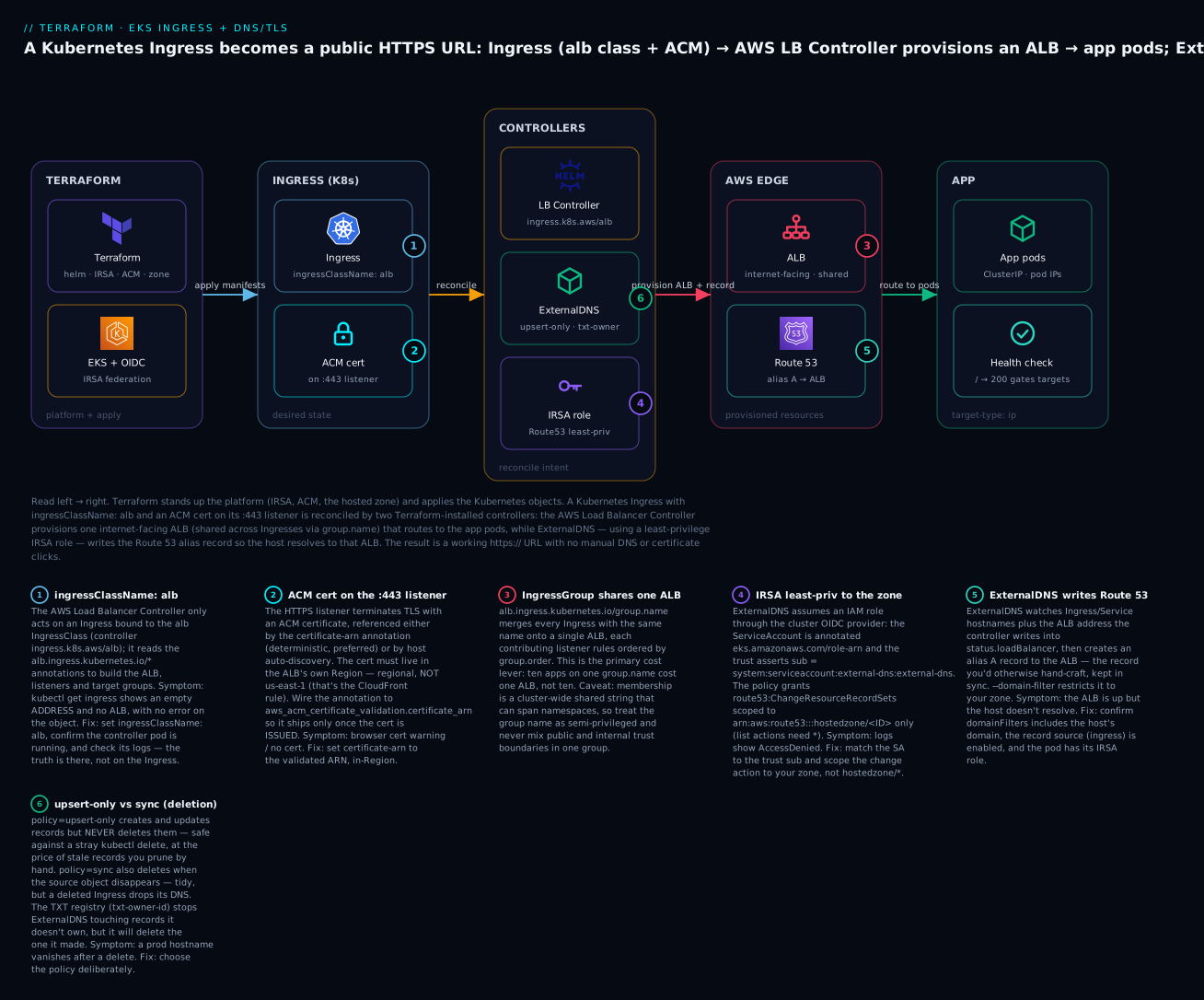
Read it left→right: Terraform stands up the platform (IRSA, ACM, the zone) and applies the Kubernetes objects; the Ingress (ingressClassName: alb, ACM cert on the :443 listener) is reconciled by two Terraform-installed controllers — the AWS Load Balancer Controller provisions one ALB (shared across Ingresses via group.name) that routes to the app pods, while ExternalDNS, using a least-privilege IRSA role, writes the Route 53 record so the host resolves to that ALB. The six badges are the six decisions that bite in production — we hit each below.
⚠️ Prerequisites. (1) An EKS cluster with an IAM OIDC provider and the AWS Load Balancer Controller running (
kubectl get deploy -n kube-system aws-load-balancer-controllerreturns a ready pod). (2) The hosted zone must be delegated — ACM validation and ExternalDNS both need the domain publicly resolvable. If either is missing, the Ingress will get no ALB / no record and you’ll chase ghosts.
The directory has five files:
| File | Contains |
|---|---|
versions.tf |
required_version, required_providers (aws/kubernetes/helm), backend "s3", the aws + kubernetes + helm provider blocks |
variables.tf |
Cluster name, OIDC provider ARN + URL, region, domain, app host |
main.tf |
Zone, ACM cert + validation, ExternalDNS IRSA role + policy + helm_release, the sample Deployment/Service/Ingress |
outputs.tf |
App URL, cert ARN, name servers, the ExternalDNS role ARN |
terraform.tfvars |
Your real values |
versions.tf — three providers, S3 remote state, and the Kubernetes/Helm providers authenticated to the cluster via EKS data sources:
terraform {
  required_version = ">= 1.6"

  required_providers {
    aws        = { source = "hashicorp/aws",        version = "~> 5.60" }
    kubernetes = { source = "hashicorp/kubernetes", version = "~> 2.31" }
    helm       = { source = "hashicorp/helm",       version = "~> 2.14" }
  }

  backend "s3" {
    bucket         = "kv-tfstate-prod-001"
    key            = "eks-ingress-dns/terraform.tfstate"
    region         = "ap-south-1"
    dynamodb_table = "kv-tfstate-lock"
    encrypt        = true
  }
}

provider "aws" {
  region = var.region
}

# Authenticate the kubernetes + helm providers to the existing cluster
data "aws_eks_cluster" "this"      { name = var.cluster_name }
data "aws_eks_cluster_auth" "this" { name = var.cluster_name }

provider "kubernetes" {
  host                   = data.aws_eks_cluster.this.endpoint
  cluster_ca_certificate = base64decode(data.aws_eks_cluster.this.certificate_authority[0].data)
  token                  = data.aws_eks_cluster_auth.this.token
}

provider "helm" {
  kubernetes {
    host                   = data.aws_eks_cluster.this.endpoint
    cluster_ca_certificate = base64decode(data.aws_eks_cluster.this.certificate_authority[0].data)
    token                  = data.aws_eks_cluster_auth.this.token
  }
}
The provider-auth table — the kubernetes/helm providers need cluster credentials, and there are two idioms:
| Auth method | How | Pros | Cons |
|---|---|---|---|
aws_eks_cluster_auth token (shown) |
A data source mints a short-lived token | Simple; no external binary | Token can expire in very long applies; re-plan refreshes it |
exec plugin |
An exec block that runs aws eks get-token |
Always-fresh token; the production default | Needs the aws CLI on the runner |
For CI or long applies, prefer the exec block (a production note below shows it). The token data source is fine for interactive runs.
variables.tf:
variable "region" {
  type    = string
  default = "ap-south-1"        # Mumbai — the ALB and the ACM cert live here
}

variable "cluster_name" {
  type        = string
  description = "Existing EKS cluster with OIDC + AWS Load Balancer Controller."
  default     = "kv-eks"
}

variable "oidc_provider_arn" {
  type        = string
  description = "ARN of the cluster's IAM OIDC provider (output of the IRSA lesson)."
}

variable "oidc_provider_url" {
  type        = string
  description = "OIDC issuer host WITHOUT https:// (e.g. oidc.eks.ap-south-1.amazonaws.com/id/ABCD1234)."
}

variable "domain_name" {
  type        = string
  description = "A domain delegated to this Route 53 zone."
  default     = "kv-demo.example"
}

variable "app_host" {
  type    = string
  default = "app.kv-demo.example"
}
main.tf — the whole build (zone + cert shown above; here is the rest wired together):
locals {
  tags = { project = "eks-ingress-dns", managedBy = "terraform", env = "demo" }
}

# ---------- Route 53 hosted zone ----------
resource "aws_route53_zone" "primary" {
  name = var.domain_name
  tags = local.tags
}

# ---------- ACM cert (regional — same Region as the ALB) ----------
resource "aws_acm_certificate" "app" {
  domain_name               = var.domain_name
  subject_alternative_names = ["*.${var.domain_name}"]
  validation_method         = "DNS"
  lifecycle { create_before_destroy = true }
  tags = local.tags
}

resource "aws_route53_record" "cert_validation" {
  for_each = { for dvo in aws_acm_certificate.app.domain_validation_options :
    dvo.domain_name => { name = dvo.resource_record_name, record = dvo.resource_record_value, type = dvo.resource_record_type } }
  allow_overwrite = true
  zone_id         = aws_route53_zone.primary.zone_id
  name            = each.value.name
  type            = each.value.type
  records         = [each.value.record]
  ttl             = 60
}

resource "aws_acm_certificate_validation" "app" {
  certificate_arn         = aws_acm_certificate.app.arn
  validation_record_fqdns = [for r in aws_route53_record.cert_validation : r.fqdn]
}

# ---------- ExternalDNS: IRSA role + least-priv Route 53 policy ----------
data "aws_iam_policy_document" "externaldns_trust" {
  statement {
    effect  = "Allow"
    actions = ["sts:AssumeRoleWithWebIdentity"]
    principals {
      type        = "Federated"
      identifiers = [var.oidc_provider_arn]
    }
    condition {
      test     = "StringEquals"
      variable = "${var.oidc_provider_url}:sub"
      values   = ["system:serviceaccount:external-dns:external-dns"]
    }
    condition {
      test     = "StringEquals"
      variable = "${var.oidc_provider_url}:aud"
      values   = ["sts.amazonaws.com"]
    }
  }
}

resource "aws_iam_role" "externaldns" {
  name               = "kv-externaldns-irsa"
  assume_role_policy = data.aws_iam_policy_document.externaldns_trust.json
  tags               = local.tags
}

data "aws_iam_policy_document" "externaldns" {
  statement {
    sid       = "ChangeThisZoneOnly"
    effect    = "Allow"
    actions   = ["route53:ChangeResourceRecordSets"]
    resources = ["arn:aws:route53:::hostedzone/${aws_route53_zone.primary.zone_id}"]
  }
  statement {
    sid       = "ListAcrossZones"
    effect    = "Allow"
    actions   = ["route53:ListHostedZones", "route53:ListResourceRecordSets", "route53:ListTagsForResources"]
    resources = ["*"]
  }
}

resource "aws_iam_role_policy" "externaldns" {
  name   = "route53-externaldns"
  role   = aws_iam_role.externaldns.id
  policy = data.aws_iam_policy_document.externaldns.json
}

# ---------- ExternalDNS install (Helm) ----------
resource "helm_release" "externaldns" {
  name             = "external-dns"
  namespace        = "external-dns"
  create_namespace = true
  repository       = "https://kubernetes-sigs.github.io/external-dns/"
  chart            = "external-dns"
  version          = "1.15.0"

  values = [yamlencode({
    provider      = "aws"
    sources       = ["ingress", "service"]
    policy        = "upsert-only"
    registry      = "txt"
    txtOwnerId    = var.cluster_name
    domainFilters = [var.domain_name]
    aws           = { region = var.region, zoneType = "public" }
    interval      = "1m"
    serviceAccount = {
      create      = true
      name        = "external-dns"
      annotations = { "eks.amazonaws.com/role-arn" = aws_iam_role.externaldns.arn }
    }
  })]

  depends_on = [aws_iam_role_policy.externaldns]
}

# ---------- Sample app: Deployment + Service + Ingress ----------
resource "kubernetes_namespace_v1" "demo" {
  metadata { name = "demo" }
}

resource "kubernetes_deployment_v1" "web" {
  metadata {
    name      = "web"
    namespace = kubernetes_namespace_v1.demo.metadata[0].name
    labels    = { app = "web" }
  }
  spec {
    replicas = 2
    selector { match_labels = { app = "web" } }
    template {
      metadata { labels = { app = "web" } }
      spec {
        container {
          name  = "web"
          image = "public.ecr.aws/nginx/nginx:1.27"
          port { container_port = 80 }
          readiness_probe {
            http_get {
              path = "/"
              port = 80
            }
            initial_delay_seconds = 5
            period_seconds        = 10
          }
        }
      }
    }
  }
}

resource "kubernetes_service_v1" "web" {
  metadata {
    name      = "web"
    namespace = kubernetes_namespace_v1.demo.metadata[0].name
  }
  spec {
    selector = { app = "web" }
    port {
      port        = 80
      target_port = 80
    }
    type = "ClusterIP"        # target-type: ip registers pods directly; ClusterIP is enough
  }
}

resource "kubernetes_ingress_v1" "web" {
  metadata {
    name      = "web"
    namespace = kubernetes_namespace_v1.demo.metadata[0].name
    annotations = {
      "alb.ingress.kubernetes.io/scheme"           = "internet-facing"
      "alb.ingress.kubernetes.io/target-type"      = "ip"
      "alb.ingress.kubernetes.io/listen-ports"     = "[{\"HTTP\":80},{\"HTTPS\":443}]"
      "alb.ingress.kubernetes.io/ssl-redirect"     = "443"
      "alb.ingress.kubernetes.io/ssl-policy"       = "ELBSecurityPolicy-TLS13-1-2-2021-06"
      "alb.ingress.kubernetes.io/certificate-arn"  = aws_acm_certificate_validation.app.certificate_arn
      "alb.ingress.kubernetes.io/group.name"       = "kv-shared"
      "alb.ingress.kubernetes.io/healthcheck-path" = "/"
    }
  }
  spec {
    ingress_class_name = "alb"
    rule {
      host = var.app_host
      http {
        path {
          path      = "/"
          path_type = "Prefix"
          backend {
            service {
              name = kubernetes_service_v1.web.metadata[0].name
              port { number = 80 }
            }
          }
        }
      }
    }
  }
  # Only write the cert-arn annotation once the cert is ISSUED
  depends_on = [aws_acm_certificate_validation.app, helm_release.externaldns]
}
outputs.tf:
output "app_url"             { value = "https://${var.app_host}" }
output "certificate_arn"     { value = aws_acm_certificate_validation.app.certificate_arn }
output "name_servers"        { value = aws_route53_zone.primary.name_servers }
output "externaldns_role_arn"{ value = aws_iam_role.externaldns.arn }
Run it, step by step
Step 1 — terraform init. Pulls the aws, kubernetes, and helm providers and wires the S3 backend:
Initializing the backend...
Initializing provider plugins...
- Installing hashicorp/aws v5.60.x...
- Installing hashicorp/kubernetes v2.31.x...
- Installing hashicorp/helm v2.14.x...
Terraform has been successfully initialized!
Step 2 — terraform plan -out tfplan. If your zone isn’t delegated yet, first apply just the zone (terraform apply -target=aws_route53_zone.primary), delegate the four name_servers at your registrar, wait for propagation, then plan the rest. Expect a create-only plan:
Plan: 12 to add, 0 to change, 0 to destroy.
The 12: the zone, the ACM cert, two cert_validation records (apex + wildcard, deduped by allow_overwrite), the _validation gate, the IRSA role, its inline policy, the helm_release, the namespace, the Deployment, the Service, and the Ingress.
Step 3 — terraform apply tfplan. ⚠️ This creates real, billed resources — the ALB (once the controller reacts) is the meter. Watch the ordering: the cert is requested, the validation records write, Terraform waits on aws_acm_certificate_validation until ACM issues; the IRSA role and ExternalDNS install; then the Kubernetes objects apply. The Ingress applies in seconds — but the ALB and the DNS record appear a beat later, made by the controllers, not by Terraform:
helm_release.externaldns: Creation complete after 41s
kubernetes_ingress_v1.web: Creation complete after 6s
Apply complete! Resources: 12 added, 0 changed, 0 destroyed.

Outputs:
app_url         = "https://app.kv-demo.example"
certificate_arn = "arn:aws:acm:ap-south-1:111122223333:certificate/abcd-…"
name_servers    = tolist(["ns-123.awsdns-45.com", …])
Step 4 — verify each layer independently. “Apply succeeded” only means the Ingress exists; prove the controllers did their part:
| Check | Command | Expected |
|---|---|---|
| Ingress got an ALB address | kubectl get ingress -n demo web |
ADDRESS = k8s-kvshared-…-….ap-south-1.elb.amazonaws.com (not empty) |
| The ALB exists | aws elbv2 describe-load-balancers --query "LoadBalancers[].DNSName" --output text |
The k8s-kvshared-… ALB |
| ExternalDNS created the record | kubectl -n external-dns logs deploy/external-dns | grep app.kv-demo |
... CREATE ... app.kv-demo.example A |
| Hostname resolves to the ALB | dig +short app.kv-demo.example |
The ALB’s public IPs (an A/alias answer) |
| Ownership TXT exists | dig +short TXT a-app.kv-demo.example |
"heritage=external-dns,external-dns/owner=kv-eks,…" |
| HTTPS works, valid cert | curl -sI https://app.kv-demo.example |
HTTP/2 200, no cert warning |
| HTTP redirects to HTTPS | curl -sI http://app.kv-demo.example |
301, Location: https://app.kv-demo.example/ |
| Cert is ISSUED | aws acm describe-certificate --certificate-arn <arn> --query 'Certificate.Status' --output text |
ISSUED |
If ADDRESS stays empty, the controller isn’t reconciling (class/annotations/IRSA — see troubleshooting). If the ALB is up but dig returns nothing, ExternalDNS isn’t writing (IRSA/domainFilters/txtOwnerId). If curl gets a cert warning, the wrong cert attached.
Step 5 — terraform destroy. ⚠️ Order matters here more than anywhere. See the cleanup section — the short version is the Ingress must be destroyed while the AWS Load Balancer Controller is still running, or the ALB it made is orphaned and keeps billing. Because the controller is a prerequisite (managed in its own state), destroying this directory removes the Ingress first (Terraform reverses creation order), the controller sees the deletion and tears down the ALB, and ExternalDNS (under upsert-only) leaves the record — which you delete by hand or by flipping to sync before destroy:
Plan: 0 to add, 0 to change, 12 to destroy.
...
Destroy complete! Resources: 12 destroyed.
Variables, outputs & making it reusable
The demo is already parameterised; to make it a module you lift the ExternalDNS platform (IRSA role + policy + helm_release) into modules/externaldns/ taking oidc_provider_arn, oidc_provider_url, zone_id, and domain_name, and drive apps with a for_each over a map so “one app” becomes “N apps” without new blocks:
variable "apps" {
  type = map(object({
    host      = string
    image     = string
    replicas  = optional(number, 2)
    path      = optional(string, "/")
    group     = optional(string, "kv-shared")
  }))
  default = {}
}

resource "kubernetes_ingress_v1" "app" {
  for_each = var.apps
  metadata {
    name      = each.key
    namespace = kubernetes_namespace_v1.demo.metadata[0].name
    annotations = {
      "alb.ingress.kubernetes.io/scheme"          = "internet-facing"
      "alb.ingress.kubernetes.io/target-type"     = "ip"
      "alb.ingress.kubernetes.io/listen-ports"    = "[{\"HTTP\":80},{\"HTTPS\":443}]"
      "alb.ingress.kubernetes.io/ssl-redirect"    = "443"
      "alb.ingress.kubernetes.io/certificate-arn" = aws_acm_certificate_validation.app.certificate_arn
      "alb.ingress.kubernetes.io/group.name"      = each.value.group   # same group ⇒ shared ALB
    }
  }
  spec {
    ingress_class_name = "alb"
    rule {
      host = each.value.host
      http {
        path {
          path      = each.value.path
          path_type = "Prefix"
          backend {
            service {
              name = each.key
              port { number = 80 }
            }
          }
        }
      }
    }
  }
}
A sensible module input surface:
| Input | Type | Why expose it |
|---|---|---|
cluster_name |
string | Which cluster the providers target |
oidc_provider_arn / oidc_provider_url |
string | IRSA trust for ExternalDNS |
zone_id / domain_name |
string | The zone ExternalDNS and the cert target |
apps |
map(object) | Add apps without touching the module |
externaldns_policy |
string | upsert-only vs sync per environment |
group_name |
string | Default IngressGroup (the shared-ALB knob) |
tags |
map(string) | Cost/ownership |
You don’t have to hand-roll every piece — the ecosystem is mature:
| Need | Registry / chart | Roll-your-own when |
|---|---|---|
| ExternalDNS install | external-dns chart (kubernetes-sigs) |
Never really — pin the chart, set values |
| IRSA role | terraform-aws-modules/iam//modules/iam-role-for-service-accounts-eks |
You want the trust/policy visible in review |
| ACM cert + validation | terraform-aws-modules/acm/aws |
You want the for_each legible, or bespoke SANs |
| Whole EKS + addons | terraform-aws-modules/eks/aws (+ addons) |
You need full control of the cluster |
| The controller itself | aws-load-balancer-controller chart (installed in the prereq lesson) |
— |
The iam-role-for-service-accounts-eks submodule is worth knowing: it has a built-in attach_external_dns_policy = true flag that generates exactly the least-privilege Route 53 policy above and the OIDC trust, so a production module often reduces to a few lines. Keep the raw role inline (as this lesson does) when you want the exact policy statements in the diff. When a local module should graduate to a shared, versioned one, the Terraform on AWS: 3-tier architecture, modules & remote state lesson walks the ladder.
Common mistakes and troubleshooting
Every row here is something that has cost a real engineer real time on exactly this stack:
| # | Symptom | Cause | Fix |
|---|---|---|---|
| 1 | kubectl get ingress shows empty ADDRESS, no ALB appears |
Controller not reconciling: wrong ingressClassName, controller not running, or its IRSA lacks EC2/ELB perms |
Set ingressClassName: alb; check kubectl -n kube-system logs deploy/aws-load-balancer-controller; verify the controller’s IRSA |
| 2 | ALB is up but the host doesn’t resolve (dig returns nothing) |
ExternalDNS not writing: bad IRSA, domainFilters mismatch, or wrong txtOwnerId |
Check kubectl -n external-dns logs deploy/external-dns for AccessDenied; confirm domainFilters includes the host’s domain |
| 3 | ExternalDNS logs AccessDenied on ChangeResourceRecordSets |
IRSA role not assumed, or policy scoped to the wrong zone id | Confirm the SA annotation eks.amazonaws.com/role-arn; match the trust sub to system:serviceaccount:external-dns:external-dns; scope the policy to the real zone id |
| 4 | HTTPS listener has no cert / browser warning | certificate-arn missing or points at an unissued cert; or auto-discovery found nothing in-Region |
Set certificate-arn to aws_acm_certificate_validation.app.certificate_arn; ensure the cert is in the ALB’s Region |
| 5 | 404 / 503 from the ALB | target-type: instance with a ClusterIP Service, or the health-check path 404s |
Use target-type: ip (or make the Service NodePort); set healthcheck-path to a real 200 URL |
| 6 | Redirect loop on HTTPS | ssl-redirect firing on the 443 listener too, or the app also redirects to https |
ssl-redirect: '443' should only redirect the :80 listener; ensure listen-ports has both 80 and 443; stop the app double-redirecting |
| 7 | Cert stuck in PENDING_VALIDATION; apply hangs on _validation |
Zone not delegated ⇒ validation CNAME not publicly resolvable | Delegate the zone’s name_servers at the registrar; dig the CNAME before re-running |
| 8 | Two Ingresses each get their own ALB (double cost) | Different or missing group.name |
Give related Ingresses the same group.name to share one ALB |
| 9 | Records deleted unexpectedly after a kubectl delete/destroy |
policy: sync deletes on source removal |
Use policy: upsert-only; or accept sync with deletion discipline |
| 10 | Two clusters fight over the same record (flapping) | Same or blank txtOwnerId on both |
Give each cluster a unique txtOwnerId so the TXT registry arbitrates ownership |
| 11 | helm_release / kubernetes_* errors: connection refused / unauthorized |
Providers can’t reach the cluster; token expired or endpoint wrong | Fix the data.aws_eks_cluster* wiring; use the exec auth plugin for long applies |
| 12 | terraform destroy leaves an orphaned ALB still billing |
Ingress deleted after the controller was already gone | Destroy the Ingress while the controller runs (keep the controller in its own state); or delete the Ingress first with kubectl |
| 13 | New ALB / perpetual diff on every apply | listen-ports JSON reformatted, or annotation ordering churn |
Keep the annotation strings byte-stable; treat the Ingress as the source of truth |
Four deserve a sentence of context. Row 1 (empty ADDRESS) is the number-one first-run failure and it’s almost always the class or the controller: the controller literally ignores any Ingress whose ingressClassName isn’t alb, and if the controller pod isn’t running (or its own IRSA can’t call elasticloadbalancing:*), nothing happens and there’s no error on the Ingress — you have to read the controller’s logs. Row 3 (AccessDenied) is the IRSA seam: the ServiceAccount name/namespace in the Helm values must match the sub in the trust policy exactly (system:serviceaccount:external-dns:external-dns), or STS refuses the AssumeRoleWithWebIdentity and ExternalDNS falls back to the node role, which is denied. Row 5 (404/503) is the target-type trap: in ip mode a ClusterIP Service is correct; in instance mode you need a NodePort Service or the ALB has no reachable targets. Row 12 (orphaned ALB) is the destroy-ordering gotcha unique to controller-provisioned resources — the ALB isn’t in Terraform state, so only the controller can delete it, and only while it’s alive.
Cost, cleanup & production notes
Left running, the meter is the ALB; ACM, the zone, and ExternalDNS are rupees (ExternalDNS is just a pod on nodes you already pay for):
| Resource | Config | Rough monthly cost | Notes |
|---|---|---|---|
| ACM certificate | Public, DNS-validated | ₹0 | Free for AWS resources; auto-renews free |
| Route 53 hosted zone | 1 public zone | ~₹42 ($0.50) + query fees | Alias→ALB queries are free |
| Route 53 queries | Standard | ~₹34 ($0.40)/million | Alias-to-AWS queries don’t count |
| Application Load Balancer | 1 shared ALB (IngressGroup) | ~₹1,500–1,900 ($18–22) | The dominant cost — LCU + hourly; the meter |
| ExternalDNS | 1 small pod | ~₹0 marginal | Runs on existing nodes |
| EKS control plane | (prerequisite) | ~₹6,100 ($73) | Not created here; the cluster is a prereq |
| This directory’s total | ~₹1,600–2,000/mo | Almost all of it is the one shared ALB |
⚠️ The shared ALB is the whole point of the IngressGroup pattern: ten demo apps on one
group.namecost one ALB, not ten. If you’re only learning the flow,terraform destroybetween sessions — but mind the ordering below, or the ALB outlives the destroy.
Cleanup ordering — the one rule that matters. The ALB and the DNS record are made by controllers, not Terraform, so:
| Order | Action | Why |
|---|---|---|
| 1 | Delete the Ingress (Terraform does this first on destroy) | The AWS LB Controller sees the deletion and tears down the ALB / listener rules |
| 2 | ExternalDNS removes the record — only if policy: sync |
Under upsert-only the record stays; delete it by hand or pre-flip to sync |
| 3 | Then destroy ExternalDNS, IRSA, cert, zone | Safe once the ALB is gone |
| ⚠️ | Never delete the controller/cluster before the Ingress | The ALB becomes orphaned — not in TF state, still billing |
Because the controller lives in its own state (the prerequisite lesson), a terraform destroy here is safe: the Ingress goes first, the still-running controller reaps the ALB, and only then does ExternalDNS/IRSA/cert/zone tear down. If you ever destroy the cluster stack, delete all alb-class Ingresses first.
Five production hardening notes for this exact layer:
| Hardening | What to change | Why |
|---|---|---|
| Scope the IRSA policy to the zone | ChangeResourceRecordSets on hostedzone/<id>, not * |
Least privilege; a compromised pod can’t touch other zones |
exec provider auth |
An exec block running aws eks get-token in the provider |
Fresh tokens for long applies/CI; the token data source can expire |
Pin the chart + ssl-policy |
Fix helm_release.version; set ELBSecurityPolicy-TLS13-1-2-2021-06 |
Reproducible installs; modern TLS floor |
| Keep validation records forever | Never delete cert_validation; manage in TF |
ACM needs them to auto-renew; deletion = silent expiry |
Deliberate policy |
upsert-only in prod unless you want DNS to mirror the cluster |
Avoid a stray kubectl delete dropping a prod hostname |
Two of those tie into the wider build: the IRSA foundation (OIDC provider, trust policies, the reusable role module) is the IRSA lesson, and the controller that turns the Ingress into an ALB — its own IRSA, its Helm install, its subnet tags — is the AWS Load Balancer Controller lesson. The ALB/target-group internals (listeners, rules, health checks, deregistration) are in Terraform on AWS: ELB — ALB, NLB & target groups.
Going deeper
The happy path is done; the rest of this is what separates “the demo worked” from “I run this in production.” Each subsection is a facet the build uses but doesn’t fully open up.
The CLI flags behind the Helm values
The Helm values you set become container flags on the ExternalDNS pod — and the flags, not the values, are what you grep for when something’s wrong. See what actually runs:
kubectl -n external-dns get deploy external-dns \
  -o jsonpath='{.spec.template.spec.containers[0].args}' | tr ',' '\n'
Representative rendering of this lesson’s values:
--source=ingress
--source=service
--provider=aws
--registry=txt
--txt-owner-id=kv-eks
--policy=upsert-only
--domain-filter=kv-demo.example
--aws-zone-type=public
--interval=1m
Map each value to its flag, then reach past the chart for the flags that solve real problems (anything the chart doesn’t name goes through extraArgs):
| Flag | Helm value | What it does | When you reach for it |
|---|---|---|---|
--source (repeatable) |
sources |
Object kinds to watch | Add service for LoadBalancer Services |
--domain-filter (repeatable) |
domainFilters |
Only manage names under these zones | Always set — a blank filter watches every zone |
--zone-id-filter |
zoneIdFilters |
Restrict to specific hosted-zone IDs | Public + private split-horizon on one domain |
--policy |
policy |
sync / upsert-only / create-only |
upsert-only in prod |
--txt-prefix / --txt-suffix |
txtPrefix / txtSuffix |
Park the ownership TXT off the record’s own name | Required for CNAME records (below) |
--aws-batch-change-size |
extraArgs |
Records per Route 53 ChangeResourceRecordSets call |
Big zones brushing API limits |
--events + --min-event-sync-interval |
extraArgs |
React to K8s watch events, not just the poll | Near-instant records (below) |
--aws-assume-role |
extraArgs |
Assume a role in another account | Central Route 53 account |
--managed-record-types |
extraArgs |
Which RR types ExternalDNS owns | Add AAAA for dual-stack ALBs |
--regex-domain-filter |
extraArgs |
Select zones by regex, not suffix | Many similar zones |
Poll vs event: why the record can lag a minute
By default ExternalDNS is a poll loop: every --interval (1m here) it lists sources, diffs them against Route 53, and applies changes — so a new record can wait up to a full interval. A second delay stacks on top: ExternalDNS reads the ALB hostname from the Ingress’s status.loadBalancer, which the controller only populates once the ALB exists. The true sequence is therefore Ingress applied → controller provisions the ALB (~2–4 min) → controller writes status → next ExternalDNS reconcile finds the hostname → Route 53 UPSERT. The first reconcile after apply usually does nothing, because the ALB isn’t ready yet. Adding --events makes ExternalDNS also wake on Kubernetes watch events (debounced by --min-event-sync-interval, e.g. 15s), collapsing the poll delay — but it cannot outrun the ALB-provisioning wait, which is the real floor.
The TXT registry, up close
The lesson introduced the ownership TXT; two sharp edges live inside it. First, DNS forbids a CNAME from coexisting with any other record at the same name — so when ExternalDNS manages a CNAME (rather than the alias-A it writes for an ALB), the companion TXT can’t sit at the same name. That is exactly why --txt-prefix (or the newer per-type prefix like a-, cname-) exists: it parks the ownership TXT at a different name so it never collides. Set a prefix once and forget it; discover the collision the hard way and you’ll lose an hour to “why won’t this CNAME apply.” Second, the TXT contents (heritage=external-dns,external-dns/owner=<id>) are readable by anyone who can query the zone; if that metadata is sensitive, --txt-encrypt-aes-key=<key> encrypts it. The ownership check is what makes deletion safe: under sync, ExternalDNS deletes only records whose TXT owner matches its own --txt-owner-id, so it physically cannot reap another cluster’s records — but it will reap the ones it made, which is the whole reason upsert-only is the safe default.
How the controller actually picks a certificate
The lesson showed explicit certificate-arn vs auto-discovery; the discovery mechanics matter because “it silently attached the wrong cert” is a real afternoon. When certificate-arn is absent, the controller enumerates ACM certificates in the ALB’s Region and matches their domain names and SANs (wildcards included) against every host it can see — the spec.rules[].host values and any spec.tls[].hosts. Each matching certificate is attached to the :443 listener via SNI (a listener carries many certs, up to its limit), one chosen as the default. Two consequences: if two certs match a host, both attach and which is default isn’t something you chose; if none match, the listener comes up with no certificate and browsers fail — with no error on the Ingress. For IaC, pin certificate-arn to the validated ARN so the plan shows the exact certificate and discovery ambiguity never enters the picture (you may pass a comma-separated list to attach several deliberately).
Zero-downtime rollouts: pod readiness gates
A subtlety the happy path hides: during a rolling update Kubernetes marks a new pod Ready the instant its own readiness probe passes — but the ALB may not have finished registering and health-checking that pod’s IP as a target. For those seconds, Kubernetes has begun terminating old pods while the ALB has no healthy new one → a brief 5xx window. The fix is pod readiness gates: label the namespace and the controller injects a gate into every pod.
apiVersion: v1
kind: Namespace
metadata:
  name: demo
  labels:
    elbv2.k8s.aws/pod-readiness-gate-inject: enabled
The injected condition (target-health.elbv2.k8s.aws/…) keeps a pod not Ready until the ALB reports its target healthy, so the rollout waits for real registration before draining the old ReplicaSet — genuine zero-downtime through the load balancer. Invisible until a production deploy drops requests; then it’s the first thing you add.
Traffic-splitting: weighted target groups (canary)
One host need not point at one Service. The controller’s actions.*/conditions.* annotations let a rule forward to weighted target groups — the native way to run a canary, no service mesh:
metadata:
  annotations:
    alb.ingress.kubernetes.io/actions.web-split: >
      {"type":"forward","forwardConfig":{"targetGroups":[
        {"serviceName":"web-v1","servicePort":"80","weight":90},
        {"serviceName":"web-v2","servicePort":"80","weight":10}]}}
spec:
  rules:
    - host: app.kv-demo.example
      http:
        paths:
          - path: /
            pathType: Prefix
            backend:
              service:
                name: web-split          # must equal the action name
                port:
                  name: use-annotation   # tells the controller to read actions.web-split
Ninety percent of traffic to web-v1, ten to web-v2, shifted by editing weights and re-applying — one ALB, one hostname, no DNS change. conditions.* adds header/query/method matching for A/B routing. This is the ALB doing what you’d otherwise reach for extra infrastructure to get.
Practice challenges
Work these against the hands-on directory. Each is self-contained; the solution is one edit or one command, and the why is the point.
1 (beginner) — Prove the HTTP→HTTPS redirect. Without changing anything, show that a plain-HTTP request is bounced to HTTPS.
<details><summary>Solution</summary>
curl -sI http://app.kv-demo.example
# HTTP/1.1 301 Moved Permanently
# Location: https://app.kv-demo.example:443/
The ssl-redirect: '443' annotation makes the controller add a redirect rule on the :80 listener — which works only because listen-ports contains both 80 and 443. Why: the redirect needs a plain-HTTP listener to redirect from.
</details>
2 (beginner→intermediate) — Two apps, one ALB. Deploy a second app in a different namespace and make it land on the same ALB as the first, sharing the bill.
<details><summary>Solution</summary>
Give both Ingresses the identical alb.ingress.kubernetes.io/group.name: kv-shared, then confirm they resolve to one ALB:
kubectl get ingress -A \
  -o custom-columns=NS:.metadata.namespace,NAME:.metadata.name,ADDR:.status.loadBalancer.ingress[0].hostname
# both rows show the SAME k8s-kvshared-… address
Why: IngressGroup merges every Ingress with the same group.name onto a single ALB, each contributing its own listener rules.
</details>
3 (intermediate) — Pin a custom DNS TTL. Make the app’s record resolve with a 60-second TTL instead of the default, and confirm with dig.
<details><summary>Solution</summary>
Add external-dns.alpha.kubernetes.io/ttl: "60" to the Ingress annotations. After the next reconcile:
dig +noall +answer app.kv-demo.example
# app.kv-demo.example.  60  IN  A  …
This affects non-alias records; a pure alias-A to an ALB follows its target and ignores a manual TTL. Why: the annotation is how ExternalDNS overrides its default record TTL per object. </details>
4 (intermediate→advanced) — Prove least privilege. Confirm the ExternalDNS role can write your zone but is denied on any other zone.
<details><summary>Solution</summary>
Keep route53:ChangeResourceRecordSets scoped to arn:aws:route53:::hostedzone/<your-zone-id>. Create a throwaway second zone, add an Ingress whose host lives in it, and read the logs:
kubectl -n external-dns logs deploy/external-dns | grep -i AccessDenied
# …AccessDenied… not authorized to perform: route53:ChangeResourceRecordSets on … hostedzone/<other-id>
Why: scoping the write action to one zone ARN caps the blast radius — a bug or a compromise can’t touch other zones. </details>
5 (advanced) — Make records near-instant. Cut the up-to-one-minute lag so a hostname change is written in seconds.
<details><summary>Solution</summary>
Add event mode to the chart:
helm upgrade external-dns external-dns/external-dns -n external-dns --reuse-values \
  --set 'extraArgs={--events,--min-event-sync-interval=15s}'
ExternalDNS now reconciles on Kubernetes watch events (debounced 15s) instead of only every --interval. Why: event mode removes the poll delay — but not the ALB-provisioning wait, which stays the real floor for a brand-new Ingress.
</details>
6 (advanced) — Ship a canary. Serve 90% of one host’s traffic from web-v1 and 10% from web-v2 on the same ALB, no DNS change.
<details><summary>Solution</summary>
Use a weighted forward action, referenced from the rule with port.name: use-annotation:
alb.ingress.kubernetes.io/actions.web-split: >
  {"type":"forward","forwardConfig":{"targetGroups":[
    {"serviceName":"web-v1","servicePort":"80","weight":90},
    {"serviceName":"web-v2","servicePort":"80","weight":10}]}}
Shift the split by editing the weights and re-applying. Why: the ALB does weighted routing natively — a canary with no second ALB, no second hostname, and no service mesh. </details>
Common beginner mistakes
These are wrong mental models, not error messages — fix the belief and the errors never happen. (The symptom→cause→fix table above is for when one slips through anyway.)
-
“I’ll just create the ALB and the DNS record in Terraform.” The single biggest misconception. The ALB and the Route 53 record are not Terraform resources — they’re side-effects the AWS Load Balancer Controller and ExternalDNS reconcile from your Ingress. Declare the Ingress and the platform; let the controllers make the ALB and the record. It’s also why
destroycan’t delete the ALB directly — only the running controller can. -
“The ACM certificate goes in
us-east-1.” That’s the CloudFront rule, and the muscle memory bites everyone once. An ALB is a regional service, so its certificate lives in the ALB’s own Region. Cluster inap-south-1→ cert inap-south-1. A cert in the wrong Region is simply invisible to the listener. -
“
digis empty right afterapply, so it’s broken.”applyfinishing means the Ingress exists — not that the ALB is built, not that ExternalDNS has run, not that resolvers have refreshed. The record appears a reconcile after the ALB is ready (its hostname has to reach the Ingressstatusfirst), then TTL and caching add seconds more. Give it a minute before you debug. -
“
upsert-onlymeans my records never change.” It means never deleted — it still creates and updates freely. People set it for safety and then panic that updates aren’t landing; updates always land, only deletions are refused. If a change isn’t showing, it’s the reconcile lag, not the policy. -
“
target-typeis a detail I can leave default.” It decides whether the ALB has any reachable targets at all.ipregisters pod IPs (VPC CNI) and a plainClusterIPService suffices;instanceregisters nodes on a NodePort and needs aNodePortService. The classic “ALB up, everything 404/503” isinstancemode against aClusterIPService — no targets. -
“The ServiceAccount name is just a label.” In IRSA the SA’s
namespace:nameis a security assertion: the role’s trust policy pinssub = system:serviceaccount:external-dns:external-dns. One character off and STS refusesAssumeRoleWithWebIdentity, ExternalDNS falls back to the node role, and every Route 53 call isAccessDenied. The string must match exactly. -
“One shared
group.nameis convenient, so I’ll use it everywhere.” Group membership is a plain string that spans namespaces — anyone who sets yourgroup.namejoins your ALB, listener rules and all. Treat it as semi-privileged: don’t mix public and internal apps in one group, and gate who can create Ingresses with RBAC.
Glossary
- Ingress — a Kubernetes object that declares L7 HTTP routing (“send these hosts/paths to these Services”). It does nothing by itself; a controller realises it.
- IngressClass — the object that says which controller owns an Ingress.
ingressClassName: albbinds an Ingress to the AWS Load Balancer Controller. - Ingress controller — a pod that watches Ingress objects and builds real infrastructure from them. Here, the AWS Load Balancer Controller.
- AWS Load Balancer Controller (LBC) — the controller that turns an
alb-class Ingress into a real ALB with listeners, target groups, and rules. - Application Load Balancer (ALB) — AWS’s L7 load balancer; the “front door” traffic actually hits. Billed per hour plus per LCU.
- Listener — a port the ALB accepts on (
:80,:443). The HTTPS listener is where the certificate lives. - Target group — the set of backends the ALB forwards to (pod IPs or nodes), continuously health-checked.
target-type—ipregisters pod IPs directly (VPC CNI,ClusterIPis enough);instanceregisters nodes on a NodePort.- Annotation — a
key: valueon Ingress metadata. For this controller,alb.ingress.kubernetes.io/*annotations are the ALB’s configuration API. - IngressGroup — Ingresses sharing an
alb.ingress.kubernetes.io/group.nameare merged onto one ALB. The main ALB cost lever. - LCU (Load Balancer Capacity Unit) — the usage-based half of ALB pricing (new connections, active flows, bandwidth, rule evaluations).
- ACM (AWS Certificate Manager) — issues free, auto-renewing TLS certificates. For an ALB the cert must be in the ALB’s Region.
- DNS validation — proving domain ownership to ACM by publishing a CNAME it specifies; the certificate stays valid (and auto-renews) as long as that record exists.
- SNI (Server Name Indication) — the TLS extension that lets one listener present different certificates per hostname; how an ALB serves many certs on one
:443. - ExternalDNS — a controller that watches Ingress/Service hostnames and writes the matching Route 53 records automatically.
- Route 53 hosted zone — the container for a domain’s DNS records that AWS answers authoritatively for.
- Alias record — a Route 53-specific record that points a name at an AWS resource (like an ALB), is free to resolve, and follows the target; what ExternalDNS writes for an ALB instead of a CNAME.
- Delegation / name servers — pointing your domain’s NS records at Route 53 at the registrar, so the world asks Route 53 for your zone. Nothing resolves until this is done.
- TXT registry — companion TXT records ExternalDNS writes to mark ownership, so many instances can share one zone without trampling each other.
txtOwnerId— the ownership fingerprint inside those TXT records; must be unique per cluster.policy— how aggressively ExternalDNS reconciles:upsert-onlynever deletes (safe default),syncdeletes when the source disappears,create-onlyonly ever adds.- IRSA (IAM Roles for Service Accounts) — binding a Kubernetes ServiceAccount to an IAM role through the cluster’s OIDC provider, so a pod gets scoped AWS permissions without static keys.
- Readiness gate — an injected pod condition that keeps a pod “not Ready” until the ALB reports its target healthy — the key to zero-downtime rollouts through the ALB.
Cheat-sheet
The Ingress annotations you set 90% of the time:
| Annotation | Value | Purpose |
|---|---|---|
kubernetes.io/ingress.class → ingressClassName |
alb |
Bind to the AWS LB Controller |
scheme |
internet-facing / internal |
Public vs private ALB |
target-type |
ip / instance |
Pod IPs vs NodePorts |
listen-ports |
[{"HTTP":80},{"HTTPS":443}] |
Which listeners open |
ssl-redirect |
443 |
301 HTTP → HTTPS |
certificate-arn |
validated ACM ARN | TLS cert on :443 |
ssl-policy |
ELBSecurityPolicy-TLS13-1-2-2021-06 |
TLS floor |
group.name |
kv-shared |
Share one ALB (cost) |
healthcheck-path |
/healthz |
Target-group health |
Resources and their load-bearing arguments:
| Resource | Must-set | Watch out |
|---|---|---|
aws_acm_certificate |
domain_name, validation_method = "DNS" |
Regional cert (ALB), not us-east-1 |
aws_acm_certificate_validation |
certificate_arn, validation_record_fqdns |
Wire the listener to this ARN |
aws_iam_role (IRSA) |
assume_role_policy (OIDC trust) |
sub must equal the SA; aud = sts.amazonaws.com |
aws_iam_role_policy (ExternalDNS) |
route53:ChangeResourceRecordSets scoped to the zone |
List actions need * |
helm_release (external-dns) |
repository, chart, version, values |
SA name = IRSA sub; pin the chart |
kubernetes_ingress_v1 |
ingress_class_name = "alb", annotations |
depends_on the cert validation |
kubernetes_service_v1 |
ClusterIP (for ip target-type) |
NodePort if target-type: instance |
The least-privilege ExternalDNS policy (memorise the shape):
{
  "Version": "2012-10-17",
  "Statement": [
    { "Effect": "Allow", "Action": ["route53:ChangeResourceRecordSets"],
      "Resource": ["arn:aws:route53:::hostedzone/ZXXXXXXXXXXXX"] },
    { "Effect": "Allow",
      "Action": ["route53:ListHostedZones","route53:ListResourceRecordSets"],
      "Resource": ["*"] }
  ]
}
Command quick-reference:
| Task | Command |
|---|---|
| Init / plan / apply | terraform init · terraform plan -out tfplan · terraform apply tfplan |
| Two-phase delegation | terraform apply -target=aws_route53_zone.primary → delegate NS → terraform apply |
| Ingress + ALB address | kubectl get ingress -n demo web |
| ExternalDNS logs | kubectl -n external-dns logs deploy/external-dns |
| Controller logs | kubectl -n kube-system logs deploy/aws-load-balancer-controller |
| Resolve the host | dig +short app.kv-demo.example |
| Ownership TXT | dig +short TXT a-app.kv-demo.example |
| Test HTTPS / redirect | curl -sI https://app.kv-demo.example · curl -sI http://app.kv-demo.example |
| Cert status | aws acm describe-certificate --certificate-arn <arn> --query 'Certificate.Status' --output text |
| Destroy | terraform destroy (Ingress first — keep the controller alive) |
Interview and exam questions
1. Which resources in this build are not Terraform resources, and why does that matter? The ALB and the Route 53 record — they’re created by controllers (the AWS Load Balancer Controller and ExternalDNS) in reaction to the Ingress, not declared in HCL. It matters for lifecycle: Terraform’s state doesn’t know about them, so destroy can’t delete them directly — only the controllers can, and only while they’re running. That’s the source of the orphaned-ALB gotcha.
2. What makes the AWS Load Balancer Controller provision an ALB for an Ingress? ingressClassName: alb bound to an IngressClass whose controller is ingress.k8s.aws/alb. The controller watches those Ingresses and reads alb.ingress.kubernetes.io/* annotations to build the ALB, listeners, and target groups. Without the class match, the controller ignores the Ingress entirely (empty ADDRESS, no error on the object).
3. Explain target-type: ip vs instance. ip registers pod IPs directly in the target group (via the VPC CNI), so an ordinary ClusterIP Service works and traffic skips the node hop. instance registers nodes on a NodePort, so the Service must be type: NodePort. ip is the modern default; the classic “404/503” bug is instance mode with a ClusterIP Service (no reachable targets).
4. What is an IngressGroup and why use it? alb.ingress.kubernetes.io/group.name merges every Ingress sharing that name onto one ALB, each contributing listener rules (ordered by group.order). It turns N-apps-N-ALBs into N-apps-one-ALB — the primary ALB cost lever. The caveat: membership is a shared string that can span namespaces, so treat the group name as semi-privileged and don’t mix trust boundaries.
5. Where must the ACM certificate live for an ALB, and how does it reach the listener? In the ALB’s own Region (regional service) — not us-east-1, which is the CloudFront rule. It reaches the listener either via the explicit certificate-arn annotation (deterministic, preferred for IaC) or by host auto-discovery (the controller finds an in-Region ACM cert whose domain matches the Ingress host). Wire the annotation to the validated ARN so it only ships once the cert is ISSUED.
6. What exactly does ExternalDNS do, and what triggers a record? It runs as a pod, watches Ingress/Service objects, reads their hostnames plus the ALB address the controller wrote into status.loadBalancer, and creates/updates the matching Route 53 record — an alias A record to the ALB. A change to the Ingress host (or a new Ingress) triggers a reconcile within its interval.
7. Write the least-privilege IAM for ExternalDNS and explain the two statements. route53:ChangeResourceRecordSets scoped to arn:aws:route53:::hostedzone/<ZONE_ID> (the write path — restricted to your zone), plus route53:ListHostedZones/ListResourceRecordSets on * (Route 53 doesn’t allow resource-level scoping on the list actions). The sloppy version uses hostedzone/*; scoping to one zone limits the blast radius.
8. How does IRSA connect the ExternalDNS pod to that role? The pod runs as a ServiceAccount annotated with eks.amazonaws.com/role-arn; the role’s trust policy federates the cluster’s OIDC provider and asserts StringEquals on <oidc>:sub = system:serviceaccount:external-dns:external-dns and <oidc>:aud = sts.amazonaws.com. STS issues temporary creds via AssumeRoleWithWebIdentity. A mismatch between the SA name/namespace and the sub is the classic AccessDenied.
9. sync vs upsert-only — what’s the risk? sync creates, updates, and deletes records when the source object is removed; upsert-only never deletes. The risk with sync is that a routine kubectl delete (or a terraform destroy of the wrong namespace) removes a production DNS record. The TXT registry stops ExternalDNS deleting records it doesn’t own, but it will happily delete the one it made. upsert-only is the safe default.
10. What is the TXT registry and txtOwnerId for? ExternalDNS writes a companion TXT record (heritage=external-dns,external-dns/owner=<txtOwnerId>) next to each managed record and checks it before making changes — so it only touches records it owns. txtOwnerId is that ownership fingerprint; a unique value per cluster lets multiple clusters share one zone without fighting. Blank/shared ids cause record flapping.
11. Your Ingress ADDRESS is empty. Diagnose in order. (a) ingressClassName: alb set? (b) Is the controller running — kubectl -n kube-system get deploy aws-load-balancer-controller? © Its logs for errors (subnet discovery, IRSA perms)? (d) Are the subnets tagged (kubernetes.io/role/elb for public)? The Ingress object shows no error itself; the truth is in the controller logs.
12. (Practical) Why does the Ingress depends_on the ACM validation resource? Because the certificate-arn annotation is wired to aws_acm_certificate_validation.app.certificate_arn, and you want Terraform to write that annotation only after ACM reports ISSUED. Without the dependency (or by referencing the raw aws_acm_certificate.arn), Terraform could apply the Ingress with a not-yet-issued cert, and the HTTPS listener would come up without a valid certificate.
Key takeaways
- The Ingress is the API; the ALB and the record are side-effects. You declare a Kubernetes
Ingress(plus the platform it needs); the AWS Load Balancer Controller provisions the ALB and ExternalDNS writes the Route 53 record. Neither is a Terraform resource — which is the power and the entire source of the cleanup-ordering gotcha. ingressClassName: alb+ the right annotations are everything.scheme,target-type: ip,listen-ports(with443and80),ssl-redirect,certificate-arn,group.name,healthcheck-path— get these right and it works; miss one and you get an empty ADDRESS, a 404, a cleartext port, or a double bill.- IngressGroup is the ALB cost lever. A shared
group.namecollapses many Ingresses onto one ALB — one bill instead of N. Treat the group name as semi-privileged and don’t mix public/internal trust in one group. - ACM for an ALB is regional, and you wire the validated ARN. The cert lives in the ALB’s Region (not
us-east-1); attach it explicitly viacertificate-arn = aws_acm_certificate_validation.…certificate_arnso it only ships onceISSUED. - ExternalDNS runs on least-privilege IRSA. Scope
route53:ChangeResourceRecordSetsto your zone’s ARN (list actions need*), match the ServiceAccount to the IRSAsub, and give each cluster a uniquetxtOwnerId. That’s the difference between automated DNS and a blast radius. upsert-onlyunless you meansync.syncmakes DNS mirror the cluster — including deletions;upsert-onlynever deletes. Pick deliberately, because a straykubectl deleteundersyncdrops a real hostname.- Destroy the Ingress while the controller lives. The ALB is only reapable by the running controller; delete Ingresses first (keep the controller in its own state), or you orphan a billing ALB that Terraform can’t see. And
terraform destroyto stop the meter — the shared ALB is the cost.