In a nutshell
Think of the AWS Load Balancer Controller as a translator living inside your cluster. You speak Kubernetes — you write an Ingress, a few lines of YAML that say “route / to my app.” AWS speaks a different language: Application Load Balancers, listeners, target groups, security groups. The controller watches for your Kubernetes objects and, in real time, translates them into the AWS load-balancing infrastructure that actually carries the traffic — then keeps the two in lock-step as pods come and go. You never touch the ELB console; you edit Kubernetes YAML, and a real cloud load balancer appears (or disappears) to match.
The catch is that this translator needs three things wired up before it can do anything, and this lesson wires all three with Terraform: an identity (an IAM role the controller assumes through IRSA, so AWS lets it call the load-balancer APIs), an install (a Helm chart that runs the controller as pods in kube-system), and a couple of tags on your subnets (so it knows where to put the load balancer). Get the identity wrong and the pod crash-loops; forget the tags and your Ingress sits there with a blank address. Most of this lesson is really about getting those three right, once, in code — so that from then on a plain Kubernetes Ingress is all anyone on the team has to write.
Level: Advanced · Time: ~50 min
Prerequisites — you should be comfortable with core Terraform (HCL, providers, variables, state, modules) and already have an EKS cluster with an OIDC provider built (the EKS OIDC & IRSA lesson builds exactly that). A working feel for Kubernetes Ingress, Service and ServiceAccount objects helps. If the kubernetes/helm provider wiring is new, skim the Kubernetes & Helm providers lesson first, and the Ingress, ACM SSL & ExternalDNS lesson is the natural next step once the controller is running.
After this lesson you’ll be able to — (1) build the controller’s IRSA role from the official IAM policy, two ways (the module and hand-rolled); (2) wire the kubernetes and helm providers from an existing cluster with fresh-token exec auth; (3) install the controller with a helm_release and register an IngressClass; (4) apply an Ingress and watch a real ALB appear, routing in target-type: ip mode straight to pod IPs; (5) explain and sidestep the provider-after-cluster ordering trap and the orphaned-ALB destroy trap; (6) reach for IngressGroups, TargetGroupBinding and EKS Pod Identity when production asks for them.
An EKS cluster on its own cannot put a load balancer in front of your pods the way you want one. Kubernetes has the concept of an Ingress and a Service of type: LoadBalancer, but something has to watch those objects and turn them into real AWS infrastructure — an Application Load Balancer, its listeners, its target groups, its security group — and keep the target group’s members in lock-step with the pods as they come and go. On AWS the modern answer is the AWS Load Balancer Controller (LBC): a controller you run inside the cluster that watches Ingress objects and provisions ALBs, watches annotated Service objects and provisions NLBs, and (via the TargetGroupBinding CRD) can even attach pods to a load balancer you built in Terraform. It has quietly replaced the old in-tree cloud provider, which could only ever stand up a Classic ELB and never understood an Ingress at all.
Installing it is a small but famously fiddly graph of two clouds meeting: an IAM role granted to a Kubernetes ServiceAccount through IRSA, a Helm chart installed by Terraform’s helm provider, and a set of cluster tags the controller reads to discover where to place the ALB. Get any one of the three wrong and the symptom is the same maddening blank — a controller pod in CrashLoopBackOff, or an Ingress whose ADDRESS column never fills in. This lesson builds the whole thing in Terraform, the way you would run it in production: the controller’s IRSA role from the official IAM policy, the kubernetes and helm providers wired from the cluster’s endpoint and token, the helm_release that installs the controller, an IngressClass, and then a test Ingress you apply to watch an ALB appear and route to pod IPs. You will init → plan → apply → verify → destroy, and you will learn the one cleanup rule that saves you a surprise bill: delete your Ingresses before you destroy the controller, or the ALBs it made are orphaned.
This is the provider-specific, hands-on layer of the course. It assumes you know core Terraform — HCL, providers, resources, variables, state and modules — and that an EKS cluster already exists (built in the cluster lesson). The controller’s IRSA role builds directly on the EKS OIDC & IRSA lesson; the kubernetes/helm provider wiring is treated in depth in the Kubernetes & Helm providers lesson; and putting HTTPS, a cert and DNS on top of the Ingress the controller creates is the subject of the EKS Ingress, ACM SSL & ExternalDNS lesson. Here we install the engine that makes all of that possible.
What you’ll build
The scenario is the first thing every EKS team needs after the cluster is up: a way to expose an application on a public HTTP(S) endpoint, backed by a real AWS load balancer, driven by Kubernetes objects rather than click-ops. You already have an EKS cluster (VPC, subnets, node group, an OIDC provider). What’s missing is the piece that translates a Kubernetes Ingress into an ALB. You will install the AWS Load Balancer Controller into kube-system, give it an IRSA role carrying the official controller IAM policy, register an IngressClass named alb, and then apply a tiny demo app + Ingress and watch the controller stand up an internet-facing ALB whose target group is filled with your pods’ IPs. Curl the ALB’s DNS name and you’re serving traffic — with zero load-balancer resources written by hand in the console.
The architecture in words is a chain that crosses from Terraform into the cluster and back out into AWS. Terraform builds two IAM objects (an aws_iam_policy from the controller’s published JSON, and an aws_iam_role whose trust policy federates the cluster’s OIDC provider to one ServiceAccount). Terraform’s helm provider then installs the controller chart, telling it the cluster name, region, VPC id, and the role ARN to annotate onto its ServiceAccount. The controller comes up as a Deployment in kube-system and, from that moment, watches the Kubernetes API for Ingress objects. When you apply one with ingressClassName: alb, the controller calls the ELBv2 API — the same elasticloadbalancing:CreateLoadBalancer you’d call from Terraform — and provisions an ALB, discovering which subnets to use from tags on your VPC subnets, then registers your pod IPs into its target group.
Why Terraform rather than the AWS CLI, eksctl, or raw kubectl + helm? Because this install is exactly the kind of cross-cloud graph Terraform exists to wire: the role ARN produced by the IAM resources must flow into the Helm values; the Helm release must not run until the role and the cluster exist; the IngressClass must not run until the controller’s CRDs are installed. eksctl create iamserviceaccount and a manual helm install do the same job imperatively, in two tools, with no plan, no single source of truth, and no reproducibility across dev/staging/prod. In Terraform it is one apply, one state file, one review-able diff — and the same code stamps the controller into every cluster you own.
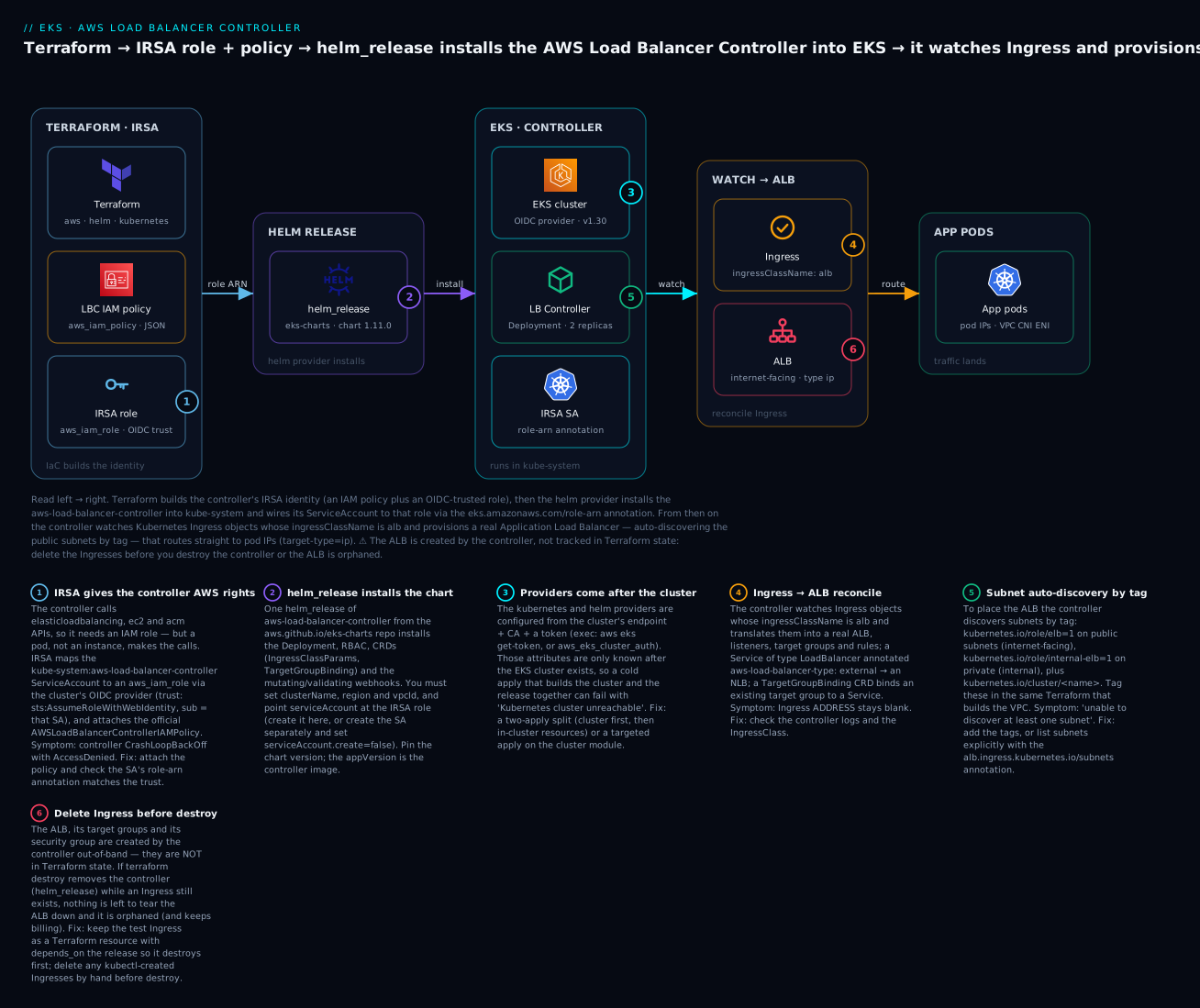
Reading that diagram left to right is reading the install you’re about to run: Terraform builds the IRSA role (badge 1) and the IAM policy, the helm_release installs the controller (badge 2) into the cluster — a step that only works once the providers are wired from the already-built cluster (badge 3) — and the running controller then reconciles an Ingress into an ALB (badge 4), discovering subnets by tag (badge 5). Badge 6 marks the cleanup trap: the ALB lives outside Terraform state, so an Ingress must be deleted before the controller is destroyed.
Here is the full inventory a single terraform apply adds on top of an existing cluster, and roughly what each costs if you leave it running (Mumbai / ap-south-1, on-demand, indicative July 2026):
| Resource (Terraform) | AWS / K8s object | Role in the build | Rough cost if left up |
|---|---|---|---|
aws_iam_policy |
IAM policy | The official AWSLoadBalancerControllerIAMPolicy |
Free |
aws_iam_role (+ attach) |
IAM role, OIDC-trusted | The controller’s IRSA identity | Free |
helm_release |
Deployment, RBAC, CRDs, webhooks | The controller itself, in kube-system |
Free (compute on existing nodes) |
kubernetes_ingress_class_v1 |
IngressClass alb |
Marks which Ingresses the controller owns | Free |
kubernetes_deployment_v1 + _service_v1 |
Demo app + Service | The thing behind the Ingress | Negligible (pods on existing nodes) |
kubernetes_ingress_v1 |
Ingress alb |
Triggers the ALB creation | — |
| ALB (controller-created) | Application Load Balancer | Provisioned by the controller, not in TF state | ~₹1,400/mo + LCU (~$16+) |
The controller, its policy and role are all free — they’re control-plane glue. The line item that bills is the ALB the controller creates when you apply the Ingress, and because that ALB is not in Terraform state, it is the one thing you must remember to clean up in the right order. Every costly or destructive step below is marked ⚠️.
What the AWS Load Balancer Controller actually does
The controller is a Kubernetes controller in the strict sense: a reconciliation loop that watches API objects and drives real-world resources toward the desired state those objects describe. It watches three kinds of object, and produces a different piece of AWS load balancing for each — this table is the mental model to carry through the whole lesson:
| It watches | With | It provisions | Terraform-adjacent equivalent |
|---|---|---|---|
Ingress |
ingressClassName: alb + alb.ingress.* annotations |
An Application Load Balancer (L7), listeners, target groups, rules | aws_lb (application) + aws_lb_target_group + aws_lb_listener |
Service type: LoadBalancer |
aws-load-balancer-type: external + nlb-target-type |
A Network Load Balancer (L4) | aws_lb (network) |
TargetGroupBinding (CRD) |
A target-group ARN + a Service | Keeps an existing target group’s members in sync with pods | You build the aws_lb/aws_lb_target_group; the controller fills it |
Those three modes matter because they cover the whole spectrum of “who owns the load balancer.” With Ingress and Service, the controller owns the ALB/NLB — it creates and deletes it as the object comes and goes. With TargetGroupBinding, Terraform owns the load balancer and target group (you write the aws_lb and aws_lb_target_group yourself), and the controller only owns the membership — it registers and deregisters pods. That last mode is the bridge for teams that want their edge in Terraform/GitOps but still want pods attached automatically.
The controller’s full feature surface is broad; these are the capabilities you actually reach for, and the annotation or CRD that unlocks each:
| Capability | How you invoke it | Notes |
|---|---|---|
| L7 ALB from an Ingress | ingressClassName: alb |
The headline feature |
| Merge many Ingresses onto one ALB | alb.ingress.kubernetes.io/group.name |
IngressGroups share an ALB (cost saving) |
| TLS from ACM | alb.ingress.kubernetes.io/certificate-arn (or auto-discover) |
Terminate HTTPS at the ALB |
| HTTP→HTTPS redirect | alb.ingress.kubernetes.io/ssl-redirect: '443' |
Standard secure default |
| Target-type IP (pods direct) | alb.ingress.kubernetes.io/target-type: ip |
ALB → pod IP, no NodePort hop |
| WAF / Shield | alb.ingress.kubernetes.io/wafv2-acl-arn, shield-advanced-protection |
L7 protection at the edge |
| NLB from a Service | service.beta.kubernetes.io/aws-load-balancer-type: external |
L4 alternative to Ingress |
| Bind an existing target group | TargetGroupBinding CRD |
Terraform owns the LB; controller owns the targets |
The NLB path: a Service, not an Ingress
Not everything is L7. When you need an L4 Network Load Balancer — raw TCP/UDP, static IPs, the lowest latency — you don’t write an Ingress; you annotate a Service of type: LoadBalancer so the controller (not the in-tree provider) handles it. The type: external annotation is the switch that hands the Service to the LBC:
| Service annotation | Value | Effect |
|---|---|---|
service.beta.kubernetes.io/aws-load-balancer-type |
external |
Hand the Service to the LBC (not the in-tree CLB) |
service.beta.kubernetes.io/aws-load-balancer-nlb-target-type |
ip / instance |
NLB target mode (ip = pods direct) |
service.beta.kubernetes.io/aws-load-balancer-scheme |
internet-facing / internal |
Public vs private NLB |
Without aws-load-balancer-type: external, a type: LoadBalancer Service falls through to the legacy in-tree provider and you get a Classic ELB — the usual surprise when someone expects an NLB and gets a CLB.
Versus the legacy in-tree cloud provider
Before this controller, Kubernetes-on-AWS relied on the in-tree AWS cloud provider baked into kube-controller-manager. It could do exactly one load-balancing thing: watch Service type: LoadBalancer and create a Classic Load Balancer (CLB) — the legacy box. It had no Ingress support whatsoever, no ALB, no target-type IP, no WAF, no CRDs. The community “ALB Ingress Controller” grew up to fill that gap and, once mature, was renamed the AWS Load Balancer Controller and given NLB duty too. The difference is stark:
| Aspect | In-tree cloud provider | AWS Load Balancer Controller |
|---|---|---|
| Runs where | Inside kube-controller-manager (control plane) |
As a Deployment you install (kube-system) |
| Ingress → ALB | Not supported | Yes (core feature) |
| Service → LB | CLB only | NLB (type: external) |
| Target type IP (pod-direct) | No | Yes |
| ACM, WAF, redirects, IngressGroups | No | Yes |
CRDs (TargetGroupBinding, IngressClassParams) |
No | Yes |
| AWS credentials | Node instance profile (broad) | IRSA (scoped to one SA) |
| Status | Deprecated / being removed | Current, recommended |
The credential story is the other big upgrade. The in-tree provider used the node’s instance profile, which meant every pod on the node inherited load-balancer-creating permissions. The LBC uses IRSA, so only the controller’s ServiceAccount can assume the role — least privilege, and the reason the install starts with an IAM role rather than a node policy.
The IRSA role: giving the controller its AWS permissions
The controller runs as a pod, but it calls AWS APIs — elasticloadbalancing:CreateLoadBalancer, ec2:DescribeSubnets, acm:ListCertificates, dozens more. A pod cannot use an instance profile without inheriting the whole node’s permissions, so we use IRSA (IAM Roles for Service Accounts): the cluster has an OIDC identity provider, and an IAM role’s trust policy federates that provider so that a specific ServiceAccount — kube-system:aws-load-balancer-controller — can call sts:AssumeRoleWithWebIdentity and receive scoped, short-lived credentials. If IRSA is new to you, the EKS OIDC & IRSA lesson builds the OIDC provider and the trust anatomy from scratch; here we consume that provider and attach the controller’s specific policy.
Two moving parts make up the role: the permission policy (what the controller may do) and the trust policy (who may assume the role). The trust policy is IRSA boilerplate keyed to the SA; the permission policy is a large, official document AWS publishes alongside each controller release.
The permission policy — use the official JSON, don’t hand-write it
The controller’s IAM policy is big (100+ actions) and it changes between controller versions as features are added. Never hand-roll it. AWS publishes the exact JSON in the controller’s repository, tagged per version. You download the file for the version you’re installing and feed it straight into aws_iam_policy:
# Pin the tag to the controller version you will install (chart appVersion).
curl -sSo iam_policy.json \
  https://raw.githubusercontent.com/kubernetes-sigs/aws-load-balancer-controller/v2.11.0/docs/install/iam_policy.json
# iam.tf — the permission policy, straight from the official file
resource "aws_iam_policy" "lbc" {
  name        = "AWSLoadBalancerControllerIAMPolicy"
  description = "Official policy for the AWS Load Balancer Controller (v2.11.0)"
  policy      = file("${path.module}/iam_policy.json")
}
Conceptually the policy grants a handful of permission families; you don’t memorise the actions, but you should recognise what each family is for when you read a denial in the logs:
| Permission family (in the policy) | Example actions | Why the controller needs it |
|---|---|---|
| Describe the network | ec2:DescribeSubnets, DescribeVpcs, DescribeSecurityGroups |
Find subnets (by tag) and VPC to place the LB |
| Manage security groups | ec2:CreateSecurityGroup, AuthorizeSecurityGroupIngress |
The ALB’s managed SG and its rules |
| Create/modify ELBv2 | elasticloadbalancing:CreateLoadBalancer, CreateTargetGroup, CreateListener, RegisterTargets |
Build the ALB/NLB and register pods |
| Read ACM & WAF & Shield | acm:ListCertificates, wafv2:*AssociateWebACL, shield:* |
TLS certs and edge protection |
| Tag & protect its own resources | elasticloadbalancing:AddTags, condition keys on elbv2.k8s.aws/cluster |
Tag LBs it owns; refuse to touch ones it doesn’t |
| Read IAM service-linked role | iam:CreateServiceLinkedRole (conditioned) |
The ELB service-linked role, first time |
A subtlety worth knowing: newer policy versions condition many write actions on a resource tag (elbv2.k8s.aws/cluster) the controller stamps on everything it creates, so even with the policy attached the controller can only modify load balancers it made — a nice guardrail against it clobbering a Terraform-owned ALB.
The trust policy — module or hand-rolled OIDC
With the permission policy created, you need the role and its OIDC trust. There are two idiomatic ways, and both are worth knowing.
Option A — the iam-role-for-service-accounts-eks module (recommended). The terraform-aws-modules/iam/aws collection ships a submodule that knows the controller by name: set one boolean and it attaches the correct policy and builds the OIDC trust scoped to the SA. This is the least-error-prone path and the one most teams use:
# iam.tf — Option A: the IRSA module does the policy AND the trust
module "lbc_irsa" {
  source  = "terraform-aws-modules/iam/aws//modules/iam-role-for-service-accounts-eks"
  version = "~> 5.44"

  role_name                              = "eks-aws-lb-controller"
  attach_load_balancer_controller_policy = true   # attaches the official policy for you

  oidc_providers = {
    main = {
      provider_arn               = var.oidc_provider_arn   # from the cluster/EKS module
      namespace_service_accounts = ["kube-system:aws-load-balancer-controller"]
    }
  }
}
# module.lbc_irsa.iam_role_arn is the value you feed to Helm.
With Option A you can delete the aws_iam_policy + curl step entirely — the module maintains the policy internally per its version. The trade-off is you trust the module’s policy to track the chart version you pin.
Option B — hand-rolled role + OIDC trust. When you want to see (or audit) every line, build the trust document yourself. This is the exact IRSA pattern: a Federated principal of the cluster’s OIDC provider ARN, and two StringEquals conditions pinning the :sub (the ServiceAccount) and the :aud (sts.amazonaws.com):
# iam.tf — Option B: hand-rolled trust, attach the official policy from Option's file
data "aws_iam_policy_document" "lbc_assume" {
  statement {
    effect  = "Allow"
    actions = ["sts:AssumeRoleWithWebIdentity"]
    principals {
      type        = "Federated"
      identifiers = [var.oidc_provider_arn]
    }
    condition {
      test     = "StringEquals"
      variable = "${var.oidc_provider}:sub"
      values   = ["system:serviceaccount:kube-system:aws-load-balancer-controller"]
    }
    condition {
      test     = "StringEquals"
      variable = "${var.oidc_provider}:aud"
      values   = ["sts.amazonaws.com"]
    }
  }
}

resource "aws_iam_role" "lbc" {
  name               = "eks-aws-lb-controller"
  assume_role_policy = data.aws_iam_policy_document.lbc_assume.json
}

resource "aws_iam_role_policy_attachment" "lbc" {
  role       = aws_iam_role.lbc.name
  policy_arn = aws_iam_policy.lbc.arn   # the file()-based policy from above
}
# aws_iam_role.lbc.arn is the value you feed to Helm.
Here var.oidc_provider is the issuer host without the https:// (e.g. oidc.eks.ap-south-1.amazonaws.com/id/EXAMPLE) and var.oidc_provider_arn is the full arn:aws:iam::…:oidc-provider/…. The two approaches compare like this:
| Option A — IRSA module | Option B — hand-rolled | |
|---|---|---|
| Lines of HCL | ~10 | ~35 + the policy file |
| Policy source | Module-maintained | The official iam_policy.json you pin |
| Trust document | Built for you | You write and can audit it |
| Version coupling | Module version ↔ policy | You pin the policy tag yourself |
| Best for | Most teams, fast + correct | Audits, air-gapped, custom conditions |
The one non-negotiable, whichever you pick: the :sub condition must be exactly system:serviceaccount:kube-system:aws-load-balancer-controller. A namespace or SA-name typo here is the number-one cause of a controller that installs cleanly and then CrashLoopBackOffs with AccessDenied — the pod assumes no role because the trust doesn’t match its identity.
Wiring the kubernetes and helm providers
To install anything into the cluster, Terraform’s kubernetes and helm providers must authenticate to the API server. They need three things: the API endpoint, the cluster CA certificate, and a bearer token. All three are outputs of the cluster you already built — and that is the source of the single biggest gotcha in EKS-with-Terraform, which we’ll hit head-on.
| Provider needs | Source (cluster output / data source) | In the demo |
|---|---|---|
| API endpoint | cluster_endpoint / data.aws_eks_cluster.this.endpoint |
var.cluster_endpoint |
| Cluster CA cert | certificate_authority[0].data (base64) |
base64decode(var.cluster_ca_data) |
| Bearer token | exec (aws eks get-token) or aws_eks_cluster_auth.token |
The exec plugin |
There are two ways to supply the token, and the choice matters:
# providers.tf — the exec plugin (recommended): a fresh token per API call
provider "kubernetes" {
  host                   = var.cluster_endpoint
  cluster_ca_certificate = base64decode(var.cluster_ca_data)

  exec {
    api_version = "client.authentication.k8s.io/v1beta1"
    command     = "aws"
    args        = ["eks", "get-token", "--cluster-name", var.cluster_name]
  }
}

provider "helm" {
  kubernetes {
    host                   = var.cluster_endpoint
    cluster_ca_certificate = base64decode(var.cluster_ca_data)
    exec {
      api_version = "client.authentication.k8s.io/v1beta1"
      command     = "aws"
      args        = ["eks", "get-token", "--cluster-name", var.cluster_name]
    }
  }
}
The alternative uses the aws_eks_cluster_auth data source, which fetches a token at plan/apply time:
data "aws_eks_cluster_auth" "this" {
  name = var.cluster_name
}

provider "kubernetes" {
  host                   = var.cluster_endpoint
  cluster_ca_certificate = base64decode(var.cluster_ca_data)
  token                  = data.aws_eks_cluster_auth.this.token   # expires in ~15 min
}
They differ in exactly one important way — token freshness — which is why the exec form is preferred for anything but the quickest apply:
exec plugin |
aws_eks_cluster_auth data source |
|
|---|---|---|
| Token fetched | On every API call, by the aws CLI |
Once, at plan/refresh time |
| Expiry risk | None (always fresh) | ~15 min — a long apply can fail mid-run |
| Requires on the runner | aws CLI on PATH |
Nothing extra |
| CI friendliness | Needs the CLI in the image | Works with just the provider |
| Recommended for | Long applies, Helm installs, prod | Short, simple applies |
⚠️ The provider-after-cluster ordering trap
Here is the gotcha, stated plainly: a Terraform provider is configured before any resource is applied — so if the kubernetes/helm provider is configured from attributes of an EKS cluster that does not exist yet, the very first apply fails. On a cold run where one root module builds both the cluster and the controller, Terraform tries to configure the helm provider from cluster_endpoint, gets an unknown/empty value (the cluster isn’t built), and either errors with Kubernetes cluster unreachable or produces an invalid provider config. This is not a bug you can annotate away with depends_on — providers don’t take depends_on.
The robust patterns, in order of preference:
| Pattern | How | When to use |
|---|---|---|
| Two root modules | cluster/ applies first (VPC, EKS, OIDC); platform/ reads it via remote_state/data sources and installs the controller |
Production — clean, no ordering hacks |
| Two-phase apply | One module, but terraform apply -target=module.eks first, then a full apply |
Quick demos, single module |
data sources not module outputs |
Configure providers from data.aws_eks_cluster / data.aws_eks_cluster_auth (which read the live cluster) rather than resource attributes |
Reduces, doesn’t eliminate, the cold-start problem |
This lesson’s demo assumes the cluster already exists and this root module only installs the controller — the cleanest separation, and the one that mirrors the two-module production layout. We read the cluster through variables/data sources, never build it here. The Kubernetes & Helm providers lesson drills into this ordering problem and the two-module layout in full.
Installing the controller with helm_release
With the role built and the providers wired, the install itself is one resource: a helm_release of the aws-load-balancer-controller chart from AWS’s eks-charts repository. The chart bundles everything — the Deployment, its RBAC, the CRDs (IngressClassParams, TargetGroupBinding), and the mutating/validating admission webhooks the controller uses to default and validate Ingress objects.
| The chart installs | Kind | Purpose |
|---|---|---|
aws-load-balancer-controller |
Deployment | The controller pods (leader-elected) |
| Cluster/Role bindings + ServiceAccount | RBAC | Lets the controller watch Ingress/Service/pods |
IngressClassParams, TargetGroupBinding |
CRDs | Class-wide defaults; bind an existing target group |
aws-load-balancer-webhook-service |
Service + webhooks | Mutating/validating admission on Ingress/Service |
# helm.tf
resource "helm_release" "lbc" {
  name       = "aws-load-balancer-controller"
  repository = "https://aws.github.io/eks-charts"
  chart      = "aws-load-balancer-controller"
  version    = "1.11.0"          # chart version; appVersion is controller v2.11.0
  namespace  = "kube-system"

  # --- required identity + placement values ---
  set {
    name  = "clusterName"
    value = var.cluster_name
  }
  set {
    name  = "region"
    value = var.region
  }
  set {
    name  = "vpcId"
    value = var.vpc_id
  }

  # --- ServiceAccount: create it here and annotate with the IRSA role ---
  set {
    name  = "serviceAccount.create"
    value = "true"
  }
  set {
    name  = "serviceAccount.name"
    value = "aws-load-balancer-controller"
  }
  set {
    name  = "serviceAccount.annotations.eks\\.amazonaws\\.com/role-arn"
    value = module.lbc_irsa.iam_role_arn      # or aws_iam_role.lbc.arn (Option B)
  }

  # --- HA + resilience ---
  set {
    name  = "replicaCount"
    value = "2"
  }

  depends_on = [module.lbc_irsa]  # role must exist before the SA references it
}
The values you set are the whole contract between Kubernetes and AWS — miss one and the controller either won’t start or won’t find the network:
| Helm value | What it does | Miss it and… |
|---|---|---|
clusterName |
Names the cluster the controller manages; used in resource tags | Required — pod won’t start without it |
region |
AWS region for API calls | Auto-detected on EKS, but set it explicitly |
vpcId |
VPC to build load balancers in | Auto-detected, but explicit avoids IMDS lookups |
serviceAccount.create |
true = chart makes the SA; false = use an existing one |
Duplicate/absent SA if it disagrees with reality |
serviceAccount.name |
The SA name (must match the IRSA :sub) |
Trust mismatch → AccessDenied |
serviceAccount.annotations.eks\.amazonaws\.com/role-arn |
Binds the SA to the IRSA role | No AWS creds → CrashLoopBackOff |
replicaCount |
Controller replicas (leader-elected) | Single point of failure at 1 |
image.tag / chart version |
Pins the controller image | Floating version drifts behaviour |
Two details in that block trip everyone at least once. First, the escaped dots in serviceAccount.annotations.eks\\.amazonaws\\.com/role-arn: Helm’s --set treats . as a path separator, so the literal dots in the annotation key must be escaped, and in HCL each backslash is itself doubled — hence \\.. Get it wrong and the annotation silently lands under the wrong key, the SA has no role ARN, and you’re back to CrashLoopBackOff. Second, the depends_on: the ServiceAccount references the role ARN, so the role must exist first; the explicit dependency guarantees ordering even though the ARN flows through a set value.
Create the ServiceAccount here, or separately?
The block above lets the chart create the ServiceAccount (serviceAccount.create = true). The alternative is to create the SA yourself with kubernetes_service_account_v1 and tell the chart to reuse it (serviceAccount.create = false). Both are valid; the trade-offs:
| Approach | Config | Pros / cons |
|---|---|---|
Chart creates the SA (create = true) |
Annotate via Helm set (escaped dots) |
Fewer resources; the escaping is fiddly |
Terraform creates the SA (create = false) |
kubernetes_service_account_v1 with clean annotation map |
Clean annotations, SA visible in state; one more resource + a depends_on |
For the Terraform-managed SA, it’s a small resource with a normal map (no escaping):
resource "kubernetes_service_account_v1" "lbc" {
  metadata {
    name      = "aws-load-balancer-controller"
    namespace = "kube-system"
    annotations = {
      "eks.amazonaws.com/role-arn" = module.lbc_irsa.iam_role_arn
    }
  }
}
# then in helm_release: serviceAccount.create=false, serviceAccount.name=aws-load-balancer-controller
Pin the chart version deliberately. The chart version and the controller image appVersion track closely (chart 1.11.0 ships controller v2.11.0); pinning both means a plan in CI never silently upgrades the controller — and, crucially, the IAM policy you attached must match the controller version, because newer controllers call newer actions. Upgrade the policy and the chart together, never one alone.
IngressClass, target-type, and subnet discovery
The controller is installed, but it won’t touch an Ingress until two things are true: the Ingress names an IngressClass the controller owns, and the controller can discover which subnets to place the ALB in. These are the two most common “I applied an Ingress and nothing happened” causes.
IngressClass and IngressClassParams
An IngressClass is the Kubernetes object that says “Ingresses of this class are handled by this controller.” You register one whose controller field is the LBC’s well-known name, and (optionally) mark it the cluster default:
# ingressclass.tf
resource "kubernetes_ingress_class_v1" "alb" {
  metadata {
    name = "alb"
    annotations = {
      "ingressclass.kubernetes.io/is-default-class" = "true"  # optional: default for classless Ingresses
    }
  }
  spec {
    controller = "ingress.k8s.aws/alb"
  }
  depends_on = [helm_release.lbc]   # the controller/CRDs must be installed first
}
For cluster-wide defaults — a default scheme, default tags, a fixed subnet list, a shared IngressGroup — you attach an IngressClassParams (a CRD the chart installs) to the class, so you don’t repeat annotations on every Ingress:
| Object | Scope | Sets | Typical use |
|---|---|---|---|
IngressClass |
Which controller owns the Ingress | controller, default flag, optional parameters |
Always — one alb class |
IngressClassParams (CRD) |
Cluster-wide defaults for that class | scheme, subnets, tags, group, ipAddressType |
Enforce internal-by-default, org tags, fixed subnets |
alb.ingress.* annotations |
Per-Ingress overrides | Anything above, plus cert-arn, healthcheck, listen-ports | The knob you turn per app |
Because IngressClassParams is a CRD, managing it with kubernetes_manifest reintroduces the provider-after-cluster problem (that resource needs the CRD’s API schema available at plan time). For the demo we keep the IngressClass plain and set behaviour with per-Ingress annotations; in production, apply the IngressClassParams after the CRDs exist (a later apply, or GitOps).
target-type: ip vs instance
Every ALB the controller builds routes to a target group, and the target group’s target-type decides what the ALB registers — and it’s the most consequential annotation you’ll set:
target-type |
ALB registers | Traffic path | Requires | Use when |
|---|---|---|---|---|
ip |
Pod IPs directly | ALB → pod ENI (one hop) | VPC CNI (pods have VPC IPs) | Default choice on EKS — lower latency, no NodePort, works with Fargate |
instance |
Node instance + NodePort | ALB → node:NodePort → kube-proxy → pod | A NodePort Service |
Custom CNI without routable pod IPs; you need node-level routing |
On EKS the VPC CNI gives every pod a real VPC IP address, so the ALB can send traffic straight to the pod’s IP — no NodePort, no extra kube-proxy hop, and it works on Fargate where there are no nodes to NodePort at all. That’s why target-type: ip is the near-universal default on EKS, and the mode our demo uses. Reach for instance only with a CNI that doesn’t give pods routable addresses.
Subnet auto-discovery by tag
The controller has to decide which subnets to build the ALB in. It does this by reading tags on your subnets — this is the single most common reason a first Ingress produces no ALB. Tag the subnets in the same Terraform that builds the VPC:
| Tag | Value | Put it on | Effect |
|---|---|---|---|
kubernetes.io/role/elb |
1 |
Public subnets | Where internet-facing ALBs go |
kubernetes.io/role/internal-elb |
1 |
Private subnets | Where internal ALBs go |
kubernetes.io/cluster/<cluster-name> |
owned or shared |
All cluster subnets | Associates the subnet with the cluster |
If those tags are missing, the controller logs unable to discover at least one subnet and the Ingress ADDRESS never fills in. You can bypass discovery by naming subnets explicitly with the alb.ingress.kubernetes.io/subnets annotation, but tagging is the clean, cluster-wide way — and it’s a two-line addition to the subnet resources you already own:
resource "aws_subnet" "public" {
  # ...
  tags = {
    "kubernetes.io/role/elb"                    = "1"
    "kubernetes.io/cluster/${var.cluster_name}" = "shared"
  }
}
Hands-on: build it with Terraform
⚠️ This installs the controller into a real EKS cluster and — at the Ingress step — provisions a real, billable Application Load Balancer. It assumes an existing EKS cluster (endpoint, CA, OIDC provider) and the aws CLI + kubectl + helm on your machine. Follow it end to end and run the destroy step in the right order.
We install the controller, register the IngressClass, and deploy a tiny app + Ingress to watch an ALB appear. Lay out the files:
mkdir -p lbc-demo && cd lbc-demo
touch versions.tf providers.tf variables.tf iam.tf helm.tf \
      ingressclass.tf demo-app.tf outputs.tf
curl -sSo iam_policy.json \
  https://raw.githubusercontent.com/kubernetes-sigs/aws-load-balancer-controller/v2.11.0/docs/install/iam_policy.json
1. Pin Terraform and the providers (versions.tf). Four providers: aws (the IAM role), helm (the release), kubernetes (IngressClass, app, Ingress). Pin each with ~>, and use a remote backend — for AWS that’s S3 for state plus a DynamoDB table for locking:
# versions.tf
terraform {
  required_version = ">= 1.6.0"

  required_providers {
    aws        = { source = "hashicorp/aws",        version = "~> 5.60" }
    helm       = { source = "hashicorp/helm",       version = "~> 2.17" }
    kubernetes = { source = "hashicorp/kubernetes", version = "~> 2.32" }
  }

  backend "s3" {
    bucket         = "kv-tfstate-2026"
    key            = "eks/lbc-demo/terraform.tfstate"
    region         = "ap-south-1"
    dynamodb_table = "kv-tf-locks"
    encrypt        = true
  }
}
2. Variables (variables.tf). The cluster’s identity and networking come in as variables (in a two-module layout these are remote_state outputs from the cluster module). We take the endpoint, CA, name, region, VPC id and OIDC details:
# variables.tf
variable "region"            {
  type = string
  default = "ap-south-1"
}
variable "cluster_name"      { type = string }
variable "cluster_endpoint"  { type = string }
variable "cluster_ca_data"   {
  type = string
  description = "base64 CA (…certificate_authority[0].data)"
}
variable "vpc_id"            { type = string }
variable "oidc_provider_arn" {
  type = string
  description = "arn:aws:iam::…:oidc-provider/oidc.eks…"
}
variable "oidc_provider"     {
  type = string
  description = "oidc.eks.<region>.amazonaws.com/id/… (no https://)"
}
variable "lbc_chart_version" {
  type = string
  default = "1.11.0"
}
3. Providers (providers.tf). The aws provider, plus kubernetes and helm wired from the cluster via the exec plugin (fresh tokens, no 15-minute expiry mid-apply):
# providers.tf
provider "aws" {
  region = var.region
  default_tags { tags = { project = "tf-course", lesson = "eks-lbc", owner = "vinod" } }
}

provider "kubernetes" {
  host                   = var.cluster_endpoint
  cluster_ca_certificate = base64decode(var.cluster_ca_data)
  exec {
    api_version = "client.authentication.k8s.io/v1beta1"
    command     = "aws"
    args        = ["eks", "get-token", "--cluster-name", var.cluster_name]
  }
}

provider "helm" {
  kubernetes {
    host                   = var.cluster_endpoint
    cluster_ca_certificate = base64decode(var.cluster_ca_data)
    exec {
      api_version = "client.authentication.k8s.io/v1beta1"
      command     = "aws"
      args        = ["eks", "get-token", "--cluster-name", var.cluster_name]
    }
  }
}
4. The IRSA role (iam.tf). We use the module (Option A) for brevity — it attaches the official policy and builds the OIDC trust scoped to the SA:
# iam.tf
module "lbc_irsa" {
  source  = "terraform-aws-modules/iam/aws//modules/iam-role-for-service-accounts-eks"
  version = "~> 5.44"

  role_name                              = "${var.cluster_name}-aws-lb-controller"
  attach_load_balancer_controller_policy = true

  oidc_providers = {
    main = {
      provider_arn               = var.oidc_provider_arn
      namespace_service_accounts = ["kube-system:aws-load-balancer-controller"]
    }
  }
}
(Prefer to see every action? Swap in the Option B aws_iam_policy + aws_iam_role + data.aws_iam_policy_document from the IRSA section, using the iam_policy.json you curled.)
5. The controller (helm.tf). The helm_release, with the required values and the SA annotated with the role ARN:
# helm.tf
resource "helm_release" "lbc" {
  name       = "aws-load-balancer-controller"
  repository = "https://aws.github.io/eks-charts"
  chart      = "aws-load-balancer-controller"
  version    = var.lbc_chart_version
  namespace  = "kube-system"

  set{
    name = "clusterName"
    value = var.cluster_name
  }
  set{
    name = "region"
    value = var.region
  }
  set{
    name = "vpcId"
    value = var.vpc_id
  }
  set{
    name = "replicaCount"
    value = "2"
  }

  set{
    name = "serviceAccount.create"
    value = "true"
  }
  set{
    name = "serviceAccount.name"
    value = "aws-load-balancer-controller"
  }
  set {
    name  = "serviceAccount.annotations.eks\\.amazonaws\\.com/role-arn"
    value = module.lbc_irsa.iam_role_arn
  }

  depends_on = [module.lbc_irsa]
}
6. The IngressClass (ingressclass.tf). Register the alb class the controller owns, after the release installs the CRDs:
# ingressclass.tf
resource "kubernetes_ingress_class_v1" "alb" {
  metadata {
    name        = "alb"
    annotations = { "ingressclass.kubernetes.io/is-default-class" = "true" }
  }
  spec { controller = "ingress.k8s.aws/alb" }
  depends_on = [helm_release.lbc]
}
7. The demo app + Ingress (demo-app.tf). A trivial echoserver Deployment, a ClusterIP Service, and an Ingress in alb class with target-type: ip. Keeping the Ingress as a Terraform resource with depends_on the release is what makes destroy clean up the ALB in the right order:
# demo-app.tf
resource "kubernetes_deployment_v1" "demo" {
  metadata{
    name = "demo"
    namespace = "default"
  }
  spec {
    replicas = 2
    selector { match_labels = { app = "demo" } }
    template {
      metadata { labels = { app = "demo" } }
      spec {
        container {
          name  = "app"
          image = "registry.k8s.io/e2e-test-images/echoserver:2.5"
          port { container_port = 8080 }
        }
      }
    }
  }
}

resource "kubernetes_service_v1" "demo" {
  metadata{
    name = "demo"
    namespace = "default"
  }
  spec {
    selector = { app = "demo" }
    port {
      port        = 80
      target_port = 8080
    }
    type = "ClusterIP"   # target-type=ip doesn't need NodePort
  }
}

resource "kubernetes_ingress_v1" "demo" {
  metadata {
    name      = "demo"
    namespace = "default"
    annotations = {
      "alb.ingress.kubernetes.io/scheme"      = "internet-facing"
      "alb.ingress.kubernetes.io/target-type" = "ip"
    }
  }
  spec {
    ingress_class_name = "alb"
    rule {
      http {
        path {
          path      = "/"
          path_type = "Prefix"
          backend {
            service {
              name = kubernetes_service_v1.demo.metadata[0].name
              port { number = 80 }
            }
          }
        }
      }
    }
  }
  depends_on = [helm_release.lbc, kubernetes_ingress_class_v1.alb]
}
8. Outputs (outputs.tf). Surface the role ARN and the Ingress hostname (the ALB DNS name the controller writes back into the Ingress status):
# outputs.tf
output "lbc_role_arn" { value = module.lbc_irsa.iam_role_arn }
output "ingress_hostname" {
  value       = try(kubernetes_ingress_v1.demo.status[0].load_balancer[0].ingress[0].hostname, "pending…")
  description = "The ALB DNS name the controller provisions (populated a minute after apply)."
}
9. Init. Downloads all four providers and wires the backend:
terraform init
# Initializing provider plugins...
# - Installing hashicorp/aws v5.6x...
# - Installing hashicorp/helm v2.17...
# - Installing hashicorp/kubernetes v2.32...
# Terraform has been successfully initialized!
10. Plan. Pass the cluster’s coordinates (from the cluster module’s outputs) and read the summary — it must add the IAM role, the release, the class and the app:
export TF_VAR_cluster_name="kv-eks"
export TF_VAR_cluster_endpoint="https://ABCD.gr7.ap-south-1.eks.amazonaws.com"
export TF_VAR_cluster_ca_data="LS0tLS1CRUdJTi…"
export TF_VAR_vpc_id="vpc-0abc123"
export TF_VAR_oidc_provider_arn="arn:aws:iam::123456789012:oidc-provider/oidc.eks.ap-south-1.amazonaws.com/id/ABCD"
export TF_VAR_oidc_provider="oidc.eks.ap-south-1.amazonaws.com/id/ABCD"

terraform plan
# Plan: 8 to add, 0 to change, 0 to destroy.
11. Apply. ⚠️ The ALB (billing) is created at the Ingress step. The slow parts are the Helm install (the controller pod pulling its image and passing its webhook readiness) and, ~60–90s later, the ALB provisioning:
terraform apply -auto-approve
# module.lbc_irsa...: Creation complete after 6s
# helm_release.lbc: Still creating... [30s elapsed]
# helm_release.lbc: Creation complete after 48s
# kubernetes_ingress_class_v1.alb: Creation complete after 1s
# kubernetes_deployment_v1.demo: Creation complete after 12s
# kubernetes_ingress_v1.demo: Creation complete after 3s
# Apply complete! Resources: 8 added, 0 changed, 0 destroyed.
# Outputs:
# ingress_hostname = "pending…"   # ALB is provisioning; check again in ~90s
12. Verify — controller healthy, ALB created, traffic served. First confirm the controller Deployment is up, then watch the Ingress get an address, then curl it:
# a) The controller is running (the brief's canonical check):
kubectl -n kube-system get deploy aws-load-balancer-controller
# NAME                           READY   UP-TO-DATE   AVAILABLE   AGE
# aws-load-balancer-controller   2/2     2            2           2m

# b) The Ingress now has an ALB hostname in ADDRESS:
kubectl get ingress demo
# NAME   CLASS   HOSTS   ADDRESS                                              PORTS   AGE
# demo   alb     *       k8s-default-demo-abc123-45678.ap-south-1.elb.amazonaws.com   80    90s

# c) The controller's log shows the reconcile (no errors):
kubectl -n kube-system logs deploy/aws-load-balancer-controller | grep -i "successfully" | tail -2
# "successfully reconciled" ingress default/demo

# d) The ALB exists in AWS, and serves:
ALB=$(kubectl get ingress demo -o jsonpath='{.status.loadBalancer.ingress[0].hostname}')
curl -s "http://$ALB/" | head -n1
# CLIENT VALUES:  (echoserver responds → the ALB routes to pods)
The verification checklist:
| Step | Command | Expect |
|---|---|---|
| Controller up | kubectl -n kube-system get deploy aws-load-balancer-controller |
2/2 ready |
| SA has role ARN | kubectl -n kube-system get sa aws-load-balancer-controller -o yaml | grep role-arn |
Your IRSA role ARN |
| Ingress got an ALB | kubectl get ingress demo |
ADDRESS = an …elb.amazonaws.com name |
| Reconcile clean | kubectl -n kube-system logs deploy/aws-load-balancer-controller |
successfully reconciled, no AccessDenied |
| ALB exists in AWS | aws elbv2 describe-load-balancers --query 'LoadBalancers[?contains(LoadBalancerName,\k8s-default-demo`)].DNSName’` |
The DNS name |
| Targets are pod IPs | aws elbv2 describe-target-health --target-group-arn <arn> |
healthy, IPs in the pod CIDR |
| It serves | curl -s http://$ALB/ |
The echoserver response |
13. Destroy. ⚠️ Order matters — this is the orphaned-ALB trap.
terraform destroy -auto-approve
# kubernetes_ingress_v1.demo: Destroying...        # ← ALB torn down FIRST (reverse dep order)
# kubernetes_ingress_v1.demo: Destruction complete after 41s
# helm_release.lbc: Destruction complete after 9s
# module.lbc_irsa...: Destruction complete after 3s
# Destroy complete! Resources: 8 destroyed.
Because kubernetes_ingress_v1.demo has depends_on = [helm_release.lbc], Terraform destroys it before the controller — so the controller is still running to delete the ALB, its target group and its managed security group. That’s the whole point of keeping the Ingress in Terraform. Confirm nothing was left behind:
aws elbv2 describe-load-balancers \
  --query 'LoadBalancers[?contains(LoadBalancerName,`k8s-`)].LoadBalancerName' --output text
# (empty)  ← no orphaned ALB
If you had created any Ingress with kubectl instead of Terraform, terraform destroy would not know about it, would tear down the controller first, and the ALB would be orphaned — still billing, with no controller left to remove it. That’s the rule to burn in: delete every Ingress (and Service type: LoadBalancer) before the controller goes.
Variables, outputs & making it reusable
The demo hard-codes one cluster’s coordinates. Turning this into a module means parameterising exactly the values a second cluster would differ on — its name, endpoint, CA, VPC, OIDC provider, and the chart version — and exposing the role ARN and controller status as outputs so a downstream stack (the Ingress/SSL lesson’s ExternalDNS, say) can consume them. The variable set is already close; a reusable module wraps iam.tf + helm.tf + ingressclass.tf (not the demo app) behind that input shape:
module "lb_controller" {
  source = "./modules/aws-lb-controller"

  cluster_name      = module.eks.cluster_name
  region            = var.region
  vpc_id            = module.vpc.vpc_id
  oidc_provider_arn = module.eks.oidc_provider_arn
  cluster_endpoint  = module.eks.cluster_endpoint
  cluster_ca_data   = module.eks.cluster_certificate_authority_data
  chart_version     = "1.11.0"
}
You rarely need to author that from scratch, though — three community options cover most needs, and knowing when to reach for each saves a day:
| Approach | You maintain | Reach for it when |
|---|---|---|
Raw helm_release + IRSA module (this lesson) |
The release + role wiring | You want to understand it, or need custom values |
terraform-aws-modules/eks blueprints / addons |
Just the toggle | You already use that EKS module — it can install the LBC as an addon |
aws-ia/eks-blueprints-addons/aws |
The addon inputs | Installing many addons (LBC, ExternalDNS, Karpenter, metrics) together, consistently |
The eks-blueprints-addons module is the production sweet spot when you’re installing a fleet of controllers: it wires each addon’s IRSA role and Helm release for you and keeps versions consistent. Roll your own (as here) when you want full control of the values, an unusual chart version, or you’re learning what the module hides. Whichever you pick, expose iam_role_arn and the release name as outputs — downstream Ingress/DNS stacks consume exactly those.
Common mistakes and troubleshooting
The controller has two signature failures, and each has a signature location. CrashLoopBackOff is almost always an IRSA/policy problem — the pod can’t get or use AWS credentials. An Ingress with a blank ADDRESS is almost always subnet tags or the IngressClass — the controller is running but can’t (or won’t) build the ALB. Start every investigation with two commands: kubectl -n kube-system get pods -l app.kubernetes.io/name=aws-load-balancer-controller and kubectl -n kube-system logs deploy/aws-load-balancer-controller. The logs name the exact cause. This is the table to keep open:
| Symptom | Likely cause | Fix |
|---|---|---|
Controller CrashLoopBackOff, logs AccessDenied / is not authorized |
IRSA role missing/incomplete policy, or SA :sub mismatch |
Attach the official policy; verify trust :sub = system:serviceaccount:kube-system:aws-load-balancer-controller |
Controller CrashLoopBackOff, WebIdentityErr / no creds |
SA not annotated with the role ARN (escaping bug) | Fix serviceAccount.annotations.eks\\.amazonaws\\.com/role-arn; check kubectl get sa … -o yaml |
Pod starts, Ingress ADDRESS blank, log unable to discover at least one subnet |
Subnet tags missing | Tag public subnets kubernetes.io/role/elb=1 (+ …/cluster/<name>), or set the subnets annotation |
Ingress ADDRESS blank, no controller log line for it |
Wrong/absent ingressClassName, or no IngressClass |
Create the alb IngressClass; set ingressClassName: alb on the Ingress |
apply fails: Kubernetes cluster unreachable / connection refused |
Provider-after-cluster ordering (cold apply) | Two-module split, or -target the cluster first; use exec auth |
apply fails installing chart: failed to create: … webhook … no endpoints available |
Webhook not ready yet, or a partial prior install | Re-apply; ensure replicaCount ≥ 1 healthy; delete a broken release and re-install |
Error: Kubernetes cluster unreachable: … token is expired |
aws_eks_cluster_auth token expired mid-apply |
Switch to the exec plugin (fresh token per call) |
Targets unhealthy, 502/503 at the ALB |
Health check path/port wrong, or SG blocks the ALB | Fix healthcheck-path/port annotations; the node/pod SG must allow the ALB SG |
ALB created but target-type: instance and no traffic |
Service isn’t NodePort (instance mode needs it) |
Use target-type: ip (VPC CNI), or make the Service NodePort |
terraform destroy finished but an ALB still bills |
An Ingress was created outside Terraform (kubectl) | Delete all Ingresses/LB Services before destroying the controller |
Beyond the table, the traps that cost real time:
The IRSA :sub typo. The trust policy pins one exact ServiceAccount. If the chart’s SA name, its namespace, and the trust condition don’t all say kube-system / aws-load-balancer-controller, the pod assumes no role and dies with AccessDenied. Verify the actual annotation on the running SA (kubectl -n kube-system get sa aws-load-balancer-controller -o jsonpath='{.metadata.annotations}') and confirm it equals the role ARN, then confirm the role’s trust condition matches. This one check resolves the majority of CrashLoops.
The escaped-dots annotation. serviceAccount.annotations.eks\\.amazonaws\\.com/role-arn looks absurd, and that’s the point: Helm splits on ., so the literal dots in the key must be escaped, and HCL doubles each backslash. If the annotation lands under the wrong key the SA silently has no role — same AccessDenied symptom, different root cause. Prefer creating the SA with kubernetes_service_account_v1 (a clean annotation map) if the escaping keeps biting you.
The webhook chicken-and-egg. The chart installs a validating/mutating webhook that the API server calls whenever an Ingress is created or changed. If the controller pods aren’t healthy, the webhook has no endpoints, and creating an Ingress (or even the IngressClass, in some versions) fails with no endpoints available for service "aws-load-balancer-webhook-service". It’s a readiness race, not a config error: make sure replicaCount ≥ 1 is actually Ready, and re-apply. A depends_on from the Ingress to the release (as in the demo) mostly sequences this correctly.
The subnet-tag blind spot. The controller doesn’t fail loudly here — the Ingress just sits with a blank ADDRESS, and only the controller log says unable to discover at least one subnet. Public subnets need kubernetes.io/role/elb=1 for internet-facing ALBs; private subnets need kubernetes.io/role/internal-elb=1 for internal ones. Tag them in the VPC module, or (escape hatch) list them per-Ingress with alb.ingress.kubernetes.io/subnets.
The orphaned ALB on destroy. Because the ALB, its target group and its managed SG are created by the controller and not in Terraform state, destroying the controller before its Ingresses leaves them stranded — billing forever, with nothing to reap them. Keep every Ingress and LB-typed Service as a Terraform resource with depends_on the release (so they destroy first), and delete any kubectl-created ones by hand before terraform destroy. And set region/vpcId explicitly rather than relying on IMDS auto-detect (which fails on Fargate and some node configs) — a wrong vpcId builds ALBs in a network that never routes.
Cost, cleanup & production notes
The controller itself is free — it’s a Deployment running on nodes you already pay for, plus two free IAM objects. The cost is entirely in what it creates: every Ingress (unless merged into an IngressGroup) becomes an ALB that bills hourly plus LCUs; every LB-typed Service becomes an NLB. Indicative Mumbai / ap-south-1, July 2026:
| Resource | Rough monthly if left up | Notes |
|---|---|---|
| The controller (pods) | ₹0 extra | Runs on existing nodes |
| IAM role + policy | Free | Control-plane glue |
| Each ALB it creates | ~₹1,400 + LCU (~$16+) | One per Ingress, unless you use group.name |
| Each NLB it creates | ~₹1,400 + NLCU (~$16+) | One per LB-typed Service |
| This demo, one week | ~₹350 (~$4) | One ALB — which is why you destroy it |
Two cost levers matter in production. IngressGroups (alb.ingress.kubernetes.io/group.name) merge many Ingresses onto one shared ALB, so ten services cost one ALB, not ten — the single biggest saving on a busy cluster. And destroying in order (Ingresses before the controller) is a cost control as much as a hygiene one: an orphaned ALB bills indefinitely.
Cleanup is terraform destroy, and it’s clean only if your Ingresses are Terraform-managed with depends_on the release (they destroy first, the controller reaps their ALBs, then the controller goes). Always confirm with aws elbv2 describe-load-balancers that no k8s-… load balancer survives.
Production hardening, the five that matter:
- Two-module layout, remote locked state. Build the cluster in one root module and the controller (and other addons) in a second that reads the cluster via
remote_state/data sources. This sidesteps the provider-after-cluster trap entirely and keeps blast radius small. Use S3 + DynamoDB locking on both. - Pin the chart and the policy together. The IAM policy must match the controller version — newer controllers call newer actions. Upgrade
version(chart) andiam_policy.json(or the IRSA module version) in the same change, never one alone, or the controllerAccessDenieds on an action the old policy lacks. - Least privilege via IRSA, not the node role. Never grant load-balancer permissions to the node instance profile — scope them to the controller’s ServiceAccount through IRSA (as here). That’s the whole security upgrade over the in-tree provider; don’t undo it.
- HA and PodDisruptionBudget. Run
replicaCount = 2(leader-elected) so a node drain doesn’t stop reconciliation, and add a PodDisruptionBudget so cluster autoscaling can’t evict both replicas at once. - Watch drift and orphans. Run
terraform planon a schedule to catch a console-edited Ingress annotation, and periodically listk8s-…ALBs to catch orphans from any out-of-band Ingress. Enable ALB access logs to S3 on production Ingresses (alb.ingress.kubernetes.io/load-balancer-attributes) for post-hoc 5xx forensics.
Going deeper
The core lesson gets a working controller. This section is the layer underneath — the mechanics that explain why the pieces behave as they do, and the production-grade alternatives you’ll eventually reach for.
How IRSA actually hands credentials to the pod
The lesson attaches a role and annotates a ServiceAccount, and “the pod gets credentials.” What actually happens is a small, elegant handshake worth understanding, because every IRSA failure is a break somewhere along it. EKS runs an admission webhook — the pod identity webhook — that watches for pods whose ServiceAccount carries the eks.amazonaws.com/role-arn annotation. When such a pod is created, the webhook mutates it: it injects two environment variables — AWS_ROLE_ARN (your role) and AWS_WEB_IDENTITY_TOKEN_FILE (a path) — and mounts a projected ServiceAccount token at that path, a short-lived JWT signed by the cluster whose audience is sts.amazonaws.com. The AWS SDK inside the controller finds those env vars via its default credential chain, reads the token file, and calls sts:AssumeRoleWithWebIdentity. STS validates the token against the cluster’s OIDC provider, checks the role’s trust :sub/:aud conditions, and returns temporary credentials.
That chain is why a :sub typo fails silently: the pod starts, the SDK finds the token, STS rejects the assume because the trust condition doesn’t match system:serviceaccount:kube-system:aws-load-balancer-controller, and the controller logs AccessDenied — not a config error, an identity rejection. kubectl -n kube-system get sa aws-load-balancer-controller -o yaml shows the annotation; kubectl -n kube-system get pod <lbc-pod> -o yaml | grep AWS_ confirms the webhook actually fired and injected the env vars.
The newer alternative: EKS Pod Identity
IRSA is the mature, universal path and what this lesson uses. Its friction is the OIDC provider per cluster plus a trust policy that hard-codes that provider’s ARN — clone a cluster and you re-wire trust. AWS’s newer EKS Pod Identity removes the OIDC coupling: you install the eks-pod-identity-agent addon (a DaemonSet), and instead of an OIDC-federated trust the role simply trusts the pods.eks.amazonaws.com service principal. A separate association maps a namespace + ServiceAccount to the role — no annotation on the SA, no per-cluster OIDC ARN baked into trust:
# The role trusts the EKS service, not an OIDC provider:
data "aws_iam_policy_document" "lbc_assume_pi" {
  statement {
    effect  = "Allow"
    actions = ["sts:AssumeRole", "sts:TagSession"]
    principals {
      type        = "Service"
      identifiers = ["pods.eks.amazonaws.com"]
    }
  }
}

resource "aws_eks_pod_identity_association" "lbc" {
  cluster_name    = var.cluster_name
  namespace       = "kube-system"
  service_account = "aws-load-balancer-controller"
  role_arn        = aws_iam_role.lbc.arn
}
The trade: Pod Identity is portable across clusters (the same role trust works everywhere) and simpler to reason about, but it needs the agent addon and a recent controller build, and it’s newer than IRSA so some tooling still assumes the annotation. For a greenfield fleet it’s increasingly the default; for this lesson, and for anything that must run on older clusters, IRSA stays the safe choice. The controller install is otherwise identical — with Pod Identity you simply drop the serviceAccount.annotations…role-arn Helm value.
Finalizers — why destroy-order actually works
The lesson’s destroy rule (“delete the Ingress before the controller”) isn’t a Terraform quirk; it’s enforced by a Kubernetes finalizer. When the controller first reconciles your Ingress, it adds a finalizer — ingress.k8s.aws/resources (or group.ingress.k8s.aws/<group> for a grouped Ingress) — to the object’s metadata. A finalizer is a lock: when you delete the Ingress, Kubernetes sets a deletionTimestamp but keeps the object alive until the controller finishes tearing down the ALB, target group and security group and then removes its own finalizer. Only then does the object vanish. That is exactly why the demo’s kubernetes_ingress_v1.demo takes ~40s to destroy — Terraform is blocked on the controller reaping AWS.
The dark side: if the controller is already gone when you try to delete the Ingress, nobody removes the finalizer, and the object is stuck Terminating forever — while its ALB keeps billing. That’s the orphaned-ALB trap seen from the inside. Recovery is manual: bring a controller back to reap it cleanly, or force-remove the finalizer (kubectl patch ingress demo -p '{"metadata":{"finalizers":[]}}' --type=merge) and then delete the ALB, target group and SG by hand. Prevention is the lesson’s rule: keep every Ingress in Terraform with depends_on the release so it always destroys first.
The two security groups the controller manages
“Its managed security group” is really two groups in a modern install, and knowing the split saves you when traffic mysteriously doesn’t flow. The controller creates a frontend SG on the ALB itself (allowing the listener ports from the internet or your inbound-cidrs), and — with enableBackendSecurityGroup (the default) — a single shared backend SG it attaches to node/pod ENIs, into which it adds rules permitting the frontend SG to reach the targets. The “shared” part matters at scale: without it, every ALB would append its own rules to your node SGs and you’d hit the per-ENI security-group-rule limits on a busy cluster. If you supply your own frontend SG via alb.ingress.kubernetes.io/security-groups, the controller stops auto-managing the backend rules unless you also set alb.ingress.kubernetes.io/manage-backend-security-group-rules: "true" — a common cause of “the ALB is healthy but every target is unhealthy,” because nothing opened the path from ALB to pod.
IngressGroups are a trust boundary
alb.ingress.kubernetes.io/group.name is sold as a cost saver — many Ingresses, one ALB — and it is (see the cost section). The subtlety for production: an IngressGroup is shared, mutable state across namespaces. Any Ingress in any namespace that names the same group.name joins that ALB and can add listener rules to it, ordered by group.order. So a team in namespace b can, intentionally or not, affect the ALB serving namespace a. Lock it down by defining the group on an IngressClassParams (spec.group.name) and binding Ingresses to that IngressClass — then individual Ingresses can’t pick an arbitrary group name; the group becomes a property of the class you grant, not free-text anyone can set.
A version note. This lesson pins the hashicorp/helm provider to ~> 2.17, whose repeatable set { name = … value = … } blocks you see throughout. Provider v3.x is a breaking change: it replaces those blocks with a single set = [{ name, value }] list attribute and turns the nested kubernetes { } block into a kubernetes = { } attribute. If you bump the constraint, read the provider v3 upgrade guide first — a straight version bump without rewriting the set blocks will not plan.
Practice challenges
Six exercises that escalate from a five-second diagnostic to owning the load balancer in Terraform. Assume the lesson’s lbc-demo is applied and the controller is running. Each solution notes the why.
1. (Beginner) Prove the ServiceAccount carries the role ARN. Before blaming anything else, confirm the controller’s SA is actually annotated with your IRSA role — the single most common crash-loop cause. Write the one command.
<details> <summary>Solution</summary>
kubectl -n kube-system get sa aws-load-balancer-controller \
  -o jsonpath='{.metadata.annotations.eks\.amazonaws\.com/role-arn}'
# arn:aws:iam::<ACCOUNT_ID>:role/kv-eks-aws-lb-controller
Why: if this is blank, the Helm annotation (with its escaped dots) never landed, the pod assumes no role, and you get CrashLoopBackOff/AccessDenied. It’s the first thing to check — before the logs.
</details>
2. (Beginner → Intermediate) Tag the subnets for an internet-facing ALB. Your Ingress sits with a blank ADDRESS and the controller log says unable to discover at least one subnet. Add the Terraform tags that let it find the public subnets.
<details> <summary>Solution</summary>
resource "aws_subnet" "public" {
  # ...existing config...
  tags = {
    "kubernetes.io/role/elb"                    = "1"        # internet-facing ALBs go here
    "kubernetes.io/cluster/${var.cluster_name}" = "shared"
  }
}
Why: the controller discovers ALB placement by reading subnet tags; kubernetes.io/role/elb=1 marks public subnets for internet-facing ALBs (…/internal-elb=1 marks private ones for internal). No tags, no ALB — and it fails quietly, only in the log.
</details>
3. (Intermediate) Terminate HTTPS at the ALB with ACM. Change the demo Ingress to listen on 443 with an ACM certificate and redirect HTTP→HTTPS — all via annotations, no new Terraform resource for the listener.
<details> <summary>Solution</summary>
annotations = {
  "alb.ingress.kubernetes.io/scheme"          = "internet-facing"
  "alb.ingress.kubernetes.io/target-type"     = "ip"
  "alb.ingress.kubernetes.io/listen-ports"    = "[{\"HTTP\":80},{\"HTTPS\":443}]"
  "alb.ingress.kubernetes.io/certificate-arn" = var.acm_certificate_arn
  "alb.ingress.kubernetes.io/ssl-redirect"    = "443"
}
Why: the controller reads these annotations and configures the ALB’s listeners and rules for you — TLS terminates at the ALB, and ssl-redirect: 443 adds the 80→443 redirect. The cert stays in ACM; you only reference its ARN.
</details>
4. (Intermediate → Advanced) Merge two Ingresses onto one ALB. You have two apps, each with its own Ingress, and you’re paying for two ALBs. Collapse them onto one shared ALB and prove only one exists.
<details> <summary>Solution</summary>
# On BOTH Ingresses, the same group name:
annotations = {
  "alb.ingress.kubernetes.io/group.name"  = "shared-web"
  "alb.ingress.kubernetes.io/group.order" = "10"   # this Ingress's rule priority on the shared listener
}
aws elbv2 describe-load-balancers \
  --query 'LoadBalancers[?contains(LoadBalancerName,`k8s-`)].LoadBalancerName' --output text
# one name, not two
Why: an IngressGroup merges every Ingress sharing group.name onto a single ALB, turning N load balancers into one — the biggest per-cluster cost lever. group.order sets each Ingress’s rule priority on the shared listener.
</details>
5. (Advanced) Let Terraform own the load balancer with TargetGroupBinding. Instead of the controller creating the ALB, build the aws_lb and aws_lb_target_group in Terraform and have the controller only keep the pods registered. Sketch the binding.
<details> <summary>Solution</summary>
# You own the LB + target group in Terraform (aws_lb, aws_lb_target_group, aws_lb_listener)…
# …then bind that target group to the Service via the CRD:
resource "kubernetes_manifest" "demo_tgb" {
  manifest = {
    apiVersion = "elbv2.k8s.aws/v1beta1"
    kind       = "TargetGroupBinding"
    metadata   = { name = "demo", namespace = "default" }
    spec = {
      serviceRef     = { name = "demo", port = 80 }
      targetGroupARN = aws_lb_target_group.demo.arn
      targetType     = "ip"
    }
  }
}
Why: TargetGroupBinding flips ownership — Terraform/GitOps owns the edge (the ALB and its target group), the controller owns only membership (registering and deregistering pod IPs). It’s the bridge for teams that want their load balancer in state but pods attached automatically. Note kubernetes_manifest needs the CRD present at plan time, so apply it only after the controller is installed.
</details>
6. (Advanced) Re-platform the controller’s identity onto EKS Pod Identity. Drop the OIDC-federated IRSA trust and give the controller credentials through EKS Pod Identity instead. What changes?
<details> <summary>Solution</summary>
resource "aws_eks_addon" "pod_identity" {
  cluster_name = var.cluster_name
  addon_name   = "eks-pod-identity-agent"
}

resource "aws_eks_pod_identity_association" "lbc" {
  cluster_name    = var.cluster_name
  namespace       = "kube-system"
  service_account = "aws-load-balancer-controller"
  role_arn        = aws_iam_role.lbc.arn   # role now trusts pods.eks.amazonaws.com
}
# …and drop the serviceAccount.annotations…role-arn Helm value entirely.
Why: Pod Identity removes the per-cluster OIDC ARN from the role’s trust (it trusts pods.eks.amazonaws.com instead) and moves the SA→role mapping into an association, so the same role is portable across clusters and the SA needs no role-arn annotation. The controller must be a recent build; IRSA stays fully supported.
</details>
Common beginner mistakes
These are misconceptions — the wrong mental model that sends you down the wrong path — not symptoms. (The symptom → cause → fix table lives in Common mistakes and troubleshooting above.)
-
“I set
type: LoadBalancer, so I’ll get an ALB.” No — aServiceoftype: LoadBalancerproduces an NLB (L4) when handed to this controller, or a legacy Classic ELB if it falls through to the in-tree provider. ALBs (L7) come only from anIngress. Right model: Ingress → ALB, Service → NLB. If you want path-based HTTP routing, HTTPS termination or host rules, you want an Ingress. -
“The controller made the ALB, so
terraform destroywill delete it.” The ALB is not in Terraform state — the controller created it out-of-band. Destroy removes thehelm_release, not the ALB. What deletes the ALB is deleting the Ingress while the controller is still alive to reap it. Right model: the Ingress is the handle on the ALB; destroy Ingresses first. -
“IRSA isn’t working — I’ll just add the policy to the node role to unblock myself.” That undoes the entire security upgrade (every pod on the node inherits load-balancer permissions) and usually doesn’t even fix it, because the controller’s SDK is trying to assume a role, not read the instance profile. Right model: fix the SA annotation and the trust
:sub; never widen the node role. -
“I applied an Ingress and nothing happened, so the controller is broken.” Far more often the controller is fine and the Ingress can’t be placed: missing subnet tags, or an
ingressClassNamethat doesn’t match a registeredIngressClass. Right model: read the controller log first — it names the exact reason (unable to discover at least one subnet, or silence because the class doesn’t match). -
“
regionandvpcIdare auto-detected, so I’ll leave them unset.” Auto-detection reads instance metadata (IMDS), which fails on Fargate and some hardened node setups — and a wrong guess builds ALBs in a network that never routes. Right model: setclusterName,regionandvpcIdexplicitly; they’re cheap insurance. -
“I’ll pin the chart version and leave the IAM policy alone.” Newer controller versions call newer AWS actions; an old policy then denies them and the controller
AccessDenieds on a feature that worked yesterday. Right model: upgrade the chart and the IAM policy together, in one change — they’re a matched pair.
Cheat-sheet
The dense reference for installing and driving the controller — resources, the Helm values you set every time, the annotations you reach for, and the verify/troubleshoot commands:
| Resource | Purpose | Must-set |
|---|---|---|
aws_iam_policy (from file()) |
The official controller policy | policy = file("iam_policy.json") (or use the IRSA module) |
iam-role-for-service-accounts-eks module |
IRSA role + policy + OIDC trust | attach_load_balancer_controller_policy, oidc_providers |
helm_release (aws-load-balancer-controller) |
Installs the controller | clusterName, region, vpcId, SA role-arn |
kubernetes_ingress_class_v1 |
Registers the alb class |
spec.controller = ingress.k8s.aws/alb |
kubernetes_ingress_v1 |
Triggers an ALB | ingress_class_name = "alb", alb.ingress.* annotations |
provider "kubernetes" / "helm" |
Talk to the cluster | host, cluster_ca_certificate, exec token |
| Helm value | Set to |
|---|---|
clusterName |
The cluster name (required) |
region / vpcId |
Region + VPC (explicit beats auto-detect) |
serviceAccount.create / .name |
true / aws-load-balancer-controller |
serviceAccount.annotations.eks\.amazonaws\.com/role-arn |
The IRSA role ARN (mind the escaping) |
replicaCount |
2 (HA, leader-elected) |
| Key annotation (on the Ingress) | Effect |
|---|---|
alb.ingress.kubernetes.io/scheme |
internet-facing / internal |
alb.ingress.kubernetes.io/target-type |
ip (EKS default) / instance |
alb.ingress.kubernetes.io/group.name |
Merge onto a shared ALB (cost) |
alb.ingress.kubernetes.io/certificate-arn |
ACM cert for HTTPS |
alb.ingress.kubernetes.io/subnets |
Explicit subnets (bypass tag discovery) |
| Subnet tag | Value | On |
|---|---|---|
kubernetes.io/role/elb |
1 |
Public subnets (internet-facing ALB) |
kubernetes.io/role/internal-elb |
1 |
Private subnets (internal ALB) |
kubernetes.io/cluster/<name> |
owned/shared |
All cluster subnets |
| Verify / debug with | Command |
|---|---|
| Controller up | kubectl -n kube-system get deploy aws-load-balancer-controller |
| Controller logs | kubectl -n kube-system logs deploy/aws-load-balancer-controller |
| Ingress address | kubectl get ingress demo |
| SA role annotation | kubectl -n kube-system get sa aws-load-balancer-controller -o yaml |
| ALB exists | aws elbv2 describe-load-balancers --query 'LoadBalancers[?contains(LoadBalancerName,\k8s-`)]'` |
Interview and exam questions
1. What does the AWS Load Balancer Controller do, and how is it different from the old in-tree cloud provider? It’s a controller you run in the cluster that watches Ingress objects (class alb) and provisions ALBs, watches annotated Service type: LoadBalancer objects and provisions NLBs, and via the TargetGroupBinding CRD keeps an existing target group’s members synced to pods. The legacy in-tree provider (in kube-controller-manager) could only create a Classic ELB for a Service and had no Ingress support, no target-type IP, no ACM/WAF, and used the node instance profile instead of IRSA.
2. Why does the controller need IRSA rather than the node instance role? Because it calls AWS APIs (ELBv2, EC2, ACM) from a pod, and using the node instance profile would grant those permissions to every pod on the node. IRSA maps the specific kube-system:aws-load-balancer-controller ServiceAccount to a scoped IAM role through the cluster’s OIDC provider (sts:AssumeRoleWithWebIdentity), so only the controller can assume it — least privilege.
3. Walk through the IRSA trust policy for the controller. The role’s assume_role_policy allows sts:AssumeRoleWithWebIdentity for a Federated principal equal to the cluster’s OIDC provider ARN, with two StringEquals conditions: <oidc>:sub = system:serviceaccount:kube-system:aws-load-balancer-controller (pin the exact SA) and <oidc>:aud = sts.amazonaws.com. A typo in the :sub is the top cause of a CrashLoopBackOff with AccessDenied.
4. How do you install the controller in Terraform, and what values are mandatory? A helm_release of aws-load-balancer-controller from https://aws.github.io/eks-charts, pinned to a chart version. Mandatory-ish values: clusterName (required), region, vpcId, and the ServiceAccount wiring — serviceAccount.name matching the IRSA :sub, and serviceAccount.annotations.eks\.amazonaws\.com/role-arn set to the role ARN (with the dots escaped for Helm --set).
5. Explain the provider-after-cluster ordering problem. Terraform configures a provider before applying resources. If the kubernetes/helm provider is configured from an EKS cluster’s endpoint/CA that don’t exist yet (cold apply of cluster + controller in one module), provider config fails with Kubernetes cluster unreachable. depends_on doesn’t apply to providers. Fixes: a two-module split (cluster first, controller second), or terraform apply -target=module.eks then a full apply.
6. target-type: ip vs instance on EKS — which and why? ip registers pod IPs directly and the ALB routes straight to the pod ENI — one hop, no NodePort, works on Fargate; it relies on the VPC CNI giving pods routable VPC IPs, which EKS does by default, so ip is the standard choice. instance registers the node + a NodePort and adds a kube-proxy hop — only needed with a CNI that doesn’t give pods routable addresses.
7. You applied an Ingress and its ADDRESS stays blank. Diagnose. Read the controller log. unable to discover at least one subnet → the subnets aren’t tagged (kubernetes.io/role/elb=1 on public, …/internal-elb=1 on private); add the tags or set the subnets annotation. No log line for the Ingress at all → the ingressClassName is wrong/absent or the alb IngressClass doesn’t exist. AccessDenied in the log → the IRSA policy/trust is wrong.
8. How does the controller decide which subnets to place an ALB in? Auto-discovery by tag: kubernetes.io/role/elb=1 marks public subnets for internet-facing ALBs, kubernetes.io/role/internal-elb=1 marks private subnets for internal ones, and kubernetes.io/cluster/<name> associates subnets with the cluster. You can override per-Ingress with alb.ingress.kubernetes.io/subnets.
9. Why must you delete Ingresses before terraform destroy, and how do you make destroy safe? The ALB, its target group and its managed security group are created by the controller, out-of-band, and are not in Terraform state. If destroy removes the controller (the helm_release) while an Ingress still exists, nothing is left to delete the ALB and it’s orphaned (and billing). Make it safe by keeping every Ingress as a Terraform resource with depends_on the release, so it’s destroyed first (reverse dependency order) while the controller is still alive to reap the ALB.
10. What is a TargetGroupBinding, and when would you use it? A CRD the controller installs that binds an existing target-group ARN to a Kubernetes Service. You provision the ALB and target group in Terraform (aws_lb, aws_lb_target_group), and the controller only manages the membership — registering/deregistering pods. Use it when you want the load balancer owned by Terraform/GitOps but still want pods attached automatically.
11. (Terraform Associate 003) You change the helm_release chart version. What does plan show? An in-place update to the release — Helm upgrades the chart to the new version. It’s not a replacement of a load balancer (the controller manages those). Note: bump the attached IAM policy in the same change so the newer controller has permissions for any new actions it calls.
12. (Terraform Associate 003) Why prefer the exec auth plugin over aws_eks_cluster_auth for the kubernetes/helm providers? aws_eks_cluster_auth fetches a token once at plan/refresh time and it expires in ~15 minutes; a long apply (a slow Helm install) can fail mid-run with token is expired. The exec plugin invokes aws eks get-token on every API call, so the token is always fresh — at the cost of needing the aws CLI on the runner.
Key takeaways
- The controller is the translator between Kubernetes and AWS load balancing. It watches
Ingress→ makes ALBs, watches annotatedServicetype: LoadBalancer→ makes NLBs, and viaTargetGroupBindingfills a Terraform-owned target group with pods. It replaced the in-tree provider, which only ever made a Classic ELB and never understood an Ingress. - IRSA first — the controller is a pod that calls AWS. Build an
aws_iam_policyfrom the officialiam_policy.json(or let theiam-role-for-service-accounts-eksmodule attach it) and anaws_iam_rolewhose OIDC trust pinssystem:serviceaccount:kube-system:aws-load-balancer-controller. A:subtypo is the #1CrashLoopBackOff. - Install with one
helm_releasefromeks-charts, and mind the values. SetclusterName,region,vpcId, and the ServiceAccount’seks.amazonaws.com/role-arnannotation (escape the dots for Helm). Pin the chart version and keep the IAM policy in lock-step with it. - Providers come after the cluster. The
kubernetes/helmproviders are configured from the cluster’s endpoint/CA/token, which only exist after the cluster is built — so use a two-module split (or-targetthe cluster first) and theexecauth plugin so tokens never expire mid-apply. target-type: ip+ subnet tags are what make the ALB appear. On EKS the VPC CNI gives pods routable IPs, sotarget-type: iproutes the ALB straight to pods; and the controller only finds where to put the ALB viakubernetes.io/role/elb(public) /internal-elb(private) subnet tags. A blank IngressADDRESSis almost always one of these two.- Delete Ingresses before you destroy the controller. The ALB lives outside Terraform state; keep Ingresses as Terraform resources with
depends_onthe release so they tear down first, or you orphan a billing ALB. Merge many Ingresses onto one ALB withgroup.nameto cut cost. - Build it, verify it, destroy it — in order. Verify with
kubectl -n kube-system get deploy aws-load-balancer-controllerand a test Ingress whoseADDRESSfills with an…elb.amazonaws.comname; then destroy, confirming nok8s-…ALB survives.
Glossary
- AWS Load Balancer Controller (LBC) — a Kubernetes controller you run inside the cluster that watches
Ingress/Service/TargetGroupBindingobjects and provisions the matching AWS load balancing (ALB/NLB). Replaces the deprecated in-tree cloud provider. - ALB (Application Load Balancer) — AWS’s L7 (HTTP/HTTPS) load balancer: path/host routing, TLS termination, WAF. Created by the controller from an
Ingress. - NLB (Network Load Balancer) — AWS’s L4 (TCP/UDP) load balancer: low latency, static IPs. Created from an annotated
Servicetype: LoadBalancer(aws-load-balancer-type: external). - CLB (Classic Load Balancer) — the legacy load balancer the old in-tree provider created. What you get by accident if a
type: LoadBalancerService falls through to the in-tree path. - Ingress — the Kubernetes object describing L7 HTTP routing rules. The controller turns one (of class
alb) into an ALB. - IngressClass — the object whose
spec.controllernames which controller owns an Ingress; you register analbclass pointing at the LBC, and an Ingress opts in viaingressClassName: alb. - IngressClassParams — a controller CRD holding cluster-wide defaults for a class (scheme, subnets, tags, group), so you don’t repeat annotations on every Ingress.
- IngressGroup — many Ingresses sharing one ALB via
alb.ingress.kubernetes.io/group.name; the main cost lever, and a cross-namespace trust boundary. - IRSA (IAM Roles for Service Accounts) — maps a specific Kubernetes ServiceAccount to an IAM role via the cluster’s OIDC provider and
sts:AssumeRoleWithWebIdentity, giving a pod scoped AWS credentials without the node role. - EKS Pod Identity — the newer alternative to IRSA: an agent addon plus an association map a ServiceAccount to a role that trusts
pods.eks.amazonaws.com, with no per-cluster OIDC coupling. - OIDC provider — the cluster’s OpenID Connect identity endpoint that AWS STS trusts to validate ServiceAccount tokens; the anchor of IRSA.
- ServiceAccount (SA) — the Kubernetes identity a pod runs as; annotated with
eks.amazonaws.com/role-arnto bind it to an IRSA role. - target group — the AWS object holding the ALB’s backends; the controller fills it with either pod IPs or node/NodePort entries.
- target-type —
ip(register pod IPs directly — the EKS default, needs the VPC CNI) vsinstance(register node + NodePort). - VPC CNI — the EKS default networking plugin that gives every pod a routable VPC IP, which is what makes
target-type: ippossible. - TargetGroupBinding — a controller CRD that binds an existing (Terraform-owned) target group to a Service, so Terraform owns the load balancer and the controller only syncs membership.
- helm_release — the Terraform resource (
helmprovider) that installs the controller’s Helm chart from theeks-chartsrepo. - admission webhook — the mutating/validating callback the chart installs; the API server calls it on every Ingress/Service change, so the controller pods must be
Readyor the create fails withno endpoints available. - finalizer — a metadata lock (
ingress.k8s.aws/resources) the controller puts on an Ingress so deletion blocks until it has torn down the ALB; the mechanism behind the destroy-order rule. - LCU (Load Balancer Capacity Unit) — the usage-based billing unit charged on top of the ALB’s hourly rate.
- subnet discovery tags —
kubernetes.io/role/elb(public) and…/internal-elb(private) tags the controller reads to decide where to place an ALB.