In a nutshell
Think of your EKS cluster as a newly-built office block. Terraform was the general contractor: it poured the foundation, ran the wiring, and installed the lifts — the VPC, the node groups, the control plane. Now someone has to move the furniture in and keep the place running. The kubernetes and helm providers are Terraform’s ability to walk through the front door and speak the building’s language — they let Terraform install controllers, create namespaces, and deploy apps inside the cluster instead of only building the shell around it.
But the moment Terraform walks through that door, two questions decide whether your platform is calm or on fire. The first is how it proves who it is — the authentication handshake to the Kubernetes API, the single most error-prone thing in all of Terraform and the reason an apply can succeed now and fail Unauthorized fifteen minutes later. The second, and the deeper one, is when Terraform should hand over the keys. A contractor does not stay on site forever rearranging desks; at some point the tenants — a GitOps controller like Argo CD or Flux, driven by Git — take over the day-to-day. Drawing that line (Terraform builds the platform, Git drives the apps) is the whole art of platform engineering, and getting it wrong means every application deploy becomes a terraform apply nobody wants to run.
So the lesson has two halves: first make the providers work (exec auth, the base64 CA trap, the two-stack split), then know where to stop (bootstrap Argo CD, hand app delivery to Git).
Level: Expert · Time: ~55 min
Prerequisites. Comfort with Terraform’s core loop, providers and required_providers pins, data sources, terraform_remote_state, and S3 remote state; a working model of Kubernetes objects (namespaces, deployments, service accounts) and Helm charts; and familiarity with how an EKS cluster is provisioned (VPC, managed node groups, the OIDC provider IRSA rides on). No prior Argo CD experience assumed.
After this lesson you will be able to:
- Configure the
kubernetesandhelmproviders against a live EKS cluster with anexecblock callingaws eks get-token, and say why that beats theaws_eks_cluster_authdata source. - Fix the “provider configuration cannot be determined until apply” trap by splitting cluster and workloads into two stacks joined by
terraform_remote_state. - Deploy controllers and apps with
helm_release, choosing correctly between it,kubernetes_manifest, and akubectl_manifest-style resource for CRDs. - Keep application secrets out of state with External Secrets Operator + IRSA.
- Draw the Terraform-vs-GitOps boundary, bootstrap Argo CD and a root App-of-Apps, and hand app delivery to Git.
You have an EKS cluster. terraform apply finished, kubectl get nodes shows three green nodes, and you feel done. You are roughly half done. A Kubernetes cluster with nothing running on it is an expensive way to heat a data centre; the value is in what runs inside it — the ingress controller that gives your services a load balancer, the secrets operator that pulls credentials from AWS Secrets Manager, the DNS controller that publishes records, and eventually the applications themselves. The moment you try to make Terraform reach inside the cluster to install those things, you cross into the single most error-prone territory in all of Terraform: the kubernetes and helm providers, configured from a cluster that Terraform itself is managing. Get the authentication wrong and your apply succeeds today and fails Unauthorized in fifteen minutes. Get the ordering wrong and a clean apply dies with Provider configuration ... cannot be determined until apply. Get the boundary wrong and you build a platform where every application deploy is a terraform apply that app teams are terrified to run.
This lesson is about doing all three correctly, and then knowing where to stop. The strong industry pattern — the one every mature platform team converges on — is a division of labour: Terraform provisions the platform (the cluster, its add-ons, the controllers, the IAM/IRSA wiring), and then hands off application delivery to GitOps — Argo CD or Flux, bootstrapped by Terraform but thereafter driven by Git. Terraform is superb at building the pieces of a cluster and terrible at continuously reconciling twenty microservices that deploy forty times a day; Argo CD is the reverse. The art is drawing the line between them in the right place, and then having Terraform bootstrap the thing that owns the other side of the line. That is the whole arc of this lesson: providers, ordering, app deployment, and the handoff.
By the end you will have run a complete, copy-pasteable, two-stack demo yourself: a cluster stack (from the companion lesson) whose outputs feed an apps stack that configures the kubernetes and helm providers over an exec block, installs a real controller and a sample app with helm_release, then bootstraps Argo CD plus a root Application pointing at a Git repository — the handoff, live. You will run init → plan → apply → verify → destroy, and you will leave with four reference tables you will come back to for years: exec-vs-data-source auth, the ordering patterns, helm_release versus kubernetes_manifest, and the Terraform-versus-GitOps boundary. Every failure that actually pages people — provider-unknown-at-plan, token-expiry drift, CRD-at-plan-time, secret-in-state, a Helm release stuck pending, and destroy ordering — gets its own row in the troubleshooting table and a paragraph on how to escape it.
What you’ll build
The scenario is the one every team hits the week after the cluster goes up: “great, now put the platform on it.” Concretely you will build a second Terraform stack — separate from the one that created the cluster — that does four jobs. First, it configures the kubernetes and helm providers to authenticate to your existing EKS cluster using the cluster’s API endpoint, its base64-decoded certificate authority, and an exec credential plugin that shells out to aws eks get-token. Second, it installs a platform controller (the AWS Load Balancer Controller) and a sample application (podinfo) as helm_release resources, wiring the controller’s IAM permissions through IRSA. Third, it bootstraps Argo CD with another helm_release. Fourth — the punchline — it creates a single root Argo CD Application that points at a Git repository, after which every future application is delivered by Argo CD from Git, not by Terraform. Terraform builds the platform; Git drives the apps.
Why split it this way rather than cram everything into one giant terraform apply that builds the cluster and installs everything and deploys the apps? Because the three layers have wildly different change rates and blast radii, and because the providers physically cannot be configured reliably from a cluster created in the same run. The comparison below is the argument in one table — it is the reasoning you will repeat to every engineer who asks “why can’t I just do it all in main.tf”:
| Approach | Repeatable? | Provider auth reliable? | App deploy cadence | Right for |
|---|---|---|---|---|
Portal / kubectl apply by hand |
No — click/command path is not code | n/a | Ad hoc, undocumented | A throwaway experiment |
eksctl + Helm CLI scripts |
Scriptable, imperative | Manual kubeconfig | Manual, per-engineer | Quick labs, glue |
| One Terraform apply: cluster + add-ons + apps | Yes, but fragile | No — provider from unknown cluster | terraform apply per deploy |
Nothing in production |
| Two Terraform stacks: cluster, then platform/apps | Yes | Yes — apps stack reads a live cluster | terraform apply per deploy |
Platform, before GitOps |
| Terraform platform → GitOps for apps (this lesson) | Yes | Yes | git push per deploy |
Production platform teams |
The last two rows are the journey of this lesson: you start by proving Terraform can deploy apps (two stacks), then you deliberately hand that job to Argo CD because Terraform is the wrong tool for continuous app delivery. Here is the full inventory of what the apps stack builds, so you can see the moving parts before the code:
| Component | Terraform resource / provider | Role |
|---|---|---|
| kubernetes provider | provider "kubernetes" |
Talks to the EKS API for raw objects |
| helm provider | provider "helm" |
Installs charts onto the cluster |
| Cluster lookup | data "aws_eks_cluster" + terraform_remote_state |
Endpoint, CA, name from the cluster stack |
| Token (preferred) | exec { command = "aws" ... get-token } |
Fresh, non-expiring-in-state credential |
| Namespace | kubernetes_namespace |
A place to put things |
| Sample app | helm_release "podinfo" |
Proves the providers work end to end |
| ALB Controller | helm_release "aws_load_balancer_controller" |
Platform controller (needs IRSA) |
| IRSA role | aws_iam_role + OIDC trust |
Keyless AWS auth for the controller pod |
| External Secrets Operator | helm_release "external_secrets" |
So secrets never enter Terraform state |
| Argo CD | helm_release "argocd" |
The GitOps engine, bootstrapped by TF |
| Root Application | helm_release "root_app" (argocd-apps) |
The App-of-Apps that hands off to Git |
And here is the same picture as a division of labour between the two stacks — the mental model to keep as you read the code:
| Layer | Cluster stack (upstream lesson) | Apps stack (this lesson) |
|---|---|---|
| State key | eks/cluster/terraform.tfstate |
eks/apps/terraform.tfstate |
| VPC, subnets, node groups | ✅ | — |
| EKS control plane + OIDC provider | ✅ | — |
kubernetes / helm providers |
— | ✅ (exec auth) |
| Controllers (ALB, ExternalDNS, ESO) | — | ✅ (helm_release) |
| Argo CD + root App-of-Apps | — | ✅ (bootstrap, then Git) |
| Change cadence | Rare — cluster lifecycle | Moderate, then continuous via Git |
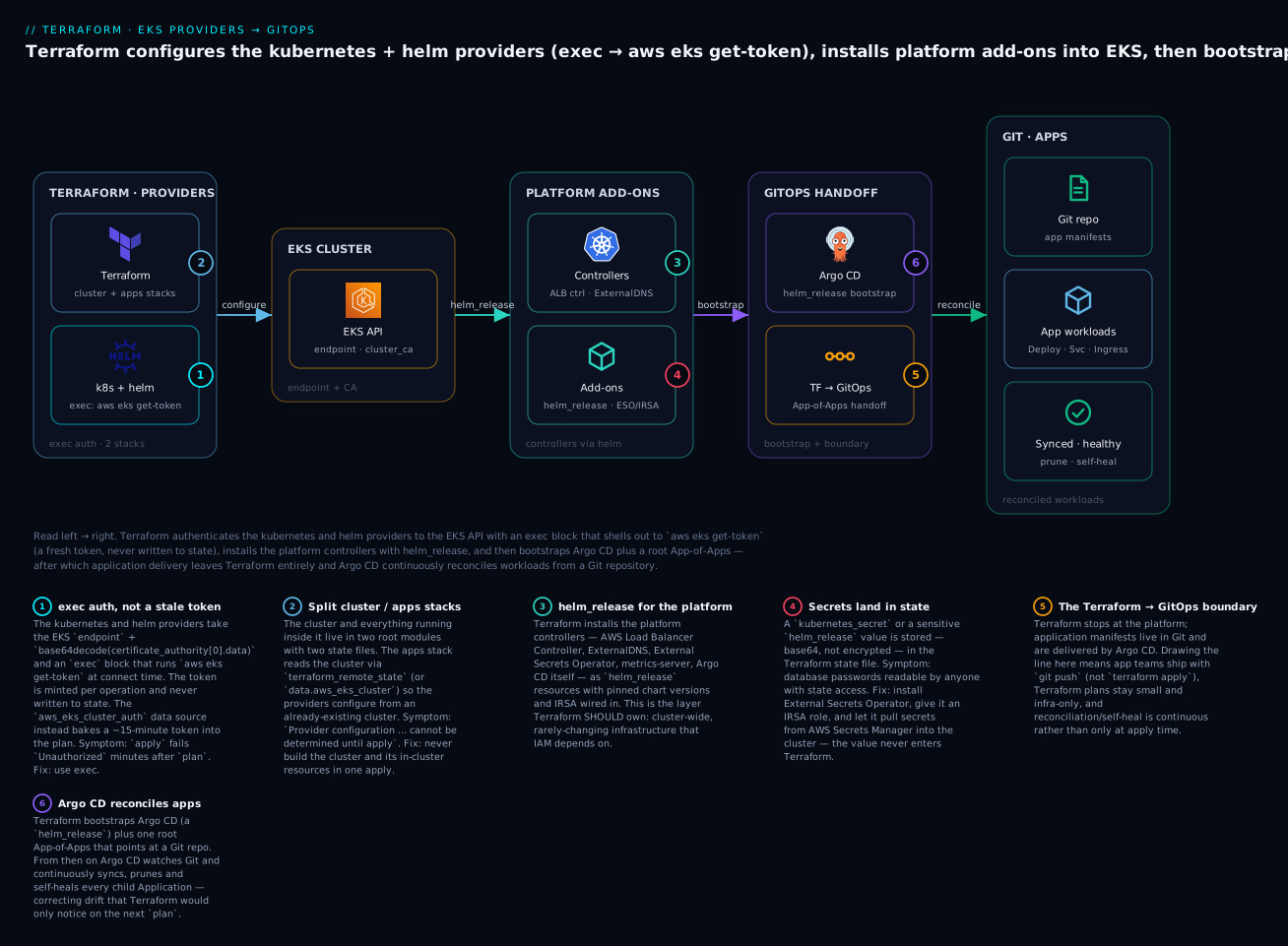
Read the diagram left to right: Terraform (badge 2 — the cluster and apps live in two separate stacks) configures the kubernetes and helm providers with an exec block that mints a fresh token, not a stale one (badge 1); those providers reach the EKS API using its endpoint and CA; Terraform installs the platform controllers with helm_release (badge 3) and wires External Secrets so credentials never land in state (badge 4); then it bootstraps Argo CD (badge 6) and crosses the Terraform → GitOps boundary (badge 5), after which Argo CD reconciles every application from Git. The six legend entries are the six decisions the rest of this lesson makes in code. This lesson assumes the cluster itself already exists, built the way the EKS cluster provisioning lesson lays it out (VPC, managed node groups, the OIDC provider that IRSA depends on), and that your AWS provider auth and S3/DynamoDB backend are configured per the Getting Started on AWS lesson.
The kubernetes and helm providers: authenticating to EKS
The kubernetes and helm providers are, at bottom, Kubernetes API clients wearing Terraform costumes. To do anything they need what any kubectl needs: the API server’s URL, the CA certificate to trust it, and a credential to prove who you are. EKS hands you the first two as cluster attributes and expects you to produce the third yourself — and how you produce it is the decision that separates a config that works forever from one that breaks every fifteen minutes.
Start with what the cluster exposes. Whether you read the cluster with a data "aws_eks_cluster" source or straight off the resource, three attributes matter:
| Attribute | Contains | Feeds provider argument | Note |
|---|---|---|---|
endpoint |
https://XXXX.gr7.<region>.eks.amazonaws.com |
host |
The API server URL |
certificate_authority[0].data |
base64-encoded PEM CA bundle | cluster_ca_certificate (after base64decode) |
Must decode — a raw paste fails TLS |
name |
The cluster name | exec args / aws_eks_cluster_auth.name |
Used to fetch the token |
identity[0].oidc[0].issuer |
The OIDC issuer URL | IRSA trust policies | Not for the provider; for IAM |
The base64 trap catches everyone once. certificate_authority[0].data is base64-encoded PEM, and the cluster_ca_certificate provider argument wants decoded PEM. Feed it the raw value and TLS fails with x509: certificate signed by unknown authority or a decode error; you must wrap it in base64decode(...). That is not optional and it is the single most common copy-paste bug in EKS provider configs.
Those three cluster attributes feed a small, fixed set of provider arguments — the same names on both the kubernetes and helm providers:
| Provider argument | What it is | Source for EKS |
|---|---|---|
host |
API server URL | data.aws_eks_cluster.this.endpoint |
cluster_ca_certificate |
PEM CA used to trust the API server | base64decode(...certificate_authority[0].data) |
token |
A static bearer token | aws_eks_cluster_auth.this.token — ⚠️ 15-min expiry |
exec |
A credential plugin run on every operation | aws eks get-token — preferred |
config_path / config_context |
Point at an existing kubeconfig | Laptop convenience; avoid in CI |
insecure |
Skip TLS verification | Never in production |
The last two rows exist mostly so you can rule them out: config_path couples the run to a kubeconfig on disk (fine on a laptop, a landmine in CI), and insecure = true disables the very TLS check the CA is there to perform. That leaves the real choice between token and exec.
Now the credential — the real decision. There are two ways to give the provider a token, and they are not equivalent:
The provider-auth decision: exec vs the aws_eks_cluster_auth data source
Option A — the exec credential plugin (preferred). You give the provider an exec block that Terraform runs every time it needs to talk to the cluster, shelling out to aws eks get-token --cluster-name <name>, which returns a short-lived token. The crucial property: the token is generated at connection time and is never stored in Terraform state or the plan. It cannot go stale between plan and apply because it is minted fresh for each.
provider "kubernetes" {
  host                   = data.aws_eks_cluster.this.endpoint
  cluster_ca_certificate = base64decode(data.aws_eks_cluster.this.certificate_authority[0].data)

  exec {
    api_version = "client.authentication.k8s.io/v1beta1"
    command     = "aws"
    args = [
      "eks", "get-token",
      "--cluster-name", data.aws_eks_cluster.this.name,
      "--region", var.region,
    ]
    # Optional: pin a profile or role so CI and laptops agree.
    # env = { AWS_PROFILE = "platform" }
  }
}
Each field of that exec block earns its place:
exec field |
Value for EKS | Why |
|---|---|---|
api_version |
client.authentication.k8s.io/v1beta1 |
The client-go exec protocol; not the dead v1alpha1 |
command |
aws |
Requires AWS CLI v2 on the runner/laptop |
args |
["eks","get-token","--cluster-name",<name>,"--region",<r>] |
The actual token request |
env |
e.g. { AWS_PROFILE = "platform" } |
Pin the profile/role so CI and laptops resolve the same identity |
Option B — the aws_eks_cluster_auth data source (the trap). This data source computes a token by presigning an STS GetCallerIdentity request. It works, and you will see it in older blog posts and modules:
# ⚠️ WORKS, BUT THE TOKEN EXPIRES IN ~15 MINUTES.
data "aws_eks_cluster_auth" "this" {
  name = data.aws_eks_cluster.this.name
}

provider "kubernetes" {
  host                   = data.aws_eks_cluster.this.endpoint
  cluster_ca_certificate = base64decode(data.aws_eks_cluster.this.certificate_authority[0].data)
  token                  = data.aws_eks_cluster_auth.this.token   # <-- computed at plan, baked into state
}
The token from aws_eks_cluster_auth is valid for roughly 15 minutes. It is computed during plan (or during the refresh phase) and written into the plan and state as a literal string. If more than fifteen minutes pass between plan and apply — a code review on the PR, a slow CI queue, a coffee — the token is dead when apply runs and you get Unauthorized. It also produces perpetual “drift”: every refresh/plan recomputes a new token, so the data source is always “changing.” It is not wrong so much as fragile, and there is a strictly better option, so use exec unless you have a specific reason not to (for example, an execution environment where you cannot run the aws binary). The full comparison:
| Dimension | exec plugin (aws eks get-token) |
aws_eks_cluster_auth data source |
|---|---|---|
| When token is generated | At connect time, every operation | At plan/refresh time, once |
| Stored in state/plan? | No | Yes (a literal token string) |
| Expiry risk | None — always fresh | ~15 min — dies between plan & apply |
| Plan noise / drift | None | Token “changes” every plan |
Requires aws CLI on the runner |
Yes | No (pure Terraform + STS) |
| Works with assumed roles / SSO | Yes (honours the AWS CLI’s chain) | Yes (uses the provider’s creds) |
| Recommended for | Almost everything | Only when you cannot exec a binary |
| Sensitive value leak | Minimal (nothing persisted) | Token sits in state until next apply |
The exec protocol version is worth a word: use api_version = "client.authentication.k8s.io/v1beta1". The older v1alpha1 is long gone, and aws eks get-token speaks v1beta1. If you see exec plugin: invalid apiVersion, that mismatch is why.
Configuring the helm provider (and the 2.x vs 3.x syntax split)
The helm provider wraps Helm and needs the exact same connection settings — but where they go changed between major versions, and this trips people who copy a snippet that assumes the other version. In the widely-deployed helm ~> 2.x provider, the Kubernetes connection is a nested kubernetes { ... } block:
# helm provider 2.x — nested kubernetes { } block
provider "helm" {
  kubernetes {
    host                   = data.aws_eks_cluster.this.endpoint
    cluster_ca_certificate = base64decode(data.aws_eks_cluster.this.certificate_authority[0].data)
    exec {
      api_version = "client.authentication.k8s.io/v1beta1"
      command     = "aws"
      args        = ["eks", "get-token", "--cluster-name", data.aws_eks_cluster.this.name, "--region", var.region]
    }
  }
}
The helm ~> 3.x provider (shipped 2025) flattens this to a single kubernetes = { ... } attribute (note the =), and exec becomes a nested attribute too:
# helm provider 3.x — kubernetes = { } attribute (note the equals sign)
provider "helm" {
  kubernetes = {
    host                   = data.aws_eks_cluster.this.endpoint
    cluster_ca_certificate = base64decode(data.aws_eks_cluster.this.certificate_authority[0].data)
    exec = {
      api_version = "client.authentication.k8s.io/v1beta1"
      command     = "aws"
      args        = ["eks", "get-token", "--cluster-name", data.aws_eks_cluster.this.name, "--region", var.region]
    }
  }
}
The demo below pins ~> 2.17 for the classic block syntax you will see in 90% of modules today, but the table tells you how to translate if you are on 3.x:
helm ~> 2.x |
helm ~> 3.x |
|
|---|---|---|
| Connection shape | kubernetes { ... } block |
kubernetes = { ... } attribute |
exec shape |
exec { ... } block |
exec = { ... } attribute |
| Config source | HCL block syntax | HCL attribute/object syntax |
| Released | Mainstream since 2021 | 2025 |
| Behaviour | Identical Helm actions | Identical Helm actions |
| Migration gotcha | — | Add =, wrap in {} as an object |
Both providers, on both versions, run identically on OpenTofu — the kubernetes, helm, and aws providers are the same binaries. Nothing in this lesson is Terraform-vs-OpenTofu specific; assume Terraform ≥ 1.6 or OpenTofu ≥ 1.6 throughout. Pin every provider in required_providers with ~> so a surprise major (like helm 2 → 3) never lands on you mid-sprint:
terraform {
  required_version = ">= 1.6"
  required_providers {
    aws        = { source = "hashicorp/aws",        version = "~> 5.60" }
    kubernetes = { source = "hashicorp/kubernetes",  version = "~> 2.31" }
    helm       = { source = "hashicorp/helm",        version = "~> 2.17" }
  }
}
The ordering problem: why cluster + apps in one apply is fragile
Here is the failure that defines this whole topic. It is tempting — obvious, even — to write one configuration that creates the EKS cluster with aws_eks_cluster and, in the same files, configures the kubernetes provider from that cluster and drops a helm_release on top. One apply, cluster and app together. It looks clean. It is a trap, and understanding exactly why is the difference between a platform engineer and someone who will spend a Saturday on it.
The root cause is Terraform’s evaluation model. Provider configurations are evaluated before resources are created, and a provider block cannot depend on values that only exist after an apply. When you write host = aws_eks_cluster.this.endpoint and the cluster does not exist yet, endpoint is an unknown value at plan time. Terraform cannot configure a provider from an unknown, so on a clean apply you get the notorious error. Even when it seems to work (because the values happen to be known from a prior state), it is fragile: the provider is configured from resources in the same graph, so destroys invert badly and any change that touches the cluster ripples into every in-cluster resource. The specific ways it breaks:
| Failure mode | Why it happens | Symptom you see |
|---|---|---|
| Provider from unknown value | Provider config references a not-yet-created cluster attribute | Provider configuration ... cannot be determined until apply / Invalid attribute in provider configuration |
kubernetes_manifest at plan |
It does a live server-side dry-run against the API | dial tcp ...: connect: connection refused during plan |
| Destroy inversion | Terraform may plan to delete the cluster before the workloads on it | Hung or errored destroy, orphaned finalizers |
| One giant blast radius | An app value change forces a re-plan of the whole cluster | Slow, terrifying applies; nobody wants to run them |
helm_release orphans |
Cluster destroyed first; Helm can’t reach the API to clean up | Kubernetes cluster unreachable on destroy |
There are three ways to deal with ordering, and only one of them is a real production answer. Know all three because you will meet all three in other people’s code:
| Pattern | How | Verdict |
|---|---|---|
| Two stacks (two states) | Cluster stack applies first; apps stack reads it via terraform_remote_state / data.aws_eks_cluster and configures providers from a live cluster |
The right answer. Independent lifecycles, clean destroy, small blast radius |
depends_on on the provider-feeding resource |
Force the cluster to exist before in-cluster resources | Helps sequencing but does not fix provider-from-unknown; still one blast radius |
-target the cluster first, then apply the rest |
terraform apply -target=aws_eks_cluster.this then a full apply |
A manual escape hatch, not a workflow. Fine once; never automate it |
The winning pattern is two root modules with two state files. The cluster stack builds the cluster (and often the core VPC and node groups) and outputs the handful of values the apps stack needs. The apps stack reads those, configures the providers against an already-existing cluster — so every attribute is known — and installs everything in-cluster. Their lifecycles are independent: you can redeploy every app forty times without ever re-planning the cluster, and a terraform destroy of the apps stack cleanly removes workloads while the cluster is still up to receive the API calls.
The join is terraform_remote_state, reading the cluster stack’s outputs from its S3 backend:
# apps stack — data.tf
data "terraform_remote_state" "cluster" {
  backend = "s3"
  config = {
    bucket = "kv-tf-state-ap-south-1"
    key    = "eks/cluster/terraform.tfstate"
    region = "ap-south-1"
  }
}

# Re-read the cluster directly for its live endpoint/CA/name.
data "aws_eks_cluster" "this" {
  name = data.terraform_remote_state.cluster.outputs.cluster_name
}
You have two ways to get the cluster’s endpoint and CA into the apps stack, and it is worth knowing the trade-off:
| Source of endpoint/CA | Pros | Cons |
|---|---|---|
terraform_remote_state.cluster.outputs.* |
One read; couples apps stack to the cluster stack’s outputs | Values are as of the cluster’s last apply (usually fine — endpoint/CA are stable) |
data "aws_eks_cluster" (fresh AWS API read) |
Always current; decoupled from what the cluster stack chose to output | An extra AWS API call; needs eks:DescribeCluster |
A common and robust compromise — the one the demo uses — is to take the cluster name from remote state (a stable string) and then read the endpoint and CA fresh from data "aws_eks_cluster", so the providers always have current connection details even if the cluster stack’s outputs lag. The remote state at scale lesson goes deeper on wiring stacks together with terraform_remote_state and the alternatives (SSM parameters, a data source per resource) when you have many stacks.
Deploying apps: helm_release, kubernetes_manifest, namespaces & secrets
With the providers configured against a live cluster, Terraform can now create objects inside it. You have two families of resources for this, and choosing between them correctly is most of the skill.
helm_release — the workhorse
helm_release installs (and upgrades, and deletes) a Helm chart. It is the right tool for anything that ships as a chart: controllers, operators, add-ons, and most off-the-shelf apps. Its important arguments:
| Argument | Purpose | Note |
|---|---|---|
name |
The Helm release name | Immutable — changing it replaces the release |
repository |
Chart repo URL | Omit for an OCI or local chart |
chart |
Chart name (or OCI ref, or local path) | e.g. podinfo, oci://.../argo-cd |
version |
Chart version | Always pin it — unpinned = silent upgrades |
namespace |
Target namespace | Pair with create_namespace |
create_namespace |
Make the namespace if absent | true for convenience |
values |
List of raw YAML value documents | The main configuration surface |
set { name value } |
Individual overrides | For a few scalars; escapes get fiddly |
set_sensitive { ... } |
Override, redacted in output | Still lands in state — see below |
atomic |
Roll back on failed install | Great for CI — no half-installed releases |
wait / timeout |
Block until resources are ready | Default waits; tune timeout for slow charts |
repository_username/_password |
Private repo auth | Or use OCI + registry.helm.sh login |
There are three ways to feed values into a chart, and idiomatic Terraform uses them in this order of preference:
| Method | When to use | Example |
|---|---|---|
values = [file("...")] |
A whole values file, unchanged | values = [file("${path.module}/values/alb.yaml")] |
values = [templatefile(...)] |
A values file with a few interpolations | inject the IRSA role ARN, cluster name, VPC id |
values = [yamlencode({...})] |
Structured values built in HCL | good for computed/looped config |
set { name = "x" value = "y" } |
One or two simple scalars | set { name = "replicaCount" value = "2" } |
templatefile is the one you will lean on for controllers, because a controller almost always needs a value that Terraform computed — an IAM role ARN, the cluster name, a VPC id. Here is the sample app first, kept trivial to prove the providers work, then the real controller:
resource "kubernetes_namespace" "demo" {
  metadata { name = "demo" }
}

resource "helm_release" "podinfo" {
  name       = "podinfo"
  repository = "https://stefanprodan.github.io/podinfo"
  chart      = "podinfo"
  version    = "6.7.1"
  namespace  = kubernetes_namespace.demo.metadata[0].name

  set {
    name  = "replicaCount"
    value = "2"
  }
  set {
    name  = "resources.requests.cpu"
    value = "50m"
  }
}
kubernetes_manifest and the raw-object family
helm_release covers charts; for raw Kubernetes objects Terraform has the kubernetes_* resource family — typed resources for the common objects, plus the generic kubernetes_manifest for anything else:
| Resource | Creates | Reach for it when |
|---|---|---|
kubernetes_namespace |
A Namespace | Placing app/platform objects |
kubernetes_config_map |
A ConfigMap | Non-secret config for a controller |
kubernetes_service_account |
A ServiceAccount | IRSA binding (annotate with the role ARN) |
kubernetes_secret |
A Secret | ⚠️ Avoid for real secrets — lands in state |
kubernetes_manifest |
Any arbitrary object / CRD / CR | A one-off raw object with no chart |
The typed resources are unremarkable; kubernetes_manifest is the powerful one, and it has a sharp edge that defines how you use it:
⚠️
kubernetes_manifesttalks to the cluster at plan time. To compute the plan it fetches the resource’s OpenAPI schema from the live API server (a server-side dry-run). Two consequences: (1) the cluster must already exist and be reachable duringplan— which is another reason for the two-stack split; and (2) if the object is a custom resource whose CRD does not yet exist at plan time, the plan fails withno matches for kind "X" in group "Y". You cannot install a CRD and a custom resource of that CRD in the same apply withkubernetes_manifest.
That CRD-at-plan-time constraint is the reason people reach for alternatives when applying custom resources (like an Argo CD Application, which is a CR of the argoproj.io CRDs). The comparison you will use to choose:
| Dimension | helm_release |
kubernetes_manifest |
|---|---|---|
| Installs | A packaged chart (many objects) | One arbitrary object |
| Plan-time cluster contact | No (renders locally, applies at apply) | Yes — server-side dry-run |
| Needs CRD to pre-exist | No (chart can ship CRD + CR together via hooks/ordering) | Yes — CRD must exist at plan |
| Diffs | Coarse (release-level; helm diff externally) |
Fine-grained per-field |
| Values / templating | Chart values (values, set) |
Raw HCL map (yamlencode, templatefile) |
| Best for | Controllers, operators, off-the-shelf apps | A handful of raw objects when no chart exists |
| Sharp edge | Unpinned version = silent upgrade |
CRD-at-plan-time; churny on server-managed fields |
The practical rule: prefer helm_release for anything chart-shaped, and use kubernetes_manifest sparingly for one-off raw objects whose CRDs already exist. When you need to apply a CR whose CRD is installed in the same run, either (a) use a chart that bundles both, or (b) reach for the community kubectl_manifest resource (from alekc/kubectl or gavinbunney/kubectl), which applies raw YAML at apply time without the plan-time schema fetch — the standard escape hatch for the CRD ordering problem.
The secrets problem: why they land in state, and what to do instead
Here is a footgun with real security consequences. Any secret material you hand to Terraform — a kubernetes_secret’s data, a set_sensitive Helm value, a password in a values file — is written into the Terraform state file in base64, which is not encryption. Anyone who can read state can read the secret. set_sensitive only redacts it from console output; it does nothing about state.
# ⚠️ ANTI-PATTERN — the password is now plaintext-equivalent in state.
resource "kubernetes_secret" "db" {
  metadata{
    name = "db-creds"
    namespace = "demo"
  }
  data = {
    password = var.db_password   # <-- lands base64 in terraform.tfstate
  }
}
The options, worst to best:
| Approach | Secret in TF state? | How it works | Verdict |
|---|---|---|---|
kubernetes_secret with data |
Yes (base64) | Terraform writes the Secret directly | Avoid for real secrets |
helm_release set_sensitive |
Yes | Redacted in output only | Avoid for real secrets |
SOPS-encrypted values + sops provider |
Ciphertext only | Terraform decrypts at apply, cipher in git | OK; key management overhead |
| External Secrets Operator + IRSA | No | ESO pulls from AWS Secrets Manager into the cluster | Best — value never touches Terraform |
| Secrets Store CSI driver (AWS provider) | No | Mounts SM/SSM secrets as files/env | Good; per-pod, no K8s Secret object |
The strong pattern is External Secrets Operator (ESO): Terraform installs the operator (a helm_release) and grants it an IRSA role that can read AWS Secrets Manager; then a SecretStore and ExternalSecret (delivered by Git, via Argo CD) tell ESO which secret to sync into which Kubernetes Secret. The actual secret value flows AWS Secrets Manager → ESO → Kubernetes, entirely outside Terraform. Terraform provisions the capability (operator + IAM) and never sees the value. That is the model to internalise: Terraform owns the plumbing for secrets, never the secrets themselves.
Where Terraform should stop: the GitOps handoff
Everything so far proves Terraform can deploy applications. The senior lesson is that for most applications it should not — and knowing where to stop is what makes a platform maintainable. Terraform and a GitOps controller (Argo CD or Flux) are good at opposite things, and the industry has converged on a division of labour that plays to each.
Terraform is a plan-and-apply tool: it computes a diff when you run it, applies it, and then stops thinking about the world until you run it again. That is exactly right for infrastructure that changes rarely and deliberately — a cluster, a node group, an IAM role, an ingress controller. It is exactly wrong for a fleet of applications that deploy dozens of times a day, where you want continuous reconciliation: if someone kubectl edits a Deployment at 3 a.m., you want it snapped back to the declared state within minutes, not “on the next terraform apply, whenever that is.” That continuous reconciliation is precisely what Argo CD and Flux do: they run in the cluster, watch a Git repository, and continuously make the cluster match Git — syncing, pruning removed resources, and self-healing drift.
So the boundary is drawn by change rate and by who owns the change. The reference table you will pin to the wall:
| Concern | Terraform owns | GitOps (Argo CD / Flux) owns |
|---|---|---|
| The EKS cluster, VPC, node groups | ✅ | — |
| IAM / IRSA roles, OIDC provider | ✅ | — |
| Cluster-wide controllers (ALB ctrl, ExternalDNS, ESO, cert-manager) | ✅ (bootstrap) | Sometimes migrated to Git later |
| Argo CD / Flux itself | ✅ (bootstrap) | — (it can manage itself after) |
| Namespaces for app teams | ✅ or GitOps | ✅ |
| Application Deployments / Services / Ingress | — | ✅ |
| App config maps, HPAs, rollouts | — | ✅ |
App secrets (via ESO ExternalSecret) |
— (installs ESO) | ✅ (the ExternalSecret manifest) |
| Change cadence | Low, deliberate | High, continuous |
| Reconciliation | Only at apply |
Continuous, self-healing |
| Who pushes changes | Platform engineers | App teams (git push) |
The head-to-head, so the trade-off is unmistakable:
| Dimension | Terraform manages apps | GitOps manages apps |
|---|---|---|
| Deploy trigger | terraform apply (pipeline or human) |
git push → auto-sync |
| Drift handling | Detected only on next plan | Continuously corrected (self-heal) |
| Rollback | Revert HCL, re-apply | Revert the Git commit; Argo syncs back |
| Blast radius | Whole stack re-planned | Per-Application, isolated |
| Who can deploy | Whoever can run Terraform (+ AWS creds) | Whoever can merge to the app repo |
| Secrets | Risk of landing in state | Stay in ESO/SM, referenced from Git |
| Audit trail | State + CI logs | Git history + Argo events |
| Best fit | Cluster + platform | Applications |
Bootstrapping Argo CD with Terraform (the handoff, in code)
The elegant part: Terraform doesn’t just stop at the boundary — it installs the thing that owns the other side. Terraform bootstraps Argo CD (a helm_release) and creates one root object — the App-of-Apps root Application — that points at a Git repository. After that single apply, Terraform’s job with applications is done forever; Argo CD reads the repo and manages every child Application declared there. New app? Add a manifest to Git; Argo CD deploys it; Terraform never runs.
# 1) Bootstrap Argo CD itself — a normal helm_release.
resource "helm_release" "argocd" {
  name             = "argocd"
  repository       = "https://argoproj.github.io/argo-helm"
  chart            = "argo-cd"
  version          = "7.7.7" # chart version — pin it
  namespace        = "argocd"
  create_namespace = true
  atomic           = true
  timeout          = 600

  values = [yamlencode({
    global = { domain = "argocd.${var.base_domain}" }
    configs = { params = { "server.insecure" = true } } # TLS terminated at the ALB
  })]
}
Now the App-of-Apps. An Argo CD Application is a custom resource of a CRD that the Argo CD chart just installed — so applying it with kubernetes_manifest would hit the CRD-at-plan-time wall on a clean apply (the CRD does not exist at plan). The clean way is to create the root Application with the argocd-apps Helm chart, which templates the Application object and applies it at apply time (after Argo CD’s CRDs exist), sequenced with depends_on:
# 2) The single root App-of-Apps — points Argo CD at your Git repo.
resource "helm_release" "root_app" {
  name       = "root"
  repository = "https://argoproj.github.io/argo-helm"
  chart      = "argocd-apps"
  version    = "2.0.2"
  namespace  = helm_release.argocd.namespace

  values = [yamlencode({
    applications = {
      root = {
        namespace = "argocd"
        project   = "default"
        source = {
          repoURL        = var.gitops_repo_url        # e.g. https://github.com/acme/eks-apps.git
          targetRevision = "main"
          path           = "apps"                     # folder of child Application manifests
        }
        destination = {
          server    = "https://kubernetes.default.svc"
          namespace = "argocd"
        }
        syncPolicy = {
          automated   = { prune = true, selfHeal = true }
          syncOptions = ["CreateNamespace=true"]
        }
      }
    }
  })]

  depends_on = [helm_release.argocd] # CRDs must exist before the CR is applied
}
The fields of that root Application are the entire contract between Terraform and Git — after this, Terraform touches none of it again:
Application field |
Meaning | Demo value |
|---|---|---|
source.repoURL |
The Git repo Argo CD watches | var.gitops_repo_url |
source.targetRevision |
Branch / tag / commit to track | main |
source.path |
Folder of child Application manifests |
apps |
destination.server |
Target cluster API | https://kubernetes.default.svc (in-cluster) |
destination.namespace |
Namespace for the child Apps | argocd |
syncPolicy.automated.prune |
Delete objects removed from Git | true |
syncPolicy.automated.selfHeal |
Revert manual drift back to Git | true |
automated = { prune = true, selfHeal = true } is the whole philosophy in two flags: prune deletes cluster objects removed from Git, and selfHeal reverts manual changes back to Git’s declared state — continuous reconciliation Terraform structurally cannot do. From here, the workflow for every application is: commit a child Application manifest under apps/ in the Git repo; Argo CD notices, creates it, and keeps it in sync. Terraform’s involvement with applications ended at helm_release.root_app.
A note on Argo CD vs Flux, since the boundary is identical for both:
| Argo CD | Flux | |
|---|---|---|
| UI | Rich web UI + CLI | CLI-first (no built-in UI) |
| Bootstrap by Terraform | helm_release of argo-cd + root Application |
helm_release/flux_bootstrap_git + Kustomization |
| App model | Application / ApplicationSet (App-of-Apps) |
Kustomization / HelmRelease (Flux CRDs) |
| Multi-tenancy | AppProject |
namespaces + RBAC |
| Best when | You want a visual, app-centric console | You want a lean, Kustomize-native GitOps |
Both are bootstrapped by Terraform the same way and both take over app delivery at the same boundary; pick on team preference, not capability. The ALB controller lesson covers the controller we install below in depth, and the production platform capstone assembles the full picture — cluster, platform add-ons, IRSA, and this GitOps handoff — into one shippable platform.
Hands-on: build it with Terraform
Time to run it. This demo assumes the cluster stack already exists (from the EKS provisioning lesson) with an S3 backend at s3://kv-tf-state-ap-south-1/eks/cluster/terraform.tfstate, exporting cluster_name, oidc_provider_arn, and oidc_provider_url as outputs, and that its OIDC provider is created (IRSA depends on it). We build the apps stack in its own directory with its own state. Region is ap-south-1 (Mumbai). Everything is copy-pasteable.
⚠️ This spends real money. An EKS cluster (~$0.10/hr control plane), node-group EC2, and any ALB the controller creates all bill by the hour. Run the
destroystep when you finish.
Step 1 — lay out the apps stack
eks-apps/
├── versions.tf        # providers + backend
├── providers.tf       # aws, kubernetes, helm — the exec auth
├── data.tf            # remote_state + aws_eks_cluster lookups
├── variables.tf
├── platform.tf        # ALB controller (IRSA) + External Secrets Operator
├── apps.tf            # podinfo sample app
├── gitops.tf          # Argo CD + root App-of-Apps
└── outputs.tf
| File | Purpose |
|---|---|
versions.tf |
Provider pins + the S3 backend (its own eks/apps key) |
providers.tf |
aws + kubernetes + helm, wired with the exec auth |
data.tf |
terraform_remote_state + aws_eks_cluster lookups |
variables.tf |
region, base_domain, gitops_repo_url |
platform.tf |
ALB controller (with IRSA) + External Secrets Operator |
apps.tf |
The podinfo sample helm_release |
gitops.tf |
Argo CD bootstrap + root App-of-Apps |
outputs.tf |
ARNs / namespaces the next layer consumes |
Step 2 — versions.tf and the backend
# versions.tf
terraform {
  required_version = ">= 1.6"

  required_providers {
    aws        = { source = "hashicorp/aws",       version = "~> 5.60" }
    kubernetes = { source = "hashicorp/kubernetes", version = "~> 2.31" }
    helm       = { source = "hashicorp/helm",       version = "~> 2.17" }
  }

  backend "s3" {
    bucket       = "kv-tf-state-ap-south-1"
    key          = "eks/apps/terraform.tfstate" # NOTE: a different key from the cluster
    region       = "ap-south-1"
    use_lockfile = true                          # S3-native locking (TF 1.10+); or dynamodb_table
    encrypt      = true
  }
}
The apps stack shares the bucket but uses a different state key from the cluster stack — that separation is the whole point of the two-stack pattern.
Step 3 — providers.tf (the exec auth) and data.tf
# data.tf
data "terraform_remote_state" "cluster" {
  backend = "s3"
  config = {
    bucket = "kv-tf-state-ap-south-1"
    key    = "eks/cluster/terraform.tfstate"
    region = "ap-south-1"
  }
}

data "aws_eks_cluster" "this" {
  name = data.terraform_remote_state.cluster.outputs.cluster_name
}
# providers.tf
provider "aws" {
  region = var.region
}

provider "kubernetes" {
  host                   = data.aws_eks_cluster.this.endpoint
  cluster_ca_certificate = base64decode(data.aws_eks_cluster.this.certificate_authority[0].data)
  exec {
    api_version = "client.authentication.k8s.io/v1beta1"
    command     = "aws"
    args        = ["eks", "get-token", "--cluster-name", data.aws_eks_cluster.this.name, "--region", var.region]
  }
}

provider "helm" {
  kubernetes {
    host                   = data.aws_eks_cluster.this.endpoint
    cluster_ca_certificate = base64decode(data.aws_eks_cluster.this.certificate_authority[0].data)
    exec {
      api_version = "client.authentication.k8s.io/v1beta1"
      command     = "aws"
      args        = ["eks", "get-token", "--cluster-name", data.aws_eks_cluster.this.name, "--region", var.region]
    }
  }
}
# variables.tf
variable "region" {
  type    = string
  default = "ap-south-1"
}

variable "base_domain" {
  type    = string
  default = "kloudvin.internal"
}

variable "gitops_repo_url" {
  type = string
}
Step 4 — platform.tf: the ALB controller with IRSA
The AWS Load Balancer Controller needs AWS permissions (to create ALBs/target groups), delivered keylessly via IRSA: an IAM role whose trust policy federates the controller’s Kubernetes service account through the cluster’s OIDC provider. Terraform builds the role and passes its ARN into the chart via templatefile.
# platform.tf
locals {
  oidc_provider_url = data.terraform_remote_state.cluster.outputs.oidc_provider_url # e.g. oidc.eks.ap-south-1.amazonaws.com/id/ABC123
  oidc_provider_arn = data.terraform_remote_state.cluster.outputs.oidc_provider_arn
}

# IAM role the controller's service account assumes (IRSA trust).
data "aws_iam_policy_document" "alb_trust" {
  statement {
    actions = ["sts:AssumeRoleWithWebIdentity"]
    effect  = "Allow"
    principals {
      type        = "Federated"
      identifiers = [local.oidc_provider_arn]
    }
    condition {
      test     = "StringEquals"
      variable = "${local.oidc_provider_url}:sub"
      values   = ["system:serviceaccount:kube-system:aws-load-balancer-controller"]
    }
    condition {
      test     = "StringEquals"
      variable = "${local.oidc_provider_url}:aud"
      values   = ["sts.amazonaws.com"]
    }
  }
}

resource "aws_iam_role" "alb" {
  name               = "eks-alb-controller"
  assume_role_policy = data.aws_iam_policy_document.alb_trust.json
}

# The official controller policy (download it, or manage inline). Attach it.
resource "aws_iam_policy" "alb" {
  name   = "AWSLoadBalancerControllerIAMPolicy"
  policy = file("${path.module}/policies/alb-controller.json")
}

resource "aws_iam_role_policy_attachment" "alb" {
  role       = aws_iam_role.alb.name
  policy_arn = aws_iam_policy.alb.arn
}

resource "helm_release" "alb_controller" {
  name       = "aws-load-balancer-controller"
  repository = "https://aws.github.io/eks-charts"
  chart      = "aws-load-balancer-controller"
  version    = "1.8.1"
  namespace  = "kube-system"

  values = [templatefile("${path.module}/values/alb.yaml.tftpl", {
    cluster_name = data.aws_eks_cluster.this.name
    role_arn     = aws_iam_role.alb.arn
    region       = var.region
    vpc_id       = data.terraform_remote_state.cluster.outputs.vpc_id
  })]
}
# values/alb.yaml.tftpl
clusterName: ${cluster_name}
region: ${region}
vpcId: ${vpc_id}
serviceAccount:
  create: true
  name: aws-load-balancer-controller
  annotations:
    eks.amazonaws.com/role-arn: ${role_arn}   # <-- IRSA binding
And External Secrets Operator, so no application secret ever enters Terraform (the operator gets its own IRSA role the same way — omitted here for length; identical trust-policy shape scoped to external-secrets:external-secrets):
resource "helm_release" "external_secrets" {
  name             = "external-secrets"
  repository       = "https://charts.external-secrets.io"
  chart            = "external-secrets"
  version          = "0.10.4"
  namespace        = "external-secrets"
  create_namespace = true
  set {
    name  = "installCRDs"
    value = "true"
  }
}
Step 5 — apps.tf and gitops.tf
apps.tf is the kubernetes_namespace + helm_release "podinfo" from earlier. gitops.tf is the helm_release "argocd" + helm_release "root_app" from the handoff section. Put them in those files as shown.
Step 6 — init, plan, apply
cd eks-apps
terraform init
Initializing the backend...
Initializing provider plugins...
- Installed hashicorp/aws v5.60.0
- Installed hashicorp/kubernetes v2.31.0
- Installed hashicorp/helm v2.17.0
Terraform has been successfully initialized!
terraform plan -var="gitops_repo_url=https://github.com/acme/eks-apps.git"
data.terraform_remote_state.cluster: Reading...
data.aws_eks_cluster.this: Read complete after 1s [name=kv-eks-dev]
...
Plan: 9 to add, 0 to change, 0 to destroy.
Note what did not happen: no Provider configuration ... cannot be determined error, because the cluster already exists and every provider input is a known value. That is the two-stack split paying off. Apply:
terraform apply -var="gitops_repo_url=https://github.com/acme/eks-apps.git" -auto-approve
helm_release.external_secrets: Creation complete after 41s [id=external-secrets]
aws_iam_role.alb: Creation complete after 3s
helm_release.alb_controller: Creation complete after 55s [id=aws-load-balancer-controller]
helm_release.podinfo: Creation complete after 22s [id=podinfo]
helm_release.argocd: Creation complete after 2m18s [id=argocd]
helm_release.root_app: Creation complete after 9s [id=root]

Apply complete! Resources: 9 added, 0 changed, 0 destroyed.
Step 7 — verify
Verify the providers reached the cluster and every layer is live:
# The sample app proves kubernetes + helm providers authenticated.
kubectl get pods -n demo
# NAME                       READY   STATUS    RESTARTS   AGE
# podinfo-7c9b8d6f5-2xk4p    1/1     Running   0          2m
# podinfo-7c9b8d6f5-9tzll    1/1     Running   0          2m

# The platform controller is up.
kubectl get deploy -n kube-system aws-load-balancer-controller
# NAME                           READY   UP-TO-DATE   AVAILABLE
# aws-load-balancer-controller   2/2     2            2

# Argo CD is up and the root App-of-Apps is registered.
kubectl get pods -n argocd
kubectl get applications -n argocd
# NAME   SYNC STATUS   HEALTH STATUS
# root   Synced        Healthy
That last command is the handoff, confirmed: the root Application exists, is Synced to Git, and Healthy. From now on, anything you commit under apps/ in the Git repo, Argo CD deploys — no Terraform. Grab the Argo CD admin password and open the UI to watch it reconcile:
kubectl -n argocd get secret argocd-initial-admin-secret \
  -o jsonpath="{.data.password}" | base64 -d && echo
kubectl -n argocd port-forward svc/argocd-server 8080:443
# open https://localhost:8080  (user: admin)
Step 8 — destroy & clean up
⚠️ Destroy the apps stack first, while the cluster is still up to receive the delete calls — this is exactly why the split matters. Argo-managed child apps live in the cluster, so let Argo prune them (or delete the root Application) before you tear down the platform:
# Optional: let Argo prune its children first for a clean teardown.
kubectl -n argocd delete application root

cd eks-apps
terraform destroy -var="gitops_repo_url=https://github.com/acme/eks-apps.git" -auto-approve
helm_release.root_app: Destroying...
helm_release.argocd: Destroying...
helm_release.podinfo: Destroying...
helm_release.alb_controller: Destroying...
...
Destroy complete! Resources: 9 destroyed.
If you destroy the cluster stack while the apps stack still has helm_release resources, those releases error with Kubernetes cluster unreachable because the API server they target is gone — the destroy-ordering trap. Apps stack down first, then the cluster stack. Only then is nothing billing.
Variables, outputs & making it reusable
The demo is already parameterised on region, base_domain, and gitops_repo_url. To make the platform reusable across dev/staging/prod, the two levers are a small platform module and for_each over the add-ons.
The for_each-over-releases pattern turns the fleet of controllers into data. Define them once as a map and loop:
variable "platform_addons" {
  description = "Helm releases that make up the platform layer."
  type = map(object({
    repository = string
    chart      = string
    version    = string
    namespace  = string
    values     = optional(list(string), [])
  }))
  default = {
    metrics-server = {
      repository = "https://kubernetes-sigs.github.io/metrics-server/"
      chart      = "metrics-server"
      version    = "3.12.1"
      namespace  = "kube-system"
    }
    external-dns = {
      repository = "https://kubernetes-sigs.github.io/external-dns/"
      chart      = "external-dns"
      version    = "1.15.0"
      namespace  = "external-dns"
    }
  }
}

resource "helm_release" "addon" {
  for_each         = var.platform_addons
  name             = each.key
  repository       = each.value.repository
  chart            = each.value.chart
  version          = each.value.version
  namespace        = each.value.namespace
  create_namespace = true
  values           = each.value.values
}
Adding a controller is now a map entry, not a copy-pasted resource block. Wrap the whole apps stack in a module and each environment becomes a thin root that passes region, gitops_repo_url (pointing at that env’s Git path), and its platform_addons map. Expose what the next layer needs:
# outputs.tf
output "argocd_namespace"    { value = helm_release.argocd.namespace }
output "alb_controller_role" { value = aws_iam_role.alb.arn }
output "gitops_repo"         { value = var.gitops_repo_url }
You do not have to roll your own for the well-trodden pieces. The community modules are excellent and worth using for the platform layer:
| Need | Community module / chart | When to use it |
|---|---|---|
| Cluster + node groups | terraform-aws-modules/eks/aws |
The cluster stack (upstream lesson) |
| IRSA roles | terraform-aws-modules/iam/aws//modules/iam-role-for-service-accounts-eks |
Every controller’s IAM — stop hand-writing trust policies |
| A bundle of add-ons | aws-ia/eks-blueprints-addons/aws |
Installs ALB controller, ExternalDNS, Karpenter, etc. with IRSA wired |
| Argo CD | argo/argo-cd Helm chart |
Bootstrap (as here) |
| App-of-Apps | argo/argocd-apps Helm chart |
The root Application |
The iam-role-for-service-accounts-eks module is the biggest time-saver: it has a pre-baked policy for the ALB controller (and ExternalDNS, ESO, cert-manager, Karpenter, etc.), so the entire platform.tf IAM block collapses to a few lines. Roll your own only when your policy is genuinely bespoke — the production platform capstone shows the blueprint-addons approach at full scale.
Going deeper
The lesson so far gets a working platform onto the cluster. This section is for keeping it working at scale: what actually happens under the auth handshake, the newer AWS identity models, why helm_release is not a reconciler, and how the two-stack split generalises.
The token is only half the story: identity mapping and Access Entries
aws eks get-token returns a string of the form k8s-aws-v1.<base64url>, whose payload is a presigned STS GetCallerIdentity URL with a short (~15-minute) expiry. When the provider presents it, EKS follows that URL back to STS, learns which IAM principal signed it, and only then decides what you may do. That second step — mapping an IAM ARN to Kubernetes RBAC — is where a perfectly valid token still yields Unauthorized, and it is invisible in every provider snippet you copy.
| Mapping mechanism | How it works | Terraform surface |
|---|---|---|
aws-auth ConfigMap (legacy) |
A ConfigMap in kube-system maps IAM ARNs → RBAC groups |
kubernetes_config_map_v1_data — one object, many editors, easy to lock yourself out |
| EKS Access Entries (2023+, preferred) | IAM principals mapped through the EKS API with managed access policies | aws_eks_access_entry + aws_eks_access_policy_association — declarative, per-principal |
A cluster’s access_config.authentication_mode is CONFIG_MAP, API_AND_CONFIG_MAP, or API; new clusters should use API. The chicken-and-egg: whoever runs the apps stack must be a principal that is already mapped. If the cluster stack created the cluster as role A but CI runs the apps stack as role B, the provider authenticates and then gets Unauthorized on the first object — so have the cluster stack grant the apps-stack role an access entry (e.g. AmazonEKSClusterAdminPolicy, or a scoped one) as part of building the cluster.
IRSA vs EKS Pod Identity for controller permissions
The lesson wires the ALB controller with IRSA — an IAM role whose trust policy federates a service account through the cluster’s OIDC provider. Since late 2023 there is a newer model, EKS Pod Identity, and you will meet both:
| IRSA | EKS Pod Identity | |
|---|---|---|
| Trust | Role trusts the cluster’s OIDC provider (<oidc>:sub) |
Role trusts pods.eks.amazonaws.com; binding is an EKS association |
| Terraform | aws_iam_role + OIDC trust doc + SA annotation |
aws_eks_pod_identity_association + the Pod Identity Agent add-on |
| Best when | Existing modules; ubiquitous support | New clusters; many-cluster fleets; one reusable role |
Neither stores a static key; both hand the pod a rotating projected token the AWS SDK exchanges for role credentials. Pod Identity removes the per-cluster OIDC-trust arithmetic, but IRSA is still what most community modules emit.
helm_release is not a reconciler — the deep reason GitOps exists
Internalise this and half the lesson’s “why” falls into place: helm_release only acts when Terraform runs. On apply it renders the chart and performs a Helm release (a three-way merge of last-applied, live, and new); then it stops thinking about the world. If a teammate kubectl edits the Deployment an hour later, Terraform is oblivious until the next plan. That gap is exactly what Argo CD’s selfHeal fills — the structural, not stylistic, reason app delivery belongs in GitOps.
When Terraform is the right owner (controllers, add-ons), these knobs matter:
| Argument | Effect |
|---|---|
atomic |
Roll the whole release back if any resource fails to become ready — never leave a pending release in CI |
cleanup_on_fail |
Delete resources created during a failed upgrade, so failures don’t leave orphans |
wait / wait_for_jobs / timeout |
Block until resources (and hook Jobs) are Ready; tune for slow charts (Argo CD, Istio) |
max_history |
Cap stored release revisions so Helm’s release secrets don’t pile up |
force_update |
Pass Helm’s --force (delete/recreate on immutable-field conflicts) — a deliberate escape hatch; leave it off |
force_update = true is the one people cargo-cult into permanence and regret: it can replace resources by deletion on a routine apply and cause an outage. Turn it on for one apply, then off.
kubernetes_manifest under the hood, and today’s alternatives
kubernetes_manifest uses Kubernetes server-side apply and does a plan-time dry-run against the live API — which is why the cluster must be reachable at plan and the CRD must already exist (else no matches for kind). SSA also makes the object owned by a field manager; if another controller writes the same fields you get a conflict, resolved with field_manager { force_conflicts = true } — powerful, and an easy way to pick a fight with a controller.
| Option | Plan-time API call? | CRD must pre-exist? | Best for |
|---|---|---|---|
kubernetes_manifest (hashicorp/kubernetes) |
Yes (SSA dry-run) | Yes | A few raw objects whose CRDs already exist |
kubectl_manifest (alekc/kubectl, maintained) |
No — applies at apply time | No | A CR in the same run its CRD is created; multi-doc YAML |
helm_release bundling chart |
No | No (chart orders CRDs first) | Anything chart-shaped |
| Hand off to Argo CD | Argo applies in-cluster | Argo handles it | Everything churny or app-shaped |
The old gavinbunney/kubectl provider is effectively unmaintained — reach for the alekc/kubectl fork. And Terraform 1.8+ gives the kubernetes provider a provider::kubernetes::manifest_decode(...) function to turn a YAML string into HCL.
Beyond two stacks: three layers and keeping churn out of state
Two stacks (cluster, apps) is the floor. At scale the platform layer becomes a third stack — cluster / platform / apps — so redeploying the ALB controller never re-plans the node groups, and each layer keeps its own state, lock, and blast radius; Terragrunt keeps them DRY. Do not use workspaces to separate layers: workspaces share one backend configuration and one set of provider blocks, reintroducing the very coupling the split exists to remove.
On the GitOps side, once you have more than a handful of apps or clusters, ApplicationSet replaces hand-written child Applications with a generator (a Git-directory generator turning every folder under apps/ into an Application, or a cluster generator fanning one app across clusters). Either way the punchline holds: application manifests must not live in Terraform state. Twenty microservices deploying forty times a day would mean a state file that churns constantly and a plan that hits the API per object. Terraform state is for slow infrastructure; the fast-moving desired state of apps belongs in Git.
Common beginner mistakes
These are misconceptions, not symptoms — the wrong mental models that lead beginners into the failures in the troubleshooting table above. Fix the model and the symptom never appears.
-
“I’ll just add the
kubernetesprovider to my cluster module.” The seductive one. A provider block is evaluated before resources exist, so it cannot read an attribute of a cluster the same run creates — on a clean apply the endpoint is unknown and Terraform refuses. The right model: a provider consumes a live cluster, so in-cluster resources belong in a second stack that reads the first viaterraform_remote_state. -
“
execvs theaws_eks_cluster_authdata source is just style.” No — it is state safety. The data source computes a ~15-minute token at plan and writes it into the plan and state;execmints one fresh per operation and stores nothing. One dies between plan and apply and shows as perpetual drift; the other cannot. Preferexecunless you genuinely cannot run a binary. -
“
set_sensitivekeeps my secret out of harm’s way.” It only redacts the value from console output. The secret still lands interraform.tfstatein base64, which is encoding, not encryption. The right model: Terraform provisions the capability to fetch secrets (External Secrets Operator + IRSA) and never touches the value. -
“
helm_releasewill keep my app in sync with the chart.” It reconciles only when Terraform runs; drift at 3 a.m. sits there until your nextapply. Continuous reconciliation is a different tool’s job — the entire reason to hand apps to Argo CD. -
“I’ll manage all my app YAML in Terraform with
kubernetes_manifest.” For a handful of static objects, fine. For real applications it means a plan-time API call per object, state that churns on every deploy, and lock contention across the team. Application desired-state belongs in Git; Terraform state is for slow infrastructure. -
“Argo CD is just another way to run
terraform apply.” Argo runs inside the cluster and continuously makes it match Git — pruning removed objects and self-healing manual edits. Terraform computes a diff when you invoke it, then stops. They are opposite tools; use each for what it is good at. -
“IRSA means storing an AWS key in a Kubernetes Secret.” IRSA is keyless: the pod receives a short-lived projected token that the AWS SDK exchanges for role credentials through the cluster’s OIDC provider. If you find yourself creating a
kubernetes_secretfull ofAWS_ACCESS_KEY_ID, stop — that is the exact thing IRSA exists to eliminate.
Common mistakes and troubleshooting
These are the failures that actually page people on EKS provider work. Scan the table; the prose below unpacks the six nastiest.
| Symptom | Likely cause | Fix |
|---|---|---|
Provider configuration ... cannot be determined until apply |
Provider configured from a cluster created in the same apply | Split into two stacks; apps stack reads a live cluster |
Unauthorized on apply, minutes after a clean plan |
aws_eks_cluster_auth token (~15 min) went stale |
Switch to the exec plugin (aws eks get-token) |
x509: certificate signed by unknown authority |
Forgot base64decode on certificate_authority[0].data |
Wrap the CA in base64decode(...) |
exec plugin: invalid apiVersion "...v1alpha1" |
Old exec API version | Use client.authentication.k8s.io/v1beta1 |
no matches for kind "Application" in group "argoproj.io" at plan |
kubernetes_manifest for a CR whose CRD isn’t installed yet |
Install via a chart / argocd-apps; or use kubectl_manifest (apply-time) |
dial tcp ...: connect: connection refused during plan |
kubernetes_manifest doing a plan-time dry-run against an unreachable cluster |
Ensure the cluster pre-exists (two stacks); avoid kubernetes_manifest for greenfield |
DB password visible in terraform.tfstate |
kubernetes_secret / set_sensitive writes secrets to state |
Use External Secrets Operator + IRSA; keep secrets out of TF |
helm_release stuck / context deadline exceeded / pending-install |
Chart resources never became ready; a prior failed install left it pending |
atomic = true + bump timeout; helm uninstall the stuck release, re-apply |
Kubernetes cluster unreachable on destroy |
Destroyed the cluster stack before the apps stack | Destroy apps stack first, then the cluster stack |
ALB controller pod AccessDenied creating a load balancer |
IRSA role/trust wrong (sub/aud) or policy missing | Fix the trust sub to system:serviceaccount:<ns>:<sa>; attach the policy |
Error: Kubernetes cluster unreachable: the server has asked for the client to provide credentials |
aws CLI not on the runner, or wrong AWS profile in exec |
Install AWS CLI v2 on the runner; set exec.env / AWS_PROFILE |
Argo CD Application stuck OutOfSync / ComparisonError |
Bad repoURL/path, or repo not reachable from the cluster |
Fix the source; add repo creds; check argocd-repo-server logs |
Provider-unknown-at-plan is the defining failure of this topic, and its fix is architectural, not a flag. If your provider block references aws_eks_cluster.this.endpoint and that cluster is in the same configuration, a clean apply has no value for endpoint at plan time and Terraform refuses. depends_on and -target are band-aids that do not address the core issue that provider configs cannot consume unknowns. The only durable answer is two stacks: the apps stack reads an already-applied cluster, so every provider input is known. Internalise it as a rule — never configure the kubernetes/helm providers from a cluster resource in the same root module.
Token-expiry drift is subtle because everything looks fine until it doesn’t. With aws_eks_cluster_auth the token is computed at plan and stored, valid ~15 minutes — so in a pipeline with an approval gate between plan and apply, or on a busy runner, it dies and apply fails Unauthorized intermittently, the worst kind of bug. The exec plugin eliminates it entirely: no token in state, none to expire.
CRD-at-plan-time bites when you apply a custom resource (an Argo CD Application, a cert-manager ClusterIssuer, an ESO ExternalSecret) with kubernetes_manifest before its CRD exists. Because kubernetes_manifest fetches the object’s schema from the live API at plan, and the CRD is not there yet, the plan fails no matches for kind. Three escapes: install the CRD-bearing chart and the CR in separate applies; use a chart that bundles both (like argocd-apps); or use the kubectl_manifest resource, which applies raw YAML at apply time with no plan-time schema fetch. The demo uses the argocd-apps chart precisely to sidestep this for the root Application.
Secret-in-state is a security incident waiting to happen. terraform.tfstate stores kubernetes_secret data and set_sensitive values in base64 — trivially decodable, not encrypted. Anyone with read access to the state backend can read every secret. The fix is to keep secrets out of Terraform entirely: install External Secrets Operator, grant it an IRSA role to read AWS Secrets Manager, and let ExternalSecret manifests (delivered by Git) sync values into the cluster. Terraform provisions the capability and never sees the value. If you must put a secret through Terraform, encrypt it with SOPS so only ciphertext is in git and state.
Helm release stuck means the chart’s resources never became Ready within the timeout, or a prior failed install left the release in pending-install/pending-upgrade, and Terraform eventually errors context deadline exceeded. Two habits fix most of it: set atomic = true so a failed install rolls back instead of leaving a half-installed pending release, and raise timeout for slow charts (Argo CD, Istio). To clear an inherited stuck release, helm -n <ns> uninstall <name>, then re-apply.
Destroy ordering inverts the create order and is the reason the two-stack split matters as much on the way down as on the way up. helm_release resources need to reach the cluster’s API to uninstall; if the cluster is already gone, they error Kubernetes cluster unreachable and the destroy hangs with orphaned finalizers. Always tear down the apps stack (which talks to the cluster) before the cluster stack (which removes it). Within the apps stack, let Argo CD prune its children — or delete the root Application — before destroying, so Argo-managed workloads with finalizers don’t block the teardown.
Cost, cleanup & production notes
The apps stack itself is nearly free — Helm releases and IAM roles cost nothing. What costs money is the cluster this all runs on and anything the controllers create (notably an ALB when you deploy an Ingress). Rough Mumbai (ap-south-1) figures to make the “destroy it” case concrete:
| Component | Rate (approx) | Left running ~24h |
|---|---|---|
| EKS control plane | ~$0.10/hr | ~$2.40 (~₹200) |
2 × t3.large nodes |
~$0.09/hr each | ~$4.30 (~₹360) |
| ALB created by the controller (per Ingress) | ~$0.025/hr + LCU | ~$0.60+ (~₹50+) |
| NAT gateway (from the cluster stack) | ~$0.05/hr + data | ~$1.20 (~₹100) |
| Helm releases, IAM roles, Argo CD | $0 | ₹0 |
| Rough total | — | ~$8–9/day (~₹700) |
The single biggest lever is not leaving it running: terraform destroy the apps stack, then the cluster stack. The subtle cost trap is orphaned ALBs — if the controller created a load balancer for an Ingress and you delete the Ingress out from under it (or destroy in the wrong order), the ALB can leak and keep billing; verify in the EC2 console after teardown. Five production-hardening notes beyond the demo:
- State is sensitive — treat it accordingly. Even with ESO keeping app secrets out, the apps stack’s state can hold IAM ARNs and, if you slip,
kubernetes_secretdata. Keep state in an encrypted, access-controlled, versioned S3 bucket with locking; never local, never in git. - Draw the Terraform/GitOps boundary and enforce it. Terraform owns cluster + platform; Git owns apps. Resist the pull to
terraform applyan application “just this once” — it erodes the boundary and reintroduces drift Terraform won’t reconcile. - Pin every chart
versionand every provider. Unpinnedhelm_release.versionmeans a re-apply can silently jump chart major versions; unpinned providers can land helm 2 → 3 on you. Pin with explicit versions and~>, and bump deliberately. - Use IRSA (or EKS Pod Identity) for every controller — never node-role permissions. Scope each controller’s IAM to exactly its service account via the OIDC trust
sub. Broad node-instance-profile permissions are a lateral-movement risk. - Bootstrap Argo CD, then let it manage itself and drift-detect the platform. After bootstrap, move the platform charts’ desired state into Git so Argo reconciles them too, and run scheduled
terraform plan(drift detection) on the cluster stack to catch out-of-band changes.
Practice challenges
Work these in order; they escalate from a one-line fix to a fleet-scale design. Each solution notes the why in one line.
1. (Beginner) Fix a broken provider. A colleague’s provider "kubernetes" fails with x509: certificate signed by unknown authority and exec plugin: invalid apiVersion "client.authentication.k8s.io/v1alpha1". What two changes fix it?
<details><summary>Solution</summary>
provider "kubernetes" {
  host                   = data.aws_eks_cluster.this.endpoint
  cluster_ca_certificate = base64decode(data.aws_eks_cluster.this.certificate_authority[0].data) # (1) decode
  exec {
    api_version = "client.authentication.k8s.io/v1beta1" # (2) v1beta1, not v1alpha1
    command     = "aws"
    args        = ["eks", "get-token", "--cluster-name", data.aws_eks_cluster.this.name, "--region", var.region]
  }
}
Why: certificate_authority[0].data is base64-encoded PEM (needs base64decode), and aws eks get-token speaks the v1beta1 exec protocol.
</details>
2. (Beginner) Kill the 15-minute token. Convert a provider that uses token = data.aws_eks_cluster_auth.this.token to the exec pattern, and say what stops appearing in terraform plan.
<details><summary>Solution</summary>
Replace the token = ... line with the exec { ... } block from challenge 1 and delete the data "aws_eks_cluster_auth" source. Why: the exec token is generated at connect time and never stored, so both the perpetual “token changed” diff and the between-plan-and-apply Unauthorized disappear.
</details>
3. (Intermediate) Split a monolith. You inherit one main.tf that creates aws_eks_cluster.this and a helm_release.podinfo on it, and it fails clean applies with Provider configuration ... cannot be determined until apply. Outline the refactor.
<details><summary>Solution</summary>
Two root modules with two state keys. The cluster stack keeps aws_eks_cluster and outputs cluster_name (plus the OIDC outputs). The apps stack reads it and configures the provider from a live cluster:
data "terraform_remote_state" "cluster" {
  backend = "s3"
  config  = { bucket = "kv-tf-state-ap-south-1", key = "eks/cluster/terraform.tfstate", region = "ap-south-1" }
}
data "aws_eks_cluster" "this" { name = data.terraform_remote_state.cluster.outputs.cluster_name }
Why: a provider cannot consume the unknown attributes of a cluster created in the same run; reading an already-applied cluster makes every input known. </details>
4. (Intermediate) Add a controller as data. Add ExternalDNS to the platform using the for_each-over-a-map pattern rather than a copy-pasted resource block. Write the map entry.
<details><summary>Solution</summary>
external-dns = {
  repository = "https://kubernetes-sigs.github.io/external-dns/"
  chart      = "external-dns"
  version    = "1.15.0"
  namespace  = "external-dns"
}
Add it to var.platform_addons; the existing helm_release "addon" with for_each = var.platform_addons installs it. Why: turning controllers into map data makes adding one a data change, not new code — though it still needs its own IRSA role scoped to external-dns:external-dns.
</details>
5. (Advanced) Escape the CRD-at-plan wall. Applying an Argo CD Application with kubernetes_manifest fails on a clean apply with no matches for kind "Application" in group "argoproj.io". Give two fixes and the trade-off.
<details><summary>Solution</summary>
(a) Use the argocd-apps Helm chart to template the Application — it applies at apply time, after Argo’s CRDs exist, sequenced with depends_on = [helm_release.argocd]. (b) Use kubectl_manifest (alekc/kubectl), which applies raw YAML at apply time with no plan-time schema fetch. Why: kubernetes_manifest does a plan-time dry-run that needs the CRD to already exist; both alternatives defer the write until after the CRD is installed. Trade-off: the chart is idiomatic here, while kubectl_manifest is the general escape hatch but adds a community provider.
</details>
6. (Advanced) Enforce the boundary in code. Your team keeps sneaking application Deployments into the apps stack as kubernetes_manifest. Design a guardrail that fails CI when an application object appears in Terraform, and describe the intended end state.
<details><summary>Solution</summary>
Run a policy check (OPA/conftest or a Checkov custom policy) over the plan JSON that fails if any kubernetes_manifest has manifest.kind in {Deployment, Service, Ingress, HorizontalPodAutoscaler}. Intended end state: those objects live under apps/ in the GitOps repo and are reconciled by the root App-of-Apps (or an ApplicationSet Git-directory generator); Terraform only ever bootstraps Argo CD and platform controllers. Why: the boundary holds only if something enforces it — otherwise “just this once” erodes it back into drift-prone terraform applys.
</details>
Cheat-sheet
| Task | HCL / command |
|---|---|
| kubernetes provider (exec) | provider "kubernetes" { host cluster_ca_certificate exec { command="aws" args=["eks","get-token",...] } } |
| Decode the CA | cluster_ca_certificate = base64decode(data.aws_eks_cluster.this.certificate_authority[0].data) |
| exec api_version | api_version = "client.authentication.k8s.io/v1beta1" |
| helm provider 2.x | provider "helm" { kubernetes { host ... exec {...} } } |
| helm provider 3.x | provider "helm" { kubernetes = { host ... exec = {...} } } |
| Read the cluster (fresh) | data "aws_eks_cluster" "this" { name = ... } → .endpoint, .certificate_authority[0].data |
| Short-lived token (⚠️) | data "aws_eks_cluster_auth" "this" { name = ... } → .token (15 min) |
| Join two stacks | data "terraform_remote_state" "cluster" { backend="s3" config={...} } |
| Install a chart | resource "helm_release" "x" { repository chart version namespace values=[...] } |
| Templated values | values = [templatefile("${path.module}/values/x.yaml.tftpl", { role_arn = ... })] |
| Raw object | resource "kubernetes_manifest" "x" { manifest = { apiVersion kind metadata spec } } |
| Apply CR before CRD exists | use argocd-apps/bundling chart, or kubectl_manifest (apply-time) |
| IRSA trust condition | condition { variable = "${oidc}:sub" values = ["system:serviceaccount:<ns>:<sa>"] } |
| Bootstrap Argo CD | helm_release "argocd" { repository="https://argoproj.github.io/argo-helm" chart="argo-cd" } |
| Root App-of-Apps | helm_release "root_app" { chart="argocd-apps" values=[yamlencode({applications={...}})] } |
| Continuous reconcile | syncPolicy = { automated = { prune = true, selfHeal = true } } |
| Verify handoff | kubectl get applications -n argocd → Synced / Healthy |
| Destroy order | apps stack first (terraform destroy), then the cluster stack |
Glossary
kubernetesprovider — Terraform’s client for the Kubernetes API; creates raw objects (namespaces, config maps, service accounts, manifests) inside a cluster.helmprovider — Terraform’s wrapper around Helm; installs, upgrades, and deletes charts through thehelm_releaseresource.helm_release— The resource that installs one Helm chart (a packaged bundle of Kubernetes objects). Pin itsversionor you get silent upgrades.kubernetes_manifest— A resource for one arbitrary Kubernetes object; does a plan-time dry-run against the live API, so the cluster must be reachable and any CRD must already exist.- exec credential plugin — The
exec { ... }block on a provider that runs an external command to fetch a fresh auth token at connect time. For EKS it runsaws eks get-token. aws eks get-token— AWS CLI command returning a short-livedk8s-aws-v1.*token (a presigned STS request); minted fresh per operation, never stored in state.aws_eks_cluster_auth— A data source that computes an EKS token at plan time. Works, but the ~15-minute token is baked into state and expires between plan and apply — preferexec.cluster_ca_certificate— The provider argument holding the API server’s CA. EKS exposes it base64-encoded, so you must wrap it inbase64decode(...).- IRSA (IAM Roles for Service Accounts) — Keyless AWS auth for pods: an IAM role trusts the cluster’s OIDC provider and binds to a service account, which receives a projected token exchanged for role credentials.
terraform_remote_state— A data source that reads another stack’s outputs from its backend; the join that lets the apps stack read the cluster stack.- Two-stack pattern — Splitting cluster and in-cluster workloads into two root modules with two state files, so providers read a live cluster and lifecycles and blast radius stay independent.
- Provider-from-unknown — The trap where a provider block references an attribute of a resource created in the same apply; the value is unknown at plan and Terraform errors
cannot be determined until apply. - GitOps — An operating model where a controller running in the cluster continuously reconciles it to match a Git repository (the source of truth), pruning and self-healing drift.
- Argo CD / Flux — The two mainstream GitOps controllers; bootstrapped by Terraform, they then own continuous application delivery from Git.
- App-of-Apps — A single root Argo CD
Applicationpointing at a Git folder of childApplicationmanifests; adding an app means committing a manifest, not running Terraform. syncPolicy(prune,selfHeal) — Argo CD flags:prunedeletes cluster objects removed from Git;selfHealreverts manual drift back to Git’s declared state.- External Secrets Operator (ESO) — An operator that syncs secrets from AWS Secrets Manager (or similar) into Kubernetes Secrets, so values never pass through Terraform state.
Interview and exam questions
1. Why is exec/aws eks get-token preferred over the aws_eks_cluster_auth data source for the kubernetes provider? The exec plugin mints a fresh token at connect time and never writes it to state; aws_eks_cluster_auth computes a ~15-minute token at plan time and bakes it into the plan/state, so it goes stale between plan and apply (intermittent Unauthorized) and shows as perpetual drift.
2. You forgot one function on the CA and TLS fails. Which? base64decode. certificate_authority[0].data is base64-encoded PEM; the cluster_ca_certificate argument needs it decoded, or you get x509: certificate signed by unknown authority.
3. Why can’t you create the EKS cluster and a helm_release on it in the same apply? Provider configurations are evaluated before resources exist and cannot consume unknown values; on a clean apply the cluster’s endpoint/CA are unknown at plan, so the provider config is invalid (cannot be determined until apply). Split into two stacks.
4. What is special about kubernetes_manifest at plan time? It contacts the live API server for a server-side dry-run/schema fetch during plan, so the cluster must already exist and the resource’s CRD must already be installed at plan time — otherwise no matches for kind. helm_release has neither requirement.
5. Where do secrets go when you use kubernetes_secret or set_sensitive, and what’s the fix? Into terraform.tfstate, base64-encoded (not encrypted) — readable by anyone with state access. Fix: External Secrets Operator + IRSA (values flow AWS Secrets Manager → cluster, never through Terraform), or SOPS for cipher-only-in-git.
6. Draw the Terraform vs GitOps boundary. What does each own? Terraform owns the cluster, VPC, node groups, IAM/IRSA, and bootstraps the platform controllers and Argo CD/Flux. GitOps owns application Deployments/Services/Ingress/config and reconciles them continuously from Git. Terraform = low-cadence infra; GitOps = high-cadence apps.
7. How does Terraform “hand off” to GitOps in code? It installs Argo CD with a helm_release, then creates a single root App-of-Apps Application (via the argocd-apps chart) pointing at a Git repo with syncPolicy.automated { prune, selfHeal }. Thereafter Argo CD manages every app from Git; Terraform doesn’t run for app changes.
8. Why bootstrap the root Application with the argocd-apps chart instead of kubernetes_manifest? The Application is a CR of a CRD that the Argo CD chart just installed; kubernetes_manifest needs the CRD at plan time and would fail no matches for kind on a clean apply. The argocd-apps chart templates and applies the Application at apply time (after CRDs exist), sequenced with depends_on.
9. (Terraform Associate) Why must the apps stack use a different backend key from the cluster stack? So they have separate state files and independent lifecycles/locks. Sharing a key would merge their states, defeating the two-stack split and coupling their blast radius.
10. (Terraform Associate) A helm_release is stuck at pending-install after a timeout. What happened and how do you prevent it? The chart’s resources didn’t become ready within timeout, leaving the release pending. Set atomic = true (roll back on failure) and raise timeout; clear a stuck release with helm uninstall before re-applying.
11. In what order do you destroy, and why? Apps stack first, then the cluster stack. helm_release uninstalls must reach the cluster API; if the cluster is gone first they error Kubernetes cluster unreachable. Delete the Argo root Application (to prune children) before destroying.
12. How does a platform controller get AWS permissions without static keys? IRSA: an IAM role whose trust policy federates the controller’s Kubernetes service account through the cluster’s OIDC provider (condition on <oidc>:sub = system:serviceaccount:<ns>:<sa>), and the SA annotated with eks.amazonaws.com/role-arn. The pod assumes the role via a projected token — no stored credentials.
Key takeaways
- Configure the
kubernetes/helmproviders from the cluster’sendpoint+base64decode(certificate_authority[0].data)+ anexecblock callingaws eks get-token. The exec token is fresh per operation and never stored — unlike theaws_eks_cluster_authdata source’s ~15-minute token, which drifts and dies between plan and apply. - Never build the cluster and its in-cluster resources in one apply. Provider configs can’t consume unknown values, so split into two stacks: a cluster stack, and an apps stack that reads a live cluster via
terraform_remote_state/data.aws_eks_cluster.depends_onand-targetare band-aids, not the fix. helm_releaseis the workhorse;kubernetes_manifestis the sharp-edged special case that contacts the API at plan time and needs CRDs to pre-exist. Prefer charts; for a CR whose CRD is installed in the same run, use a bundling chart orkubectl_manifest.- Secrets handed to Terraform land in state, base64, not encrypted. Keep them out entirely with External Secrets Operator + IRSA; Terraform provisions the capability, never the value.
- Terraform provisions the platform; GitOps delivers the apps. Draw the boundary at change rate: cluster/controllers/IAM in Terraform, applications in Git. Terraform then bootstraps Argo CD and one root App-of-Apps — and app delivery leaves Terraform for good.
- Argo CD reconciles continuously (
prune+selfHeal); Terraform reconciles only atapply. That difference is the entire reason for the handoff — continuous drift correction is Argo’s job, not Terraform’s. - Destroy the apps stack before the cluster stack, and let Argo prune its children first, or
helm_releaseuninstalls failKubernetes cluster unreachable.