In a nutshell
Every pod on Kubernetes starts life with amnesia: kill it, and whatever it wrote to disk is gone. To run a database, a message broker, or anything that must remember, you have to hand the pod a piece of storage that outlives it. On AWS the tool for that is Amazon EBS, and the EBS CSI driver is the adapter that lets Kubernetes ask AWS for one automatically.
The mental model: the EBS CSI driver gives each pod its own private hard drive that follows it around. When the pod moves to a new node, its drive detaches from the old node and re-attaches to the new one — same disk, same data. But it is a private drive: exactly one pod can plug into it at a time (single-attach block storage), and it physically lives in a single Availability Zone, so the pod can only ever run where its disk is. Contrast that with EFS, which is a shared drive that many pods across many AZs read and write at once — a different tool for a different job (the sibling EFS CSI lesson covers it).
Terraform’s job in this story is to build the plumbing once, as code: install the driver as an EKS add-on, give it a narrowly-scoped IAM identity (IRSA) so it — and only it — may call the EC2 API, and publish a StorageClass that says “when a pod asks for a disk, make it a fast, encrypted gp3 volume in that pod’s zone.” After that, an app author writes a three-line request (“I need 10 GiB”) and a real, billable EBS volume appears, binds, and mounts — no ticket, no console clicking.
Level: Advanced · Time: ~59 min
Before you start, you should be comfortable with: core Terraform (providers, variables, for_each, state) from the foundation tier; the aws provider auth and S3/DynamoDB backend from Getting Started on AWS; a running EKS cluster with an OIDC provider from Provisioning EKS and the IRSA pattern from EKS OIDC & IRSA. No prior CSI or storage knowledge is assumed — the model is built from scratch below.
After this lesson you will be able to:
- Install the EBS CSI driver as a managed EKS add-on in Terraform and wire it to a least-privilege IRSA role.
- Author a production-shaped gp3 StorageClass — encrypted, expandable,
WaitForFirstConsumer— and make it the cluster default. - Run a StatefulSet whose PVCs dynamically provision real, encrypted EBS volumes, and prove it with
kubectland the EC2 API. - Grow a volume online, change its IOPS/throughput on the fly, and take and restore CSI snapshots.
- Explain and design around the single-AZ attach constraint that marries a stateful pod to one Availability Zone.
- Diagnose the classic failures —
PendingPVCs,volume node affinity conflict, wedged attachments — and tune the add-on for scale.
A fresh EKS cluster can schedule a thousand stateless pods and lose none of them — but ask it to run a single Postgres, a Kafka broker, a Prometheus TSDB, or anything that must remember something after a restart, and you discover the cluster has no durable storage at all until you give it some. There is no default place for a pod’s data to live that survives the pod. On AWS the answer for single-writer, low-latency, block storage is Amazon EBS, and the bridge between “a pod wants a 10 GiB volume” and “AWS creates, attaches, and formats an EBS volume on the right node” is the EBS CSI driver — a controller that speaks the Kubernetes storage API on one side and the EC2 API on the other. This lesson builds that bridge with Terraform: the driver installed as a first-class EKS add-on, permissioned with IRSA (not node-role credentials), fronted by a gp3 StorageClass tuned the way production wants it, and exercised by a real StatefulSet whose PersistentVolumeClaim binds an actual EBS volume you can see in aws ec2 describe-volumes.
Storage on Kubernetes is where a lot of otherwise-competent platform engineers get quietly burned, because the failure modes are not loud. A misconfigured StorageClass does not error at apply time — it errors hours later when the first PVC hangs Pending with a cryptic event, or weeks later when a pod cannot reschedule because its EBS volume is trapped in an Availability Zone the pod can no longer be placed in. The two settings that prevent most of that pain — the IRSA role on the driver and volumeBindingMode: WaitForFirstConsumer on the StorageClass — are exactly the two settings people copy wrong from an old blog. We treat both as first-class topics, not footnotes, alongside the one physical fact that governs every stateful design on AWS: an EBS volume lives in a single Availability Zone and attaches to one node at a time. Internalise that and half of “why won’t my pod start” answers itself.
By the end you will have a complete, copy-pasteable configuration you run yourself: terraform init → plan → apply installs the add-on, the IRSA role, and a default gp3 StorageClass; a StatefulSet then binds two encrypted EBS volumes; you verify with kubectl get pv,pvc and the EC2 API, grow a volume online by editing the PVC, snapshot it through the CSI snapshot controller, and terraform destroy — with the ⚠️ PVC-and-reclaim gotcha spelled out so you do not leave orphaned volumes billing overnight. Every knob is laid out in reference tables you will come back to: the PV/PVC/StorageClass object model, the add-on-versus-Helm install matrix, the StorageClass parameter set, the volumeBindingMode decision, and a troubleshooting table for the failures that actually happen.
This lesson assumes the cluster already exists. If you need to build it, the companion Provisioning EKS: VPC, Node Groups & the Cluster lesson stands up the VPC and managed node groups, and EKS OIDC & IRSA: IAM Roles for Service Accounts builds the OIDC provider and the IRSA pattern this driver depends on. For shared, multi-writer, multi-AZ storage — the opposite trade-off from EBS — see the sibling EKS EFS CSI: Shared ReadWriteMany Storage lesson. Core Terraform (HCL, providers, variables, state, modules, for_each) is assumed from the course foundation tier, and the aws provider auth plus the S3/DynamoDB backend from Getting Started on AWS: Provider Auth & S3/DynamoDB Backend. We pin hashicorp/aws ~> 5.0 and hashicorp/kubernetes ~> 2.35, assume Terraform ≥ 1.6 (OpenTofu is a drop-in), and run in ap-south-1 (Mumbai) to keep the INR bill small.
What you’ll build
The scenario is the one every team hits the first time a “we’ll run it on Kubernetes” project needs a database: a stateful workload that must keep its data across pod restarts, node replacements, and rolling updates. Concretely, one terraform apply produces the EBS CSI driver as an EKS add-on, an IAM role for its controller ServiceAccount (IRSA) bearing AmazonEBSCSIDriverPolicy, and a gp3 StorageClass marked cluster-default with WaitForFirstConsumer, encrypted = true, and allowVolumeExpansion = true. Then you apply a two-replica StatefulSet whose volumeClaimTemplates mint one PVC per replica; the driver dynamically provisions two encrypted gp3 EBS volumes — each in the AZ where its pod landed — attaches them, and the pods start writing. You will see two Bound PVCs, two PersistentVolumes, and two real volumes in the EC2 console, then grow one from 10 GiB to 20 GiB with a single PVC edit and snapshot it.
Why Terraform rather than eksctl, kubectl apply, or raw Helm? Because the driver, its IAM role, and the StorageClass are infrastructure you provision once per cluster and change over time — precisely what declarative IaC is for. The add-on’s version, the IRSA trust policy, and the StorageClass parameters all drift if managed by hand, and drift in the storage layer is the kind you find out about during an incident. The comparison is worth pinning down:
| Approach | Installs the driver | Manages the IRSA role | StorageClass as code | Drift visible | Best for |
|---|---|---|---|---|---|
kubectl apply / raw manifests |
Yes (self-managed) | No — you wire IAM by hand | Only if you keep the YAML | No | One-off labs |
eksctl |
Yes (add-on or manifest) | Yes (creates IRSA) | No | No — imperative | Quick cluster bootstraps |
Helm (aws-ebs-csi-driver chart) |
Yes | You pass a pre-made role ARN | Chart values, if you template them | Partial (Helm state) | Chart-standardised platforms |
Terraform (aws + kubernetes) |
aws_eks_addon |
aws_iam_role + OIDC trust |
kubernetes_storage_class |
plan shows it |
Repeatable platforms, fleets, GitOps |
Terraform’s edge is not that it is the only tool that can install a CSI driver — Helm and eksctl both can. It is that the same plan → apply → destroy workflow, the same state discipline, and the same CI pipeline cover the add-on, the IAM role that permissions it, the StorageClass that configures it, and the VPC and node groups underneath — one workflow across the whole stack. Here is the full build as a table of resources so you can see the moving parts before the code:
| Resource | Terraform type | Role in the build |
|---|---|---|
| Cluster lookup | data.aws_eks_cluster / _auth |
Read endpoint, CA, and a token to talk to the API |
| OIDC provider lookup | data.aws_iam_openid_connect_provider |
The trust anchor IRSA federates against |
| Add-on version lookup | data.aws_eks_addon_version |
Pick a compatible driver version for the cluster |
| Driver IAM role | aws_iam_role |
The identity the CSI controller assumes |
| Policy attachment | aws_iam_role_policy_attachment |
AmazonEBSCSIDriverPolicy → the role |
| EBS CSI add-on | aws_eks_addon |
Installs and lifecycles the driver, wired to the role |
| Default StorageClass | kubernetes_storage_class |
gp3, encrypted, WaitForFirstConsumer, expandable |
| The workload | StatefulSet + PVCs (YAML/kubectl) |
Consumes the class, binds real EBS volumes |
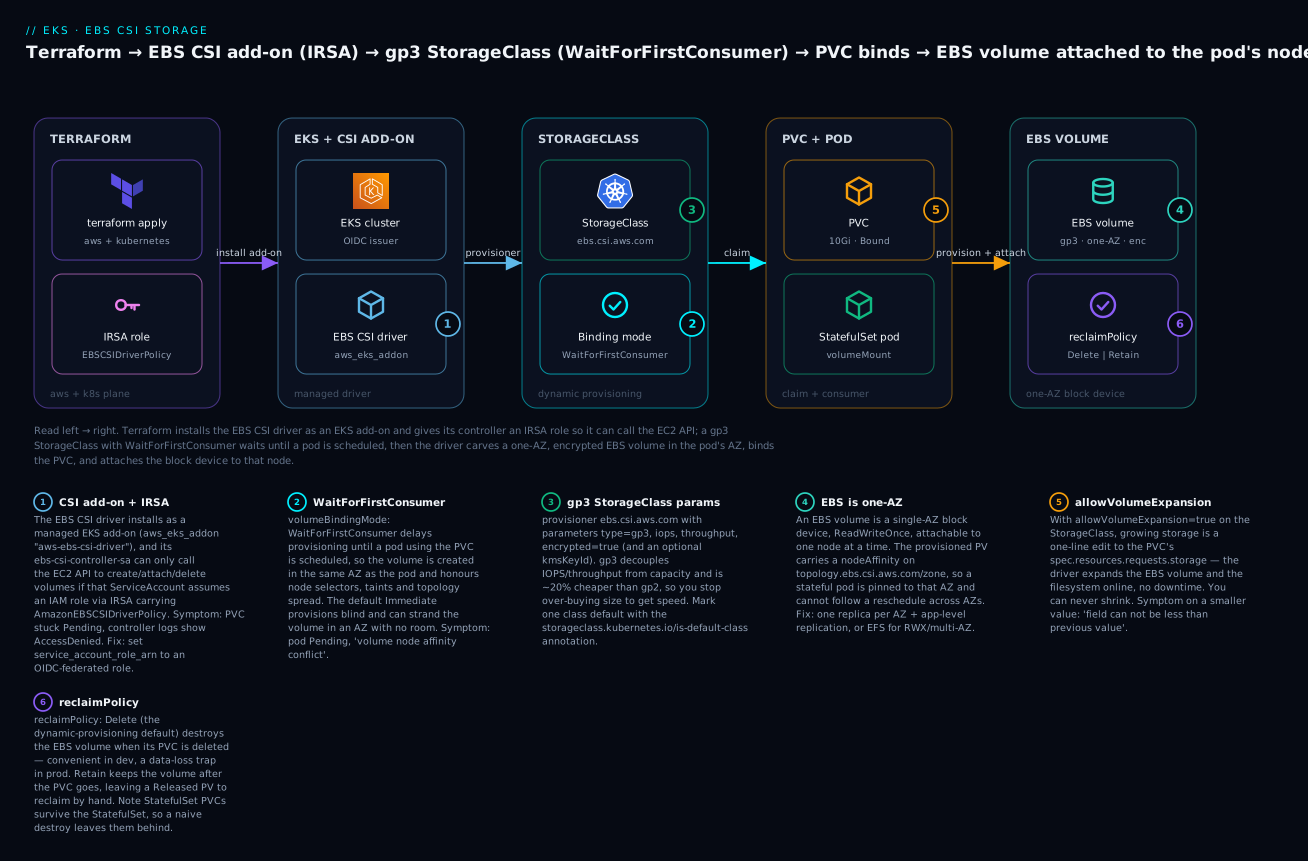
Read the diagram left to right: Terraform installs the driver as an add-on and hands it an IRSA role (badge 1) so its controller may call the EC2 API; a gp3 StorageClass (badge 3) with WaitForFirstConsumer (badge 2) waits for a pod before provisioning; the PVC binds (badge 5 — it is also expandable) and the driver carves an encrypted, single-AZ EBS volume (badge 4) whose reclaim policy (badge 6) decides its fate on delete. The six legend entries are the six decisions you make in code below.
Kubernetes storage on EKS: PV, PVC, StorageClass & dynamic provisioning
Kubernetes deliberately splits storage into three objects so that the person who needs a volume never has to know how it is made. That separation is the whole model, and getting the vocabulary exact prevents most confusion downstream:
| Object | Kind | Who writes it | What it represents |
|---|---|---|---|
| PersistentVolume (PV) | PersistentVolume |
The provisioner (driver), automatically | A piece of storage in the cluster — a specific EBS volume, with capacity, access mode, and node affinity |
| PersistentVolumeClaim (PVC) | PersistentVolumeClaim |
The app author | A request for storage — “I need 10 GiB, RWO, from class gp3” |
| StorageClass (SC) | StorageClass |
The platform team | A recipe — which provisioner, which parameters, binding mode, reclaim policy |
| CSIDriver / CSINode | CSIDriver, CSINode |
The driver install | Registers the driver and per-node topology with Kubernetes |
The flow is: an app author writes a PVC naming a StorageClass; the StorageClass’s provisioner (the CSI driver) creates a real EBS volume and a matching PV; Kubernetes binds the PVC to that PV; the pod mounts the PVC. The app never names an AWS volume ID, an AZ, or a driver — it names a class and a size. That indirection is what lets the same Deployment run unchanged on EKS with EBS, on AKS with Azure Disk, or on-prem with Ceph; only the StorageClass differs.
There are two ways a PV comes into existence, and modern clusters use exactly one of them:
| Provisioning | How the PV appears | When to use |
|---|---|---|
| Static | An admin pre-creates PVs (or aws_ebs_volume + a PV manifest); PVCs bind to a matching one |
Importing an existing volume; pre-baked data; rare edge cases |
| Dynamic | The StorageClass provisioner creates the PV on demand when a PVC is made | The default and the sane choice — no pre-provisioning, right-sized per claim |
We use dynamic provisioning exclusively: the reader writes a PVC, and an EBS volume appears. Static provisioning still matters for importing a volume that already holds data (you create an aws_ebs_volume, then a PersistentVolume referencing its volumeHandle), but for greenfield workloads dynamic is correct.
Access modes are the next concept people trip on, because EBS supports only some of them — and the ones it does not support are exactly the ones a naive ReadWriteMany PVC asks for:
| Access mode | Short | Meaning | EBS supports? |
|---|---|---|---|
ReadWriteOnce |
RWO | Mounted read-write by one node | Yes — the normal EBS mode |
ReadWriteOncePod |
RWOP | Read-write by one pod (stricter than RWO) | Yes (k8s ≥ 1.22) |
ReadOnlyMany |
ROX | Read-only by many nodes | No |
ReadWriteMany |
RWX | Read-write by many nodes | No — use EFS instead |
That table is the single most important reason to know both the EBS and EFS drivers. EBS is a block device: fast, low-latency, single-writer, one-AZ — perfect for a database’s data directory. EFS is an NFS file system: multi-writer, multi-AZ, higher latency — perfect for shared assets a fleet of pods all read and write. If a PVC asks for ReadWriteMany against a gp3 class it will hang Pending forever, because no EBS volume can satisfy it. That is the cross-over point to the EFS CSI lesson.
The CSI model: why in-tree is gone
For years, Kubernetes shipped cloud storage drivers in-tree — the AWS EBS provisioner (kubernetes.io/aws-ebs) was compiled into Kubernetes itself. That coupled storage releases to Kubernetes releases and forced every cloud’s code into the core binary, so the project moved everything to the Container Storage Interface (CSI): an out-of-tree, versioned, vendor-maintained plugin API. The consequences are concrete and current:
| Aspect | In-tree (legacy) | CSI (current) |
|---|---|---|
| Provisioner name | kubernetes.io/aws-ebs |
ebs.csi.aws.com |
| Ships where | Inside the Kubernetes binary | A separate driver (add-on / Helm) you install |
| Released by | The Kubernetes project | AWS, on its own cadence |
| Status | Deprecated; code removed upstream (~v1.27) | The only supported path |
| gp3 support | No (gp2/io1 era) | Yes — gp3, io2, throughput/IOPS params |
| Snapshots, resize, topology | Limited / none | Full |
The migration has a sharp edge worth stating plainly: on any current EKS cluster you must install the EBS CSI driver even to use the old gp2 StorageClass. EKS still ships a default gp2 class that lists the legacy provisioner kubernetes.io/aws-ebs, but the in-tree code is gone; a shim called CSI migration transparently routes those calls to ebs.csi.aws.com — if the driver is installed. Skip the driver and even a plain gp2 PVC hangs Pending. So the driver is not optional plumbing you add for fancy features; it is the thing that makes dynamic block storage work at all.
The EBS CSI driver: EKS add-on vs Helm, and IRSA
The driver has two halves. A controller Deployment (in kube-system) watches PVCs and calls the EC2 API to create, attach, delete, snapshot, and resize volumes. A node DaemonSet runs on every node and does the local work — formatting the block device, mounting it into the pod, growing the filesystem. The controller is the half that needs AWS credentials, and how it gets them is the crux of this whole lesson.
| Component | Kubernetes object | Where it runs | Job | Needs AWS creds |
|---|---|---|---|---|
| Controller | Deployment ebs-csi-controller |
kube-system (2 replicas) |
Create/attach/delete/snapshot/resize via the EC2 API | Yes — via IRSA |
| Node plugin | DaemonSet ebs-csi-node |
Every node | Format, mount, grow the filesystem locally | No (uses local block device) |
| Driver registration | CSIDriver ebs.csi.aws.com |
Cluster-scoped | Registers the driver + topology with Kubernetes | No |
| Sidecars | provisioner, attacher, resizer, snapshotter | Inside the controller pod | Translate K8s events → CSI gRPC calls | No |
First, how to install it. Three paths exist; they are not equivalent:
| Install method | Terraform resource | Version lifecycle | IRSA wiring | Verdict |
|---|---|---|---|---|
| EKS managed add-on | aws_eks_addon |
AWS-curated versions, one-line upgrades | service_account_role_arn argument |
Preferred — AWS owns the manifests |
| Helm chart | helm_release (aws-ebs-csi-driver) |
You track chart versions | controller.serviceAccount.annotations |
Fine if you standardise on Helm |
| Self-managed manifests | kubernetes_manifest / kustomize |
You track upstream YAML | Annotate the SA yourself | Most control, most toil |
We use the managed add-on. The advantages are real: AWS validates each add-on version against each Kubernetes version, the manifests are maintained for you, upgrades are a single version bump, and the add-on integrates with EKS’s own health reporting. The aws_eks_addon arguments you will set:
| Argument | Purpose | Note |
|---|---|---|
cluster_name |
Which cluster to install into | From the cluster data source |
addon_name |
"aws-ebs-csi-driver" |
The canonical add-on name |
addon_version |
Pin a specific driver build | Use data.aws_eks_addon_version to resolve |
service_account_role_arn |
The IRSA role the controller SA assumes | The security control of the whole lesson |
resolve_conflicts_on_create |
"OVERWRITE" / "NONE" |
How to handle a pre-existing install |
resolve_conflicts_on_update |
"OVERWRITE" / "PRESERVE" / "NONE" |
PRESERVE keeps your field edits on upgrade |
preserve |
Keep k8s resources on add-on delete | Usually false |
tags |
Cost/ownership tags on the add-on | Your metadata |
⚠️ Deprecation note: older examples set a single
resolve_conflictsargument. That is deprecated — use the splitresolve_conflicts_on_create/resolve_conflicts_on_updatepair. Copying the old single argument from a blog will throw a deprecation warning and, on newer provider versions, may be rejected.
IRSA: why the driver needs its own IAM role
The CSI controller must call ec2:CreateVolume, ec2:AttachVolume, ec2:DeleteVolume, and friends. There are two ways to give it those permissions, and only one is the least-privilege answer:
| Approach | How the controller gets AWS creds | Blast radius | Verdict |
|---|---|---|---|
| Node instance role | Attach AmazonEBSCSIDriverPolicy to the node group’s IAM role |
Every pod on every node can now use those creds via IMDS | Avoid |
| IRSA (this lesson) | The controller’s ServiceAccount federates to a dedicated IAM role via OIDC | Only the CSI controller pod | Correct |
IRSA — IAM Roles for Service Accounts — is the mechanism that gives a specific Kubernetes ServiceAccount, and nothing else, a specific IAM role. It works because the cluster publishes an OIDC issuer; you register that issuer as an IAM OIDC identity provider; and you write an IAM role whose trust policy says “allow this role to be assumed via web identity only by the ServiceAccount ebs-csi-controller-sa in kube-system.” When the add-on runs with service_account_role_arn set, EKS annotates that ServiceAccount with the role ARN, a projected OIDC token is mounted into the pod, and the AWS SDK exchanges it for role credentials. No node-wide key, no secret, nothing to rotate. The pieces:
| Piece | Resource / field | Role |
|---|---|---|
| OIDC issuer URL | data.aws_eks_cluster...identity[0].oidc[0].issuer |
The trust anchor |
| IAM OIDC provider | aws_iam_openid_connect_provider (built with the cluster) |
Registers the issuer with IAM |
| Trust policy | aws_iam_policy_document (federated, sts:AssumeRoleWithWebIdentity) |
Binds the SA to the role |
| Permissions policy | AmazonEBSCSIDriverPolicy (AWS-managed) |
What the controller may do |
| SA annotation | eks.amazonaws.com/role-arn (set by the add-on) |
Tells the SDK which role to assume |
The trust policy is where correctness lives. Two StringEquals conditions must match exactly — the :sub (the ServiceAccount) and the :aud (always sts.amazonaws.com). Get the ServiceAccount name wrong and the assume fails silently; the controller logs WebIdentityErr and every PVC hangs Pending. The OIDC & IRSA lesson covers the mechanism end to end; here we consume it.
AmazonEBSCSIDriverPolicy is the AWS-managed policy purpose-built for this driver. It grants the EC2 volume verbs plus the ability to use the AWS-managed aws/ebs KMS key for default encryption. One gotcha: if you encrypt with a customer-managed KMS key (CMK), the managed policy is not enough — you must add kms:CreateGrant, kms:GenerateDataKeyWithoutPlaintext, kms:Decrypt, kms:ReEncrypt*, and kms:DescribeKey on that key to the IRSA role (and a matching key policy grant). The permissions the managed policy covers:
| Capability | Example actions | Needed for |
|---|---|---|
| Create / delete volumes | ec2:CreateVolume, ec2:DeleteVolume |
Dynamic provisioning |
| Attach / detach | ec2:AttachVolume, ec2:DetachVolume |
Binding a volume to a node |
| Describe | ec2:DescribeVolumes, ec2:DescribeInstances |
Reconciliation |
| Snapshots | ec2:CreateSnapshot, ec2:DeleteSnapshot |
VolumeSnapshot support |
| Tagging | ec2:CreateTags (on Create*) |
PVC → volume tagging |
| Default-key encryption | kms:CreateGrant etc. on aws/ebs |
encrypted=true with the AWS-managed key |
StorageClass: provisioner, parameters, volumeBindingMode & expansion
The StorageClass is the platform team’s recipe, and it is where you encode every decision an app author should not have to think about: which volume type, how fast, encrypted or not, what happens on delete, and — the subtle one — when the volume is created relative to where the pod is scheduled. In Terraform it is a kubernetes_storage_class resource. Here is the production-shaped default we build:
resource "kubernetes_storage_class" "gp3" {
  metadata {
    name = "gp3"
    annotations = {
      # Make this the cluster default so PVCs without a storageClassName use it.
      "storageclass.kubernetes.io/is-default-class" = "true"
    }
  }

  storage_provisioner    = "ebs.csi.aws.com"
  volume_binding_mode    = "WaitForFirstConsumer" # ⚠️ the multi-AZ-correct setting
  allow_volume_expansion = true
  reclaim_policy         = "Delete"

  parameters = {
    type       = "gp3"
    iops       = "3000"  # gp3 baseline; up to 16000
    throughput = "125"   # MB/s baseline; up to 1000
    encrypted  = "true"
    # kmsKeyId = "arn:aws:kms:ap-south-1:<acct>:key/<id>"  # optional CMK
    # tagSpecification_1 = "team=payments"                  # tag the EBS volume
  }
}
The top-level arguments of kubernetes_storage_class:
| Argument | Value here | What it does |
|---|---|---|
metadata.name |
"gp3" |
The class name PVCs reference |
storage_provisioner |
"ebs.csi.aws.com" |
The CSI driver that provisions volumes |
volume_binding_mode |
"WaitForFirstConsumer" |
When the volume is provisioned/bound |
allow_volume_expansion |
true |
Whether PVCs of this class can grow |
reclaim_policy |
"Delete" |
Fate of the EBS volume when the PVC is deleted |
parameters |
map (below) | Driver-specific volume settings |
mount_options |
e.g. ["noatime"] |
Extra mount flags (optional) |
allowed_topologies |
zone constraints | Restrict which AZs the class may use (optional) |
Note every value in parameters is a string, even numbers and booleans ("3000", "true") — Kubernetes StorageClass parameters are stringly typed and Terraform will not coerce them for you. The EBS CSI driver’s parameter set:
| Parameter | Example | Meaning |
|---|---|---|
type |
gp3 |
EBS volume type (gp3, gp2, io1, io2, st1, sc1) |
iops |
3000 |
Provisioned IOPS (gp3: 3000–16000; io1/io2: up to 64000) |
throughput |
125 |
gp3 throughput in MB/s (125–1000) |
encrypted |
true |
Encrypt the volume at rest |
kmsKeyId |
ARN | Customer-managed KMS key (default: aws/ebs) |
fsType |
ext4 |
Filesystem to format (ext4 default, xfs, etc.) |
blockExpress |
true |
io2 Block Express for very high IOPS |
tagSpecification_1 |
team=payments |
Extra AWS tag on the provisioned volume |
gp3 is the current default choice, and choosing it deliberately matters. Its predecessor gp2 coupled performance to size — 3 IOPS per GiB — so the only way to get more IOPS was to over-provision capacity you did not need. gp3 decouples them: 3000 IOPS and 125 MB/s baseline at any size, dial-able independently, at roughly 20% lower cost per GiB. The volume-type landscape:
| Type | Class | Baseline / max IOPS | Best for | Relative cost |
|---|---|---|---|---|
| gp3 | SSD general | 3000 / 16000 (independent) | Default — most workloads | Low |
| gp2 | SSD general | 3 IOPS/GiB / 16000 | Legacy; migrate off | Low-ish (pricier than gp3) |
| io2 | SSD provisioned | up to 64000, 99.999% durable | Databases needing guaranteed IOPS | High |
| io1 | SSD provisioned | up to 64000 | Older provisioned-IOPS workloads | High |
| st1 | HDD throughput | throughput-optimised | Big sequential (logs, data lakes) | Very low |
| sc1 | HDD cold | lowest | Infrequent access | Lowest |
volumeBindingMode — the setting that prevents cross-AZ heartbreak
This is the most consequential single field on the StorageClass, and the default is the wrong choice for a multi-AZ cluster. It controls when the volume is provisioned and the PVC bound:
| Mode | When it provisions | AZ correctness | Use when |
|---|---|---|---|
Immediate |
As soon as the PVC is created, before any pod is scheduled | The volume’s AZ is chosen blind — the scheduler must then place the pod there | Single-AZ clusters; you truly want eager binding |
WaitForFirstConsumer |
Only once a pod using the PVC is being scheduled | The volume is created in the pod’s AZ, honouring the pod’s node selectors, taints, resources, and topology spread | Always, on a multi-AZ EKS cluster |
The failure Immediate produces is textbook and common: the driver creates the volume in, say, ap-south-1a; the scheduler then wants to run the pod in 1b (that is where CPU is free); but the volume’s PV carries a nodeAffinity pinning it to 1a; so the pod hangs Pending with volume node affinity conflict or 0/N nodes are available: had volume node affinity conflict. Nothing is broken — the volume and the pod simply disagree about which AZ they live in, because the volume was created before anyone knew where the pod would go. WaitForFirstConsumer inverts the order: schedule the pod first, then create the volume where the pod landed. On any cluster whose node groups span more than one AZ — i.e. every production EKS cluster — this must be WaitForFirstConsumer.
Default class, reclaim policy, and expansion
Three more decisions, each a one-liner with outsized consequences.
The default annotation. A PVC that omits storageClassName gets whatever class carries storageclass.kubernetes.io/is-default-class: "true". Our gp3 class claims it — but EKS also ships a default gp2 class, and two defaults is an error state: the admission controller picks arbitrarily and your PVCs may land on gp2. Part of the demo is stripping the default flag off the old gp2 class so gp3 is the sole default.
Reclaim policy decides what happens to the underlying EBS volume when its PVC is deleted:
reclaim_policy |
On PVC delete | Data | Use when |
|---|---|---|---|
Delete (default for dynamic) |
The PV and the EBS volume are deleted | Gone | Dev, ephemeral, reproducible data |
Retain |
The PV is kept (Released), the EBS volume survives |
Kept — reclaim by hand | Production databases, anything precious |
Recycle |
— | — | Deprecated; do not use |
Delete is convenient and is a data-loss trap in production: a stray kubectl delete pvc, or a terraform destroy that removes the namespace, silently wipes the volume. Precious data wants Retain, accepting that you must delete orphaned volumes manually later. You cannot change a bound PV’s reclaim policy through the StorageClass afterward — the PV copies it at creation — but you can patch an individual PV’s persistentVolumeReclaimPolicy in place.
allow_volume_expansion = true is what lets you grow a volume without recreating it. With it set, enlarging storage is a one-line edit to the PVC’s spec.resources.requests.storage; the driver expands the EBS volume via ec2:ModifyVolume and grows the filesystem online, no downtime, no pod restart. You can only ever grow, never shrink — a smaller value is rejected with field can not be less than previous value. Leave this on; a class you cannot expand is a class you will have to migrate off the day a disk fills.
PVC, the StatefulSet & the AZ-affinity trap
A PVC is the app author’s request. Minimal, it is three lines of intent — size, access mode, class:
apiVersion: v1
kind: PersistentVolumeClaim
metadata:
  name: data
spec:
  accessModes: ["ReadWriteOnce"]
  storageClassName: gp3
  resources:
    requests:
      storage: 10Gi
For a StatefulSet you rarely write the PVC by hand; you use volumeClaimTemplates, and the controller mints one PVC per replica with a stable name. That stability is the whole point of a StatefulSet: web-0 always gets data-web-0, which always binds the same PV, which is always the same EBS volume — so a restarted web-0 reattaches its own data. Deployment-plus-a-single-PVC does not give you that; every replica would fight over one RWO volume.
| Aspect | Deployment + one PVC | StatefulSet + volumeClaimTemplates |
|---|---|---|
| PVC per replica | One shared (RWO → only one pod can mount) | One each, stable-named |
| Pod identity | Interchangeable | Stable (web-0, web-1, …) |
| Reschedule keeps data | Only the single owner | Each pod keeps its own volume |
| Scale-down PVCs | n/a | Retained by default (see destroy gotcha) |
| Fit for | Stateless, or one-writer with a single replica | Databases, brokers, per-replica state |
Now the trap the whole lesson circles back to. An EBS volume exists in exactly one Availability Zone. When the driver provisions it, the resulting PV carries a nodeAffinity requiring topology.ebs.csi.aws.com/zone = <that AZ>. Consequences that shape every stateful design on AWS:
| Fact | Consequence |
|---|---|
| EBS is single-AZ | The PV is pinned to one AZ forever |
PV has zone nodeAffinity |
The pod can only schedule on nodes in that AZ |
EBS is ReadWriteOnce |
Only one node attaches it at a time |
| A pod cannot cross AZs with its volume | If that AZ has no capacity (or fails), the pod stays Pending |
So a stateful pod is married to its AZ. WaitForFirstConsumer solves the creation-time mismatch — the volume is born in the pod’s AZ — but once created, the pod cannot follow a reschedule into another AZ, because the data physically cannot go with it. The design answers are not Terraform tricks; they are architecture:
- Spread replicas one-per-AZ and let the application replicate (Postgres streaming replication, a Kafka replication factor of 3). Now an AZ loss costs you one replica, not the data. A StatefulSet across AZ-spanning node groups with
WaitForFirstConsumernaturally places each replica in a different AZ. - For shared, multi-AZ, multi-writer storage, use EFS, not EBS — that is the EFS CSI lesson, and RWX is the reason it exists.
- Do not fight it with cross-AZ hacks. There is no supported way to attach one EBS volume to nodes in two AZs; snapshot-and-restore into a new AZ is a copy, not a move.
Hands-on: build it with Terraform
Time to run it. This configuration assumes the EKS cluster from the cluster-provisioning lesson already exists (with its OIDC provider). Paste each file into a directory — say eks-ebs-csi/ — and follow the numbered steps. ⚠️ This provisions real, billable resources (EBS volumes, snapshots). Do the destroy at the end.
Step 1 — versions.tf (providers + backend + the cluster handoff)
The kubernetes provider is configured from the existing cluster via data sources — the read-only equivalent of the provider chaining you would do if you built the cluster in the same config. Because the cluster already exists, this is safe (the endpoint and token are known at plan time).
terraform {
  required_version = ">= 1.6"

  required_providers {
    aws        = { source = "hashicorp/aws", version = "~> 5.0" }
    kubernetes = { source = "hashicorp/kubernetes", version = "~> 2.35" }
  }

  # Remote state — S3 with a DynamoDB lock (see the AWS "Getting Started" lesson).
  backend "s3" {
    bucket         = "kloudvin-tfstate-<account-id>" # globally unique
    key            = "eks/ebs-csi/dev.tfstate"
    region         = "ap-south-1"
    dynamodb_table = "kloudvin-tflock" # or use_lockfile = true on TF >= 1.10
    encrypt        = true
  }
}

provider "aws" {
  region = var.region
}

# ---- Read the existing cluster --------------------------------------------
data "aws_eks_cluster" "this" {
  name = var.cluster_name
}

data "aws_eks_cluster_auth" "this" {
  name = var.cluster_name
}

# The IAM OIDC provider was created alongside the cluster (IRSA lesson).
data "aws_iam_openid_connect_provider" "this" {
  url = data.aws_eks_cluster.this.identity[0].oidc[0].issuer
}

# Configure the kubernetes provider FROM the live cluster.
provider "kubernetes" {
  host                   = data.aws_eks_cluster.this.endpoint
  cluster_ca_certificate = base64decode(data.aws_eks_cluster.this.certificate_authority[0].data)
  token                  = data.aws_eks_cluster_auth.this.token
}
Step 2 — variables.tf
variable "region" {
  type    = string
  default = "ap-south-1"
}

variable "cluster_name" {
  description = "Name of the existing EKS cluster"
  type        = string
  default     = "kv-eks-dev"
}

variable "namespace" {
  description = "Namespace for the demo workload"
  type        = string
  default     = "storage-demo"
}

variable "tags" {
  type = map(string)
  default = {
    environment = "dev"
    managed_by  = "terraform"
    course      = "terraform-zero-to-hero"
  }
}
Step 3 — main.tf (IRSA role + add-on + StorageClass)
locals {
  # Strip the scheme so we can build the OIDC condition keys "<oidc>:sub" / ":aud".
  oidc_url = replace(data.aws_iam_openid_connect_provider.this.url, "https://", "")
}

# ---- IRSA role for the EBS CSI controller ---------------------------------
data "aws_iam_policy_document" "ebs_csi_assume" {
  statement {
    effect  = "Allow"
    actions = ["sts:AssumeRoleWithWebIdentity"]

    principal {
      type        = "Federated"
      identifiers = [data.aws_iam_openid_connect_provider.this.arn]
    }

    condition {
      test     = "StringEquals"
      variable = "${local.oidc_url}:sub"
      values   = ["system:serviceaccount:kube-system:ebs-csi-controller-sa"]
    }

    condition {
      test     = "StringEquals"
      variable = "${local.oidc_url}:aud"
      values   = ["sts.amazonaws.com"]
    }
  }
}

resource "aws_iam_role" "ebs_csi" {
  name               = "${var.cluster_name}-ebs-csi-driver"
  assume_role_policy = data.aws_iam_policy_document.ebs_csi_assume.json
  tags               = var.tags
}

resource "aws_iam_role_policy_attachment" "ebs_csi" {
  role       = aws_iam_role.ebs_csi.name
  policy_arn = "arn:aws:iam::aws:policy/service-role/AmazonEBSCSIDriverPolicy"
}

# ---- The EBS CSI driver as a managed EKS add-on ---------------------------
data "aws_eks_addon_version" "ebs_csi" {
  addon_name         = "aws-ebs-csi-driver"
  kubernetes_version = data.aws_eks_cluster.this.version
  most_recent        = true
}

resource "aws_eks_addon" "ebs_csi" {
  cluster_name  = data.aws_eks_cluster.this.name
  addon_name    = "aws-ebs-csi-driver"
  addon_version = data.aws_eks_addon_version.ebs_csi.version

  # Wire the controller ServiceAccount to the IRSA role — the whole point.
  service_account_role_arn = aws_iam_role.ebs_csi.arn

  resolve_conflicts_on_create = "OVERWRITE"
  resolve_conflicts_on_update = "PRESERVE"

  tags = var.tags

  depends_on = [aws_iam_role_policy_attachment.ebs_csi]
}

# ---- A production-shaped default gp3 StorageClass -------------------------
resource "kubernetes_storage_class" "gp3" {
  metadata {
    name = "gp3"
    annotations = {
      "storageclass.kubernetes.io/is-default-class" = "true"
    }
  }

  storage_provisioner    = "ebs.csi.aws.com"
  volume_binding_mode    = "WaitForFirstConsumer"
  allow_volume_expansion = true
  reclaim_policy         = "Delete"

  parameters = {
    type       = "gp3"
    iops       = "3000"
    throughput = "125"
    encrypted  = "true"
  }

  depends_on = [aws_eks_addon.ebs_csi]
}
The default
gp2class EKS ships is still marked default too. Two defaults is an error; strip the flag off gp2 after apply (Step 6) so gp3 is the sole default. You can also do this in Terraform by importing the gp2 class and setting its annotation to"false", but a one-linekubectl patchis simpler for a class you did not create.
Step 4 — outputs.tf
output "ebs_csi_role_arn" {
  value = aws_iam_role.ebs_csi.arn
}

output "ebs_csi_addon_version" {
  value = aws_eks_addon.ebs_csi.addon_version
}

output "default_storage_class" {
  value = kubernetes_storage_class.gp3.metadata[0].name
}
Step 5 — init, plan, apply
Make sure your kubeconfig points at the cluster (so the provider token works), then initialise:
aws eks update-kubeconfig --name kv-eks-dev --region ap-south-1
terraform init
Initializing the backend...
Successfully configured the backend "s3"!
Initializing provider plugins...
- Installing hashicorp/aws v5.x.x...
- Installing hashicorp/kubernetes v2.x.x...
Terraform has been successfully initialized!
terraform plan -out=ebs.plan
Terraform will perform the following actions:

  # aws_iam_role.ebs_csi will be created
  # aws_iam_role_policy_attachment.ebs_csi will be created
  # aws_eks_addon.ebs_csi will be created
  + resource "aws_eks_addon" "ebs_csi" {
      + addon_name               = "aws-ebs-csi-driver"
      + addon_version            = "v1.35.0-eksbuild.1"
      + service_account_role_arn = (known after apply)
    }
  # kubernetes_storage_class.gp3 will be created
  + resource "kubernetes_storage_class" "gp3" {
      + storage_provisioner    = "ebs.csi.aws.com"
      + volume_binding_mode    = "WaitForFirstConsumer"
      + allow_volume_expansion = true
      + reclaim_policy         = "Delete"
    }

Plan: 4 to add, 0 to change, 0 to destroy.
terraform apply ebs.plan
aws_iam_role.ebs_csi: Creation complete after 3s
aws_iam_role_policy_attachment.ebs_csi: Creation complete after 1s
aws_eks_addon.ebs_csi: Still creating... [30s elapsed]
aws_eks_addon.ebs_csi: Creation complete after 48s
kubernetes_storage_class.gp3: Creation complete after 1s

Apply complete! Resources: 4 added, 0 changed, 0 destroyed.

Outputs:
ebs_csi_addon_version = "v1.35.0-eksbuild.1"
default_storage_class = "gp3"
Step 6 — verify the driver, IRSA, and the default class
Confirm the controller is running, its ServiceAccount carries the role ARN (IRSA is wired), and gp3 is the sole default:
# Controller + node pods
kubectl get pods -n kube-system -l app.kubernetes.io/name=aws-ebs-csi-driver
# ebs-csi-controller-...   6/6   Running
# ebs-csi-node-...         3/3   Running   (one per node, DaemonSet)

# IRSA annotation on the controller SA — proves the role is attached
kubectl get sa ebs-csi-controller-sa -n kube-system \
  -o jsonpath='{.metadata.annotations.eks\.amazonaws\.com/role-arn}'
# arn:aws:iam::<acct>:role/kv-eks-dev-ebs-csi-driver

# Strip the default flag off the legacy gp2 class so gp3 is the ONLY default
kubectl patch storageclass gp2 \
  -p '{"metadata":{"annotations":{"storageclass.kubernetes.io/is-default-class":"false"}}}'

kubectl get storageclass
# NAME            PROVISIONER       RECLAIMPOLICY  VOLUMEBINDINGMODE      ...
# gp2             ebs.csi.aws.com   Delete         WaitForFirstConsumer
# gp3 (default)   ebs.csi.aws.com   Delete         WaitForFirstConsumer
Step 7 — apply a StatefulSet that binds real EBS volumes
The workload is a separate concern from the platform, so we apply it with kubectl (an app team’s job) rather than folding it into the platform state. Save as workload.yaml:
apiVersion: v1
kind: Namespace
metadata:
  name: storage-demo
---
apiVersion: apps/v1
kind: StatefulSet
metadata:
  name: web
  namespace: storage-demo
spec:
  serviceName: web
  replicas: 2
  selector:
    matchLabels: { app: web }
  template:
    metadata:
      labels: { app: web }
    spec:
      containers:
        - name: app
          image: public.ecr.aws/docker/library/busybox:1.36
          command: ["sh", "-c", "while true; do echo $(date) $(hostname) >> /data/log.txt; sleep 5; done"]
          volumeMounts:
            - name: data
              mountPath: /data
  volumeClaimTemplates:
    - metadata:
        name: data
      spec:
        accessModes: ["ReadWriteOnce"]
        storageClassName: gp3
        resources:
          requests:
            storage: 10Gi
kubectl apply -f workload.yaml
kubectl get pv,pvc -n storage-demo
NAME                          CAPACITY  ACCESS MODES  RECLAIM POLICY  STATUS  CLAIM
persistentvolume/pvc-a1b2...  10Gi      RWO           Delete          Bound   storage-demo/data-web-0
persistentvolume/pvc-c3d4...  10Gi      RWO           Delete          Bound   storage-demo/data-web-1

NAME                                 STATUS  VOLUME        CAPACITY  STORAGECLASS
persistentvolumeclaim/data-web-0     Bound   pvc-a1b2...   10Gi      gp3
persistentvolumeclaim/data-web-1     Bound   pvc-c3d4...   10Gi      gp3
Two Bound PVCs, two dynamically provisioned PVs. Now prove the volumes are real EBS, encrypted, and in the pods’ AZs — this is the payoff:
# Pods land on nodes in (ideally) different AZs — WaitForFirstConsumer at work
kubectl get pods -n storage-demo -o wide

# The PV's node affinity shows the volume's AZ
kubectl get pv -o jsonpath='{range .items[*]}{.metadata.name}{"  "}{.spec.nodeAffinity.required.nodeSelectorTerms[0].matchExpressions[0].values[0]}{"\n"}{end}'
# pvc-a1b2...  ap-south-1a
# pvc-c3d4...  ap-south-1b

# Ask EC2 directly — the driver tags volumes with the PVC name
aws ec2 describe-volumes \
  --filters "Name=tag:kubernetes.io/created-for/pvc/name,Values=data-web-0" \
  --query 'Volumes[].{ID:VolumeId,AZ:AvailabilityZone,Type:VolumeType,IOPS:Iops,Enc:Encrypted,Size:Size}' \
  --output table
-------------------------------------------------------------------------
|                           DescribeVolumes                             |
+------------+----------------+--------+-------+---------+------+--------+
|  AZ        |  ID            | Type   | IOPS  | Enc     | Size |        |
+------------+----------------+--------+-------+---------+------+--------+
| ap-south-1a| vol-0abc123... | gp3    | 3000  | True    | 10   |        |
+------------+----------------+--------+-------+---------+------+--------+
Finally, prove persistence survives a pod restart — the reattach that justifies the whole StatefulSet:
kubectl exec -n storage-demo web-0 -- tail -2 /data/log.txt   # note the last line
kubectl delete pod web-0 -n storage-demo                       # pod is recreated
kubectl exec -n storage-demo web-0 -- tail -4 /data/log.txt    # SAME file, continues
The recreated web-0 reattached data-web-0 — the same EBS volume, on a node in the same AZ — and the log continued. That is durable state. Run the full smoke test so you know every piece landed:
| Check | Command | Expect |
|---|---|---|
| Driver pods running | kubectl get pods -n kube-system -l app.kubernetes.io/name=aws-ebs-csi-driver |
controller Running, node pod per node |
| IRSA wired | kubectl get sa ebs-csi-controller-sa -n kube-system -o yaml |
eks.amazonaws.com/role-arn annotation present |
| gp3 is the sole default | kubectl get storageclass |
only gp3 shows (default) |
| PVCs bound | kubectl get pvc -n storage-demo |
both Bound to gp3 |
| Volumes in the pods’ AZs | aws ec2 describe-volumes --filters ... |
gp3, Encrypted=True, AZ matches the pod |
| Persistence survives restart | delete web-0, re-exec tail /data/log.txt |
same file continues |
Step 8 — grow a volume online by editing the PVC
Because allow_volume_expansion = true, enlarging is a one-line PVC edit — no restart:
kubectl patch pvc data-web-0 -n storage-demo \
  -p '{"spec":{"resources":{"requests":{"storage":"20Gi"}}}}'

kubectl get pvc data-web-0 -n storage-demo   # CAPACITY climbs to 20Gi
kubectl describe pvc data-web-0 -n storage-demo | grep -A2 Conditions
# FileSystemResizePending → then clears as the node driver grows the fs online

aws ec2 describe-volumes \
  --filters "Name=tag:kubernetes.io/created-for/pvc/name,Values=data-web-0" \
  --query 'Volumes[].Size'   # 20
Try to shrink it and Kubernetes refuses: spec.resources.requests.storage: Forbidden: field can not be less than previous value. Growth only.
Step 9 — take a CSI snapshot (controller + VolumeSnapshotClass)
⚠️ The EBS CSI add-on does not include the snapshot controller — that is a separate component and its absence is the #1 snapshot gotcha. Install the external snapshotter’s CRDs and controller once (Helm shown; kustomize also works), then a VolumeSnapshotClass:
# Snapshot CRDs + controller (once per cluster)
helm repo add piraeus-charts https://piraeus.io/helm-charts/
helm install snapshot-controller piraeus-charts/snapshot-controller \
  -n kube-system
# snapshotclass.yaml
apiVersion: snapshot.storage.k8s.io/v1
kind: VolumeSnapshotClass
metadata:
  name: ebs-vsc
driver: ebs.csi.aws.com
deletionPolicy: Delete
---
# snapshot.yaml — snapshot data-web-0
apiVersion: snapshot.storage.k8s.io/v1
kind: VolumeSnapshot
metadata:
  name: web-0-snap
  namespace: storage-demo
spec:
  volumeSnapshotClassName: ebs-vsc
  source:
    persistentVolumeClaimName: data-web-0
kubectl apply -f snapshotclass.yaml -f snapshot.yaml
kubectl get volumesnapshot -n storage-demo
# NAME         READYTOUSE   SOURCEPVC     RESTORESIZE
# web-0-snap   true         data-web-0    20Gi
To restore, create a new PVC whose dataSource points at the snapshot — the driver provisions a fresh EBS volume from the EBS snapshot:
apiVersion: v1
kind: PersistentVolumeClaim
metadata:
  name: data-restored
  namespace: storage-demo
spec:
  storageClassName: gp3
  accessModes: ["ReadWriteOnce"]
  resources:
    requests: { storage: 20Gi } # >= snapshot restoreSize
  dataSource:
    name: web-0-snap
    kind: VolumeSnapshot
    apiGroup: snapshot.storage.k8s.io
Step 10 — destroy & clean up
⚠️ This is where people leak money. Deleting a StatefulSet does NOT delete its PVCs — volumeClaimTemplates PVCs are retained by design — and with reclaimPolicy: Delete the EBS volume only disappears when the PVC is deleted. So tear down in this order:
# 1. The workload objects
kubectl delete -f workload.yaml            # deletes the StatefulSet + namespace
# 2. The PVCs the StatefulSet left behind (this deletes the EBS volumes)
kubectl delete pvc -n storage-demo --all   # only if the ns still exists; else:
#    kubectl get pvc -A  → delete any leftover data-web-* explicitly
# 3. Snapshots (they persist and bill as EBS snapshots)
kubectl delete volumesnapshot -n storage-demo --all
# 4. The platform (add-on, IRSA role, StorageClass)
terraform destroy -auto-approve
kubernetes_storage_class.gp3: Destroying...
aws_eks_addon.ebs_csi: Destroying...
aws_iam_role_policy_attachment.ebs_csi: Destroying...
aws_iam_role.ebs_csi: Destroying...
Destroy complete! Resources: 4 destroyed.
Then confirm no orphaned volumes remain — the check that saves you a surprise bill:
aws ec2 describe-volumes \
  --filters "Name=tag:kubernetes.io/created-for/pvc/namespace,Values=storage-demo" \
  --query 'Volumes[].VolumeId'
# []   ← empty means clean. Any IDs here are orphans; delete them.
If you had used reclaimPolicy: Retain, those volumes would still be listed after the PVC delete, and you would remove them with aws ec2 delete-volume by hand — the price of keeping data safe.
Variables, outputs & making it reusable
The demo hard-codes one StorageClass, but a real platform offers a menu — a fast gp3 default, a high-IOPS io2 class for databases, maybe a cheap st1 class for logs. That is a textbook for_each over a map, the same technique the modules-authoring lesson teaches, applied to StorageClasses:
variable "storage_classes" {
  description = "Map of StorageClasses to create"
  type = map(object({
    type          = string
    iops          = optional(string)
    throughput    = optional(string)
    is_default    = optional(bool, false)
    reclaim       = optional(string, "Delete")
    expandable    = optional(bool, true)
    binding_mode  = optional(string, "WaitForFirstConsumer")
  }))
  default = {
    gp3 = { type = "gp3", iops = "3000", throughput = "125", is_default = true }
    io2 = { type = "io2", iops = "10000", reclaim = "Retain" }
    st1 = { type = "st1", binding_mode = "WaitForFirstConsumer" }
  }
}

resource "kubernetes_storage_class" "this" {
  for_each = var.storage_classes

  metadata {
    name = each.key
    annotations = {
      "storageclass.kubernetes.io/is-default-class" = tostring(each.value.is_default)
    }
  }

  storage_provisioner    = "ebs.csi.aws.com"
  volume_binding_mode    = each.value.binding_mode
  allow_volume_expansion = each.value.expandable
  reclaim_policy         = each.value.reclaim

  parameters = merge(
    { type = each.value.type, encrypted = "true" },
    each.value.iops == null ? {} : { iops = each.value.iops },
    each.value.throughput == null ? {} : { throughput = each.value.throughput },
  )

  depends_on = [aws_eks_addon.ebs_csi]
}
Adding a class is now a map entry, not a new resource block. Wrap the add-on, IRSA role, and this for_each into a module with clear inputs and you have a reusable “EBS storage layer” building block for every cluster in the fleet.
Should you roll your own or use a registry module? The community terraform-aws-modules/eks module and the AWS EKS Blueprints Addons module (aws-ia/eks-blueprints-addons/aws) both install the EBS CSI add-on and build its IRSA role for you from a single flag. The trade-off:
| Consideration | Roll your own (this lesson) | Blueprints / community module |
|---|---|---|
| Control / transparency | Total — every line is yours | Abstracted behind inputs |
| IRSA correctness | You write the trust policy | Handled, well-tested |
| Learning value | High — you see the wiring | Low — it hides the mechanics |
| Surface area | Only what you need | Large; many add-ons at once |
| Best for | Understanding, opinionated platforms | Fast standardisation, big fleets |
The honest recommendation: build it yourself once so you understand the add-on, the IRSA trust policy, and the StorageClass, then decide whether a Blueprints module’s convenience is worth the abstraction. You cannot debug a module that hides mechanics you have never seen. See Module Sources & Composition for pinning and consuming registry modules safely.
Common mistakes and troubleshooting
The failures below are the ones that actually page people. Scan the table, then read the prose on the five nastiest.
| Symptom | Likely cause | Fix |
|---|---|---|
PVC stuck Pending, event waiting for a volume to be created |
Driver not installed, or IRSA broken (controller can’t call EC2) | Verify the add-on pods run and the SA has the role ARN; check controller logs for AccessDenied |
PVC Pending, controller log WebIdentityErr/AccessDenied |
IRSA trust policy :sub mismatch |
The sub must be system:serviceaccount:kube-system:ebs-csi-controller-sa exactly |
Pod Pending, had volume node affinity conflict |
volumeBindingMode: Immediate provisioned the volume in the wrong AZ |
Recreate the class with WaitForFirstConsumer; delete/recreate the PVC |
| Pod won’t reschedule after a node dies | EBS volume is one-AZ; that AZ has no capacity | Spread replicas per-AZ + app replication; you cannot move the volume |
| PVC edit to grow does nothing | allowVolumeExpansion was false when the class was made |
Set it true (it’s mutable on the SC); re-edit the PVC |
field can not be less than previous value |
Tried to shrink a PVC | EBS only grows; provision a new smaller volume and copy |
PVCs land on gp2 not gp3 |
Two default StorageClasses | Strip the default annotation off the gp2 class |
VolumeSnapshot never readyToUse / no matches for kind VolumeSnapshot |
Snapshot controller + CRDs not installed | Install the external snapshotter; the add-on does not bundle it |
terraform destroy clean but EBS volumes remain |
StatefulSet PVCs are retained; Retain reclaim keeps volumes |
Delete PVCs before/after destroy; sweep with aws ec2 describe-volumes |
parameters.iops: must be a string at apply |
Passed a number, not a string | StorageClass params are stringly typed: "3000" not 3000 |
CMK-encrypted PVC Pending, AccessDenied on KMS |
IRSA role lacks CMK permissions | Add kms:CreateGrant/Decrypt/… on the key + a key-policy grant |
Add-on apply error: resolve_conflicts is deprecated |
Old single argument | Use resolve_conflicts_on_create / _on_update |
PVC Pending is almost always one of three things, and the order to check them is fixed: (1) Is the driver installed? kubectl get pods -n kube-system -l app.kubernetes.io/name=aws-ebs-csi-driver — no pods means no provisioner, so install the add-on. (2) Is IRSA wired? Check the SA annotation and the controller logs; AccessDenied/WebIdentityErr means the trust policy :sub does not match the controller ServiceAccount. (3) Is it just waiting for a pod? With WaitForFirstConsumer, a PVC with no consuming pod should sit Pending showing waiting for first consumer to be created before binding — that is not a bug, it is the design; it binds the moment a pod uses it.
The AZ trap is the one that looks like a scheduling bug and is really a physics fact. A pod that ran fine yesterday is Pending today with volume node affinity conflict, because its node died and the only spare capacity is in another AZ where its EBS volume cannot follow. There is no in-place fix — the volume is single-AZ. The real fix is architectural (per-AZ replicas + application-level replication, or EFS for shared data), and the prevention is WaitForFirstConsumer plus node groups in every AZ so the scheduler always has same-AZ capacity to fall back to.
Volume not expanding has two distinct causes people conflate. If the PVC edit is rejected, you tried to shrink — EBS only grows. If the edit is accepted but nothing happens, either allowVolumeExpansion was false on the class (mutable — flip it, then re-edit the PVC), or you are hitting the once-per-6-hours EBS ModifyVolume limit (AWS rate-limits volume modifications; wait and retry). Watch kubectl describe pvc for the FileSystemResizePending condition to clear.
The snapshot controller gap trips everyone once. The EBS CSI driver knows how to snapshot, but the Kubernetes snapshot controller and its CRDs (VolumeSnapshot, VolumeSnapshotContent, VolumeSnapshotClass) are a separate install that AWS deliberately leaves out of the add-on. Symptom: kubectl apply of a VolumeSnapshot fails no matches for kind "VolumeSnapshot" (CRDs missing), or the object is created but never becomes readyToUse (controller missing). Install the external snapshotter once per cluster.
gp2 vs gp3 is a slow-burn cost mistake. Clusters that predate gp3, or that never stripped the default gp2 class, keep provisioning gp2 volumes that cost more and cap performance at 3 IOPS/GiB. New workloads should default to gp3; existing gp2 volumes can be modified in place at the AWS level (aws ec2 modify-volume --volume-type gp3) without detaching, though Kubernetes still records the PV as gp2 — a cosmetic mismatch. The clean, K8s-native migration is snapshot-and-restore into a gp3 PVC:
| gp2 → gp3 approach | How | Trade-off |
|---|---|---|
| AWS-side modify | aws ec2 modify-volume --volume-type gp3 on the live volume |
No downtime; PV still says gp2 (cosmetic) |
| Snapshot + restore | Snapshot the gp2 PVC, restore into a gp3 PVC | Clean and K8s-native; brief cutover |
| New class + rebalance | Make gp3 default; recreate workloads on new PVCs | Full control; most work |
Cost, cleanup & production notes
EBS bills on provisioned capacity, not usage — a 10 GiB volume with 1 GiB written costs the full 10 GiB — plus provisioned IOPS/throughput above the gp3 baseline, plus snapshot storage. Rough ap-south-1 figures for this demo, to make the “destroy it” case concrete:
| Component | Rate (approx) | This demo (~24h) |
|---|---|---|
| 2 × 10 GiB gp3 volumes | ~₹7.5/GB-month | ~₹12 |
| gp3 baseline IOPS/throughput | included (3000 IOPS, 125 MB/s) | ₹0 |
| Extra IOPS above 3000 | ~₹0.5/IOPS-month | ₹0 (baseline) |
| One EBS snapshot (~10 GiB) | ~₹4/GB-month (changed blocks) | ~₹1 |
| The EBS CSI add-on itself | ₹0 (software) | ₹0 |
| Rough total | — | ~₹15–25/day |
The volumes are cheap; the trap is leaving them running — an orphaned 100 GiB io2 volume from a forgotten Retain PVC quietly bills every month with no pod attached. The single biggest hygiene lever is the post-destroy describe-volumes sweep from Step 10. Snapshots are incremental (only changed blocks bill) but accumulate; delete old ones. Five production-hardening notes beyond the demo:
- Encrypt by default, and consider a CMK.
encrypted = "true"on the class covers most needs with the AWS-managedaws/ebskey; a customer-managed key gives you key rotation control and its own audit trail — remember the extra KMS permissions on the IRSA role. Retainfor anything precious, and back it with snapshots. ReclaimDeleteis fine for reproducible data; production databases wantRetainplus scheduled snapshots (via aCronJobcreatingVolumeSnapshotobjects, or AWS Backup) so a fat-fingeredkubectl delete pvcis survivable.- Size for growth and turn on expansion. Start smaller with
allowVolumeExpansion = trueand grow on demand rather than over-provisioning; you pay for provisioned capacity whether or not it is used. - Keep the driver on IRSA, never node-role. Attaching
AmazonEBSCSIDriverPolicyto the node role gives every pod EC2 volume permissions via IMDS. IRSA scopes it to the controller alone. Consider EKS Pod Identity as the newer alternative to IRSA for the same least-privilege outcome. - Pin and manage the add-on version; watch drift. Pin
addon_version, useresolve_conflicts_on_update = "PRESERVE", and run scheduledterraform planin CI so an out-of-band console upgrade or a hand-edited StorageClass shows up before it bites.
The EFS equivalent of this build swaps single-AZ block storage for a multi-AZ NFS file system with ReadWriteMany — same CSI/IRSA/StorageClass shape, opposite storage trade-off — and lives in the EKS EFS CSI lesson. The IRSA mechanism both drivers lean on is built once in the OIDC & IRSA lesson.
Going deeper
Everything above gets a stateful workload running correctly. This section is the layer underneath — the driver’s internals, the ceilings you hit at scale, and the newer mechanisms the first pass glosses over. None of it is on the happy path; all of it shows up the first time you run this in anger.
Inside the driver: the CSI RPC lifecycle
The “controller + node plugin + sidecars” split from earlier is not arbitrary — it mirrors the Container Storage Interface gRPC contract. Every volume you provision walks the same sequence of remote calls, and knowing the sequence turns opaque Pending/FailedAttach events into a map with an X on it:
| Phase | CSI RPC | Who calls it | AWS / Linux action |
|---|---|---|---|
| Provision | CreateVolume |
external-provisioner sidecar | ec2:CreateVolume |
| Attach | ControllerPublishVolume |
external-attacher sidecar | ec2:AttachVolume |
| Stage (per node) | NodeStageVolume |
node plugin | format + mount to a global staging dir |
| Publish (per pod) | NodePublishVolume |
node plugin | bind-mount into the pod |
| Grow | ControllerExpandVolume + NodeExpandVolume |
external-resizer + node | ec2:ModifyVolume + grow the filesystem |
| Snapshot | CreateSnapshot |
external-snapshotter sidecar | ec2:CreateSnapshot |
Teardown runs the mirror image: NodeUnpublishVolume → NodeUnstageVolume → ControllerUnpublishVolume (ec2:DetachVolume) → DeleteVolume. The controller half owns the cloud calls (create, attach, delete, snapshot), which is exactly why it — and not the node plugin — is the half that needs IRSA. The node half owns the Linux calls (mkfs, mount, resize2fs), which need only local root and no AWS credentials at all. When a PVC wedges, “which RPC is stuck?” localises the fault fast: no CreateVolume → provisioner or IRSA; volume created but never attached → ControllerPublishVolume or an attachment-limit ceiling; attached but the pod won’t start → NodeStageVolume/NodePublishVolume or a filesystem problem.
The attachment ceiling nobody plans for
An EBS volume attaches to exactly one node, but there is also a hard cap on how many volumes a single node can hold — and on a busy node running many stateful pods, you hit it. On most Nitro instances, EBS volumes and network interfaces (ENIs) share a single pool of roughly 28 attachments; the driver subtracts the ENIs already in use and the root volume to work out how many CSI volumes remain. A pod whose PVC cannot attach because the node is full sits Pending with FailedAttachVolume and an exceeded ... volume attach limit event.
The knobs: the node plugin honours a --volume-attach-limit flag (and a volumeAttachLimit node parameter) so you can pin a conservative number, set through the add-on’s configuration_values. Newer, dedicated-EBS Nitro instance families lift the ceiling to as many as 128 attachments, which means instance choice is itself a storage-density decision. If you intend to pack many small-volume pods onto each node, budget the attachment count the way you budget CPU and memory — it is a first-class, finite resource, not an afterthought.
Changing IOPS, throughput, or type on a live volume
Online expansion (Step 8) only grows size. To change a volume’s IOPS, throughput, or type while it is mounted — say, promote a gp3 to 16 000 IOPS ahead of a load test — Kubernetes uses a separate object, the VolumeAttributesClass (beta, behind the VolumeAttributesClass feature gate; supported by recent EBS CSI driver builds). You declare a class of mutable attributes and point a PVC at it:
apiVersion: storage.k8s.io/v1beta1
kind: VolumeAttributesClass
metadata:
  name: gp3-fast
driverName: ebs.csi.aws.com
parameters:
  type: gp3
  iops: "10000"
  throughput: "500"
Referencing it from a PVC (spec.volumeAttributesClassName: gp3-fast) triggers the driver’s ModifyVolume path — one ec2:ModifyVolume call, no detach, no restart. It obeys the same EBS guard rails: the once-per-six-hours modification limit per volume, and gp3’s ceilings (16 000 IOPS, 1 000 MB/s). This is the declarative, GitOps-friendly successor to hand-running aws ec2 modify-volume, and it keeps the desired performance in the same manifest as the claim rather than in a runbook.
EKS Pod Identity: the successor to IRSA
IRSA works, but every role needs a trust policy hand-wired to that cluster’s specific OIDC issuer — fine for one cluster, tedious across a fleet. EKS Pod Identity (GA late 2023) reaches the same least-privilege outcome by a shorter road, and the aws_eks_addon resource speaks it natively:
| IRSA (this lesson) | EKS Pod Identity | |
|---|---|---|
| Trust policy | Per-cluster, federated to that cluster’s OIDC provider | One reusable policy trusting pods.eks.amazonaws.com |
| Cluster prerequisite | An IAM OIDC provider per cluster | The eks-pod-identity-agent add-on |
| Wire-up | service_account_role_arn on the add-on |
aws_eks_pod_identity_association (or the add-on’s pod_identity_association block) |
| Reuse across clusters | Low — the issuer URL is unique | High — same role, many clusters |
| Best for | Existing IRSA estates | New clusters, fleets |
The Pod Identity trust policy is dramatically simpler — it trusts a single AWS service principal and uses sts:AssumeRole + sts:TagSession instead of sts:AssumeRoleWithWebIdentity gated on an issuer-specific :sub condition. The permissions side is unchanged (AmazonEBSCSIDriverPolicy); only how the role is assumed differs. For greenfield platforms, prefer Pod Identity; both mechanisms are built end-to-end in the OIDC & IRSA lesson.
When a node dies with a volume still attached
The AZ trap earlier is about capacity — the pod cannot find a same-AZ node. A distinct failure is when a node hard-fails (kernel panic, lost network) with the volume still attached: AWS still believes the volume is attached to the dead instance, so the replacement pod’s attach fails with Multi-Attach error for volume even though nothing is really using it. Kubernetes’ attach/detach controller waits — historically about six minutes — before it force-detaches, and the pod is stuck for the duration.
The modern remedy is Non-Graceful Node Shutdown (GA in Kubernetes 1.28). Once you have confirmed the node is truly gone, taint it:
kubectl taint node <dead-node> \
  node.kubernetes.io/out-of-service=nodeshutdown:NoExecute
That tells the controller to force-detach the volume immediately and reschedule the pod (in the same AZ, onto its own disk) instead of waiting out the timeout. The danger is the mirror image: applied to a node that is actually still running, the taint yanks volumes out from under live pods and can corrupt data — only ever use it on a node you have verified is dead.
Tuning the add-on and closing the PVC-leak gap
Two production levers the demo left at their defaults. First, the add-on itself is configurable through configuration_values — a JSON blob for controller replica count, node tolerations, resource requests, and feature flags, passed straight through to the underlying chart:
resource "aws_eks_addon" "ebs_csi" {
  # ...arguments as before...
  configuration_values = jsonencode({
    controller = { replicaCount = 2 }
    node       = { tolerateAllTaints = true }
  })
}
Second, the orphaned-PVC problem from the destroy step has a native fix: a StatefulSet’s persistentVolumeClaimRetentionPolicy (GA in Kubernetes 1.27) decides whether volumeClaimTemplates PVCs are cleaned up automatically:
spec:
  persistentVolumeClaimRetentionPolicy:
    whenDeleted: Delete
    whenScaled: Retain
Both fields default to Retain (the legacy, safe behaviour). Setting whenDeleted: Delete makes teardown tidy — no orphaned volumes to sweep after terraform destroy — but it also means a bare kubectl delete statefulset now destroys data. Use it for ephemeral and dev workloads; keep Retain for anything you would miss.
Practice challenges
Work these in order — they climb from a first PVC to rescuing a wedged attachment. Each assumes the platform from the hands-on build (add-on + IRSA + gp3 default class) is applied. Try each before opening its solution.
Challenge 1 — Your first claim (beginner)
Write the smallest possible PVC that asks for 5 GiB, ReadWriteOnce, from the gp3 class, apply it in the storage-demo namespace, and explain why kubectl get pvc shows it Pending with no error.
<details><summary>Solution</summary>
apiVersion: v1
kind: PersistentVolumeClaim
metadata:
  name: scratch
  namespace: storage-demo
spec:
  accessModes: ["ReadWriteOnce"]
  storageClassName: gp3
  resources:
    requests:
      storage: 5Gi
kubectl describe pvc scratch -n storage-demo shows waiting for first consumer to be created before binding. Why: the gp3 class uses WaitForFirstConsumer, so no EBS volume is provisioned until a pod actually mounts the claim — Pending here is correct behaviour, not a fault.
</details>
Challenge 2 — One default to rule them all (beginner)
A fresh EKS cluster ships a default gp2 class and your new default gp3. Show that “two defaults” is a problem and make gp3 the sole default.
<details><summary>Solution</summary>
kubectl get sc                 # two rows show (default)
kubectl patch storageclass gp2 -p \
  '{"metadata":{"annotations":{"storageclass.kubernetes.io/is-default-class":"false"}}}'
kubectl get sc                 # only gp3 now shows (default)
Why: with two defaults the admission controller picks arbitrarily, so a PVC that omits storageClassName may silently land on the slower, pricier gp2. Exactly one class may carry is-default-class: "true".
</details>
Challenge 3 — A class for databases (intermediate)
Add a second StorageClass io2-db in Terraform: type io2, 10 000 provisioned IOPS, encrypted, and reclaim_policy = "Retain" so a deleted PVC never destroys the volume.
<details><summary>Solution</summary>
resource "kubernetes_storage_class" "io2_db" {
  metadata { name = "io2-db" }

  storage_provisioner    = "ebs.csi.aws.com"
  volume_binding_mode    = "WaitForFirstConsumer"
  allow_volume_expansion = true
  reclaim_policy         = "Retain"

  parameters = {
    type      = "io2"
    iops      = "10000"
    encrypted = "true"
  }

  depends_on = [aws_eks_addon.ebs_csi]
}
Why: io2 gives guaranteed, size-independent IOPS and 99.999% durability for a database’s data directory, and Retain means an accidental kubectl delete pvc leaves the underlying EBS volume intact to reclaim by hand.
</details>
Challenge 4 — Grow it, then try to shrink it (intermediate)
Expand data-web-0 from 10 GiB to 30 GiB online, verify the new size at the EBS level, then attempt to shrink it back to 10 GiB and read the error.
<details><summary>Solution</summary>
kubectl patch pvc data-web-0 -n storage-demo -p \
  '{"spec":{"resources":{"requests":{"storage":"30Gi"}}}}'
aws ec2 describe-volumes \
  --filters "Name=tag:kubernetes.io/created-for/pvc/name,Values=data-web-0" \
  --query 'Volumes[].Size'     # 30

# The shrink attempt is rejected:
kubectl patch pvc data-web-0 -n storage-demo -p \
  '{"spec":{"resources":{"requests":{"storage":"10Gi"}}}}'
# Error: spec.resources.requests.storage: Forbidden: field can not be less than previous value
Why: allow_volume_expansion = true lets the driver call ec2:ModifyVolume and grow the filesystem online, but EBS volumes only ever grow — the API server refuses any shrink.
</details>
Challenge 5 — Diagnose a wedged PVC (advanced)
Every PVC on the cluster is Pending. The controller log shows WebIdentityErr ... not authorized to perform sts:AssumeRoleWithWebIdentity. Name the root cause and the exact string that must match.
<details><summary>Solution</summary>
The IRSA trust-policy :sub condition does not match the driver’s ServiceAccount. It must be exactly:
system:serviceaccount:kube-system:ebs-csi-controller-sa
Why: AssumeRoleWithWebIdentity only succeeds when the projected token’s subject equals the trust policy’s <oidc>:sub value; a wrong namespace or SA name (a classic copy-paste from another driver’s example) makes every CreateVolume fail with AccessDenied, so no volume is ever provisioned and all PVCs hang Pending.
</details>
Challenge 6 — Rescue a pod after a node hard-fails (advanced)
A node dies abruptly with web-0’s volume still attached. web-0 will not restart; its events show Multi-Attach error for volume. Get it running again in the same AZ without waiting out the default timeout — and state the danger of the command.
<details><summary>Solution</summary>
# Only after confirming the node is genuinely gone:
kubectl taint node <dead-node> \
  node.kubernetes.io/out-of-service=nodeshutdown:NoExecute
Why: the taint triggers Non-Graceful Node Shutdown handling, which force-detaches the volume immediately (instead of the ~6-minute wait) so it can re-attach to a healthy node in the same AZ. Danger: applied to a node that is actually still running, it force-detaches live volumes and can corrupt data — only ever use it on a confirmed-dead node. </details>
Common beginner mistakes
These are misconceptions, not error messages — the wrong mental model that produces the errors in the troubleshooting table above. Fix the model and the whole class of bug disappears.
-
“I’ll set
ReadWriteManyso all my replicas share one volume.” EBS is a block device that attaches to one node at a time; aReadWriteManyPVC on a gp3 class hangsPendingforever because no EBS volume can satisfy it. Right model: EBS is one private disk per pod (RWO). When you genuinely need many pods writing one filesystem, that is EFS — a different driver entirely. -
“StorageClass numbers are numbers.”
iops = 3000fails at apply withmust be a string. Kubernetes StorageClassparametersare stringly typed and Terraform will not coerce them. Right model: every value inparametersis a quoted string —"3000","true", booleans included. -
“Deleting the workload frees the storage.” Deleting a StatefulSet leaves its
volumeClaimTemplatesPVCs behind by design, and aRetainvolume survives even the PVC. Right model: PVC and volume lifecycle is independent of the workload; you delete storage explicitly (or opt intopersistentVolumeClaimRetentionPolicy), and you sweep for orphans afterterraform destroy. -
“
volumeBindingModeis a detail I can leave at its default.” The default isImmediate, which on a multi-AZ cluster provisions the volume in a blindly-chosen AZ and lands you involume node affinity conflict. Right model: on any cluster whose nodes span AZs,WaitForFirstConsumeris mandatory — schedule the pod first, then make the disk where it landed. -
“gp2 is fine — it’s the default.” gp2 costs more per GiB than gp3 and caps IOPS at 3 per GiB, and on a current cluster it still needs the CSI driver installed to work at all. Right model: default new workloads to gp3 and strip the default flag off gp2; gp2 is a legacy class to migrate off, not a safe fallback.
-
“The add-on gives me snapshots.” The EBS CSI add-on ships the driver, not the snapshot controller or its CRDs. A
VolumeSnapshotthen fails withno matches for kind "VolumeSnapshot"or never turnsreadyToUse. Right model: the snapshot controller is a separate, once-per-cluster install; the driver only knows how to take the snapshot once something asks it to. -
“IRSA works, so the node role should have the policy too.” Adding
AmazonEBSCSIDriverPolicyto the node role is redundant and a downgrade — it hands EC2 volume permissions to every pod on the node via IMDS. Right model: the entire point of IRSA is that only the controller ServiceAccount holds those permissions; the node role must not carry them.
Cheat-sheet
| Task | HCL / command |
|---|---|
| Read the cluster | data "aws_eks_cluster" "this" { name = ... } + _auth |
| OIDC provider (existing) | data "aws_iam_openid_connect_provider" "this" { url = ...oidc[0].issuer } |
| Configure k8s provider | provider "kubernetes" { host token cluster_ca_certificate } |
| Resolve add-on version | data "aws_eks_addon_version" { addon_name kubernetes_version most_recent } |
| Install EBS CSI add-on | resource "aws_eks_addon" "ebs_csi" { addon_name = "aws-ebs-csi-driver" service_account_role_arn = ... } |
IRSA trust :sub |
system:serviceaccount:kube-system:ebs-csi-controller-sa |
| Attach the policy | arn:aws:iam::aws:policy/service-role/AmazonEBSCSIDriverPolicy |
| StorageClass | resource "kubernetes_storage_class" "gp3" { storage_provisioner = "ebs.csi.aws.com" } |
| Multi-AZ binding | volume_binding_mode = "WaitForFirstConsumer" |
| Grow-able | allow_volume_expansion = true |
| Keep data on delete | reclaim_policy = "Retain" |
| gp3 params | parameters = { type="gp3" iops="3000" throughput="125" encrypted="true" } |
| Make default | annotation storageclass.kubernetes.io/is-default-class = "true" |
| Verify driver | kubectl get pods -n kube-system -l app.kubernetes.io/name=aws-ebs-csi-driver |
| Verify IRSA | kubectl get sa ebs-csi-controller-sa -n kube-system -o yaml |
| See bound volumes | kubectl get pv,pvc -n <ns> |
| Inspect the EBS volume | aws ec2 describe-volumes --filters Name=tag:kubernetes.io/created-for/pvc/name,Values=<pvc> |
| Expand a PVC | kubectl patch pvc <p> -p '{"spec":{"resources":{"requests":{"storage":"20Gi"}}}}' |
| Snapshot class | kind: VolumeSnapshotClass driver: ebs.csi.aws.com |
| Restore | PVC spec.dataSource → kind: VolumeSnapshot |
| Sweep orphans | aws ec2 describe-volumes --filters Name=tag:...pvc/namespace,Values=<ns> |
Interview and exam questions
1. Walk through what happens from kubectl apply of a StatefulSet to a running pod with an EBS volume. The volumeClaimTemplates create a PVC per replica; with WaitForFirstConsumer the PVC stays Pending until the scheduler places the pod; the CSI controller then calls ec2:CreateVolume in the pod’s AZ, creates a matching PV with zone nodeAffinity, binds the PVC; the node DaemonSet attaches and formats the volume and mounts it into the pod.
2. Why does the EBS CSI driver need IRSA, and what breaks without it? The controller must call the EC2 API to create/attach/delete volumes; IRSA gives its ServiceAccount a scoped IAM role (AmazonEBSCSIDriverPolicy) via the cluster’s OIDC provider. Without it (or with a wrong trust policy) the controller gets AccessDenied/WebIdentityErr and every PVC hangs Pending. The alternative — node-role credentials — works but gives every pod on the node those permissions.
3. What does volumeBindingMode: WaitForFirstConsumer fix, and what is the symptom of getting it wrong? It delays volume provisioning until a pod is scheduled, so the volume is created in the pod’s AZ (honouring node selectors, taints, topology). With the default Immediate, the volume can be born in an AZ where the pod cannot run, and the pod hangs Pending with had volume node affinity conflict.
4. An EBS-backed pod won’t reschedule after its node fails. Why, and what are the design fixes? An EBS volume is single-AZ and ReadWriteOnce; its PV pins the pod to that AZ, so if the AZ has no capacity the pod stays Pending. Fixes are architectural: spread replicas one-per-AZ with application-level replication, or use EFS (RWX, multi-AZ) for shared data. You cannot move an EBS volume across AZs.
5. Why must the EBS CSI driver be installed even to use the old gp2 StorageClass on a current EKS cluster? The in-tree kubernetes.io/aws-ebs provisioner is deprecated and its code was removed upstream (~v1.27). CSI migration transparently routes the legacy gp2 class to ebs.csi.aws.com — but only if the CSI driver is installed. No driver, no dynamic provisioning, even for gp2.
6. How do you expand an EBS-backed PVC, and what are the two limits? Set allowVolumeExpansion = true on the StorageClass, then edit the PVC’s spec.resources.requests.storage upward; the driver grows the volume and filesystem online. Limits: you can never shrink, and EBS rate-limits ModifyVolume to roughly once per six hours per volume.
7. What is the difference between reclaimPolicy: Delete and Retain, and which does a production database want? Delete destroys the EBS volume when the PVC is deleted; Retain keeps it (leaving a Released PV) so you reclaim it by hand. A production database wants Retain so an accidental PVC delete does not wipe data — accepting that you must clean up orphaned volumes manually.
8. Your VolumeSnapshot is created but never becomes readyToUse. What’s missing? The external snapshot controller and its CRDs. The EBS CSI add-on does not bundle them; install the snapshotter (Helm or kustomize) once per cluster, then define a VolumeSnapshotClass with driver: ebs.csi.aws.com.
9. Why do EBS access modes matter, and what happens to a ReadWriteMany PVC on a gp3 class? EBS supports only ReadWriteOnce / ReadWriteOncePod — one node/pod at a time. A ReadWriteMany PVC against an EBS class hangs Pending forever because no EBS volume can satisfy it; RWX needs EFS.
10. (Terraform Associate) Why configure the kubernetes provider from data.aws_eks_cluster data sources instead of building the cluster in the same config? Because a provider configured from a resource created in the same apply depends on values unknown until apply, which is fragile and can break plan/destroy. Reading an existing cluster via data sources means the endpoint, CA, and token are known at plan time — the safe pattern for layering platform add-ons onto a pre-built cluster.
11. (Terraform Associate) You changed resolve_conflicts on aws_eks_addon and got a deprecation error. What’s the fix? Replace the single resolve_conflicts argument with the pair resolve_conflicts_on_create and resolve_conflicts_on_update (values OVERWRITE/NONE, plus PRESERVE on update to keep field edits through upgrades).
12. After terraform destroy the plan is clean but EBS volumes still exist. Why, and how do you prevent the leak? StatefulSet volumeClaimTemplates PVCs are retained when the StatefulSet is deleted, and Retain-policy volumes survive PVC deletion — so Terraform (which never owned the PVCs) leaves them. Delete PVCs explicitly and sweep with aws ec2 describe-volumes filtered on the PVC-namespace tag; delete any orphans.
Glossary
| Term | Plain-language meaning |
|---|---|
| EBS (Elastic Block Store) | AWS’s network-attached virtual hard drive — a block device that lives in one Availability Zone and attaches to one machine at a time. |
| CSI (Container Storage Interface) | The standard, vendor-neutral gRPC API Kubernetes uses to talk to any storage system, so drivers ship and version outside the Kubernetes core. |
| CSI driver | The plugin that implements CSI for a specific backend. The EBS driver has a controller (calls the AWS API) and a node plugin (formats and mounts on each node). |
| Provisioner | The component named in a StorageClass that actually creates volumes — here ebs.csi.aws.com. |
| PersistentVolume (PV) | A concrete piece of storage in the cluster — one specific EBS volume, created by the driver. |
| PersistentVolumeClaim (PVC) | An app’s request for storage (“10 GiB, RWO, class gp3”); it binds to a PV. |
| StorageClass (SC) | The platform team’s recipe: which provisioner, volume type, binding mode, reclaim policy, and parameters to use when fulfilling a claim. |
| Dynamic provisioning | The driver creates a PV automatically when a PVC appears — no pre-created volumes. The modern default. |
| Static provisioning | An admin pre-creates the PV (e.g. to import an existing volume) and PVCs bind to it. |
| Access mode | How many nodes/pods may mount a volume: RWO (one node), RWOP (one pod), ROX (many read-only), RWX (many read-write — EFS, not EBS). |
| volumeBindingMode | When a volume is provisioned. Immediate = at claim time; WaitForFirstConsumer = when a pod is scheduled, so the volume lands in the pod’s AZ. |
| Reclaim policy | The fate of the EBS volume when its PVC is deleted: Delete (destroyed) or Retain (kept for manual reclaim). |
| allowVolumeExpansion | A StorageClass flag letting PVCs of that class grow online; EBS can grow but never shrink. |
| IRSA (IAM Roles for Service Accounts) | Giving one Kubernetes ServiceAccount a scoped AWS IAM role via the cluster’s OIDC provider, instead of node-wide credentials. |
| OIDC provider | The identity endpoint the cluster publishes; IAM trusts it so IRSA can federate a ServiceAccount to a role. |
| EKS Pod Identity | The newer alternative to IRSA — a reusable role trusting pods.eks.amazonaws.com, associated to a ServiceAccount without a per-cluster OIDC trust policy. |
| EKS add-on | An AWS-curated, version-managed install of a cluster component (here the EBS CSI driver) via aws_eks_addon. |
| gp3 / io2 / st1 | EBS volume types: gp3 (general SSD, default), io2 (high, guaranteed IOPS), st1 (throughput HDD). |
| IOPS / throughput | A volume’s I/O operations per second and its MB/s bandwidth — on gp3, dialable independently of size. |
| KMS / CMK | AWS Key Management Service; a customer-managed key encrypts volumes with your own key (needs extra IRSA permissions) versus the default aws/ebs key. |
| VolumeSnapshot / VolumeSnapshotClass | A point-in-time EBS snapshot of a PVC and the recipe describing how to take it; needs the separate snapshot controller. |
| VolumeAttributesClass | A newer object for changing a live volume’s IOPS/throughput/type declaratively, distinct from size expansion. |
| StatefulSet / volumeClaimTemplates | A workload that gives each replica a stable identity and its own per-replica PVC, so a restarted web-0 reattaches its own volume. |
| Node affinity (AZ affinity) | The rule a dynamically-provisioned PV carries pinning it — and therefore its pod — to the single AZ the EBS volume lives in. |
| Multi-Attach error | The event when Kubernetes tries to attach an RWO volume to a second node while AWS still believes it is attached to the first (e.g. a dead node). |
| Sidecar | A helper container in the controller pod (provisioner, attacher, resizer, snapshotter) that turns Kubernetes events into CSI calls. |
These build directly on the objects introduced in the OIDC & IRSA and EFS CSI lessons.
Key takeaways
- A fresh EKS cluster has no durable storage until you install a CSI driver. For single-writer block storage the answer is the EBS CSI driver, installed as a managed EKS add-on and permissioned with IRSA — never node-role credentials.
- IRSA is the security control of the whole lesson. The controller ServiceAccount
ebs-csi-controller-safederates through the cluster’s OIDC issuer to an IAM role carryingAmazonEBSCSIDriverPolicy; a wrong trust-policy:subis the most common cause of PVCs stuckPending. volumeBindingMode: WaitForFirstConsumeris non-negotiable on a multi-AZ cluster — it provisions the volume in the pod’s AZ instead of blind, avoidingvolume node affinity conflict.- An EBS volume is one-AZ,
ReadWriteOnce, and pins its pod to that AZ. That single physical fact drives stateful design: replicas per-AZ plus application replication, or EFS for shared multi-AZ RWX storage. - gp3 is the default choice — decoupled IOPS/throughput, ~20% cheaper than gp2 — set via StorageClass
parameters(all stringly typed), withencrypted = "true"andallow_volume_expansion = true. - Reclaim policy decides data fate.
Deletefor reproducible dev data,Retainfor production — and remember StatefulSet PVCs andRetainvolumes surviveterraform destroy, so sweep for orphans or pay for them. - Snapshots need a separate controller. The add-on ships the driver, not the snapshot controller/CRDs; install the external snapshotter, then use
VolumeSnapshotClass/VolumeSnapshotand restore via a PVCdataSource.