In a nutshell
Think of Amazon EBS as a USB disk: you plug it into exactly one machine at a time. Perfect for that machine, useless the moment a second one needs the same files — you cannot split one USB stick across two laptops and have both write to it. Amazon EFS is the office shared network drive instead: every machine on the network mounts the same drive at the same time, and a file one person saves appears for everyone else. On Kubernetes, “machine” means “pod”: EBS gives one node a private disk (ReadWriteOnce), while EFS lets every pod in every Availability Zone mount one filesystem at once (ReadWriteMany) and read each other’s writes.
The part that connects that shared drive to your pods is a CSI driver — the aws-efs-csi-driver, a small component Kubernetes runs that knows how to turn a PersistentVolumeClaim into a real EFS mount. This lesson wires the whole thing in Terraform: the EFS filesystem, a network entry point (a mount target) in every AZ, a security-group rule that lets only your nodes reach it, the CSI driver installed as an EKS add-on with just-enough AWS permissions, and a StorageClass that hands each claim its own private folder on the shared drive. Then it proves the payoff — two pods in two zones writing to and reading from one file.
If you take one idea away before the code starts, take this: access mode is a property of the storage you chose, not a setting you can tune. No amount of replica or scheduler tweaking makes an EBS volume writable from two nodes. When the requirement is “many writers, many AZs, one directory”, you change the kind of storage — and that is what the rest of this lesson builds.
Level: Advanced · Time: ~55 min
Prerequisites — the core workflow from Terraform Fundamentals, an existing cluster from Provisioning an EKS Cluster, an OIDC provider from EKS OIDC & IRSA, and ideally the block-storage counterpart EKS EBS CSI Driver & StorageClasses. Knowing roughly what a PersistentVolumeClaim, a StorageClass, and a security group are will make everything here click.
After this lesson you will be able to:
- Explain why EBS is ReadWriteOnce and single-AZ while EFS is ReadWriteMany and regional — and pick the right one per workload.
- Provision an encrypted EFS filesystem with a mount target per AZ and a least-privilege NFS security group in Terraform.
- Install the
aws-efs-csi-driveras an EKS add-on (or via Helm) under an IRSA role carryingAmazonEFSCSIDriverPolicy. - Author an
efs-apStorageClass that dynamically provisions a per-PVC access point with POSIX isolation, and know when static provisioning is the better fit. - Sequence the build correctly (cluster → OIDC → IRSA → add-on → StorageClass) and debug the mount timeouts and
PendingPVCs that hit when you get it wrong.
Every Kubernetes storage tutorial starts with a PersistentVolumeClaim and an EBS volume, and for a database or a single-writer cache that is exactly right. Then the requirement arrives that EBS simply cannot satisfy: three pods, possibly in three Availability Zones, all writing to the same directory at once. A CMS where any web replica must serve — and receive — the same user uploads. An ML training job whose workers all read one dataset and one checkpoint directory. A fleet of workers sharing a config or a prompt-template folder that an admin edits live. The instinct is to slap replicas: 3 on the Deployment and reuse the EBS PVC, and Kubernetes stops you cold: an EBS volume is ReadWriteOnce, attachable to exactly one node, and it lives in exactly one AZ. The second pod schedules onto a different node, the attach fails with a Multi-Attach error, and the pod hangs forever.
The answer is not a bigger EBS volume; it is a different kind of storage. Amazon EFS is a managed, elastic NFS filesystem: it presents one namespace reachable from every subnet in your VPC, so thousands of pods across every AZ can mount it ReadWriteMany and read each other’s writes in real time. This lesson builds that capability the way a platform team ships it — entirely in Terraform, on an existing EKS cluster. You will create an encrypted EFS filesystem, put a mount target in every private subnet, lock its security group to NFS port 2049 from your nodes only, install the aws-efs-csi-driver as an EKS add-on running under an IRSA role, define an efs-ap StorageClass that dynamically carves an access point per claim, and prove the whole thing with a two-replica Deployment that shares one PVC — one pod writes, the other reads, across zones.
This is a provider-integration lesson as much as a storage one, because shared storage on EKS is where four Terraform providers meet: aws builds the filesystem and the IAM, aws_eks_addon installs the driver, and the kubernetes provider lays down the StorageClass, the claim, and the workload. It assumes you already have a cluster from Provisioning an EKS Cluster: VPC & Managed Node Groups and an OIDC provider from EKS OIDC & IRSA: IAM Roles for Service Accounts. It is the RWX companion to the block-storage lesson EKS EBS CSI Driver & StorageClasses — read them side by side and the “which volume for which workload” decision becomes automatic.
What you’ll build
The scenario is the one that forces every team off EBS eventually: a workload whose replicas must share a filesystem. Concretely, one terraform apply (against an existing cluster) produces an encrypted EFS filesystem with Elastic throughput, a mount target in each of your private subnets so every AZ can reach it, a dedicated security group that permits only inbound NFS (TCP 2049) from the EKS node security group, an IAM role wired to the cluster’s OIDC provider (IRSA) and granted AmazonEFSCSIDriverPolicy, the aws-efs-csi-driver add-on bound to that role, an efs-sc StorageClass in access-point dynamic-provisioning mode, and a demo namespace holding one RWX PersistentVolumeClaim and a two-replica Deployment mounting it. Then you exec into each pod and watch them read the same file — proof that RWX is real.
Why Terraform rather than the console, eksctl, or a pile of kubectl apply? Because this stack spans IAM, VPC, EFS, an EKS add-on, and Kubernetes objects, and getting the ordering and the wiring right by hand — the OIDC trust, the 2049 rule sourced from the right SG, the add-on’s service-account role ARN — is exactly the tedious, error-prone glue that declarative IaC exists to make repeatable. The comparison:
| Approach | Repeatable? | Wires IAM + VPC + K8s together | Drift visible? | Best for |
|---|---|---|---|---|
| Console click-ops | No | You click each piece separately | No | A one-off you will delete |
eksctl / shell |
Scriptable, imperative | Partly; you sequence it | No — script has no state | Quick experiments |
kubectl apply YAML only |
The K8s half only | No — IAM/EFS are out of band | No | The workload, not the platform |
Terraform (aws + kubernetes) |
Yes, declarative | Yes — one graph, correct order | plan shows drift |
Platform teams, one workflow everywhere |
Terraform’s edge is that the dependency graph is explicit: the mount targets wait for the SG, the add-on waits for the IRSA role, the StorageClass waits for both the filesystem and the driver, and destroy unwinds it in reverse. You author the intent once and the tool computes the order. This lesson assumes the core workflow from Terraform Fundamentals and an S3 + DynamoDB backend per Getting Started on AWS.
Here is the whole build as a resource inventory, so you can see the moving parts before the code:
| Resource | Terraform type | Role |
|---|---|---|
| KMS key (optional) | aws_kms_key |
Customer-managed key for EFS encryption at rest |
| EFS filesystem | aws_efs_file_system |
The elastic NFS namespace, encrypted, with IA lifecycle |
| EFS SG | aws_security_group |
Admits NFS 2049 from the node SG only |
| Mount targets | aws_efs_mount_target (for_each) |
One ENI per private subnet/AZ |
| IRSA role | aws_iam_role + assume policy |
OIDC-federated role for the driver’s SA |
| Policy attach | aws_iam_role_policy_attachment |
AmazonEFSCSIDriverPolicy on the role |
| EFS CSI add-on | aws_eks_addon |
Installs aws-efs-csi-driver, bound to the IRSA role |
| StorageClass | kubernetes_storage_class |
efs.csi.aws.com, provisioningMode: efs-ap |
| Namespace + PVC | kubernetes_namespace, kubernetes_persistent_volume_claim |
The RWX claim |
| Deployment | kubernetes_deployment |
Two replicas sharing the PVC |
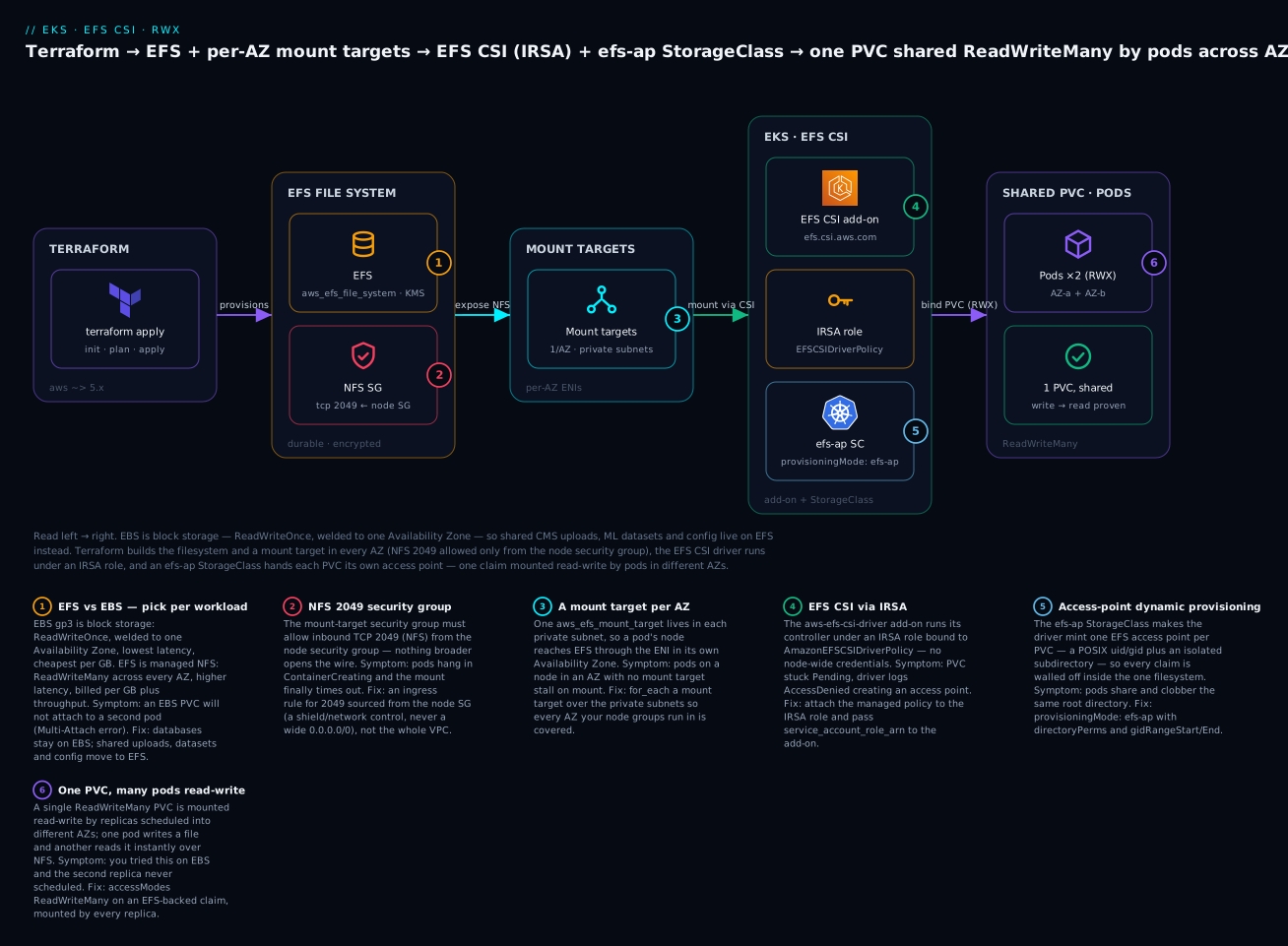
Read the diagram left to right: Terraform provisions the EFS filesystem (badge 1 — chosen over EBS precisely because it does RWX) guarded by a security group that opens NFS 2049 to the nodes only (badge 2), exposed through a mount target in every AZ (badge 3); the EFS CSI driver runs under an IRSA role (badge 4), an efs-ap StorageClass provisions an access point per claim (badge 5), and a single PVC is mounted read-write by pods in different AZs (badge 6). The six legend entries are the six decisions you make in the code below.
Why EBS can’t do this: access modes and the RWX problem
Before any HCL, internalise why you are reaching for a second storage class at all. It comes down to Kubernetes access modes — the contract a volume advertises about how many nodes may mount it and how:
| Access mode | Short | Meaning | EBS | EFS |
|---|---|---|---|---|
| ReadWriteOnce | RWO | Mounted read-write by pods on one node | ✅ (native) | ✅ |
| ReadWriteOncePod | RWOP | Read-write by exactly one pod cluster-wide | ✅ (1.22+) | ✅ |
| ReadOnlyMany | ROX | Mounted read-only by many nodes | ⚠️ snapshot clones only | ✅ |
| ReadWriteMany | RWX | Mounted read-write by many nodes at once | ❌ impossible | ✅ (native) |
The line that matters is the last one. An EBS volume is a block device: the AWS control plane attaches it to a single EC2 instance’s block layer, and a block device with a normal filesystem (ext4/xfs) cannot be mounted read-write by two kernels simultaneously without corrupting itself. So EBS tops out at RWO — read-write from the pods on one node. Worse for a multi-AZ cluster, an EBS volume is created in one Availability Zone and cannot leave it; a pod that lands on a node in another AZ cannot attach it at all. EFS sidesteps both limits by not being a block device: it is a network filesystem (NFSv4.1), and NFS was designed from day one for many clients writing concurrently, with the server arbitrating. Because it is reached over the network, it is regional — every AZ can mount the same filesystem.
That difference cascades into a decision table you should be able to recite:
| Dimension | Amazon EBS (gp3) | Amazon EFS |
|---|---|---|
| Storage type | Block device | Managed NFS filesystem |
| Access mode | RWO (one node) | RWX (many nodes) |
| AZ scope | Single AZ (pinned) | Regional — all AZs |
| Provisioned capacity | Fixed size you set/grow | Elastic — grows/shrinks automatically |
| Latency | Sub-millisecond, consistent | ~ms, NFS round-trips |
| Throughput ceiling | Per-volume (up to 1,000 MB/s) | Elastic/Provisioned; scales huge |
| Price model | Per GB provisioned | Per GB stored + throughput + IA tiers |
| Rough cost | ~₹8/GB-mo (gp3) | ~₹25/GB-mo Standard, far less on IA |
| CSI driver | ebs.csi.aws.com |
efs.csi.aws.com |
| Ideal workload | Databases, single-writer caches | Shared uploads, ML datasets, config |
| Snapshot/restore | EBS snapshots | AWS Backup / EFS-to-EFS |
The reading of this table is not “EFS is better.” It is “they solve different problems and cost differently.” EBS is faster and cheaper per GB and is the correct home for a Postgres data directory or an Elasticsearch node — anything single-writer and latency-sensitive. EFS costs more per GB and adds network latency, and you use it precisely when sharing is the requirement. The workloads that pull you to EFS share a shape:
| Workload | Why RWX | Why not EBS |
|---|---|---|
| CMS / WordPress media uploads | Any web replica must serve and receive uploads | Uploads on one pod’s EBS are invisible to the others |
| ML training dataset + checkpoints | All workers read one dataset, share a checkpoint dir | Copying the dataset per-pod wastes hours and TB |
| Shared config / prompt templates | Admin edits once; every pod sees it live | An EBS copy per pod drifts and needs redeploys |
| CI/CD artifact or build cache | Parallel runners read/write one cache | RWO serialises the runners onto one node |
| Legacy app expecting a shared mount | Lift-and-shift assumed NFS | Re-architecting to object storage is a project |
If your “shared” need is actually read-mostly and can tolerate eventual consistency, object storage (S3) is cheaper still — but the moment the workload needs POSIX semantics (open, flock, in-place edits, a real directory tree) and concurrent writers, EFS is the answer.
Modelling EFS in Terraform
EFS decomposes into three resources you will always create together: the filesystem (the durable data), the mount targets (the per-AZ network entry points), and a security group that gates them. Miss any one and pods will not mount.
The filesystem — aws_efs_file_system
The filesystem is the durable object; everything else references its ID. The arguments that matter:
resource "aws_efs_file_system" "this" {
  creation_token = "kv-eks-efs-${var.env}" # idempotency token — dedupes retries
  encrypted      = true                    # encryption at rest (always on)
  kms_key_id     = aws_kms_key.efs.arn     # omit → AWS-managed aws/elasticfilesystem key

  performance_mode = "generalPurpose"      # or "maxIO" (legacy, higher per-op latency)
  throughput_mode  = "elastic"             # "bursting" | "provisioned" | "elastic"

  # Tier cold data to Infrequent Access to cut cost ~90% per GB.
  lifecycle_policy {
    transition_to_ia                    = "AFTER_30_DAYS"
    transition_to_primary_storage_class = "AFTER_1_ACCESS"
  }

  tags = { Name = "kv-eks-efs-${var.env}" }
}
| Argument | Values | What it controls | Note |
|---|---|---|---|
creation_token |
string | Idempotency key for the create call | Stops a retried apply making two filesystems |
encrypted |
bool | Encryption at rest | Set true — always; free |
kms_key_id |
ARN | CMK for encryption | Omit for the AWS-managed key; a CMK gives you key policy + rotation control |
performance_mode |
generalPurpose | maxIO |
Latency vs parallelism | generalPurpose for ~all; maxIO is legacy, adds latency, and is incompatible with Elastic |
throughput_mode |
bursting | provisioned | elastic |
How throughput scales | See table below |
provisioned_throughput_in_mibps |
number | Fixed MiB/s | Only with throughput_mode = "provisioned" |
lifecycle_policy |
block | IA / Archive tiering | Slashes cost for cold data |
availability_zone_name |
string | One-Zone EFS | Cheaper, not multi-AZ — defeats RWX-across-AZs |
Two footguns hide in that table. First, throughput_mode = "elastic" requires generalPurpose and forbids provisioned_throughput_in_mibps; combine them and the apply errors. Second, setting availability_zone_name creates a One-Zone filesystem — cheaper, but single-AZ, which throws away the very cross-AZ sharing you came for. Leave it unset for a regional filesystem.
Performance mode is a smaller decision and, in 2026, almost always the default:
| Performance mode | Latency | Parallel ops | Use when |
|---|---|---|---|
generalPurpose |
Lowest per-op | High (tens of thousands) | Almost everything — the only mode that supports Elastic throughput |
maxIO |
Higher per-op | Highest aggregate | Legacy, huge highly-parallel jobs; incompatible with Elastic — avoid for new filesystems |
Throughput mode is the lever people misjudge, because Bursting — the old default — throttles surprisingly:
| Mode | How it scales | Cost | Use when |
|---|---|---|---|
bursting |
Baseline scales with size (50 KB/s per GB), burst credits for spikes | Cheapest at rest | Small/cheap filesystems with bursty, low sustained I/O |
provisioned |
You fix a MiB/s floor regardless of size | Pay for provisioned MiB/s | Small filesystem needing steady high throughput |
elastic |
Auto-scales up and down to demand, pay-per-use | Pay for what you drive | Default for most — no credits to exhaust, no guessing |
For anything with unpredictable load — the exact profile of a shared media store or an ML cache — Elastic is the modern default: there are no burst credits to run dry (the classic “our EFS got slow at 2 a.m.” incident), and you are not paying a provisioned floor 24/7. Reserve Provisioned for a small filesystem that nonetheless needs a guaranteed high floor.
The lifecycle policy is free money. EFS Standard is ~₹25/GB-mo; Infrequent Access (IA) is roughly a tenth of that. transition_to_ia = "AFTER_30_DAYS" moves files not touched in 30 days to IA; transition_to_primary_storage_class = "AFTER_1_ACCESS" pulls them back to Standard the moment they are read again. For a media library with a long tail of rarely-viewed assets, this quietly cuts the bill by most of it:
| Storage class | Relative price/GB | Populated by |
|---|---|---|
| Standard | 1× (baseline) | New and recently accessed files |
| Standard-IA | ~0.1× | transition_to_ia after N days idle |
| Archive | ~0.03× | transition_to_archive (≥90 days), rarely-read data |
Mount targets — one per AZ — aws_efs_mount_target
A filesystem you cannot reach is useless. A mount target is an elastic network interface (ENI) EFS places inside a subnet, giving that subnet’s AZ an IP to NFS-mount. The rule that trips everyone: one mount target per Availability Zone, and a pod can only reach EFS through the mount target in its own node’s AZ. So you create one mount target per private subnet where nodes run, and the idiomatic way is for_each over the subnet IDs — the pattern from Meta-Arguments: count & for_each:
resource "aws_efs_mount_target" "this" {
  for_each        = toset(var.private_subnet_ids) # one per private subnet/AZ
  file_system_id  = aws_efs_file_system.this.id
  subnet_id       = each.value
  security_groups = [aws_security_group.efs.id]
}
| Rule | Detail | Failure if broken |
|---|---|---|
| One per AZ | At most one mount target per AZ per filesystem | Duplicate-AZ mount target → apply error |
| Cover every node AZ | A node whose AZ has no mount target cannot mount | Pods on that node hang in ContainerCreating |
| Put them in the private subnets | Nodes live there; keeps EFS off the internet | Public mount targets widen the attack surface |
| Attach the EFS SG | The SG gates who may reach 2049 | No SG rule → mount times out |
| Subnets must be in the filesystem’s region | Mount target follows the subnet’s AZ | — |
The subtle production bug is an AZ mismatch: your node group spans three AZs but you only created mount targets in two subnets. Everything works until the autoscaler places a pod in the third AZ, and only that pod fails to mount. for_each over the full private-subnet list is the guard — the same list your node groups use, so they can never diverge.
The security group — NFS 2049 from the nodes only
The mount target’s ENI needs a security group, and this is a place to be deliberately narrow. EFS speaks NFS on TCP 2049, and the only thing that should reach it is your EKS nodes. So the rule sources port 2049 from the node security group, not from a CIDR — reference the SG, and the rule follows the nodes wherever they scale:
resource "aws_security_group" "efs" {
  name_prefix = "kv-eks-efs-"
  description = "EFS mount targets: allow NFS 2049 from EKS nodes only"
  vpc_id      = var.vpc_id

  ingress {
    description     = "NFS from EKS node group"
    from_port       = 2049
    to_port         = 2049
    protocol        = "tcp"
    security_groups = [var.node_security_group_id] # source = the node/cluster SG
  }

  egress {
    from_port   = 0
    to_port     = 0
    protocol    = "-1"
    cidr_blocks = ["0.0.0.0/0"]
  }

  tags = { Name = "kv-eks-efs-sg" }
}
| Setting | Value | Why |
|---|---|---|
| Ingress port | 2049 (TCP) |
NFSv4.1 — the only port EFS needs |
| Ingress source | security_groups = [node SG] |
Follows the nodes; never a broad CIDR |
vpc_id |
the cluster VPC | Mount targets live in this VPC |
| Egress | all (or 2049 back to nodes) | NFS is stateful; return traffic |
For a managed node group, the security group to reference is the cluster’s primary security group — data.aws_eks_cluster.this.vpc_config[0].cluster_security_group_id — which EKS attaches to every managed node, so var.node_security_group_id should point at it. The reason to source from the SG rather than the subnet CIDR is drift-resistance and least privilege: scale the node group, add a subnet, replace the nodes — the rule keeps working and nothing else in the VPC can touch 2049.
On the diagram this control is a
shield/networkelement labelled “NFS SG”, never afirewall— a security group is a stateful allow-list on an ENI, not a network firewall appliance, and drawing it as a firewall misleads readers about what it is.
The EFS CSI driver: add-on, IRSA & the StorageClass
Terraform has built the AWS-side storage. For Kubernetes to use it, three things must be true: the EFS CSI driver must be running in the cluster, it must hold AWS permissions to create access points, and a StorageClass must tell it how to provision volumes.
Installing the driver — add-on vs Helm
The driver is a controller + node DaemonSet that translates PVCs into EFS mounts. Two supported install paths:
| Path | Terraform | Pros | Cons |
|---|---|---|---|
| EKS managed add-on | aws_eks_addon (aws-efs-csi-driver) |
AWS lifecycles it; version pinning; wires IRSA via one arg | Slightly behind upstream releases |
| Helm chart | helm_release (aws-efs-csi-driver) |
Latest versions, full values control |
You own upgrades and the SA/IRSA annotation |
For a Terraform shop the managed add-on is the better default — it takes a service_account_role_arn, so the IRSA wiring is one argument and AWS handles the upgrade path. Discover versions with aws eks describe-addon-versions --addon-name aws-efs-csi-driver --kubernetes-version 1.30:
resource "aws_eks_addon" "efs_csi" {
  cluster_name  = var.cluster_name
  addon_name    = "aws-efs-csi-driver"
  addon_version = var.efs_csi_addon_version # e.g. "v2.1.0-eksbuild.1"

  service_account_role_arn    = aws_iam_role.efs_csi.arn # IRSA — the key line
  resolve_conflicts_on_create = "OVERWRITE"
  resolve_conflicts_on_update = "OVERWRITE"

  tags = { Name = "aws-efs-csi-driver" }
}
The Helm equivalent, when you want the bleeding edge, annotates the service account with the same role ARN yourself:
resource "helm_release" "efs_csi" {
  name       = "aws-efs-csi-driver"
  repository = "https://kubernetes-sigs.github.io/aws-efs-csi-driver/"
  chart      = "aws-efs-csi-driver"
  namespace  = "kube-system"
  version    = "3.1.0"

  set {
    name  = "controller.serviceAccount.annotations.eks\\.amazonaws\\.com/role-arn"
    value = aws_iam_role.efs_csi.arn
  }
}
IRSA — giving the driver AWS permissions
Under dynamic provisioning the driver calls the EFS API to create an access point for every PVC, so it needs elasticfilesystem:CreateAccessPoint, DeleteAccessPoint, and DescribeAccessPoints — exactly what the AWS-managed AmazonEFSCSIDriverPolicy grants. IRSA (IAM Roles for Service Accounts) is how a specific Kubernetes service account assumes an IAM role via the cluster’s OIDC provider — no node-wide keys, no secrets. (The full mechanism is the subject of EKS OIDC & IRSA; here we apply it.)
data "aws_eks_cluster" "this" { name = var.cluster_name }

# The IAM OIDC provider you created in the IRSA lesson.
data "aws_iam_openid_connect_provider" "this" {
  url = data.aws_eks_cluster.this.identity[0].oidc[0].issuer
}

locals {
  oidc_url = replace(data.aws_eks_cluster.this.identity[0].oidc[0].issuer, "https://", "")
}

data "aws_iam_policy_document" "efs_csi_assume" {
  statement {
    effect  = "Allow"
    actions = ["sts:AssumeRoleWithWebIdentity"]

    principals {
      type        = "Federated"
      identifiers = [data.aws_iam_openid_connect_provider.this.arn]
    }
    # Only the driver's controller SA in kube-system may assume this role.
    condition {
      test     = "StringEquals"
      variable = "${local.oidc_url}:sub"
      values   = ["system:serviceaccount:kube-system:efs-csi-controller-sa"]
    }
    condition {
      test     = "StringEquals"
      variable = "${local.oidc_url}:aud"
      values   = ["sts.amazonaws.com"]
    }
  }
}

resource "aws_iam_role" "efs_csi" {
  name               = "kv-eks-efs-csi-irsa-${var.env}"
  assume_role_policy = data.aws_iam_policy_document.efs_csi_assume.json
}

resource "aws_iam_role_policy_attachment" "efs_csi" {
  role       = aws_iam_role.efs_csi.name
  policy_arn = "arn:aws:iam::aws:policy/service-role/AmazonEFSCSIDriverPolicy"
}
| IRSA piece | Resource / value | Job |
|---|---|---|
| OIDC provider | data.aws_iam_openid_connect_provider |
The trust anchor federating K8s SAs to IAM |
Trust policy sub |
system:serviceaccount:kube-system:efs-csi-controller-sa |
Only this SA may assume the role |
Trust policy aud |
sts.amazonaws.com |
Audience check — blocks token confusion |
| Managed policy | AmazonEFSCSIDriverPolicy |
CreateAccessPoint / DeleteAccessPoint / describe |
| Wiring to driver | add-on service_account_role_arn |
Binds the role to the SA |
The sub condition is the security crux: it scopes the role to precisely the efs-csi-controller-sa service account in kube-system, so no other pod — even a compromised one — can assume it. Get the SA name wrong and the driver’s calls fail with AccessDenied and PVCs sit Pending. (AWS is also rolling out EKS Pod Identity as a newer alternative to IRSA — an aws_eks_pod_identity_association instead of an OIDC trust policy; it is simpler but IRSA remains the broadly supported path and is what the add-on’s service_account_role_arn expects.)
The StorageClass — access-point dynamic provisioning
The StorageClass tells Kubernetes how to turn a PVC into a volume. For EFS you almost always want provisioningMode: efs-ap, where the driver creates one EFS access point per claim. An access point is an application-specific entry into the filesystem: it pins a root directory and enforces a POSIX uid/gid, so each PVC gets an isolated, permission-scoped subtree of the one filesystem — tenants cannot see each other’s data even though they share the filesystem.
An access point is worth understanding as its own object, because it is what makes one shared filesystem safe for many tenants:
| Access-point property | Set from (StorageClass param) | Effect |
|---|---|---|
| Root directory path | basePath + subPathPattern |
The subtree this claim is confined to — it cannot escape upward |
| Directory permissions | directoryPerms |
POSIX mode bits on the root dir (e.g. 700) |
| POSIX user (uid) | uid or auto |
The uid all I/O through the access point runs as |
| POSIX group (gid) | gid / gidRangeStart–gidRangeEnd |
The gid, or a pool the driver assigns from |
| Uniqueness | ensureUniqueDirectory |
Appends a suffix so two claims never share a dir |
resource "kubernetes_storage_class" "efs" {
  metadata { name = "efs-sc" }
  storage_provisioner = "efs.csi.aws.com"
  reclaim_policy      = "Delete" # delete the access point when the PVC is deleted

  parameters = {
    provisioningMode = "efs-ap"
    fileSystemId     = aws_efs_file_system.this.id
    directoryPerms   = "700"
    gidRangeStart    = "1000" # POSIX GID pool for per-PVC access points
    gidRangeEnd      = "2000"
    basePath         = "/dynamic_provisioning"
    # One isolated subdir per claim; $$ escapes Terraform interpolation.
    subPathPattern        = "$${.PVC.namespace}/$${.PVC.name}"
    ensureUniqueDirectory = "true"
  }

  mount_options = ["tls"] # encryption in transit (NFS over TLS)
}
| Parameter | Example | Meaning |
|---|---|---|
provisioningMode |
efs-ap |
Create an access point per PVC (the dynamic mode) |
fileSystemId |
fs-0abc… |
Which EFS filesystem to carve access points in |
directoryPerms |
700 |
POSIX perms on the access point’s root dir |
gidRangeStart / gidRangeEnd |
1000 / 2000 |
GID pool the driver assigns per access point |
uid / gid |
fixed number | Pin a single uid/gid instead of a range (optional) |
basePath |
/dynamic_provisioning |
Parent dir under which access-point dirs are made |
subPathPattern |
$${.PVC.namespace}/$${.PVC.name} |
Template for each claim’s subdirectory |
ensureUniqueDirectory |
true |
Append a suffix so two PVCs never collide |
reclaimPolicy (block arg) |
Delete / Retain |
Delete or keep the access point + data on PVC delete |
mount_options |
["tls"] |
NFS over TLS — encryption in transit |
Two things about that HCL. First, $${...} is an escape: in Terraform, ${ starts an interpolation, so to write the literal ${.PVC.name} that the driver’s subPathPattern expects, you double the dollar sign. Forget it and Terraform tries to evaluate .PVC.name and errors. Second, reclaim_policy = "Delete" means deleting the PVC deletes the access point and its data — right for ephemeral, dynamically-provisioned claims, but set it to Retain for anything precious, and know that Retained access points linger and can block the filesystem from being destroyed later.
Static vs dynamic provisioning
There are two ways to hand EFS to a pod, and knowing when to use each avoids a lot of confusion:
Dynamic (efs-ap) |
Static (pre-provisioned PV) | |
|---|---|---|
| Who makes the volume | The driver, per PVC | You, up front |
| Kubernetes object | StorageClass → PVC | A PersistentVolume you author |
| Isolation | One access point per claim | Whatever volumeHandle you point at |
volumeHandle |
Managed for you | fs-id or fs-id::fsap-id (you set it) |
| StorageClass | efs-sc |
storageClassName: "" (none) |
| Best for | Self-service, many teams, per-PVC dirs | A shared, pre-existing directory everyone mounts |
| IAM need | Driver needs CreateAccessPoint |
None at provision time |
Dynamic is the self-service default this lesson uses: developers create a PVC against efs-sc and get an isolated, permission-scoped slice automatically. Static is for when a single, known directory (perhaps pre-populated with a dataset) must be mounted by everyone — you write a PersistentVolume whose volumeHandle is the filesystem (or fs-xxxx::fsap-yyyy to pin an access point), give it accessModes: [ReadWriteMany], and PVCs bind to it directly:
# Static PV — no StorageClass provisioner; you point at the filesystem/access point.
apiVersion: v1
kind: PersistentVolume
metadata: { name: efs-shared-dataset }
spec:
  capacity: { storage: 100Gi } # advisory only — EFS is elastic
  accessModes: ["ReadWriteMany"]
  persistentVolumeReclaimPolicy: Retain
  storageClassName: ""
  csi:
    driver: efs.csi.aws.com
    volumeHandle: fs-0abc123def456::fsap-0aabbcc # filesystem :: access point
Hands-on: build it with Terraform
Time to run it. This is a complete configuration you paste into a directory (say eks-efs/) and apply against an existing EKS cluster. ⚠️ This provisions real, billable resources — EFS storage, throughput, an add-on. Do the destroy at the end.
Because the cluster already exists, we configure the kubernetes provider from a data source — plan-time API access is available, so the StorageClass/PVC/Deployment can live in the same config as the AWS resources. (If you were building the cluster in the same apply, you would split into two states, exactly as the EKS cluster lesson explains.)
Step 1 — versions.tf (providers + backend)
terraform {
  required_version = ">= 1.6"

  required_providers {
    aws        = { source = "hashicorp/aws", version = "~> 5.60" }
    kubernetes = { source = "hashicorp/kubernetes", version = "~> 2.31" }
  }

  # Remote state — S3 with DynamoDB locking (per the AWS getting-started lesson).
  backend "s3" {
    bucket         = "kv-tfstate-demo"
    key            = "eks/efs-csi/dev.tfstate"
    region         = "ap-south-1"
    dynamodb_table = "kv-tfstate-lock"
    encrypt        = true
  }
}

provider "aws" {
  region = var.region
}

# Read the existing cluster — endpoint, CA, OIDC issuer.
data "aws_eks_cluster" "this" { name = var.cluster_name }

# Authenticate via the exec plugin (fresh, short-lived token each run) rather
# than a data-source token that would be baked into state at plan time.
provider "kubernetes" {
  host                   = data.aws_eks_cluster.this.endpoint
  cluster_ca_certificate = base64decode(data.aws_eks_cluster.this.certificate_authority[0].data)
  exec {
    api_version = "client.authentication.k8s.io/v1beta1"
    command     = "aws"
    args        = ["eks", "get-token", "--cluster-name", var.cluster_name]
  }
}
Step 2 — variables.tf
variable "region" {
  type    = string
  default = "ap-south-1"
}

variable "env" {
  type    = string
  default = "dev"
}

variable "cluster_name" {
  description = "Name of the existing EKS cluster"
  type        = string
}

variable "vpc_id" {
  description = "VPC the cluster runs in"
  type        = string
}

variable "private_subnet_ids" {
  description = "Private subnets (one per AZ) to place EFS mount targets in"
  type        = list(string)
}

variable "node_security_group_id" {
  description = "The EKS node/cluster primary SG allowed to reach EFS on 2049"
  type        = string
}

variable "efs_csi_addon_version" {
  description = "aws-efs-csi-driver add-on version (aws eks describe-addon-versions)"
  type        = string
  default     = "v2.1.0-eksbuild.1"
}
Step 3 — main.tf (the resources)
# ---- KMS + EFS filesystem ---------------------------------------------------
resource "aws_kms_key" "efs" {
  description             = "CMK for EFS at-rest encryption (${var.env})"
  deletion_window_in_days = 7
  enable_key_rotation     = true
}

resource "aws_efs_file_system" "this" {
  creation_token   = "kv-eks-efs-${var.env}"
  encrypted        = true
  kms_key_id       = aws_kms_key.efs.arn
  performance_mode = "generalPurpose"
  throughput_mode  = "elastic"

  lifecycle_policy {
    transition_to_ia                    = "AFTER_30_DAYS"
    transition_to_primary_storage_class = "AFTER_1_ACCESS"
  }

  tags = { Name = "kv-eks-efs-${var.env}" }
}

# ---- Security group: NFS 2049 from the nodes only ---------------------------
resource "aws_security_group" "efs" {
  name_prefix = "kv-eks-efs-"
  description = "EFS mount targets: allow NFS 2049 from EKS nodes only"
  vpc_id      = var.vpc_id

  ingress {
    description     = "NFS from EKS node group"
    from_port       = 2049
    to_port         = 2049
    protocol        = "tcp"
    security_groups = [var.node_security_group_id]
  }
  egress {
    from_port   = 0
    to_port     = 0
    protocol    = "-1"
    cidr_blocks = ["0.0.0.0/0"]
  }
  tags = { Name = "kv-eks-efs-sg" }
}

# ---- One mount target per private subnet / AZ -------------------------------
resource "aws_efs_mount_target" "this" {
  for_each        = toset(var.private_subnet_ids)
  file_system_id  = aws_efs_file_system.this.id
  subnet_id       = each.value
  security_groups = [aws_security_group.efs.id]
}

# ---- IRSA role for the EFS CSI driver ---------------------------------------
data "aws_iam_openid_connect_provider" "this" {
  url = data.aws_eks_cluster.this.identity[0].oidc[0].issuer
}

locals {
  oidc_url = replace(data.aws_eks_cluster.this.identity[0].oidc[0].issuer, "https://", "")
}

data "aws_iam_policy_document" "efs_csi_assume" {
  statement {
    effect  = "Allow"
    actions = ["sts:AssumeRoleWithWebIdentity"]
    principals {
      type        = "Federated"
      identifiers = [data.aws_iam_openid_connect_provider.this.arn]
    }
    condition {
      test     = "StringEquals"
      variable = "${local.oidc_url}:sub"
      values   = ["system:serviceaccount:kube-system:efs-csi-controller-sa"]
    }
    condition {
      test     = "StringEquals"
      variable = "${local.oidc_url}:aud"
      values   = ["sts.amazonaws.com"]
    }
  }
}

resource "aws_iam_role" "efs_csi" {
  name               = "kv-eks-efs-csi-irsa-${var.env}"
  assume_role_policy = data.aws_iam_policy_document.efs_csi_assume.json
}

resource "aws_iam_role_policy_attachment" "efs_csi" {
  role       = aws_iam_role.efs_csi.name
  policy_arn = "arn:aws:iam::aws:policy/service-role/AmazonEFSCSIDriverPolicy"
}

# ---- The EFS CSI driver as an EKS add-on, bound to the IRSA role ------------
resource "aws_eks_addon" "efs_csi" {
  cluster_name                = var.cluster_name
  addon_name                  = "aws-efs-csi-driver"
  addon_version               = var.efs_csi_addon_version
  service_account_role_arn    = aws_iam_role.efs_csi.arn
  resolve_conflicts_on_create = "OVERWRITE"
  resolve_conflicts_on_update = "OVERWRITE"

  depends_on = [aws_iam_role_policy_attachment.efs_csi]
  tags       = { Name = "aws-efs-csi-driver" }
}

# ---- StorageClass: access-point dynamic provisioning ------------------------
resource "kubernetes_storage_class" "efs" {
  metadata { name = "efs-sc" }
  storage_provisioner = "efs.csi.aws.com"
  reclaim_policy      = "Delete"

  parameters = {
    provisioningMode      = "efs-ap"
    fileSystemId          = aws_efs_file_system.this.id
    directoryPerms        = "700"
    gidRangeStart         = "1000"
    gidRangeEnd           = "2000"
    basePath              = "/dynamic_provisioning"
    subPathPattern        = "$${.PVC.namespace}/$${.PVC.name}"
    ensureUniqueDirectory = "true"
  }

  mount_options = ["tls"]
  depends_on    = [aws_eks_addon.efs_csi]
}

# ---- Demo: a namespace, an RWX PVC, and a 2-replica Deployment sharing it ---
resource "kubernetes_namespace" "demo" {
  metadata { name = "efs-demo" }
}

resource "kubernetes_persistent_volume_claim" "shared" {
  metadata {
    name      = "shared-rwx"
    namespace = kubernetes_namespace.demo.metadata[0].name
  }
  spec {
    access_modes       = ["ReadWriteMany"]
    storage_class_name = kubernetes_storage_class.efs.metadata[0].name
    resources {
      requests = { storage = "5Gi" } # advisory — EFS is elastic
    }
  }
}

resource "kubernetes_deployment" "writer_reader" {
  metadata {
    name      = "shared-demo"
    namespace = kubernetes_namespace.demo.metadata[0].name
  }
  spec {
    replicas = 2
    selector { match_labels = { app = "shared-demo" } }
    template {
      metadata { labels = { app = "shared-demo" } }
      spec {
        # Spread the two replicas across AZs to prove cross-AZ RWX.
        topology_spread_constraint {
          max_skew           = 1
          topology_key       = "topology.kubernetes.io/zone"
          when_unsatisfiable = "ScheduleAnyway"
          label_selector { match_labels = { app = "shared-demo" } }
        }
        container {
          name    = "app"
          image   = "public.ecr.aws/docker/library/busybox:1.36"
          command = ["/bin/sh", "-c"]
          # Each pod appends its identity every 5s to the SHARED file.
          args = [
            "while true; do echo \"$(date -Iseconds) from $(hostname)\" >> /data/shared.log; sleep 5; done"
          ]
          volume_mount {
            name       = "shared"
            mount_path = "/data"
          }
        }
        volume {
          name = "shared"
          persistent_volume_claim {
            claim_name = kubernetes_persistent_volume_claim.shared.metadata[0].name
          }
        }
      }
    }
  }
}
Step 4 — outputs.tf
output "efs_id" {
  value = aws_efs_file_system.this.id
}

output "efs_dns_name" {
  value = aws_efs_file_system.this.dns_name
}

output "mount_target_azs" {
  value = { for k, mt in aws_efs_mount_target.this : k => mt.availability_zone_name }
}

output "efs_csi_role_arn" {
  value = aws_iam_role.efs_csi.arn
}

output "storage_class" {
  value = kubernetes_storage_class.efs.metadata[0].name
}
Step 5 — init, plan, apply
Point Terraform at the existing cluster’s details (from the cluster lesson’s outputs or terraform output in that config), then init:
export AWS_REGION=ap-south-1
terraform init
Initializing the backend...
Successfully configured the backend "s3"!
Initializing provider plugins...
- Installing hashicorp/aws v5.60.x...
- Installing hashicorp/kubernetes v2.31.x...
Terraform has been successfully initialized!
Plan it, supplying the cluster wiring (a terraform.tfvars is cleanest):
terraform plan -out=efs.plan \
  -var 'cluster_name=kv-eks-dev' \
  -var 'vpc_id=vpc-0abc123' \
  -var 'private_subnet_ids=["subnet-0a1","subnet-0b2","subnet-0c3"]' \
  -var 'node_security_group_id=sg-0nodes123'
Terraform will perform the following actions:

  # aws_efs_file_system.this will be created
  + resource "aws_efs_file_system" "this" {
      + encrypted        = true
      + performance_mode = "generalPurpose"
      + throughput_mode  = "elastic"
      + dns_name         = (known after apply)
    }
  # aws_efs_mount_target.this["subnet-0a1"] will be created  (×3 subnets)
  # aws_security_group.efs will be created
  # aws_iam_role.efs_csi will be created
  # aws_eks_addon.efs_csi will be created
  # kubernetes_storage_class.efs will be created
  # kubernetes_persistent_volume_claim.shared will be created
  # kubernetes_deployment.shared_demo will be created
  # ... (KMS key, policy attachment, namespace)

Plan: 13 to add, 0 to change, 0 to destroy.
Apply (EFS and mount targets create in seconds; the add-on takes a minute or two):
terraform apply efs.plan
aws_efs_file_system.this: Creation complete after 6s [id=fs-0abc123def456]
aws_efs_mount_target.this["subnet-0a1"]: Creation complete after 48s
aws_efs_mount_target.this["subnet-0b2"]: Creation complete after 51s
aws_efs_mount_target.this["subnet-0c3"]: Creation complete after 49s
aws_eks_addon.efs_csi: Creation complete after 1m20s
kubernetes_storage_class.efs: Creation complete after 1s
kubernetes_persistent_volume_claim.shared: Creation complete after 9s
kubernetes_deployment.shared_demo: Creation complete after 12s

Apply complete! Resources: 13 added, 0 changed, 0 destroyed.

Outputs:
efs_id        = "fs-0abc123def456"
storage_class = "efs-sc"
Step 6 — verify RWX sharing (the whole point)
First confirm the plumbing landed, then prove two pods share one volume:
kubectl get sc efs-sc
kubectl -n efs-demo get pvc          # STATUS should be Bound
kubectl -n efs-demo get pods -o wide # two pods, ideally different NODE + ZONE
NAME                          STATUS   VOLUME        CAPACITY   ACCESS MODES   STORAGECLASS
shared-rwx                    Bound    pvc-9f0e…     5Gi        RWX            efs-sc

NAME                          READY   NODE                    ...
shared-demo-6c8…-abcde        1/1     ip-10-0-1-11 (az-a)     ...
shared-demo-6c8…-fghij        1/1     ip-10-0-2-22 (az-b)     ...
The two pods are on different nodes in different AZs — an EBS RWO volume could never do this. Now read the shared file from one pod and confirm it contains lines written by both:
POD_A=$(kubectl -n efs-demo get pod -l app=shared-demo -o jsonpath='{.items[0].metadata.name}')
POD_B=$(kubectl -n efs-demo get pod -l app=shared-demo -o jsonpath='{.items[1].metadata.name}')

kubectl -n efs-demo exec "$POD_A" -- sh -c 'tail -4 /data/shared.log'
2026-07-09T10:31:05+00:00 from shared-demo-6c8…-abcde
2026-07-09T10:31:06+00:00 from shared-demo-6c8…-fghij   <-- written by POD_B, read by POD_A
2026-07-09T10:31:10+00:00 from shared-demo-6c8…-abcde
2026-07-09T10:31:11+00:00 from shared-demo-6c8…-fghij
Both hostnames appear in the file read from a single pod: the write from POD_B in AZ-b is visible to POD_A in AZ-a, live, over NFS. Write a file from B and read it from A to be fully convinced:
kubectl -n efs-demo exec "$POD_B" -- sh -c 'echo "hello from B" > /data/from-b.txt'
kubectl -n efs-demo exec "$POD_A" -- cat /data/from-b.txt   # -> hello from B
Confirm the driver dynamically created an access point for the claim, and the smoke-test checklist:
aws efs describe-access-points --file-system-id "$(terraform output -raw efs_id)" \
  --query 'AccessPoints[].RootDirectory.Path'
# [ "/dynamic_provisioning/efs-demo/shared-rwx-<suffix>" ]
| Check | Command | Expect |
|---|---|---|
| StorageClass present | kubectl get sc efs-sc |
efs.csi.aws.com |
| Driver pods running | kubectl -n kube-system get pods | grep efs-csi |
efs-csi-controller + efs-csi-node Ready |
| PVC bound | kubectl -n efs-demo get pvc |
Bound, RWX |
| Pods across AZs | kubectl -n efs-demo get pods -o wide |
2 pods, different NODE/zone |
| Access point created | aws efs describe-access-points --file-system-id <id> |
one per PVC |
| Cross-pod read works | exec POD_A -- cat /data/from-b.txt |
content written by POD_B |
Step 7 — destroy & clean up
⚠️ Tear it all down so you stop paying for storage and throughput:
terraform destroy -auto-approve \
  -var 'cluster_name=kv-eks-dev' -var 'vpc_id=vpc-0abc123' \
  -var 'private_subnet_ids=["subnet-0a1","subnet-0b2","subnet-0c3"]' \
  -var 'node_security_group_id=sg-0nodes123'
kubernetes_deployment.shared_demo: Destroying...
kubernetes_persistent_volume_claim.shared: Destroying...   # reclaim=Delete → access point removed
aws_eks_addon.efs_csi: Destroying...
aws_efs_mount_target.this["subnet-0a1"]: Destroying...
aws_efs_file_system.this: Destroying...

Destroy complete! Resources: 13 destroyed.
Because reclaim_policy = "Delete", deleting the PVC deletes the dynamically-provisioned access point before the filesystem is torn down — Terraform sequences it. Watch for one gotcha: if you had set Retain, or created access points out of band, they linger and EFS refuses to delete (FileSystemInUse). List and delete stragglers with aws efs describe-access-points --file-system-id <id> then delete-access-point.
Variables, outputs & making it reusable
The demo already parameterises the cluster wiring; a platform team goes one step further and wraps the whole thing in a module with clean inputs — cluster name, subnets, node SG, throughput mode, lifecycle days — and outputs the filesystem ID and StorageClass name for other stacks to consume. The for_each over subnets is already the reusable core; the natural next move is supporting multiple StorageClasses (e.g. a Retain class for precious data and a Delete class for scratch) from a map:
variable "storage_classes" {
  description = "EFS StorageClasses to create, keyed by name"
  type = map(object({
    reclaim_policy = optional(string, "Delete")
    directory_perms = optional(string, "700")
    base_path      = optional(string, "/dynamic_provisioning")
  }))
  default = {
    "efs-sc"        = { reclaim_policy = "Delete" }
    "efs-sc-retain" = { reclaim_policy = "Retain", base_path = "/retained" }
  }
}

resource "kubernetes_storage_class" "efs" {
  for_each            = var.storage_classes
  metadata { name = each.key }
  storage_provisioner = "efs.csi.aws.com"
  reclaim_policy      = each.value.reclaim_policy
  parameters = {
    provisioningMode = "efs-ap"
    fileSystemId     = aws_efs_file_system.this.id
    directoryPerms   = each.value.directory_perms
    basePath         = each.value.base_path
    gidRangeStart    = "1000"
    gidRangeEnd      = "2000"
  }
  mount_options = ["tls"]
}
Should you roll your own or use registry modules? Two community modules cover this ground, and for a big fleet they are the fast path:
| Consideration | Roll your own | Registry modules |
|---|---|---|
| EFS filesystem + mount targets | Your aws_efs_* (this lesson) |
terraform-aws-modules/efs/aws |
| IRSA role for the driver | Your OIDC trust policy | terraform-aws-modules/iam//modules/iam-role-for-service-accounts-eks (has an attach_efs_csi_policy toggle) |
| The add-on | Your aws_eks_addon |
terraform-aws-modules/eks cluster_addons |
| Control / learning | Total — you see every wire | Abstracted; fast to standardise |
| Best for | Understanding, opinionated platforms | Large fleets, many clusters |
The honest recommendation matches the modules lesson: build it once by hand so the OIDC trust, the 2049 rule, and the access-point mechanics are not magic, then decide whether the registry module’s convenience is worth the abstraction. You cannot debug the module until you know what it hides.
Common mistakes and troubleshooting
These are the failures that actually page people. Scan the table, then read the prose on the five nastiest.
| Symptom | Likely cause | Fix |
|---|---|---|
Pod stuck ContainerCreating, then mount timeout |
SG doesn’t allow 2049 from the node SG | Add ingress 2049 sourced from the node/cluster SG |
| Mount timeout on some pods only | No mount target in that pod’s AZ | for_each a mount target over every private subnet |
PVC stuck Pending |
Driver lacks IAM (AccessDenied on CreateAccessPoint) |
Attach AmazonEFSCSIDriverPolicy to the IRSA role; check the sub |
PVC Pending, events show wrong/blank fileSystemId |
StorageClass fileSystemId typo/empty |
Set it to aws_efs_file_system.this.id |
AccessDenied even with the policy |
IRSA sub ≠ efs-csi-controller-sa in kube-system |
Fix the trust-policy sub; re-check aud=sts.amazonaws.com |
| Files created but pods get permission denied | Access-point uid/gid vs container runAsUser mismatch |
Align directoryPerms/gid with the pod’s security context |
Error: interpolation on subPathPattern |
${...} not escaped in HCL |
Write $${.PVC.namespace}/$${.PVC.name} |
| Throughput throttled / slow at load | bursting mode ran out of burst credits |
Switch throughput_mode = "elastic" (or provisioned) |
throughput_mode elastic + provisioned MiB/s |
Invalid combination | Drop provisioned_throughput_in_mibps under Elastic |
destroy fails FileSystemInUse |
Retained/orphan access points or mount targets | Delete access points, then the filesystem |
| Second pod won’t schedule on the old EBS PVC | You’re still on RWO EBS | Use the EFS efs-sc RWX class, not the EBS class |
| Add-on create conflict | Driver already present (Helm/older add-on) | resolve_conflicts_on_create = "OVERWRITE" |
Mount timeout is the number-one first-day failure and it is always one of three things: the security group does not admit 2049 from the nodes, there is no mount target in the pod’s AZ, or the mount target is in the wrong subnet. Diagnose with kubectl describe pod (you will see failed to mount ... connection timed out), then check, in order: does the EFS SG have an ingress rule for 2049 sourced from the node SG; is there an aws_efs_mount_target in the subnet matching the pod’s node AZ; and are the mount targets in the private subnets the nodes actually use. The for_each-over-subnets pattern eliminates the second and third by construction.
PVC Pending with dynamic provisioning is nearly always IRSA. The driver’s controller tries to call CreateAccessPoint and gets AccessDenied. Two culprits: the AmazonEFSCSIDriverPolicy is not attached to the role, or — more subtly — the role’s trust policy sub does not exactly equal system:serviceaccount:kube-system:efs-csi-controller-sa, so the SA can’t even assume the role. Read the controller logs (kubectl -n kube-system logs deploy/efs-csi-controller -c csi-provisioner) and the error names which. The other Pending cause is a bad fileSystemId in the StorageClass — a typo or an unresolved reference leaves it blank and the driver has nothing to provision into.
Access-point permissions bite when the container runs as a specific non-root user. The access point pins a POSIX uid/gid and directoryPerms; if your pod’s securityContext.runAsUser differs and the directory perms are 700, the process gets Permission denied writing to its own volume. Align them: either let the access point’s gid own the directory (fsGroup on the pod matching the gidRange), or set directoryPerms to something the pod’s user can write. This is the price of the isolation access points give you — worth understanding before it surprises you at 2 a.m.
Throughput throttling is the classic “EFS got slow” incident, and it is a mode problem, not a size problem. In Bursting mode, baseline throughput scales with stored size (50 KB/s per GB) and you spend burst credits for anything above it; a small-but-busy filesystem drains its credits and then crawls at baseline. The BurstCreditBalance CloudWatch metric hitting zero is the tell. The modern fix is Elastic throughput — it auto-scales to demand with no credits to exhaust — which is why this lesson defaults to it. Provisioned is the alternative when you want a guaranteed floor on a small filesystem.
Dynamic vs static confusion produces phantom failures. If you author a static PersistentVolume but also set storageClassName: efs-sc, Kubernetes tries to dynamically provision instead of binding your PV — set storageClassName: "" on both the PV and PVC for static binding. Conversely, a dynamic PVC needs the efs-sc class name; leave it blank and it never binds. Decide which mode you want and be consistent across the PV and the PVC.
Cost, cleanup & production notes
EFS bills on three axes — storage stored, throughput, and the IA/Archive discount — with no per-hour charge for the filesystem itself. Rough Mumbai (ap-south-1) figures for this demo, to make “destroy it” concrete:
| Component | Rate (approx) | This demo (~1 GB, light I/O) |
|---|---|---|
| EFS Standard storage | ~₹25/GB-mo | ~₹25/mo per GB |
| EFS IA storage | ~₹2.5/GB-mo | pennies (cold data) |
| Elastic throughput (read) | ~₹0.5/GB transferred | ~₹0 idle, pay per use |
| Elastic throughput (write) | ~₹2.4/GB transferred | ~₹0 idle |
| Mount targets / ENIs | no charge | ₹0 |
| EKS add-on | no charge | ₹0 |
| Idle demo left a day | — | ~₹1–2 (it stores almost nothing) |
EFS is cheap when nearly empty, which the demo is — the real cost lever in production is total stored GB and how much of it you let cool into IA. The single biggest saving is the lifecycle policy: a media library with a long cold tail can land 80–90% of its bytes in IA at a tenth the price. The second lever is not over-provisioning throughput: Elastic bills per GB transferred, so an idle filesystem costs almost nothing, whereas a Provisioned floor bills 24/7 whether you use it or not.
Five production-hardening notes beyond the demo:
- Encrypt at rest with a CMK, and in transit with TLS.
encrypted = trueplus a customer-managedkms_key_idgives you key rotation and a key policy;mount_options = ["tls"](or the driver’s TLS default) encrypts NFS on the wire. Both are effectively free. - Back it up. EFS has no snapshots like EBS; use AWS Backup (an
aws_backup_plan+ selection on the filesystem ARN) for point-in-time recovery. RWX data is often the most shared and least individually owned — back it up deliberately. - Tier aggressively with lifecycle policies.
transition_to_iaandtransition_to_archiveare the cheapest cost control you will ever configure; set them from day one. - Least-privilege the IRSA role and scope access points. The driver gets
AmazonEFSCSIDriverPolicyand nothing more; per-PVC access points with distinct uid/gid keep tenants isolated inside the one filesystem. Never grant the node role blanket EFS access. - Right-size throughput and watch the metrics. Prefer Elastic; if you must use Bursting, alarm on
BurstCreditBalanceandPercentIOLimitso you catch throttling before users do. Keep state remote, encrypted, and locked (S3 + DynamoDB), and runterraform planin CI for drift.
The Azure equivalent of this pattern is Azure Files (SMB/NFS) mounted via the Azure Files CSI driver on AKS with a ReadWriteMany class — same access-mode story, different provider; the shape rhymes. On GKE it is Filestore. The lesson generalises: block storage is RWO/single-AZ; when you need many-writer, multi-AZ sharing, you reach for a managed NFS/SMB filesystem and its CSI driver.
Going deeper
The hands-on gets you a working stack. This section is the layer underneath: how the driver actually turns a claim into a mount, the exact order Terraform must build things in, and the production subtleties that only surface once real workloads land on the volume.
Inside the driver: the control/node split and the provisioning RPCs
The aws-efs-csi-driver is not one process. Like every CSI driver it splits into two halves, which the add-on (or the Helm chart) lays down together:
| Component | Kubernetes object | Runs where | Job |
|---|---|---|---|
| Controller | Deployment (efs-csi-controller) |
A couple of replicas, any node | Calls the EFS API — creates/deletes an access point per dynamic PVC |
| Node plugin | DaemonSet (efs-csi-node) |
Every node | Performs the actual NFS mount on the node where a pod lands |
Only the controller needs AWS credentials — which is exactly why the IRSA role is scoped to the efs-csi-controller-sa service account and not to the node plugin. Inside the controller pod sit the standard CSI sidecars: csi-provisioner watches for new claims and calls the driver’s CreateVolume RPC, while liveness and registrar sidecars keep the plugin healthy and registered with each kubelet.
Trace one PVC through the lifecycle and the whole system demystifies:
- You create a PVC against
efs-sc.csi-provisionernotices it and invokesCreateVolumeon the controller. - The controller calls
elasticfilesystem:CreateAccessPoint— the permission thatAmazonEFSCSIDriverPolicygrants — carving a root directory underbasePathwith the POSIX uid/gid the StorageClass specified. It returns avolumeHandleshapedfs-xxxx::fsap-yyyy. - Kubernetes creates the PV and binds the claim. The pod is then scheduled onto a node.
- On that node the
efs-csi-nodeDaemonSet handlesNodeStageVolume/NodePublishVolume— the actual NFS mount into the pod’s mount namespace.
That split explains the two failure classes cleanly: a PVC stuck Pending is almost always a controller problem (IAM — step 2 failed), while a pod stuck in ContainerCreating with a mount timeout is almost always a node problem (network, security group, or a missing mount target in that AZ — step 4 failed). Knowing which half broke tells you which logs to read.
The mount_options = ["tls"] line deserves the same treatment, because it looks like magic. It is not a Kubernetes feature at all — it is handled by efs-utils, baked into the driver’s node image. When tls is set, the node plugin mounts with the EFS mount helper, which starts a local stunnel process that terminates TLS toward EFS and presents a plaintext NFS endpoint on 127.0.0.1; the kernel’s NFS client mounts that loopback endpoint. So “NFS over TLS” really means “NFS to localhost, tunnelled to EFS over TLS” — encryption in transit with no change to the application.
The ordering trap: cluster → OIDC → IRSA → add-on → StorageClass
The most common way this stack fails to build is order. Shared storage sits at the end of a dependency chain, and every link must exist before the next one is created:
EKS cluster ──▶ OIDC provider ──▶ IRSA role (+ policy) ──▶ EFS CSI add-on ──▶ StorageClass ──▶ PVC ──▶ Pod
      │                                                                            ▲
      └──────────── EFS filesystem ──▶ security group ──▶ mount targets ───────────┘
Terraform derives most of that graph from implicit dependencies: aws_eks_addon.efs_csi references aws_iam_role.efs_csi.arn, so the role is created first; kubernetes_storage_class.efs references aws_efs_file_system.this.id, so the filesystem is created first. But two edges are not expressible as attribute references, and those are the ones that bite:
| Edge | Why an implicit reference misses it | Guard |
|---|---|---|
| add-on → policy attachment | The add-on references the role’s ARN, not the attachment — so AWS can install the driver before the policy lands, and its first CreateAccessPoint fails |
depends_on = [aws_iam_role_policy_attachment.efs_csi] |
| StorageClass → add-on | The StorageClass names efs.csi.aws.com as a string, not a resource — Kubernetes happily accepts a class whose provisioner is not installed yet, and PVCs then hang |
depends_on = [aws_eks_addon.efs_csi] |
Both depends_on lines are already in this lesson’s main.tf; now you know they are load-bearing rather than decorative. Remove either and you get a build that succeeds perhaps four times out of five and fails mysteriously on the fifth — the worst kind of infrastructure bug.
The same ordering logic explains why the kubernetes resources can share a config with the AWS ones here: the cluster already exists, so its endpoint and CA are known at plan time and the provider can be configured. Create the cluster in the same apply and the provider would be configured from not-yet-known values, which is precisely why the cluster lesson splits that case into two states.
Consistency, blast radius, and IRSA’s successor
Three things that only bite once the volume is carrying real traffic:
- NFS consistency is close-to-open, not instant-global. NFSv4.1 guarantees that when pod B closes a file, a pod A that opens it afterwards sees B’s writes. It does not guarantee that a byte B writes this millisecond is visible to a read A already has in flight. For append-log and file-drop patterns — the demo in this lesson, CMS uploads, checkpoint directories — this is invisible. For two pods mutating the same bytes concurrently you still need application-level locking (
flock, which EFS supports). RWX gives you a shared filesystem, not a shared database. - The blast radius is the whole filesystem. One filesystem shared by many teams means one throttling event, one runaway writer, or one mistaken
reclaim_policyaffects everyone. Access points isolate directories and POSIX permissions; they do not partition throughput. When you need hard isolation between tenants, the boundary is a separate filesystem (and a StorageClass pointing at it), not another access point. - EKS Pod Identity is the newer path.
aws_eks_pod_identity_associationbinds an IAM role to a service account without an OIDC trust policy — nosub/audconditions to fat-finger, and roles become reusable across clusters. IRSA remains the broadly supported default and is what the add-on’sservice_account_role_arnexpects, so it is the right thing to learn first; on a green-field cluster, Pod Identity is worth evaluating for exactly this kind of controller role.
One last cost note that the pricing table implies but is worth stating outright: EFS costs roughly 3× EBS per GB stored, so “just put everything on EFS” is a real bill. The discipline is per-workload — single-writer and latency-sensitive stays on EBS; genuinely shared data goes to EFS and gets a lifecycle policy so its cold tail falls to IA at about a tenth the price. The two decisions together are what keep shared storage cheap.
Cheat-sheet
| Task | HCL / command |
|---|---|
| Filesystem | resource "aws_efs_file_system" "this" { encrypted=true throughput_mode="elastic" } |
| IA lifecycle | lifecycle_policy { transition_to_ia="AFTER_30_DAYS" } |
| Mount target/AZ | aws_efs_mount_target with for_each = toset(var.private_subnet_ids) |
| NFS SG rule | ingress { from_port=2049 to_port=2049 protocol="tcp" security_groups=[node_sg] } |
IRSA trust sub |
system:serviceaccount:kube-system:efs-csi-controller-sa |
| Driver policy | arn:aws:iam::aws:policy/service-role/AmazonEFSCSIDriverPolicy |
| Add-on | aws_eks_addon { addon_name="aws-efs-csi-driver" service_account_role_arn=... } |
| StorageClass | storage_provisioner="efs.csi.aws.com" provisioningMode="efs-ap" |
| Escape in subPathPattern | $${.PVC.namespace}/$${.PVC.name} |
| TLS in transit | mount_options = ["tls"] |
| RWX PVC | access_modes=["ReadWriteMany"] storage_class_name="efs-sc" |
| K8s provider (exec) | exec { command="aws" args=["eks","get-token","--cluster-name",...] } |
| List access points | aws efs describe-access-points --file-system-id <id> |
| Driver logs | kubectl -n kube-system logs deploy/efs-csi-controller -c csi-provisioner |
| Addon versions | aws eks describe-addon-versions --addon-name aws-efs-csi-driver |
| Prove sharing | exec POD_A -- cat /data/from-b.txt (written by POD_B) |
Practice challenges
Work these in order — the first two cement the mental model, the last two are the kind of thing that shows up in a real platform pull request. Each solution says why, not just what.
1. Pick the storage (beginner). A team runs a three-replica WordPress Deployment; every replica must serve and receive the same wp-content/uploads. They are on a gp3 EBS PVC and the second and third pods are stuck. Which storage and access mode do they need, and what exactly is EBS doing wrong?
<details><summary>Solution</summary>
EFS with ReadWriteMany, via the efs-sc StorageClass. The EBS volume is ReadWriteOnce and pinned to one AZ, so only the pod on the volume’s node can mount it — the others fail with a Multi-Attach error and hang. Even if they could attach, uploads written to one pod’s EBS volume would be invisible to the others.
Why: the requirement is concurrent multi-writer sharing across nodes and AZs — the one thing a block device fundamentally cannot do and a managed NFS filesystem does natively. </details>
2. Open the firewall correctly (beginner). Pods sit in ContainerCreating and kubectl describe pod shows a mount timeout. The EFS security group has no ingress rules. Write the Terraform ingress block that fixes it — and source it the right way.
<details><summary>Solution</summary>
ingress {
  description     = "NFS from EKS node group"
  from_port       = 2049
  to_port         = 2049
  protocol        = "tcp"
  security_groups = [var.node_security_group_id] # source = the node SG, not a CIDR
}
Why: EFS speaks NFSv4.1 on TCP 2049. Sourcing from the node security group rather than a subnet CIDR means the rule follows the nodes as the group scales or gains subnets, and nothing else in the VPC can reach the filesystem. </details>
3. Cover a new Availability Zone (intermediate). The platform team adds a fourth private subnet in a new AZ. The autoscaler starts placing pods there and only those pods fail to mount. What single change fixes it, and why did the existing code already prevent most of this bug class?
<details><summary>Solution</summary>
Add the new subnet ID to var.private_subnet_ids. Because aws_efs_mount_target uses for_each = toset(var.private_subnet_ids), Terraform creates a mount target in the new AZ automatically on the next apply.
Why: a pod can only reach EFS through the mount target in its own AZ, so an uncovered AZ produces an intermittent, pod-specific failure. for_each over the full subnet list makes the mount-target set track the node subnets by construction — the only manual step left is keeping that one variable complete, ideally by feeding it the same list the node groups use.
</details>
4. A Retain class for precious data (intermediate). Add a second StorageClass, efs-sc-retain, that keeps the access point and its data when a PVC is deleted — without touching the existing efs-sc. Write the resource.
<details><summary>Solution</summary>
resource "kubernetes_storage_class" "efs_retain" {
  metadata { name = "efs-sc-retain" }
  storage_provisioner = "efs.csi.aws.com"
  reclaim_policy      = "Retain"

  parameters = {
    provisioningMode      = "efs-ap"
    fileSystemId          = aws_efs_file_system.this.id
    directoryPerms        = "700"
    basePath              = "/retained"
    gidRangeStart         = "1000"
    gidRangeEnd           = "2000"
    subPathPattern        = "$${.PVC.namespace}/$${.PVC.name}"
    ensureUniqueDirectory = "true"
  }

  mount_options = ["tls"]
  depends_on    = [aws_eks_addon.efs_csi]
}
Why: reclaim_policy = "Retain" leaves the access point and its data in place after the PVC is deleted — correct for data you cannot recreate. The trade-off is that retained access points linger and will block a later filesystem destroy with FileSystemInUse until you delete them.
</details>
5. Static mount of a pre-populated dataset (advanced). A data team has an existing filesystem fs-0dataset99 with an access point fsap-0train01 already holding a training set. Every pod must mount that exact directory — no dynamic provisioning. Sketch the PV and the PVC.
<details><summary>Solution</summary>
apiVersion: v1
kind: PersistentVolume
metadata:
  name: efs-trainset
spec:
  capacity:
    storage: 1Ti                 # advisory only — EFS is elastic
  accessModes: ["ReadWriteMany"]
  persistentVolumeReclaimPolicy: Retain
  storageClassName: ""           # static — no provisioner involved
  csi:
    driver: efs.csi.aws.com
    volumeHandle: fs-0dataset99::fsap-0train01
---
apiVersion: v1
kind: PersistentVolumeClaim
metadata:
  name: trainset
  namespace: ml
spec:
  accessModes: ["ReadWriteMany"]
  storageClassName: ""           # must ALSO be "" to bind statically
  resources:
    requests:
      storage: 1Ti
Why: static provisioning binds a hand-authored PV whose volumeHandle pins the filesystem and the access point (fs-id::fsap-id). Setting storageClassName: "" on both objects is what stops Kubernetes from trying to dynamically provision a new volume instead of binding the one you wrote — the single most common static-provisioning mistake.
</details>
6. Debug a Pending PVC (advanced). A dynamic PVC against efs-sc is stuck Pending. The provisioner log shows AccessDenied on CreateAccessPoint. You confirm AmazonEFSCSIDriverPolicy is attached to the role. What is the remaining cause, and what exactly do you check?
<details><summary>Solution</summary>
The IRSA trust policy does not match the controller’s service account, so the service account cannot assume the role at all — the permissions policy is attached to a role nobody can reach. Check the trust policy conditions read exactly:
"<oidc-issuer>:sub" = "system:serviceaccount:kube-system:efs-csi-controller-sa"
"<oidc-issuer>:aud" = "sts.amazonaws.com"
Why: IRSA authorization has two independent gates — may this service account assume the role (the trust policy sub/aud) and what may the role then do (the attached policy). An AccessDenied while the policy is demonstrably attached points at the first gate, which is also the gate beginners forget exists.
</details>
Common beginner mistakes
These are misconceptions rather than symptoms — the wrong mental models that produce the failures in the troubleshooting table above. Correct the model and the failures stop recurring.
-
“I’ll add
replicas: 3and reuse the EBS PVC.” The instinct that starts every RWX journey. EBS is ReadWriteOnce: the second pod, on a different node, gets aMulti-Attach errorand hangs forever. Right model: access mode is a property of the storage you picked, not a knob you tune. Many writers means EFS, and no scheduler or replica tweak changes that. -
“EFS is basically a bigger, better EBS.” They are different kinds of storage with different physics. EBS is a block device — sub-millisecond, single-node, single-AZ. EFS is a network filesystem — NFS round-trips, many nodes, regional. EFS is slower per operation and costs more per GB. Right model: you choose EFS for sharing, never for speed. A Postgres data directory on EFS is as wrong as shared uploads on EBS.
-
“ReadWriteMany means instant global consistency.” NFS gives close-to-open consistency: a reader sees a writer’s data once the writer has closed the file and the reader opens it afterwards. Two pods mutating the same bytes concurrently still need
flock. Right model: EFS is a shared filesystem, not a shared database — design for file-drop and append patterns, or lock explicitly. -
“One mount target is enough.” It is, right up until the scheduler puts a pod in an AZ you did not cover — and then only that pod fails, which is far more confusing than a total outage. Right model: a pod reaches EFS only through the mount target in its own AZ, so you create one per node AZ, always, via
for_eachover every private subnet. -
“The security group needs the pod or subnet CIDR.” A CIDR rule is simultaneously too broad (anything in that range reaches your data) and too brittle (it breaks the day you add a subnet). Right model: source port 2049 from the node security group — least privilege that follows the nodes automatically.
-
“Attaching the IAM policy is enough for the driver.” Attaching
AmazonEFSCSIDriverPolicyto a role that nothing can assume accomplishes nothing. Right model: IRSA is two gates — the trust policy decides who may assume the role, the attached policy decides what it may do. Beginners fix the second and never look at the first, and their PVCs sitPendingwhile the policy looks perfect. -
“
storageClassNamecan be left blank for a dynamic claim.” Blank means “static binding” to Kubernetes, so a dynamic PVC with no class never binds — and conversely a static PV that namesefs-sctriggers dynamic provisioning instead of binding. Right model: dynamic claims name the class; static PV and PVC both setstorageClassName: "". Be consistent across the pair.
Interview and exam questions
1. Why can’t an EBS volume be shared ReadWriteMany across pods on different nodes? EBS is a block device attached to a single EC2 instance, and a normal filesystem cannot be mounted read-write by two kernels at once without corruption — so EBS is RWO. It is also pinned to one AZ, so a pod in another AZ cannot attach it at all. EFS is an NFS filesystem reached over the network, designed for concurrent multi-client writes and reachable from every AZ, so it supports RWX.
2. What is an EFS mount target and how many do you need? A mount target is an ENI EFS places inside a subnet, giving that AZ an IP to NFS-mount. You need one per Availability Zone your nodes run in — a pod reaches EFS only through the mount target in its own AZ. Idiomatic Terraform: for_each a mount target over the private subnet IDs.
3. Which port and source does the EFS security group allow? Inbound TCP 2049 (NFSv4.1), sourced from the EKS node security group (reference the SG, not a CIDR) so the rule follows the nodes and nothing else in the VPC can reach the filesystem.
4. How does the EFS CSI driver get AWS permissions, and which policy? Via IRSA: an IAM role trusts the cluster’s OIDC provider with a sub condition scoping it to system:serviceaccount:kube-system:efs-csi-controller-sa, and the role has AmazonEFSCSIDriverPolicy attached (CreateAccessPoint/DeleteAccessPoint/describe). The add-on’s service_account_role_arn binds the role to the SA.
5. What does provisioningMode: efs-ap do? It tells the driver to dynamically create one EFS access point per PVC — an application-specific entry pinning a root directory and a POSIX uid/gid — so each claim gets an isolated, permission-scoped slice of the shared filesystem.
6. Static vs dynamic EFS provisioning — when each? Dynamic (efs-sc StorageClass, access point per PVC) for self-service where each claim wants its own isolated directory. Static (a hand-authored PersistentVolume with a volumeHandle of fs-id or fs-id::fsap-id, storageClassName: "") for a single, known, often pre-populated directory that everyone mounts.
7. A PVC against efs-sc is stuck Pending. First things to check? The driver’s IAM: is AmazonEFSCSIDriverPolicy attached, and does the IRSA trust-policy sub exactly match efs-csi-controller-sa in kube-system? Then the StorageClass fileSystemId — a blank or wrong ID leaves the driver with nothing to provision into. Read the csi-provisioner logs.
8. Pods hang in ContainerCreating with a mount timeout. Causes? The SG doesn’t allow 2049 from the node SG; or there’s no mount target in the pod’s AZ; or the mount targets are in the wrong subnets. Diagnose with kubectl describe pod and verify the SG rule and one mount target per node AZ.
9. EFS throughput is throttling under load. What happened and how do you fix it? The filesystem is in Bursting mode and exhausted its burst credits (BurstCreditBalance at zero), so it fell back to baseline. Switch throughput_mode to Elastic (auto-scales, no credits) or Provisioned (guaranteed floor).
10. Why is $${.PVC.name} written with two dollar signs in Terraform? ${ starts a Terraform interpolation, so to emit the literal ${.PVC.name} the driver’s subPathPattern expects, you escape it as $${...}. Without the escape, Terraform tries to evaluate .PVC.name and errors.
11. (Terraform Associate) You configure the kubernetes provider from an existing cluster’s data source and put the StorageClass in the same config. Why is that OK here but not when creating the cluster? Because the cluster already exists, its endpoint/CA are known at plan time and the provider can reach the API. When you create the cluster in the same apply, the provider would be configured from not-yet-known attributes and kubernetes_manifest needs a live API at plan — so you split into two states.
12. (Terraform Associate) terraform destroy fails with FileSystemInUse. Why, and how do you resolve it? Access points or mount targets still reference the filesystem — commonly access points created with reclaimPolicy: Retain or out of band. List them (aws efs describe-access-points), delete them, then destroy. Using reclaim_policy = "Delete" lets Terraform remove dynamically-provisioned access points automatically.
Glossary
- Access mode — the contract a Kubernetes volume advertises about how many nodes may mount it and how: RWO (ReadWriteOnce, one node), RWOP (ReadWriteOncePod, one pod cluster-wide), ROX (ReadOnlyMany), RWX (ReadWriteMany, many nodes read-write at once). EBS tops out at RWO; EFS does RWX.
- Amazon EBS — Elastic Block Store: a virtual disk attached to a single EC2 instance in a single Availability Zone. Fast, single-writer, driven by
ebs.csi.aws.com. - Amazon EFS — Elastic File System: a managed, elastic NFS filesystem reachable from every subnet in a VPC and mountable ReadWriteMany by many pods across AZs. Driven by
efs.csi.aws.com. - NFS — Network File System (v4.1 here): the protocol that lets many clients mount and write one filesystem concurrently over the network, on TCP port 2049.
- CSI driver — Container Storage Interface driver: the plugin that teaches Kubernetes how to provision and mount one particular storage backend. Splits into a controller (calls the cloud API) and a node DaemonSet (performs the mount).
- Mount target — an elastic network interface (ENI) that EFS places inside a subnet, giving that Availability Zone an IP address to NFS-mount. You need one per AZ your nodes run in.
- Security group — a stateful allow-list attached to an ENI. The EFS one admits inbound TCP 2049 from the EKS node security group and nothing else.
- IRSA — IAM Roles for Service Accounts: the mechanism that lets a named Kubernetes service account assume an IAM role through the cluster’s OIDC provider, so pods get AWS permissions without node-wide credentials.
- OIDC provider — the OpenID Connect identity provider an EKS cluster exposes; the trust anchor that lets IAM federate Kubernetes service-account tokens.
- EKS add-on — an AWS-managed installation of a cluster component (here
aws-efs-csi-driver).aws_eks_addonpins a version and wires IRSA throughservice_account_role_arn. - StorageClass — the Kubernetes object describing how to provision volumes of a given kind: which provisioner, with which parameters. Here
efs.csi.aws.comwithprovisioningMode: efs-ap. - PersistentVolumeClaim (PVC) — a workload’s request for storage of a given size and access mode. It binds to a PersistentVolume (PV), the object representing the actual storage.
- Access point — an application-specific entry into an EFS filesystem that pins a root directory and a POSIX uid/gid, confining each claim to its own permission-scoped subtree of the shared filesystem.
- Dynamic vs static provisioning — dynamic: the driver creates a volume (an access point) per PVC via a StorageClass. Static: you hand-author a PV pointing at an existing filesystem or access point, and PVCs bind directly to it.
provisioningMode: efs-ap— the StorageClass setting that makes the driver create one EFS access point per PVC — the dynamic mode this lesson uses.subPathPattern— the template for each claim’s subdirectory (e.g.${.PVC.namespace}/${.PVC.name}), written with doubled dollar signs in HCL so Terraform does not try to interpolate it.- Throughput mode — how EFS throughput scales: bursting (baseline plus burst credits), provisioned (a fixed MiB/s floor you pay for), or elastic (auto-scales to demand, pay-per-use — the modern default).
- Performance mode —
generalPurpose(lowest per-operation latency, the default, and the only mode compatible with Elastic throughput) ormaxIO(legacy, higher aggregate throughput at higher latency). - Lifecycle policy / IA / Archive — rules that tier files untouched for N days into Infrequent Access (roughly a tenth the price) or Archive (cheaper still), the single most effective EFS cost control.
- Reclaim policy — what happens to the underlying volume when its PVC is deleted: Delete (remove the access point and its data) or Retain (keep both, and clean up manually later).
- Close-to-open consistency — the NFS guarantee that a reader opening a file after a writer closed it sees that writer’s data. Concurrent writers to the same bytes still need
flock. - efs-utils / stunnel — the tooling in the driver’s node image that implements the
tlsmount option by proxying NFS through a local TLS tunnel to EFS. - EKS Pod Identity — a newer alternative to IRSA (
aws_eks_pod_identity_association) that binds an IAM role to a service account without an OIDC trust policy.
Key takeaways
- EBS is ReadWriteOnce and single-AZ; when many pods across AZs must write the same directory, you need EFS (NFS, ReadWriteMany, regional). Choose per workload: databases on EBS, shared uploads/datasets/config on EFS.
- EFS is three resources that always ship together: the encrypted
aws_efs_file_system, oneaws_efs_mount_targetper AZ (viafor_eachover private subnets), and a security group admitting NFS 2049 from the node SG only. - The EFS CSI driver needs AWS permissions via IRSA — an OIDC-federated role scoped to
efs-csi-controller-sawithAmazonEFSCSIDriverPolicy— passed to the add-on’sservice_account_role_arn. PVCPendingalmost always means this is wrong. - Use access-point dynamic provisioning (
provisioningMode: efs-ap) so each PVC gets its own isolated, uid/gid-scoped directory in the one filesystem; escape$${...}insubPathPattern. - Prefer Elastic throughput to dodge Bursting’s credit exhaustion, and tier cold data to IA with a lifecycle policy — the cheapest cost control EFS offers.
- Mount timeouts trace to the SG, a missing per-AZ mount target, or the wrong subnet; the
for_each-over-subnets pattern designs those failures out. - Prove RWX, don’t assume it: a two-replica Deployment in different AZs where one pod reads a file another wrote is the demonstration that the whole stack — filesystem, mount targets, SG, driver, StorageClass, PVC — is wired correctly.