In a nutshell
Running Kubernetes the usual way is like running a whole restaurant kitchen: you buy the ovens (EC2 nodes), keep them powered and staffed around the clock, patch them, and pay for them even at 3am when no orders come in. AWS Fargate lets you order per plate instead. You hand AWS a pod; it cooks that one pod in its own tiny private kitchen (a micro-VM), bills you only for the minutes it runs, and clears the kitchen away when the pod exits. There are no ovens to own — no nodes to size, patch, scale, or SSH into.
You still write ordinary Kubernetes — Deployments, Services, namespaces, exactly as before. The one new thing you declare is a Fargate profile: a short rule that says “pods in this namespace (optionally carrying these labels) should run on Fargate.” Terraform makes that rule real with a single aws_eks_fargate_profile. That is the whole idea — you describe which pods go serverless, and AWS runs them with none of your servers involved.
The catch, and the reason this is an advanced lesson, is that “one tiny kitchen per plate” changes the rules. No shared oven means no DaemonSets (a per-node agent has no node to sit on), no privileged pods, no EBS disks, and a short cold-start wait while each plate’s kitchen boots. Knowing exactly where those edges are is the entire skill — and it is what the rest of this lesson teaches, in code.
Level: Advanced · Time: ~60 min
Before you start, you should be comfortable with:
- A running EKS cluster with private subnets — build one in Provisioning EKS: the Cluster, VPC & Managed Node Groups.
- Basic
kubectl(namespaces, Deployments,get pods -o wide) and what an IAM role and its trust policy are. - Terraform fundamentals —
init/plan/apply,for_each, and data sources.
After this lesson you will be able to:
- Write an
aws_eks_fargate_profilewith namespace + label selectors and the mandatory pod execution role, and explain precisely which pods it captures. - Move CoreDNS onto Fargate and switch on sidecar-less logging to CloudWatch via the
aws-loggingConfigMap. - Right-size a pod (requests → the rounded vCPU/memory shape you actually pay for) and read
kubectl get nodesto prove pods landed onfargate-*virtual nodes. - Choose Fargate vs managed nodes vs Karpenter per workload, and spot the limitations (no DaemonSets, no EBS, no GPU) before they page you.
There is a specific kind of on-call page that Fargate exists to delete: it is 02:00, a kube-system pod is CrashLoopBackOff because a node ran out of disk on the container runtime’s overlay filesystem, and you are cordoning, draining, and rolling an AMI at an hour when nobody should be touching a kernel. AWS Fargate for EKS removes the node from the picture entirely. You do not run EC2 instances; you run pods, and for each pod AWS quietly provisions a dedicated micro-VM, boots it, schedules exactly one pod onto it, patches its kernel on your behalf, and destroys it when the pod exits. There is no node group to size, no Auto Scaling Group to tune, no AMI to roll, no SSH, no kubelet you own. You describe which pods should run this way with an aws_eks_fargate_profile, and Terraform makes that description real.
That convenience is not free of trade-offs, and the entire craft of using Fargate well is knowing exactly where the edges are. A Fargate pod is one kernel, so a DaemonSet has no node to land on and is silently ignored — every node-level agent pattern (log shippers, security sensors, the CNI) has to become a sidecar or move to nodes. There is no EBS: persistent storage is EFS only. There are no privileged pods, no hostNetwork, no hostPort, no GPUs. Pods must sit on private subnets. Load balancing must use IP target type because there is no instance to register. And the pod’s size is not something you pick — Fargate reads your CPU and memory requests and provisions the smallest valid micro-VM that fits, which means your resource requests are quite literally your bill. Miss any one of these and the symptom is almost always the same maddening line: pod stuck Pending.
This lesson builds the whole thing in Terraform on top of an existing cluster — the one from the companion lesson Provisioning EKS: the Cluster, VPC & Managed Node Groups. You will write the aws_eks_fargate_profile, the IAM pod execution role it requires, a second profile that moves CoreDNS onto Fargate, and the aws-logging ConfigMap that turns on AWS’s built-in Fluent Bit router to CloudWatch. Then you run terraform init → plan → apply, deploy an app into the Fargate namespace, and confirm with kubectl get nodes that the pod is running on a fargate-ip-… virtual node that did not exist a minute earlier — the moment Fargate “clicks”. Finally you will see the logs land in a CloudWatch log group and terraform destroy it all so nothing lingers on the bill.
What you’ll build
The scenario is the one a platform team reaches when a new internal service needs to ship but nobody wants to grow the node fleet for it: a small, bursty, stateless web app that should run without adding any capacity to manage. You already have an EKS cluster with a managed node group carrying the DaemonSets and the steady workloads. You want a new namespace — apps-fargate — whose pods run on Fargate, isolated in their own micro-VMs, scaling from zero to a handful and back to zero over the day, billed by the second. You also want the cluster’s own DNS (CoreDNS) to stop depending on nodes, and you want every Fargate pod’s stdout to arrive in CloudWatch with no sidecar to maintain.
Concretely, one terraform apply (against the existing cluster) produces: an IAM pod execution role trusted by eks-fargate-pods.amazonaws.com and carrying AmazonEKSFargatePodExecutionRolePolicy plus a small logging policy; an aws_eks_fargate_profile named apps that selects the apps-fargate namespace on the cluster’s private subnets; a second profile system that selects kube-system so CoreDNS can move to Fargate; the aws-observability namespace + aws-logging ConfigMap that switches on the managed Fluent Bit log router to CloudWatch; and — through the kubernetes provider — a small Deployment + Service in apps-fargate you can prove landed on Fargate.
Why Terraform rather than eksctl create fargateprofile, the console, or CloudFormation? Because a Fargate profile is immutable — you cannot edit a selector or a subnet list in place; changing either forces a replace — and immutability is exactly where declarative IaC earns its keep. terraform plan shows you the replace before it happens; a for_each map turns “add a namespace to Fargate” into a one-line diff; and the profile, its execution role, and the logging config live in one reviewed, versioned change instead of three imperative commands nobody logged.
| Approach | Repeatable? | Sees the replace? | Day-2 “add a namespace” | Best for |
|---|---|---|---|---|
| Console | No — click path | No | Re-click, hope you match | A throwaway you will delete |
eksctl create fargateprofile |
Scriptable, imperative | No — you discover the replace live | Another command, untracked | Quick experiments, glue |
| CloudFormation | Yes, declarative | Change set (verbose) | Edit template, deploy | All-in on CFN already |
Terraform (hashicorp/aws) |
Yes, declarative | plan shows -/+ replace |
One line in a for_each map |
Multi-cloud, module reuse, one workflow |
Here is the full inventory of what the demo creates, so you can see the moving parts before the HCL:
| Resource | Terraform type | Role |
|---|---|---|
| Pod execution role | aws_iam_role |
Identity Fargate assumes to pull images + write logs on the pod’s behalf |
| Managed policy attach | aws_iam_role_policy_attachment |
AmazonEKSFargatePodExecutionRolePolicy (ECR pull, ENI, base) |
| Logging policy | aws_iam_role_policy |
logs:CreateLogStream / PutLogEvents for the Fluent Bit router |
| App Fargate profile | aws_eks_fargate_profile |
Selects apps-fargate → run its pods on Fargate |
| System Fargate profile | aws_eks_fargate_profile |
Selects kube-system → let CoreDNS run on Fargate |
| Observability namespace | kubernetes_namespace |
aws-observability (labelled aws-observability=enabled) |
| Logging ConfigMap | kubernetes_config_map |
aws-logging → turns on managed Fluent Bit → CloudWatch |
| App namespace | kubernetes_namespace |
apps-fargate |
| Demo app | kubernetes_deployment + kubernetes_service |
Something to schedule and prove on Fargate |
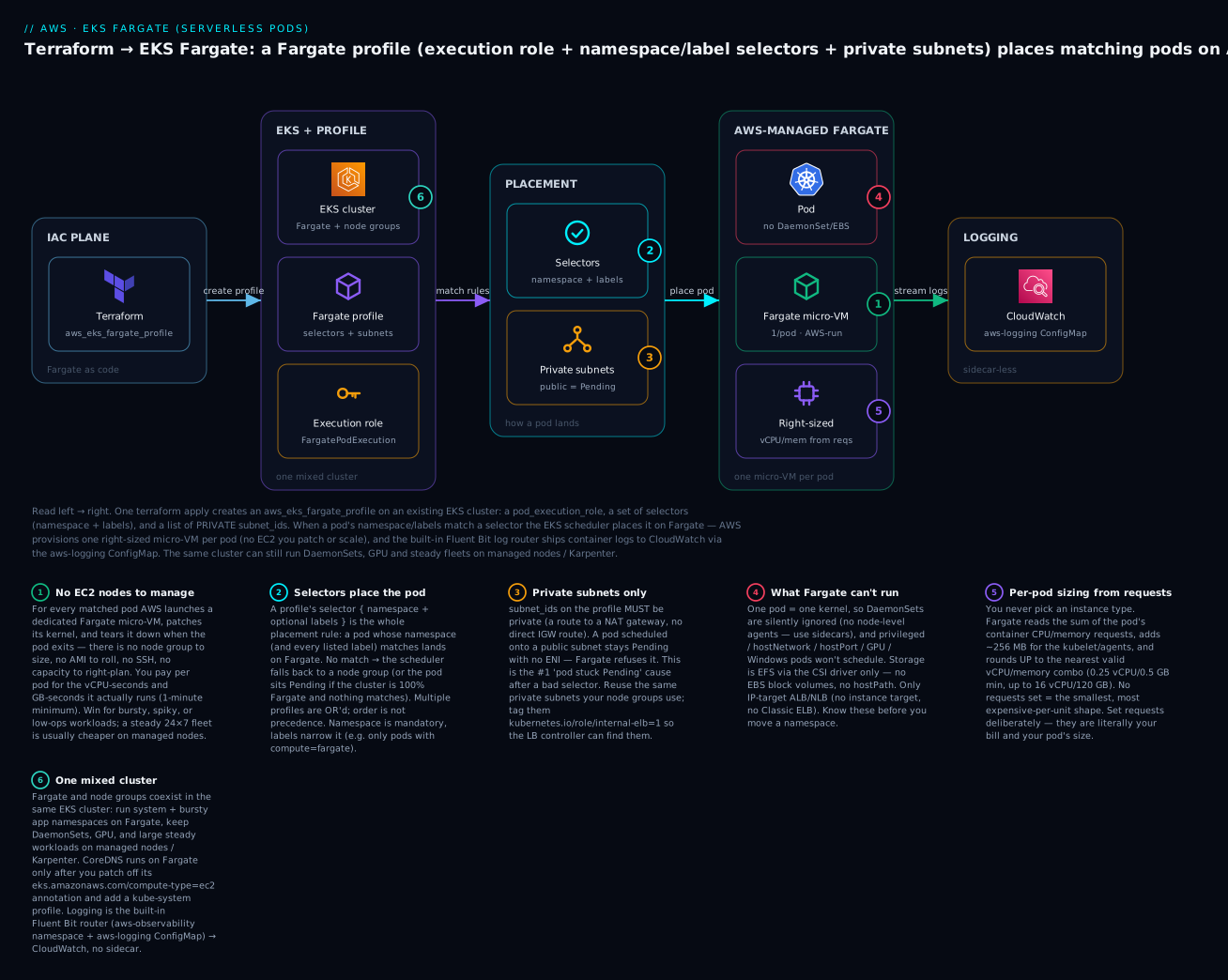
Read the diagram left to right: Terraform creates a Fargate profile on the EKS cluster (badge 6 — the same cluster still runs node groups for everything Fargate can’t); the profile’s selectors decide which pods qualify (badge 2) and its private subnets are mandatory (badge 3); a matching pod is placed on an AWS-managed micro-VM with no node for you to run (badge 1), sized per-pod from its requests (badge 5), and cannot use DaemonSets, EBS, GPUs, or privileged mode (badge 4); logs flow to CloudWatch through the built-in router. The six legend entries are the six decisions this lesson makes in code.
Fargate, managed nodes, and Karpenter: choosing the compute model
Before any HCL, get the mental model exact, because it drives every later decision. A managed node group is a fleet of EC2 instances you own inside the cluster: you pick the instance type, the DaemonSets run on them, many pods share each node, and you (or the Cluster Autoscaler) decide how many nodes exist. Karpenter is a smarter, faster autoscaler that provisions right-sized nodes just-in-time from the actual pending-pod shapes — still EC2 you own, but with far less bin-packing waste and second-scale response, covered in EKS Autoscaling: Cluster Autoscaler & Karpenter. Fargate is neither: there is no node you own at all. Each pod gets a private micro-VM, AWS patches and scales it, and you are billed for that pod’s vCPU-seconds and GB-seconds.
The three are not rivals so much as tools for different shapes of workload, and mature clusters run all three at once. The comparison that matters:
| Dimension | Fargate | Managed node group | Karpenter |
|---|---|---|---|
| What you manage | Nothing — pods only | The node fleet, AMIs, scaling | Provisioner config; Karpenter owns nodes |
| Unit of compute | One micro-VM per pod | Many pods per shared EC2 node | Many pods per just-in-time EC2 node |
| Scaling trigger | Pod scheduled → VM created | ASG desired / Cluster Autoscaler | Pending pods → right-sized node in seconds |
| Cold start | ~30–70 s (VM boot + image pull) | Node already warm → seconds; new node ~2–4 min | New node in ~30–60 s, then pod |
| Cost model | Per-pod vCPU-sec + GB-sec, 1-min min | Per-EC2-hour whether packed or idle | Per-EC2-hour, but tightly bin-packed |
| Cheapest when | Bursty, spiky, low duty-cycle, few pods | Dense, steady 24×7 fleets | Dynamic fleets that want low waste + Spot |
| DaemonSets | ⚠️ Not supported (silently ignored) | Yes | Yes |
| Privileged / hostNetwork / hostPort | No | Yes | Yes |
| GPU / Inferentia / Arm bare choice | No GPU; arch is amd64/arm64 per profile | Yes, any instance type | Yes, any instance type |
| Persistent storage | EFS only (no EBS, no hostPath) | EBS, EFS, instance store, hostPath | EBS, EFS, instance store, hostPath |
| Pod sizing | From requests, rounded up (fixed table) | You size the node; pods pack in | Karpenter sizes the node to the pods |
| Patching / CVEs | AWS patches the micro-VM | You roll AMIs | Karpenter rolls nodes (drift/expiry) |
| Node access (SSH/exec-into-node) | None | Yes | Yes |
| Per-pod isolation | Strong (VM boundary per pod) | Shared kernel per node | Shared kernel per node |
Two rows deserve emphasis because they surprise people. Cold start: a Fargate pod pays a VM-boot-plus-image-pull tax on every new pod, not just when the cluster scales — so a workload that scales from 0→50→0 many times an hour feels that latency repeatedly, while a node-based deployment keeps warm nodes and only pays when it adds a node. Cost: Fargate looks expensive per vCPU-hour, and for a dense, always-on fleet it is — but for a job that runs 4 minutes an hour you pay for ~4 minutes, whereas a node sits (and bills) 24×7. Duty cycle, not sticker price, decides who wins.
The billing dimensions, so “per-pod” is concrete (us-east-1 list price; check current AWS pricing for your region — prices vary and change):
| You pay for | Dimension | Approx. list (us-east-1) | Notes |
|---|---|---|---|
| vCPU time | per vCPU per hour | ~$0.04048 | Billed per second, 1-minute minimum |
| Memory time | per GB per hour | ~$0.004445 | Billed per second, 1-minute minimum |
| Window | from image pull start → pod stops | — | Not “requested to deleted”; actual run |
| Ephemeral storage | 20 GB free, then per GB-hour | ~$0.000111/GB-hr | First 20 GB included per pod |
| EFS (if mounted) | EFS storage + throughput | separate | Only supported persistent volume type |
And the decision heuristic — when each model is the right default:
| Choose | When |
|---|---|
| Fargate | Bursty/spiky or low-duty-cycle workloads; jobs and cron; per-pod isolation for multi-tenant or untrusted code; small teams that want zero node ops; getting a cluster to “no nodes to patch” for kube-system |
| Managed nodes | Dense, steady 24×7 services; you need DaemonSets, GPUs, privileged pods, EBS, or hostNetwork; predictable, packed utilisation where per-hour EC2 is cheapest |
| Karpenter | Dynamic fleets that want minimal waste and fast scale; heavy Spot use; many pod shapes; you want EC2 economics without hand-tuning node groups |
| All three (mixed) | The common real answer: system + bursty namespaces on Fargate, steady + DaemonSet + GPU on nodes/Karpenter — one cluster |
The Fargate profile: how a pod lands on Fargate
The whole placement mechanism is one resource: aws_eks_fargate_profile. It is a rule attached to a cluster that says “pods matching these selectors, schedule them on Fargate, and give them an ENI in these subnets under this IAM role.” It does not run anything by itself; it changes where the EKS scheduler places matching pods. Here is the resource with every argument you will realistically set:
resource "aws_eks_fargate_profile" "apps" {
  cluster_name           = data.aws_eks_cluster.this.name
  fargate_profile_name   = "apps"
  pod_execution_role_arn = aws_iam_role.fargate_pod.arn
  subnet_ids             = local.private_subnet_ids   # MUST be private

  # A pod is placed on Fargate if it matches ANY selector below.
  selector {
    namespace = "apps-fargate"
  }

  # Narrow with labels: only pods in this namespace carrying compute=fargate.
  selector {
    namespace = "batch"
    labels = {
      compute = "fargate"
    }
  }

  tags = {
    Project = "kloudvin-fargate-demo"
  }

  # Creating/deleting a profile is slow (ENIs, warm-pool). Give it room.
  timeouts {
    create = "20m"
    delete = "20m"
  }
}
The argument reference — memorise the immutable ones, because they turn edits into replacements:
| Argument | Required | Mutable? | Meaning / gotcha |
|---|---|---|---|
cluster_name |
Yes | Replace | The EKS cluster this profile attaches to |
fargate_profile_name |
Yes | Replace | Unique name within the cluster |
pod_execution_role_arn |
Yes | Replace | IAM role Fargate assumes for the pod (images, logs, ENI) |
subnet_ids |
Yes | Replace | Private subnets only; changing the set replaces the profile |
selector (≥1 block) |
Yes | Replace | namespace (required) + labels (optional); editing forces replace |
selector.namespace |
Yes | Replace | Namespace to match; no wildcards |
selector.labels |
No | Replace | Map — pod must carry all listed labels to match |
tags |
No | In-place | Cost allocation / ownership |
timeouts |
No | n/a | Create/delete can take minutes; default 10m may be tight |
Attributes you will reference: arn, status (ACTIVE when usable), and id (cluster_name:fargate_profile_name). Because nothing about a selector or subnet is editable, treat a profile like a piece of naming: get it right, and when you must change it, expect terraform plan to show -/+ destroy and then create replacement — harmless for a placement rule, but you should know it is coming.
Selectors: the entire placement contract
A pod runs on Fargate iff it matches at least one selector on some profile in the cluster. Matching is simple and worth stating precisely so you can debug the inevitable “why is my pod on a node / stuck Pending?”:
| Selector shape | Matches | Does not match |
|---|---|---|
namespace = "apps-fargate" (no labels) |
Every pod in apps-fargate |
Pods in any other namespace |
namespace = "batch", labels = { compute = "fargate" } |
Pods in batch carrying compute=fargate |
Pods in batch without that label |
| Two selectors on one profile | A pod matching either (logical OR) | — |
| Two profiles, overlapping | The pod is scheduled by the first matching profile found | — |
The rules that trip people up, made explicit:
- Namespace is mandatory; labels are optional and additive. A selector with labels requires the pod to carry every label listed (AND within a selector). Across selectors and profiles it is OR.
- A pod’s labels are its own labels, not the Deployment’s — but a Deployment’s pod template labels become the pod labels, so
template.metadata.labelsis what the selector sees. - No match, and you have node groups → the pod schedules on a node like normal. No match, and the cluster is 100% Fargate → the pod sits
Pendingforever. This is the classic “I deleted my node group and now nothing schedules” incident. - Selectors are evaluated at pod admission by the
fargate-scheduler. Adding a profile does not move already-running pods; you must recreate them (kubectl rollout restart) for the new rule to apply.
The pod execution role
Because Fargate does the low-level work on your pod’s behalf — pulling the image from ECR, wiring the ENI, shipping logs — it needs an IAM identity to do it as. That is the pod execution role, and it is not optional. It is trusted by the eks-fargate-pods.amazonaws.com service principal and carries AWS’s managed policy plus whatever your pods’ infrastructure needs (here, CloudWatch Logs):
data "aws_iam_policy_document" "fargate_assume" {
  statement {
    effect  = "Allow"
    actions = ["sts:AssumeRole"]
    principals {
      type        = "Service"
      identifiers = ["eks-fargate-pods.amazonaws.com"]
    }
    # Scope the trust to fargate profiles of THIS cluster (defence in depth).
    condition {
      test     = "ArnLike"
      variable = "aws:SourceArn"
      values   = ["arn:aws:eks:${var.region}:${data.aws_caller_identity.me.account_id}:fargateprofile/${data.aws_eks_cluster.this.name}/*"]
    }
  }
}

resource "aws_iam_role" "fargate_pod" {
  name               = "${data.aws_eks_cluster.this.name}-fargate-pod-exec"
  assume_role_policy = data.aws_iam_policy_document.fargate_assume.json
}

# The AWS-managed policy: ECR pull, ENI, and base permissions Fargate needs.
resource "aws_iam_role_policy_attachment" "fargate_managed" {
  role       = aws_iam_role.fargate_pod.name
  policy_arn = "arn:aws:iam::aws:policy/AmazonEKSFargatePodExecutionRolePolicy"
}

# Extra: let the built-in Fluent Bit router write to CloudWatch Logs.
resource "aws_iam_role_policy" "fargate_logging" {
  name = "fargate-logging-to-cloudwatch"
  role = aws_iam_role.fargate_pod.id
  policy = jsonencode({
    Version = "2012-10-17"
    Statement = [{
      Effect = "Allow"
      Action = [
        "logs:CreateLogStream",
        "logs:CreateLogGroup",
        "logs:DescribeLogStreams",
        "logs:PutLogEvents",
        "logs:PutRetentionPolicy"
      ]
      Resource = "*"
    }]
  })
}
What each piece grants, and why it exists:
| Piece | Grants | Why it’s needed |
|---|---|---|
Trust: eks-fargate-pods.amazonaws.com |
Fargate can assume the role for your pods | Without it, AccessDenied and pods never start |
AmazonEKSFargatePodExecutionRolePolicy |
ECR image pull, ENI create, base | The minimum for a Fargate pod to exist |
aws:SourceArn condition |
Only profiles of this cluster may assume it | Confused-deputy hardening; optional but recommended |
| Inline logging statement | logs:*Stream, PutLogEvents, etc. |
The managed Fluent Bit router runs as this role |
Note the crucial distinction: the pod execution role is infrastructure identity (image pull, logging, networking), not your application’s identity. Your application’s AWS permissions still come from IRSA / EKS Pod Identity on the pod’s service account — Fargate does not change that, and it is covered in the cluster and IRSA lessons. Do not overload the execution role with your app’s S3/DynamoDB permissions.
Why the subnets must be private
subnet_ids on a profile must be private — subnets whose route table sends 0.0.0.0/0 to a NAT gateway, not to an internet gateway. A Fargate pod scheduled onto a public subnet is rejected and the pod stays Pending with no ENI attached. Reuse the very same private subnets your node groups use (built in the EKS cluster provisioning lesson and the underlying VPC / subnets / NAT lesson). Tag them the way EKS and the load balancer controller expect so internal ALBs/NLBs can find them:
| Subnet tag | Value | Purpose |
|---|---|---|
kubernetes.io/role/internal-elb |
1 |
Lets the LB controller place internal LBs here |
kubernetes.io/role/elb |
1 (public subnets only) |
Internet-facing LBs — never on the Fargate subnets |
kubernetes.io/cluster/<name> |
owned / shared |
Associates the subnet with the cluster |
CoreDNS on Fargate: making the cluster nodeless
Out of the box, EKS pins its CoreDNS deployment to EC2 with an annotation on the pod template — eks.amazonaws.com/compute-type: ec2. That annotation exists precisely so that a brand-new cluster’s DNS does not accidentally try to schedule on Fargate before you have a profile for it. If your goal is a cluster with no nodes at all (everything, including system components, on Fargate), you must do two things: create a Fargate profile that selects kube-system, and patch off that annotation so the scheduler is allowed to place CoreDNS on Fargate.
The profile is just another aws_eks_fargate_profile selecting kube-system (optionally narrowed to k8s-app: kube-dns so only CoreDNS, not everything in kube-system, goes to Fargate):
resource "aws_eks_fargate_profile" "system" {
  cluster_name           = data.aws_eks_cluster.this.name
  fargate_profile_name   = "system"
  pod_execution_role_arn = aws_iam_role.fargate_pod.arn
  subnet_ids             = local.private_subnet_ids

  selector {
    namespace = "kube-system"
    labels    = { "k8s-app" = "kube-dns" }   # CoreDNS only
  }
}
The annotation removal is a kubectl patch — it is a mutation to a resource EKS created, not something you declare from scratch, so run it as a one-off (or a null_resource/kubernetes_annotation in more advanced setups):
# Remove the ec2 pin so CoreDNS may schedule on Fargate, then restart it.
kubectl patch deployment coredns -n kube-system --type json \
  -p='[{"op":"remove","path":"/spec/template/metadata/annotations/eks.amazonaws.com~1compute-type"}]'
kubectl rollout restart deployment coredns -n kube-system
Which system components can move to Fargate, and how they behave:
| Component | On Fargate? | How |
|---|---|---|
| CoreDNS | Yes | Add a kube-system profile + patch off the compute-type=ec2 annotation |
| kube-proxy | Not needed | Fargate networking does not use the node kube-proxy DaemonSet |
| aws-node (VPC CNI) | Not needed | Fargate has its own per-pod networking; the CNI DaemonSet doesn’t run |
| metrics-server | Yes (as a Deployment) | Runs fine on Fargate; it is not a DaemonSet |
| Any DaemonSet (log/security agents) | ⚠️ No | Ignored on Fargate; use sidecars or keep a node group |
The pattern to internalise: a fully nodeless cluster runs kube-system (CoreDNS) and your app namespaces on Fargate and accepts the DaemonSet limitation. A mixed cluster keeps a small node group for DaemonSets and CoreDNS and puts only chosen app namespaces on Fargate. Both are valid; the mixed cluster is more common because almost everyone runs at least one DaemonSet (a log or security agent).
Logging: sidecar-less Fluent Bit to CloudWatch
On nodes, you ship container logs with a DaemonSet (Fluent Bit / Fluentd) that tails /var/log/containers. On Fargate there is no node and no DaemonSet, so that pattern is impossible — which is exactly why AWS builds a managed log router into the Fargate runtime. You do not deploy Fluent Bit; you configure the built-in one by creating a specific ConfigMap, and AWS runs it out-of-band for every pod on the profile. No sidecar, no DaemonSet, no extra container in your pod.
The contract is exact: a namespace named aws-observability carrying the label aws-observability=enabled, containing a ConfigMap named aws-logging whose keys are Fluent Bit config fragments. Here it is in Terraform via the kubernetes provider:
resource "kubernetes_namespace" "observability" {
  metadata {
    name   = "aws-observability"
    labels = { "aws-observability" = "enabled" }   # required exactly
  }
}

resource "kubernetes_config_map" "aws_logging" {
  metadata {
    name      = "aws-logging"
    namespace = kubernetes_namespace.observability.metadata[0].name
  }

  data = {
    "flb_log_cw" = "true"   # emit Fluent Bit's own logs to CloudWatch too

    "output.conf" = <<-EOT
      [OUTPUT]
          Name                cloudwatch_logs
          Match               *
          region              ${var.region}
          log_group_name      /aws/eks/${data.aws_eks_cluster.this.name}/fargate
          log_stream_prefix   fargate-
          auto_create_group   true
    EOT

    "filters.conf" = <<-EOT
      [FILTER]
          Name                kubernetes
          Match               kube.*
          Merge_Log           On
          Keep_Log            Off
    EOT

    "parsers.conf" = <<-EOT
      [PARSER]
          Name   json
          Format json
    EOT
  }
}
The keys and what they control:
| ConfigMap key | Contains | Notes |
|---|---|---|
flb_log_cw |
"true"/"false" |
Send the router’s own logs to CloudWatch (debugging) |
output.conf |
Fluent Bit [OUTPUT] |
Destination — cloudwatch_logs, kinesis_firehose, or es (OpenSearch) |
filters.conf |
[FILTER] blocks |
Enrich (Kubernetes metadata), drop, or rewrite records |
parsers.conf |
[PARSER] blocks |
Parse app log formats (JSON, regex) before shipping |
Output-plugin choices, and the permission each needs on the execution role:
| Destination | Name |
Execution-role permission |
|---|---|---|
| CloudWatch Logs | cloudwatch_logs |
logs:CreateLogGroup/Stream, PutLogEvents |
| Kinesis Data Firehose | kinesis_firehose |
firehose:PutRecordBatch |
| OpenSearch | es |
es:ESHttp* (plus network access) |
Two failure modes to pre-empt: if the namespace is missing the aws-observability=enabled label, the router silently does nothing — no error, just no logs. And if the execution role lacks the logs:* permissions above, the router runs but every put is denied and, again, no logs appear. Both look identical from kubectl (the pod is healthy), so when logs are missing, check the label and the role first.
Load balancing Fargate pods: IP target type is mandatory
A classic ALB/NLB target group registers EC2 instance IDs (target_type = "instance") and routes to each instance’s port. Fargate pods have no EC2 instance to register — so instance mode simply cannot express them. Every load balancer in front of Fargate must use target_type = "ip", registering the pod’s own IP address, and the component that keeps those IP registrations in sync with your pods is the AWS Load Balancer Controller, covered in The AWS Load Balancer Controller. (The mechanics of target_type — and why it forces replacement when changed — are in the ALB/NLB & Target Groups lesson.)
| LB fact on Fargate | Why | How to satisfy it |
|---|---|---|
target_type = "ip" required |
No EC2 instance to register | Set it on the target group / annotation |
| Classic ELB not supported | Legacy, instance-only | Use ALB (L7) or NLB (L4) |
| Registrations must track pods | Pods (and their IPs) come and go | AWS Load Balancer Controller manages them |
| Ingress annotation | alb.ingress.kubernetes.io/target-type: ip |
On the Ingress object |
| Service (NLB) annotation | service.beta.kubernetes.io/aws-load-balancer-nlb-target-type: ip |
On the Service object |
| Health checks hit the pod IP | Not a node port | Ensure the pod’s SG/rules allow the LB subnets |
The practical upshot: expose Fargate workloads with an Ingress (ALB) or an IP-mode Service (NLB) and let the controller register pod IPs. If you forget target-type: ip, the controller creates an instance-mode target group with no instances to register, and every request returns 503 because there are zero healthy targets.
Hands-on: build it with Terraform
Time to run it. This demo assumes you already have an EKS cluster with private subnets — build it with the cluster provisioning lesson first, or point the data sources below at any existing cluster. We deliberately keep the cluster in its own Terraform state and build Fargate + workloads in a second root, because configuring the kubernetes provider from a cluster you are creating in the same apply is the number-one way to get a config that plans clean and applies broken. Here the cluster already exists, so the data sources resolve at plan time and the provider is safe.
⚠️ Real spend. Fargate pods, any NAT data, and CloudWatch ingestion cost money. This demo is a few cents per hour, but run
terraform destroywhen you finish.
Step 1 — versions.tf
terraform {
  required_version = ">= 1.6"

  required_providers {
    aws = {
      source  = "hashicorp/aws"
      version = "~> 5.60"
    }
    kubernetes = {
      source  = "hashicorp/kubernetes"
      version = "~> 2.31"
    }
  }

  backend "s3" {
    bucket       = "kloudvin-tf-state"
    key          = "eks/fargate/terraform.tfstate"
    region       = "us-east-1"
    encrypt      = true
    use_lockfile = true   # S3-native locking (TF 1.10+); or dynamodb_table
  }
}
Step 2 — variables.tf
variable "region" {
  type    = string
  default = "us-east-1"
}

variable "cluster_name" {
  type        = string
  description = "Existing EKS cluster to attach Fargate profiles to"
  default     = "kloudvin-eks"
}

# Map of Fargate profiles → drives for_each. Add a namespace = one line here.
variable "fargate_profiles" {
  description = "profile name => { namespace, labels }"
  type = map(object({
    namespace = string
    labels    = optional(map(string), {})
  }))
  default = {
    apps   = { namespace = "apps-fargate" }
    system = { namespace = "kube-system", labels = { "k8s-app" = "kube-dns" } }
  }
}
Step 3 — providers.tf (data-driven, cluster already exists)
provider "aws" {
  region = var.region
}

data "aws_caller_identity" "me" {}

# Look up the existing cluster + its networking.
data "aws_eks_cluster" "this" {
  name = var.cluster_name
}

data "aws_eks_cluster_auth" "this" {
  name = var.cluster_name
}

# Private subnets, discovered by the tag the cluster lesson set.
data "aws_subnets" "private" {
  filter {
    name   = "vpc-id"
    values = [data.aws_eks_cluster.this.vpc_config[0].vpc_id]
  }
  tags = {
    "kubernetes.io/role/internal-elb" = "1"
  }
}

locals {
  private_subnet_ids = data.aws_subnets.private.ids
}

# The kubernetes provider is configured FROM the existing cluster (safe:
# it resolves at plan time because the cluster is not created in this apply).
provider "kubernetes" {
  host                   = data.aws_eks_cluster.this.endpoint
  cluster_ca_certificate = base64decode(data.aws_eks_cluster.this.certificate_authority[0].data)
  # Short-lived token is fine for a demo; for CI prefer an exec { } block
  # that calls `aws eks get-token` so credentials refresh past 15 minutes.
  token = data.aws_eks_cluster_auth.this.token
}
Step 4 — main.tf (the execution role, the profiles, the app)
# ---------- pod execution role ----------
data "aws_iam_policy_document" "fargate_assume" {
  statement {
    effect  = "Allow"
    actions = ["sts:AssumeRole"]
    principals {
      type        = "Service"
      identifiers = ["eks-fargate-pods.amazonaws.com"]
    }
    condition {
      test     = "ArnLike"
      variable = "aws:SourceArn"
      values   = ["arn:aws:eks:${var.region}:${data.aws_caller_identity.me.account_id}:fargateprofile/${var.cluster_name}/*"]
    }
  }
}

resource "aws_iam_role" "fargate_pod" {
  name               = "${var.cluster_name}-fargate-pod-exec"
  assume_role_policy = data.aws_iam_policy_document.fargate_assume.json
}

resource "aws_iam_role_policy_attachment" "fargate_managed" {
  role       = aws_iam_role.fargate_pod.name
  policy_arn = "arn:aws:iam::aws:policy/AmazonEKSFargatePodExecutionRolePolicy"
}

resource "aws_iam_role_policy" "fargate_logging" {
  name = "fargate-logging-to-cloudwatch"
  role = aws_iam_role.fargate_pod.id
  policy = jsonencode({
    Version = "2012-10-17"
    Statement = [{
      Effect   = "Allow"
      Action   = ["logs:CreateLogStream", "logs:CreateLogGroup",
                  "logs:DescribeLogStreams", "logs:PutLogEvents",
                  "logs:PutRetentionPolicy"]
      Resource = "*"
    }]
  })
}

# ---------- the Fargate profiles (one per map entry) ----------
resource "aws_eks_fargate_profile" "this" {
  for_each = var.fargate_profiles

  cluster_name           = var.cluster_name
  fargate_profile_name   = each.key
  pod_execution_role_arn = aws_iam_role.fargate_pod.arn
  subnet_ids             = local.private_subnet_ids

  selector {
    namespace = each.value.namespace
    labels    = each.value.labels
  }

  timeouts {
    create = "20m"
    delete = "20m"
  }

  tags = { Project = "kloudvin-fargate-demo" }
}

# ---------- logging: managed Fluent Bit → CloudWatch ----------
resource "kubernetes_namespace" "observability" {
  metadata {
    name   = "aws-observability"
    labels = { "aws-observability" = "enabled" }
  }
}

resource "kubernetes_config_map" "aws_logging" {
  metadata {
    name      = "aws-logging"
    namespace = kubernetes_namespace.observability.metadata[0].name
  }
  data = {
    "flb_log_cw"  = "true"
    "output.conf" = <<-EOT
      [OUTPUT]
          Name                cloudwatch_logs
          Match               *
          region              ${var.region}
          log_group_name      /aws/eks/${var.cluster_name}/fargate
          log_stream_prefix   fargate-
          auto_create_group   true
    EOT
  }
}

# ---------- app namespace + a Deployment to prove Fargate ----------
resource "kubernetes_namespace" "apps" {
  metadata { name = "apps-fargate" }
}

resource "kubernetes_deployment" "hello" {
  metadata {
    name      = "hello"
    namespace = kubernetes_namespace.apps.metadata[0].name
  }
  spec {
    replicas = 2
    selector { match_labels = { app = "hello" } }
    template {
      metadata { labels = { app = "hello" } }
      spec {
        container {
          name  = "web"
          image = "public.ecr.aws/nginx/nginx:1.27"
          port { container_port = 80 }
          # requests = the Fargate micro-VM size. Rounds UP to 0.5 vCPU/1 GB.
          resources {
            requests = { cpu = "250m", memory = "512Mi" }
            limits   = { cpu = "500m", memory = "1Gi" }
          }
        }
      }
    }
  }
  # Fargate boots a VM per pod; give the rollout time before it's "unhealthy".
  timeouts { create = "10m" }
  depends_on = [aws_eks_fargate_profile.this]
}

resource "kubernetes_service" "hello" {
  metadata {
    name      = "hello"
    namespace = kubernetes_namespace.apps.metadata[0].name
  }
  spec {
    selector = { app = "hello" }
    port {
      port        = 80
      target_port = 80
    }
    type = "ClusterIP"
  }
}
Step 5 — outputs.tf
output "fargate_profile_arns" {
  value = { for k, p in aws_eks_fargate_profile.this : k => p.arn }
}

output "pod_execution_role_arn" {
  value = aws_iam_role.fargate_pod.arn
}

output "log_group" {
  value = "/aws/eks/${var.cluster_name}/fargate"
}
Step 6 — init, plan, apply
terraform init      # downloads aws + kubernetes providers, configures S3 backend
terraform plan      # review — expect the profiles as CREATE, not replace
Representative plan summary (abridged):
Terraform will perform the following actions:

  # aws_eks_fargate_profile.this["apps"] will be created
  + resource "aws_eks_fargate_profile" "this" {
      + arn                    = (known after apply)
      + cluster_name           = "kloudvin-eks"
      + fargate_profile_name   = "apps"
      + pod_execution_role_arn = (known after apply)
      + status                 = (known after apply)
      + subnet_ids             = [ "subnet-0a1b…", "subnet-0c2d…" ]
      + selector { namespace = "apps-fargate" }
    }
  # aws_eks_fargate_profile.this["system"]  ... (CoreDNS)
  # aws_iam_role.fargate_pod ...
  # kubernetes_config_map.aws_logging ...
  # kubernetes_deployment.hello ...

Plan: 9 to add, 0 to change, 0 to destroy.
terraform apply -auto-approve
The two Fargate profiles are the slow part — each takes a couple of minutes to reach ACTIVE while EKS provisions the warm-pool plumbing, which is why we set generous timeouts. Total apply is typically 3–6 minutes.
Step 7 — verify the pods really landed on Fargate
This is the payoff. Point kubectl at the cluster and look at the nodes:
aws eks update-kubeconfig --name kloudvin-eks --region us-east-1
kubectl get nodes -o wide
The tell is node names: each Fargate pod runs on its own virtual node named fargate-ip-…, which did not exist before you deployed:
NAME                                                STATUS   ROLES    AGE   VERSION
fargate-ip-10-0-13-201.ec2.internal                 Ready    <none>   72s   v1.30.x-eks
fargate-ip-10-0-14-118.ec2.internal                 Ready    <none>   70s   v1.30.x-eks
ip-10-0-9-44.ec2.internal                           Ready    <none>   4h    v1.30.x-eks   <- a managed node (if any)
Two hello replicas → two fargate-… nodes. Confirm each pod’s node and that they are Running:
kubectl get pods -n apps-fargate -o wide
NAME                     READY   STATUS    NODE
hello-6d4c…-abcde        1/1     Running   fargate-ip-10-0-13-201.ec2.internal
hello-6d4c…-fghij        1/1     Running   fargate-ip-10-0-14-118.ec2.internal
If you patched CoreDNS onto Fargate (Step for the system profile), kubectl get pods -n kube-system -o wide shows coredns-* on fargate-… nodes too. Your verification checklist:
| Check | Command | Expected |
|---|---|---|
| Profiles active | aws eks list-fargate-profiles --cluster-name kloudvin-eks |
apps, system listed |
| Pods on Fargate | kubectl get pods -n apps-fargate -o wide |
NODE = fargate-ip-… |
| Virtual nodes exist | kubectl get nodes |
fargate-… names present |
| Right-sizing applied | kubectl get pods -n apps-fargate -o jsonpath='{..annotations.CapacityProvisioned}' |
e.g. 0.5vCPU 1GB (rounded up from 250m/512Mi) |
| CoreDNS moved (optional) | kubectl get pods -n kube-system -o wide |
coredns-* on fargate-… |
Step 8 — confirm logging reached CloudWatch
Generate a log line and look in CloudWatch:
kubectl exec -n apps-fargate deploy/hello -- sh -c 'echo "hello from fargate"'
aws logs describe-log-groups --log-group-name-prefix /aws/eks/kloudvin-eks/fargate
aws logs tail /aws/eks/kloudvin-eks/fargate --since 5m
You should see the log group /aws/eks/kloudvin-eks/fargate (auto-created by the router) with fargate-… streams carrying your container’s stdout. If it is empty, jump to troubleshooting — it is almost always the missing aws-observability=enabled label or the execution-role logging permissions.
Step 9 — destroy and clean up
terraform destroy -auto-approve
Destroy removes the profiles (each again a few minutes), the role, the ConfigMap, and the app. What Terraform does not delete, and you should check by hand:
| Left behind | Why | Clean up |
|---|---|---|
| CloudWatch log group | auto_create_group=true made it outside TF state |
aws logs delete-log-group --log-group-name /aws/eks/kloudvin-eks/fargate |
| CoreDNS annotation patch | It was a kubectl patch, not TF-managed |
Re-add compute-type=ec2 if you kept a node group and want DNS back on nodes |
| The cluster / VPC / NAT | Owned by the other state | Destroy in the cluster-provisioning root |
Variables, outputs & making it reusable
The demo already hints at the reusable shape: the fargate_profiles map driving a single for_eached resource. “Put another namespace on Fargate” is now a one-line data change, not a copy-pasted resource block:
fargate_profiles = {
  apps    = { namespace = "apps-fargate" }
  system  = { namespace = "kube-system", labels = { "k8s-app" = "kube-dns" } }
  batch   = { namespace = "batch",       labels = { compute = "fargate" } }   # <- added
  ingress = { namespace = "ingress" }
}
Because the profile name is the map key, for_each gives you stable addresses (aws_eks_fargate_profile.this["batch"]) — adding or removing a key touches only that one profile, never the others. Contrast with count, which would re-index and threaten to replace unrelated profiles when you reorder the list. Always key Fargate profiles by name, never by index.
When to roll your own versus reach for the community module:
| Option | Use when |
|---|---|
| Roll your own (as above) | You want to see and own every argument; small number of profiles; learning |
terraform-aws-modules/eks/aws fargate_profiles input |
You are already building the cluster with that module — it creates the execution role and profiles for you, IAM wired correctly |
The registry module takes a fargate_profiles map that looks almost identical to ours and, critically, creates the pod execution role and its policy attachment for you — one less thing to get wrong. If your cluster is built with terraform-aws-modules/eks/aws, define Fargate there rather than bolting on a separate role. If your cluster predates the module or is hand-rolled, the standalone resources in this lesson are the right call.
A mixed cluster: Fargate and nodes side by side
The most common production shape is not “all Fargate” or “all nodes” — it is a mixed cluster where each workload lives where it fits best. Fargate takes the bursty, isolated, low-ops namespaces; managed nodes or Karpenter take everything Fargate can’t do. The routing is entirely by selector: a namespace with a matching profile goes to Fargate; everything else schedules on nodes.
| Workload | Lands on | Why |
|---|---|---|
Bursty stateless web/API (apps-fargate) |
Fargate | Spiky, per-pod isolation, no node ops |
| Cron / batch jobs | Fargate | Run-then-exit; pay only for the minutes |
| CoreDNS (patched) | Fargate | Get system components off nodes |
| Log / security DaemonSet | Nodes | DaemonSets don’t run on Fargate |
| GPU / ML inference | Nodes / Karpenter | No GPU on Fargate |
| Large steady 24×7 services | Nodes / Karpenter | Dense, always-on → per-hour EC2 cheaper |
Pods needing EBS / hostPath |
Nodes | Fargate storage is EFS-only |
Pods needing hostNetwork / privileged |
Nodes | Not allowed on Fargate |
Three coordination points make a mixed cluster behave:
- CoreDNS placement. If you keep a node group, you can leave CoreDNS on nodes (the default) and not patch the annotation — simpler. Patch it onto Fargate only when you want DNS resilient to node loss.
- The LB controller itself is a Deployment (not a DaemonSet), so it happily runs on either — but the workloads it fronts must use
target-type: ipregardless of where they run, since a Fargate pod is IP-only. - DaemonSet-shaped needs become sidecars for Fargate namespaces: a per-pod log/metrics sidecar replaces the per-node agent. For logging specifically, the built-in Fluent Bit router removes even that need.
Fargate limitations — the table to read before you migrate
Every limitation here is a design constraint, not a bug — Fargate’s per-pod-VM model causes them. Read this before moving any namespace:
| Limitation | Consequence | Work around |
|---|---|---|
| No DaemonSets | Node-agent patterns don’t run | Sidecars; or keep those workloads on nodes |
| No privileged pods | securityContext.privileged: true won’t schedule |
Redesign; run on nodes |
No hostNetwork / hostPort |
Can’t bind node ports / host net | Use Service / Ingress |
| No GPU / accelerators | ML/inference can’t use GPUs | Nodes / Karpenter with GPU instances |
| No Windows | Linux (amd64/arm64) only | Windows node group |
| EBS not supported | No block volumes, no hostPath |
EFS via the EFS CSI driver |
| Instance target type unsupported | Classic instance-mode LBs fail | target_type = "ip" + LB controller |
| Classic ELB unsupported | — | ALB or NLB (IP mode) |
| Sizing capped | Max ~16 vCPU / 120 GB per pod | Split the workload; or use nodes |
| Min size + rounding | Smallest is 0.25 vCPU / 0.5 GB; requests round up | Set requests to the real need |
| Public subnets rejected | Pods Pending on public subnets |
Private subnets only |
| Slower pod start | VM boot + image pull per pod | Smaller images; keep min replicas warm |
| No node exec / SSH | Can’t shell into the “node” | kubectl exec into the pod instead |
The sizing table is worth internalising, because “no requests set” quietly gives you the smallest, most expensive-per-unit shape and surprises the bill. Fargate sums the pod’s container requests, adds ~256 MB for the kubelet and agents, and rounds up to the nearest valid vCPU/memory combination:
| vCPU | Valid memory (GB) |
|---|---|
| 0.25 | 0.5, 1, 2 |
| 0.5 | 1 – 4 (1 GB steps) |
| 1 | 2 – 8 |
| 2 | 4 – 16 |
| 4 | 8 – 30 |
| 8 | 16 – 60 |
| 16 | 32 – 120 |
Your hello pod requested 250m CPU / 512Mi; add overhead and round up → it runs as 0.5 vCPU / 1 GB. That rounded shape, not your request, is what you pay for.
Going deeper
Everything above tells you how to place pods on Fargate. This section is the layer underneath — the machinery AWS runs on your behalf and the caveats that only bite at scale or in production. None of it is needed to ship the demo; all of it is what separates “it worked” from “I know why.”
How placement actually happens (the mutating webhook)
A profile does not schedule pods itself. When the cluster is created, EKS installs a mutating admission webhook, and every pod is checked against your profiles’ selectors at admission, before it is persisted. If it matches, the webhook rewrites the pod in flight: it sets schedulerName: fargate-scheduler (so the default kube-scheduler leaves it alone) and stamps the annotation eks.amazonaws.com/fargate-profile: <name> recording which profile won. The fargate-scheduler then provisions a micro-VM, and only once capacity is ready does the pod bind. This is exactly why already-running pods do not move when you add a profile — the webhook fires only at admission, so you must recreate pods (kubectl rollout restart) for a new rule to take effect. It is also why a pod that already carries its own schedulerName can quietly refuse to go to Fargate.
One ENI per pod — the IP-exhaustion trap
Each Fargate pod is given its own dedicated ENI in one of the profile’s private subnets, and that ENI consumes one VPC IP address. On EC2 nodes many pods share a node’s secondary IPs; on Fargate the ratio is strictly one pod = one IP. A namespace that scales to 400 Fargate pods needs 400 free addresses in the profile’s subnets. A /24 (≈251 usable) runs out and new pods stick Pending with an ENI/IP error — a failure that never shows up in a small demo and blindsides teams in production. Size the private subnets for peak pod count, not node count, and spread the profile across several subnets and AZs.
Cold-start anatomy
The “~30–70 s” cold start in the comparison table is really four serial phases, and naming them tells you which you can shorten:
| Phase | What happens | Your lever |
|---|---|---|
| Match + schedule | Webhook matches; fargate-scheduler requests capacity |
None (AWS-side) |
| Micro-VM boot | A Firecracker micro-VM is provisioned and booted | None (AWS-side) |
| ENI attach | The pod’s ENI is created and wired into your VPC | Free IPs, no SG bottleneck |
| Image pull | Every image is pulled fresh — no node image cache | Smaller images, in-region ECR |
The image pull is the phase you control and usually the longest. Fargate has no node-level image cache, so a 1 GB image is pulled from scratch for every pod, every time. Slim images (distroless/alpine), an ECR repository in the same region, and keeping a few minReplicas warm are the real mitigations. There is no user-facing “warm pool” — every new pod pays the full tax.
Who patches what — the managed split
Fargate runs on platform versions (e.g. eks.7) that AWS rolls forward for you. AWS owns and patches the micro-VM kernel, the container runtime, and the kubelet; you own only the container image and the pod spec. That is the entire “no nodes to patch” value proposition — but it has a corollary: you cannot install a custom kernel module, a node-level CIS agent, or anything that must touch the host, because there is no host you can reach. If your compliance posture mandates a node-level agent, that workload stays on managed nodes.
Ephemeral storage — bigger than you think, but still ephemeral
Every Fargate pod gets 20 GiB of ephemeral storage free, encrypted at rest with AES-256 by AWS-managed keys. On current platform versions you can request up to 175 GiB by setting an ephemeral-storage resource request — handy for build caches or large scratch files:
resources:
  requests:
    ephemeral-storage: "100Gi"
  limits:
    ephemeral-storage: "100Gi"
It is still ephemeral: it is wiped when the pod stops. For anything that must survive a restart, Fargate’s only persistent option is EFS via the EFS CSI driver — never EBS, never hostPath.
Limits, quotas, and the Spot gap
A few hard numbers worth knowing before you design around Fargate:
| Constraint | Value | Consequence |
|---|---|---|
| Selectors per profile | 5 | Split rules across multiple profiles beyond that |
| Max pod size | 16 vCPU / 120 GB | Bigger workloads must use nodes |
| Min pod size | 0.25 vCPU / 0.5 GB | Tiny pods still pay this floor |
| Fargate Spot | Not on EKS | Fargate Spot is ECS-only — no discounted Fargate on EKS |
| Per-pod isolation | Firecracker micro-VM | No shared kernel — a strong multi-tenant boundary |
That last row is a genuine security property: because each pod is its own micro-VM with no shared kernel, Fargate is a strong fit for multi-tenant or untrusted code, where a shared-node kernel-escape blast radius would be unacceptable — the same design reason it cannot run privileged pods.
Scheduling features that quietly change meaning
nodeSelector, affinity, taints/tolerations, and topology-spread constraints all assume nodes you control. On Fargate the “node” is a virtual, single-pod construct, so: a nodeSelector for a label Fargate nodes do not carry leaves the pod Pending; taints and tolerations are moot (there are no custom taints to tolerate); and pod anti-affinity across nodes is trivially satisfied because every pod is alone on its node anyway. Drive placement with profiles and namespaces, not node primitives.
Common beginner mistakes
These are mental-model errors, not error messages — the wrong idea that produces the confusing symptom. (For symptom-to-fix lookups, use the troubleshooting table below.)
“Fargate is just a cheaper way to run Kubernetes.” It is not universally cheaper — it is cheaper only at low duty cycle. Per vCPU-hour Fargate costs more than raw EC2; what you save is the idle time you no longer pay for and the node ops you no longer do. Right model: duty-cycle arithmetic. A pod running five minutes an hour is far cheaper on Fargate; the same pod running 24×7 is cheaper on a packed node. Decide per workload, not per religion.
“Fargate means I don’t have to learn Kubernetes.” Fargate removes nodes, not Kubernetes. You still write Deployments, Services, RBAC, requests/limits, probes, and namespaces exactly as before — the only thing you stop doing is managing the machines under them. If anything, Fargate makes correct resource requests more important, because they literally set your VM size and your bill.
“I set limits, so that’s my Fargate size.” Fargate sizes the micro-VM from the pod’s requests — summed across containers, plus ~256 MB overhead, rounded up — not its limits. Set no requests and you get the smallest, priciest-per-unit shape; set only limits and Fargate still reads requests (which then default to unset). Right model: requests = size = bill. Always set them to the real need.
“I’ll lift-and-shift my whole cluster onto Fargate.” Move a namespace that contains a DaemonSet, a privileged pod, an EBS PersistentVolumeClaim, or a GPU workload and it breaks — the DaemonSet worst of all, because it fails silently with no Pending pod and no event. Right model: audit first, mix by default. Almost every real cluster keeps a small node group for DaemonSets and puts only chosen namespaces on Fargate.
“The pod execution role is my app’s AWS identity.” The execution role is infrastructure identity — it lets Fargate pull your image and ship logs. Your application’s access to S3, DynamoDB, or SQS comes from IRSA / EKS Pod Identity on the pod’s service account, a completely separate role. Overloading the execution role with app permissions is a security smell and does not even work the way you expect. Keep the two apart.
“Editing a selector just updates the profile.” A Fargate profile is immutable. Change a selector or a subnet and terraform plan shows a replace (-/+) — and during that replace, matching pods have no profile and will not schedule, a self-inflicted outage on a live namespace. Right model: add a new profile, migrate the pods, then remove the old one. Never edit a live profile in place.
Common mistakes and troubleshooting
| Symptom | Cause | Fix |
|---|---|---|
Pod stuck Pending, no events about Fargate |
No selector matches the pod’s namespace/labels | Add/verify a profile whose selector matches; remember labels are AND, and are the pod’s labels |
Pod Pending, no Fargate profile … subnets error |
Profile subnet_ids include a public subnet |
Use private subnets only (route to NAT, not IGW) |
Pod Pending, cluster has no nodes at all |
100% Fargate but nothing matches this pod | Add a matching profile, or keep a node group as fallback |
CoreDNS pods Pending after removing node group |
The compute-type=ec2 annotation still pins it to EC2 |
Add a kube-system profile and patch off the annotation, then rollout restart |
| DaemonSet pods never appear on Fargate | DaemonSets are unsupported — silently ignored | Convert to a sidecar, or run that workload on nodes |
AccessDenied / images won’t pull |
Pod execution role missing / wrong trust | Trust eks-fargate-pods.amazonaws.com; attach AmazonEKSFargatePodExecutionRolePolicy |
| Logs never reach CloudWatch, pod healthy | aws-observability ns missing the aws-observability=enabled label |
Add the exact label; the router no-ops without it |
| Logs still missing, label present | Execution role lacks logs:* permissions |
Attach the logs:CreateLogStream/PutLogEvents policy |
ALB returns 503, zero healthy targets |
Target group is instance mode; no instances exist | Set alb.ingress.kubernetes.io/target-type: ip |
terraform plan shows a profile replace you didn’t intend |
You edited a selector or subnet_ids (immutable) |
Expected — profiles are immutable; accept the replace or revert |
| PVC never binds | You requested an EBS volume | Fargate is EFS-only; use the EFS CSI driver |
| Pod bigger/pricier than expected | No requests set → smallest shape, or rounded up |
Set explicit CPU/memory requests to the real need |
| Profile create/delete times out | Default 10-minute timeout too tight | Set timeouts { create = "20m" delete = "20m" } |
The nastiest real gotchas, expanded:
“Pending” is almost always the selector or the subnet. When a Fargate pod won’t schedule, the two suspects — in order — are: (1) no selector matches, and (2) the profile points at a public subnet. Run kubectl describe pod and look for the fargate-scheduler events; “no Fargate profile” means selector, a subnet/ENI error means networking. Nine out of ten Pending Fargate pods are one of these two.
DaemonSets fail silently, which is the cruelty. There is no error, no Pending pod, no event — the DaemonSet controller simply never creates a pod for a Fargate “node” because Fargate reports no schedulable node in the normal sense. If your security or logging agent is a DaemonSet and you moved its namespace to Fargate, it just vanishes. Audit for DaemonSets before migrating a namespace.
The CoreDNS trap on a “nodeless” cluster. People delete their node group to go all-Fargate, and DNS dies because CoreDNS is still annotation-pinned to EC2 and now has nowhere to run — which breaks everything, since pods can’t resolve services. Always add the kube-system profile and patch CoreDNS before removing the last node group, and verify kubectl get pods -n kube-system -o wide shows CoreDNS on Fargate.
Immutability turns careless edits into outages. Changing a selector or subnet list replaces the profile — and during the replace, matching pods have no profile and won’t schedule. For a live namespace, add a new profile with the new rule, shift pods over, then remove the old one, rather than editing in place.
Cost, cleanup & production notes
Fargate cost is duty-cycle arithmetic. A pod sized 0.5 vCPU / 1 GB (our rounded hello) costs roughly 0.5 × $0.04048 + 1 × $0.004445 ≈ $0.0247 per hour while running. Left running 24×7 that is ~$18/month per replica — more than a small shared node slice, which is the point: Fargate is not cheaper for always-on. But the same pod run for 5 minutes an hour costs ~$0.002/hour of wall-clock — pennies, where a node would bill the full hour. Model it:
| Scenario | Pod shape | Runtime | Approx. monthly |
|---|---|---|---|
| Always-on API (2 replicas) | 0.5 vCPU / 1 GB | 24×7 | ~$36 (nodes likely cheaper) |
| Business-hours app (2 replicas) | 0.5 vCPU / 1 GB | 10h × 22d | ~$11 |
| Hourly batch job | 1 vCPU / 2 GB | 5 min × 720 | ~$3 |
| Bursty spike-only pods | varies | rare | pay only for the spikes |
To destroy cleanly, terraform destroy handles the profiles/role/app, then delete the auto-created log group by hand (it is outside state because auto_create_group=true created it), and re-pin CoreDNS to EC2 if you are keeping nodes. Production hardening notes:
| Area | Practice |
|---|---|
| State | Fargate root in its own S3 state, separate from the cluster; encrypted; locked (use_lockfile/DynamoDB) |
| Provider config | Configure kubernetes/helm from an existing cluster (data source) or a second apply — never build cluster + workloads in one apply |
| Least privilege | Pod execution role holds only image-pull + logging; app AWS permissions via IRSA / Pod Identity on the service account, not the exec role |
| Log retention | The router’s auto_create_group log group defaults to never expire — set retention (aws logs put-retention-policy) or it bills forever |
| Subnets & tags | Private subnets only; tag kubernetes.io/role/internal-elb=1 so internal LBs work |
| Sizing | Always set CPU/memory requests — they are the pod’s size and your bill; no requests = smallest shape |
| Drift | Selectors/subnets are immutable — treat profile changes as replacements; add-then-remove for live namespaces |
| DaemonSet audit | Before moving a namespace, confirm it has no DaemonSets or privileged/EBS/GPU needs |
Cheat-sheet
Core resources and their key arguments:
| Resource | Key arguments |
|---|---|
aws_eks_fargate_profile |
cluster_name, fargate_profile_name, pod_execution_role_arn, subnet_ids (private), selector { namespace, labels } |
aws_iam_role (exec) |
assume_role_policy trusting eks-fargate-pods.amazonaws.com |
aws_iam_role_policy_attachment |
AmazonEKSFargatePodExecutionRolePolicy |
aws_iam_role_policy (logging) |
logs:CreateLogStream/Group, PutLogEvents |
kubernetes_namespace (logging) |
name = aws-observability, label aws-observability=enabled |
kubernetes_config_map |
name = aws-logging, keys output.conf / filters.conf / parsers.conf / flb_log_cw |
Verification and operational commands:
| Goal | Command |
|---|---|
| List profiles | aws eks list-fargate-profiles --cluster-name <c> |
| See Fargate virtual nodes | kubectl get nodes → fargate-ip-… |
| Which node a pod got | kubectl get pods -n <ns> -o wide |
| Provisioned size | kubectl get pod <p> -o jsonpath='{..annotations.CapacityProvisioned}' |
| Why is it Pending | kubectl describe pod <p> → fargate-scheduler events |
| Move CoreDNS to Fargate | kubectl patch deployment coredns -n kube-system --type json -p='[{"op":"remove","path":"/spec/template/metadata/annotations/eks.amazonaws.com~1compute-type"}]' |
| Tail Fargate logs | aws logs tail /aws/eks/<c>/fargate --since 10m |
| Set log retention | aws logs put-retention-policy --log-group-name /aws/eks/<c>/fargate --retention-in-days 14 |
Placement rules in one glance:
| Rule | Effect |
|---|---|
| Pod matches ≥1 selector | Scheduled on Fargate |
| No match + nodes exist | Scheduled on a node |
| No match + no nodes | Pending forever |
| Labels in a selector | Pod must carry all of them (AND) |
| Multiple selectors/profiles | OR — any match wins |
| Subnets | Private only |
| DaemonSet | Never runs on Fargate |
Practice challenges
Work these against the demo root from the hands-on section. Each has a worked solution — try it before you open it.
Challenge 1 — Beginner: a minimal profile. Write the aws_eks_fargate_profile block that runs every pod in a staging namespace on Fargate (no label filter), reusing the pod execution role and private subnets from the lesson.
<details><summary>Solution</summary>
resource "aws_eks_fargate_profile" "staging" {
  cluster_name           = var.cluster_name
  fargate_profile_name   = "staging"
  pod_execution_role_arn = aws_iam_role.fargate_pod.arn
  subnet_ids             = local.private_subnet_ids
  selector { namespace = "staging" }
}
Why: a selector with only namespace and no labels matches every pod in that namespace — the simplest possible placement rule.
</details>
Challenge 2 — Beginner: diagnose a Pending pod. A pod in apps-fargate is stuck Pending and kubectl describe pod shows no fargate-scheduler events at all. Name the two likeliest causes, in order, and the one command that tells them apart.
<details><summary>Solution</summary>
The two suspects, in order: (1) no selector matches the pod’s namespace/labels, and (2) the profile points at a public subnet. Run kubectl describe pod <p> and read the events — “no Fargate profile” means the selector; an ENI/subnet error means networking. No fargate-scheduler event at all usually means the pod never matched a profile, so check the namespace and labels first.
Why: placement is decided at admission by selector match; roughly 9 in 10 Pending Fargate pods are one of these two causes.
</details>
Challenge 3 — Intermediate: add a namespace the safe way. Add a jobs namespace (label compute = fargate) to the fargate_profiles map. Write the one-line change and predict what terraform plan reports for the existing profiles.
<details><summary>Solution</summary>
jobs = { namespace = "jobs", labels = { compute = "fargate" } }
plan reports 1 to add, 0 to change, 0 to destroy — only aws_eks_fargate_profile.this["jobs"] is created. Because the resource is keyed by map key (for_each), the apps and system profiles keep their addresses and are untouched.
Why: for_each gives stable per-key addresses, so adding a key never re-indexes or threatens the others — a count list would.
</details>
Challenge 4 — Intermediate: predict the billed shape. A pod has two containers requesting 400m/800Mi and 200m/600Mi. Using the rounding rules, what vCPU/memory shape does Fargate provision — and therefore bill?
<details><summary>Solution</summary>
Sum the requests: 600m CPU, 1400Mi memory. Add ~256Mi overhead → ~1656Mi (~1.65 GB). Now round up to a valid combo: 600m needs at least 1 vCPU (0.5 vCPU tops out at 500m); 1 vCPU allows 2–8 GB, so ~1.65 GB rounds up to 2 GB. Provisioned shape: 1 vCPU / 2 GB — confirm it with kubectl get pod <p> -o jsonpath='{..annotations.CapacityProvisioned}'.
Why: Fargate bills the rounded shape, not your raw requests — under-requesting does not save money, it just risks an OOM kill.
</details>
Challenge 5 — Advanced: change a live selector with zero downtime. The apps profile selects apps-fargate. You must tighten it to also require the label tier = web, but the pods are serving live traffic. Describe the safe sequence — and why editing in place is wrong.
<details><summary>Solution</summary>
Editing the selector replaces the profile (immutable), leaving a window where matching pods have no profile and will not schedule. Instead: (1) add a new profile (e.g. apps-web) with the tier = web selector and apply; (2) ensure the pods carry tier: web and kubectl rollout restart them so the webhook re-admits them onto the new profile; (3) once every pod runs under apps-web, remove the old apps profile. No scheduling gap at any point.
Why: immutability turns an in-place edit into a destroy-then-create; add-then-migrate keeps a valid profile live the whole time.
</details>
Challenge 6 — Advanced: go nodeless safely. You want to delete the last managed node group and run CoreDNS on Fargate. Give the exact ordered steps so DNS never goes dark.
<details><summary>Solution</summary>
- Create a
kube-systemFargate profile selectinglabels = { "k8s-app" = "kube-dns" }andapply. - Patch off the EC2 pin:
kubectl patch deployment coredns -n kube-system --type json -p='[{"op":"remove","path":"/spec/template/metadata/annotations/eks.amazonaws.com~1compute-type"}]'. kubectl rollout restart deployment coredns -n kube-system.- Verify:
kubectl get pods -n kube-system -o wideshowscoredns-*onfargate-ip-…nodes. - Only now delete the node group.
Why: CoreDNS is annotation-pinned to EC2; remove the nodes first and DNS has nowhere to run, which breaks name resolution cluster-wide.
</details>
Interview and exam questions
1. What is an EKS Fargate profile and what does it do? A cluster-level rule (aws_eks_fargate_profile) that declares which pods run on Fargate. It carries selectors (namespace + optional labels), a pod execution role, and private subnets. Pods matching any selector are placed by the fargate-scheduler onto AWS-managed micro-VMs — one per pod — instead of on nodes.
2. How does a pod get placed on Fargate? At admission, EKS checks the pod’s namespace and labels against every profile’s selectors. If it matches at least one, it goes to Fargate; a selector’s labels are AND (the pod must carry them all), across selectors/profiles it is OR. No match → a node (or Pending if there are no nodes).
3. Why must Fargate subnets be private? Fargate refuses to place a pod on a public subnet (one with a direct IGW route). The pod stays Pending with no ENI. Use subnets that route egress through a NAT gateway. It is the second-most-common cause of Pending Fargate pods after a bad selector.
4. What is the pod execution role and how does it differ from IRSA? The execution role is the identity Fargate assumes to run your pod’s infrastructure — pull the image from ECR, attach the ENI, ship logs. It is trusted by eks-fargate-pods.amazonaws.com and carries AmazonEKSFargatePodExecutionRolePolicy. IRSA (or Pod Identity) is the application’s identity on its service account for calling AWS APIs (S3, DynamoDB). Keep app permissions out of the execution role.
5. Why don’t DaemonSets work on Fargate, and what do you do instead? Each Fargate pod is its own micro-VM with no shared node for a per-node daemon to occupy, so the DaemonSet controller never schedules pods there — silently. Replace node-agent patterns with sidecars, or keep those workloads on a node group. For logging specifically, use the built-in Fluent Bit router instead of a log DaemonSet.
6. How do you get CoreDNS running on Fargate? Create a Fargate profile selecting kube-system (optionally k8s-app: kube-dns), then patch off CoreDNS’s eks.amazonaws.com/compute-type: ec2 annotation and rollout restart it. Do this before removing your last node group, or DNS — and therefore everything — breaks.
7. How is a Fargate pod sized, and why does “no requests” cost more? Fargate sums the pod’s container CPU/memory requests, adds ~256 MB overhead, and rounds up to the nearest valid vCPU/memory combo (min 0.25 vCPU / 0.5 GB). With no requests set you get the smallest shape — which is the most expensive per unit and may be too small — so always set requests to the real need.
8. Why must load balancing to Fargate use IP target type? There is no EC2 instance to register, so target_type = "instance" cannot express a Fargate pod. Use target_type = "ip" (ALB via Ingress annotation alb.ingress.kubernetes.io/target-type: ip, or NLB IP mode) with the AWS Load Balancer Controller registering pod IPs. Forget it and you get a 503 with zero healthy targets.
9. How does Fargate logging work without a sidecar or DaemonSet? AWS runs a managed Fluent Bit log router in the Fargate runtime. You enable it by creating the aws-observability namespace (labelled aws-observability=enabled) and an aws-logging ConfigMap describing outputs/filters/parsers; the execution role needs the destination permissions (e.g. logs:PutLogEvents). No container is added to your pod.
10. When would you pick managed nodes or Karpenter over Fargate? For dense, steady 24×7 fleets (per-hour EC2 is cheaper than per-pod Fargate at high duty cycle), for DaemonSets, GPUs, privileged pods, hostNetwork, or EBS, and for large dynamic fleets that want Spot and minimal bin-packing waste (Karpenter’s sweet spot). Fargate wins for bursty, low-duty-cycle, isolation-sensitive, or zero-ops workloads.
11. (Terraform Associate 003) You change a selector block on an aws_eks_fargate_profile. What does terraform plan show? A replacement (-/+ destroy and then create) — selectors and subnet_ids are immutable, so any edit forces the profile to be recreated. Plan shows 1 to add, 0 to change, 1 to destroy for that resource. For a live namespace, add a new profile and migrate rather than editing in place.
12. (Terraform Associate 003) Why key Fargate profiles with for_each over a map instead of count over a list? for_each gives each profile a stable address by name (["batch"]), so adding/removing one entry touches only that resource. count indexes positionally, so reordering or removing a middle element re-indexes the rest and can force unintended replacements of unrelated profiles.
Glossary
- AWS Fargate (for EKS) — a serverless compute engine that runs each Kubernetes pod on its own AWS-managed micro-VM, so you manage no EC2 nodes. You pay per pod for vCPU-seconds and GB-seconds.
- Fargate profile (
aws_eks_fargate_profile) — the cluster-level rule declaring which pods run on Fargate, via one or more selectors, a pod execution role, and private subnets. Immutable: edits force a replace. - Selector — a
namespace(required) plus optionallabelsinside a profile. A pod runs on Fargate if it matches any selector; labels within one selector are AND-ed, while selectors and profiles are OR-ed. - Pod execution role — the IAM role Fargate assumes to run your pod’s infrastructure: pull the image from ECR, attach the ENI, ship logs. Trusted by
eks-fargate-pods.amazonaws.com. Not your app’s identity. - IRSA / EKS Pod Identity — the mechanism that gives your application an IAM role via its Kubernetes service account (for S3, DynamoDB, etc.), separate from the execution role.
- Micro-VM — the lightweight virtual machine (Firecracker) that hosts exactly one Fargate pod, giving each pod a private kernel and strong isolation.
fargate-scheduler— the AWS scheduler that places matched pods; a mutating webhook stampsschedulerName: fargate-scheduleron qualifying pods at admission.- Managed node group — a fleet of EC2 instances you own inside the cluster; the classic alternative to Fargate, where many pods share each node.
- Karpenter — a just-in-time autoscaler that provisions right-sized EC2 nodes from pending-pod shapes; still EC2 you own, but with less waste than static node groups.
- DaemonSet — a workload that runs one pod per node. Because Fargate has no shared nodes, DaemonSets never schedule on it — silently.
- ENI (elastic network interface) — the virtual NIC attached to each Fargate pod, consuming one private VPC IP; the reason subnets must be sized for peak pod count.
- Private subnet — a subnet whose default route goes to a NAT gateway, not an internet gateway. Fargate profiles require these; public subnets are rejected.
- CoreDNS — the cluster’s in-pod DNS. EKS pins it to EC2 by default; a
kube-systemprofile plus removing thecompute-type=ec2annotation moves it to Fargate. aws-loggingConfigMap — the ConfigMap (in the labelledaws-observabilitynamespace) that switches on Fargate’s built-in Fluent Bit log router to CloudWatch — no sidecar, no DaemonSet.- Target type
ip— the load-balancer mode that registers pod IPs instead of EC2 instance IDs; mandatory for Fargate, since there is no instance to register. - CapacityProvisioned — the pod annotation showing the rounded vCPU/GB shape Fargate actually provisioned (and bills), e.g.
0.5vCPU 1GB. - Ephemeral storage — the temporary disk each Fargate pod gets (20 GiB free, up to 175 GiB), encrypted and erased when the pod stops. Persistent data needs EFS.
- Cold start — the delay before a new Fargate pod runs: micro-VM boot, ENI attach, and a fresh image pull (there is no node image cache).
- Platform version — the AWS-managed version (e.g.
eks.7) of the Fargate runtime — kernel,kubelet, and container runtime — that AWS patches for you.
Key takeaways
- Fargate removes the node, not the pod. Each pod runs on its own AWS-managed micro-VM — no node groups, AMIs, SSH, or capacity planning — and you pay per-pod vCPU-seconds and GB-seconds with a 1-minute minimum.
- The profile is the whole placement contract.
aws_eks_fargate_profileselectors (namespace + optional AND-ed labels) decide which pods go to Fargate; matching is OR across selectors/profiles; subnets must be private, and selectors/subnets are immutable (edits force replace). - A pod execution role is mandatory and is infrastructure identity — trusted by
eks-fargate-pods.amazonaws.com, carryingAmazonEKSFargatePodExecutionRolePolicy(+ logging). App AWS access still comes from IRSA/Pod Identity, not this role. - Know the limits before you migrate: no DaemonSets (they vanish silently), no privileged/
hostNetwork/GPU/Windows, EFS-only storage, IP-target LBs only, and per-pod sizing rounded up from requests. - CoreDNS and logging need explicit steps: patch off the
compute-type=ec2annotation (+ akube-systemprofile) to run DNS on Fargate; enable the built-in Fluent Bit router via theaws-observabilitynamespace label and theaws-loggingConfigMap to reach CloudWatch. kubectl get nodesis your proof — Fargate pods appear asfargate-ip-…virtual nodes that materialise on demand and disappear when pods exit.- Mixed clusters are the norm: run system + bursty namespaces on Fargate, keep DaemonSets, GPU, and steady fleets on managed nodes or Karpenter, all in one cluster.