In a nutshell
Think of a Terraform configuration as a machine on a bench. Input variables are the dials on the front panel — the knobs whoever runs the machine turns to say “build the prod version, in ap-south-1, with three servers.” Same machine, different dial settings, different result. Locals are the scratch math you scribble on a notepad while wiring it up — “prod plus the region makes the name prefix” — private jottings the machine uses internally but never shows anyone. Outputs are the labelled readout on the front — the ID, the address, the password — the values other machines (and people) read off once the run finishes.
Keep those three roles straight and almost every “why did it pick that value?” question answers itself. Only variables can be set from outside. Only outputs can be read from outside. Locals are sealed inside. In plain programming terms: a variable is a function argument, a local is a temporary inside the function, and an output is the return value.
The two things beginners trip over — and this lesson nails both — are precedence (when the same dial is set five different ways, which setting wins?) and sensitivity (marking a value sensitive hides it on screen but still writes it, in plain text, into the state file). Get comfortable with those two and the rest is detail.
Level: Junior · Time: ~35 min · You’ll need: the init → plan → apply loop and what a resource block looks like (see Terraform Fundamentals, linked below). By the end you can: type and validate an input, recite the precedence order cold, compute a local, expose a sensitive output, and say exactly where a secret still leaks.
Every Terraform configuration that survives past a weekend ends up needing three things: a way to take values in (so the same code can build dev, staging and prod), a way to hand values out (so a VPC’s ID can feed the database stack), and a way to name intermediate values once (so a tagging convention or a computed name isn’t copy-pasted across forty resources). Those three jobs map exactly onto Terraform’s three value-carrying constructs — input variables, outputs, and locals — and getting them right is the difference between a module other people trust and one they quietly fork. This lesson covers all three exhaustively: every argument each block accepts, the complete and frequently-misremembered variable-definition precedence order, how Terraform decides which value wins when the same variable is set five different ways, and the uncomfortable truth about sensitive — what it protects and the several places it does not.
This is a Foundation lesson, so every term is defined as it appears and you need no prior Terraform beyond knowing that a .tf file holds blocks. But it is also written to the depth an interviewer or the Terraform Associate exam will probe: by the end you will be able to reach for optional() object attributes, multi-rule validation blocks, nullable = false, ephemeral inputs and outputs, and terraform_remote_state with confidence, and you will know precisely why a -var on the command line beats a value in terraform.tfvars. Everything here applies identically to OpenTofu, the open-source fork — the HCL and the terraform/tofu CLI behave the same for variables, outputs and locals, with the small modern additions (ephemeral values, write-only behaviour) noted where they matter.
Learning objectives
After working through this lesson you will be able to:
- Declare input variables using every available argument:
type,default,description,validation,sensitive,nullable, and the modernephemeral. - Build precise type constraints — primitives, collections (
list/set/map), structural types (object/tuple),any, and object attributes made optional withoptional()and per-attribute defaults. - Write
validationblocks with aconditionand a customerror_message, including multi-rule and cross-variable checks, and explain how they differ fromprecondition/postcondition. - Recite and apply the full variable-definition precedence order — from
TF_VAR_environment variables throughterraform.tfvars,*.auto.tfvars,-var-file, to-var— and predict which value wins. - Declare outputs with
value,description,sensitive,depends_onandephemeral, and consume another configuration’s outputs throughterraform_remote_state. - Use locals correctly — for DRY and for computed values — and articulate when a value should be a local versus an input variable.
- Trace how values flow into child modules, and identify every place sensitive data can still leak: state, plan files, the CLI, logs, and outputs.
Prerequisites
You need a working command line, a text editor, and Terraform 1.9 or later (or OpenTofu 1.7+); install instructions live in The Terraform CLI, In Depth. The hands-on lab uses only the built-in local and random providers, so no cloud account and no spend are required — everything runs on your laptop. You should already be comfortable with the init → plan → apply → destroy loop and recognise what a resource block looks like; if not, read Terraform Fundamentals: HCL, Providers, State & the Core Workflow first. This lesson sits in the Foundation tier of the Terraform Zero-to-Hero ladder, immediately after resources and meta-arguments, and everything in the modules lessons that follow assumes you can confidently pass variables in and read outputs back.
Core concepts: the three constructs at a glance
Terraform has exactly three top-level blocks whose job is to carry values rather than to create infrastructure. Keep their roles distinct in your head and most confusion evaporates.
| Block | Direction | Set by | Read as | One-line purpose |
|---|---|---|---|---|
variable |
In (parameter) | The caller / CLI / files / env | var.<name> |
Parameterise the configuration so the same code builds many environments. |
output |
Out (return value) | The configuration computes it | module.<m>.<name> or remote state |
Expose a result to the operator, to a parent module, or to another stack. |
local |
Internal | The configuration computes it | local.<name> |
Name a value (often computed) once and reuse it; the DRY tool. |
A useful mental model from ordinary programming: a variable is a function argument, an output is a return value, and a local is a let binding inside the function body. Variables are the only one of the three that an external caller can influence. Outputs are the only one a parent can read. Locals are private to the module they’re declared in — nobody outside can set them or read them.
Two more terms you’ll meet constantly:
- Root module — the directory you run
terraformin. Its variables are set from the CLI, files and environment. - Child module — a module called via a
moduleblock. Its variables are set by the calling configuration in thatmoduleblock, and its outputs are read back asmodule.<name>.<output>.
Input variables: every option
An input variable is declared with a variable block. The label after variable is the name (referenced as var.<name>). The block body accepts a small, fixed set of meta-arguments — there are no others, so this list is the complete surface:
| Argument | Type | Purpose | Default if omitted |
|---|---|---|---|
type |
type constraint | Restrict and convert the accepted value | any (accept anything) |
default |
any value | Make the variable optional; supply a fallback | none → variable is required |
description |
string | Human documentation; surfaces in plan, docs tooling, and the Registry |
empty |
validation |
block (repeatable) | Custom rules with a condition and error_message |
none |
sensitive |
bool | Redact the value from CLI/plan output | false |
nullable |
bool | Whether null is an acceptable value |
true |
ephemeral |
bool | Value exists only during the run; never persisted to state/plan (1.10+) | false |
Here is a single variable exercising most of them, which we’ll dissect:
variable "instance_count" {
  description = "Number of app servers to run. Must be between 1 and 9."
  type        = number
  default     = 2
  nullable    = false

  validation {
    condition     = var.instance_count >= 1 && var.instance_count <= 9
    error_message = "instance_count must be between 1 and 9 (got ${var.instance_count})."
  }
}
type — type constraints
The type argument is a type constraint, not an ordinary value, so it is written without quotes (type = string, not type = "string"). It does two jobs: it rejects values of the wrong shape at plan time with a clear error, and it converts where conversion is unambiguous (the string "5" passed to a number variable becomes 5; true/false convert to/from "true"/"false"). The constraint vocabulary:
| Category | Constraint | Example value | Notes |
|---|---|---|---|
| Primitive | string |
"ap-south-1" |
Unicode text. |
| Primitive | number |
2, 3.5 |
Integers and floats; no separate int type. |
| Primitive | bool |
true |
Converts to/from "true"/"false". |
| Collection | list(T) |
["a","b"] |
Ordered, duplicates allowed, accessed by index [0]. |
| Collection | set(T) |
["a","b"] |
Unordered, no duplicates, no indexing. |
| Collection | map(T) |
{ env = "dev" } |
String keys → values of type T. |
| Structural | object({...}) |
{ name = "x", size = 2 } |
Fixed named attributes, each with its own type. |
| Structural | tuple([...]) |
["x", 2, true] |
Fixed-length, per-position types. |
| Special | any |
anything | No constraint; Terraform infers the type at use. |
Collections nest: list(object({ name = string, port = number })) is a list of objects, and map(list(string)) is a map whose values are lists of strings. Prefer a precise constraint over any — it turns a class of mistakes into a plan-time error instead of a confusing failure deep in a resource. The practical difference between list and set matters more than beginners expect: a set deduplicates and has no order, which is exactly what for_each wants, while a list preserves order and position, which is what count consumes.
optional() — optional object attributes with defaults
By default, every attribute of an object type is required — omit one and the plan fails. The optional() modifier (stable since 1.3) marks an attribute optional and, with a second argument, supplies a default that is filled in when the caller leaves it out. This is the single most important feature for building friendly module inputs:
variable "bucket" {
  description = "Bucket configuration; only `name` is required."
  type = object({
    name          = string                      # required
    versioning    = optional(bool, false)        # default false
    force_destroy = optional(bool, false)
    storage_class = optional(string, "STANDARD")
    tags          = optional(map(string), {})    # default empty map
  })
}
A caller may now pass { name = "logs" } and Terraform materialises { name = "logs", versioning = false, force_destroy = false, storage_class = "STANDARD", tags = {} }. Two rules to remember: optional(type) with no default yields null when omitted (so your code must tolerate null), whereas optional(type, default) substitutes the default. Defaults can be applied at nested levels too — an optional object attribute can itself contain optional() attributes, and the defaults cascade. This is how the well-built community modules accept a single object argument yet require almost nothing.
default — optional vs required
If default is present the variable is optional; if it is absent the variable is required, and a run that doesn’t supply it will, in a non-interactive context, fail with “No value for required variable.” (Interactively, terraform plan prompts you for it on the terminal — convenient locally, fatal in CI, which is why required variables in automation must always be supplied explicitly.) A subtlety worth internalising: setting default = null makes the variable optional and gives it the value null when unset — useful for “leave this unmanaged unless the caller opts in”, and the idiomatic way to make an attribute conditionally apply. Note that a default is a fallback, not an override: any value supplied by the caller, the CLI, a file or the environment takes precedence over it (the default sits at the very bottom of the precedence order covered below).
description — documentation that travels
description is a plain string, but it is not cosmetic: it appears in terraform plan when Terraform prompts for a missing variable, it is harvested by documentation generators such as terraform-docs, and it is rendered on the public and private Registry pages for published modules. Treat it as the variable’s API documentation — state the unit, the accepted range, and the consequence of changing it. A description that says “the instance count” is wasted; one that says “Number of app servers (1–9); changing this triggers a rolling replace” earns its keep.
validation — custom rules with custom messages
A variable block may contain one or more validation blocks, each with exactly two arguments:
condition— a boolean expression that must evaluate totruefor the value to be accepted. It may referencevar.<this_variable>and, since Terraform 1.9, other variables and objects too (cross-variable validation).error_message— the string shown when the condition isfalse. It should be a full sentence ending in a full stop and may interpolate the offending value.
Validations run at plan time, before any provider is contacted, so they fail fast and cheaply. Multiple blocks are evaluated independently and all failing messages are reported together, which lets you give one precise message per rule rather than one catch-all:
variable "environment" {
  type = string
  validation {
    condition     = contains(["dev", "staging", "prod"], var.environment)
    error_message = "environment must be one of: dev, staging, prod."
  }
}

variable "cidr_block" {
  type = string
  validation {
    condition     = can(cidrhost(var.cidr_block, 0))
    error_message = "cidr_block must be valid CIDR notation, e.g. 10.0.0.0/16."
  }
  validation {
    condition     = tonumber(split("/", var.cidr_block)[1]) <= 24
    error_message = "cidr_block must be /24 or larger (a smaller prefix number)."
  }
}
The can() function is the workhorse here: it wraps an expression and returns true if it evaluates without error and false otherwise, which turns “is this a parseable CIDR / valid timestamp / decodable JSON?” into a clean boolean. Use validation for input contracts (what the caller may pass). Use precondition/postcondition (covered in the resources lesson) when a check needs to see resource or data-source values that aren’t known until the graph is built — for example, asserting that a chosen AMI is x86_64 by reading a data source. The dividing line: validation guards the input; precondition/postcondition guard the relationship between inputs and the world.
sensitive — redaction (and its limits)
Setting sensitive = true tells Terraform to redact the value wherever it would otherwise print it: in terraform plan, in apply output, and in the human-readable rendering of resources, it shows as (sensitive value). Sensitivity is contagious — any expression derived from a sensitive value is itself treated as sensitive, so a password concatenated into a connection string redacts the whole string. This is genuinely useful, but it is redaction of console output only, not encryption. The value is still written in plaintext to the state file, and the section below on leaks spells out the full list of places it remains visible. For values that must never touch state at all, reach for ephemeral instead.
nullable — whether null is allowed
nullable controls whether the caller may pass null. The default is true (historically and for compatibility). Set nullable = false to forbid null outright — a sensible default for required variables, because it converts a silent “value is null” foot-gun into an explicit plan-time error. The interaction with default is the part people miss:
nullable |
default |
Caller passes null |
Result |
|---|---|---|---|
true (default) |
none | — | null is accepted as the value |
true |
"x" |
null |
The value is null (null does not fall back to the default) |
false |
"x" |
null |
Terraform substitutes the default ("x") |
false |
none | null |
Error — null not allowed and no default to use |
The standout row is the third: with nullable = false and a default, passing null quietly uses the default rather than erroring — the only situation in which null is replaced by the default. For most variables, nullable = false with no default (required, non-null) or nullable = false with a default (optional, non-null) is what you want.
ephemeral — values that never persist
Introduced in Terraform 1.10 (and present in OpenTofu), ephemeral = true marks a variable whose value exists only for the duration of a single run and is never written to the state file or the plan file. This is the construct for short-lived secrets — a one-time token, a temporary database password fetched from a vault — that you don’t want lingering in state even encrypted. An ephemeral variable’s value may only flow into other ephemeral contexts (ephemeral resources, write-only resource arguments, ephemeral outputs) and into providers; Terraform errors if you try to route it somewhere persistent, which is the guarantee that makes it safe. It is the strict big brother of sensitive: sensitive hides the value on screen but stores it; ephemeral refuses to store it at all.
Setting variable values: the complete precedence order
You can supply a variable’s value in several ways, and when the same variable is set more than once, Terraform uses a strict, defined order to decide which wins. This is one of the most-tested topics on the Associate exam and the source of countless “but I set it in tfvars!” confusions. The rule, top to bottom, is lowest priority first, last-listed wins:
| # | Source | How it’s provided | Loaded automatically? | Priority |
|---|---|---|---|---|
| 1 | Default in the variable block |
default = ... |
n/a | Lowest — fallback only |
| 2 | Environment variables | TF_VAR_<name>=value |
Yes (from the shell) | ↑ |
| 3 | terraform.tfvars |
Key/value file in the working dir | Yes | ↑ |
| 4 | terraform.tfvars.json |
JSON variant of the above | Yes | ↑ |
| 5 | *.auto.tfvars / *.auto.tfvars.json |
Any file ending .auto.tfvars, in alphabetical filename order |
Yes | ↑ |
| 6 | -var-file=FILE |
On the CLI, in the order the flags appear | No (explicit) | ↑ |
| 7 | -var "name=value" |
On the CLI, in the order the flags appear | No (explicit) | Highest — last word |
Read the table as: a source lower in the list overrides a source higher up for the same variable name. So a -var on the command line beats a -var-file, which beats every .auto.tfvars file, which beats terraform.tfvars, which beats TF_VAR_, which beats the default. Variables set by different sources simply combine; the precedence only decides ties on the same name.
Four details that trip people up, each worth committing to memory:
terraform.tfvarsis the only “plain” filename loaded automatically. A file you invent likeprod.tfvarsis not loaded unless you either rename it to end in.auto.tfvarsor pass it with-var-file=prod.tfvars. This is by far the most common precedence surprise..auto.tfvarsfiles load in alphabetical order, and later files override earlier ones, soa.auto.tfvarsis overridden byz.auto.tfvarson any shared key. Don’t rely on this for important overrides — make the dependency explicit with-var-file.- Within
-varand-var-fileflags, order on the command line matters and the last occurrence wins.-var foo=1 -var foo=2yields2. TF_VAR_environment variables are convenient but low priority — handy for secrets in CI (they don’t appear in files) and for defaults, but any file or flag overrides them, which is occasionally surprising when a staleTF_VAR_regionin your shell is silently beaten by a tfvars entry, or vice versa.
A few mechanics of the value sources themselves. A .tfvars file uses the same name = value syntax as HCL arguments but contains only assignments, no blocks:
# terraform.tfvars
region         = "ap-south-1"
instance_count = 3
tags = {
  team = "platform"
  env  = "prod"
}
A TF_VAR_ environment variable maps the shell name TF_VAR_<name> to the variable <name>; for complex types the value is parsed as an HCL literal, so a list looks like export TF_VAR_zones='["a","b"]'. And a -var flag sets one value inline: terraform apply -var="instance_count=5". If a required variable is still unset after all seven sources, Terraform prompts interactively (or errors in -input=false/CI mode).
Outputs: every option
An output block exposes a value from a module. From the root module, outputs are printed after apply and retrievable with terraform output. From a child module, outputs are how the parent reads results back (module.<name>.<output>) — a child’s resources are otherwise invisible to the caller. Output blocks accept this complete set of arguments:
| Argument | Type | Purpose |
|---|---|---|
value |
any expression | Required. The value to expose. |
description |
string | Documentation; shown in tooling and the Registry. |
sensitive |
bool | Redact from CLI output (still stored in state). |
depends_on |
list of references | Force the output to wait for given resources (rarely needed). |
ephemeral |
bool | Output is available to a parent during the run but never persisted (1.10+). |
precondition |
block | A check (inside output) asserting an invariant before the value is finalised. |
output "bucket_arn" {
  description = "ARN of the created bucket, for IAM policies in other stacks."
  value       = aws_s3_bucket.this.arn
}

output "db_password" {
  description = "Generated DB password."
  value       = random_password.db.result
  sensitive   = true
}
Notes on the less-obvious arguments. sensitive = true on an output is mandatory if the value is itself sensitive — Terraform refuses to print a sensitive value through a non-sensitive output and errors at plan time, which is a deliberate guard-rail. depends_on is for the rare case where a consumer must not read the output until some side-effecting resource (that the value doesn’t reference directly) has completed; reach for it sparingly, as most ordering is already implied by the references inside value. ephemeral outputs let a child module hand a short-lived secret up to its parent within a single run without that secret ever landing in state — the output-side counterpart to ephemeral variables. A precondition inside an output asserts something must hold before the value is published (e.g. “this list is non-empty”), giving callers a clear failure instead of a confusing downstream one.
After apply, read outputs with terraform output (all), terraform output <name> (one), terraform output -json (machine-readable, and the way to see a sensitive value deliberately), or terraform output -raw <name> (the bare string with no quotes, ideal for piping into another command). Sensitive outputs are redacted in the default listing but are revealed by -json and -raw — a reminder that sensitive is a display convenience, not access control.
Consuming outputs across configurations: terraform_remote_state
Outputs are also the supported way for one Terraform configuration to read another’s results. The terraform_remote_state data source reads the outputs of a separate state file — and only its outputs, never its internal resource attributes:
data "terraform_remote_state" "network" {
  backend = "s3"
  config = {
    bucket = "my-tf-state"
    key    = "network/terraform.tfstate"
    region = "ap-south-1"
  }
}

resource "aws_instance" "app" {
  subnet_id = data.terraform_remote_state.network.outputs.private_subnet_id
  # ...
}
This is how a layered estate is wired: the network stack publishes private_subnet_id as an output, and the application stack consumes it via remote state. Two cautions. First, only outputs are exposed — if the network stack doesn’t output a value, the consumer simply cannot see it, so outputs become a deliberate, reviewed interface between stacks. Second, reading remote state grants read access to the entire state file, including any sensitive values in it; for cross-team boundaries many teams prefer publishing specific values to a parameter store (SSM, etc.) and reading those instead, so the consumer gets exactly one value and not the whole state. The remote-state-at-scale lesson goes deeper on the backend types and access patterns.
Locals: the DRY tool
A locals block (note the plural keyword, though each entry is referenced as local.<name>, singular) names one or more values for reuse within the module. Unlike a variable, a local cannot be set from outside — it is computed inside the configuration — and unlike an output, it is not exposed to a parent. It exists purely to avoid repetition and to give an intermediate computation a readable name.
locals {
  name_prefix = "${var.project}-${var.environment}"

  common_tags = {
    project     = var.project
    environment = var.environment
    managed_by  = "terraform"
  }

  # Computed once, used everywhere:
  is_production = var.environment == "prod"
}

resource "aws_s3_bucket" "logs" {
  bucket = "${local.name_prefix}-logs"
  tags   = local.common_tags
}
Locals shine in three situations: a value built from other values (a name prefix assembled from project + environment); a constant convention used in many places (a common_tags map merged into every resource); and a complex expression (a for transformation, a merge, a flatten) that you want to name once and keep out of the resource body for readability. You can have multiple locals blocks in a file or module — they all merge into one local.* namespace — and locals may reference other locals, variables, resources and data sources, but a local must not, even transitively, depend on itself (Terraform detects and rejects the cycle).
Local vs variable: which to use
The decision is simply who decides the value:
| Use a variable when… | Use a local when… |
|---|---|
| The caller should be able to choose the value | The value is derived from other values, not chosen |
| The value differs per environment (region, instance size) | The value is the same logic everywhere (a tag convention) |
| You want validation of an externally-supplied value | You’re naming an intermediate computation for readability |
| It’s part of the module’s public interface | It’s a private implementation detail |
The anti-pattern to avoid is a default-only variable that no caller ever overrides and that nothing validates — that’s just a constant wearing a variable’s costume, and it belongs in a local. Conversely, hard-coding a value inline that should vary by environment is the mistake locals can’t fix; that wants a variable.
How variables flow into modules
Variables are how you configure a child module. The child declares variable blocks (its parameters); the parent supplies them as arguments inside the module block — the only place a child’s variables can be set (you cannot pass -var to a nested module from the CLI). The child’s outputs are then read back by the parent:
module "network" {
  source = "./modules/network"

  cidr_block  = "10.0.0.0/16"   # sets the child's var.cidr_block
  environment = var.environment  # forward the root's value down
  tags        = local.common_tags
}

resource "aws_instance" "app" {
  subnet_id = module.network.private_subnet_id  # read the child's output
}
Three rules govern the flow. Required child variables must be set in the module block or the plan fails (the child’s defaults apply otherwise). Values flow strictly downward through arguments and back up through outputs — there are no globals, so a value the child needs must be threaded in explicitly, and a value the parent wants must be exposed as a child output. And sensitivity propagates across the boundary: a sensitive root value passed into a child stays sensitive inside it, and a child output marked sensitive (or derived from a sensitive input) must be treated as sensitive by the parent. This explicit, one-value-at-a-time wiring is verbose but is exactly what makes a Terraform estate auditable.
Sensitive data: where it still leaks
This is the section to read twice, because sensitive promises less than its name suggests. Marking a value sensitive redacts it from console output — and nothing more. Here is the complete map of where a sensitive value remains exposed, and the real mitigation for each:
| Location | Is a sensitive value exposed there? |
Real mitigation |
|---|---|---|
terraform plan / apply console |
No — shown as (sensitive value) |
This is the one thing sensitive actually does |
State file (terraform.tfstate) |
Yes — full plaintext | Encrypt the backend (S3 SSE, etc.); restrict who can read state |
Saved plan file (-out=plan.tfplan) |
Yes — full plaintext | Treat plan files as secrets; don’t commit or archive them carelessly |
terraform output -json / -raw |
Yes — value revealed | Expected (you asked for it); guard the command’s output |
terraform_remote_state consumers |
Yes — whole state readable | Publish specific values to a param store instead; tight state IAM |
Debug logs (TF_LOG=trace) |
Often yes — provider requests may include it | Never share trace logs; scrub before attaching to issues |
| Provider/API side | Sent to the API as normal | Unavoidable — the resource genuinely needs the value |
CLI -var "pw=..." |
In shell history & process list | Use a .tfvars file (gitignored) or TF_VAR_ instead |
The practical doctrine that follows: use sensitive = true to keep secrets off the terminal and out of casual screenshots; encrypt and lock down state because that’s where secrets actually live at rest; pass secrets via gitignored .tfvars or TF_VAR_ rather than inline -var; and for the highest bar — secrets that must never persist even in encrypted state — use ephemeral variables/outputs and write-only resource arguments. Best of all, prefer not to put secrets in Terraform at all: generate them (e.g. random_password) or fetch them at apply time from a dedicated secrets manager, so the source of truth is the vault and Terraform only references it.
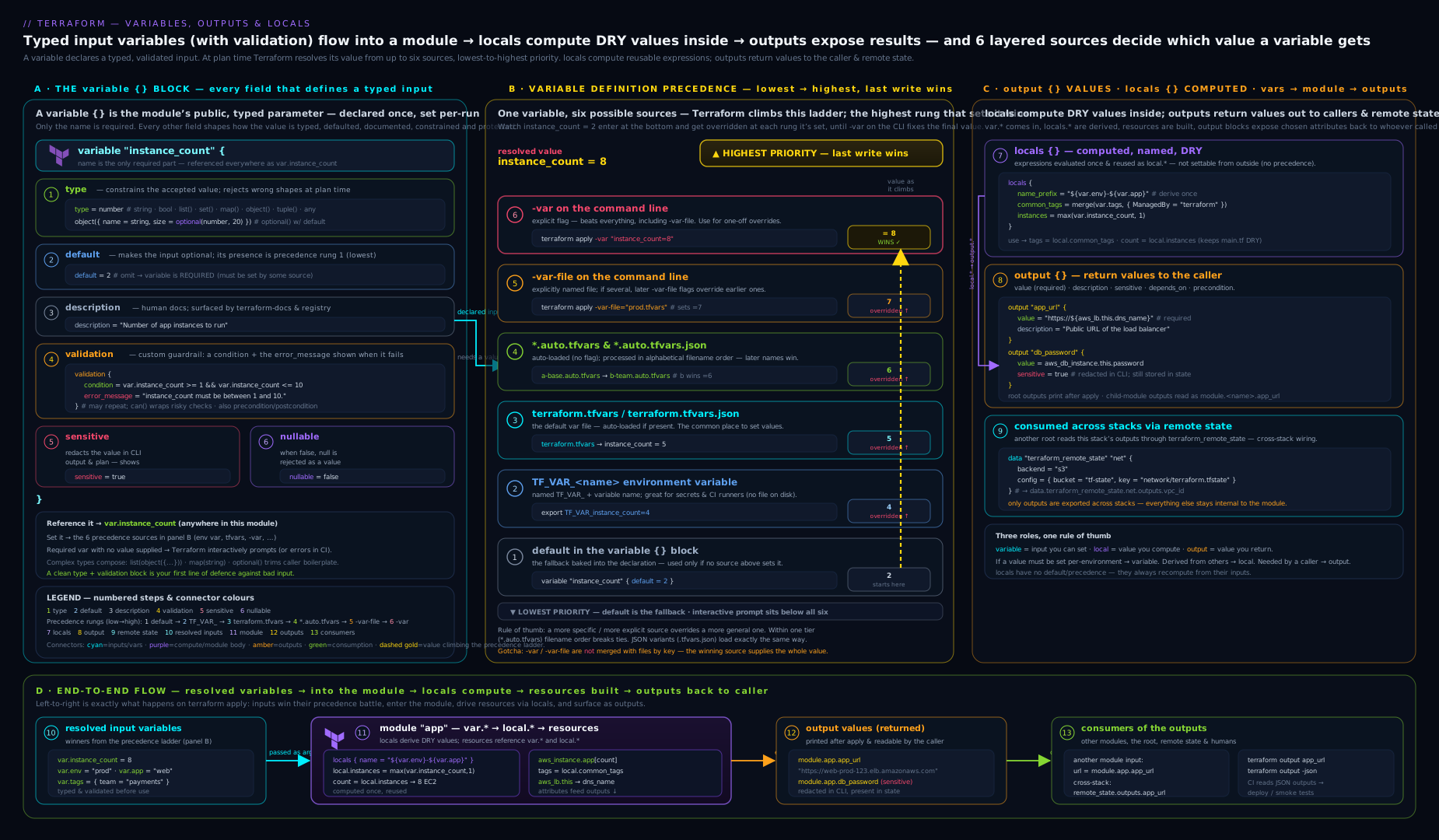
The diagram traces a value’s full journey: in through the precedence ladder (default → TF_VAR_ → tfvars → auto-tfvars → -var-file → -var), through type/validation gates, into resources and local computations, and out through output blocks to the operator, a parent module, or a remote-state consumer — with the persistence points (state, plan) flagged where sensitive does not protect you.
Hands-on lab: variables, validation, locals and outputs — no cloud needed
This lab uses only the random and local providers, so it runs entirely on your machine with zero cost. You’ll declare a typed-and-validated variable, compute a local, generate a sensitive value, expose outputs, and watch the precedence rules in action.
1. Create the working directory and main.tf:
terraform {
  required_version = ">= 1.9.0"
  required_providers {
    random = { source = "hashicorp/random", version = "~> 3.6" }
    local  = { source = "hashicorp/local",  version = "~> 2.5" }
  }
}

variable "environment" {
  description = "Target environment."
  type        = string
  nullable    = false
  validation {
    condition     = contains(["dev", "staging", "prod"], var.environment)
    error_message = "environment must be one of: dev, staging, prod."
  }
}

variable "instance_count" {
  description = "Number of app servers (1–9)."
  type        = number
  default     = 2
  validation {
    condition     = var.instance_count >= 1 && var.instance_count <= 9
    error_message = "instance_count must be between 1 and 9 (got ${var.instance_count})."
  }
}

locals {
  name_prefix = "kloudvin-${var.environment}"
  common_tags = {
    environment = var.environment
    managed_by  = "terraform"
  }
}

resource "random_password" "db" {
  length  = 20
  special = true
}

resource "local_file" "manifest" {
  filename = "${path.module}/manifest.txt"
  content  = "prefix=${local.name_prefix}\ncount=${var.instance_count}\n"
}

output "name_prefix" {
  description = "Computed name prefix."
  value       = local.name_prefix
}

output "tags" {
  description = "Common tags applied to resources."
  value       = local.common_tags
}

output "db_password" {
  description = "Generated DB password (sensitive)."
  value       = random_password.db.result
  sensitive   = true
}
2. Initialise and try to apply without setting the required variable:
terraform init
terraform apply -auto-approve
In CI this errors with “No value for required variable” for environment; locally it prompts you. Cancel (Ctrl-C) and instead supply it.
3. Watch validation reject a bad value:
terraform apply -auto-approve -var="environment=production"
Expected output — the plan stops before doing anything:
│ Error: Invalid value for variable
│   environment must be one of: dev, staging, prod.
Note it fails fast, before any resource is touched.
4. Apply correctly, and observe redaction:
terraform apply -auto-approve -var="environment=dev"
The outputs print with db_password = (sensitive value) — redacted — while name_prefix and tags show in full.
5. Reveal the sensitive output deliberately, and inspect state:
terraform output -raw db_password        # prints the bare password
grep -c "result" terraform.tfstate       # the password IS in state, plaintext
This is the key lesson made tangible: sensitive hid it on screen, but terraform output -raw reveals it and the state file contains it in clear text.
6. Prove the precedence rule — -var beats terraform.tfvars:
printf 'instance_count = 3\n' > terraform.tfvars
terraform plan -var="environment=dev"                      # count = 3 (from tfvars)
terraform plan -var="environment=dev" -var="instance_count=7"  # count = 7 (-var wins)
The first plan reads 3 from terraform.tfvars; the second shows 7 because the command-line -var sits at the top of the precedence order.
7. Cleanup:
terraform destroy -auto-approve -var="environment=dev"
rm -f manifest.txt terraform.tfvars terraform.tfstate*
Cost note: zero. The random and local providers create nothing in any cloud — random_password lives only in state and local_file writes a file on disk. Nothing here incurs spend, so you can repeat the lab freely.
Going deeper
The main lesson gives you the full surface of variables, outputs and locals. This section is for the reader who wants the mechanics underneath four facets that surface skims: how Terraform actually converts types, how sensitivity can quietly over-spread (and the escape hatch), how these constructs behave in CI, and how ephemeral values live across runs.
Complex-type coercion: what “convert where unambiguous” really means
The type constraint doesn’t only reject wrong shapes — it converts compatible ones, and the rules are more generous (and more surprising) than the one-line "5" → 5 example suggests. Terraform applies a defined set of conversions when a supplied value doesn’t exactly match the declared type:
| Declared type | You supply | Result |
|---|---|---|
list(string) |
["a", 1, true] |
["a", "1", "true"] — every element converted to string |
set(string) |
["a", "a", "b"] |
["a", "b"] — duplicates dropped, order not preserved |
map(string) |
{ a = 1, b = true } |
{ a = "1", b = "true" } — values converted |
object({...}) |
a map with matching keys | the map is shaped into the object; missing non-optional keys error |
number |
"3.5" |
3.5; but "3.5x" errors — the whole string must be numeric |
bool |
"true" |
true; "yes"/"1" do not convert |
The rule that catches people: a tuple and a list are not the same type, and neither are an object and a map — but Terraform will unify them when it can. Passing tuple([string, string]) where list(string) is wanted works because every element already converts to string; passing tuple([string, number]) to list(string) also works (the number becomes a string); but passing it to list(number) fails on the first element. When Terraform builds a value from a conditional or a for expression whose branches have different element types, it performs type unification — finding the most specific type all elements fit — which is why the literal [1, "a"] becomes tuple([number, string]), not a list. Declaring a precise type on the receiving variable forces the conversion (and any clear error) to happen at the boundary instead of somewhere deep inside a resource.
nonsensitive() and how sensitivity spreads too far
Sensitivity is contagious by design — but the same contagion sometimes marks values sensitive that genuinely aren’t, and then Terraform redacts a whole map because one key was derived from a sensitive input, or refuses a for_each over a set built from a sensitive value. The escape hatch is the nonsensitive() function, which strips the sensitive marking:
# keys() is safe even though the map's values came from a sensitive var:
output "config_keys" {
  value = nonsensitive(keys(local.derived_map))
}
Treat nonsensitive() as a loaded weapon: it is correct only when you can personally guarantee the specific expression you unwrap carries no secret (a length, a key name, a boolean derived from a secret’s mere presence). Using it to silence the redaction on the secret itself defeats the entire mechanism and leaks the value to the console and logs. The safe pattern is to unwrap the narrowest possible expression — nonsensitive(length(var.password)), never nonsensitive(var.password). OpenTofu behaves identically here.
-var vs .tfvars in CI and automation
The precedence table is the rule; CI is where the practice bites. In a pipeline you almost always run with -input=false, which turns “prompt for a missing required variable” into an immediate error — so every required variable must arrive through one of the non-interactive sources. The idioms that hold up:
- Secrets →
TF_VAR_environment variables, injected from the CI secret store — never-varon the command line (it lands in the process list and often the job log) and never a committed.tfvars.TF_VAR_values don’t live in the repo and are easy to scope per job. - Per-environment config → a checked-in
dev.tfvars/prod.tfvarspassed with-var-file, so each environment’s exact inputs are reviewable in one file and the pipeline merely selects which file to pass. TF_CLI_ARGS/TF_CLI_ARGS_planinject flags (including a-var-file) into every invocation without editing each command — handy for a wrapper, but invisible at the call site, so document them.-input=falseeverywhere, plus a-lock-timeout, so a run fails loudly instead of hanging on a human prompt or a held state lock.
Why -var for secrets is an anti-pattern isn’t style: on a shared runner the full command line is visible to ps, and many CI systems echo the command into the build log. TF_VAR_ keeps the value out of both.
Ephemeral values across runs, and write-only arguments
An ephemeral variable (1.10) is never persisted, which has a consequence people miss: because Terraform never stored it, you must supply it again on every run — plan and apply — with no “remembered” value from last time. That is the point (a one-time token should be re-fetched), but it means an ephemeral input driving a provider has to come from a source available at every invocation, typically a TF_VAR_ fed from a vault, not a human at a keyboard.
Ephemeral variables and outputs pair with write-only arguments (*_wo, added in Terraform 1.11) on managed resources — arguments such as a database’s initial password that the provider sends to the API but that Terraform never reads back into state. A write-only argument takes its value from an ephemeral source and is accompanied by a *_wo_version argument you bump to trigger a resend. Together they close the last gap the leak table leaves open: a secret that flows in, reaches the provider, and is never written to state or plan even in encrypted form. If your Terraform predates 1.10/1.11, the honest fallback is: generate the secret with random_password, mark it sensitive, and lock down the state backend — accepting that it lives (encrypted) in state.
Common mistakes & troubleshooting
| Symptom | Likely cause | Fix |
|---|---|---|
No value for required variable in CI |
Required variable (no default) not supplied; CI is non-interactive |
Pass it via -var, a -var-file, or a TF_VAR_ env var; or give a sensible default |
“But I set it in prod.tfvars!” — value ignored |
Only terraform.tfvars and *.auto.tfvars auto-load |
Rename to prod.auto.tfvars or pass -var-file=prod.tfvars |
| Wrong value wins between two sources | Misremembered precedence | -var > -var-file > *.auto.tfvars > terraform.tfvars > TF_VAR_ > default |
Output refers to sensitive values error |
Output exposes a sensitive value without sensitive = true |
Add sensitive = true to the output |
Invalid value for variable you didn’t expect |
A validation condition is false |
Read the error_message; fix the input or the rule |
null slips through where you forbid it |
nullable left at default true |
Set nullable = false (note: with a default, null then uses the default) |
Error: Reference to undeclared input variable |
var.x used but no variable "x" block |
Declare the variable; every var.* needs a variable block |
Secret visible in terraform plan despite sensitive |
Value derived in a way that broke propagation, or printed via -json/-raw |
Mark intermediate values/outputs sensitive; remember -json/-raw always reveal |
| Self-referential local error | A local depends on itself transitively |
Break the cycle; locals may not reference themselves |
Common beginner mistakes
These are misconceptions — wrong mental models — rather than the symptom-to-fix entries in the troubleshooting table above. Each is a belief that feels reasonable and quietly bites.
- “
sensitive = trueprotects the secret.” It protects your screen. The value is still written to state in plaintext, saved in plan files, and revealed byterraform output -raw. Right model:sensitiveis a redaction flag for console output; state encryption and access control is what protects the secret at rest, andephemeral/write-only is what keeps it out of state entirely. - “I’ll name my env config
prod.tfvarsand Terraform will use it.” Onlyterraform.tfvarsand*.auto.tfvarsauto-load; a file calledprod.tfvarsis inert until you pass-var-file=prod.tfvars. Right model: an arbitrary.tfvarsname is a file you choose to pass, not one Terraform finds. - “A variable with a
defaultI never change is harmless.” Adefault-only, never-overridden, unvalidated variable is a constant wearing a costume — it adds an input to your module’s public interface for no reason. Right model: if the caller doesn’t decide it, it’s alocal; variables are for caller choices. - “
optional(string)gives me an empty string when omitted.” It gives younull, not""— andlength(var.x.name)then explodes on the null. Right model:optional(type)with no default means “maybe null, handle it,” whileoptional(type, default)is what you reach for when you need a concrete fallback. - “
nullable = falsewith adefaultmeans passingnullerrors.” It’s the one case wherenullis silently replaced by the default instead of erroring. Right model:nullable = false+ default = “null means ‘use the default’”; onlynullable = falsewith no default turnsnullinto an error. - “
listandsetare interchangeable.” Alistis ordered, indexable, and drivescount; asetis unordered, de-duplicated, and is whatfor_eachwants. Pickinglistfor something keyed by identity causes destroy-and-recreate churn when a middle element is removed. Right model: choose the collection type from how the value is used downstream, not from what’s quickest to type. - “Locals can reference each other however I like.” They can — except a local may not depend on itself, even through a chain of other locals. Right model: locals form a dependency graph Terraform must be able to order; a cycle is a hard error, not a warning.
Best practices
- Type every variable precisely. Prefer
object({...})withoptional()over a pile of loose scalars; reserveanyfor genuinely free-form inputs. A good type turns a class of mistakes into a plan-time error. - Validate inputs at the boundary. Add
validationfor enums, ranges, and formats; onevalidationblock per rule gives one clear message per failure. - Write real
descriptions — unit, range, and the effect of changing the value. They become the module’s Registry documentation and the prompt text for missing variables. - Default to
nullable = falseunless you specifically neednullto mean “unmanaged”. - Keep a
default-only, never-overridden, unvalidated variable out ofvariable— make it alocal. Variables are for caller choices; locals are for derived values. - Standardise with locals: a
common_tagslocal merged into every resource and aname_prefixlocal are the two highest-leverage conventions in any codebase. - Treat outputs as a deliberate interface. Expose only what consumers need, with descriptions; this is your contract between stacks and modules.
- Use a layered, gitignored
.tfvarsstrategy (dev.tfvars,prod.tfvarspassed with-var-file) rather than scattering-varflags, so the inputs for each environment are reviewable in one file.
Security notes
sensitiveis redaction, not encryption. Sensitive values are stored in plaintext in state and in saved plan files, and are revealed byterraform output -json/-raw. Internalise the leak table above.- Encrypt and lock down state. Because state is where secrets actually live at rest, use an encrypted, access-controlled backend (S3 with SSE + tight IAM, an encrypted Azure/GCS bucket). State access is secret access.
- Never put secrets in
-varon the command line — they land in shell history and the process list. Use a gitignored.tfvarsfile or aTF_VAR_env var, or better, generate/fetch the secret at apply time. - Prefer generated or vault-sourced secrets (
random_password, a secrets-manager data source) over hand-entered ones, so the vault is the source of truth and rotation is possible. - For secrets that must never persist, use
ephemeralvariables and outputs and write-only resource arguments so the value never touches state, even encrypted. terraform_remote_stategrants whole-state read access. Across trust boundaries, publish specific values to a parameter store and consume those instead of reading another team’s entire state.- Treat saved plan files (
-out) as secrets — they contain resolved sensitive values in plaintext; don’t archive or attach them carelessly.
Interview & exam questions
1. Recite the variable-definition precedence order, lowest to highest.
default in the block → environment TF_VAR_* → terraform.tfvars → terraform.tfvars.json → *.auto.tfvars (alphabetical) → -var-file (CLI order) → -var (CLI order). The last source listed wins for any given variable name.
2. You put values in prod.tfvars but Terraform ignores them. Why?
Only terraform.tfvars and files ending in .auto.tfvars are auto-loaded. prod.tfvars must be passed explicitly with -var-file=prod.tfvars (or renamed to prod.auto.tfvars).
3. Does marking a variable sensitive keep its value out of the state file?
No. sensitive only redacts the value from CLI/plan output. It is still written in plaintext to state (and to saved plan files, and revealed by terraform output -json/-raw). To keep a value out of state entirely, use ephemeral.
4. What does optional() do in an object type, and what’s the value of an omitted attribute?
It makes that attribute optional. optional(type, default) fills the default when omitted; optional(type) with no default yields null, so your code must tolerate null.
5. When would you use a local instead of a variable?
When the value is derived from other values or is a constant convention used in many places (e.g. a name_prefix or common_tags), rather than something a caller should choose. Variables are the public interface for caller-supplied values; locals are private, computed values.
6. How does nullable = false interact with a default?
With nullable = false and a default, passing null substitutes the default — the only case where null is replaced by the default. With nullable = false and no default, passing null is an error.
7. What’s the difference between a validation block and a precondition?
validation (inside variable) checks the input itself at plan time, before providers are contacted, and can reference other variables (since 1.9). precondition/postcondition (inside resource/data/output lifecycle) check relationships involving resource or data-source values that aren’t known until the graph is built.
8. How does one Terraform configuration read another’s outputs?
With the terraform_remote_state data source pointed at the other config’s backend; you can read only its outputs (data.terraform_remote_state.x.outputs.y), never its internal resource attributes. Note this grants read access to the whole state file.
9. How are values passed into a child module, and how are results read back?
Values are set as arguments inside the module block (the only place — you cannot -var a nested module). Results are exposed by the child as outputs and read by the parent as module.<name>.<output>. Sensitivity propagates across the boundary.
10. You get Output refers to sensitive values. What’s wrong and how do you fix it?
An output’s value is sensitive but the output isn’t marked sensitive. Terraform refuses to print a sensitive value through a non-sensitive output. Add sensitive = true to the output.
11. Why prefer for_each (a set/map) over count (a list/number) for variables that drive resource instances?
A set/map gives each instance a stable, key-based address, so inserting or removing an element doesn’t re-index and destroy/recreate unrelated instances. A list/count keys by position, so a middle removal shifts every later index. (Covered fully in the resources lesson; the type choice on the variable is what enables it.)
12. What is an ephemeral variable and when would you use one?
A variable (Terraform 1.10+/OpenTofu) whose value exists only during a single run and is never written to state or the plan file. Use it for short-lived secrets — a one-time token or a temporary password — that must not persist even in encrypted state; it may only flow into other ephemeral/write-only contexts and providers.
Quick check
- Which is the only plain (non-
.auto) tfvars filename Terraform loads automatically? - True or false: a value in
terraform.tfvarsoverrides a-varflag on the command line. - What does
optional(string)(no second argument) evaluate to when the caller omits the attribute? - Where is a
sensitivevalue stored at rest, despite the redaction? - You want a value computed from two variables and reused across ten resources —
variable,output, orlocal?
Answers
terraform.tfvars(and its.jsonform). Anything else must end in.auto.tfvarsor be passed with-var-file.- False.
-varis the highest priority; it overridesterraform.tfvars. (The reverse of the statement is true.) null—optional()without a default yieldsnullwhen omitted, so the consuming code must handlenull.- In the state file (and saved plan files), in plaintext —
sensitiveonly affects console output. - A
local— it’s a derived value reused internally, not a caller choice (variable) or an exported result (output).
Practice challenges
Six graded challenges, easiest first. Try each before opening its solution. They reuse the local/random providers from the lab, so nothing here costs anything.
1 (Beginner) — Make a variable required and non-null. Declare variable "project" that must be a non-empty string and rejects null.
<details> <summary>Show solution</summary>
variable "project" {
  type     = string
  nullable = false            # reject null
  # no default → the variable is required
  validation {
    condition     = length(trimspace(var.project)) > 0
    error_message = "project must be a non-empty string."
  }
}
Why: omitting default makes it required; nullable = false blocks null; the validation catches the empty string that nullable alone would still allow.
</details>
2 (Beginner) — Predict the winner. terraform.tfvars sets region = "us-east-1", a shell export sets TF_VAR_region=eu-west-1, and you run terraform apply -var="region=ap-south-1". What is var.region?
<details> <summary>Show solution</summary>
ap-south-1. Precedence low→high is default < TF_VAR_ < terraform.tfvars < .auto.tfvars < -var-file < -var. The command-line -var sits at the top and wins; terraform.tfvars beats TF_VAR_, but both lose to -var.
Why: the last, most-explicit source wins for the same variable name. </details>
3 (Intermediate) — A friendly object input. Write variable "service" as an object with a required name and optional region (default "ap-south-1"), replicas (default 1), and tags (default {}), so a caller can pass just { name = "api" }.
<details> <summary>Show solution</summary>
variable "service" {
  type = object({
    name     = string
    region   = optional(string, "ap-south-1")
    replicas = optional(number, 1)
    tags     = optional(map(string), {})
  })
}
Why: optional(type, default) fills each omitted attribute, so { name = "api" } materialises as the full object with the defaults applied.
</details>
4 (Intermediate) — Cross-variable validation (1.9). Add a rule to variable "max_size" that it must be greater than or equal to var.min_size.
<details> <summary>Show solution</summary>
variable "min_size" {
  type    = number
  default = 1
}

variable "max_size" {
  type    = number
  default = 3
  validation {
    condition     = var.max_size >= var.min_size
    error_message = "max_size must be >= min_size (${var.min_size})."
  }
}
Why: since Terraform 1.9 a validation condition may reference other variables, not just its own; on 1.8 or earlier this errors and the check must move to a resource precondition.
</details>
5 (Advanced) — Expose a length without leaking the secret. You have variable "db_password" { sensitive = true } and want a smoke-test output of the password’s length only, without leaking the value. Make it work.
<details> <summary>Show solution</summary>
output "db_password_length" {
  value = nonsensitive(length(var.db_password))
}
Why: the length is derived from a sensitive value, so Terraform marks it sensitive too; nonsensitive() unwraps the narrow, safe length — never nonsensitive(var.db_password), which would leak the secret itself.
</details>
6 (Advanced) — Keep a token out of state entirely. A provider needs a one-time enrolment token that must never be written to state, even encrypted. Which construct, and what’s the operational catch?
<details> <summary>Show solution</summary>
Declare it ephemeral (Terraform 1.10+):
variable "enrolment_token" {
  type      = string
  sensitive = true
  ephemeral = true            # never written to state or plan
}
The catch: because it is never stored, you must re-supply it on every run (plan and apply), so it has to come from an always-available source — typically a TF_VAR_enrolment_token injected from a vault, not typed by a human. On 1.11+ pair it with a write-only (*_wo) resource argument so the value reaches the provider without ever landing in state.
Why: sensitive still stores the value; only ephemeral (plus write-only arguments) keeps it out of state and plan.
</details>
Exercise
Build a small module interface that exercises every construct in this lesson. Create a variable "service" of type object({ ... }) with a required name (string), an optional(string, "ap-south-1") region, an optional(number, 1) replica count, and an optional(map(string), {}) tags map. Add two validation blocks: one asserting the replica count is between 1 and 5, another asserting the region is in an allow-list of three regions (use contains). Compute a local.name_prefix from service.name and service.region, and a local.tags that merges service.tags with a fixed { managed_by = "terraform" }. Generate a random_password and expose it as a sensitive output, plus a non-sensitive output for name_prefix. Then: (a) apply passing only { name = "api" } and confirm the defaults fill in; (b) apply with an out-of-range replica count and read the exact error message; © prove that a -var-file=override.tfvars setting the region beats a terraform.tfvars setting; (d) confirm the password is redacted in apply output but visible via terraform output -raw and present in terraform.tfstate. Tear everything down with destroy and remove the local state files.
Certification mapping
This lesson maps directly to the HashiCorp Certified: Terraform Associate (003) objectives. Objective 8 (Read, generate, and modify configuration) is covered end to end: input variables and their options, output values, local values, the type constraint system including optional(), and built-in functions used in validations (contains, can, cidrhost). The variable-definition precedence order is an exam staple and is given here as a complete table. Objective 4 (Terraform workflow) is touched via terraform output and its flags, and Objective 5/6 (state & modules) via terraform_remote_state and passing variables into modules. The sensitive/ephemeral distinction and “where secrets leak” align with the security expectations that recur across both the Associate exam and senior interviews. Everything stated holds for OpenTofu as well, so the knowledge is portable across both tools.
Glossary
- Input variable — a parameter (
variableblock) set by the caller, CLI, files or environment; read asvar.<name>. - Output — a return value (
outputblock) exposed to the operator, a parent module, or a remote-state consumer; read asmodule.<m>.<name>. - Local value — an internal, computed named value (
localsblock); read aslocal.<name>; not settable or readable from outside the module. - Type constraint — the unquoted
typeexpression that restricts and converts a variable’s value (string,list(...),object({...}),any, …). optional()— modifier marking anobjectattribute optional, with an optional default substituted when the attribute is omitted.validationblock — acondition+error_messagepair that rejects invalid input at plan time, before providers are contacted.- Variable-definition precedence — the order Terraform uses to pick a value when one variable is set multiple ways;
-varhighest, the blockdefaultlowest. .auto.tfvars— a tfvars file auto-loaded by Terraform (unlike arbitrary*.tfvarsnames), in alphabetical order.sensitive— flag that redacts a value from CLI/plan output but does not encrypt it or keep it out of state.nullable— flag controlling whethernullis an accepted value for a variable (defaulttrue).ephemeral— flag (1.10+) for a value that exists only during a run and is never written to state or the plan file.terraform_remote_state— a data source that reads another configuration’s outputs from its state backend.- Root module / child module — the directory you run Terraform in / a module called via a
moduleblock; variables set the child, outputs are read back from it. TF_VAR_environment variable — the shell-based way to set a variable (TF_VAR_<name>=value); low in the precedence order but the safe way to pass secrets in CI, since it stays out of files and the command line..tfvarsfile — a file ofname = valueassignments (no blocks);terraform.tfvarsand*.auto.tfvarsauto-load, while any other name must be passed with-var-file.nonsensitive()— a function that strips thesensitivemarking from a value; safe only on a narrow expression you can guarantee carries no secret.precondition/postcondition—lifecyclechecks (inresource/data/output) that validate relationships involving resource or data-source values, complementingvalidation, which guards the raw input.- Type conversion (coercion) — Terraform’s automatic conversion of a supplied value to the declared
typewhere unambiguous (e.g."5"→5; the elements of alist(string)stringified). - Type unification — the process of finding a single type that fits all elements of a mixed expression (such as a conditional’s two branches), yielding a
tuple/objectwhen the element types differ. - Write-only argument — a managed-resource argument (
*_wo, Terraform 1.11+) whose value is sent to the provider but never read back into state; fed from an ephemeral source and versioned with a companion*_wo_version.
Next steps
You now command Terraform’s three value-carrying constructs and the precedence rules that govern them — the prerequisite for everything modular. Next, learn how to package and reuse configuration in Consuming Terraform Modules, In Depth: Sources, Versions, Composition & the Registry (terraform-module-sources-composition-registry-consumption), where the variables you just mastered become a module’s public interface. To anchor these ideas in the broader workflow, revisit Terraform Fundamentals: HCL, Providers, State & the Core Workflow (terraform-fundamentals-hcl-providers-state-workflow). And for the advanced end of typed inputs — deeply nested optional() objects, dynamic blocks, and precondition/postcondition — see Mastering Terraform Dynamic Blocks, Complex Types, and Variable Validation (terraform-dynamic-blocks-complex-types-validation).