The resource block is the heart of Terraform — it is the thing that actually creates infrastructure. You can write a perfectly valid configuration with no variables, no modules, and no outputs, but without at least one resource block Terraform does nothing. And yet most engineers use only a fraction of what a resource block can do. They know type, name, and a handful of arguments, and they reach for copy-paste the moment they need three of something. The difference between an engineer who uses Terraform and one who commands it lies almost entirely in the meta-arguments — the small set of special arguments (count, for_each, depends_on, provider, and the lifecycle block) that every resource type accepts regardless of which provider it comes from. They control how many of a resource exist, in what order resources are created and destroyed, which provider manages them, and how Terraform treats changes and deletions — including the safety rails that stop a plan from quietly destroying your production database.
This lesson is deliberately exhaustive. We start with the anatomy of a resource block and how every resource is addressed — because addressing is the thread that connects count, for_each, state operations, and the dependency graph. We cover data sources, the read-only cousin of resources. Then we go meta-argument by meta-argument: count and its index model and empty-list toggle; for_each over maps and sets, why its key-based addresses make it the right default, and the precise rules for converting from one to the other; depends_on and the difference between implicit and explicit dependencies; the provider meta-argument for multi-region and multi-account work; and finally the lifecycle block in full — create_before_destroy, prevent_destroy, ignore_changes (attributes and all), replace_triggered_by, and the often-missed precondition and postcondition validation blocks. We finish with the dependency graph that ties it all together and terraform_data for trigger-driven replacement. Everything here applies equally to OpenTofu, the open-source fork — the HCL and CLI are identical unless noted.
In a nutshell
Level: Intermediate · Time: ~43 min
Every resource block you write describes one kind of thing — a server, a bucket, a DNS record. The meta-arguments are the small set of knobs that sit on the outside of that block, and they are identical on every resource from every provider. They do not describe what the thing is; they describe how Terraform should handle it.
Think of a resource block as an order form at a factory. The arguments inside the block are the product spec — colour, size, model. The meta-arguments are the four boxes on the outside of the form:
- How many? —
count(give me N of these, numbered[0],[1],[2]) orfor_each(give me one per name on this list, labelled["web"],["db"]). - In what order? —
depends_on, for when one thing must genuinely be finished before another starts and nothing in the spec says so. - Made by whom? —
provider, which picks which factory — which region or which account — fills the order. - What happens when it has to be remade? — the
lifecycleblock: build the replacement before scrapping the old one, refuse to scrap it at all, ignore certain scratches, or scrap it whenever some other part changes.
The single idea that makes all four click is the address. Terraform remembers every object it built by a label — aws_instance.web, aws_instance.web[0], aws_instance.web["db"] — and it decides what to create, change, or destroy purely by comparing the labels in your code against the labels in its records. Change a label and Terraform does not see “the same thing, renamed”; it sees one thing vanish and another appear. That is why count, which labels by position, is dangerous for lists that change in the middle, and why for_each, which labels by name, is the modern default. Almost everything else in this lesson follows from that one sentence.
You need to be comfortable reading HCL and to have run init → plan → apply at least once. By the end you will be able to pick count or for_each deliberately and defend the choice, migrate between them without destroying anything, express hidden ordering with depends_on, and use every lifecycle option — including the pre/post condition checks that turn quiet assumptions into enforced, self-documenting rules.
Learning objectives
After working through this lesson you will be able to:
- Read and write a resource block and address any instance precisely —
type.name,type.name[0],type.name["key"], and the module-qualified forms. - Use data sources to read existing infrastructure and feed it into managed resources.
- Choose correctly between
countandfor_each, explain the stable-address problem that makesfor_eachthe safer default, and convert between them without destroying resources. - Express dependencies with the implicit reference model and know exactly when an explicit
depends_onis required. - Use the
providermeta-argument to place a resource with a non-default (aliased) provider. - Apply every
lifecycleoption —create_before_destroy,prevent_destroy,ignore_changes,replace_triggered_by,precondition, andpostcondition— and explain the trade-off and gotcha of each. - Reason about the dependency graph, the create/destroy ordering it implies, and how to drive replacement with
terraform_data.
Prerequisites
You should be comfortable reading basic HCL — blocks, arguments, and simple expressions — and you should have run the init → plan → apply → destroy workflow at least once. If the terms state, provider, and dependency graph are new, read Terraform Fundamentals: HCL, Providers, State & the Core Workflow first; this lesson assumes those mental models and goes deep on the resource layer that sits on top of them. This is a core Fundamentals lesson in the Terraform Zero-to-Hero ladder, sitting just after providers and just before variables. Meta-arguments are some of the most heavily tested topics on the Terraform Associate exam, so the depth here is exam-aligned as well as practical.
Core concepts: the resource block, anatomy and addressing
A resource block declares a single kind of infrastructure object that Terraform should create, read, update, and delete to match your configuration. Its skeleton is always the same:
resource "aws_instance" "web" {   # keyword "resource", a TYPE label, a NAME label
  ami           = "ami-0abc123"   # argument (provider-specific)
  instance_type = "t3.micro"      # argument (provider-specific)

  tags = {                        # nested argument (a map)
    Name = "web"
  }

  lifecycle {                     # a meta-argument BLOCK
    create_before_destroy = true
  }
}
Two labels follow the resource keyword. The first is the resource type (aws_instance) — it is defined by a provider and dictates which arguments are legal; the prefix before the first underscore (aws) tells Terraform which provider owns it. The second is the local name (web) — your choice, and it only has to be unique among resources of the same type within the same module. The type and name together form the resource’s address.
Addressing is the single most important idea in this lesson, because every meta-argument is really a statement about addresses. Terraform tracks each managed object in state by its address; terraform state commands, the dependency graph, plan output, and -target all speak in addresses. The forms you will meet:
| Address form | Means | When it appears |
|---|---|---|
aws_instance.web |
The single instance of a resource declared without count/for_each |
The default — one resource, one address |
aws_instance.web[0] |
The instance at integer index 0 of a count-ed resource |
Whenever count is set (even count = 1) |
aws_instance.web["app"] |
The instance keyed by string "app" of a for_each-ed resource |
Whenever for_each is set |
module.network.aws_subnet.this[2] |
A resource inside a child module, indexed | Resources created by modules |
data.aws_ami.ubuntu |
A data source (read-only), addressed under the data. prefix |
Reads, never managed |
Note the consequence that trips up everyone once: adding count or for_each to a resource that previously had neither changes its address. aws_instance.web becomes aws_instance.web[0] (or ["app"]), and Terraform — which keys state by address — sees the old address vanish and a new one appear. Without intervention it will plan to destroy and recreate the resource. The clean fix is a moved block (covered in the refactoring lesson, cross-linked below); the crude fix is terraform state mv. Keep this in mind through everything that follows.
A few more anatomy facts worth stating plainly:
- Arguments vs attributes. You set arguments (inputs). After apply, the resource exposes attributes (outputs) you can reference — some are arguments echoed back, others are computed by the provider (an
id, an ARN, an IP).aws_instance.web.private_ipis a computed attribute. - Computed / known-after-apply. If an attribute’s value cannot be known until apply (an auto-generated ID),
planshows it as(known after apply). This matters forfor_each, as we will see. - Sensitive attributes. Some attributes are marked sensitive by the provider and are redacted in plan/CLI output, though they still land in state in plaintext.
- Resource behaviour types. Most resources support full CRUD. Some changes are done in place (an
~update in the plan), others force a replace (-/+, destroy then create) because the underlying API cannot change that attribute live. The plan tells you which, and thelifecycleblock lets you influence it.
Data sources: the read-only cousin
A data source uses a data block to read information about infrastructure that already exists — whether created outside Terraform, in another configuration, or by a different team — without managing it. It never appears in your destroy plan because Terraform does not own it.
data "aws_ami" "ubuntu" {
  most_recent = true
  owners      = ["099720109477"] # Canonical

  filter {
    name   = "name"
    values = ["ubuntu/images/hvm-ssd/ubuntu-jammy-22.04-amd64-server-*"]
  }
}

resource "aws_instance" "web" {
  ami           = data.aws_ami.ubuntu.id   # consume the data source's attribute
  instance_type = "t3.micro"
}
| Aspect | resource block |
data block |
|---|---|---|
| Purpose | Create/update/delete & manage an object | Read attributes of an existing object |
| Address prefix | type.name |
data.type.name |
| Lifecycle | Full CRUD; appears in destroy | Read-only; never destroyed |
| When it runs | During apply (and refresh) | During plan/refresh (or apply if its inputs are known-after-apply) |
| Meta-arguments | count, for_each, depends_on, provider, lifecycle (all) |
count, for_each, provider, and depends_on; lifecycle supports precondition/postcondition only |
Data sources take the same count and for_each meta-arguments as resources, addressed identically (data.aws_subnet.this["a"]). A subtle but important rule: if a data source’s arguments depend on values that are unknown until apply (for example a filter built from a not-yet-created resource), Terraform defers the read until apply, and any plan that depends on its results shows (known after apply). Adding depends_on to a data source forces the same deferral on purpose — useful when a read must happen after some resource is in place but there is no attribute to reference.
The meta-arguments, in full
Five meta-arguments are valid on (almost) every resource regardless of provider. Here they are at a glance before we take each in depth:
| Meta-argument | Form | What it controls | Valid on data sources? |
|---|---|---|---|
count |
count = <number> |
How many identical instances; index-addressed [0], [1]… |
Yes |
for_each |
for_each = <map|set> |
One instance per element; key-addressed ["k"] |
Yes |
depends_on |
depends_on = [<refs>] |
Explicit ordering when no attribute reference links resources | Yes |
provider |
provider = <type.alias> |
Which (aliased) provider configuration manages this resource | Yes |
lifecycle |
lifecycle { … } |
Create/destroy ordering, deletion protection, change-ignoring, replacement triggers, pre/post conditions | Partly (conditions only) |
A hard rule to memorise: count and for_each are mutually exclusive on the same block — you may use one or the other, never both.
count: the simplest multiplier
count accepts a whole number and creates that many instances of the resource, each addressed by a zero-based integer index and each exposing a count.index value inside the block.
resource "aws_instance" "worker" {
  count         = 3
  ami           = data.aws_ami.ubuntu.id
  instance_type = "t3.micro"

  tags = {
    Name = "worker-${count.index}"   # worker-0, worker-1, worker-2
  }
}
# Addresses: aws_instance.worker[0], [1], [2]
# Reference all: aws_instance.worker[*].id   (a list via the splat)
# Reference one: aws_instance.worker[1].private_ip
count.index is the only special symbol count provides, and it is an integer (0 to count − 1). To turn a list into indexed resources you typically index the list by count.index:
variable "subnet_cidrs" {
  type    = list(string)
  default = ["10.0.1.0/24", "10.0.2.0/24"]
}

resource "aws_subnet" "this" {
  count      = length(var.subnet_cidrs)
  vpc_id     = aws_vpc.main.id
  cidr_block = var.subnet_cidrs[count.index]
}
The conditional (zero-or-one) toggle
The most idiomatic use of count has nothing to do with counting many things — it is the on/off switch. Because count = 0 creates no instances, a boolean-driven count makes a resource conditional:
variable "create_bastion" {
  type    = bool
  default = false
}

resource "aws_instance" "bastion" {
  count         = var.create_bastion ? 1 : 0   # 1 = exists, 0 = absent
  ami           = data.aws_ami.ubuntu.id
  instance_type = "t3.micro"
}

# Referencing a maybe-absent resource needs the index and a guard:
output "bastion_ip" {
  value = var.create_bastion ? aws_instance.bastion[0].public_ip : null
}
This is the standard pattern for “deploy this only in prod” or “create the resource only if a feature flag is set”. Note that even a single conditional instance lives at index [0], never the bare address — referencing aws_instance.bastion.public_ip (no index) is an error when count is set.
The fatal flaw of count: positional addresses
count addresses by position, and positions shift. Suppose you manage three users from a list and remove the middle one:
variable "users" { default = ["alice", "bob", "carol"] }

resource "aws_iam_user" "team" {
  count = length(var.users)
  name  = var.users[count.index]
}
# State: team[0]=alice, team[1]=bob, team[2]=carol
Drop "bob", leaving ["alice", "carol"]. Now the list is shorter, so carol slides from index 2 to index 1. Terraform compares by address:
team[0]— stillalice, no change.team[1]— wasbob, nowcarol→ Terraform plans to modify in place or replace, renaming bob to carol.team[2]— no longer exists → Terraform plans to destroy it.
You asked to delete one user; Terraform proposes to destroy one and mutate another. For IAM users this is merely noisy; for stateful resources (a database, a disk, a persistent volume) this positional shuffle is data-destroying. This is the single most important reason to prefer for_each whenever the set of things has stable identities.
Use count when: the instances are genuinely identical and interchangeable and the number is what matters (a fixed-size pool of stateless workers), or you need the zero/one conditional toggle, or you are iterating a list where order is irrelevant and the list never has middle elements removed.
for_each: one instance per keyed element
for_each creates one instance per element of a map or a set of strings, addressing each by a stable string key rather than a position. Inside the block you get two symbols: each.key and each.value.
# --- over a SET of strings: key == value ---
resource "aws_iam_user" "team" {
  for_each = toset(["alice", "bob", "carol"])
  name     = each.key      # for a set, each.key == each.value
}
# Addresses: aws_iam_user.team["alice"], ["bob"], ["carol"]

# --- over a MAP: key and value differ ---
resource "aws_instance" "svc" {
  for_each      = {
    web   = "t3.small"
    cache = "r6g.large"
    db    = "m6i.xlarge"
  }
  ami           = data.aws_ami.ubuntu.id
  instance_type = each.value           # the map value
  tags          = { Name = each.key }  # the map key
}
# Addresses: aws_instance.svc["web"], ["cache"], ["db"]
Now remove "bob" from the set. Because addresses are keyed by name, Terraform sees exactly one change:
team["alice"]— unchanged.team["bob"]— gone → destroy (only this one).team["carol"]— unchanged (its key never moved).
That is the whole point: for_each gives every instance a stable, meaningful address, so adding or removing one element touches only that element. This is why for_each is the modern default for any collection whose members have identities.
each.key / each.value reference table
| Symbol | With for_each over a set |
With for_each over a map |
|---|---|---|
each.key |
The element’s string value | The map key |
each.value |
The element’s string value (same as key) | The map value (any type) |
The rules and constraints of for_each
for_each is stricter than count, and the constraints are exam favourites:
| Rule | Detail | Why / fix |
|---|---|---|
| Argument type | Must be a map or a set(string) |
A list is not allowed — convert with toset(...). Lists imply order/duplicates, which keys cannot have. |
| Keys must be known at plan time | The keys (map keys / set members) cannot be values that are “known after apply” | You may not key for_each on an attribute computed by another resource (e.g. a generated ID). Values can be unknown; keys cannot. |
| No duplicate keys | A set cannot contain duplicates; map keys are unique by definition | toset(["a","a"]) collapses to one — silently fewer instances than you might expect. |
each only inside the block |
each.key/each.value are scoped to the resource using for_each |
Outside it, iterate with a for expression instead. |
| Splat differs | for_each resources are a map of instances, not a list |
Use values(aws_instance.svc)[*].id or a for expression; bare [*] is for count. |
The “keys must be known at plan time” rule is the one people hit hardest. If you write for_each = toset(aws_subnet.this[*].id) — keying on IDs that do not exist until apply — Terraform errors with “the for_each value depends on resource attributes that cannot be determined until apply”. The fix is to key on something you control (names, CIDRs) and look up the computed value inside, or to split the apply with -target as a last resort.
Turning a list into a map for for_each
Real input often arrives as a list of objects. The idiomatic conversion is a for expression that projects a stable key:
variable "subnets" {
  type = list(object({
    name = string
    cidr = string
    az   = string
  }))
}

resource "aws_subnet" "this" {
  for_each = { for s in var.subnets : s.name => s }   # key by the stable "name"
  vpc_id            = aws_vpc.main.id
  cidr_block        = each.value.cidr
  availability_zone = each.value.az
  tags              = { Name = each.key }
}
Keying by s.name (not by count.index) means reordering the list, or inserting an entry in the middle, never disturbs the existing subnets — exactly the stability count cannot give you.
count vs for_each: the exhaustive comparison
This is the decision the rest of your Terraform life turns on. The full contrast:
| Dimension | count |
for_each |
|---|---|---|
| Accepts | A whole number | A map or set(string) |
| Instance address | Integer index — name[0], name[1] |
String key — name["app"] |
| Special symbols | count.index (int) |
each.key, each.value |
| Add/remove a middle element | Re-indexes everything after it → cascade of changes/replacements | Touches only the affected key |
| Address stability | Positional — fragile | Key-based — stable |
| Conditional create | count = cond ? 1 : 0 (idiomatic) |
for_each = cond ? {...} : {} (works, more verbose) |
| Keys known at plan time? | N/A (count can derive from computed length if the list itself is known) |
Keys must be known at plan time |
| Collection of instances | A list — splat name[*] |
A map — values(name), name["k"] |
| Best for | Fixed pools of identical, interchangeable things; on/off toggles | Anything whose members have identities (named subnets, users, buckets, rules) |
| Duplicates | Allowed (list values can repeat) | Not allowed (set/map keys are unique) |
The rule of thumb that interviewers want to hear: use for_each by default; reach for count only for a fixed number of truly interchangeable instances or for the zero/one conditional toggle. The reason is always the same — stable addresses prevent accidental destroy-and-recreate when the collection changes.
One more practical note: you can use count or for_each on modules too, with identical semantics (module.app["web"]), and on data sources. The address rules carry over unchanged.
depends_on: explicit ordering
Terraform almost never needs to be told about ordering, because it infers dependencies from references. When resource A’s argument reads resource B’s attribute, Terraform knows B must exist first. That is an implicit dependency, and it is the mechanism you should rely on 95% of the time:
resource "aws_vpc" "main" {
  cidr_block = "10.0.0.0/16"
}

resource "aws_subnet" "app" {
  vpc_id     = aws_vpc.main.id   # implicit dependency: subnet waits for the VPC
  cidr_block = "10.0.1.0/24"
}
depends_on is the explicit override for the cases where a real dependency exists but is invisible to Terraform because no attribute connects the two resources. The classic example is an IAM policy that must be attached before an instance can use it, where the instance configuration never references the policy:
resource "aws_iam_role_policy" "s3" {
  role   = aws_iam_role.app.id
  policy = data.aws_iam_policy_document.s3.json
}

resource "aws_instance" "app" {
  ami           = data.aws_ami.ubuntu.id
  instance_type = "t3.micro"
  iam_instance_profile = aws_iam_instance_profile.app.name

  # The app's startup script writes to S3, which only works once the
  # role policy is attached — but nothing here *references* that policy:
  depends_on = [aws_iam_role_policy.s3]
}
| Dependency kind | How it is created | Use it when |
|---|---|---|
| Implicit | One resource references another’s attribute (vpc_id = aws_vpc.main.id) |
Always, if any attribute links them — it is automatic and precise |
Explicit (depends_on) |
A literal list of resource/module addresses with no attribute reference | A hidden ordering exists (eventual-consistency, side effects, IAM, “must be ready before”) that Terraform cannot see |
Rules and cautions for depends_on:
- It takes a list of references to whole resources or modules —
[aws_iam_role_policy.s3],[module.network]— not references to specific attributes. - Overusing it serialises your graph and slows applies; every false dependency you add removes parallelism. Prefer a real attribute reference whenever one is available.
- On a module,
depends_onmakes everything in the module wait for the listed dependencies — a blunt but sometimes necessary instrument. - On a data source,
depends_onforces the read to happen after the dependency and defers it to apply time (the value becomes known-after-apply).
The provider meta-argument
By default a resource is managed by the default configuration of its provider (the unlabelled provider "aws" {} block). When you have multiple configurations of the same provider — for multiple regions or accounts — you give the extra ones an alias and select one per resource with the provider meta-argument.
provider "aws" {                 # default — us-east-1
  region = "us-east-1"
}

provider "aws" {                 # aliased — eu-west-1
  alias  = "europe"
  region = "eu-west-1"
}

resource "aws_s3_bucket" "us" {
  bucket = "kv-data-us"          # uses the DEFAULT provider implicitly
}

resource "aws_s3_bucket" "eu" {
  provider = aws.europe          # explicitly use the aliased config
  bucket   = "kv-data-eu"
}
Key facts: the value is <provider>.<alias> (no quotes — it is a reference, not a string); without it the default configuration is used; and for modules you pass aliased providers down via the providers = { aws = aws.europe } map rather than the provider meta-argument. Aliases and version constraints are covered fully in Terraform Providers, In Depth: required_providers, Versions, Aliases & the Lock File; here we only need the meta-argument that consumes them.
The lifecycle block: every option
The lifecycle nested block changes how Terraform treats the resource’s creation, replacement, deletion, and change-detection. Its arguments take literal values only (with one exception, ignore_changes, which takes attribute references). Here is the full surface before we take each in turn:
| Option | Type | Purpose | One-line gotcha |
|---|---|---|---|
create_before_destroy |
bool | Create the replacement before destroying the old one (zero-downtime replace) | The new object must not clash with the old on any unique name/port/identifier |
prevent_destroy |
bool | Make any plan that would destroy this resource error out | Blocks terraform destroy too; must be removed (not just toggled) to delete |
ignore_changes |
list of attribute refs, or all |
Stop Terraform reverting drift on the listed attributes | Suppresses updates to those attrs; does not stop replacement triggered elsewhere |
replace_triggered_by |
list of refs | Force replacement when a referenced resource/attribute changes | References must be to managed resources/attributes, not variables |
precondition |
block (condition + error_message) |
Assert an assumption before the resource is created/updated | Evaluated during plan; fails fast with your message |
postcondition |
block (condition + error_message) |
Assert a guarantee about the result after apply | Can reference self; catches bad outcomes the type cannot prevent |
resource "aws_instance" "web" {
  ami           = data.aws_ami.ubuntu.id
  instance_type = var.instance_type

  lifecycle {
    create_before_destroy = true
    prevent_destroy       = false
    ignore_changes        = [tags["LastScanned"], ami]
    replace_triggered_by  = [terraform_data.deploy_version]

    precondition {
      condition     = data.aws_ami.ubuntu.architecture == "x86_64"
      error_message = "The selected AMI must be x86_64 for this instance family."
    }
    postcondition {
      condition     = self.public_ip != ""
      error_message = "The instance was created without a public IP; check the subnet's auto-assign setting."
    }
  }
}
create_before_destroy
By default Terraform destroys then creates when an attribute change forces a replacement — there is a window where the resource does not exist. Setting create_before_destroy = true inverts this: Terraform creates the replacement first, switches references to it, then destroys the old one. This is how you achieve zero-downtime replacement of things like launch configurations, instances behind a load balancer, or TLS certificates.
- Trade-off: during the swap both instances exist, so you momentarily consume double the resource (and may brush against quotas).
- The naming gotcha: if the resource has any attribute that must be globally or regionally unique — a fixed
name, an S3 bucket name, a static port — creating the new one before destroying the old one fails with a conflict. The remedy is to let the provider generate the name (name_prefixinstead ofname) so the two coexist. - Propagation:
create_before_destroyis “infectious” — any resource that depends on acreate_before_destroyresource must also adopt it, or Terraform will tell you the graph cannot be ordered. Terraform 1.x usually handles this automatically for direct dependents, but you will see errors if a dependency cannot honour the ordering.
prevent_destroy
prevent_destroy = true makes Terraform reject any plan that would destroy this resource, erroring at plan time before anything happens. It is the guardrail for irreplaceable, stateful resources — production databases, the state bucket itself, a KMS key.
- It blocks
terraform destroyand any change that would replace the resource (because a replace destroys the old one). - It is not a substitute for cloud-side deletion protection (RDS
deletion_protection, S3 bucket policies); it only stops Terraform from issuing the delete. Someone deleting via the console is unaffected. - The gotcha: to legitimately delete the resource you must remove the
prevent_destroyline (or set it false) and apply that change first, then destroy — a flag set from a variable will error becauseprevent_destroymust be a literal (it cannot reference variables). This is by design: deletion protection you can flip with a-varis not protection.
ignore_changes
ignore_changes tells Terraform to stop trying to “correct” specified attributes when they drift from the configuration. It takes a list of attribute references (bare names, not strings):
lifecycle {
  ignore_changes = [
    tags["LastModifiedBy"],   # an autoscaler or another system writes this tag
    desired_count,            # an autoscaler manages the count; don't fight it
  ]
}
After the resource is created, Terraform will no longer plan updates to those attributes even if the real value differs from the config. The canonical use cases are attributes managed by something other than Terraform — autoscaling adjusting desired_count, a deployment system bumping an image tag, a platform stamping tags, or an initial_password you set once and the cloud then rotates.
- You may pass the special token
all—ignore_changes = all— to ignore changes to every attribute after creation. Terraform will create the resource and then never update it in place again. This is occasionally right for “create once, then leave entirely to another owner”, but it is a sledgehammer: real, intended config changes will also be silently ignored, so use it sparingly. - The crucial limit:
ignore_changesonly suppresses in-place updates to the listed attributes. It does not prevent the resource from being replaced if some other change (orreplace_triggered_by, or a-replace) forces it. Ignoringamistops AMI drift from causing an update, but a change toinstance_typecan still replace the whole instance. - It accepts top-level argument names and map/index sub-paths (
tags["X"]), but not arbitrary deep expressions.
replace_triggered_by
replace_triggered_by (added in Terraform 1.2 / present in OpenTofu) forces this resource to be replaced whenever a referenced resource or attribute changes, even though nothing about this resource’s own arguments changed. It takes a list of references to managed resources, instances, or their attributes:
resource "terraform_data" "deploy" {
  input = var.app_version    # changes when you ship a new version
}

resource "aws_instance" "app" {
  ami           = data.aws_ami.ubuntu.id
  instance_type = "t3.micro"

  lifecycle {
    # Replace the instance every time app_version changes, even though
    # none of the instance's own arguments changed:
    replace_triggered_by = [terraform_data.deploy]
  }
}
Use it to couple replacement to an external signal — “rebuild the instance when the deployment version changes”, “recreate the cache when the config object changes”. References must point at managed resources/attributes (you cannot replace_triggered_by a variable directly — wrap the variable in a terraform_data resource, as above). Referencing a whole resource triggers replacement when any of its attributes change; referencing a single attribute narrows the trigger.
precondition and postcondition (custom condition checks)
These two nested blocks turn assumptions and guarantees into enforced, self-documenting assertions — part of Terraform’s custom conditions feature (1.2+, and in OpenTofu). Each contains a condition (a boolean expression that must be true) and an error_message (shown when it is false).
- A
preconditionis checked before the resource is created or updated — it asserts something must be true for this resource to make sense. Think of it as a guard at the front door: validate inputs, the chosen image’s architecture, a region’s capability, a CIDR’s size. If it fails, the plan/apply stops with your message before anything is built. - A
postconditionis checked after the resource’s planned values are known / after apply — it asserts something about the result. It can referenceself(the resource’s own attributes), making it ideal for catching outcomes the resource type itself does not validate: “the instance actually got a public IP”, “the bucket region matches what we expected”.
data "aws_ec2_instance_type" "this" {
  instance_type = var.instance_type
}

resource "aws_instance" "web" {
  ami           = data.aws_ami.ubuntu.id
  instance_type = var.instance_type
  subnet_id     = var.subnet_id

  lifecycle {
    precondition {
      condition     = data.aws_ec2_instance_type.this.ebs_optimized_support != "unsupported"
      error_message = "instance_type ${var.instance_type} does not support EBS optimisation, which this workload requires."
    }
    postcondition {
      condition     = self.private_ip != ""
      error_message = "Instance launched without a private IP — the subnet may be misconfigured."
    }
  }
}
| Aspect | precondition |
postcondition |
|---|---|---|
| When evaluated | Before create/update (during plan, as soon as its inputs are known) | After the resource’s values are known (plan if known, else apply) |
Can reference self? |
No (the resource does not exist yet) | Yes — its own attributes |
| Typical use | Validate inputs/assumptions before building | Validate outcomes/guarantees after building |
| On failure | Halts with your error_message |
Halts with your error_message |
| Valid on data sources? | Yes | Yes |
Where do these sit among Terraform’s other validation tools? It is worth fixing the boundaries, because the exam and interviewers probe it:
| Check | Lives in | Best for |
|---|---|---|
Variable validation |
variable block |
Validating a single input value in isolation (a string matches a regex, a number is in range) |
precondition |
resource/data lifecycle |
Cross-cutting assumptions about inputs/other data before a specific resource is built |
postcondition |
resource/data lifecycle |
Guarantees about a resource’s own result (self.*) after it is built |
check block |
top-level check (1.5+) |
Non-blocking assertions/health checks that warn but never fail the apply |
The distinction that matters: variable validation is scoped to one variable; pre/postconditions can reference multiple values and a resource’s own attributes; and a check block (a separate top-level construct) reports problems as warnings without stopping the apply, which the others always do.
terraform_data and trigger-driven replacement
Often you want to force something to happen when an arbitrary value changes — re-run a provisioner, replace a resource (via replace_triggered_by), or simply store a value in state to depend on. The historical tool was the null_resource from the null provider with its triggers map. Terraform 1.4 introduced a built-in replacement that needs no provider: terraform_data (OpenTofu has it too).
resource "terraform_data" "config_version" {
  input = var.config_hash      # store any value in state

  triggers_replace = [         # replace this resource when any of these change
    var.config_hash,
    var.app_version,
  ]
}
inputstores an arbitrary value;outputechoes it back (handy for passing a value through state).triggers_replacetakes a value (or list); whenever it changes, theterraform_dataresource is replaced, which you can then chain intoreplace_triggered_byon a real resource or into a provisioner’s lifecycle.- It is the modern, provider-free stand-in for
null_resource+triggers. Prefer it. (Provisioners themselves — and the few remaining reasons to usenull_resource— are covered in Terraform Provisioners, In Depth.)
| Need | Old way | Modern way |
|---|---|---|
| Store a value in state to depend on | null_resource + triggers |
terraform_data with input |
| Force replacement when X changes | null_resource triggers + downstream depends_on |
terraform_data + triggers_replace, consumed by replace_triggered_by |
| Run a provisioner on change | null_resource + provisioner |
terraform_data + provisioner (still a last resort) |
The dependency graph: how it all orders
Everything above feeds one thing: the dependency graph. Before any apply, Terraform builds a directed acyclic graph (DAG) whose nodes are resource instances and whose edges are dependencies. It derives edges from:
- Implicit references — every attribute one resource reads from another.
- Explicit
depends_on— edges you add by hand. replace_triggered_byand provider relationships — additional ordering constraints.
Terraform then walks the graph: it creates/updates resources in dependency order, parallelising independent branches (up to -parallelism, default 10), and on destroy it walks the graph in reverse, tearing down dependents before the things they depend on. count and for_each expand a single configured resource into multiple graph nodes (one per index/key), which is why a re-indexing change ripples through the graph. You can render the graph with terraform graph | dot -Tsvg > graph.svg.
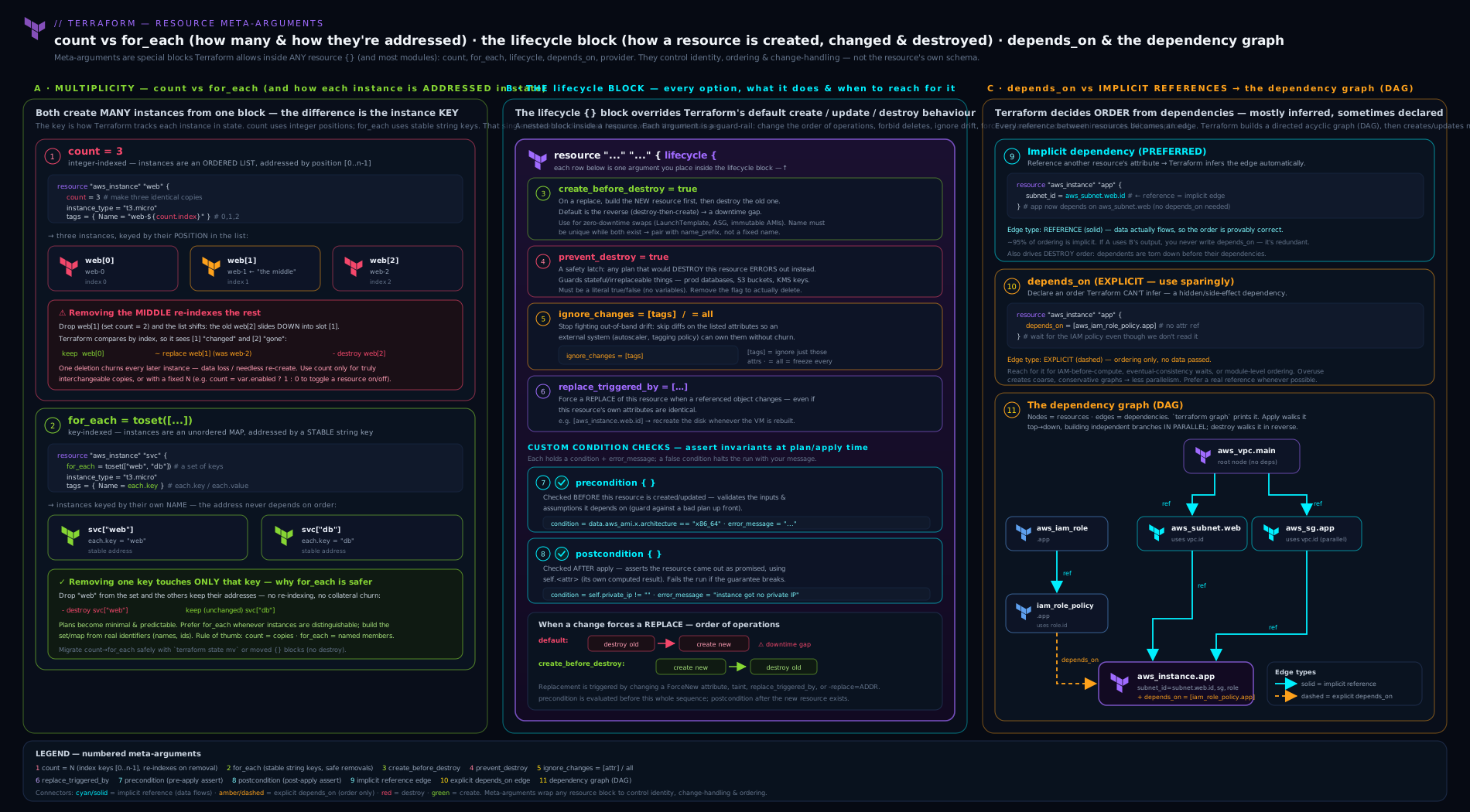
The diagram shows a single resource block fanning out via count (positional [0..n]) and for_each (keyed ["a".."z"]) into distinct graph nodes, the implicit and depends_on edges that order them, and the lifecycle decision points — create_before_destroy reversing the destroy/create order, prevent_destroy halting a delete, ignore_changes filtering drift, and precondition/postcondition gating plan and apply.
Hands-on lab
We will do this entirely free and local using the local and random providers — no cloud account, no cost — so you can see count, for_each, and the whole lifecycle surface behave for real. You only need the Terraform (or OpenTofu) binary.
1. Scaffold the project. Create a folder tf-meta and a file main.tf:
terraform {
  required_version = ">= 1.5"
  required_providers {
    local  = { source = "hashicorp/local",  version = "~> 2.5" }
    random = { source = "hashicorp/random", version = "~> 3.6" }
  }
}

# --- count: a fixed pool, index-addressed ---
resource "random_pet" "worker" {
  count = 3
}

resource "local_file" "worker" {
  count    = length(random_pet.worker)
  filename = "${path.module}/out/worker-${count.index}.txt"
  content  = "worker ${count.index}: ${random_pet.worker[count.index].id}\n"
}

# --- for_each: keyed instances over a map ---
variable "services" {
  type = map(string)
  default = {
    web   = "frontend"
    cache = "redis"
    db    = "postgres"
  }
}

resource "local_file" "service" {
  for_each = var.services
  filename = "${path.module}/out/service-${each.key}.txt"
  content  = "service ${each.key} runs ${each.value}\n"

  lifecycle {
    create_before_destroy = true
    precondition {
      condition     = length(each.key) <= 10
      error_message = "Service key '${each.key}' exceeds 10 characters."
    }
  }
}

# --- terraform_data driving replacement ---
variable "config_version" {
  type    = string
  default = "v1"
}

resource "terraform_data" "deploy" {
  input            = var.config_version
  triggers_replace = [var.config_version]
}

resource "local_file" "manifest" {
  filename = "${path.module}/out/manifest.txt"
  content  = "deployed config: ${var.config_version}\n"

  lifecycle {
    replace_triggered_by = [terraform_data.deploy]
  }
}

output "service_files" {
  value = { for k, f in local_file.service : k => f.filename }
}
2. Initialise and apply.
terraform init
terraform apply -auto-approve
Expected: Terraform creates 3 random_pet, 3 worker-N.txt, 3 service-<key>.txt, the terraform_data.deploy, and manifest.txt. List them: ls out/ should show worker-0.txt worker-1.txt worker-2.txt service-web.txt service-cache.txt service-db.txt manifest.txt.
3. Watch for_each’s stable addressing. Remove cache from the services map and add queue = "rabbitmq", then plan:
terraform plan
Expected: exactly one destroy (local_file.service["cache"]) and one create (local_file.service["queue"]). The web and db files are untouched — their keys never moved. This is the payoff of for_each.
4. Contrast with count’s re-indexing. Temporarily change the worker pool from count = 3 to count = 2 and plan:
terraform plan
Expected: local_file.worker[2] is destroyed. Now imagine instead you had keyed workers off a list and removed a middle element — every later index would show as a change. Restore count = 3.
5. See replace_triggered_by fire. Change config_version to "v2":
terraform apply -auto-approve -var 'config_version=v2'
Expected: terraform_data.deploy is replaced, which forces local_file.manifest to be replaced (destroy/create), even though nothing about the manifest’s own content arguments changed beyond the version string.
6. Trip a precondition. Add a service with an over-long key, e.g. analyticsdashboard = "metabase", and plan:
terraform plan
Expected: the apply is refused with “Service key ‘analyticsdashboard’ exceeds 10 characters.” — the precondition caught a bad input before creating anything. Remove the entry.
7. Cleanup.
terraform destroy -auto-approve
Then remove the folder. Cost note: the local, random, and terraform_data resources create only files on your machine and state entries — there is zero cloud cost. This entire lab is free.
Going deeper
Everything above is enough to write correct configuration from scratch. This section is for the engineer who has to change configuration that is already running — migrate between the multipliers, force a single instance to rebuild, and reason about the order Terraform tears things down in.
Migrating count → for_each without destroying anything
This lesson has twice noted that changing a resource’s address makes Terraform see a destroy plus a create. Migrating from count to for_each changes every address at once, so a naive edit proposes to destroy and recreate the entire set. The fix is a moved block (Terraform 1.1+, and in OpenTofu): a config-only instruction that says “this old address is now that new address — treat it as a rename, not a replacement.”
Start from the fragile version:
variable "users" {
  type    = list(string)
  default = ["alice", "bob", "carol"]
}

resource "aws_iam_user" "team" {
  count = length(var.users)
  name  = var.users[count.index]
}
# State addresses: team[0], team[1], team[2]
Convert the resource to for_each, then add one moved block per existing instance, mapping the old integer index to the new string key:
resource "aws_iam_user" "team" {
  for_each = toset(var.users)
  name     = each.key
}

moved {
  from = aws_iam_user.team[0]
  to   = aws_iam_user.team["alice"]
}
moved {
  from = aws_iam_user.team[1]
  to   = aws_iam_user.team["bob"]
}
moved {
  from = aws_iam_user.team[2]
  to   = aws_iam_user.team["carol"]
}
terraform plan should now report no changes — only the address rewrites. That “no changes” line is the entire test: if the plan still shows a destroy, one of your from/to pairs is wrong, and the correct response is to fix the block, not to accept the plan.
Points that matter in practice:
- The index-to-key mapping must reflect the order the list had when it was last applied, not the order it has today. Read the real mapping out of state with
terraform state listrather than assuming it. movedblocks are declarative and idempotent — they live in your configuration, so they run for every engineer and every CI job, and they can be deleted once every state has been through one apply. That is why they beat the imperativeterraform state mv, which each person must remember to run against each state.- The same technique covers plain renames (
aws_iam_user.team→aws_iam_user.engineers), moving a resource into or out of a module (module.iam.aws_iam_user.team), and the reversefor_each→countmigration. - Generating the blocks beats hand-writing them:
terraform state listprints the exact old addresses to paste into eachfrom.
Three config-only blocks cover the whole refactoring surface, and it is worth knowing which one you want:
| Block | Since | What it says | What it does to real infrastructure |
|---|---|---|---|
moved |
1.1 | “This address is now that address” | Nothing — a state rename |
import |
1.5 | “This existing real object belongs at this address” | Nothing — adopts it into state |
removed |
1.7 | “Stop managing this address” | Nothing — forgets it, leaves the object alive |
All three are covered end-to-end in Refactoring Terraform Safely: moved, import & removed Blocks.
Surgical operations on a single instance: -replace and -target
Because count and for_each expand one block into many graph nodes, you frequently need to act on exactly one of them. Two CLI flags take a resource address and do that — and both are break-glass tools, not routine workflow.
-replace forces one instance to be destroyed and recreated on the next apply even though its configuration has not changed. It is the modern successor to the deprecated terraform taint/untaint commands:
# Plan the replacement first — always
terraform plan -replace='aws_instance.svc["cache"]'

# Then carry it out
terraform apply -replace='aws_instance.svc["cache"]'
-target restricts an operation to the given address and everything it depends on, skipping the rest of the configuration:
terraform apply -target='aws_subnet.this["public-a"]'
Note the quoting. A keyed address contains double quotes, so wrap the whole address in single quotes in bash/zsh ('aws_instance.svc["cache"]') or escape the inner quotes. Forgetting this is the most common reason these commands appear to “do nothing” — the shell strips the quotes and the address no longer matches anything.
| Flag | What it does | Legitimate use | Why it is dangerous |
|---|---|---|---|
-replace=ADDR |
Marks one instance for destroy-and-recreate on the next apply | A resource is in a bad runtime state its configuration cannot express (a corrupted VM, a poisoned cache) | It destroys something; on a stateful resource that is data loss |
-target=ADDR |
Applies only that address and its dependencies | Unsticking a broken dependency chain or finishing a partially-failed apply | Leaves the rest of the configuration un-reconciled, hiding drift — Terraform prints a warning after every targeted run |
Neither belongs in a pipeline. If you find yourself reaching for -target routinely, the real problem is almost always that one configuration has grown too large and should be split into separately-applied layers.
for_each edge cases the documentation glosses over
Three failure modes account for most for_each frustration once you move past simple maps.
A set of objects is not allowed — only a set of strings. for_each must derive a string key from each element. toset([{name="a"}, {name="b"}]) produces a set of objects and Terraform rejects it. Project a map instead, keyed by the stable field:
# WRONG — a set of objects has no string key to address by
for_each = toset(var.subnets)

# RIGHT — a map keyed by a stable, unique string
for_each = { for s in var.subnets : s.name => s }
Keys must be known at plan time, and “known” is stricter than it first looks. The rule is not merely “no resource IDs”. A key derived from anything Terraform cannot resolve during plan fails identically: an attribute of a not-yet-created resource, a value from a data source whose own arguments are unknown, or a value from a resource that a -target run has not created yet. Values may be unknown; keys may not. When you genuinely cannot know the keys, the honest answers are to key on something you do control and look the computed value up inside the block, or to split the work into two configurations applied in sequence.
Sensitive values cannot be keys. If you build a for_each map from a value marked sensitive, Terraform refuses, because those keys would be printed in plan output and baked into resource addresses. Key on a non-sensitive identifier and keep the secret in the value, which is allowed.
Chaining is where for_each starts to pay off structurally. Because a for_each resource is a map of instances, you can iterate the parent map to build the child and the keys line up on both sides:
resource "aws_subnet" "this" {
  for_each          = { for s in var.subnets : s.name => s }
  vpc_id            = aws_vpc.main.id
  cidr_block        = each.value.cidr
  availability_zone = each.value.az
}

resource "aws_route_table_association" "this" {
  for_each       = aws_subnet.this          # iterate the resource map itself
  subnet_id      = each.value.id            # each.value is the whole subnet object
  route_table_id = aws_route_table.main.id
}
Iterating aws_subnet.this directly is legal precisely because its keys ("public-a", …) are known at plan time even though the subnet IDs are not — a clean illustration of the keys-versus-values rule. The same works on modules: for_each on a module block yields module.app["web"], with identical addressing semantics.
ignore_changes for secrets — and the modern alternative
The classic reason to reach for ignore_changes is a secret: you set a database’s password once, the platform (or a human) rotates it, and every subsequent plan wants to “correct” it back. ignore_changes = [password] silences that, at the cost of Terraform no longer noticing any change to that attribute.
Terraform 1.11+ offers a cleaner answer for the subset of cases where the provider supports it: a write-only argument. These are provider-declared arguments — conventionally suffixed _wo, such as password_wo, paired with a companion password_wo_version — whose values are sent to the provider but never persisted to state or plan:
resource "aws_db_instance" "main" {
  # …
  password_wo         = var.db_password   # best fed from an ephemeral source
  password_wo_version = 1                 # increment this to re-send a new value
}
Because the value is never written to state, Terraform never reads it back, so it can never drift — and there is nothing to ignore. You re-send a value by incrementing the companion _wo_version argument rather than by changing something Terraform would diff. This is version-gated (1.11+) and provider-dependent: only arguments a provider has explicitly marked write-only behave this way, so check the resource’s documentation before assuming one exists. Where it does, prefer it over ignore_changes for secrets; where it does not, ignore_changes plus a locked-down state backend remains the honest fallback.
The wider principle is worth stating plainly: ignore_changes is an assertion that another system owns this attribute. If nothing else actually owns it, ignoring it is not a fix — it is a way of hiding a diff you did not want to read.
How destroy actually orders itself
Create order is easy to picture: dependencies first. Destroy is the mirror image, and the details start to matter the moment an apply fails halfway.
Terraform destroys by walking the same dependency graph in reverse — dependents are torn down before the things they depend on, because a subnet cannot be deleted while an instance still sits inside it. Independent branches are still destroyed in parallel, subject to -parallelism.
create_before_destroy complicates this, and understanding why explains its “infectiousness”. For a normal replacement the node order is destroy old → create new. Setting create_before_destroy = true rewrites that portion of the graph into create new → update dependents → destroy old. Any resource that depends on the replaced one now sits between the create and the destroy, so it too must tolerate that ordering — which is why Terraform propagates the setting to dependents automatically, and why you occasionally see an error saying the graph cannot be ordered when something in the chain cannot honour it. The practical rule: when you enable create_before_destroy on a resource that has dependents, expect those dependents to be replaced as well.
Two further destroy-time facts routinely surprise people:
prevent_destroyis evaluated at plan time, against the plan — not during apply. Any plan containing a destroy of that address fails immediately, including a plainterraform destroyand any change that would replace the resource. Because it must be a literal, you cannot switch it off with-var; removing the line and applying that change is a deliberate, reviewable two-step.- Destroy-time provisioners are the one construct that runs during teardown (
when = destroy), and they are heavily constrained: they may reference onlyself,count, andeach, and if the resource is already gone they simply never run. Treat them as a last resort — the general advice to avoid provisioners applies doubly here, because a failed destroy provisioner can leave a resource wedged in state.
When a destroy is genuinely stuck — the real object is already gone, or the provider errors on delete — the tools are terraform state rm (forget the object without deleting it) and, from Terraform 1.7, the declarative removed block, which does the same thing in configuration so the whole team’s state converges. Neither deletes anything in the cloud; both are ways of telling Terraform to stop managing an address.
Common mistakes & troubleshooting
| Symptom | Likely cause | Fix |
|---|---|---|
Adding count/for_each plans to destroy & recreate an existing resource |
The address changed (name → name[0]/name["k"]); state keys by address |
Add a moved block, or terraform state mv the old address to the new — see the refactoring lesson |
Error: Invalid for_each argument … cannot be determined until apply |
You keyed for_each on a computed/known-after-apply value (e.g. a resource ID) |
Key on a value known at plan time (names/CIDRs); look up the computed value inside via each.key |
| Removing one list element causes many resources to change | count re-indexes positionally |
Migrate the resource to for_each keyed by a stable identity |
Error: Reference to undeclared resource when referencing a count=0 resource |
You referenced name.attr instead of name[0].attr, or the resource has 0 instances |
Use the index and guard with a conditional (cond ? name[0].attr : null) |
create_before_destroy fails with a name/identifier conflict |
A unique name exists on both old and new during the overlap | Use name_prefix (provider-generated unique name) instead of a fixed name |
terraform destroy errors and refuses to delete a resource |
prevent_destroy = true is set on it |
Remove the prevent_destroy line (it must be a literal), apply, then destroy |
ignore_changes does not stop a resource from being replaced |
ignore_changes only suppresses in-place updates; a different attribute or replace_triggered_by is forcing the replace |
Identify the replace-forcing attribute in the plan; ignore that, or accept the replacement |
for_each silently creates fewer instances than expected |
Duplicate set members collapsed (toset dedupes) or a for projection produced colliding keys |
Ensure the key expression is unique per element |
depends_on makes applies slow |
False/over-broad explicit dependencies serialise the graph | Replace with a real attribute reference; only keep depends_on for genuinely hidden deps |
Common beginner mistakes
These are misconceptions rather than error messages — the wrong mental model that produces the symptoms in the table above. Fix the model and the errors stop recurring.
- “
countis fine for a dynamic list.” This is the most expensive misconception in the lesson.countis fine for a fixed quantity of interchangeable things; the moment the list has named members that can be added or removed,countbinds each resource to a position. Remove the middle entry and every later element shifts down one index, so Terraform rewrites one resource into another and destroys the tail — for a database or a disk that is data loss caused by a one-line edit. Right model: ask “do these things have identities?” If yes,for_eachkeyed by that identity.countanswers how many;for_eachanswers which ones. - “Adding
countorfor_eachto an existing resource is a harmless edit.” It changes the resource’s address (aws_instance.web→aws_instance.web[0]), and the address is how Terraform matches configuration to state. The plan will show a destroy and a create of the very same real object. Right model: any edit that changes an address is a refactor, and refactors need amovedblock — not a shrug at the plan output. - “
for_eachtakes a list.” It takes amapor aset(string). A list has order and permits duplicates; keys have neither, so Terraform will not invent a mapping for you. Right model: convert explicitly —toset(...)for plain strings, or aforexpression projecting a stable key for objects. That conversion is the moment you choose the identity, which is exactly the decision you want to make consciously. - “
ignore_changesfreezes the resource.” It suppresses in-place updates to the attributes you list, and nothing more. A different attribute changing, areplace_triggered_by, or a-replacecan still destroy and recreate the whole object. Right model:ignore_changesis a per-attribute mute button on drift, not a lock on the resource — for that you wantprevent_destroy. - “I’ll drive
prevent_destroyfrom a variable so I can switch it off in dev.” Terraform requires a literal, and that restriction is the feature. Protection you can disable with a-varon the same run that destroys the resource is not protection. Right model: hard-code it on the irreplaceable things; deleting them should require a configuration change, a code review, and a separate apply. - “More
depends_onis safer.” Every explicit edge Terraform could not infer removes parallelism, and edges that do not reflect a real dependency make applies slower without making them safer. Right model: a reference is a dependency — reach fordepends_ononly when the ordering is genuinely invisible to Terraform, and delete it once a real attribute reference exists. - “A conditional resource can be referenced like a normal one.” With
count = var.enabled ? 1 : 0the instance lives at[0]even when there is exactly one, and there is no instance at all when the flag is false.aws_instance.bastion.public_ipis an error in both cases. Right model: index it and guard it —var.enabled ? aws_instance.bastion[0].public_ip : null.
Best practices
- Default to
for_each. Usecountonly for fixed pools of interchangeable instances and the zero/one conditional toggle. Stable, keyed addresses prevent the destroy-and-recreate cascade. - Key
for_eachon something stable and meaningful — a name, a CIDR, an environment — never on positional index and never on a computed attribute. - Lean on implicit dependencies. Add
depends_ononly when a real ordering is invisible to Terraform; every false edge costs you parallelism. - Reserve
prevent_destroyfor the irreplaceable — production data stores, the state backend, KMS keys — and keep it a literal so it cannot be flipped with a-var. - Use
create_before_destroyfor anything fronted by a load balancer or with live traffic, and pair it withname_prefixto avoid unique-name clashes. - Encode assumptions as
preconditions and guarantees aspostconditions rather than discovering them in a broken apply; they are documentation that fails loudly. - Scope
ignore_changesnarrowly to the specific attributes another system owns; never reach forallunless you truly mean “create once and never manage again”. - Prefer
terraform_dataovernull_resourcefor triggers and pass-through values — it needs no provider. - Refactor with
movedblocks, not destroy-and-recreate, whenever you restructurecount/for_eachor rename resources.
Security notes
Meta-arguments shape your security posture more than they appear to. prevent_destroy is a control-plane safety rail, not a security control: it stops Terraform deleting a resource but does nothing against a console user, so pair it with cloud-native deletion protection and least-privilege IAM on the principal Terraform runs as. ignore_changes can quietly hide drift that matters for security — if you ignore changes to a security group’s rules or a bucket policy because “something else manages them”, you also lose Terraform’s ability to detect that those rules were tampered with; ignore only attributes whose ownership genuinely lies elsewhere, and consider a check block to alert on the ignored values. precondition/postcondition are excellent security gates: assert that an AMI comes from an approved owner, that a bucket is in an allowed region, that encryption is enabled — failing the apply rather than shipping a misconfiguration. Finally, remember that for_each/count over secrets (looping to create many secret values) still writes every value to state in plaintext; the iteration does not change the state-sensitivity rules, so protect the backend accordingly.
Interview & exam questions
1. When would you choose for_each over count, and why?
Use for_each whenever the instances have stable identities (named subnets, users, buckets). count addresses by integer position, so removing or inserting a middle element re-indexes everything after it, causing spurious changes or destructive recreation. for_each addresses by key, so adding/removing one element touches only that element.
2. Give the one case where count is clearly the right tool.
The zero/one conditional toggle — count = var.enabled ? 1 : 0 — to make a resource conditional. Also a fixed-size pool of genuinely interchangeable, stateless instances where position is irrelevant.
3. What types can for_each accept, and what is the constraint on its keys?
A map or a set(string) (not a list — convert with toset). The keys must be known at plan time; they cannot depend on values computed during apply (like a resource ID). Values may be unknown; keys may not.
4. What is the difference between an implicit and an explicit dependency?
Implicit: created automatically when one resource references another’s attribute. Explicit: declared with depends_on when a real ordering exists but no attribute links the resources (IAM attachment, eventual consistency, side effects). Prefer implicit; depends_on removes parallelism.
5. Walk me through every lifecycle option.
create_before_destroy (create the replacement before destroying the old — zero-downtime, but watch unique names); prevent_destroy (error on any plan that would delete it); ignore_changes (stop reverting drift on listed attrs, or all); replace_triggered_by (replace when a referenced resource/attr changes); precondition (assert before create/update); postcondition (assert about the result, can use self).
6. ignore_changes = [ami] is set, yet the plan wants to replace the instance. Why?
ignore_changes only suppresses in-place updates to the named attributes. A different attribute changing (e.g. instance_type), or a replace_triggered_by/-replace, can still force a full replacement. Ignoring ami does not pin the whole resource.
7. Difference between a variable validation block, a precondition, and a check block?
validation validates a single input variable in isolation. precondition/postcondition live in a resource/data lifecycle and can reference multiple values (and self for postconditions); they fail the plan/apply. A top-level check block runs non-blocking assertions that emit warnings without failing the apply.
8. What does create_before_destroy do to a resource with a fixed unique name, and how do you fix it?
It fails: the new instance is created while the old still holds the unique name/identifier, causing a conflict. Fix by using name_prefix so the provider generates a unique name, letting both coexist during the swap.
9. How do you make a resource rebuild whenever an external version string changes?
Wrap the version in a terraform_data resource (triggers_replace = [var.version]) and reference it from the target resource’s lifecycle { replace_triggered_by = [terraform_data.deploy] }. (replace_triggered_by must reference a managed resource/attribute, not a variable.)
10. You add for_each to an existing single resource and the plan wants to destroy and recreate it. What happened and what is the clean fix?
Its address changed from type.name to type.name["key"]; Terraform keys state by address, so the old address looks deleted and the new one new. The clean fix is a moved { from = ..., to = ... } block (or terraform state mv) so Terraform treats it as a rename, not a replacement.
11. What replaced null_resource + triggers, and why is it better?
terraform_data, built into Terraform/OpenTofu core. It needs no null provider, supports input/output for pass-through values, and triggers_replace for change-driven replacement.
12. On a module, what does depends_on affect?
Every resource inside the module waits for the listed dependencies — it is module-wide. It is blunt; prefer wiring real attribute references between modules where possible.
Quick check
countaddresses instances by ______;for_eachaddresses them by ______.- True or false:
for_eachaccepts alist(string)directly. - Which
lifecycleoption creates the replacement before destroying the old resource? - You need a resource only when
var.enabledis true. Write the meta-argument. - Which two
lifecycleblocks are also valid on adatasource, and which one can referenceself?
Answers
- Integer index (
name[0]); string key (name["k"]). Position vs identity. - False. It accepts a
maporset(string); wrap a list withtoset(...). create_before_destroy = true— inverts the default destroy-then-create order for zero-downtime replacement.count = var.enabled ? 1 : 0(the idiomatic conditional toggle). The instance lives at index[0].preconditionandpostconditionare valid on data sources (the otherlifecycleoptions are not). Onlypostconditioncan referenceself, because the object exists by then.
Exercise
Take the lab’s for_each services map and harden it like production:
- Convert
var.servicesfrommap(string)to alist(object({ name = string, role = string, replicas = number })), then build thefor_eachmap with aforexpression keyed byname({ for s in var.services : s.name => s }). - Resist the urge to nest a
countfor the replicas. Keep exactly onelocal_fileper service (for_each), and express the replica count as an attribute of the content rather than as multiple resources. (This is the discriminator: distinct identities →for_each; a mere quantity within one identity → an attribute, notcount.) - Add a
preconditionto thelocal_file.serviceresource asserting everyreplicasvalue is between 1 and 5, with a clearerror_messagethat interpolateseach.key. - Add a
postconditionasserting the generatedcontentis non-empty (length(self.content) > 0). - Add a
terraform_data“release” resource keyed off avar.release_id, and makelocal_file.manifestusereplace_triggered_byso changingrelease_idrebuilds the manifest. apply; then reorder the list and confirm viaplanthat no existing service file changes (proving thefor_eachkey is stable). Finallydestroy.
Write two or three sentences contrasting what step 6’s plan showed against what count keyed off the list index would have shown — this stable-address contrast is the single most common Terraform interview discriminator.
Practice challenges
Six graded exercises, beginner to advanced. Write your answer before opening the solution — the reasoning matters more than the syntax, and every solution ends with the one-line reason it is correct.
Challenge 1 — Make a resource optional (beginner)
Add a local_file that is created only when var.enable_debug_log is true, plus an output that returns its filename when it exists and null when it does not.
<details> <summary>Solution</summary>
variable "enable_debug_log" {
  type    = bool
  default = false
}

resource "local_file" "debug" {
  count    = var.enable_debug_log ? 1 : 0
  filename = "${path.module}/out/debug.txt"
  content  = "debug enabled\n"
}

output "debug_file" {
  value = var.enable_debug_log ? local_file.debug[0].filename : null
}
Why: count = 0 creates no instances, which is the idiomatic on/off switch — and because count is set, the single instance still lives at [0], so the output must both index it and guard for the absent case.
</details>
Challenge 2 — Swap positional addresses for stable ones (beginner)
Rewrite this so that removing the middle region touches only that one file:
variable "regions" { default = ["ap-south-1", "eu-west-1", "us-east-1"] }

resource "local_file" "region" {
  count    = length(var.regions)
  filename = "${path.module}/out/${var.regions[count.index]}.txt"
  content  = "region ${var.regions[count.index]}\n"
}
<details> <summary>Solution</summary>
resource "local_file" "region" {
  for_each = toset(var.regions)
  filename = "${path.module}/out/${each.key}.txt"
  content  = "region ${each.key}\n"
}
Why: toset converts the list into a set(string), so each instance is addressed by name (local_file.region["eu-west-1"]) instead of position, and deleting a middle element no longer re-indexes everything after it.
</details>
Challenge 3 — Key a list of objects, and filter it (intermediate)
Given a list(object({ name = string, cidr = string, public = bool })), create one file per entry, keyed by name, but only for entries where public is true.
<details> <summary>Solution</summary>
variable "subnets" {
  type = list(object({
    name   = string
    cidr   = string
    public = bool
  }))
}

resource "local_file" "public_subnet" {
  for_each = { for s in var.subnets : s.name => s if s.public }
  filename = "${path.module}/out/subnet-${each.key}.txt"
  content  = "${each.key} = ${each.value.cidr}\n"
}
Why: a for expression projects the list into a map keyed by the stable name field and the trailing if clause filters it — both resolve at plan time, so the keys are known and the addresses stay stable.
</details>
Challenge 4 — Migrate count → for_each with no destroys (intermediate)
aws_iam_user.team currently uses count = length(var.users) with var.users = ["alice", "bob", "carol"]. Convert it to for_each keyed by username and make terraform plan report no changes.
<details> <summary>Solution</summary>
resource "aws_iam_user" "team" {
  for_each = toset(var.users)
  name     = each.key
}

moved {
  from = aws_iam_user.team[0]
  to   = aws_iam_user.team["alice"]
}
moved {
  from = aws_iam_user.team[1]
  to   = aws_iam_user.team["bob"]
}
moved {
  from = aws_iam_user.team[2]
  to   = aws_iam_user.team["carol"]
}
Confirm the real index→name mapping with terraform state list before writing the blocks — never assume it matches today’s list order.
Why: moved blocks tell Terraform the object at the old address is the object at the new one, turning what would be three destroys and three creates into a pure state rewrite; a plan reporting “no changes” is the proof you mapped them correctly.
</details>
Challenge 5 — Turn assumptions into enforced rules (advanced)
On a for_each-ed local_file.service, add a precondition requiring every replicas value to be between 1 and 5 (naming the offending service in the message) and a postcondition asserting the generated content is not empty.
<details> <summary>Solution</summary>
resource "local_file" "service" {
  for_each = { for s in var.services : s.name => s }
  filename = "${path.module}/out/service-${each.key}.txt"
  content  = "${each.key} runs ${each.value.replicas} replica(s)\n"

  lifecycle {
    precondition {
      condition     = each.value.replicas >= 1 && each.value.replicas <= 5
      error_message = "Service '${each.key}' requests ${each.value.replicas} replicas; the allowed range is 1-5."
    }
    postcondition {
      condition     = length(self.content) > 0
      error_message = "Service '${each.key}' generated an empty file."
    }
  }
}
Why: the precondition fails the plan before anything is built and can see each, while the postcondition validates the outcome and is the only one of the two permitted to reference self.
</details>
Challenge 6 — Drive replacement from an external signal (advanced)
Make local_file.manifest rebuild whenever var.release_id changes, without any of the manifest’s own arguments changing. Then force just local_file.service["web"] to be recreated on the next apply without editing any configuration.
<details> <summary>Solution</summary>
variable "release_id" {
  type    = string
  default = "r1"
}

resource "terraform_data" "release" {
  input            = var.release_id
  triggers_replace = [var.release_id]
}

resource "local_file" "manifest" {
  filename = "${path.module}/out/manifest.txt"
  content  = "manifest\n"

  lifecycle {
    replace_triggered_by = [terraform_data.release]
  }
}
For the one-off rebuild, no configuration change is needed:
terraform apply -replace='local_file.service["web"]'
Why: replace_triggered_by must reference a managed resource, so the variable is wrapped in a terraform_data whose triggers_replace makes it replace on change; -replace is the out-of-band equivalent for a single rebuild, and the keyed address needs single quotes so the shell preserves the inner double quotes.
</details>
Certification mapping
This lesson maps to the HashiCorp Certified: Terraform Associate (003) exam, principally the objectives Read, generate, and modify configuration and Understand Terraform basics. Specifically it covers: the resource block and data sources; the meta-arguments count, for_each, depends_on, and provider; resource addressing and how count/for_each change it; the lifecycle block — create_before_destroy, prevent_destroy, ignore_changes, replace_triggered_by, and precondition/postcondition; the dependency graph and implicit-vs-explicit dependencies; and terraform_data as the modern trigger primitive. Expect the exam to test count vs for_each (the re-indexing problem), the for_each plan-time key constraint, and what each lifecycle option does — all covered above. The adjacent Terraform Associate Prep Kit lesson drills these as practice questions.
Glossary
- Resource block — A
resource "type" "name" {}declaration of infrastructure Terraform creates and manages. - Resource type — The provider-defined kind (
aws_instance); the prefix names the owning provider. - Local name — Your label for a resource, unique among that type in the module; with the type it forms the address.
- Address — The identifier Terraform tracks a resource by:
type.name,type.name[0],type.name["k"],module.x.type.name. - Data source — A read-only
datablock that looks up existing infrastructure without managing it. - Meta-argument — A special argument valid on any resource regardless of provider:
count,for_each,depends_on,provider,lifecycle. count— Creates N instances addressed by integer index; exposescount.index.for_each— Creates one instance per map/set element addressed by key; exposeseach.key/each.value.- Implicit dependency — Ordering inferred when one resource references another’s attribute.
- Explicit dependency — Ordering forced with
depends_onwhen no attribute links the resources. lifecycle— A nested block controlling create/destroy order, deletion protection, change-ignoring, replacement triggers, and pre/post conditions.create_before_destroy— Create the replacement before destroying the old one (zero-downtime replace).prevent_destroy— Make any plan that would delete the resource fail.ignore_changes— Stop Terraform reverting drift on listed attributes (orall).replace_triggered_by— Force replacement when a referenced resource/attribute changes.precondition/postcondition— Custom condition checks asserting assumptions before / guarantees after; postconditions can useself.terraform_data— Built-in resource for storing values and triggering replacement (triggers_replace); replacesnull_resource.- Dependency graph (DAG) — The directed acyclic graph Terraform builds from dependencies to order create/destroy operations.
count.index— The zero-based integer position available inside acount-ed resource block.each.key/each.value— The symbols available inside afor_eachresource; for a set both are the element string, for a map they are the key and the value.- Splat expression — The
[*]shorthand collecting an attribute from every instance of acount-ed resource into a list (aws_instance.worker[*].id);for_eachresources are maps, so usevalues(...)instead. toset()— The function converting a list into aset(string)so it can be used withfor_each; it discards order and collapses duplicates.- Known after apply — A value the provider computes during apply, shown as
(known after apply)in the plan; legal as afor_eachvalue, never as afor_eachkey. movedblock — A config-only declaration (1.1+) mapping an old resource address to a new one so an address change is treated as a rename rather than a destroy-and-create.removedblock — A config-only declaration (1.7+) telling Terraform to stop managing an address without destroying the real object.-replace=ADDR— A plan/apply flag forcing one instance to be destroyed and recreated; the modern successor toterraform taint.-target=ADDR— A flag limiting an operation to one address and its dependencies; a break-glass tool that leaves the rest of the configuration un-reconciled.checkblock — A top-level construct (1.5+) for non-blocking assertions that emit warnings instead of failing the apply.- Write-only argument — A provider argument (
*_wo, Terraform 1.11+) whose value is sent to the provider but never persisted to state or plan; paired with a*_wo_versionargument you increment to re-send it. name_prefix— A provider-supplied alternative to a fixednamethat lets the provider generate a unique name, makingcreate_before_destroyworkable for resources with unique-name constraints.- Provider alias — A label on a second configuration of the same provider (
alias = "europe"), selected per resource with theprovidermeta-argument. - Parallelism — The number of independent graph nodes Terraform operates on concurrently (default 10; set with
-parallelism=N).
Next steps
You now command the resource layer — addressing, data sources, count vs for_each, dependencies, the provider meta-argument, and every lifecycle option including the pre/post condition checks. The natural next move is the layer that feeds these resources: inputs and their rules. Continue with Terraform Variables, Outputs & Locals, In Depth: Types, Validation, Sensitivity & Precedence, which covers variable type constraints (including optional() object attributes), validation blocks, the full variable-precedence order, outputs, and locals — the parameterisation that turns the resources you just mastered into reusable configuration. And when you need to restructure count/for_each or rename resources without destroying them, see Refactoring Terraform Safely: moved, import & removed Blocks.