In a nutshell
Think of a form letter run through mail-merge. You write the letter once, leave blanks for the name and the address, hand it a list of recipients, and mail-merge stamps out one finished, personalised letter per row. A Terragrunt Stack is mail-merge for infrastructure. You describe a bundle of components once in a file called terragrunt.stack.hcl, leave blanks for the handful of things that differ between copies — a network range, a database size, a replica count — and Terragrunt stamps out a complete, ready-to-run copy of the whole bundle for every environment, region, or tenant you point it at.
The blanks are filled by values: the blueprint is the letter, each values map is one row of the merge list, and terragrunt stack generate is the button that runs the merge and writes the finished copies into a folder named .terragrunt-stack/. Those finished copies are ordinary units — the same terragrunt.hcl folders you already build by hand — so everything you know about running them (the dependency graph, run --all, parallelism) works on them unchanged. Stacks do not change how infrastructure runs; they change who writes the folders. Where you used to copy-paste a directory of units for each new environment, you now declare the bundle once and let Terragrunt stamp the directories.
One warning up front, because it saves an interview and a lot of confusion: there are two completely unrelated features called “Stacks.” This lesson is about Terragrunt Stacks (the Gruntwork wrapper’s terragrunt.stack.hcl). HashiCorp’s Terraform Stacks (*.tfstack.hcl + *.tfdeploy.hcl) are a different feature, from a different vendor, at a different layer. If someone just says “stacks,” your first move is to ask which — and we clear the clash up in full later in the lesson.
Level: Advanced · Time: ~38 min
New to Terragrunt? Get comfortable with what a unit is and the DRY building blocks a generated unit still leans on — include, remote_state generation, find_in_parent_folders, the live/modules split — via Terragrunt fundamentals and Scaling Terragrunt monorepos with run-all; Stacks generate the very tree that second lesson runs. The full objectives and prerequisites are spelled out in the two sections just below — in one line: by the end you can read a blueprint, parametrise it with values, generate and run it, and never again confuse Terragrunt Stacks with HashiCorp’s Terraform Stacks.
You have built the live tree by hand — a terragrunt.hcl per component, wired with dependency, run with run --all — and it works. Then the platform team is asked for the fifth near-identical environment, or a per-tenant copy of the same VPC-plus-RDS-plus-app bundle, and you notice the duplication has simply moved up a level: instead of copy-pasting backend blocks, you are now copy-pasting whole directories of units. Every new environment means hand-stamping a tree of terragrunt.hcl files that differ only in a CIDR, a size, and a name. That is the wall Terragrunt Stacks were built to remove. A Stack is a blueprint: you describe a bundle of units once, in a terragrunt.stack.hcl, parametrise it with values, and terragrunt stack generate materialises the whole tree of real units for you — per environment, per region, per tenant — from that single declaration.
This lesson is an exhaustive treatment of that feature and nothing else. The two companion lessons stay deliberately in their lanes: Terragrunt Configuration, In Depth is the field-by-field reference for the terragrunt.hcl config language (every block and attribute, the function catalogue, hooks, the errors model), and Scaling Terragrunt Monorepos owns the orchestration of a hand-built tree (the DAG, run --all/run --graph, --filter-affected, parallelism, CI). Neither goes deep on Stacks, because Stacks are a distinct layer that sits above both: a generator that produces the very units those lessons configure and orchestrate. Here we enumerate the whole Stacks surface — units vs stacks, the unit and stack blocks attribute by attribute, the values/values.* mechanism that makes a blueprint reusable, the .terragrunt-stack/ working tree, and the stack generate/run/output commands — and, because the name causes real confusion, we draw a sharp line between Terragrunt Stacks and HashiCorp’s entirely separate Terraform/OpenTofu Stacks. Everything targets a current Terragrunt release (2026, on the road to 1.0), Terraform 1.9+/OpenTofu, and works identically against either engine. Stacks are a relatively new feature still stabilising, so where behaviour is experiment-gated or still settling, the lesson says so.
Learning objectives
By the end of this lesson you will be able to:
- Distinguish a unit (
terragrunt.hcl) from a stack (terragrunt.stack.hcl) and explain why Stacks are described as the evolution beyondrun --all. - Write a
terragrunt.stack.hclusing theunitandstackblocks, with every attribute (source,path,values,no_dot_terragrunt_stack,no_validation,no_stack). - Use the
values/values.*mechanism to parametrise generated units, and explain howvaluesdiffers frominputs,locals, anddependencyoutputs. - Run the
terragrunt stackcommands —generate,run,output, and the generation that is implicit in anyrun --allagainst a stack file — and read the.terragrunt-stack/working tree they produce. - Decide when to reach for Stacks versus a classic hand-built tree of units, and how Stacks relate to (and partly replace) the DRY
run-all+find_in_parent_folderspattern. - Clearly disambiguate Terragrunt Stacks from HashiCorp’s Terraform/OpenTofu Stacks — different vendors, different files, different model — so an interviewer’s “stacks” question never trips you.
Prerequisites
This is an advanced lesson that assumes the working Terragrunt knowledge from Terragrunt Fundamentals: DRY Configurations, Remote State & Dependencies — what a unit is, the live/modules split, that remote_state/generate write .tf files Terragrunt hands to the engine, and the basic shape of include and dependency. It builds directly on two deep references you should have to hand. For the config language — every attribute of terraform, remote_state, generate, include, dependency, the function catalogue, hooks, and the errors block — see Terragrunt Configuration, In Depth; this lesson uses those blocks freely without re-explaining them. For the orchestration of a tree of units — how the DAG is built, how run --all/run --graph traverse it, --filter-affected, parallelism, and CI — see Scaling Terragrunt Monorepos with Dependency Graphs and run-all; Stacks generate the tree that lesson then runs, so the two compose. You also want solid Terraform: HCL syntax, backends and state locking, and module sourcing/versioning. In the KloudVin Terraform & DevOps Zero-to-Hero course this sits in the Terragrunt module as the modern-architecture deep-dive between the config reference and the multi-environment capstone. You need only a free local toolchain — a current terragrunt plus terraform or tofu — and the hands-on lab runs entirely on the local backend, so it costs nothing and touches no cloud.
Core concepts: unit, stack, and “generate then run”
Three ideas carry the whole feature. Hold them before the attribute tables, because every option below only makes sense against them.
1. A unit is one module instantiation; a stack is a recipe for many. A unit is the atom you already know: a directory with a terragrunt.hcl that points a single module at a single backend key — Terragrunt’s node in the DAG. A stack is a blueprint: a terragrunt.stack.hcl that lists the units (and nested stacks) that make up a deployable bundle, where each comes from, where it should be placed, and what values customise it. The stack file provisions nothing itself; it is a generator. The mental upgrade from the classic model is: instead of hand-writing twelve unit directories for an environment, you declare the bundle once and let Terragrunt stamp the twelve directories.
2. generate materialises real units into .terragrunt-stack/. When you run terragrunt stack generate (or any run against a stack file, which generates first), Terragrunt reads the terragrunt.stack.hcl, fetches each unit’s source, copies it to the path you named inside a .terragrunt-stack/ directory next to the stack file, and writes the unit’s values so the generated terragrunt.hcl can read them. The result is an ordinary tree of units — the same kind of tree you would have built by hand — that the normal DAG and run --all machinery then operate on. .terragrunt-stack/ is generated output: you .gitignore it, exactly as you do .terragrunt-cache/.
3. values is the parameter channel into a generated unit. A blueprint is only reusable if each instantiation can differ. values is a map you set on a unit/stack block; inside the generated unit’s config you read it back as values.<key>. This is a new, distinct channel — not inputs (which feeds the module’s variables), not locals, and not dependency outputs. values flows stack file → generated unit config; what the unit then does with those values (turn them into inputs, derive locals, choose a source ref) is up to the unit’s own terragrunt.hcl.
A one-line map of the new vocabulary before we take each piece in turn:
| Term | What it is |
|---|---|
| Unit | A directory with a terragrunt.hcl — one module instantiation, one DAG node, one state key. |
| Stack | A terragrunt.stack.hcl — a blueprint listing unit/stack blocks that generate units. |
unit block |
In a stack file: one generated unit (source, path, values). |
stack block |
In a stack file: a generated nested stack (a stack-of-stacks). |
values |
A map passed from the stack file into a generated unit, read back as values.*. |
.terragrunt-stack/ |
The generated working tree the blueprint stamps out (git-ignored). |
stack generate / run / output |
The CLI verbs that generate the tree and operate on it. |
Units vs Stacks: the model, side by side
The clearest way to internalise Stacks is to see the same outcome built both ways.
The classic, hand-built way. You create one directory per component and write a terragrunt.hcl in each, repeating the structure for every environment:
live/
  prod/
    vpc/  terragrunt.hcl       # hand-written
    rds/  terragrunt.hcl       # hand-written
    app/  terragrunt.hcl       # hand-written
  staging/
    vpc/  terragrunt.hcl       # hand-written copy, different CIDR
    rds/  terragrunt.hcl       # hand-written copy, smaller size
    app/  terragrunt.hcl       # hand-written copy, fewer replicas
Every new environment is a new hand-stamped subtree. The bundle’s shape (vpc → rds → app, wired by dependency) is duplicated in each environment, and it drifts: someone tweaks prod/app and forgets staging/app.
The Stacks way. You describe the bundle once and instantiate it:
units/                          # the reusable unit templates (each a terragrunt.hcl + maybe values)
  vpc/
  rds/
  app/
live/
  prod/
    terragrunt.stack.hcl        # "stamp vpc+rds+app here, prod values"
  staging/
    terragrunt.stack.hcl        # "stamp vpc+rds+app here, staging values"
terragrunt stack generate in live/prod reads its terragrunt.stack.hcl and produces live/prod/.terragrunt-stack/{vpc,rds,app}/ — a real tree of units — from the templates in units/, customised by the prod values. The bundle’s shape now lives in one place; a change to the blueprint or a unit template propagates to every environment on the next generate. That is the headline: Stacks turn “copy a directory of units” into “instantiate a blueprint.”
The relationship to run --all is precise. run --all did not create units — it discovered hand-built ones and ran them in DAG order. Stacks add the creation step: generate the units from a blueprint, then the same DAG/run --all machinery runs them. So Stacks do not replace run --all; they replace the manual authoring of the tree that run --all consumes. This is why Stacks are called “the evolution beyond run-all”: run-all solved running a tree; Stacks solve defining it.
The terragrunt.stack.hcl file
A stack is declared in a file literally named terragrunt.stack.hcl (distinct from terragrunt.hcl, which is a unit). It is HCL — same lexer, expression language, and type system — and supports locals and Terragrunt’s functions, so you can compute values, read shared .hcl files with read_terragrunt_config, and anchor paths with get_repo_root()/get_terragrunt_dir(). What it contains is a list of unit blocks (the common case) and optionally stack blocks (to nest a whole stack). It contains no terraform/remote_state/provider of its own — those belong to the units it generates.
# live/prod/terragrunt.stack.hcl
locals {
  env  = "prod"
  tmpl = "${get_repo_root()}/units"   # where the unit templates live
}

unit "vpc" {
  source = "${local.tmpl}/vpc"
  path   = "vpc"
  values = { cidr = "10.10.0.0/16", environment = local.env }
}

unit "rds" {
  source = "${local.tmpl}/rds"
  path   = "rds"
  values = { instance_class = "db.r6g.large", environment = local.env }
}

unit "app" {
  source = "${local.tmpl}/app"
  path   = "app"
  values = { replicas = 4, environment = local.env }
}
generate in live/prod turns this into live/prod/.terragrunt-stack/vpc/, .../rds/, .../app/, each a real unit ready to run. The staging stack file is the same three blocks with smaller values — the shape is identical, only the parameters differ.
The unit block: every attribute
unit "<name>" declares one generated unit. The label ("vpc") names the block; path names the directory it lands in. Here is the complete attribute set.
| Attribute | Type | Default | What it does · gotcha |
|---|---|---|---|
source |
string | — (required) | Where the unit template comes from — a local path (../../units/vpc, or anchored with get_repo_root()) or a remote getter (Git git::...//subdir?ref=, registry tfr:///..., S3/GCS/HTTP). This is the source of the unit’s config (its terragrunt.hcl and friends), not of a Terraform module. Pin remote sources with ?ref=/?version= — an unpinned blueprint is not reproducible. |
path |
string | — (required) | The destination directory relative to .terragrunt-stack/ where the unit is generated (vpc, or nested like network/vpc). It becomes the unit’s identity — and, because Terragrunt derives the state key from the unit’s path, it becomes part of the state key too. Choose paths deliberately. |
values |
map / object | {} |
Arbitrary data passed into the generated unit, read there as values.<key>. The parameter channel that makes the blueprint reusable (full treatment below). Values must be expressible in HCL (strings, numbers, bools, lists, maps, objects). |
no_dot_terragrunt_stack |
bool | false |
Generate the unit outside the .terragrunt-stack/ directory (i.e. directly under the stack-file directory) instead of inside it. Use sparingly — when you want generated units to live at a path not nested under .terragrunt-stack/. The default (inside) keeps generated output clearly separated and easy to .gitignore. |
no_validation |
bool | false |
Skip Terragrunt’s post-generation validation of this unit. Off by default so a malformed generated unit is caught at generate time; turn on only to work around a known false positive. |
A note on naming, because the two labels confuse newcomers: the block label (unit "vpc") is the logical name used in messages and for nested addressing; the path is the on-disk directory. They are usually the same string, but they need not be — unit "primary_db" { path = "rds" ... } is legal. Keep them aligned unless you have a reason not to.
The stack block: nesting stacks
stack "<name>" instantiates a whole nested stack rather than a single unit. It has the same shape as unit — source, path, values — but source points at something that contains its own terragrunt.stack.hcl, so generating the parent recurses and stamps out the child stack’s units too. This is how you compose: a top-level “platform” stack that pulls in a “network” stack and a “data” stack, each itself a bundle of units.
| Attribute | Type | Default | What it does |
|---|---|---|---|
source |
string | — (required) | A location containing a terragrunt.stack.hcl — the nested blueprint to instantiate (local path or remote getter, pinned). |
path |
string | — (required) | Where the nested stack is generated, relative to the parent’s .terragrunt-stack/. The nested stack’s own units land beneath this. |
values |
map / object | {} |
Values passed into the nested stack; the nested terragrunt.stack.hcl reads them as values.* and can forward them down to its own units. The channel that lets a parent parametrise a child stack. |
no_dot_terragrunt_stack |
bool | false |
As for unit — generate the nested stack outside .terragrunt-stack/. |
no_validation |
bool | false |
Skip validation of the generated nested stack. |
# live/prod/terragrunt.stack.hcl  — a stack composed of nested stacks
stack "network" {
  source = "${get_repo_root()}/stacks/network"   # contains its own terragrunt.stack.hcl
  path   = "network"
  values = { cidr = "10.10.0.0/16", azs = 3 }
}

stack "data" {
  source = "${get_repo_root()}/stacks/data"
  path   = "data"
  values = { engine = "postgres", multi_az = true }
}
Nesting is what lets a blueprint scale from “three units in a row” to “an entire account’s worth of bundles,” composed from smaller, independently versioned stacks. Generation recurses depth-first, so live/prod/.terragrunt-stack/network/.terragrunt-stack/... is the shape on disk — nested stacks generate nested .terragrunt-stack/ directories.
no_stackis a related modifier you will meet in unit templates (not in the stack file). A file marked with theno_stackconvention is copied through generation as-is rather than being treated as part of the generated unit’s normal processing — useful for static assets a template ships that should land verbatim in the generated unit. Treat it as the “copy this through untouched” escape hatch; the common path never needs it.
values and values.*: parametrising a generated unit
values is the heart of what makes Stacks more than a copy script. Understanding exactly where it flows — and how it differs from the three channels you already know — is the thing interviewers probe and the thing that makes blueprints reusable.
The flow. You set values on a unit (or stack) block in the stack file. Terragrunt writes those values alongside the generated unit, and the generated unit’s terragrunt.hcl reads them back through the values.<key> reference. So the data path is:
terragrunt.stack.hcl  (unit "rds" { values = { instance_class = "db.r6g.large" } })
        │  generate
        ▼
.terragrunt-stack/rds/terragrunt.hcl   reads  values.instance_class
        │  init/plan/apply
        ▼
the rds module runs with that size
The generated unit decides what to do with the values. Most often it turns them into inputs for the module, but it can also use a value to pick a module source ref, derive a locals, or gate a generate block:
# units/rds/terragrunt.hcl  — a unit template that consumes values.*
terraform {
  source = "${get_repo_root()}/modules//rds?ref=v1.4.0"
}

inputs = {
  instance_class = values.instance_class     # from the stack file
  environment    = values.environment
}
values vs the three channels you already know. This table is the disambiguation to memorise:
| Channel | Flows from → to | Read as | Purpose |
|---|---|---|---|
values |
stack file unit/stack block → generated unit config |
values.<key> |
Parametrise the blueprint — make one unit template produce many different units. Generation-time. |
inputs |
a unit’s terragrunt.hcl → the Terraform module (as TF_VAR_*) |
(the module’s var.<x>) |
Feed the module’s variables. Run-time, per unit. |
locals |
within a single config file | local.<key> |
Compute/derive values inside one file (unit or stack file). |
dependency outputs |
another applied unit → this unit | dependency.<name>.outputs.<key> |
Pass runtime results (a real VPC ID) between units in the DAG. |
The crisp distinctions: values is generation-time input to a unit template; inputs is run-time input to a module. values is set in the stack file; inputs is set in the unit. And values is not how you pass a VPC ID from a network unit to an app unit — that is still dependency outputs, resolved at run-time from real state, because at generation time the VPC does not exist yet. A common beginner error is trying to thread a dependency’s output through values; it cannot work, because generation happens before any apply. Use values for static parameters (sizes, CIDRs, names, counts, refs) and dependency for dynamic results.
Where values lives on disk. Terragrunt persists each generated unit’s values so the unit can read them after generation (this is what makes values.* resolvable in the generated terragrunt.hcl). You do not write or edit that file by hand — it is generated output under .terragrunt-stack/ — but knowing it exists explains how a value set in the stack file becomes readable in the unit: it is materialised next to the generated unit at generate time.
The .terragrunt-stack/ working tree
generate produces a directory named .terragrunt-stack/ next to the stack file. Inside it is one subdirectory per unit (at the path you named), each containing the generated unit — its terragrunt.hcl (from the template’s source), any files the template shipped, and the materialised values. Nested stack blocks produce nested .terragrunt-stack/ directories.
live/prod/
  terragrunt.stack.hcl
  .terragrunt-stack/          # GENERATED — git-ignore it
    vpc/
      terragrunt.hcl
    rds/
      terragrunt.hcl
    app/
      terragrunt.hcl
Three operational facts follow:
- It is generated output — never edit it, always
.gitignoreit. Editing a file under.terragrunt-stack/is editing a build artefact; the nextgenerateoverwrites it. The blueprint (terragrunt.stack.hcl) and the unit templates are the source of truth;.terragrunt-stack/is the build. - The generated units are ordinary units. Once stamped,
.terragrunt-stack/vpcis exactly the kind of unit the other lessons describe: it has aterragrunt.hcl, derives its state key from its path, wiresdependencyedges to siblings, and is run by the normal DAG/run --allmachinery. There is nothing special about a generated unit at run-time. - Regenerate is cheap and idempotent. Re-running
generatere-stamps the tree from the current blueprint and templates; bump a unit template’srefor avaluesentry andgenerateagain to roll the change into every instantiation. Because generation is separate from apply, you can review the generated tree before running anything against it.
The terragrunt stack commands
Stacks add a stack command group plus an interaction with the familiar run verbs.
| Command | What it does · notes |
|---|---|
terragrunt stack generate |
Reads the terragrunt.stack.hcl in the current directory and materialises .terragrunt-stack/ — fetching each unit/stack source, copying it to its path, and writing values. The explicit “build the tree” step. Run it after changing the blueprint, a unit template, or values. |
terragrunt stack run <cmd> |
Generates if needed, then runs <cmd> (plan, apply, destroy, validate, output, …) across every unit in the generated stack, in DAG order — the stack-aware equivalent of run --all. terragrunt stack run plan is the everyday command for planning a whole bundle. |
terragrunt stack output |
Aggregates the outputs of every unit in the stack into one structured result (keyed by unit), so you can read the whole bundle’s outputs at once rather than unit-by-unit. Useful for feeding a stack’s results to another system. |
terragrunt run --all <cmd> (in a stack dir) |
A run --all invoked where a terragrunt.stack.hcl is present will generate the stack first, then run across the generated units — so existing run --all muscle memory and CI keep working against stack files. terragrunt stack run is the explicit, stack-native form. |
Two clarifications. First, generate is implicit in run: you rarely call stack generate by hand in CI because stack run/run --all generate first; you call it explicitly when you want to inspect the produced tree (or to fail fast on a generation error) before running anything. Second, the DAG, ordering, parallelism, and selective-execution flags from the monorepo lesson (--parallelism, --filter-affected, --queue-*, reverse-order destroy) apply to the generated units exactly as they do to hand-built ones — Stacks change where the units come from, not how they are orchestrated once they exist.
cd live/prod

# Build the tree from the blueprint and inspect it.
terragrunt stack generate
ls .terragrunt-stack/            # vpc/ rds/ app/

# Plan the whole bundle (generates first, runs in DAG order).
terragrunt stack run plan

# Apply it, capped for provider rate limits, non-interactive for CI.
terragrunt stack run apply --parallelism 6 --non-interactive

# Read every unit's outputs at once.
terragrunt stack output

# Tear the bundle down in reverse dependency order.
terragrunt stack run destroy --non-interactive
Terragrunt Stacks vs Terraform/OpenTofu Stacks — the name clash, cleared up
This is the single most important disambiguation in the lesson, and a guaranteed interview trap: two unrelated features, from two different vendors, both called “Stacks.”
- Terragrunt Stacks (what this lesson is about) are a Gruntwork feature of the Terragrunt wrapper. They live in
terragrunt.stack.hcl, use theunit/stackblocks andvalues, and their job is to generate a tree of Terragrunt units that then run against your existingterraform/tofubinary. They are still “Terragrunt orchestrating Terraform” — just with the tree generated from a blueprint instead of hand-built. Nothing about the underlying Terraform model changes. - Terraform Stacks (and OpenTofu Stacks) are a HashiCorp/OpenTofu feature of the engine itself. They live in
*.tfstack.hcl(which declares components — instances of modules) and*.tfdeploy.hcl(which declares deployments — the environments those components are rolled out to). They introduce native concepts — components, deployments, deferred changes, orchestration rules — and (in the HashiCorp incarnation) are run through HCP Terraform. They are a new layer of Terraform, not a wrapper.
The table makes the contrast unmissable:
| Terragrunt Stacks | Terraform / OpenTofu Stacks | |
|---|---|---|
| Vendor | Gruntwork (Terragrunt) | HashiCorp / OpenTofu (the engine) |
| Files | terragrunt.stack.hcl |
*.tfstack.hcl + *.tfdeploy.hcl |
| Core blocks | unit, stack, values |
component, deployment, variable, output, provider |
| What it produces | A generated tree of Terragrunt units | Native components rolled out to deployments |
| Runs via | The Terragrunt CLI against terraform/tofu |
The engine itself / HCP Terraform |
| Layer | A wrapper above Terraform | Inside Terraform |
| Mental model | “Generate my units from a blueprint” | “Define components and the deployments they ship to, natively” |
The two solve overlapping problems — instantiate the same infrastructure many times with different parameters — by completely different means at different layers. They are not interchangeable, you do not use both files together, and “Terragrunt Stacks vs Terraform Stacks” is precisely the question that separates someone who has read a headline from someone who has used the tools. If a job spec or interviewer says “stacks,” your first move is to ask which — the wrapper’s or the engine’s. (The config-language lesson notes this clash too; this is the full treatment.)
When to use Stacks vs classic units
Stacks are powerful but not free — they add a generation step, a .terragrunt-stack/ artefact, and a still-stabilising feature surface. Choose deliberately.
| Situation | Reach for… | Why |
|---|---|---|
| You instantiate the same bundle of components many times (per env / per region / per tenant) with only parameter differences | Stacks | The blueprint is written once; new instantiations are a new terragrunt.stack.hcl with different values, not a hand-stamped subtree. |
| A handful of bespoke units that differ structurally, not just by parameter | Classic units | There is no blueprint to factor out; a blueprint of one is just indirection. |
| You need to review the exact tree that will be deployed in the PR | Classic units (or commit-then-review) | Hand-built units are the diff; with Stacks the units are generated, so review the blueprint + templates and the generated tree separately. |
A mature repo already on run --all with hand-built units, working fine |
Stay (adopt Stacks incrementally) | Stacks generate the same units run --all consumes, so you can convert one bundle to a blueprint at a time without a big-bang migration. |
| You want the newest, most-supported direction and can absorb some rough edges | Stacks | This is where Terragrunt is heading on the road to 1.0; new greenfield bundles are the natural place to adopt them. |
| You are in a regulated/change-controlled shop that must diff every resource pre-merge | Classic units, or Stacks with the generated tree committed | Generation indirection can complicate “the PR is the change” review unless you commit or carefully gate the generated output. |
The relationship to the DRY run-all + find_in_parent_folders pattern is one of complement, not replacement at the config layer. That pattern (a root terragrunt.hcl carrying remote_state/generate, pulled in by every unit via include "root" { path = find_in_parent_folders("root.hcl") }) keeps backend/provider config DRY within a unit. Stacks keep the set and shape of units DRY across a bundle. They stack (no pun intended): a generated unit still includes a root for its backend/provider, and the stack blueprint decides which units exist. Stacks remove the directory-level duplication that find_in_parent_folders never addressed.
Going deeper
The rest of the lesson teaches the model. This section is the production reality around it: the feature’s experimental status and how to pin it, the modern CLI surface every stack command assumes, how to migrate a live bundle onto a blueprint without recreating its state, and what generation actually writes to disk.
The experiment gate, and “still on the road to 1.0”
Terragrunt Stacks arrived as an opt-in experiment, not a frozen, stable feature. On builds where the gate is present you enable it explicitly — with --experiment stacks on the command, or the environment variable TG_EXPERIMENT=stacks (the variable takes a comma-separated list of experiment names; a separate --experiment-mode turns on every current experiment at once). “Experimental” is a real caveat, not boilerplate: attribute names, defaults, and the exact shape of .terragrunt-stack/ can shift between minor releases, and behaviour that works today may need a flag tomorrow — or stop needing one.
As Terragrunt moves toward its 1.0 release the feature is stabilising and the gate is progressively being lifted, so whether a given build needs --experiment stacks depends on its version. Two habits keep that safe rather than fragile:
- Pin the Terragrunt version in CI — a
.terragrunt-version/.tool-versions/misepin, or a pinned container image — so a background auto-upgrade cannot quietly change generation behaviour under a pipeline you did not touch. Same discipline you already apply to theterraform/tofubinary. - Read the changelog before you bump it. Because the surface is still settling, a Terragrunt minor bump is a change to your generator, not just your wrapper. Treat it like a provider upgrade: bump on a throwaway environment,
stack generate, diff the produced tree, then promote.
If you meet unknown command "stack" or an “experimental” error, you are on a build where the gate is required and unset — add --experiment stacks (or TG_EXPERIMENT=stacks) and re-run.
The CLI redesign: TG_* env vars and dropped --terragrunt- prefixes
Stacks landed as part of Terragrunt’s CLI redesign (v0.88.0), and every stack command assumes that modern surface. Two sweeping renames define it, and both trip up anyone pasting from an older runbook:
run-allbecamerun --all. The oldterragrunt run-all applyis nowterragrunt run --all apply; invoked in a stack directory, that samerun --allgenerates the tree first, exactly asstack rundoes.- Flags lost the
--terragrunt-prefix; env vars moved fromTERRAGRUNT_*toTG_*. The legacy forms still work as deprecated aliases, so existing pipelines will not break — but they log deprecation warnings, and all-new Stacks tooling uses the current names.
The renames you actually hit while driving a stack:
| Legacy | Current | Purpose |
|---|---|---|
terragrunt run-all apply |
terragrunt run --all apply |
Run across the tree (generates first in a stack dir) |
--terragrunt-non-interactive |
--non-interactive |
No prompts (mandatory in CI) |
--terragrunt-parallelism N |
--parallelism N |
Cap concurrent units |
--terragrunt-working-dir DIR |
--working-dir DIR |
Point at the stack/unit directory |
--terragrunt-tfpath PATH |
--tf-path PATH |
Choose the terraform/tofu binary |
TERRAGRUNT_NON_INTERACTIVE |
TG_NON_INTERACTIVE |
Env form of --non-interactive |
TERRAGRUNT_TFPATH |
TG_TF_PATH |
Env form of --tf-path (e.g. run against OpenTofu) |
TERRAGRUNT_PARALLELISM |
TG_PARALLELISM |
Env form of --parallelism |
TERRAGRUNT_LOG_LEVEL |
TG_LOG_LEVEL |
Log verbosity |
| — | TG_EXPERIMENT |
Enable experiments, e.g. TG_EXPERIMENT=stacks |
So a CI job that plans a whole stack against OpenTofu, non-interactively and capped, is just environment plus one command:
export TG_TF_PATH=tofu
export TG_NON_INTERACTIVE=true
export TG_EXPERIMENT=stacks     # only on builds where the experiment gate is still present
export TG_PARALLELISM=6
cd live/prod
terragrunt stack run plan
If your logs warn about deprecated flags or variables, that rename is what they mean — migrate the names; the behaviour is identical.
Migrating one bundle from run --all to a blueprint — without recreating state
“Adopt incrementally” is the advice; here is the actual procedure for one live bundle, plus the single gotcha that can propose destroying real infrastructure if you miss it.
- Pick one repeatable bundle already hand-built and applied — say
live/prod/{vpc,rds,app}— and leave it running untouched while you build its blueprint beside it. - Lift each unit’s
terragrunt.hclinto a reusable template underunits/(or acatalog/), replacing per-environment literals (CIDR, size, count, name) withvalues.*reads. The modulesource, theinclude "root", and thedependencywiring stay exactly as they were. - Write the
terragrunt.stack.hclin the environment directory with oneunitblock per component, supplying the old literals as that environment’svalues. .gitignore.terragrunt-stack/, thenterragrunt stack generateand diff the generated units against the originals — they should match bar the values you extracted.- The gotcha — the state key comes from
path. A generated unit derives its backend state key from itspathunder.terragrunt-stack/, not from the old hand-built directory name. If the computed key differs from where the bundle’s state lives today,planshows the whole bundle being created from scratch — because Terragrunt is reading an empty new key, not your real one. Before applying, confirm the generated unit resolves to the same backend key as the original (alignpath, or set the key explicitly in the sharedremote_state) so the generated unit adopts existing state instead of recreating the world. Aplanproposing to destroy and recreate a live VPC is this mistake, every time. - Cut over one bundle, verify a clean
plan(no unexpected creates/destroys), then delete the hand-built directories. Repeat per bundle. Because generated units are ordinary units, the rest of the repo keeps running onrun --allthroughout the migration.
What generation actually writes: the values file and idempotency
The lesson notes that Terragrunt “persists each generated unit’s values” so values.* resolves. Concretely, generation writes those values into a generated file beside the unit — currently terragrunt.values.hcl, inside the unit’s .terragrunt-stack/<path>/ directory, next to the copied template. You never author or edit it (it is build output), but its existence is why a value set in the blueprint becomes readable in the generated terragrunt.hcl.
Two properties follow, both load-bearing in CI:
- Generation is idempotent. Re-running
stack generatefrom an unchanged blueprint and unchanged, pinned templates reproduces the identical tree — which is exactly why an unpinnedsourceis a correctness bug, not a style nit: an unpinned template can make two “identical” generations differ. Pin everyunit/stacksourcewith?ref=/?version=. - The generate/run boundary is a hard wall. Every
valuesentry is resolved and written at generate time, before any provider is touched; anything that only exists after an apply (an ID, an ARN, an endpoint) cannot be avaluesentry and must cross bydependencyat run time. This is thevalues-vs-dependencytable seen from the generator’s side:stack generateruns with no cloud credentials and no state reads, so it cannot know a runtime value even in principle.
Architecture overview
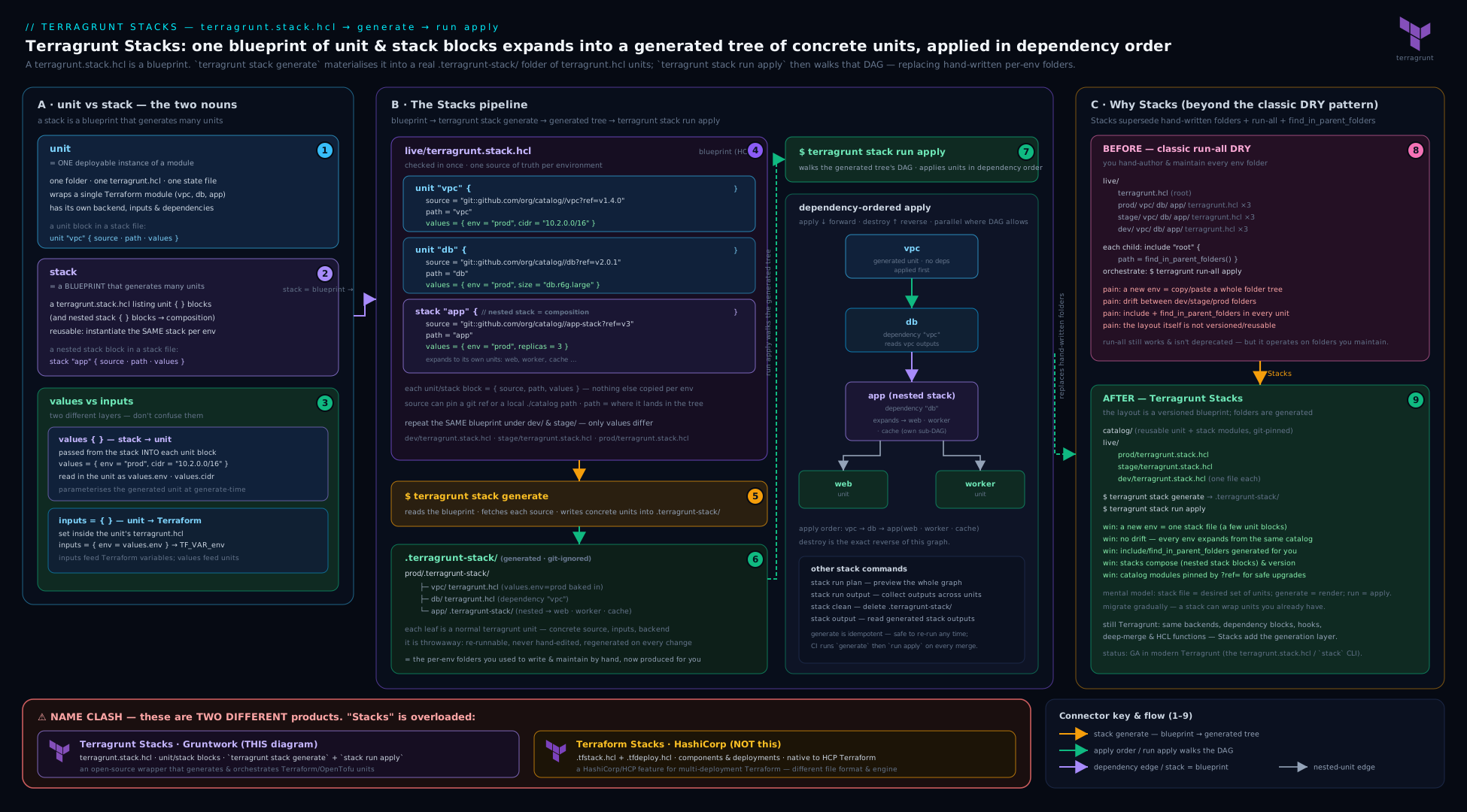
The diagram puts the whole feature on one canvas: a terragrunt.stack.hcl holding unit "vpc", unit "rds", unit "app" (and a nested stack block) with values annotated on each; a generate arrow into the .terragrunt-stack/ tree of real units; each generated unit reading values.* into its inputs and include-ing the shared root for backend/provider; dependency edges between the generated units feeding the DAG; and stack run/stack output operating across the lot. Off to one side, a clearly separated box shows HashiCorp’s Terraform Stacks (*.tfstack.hcl components + *.tfdeploy.hcl deployments) — drawn apart precisely to reinforce that it is a different layer from a different vendor. It is the mental index for everything tabulated above: blueprint → generation → units → orchestration, with the name-clash quarantined in its own corner.
Hands-on lab
This lab builds a real blueprint and instantiates it twice — a dev and a staging environment — entirely on the local backend with the null/random providers, so it runs offline, costs nothing, and needs no cloud account. You will write unit templates, a terragrunt.stack.hcl that consumes values, generate the .terragrunt-stack/ tree, run it, read aggregated outputs, and prove the same blueprint produces two differently-sized environments. You need a current terragrunt and terraform (or tofu) on your PATH.
1. Scaffold the repo shape.
mkdir -p tg-stacks-lab/modules/{net,app} \
         tg-stacks-lab/units/{net,app} \
         tg-stacks-lab/live/dev tg-stacks-lab/live/staging
cd tg-stacks-lab
2. Two tiny modules. Create modules/net/main.tf:
variable "cidr"        { type = string }
variable "environment" { type = string }
resource "random_id" "vpc" { byte_length = 4 }
output "vpc_id" { value = "vpc-${random_id.vpc.hex}" }
output "cidr"   { value = var.cidr }
Create modules/app/main.tf:
variable "replicas"    { type = number }
variable "environment" { type = string }
variable "vpc_id"      { type = string }
resource "null_resource" "app" {
  triggers = { replicas = var.replicas, env = var.environment, vpc = var.vpc_id }
}
output "app_summary" { value = "${var.environment}: ${var.replicas} replicas in ${var.vpc_id}" }
3. A DRY root for backend/provider, shared by every generated unit. Create live/root.hcl:
remote_state {
  backend  = "local"
  generate = { path = "backend.tf", if_exists = "overwrite_terragrunt" }
  config   = { path = "${get_terragrunt_dir()}/terraform.tfstate" }
}

generate "versions" {
  path      = "versions.tf"
  if_exists = "overwrite_terragrunt"
  contents  = <<-EOF
    terraform {
      required_providers {
        random = { source = "hashicorp/random" }
        null   = { source = "hashicorp/null" }
      }
    }
  EOF
}
4. Unit templates that consume values.*. Create units/net/terragrunt.hcl:
include "root" { path = find_in_parent_folders("root.hcl") }

terraform { source = "${get_repo_root()}/modules//net" }

inputs = {
  cidr        = values.cidr           # from the stack file
  environment = values.environment
}
Create units/app/terragrunt.hcl (note the dependency on the generated net sibling — runtime data still flows through dependency, not values):
include "root" { path = find_in_parent_folders("root.hcl") }

terraform { source = "${get_repo_root()}/modules//app" }

dependency "net" {
  config_path  = "../net"
  mock_outputs = { vpc_id = "vpc-mock0000" }
  mock_outputs_allowed_terraform_commands = ["validate", "plan", "init"]
}

inputs = {
  replicas    = values.replicas        # static parameter via values
  environment = values.environment
  vpc_id      = dependency.net.outputs.vpc_id   # dynamic result via dependency
}
5. The blueprint, instantiated for dev. Create live/dev/terragrunt.stack.hcl:
locals {
  env  = "dev"
  tmpl = "${get_repo_root()}/units"
}

unit "net" {
  source = "${local.tmpl}/net"
  path   = "net"
  values = { cidr = "10.0.0.0/16", environment = local.env }
}

unit "app" {
  source = "${local.tmpl}/app"
  path   = "app"
  values = { replicas = 1, environment = local.env }
}
6. The same blueprint, bigger values, for staging. Create live/staging/terragrunt.stack.hcl:
locals {
  env  = "staging"
  tmpl = "${get_repo_root()}/units"
}

unit "net" {
  source = "${local.tmpl}/net"
  path   = "net"
  values = { cidr = "10.1.0.0/16", environment = local.env }
}

unit "app" {
  source = "${local.tmpl}/app"
  path   = "app"
  values = { replicas = 3, environment = local.env }   # bigger than dev
}
7. Generate the dev tree and inspect it.
cd live/dev
terragrunt stack generate
find .terragrunt-stack -name terragrunt.hcl
Expected: .terragrunt-stack/net/terragrunt.hcl and .terragrunt-stack/app/terragrunt.hcl exist — the blueprint has stamped out two real units from the templates.
8. Plan and apply the whole bundle in DAG order.
terragrunt stack run plan
terragrunt stack run apply --non-interactive
Expected: net plans/applies before app (the dependency edge orders them), and the plan shows replicas = 1, cidr = "10.0.0.0/16" — the dev values flowed through values.* into inputs.
9. Read the bundle’s aggregated outputs.
terragrunt stack output
Expected: a structured result containing both units’ outputs — net’s vpc_id/cidr and app’s app_summary reading dev: 1 replicas in vpc-....
10. Instantiate the same blueprint as staging and confirm it differs only by parameter.
cd ../staging
terragrunt stack run apply --non-interactive
terragrunt stack output
Expected: the identical two-unit shape, but app_summary now reads staging: 3 replicas in vpc-... — one blueprint, two environments, differing only in values. That is the whole point of Stacks made concrete.
11. Cleanup.
terragrunt stack run destroy --non-interactive       # tears down staging
cd ../dev
terragrunt stack run destroy --non-interactive       # tears down dev
cd ../..
rm -rf tg-stacks-lab
Cost note: zero. The lab uses the local backend and the null/random providers — nothing is created in any cloud, so there is nothing to bill; cleanup is destroy plus deleting the directory. (The generated .terragrunt-stack/ trees vanish with it.)
Common mistakes & troubleshooting
| Symptom | Cause | Fix |
|---|---|---|
values.<x> is unknown / unresolved in a generated unit |
The unit template references a values key the stack file’s unit block never set |
Set the key in the unit/stack block’s values = { ... }; every values.* a template reads must be supplied. |
Trying to pass a VPC ID through values and getting a stale/empty value |
values is generation-time static data; the VPC does not exist yet when the tree is generated |
Use a dependency block for runtime results (dependency.net.outputs.vpc_id); reserve values for static parameters. |
Edits to a file under .terragrunt-stack/ disappear |
.terragrunt-stack/ is generated output; the next generate/run overwrites it |
Edit the unit template (the source) or the blueprint, then regenerate. Never edit generated units. |
.terragrunt-stack/ committed to git, noisy diffs |
The generated tree is checked in | .gitignore .terragrunt-stack/ (and .terragrunt-cache/); commit only blueprints and templates — unless your change-control process requires committing the generated tree. |
| A blueprint change didn’t take effect at run-time | run generates first, but you inspected a stale .terragrunt-stack/ from before the change |
Re-run stack run (it regenerates) or stack generate explicitly, then inspect; do not read an old generated tree. |
Confusing *.tfstack.hcl with terragrunt.stack.hcl |
The Terraform-Stacks vs Terragrunt-Stacks name clash | Terragrunt uses terragrunt.stack.hcl (unit/stack/values); HashiCorp uses *.tfstack.hcl + *.tfdeploy.hcl (component/deployment). Different vendors, different files. |
Remote source produces inconsistent generated units across runs |
The unit/stack source is unpinned, so the template drifts |
Pin every remote source with ?ref=/?version= so a blueprint generates identically over time. |
| Generated unit’s state key isn’t where you expected | The key derives from the unit’s path, which lives under .terragrunt-stack/ |
Choose path deliberately (it is part of the identity/state key); if you changed a path, you have moved the unit’s state — migrate it. |
Common beginner mistakes
Distinct from the symptom-driven troubleshooting table above, these are the mental-model errors newcomers bring to Stacks — the misconception, then the model that replaces it.
- “A Stack provisions infrastructure.” It does not. A
terragrunt.stack.hclprovisions nothing — it is a generator. Nothing is created until you run a command against the generated units. Right model: blueprint →generate→ units →apply; the stack file sits upstream of every provider call. - “
valuesis just another name forinputs.” Two different channels at two different times.valuesis generation-time data flowing stack file → unit template (read asvalues.*);inputsis run-time data flowing unit → Terraform module (asTF_VAR_*). One decides which unit gets built and how; the other feeds the module’svar.*. - “I’ll pass the VPC id into the app unit through
values.” Impossible — generation happens before any apply, so at generate time the VPC does not exist yet. Static parameters (sizes, CIDRs, counts, refs) travel byvalues; anything that only exists after an apply travels bydependencyoutputs, resolved from real state at run time. - “I’ll just tweak the generated unit under
.terragrunt-stack/for this one environment.” That edit is a build artefact; the nextgenerate/runoverwrites it silently. Change the unit template (itssource) or the blueprint and regenerate — the generated tree is never the source of truth. - “Terragrunt Stacks and Terraform Stacks are the same thing.” Different vendor, different files, different layer — and not interchangeable. Terragrunt:
terragrunt.stack.hcl,unit/stack/values, generating Terragrunt units. HashiCorp/OpenTofu:*.tfstack.hcl+*.tfdeploy.hcl, nativecomponent/deployment. When in doubt, ask which stacks. - “A blueprint of one unit is good, DRY practice.” A blueprint you instantiate exactly once is indirection with no payoff. Stacks earn their keep when the same bundle is stamped many times (per env / region / tenant); genuinely bespoke, one-off units stay hand-built.
- “I should commit
.terragrunt-stack/so reviewers can see the tree.” Usually the reverse: it is generated output, so commit the blueprint and templates and.gitignorethe tree. Review the blueprint diff plus a generated-tree diff you produce on demand — unless a change-control process specifically requires committing the generated units.
Best practices
- Treat the blueprint and templates as the source of truth; treat
.terragrunt-stack/as a build. Committerragrunt.stack.hcland the unit templates,.gitignorethe generated tree (unless change-control demands otherwise), and never hand-edit generated units. - Use
valuesfor static parameters,dependencyfor dynamic results. Sizes, CIDRs, names, counts, and module refs go throughvalues; anything that only exists after an apply (IDs, ARNs, endpoints) goes throughdependencyoutputs. - Keep each unit template self-contained and pinned. A template
includes the shared root for backend/provider and pins its modulesourcewith?ref=; a blueprint pins eachunit/stacksourcetoo — so an instantiation today and an apply on merge run identical code. - One blueprint per repeatable bundle; nest stacks to compose. Factor a genuinely reusable bundle (network + data + app) into a
terragrunt.stack.hcl; compose larger topologies with nestedstackblocks rather than one giant flat blueprint. - Choose
pathvalues deliberately — they are the unit’s identity and part of its state key. Keep block labels andpaths aligned unless you have a reason not to. - Adopt Stacks incrementally. Because generated units are ordinary units, convert one bundle at a time from hand-built to blueprint; you do not need a big-bang migration off
run --all. - Orchestrate generated units with the usual flags.
--parallelism,--filter-affected,--non-interactive, and reverse-orderdestroyall apply to the generated tree; reuse the monorepo lesson’s CI patterns unchanged. - Validate before you trust. Run
stack generateand inspect.terragrunt-stack/(andstack run validate) on a non-critical environment before relying on a new blueprint — Stacks are still stabilising on the road to 1.0.
Security notes
- Generation runs
sourcefetches and config evaluation — treat blueprints as code. Aterragrunt.stack.hcl(and the unit templates it pulls) can run functions,read_terragrunt_config, and pull remote sources at generation time, before any human approves an apply. Review blueprint and template changes like code, and neverstack generate/runan untrusted Terragrunt repository. valuesand generatedinputscan leak secrets. Anything you put in aunit’svalues, or that a template turns intoinputs/generate "provider"contents, lands in files under.terragrunt-stack/. Keep secrets out ofvalues; pull them at runtime in the unit (sops_decrypt_file/get_env), and.gitignore.terragrunt-stack/.- Pin every
source. An unpinnedunit/stackor modulesourcemeans a future generation could pull different — possibly compromised — code.?ref=<tag>/?version=on every source is a supply-chain control, not just a reproducibility one. - State stays sensitive, and each generated unit still owns real state. Generated units use the same backend as hand-built ones; use an encrypted, access-controlled, locked backend (and
remote_state.encryptionfor DRY OpenTofu state encryption). The lab’slocalbackend is for offline learning only. - Blast-radius discipline survives generation. A generated unit still applies against real credentials; keep per-environment
assume_role/account assertions (get_aws_account_id()) in the shared root so a blueprint instantiated fordevcannot touchprod.
Interview & exam questions
-
What is the difference between a unit and a stack in Terragrunt? A unit is a directory with a
terragrunt.hcl— one module instantiation, one DAG node, one state key. A stack is aterragrunt.stack.hclblueprint that listsunit(and nestedstack) blocks and, when generated, produces a tree of those units. A unit is the atom; a stack is a recipe for many atoms. -
What does
terragrunt stack generateactually do? It reads theterragrunt.stack.hclin the current directory, fetches eachunit/stacksource, copies it to thepathyou named inside.terragrunt-stack/, and materialises each unit’svalues. The output is an ordinary tree of units the normal DAG/run --allmachinery then operates on. -
How does
valuesdiffer frominputs?valuesis generation-time data set on aunit/stackblock in the stack file and read in the generated unit asvalues.*— it parametrises the blueprint.inputsis run-time data set in a unit’sterragrunt.hcland passed to the Terraform module asTF_VAR_*.valuescustomises which/what units get generated;inputsfeeds the module’s variables. -
Can you pass a dependency’s output through
values? Why or why not? No.valuesis resolved at generation time, before any unit is applied, so a runtime result (a real VPC ID) does not exist yet. Runtime results flow throughdependencyoutputs (dependency.net.outputs.vpc_id), resolved from real state at run-time.valuesis for static parameters only. -
What is in
.terragrunt-stack/, and should you commit it? It is the generated tree of real units (and nested stacks) that the blueprint stamped out —terragrunt.hclfiles, template files, materialised values. It is build output:.gitignoreit and treat the blueprint + templates as the source of truth, unless a change-control process specifically requires committing the generated tree. -
How do Terragrunt Stacks relate to
run --all?run --allruns a tree of units in DAG order but never created them. Stacks add the creation step — generate the units from a blueprint — and the same DAG/run --allmachinery then runs them. So Stacks replace the manual authoring of the tree, not the running of it; hence “the evolution beyondrun-all.” -
Distinguish Terragrunt Stacks from Terraform/OpenTofu Stacks. Terragrunt Stacks are a Gruntwork wrapper feature:
terragrunt.stack.hcl,unit/stack/values, generating Terragrunt units that run againstterraform/tofu. Terraform/OpenTofu Stacks are a HashiCorp/OpenTofu engine feature:*.tfstack.hcl(components) +*.tfdeploy.hcl(deployments), a native multi-deployment construct (HCP-run in HashiCorp’s case). Different vendors, different files, different layers — not interchangeable. -
When would you choose a hand-built tree of units over Stacks? When the units are bespoke (they differ structurally, not just by parameter, so there is no blueprint to factor out), when you need the PR diff to be the exact tree being deployed, or in a change-controlled shop that must review every resource pre-merge without generation indirection. Stacks shine when you instantiate the same bundle many times with only parameter differences.
-
Every attribute of the
unitblock?source(where the unit template comes from — local or pinned remote),path(destination under.terragrunt-stack/, which becomes part of the state key),values(the parameter map read asvalues.*),no_dot_terragrunt_stack(generate outside.terragrunt-stack/), andno_validation(skip post-generation validation). -
What is the
stackblock (inside a stack file) for? It instantiates a nested stack — itssourcepoints at a location containing its ownterragrunt.stack.hcl, so generation recurses and stamps the child stack’s units beneath the parent’spath. Samesource/path/valuesshape asunit; it is how you compose larger topologies from smaller, independently versioned stacks. -
How do Stacks relate to the DRY
run-all+find_in_parent_folderspattern? They are complementary at different scopes.find_in_parent_folders("root.hcl")keeps backend/provider config DRY within a unit (every generated unit stillincludes the root). Stacks keep the set and shape of units DRY across a bundle. Stacks remove the directory-level duplication thatfind_in_parent_foldersnever addressed. -
Do orchestration flags like
--filter-affectedand--parallelismwork with Stacks? Yes — they apply to the generated units exactly as to hand-built ones. Stacks change where the units come from (a blueprint), not how they are run once they exist; the DAG, ordering, parallelism, selective execution, and reverse-orderdestroyall behave identically.
Quick check
- Which file declares a Terragrunt Stack, and which blocks does it contain?
- Where do generated units land, and should that directory be committed?
- How is
valuesread inside a generated unit, and at what time is it resolved? - Which channel passes a runtime VPC ID into an app unit —
valuesordependency? - Name the two files that define HashiCorp’s Terraform Stacks (the other “stacks”).
Answers
terragrunt.stack.hcl, containingunitblocks (and optionally nestedstackblocks), each withsource/path/values.- In
.terragrunt-stack/(one subdirectory per unit at itspath); it is generated output, so.gitignoreit — commit blueprints and templates, not the generated tree (unless change-control requires it). - As
values.<key>in the generated unit’sterragrunt.hcl, resolved at generation time (not run-time). dependency(dependency.net.outputs.vpc_id) —valuesis static, generation-time data and cannot carry a runtime result.*.tfstack.hcl(components) and*.tfdeploy.hcl(deployments) — HashiCorp/OpenTofu’s engine-native Stacks, distinct from Terragrunt’sterragrunt.stack.hcl.
Practice challenges
Work these against the hands-on lab above (tg-stacks-lab, with units/{net,app}, modules/{net,app}, and live/{dev,staging}). They escalate from a single attribute to a live-migration judgement call. Try each before opening the solution.
1. Supply a new values key and consume it (beginner)
Add a region parameter to the net unit in live/dev/terragrunt.stack.hcl and make the net template read it. What two edits are required?
<details> <summary>Solution</summary>
# live/dev/terragrunt.stack.hcl — in unit "net"
values = { cidr = "10.0.0.0/16", environment = local.env, region = "us-east-1" }
# units/net/terragrunt.hcl — consume it
inputs = {
  cidr        = values.cidr
  environment = values.environment
  region      = values.region      # newly supplied
}
Why: every values.* a template reads must be set by the unit/stack block — an unset key is an unresolved reference at generate time.
</details>
2. Predict the generated tree (beginner → intermediate)
Before running anything, list every path terragrunt stack generate creates under live/dev from the two-unit dev blueprint.
<details> <summary>Solution</summary>
live/dev/.terragrunt-stack/net/terragrunt.hcl   (+ generated terragrunt.values.hcl, copied module ref)
live/dev/.terragrunt-stack/app/terragrunt.hcl   (+ generated terragrunt.values.hcl, copied module ref)
Why: generation writes one subdirectory per unit, at its path, inside .terragrunt-stack/, materialising each unit’s values beside it.
</details>
3. Route a static param and a runtime result correctly (intermediate)
app needs its replica count (known now) and net’s vpc_id (only exists after net applies). Write the two inputs lines and name the channel each uses.
<details> <summary>Solution</summary>
inputs = {
  replicas = values.replicas                    # static → values (generation-time)
  vpc_id   = dependency.net.outputs.vpc_id      # runtime → dependency (run-time)
}
Why: values is resolved at generate time when the VPC does not yet exist, so a runtime id can only cross by dependency, read from real state during the run.
</details>
4. Plan the whole bundle, non-interactive and capped, on OpenTofu (intermediate)
Give the command(s) to generate-and-plan the dev stack with no prompts, at most four units at once, using tofu rather than terraform.
<details> <summary>Solution</summary>
cd live/dev
TG_TF_PATH=tofu terragrunt stack run plan --non-interactive --parallelism 4
# add TG_EXPERIMENT=stacks on a build where the experiment gate is still present
Why: stack run generates then runs in DAG order; the redesigned flags are un-prefixed (--non-interactive, --parallelism), and TG_TF_PATH selects the engine binary.
</details>
5. Compose with a nested stack (intermediate → advanced)
Factor net into stacks/platform/terragrunt.stack.hcl, then pull it into live/dev with a single stack "platform" block that forwards values. What does the on-disk tree look like after generate?
<details> <summary>Solution</summary>
# live/dev/terragrunt.stack.hcl
stack "platform" {
  source = "${get_repo_root()}/stacks/platform"   # contains its own terragrunt.stack.hcl
  path   = "platform"
  values = { cidr = "10.0.0.0/16", environment = local.env }
}
live/dev/.terragrunt-stack/platform/.terragrunt-stack/net/terragrunt.hcl
Why: a stack block recurses — generating the parent generates the nested stack’s own .terragrunt-stack/ beneath the parent’s path.
</details>
6. Migrate a live unit onto the blueprint without recreating it (advanced)
net is already applied, with real state at backend key live/dev/net. You convert it to a generated unit. What must be true of the generated unit before you apply, and how do you verify it?
<details> <summary>Solution</summary>
The generated unit’s path (which determines its backend state key) must resolve to the same key as the live unit — align the path, or pin the key explicitly in the shared remote_state. Verify with:
terragrunt stack run plan # expect: net shows no create/destroy — only no-op or in-place
Why: the state key derives from path; a mismatched path points Terragrunt at an empty key, so plan proposes recreating the whole unit instead of adopting its existing state.
</details>
Exercise
Extend the lab’s blueprint to exercise the rest of the Stacks surface:
- Add a third unit (
cache) to both the dev and stagingterragrunt.stack.hcl, sourced from a newunits/cachetemplate that readsvalues.node_count, and wireappto depend on it. Prove withterragrunt stack run planthat the new unit is generated, ordered correctly in the DAG, and sized by itsvalues(small in dev, larger in staging). - Compose with a nested stack. Factor
net+cacheinto astacks/platform/terragrunt.stack.hcl, then replace those twounitblocks inlive/dev/live/stagingwith a singlestack "platform"block that forwardsvaluesdown. Confirm the nested.terragrunt-stack/platform/.terragrunt-stack/...shape on disk and thatstack run applystill works end to end. - Pin a remote template. Change one
unit’ssourceto a pinned Git URL (git::...//units/app?ref=<tag>) and show thatstack generateproduces an identical unit on repeat runs; then bump therefand confirm the regenerated unit changes. - Read the whole bundle’s outputs and feed them onward. Use
terragrunt stack outputto capture every unit’s outputs for one environment, and pipe the structured result into a file you could hand to another system — demonstrating the aggregate-outputs use case.
Success looks like: a three-unit blueprint instantiated as two differently-sized environments, a nested stack composing a reusable platform sub-bundle, a pinned remote template that generates reproducibly, and a single aggregated stack output for the whole bundle.
Certification mapping
This lesson supports the HashiCorp Certified: Terraform Associate (003) objectives — with the standing caveat that Terragrunt is a third-party tool and the exam tests Terraform itself; Terragrunt (and its Stacks) is the production wrapper that exercises those concepts at scale:
- Objective 4 (use Terraform modules): a Stack is module consumption and composition taken up a level — each generated unit instantiates a module, and the blueprint instantiates many; know the plain-Terraform equivalent (calling the same module from many root configurations).
- Objective 8 (read, generate, and modify configuration): Stacks are literally configuration generation —
terragrunt.stack.hcl+valuesproduce config; the exam’s config-generation/composition topics map directly. - Objective 7 (state): every generated unit owns its own state keyed by
path; the per-unit isolation and backend reuse are the exam’s remote-state topics applied for real. - Objective 5 (core workflow):
stack run plan/apply/destroywrap the standardinit/plan/applyworkflow across a generated tree. - Cloud DevOps certs (AWS DOP-C02, Azure AZ-400, Google Cloud Professional DevOps Engineer) test multi-environment IaC at scale, where Stacks (instantiate a bundle per environment) are directly applicable — as is the disambiguation from HashiCorp’s Terraform Stacks.
For the exam, be crisp on the Terraform primitives underneath: a module instantiated many times, per-instance state, and terraform_remote_state/outputs for cross-instance data (the manual alternative to dependency). Stacks change who authors the tree, not the underlying Terraform model the exam tests.
Glossary
- Unit — a directory containing a
terragrunt.hcl; one module instantiation, one DAG node, one state key. The atom Stacks generate. - Stack — a
terragrunt.stack.hclblueprint listingunit/stackblocks that, when generated, produce a tree of units. Distinct from HashiCorp’s Terraform Stacks. terragrunt.stack.hcl— the file that declares a Terragrunt Stack (vsterragrunt.hcl, which declares a unit). Holdsunit/stackblocks,locals, and functions.unitblock — declares one generated unit:source(template location),path(destination under.terragrunt-stack/, part of the state key),values(parameter map),no_dot_terragrunt_stack,no_validation.stackblock — declares a generated nested stack (samesource/path/valuesshape); itssourcecontains its ownterragrunt.stack.hcl, so generation recurses.values/values.*— a map passed from a stack file’sunit/stackblock into the generated unit, read there asvalues.<key>; generation-time, static parameters (distinct frominputs,locals, anddependencyoutputs).no_stack— a template-file convention that copies a file through generation verbatim rather than processing it as part of the generated unit..terragrunt-stack/— the generated working tree the blueprint stamps out (one subdir per unit at itspath; nested for nested stacks); build output —.gitignoreit.terragrunt stack generate— the command that materialises.terragrunt-stack/from a blueprint.terragrunt stack run <cmd>— generate-if-needed then run<cmd>across the generated units in DAG order (the stack-awarerun --all).terragrunt stack output— aggregate every generated unit’s outputs into one structured result.- Terraform / OpenTofu Stacks — HashiCorp/OpenTofu’s engine-native multi-deployment feature:
*.tfstack.hcl(components) +*.tfdeploy.hcl(deployments). A different vendor and layer from Terragrunt Stacks. - Blueprint — informal name for a
terragrunt.stack.hcl: the single declaration from which many units are generated. - Unit template — the reusable
sourceaunitblock points at (aterragrunt.hclplus any files it ships) that generation copies and parametrises withvaluesinto a real, runnable unit. terragrunt.values.hcl— the generated file written beside each generated unit into which the blueprint’svaluesare materialised, sovalues.*resolves in the unit’sterragrunt.hcl. Build output; never hand-edited.- Experiment gate (
--experiment stacks/TG_EXPERIMENT) — the opt-in that enabled Stacks while the feature was experimental; progressively lifted as Terragrunt stabilises toward 1.0, so whether it is required depends on your version. - CLI redesign (
TG_*) — Terragrunt’s v0.88.0 flag/env-var overhaul:run-all→run --all, dropped--terragrunt-flag prefixes, andTERRAGRUNT_*→TG_*variables; the legacy forms survive as deprecated aliases. - Generation-time vs run-time — the hard boundary Stacks draw:
valuesresolve atstack generate(no credentials, no state);inputsanddependencyoutputs resolve at run (plan/apply). It is why static parameters go throughvaluesand runtime results throughdependency.
Next steps
You now have the full Terragrunt Stacks picture — units vs stacks, the unit/stack blocks attribute by attribute, the values/values.* parameter channel, the .terragrunt-stack/ working tree, the stack generate/run/output commands, and a clear line between Terragrunt Stacks and HashiCorp’s Terraform Stacks. To go deep on the config language the generated units are written in — every block and attribute of terragrunt.hcl, the function catalogue, hooks, and the errors model — see Terragrunt Configuration, In Depth: Every Block, Function & Hook in terragrunt.hcl. To go deep on orchestrating the tree once it exists — the DAG, run --all/run --graph, --filter-affected, parallelism, and CI at scale — read Scaling Terragrunt Monorepos with Dependency Graphs and run-all. Then put all three together end to end in Multi-Environment 3-Tier Infrastructure with Terragrunt & CI/CD Approval Gates, where DRY configuration, a dependency-ordered tree, and graduated approval gates drive a real dev→uat→staging→prod promotion pipeline.