In the previous lesson we covered how machine learning works — features and labels, training and evaluation, the six Responsible AI principles. That knowledge matters, but here is the liberating truth for most projects: you rarely need to train a model at all. For the overwhelming majority of everyday AI tasks — reading text from a photo, detecting the sentiment of a review, transcribing a call, pulling line items out of an invoice — Microsoft has already trained a world-class model, exposed it as a cloud API, and asked you to bring nothing but an HTTPS request. These prebuilt, ready-to-call models are the Azure AI services, and they are the single most practical thing on the entire AI-900 syllabus.
This lesson is the applied half of AI-900. We tour the five families a fundamentals candidate must know — Azure AI Vision, Azure AI Language, Azure AI Speech, Azure AI Document Intelligence, and Azure AI Search — answering for each the only questions that matter here: what can it do, and when would I reach for it? We then cover what trips up beginners more than any single capability: how you actually consume these services — the resource you create, the endpoint and key (or Microsoft Entra) you authenticate with, the SDK or REST call you make, the pricing tiers including the free one, and the multi-service resource that unifies them inside Azure AI Foundry. A capability-to-service table sits in the middle. Everything maps to AI-900, and it is the natural on-ramp to AI-102: Azure AI Engineer.
Learning objectives
By the end of this lesson you can:
- Explain what an Azure AI service is and why a prebuilt API beats training your own model for most tasks.
- Describe the capabilities of Azure AI Vision (image analysis, OCR, Face), Azure AI Language, Azure AI Speech, Azure AI Document Intelligence, and Azure AI Search.
- Use a capability-to-service table to pick the right service for a given business problem.
- Describe how you consume an Azure AI service: the resource, the endpoint + key or Microsoft Entra authentication, and SDK vs REST.
- Tell a single-service resource apart from a multi-service resource, and say where Azure AI Foundry fits.
- Read the pricing-tier model — free (F0) vs standard (S) — and name the levers that move the bill.
- Call a real Azure AI service from the command line in the hands-on lab and clean it up afterwards.
Prerequisites & where this fits
You should have finished the previous lesson, AI-900: AI & Machine Learning Fundamentals (incl. Responsible AI), so the words model, inference, natural language processing and computer vision are already familiar. You also want the basics from What Is Azure? Accounts, Subscriptions, Regions & Resource Groups — you will create a resource in a resource group in a region, and that vocabulary is assumed. An Azure account (the free tier is plenty) and a working Azure CLI or Cloud Shell session are all you need for the lab. This is Part of the AI Fundamentals module of the Azure Zero-to-Hero course, sitting between the ML-concepts lesson and the generative-AI lesson that follows.
Core concept: a prebuilt model behind an HTTPS call
Picture the spectrum of “doing AI” on Azure. At one end sits Azure Machine Learning, where you gather data, choose an algorithm, train, evaluate and deploy your own model — maximum control, maximum effort. At the other end sit the Azure AI services: Microsoft has done the data-gathering, training and evaluation on enormous datasets, and you simply send your input (an image, some text, an audio clip, a PDF) to an endpoint and read back a structured result (a caption, a sentiment score, a transcript, a table of fields). No training code, no infrastructure. This is why they were once marketed as Cognitive Services — the name on the exam and in the portal today is Azure AI services.
Three properties define them and explain almost every design choice that follows:
- Prebuilt and managed. The model already exists; you consume it as a metered API. Microsoft patches, scales and improves it. (Some services also let you customise — Custom Vision, a custom Document Intelligence model, Custom Speech, Conversational Language Understanding — but the default is “use it as-is”.)
- Accessed over HTTPS with a key or an identity. Every call goes to a regional endpoint URL and must prove who you are — historically with a subscription key, increasingly with Microsoft Entra ID (formerly Azure AD). More on this below.
- Billed per use. You pay per transaction (per 1,000 images, per million characters, per audio hour, per page). There is almost always a free tier (F0) with a low monthly cap — perfect for learning and the lab in this lesson.
One more foundational idea: an Azure AI service can be deployed as a single-service resource (just Vision, say) or as a multi-service resource that exposes many capabilities behind one endpoint, one key and one bill. Modern practice is to create the multi-service Azure AI services resource inside Azure AI Foundry, the unified portal and SDK for building AI solutions. We return to this after the tour; for now, the building blocks come in five families.
Azure AI Vision — making sense of images
Azure AI Vision is the computer-vision family: give it an image and it tells you what is in it, reads any text it contains, and (with the Face capability) analyses human faces. The AI-900 syllabus expects you to recognise its three pillars.
- Image Analysis. Generates a human-readable caption (“a person riding a bicycle on a city street”), returns tags and objects with bounding boxes and confidence scores, performs smart-cropping (thumbnails that keep the subject centred), detects whether content is adult/racy/gory, and — with the latest models — supports dense captions and image retrieval via vector embeddings. The newest unified endpoint is Image Analysis 4.0.
- Optical Character Recognition (OCR). Extracts printed and handwritten text from images and PDFs via the Read capability — receipts, signs, whiteboards, scanned forms. (When the document is structured — an invoice with fields — you graduate to Azure AI Document Intelligence, below. Plain “get me the text” is Vision OCR; “get me the fields” is Document Intelligence. That distinction is a classic exam trap.)
- Face. Detects faces and returns attributes (head pose, glasses, occlusion, blur), finds facial landmarks, and supports verification (“are these two faces the same person?”) and identification against an enrolled group. Note the Responsible AI gate: the more sensitive face-recognition and identification features are Limited Access — you must apply and be approved — and some attribute predictions (emotion, gender, age) were retired for ethical reasons. Expect AI-900 to test that face recognition is gated.
A handy related service is Azure AI Custom Vision, where you upload a few dozen of your own labelled images to train a bespoke image-classification or object-detection model without writing ML code — the bridge between “prebuilt” and “train your own”.
Azure AI Language — making sense of text
Azure AI Language unifies Azure’s natural-language-processing capabilities behind one resource. You send text; it returns structure and meaning. The capabilities you must know for AI-900:
| Capability | What it does | Typical use |
|---|---|---|
| Sentiment analysis & opinion mining | Scores text as positive / neutral / negative (with confidence) and links opinions to the thing they are about | Triaging reviews, support tickets, social posts |
| Key phrase extraction | Pulls out the main talking points (noun phrases) | Summarising feedback at a glance |
| Named entity recognition (NER) | Identifies people, places, organisations, dates, quantities | Tagging and enriching documents |
| PII detection | Finds and can redact personally identifiable information (names, emails, IDs) | Privacy, compliance, data minimisation |
| Language detection | Returns the language of the input with a confidence score | Routing to the right pipeline or translator |
| Entity linking | Disambiguates entities to a knowledge base (e.g. Wikipedia) | “Mars” the planet vs the company |
| Text summarisation | Extractive (pick key sentences) and abstractive (generate a new summary) | Condensing long documents or call transcripts |
| Question answering | Builds a knowledge base from FAQs/docs and answers natural-language questions over it | A help-desk or website FAQ bot |
| Conversational Language Understanding (CLU) | Predicts the user’s intent and extracts entities from an utterance | The “brain” of a chatbot or voice assistant |
| Custom text classification / custom NER | Train the service on your labels/entities | Domain-specific tagging and extraction |
Two of these deserve emphasis because beginners confuse them. Question answering turns a pile of documents into a queryable FAQ (“How do I reset my password?” → the stored answer). Conversational Language Understanding (CLU) is different: it reads an utterance such as “book me a flight to Mumbai next Tuesday” and returns the intent (BookFlight) plus the entities (destination = Mumbai, date = next Tuesday) so your application can act. CLU is the successor to the older LUIS; if you see LUIS on a question, the modern answer is CLU in Azure AI Language.
Azure AI Translator is a sibling text service (sometimes grouped under the same heading): real-time machine translation across 100+ languages, with document translation that preserves layout and custom translation for your terminology. If the requirement says “translate text”, the answer is Translator.
Azure AI Speech — making sense of (and producing) audio
Azure AI Speech handles everything where audio meets language. Its three headline capabilities:
| Capability | Direction | What it does |
|---|---|---|
| Speech to text (STT) | Audio → text | Transcribes speech in real time or in batch; Custom Speech adapts it to your jargon, accents and audio conditions |
| Text to speech (TTS) | Text → audio | Synthesises lifelike voices, including neural and custom neural voices; controlled with SSML for pronunciation, pitch and pace |
| Speech translation | Audio → audio/text | Translates spoken input into another language, in near real time |
Two further features show up: speaker recognition (verify or identify a speaker by voice — a Limited Access, Responsible-AI-gated feature like Face) and pronunciation assessment (scoring how clearly someone speaks, used in language-learning apps). For AI-900 the load-bearing facts are simply the direction of each capability — STT is audio→text, TTS is text→audio, speech translation is audio→audio — and that Custom Speech and custom neural voice exist for when the prebuilt models are not enough.
Azure AI Document Intelligence — turning documents into data
Azure AI Document Intelligence (formerly Form Recognizer) is the answer whenever the requirement is “extract structured fields, key-value pairs and tables from documents”. Where Vision OCR gives you raw text, Document Intelligence gives you meaning — it knows that this number is the invoice total and that block is the vendor address. It comes in three flavours you must distinguish:
| Model type | What it is | Examples |
|---|---|---|
| Prebuilt models | Ready-trained for common document types | Invoices, receipts, ID documents, business cards, W-2/tax forms, health insurance cards, contracts |
| Layout (general) model | Extracts text, tables, selection marks and structure from any document, without field labels | Generic document parsing, RAG pre-processing |
| Custom models | You train on a handful of your form samples to extract your fields | A bespoke purchase-order or claim form |
Custom models split further into custom template (for forms with a consistent layout — fast, needs as few as five samples) and custom neural (for documents whose layout varies — more robust, slightly more data). There is also custom classification to route a mixed pile of documents to the right extraction model first. The mental model for the exam: prebuilt = common documents, layout = any document’s structure, custom = your specific forms.
Azure AI Search — finding the right information
Azure AI Search (formerly Azure Cognitive Search) is a managed search-as-a-service: you give it your content, it builds an index, and your application runs fast, relevant queries over it — full-text, faceted, geospatial, and now vector and semantic search. Its standout feature for an AI course is AI enrichment / knowledge mining: a skillset runs your documents through other Azure AI services during indexing — OCR-ing images, extracting key phrases and entities, translating, even calling Document Intelligence — so unstructured content (PDFs, images, audio transcripts) becomes richly searchable structured data.
It matters for a second reason beyond classic search: it is the standard retrieval layer for generative AI. The Retrieval-Augmented Generation (RAG) pattern — grounding a large language model on your data so it answers from your documents rather than hallucinating — uses Azure AI Search (with vector search) to find the relevant passages to feed the model. We build that next lesson; for now, file Azure AI Search under both “enterprise search” and “the memory that grounds a Copilot”.
The capability → service map
This is the single most exam-relevant table in the lesson. Read a requirement, find the capability, pick the service.
| You need to… (capability) | Use this Azure AI service |
|---|---|
| Caption, tag, or detect objects in an image | Azure AI Vision (Image Analysis) |
| Read printed/handwritten text from an image or PDF | Azure AI Vision (OCR / Read) |
| Detect, verify or identify a face | Azure AI Vision (Face) — Limited Access |
| Train a classifier on your own images | Azure AI Custom Vision |
| Score sentiment, extract key phrases / entities, detect PII | Azure AI Language |
| Detect the language of some text | Azure AI Language (language detection) |
| Summarise text or answer questions from a FAQ/knowledge base | Azure AI Language (summarisation / question answering) |
| Understand a user’s intent in a chatbot | Azure AI Language (Conversational Language Understanding) |
| Translate text or documents between languages | Azure AI Translator |
| Transcribe speech to text | Azure AI Speech (speech to text) |
| Synthesise text to speech | Azure AI Speech (text to speech) |
| Translate spoken language | Azure AI Speech (speech translation) |
| Extract fields, key-value pairs and tables from invoices, receipts, IDs, or your own forms | Azure AI Document Intelligence |
| Build an enterprise search index with AI enrichment (knowledge mining) | Azure AI Search |
| Provide the retrieval / grounding layer for a generative-AI app (RAG) | Azure AI Search (vector search) |
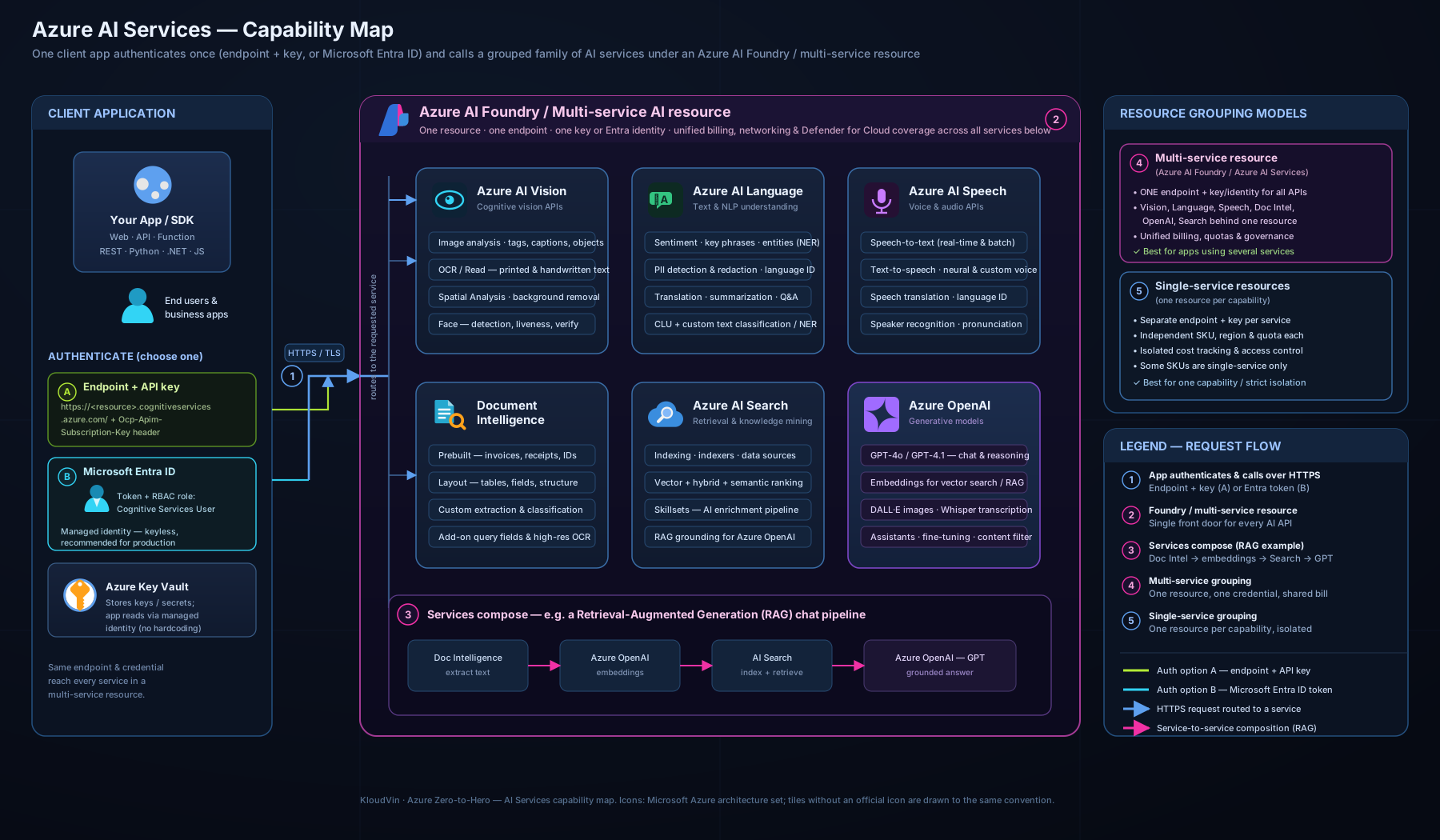
The diagram above lays the five families out side by side — Vision, Language, Speech, Document Intelligence and Search — with their headline capabilities beneath each, and shows them all consumed through a single multi-service Azure AI services resource (an endpoint + key or Microsoft Entra, surfaced in Azure AI Foundry). Keep this picture in your head: it is, in effect, the whole lesson on one page, and the capability column is exactly what the exam tests.
How you consume an Azure AI service
Knowing what each service does is half of AI-900; the other half is how you call it. The pattern is identical across every service, which is the good news.
1. Create a resource. In the portal, CLI, or Azure AI Foundry you create either a single-service resource (e.g. Computer Vision, Language, Speech, Document Intelligence, Translator, Search) or a multi-service Azure AI services resource. Creating it gives you two things you need: an endpoint (a regional HTTPS URL like https://<name>.cognitiveservices.azure.com/) and access keys.
2. Authenticate. Two ways, and the exam expects you to know both:
| Method | How it works | When to use |
|---|---|---|
| Key (subscription key) | Pass Ocp-Apim-Subscription-Key: <key> in the header; two keys are issued so you can rotate without downtime |
Quickest to start, fine for learning and prototypes |
| Microsoft Entra ID | Authenticate with a token from an identity (a user or, in production, a managed identity) and a role assignment | The recommended, more secure production approach — no secrets to leak; pairs with Key Vault if you must use keys |
3. Call it via the REST API (a plain HTTPS request — language-agnostic) or a client-library SDK for .NET, Python, JavaScript, Java and more (which wraps the REST call in idiomatic code). REST is great for testing and exotic languages; the SDK is what you ship.
4. Read the structured result — JSON describing the caption, the sentiment, the transcript, the extracted fields — and act on it in your app.
A few cross-cutting points: every resource is regional (pick a region for latency and data residency); calls can be governed with networking controls (private endpoints, IP firewall) and content-safety features; and some services run in containers on-premises or at the edge for sovereignty or latency, while still billing through Azure.
Single-service vs multi-service, and where Azure AI Foundry fits
A single-service resource is scoped to one capability family — handy when you want separate keys, quotas or billing per capability. A multi-service Azure AI services resource gives you one endpoint, one key and one bill across Vision, Language, Speech, Translator and more — the usual choice once you use more than one. Azure AI Foundry is the unified studio and SDK that ties it together: create a connection, experiment in the playground, and build Copilots, RAG apps and agents — it is also where Azure OpenAI (next lesson) lives. For AI-900, remember the relationship: individual services → optionally unified by a multi-service resource → orchestrated in Azure AI Foundry.
Pricing tiers
Every Azure AI service offers a free tier (F0) and one or more standard tiers (S0, S1…). The free tier has a generous-enough monthly allowance for learning and small demos (e.g. a few thousand image transactions or a number of free text records per month) but is rate-limited and usually allows only one F0 resource of a given kind per subscription. Standard tiers are pay-as-you-go, billed per transaction with the unit varying by service:
| Service family | Typical billing unit |
|---|---|
| Azure AI Vision | per 1,000 transactions (images) |
| Azure AI Language | per 1,000 text records (≈ 1,000 characters each) |
| Azure AI Speech | per audio hour (STT/TTS) or per character (TTS) |
| Azure AI Document Intelligence | per 1,000 pages (prebuilt/layout/custom priced differently) |
| Azure AI Search | per search unit per hour (a provisioned tier, not pure pay-per-call) |
Note that Azure AI Search is the odd one out: it is provisioned capacity (you pay for a tier — Free, Basic, Standard — by the hour, scaled by replicas and partitions), not per-transaction. The cost levers: volume (transactions/characters/pages), tier, which features you call (custom models and neural voices cost more), and for Search, how much capacity you provision. For the lab below, the free F0 tier costs ₹0 — which is exactly why we use it.
Hands-on lab: call Azure AI Language from the CLI
We will create a free Azure AI Language resource and run a sentiment and key-phrase call against it with nothing but the Azure CLI and curl. Use Azure Cloud Shell (it has the CLI and curl preinstalled) or a local terminal with az logged in.
1. Set variables and create a resource group:
RG="rg-ai900-lab"
LOC="eastus"          # AI services are widely available here
NAME="ai900lang$RANDOM"

az group create --name "$RG" --location "$LOC" --output table
2. Create a free-tier Language resource (kind = TextAnalytics is the Language service; --sku F0 is the free tier; the --yes accepts the Responsible AI terms):
az cognitiveservices account create \
  --name "$NAME" \
  --resource-group "$RG" \
  --kind TextAnalytics \
  --sku F0 \
  --location "$LOC" \
  --yes \
  --output table
3. Fetch the endpoint and a key:
ENDPOINT=$(az cognitiveservices account show \
  --name "$NAME" --resource-group "$RG" \
  --query "properties.endpoint" --output tsv)

KEY=$(az cognitiveservices account keys list \
  --name "$NAME" --resource-group "$RG" \
  --query "key1" --output tsv)

echo "Endpoint: $ENDPOINT"
4. Call the sentiment endpoint with a couple of sentences:
curl -s -X POST "${ENDPOINT}language/:analyze-text?api-version=2023-04-01" \
  -H "Ocp-Apim-Subscription-Key: ${KEY}" \
  -H "Content-Type: application/json" \
  -d '{
    "kind": "SentimentAnalysis",
    "parameters": { "opinionMining": false },
    "analysisInput": {
      "documents": [
        { "id": "1", "language": "en", "text": "The Azure AI services are fantastic and easy to use." },
        { "id": "2", "language": "en", "text": "The portal was slow and the docs were confusing." }
      ]
    }
  }'
Expected output (abridged): JSON with a results.documents array; document 1 shows "sentiment": "positive" with a high confidenceScores.positive, and document 2 shows "sentiment": "negative".
5. (Optional) Try key-phrase extraction by changing "kind" to "KeyPhraseExtraction" and removing parameters — you will get back the main phrases per document.
Validation: you have created an Azure AI service, authenticated with an endpoint + key, sent a REST request, and read a structured AI result — the exact consumption pattern described above, end to end.
Cleanup (do this — it avoids surprise charges):
az group delete --name "$RG" --yes --no-wait
Cost note: the F0 (free) tier used here is ₹0 within its monthly free allowance, so this lab costs nothing. If you later switch to the S (standard) tier, Language is billed per 1,000 text records at a few rupees per thousand — still trivial for experiments. Deleting the resource group removes the resource entirely so no stray meter keeps running.
Common mistakes & troubleshooting
| Symptom / mistake | Cause | Fix |
|---|---|---|
401 Unauthorized |
Wrong key, key from a different resource, or the resource is in another region than the endpoint you called | Re-fetch the key for this resource; ensure the endpoint and key come from the same account |
403 / cannot create a second free resource |
Only one F0 resource per kind per subscription is allowed | Delete the old F0 resource or use a different kind, or move to S0 |
429 Too Many Requests |
Free tier is rate-limited; you exceeded calls per second/minute | Throttle/retry with back-off, or upgrade to a standard tier |
| Using Vision OCR but you wanted invoice fields | OCR returns raw text, not structured fields | Use Azure AI Document Intelligence for key-value pairs and tables |
| Face recognition/identification call rejected | These are Limited Access, Responsible-AI-gated features | Apply for access; for AI-900 simply know it is gated |
| Confusing question answering with CLU | They solve different problems | Q&A = answer from a knowledge base; CLU = detect intent + entities |
| Translator vs Language mix-up | Both touch text | “Translate” → Translator; “analyse/understand” → Language |
| Hard-coded key checked into source control | Key used as a literal string | Store in Key Vault or, better, authenticate with Microsoft Entra managed identity |
Best practices
- Prefer the prebuilt service over training a model unless your task is genuinely bespoke — it is faster, cheaper and maintained for you.
- Start on F0 to prototype, then size the standard tier from observed volume rather than guessing.
- Use a multi-service resource once you consume more than one capability — one endpoint, one key, one bill.
- Pin an
api-versionin REST calls and SDK versions in code, so a service update never silently changes your results. - Pick the region deliberately for latency and data residency; not every feature is in every region.
- Handle confidence scores — act on a threshold, and design a human-in-the-loop path for low-confidence results.
- Build on Azure AI Foundry when you move beyond single calls toward Copilots, RAG and agents.
Security notes
The data and identity you bring to an AI service are still yours to protect — the shared-responsibility line does not move just because the model is Microsoft’s. Practical controls for AI-900 and beyond:
- Authenticate with Microsoft Entra ID and managed identities in production rather than keys; if you must use keys, keep them in Azure Key Vault and rotate using the two-key design.
- Restrict network access with the resource firewall (allowed IPs / VNet) and private endpoints so the service is not reachable from the public internet.
- Mind the data you send: use PII detection/redaction before logging text, and check each service’s data-retention and customer-managed-key options for sensitive workloads.
- Respect the Responsible AI gates — Face recognition, speaker recognition and custom neural voice are Limited Access by design; the gate is the security control.
- Enable diagnostic logging to Azure Monitor for an audit trail of who called what.
Interview & exam questions
- What is an Azure AI service, and how does it differ from building a model in Azure Machine Learning? A prebuilt, Microsoft-trained model exposed as a managed API you call over HTTPS; you write no training code and manage no infrastructure, whereas Azure ML is where you train, evaluate and deploy your own models.
- You need to read printed text from scanned photos. Which service? Azure AI Vision — OCR (Read). If you needed structured fields from a form, you would use Document Intelligence instead.
- What is the difference between Azure AI Vision OCR and Azure AI Document Intelligence? OCR returns raw text; Document Intelligence returns structured key-value pairs, tables and fields (prebuilt, layout or custom models). This is the classic trap.
- A chatbot must understand “book a table for two at 7pm”. Which capability? Conversational Language Understanding (CLU) in Azure AI Language — it returns the intent plus entities. (CLU is the successor to LUIS.)
- Name the three model types in Document Intelligence. Prebuilt (common documents), layout/general (structure of any document), and custom (your own forms — template or neural).
- Which service builds a search index and can run an AI-enrichment pipeline over your documents? Azure AI Search — the engine of knowledge mining, and the retrieval layer for RAG.
- What are the two ways to authenticate to an Azure AI service, and which is recommended? A subscription key in the request header, or Microsoft Entra ID (token + role assignment). Entra ID — ideally via a managed identity — is recommended because there are no secrets to leak.
- Single-service vs multi-service resource — when would you choose each? Single-service for separate keys/quota/billing per capability; multi-service for one endpoint, one key, one bill across many capabilities once you use more than one.
- Which Azure AI capability is gated for Responsible AI reasons? Face recognition/identification (and speaker recognition, custom neural voice) are Limited Access — you must apply.
- Speech to text vs text to speech vs speech translation — what is the direction of each? STT: audio→text; TTS: text→audio; speech translation: spoken input→translated output. Custom Speech and custom neural voice exist for bespoke needs.
- You want to translate documents while preserving their layout. Which service? Azure AI Translator (document translation).
- How are Azure AI services priced, and what is special about Azure AI Search? Mostly per transaction (per 1,000 images / text records / pages, or per audio hour) with a free F0 tier; Azure AI Search is the exception — provisioned capacity billed per search unit per hour.
Quick check
- Match each to a service: (a) detect sentiment in a review, (b) read text from a sign in a photo, © extract the total from an invoice, (d) transcribe a podcast, (e) translate a paragraph.
- What is the difference between a single-service and a multi-service Azure AI resource?
- Which authentication method should production apps prefer, and why?
- Name the three model types in Azure AI Document Intelligence and what each is for.
- Which service provides the retrieval/grounding layer for a RAG generative-AI app, and what is the indexing-time AI pipeline called?
Answers
- (a) Azure AI Language (sentiment); (b) Azure AI Vision (OCR/Read); © Azure AI Document Intelligence (prebuilt invoice model); (d) Azure AI Speech (speech to text); (e) Azure AI Translator.
- A single-service resource exposes one capability family with its own key, quota and bill; a multi-service Azure AI services resource exposes many capabilities behind one endpoint, one key and one bill — preferred once you use more than one.
- Microsoft Entra ID, ideally via a managed identity — there are no keys to leak, store or rotate, and access is governed by role assignments. If keys must be used, keep them in Key Vault.
- Prebuilt (ready-trained for common documents like invoices, receipts, IDs); layout/general (text, tables, selection marks and structure from any document); custom (trained on your own forms — template for fixed layouts, neural for variable ones).
- Azure AI Search (with vector search) provides retrieval/grounding; the indexing-time enrichment pipeline is called knowledge mining (built from a skillset).
Exercise
Take a small business scenario — say, an insurance company that wants to (1) let customers ask policy questions on its website, (2) automatically read uploaded claim forms, (3) gauge the sentiment of feedback emails, and (4) offer an English↔Hindi voice assistant. For each requirement, write down (a) the exact Azure AI service and capability you would use, (b) whether a prebuilt model suffices or you would customise/train, and © one Responsible AI or security consideration. Then sketch how a multi-service resource and Azure AI Foundry would let one team build all four. Compare your answers against the capability→service table above — if any choice was hard, that is the row to re-read.
Certification mapping
This lesson maps to the “Describe features of computer vision workloads”, “Describe features of Natural Language Processing (NLP) workloads” and document-processing areas of AI-900: Microsoft Azure AI Fundamentals:
- Computer vision — image analysis, OCR, and Face via Azure AI Vision; custom image models via Custom Vision.
- NLP — sentiment, key phrases, entities, PII, language detection, summarisation, question answering and CLU via Azure AI Language; translation via Azure AI Translator; speech via Azure AI Speech.
- Document & knowledge — Azure AI Document Intelligence for structured extraction and Azure AI Search for knowledge mining.
- Consuming services — the endpoint/key vs Microsoft Entra authentication, single- vs multi-service resources, SDK/REST, and pricing tiers.
It is also the natural on-ramp to AI-102: Azure AI Engineer Associate, which goes deep on exactly these services — provisioning, securing, customising and integrating them in production.
Glossary
- Azure AI services — Microsoft’s family of prebuilt, managed AI models (formerly Cognitive Services) consumed as HTTPS APIs.
- Azure AI Vision — computer-vision service: image analysis, OCR (Read), and Face.
- OCR (Optical Character Recognition) — extracting printed/handwritten text from images and PDFs.
- Azure AI Language — NLP service: sentiment, key phrases, NER, PII, language detection, summarisation, question answering, CLU.
- CLU (Conversational Language Understanding) — predicts a user’s intent and extracts entities from an utterance; successor to LUIS.
- Azure AI Speech — speech to text, text to speech, and speech translation (plus speaker recognition and pronunciation assessment).
- Azure AI Translator — machine translation of text and documents across many languages.
- Azure AI Document Intelligence — extracts structured fields, key-value pairs and tables from documents (prebuilt, layout, custom); formerly Form Recognizer.
- Azure AI Search — managed search-as-a-service with AI enrichment (knowledge mining) and vector search; formerly Azure Cognitive Search.
- Knowledge mining — running unstructured content through AI services during indexing to make it searchable.
- Endpoint / key — the regional HTTPS URL of a resource and the subscription key used to authenticate to it.
- Microsoft Entra ID — Microsoft’s identity service (formerly Azure AD); the recommended way to authenticate to AI services, ideally via a managed identity.
- Single-service / multi-service resource — a resource scoped to one capability vs one exposing many behind a single endpoint, key and bill.
- Azure AI Foundry — the unified portal and SDK for building AI solutions on Azure, including Copilots, RAG and agents (and where Azure OpenAI lives).
- Free tier (F0) — the no-cost, rate-limited tier available for each AI service, used for learning and prototyping.
- RAG (Retrieval-Augmented Generation) — grounding a generative model on your own data, retrieved (often) via Azure AI Search.
Next steps
You now know the applied AI building blocks — Vision, Language, Speech, Document Intelligence and Search — how to choose between them with the capability table, and how to consume any of them with an endpoint and key or a Microsoft Entra identity. The final piece of the AI-900 picture is the part of AI that has reshaped the industry: generative AI.
- Next lesson: AI-900: Generative AI & Azure OpenAI Fundamentals — large language models, tokens and prompts, the Azure OpenAI Service, and the RAG pattern that puts Azure AI Search to work grounding a model on your data.
Related reading to reinforce the foundations:
- AI-900: AI & Machine Learning Fundamentals (incl. Responsible AI) — the concepts and the six Responsible AI principles these services are built to honour.
- What Is Azure? Accounts, Subscriptions, Regions & Resource Groups — the resource, region and resource-group vocabulary every AI service create uses.