You have a workload — an API, a batch job, a queue consumer, a website — and AWS gives you at least five credible ways to run it: a raw EC2 instance you own end to end, a Lambda function with no server in sight, an ECS task on AWS’s own orchestrator, an EKS pod on managed Kubernetes, or any of the container options backed by Fargate so you never touch a node. Pick wrong and you pay for it twice: once in the monthly bill, and again every week in the operational toil of patching, scaling and debugging a platform that was never the right shape for the job. The wrong default — “spin up an EC2 instance, it’s what we know” — is the single most expensive habit on AWS, because an idle m5.large costs the same whether it serves a million requests or zero, and someone still has to patch its kernel.
This is the decision guide, written the way a 22-year architect actually reasons about it: not “which is best” (none is best) but “which axis does this workload live on” — how much of the stack you must control, how the traffic arrives (steady, bursty, event-driven, scheduled), how long each unit of work runs, and how much undifferentiated heavy lifting you are willing to hand to AWS. We walk every service option by option: EC2’s instance families and purchase models, Lambda’s runtimes and its hard 15-minute / 10 GB ceilings, ECS’s two launch types and task-definition knobs, EKS’s control-plane-plus-data-plane split and its per-cluster hourly charge, and Fargate’s per-second vCPU/GB billing. Every configuration gets an aws CLI snippet and a Terraform snippet, and because you will come back to this mid-design, every comparison — instance families, runtimes, launch types, limits, failure modes, prices — is a table you can scan in ten seconds.
By the end you will stop treating EC2 as the answer to every question. You will look at a workload and know within a minute whether it wants a function (event-driven, sub-15-minute, spiky), a task (a container with no Kubernetes ambitions), a pod (you already run Kubernetes and want the API and ecosystem), or a real instance (GPU, Windows licensing, a kernel module, sustained 24×7 load where reserved capacity is cheapest). And when the workload is genuinely on the fence, you will know the exact knobs — cold start, SNAT, node-group sizing, Savings Plans — that tip the decision.
What problem this solves
The pain is concrete and recurring. A team ships a service on the compute they’re comfortable with, not the compute that fits, and the mismatch shows up as either a bloated bill or a stream of 2 a.m. pages. A cron job that runs for forty seconds once an hour sits on a 24×7 t3.medium — you pay for ~720 hours a month to do ~12 hours of work. A bursty image-thumbnailer runs on a fixed fleet that’s over-provisioned for the median and still falls over at peak. A five-service product adopts EKS because a conference talk said to, then discovers it now owns a Kubernetes control plane’s worth of upgrades, add-on CVEs and IRSA debugging — for five services that ECS would have run with a fraction of the surface area.
What breaks without a deliberate choice: cost creeps (idle instances, over-provisioned fleets, a $0.10/hour EKS cluster per environment that nobody decommissions); operational load balloons (OS patching, AMI rebuilds, node-group rotations, control-plane version skew); and reliability suffers in the gaps the team didn’t design for (a Lambda that quietly hits its 15-minute timeout on a large input, an ECS service with no health check that ships a crash-looping task, an EKS pod stuck Pending because the cluster autoscaler can’t get capacity in the right AZ). None of these are exotic failures — they’re the default outcome of picking compute by familiarity.
Who hits this: essentially every team that runs more than one kind of workload. It bites hardest on teams migrating a monolith (everything lands on EC2 because that’s the lift-and-shift path, and nothing ever moves off), startups that adopt Kubernetes before they have the headcount to operate it, and cost-sensitive shops that never revisit the first instance they launched. The fix is not a tool — it’s a model: match the lifecycle of the work to the billing and operational model of the service. The rest of this article is that model, enumerated.
To frame the whole field before the deep dive, here is every compute service this article covers, the unit you pay for, what AWS manages versus what you manage, and the workload shape it fits:
| Service | What it is | You pay for | AWS manages | You manage | Fits this workload shape |
|---|---|---|---|---|---|
| EC2 | Virtual machine (instance) | Instance-hour (per-second, 60s min) | Hypervisor, hardware, network | OS, patching, scaling, runtime | Full OS control, GPU, Windows licensing, sustained 24×7 |
| Lambda | Function-as-a-service | GB-second + per-request | Everything below your handler | Just the function code + config | Event-driven, bursty, ≤15 min, glue |
| ECS on EC2 | AWS container orchestrator on your nodes | The EC2 instances (free control plane) | Scheduler/control plane | The EC2 node fleet | Containers, want bin-packing & EC2 pricing |
| ECS on Fargate | AWS orchestrator, serverless data plane | Per-second vCPU + GB | Scheduler and nodes | Just the task definition | Containers, no nodes, variable load |
| EKS on EC2 | Managed Kubernetes on your nodes | $0.10/hr control plane + nodes | K8s control plane (3-AZ) | Node groups, add-ons, upgrades | Already on K8s, need the API/ecosystem |
| EKS on Fargate | Managed Kubernetes, serverless pods | $0.10/hr + per-pod vCPU/GB | Control plane and pod hosts | Manifests, profiles | K8s API without node management |
| App Runner | Fully managed container web service | Per-second + provisioned floor | Build, deploy, scale, LB | Just the container image | Stateless HTTP container, minimal ops |
| Batch | Managed batch scheduler | The underlying EC2/Fargate | Queueing & provisioning | Job definitions | Large fan-out batch / HPC |
| Lightsail | Bundled VPS | Flat monthly bundle | VM + simple stack | The app | Simple sites, predictable flat pricing |
Learning objectives
By the end of this article you can:
- Map any workload to EC2, Lambda, ECS, EKS or Fargate using its lifecycle (event-driven, bursty, steady, scheduled, long-running) and your control requirement, not by habit.
- Read the EC2 instance-family taxonomy (the letter/number/suffix scheme) and pick the right family — general purpose, compute, memory, storage, accelerated — and the right purchase model (On-Demand, Reserved, Savings Plan, Spot, Dedicated).
- State Lambda’s hard limits from memory — 15-minute timeout, 10 GB memory, 10 GB ephemeral
/tmp, 6 MB synchronous payload, 250 MB unzipped package, 1,000 default concurrency — and design around each. - Choose between ECS launch types (EC2 vs Fargate) and configure a task definition’s CPU/memory, networking mode, IAM roles and health checks correctly.
- Decide between ECS and EKS honestly (operational surface area vs Kubernetes API/portability) and size an EKS data plane with managed node groups, Fargate profiles or Karpenter.
- Use Fargate where it earns its premium and fall back to EC2-backed compute where bin-packing or reserved pricing wins.
- Right-size and cost-model each option in INR/USD, exploit the relevant free tier, and name the price levers (Graviton, Spot, Savings Plans, memory tuning) that move the bill most.
Prerequisites & where this fits
You should be comfortable with the AWS basics: an AWS account and IAM (roles, policies — every compute service assumes an execution role or instance profile to call other services), the VPC model (subnets, security groups, public vs private), and how to run the aws CLI with credentials. You should know what a container image is (a packaged filesystem + entrypoint, built from a Dockerfile, stored in a registry like ECR) and roughly what Kubernetes does (declarative orchestration of pods across nodes), even if you’ve never operated it. Familiarity with Terraform (resource, provider, terraform apply) helps because every example pairs a CLI command with IaC.
This sits at the foundation of the AWS compute track. It’s the decision upstream of the deeper guides: once you’ve chosen containers, the ECS vs EKS vs Fargate container path goes one level deeper on orchestration, and once you’ve chosen serverless, Lambda event-driven patterns covers the integration shapes. The network your compute lands in is VPC subnets and security groups; the placement across Regions and Availability Zones decides your blast radius; the front door is usually an ALB, NLB or API Gateway; and the identity every service assumes comes from Organizations and IAM foundations. The state your compute talks to lives in RDS, DynamoDB or Aurora and S3 storage classes.
A quick map of who owns what during design and operations, so the trade-off is concrete:
| Layer | EC2 | Lambda | ECS/Fargate | EKS |
|---|---|---|---|---|
| Hardware / hypervisor | AWS | AWS | AWS | AWS |
| Guest OS & kernel patching | You | AWS | AWS (Fargate) / You (EC2) | AWS (Fargate) / You (EC2) |
| Runtime / language version | You | AWS-provided or your image | Your image | Your image |
| Orchestration / scheduling | You (ASG) | AWS | AWS | AWS control plane, you tune |
| Scaling policy | You (ASG/target tracking) | AWS (automatic) | You (service autoscaling) | You (HPA + node scaler) |
| Kubernetes version upgrades | n/a | n/a | n/a | You (control + data plane) |
| Networking (ENI, SG) | You | AWS (+ VPC opt-in) | You (awsvpc) | You (CNI) |
Core concepts
Five mental models make every later choice obvious.
Compute is a control-versus-convenience dial, not a ladder. EC2, ECS, EKS and Lambda are not “beginner to advanced” — they’re points on a single axis: how much of the stack do you operate yourself. At one end, EC2 hands you a bare virtual machine and you own everything above the hypervisor (OS, patches, runtime, scaling). At the other, Lambda hands you a function signature and AWS owns everything else. ECS and EKS sit in the middle as container orchestrators — they schedule your containers onto compute and keep the desired count running — with Fargate sliding the same orchestrators toward the Lambda end by removing the servers. You don’t climb this; you pick the point where the control you need meets the convenience you want.
The billing unit encodes the right workload shape. EC2 bills per instance-second (60-second minimum) regardless of utilisation — so it’s cheapest for work that keeps the instance busy, and wasteful for idle. Lambda bills per GB-second of execution plus per request — you pay only while code runs, so it’s cheapest for spiky, intermittent work and ruinous for something that runs flat-out 24×7. Fargate bills per second of provisioned vCPU and GB — between the two. EKS adds a fixed $0.10/hour per cluster for the managed control plane on top of whatever data plane you choose. Match the traffic shape to the meter: steady → instances; spiky/event → functions; in-between containerised → tasks.
A container needs an orchestrator, and the orchestrator needs a data plane. A container image is inert; something must place it on a host, restart it when it dies, scale the count, and wire it to networking. That “something” is the orchestrator — ECS (AWS’s own, simpler) or EKS (managed Kubernetes, richer/portable). Each orchestrator runs your containers on a data plane: either EC2 nodes you own (you patch and scale them, but get bin-packing and EC2/Spot pricing) or Fargate (AWS owns the host; you pay per task/pod, no nodes to manage). “ECS vs EKS” is the control-plane choice; “EC2 vs Fargate” is the data-plane choice — they’re orthogonal, and you make both.
Limits are the design, not the fine print. Lambda’s limits define what it can’t do: a request that takes 16 minutes will never finish (15-minute hard ceiling), a job needing 12 GB RAM can’t run (10 GB max), a sync response over 6 MB will be rejected. These aren’t tunables — they’re walls. EC2 has no such walls (you can run a 24-hour job on a 768 GB instance) but trades that freedom for ownership of the whole machine. Knowing each service’s hard limits up front turns “we’ll figure it out” into “this workload is disqualified from Lambda, so it’s a task or an instance.”
Cold start is the tax on scaling from zero. Anything that can scale to zero — Lambda, Fargate, App Runner, Karpenter-provisioned nodes — pays a startup cost the first time a request lands with no warm capacity: the runtime initialises, the image is pulled, the connection pool primes. Lambda cold starts are tens to hundreds of milliseconds (seconds for large packages or VPC-attached functions historically); a new Fargate task takes tens of seconds to pull and start; a new EC2 node under an autoscaler takes a minute or more. An always-on EC2 instance never pays this — that’s part of what its idle cost buys. Whether cold start matters is a property of your latency budget, and it’s often the knob that decides a borderline case.
The vocabulary in one table
Before the deep sections, pin down every moving part. The glossary at the end repeats these for lookup; this table is the mental model side by side:
| Concept | One-line definition | Where it lives | Why it matters to the choice |
|---|---|---|---|
| Instance | A virtual machine you rent | EC2 | The control end of the dial |
| Instance family | A class tuned for a resource profile | EC2 (e.g. m, c, r, g) |
Picks CPU:RAM:GPU ratio + price |
| AMI | The disk image an instance boots | EC2 | You own its patch level |
| Auto Scaling Group | Keeps N instances running, scales them | EC2 | You write the scaling policy |
| Function | A handler AWS runs per event | Lambda | The convenience end of the dial |
| Cold start | First-request latency on fresh capacity | Lambda/Fargate/nodes | Tax on scale-from-zero |
| Concurrency | Simultaneous executions/tasks | Lambda/ECS | The Lambda scaling + limit unit |
| Task | A running container group (ECS) | ECS | The ECS unit of work |
| Task definition | The blueprint for a task | ECS | CPU/mem/role/ports declared here |
| Service | Keeps N tasks running (ECS) | ECS | ECS’s “desired count” + autoscaling |
| Pod | The smallest deployable unit (K8s) | EKS | The EKS unit of work |
| Node / node group | The EC2 host(s) running pods | EKS/ECS-EC2 | The data plane you may own |
| Fargate | Serverless data plane for ECS/EKS | ECS/EKS | Removes nodes; per-task billing |
| Control plane | The orchestrator’s brain (API/scheduler) | ECS (free) / EKS ($0.10/hr) | EKS’s fixed cost + upgrade burden |
| Execution / task role | The IAM identity the compute assumes | All | Least-privilege access to AWS APIs |
The decision table — pick from the symptom
When you’re staring at a workload and not sure where it goes, match its dominant characteristic in the left column and read across. This is the whole article compressed into one lookup:
| If the workload is… | It’s probably best on… | Because… |
|---|---|---|
| Event-driven, runs seconds–minutes, spiky | Lambda | Scales to zero; pay per invocation; no servers |
| A long process or anything > 15 minutes | ECS / EC2 | Past Lambda’s hard timeout wall |
| A stateless container, lean team, AWS-only | ECS on Fargate | Simplest orchestration, no nodes |
| Containers at high steady density / GPU | ECS on EC2 | Bin-pack + Reserved/Spot pricing wins |
| Already on Kubernetes / needs the K8s API | EKS | Full API + ecosystem + portability |
| Needs a specific OS, kernel module, BYOL licence | EC2 | Only a real machine gives that control |
| Sustained 24×7 CPU at scale, cost-sensitive | EC2 (Reserved/Spot) | Lowest per-compute cost when always busy |
| A simple website with predictable flat cost | Lightsail / App Runner | Bundled, minimal decisions |
| Large fan-out batch / HPC | Batch (on EC2/Fargate) | Managed queueing + provisioning |
EC2 — the full-control option, option by option
EC2 gives you a virtual machine and gets out of the way. That freedom is the point and the cost: you choose the instance family (the CPU:memory:accelerator ratio), the size within it, the AMI (and thus the patch level you now own), the purchase model (which swings the price by up to ~90%), and the scaling (you write the Auto Scaling Group policy). Reach for EC2 when you need something the managed options can’t give: a specific OS or kernel module, a GPU, BYOL Windows/Oracle licensing, persistent local NVMe, or simply the lowest per-compute cost for a workload that runs flat-out 24×7.
Instance families — read the naming scheme
EC2 instance type names encode everything: m5.large = family m (general purpose), generation 5, size large. Suffixes refine it: g = Graviton (ARM, cheaper per vCPU), n = enhanced networking, d = local NVMe, a = AMD. Pick the family by the workload’s bottleneck (CPU-bound → c, RAM-bound → r/x, GPU → g/p), then the size by how much you need.
| Family | Class | vCPU:RAM ratio | Built for | Example type | Typical workload |
|---|---|---|---|---|---|
t (t3/t4g) |
Burstable general | 1:2–1:4, CPU credits | Spiky low-average CPU | t3.medium (2 vCPU/4 GB) |
Dev boxes, low-traffic web, microservices |
m (m6i/m7g) |
General purpose | 1:4 | Balanced steady load | m7g.large (2/8) |
App servers, mid-tier, small DBs |
c (c7g/c6i) |
Compute optimised | 1:2 | CPU-bound | c7g.xlarge (4/8) |
Batch, encoding, game servers, HPC |
r (r6i/r7g) |
Memory optimised | 1:8 | RAM-bound | r7g.2xlarge (8/64) |
In-memory caches, big DBs, analytics |
x (x2) |
High memory | 1:16+ | Huge RAM | x2idn.16xlarge (64/1024) |
SAP HANA, large in-memory stores |
i (i4i) |
Storage optimised | NVMe-heavy | High local IOPS | i4i.2xlarge (8/64 + NVMe) |
NoSQL, search, warm caches |
g (g5/g6) |
GPU (inference/graphics) | + NVIDIA GPU | ML inference, rendering | g5.xlarge |
Inference, transcode, VDI |
p (p4/p5) |
GPU (training) | + high-end GPU | ML training, HPC | p5.48xlarge |
LLM training, simulation |
inf/trn |
AWS silicon | Inferentia/Trainium | Cost-optimised ML | inf2.xlarge |
High-volume inference |
The t family deserves a warning: it runs on CPU credits. You bank credits while below a baseline and spend them to burst above it; run out and you’re throttled to the baseline (e.g. ~20% of a vCPU for t3.medium) — unless you enable T3 Unlimited, which lets you burst beyond credits for a surcharge. A t3 instance that’s busy 24×7 is the wrong choice (it’ll throttle or surcharge); move to m.
Purchase models — the 90% price lever
How you buy the same instance changes the price more than which instance you pick. On-Demand is the flexible default; commit to usage and you save up to ~72%; bid on spare capacity (Spot) and save up to ~90% with the risk of a 2-minute eviction notice.
| Purchase model | Discount vs On-Demand | Commitment | Interruptible? | Best for |
|---|---|---|---|---|
| On-Demand | 0% (baseline) | None | No | Spiky/unpredictable, short-lived, dev |
| Reserved Instance (Standard) | up to ~72% | 1 or 3 yr, instance family | No | Steady 24×7, known instance type |
| Reserved Instance (Convertible) | up to ~54% | 1 or 3 yr, swappable | No | Steady but family may change |
| Compute Savings Plan | up to ~66% | 1 or 3 yr, $/hr commit | No | Steady spend, flexible across family/region/Fargate/Lambda |
| EC2 Instance Savings Plan | up to ~72% | 1 or 3 yr, family+region | No | Steady within a family |
| Spot | up to ~90% | None | Yes (2-min notice) | Fault-tolerant batch, stateless, CI |
| Dedicated Instance | premium | None | No | Compliance: no shared hardware |
| Dedicated Host | premium | optional | No | BYOL socket/core licensing |
| Capacity Reservation | On-Demand rate + reserved | None (reserve capacity) | No | Guaranteed capacity in an AZ |
Launch a basic instance and attach an instance profile:
aws ec2 run-instances \
  --image-id ami-0abcd1234efgh5678 \
  --instance-type m7g.large \
  --iam-instance-profile Name=app-instance-profile \
  --security-group-ids sg-0a1b2c3d \
  --subnet-id subnet-0e1f2a3b \
  --tag-specifications 'ResourceType=instance,Tags=[{Key=Name,Value=app-prod}]'
resource "aws_instance" "app" {
  ami                    = data.aws_ami.al2023.id
  instance_type          = "m7g.large"   # Graviton: ~20% cheaper per vCPU
  iam_instance_profile   = aws_iam_instance_profile.app.name
  vpc_security_group_ids = [aws_security_group.app.id]
  subnet_id              = aws_subnet.private_a.id
  tags                   = { Name = "app-prod" }
}
Auto Scaling — you own the policy
A single instance is a single point of failure. Production EC2 runs in an Auto Scaling Group (ASG) spanning ≥2 AZs, fronted by a load balancer, scaling on a target metric. You write the policy — that’s the cost of control. The scaling-policy choices:
| Scaling policy | How it decides | When to use | Gotcha |
|---|---|---|---|
| Target tracking | Holds a metric at a target (e.g. CPU 50%) | Most web/app tiers | Pick the right metric (CPU vs ALB requests/target) |
| Step scaling | Add/remove N by alarm thresholds | Fine-grained custom response | More tuning; can oscillate |
| Simple scaling | One adjustment per alarm + cooldown | Legacy; avoid | Cooldown blocks reacting to fast spikes |
| Scheduled | Scale at known times | Predictable daily/weekly peaks | Doesn’t react to surprises |
| Predictive | ML forecasts and pre-scales | Recurring cyclical load | Needs history; pairs with dynamic |
Storage choices — durable vs ephemeral
An instance’s disk is a decision, not a given. Get it wrong and you either lose data on a reboot or pay for IOPS you don’t need.
| Storage | Persists across stop/terminate? | Performance | Cost model | Use for |
|---|---|---|---|---|
| EBS gp3 | Yes (network block) | Baseline 3,000 IOPS, tunable | Per GB-month + provisioned IOPS/throughput | General root + data volumes |
| EBS io2 Block Express | Yes | Up to 256k IOPS, sub-ms | Premium per GB + IOPS | Latency-critical databases |
| EBS st1 / sc1 | Yes | Throughput-optimised HDD | Cheapest per GB | Big sequential / cold data |
| Instance store (NVMe) | No — wiped on stop | Highest local IOPS, no network hop | Included in instance price | Scratch, caches, shardable temp |
| EFS | Yes (shared NFS) | Scales with usage | Per GB + throughput mode | Shared filesystem across instances |
| FSx | Yes | Lustre/Windows/ONTAP/OpenZFS | Per GB + throughput | HPC, Windows shares, specialised FS |
The trap: instance store looks free and fast, and it is — until someone reboots the instance and the data is gone. Only put reconstructable data on it.
EC2 limits and gotchas that bite
| Limit / gotcha | Reality | Why it matters |
|---|---|---|
| Per-region vCPU quota | Soft limit, raise via Service Quotas | Large fleets/GPU need a quota increase first |
| ENI / IP per instance | Bounded by instance size | Pod/IP density on ECS-EC2 capped by ENI count |
| Instance store is ephemeral | Local NVMe wiped on stop/terminate | Never put durable data on instance store |
| Stopping ≠ free | EBS volumes still bill when stopped | “Stopped to save money” still costs storage |
| Patching is yours | No automatic OS patches | Unpatched AMIs = your CVE exposure |
| Right-sizing drift | Instances outlive their workload | Quarterly review or pay for idle vCPUs |
Lambda — serverless functions, and the walls you design around
Lambda runs your code in response to an event with no server to manage: you upload a handler, pick a runtime and a memory size, and AWS executes it on demand, scaling from zero to thousands of concurrent executions automatically. You pay only while code runs (GB-second) plus per request. It is the right answer for event-driven work (an S3 upload, a queue message, an API request, a schedule) that is short (seconds to a few minutes) and spiky — and the wrong answer for anything long-running, steady-state, or needing a fixed environment, because Lambda’s limits are hard walls, not knobs.
The hard limits — memorise these
These define what Lambda cannot do. There is no setting to exceed them; a workload that needs more is disqualified.
| Limit | Default / max | Tunable? | What hitting it looks like |
|---|---|---|---|
| Timeout | 3 s default, 900 s (15 min) max | Up to 900 s | Task timed out after 900.00 seconds; partial work |
| Memory | 128 MB default, 10,240 MB max | In 1 MB steps | OOM kill; Runtime exited |
| vCPU | Scales with memory (~1 vCPU/1,769 MB) | Indirect (via memory) | CPU-bound work slow until you raise memory |
Ephemeral /tmp |
512 MB default, 10,240 MB max | Yes | No space left on device |
| Sync payload | 6 MB request + response | No | RequestEntityTooLarge |
| Async payload | 256 KB | No | Event rejected |
| Deployment package | 50 MB zipped (direct), 250 MB unzipped | No (use container image: 10 GB) | Upload rejected |
| Container image | 10 GB | No | Image too large |
| Default concurrency | 1,000 per region | Raise via quota | TooManyRequestsException (429), throttling |
| Layers | 5 per function, 250 MB unzipped total | No | Can’t add another layer |
| Env var size | 4 KB total | No | Config truncation |
Runtimes — managed or your own
Lambda gives you a managed runtime or lets you bring a container image / custom runtime.
| Runtime option | Examples | When to choose | Note |
|---|---|---|---|
| Managed runtime | Node.js, Python, Java, .NET, Ruby, Go | Standard languages, fastest start | AWS patches the runtime |
| Container image | Any, up to 10 GB | Large deps, custom binaries, parity with local | Bigger cold start; built like Docker |
| Custom runtime | Anything via Runtime API | Unsupported languages | You own the bootstrap |
Graviton (arm64) |
Node/Python/etc. on ARM | ~20% cheaper, often faster | Recompile native deps |
Concurrency and cold starts — the two performance knobs
Lambda scales by running more concurrent executions. Two controls shape its behaviour under load and its latency on a cold path.
| Control | What it does | When to set | Cost impact |
|---|---|---|---|
| Reserved concurrency | Caps (and guarantees) a function’s share of the account pool | Protect a downstream DB from too many connections; isolate a noisy function | Free; reduces pool for others |
| Provisioned concurrency | Keeps N execution environments warm | Latency-critical paths that can’t pay cold start | Charged per provisioned GB-hour |
| SnapStart (Java/.NET) | Snapshots an initialised runtime, restores fast | Java/.NET cold-start pain | Lower cold start, some caveats |
| Account concurrency limit | 1,000 default, raisable | Bursty workloads exceeding 1,000 | Quota request |
What actually drives cold-start latency, and how to cut it:
| Cold-start factor | Magnitude | Reduce it by |
|---|---|---|
| Runtime init | tens of ms (Node/Python) to seconds (JVM cold) | SnapStart (Java/.NET); lighter runtime |
| Package/image size | larger = slower pull/init | Trim deps; smaller image; layers |
| VPC ENI attach | historically seconds (now much faster) | Use only if you need VPC resources |
| Handler init code | your code outside the handler | Lazy-init; cache clients across invocations |
| Provisioned concurrency | eliminates cold start for N | Pre-warm latency-critical functions |
Invocation models — how the event reaches the function
How Lambda is invoked changes retry behaviour, error handling and the payload limit you’re bound by. Three models:
| Invocation model | Triggers | Retry on error | Payload limit | Note |
|---|---|---|---|---|
| Synchronous | API Gateway, ALB, direct Invoke |
Caller handles it | 6 MB | Caller waits for the response |
| Asynchronous | S3, SNS, EventBridge | 2 automatic retries → DLQ | 256 KB | AWS queues and retries for you |
| Poll-based (event source mapping) | SQS, Kinesis, DynamoDB Streams, Kafka (MSK) | Per-batch, configurable | Batch-bounded | Lambda polls and batches records |
The retry column matters: an async failure silently retries twice and then drops to a dead-letter queue (if you configured one) — no DLQ means lost events. A poll-based SQS failure returns the batch to the queue, so a poison message can loop forever without a redrive policy.
Create a function and wire a trigger:
aws lambda create-function \
  --function-name thumbnailer \
  --runtime python3.12 --architectures arm64 \
  --handler app.handler --timeout 60 --memory-size 1024 \
  --role arn:aws:iam::111122223333:role/thumbnailer-exec \
  --zip-file fileb://function.zip

# Let S3 invoke it on object-created (event-driven, the canonical Lambda shape)
aws lambda add-permission --function-name thumbnailer \
  --statement-id s3invoke --action lambda:InvokeFunction \
  --principal s3.amazonaws.com --source-arn arn:aws:s3:::uploads-bucket
resource "aws_lambda_function" "thumbnailer" {
  function_name = "thumbnailer"
  runtime       = "python3.12"
  architectures = ["arm64"]   # Graviton: cheaper GB-second
  handler       = "app.handler"
  timeout       = 60          # seconds; hard ceiling is 900
  memory_size   = 1024        # MB; also scales vCPU
  role          = aws_iam_role.thumbnailer_exec.arn
  filename      = "function.zip"
}
The cost trap: Lambda is not always cheaper
Lambda’s “pay only when it runs” is a gift for spiky work and a trap for steady work. A function pinned at high concurrency 24×7 can cost far more than the equivalent always-on instance. The break-even reasoning:
| Workload pattern | Lambda economics | Better on |
|---|---|---|
| Spiky / intermittent (idle most of the time) | Pay near-zero when idle — wins big | Lambda |
| Event-driven (per upload / message) | Pay per event; scales to zero | Lambda |
| Steady moderate (constant low-mid traffic) | GB-seconds add up | Borderline — model it |
| Sustained high (flat-out 24×7) | Paying full GB-second every second | EC2/Fargate (reserved) |
| Long-running (>15 min per unit) | Impossible (timeout wall) | ECS task / EC2 |
ECS — AWS-native containers, two launch types
ECS is AWS’s own container orchestrator: you describe a task (one or more containers, their CPU/memory, ports, IAM role and health check in a task definition), and a service keeps a desired number of those tasks running, replacing failures and integrating with a load balancer. It’s simpler than Kubernetes — fewer concepts, no control-plane upgrades, deep AWS integration — and the control plane is free; you pay only for the data plane. The big fork is the launch type: run tasks on EC2 nodes you own (bin-packing, Spot, GPU, lowest cost at scale) or on Fargate (no nodes; pay per task-second).
EC2 vs Fargate launch type — the data-plane decision
| Dimension | ECS on EC2 | ECS on Fargate |
|---|---|---|
| Who manages the host | You (AMI, patching, scaling the ASG) | AWS (no host access) |
| Billing | Per EC2 instance-hour | Per task: vCPU-second + GB-second |
| Bin-packing | Yes — pack many tasks per instance | No — each task is isolated, sized exactly |
| Spot support | Yes (Spot instances) | Yes (Fargate Spot) |
| GPU / special hardware | Yes | Limited |
| Right-sizing granularity | Per instance | Per task (fine-grained) |
| Idle cost | Pay for the whole node even if under-packed | Pay only for running tasks |
| Best for | High, steady density; cost-optimised at scale | Variable load; minimal ops; small/spiky services |
| Cold start | Node already warm; task start fast | Task pull+start (tens of seconds) |
Rule of thumb: start on Fargate (no node fleet to operate), move specific high-density or GPU workloads to EC2-backed capacity when bin-packing or reserved/Spot pricing demonstrably wins.
Task definition — the knobs that matter
The task definition is the blueprint. Get these right or the task won’t place, won’t reach its dependencies, or won’t be replaced when it crashes.
| Setting | What it controls | Values / default | Gotcha |
|---|---|---|---|
cpu / memory (task-level) |
Total task size | Fargate: fixed valid combos (256 CPU/0.5–2 GB … up to 16 vCPU/120 GB) | Fargate rejects invalid CPU:mem pairs |
networkMode |
How containers get networking | awsvpc (own ENI), bridge, host, none |
Fargate requires awsvpc |
executionRoleArn |
Role to pull image / write logs | IAM role | Missing → CannotPullContainerError |
taskRoleArn |
Role the app assumes for AWS APIs | IAM role | Don’t overscope; this is your app’s identity |
containerDefinitions[].healthCheck |
Per-container liveness | command + interval/timeout/retries | No health check → crash-loops ship traffic |
essential |
Whether a container’s death kills the task | true/false | Sidecars usually essential:false |
logConfiguration |
Where stdout/stderr goes | awslogs → CloudWatch |
Forgetting it = no logs to debug |
portMappings |
Ports exposed | container/host port | With awsvpc, host port = container port |
secrets |
Inject from SSM/Secrets Manager | valueFrom ARN | Don’t bake secrets into the image |
Register a Fargate task definition and run a service:
aws ecs register-task-definition \
  --family api --network-mode awsvpc \
  --requires-compatibilities FARGATE --cpu 512 --memory 1024 \
  --execution-role-arn arn:aws:iam::111122223333:role/ecsTaskExecutionRole \
  --task-role-arn arn:aws:iam::111122223333:role/api-task-role \
  --container-definitions '[{
    "name":"api","image":"111122223333.dkr.ecr.ap-south-1.amazonaws.com/api:1.4.2",
    "portMappings":[{"containerPort":8080}],
    "healthCheck":{"command":["CMD-SHELL","curl -f http://localhost:8080/healthz || exit 1"],
      "interval":30,"timeout":5,"retries":3},
    "logConfiguration":{"logDriver":"awslogs","options":{
      "awslogs-group":"/ecs/api","awslogs-region":"ap-south-1","awslogs-stream-prefix":"api"}}
  }]'
resource "aws_ecs_service" "api" {
  name            = "api"
  cluster         = aws_ecs_cluster.main.id
  task_definition = aws_ecs_task_definition.api.arn
  desired_count   = 3
  launch_type     = "FARGATE"

  network_configuration {
    subnets          = aws_subnet.private[*].id
    security_groups  = [aws_security_group.api.id]
    assign_public_ip = false
  }
  load_balancer {
    target_group_arn = aws_lb_target_group.api.arn
    container_name   = "api"
    container_port   = 8080
  }
}
Networking modes — and why Fargate forces awsvpc
The networkMode decides how containers get IPs and how they’re reachable. Fargate only supports one of them, which removes the choice but also the foot-guns.
networkMode |
How it works | Pros | Cons | Available on |
|---|---|---|---|---|
awsvpc |
Each task gets its own ENI + private IP | Per-task SG, clean isolation, ALB IP targets | Consumes ENIs/IPs (subnet sizing matters) | EC2 and Fargate (required) |
bridge |
Docker bridge, port mapping on the host | Many tasks per host, fewer IPs | Shared host SG, dynamic ports | EC2 only |
host |
Container shares the host network stack | Lowest overhead | No two tasks on the same port | EC2 only |
none |
No external networking | Maximum isolation | Task can’t reach the network | EC2 only |
awsvpc is the modern default — a per-task ENI gives each task its own security group and lets the ALB target task IPs directly. The cost is IP consumption: a service running 200 tasks needs 200 IPs in its subnets, so size the CIDR accordingly or you’ll hit the PROVISIONING-stuck failure above.
Service autoscaling and capacity providers
ECS scales the service (task count) via Application Auto Scaling, and on EC2 you also scale the node fleet via a capacity provider. The two layers:
| Scaling layer | Mechanism | Target | Note |
|---|---|---|---|
| Service (task count) | Target tracking / step | ECS service desired count | Scale on CPU, memory, or ALB requests/target |
| Capacity provider (EC2) | Managed scaling of the ASG | Cluster instance count | Keeps headroom for new tasks |
| Fargate | None to manage | — | AWS provisions per task automatically |
ECS error reference — what blocks a task
| Error / state | Meaning | Likely cause | Fix |
|---|---|---|---|
CannotPullContainerError |
Image pull failed | Bad image tag, no ECR perms on execution role, no route to ECR | Fix tag; grant AmazonECSTaskExecutionRolePolicy; VPC endpoint/NAT |
ResourceInitializationError |
Couldn’t init networking/secrets | No route to fetch secrets/logs | NAT or VPC endpoints for SSM/Secrets/ECR/logs |
Task stuck PROVISIONING |
Can’t get an ENI | Subnet IP exhaustion, SG/subnet misconfig | Free IPs; check subnet/SG |
Task PENDING forever (EC2) |
No capacity to place | Cluster full, wrong instance attributes | Scale ASG; check CPU/mem reservation |
| Service flapping (tasks cycle) | Health check failing | Bad health path, slow start | Fix /healthz; raise start period |
OutOfMemory (137) |
Container exceeded memory | Under-sized task memory | Raise memory; fix leak |
essential container exited |
A required container died | App crash on boot | Read CloudWatch logs; fix startup |
EKS — managed Kubernetes when you actually need it
EKS is managed Kubernetes: AWS runs the control plane (the API server, etcd, scheduler — across 3 AZs, patched and highly available) for a flat $0.10/hour per cluster, and you run the data plane (the nodes or Fargate that host your pods). You get the full Kubernetes API, the CNCF ecosystem (Helm, operators, service mesh, the whole tooling universe) and cluster portability across clouds. You also get Kubernetes’ operational surface: version upgrades on both planes, add-on management (CNI, CoreDNS, kube-proxy, CSI drivers), IRSA/Pod Identity for AWS access, and a genuinely steeper learning curve. Choose EKS when you already run Kubernetes, need its API/ecosystem, or require multi-cloud portability — not because it’s fashionable.
ECS vs EKS — the honest comparison
This is the decision that costs teams the most when they get it wrong. EKS is more powerful and more work; ECS is simpler and AWS-only.
| Dimension | ECS | EKS |
|---|---|---|
| Orchestrator | AWS proprietary | Kubernetes (CNCF) |
| Control-plane cost | Free | $0.10/hr (~$73/mo) per cluster |
| Learning curve | Gentle (few concepts) | Steep (pods, deployments, services, RBAC, CRDs…) |
| Operational surface | Small | Large (upgrades, add-ons, CNI, CVEs) |
| Ecosystem | AWS-native integrations | Vast (Helm, operators, mesh, ArgoCD) |
| Portability | Locked to AWS | Portable across K8s anywhere |
| Networking | Simple (awsvpc) |
CNI (IP-per-pod, more powerful, more complex) |
| Best fit | Few-to-many services, AWS-committed, lean team | K8s shops, complex platforms, portability needs |
| Version upgrades | None (AWS-managed) | You drive control + data plane |
EKS data-plane options — how you run pods
EKS pods run on one of three data planes (often mixed in one cluster):
| Data plane | What it is | You manage | Best for | Trade-off |
|---|---|---|---|---|
| Managed node groups | EC2 nodes EKS provisions/rotates for you | Instance type, size, upgrades (assisted) | General workloads, GPU, Spot | You still own AMI/upgrade cadence |
| Self-managed nodes | Your own ASG of nodes | Everything | Maximum customisation | Most toil |
| Fargate | Serverless pods (one pod per micro-VM) | Just manifests + Fargate profiles | Spiky/isolated workloads, no node ops | No DaemonSets, per-pod overhead, limited sizes |
| Karpenter | Just-in-time node provisioning (controller) | Provisioner config | Fast, cost-optimised, right-sized scaling | A controller to operate |
EKS scaling — two independent loops
Kubernetes scales pods and nodes separately; you wire both.
| Scaler | Scales | Reacts to | Note |
|---|---|---|---|
| HPA (Horizontal Pod Autoscaler) | Pod replica count | CPU/memory/custom metrics | Needs metrics-server |
| VPA (Vertical Pod Autoscaler) | Pod CPU/mem requests | Usage over time | Restarts pods to resize |
| Cluster Autoscaler | Node count (node groups) | Unschedulable pods | Per-node-group; slower |
| Karpenter | Nodes (any shape) | Unschedulable pods | Picks instance types live; faster, cheaper |
Create a cluster and a managed node group (CLI shown via eksctl-style and Terraform):
# Control plane (AWS manages it across 3 AZs)
aws eks create-cluster --name prod \
  --role-arn arn:aws:iam::111122223333:role/eksClusterRole \
  --resources-vpc-config subnetIds=subnet-a,subnet-b,subnet-c \
  --kubernetes-version 1.30

# A managed node group for the data plane
aws eks create-nodegroup --cluster-name prod --nodegroup-name general \
  --node-role arn:aws:iam::111122223333:role/eksNodeRole \
  --subnets subnet-a subnet-b subnet-c \
  --instance-types m7g.large --scaling-config minSize=2,maxSize=10,desiredSize=3
resource "aws_eks_cluster" "prod" {
  name     = "prod"
  role_arn = aws_iam_role.eks_cluster.arn
  version  = "1.30"
  vpc_config { subnet_ids = aws_subnet.private[*].id }
}

resource "aws_eks_node_group" "general" {
  cluster_name    = aws_eks_cluster.prod.name
  node_group_name = "general"
  node_role_arn   = aws_iam_role.eks_node.arn
  subnet_ids      = aws_subnet.private[*].id
  instance_types  = ["m7g.large"]   # Graviton nodes
  scaling_config { min_size = 2, max_size = 10, desired_size = 3 }
}
EKS failure reference — the classics
| Symptom | Meaning | Likely cause | Fix |
|---|---|---|---|
Pod Pending |
No node can schedule it | No capacity / taints / resource requests too big | Scale nodes (CA/Karpenter); check requests, taints, AZ |
Pod ImagePullBackOff |
Can’t pull the image | Bad tag, no ECR auth, no route | Fix tag; node role ECR perms; NAT/endpoint |
Pod CrashLoopBackOff |
Container keeps dying | App crash, bad config, failing probe | kubectl logs; fix startup/probe |
0/3 nodes available |
Scheduler can’t place | Taints, insufficient resources, AZ mismatch | Tolerations; bigger nodes; spread AZs |
| Service has no endpoints | LB can’t reach pods | Selector mismatch, failing readiness | Fix label selector; readiness probe |
AccessDenied from pod |
Pod can’t call AWS API | Missing IRSA / Pod Identity | Bind a service account to an IAM role |
Node NotReady |
kubelet unhealthy | CNI/disk/network issue | Check node, CNI add-on, disk pressure |
Fargate — the serverless data plane
Fargate isn’t a separate orchestrator — it’s a serverless data plane for ECS and EKS. Instead of running and patching EC2 nodes, you ask for a task or pod and AWS provisions an isolated micro-VM sized exactly to your request, billed per-second of vCPU and memory. You never see the host. It removes the entire node-management burden (no AMIs, no patching, no cluster autoscaler for nodes, no SSH) at a per-compute premium over equivalently-utilised EC2. It earns that premium when your load is variable, your team is lean, or your density is low; it loses to EC2 when you can pack a node tightly and buy it reserved or Spot.
| Question | If yes → Fargate | If yes → EC2-backed |
|---|---|---|
| Is load variable/spiky? | ✓ (pay per task) | |
| Is the team lean on ops? | ✓ (no nodes) | |
| Can you pack a node ≥70%? | ✓ (bin-pack wins) | |
| Need GPU / special hardware? | ✓ | |
| Want Reserved/Spot EC2 pricing at scale? | ✓ (lowest cost) | |
| Need DaemonSets (EKS)? | ✓ (Fargate has none) | |
| Want minimum time-to-first-deploy? | ✓ |
Valid Fargate task sizes are fixed combinations — you can’t ask for arbitrary CPU:memory:
| Task vCPU | Valid memory range |
|---|---|
| 0.25 vCPU | 0.5, 1, 2 GB |
| 0.5 vCPU | 1–4 GB (1 GB steps) |
| 1 vCPU | 2–8 GB (1 GB steps) |
| 2 vCPU | 4–16 GB (1 GB steps) |
| 4 vCPU | 8–30 GB (1 GB steps) |
| 8 vCPU | 16–60 GB (4 GB steps) |
| 16 vCPU | 32–120 GB (8 GB steps) |
Architecture at a glance
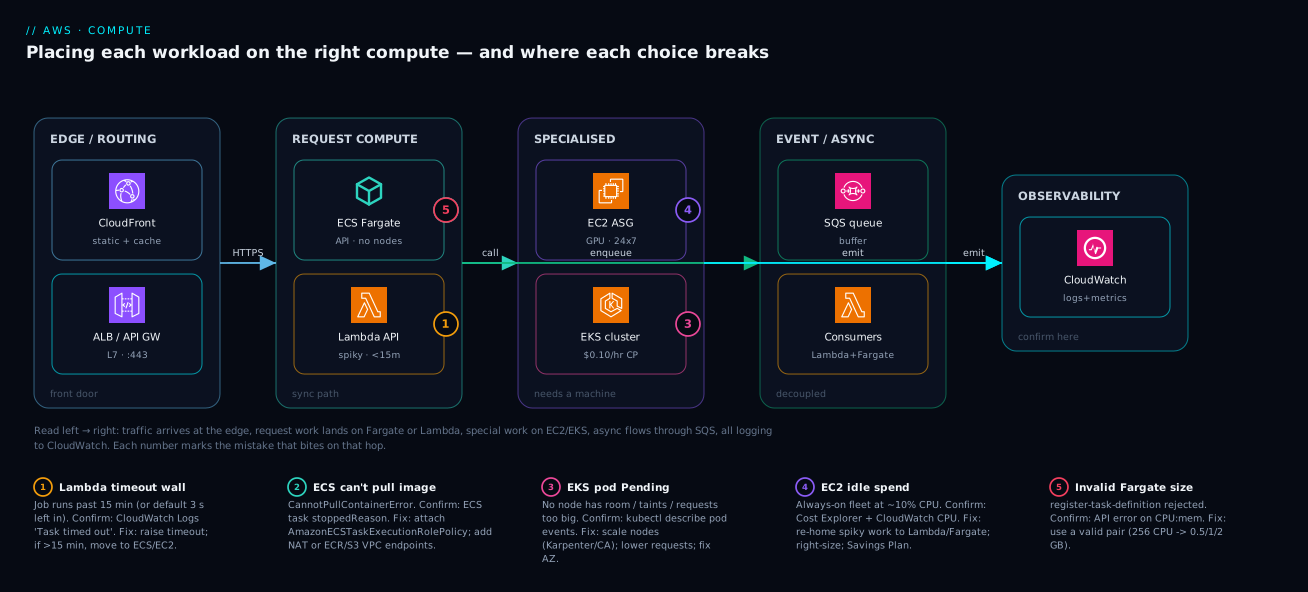
The diagram below traces a single product across all the compute homes it might legitimately use — not “pick one” but “place each workload on the service whose billing and operational model fits its lifecycle.” Follow it left to right as the request and event path. Traffic enters through the edge and routing zone (CloudFront for static/cache, an ALB or API Gateway as the front door). The synchronous, request-shaped work lands in the request compute zone: a containerised API on ECS Fargate (no nodes to run) for the steady microservice, and a thin Lambda behind API Gateway for the spiky, event-shaped endpoints. Heavier or special work sits in the specialised compute zone: an EC2 Auto Scaling fleet for the GPU/Windows/licensed workload that needs a real machine, and an EKS cluster for the platform team that already lives in Kubernetes. Asynchronous work flows through the event & async zone — an SQS queue and EventBridge decoupling producers from a fleet of Lambda consumers and Fargate workers — and everything emits logs and metrics to the observability zone (CloudWatch), which is where every failure below is confirmed.
The numbered badges mark the five places a compute choice most often goes wrong: a Lambda hitting its 15-minute wall, an ECS task that can’t pull its image, an EKS pod stuck Pending with no node, an EC2 fleet bleeding money while idle, and a Fargate task rejected for an invalid CPU:memory pair. The legend narrates each as symptom · how to confirm · fix. Read the picture as the map: arrival path across the top, the compute menu in the middle tiers, and the diagnostic pins on the exact hop where each mistake bites.
Real-world scenario
FreightLink, a logistics SaaS in Pune, ran everything on EC2 — eighteen m5.large and c5.xlarge instances across two AZs, hand-rolled with Ansible, patched on a monthly maintenance window that nobody enjoyed. Their AWS bill was ₹6.8 lakh/month and climbing, and a quarterly review found the embarrassing truth: average fleet CPU was 14%. They were paying for a 24×7 fleet sized for a peak that lasted ninety minutes a day, and the on-call rotation spent most of its energy on OS patching and capacity guesswork rather than the product.
The platform lead ran the workloads through exactly the model in this article — match the lifecycle to the meter — and re-homed them one class at a time. The shipment-label generator, a CPU job that ran for ~40 seconds whenever a label was requested (a few thousand times a day, in bursts), was the worst fit for an always-on instance: it moved to Lambda at 1,024 MB with arm64, triggered by SQS. It now costs about ₹4,000/month and scales to zero between bursts — down from a dedicated c5.xlarge running flat-out 24×7. The customer-facing API and tracking services, six stateless microservices with steady mid-day traffic, moved to ECS on Fargate behind an ALB, sized per service (0.5–1 vCPU each) with service autoscaling on ALB requests-per-target. Deploys that used to mean an Ansible run and a held breath became a terraform apply that rolled tasks with zero downtime, and the team stopped SSHing into anything.
Two workloads stayed close to the metal — correctly. The route-optimisation engine used a GPU and a licensed solver, so it stayed on EC2 (g5.xlarge, now on a 1-year Compute Savings Plan because its load was steady). And the data-science platform the analytics team had already built on Kubernetes stayed on EKS — re-platforming it to ECS would have thrown away their Helm charts and operators for no benefit; instead they moved its node group to Graviton and Spot for the batch pools. The one stumble: the first Lambda cut over with the default 3-second timeout inherited from a copy-pasted template, and large multi-page labels intermittently failed with Task timed out after 3.00 seconds. Confirmed in CloudWatch Logs in two minutes, fixed by raising the timeout to 60 s and the memory (which also raised vCPU, halving the runtime). Six weeks later the bill was ₹3.9 lakh/month — a 43% cut — fleet CPU on the remaining EC2 was a healthy 55%, and the monthly patching window was gone for everything except the two instance-based workloads that genuinely needed it. The lesson FreightLink internalised: EC2 wasn’t wrong, defaulting to it was.
Advantages and disadvantages
Each service is a bundle of trade-offs; the table makes them explicit, then the prose says when each side matters.
| Service | Advantages | Disadvantages |
|---|---|---|
| EC2 | Total control; any OS/kernel/GPU; lowest cost at sustained scale (Reserved/Spot); no cold start when always-on | You patch & scale everything; idle cost; operational toil; over-provisioning risk |
| Lambda | No servers; scales to zero and to thousands; pay-per-use; fastest path for event glue | Hard 15-min/10 GB walls; cold starts; cost trap at sustained load; harder local parity |
| ECS | Simpler than K8s; free control plane; deep AWS integration; Fargate or EC2 | AWS-only (less portable); smaller ecosystem than K8s |
| EKS | Full Kubernetes API; huge ecosystem; portable; battle-tested at scale | $0.10/hr/cluster; steep curve; you own upgrades/add-ons/CVEs |
| Fargate | No nodes to manage; per-task billing; right-size each task; fast to ship | Premium over packed EC2; fixed size combos; no DaemonSets/GPU |
Control matters when the workload has a hard requirement the managed options can’t satisfy — a kernel module, a GPU, BYOL licensing, persistent local NVMe, or sustained 24×7 load where Reserved EC2 is simply the cheapest place to run. There, EC2’s “disadvantages” are the price of admission and worth paying. Convenience matters when the workload is ordinary and your scarcest resource is engineering time: a stateless API, a queue consumer, an event handler. There, Lambda or Fargate’s premium buys back the weeks you’d otherwise spend patching and scaling — almost always a good trade for a lean team. Portability (EKS) matters when you genuinely run multi-cloud or have deep Kubernetes investment; it’s a real cost you should only pay for a real need, not a hypothetical one. The failure mode in every direction is the same: choosing the bundle for its headline feature while ignoring the column of costs that comes attached.
Hands-on lab
A free-tier-friendly walk-through that deploys the same trivial container as a Fargate task and the same logic as a Lambda, so you feel the two models side by side. Region ap-south-1. Tear everything down at the end.
1. Set up variables and a log group.
export AWS_REGION=ap-south-1 ACCT=$(aws sts get-caller-identity --query Account --output text)
aws logs create-log-group --log-group-name /lab/compute || true
2. Deploy a Lambda (the event/glue model). A tiny function that returns a greeting — stands in for “event-shaped work.”
cat > index.py <<'PY'
def handler(event, context):
    return {"statusCode": 200, "body": "hello from Lambda"}
PY
zip function.zip index.py

# Minimal execution role (trust + basic logging) — created once
aws iam create-role --role-name lab-lambda-exec \
  --assume-role-policy-document '{"Version":"2012-10-17","Statement":[{"Effect":"Allow","Principal":{"Service":"lambda.amazonaws.com"},"Action":"sts:AssumeRole"}]}'
aws iam attach-role-policy --role-name lab-lambda-exec \
  --policy-arn arn:aws:iam::aws:policy/service-role/AWSLambdaBasicExecutionRole
sleep 10  # let the role propagate

aws lambda create-function --function-name lab-hello \
  --runtime python3.12 --architectures arm64 --handler index.handler \
  --timeout 10 --memory-size 128 \
  --role arn:aws:iam::${ACCT}:role/lab-lambda-exec \
  --zip-file fileb://function.zip
3. Invoke it and watch it scale from zero.
aws lambda invoke --function-name lab-hello out.json && cat out.json
# Expected: {"statusCode": 200, "body": "hello from Lambda"}
4. Deploy the same idea as a Fargate task (the container model). Use a public amazonlinux image that prints and exits — stands in for “container-shaped work.”
aws ecs create-cluster --cluster-name lab-cluster

aws ecs register-task-definition --family lab-hello \
  --requires-compatibilities FARGATE --network-mode awsvpc \
  --cpu 256 --memory 512 \
  --execution-role-arn arn:aws:iam::${ACCT}:role/ecsTaskExecutionRole \
  --container-definitions '[{"name":"hello","image":"public.ecr.aws/amazonlinux/amazonlinux:2023",
    "command":["/bin/sh","-c","echo hello from Fargate"],"essential":true,
    "logConfiguration":{"logDriver":"awslogs","options":{
      "awslogs-group":"/lab/compute","awslogs-region":"ap-south-1","awslogs-stream-prefix":"hello"}}}]'

# Run one task in a public subnet (replace subnet/SG with yours)
aws ecs run-task --cluster lab-cluster --launch-type FARGATE \
  --task-definition lab-hello \
  --network-configuration 'awsvpcConfiguration={subnets=[subnet-xxxx],securityGroups=[sg-xxxx],assignPublicIp=ENABLED}'
5. Confirm the Fargate task ran by reading its log stream in CloudWatch (/lab/compute), where you’ll see hello from Fargate. Notice the difference you just felt: the Lambda returned in milliseconds with nothing to provision; the Fargate task took tens of seconds to pull and start — that’s the cold-start tax of the container path, and the per-task isolation you pay for.
6. Teardown — leave nothing billing.
aws lambda delete-function --function-name lab-hello
aws ecs delete-cluster --cluster lab-cluster
aws logs delete-log-group --log-group-name /lab/compute
aws iam detach-role-policy --role-name lab-lambda-exec \
  --policy-arn arn:aws:iam::aws:policy/service-role/AWSLambdaBasicExecutionRole
aws iam delete-role --role-name lab-lambda-exec
Common mistakes & troubleshooting
The real failure modes, each as symptom → root cause → how to confirm → fix. These are the ones that actually page teams.
| # | Symptom | Root cause | Confirm with | Fix |
|---|---|---|---|---|
| 1 | Task timed out after 900.00 seconds (or 3.00) |
Work exceeds Lambda’s timeout (or default 3 s left in place) | CloudWatch Logs for the function | Raise timeout (≤900 s); if it needs >15 min, move to ECS/EC2 |
| 2 | Lambda 429 TooManyRequestsException |
Hit the 1,000 concurrency limit | Lambda Throttles metric |
Raise account concurrency quota; add reserved concurrency; smooth with SQS |
| 3 | Lambda OOM / Runtime exited |
Function exceeded its memory | Logs show Runtime exited; memory near max |
Raise memory-size (also raises vCPU) |
| 4 | ECS task CannotPullContainerError |
Execution role lacks ECR perms, or no route to ECR | ECS task stoppedReason |
Attach AmazonECSTaskExecutionRolePolicy; add NAT or ECR/S3 VPC endpoints |
| 5 | ECS service flaps; tasks cycle | Health check fails (bad path / slow start) | Service events; target group health | Fix /healthz; raise health-check grace/start period |
| 6 | Fargate register-task-definition rejected |
Invalid CPU:memory combination | API error message | Use a valid pair (e.g. 256 CPU → 0.5/1/2 GB) |
| 7 | EKS pod stuck Pending |
No node has room / taints / requests too big | kubectl describe pod events |
Scale nodes (Karpenter/CA); lower requests; fix taints/AZ |
| 8 | EKS pod ImagePullBackOff |
Bad tag, node role lacks ECR, no route | kubectl describe pod |
Fix tag; node role ECR perms; NAT/endpoint |
| 9 | EKS pod AccessDenied calling AWS |
No IRSA / Pod Identity binding | App logs; kubectl describe sa |
Bind service account to an IAM role (IRSA) |
| 10 | EC2 fleet bill high, CPU ~10% | Over-provisioned / idle always-on fleet | Cost Explorer + CloudWatch CPU | Right-size; move spiky work to Lambda; Savings Plan the rest |
| 11 | t3 instance mysteriously slow |
CPU credits exhausted, throttled to baseline | CPUCreditBalance near zero |
Enable T3 Unlimited or move to m family |
| 12 | EKS cluster cost surprise | Forgotten $0.10/hr per non-prod cluster |
Billing per cluster | Consolidate clusters; namespaces over clusters where safe |
| 13 | Spot task/instance killed mid-job | Spot interruption (2-min notice) | Interruption notices / events | Make work idempotent/checkpointed; use capacity-optimized; mix On-Demand |
| 14 | Lambda cold starts hurt p99 | Scale-from-zero + heavy init (or JVM) | Duration init metric / X-Ray | Provisioned concurrency; SnapStart (Java/.NET); trim package |
The meta-mistake behind half of these is choosing the service by familiarity and then fighting its model: forcing long work into Lambda (1, 3), running spiky work on always-on EC2 (10), or adopting EKS without budgeting for its control-plane cost and upgrade toil (12). Re-home the workload and the symptom disappears.
Best practices
- Choose by lifecycle, not by habit. Event-driven & short → Lambda; containerised with no K8s need → ECS; already on Kubernetes → EKS; OS/GPU/licensing/sustained → EC2. Re-derive it per workload.
- Default the data plane to Fargate, move to EC2-backed only when bin-packing or Reserved/Spot pricing demonstrably wins. Don’t run a node fleet you don’t need.
- Prefer Graviton (
arm64) for Lambda, Fargate and EC2 wherever your dependencies support it — ~20% cheaper and often faster. Recompile native deps and test. - Buy commitment for steady spend. Compute Savings Plans cover EC2, Fargate and Lambda; cover your steady baseline and leave the spiky top On-Demand/Spot.
- Make fault-tolerant work run on Spot (batch, CI, stateless workers) with checkpointing/idempotency and a capacity-optimized allocation strategy.
- Always set health checks (ECS container health + ALB target health; EKS readiness/liveness probes). No health check means you ship crash-looping tasks to users.
- Set Lambda timeouts and memory deliberately — never ship the default 3 s; raise memory to raise vCPU for CPU-bound work (it can be cheaper by finishing faster).
- Cap blast radius with reserved concurrency on functions that hit a fragile downstream (a small RDS), so one function can’t exhaust connections.
- Keep one cluster, many namespaces on EKS where isolation allows — each extra cluster is another $0.10/hr plus another upgrade to run.
- Right-size on a schedule. Review fleet/utilisation quarterly; instances outlive their workloads and idle vCPUs are pure waste.
- Push everything to CloudWatch (and X-Ray for traces). The first move in every failure above is reading a log; make sure there is one.
Security notes
- Least-privilege roles per workload. Every compute service assumes an identity: EC2 → instance profile, Lambda → execution role, ECS → task role, EKS → IRSA/Pod Identity. Scope each to exactly the APIs that workload calls — never a wildcard
*. The task role (your app’s identity) is distinct from the execution role (pull image / write logs); don’t conflate them. - Run compute in private subnets. API/worker tasks, functions touching VPC resources, and nodes belong in private subnets with egress via NAT or, better, VPC endpoints (for ECR, S3, Secrets Manager, CloudWatch) so traffic to AWS APIs never leaves the AWS backbone — which also fixes the most common
CannotPullContainerError/ResourceInitializationError. - Inject secrets, never bake them. Pull from Secrets Manager or SSM Parameter Store at runtime (ECS
secrets, Lambda env from Secrets, EKS External Secrets) — never put credentials in an AMI, image layer or environment file in source control. - Patch what you own. AWS patches the Lambda runtime and the Fargate host; you patch EC2 AMIs and EKS/ECS-EC2 nodes. Automate AMI rebuilds and node rotation, and track EKS add-on and Kubernetes-version CVEs — an unpatched node is your exposure, not AWS’s.
- Encrypt at rest and in transit. EBS volumes and ephemeral storage encrypted with KMS; TLS on every front door (ALB/API Gateway); mTLS inside the mesh where the threat model warrants it.
- Lock down the EKS API. Make the control-plane endpoint private (or tightly IP-restricted), use RBAC and IAM together, and disable anonymous access; the Kubernetes API is a high-value target.
- Isolate Spot/preemptible blast radius. Don’t run security-sensitive, hard-to-checkpoint work on Spot where a 2-minute eviction could interrupt a partial sensitive operation.
Cost & sizing
The bill is driven by what you pay per unit times how much you run idle. The levers that move it most, ordered by impact:
| Lever | Typical saving | Applies to | How |
|---|---|---|---|
| Stop paying for idle | Up to ~85% on the workload | EC2 → Lambda/Fargate | Move spiky/intermittent work off always-on instances |
| Savings Plans / Reserved | up to ~72% | EC2, Fargate, Lambda | Commit 1–3 yr to your steady baseline |
| Spot | up to ~90% | EC2, Fargate, EKS nodes | Fault-tolerant/stateless workloads |
Graviton (arm64) |
~20% | EC2, Lambda, Fargate | Recompile + test on ARM |
| Right-size | 10–40% | All | Match instance/task/memory to real usage |
| Lambda memory tuning | varies (can cut cost) | Lambda | More memory → more vCPU → shorter run |
| Consolidate EKS clusters | $73/mo each | EKS | Namespaces over clusters where safe |
Rough figures (ap-south-1 / Mumbai, On-Demand, indicative — always check the calculator):
| Compute unit | Indicative price | Notes |
|---|---|---|
t3.medium (2 vCPU/4 GB) |
~$0.0448/hr (~₹2,700/mo if 24×7) | Burstable; throttles if always busy |
m7g.large (2 vCPU/8 GB) |
~$0.0856/hr (~₹5,200/mo) | Graviton general purpose |
c7g.xlarge (4 vCPU/8 GB) |
~$0.145/hr | Compute-optimised Graviton |
| Lambda | ~$0.20 / 1M requests + ~$0.0000166667/GB-s | arm64 ~20% less; free tier 1M req + 400k GB-s/mo |
| Fargate | ~$0.04048/vCPU-hr + ~$0.004445/GB-hr | Per-second; Fargate Spot ~70% off |
| EKS control plane | $0.10/hr (~$73/mo) per cluster | Fixed, on top of the data plane |
| App Runner | per-second active + provisioned floor | Managed HTTP container |
Free-tier anchors worth knowing: EC2 750 hours/month of t2.micro/t3.micro for 12 months; Lambda a perpetual 1M requests + 400,000 GB-seconds/month; EKS has no free tier — the $0.10/hr starts immediately, which is exactly why idle non-prod clusters quietly add up. Size by starting small and scaling on a real metric: for EC2/ECS, pick the smallest type that holds your p95 with headroom and let autoscaling handle peaks; for Lambda, set memory by profiling (the cheapest run is often not the smallest memory, because higher memory finishes faster).
Interview & exam questions
1. When would you choose Lambda over ECS Fargate for an HTTP API? When traffic is spiky or low-average and each request is short (well under 15 minutes), so scaling to zero between bursts saves money and you want zero infrastructure to operate. Choose Fargate when the service is steady, needs a long-lived process, has heavy/large dependencies, or you want consistent low latency without cold-start management. (AWS SAA-C03.)
2. What are Lambda’s hard limits, and which is most often hit first?
15-minute max timeout, 10 GB max memory, 10 GB ephemeral /tmp, 6 MB synchronous payload, 250 MB unzipped package (10 GB as a container image), and 1,000 default concurrency per region. In practice the timeout and concurrency limits bite first — long jobs silently fail at 15 minutes, and bursty workloads throttle at 1,000.
3. ECS or EKS for a five-service startup with a three-person platform team? ECS. EKS adds a $0.10/hr-per-cluster cost and, more importantly, the full Kubernetes operational surface — version upgrades, add-on CVEs, CNI/IRSA debugging — which a three-person team servicing five services can’t justify. Choose EKS only if they already have deep Kubernetes investment or a hard portability requirement.
4. Explain the difference between an ECS execution role and a task role. The execution role is used by the ECS agent/Fargate to pull the container image from ECR and write logs to CloudWatch. The task role is the identity your application code assumes to call AWS APIs (S3, DynamoDB, etc.). They’re separate so you can least-privilege the app independently of the platform’s pull/log permissions.
5. How do EC2 purchase models change cost, and when is Spot appropriate? On-Demand is the flexible baseline; Reserved Instances and Savings Plans discount up to ~72% for a 1–3 year commitment to steady usage; Spot discounts up to ~90% for spare capacity that can be reclaimed with a 2-minute notice. Spot suits fault-tolerant, stateless, checkpointed work (batch, CI, stateless workers) — never a stateful single instance that can’t tolerate eviction.
6. What is a cold start and which services pay it? The latency to initialise fresh capacity when a request arrives with nothing warm — runtime init, image pull, connection priming. Lambda (from zero or beyond warm concurrency), Fargate tasks (pull + start), and autoscaler-provisioned EC2/EKS nodes all pay it; an always-on EC2 instance does not. Mitigate with provisioned concurrency, SnapStart, smaller packages, or keeping warm capacity.
7. Fargate vs EC2 launch type for ECS — what decides it? Fargate removes node management and bills per task — best for variable load and lean teams. EC2-backed wins when you can bin-pack a node tightly (≥~70% utilisation), need GPU/special hardware, or want Reserved/Spot EC2 pricing at scale. They’re the data-plane choice; the orchestrator (ECS) is unchanged either way.
8. Why might raising a Lambda’s memory reduce its cost? Memory and vCPU scale together — more memory means more CPU, so a CPU-bound function finishes faster. Because you’re billed per GB-second, a function that runs in half the time at double the memory can cost the same or less, while being far faster. Profile across memory sizes to find the cost/latency sweet spot.
9. A pod is stuck Pending on EKS. Walk through diagnosis.
kubectl describe pod and read the events: common causes are no node with enough free CPU/memory (resource requests too high or cluster at capacity), taints with no matching toleration, or an AZ/volume affinity mismatch. Fix by scaling the data plane (Cluster Autoscaler/Karpenter), lowering requests, adding tolerations, or correcting AZ placement.
10. What does the EKS control-plane charge buy you, and how do you avoid wasting it? $0.10/hr per cluster pays for a managed, 3-AZ, highly-available, AWS-patched Kubernetes control plane (API server + etcd). Avoid waste by consolidating environments into fewer clusters (namespaces and RBAC for isolation) instead of spinning up a cluster per team/env that then sits mostly idle.
11. Which compute service for a 4-hour nightly ETL batch job? Not Lambda (15-minute wall). A Batch-managed or scheduled ECS task (Fargate for simplicity, EC2/Spot for cost) running the container to completion, or an EC2 Spot fleet if it’s large and checkpointable. The job’s >15-minute duration disqualifies functions outright.
12. How do Savings Plans differ from Reserved Instances? Reserved Instances commit to a specific instance family (Standard) or a swappable set (Convertible) in a region. Compute Savings Plans commit to a dollars-per-hour spend and apply flexibly across instance family, size, region, OS and across EC2, Fargate and Lambda — more flexible, slightly lower max discount than an exact-match Standard RI.
Quick check
- A job runs for 18 minutes per execution. Can it run on Lambda? Why or why not?
- You have six stateless microservices, a lean team, and no Kubernetes experience. ECS or EKS — and on what data plane?
- Name two EC2 purchase models that discount steady 24×7 usage and one that suits fault-tolerant batch.
- What’s the difference between an ECS execution role and a task role?
- Your EC2 fleet’s average CPU is 12% and the bill is high. What’s the likely problem and the first fix?
Answers
- No. Lambda’s hard maximum timeout is 15 minutes (900 s); an 18-minute job will be killed with
Task timed out. Run it as an ECS task (Fargate or EC2) or on EC2/Batch where there’s no duration wall. - ECS on Fargate. ECS avoids the Kubernetes operational surface and the $0.10/hr-per-cluster cost a lean, non-K8s team can’t justify; Fargate removes node management so they ship without running a fleet.
- Steady: Reserved Instances and Savings Plans (up to ~72%). Fault-tolerant batch: Spot (up to ~90%, with 2-minute interruption).
- The execution role lets the platform pull the image from ECR and write logs; the task role is the identity your application assumes to call AWS APIs. Keep them separate and least-privilege each.
- The fleet is over-provisioned / idle — paying for always-on capacity it doesn’t use. First fix: re-home spiky/intermittent work to Lambda or Fargate (scale to zero), right-size what remains, and cover the steady baseline with a Savings Plan.
Glossary
- Instance — a virtual machine rented from EC2; the maximum-control compute unit.
- Instance family — an EC2 class (
t,m,c,r,g, …) tuned to a CPU:memory:accelerator ratio. - AMI (Amazon Machine Image) — the disk image an EC2 instance boots from; you own its patch level.
- Auto Scaling Group (ASG) — keeps a target number of EC2 instances running and scales them on a policy.
- CPU credits — the burst budget for
t-family instances; exhaust them and you throttle to a baseline (unless Unlimited). - Lambda — function-as-a-service; runs your handler per event, scaling automatically, billed per GB-second + request.
- Cold start — the latency to initialise fresh capacity (runtime/image/connection) when nothing is warm.
- Concurrency — simultaneous executions (Lambda) or tasks (ECS); Lambda’s default account limit is 1,000.
- Provisioned concurrency — pre-warmed Lambda execution environments that eliminate cold start for N invocations.
- Task (ECS) — a running group of one or more containers; the ECS unit of work.
- Task definition — the blueprint declaring a task’s containers, CPU/memory, roles, ports and health check.
- Service (ECS) — keeps a desired number of tasks running and integrates with a load balancer.
- Launch type — whether ECS tasks run on EC2 nodes you own or on Fargate (serverless).
- Pod (EKS) — the smallest deployable Kubernetes unit; one or more containers scheduled together.
- Node group (EKS) — a managed set of EC2 nodes that host pods; the data plane you may own.
- Control plane — the orchestrator’s API/scheduler; free on ECS, $0.10/hr per cluster on EKS.
- Fargate — the serverless data plane for ECS and EKS; per-second vCPU/GB billing, no nodes to manage.
- Execution role — the IAM identity the platform uses to pull images and write logs.
- Task role / IRSA — the IAM identity the application assumes to call AWS APIs (IRSA = IAM Roles for Service Accounts on EKS).
- Savings Plan — a commitment to $/hour spend that discounts EC2, Fargate and Lambda flexibly.
- Spot — spare-capacity pricing up to ~90% off, reclaimable with a 2-minute notice.
- Graviton (
arm64) — AWS’s ARM processors; ~20% cheaper per vCPU, often faster, across EC2/Lambda/Fargate.
Next steps
- Go one level deeper on containers with ECS vs EKS vs Fargate: choosing your container path.
- Master the serverless integration shapes in AWS Lambda event-driven patterns.
- Put a front door on your compute with ALB vs NLB vs API Gateway compared.
- Land it in the right network and blast radius via VPC, subnets and security groups and Regions and Availability Zones explained.
- Connect it to state with RDS vs DynamoDB vs Aurora compared and the identity it assumes via AWS Organizations and IAM foundations.