You have an app that runs on your laptop — a Node API, a Python service, a .NET site; it does not matter for this article. Someone has now said “let’s put it on Kubernetes,” and you are staring at a wall of unfamiliar nouns: image, registry, cluster, node pool, Deployment, Service, Pod. The distance from a working docker run on your machine to a Pod serving public traffic on Azure Kubernetes Service (AKS) feels enormous. It is not. It is four moves — build an image, push it to a registry, let the cluster pull it, run and expose it — and this article walks every one end to end, three ways: in the Azure portal, with the az CLI, and as Bicep you can commit.
The pieces are simpler than the jargon. Docker turns your app and its dependencies into one immutable image. Azure Container Registry (ACR) is the private warehouse where that image lives. AKS is a managed Kubernetes cluster: Microsoft runs the brittle, security-critical control plane, and you get a pool of Azure VMs (the nodes) where your containers execute. To run your app you write a short manifest — a YAML file describing a Deployment (how many copies to run) and a Service (how the outside world reaches them) — and hand it to the cluster with kubectl apply. Kubernetes pulls the image from ACR, starts your Pods, and wires up a public IP. That is the whole journey.
By the end you will have done it for real: a tiny container built for the correct CPU architecture, stored in your own ACR, pulled by AKS using a managed identity (no passwords in YAML), running as two replicas behind a LoadBalancer Service, reachable at a public EXTERNAL-IP. You will also know the three first-timer traps that eat an afternoon — an arm64 image built on an Apple-silicon Mac shipped to amd64 nodes, an ImagePullBackOff because the cluster was never granted pull rights, and a Service stuck at <pending> — and exactly how to spot and fix each. This is a getting-started lab, not an exhaustive Kubernetes course: zero to a running app you understand, with the right habits baked in.
What problem this solves
The painful gap is not running a container — docker run does that in one line. The gap is everything between “it works on my machine” and “it runs reliably somewhere my team and users can reach it.” On your laptop the image is local, the network is loopback, and you are the only user. In production the image has to live somewhere private and trusted, something has to pull it onto real compute, that compute has to be patched and kept alive, and traffic has to find it through a real load balancer with a real IP. Doing all of that by hand — provisioning VMs, installing a runtime, copying tarballs, hand-rolling a load balancer — is the slow, fragile path most teams start on and quickly regret.
AKS plus ACR collapses that work into a managed pipeline. The registry gives you a private, access-controlled home for images. The cluster gives you self-healing compute: if a Pod dies, Kubernetes restarts it; ask for two replicas and it keeps two running; a LoadBalancer Service provisions an Azure public IP for you. What breaks without this knowledge is the first hour. Newcomers ship an image their nodes cannot execute, watch Pods crash-loop with a cryptic exec format error, or see kubectl get svc sit at EXTERNAL-IP: <pending> and assume the cluster is broken when it is a quota or a missing pull grant. None of these are exotic — they are the standard first-deploy stumbles, and every one has a precise confirm-and-fix.
Who hits this: anyone moving past a single web app or a handful of Azure Container Instances onto Kubernetes — first-time AKS users especially. If you want the cluster’s internals, the companion piece AKS Architecture Explained: Managed Control Plane, Node Pools, and the Azure Integrations That Make It Tick is the mental model behind everything here. This article is the hands-on counterpart: the actual commands, in order, with the output you should see at each step.
Here is the entire journey in one table — five moves, the tool for each, and what you have once it succeeds:
| # | Move | Local / cloud | Primary tool | You end up with |
|---|---|---|---|---|
| 1 | Containerize the app | Local | Dockerfile + docker build |
A runnable image for linux/amd64 |
| 2 | Push to a registry | Local → cloud | ACR + docker push (or az acr build) |
The image stored privately in ACR |
| 3 | Grant the cluster pull rights | Cloud | az aks update --attach-acr |
Keyless AcrPull for the cluster identity |
| 4 | Deploy onto the cluster | Cloud | kubectl apply (Deployment) |
Pods running your container |
| 5 | Expose it to users | Cloud | kubectl apply (Service) |
A public EXTERNAL-IP serving traffic |
Learning objectives
By the end of this article you can:
- Write a small, production-shaped multi-stage Dockerfile and build it for the
linux/amd64architecture AKS nodes run, even from an Apple-silicon Mac. - Create an Azure Container Registry, tag an image with an immutable tag plus digest, and push it — by
docker pushor by building in the cloud withaz acr build. - Provision a minimal AKS cluster, get cluster credentials, and run
kubectlagainst it. - Attach ACR to AKS with
--attach-acrso the cluster’s kubelet managed identity pulls images with theAcrPullrole — no registry passwords in any manifest. - Write a Kubernetes manifest with a Deployment (replicas, resource requests/limits, readiness and liveness probes) and a
LoadBalancerService, and apply it withkubectl. - Validate the deployment end to end: Pods
Running, a publicEXTERNAL-IPassigned, the app answering HTTP — and readkubectl describe/kubectl logswhen it does not. - Diagnose and fix the three classic first-deploy failures: wrong-architecture
CrashLoopBackOff,ImagePullBackOff, and a<pending>external IP. - Tear the whole thing down cleanly so the lab costs you nothing past the hour.
Prerequisites & where this fits
You need an Azure subscription with permission to create resource groups, an ACR, and an AKS cluster (Owner or Contributor on a resource group is plenty for the lab). Install three tools locally, or skip the local installs and use Azure Cloud Shell, which ships with all of them: the Azure CLI (az), kubectl (install with az aks install-cli), and Docker if you want to build images on your own machine. You should be comfortable in a terminal, know what an HTTP server is, and have seen YAML before. No prior Kubernetes experience is assumed — every object is introduced as it appears.
Where this sits: it is the first practical step in the container track. Conceptually it sits on top of two things — knowing why you might choose Kubernetes over simpler compute, covered in Azure App Service vs Container Apps vs AKS: Choose the Right Compute, and knowing what the cluster is made of, covered in the architecture article linked above. It feeds forward into harder topics: securing the registry properly (Securing Azure Container Registry: Private Endpoints, ACR Tasks, Content Trust, and Geo-Replication), and watching the workload in production (Azure Monitor and Application Insights: Full-Stack Observability). For this lab you only need the four moves.
A quick map of the tools you will touch and what each one is responsible for, so the command names stop blurring together:
| Tool | What it is | What you use it for here | Runs where |
|---|---|---|---|
| Docker | Builds and runs container images | docker build, docker tag, docker push, local test |
Your machine |
az (Azure CLI) |
Drives Azure resources | Create RG, ACR, AKS; attach ACR; cloud builds | Local or Cloud Shell |
| ACR | Private image registry | Stores and serves your image | Azure |
| AKS | Managed Kubernetes | Runs your Pods on Azure VM nodes | Azure |
kubectl |
Talks to the Kubernetes API | Apply manifests, inspect Pods/Services | Local or Cloud Shell |
| Bicep | Azure IaC language | Declares RG/ACR/AKS as reviewable code | Local or Cloud Shell |
Core concepts
Five ideas make every command below obvious.
An image is your app frozen into a portable layer-cake. A container image is a read-only, layered filesystem snapshot of your app, its runtime and dependencies, built from a Dockerfile. It is immutable and content-addressed: the same build produces the same digest (a sha256:... hash). A running instance is a container. The catch in its portability — an image is built for a specific CPU architecture (amd64/x86-64 or arm64). AKS node pools are overwhelmingly linux/amd64, so an image built on an Apple-silicon Mac (arm64) without specifying the platform will not run there. Remember that one fact and you avoid the most common first failure.
A registry is the handoff point between build and run. The registry (ACR) is where you push an image after building and where the cluster pulls it before running. An image is named <registry>.azurecr.io/<repository>:<tag>, e.g. acrkvlab.azurecr.io/hello-aks:v1. The tag is a human label; the digest is the cryptographic identity. Tags are mutable (you can move :latest onto a new image), which is exactly why you deploy by an immutable tag or digest — so a rollback actually rolls back.
A cluster is a managed control plane plus your worker nodes. AKS gives you a Kubernetes control plane (the API server and friends) that Microsoft operates, and one or more node pools — Azure VMs you own and pay for, where containers run. You talk to the control plane with kubectl after fetching credentials via az aks get-credentials. You never SSH into the control plane and rarely into nodes.
You describe desired state; Kubernetes makes it true. In production you do not start containers imperatively. You write a manifest declaring what you want, and the cluster’s controllers continuously reconcile reality to match. The two objects you need today: a Deployment (“run N replicas of this image with these probes and limits, and keep them running”) and a Service (“give these Pods a stable address” — a ClusterIP for internal-only, or a LoadBalancer that provisions a public Azure IP). A Pod is the smallest unit Kubernetes schedules — usually one container plus its environment — and the Deployment manages a set of identical Pods.
The cluster needs permission to pull from your private registry. ACR is private by default. The cluster’s kubelet (the per-node agent that pulls images and runs Pods) authenticates to ACR with a managed identity. The clean, keyless way to grant this is az aks update --attach-acr, which assigns the AcrPull RBAC role on the registry to the kubelet identity. Skip it and every Pod fails with ImagePullBackOff / 401 unauthorized — the second classic first-deploy failure.
The vocabulary in one table
Pin down every moving part before the steps. The glossary repeats these for lookup; this table is the model side by side:
| Term | One-line definition | Where it lives | Why it matters here |
|---|---|---|---|
| Image | Immutable app + runtime snapshot | Built locally / in ACR | Wrong arch → won’t run on nodes |
| Dockerfile | Recipe to build an image | Your repo | Multi-stage = small, safe images |
| Digest | sha256 identity of an image |
ACR metadata | Deploy by digest = reproducible |
| Tag | Human label on an image | repo:tag in ACR |
Use immutable tags, not :latest |
| ACR | Private container registry | Your subscription | Stores/serves the image |
| AKS | Managed Kubernetes cluster | Your subscription | Runs the Pods |
| Node pool | VMs that run containers | Your VNet/subscription | Your compute + bill |
| Pod | Smallest schedulable unit | On a node | The thing that actually runs |
| Deployment | Manages N identical Pods | Cluster (API state) | Replicas, rollout, self-heal |
| Service | Stable address for Pods | Cluster (API state) | LoadBalancer → public IP |
| kubelet identity | Node agent’s managed identity | The cluster | Needs AcrPull to pull images |
Step 0 — the picture and the names you’ll use
Before any commands, fix two things: a mental picture of the flow, and a consistent set of resource names so every command in this article lines up.
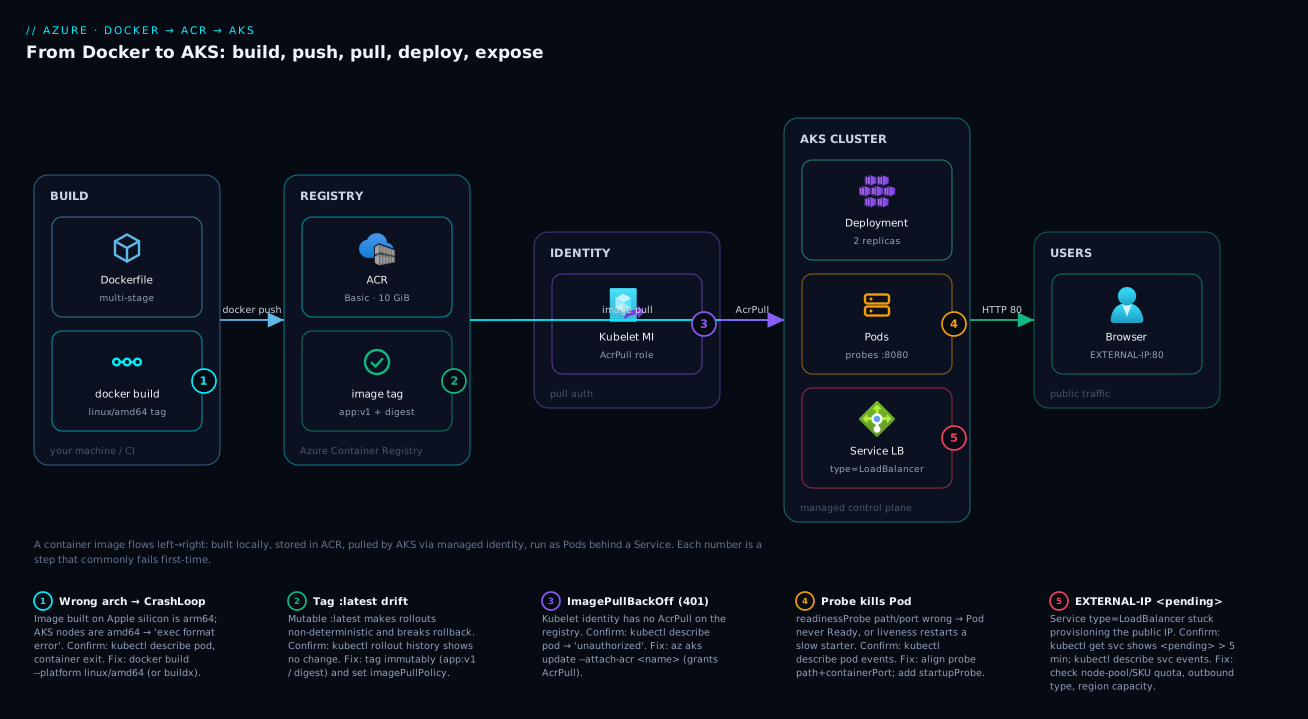
The flow is strictly left to right and you will physically watch each arrow happen: you build an image, push it to ACR, the cluster’s identity is granted AcrPull, AKS pulls the image and starts Pods, and a Service exposes those Pods on a public IP. Three numbered hops in that chain are where first deploys break — the build (wrong architecture), the pull (no permission), and the expose (IP stuck pending). Keep that map in your head; the “Architecture at a glance” section draws it.
Set these names once. ACR names are globally unique, 5–50 alphanumeric characters, lowercase, no hyphens, so pick something likely free and reuse it everywhere:
| Variable | Example value | Rule / note |
|---|---|---|
| Resource group | rg-aks-lab |
Lowercase, your choice |
| Region | centralindia |
Pick one near you with AKS + VM quota |
| ACR name | acrkvlab20260624 |
5–50 chars, lowercase alphanumeric, globally unique |
| AKS cluster | aks-lab |
1–63 chars |
| Image repo:tag | hello-aks:v1 |
Immutable tag, never :latest in prod |
| Node VM size | Standard_B2s |
2 vCPU / 4 GiB — cheap, fine for the lab |
| Node count | 2 |
Two nodes so a Pod failure isn’t total |
Export them in your shell so you can paste the rest verbatim:
RG=rg-aks-lab
LOC=centralindia
ACR=acrkvlab20260624          # <-- change to something globally unique
AKS=aks-lab
IMAGE=hello-aks
TAG=v1
Step 1 — containerize the app (Dockerfile + local build)
You need an app and a Dockerfile. If you do not have one handy, use this tiny Node HTTP server — it is intentionally trivial so the lab is about the pipeline, not the code. Create app.js:
const http = require('http');
const port = process.env.PORT || 8080;
http.createServer((req, res) => {
  if (req.url === '/healthz') { res.writeHead(200); return res.end('ok'); }
  res.writeHead(200, { 'Content-Type': 'text/plain' });
  res.end(`Hello from AKS — host ${require('os').hostname()}\n`);
}).listen(port, '0.0.0.0', () => console.log(`listening on ${port}`));
Note two production habits already: it listens on 0.0.0.0 (not 127.0.0.1, which would be unreachable from outside the container) on a port from PORT, and it exposes a cheap /healthz path for probes. Now the Dockerfile — a multi-stage build keeps the final image small and free of build tooling:
# ---- build stage (only if you have a build step; kept minimal here) ----
FROM node:20-alpine AS build
WORKDIR /app
COPY package*.json ./
RUN npm ci --omit=dev || true
COPY . .

# ---- runtime stage: small, no build tools, non-root ----
FROM node:20-alpine
WORKDIR /app
COPY --from=build /app .
ENV PORT=8080
EXPOSE 8080
USER node
CMD ["node", "app.js"]
Build it for the architecture AKS runs — this is the single most important flag in the whole article. AKS node pools are linux/amd64; if you are on an Apple-silicon Mac, omitting --platform produces an arm64 image that will CrashLoopBackOff on the cluster with exec format error:
# ALWAYS pin the platform. On Apple silicon this is the line that saves your afternoon.
docker build --platform linux/amd64 -t $IMAGE:$TAG .

# Smoke-test it locally before it ever leaves your machine
docker run --rm -p 8080:8080 $IMAGE:$TAG &
curl -s localhost:8080            # -> Hello from AKS — host <id>
curl -s localhost:8080/healthz    # -> ok
kill %1
Expected output: the two curl calls return the greeting and ok. If they do, your image is correct and runnable. The Dockerfile choices that matter for a first image, and why:
| Choice | What it does | Why it matters | Common mistake |
|---|---|---|---|
Multi-stage (AS build) |
Separate build vs runtime layers | Final image excludes compilers/dev deps | Single stage ships a 1 GB+ image |
Small base (alpine/slim) |
Tiny OS layer | Faster pulls, smaller attack surface | FROM ubuntu with the full toolchain |
EXPOSE + PORT env |
Documents/parameterizes the port | Probe and Service align to it | Hardcoding a port the manifest doesn’t match |
USER node (non-root) |
Drops root in the container | Least privilege; some clusters enforce it | Running as root by default |
Bind 0.0.0.0 |
Listen on all interfaces | Reachable from outside the container | Binding 127.0.0.1 → connection refused |
--platform linux/amd64 |
Targets node CPU arch | Runs on amd64 AKS nodes | arm64 image → exec format error |
If you do not have Docker locally at all, you can skip this entire build and let ACR build it in the cloud — covered in Step 3. Either path gets the same image into the registry.
Step 2 — create the registry and the cluster
2a — Resource group and ACR
az group create --name $RG --location $LOC

# Basic SKU is fine for a lab: 10 GiB included, no geo-replication
az acr create --resource-group $RG --name $ACR --sku Basic --location $LOC
Expected output: JSON with "provisioningState": "Succeeded" and a loginServer of <acr>.azurecr.io. If az acr create errors with the name already taken, your ACR name is not globally unique — change $ACR and retry. The three ACR SKUs, so you know what Basic gives up:
| SKU | Included storage | Throughput / replicas | Private endpoints | Typical use |
|---|---|---|---|---|
| Basic | 10 GiB | Lowest; no geo-replication | No | Dev / labs (this lab) |
| Standard | 100 GiB | Higher; no geo-replication | No | Most production single-region |
| Premium | 500 GiB | Highest; geo-replication, content trust | Yes | Multi-region, private, compliance |
2b — The AKS cluster
This single command creates a two-node cluster, generates an SSH key, and — critically — uses --attach-acr to grant the cluster’s kubelet identity AcrPull on your registry in the same step, so you never deal with registry passwords:
az aks create \
  --resource-group $RG \
  --name $AKS \
  --node-count 2 \
  --node-vm-size Standard_B2s \
  --generate-ssh-keys \
  --attach-acr $ACR \
  --enable-managed-identity
Expected: this takes a few minutes and returns a large JSON blob ending in "provisioningState": "Succeeded". The --attach-acr flag is doing the keyless-pull wiring; if you forget it here you can run it later (Step 4 covers exactly that). Fetch credentials so kubectl targets this cluster, then confirm the nodes are Ready:
az aks get-credentials --resource-group $RG --name $AKS

kubectl get nodes
# NAME                                STATUS   ROLES   AGE   VERSION
# aks-nodepool1-xxxxxxxx-vmss000000   Ready    <none>  3m    v1.30.x
# aks-nodepool1-xxxxxxxx-vmss000001   Ready    <none>  3m    v1.30.x
Two nodes, both Ready. If kubectl get nodes hangs or errors, your kubeconfig is not pointed at the cluster — re-run az aks get-credentials (add --overwrite-existing if you have a stale entry).
Portal alternative for Steps 2a–2b
If you prefer clicking, the portal path is straightforward. The exact panes and the equivalent CLI for each:
| Portal step | Where | What you set | CLI equivalent |
|---|---|---|---|
| Create registry | Create a resource → Container Registry | Name, RG, region, SKU = Basic | az acr create ... --sku Basic |
| Create cluster basics | Create a resource → Kubernetes service | Cluster name, region, node size/count | az aks create --node-count 2 ... |
| Attach ACR | AKS create wizard → Integrations tab | Select your ACR under “Container registry” | --attach-acr $ACR |
| Identity | AKS create wizard → Authentication | “System-assigned managed identity” | --enable-managed-identity |
| Connect locally | After deploy → Connect blade | Copy the get-credentials command |
az aks get-credentials ... |
The portal’s AKS create wizard has an Integrations tab with a “Container registry” dropdown — selecting your ACR there is exactly what --attach-acr does. Everything after this point (pushing the image, applying manifests) is identical regardless of how you created the resources.
Step 3 — push the image to ACR
You have two ways to get the image into ACR. Pick one.
Path A — push the image you already built locally. Log in to the registry (this configures the local Docker client), tag the image with the full registry path, and push:
az acr login --name $ACR

# Tag local image -> fully-qualified registry path, then push
LOGIN_SERVER=$(az acr show --name $ACR --query loginServer -o tsv)
docker tag $IMAGE:$TAG $LOGIN_SERVER/$IMAGE:$TAG
docker push $LOGIN_SERVER/$IMAGE:$TAG
Expected: docker push prints each layer and finishes with the image digest, e.g. v1: digest: sha256:9f8c... size: 1573.
Path B — let ACR build it in the cloud (no local Docker needed). az acr build uploads your source and Dockerfile and builds inside Azure — and you can force the architecture there too, sidestepping the Apple-silicon problem entirely:
az acr build --registry $ACR --image $IMAGE:$TAG --platform linux/amd64 .
Expected: a streamed build log ending in Run ID: ... was successful. This is the simplest path for newcomers because it removes Docker-on-laptop and architecture mismatches in one shot.
Either way, confirm the image is actually in the registry before you try to deploy it:
az acr repository show-tags --name $ACR --repository $IMAGE -o table
# Result
# -------
# v1
Seeing v1 listed is your proof the push succeeded. The two push paths compared:
Path A — docker push |
Path B — az acr build |
|
|---|---|---|
| Needs Docker locally | Yes | No |
| Where the build runs | Your machine | In Azure |
| Architecture control | docker build --platform |
--platform linux/amd64 |
| Best for | You already build locally | First-timers / CI / Apple silicon |
| Speed on slow uplinks | Slower (uploads layers) | Faster (uploads source only) |
Step 4 — make sure the cluster can pull (AcrPull)
If you passed --attach-acr in Step 2b, this is already done and you can skim — but verify it, because a missing grant is the number-one reason a first deploy shows ImagePullBackOff. The attachment assigns the AcrPull role to the cluster’s kubelet managed identity on the registry. To attach (or re-attach) it after the fact:
az aks update --resource-group $RG --name $AKS --attach-acr $ACR
Verify the role assignment exists. Grab the kubelet identity’s object ID and the registry’s resource ID, then list the assignment:
KUBELET_OID=$(az aks show -g $RG -n $AKS --query identityProfile.kubeletidentity.objectId -o tsv)
ACR_ID=$(az acr show -n $ACR --query id -o tsv)

az role assignment list --assignee $KUBELET_OID --scope $ACR_ID \
  --query "[].roleDefinitionName" -o tsv
# Expected: AcrPull
Expected output: AcrPull. If the list is empty, the grant is missing — run the az aks update --attach-acr line above and re-check. The pull-authentication options, and why --attach-acr is the right default:
| Method | How auth works | Secrets in cluster? | When to use |
|---|---|---|---|
--attach-acr (managed identity) |
Kubelet identity has AcrPull |
None | Default for AKS + ACR (this lab) |
imagePullSecrets (admin user) |
Registry username/password in a Secret | Yes (a long-lived credential) | Cross-tenant / non-AKS clusters |
| Service principal | SP credential on the cluster | Yes (a rotating secret) | Legacy / specific automation |
| Anonymous pull | No auth, public images | N/A | Public base images only, never your app |
Step 5 — deploy and expose (the manifest)
Now the Kubernetes part. One manifest describes both the Deployment (run two replicas of your image, with probes and resource bounds) and the Service (LoadBalancer, which provisions a public Azure IP and forwards port 80 → your container’s 8080). Save it as app.yaml — substitute your real login server and tag in the image: line:
apiVersion: apps/v1
kind: Deployment
metadata:
  name: hello-aks
  labels: { app: hello-aks }
spec:
  replicas: 2
  selector:
    matchLabels: { app: hello-aks }
  template:
    metadata:
      labels: { app: hello-aks }
    spec:
      containers:
        - name: hello-aks
          image: acrkvlab20260624.azurecr.io/hello-aks:v1   # <-- your login server / tag
          ports:
            - containerPort: 8080
          resources:
            requests: { cpu: "50m", memory: "64Mi" }
            limits:   { cpu: "250m", memory: "128Mi" }
          readinessProbe:
            httpGet: { path: /healthz, port: 8080 }
            initialDelaySeconds: 3
            periodSeconds: 5
          livenessProbe:
            httpGet: { path: /healthz, port: 8080 }
            initialDelaySeconds: 10
            periodSeconds: 10
---
apiVersion: v1
kind: Service
metadata:
  name: hello-aks
spec:
  type: LoadBalancer
  selector: { app: hello-aks }
  ports:
    - port: 80          # public port
      targetPort: 8080  # container port
Apply it and watch the objects come up:
kubectl apply -f app.yaml
# deployment.apps/hello-aks created
# service/hello-aks created

kubectl get pods -w
# hello-aks-7d9f...-abcde   0/1   ContainerCreating   0   5s
# hello-aks-7d9f...-abcde   1/1   Running             0   20s
# hello-aks-7d9f...-fghij   1/1   Running             0   22s   (Ctrl-C to stop watching)
Expected: two Pods transition ContainerCreating → Running and become 1/1 ready (the 1/1 means the readiness probe passed). The fields you set in that manifest and what each controls:
| Field | What it controls | This lab’s value | Effect if wrong |
|---|---|---|---|
replicas |
How many Pods run | 2 |
1 = no redundancy; a restart is downtime |
image |
Which image to pull | <acr>/hello-aks:v1 |
Wrong tag/registry → ImagePull* errors |
containerPort |
Port the app listens on | 8080 |
Mismatch with probe/Service → no traffic |
requests |
Guaranteed CPU/memory | 50m / 64Mi |
Too high → Pod stays Pending (unschedulable) |
limits |
Hard CPU/memory ceiling | 250m / 128Mi |
Too low memory → OOMKilled restarts |
readinessProbe |
“Can serve yet?” gate | /healthz:8080 |
Wrong path → Pod never Ready, no traffic |
livenessProbe |
“Still alive?” restart trigger | /healthz:8080 |
Too aggressive → restarts a slow starter |
Service type |
How it’s exposed | LoadBalancer |
ClusterIP = internal only, no public IP |
Now get the public IP. The LoadBalancer Service provisions an Azure public IP, which takes a minute or two:
kubectl get service hello-aks -w
# NAME        TYPE           CLUSTER-IP     EXTERNAL-IP     PORT(S)        AGE
# hello-aks   LoadBalancer   10.0.142.10    <pending>       80:31xxx/TCP   10s
# hello-aks   LoadBalancer   10.0.142.10    20.40.55.123    80:31xxx/TCP   90s   (Ctrl-C)
When EXTERNAL-IP flips from <pending> to a real address, hit it:
EXTERNAL_IP=$(kubectl get svc hello-aks -o jsonpath='{.status.loadBalancer.ingress[0].ip}')
curl -s http://$EXTERNAL_IP/
# Hello from AKS — host hello-aks-7d9f...-abcde
Expected: the greeting, served from one of your Pods, over the public internet. Run curl a few times and the hostname alternates between Pods — proof the Service is load-balancing across replicas. You have gone from a Dockerfile to a publicly reachable, self-healing app. Confirm self-healing for fun: kubectl delete pod <one-pod-name> and watch the Deployment recreate it within seconds via kubectl get pods -w.
Architecture at a glance
Read the diagram left to right and it is exactly the five moves you just performed. On the far left, BUILD is your machine (or CI): a multi-stage Dockerfile turns into an image via docker build, pinned to linux/amd64. That image is pushed into the REGISTRY zone — ACR on the Basic SKU — where it lives as hello-aks:v1 with an immutable tag and a sha256 digest. The IDENTITY zone is the quiet hero: the cluster’s kubelet managed identity holds the AcrPull role on the registry, which is what lets the next hop happen without a single password. In the AKS CLUSTER zone, a Deployment asks for two replicas; the kubelet pulls the image and starts Pods that pass their :8080 probes; a Service of type=LoadBalancer fronts them. Finally the USERS zone reaches the app at the public EXTERNAL-IP on port 80, which the Service maps to container port 8080.
The numbered badges mark the three-plus places a first deploy actually breaks, in the order you would hit them: a wrong-architecture image (badge 1) that crash-loops, a mutable :latest tag (badge 2) that makes rollbacks meaningless, a missing AcrPull grant (badge 3) that yields ImagePullBackOff, a misconfigured probe (badge 4) that keeps Pods from ever going Ready, and a LoadBalancer Service stuck at <pending> (badge 5). Each badge in the legend carries the symptom, the one command that confirms it, and the fix — the same map the troubleshooting section expands. Trace the arrows once and the entire pipeline, plus its failure points, is in your head.
Real-world scenario
Brightleaf Labs, a 12-person analytics startup in Pune, ran their customer-facing dashboard API as a single container on Azure Container Instances. It worked until it did not: ACI gave them no rolling deploys (every release was a hard stop-start with visible downtime), no self-healing (a crash meant a 3am manual restart), and no easy way to run two copies behind one address. Their new lead engineer, fresh off her AZ-204, was asked to move it to AKS in a sprint without disrupting the daily 9am usage spike.
She followed exactly this path. A multi-stage Dockerfile shrank their image from 1.1 GB (single-stage, full Node toolchain) to 180 MB. The first deploy from her MacBook Pro (M2) crash-looped instantly — kubectl describe pod showed exec format error: she had built an arm64 image for amd64 nodes. Two fixes landed at once — she switched the team to az acr build --platform linux/amd64 (the registry now builds in Azure, no laptop-architecture surprises) and pinned the platform in CI. The second deploy pulled cleanly because the cluster was created with --attach-acr; a colleague’s earlier attempt without it had hit ImagePullBackOff, fixed by the one-liner az aks update --attach-acr.
The third snag was the LoadBalancer Service sitting at EXTERNAL-IP: <pending> for eight minutes. kubectl describe svc surfaced a public-IP quota limit in their region; raising it cleared the issue within the hour. They shipped two replicas behind one IP, added /healthz readiness and liveness probes (so the dashboard never took traffic before it was ready, and a wedged Pod self-restarted), and set conservative CPU/memory requests so the scheduler placed Pods predictably on their two Standard_B2s nodes.
The outcome: rollouts became zero-downtime (kubectl rollout does a rolling replace), 3am restarts disappeared, and the 9am spike was absorbed by two replicas sharing load. Cost barely moved — two B2s nodes plus a Basic ACR ran well under their old over-provisioned ACI bill. The whole migration took two days, most of it spent learning the three failure modes above. Her runbook note: “AKS first-deploy failures are almost never the cluster. They are arch, AcrPull, or quota — confirm with kubectl describe pod / kubectl get svc before you touch anything else.”
Advantages and disadvantages
Moving a first app from “just a container” to AKS buys real capability and costs real complexity. The honest trade-off:
| Advantages | Disadvantages |
|---|---|
| Self-healing: crashed Pods restart automatically | A genuine learning curve (objects, YAML, kubectl) |
| Declarative rolling deploys, easy rollback | You own/patch the node pool VMs and their cost |
| Horizontal scale (more replicas / autoscaling) | More moving parts than App Service / Container Apps |
One LoadBalancer Service → managed public IP + HA |
Networking decisions (CIDRs, IP exhaustion) appear early |
| Keyless ACR pulls via managed identity | Misconfig surfaces as cryptic states (CrashLoop, ImagePullBackOff) |
| Portable: standard Kubernetes, not a proprietary runtime | Day-2 ops (upgrades, monitoring) are now your job |
When the advantages win: you run multiple services, need rolling deploys and self-healing, expect to scale, or already have Kubernetes skills. When the disadvantages dominate: a single low-traffic app with no scaling needs is better served by Azure Container Apps or App Service — the decision is laid out in Azure App Service vs Container Apps vs AKS: Choose the Right Compute. The right move is to match the platform to the workload, not to reach for Kubernetes by reflex. For a first app whose future is “this will grow into several services,” AKS is a reasonable starting bet; for “this is one small site forever,” it is over-engineering.
Hands-on lab
This is the full lab, start to finish, assembled from the steps above into one runnable sequence. It is free-tier-adjacent (a couple of small VMs and a Basic registry for an hour cost a few rupees) and ends with a teardown so you pay nothing afterward. Use Cloud Shell if you do not want local installs.
Prerequisites: an Azure subscription (Contributor on a resource group), and either Cloud Shell or local az + kubectl (+ Docker for Path A). Confirm you are logged in and on the right subscription first:
az login
az account show --query "{sub:name, id:id}" -o table
az account set --subscription "<your-subscription-name-or-id>"   # if you have several
kubectl version --client -o yaml | grep gitVersion               # confirm kubectl is installed
Step 1 — set names and (optionally) build locally.
RG=rg-aks-lab; LOC=centralindia; ACR=acrkvlab20260624; AKS=aks-lab; IMAGE=hello-aks; TAG=v1
# If building locally (Path A), from the folder with app.js + Dockerfile:
docker build --platform linux/amd64 -t $IMAGE:$TAG .
Step 2 — create resources.
az group create --name $RG --location $LOC
az acr create --resource-group $RG --name $ACR --sku Basic
az aks create --resource-group $RG --name $AKS --node-count 2 \
  --node-vm-size Standard_B2s --generate-ssh-keys --attach-acr $ACR --enable-managed-identity
az aks get-credentials --resource-group $RG --name $AKS
kubectl get nodes   # expect 2 nodes, STATUS Ready
Step 3 — get the image into ACR (pick A or B).
# Path A: push a locally built image
az acr login --name $ACR
LOGIN_SERVER=$(az acr show --name $ACR --query loginServer -o tsv)
docker tag $IMAGE:$TAG $LOGIN_SERVER/$IMAGE:$TAG
docker push $LOGIN_SERVER/$IMAGE:$TAG

# Path B (no local Docker): build in the cloud
az acr build --registry $ACR --image $IMAGE:$TAG --platform linux/amd64 .

# Confirm either way
az acr repository show-tags --name $ACR --repository $IMAGE -o table
Step 4 — verify the pull grant.
KUBELET_OID=$(az aks show -g $RG -n $AKS --query identityProfile.kubeletidentity.objectId -o tsv)
ACR_ID=$(az acr show -n $ACR --query id -o tsv)
az role assignment list --assignee $KUBELET_OID --scope $ACR_ID --query "[].roleDefinitionName" -o tsv
# expect: AcrPull  (if empty, run: az aks update -g $RG -n $AKS --attach-acr $ACR)
Step 5 — deploy and expose. Create app.yaml from Step 5 (set the image: to your $LOGIN_SERVER/$IMAGE:$TAG), then:
kubectl apply -f app.yaml
kubectl get pods -w                        # wait for 2x Running, 1/1
kubectl get svc hello-aks -w               # wait for EXTERNAL-IP to leave <pending>
EXTERNAL_IP=$(kubectl get svc hello-aks -o jsonpath='{.status.loadBalancer.ingress[0].ip}')
curl -s http://$EXTERNAL_IP/               # expect the greeting; repeat to see both Pods
Validation checklist — what “done” looks like:
| Check | Command | Pass condition |
|---|---|---|
| Nodes healthy | kubectl get nodes |
2 nodes, Ready |
| Image in registry | az acr repository show-tags -n $ACR --repository $IMAGE -o table |
v1 listed |
| Pull grant present | az role assignment list --assignee $KUBELET_OID --scope $ACR_ID |
AcrPull |
| Pods running | kubectl get pods |
2 Pods Running, 1/1 |
| Public IP assigned | kubectl get svc hello-aks |
EXTERNAL-IP is a real address |
| App responds | curl http://$EXTERNAL_IP/ |
Greeting returned |
Bicep version (resources only). The cluster, registry, and the AcrPull role assignment as committable code. Deploy with az deployment group create -g $RG --template-file main.bicep. (Application deploy stays in kubectl/manifests — Bicep provisions the platform, not the Pods.)
@description('Base name; ACR name must be globally unique and lowercase alphanumeric.')
param location string = resourceGroup().location
param acrName string = 'acrkvlab20260624'
param aksName string = 'aks-lab'

resource acr 'Microsoft.ContainerRegistry/registries@2023-11-01-preview' = {
  name: acrName
  location: location
  sku: { name: 'Basic' }
  properties: { adminUserEnabled: false }   // keyless; rely on managed identity
}

resource aks 'Microsoft.ContainerService/managedClusters@2024-02-01' = {
  name: aksName
  location: location
  identity: { type: 'SystemAssigned' }
  properties: {
    dnsPrefix: aksName
    agentPoolProfiles: [
      {
        name: 'nodepool1'
        count: 2
        vmSize: 'Standard_B2s'
        mode: 'System'
        osType: 'Linux'
      }
    ]
  }
}

// Grant the cluster's kubelet identity AcrPull on the registry (what --attach-acr does)
var acrPullRoleId = '7f951dda-4ed3-4680-a7ca-43fe172d538d' // AcrPull built-in role
resource acrPull 'Microsoft.Authorization/roleAssignments@2022-04-01' = {
  name: guid(acr.id, aks.id, acrPullRoleId)
  scope: acr
  properties: {
    principalId: aks.properties.identityProfile.kubeletidentity.objectId
    roleDefinitionId: subscriptionResourceId('Microsoft.Authorization/roleDefinitions', acrPullRoleId)
    principalType: 'ServicePrincipal'
  }
}
Teardown — delete the resource group and everything in it (including the cluster’s auto-created node resource group and the public IP), then drop the local kubeconfig entry:
az group delete --name $RG --yes --no-wait
kubectl config delete-context $AKS 2>/dev/null || true
# AKS creates a second 'MC_<rg>_<aks>_<region>' resource group for node infra;
# deleting the main RG cleans it up automatically.
Expected: the group deletion runs in the background; within a few minutes the cluster, registry, node-infra RG, and public IP are all gone, and your bill stops.
Common mistakes & troubleshooting
The first AKS deploy fails in a small number of predictable ways. Each one below is symptom → root cause → how to confirm (exact command) → fix. The first three are the ones that get nearly everyone.
1. Pods CrashLoopBackOff with exec format error.
Root cause: The image was built for arm64 (e.g. on an Apple-silicon Mac) but AKS nodes are linux/amd64, so the binary cannot execute.
Confirm: kubectl describe pod <pod> shows the container terminated with exec /usr/local/bin/node: exec format error (or similar); kubectl logs <pod> is often empty because the process never started.
Fix: Rebuild with docker build --platform linux/amd64, or build in the cloud with az acr build --platform linux/amd64. Re-push and kubectl rollout restart deployment hello-aks.
2. Pods stuck ImagePullBackOff / ErrImagePull.
Root cause: The cluster cannot authenticate to the private registry — --attach-acr was never run, so the kubelet identity has no AcrPull role.
Confirm: kubectl describe pod <pod> Events show failed to pull ... 401 Unauthorized or unauthorized: authentication required. Cross-check the grant: az role assignment list --assignee $KUBELET_OID --scope $ACR_ID returns empty.
Fix: az aks update -g $RG -n $AKS --attach-acr $ACR, then kubectl rollout restart deployment hello-aks.
3. ImagePullBackOff but AcrPull is present — manifest unknown / not found.
Root cause: The image reference is wrong: a typo in the registry login server, the wrong repository, or a tag that was never pushed (e.g. you deployed :v2 but pushed :v1).
Confirm: kubectl describe pod <pod> shows manifest for ...:tag not found; verify what exists: az acr repository show-tags -n $ACR --repository $IMAGE -o table.
Fix: Correct the image: line in app.yaml to the exact <acr>.azurecr.io/<repo>:<tag> that the registry lists; re-apply.
4. Service EXTERNAL-IP stays <pending>.
Root cause: The cloud could not provision a public IP — usually a public-IP / VM quota limit in the region, or a non-standard cluster outbound configuration.
Confirm: kubectl describe svc hello-aks Events mention IP allocation; check quota with az network list-usages --location $LOC -o table (look at Public IP Addresses) and az vm list-usage --location $LOC -o table.
Fix: Request a quota increase for the constrained resource, or deploy in a region with headroom. For internal-only apps, you do not need a public IP — use type: ClusterIP or an internal load balancer annotation.
5. Pod stuck Pending, never schedules.
Root cause: No node can satisfy the Pod’s resource requests (you asked for more CPU/memory than a node has free), or there are no Ready nodes.
Confirm: kubectl describe pod <pod> Events show 0/2 nodes are available: Insufficient cpu (or memory); kubectl get nodes confirms node readiness.
Fix: Lower the requests in the manifest, scale the node pool (az aks scale -g $RG -n $AKS --node-count 3), or use larger nodes.
6. Pod Running but 0/1 ready — no traffic served.
Root cause: The readiness probe is failing — wrong path or port (probing /healthz on 80 when the app serves 8080), so Kubernetes never marks the Pod ready and the Service sends it nothing.
Confirm: kubectl describe pod <pod> Events show Readiness probe failed: ... connection refused or HTTP 404.
Fix: Align the probe’s path and port with what the container actually serves; re-apply. Verify by exec-ing in: kubectl exec <pod> -- wget -qO- localhost:8080/healthz.
7. Pod restarts repeatedly, OOMKilled in status.
Root cause: The container exceeded its memory limit and the kubelet killed it.
Confirm: kubectl describe pod <pod> shows Last State: Terminated, Reason: OOMKilled.
Fix: Raise resources.limits.memory, or fix the app’s memory use. Set requests realistically so the scheduler reserves enough.
8. curl to the external IP times out, but Pods are healthy.
Root cause: Port mapping mismatch — the Service targetPort does not match the container’s listening port, or the app bound 127.0.0.1 instead of 0.0.0.0.
Confirm: kubectl get svc hello-aks shows port:80 → targetPort; compare to containerPort. Test inside the cluster: kubectl run tmp --rm -it --image=busybox -- wget -qO- http://hello-aks/.
Fix: Make targetPort equal the containerPort (8080 here) and ensure the app listens on 0.0.0.0.
9. kubectl commands fail with Unable to connect to the server.
Root cause: No (or stale) cluster credentials in your kubeconfig.
Confirm: kubectl config current-context shows the wrong/empty context.
Fix: az aks get-credentials -g $RG -n $AKS --overwrite-existing.
10. Everything deployed, but you used :latest and can’t roll back.
Root cause: The :latest tag is mutable; kubectl rollout undo finds no distinct prior image to return to.
Confirm: kubectl rollout history deployment hello-aks shows revisions with no meaningful image change.
Fix: Always deploy immutable tags (:v1, :v2, or a digest). Set imagePullPolicy: IfNotPresent with immutable tags so nodes cache correctly.
A compact decision table to localize the failure fast:
| If you see… | It’s probably… | Do this first |
|---|---|---|
exec format error |
Wrong CPU architecture | Rebuild --platform linux/amd64 |
401 / unauthorized on pull |
Missing AcrPull grant |
az aks update --attach-acr |
manifest ... not found |
Wrong image/tag reference | Check az acr repository show-tags |
EXTERNAL-IP <pending> |
Public-IP / VM quota | Check az network list-usages |
Pod Pending |
Insufficient node resources | Lower requests or scale nodes |
Pod 0/1 ready |
Readiness probe failing | Align probe path/port |
OOMKilled |
Memory limit too low | Raise limits.memory |
Best practices
- Always pin the build architecture.
docker build --platform linux/amd64(oraz acr build --platform linux/amd64). This one habit eliminates the single most common first-deploy failure. - Deploy immutable tags or digests, never
:latest. A meaningful tag (v1, a git SHA) makes rollouts deterministic andkubectl rollout undoactually work. - Use multi-stage Dockerfiles and small bases. Smaller images pull faster, start faster, and have a smaller attack surface.
- Attach ACR to AKS, don’t paste registry passwords.
--attach-acrgives keyless, auditableAcrPullvia managed identity — no secrets in any manifest. - Set resource
requestsandlimitson every container. Requests let the scheduler place Pods sanely; limits stop one Pod starving a node. Start conservative. - Always define readiness and liveness probes. Readiness gates traffic until the app is ready; liveness restarts a wedged process. Keep the path cheap (
/healthz). - Run at least two replicas in anything that matters. A single Pod means every restart or node drain is downtime.
- Build in the cloud (
az acr build) for CI and Apple-silicon developers. It removes laptop-architecture surprises and keeps builds reproducible. - Keep manifests in version control and apply them, don’t click.
kubectl apply -fagainst a committed YAML is reviewable and repeatable; portal clicks are not. - Tear down lab clusters. A forgotten two-node cluster quietly bills every hour —
az group deletewhen you’re done.
Security notes
- Keyless pulls only. Use
--attach-acr(managed identity +AcrPull) so no long-lived registry credential ever lives in the cluster. Leave the ACR admin user disabled (adminUserEnabled: false) — it is a shared password and a liability. - Least privilege on the registry. The kubelet identity needs only
AcrPull, nothing more. Push rights belong to your CI identity, not the cluster. - Run containers as non-root. The Dockerfile uses
USER node; many clusters enforce non-root via Pod Security. Drop root and unneeded Linux capabilities. - Pin and scan images. Deploy by digest where you can, and scan images for CVEs (ACR integrates with vulnerability scanning). Don’t run unscanned third-party images in production.
- Don’t expose more than you must. A
LoadBalancerService is a public IP; for internal apps useClusterIPor an internal load balancer. Front public apps with an ingress controller and WAF rather than exposing each Service raw. - Keep secrets out of images and manifests. Use Kubernetes Secrets backed by Key Vault (the CSI driver) rather than baking credentials into the image or YAML — see Azure Key Vault: Secrets, Keys and Certificates Done Right.
- Lock down the registry network for production. Basic ACR is public; production should use Premium with private endpoints so images aren’t pulled over the internet. The hardening path is in Securing Azure Container Registry: Private Endpoints, ACR Tasks, Content Trust, and Geo-Replication.
Cost & sizing
The bill for this lab has three line items, and the dominant one is the nodes:
- Node pool VMs are the real cost — you pay per VM-hour for every node, whether or not Pods use them. Two
Standard_B2s(2 vCPU / 4 GiB) nodes are a sensible, cheap lab size at roughly ₹3–4/hour each, so the full lab for an hour is well under ₹10. The AKS control plane is free on the Free tier (you pay only for the worker nodes); the optional Standard tier adds a financially-backed uptime SLA for about US$0.10/hour per cluster. - ACR on Basic is a small flat monthly charge (~₹400–450/month, ~US$5) with 10 GiB included — negligible for a lab and fine for single-region dev.
- The public IP from the
LoadBalancerService carries a tiny hourly charge plus egress; trivial here but real at scale.
Right-sizing guidance: start with the smallest nodes that fit your Pod requests, run two for resilience, and add the cluster autoscaler later if load is spiky rather than over-provisioning up front. The cost levers and what each one moves:
| Cost driver | What you pay for | Rough cost | How to control it |
|---|---|---|---|
| Node pool VMs | Per VM-hour × node count | ~₹3–4/hr per B2s |
Smallest fitting size; autoscale; delete idle clusters |
| AKS control plane | Free tier vs Standard SLA | Free / ~US$0.10/hr | Use Free for non-prod; Standard for SLA |
| ACR | SKU flat fee + storage | Basic ~US$5/mo | Basic for dev; Premium only when you need it |
| Public IP (LoadBalancer) | Hourly + egress | Small | ClusterIP/internal LB for non-public apps |
| Image storage/egress | GiB stored + pulled | Within SKU quota | Small images; same-region registry |
Interview & exam questions
1. Why does an image built on an Apple-silicon Mac often fail on AKS, and how do you fix it? Apple silicon builds arm64 images by default; AKS node pools are typically linux/amd64, so the binary can’t execute and the Pod CrashLoopBackOffs with exec format error. Fix by building with docker build --platform linux/amd64 or az acr build --platform linux/amd64.
2. What does az aks update --attach-acr actually do? It assigns the AcrPull RBAC role to the cluster’s kubelet managed identity on the target registry, so the cluster can pull private images without any stored credential. Without it, Pods fail with ImagePullBackOff / 401 unauthorized.
3. Difference between a Deployment and a Service? A Deployment manages a set of identical Pods — desired replica count, rolling updates, self-healing. A Service gives those Pods a stable network identity; a LoadBalancer Service additionally provisions a public Azure IP. One runs your app; the other exposes it.
4. Why deploy by an immutable tag or digest instead of :latest? :latest is mutable, so the image it points to can change underneath you; rollbacks become non-deterministic because kubectl rollout undo has no distinct prior image. An immutable tag (v1) or a sha256 digest makes deploys and rollbacks reproducible.
5. A LoadBalancer Service is stuck at EXTERNAL-IP: <pending>. What do you check? The cloud can’t allocate a public IP — usually a public-IP or VM quota limit in the region, or a non-standard outbound config. Confirm with kubectl describe svc and az network list-usages; fix by raising quota, changing region, or using an internal/ClusterIP Service if public access isn’t needed.
6. What’s the purpose of readiness vs liveness probes? Readiness decides whether a Pod should receive traffic — failing it removes the Pod from the Service endpoints without killing it. Liveness decides whether a Pod is wedged — failing it restarts the container. Readiness gates traffic; liveness recovers a stuck process.
7. Why must a containerized server bind 0.0.0.0 rather than 127.0.0.1? 127.0.0.1 is reachable only inside the container’s own network namespace, so probes and the Service can’t reach it. Binding 0.0.0.0 listens on all interfaces, making the app reachable from the node and the load balancer.
8. Which is cheaper for a single small app — AKS or Container Apps/App Service, and why? Usually Container Apps or App Service, because AKS charges for always-on node VMs and adds operational overhead. AKS pays off when you run many services, need fine-grained control, or already have Kubernetes skills. Match the platform to the workload.
9. What does a multi-stage Dockerfile buy you? It separates the build environment (compilers, dev dependencies) from the runtime image, so the final image ships only what’s needed to run — smaller, faster to pull, and a smaller attack surface.
10. How does Kubernetes deliver self-healing in this setup? The Deployment’s controller continuously reconciles actual state to desired state: if a Pod crashes or a node dies, it schedules a replacement to maintain the requested replica count, with no human action. Liveness probes additionally restart wedged-but-not-crashed containers.
11. You see ImagePullBackOff but the AcrPull role is present. What else could be wrong? The image reference itself — a wrong login server, repository, or a tag that was never pushed — yields manifest not found. Confirm what exists with az acr repository show-tags and correct the image: line.
12. Where do these topics map on the certs? Containerizing and deploying to AKS, ACR integration, and kubectl basics map to AZ-204 (Developer Associate); provisioning and operating the cluster, node pools and identity map to AZ-104 (Administrator); the shared-responsibility/architecture reasoning maps to AZ-305 (Solutions Architect Expert).
A compact cert mapping:
| Theme | Primary cert | Objective area |
|---|---|---|
| Build/push images, ACR, deploy to AKS | AZ-204 | Develop for Azure; containers |
| Provision AKS, node pools, identity, scaling | AZ-104 | Configure & manage compute |
| Choose compute, shared responsibility, design | AZ-305 | Design infrastructure solutions |
Quick check
- You build an image on an M2 Mac, push it, deploy it, and the Pod
CrashLoopBackOffs withexec format error. What happened and what is the one-line fix? - Your Pods are
ImagePullBackOffwith a401 unauthorized. What grant is missing and which command adds it? - True or false:
kubectl get svcshowingEXTERNAL-IP: <pending>for ten minutes means the cluster is broken. - Why should you deploy
hello-aks:v1rather thanhello-aks:latest? - In the Service,
port: 80andtargetPort: 8080— which is the public port and which is the container’s listening port?
Answers
- You built an arm64 image but AKS nodes are linux/amd64, so it can’t execute. Fix: rebuild with
docker build --platform linux/amd64(oraz acr build --platform linux/amd64), re-push, andkubectl rollout restart. - The cluster’s kubelet managed identity is missing the
AcrPullrole on the registry. Add it withaz aks update -g $RG -n $AKS --attach-acr $ACR(or pass--attach-acrat cluster creation). - False. A
<pending>IP usually means a public-IP / VM quota limit or an outbound-config issue, not a broken cluster. Confirm withkubectl describe svcandaz network list-usages; raise quota or change region. :latestis mutable — the image it points to can change, making rollouts non-deterministic andkubectl rollout undounreliable. An immutable tag (v1) or digest makes deploys and rollbacks reproducible.port: 80is the public port the Service listens on;targetPort: 8080is the container’s listening port the Service forwards to.
Glossary
- Image — an immutable, layered snapshot of your app plus its runtime and dependencies, built from a Dockerfile and identified by a
sha256digest. - Dockerfile — the text recipe of build instructions that produces an image; a multi-stage Dockerfile separates build tooling from the runtime image.
- Container — a running instance of an image.
- Digest — the cryptographic (
sha256:...) identity of a specific image; immutable, unlike a tag. - Tag — a human-readable label on an image (
v1,latest); mutable, so prefer immutable tags or digests for deploys. - ACR (Azure Container Registry) — a private, access-controlled registry that stores and serves your container images; SKUs Basic/Standard/Premium.
- AKS (Azure Kubernetes Service) — managed Kubernetes: Microsoft runs the control plane; you run and pay for the node pools.
- Node pool — a set of Azure VMs in your subscription where containers actually execute (the data plane).
- Pod — the smallest unit Kubernetes schedules, usually one container plus its environment.
- Deployment — a Kubernetes object that runs and maintains N identical Pods, handling rolling updates and self-healing.
- Service — a Kubernetes object giving Pods a stable address; a
LoadBalancerService provisions a public Azure IP. - kubelet — the agent on each node that pulls images and runs Pods; its managed identity needs
AcrPullto pull from a private ACR. AcrPull— the built-in RBAC role granting permission to pull images from a registry;--attach-acrassigns it to the cluster identity.kubectl— the CLI that talks to the Kubernetes API server to apply manifests and inspect cluster state.CrashLoopBackOff/ImagePullBackOff— Pod statuses meaning, respectively, the container keeps crashing on start, or the image can’t be pulled (auth or reference problem).- Readiness / liveness probe — health checks that gate traffic to a Pod (readiness) or restart a wedged container (liveness).
Next steps
You can now take any app from a Dockerfile to a running, publicly reachable Pod on AKS. Build outward:
- Next: AKS Architecture Explained: Managed Control Plane, Node Pools, and the Azure Integrations That Make It Tick — the full mental model of the cluster you just deployed onto.
- Related: Azure App Service vs Container Apps vs AKS: Choose the Right Compute — confirm AKS is the right home for your workload, or pick a simpler one.
- Related: Securing Azure Container Registry: Private Endpoints, ACR Tasks, Content Trust, and Geo-Replication — harden the registry for production once the basics work.
- Related: Azure Monitor and Application Insights: Full-Stack Observability — see and alert on your Pods once they’re live.
- Related: Azure Key Vault: Secrets, Keys and Certificates Done Right — get real secrets into your Pods without baking them into the image.