Every application has settings: a database connection string, a feature toggle, an API base URL, a cache TTL, a logging level. On day one you put them in appsettings.json or environment variables and move on. Then the application grows — staging, then production, then a second region, then four services instead of one — and suddenly the same setting lives in seven places, three are stale, one has the production connection string on a dev branch, and flipping a flag means a redeploy. This is configuration sprawl, one of the quietest, most expensive sources of production incidents — the kind where the code is perfect but the value it read was wrong.
Azure App Configuration is a managed service whose entire job is to be the one place your settings live. Instead of every app carrying its own copy of every value, each reads from a central store over HTTPS at startup. The store holds key-value pairs, separates environments with labels, points at secrets in Key Vault through Key Vault references (so secrets stay in the vault, never duplicated), and freezes a known-good set into an immutable snapshot you can roll back to. It is deliberately simple — a flat namespace of keys, each with an optional label, value and content type — and that simplicity is the point: once you hold the mental model, the rest is detail.
This is the getting-started explainer. It skips the advanced production knobs — dynamic refresh internals, geo-replication failover, feature-flag targeting — which belong to the Azure App Configuration production playbook. Instead it builds the foundation: what a key-value pair really is, why labels make the whole thing click, how a Key Vault reference differs from storing a secret, what a snapshot buys you, and when App Configuration beats appsettings.json — finishing with a decision model, an architecture you can draw from memory, and a fifteen-minute free-tier lab.
What problem this solves
Picture a modest system: a web front end, a background worker, and an API, each deployed to dev, staging and prod — nine running things, each needing roughly the same dozen settings. Without a central store those settings live in nine appsettings.{env}.json files (or App Service application settings, or pipeline variables), nothing keeps them in sync, and the places a value can be wrong multiply. When the database failover URL changes you must edit every copy, and the one you miss pages you at 2 a.m.
Secrets make it worse: a connection string pasted into appsettings.json ends up in source control — and therefore in every laptop, CI cache, and the git history forever. The issue is duplication, which multiplies both drift risk and the blast radius of a leak. There is also a redeploy-to-change-a-value tax: a setting baked into your build needs a new build and deploy to change, turning a thirty-second incident mitigation into a thirty-minute one.
App Configuration attacks all three: centralization kills duplication (one value, one place, read by everyone), Key Vault references keep secrets out of source control, and because apps read at runtime you can change a value without redeploying — edit it in the store and the app picks it up at next read. The shape of the pain and what relieves it:
| Pain without a central store | Concrete symptom | How App Configuration fixes it |
|---|---|---|
| Duplication across env/service | Same setting in 9 places, 3 stale | One key-value, read by all apps over HTTPS |
| Secrets in source control | Connection string in git history forever | Key Vault reference — value stays in the vault |
| Redeploy to change a value | New build + deploy to bump a timeout | Edit the value in the store; no app redeploy |
| No environment separation | appsettings.prod.json copied and edited by hand |
One key, many labels (dev/staging/prod) |
| No rollback for config | “What were the settings yesterday?” — unknown | Immutable snapshot you can re-apply |
| No history of who changed what | A value changed and nobody knows when | Built-in revision history + Azure activity log |
Who hits this: essentially every team past a single app in a single environment. Two environments and one secret is enough to feel the benefit; it bites hardest on microservice fleets, multi-region deployments, and teams shipping config changes far more often than code.
Learning objectives
By the end of this article you can:
- Explain what an Azure App Configuration store holds and the configuration-sprawl problem it solves.
- Describe a key-value pair — key, value, label, content type — and how (key + label) uniquely identifies a setting.
- Use labels to keep dev, staging and prod in one store without collisions, and explain the “no label” trap.
- Tell apart a plain value, a structured (JSON) value, and a Key Vault reference — and know which to reach for.
- Explain what a snapshot is, why it is immutable, and how it gives configuration a code-style rollback.
- Decide when App Configuration beats
appsettings.json, environment variables, or Key Vault alone. - Stand up a store, add keys with labels and a Key Vault reference, and read it back — with
azCLI and Bicep — on the free tier, and avoid the classic beginner traps (the missing-label fallthrough, the soft-delete name clash, confusing the two services).
Prerequisites & where this fits
You need an Azure subscription (the free account is fine — App Configuration has a no-cost Free tier), the ability to run az in Cloud Shell or a local terminal, and comfort reading JSON. Knowing what a connection string and an environment variable are, and having deployed at least one app (an App Service web app, a Function, or a container) that reads settings, helps.
This sits in the application configuration track — upstream of the production playbook and downstream of two services it leans on. The first is Azure Key Vault for secrets, keys and certificates: App Configuration references secrets there rather than storing them, so the two are partners, not competitors. The second is managed identity, the credential-free way your app authenticates to both.
The rule that prevents most confusion: App Configuration owns non-secret settings, labels and snapshots; Key Vault owns secrets, keys and certificates; and App Configuration points at Key Vault so your app reads both from one client — storing only a pointer to each secret, never the secret itself.
Core concepts
App Configuration has a small vocabulary. Learn these six terms and you understand the service.
The store is a flat namespace of key-value pairs. An App Configuration store is the top-level resource you create in a resource group. Inside is not a tree or a database but a flat list of key-value pairs, each with a key, a value and metadata — no schema; you read by key, or by a key prefix and a label filter.
A key is a string; the colon convention gives it structure. Keys are plain strings, and the universal convention is : as a hierarchy separator (Shop:Api:BaseUrl). The store does not enforce the hierarchy, but it lets you query by prefix (Shop:Api:*) and maps onto the nested structure .NET, Java and others expect. Pick a prefix scheme early — usually one per service.
Labels are the second dimension — they turn one store into many environments. This is the concept that makes App Configuration click. A label is an optional tag, and the unique identity of a setting is its key AND its label: Shop:Api:BaseUrl under dev and the same key under prod are two different settings. Each environment reads with its own label filter, seeing its own value from the same key, same store — no store-per-environment, no ugly prefixes.
Content type tells consumers how to interpret the value. Each pair carries a content type (a MIME string). Plain settings have none; a structured value uses application/json; Key Vault references and feature flags use reserved types. The SDK reads it to decide whether to parse JSON, resolve a secret, or evaluate a flag.
A Key Vault reference stores a pointer, not a secret. Its value is a small JSON pointer (secretUri) to a Key Vault secret. The app’s SDK sees the reference and fetches the actual secret from Key Vault — using the app’s identity, not App Configuration’s — so the secret never lives in the store, only its address.
A snapshot is an immutable, named freeze of key-values. It captures every pair matching a filter at a moment in time as a read-only set that can never be edited, so a config “release” is pinned and reproducible and rollback is pointing at the previous snapshot — the versioned release story image tags give your code.
The whole vocabulary side by side — keep this open while the rest of the article uses these terms:
| Concept | One-line definition | Example | Why it matters |
|---|---|---|---|
| Store | The top-level resource holding all pairs | appcs-shop |
One central place; the thing you create |
| Key-value pair | A single setting (key + value + metadata) | Shop:Cache:Ttl = 300 |
The atomic unit you read and write |
| Key | The setting’s name (string; : for hierarchy) |
Shop:Api:BaseUrl |
How you look a setting up |
| Value | The setting’s content (always a string) | https://api.shop.com |
What the app actually reads |
| Label | Optional tag; (key+label) is the real identity | dev / staging / prod |
Same key, different value per environment |
| Content type | MIME type telling consumers how to read it | application/json |
Plain text vs JSON vs KV-ref vs flag |
| Key Vault reference | A pair whose value points at a Key Vault secret | secretUri: .../db-pass |
Secrets stay in the vault, not here |
| Snapshot | Immutable named freeze of matching pairs | release-2026-06-24 |
Config rollback and reproducibility |
Key-value pairs in depth
A key-value pair has several attributes beyond “a key and a value,” and knowing them removes most early confusion:
| Attribute | What it is | Required? | Notes / limit |
|---|---|---|---|
| Key | The setting name (string) | Yes | Up to 10,000 characters total per key; : is the conventional delimiter |
| Value | The setting content (string) | No (can be empty) | Stored as text; large values count against your storage quota |
| Label | A tag distinguishing same-named keys | No | null/no-label is itself a distinct, valid label |
| Content type | MIME type for interpretation | No | Drives JSON parsing, KV-ref resolution, flag evaluation |
| Tags | Arbitrary metadata on the pair | No | For your own filtering; not read as config |
| Last modified / ETag | Change timestamp + concurrency token | Auto | Surface in revision history and optimistic writes |
| Read-only flag | Locks a pair against edits | No | Set critical keys read-only to prevent accidental change |
Some characters carry special meaning in keys: : is the conventional hierarchy separator, and *, , and \ are reserved for key filters (wildcards and lists) — escape them with \ to use literally, or just stick to letters, digits, :, ., - and _. The value side is simpler — always a string: a number, a boolean, a URL or a whole JSON document are all just text. What changes how it is interpreted is the content type.
Plain values vs structured (JSON) values
A plain value has no special content type — opaque text read as-is ("300", "https://api.shop.com"). A structured value sets content type application/json with a JSON object or array as its value. The difference is how the SDK surfaces it: a plain value is one string setting, while a JSON value is flattened into your configuration system as nested keys, so code reads Shop:Endpoints:primary and Shop:Endpoints:secondary from one stored pair. Use JSON for a naturally small object, plain values for everything else:
| You have… | Store as | Content type | The app sees |
|---|---|---|---|
| A single scalar (URL, timeout, flag) | Plain value | (none) | One string setting |
| A small object or list | JSON value | application/json |
Nested/flattened config keys |
| A secret (password, key, conn string) | Key Vault reference | ...keyvaultref+json |
The secret, fetched from the vault |
| An on/off feature toggle | Feature flag | ...ff+json |
A flag the SDK evaluates |
Labels: one store, many environments
Labels are the idea that distinguishes App Configuration from a flat key-value store, and the most common beginner bug lives here. The rule, precisely: the unique identity of a pair is (key, label). Two pairs with the same key but different labels are independent — different values, independently editable. The classic pattern is one label per environment:
Key                     Label      Value
Shop:Api:BaseUrl        dev        https://dev-api.shop.com
Shop:Api:BaseUrl        staging    https://stg-api.shop.com
Shop:Api:BaseUrl        prod       https://api.shop.com
Shop:Cache:TtlSeconds   dev        60
Shop:Cache:TtlSeconds   prod       300
Dev reads the store with a label filter of dev, production with prod; each sees only its own values, no key-name gymnastics. You can layer labels — a no-label base of shared defaults plus per-environment overrides — but get the simple model solid first.
The trap that catches everyone: a key with no label is NOT a wildcard, and a label filter that finds no match does NOT fall back to the no-label value. “No label” is just another specific label (internally null/empty). Filter for prod but write the key with no label and the app finds nothing under prod — not the no-label value — so you get a missing-config error and blame the store. Always make your write label and read filter agree. The label semantics that matter:
| Situation | What the store does | Gotcha |
|---|---|---|
Key written with label prod, app reads label prod |
Returns the prod value |
The happy path — labels match |
Key written with no label, app reads label prod |
Returns nothing for that key under prod |
No automatic fallthrough to no-label |
| Key written with no label, app reads no label | Returns the no-label value | “No label” is a real, specific label |
Same key under dev and prod |
Two independent settings | Editing one does not touch the other |
| App reads with no label filter at all | Returns only the no-label pairs | Not “all labels” — just the no-label set |
Read with label filter * |
Matches all labels (use carefully) | Can return duplicate keys across labels |
Naming discipline keeps this sane: a small fixed set of labels (dev, staging, prod), a documented no-label policy, and no ad-hoc labels per developer or ticket.
Key Vault references: secrets stay in the vault
App Configuration is not a secret store — that is Key Vault’s job. So for any sensitive value you store not the value but a Key Vault reference, a pair whose value is a tiny JSON pointer:
{ "uri": "https://kv-shop.vault.azure.net/secrets/db-password" }
with content type application/vnd.microsoft.appconfig.keyvaultref+json. When the app reads that key (with Key Vault resolution enabled), the SDK sees the reference, calls Key Vault at the secretUri, and returns the actual secret to your code as if it were a normal setting. The chain of who-reads-what matters for permissions:
| Step | Who acts | Against what | Permission needed |
|---|---|---|---|
| 1. App reads the config key | App’s identity | App Configuration store | App Configuration Data Reader (RBAC) |
| 2. SDK sees a KV reference | App SDK (local) | — | none (in-process) |
| 3. SDK fetches the secret | App’s identity (not App Config’s) | Key Vault | Key Vault Secrets User / get-secret |
| 4. Secret returned to code | App SDK | — | — |
The frequently-missed point is step 3: the app’s own identity resolves the secret, not App Configuration’s. The store never reads the secret and needs no Key Vault access, so your app’s managed identity needs both read access to the store and get-secret on the vault. Forget the second grant and the config read succeeds but the secret errors — the “it’s there but it won’t load” symptom. The reference earns its keep by letting one client read everything (settings, JSON, secrets) from one endpoint while the secret keeps Key Vault’s access policies, rotation and audit. Reference vs storing the value:
| Approach | Where the secret lives | Source control risk | Rotation story | Best for |
|---|---|---|---|---|
Secret pasted in appsettings.json |
In your repo (forever) | Severe — in git history | Manual, error-prone | Never |
| Plain value in App Configuration | In the App Config store | Lower, but still duplicated | Edit in App Config | Non-secret settings only |
| Key Vault reference | In Key Vault only | None — only a URI is stored | Rotate in Key Vault, app re-reads | Any secret |
| App reads Key Vault directly | In Key Vault only | None | Rotate in Key Vault | Secret-only apps; but two clients |
Snapshots: rollback for configuration
Code has tags and releases; configuration historically had neither — a live, mutable set of values with no “version 1.4.2.” A snapshot fixes that: it captures every key-value matching a key filter and label filter at the instant you create it as a named, immutable, read-only object that can never be modified — only archived and later recovered.
It buys two things. Reproducibility: an app told to read from snapshot release-2026-06-24 gets exactly those values forever, even after someone edits the live keys. Rollback: if a config change breaks production, re-point at the previous snapshot and you are back to known-good in seconds — no archaeology to reconstruct what the values used to be.
Do not confuse a snapshot with the store’s always-on revision history: history records changes per individual key (“what did this one key change to?”) with a bounded retention window, while a snapshot is a named, immutable set across many keys that an app can read directly — the unit you use for a config release.
Architecture at a glance
Walk the path left to right. A client request lands on your application — say an App Service web app — which at startup reaches the App Configuration store over HTTPS 443, authenticating with its managed identity so there is no connection string to leak. The store returns the pairs matching the app’s label filter (say prod) and key prefix (say Shop:*); most are plain or JSON values used directly.
Some are Key Vault references. For each, the SDK inside your app takes the secretUri and makes a second HTTPS call to Key Vault, again with the app’s identity, to fetch the real secret — so your code holds one object of ordinary settings and resolved secrets while the secrets never passed through App Configuration. A snapshot freezes the current values into a pinned release. The diagram shows these zones, the secret resolution, and numbered badges where beginners get stuck.
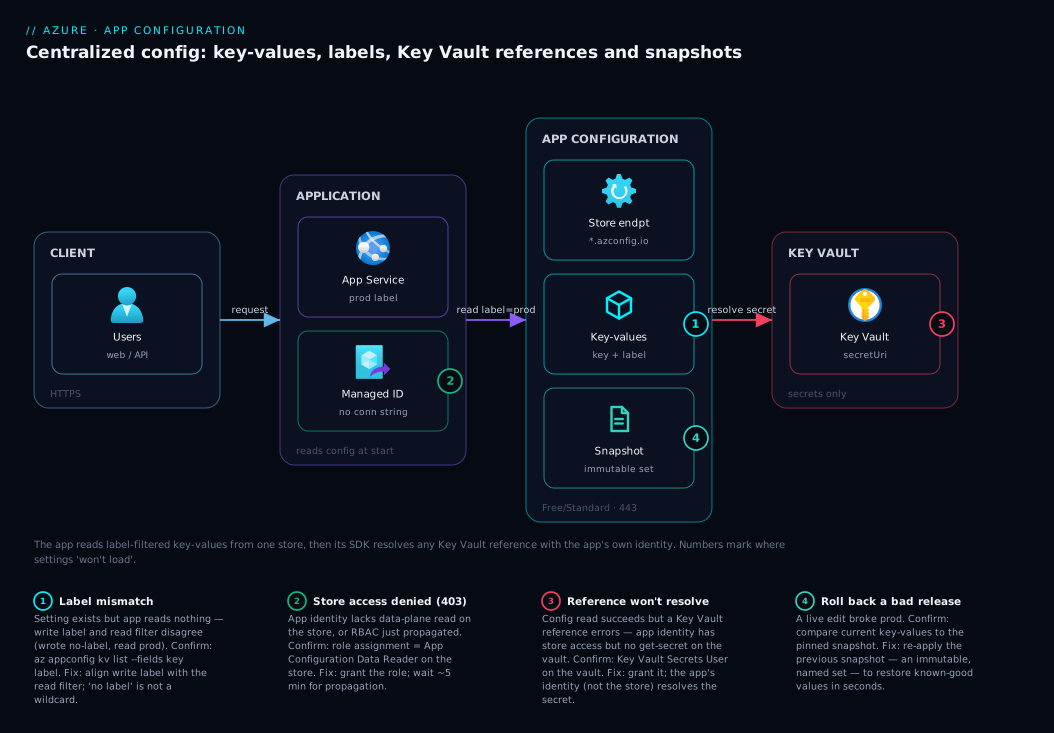
The diagnostic takeaway is built into the badges: if a setting “won’t load,” it is almost always one of them — the label filter found nothing, or the app’s identity lacks the data-reader or get-secret role.
Real-world scenario
Northwind Retail runs a modest e-commerce platform on Azure: a customer web app, a checkout API, and an order-processing worker, each deployed to dev, staging and prod. Every service carried appsettings.{env}.json baked into its build, and settings drifted constantly — the staging API once spent a week pointing at the dev payment sandbox because someone edited the wrong file. Worse, the production database connection string sat in source control; a contributor’s fork leaked it, forcing an emergency credential rotation at 11 p.m. on a Friday. And every flag flip meant a full build-and-deploy of all three services — twenty minutes and three deployment risks for a one-line change.
The team adopted App Configuration over a single sprint. They created one Free-tier store, appcs-northwind, and moved every non-secret setting in under a per-service prefix (Web:*, Checkout:*, Worker:*), each with a label — dev, staging, or prod — so all three environments shared one store with no key collisions. The connection strings and the payment API key did not move in; they stayed in the existing Key Vault, and App Configuration held Key Vault references pointing at them. Each service’s managed identity got App Configuration Data Reader on the store and Key Vault Secrets User on the vault — the two grants that let the SDK read settings and resolve secrets with no connection strings anywhere.
The payoff was immediate. The “staging points at dev” bug class vanished — one place per value, the environment explicit in the label — and leaked-secret risk dropped to near zero, since only secretUri pointers lived in the store. Flag flips became seconds, not minutes: editing Web:Promo:BannerEnabled for label prod took effect on next read, no redeploy. Before a seasonal sale the team created a snapshot, release-blackfriday-2026, freezing every value going into the event — and they needed it: a mis-set cache TTL caused stale prices, and re-applying the snapshot rolled the whole set back in under a minute with the team still on the call. One store, labels, references, a snapshot — the configuration story tightened up without touching a line of application logic.
Advantages and disadvantages
App Configuration is the right answer for a large class of problems, but not without trade-offs. The honest two-column view:
| Advantages | Disadvantages / costs |
|---|---|
| One central place — kills duplication and drift | One more service (and dependency) to operate |
| Change values without redeploying the app | Your app now has a runtime dependency on the store |
| Labels separate environments in a single store | Mis-set label filters cause “missing config” surprises |
| Key Vault references keep secrets out of code/git | Two grants needed (store + vault) — easy to half-configure |
| Snapshots give config rollback + reproducibility | Snapshots are immutable — a mistake means a new snapshot |
| Managed-identity auth — no connection strings | RBAC propagation can lag a few minutes after a grant |
| Free tier covers small/dev use at no cost | Standard tier (HA/geo/larger quota) is a paid, hourly cost |
| Revision history + activity log for audit | Not a secret store — must pair with Key Vault for secrets |
The deciding question is “how many places can this value be wrong, and how often does it change?” Past one environment, anything with secrets, or frequent flag flips, App Configuration earns its place (labels for environments, references for secrets, snapshots for releases). For a single tiny app with a couple of non-secret settings and one environment, plain appsettings.json is simpler; for a single app that needs only secrets, Key Vault directly is enough — you do not need a config store on top.
Hands-on lab
This lab creates a Free-tier store, adds keys with labels, adds a Key Vault reference, and reads it back — all in Cloud Shell, within the free tier. Store and vault names must be globally unique.
1. Set variables and create a resource group.
RG=rg-appconfig-lab
LOC=eastus
ACS=appcs-lab-$RANDOM          # App Configuration store (globally unique)
KV=kv-aclab-$RANDOM            # Key Vault (globally unique)

az group create --name $RG --location $LOC
2. Create the App Configuration store on the Free SKU.
az appconfig create --name $ACS --resource-group $RG \
  --location $LOC --sku Free
Expect JSON describing the store with "sku": { "name": "Free" } and a endpoint like https://appcs-lab-12345.azconfig.io.
3. Add a few key-value pairs with environment labels. Note the same key, two labels, two values:
az appconfig kv set --name $ACS --yes \
  --key "Shop:Api:BaseUrl" --label dev   --value "https://dev-api.shop.com"
az appconfig kv set --name $ACS --yes \
  --key "Shop:Api:BaseUrl" --label prod  --value "https://api.shop.com"
az appconfig kv set --name $ACS --yes \
  --key "Shop:Cache:TtlSeconds" --label prod --value "300"
4. Add a structured (JSON) value. The content type makes the SDK treat it as nested config:
az appconfig kv set --name $ACS --yes \
  --key "Shop:Endpoints" --label prod \
  --content-type "application/json" \
  --value '{"primary":"https://api.shop.com","secondary":"https://api2.shop.com"}'
5. Read back only the prod settings — proving labels isolate environments:
az appconfig kv list --name $ACS --label prod \
  --query "[].{key:key, value:value, contentType:contentType}" -o table
You should see the three prod pairs and not the dev one. Re-run with --label dev and you get only the dev value — the label model working.
6. Create a Key Vault, a secret, and reference it.
az keyvault create --name $KV --resource-group $RG --location $LOC --enable-rbac-authorization true

# Grant yourself secret-officer on the vault so you can add a secret
ME=$(az ad signed-in-user show --query id -o tsv)
KVID=$(az keyvault show --name $KV --query id -o tsv)
az role assignment create --assignee $ME --role "Key Vault Secrets Officer" --scope $KVID

az keyvault secret set --vault-name $KV --name "db-password" --value "S3cr3t-do-not-store-in-config"
SECRET_URI=$(az keyvault secret show --vault-name $KV --name db-password --query id -o tsv)

# Store a Key Vault *reference* in App Configuration (a pointer, not the secret)
az appconfig kv set-keyvault --name $ACS --yes \
  --key "Shop:Db:Password" --label prod --secret-identifier "$SECRET_URI"
The stored value is the secretUri, with content type application/vnd.microsoft.appconfig.keyvaultref+json — the secret stays in the vault.
7. Create a snapshot of the prod release.
az appconfig snapshot create --name $ACS --snapshot-name release-lab-001 \
  --filters '[{"key":"Shop:*","label":"prod"}]'
az appconfig snapshot show --name $ACS --snapshot-name release-lab-001 \
  --query "{name:name, status:status, items:items_count}" -o table
8. (Equivalent Bicep) for the store and a couple of keys, so you can put this in IaC:
param location string = resourceGroup().location

resource store 'Microsoft.AppConfiguration/configurationStores@2023-03-01' = {
  name: 'appcs-lab-bicep'
  location: location
  sku: { name: 'Free' }
}

resource baseUrlProd 'Microsoft.AppConfiguration/configurationStores/keyValues@2023-03-01' = {
  // The resource name encodes key$label — note the $ separator
  parent: store
  name: 'Shop:Api:BaseUrl$prod'
  properties: {
    value: 'https://api.shop.com'
  }
}

resource cacheTtlProd 'Microsoft.AppConfiguration/configurationStores/keyValues@2023-03-01' = {
  parent: store
  name: 'Shop:Cache:TtlSeconds$prod'
  properties: {
    value: '300'
  }
}
9. Teardown — delete everything so the lab costs nothing. App Configuration soft-deletes by default; purge so the name is reusable immediately:
az appconfig delete --name $ACS --resource-group $RG --yes
az appconfig purge --name $ACS --yes        # remove from soft-delete so the name frees up
az keyvault delete --name $KV --resource-group $RG
az keyvault purge --name $KV
az group delete --name $RG --yes --no-wait
Common mistakes & troubleshooting
These are the failures beginners actually hit. Each row: the symptom, what is really wrong, how to confirm it, and the fix.
| # | Symptom | Root cause | Confirm with | Fix |
|---|---|---|---|---|
| 1 | App reads “no value” for a key that exists in the portal | Read label filter doesn’t match the key’s label (e.g. wrote no-label, read prod) |
az appconfig kv list --name $ACS --fields key label and compare to the app’s filter |
Align write label and read filter; decide on a no-label default layer deliberately |
| 2 | Config loads but a referenced secret resolves to an error | App identity has store access but no Key Vault get-secret permission | Check Key Vault Secrets User on the vault for the app’s identity |
Grant the app Key Vault Secrets User (or get-secret) on the referenced vault |
| 3 | 403/Forbidden reading the store right after granting a role |
RBAC propagation lag (a few minutes) | Re-run the read after ~5 min; check the role assignment exists | Wait for propagation; verify scope is the store, not the RG |
| 4 | Created store fails: “name already in use” but you deleted it | Store is in soft-delete, name still reserved | az appconfig list-deleted shows it |
az appconfig purge --name <name> to free the name |
| 5 | A JSON value comes through as one opaque string, not nested keys | Content type not set to application/json |
az appconfig kv show --key <k> --query contentType |
Set --content-type application/json on the pair |
| 6 | Secret value accidentally stored as plain text in App Config | Used kv set with the secret as the value instead of set-keyvault |
kv show — value is the secret, not a secretUri |
Delete it, store a Key Vault reference, rotate the exposed secret |
| 7 | App uses a connection string and you want identity-based auth | App configured with the store connection string instead of endpoint + identity | Check the app’s App Config client setup | Switch to endpoint + DefaultAzureCredential; grant data-reader role |
| 8 | Snapshot doesn’t contain a key you expected | Snapshot filter didn’t match that key/label | az appconfig snapshot show filters vs the key’s label |
Create a new snapshot with a correct filter (snapshots are immutable) |
| 9 | Changed a value but the app still serves the old one | App reads config only at startup; no refresh configured | Confirm whether dynamic refresh is set up in the app | Restart the app, or set up dynamic refresh (see the production playbook) |
| 10 | Wildcards in a key filter behave oddly / error | *, ,, \ are reserved in filters; a literal key contains one |
Inspect the failing key for reserved characters | Escape literal reserved chars with \; prefer safe key characters |
By far the most frequent are #1 (label mismatch — when a value that visibly exists “won’t load,” check the label first) and #2 (the half-configured reference, where the store grant is present but the vault grant is missing — the app’s identity resolves the secret, so it needs both).
Best practices
- One store per system, labels per environment. A store per environment recreates duplication; one store with
dev/staging/prodlabels is the canonical layout. - Adopt a key prefix scheme early (one prefix per service,
:separator) and document it — retrofitting later is painful. - Never store a secret as a plain value. Anything sensitive is a Key Vault reference; a secret showing in
kv showis a leak — rotate it. - Authenticate with managed identity, not connection strings. Endpoint +
DefaultAzureCredential+App Configuration Data Readerleaves nothing to leak. - Grant both roles for references. The app needs
App Configuration Data Readeron the store andKey Vault Secrets Useron the vault — provision them together. - Pin releases with snapshots so rollback is a single action, not an archaeology project.
- Lock critical keys read-only to prevent accidental edits, and decide your no-label policy explicitly so the missing-label trap never bites.
- Keep the store and stable keys in IaC (Bicep) so the structure is reviewable, even if values are edited live.
- Use revision history and the activity log as your audit trail — always answer “what changed and when.”
- Right-size the SKU: Free for dev and small workloads, Standard only for higher quota, geo-replication, or an SLA.
Security notes
The security model rests on three pillars: identity, network, and the secret boundary.
For identity, prefer Azure RBAC with managed identity over connection-string auth. The two data-plane roles are App Configuration Data Reader (read — what apps need) and App Configuration Data Owner (read/write — for CI/CD and admins): grant readers to app identities, reserve owner for pipelines. Avoid the access keys / connection string — a static secret that, if leaked, grants store access with no per-identity revocation.
For the secret boundary, the cardinal rule is that App Configuration is not a secret store: keep secrets in Key Vault under its stronger controls (RBAC, soft-delete and purge protection, rotation, HSM-backed keys) and store only references. Because the app’s identity resolves references, scope that identity’s Key Vault access to exactly the secrets it needs.
For network, the Standard tier supports private endpoints so the store is reachable only from your VNet over the Microsoft backbone (see private endpoint vs service endpoint), and you can disable public access. Standard also offers customer-managed keys, though data is always encrypted at rest regardless. The security-relevant settings:
| Control | What it protects | Tier | Default |
|---|---|---|---|
| Azure RBAC (data roles) | Per-identity read/write access | All | RBAC available; assign roles |
| Managed identity auth | Removes connection-string secrets | All | You opt in (recommended) |
| Disable access keys | Forces identity-based auth only | All | Keys enabled by default |
| Key Vault references | Keeps secrets out of the store | All | You choose per secret |
| Private endpoint / no public access | Network isolation | Standard | Public access on by default |
| Customer-managed keys (CMK) | Encryption-at-rest with your key | Standard | Microsoft-managed key by default |
| Soft-delete + purge protection | Recover/guard a deleted store | All | Soft-delete on; purge protection optional |
Cost & sizing
App Configuration is one of Azure’s cheaper services, and for learning it is free. Free costs nothing — one store of its kind per subscription, a bounded daily request count and modest storage, ample for dev, demos and small apps. Standard is billed at a small hourly rate per store plus a per-day request allowance with overage, and unlocks a financially-backed SLA, geo-replication, private endpoints, customer-managed keys and far higher limits. As rough figures (confirm on the Azure pricing page; geo-replication adds per-replica cost): Standard runs on the order of a low single-digit USD per store per day — very roughly a few hundred INR/month for a single-region store — with Free at zero. The comparison that drives the decision:
| Dimension | Free | Standard |
|---|---|---|
| Price | No cost | Hourly per store + per-request overage |
| Stores per subscription | Limited (one of this kind) | Effectively many (per-store billing) |
| Requests / day | Bounded daily quota | Large daily allowance + overage |
| Storage | Modest allowance | Much larger allowance |
| SLA | None | Financially-backed SLA |
| Geo-replication (replicas) | Not available | Available (extra per-replica cost) |
| Private endpoint / CMK | Not available | Available |
| Best for | Dev, demos, small/non-critical apps | Production, multi-region, compliance |
Standard cost is the per-store hourly charge times stores and replicas, plus request volume, so a single store with sensible refresh intervals keeps the bill trivial. Avoid two cost mistakes: a store per environment (use labels), and an aggressive refresh that multiplies request counts for nothing.
Interview & exam questions
1. What problem does Azure App Configuration solve? It centralizes settings so a value lives in one place instead of being duplicated across environments, services and config files — eliminating drift, keeping secrets out of source control (via Key Vault references), and letting you change values without redeploying.
2. What uniquely identifies a key-value pair? The combination of key and label. The same key with different labels is two independent settings — exactly how one store serves multiple environments.
3. How is App Configuration different from Key Vault? App Configuration stores non-secret settings as key-values; Key Vault stores secrets, keys and certificates with stronger controls. They are complementary: App Configuration holds references to Key Vault secrets so an app reads both from one client while secrets stay vaulted.
4. When an app reads a Key Vault reference, whose identity fetches the secret? The app’s, not App Configuration’s. App Configuration stores only the secretUri; the app’s SDK calls Key Vault directly, so the app needs both App Configuration Data Reader and get-secret access on the vault.
5. A setting exists in the portal but the app reads nothing. Cause? A label mismatch — the read filter doesn’t match the label the key was written with (commonly: written no-label, read prod). “No label” is a specific label, not a wildcard, with no automatic fallthrough.
6. What is a snapshot and why is it immutable? A named, read-only freeze of all key-values matching a filter at a point in time. Immutability makes it a reliable config “release” — an app reads exactly those values forever, and rollback is re-pinning a previous snapshot, like a Docker image tag for configuration.
7. How does content type change how a value is read? It tells the SDK how to interpret the string: none = plain text, application/json = flattened structured config, the KV-reference type = resolve the secret, the feature-flag type = evaluate a flag.
8. How should an app authenticate in production? With managed identity (endpoint + DefaultAzureCredential) and the App Configuration Data Reader role — no connection string, giving per-identity, revocable access.
9. Free vs Standard tier? Free is no-cost with bounded quotas and no SLA — good for dev and small apps. Standard is billed per store and adds an SLA, geo-replication, private endpoints, CMK and much higher quotas — for production and multi-region.
10. You accidentally stored a password as a plain value. What now? Treat it as a leak: delete the plain value, store a Key Vault reference instead, and rotate the exposed secret — it sat in the store (and possibly logs/exports) as plaintext.
11. Cert mapping? App Configuration appears in AZ-204 (secure config, Key Vault references, feature management) and is relevant context for AZ-400 (configuration and feature management in release pipelines).
Quick check
- True or false: a key with no label automatically falls back to serve any label filter.
- Where does the actual secret live when you use a Key Vault reference — in App Configuration or in Key Vault?
- What two pieces of metadata together uniquely identify a setting?
- Which content type makes a value be treated as structured/nested config?
- Why is a snapshot useful for rolling back a configuration change?
Answers
- False. “No label” is a specific label, not a wildcard. If you write with no label and read with label
prod, you get nothing for that key underprod— there is no automatic fallthrough. - In Key Vault. App Configuration stores only a
secretUripointer; the app’s SDK fetches the real secret from the vault using the app’s identity. - The key and the label together. The same key under different labels is two independent settings.
application/json. With it, the SDK parses and flattens the value into nested configuration keys; without it the JSON is just an opaque string.- A snapshot is an immutable, named freeze of values at a point in time, so you can re-pin a known-good set in one action instead of reconstructing past values from history.
Glossary
- App Configuration store — the top-level Azure resource holding all key-value pairs, at an
*.azconfig.ioendpoint. - Key-value pair — the atomic unit of config: a key, a value (always a string), and metadata.
- Key — the setting’s name; a string where
:conventionally denotes hierarchy (Shop:Api:BaseUrl). - Label — an optional tag; the unique identity of a setting is (key + label) — how one store serves many environments.
- Content type — a MIME string telling consumers how to read a value (plain text, JSON, Key Vault reference, or feature flag).
- Key Vault reference — a pair whose value is a
secretUripointer to a Key Vault secret, resolved by the app’s SDK so the secret never lives here. - Snapshot — a named, immutable, read-only freeze of key-values matching a filter at a point in time; used to pin and roll back releases.
- Key filter / label filter — patterns selecting which keys and label(s) a read includes; a mismatched label filter is the #1 beginner bug.
- Managed identity — an Azure identity on your app so it authenticates to the store and Key Vault with no connection strings.
- App Configuration Data Reader / Data Owner — the RBAC roles for read-only and read-write data-plane access.
- Configuration sprawl — one setting duplicated across files, services and environments, drifting out of sync.
Next steps
- Go production with this store: Azure App Configuration in production — dynamic refresh, feature flags, Key Vault references, snapshots.
- Master the secret side of the partnership: Azure Key Vault — secrets, keys and certificates.
- Make your app credential-free: managed identity — system-assigned vs user-assigned patterns.
- Lock the store to your network: private endpoint vs service endpoint.
- Put the store and stable keys in IaC: deploy your first Bicep file from scratch.