You push a new build to production at 11am, and for the next ninety seconds the site throws slow first requests, 502s, or a half-loaded page while the worker boots the new code — and every user who arrives in that window feels it. The fix isn’t a faster deploy; it’s deploying somewhere else first. Azure App Service deployment slots are live, addressable copies of your web app that share the same App Service plan. You deploy to a staging slot, let it warm up against real configuration, then swap it into production — and the swap is a routing change, not a restart, so production users never hit a cold worker or a half-deployed app. Done right, a deploy goes from “ninety seconds of pain” to “zero downtime, instant rollback.”
This is the implementation guide. We build the whole thing end to end: create a web app, add a staging slot, configure swap warm-up so the swap only completes once the new code answers a health path, decide which app settings are slot-sticky (stay put through a swap) versus which travel with the code, run a real swap in the portal and in az CLI, express the identical setup as Bicep, then practise the two things that save you in production — rollback (swap back) and traffic splitting for canary testing. Every step has the exact command, the expected output, and a validation check, because a slot you think is configured but isn’t is worse than no slot at all.
By the end you will run swaps without thinking twice. You will know exactly what a swap does under the hood (and why it’s near-zero-downtime), which settings must be marked sticky or they’ll follow your code into the wrong environment, why a swap can fail mid-flight and how to recover, and how much slots actually cost (on the right tier, nothing extra — they run on the plan you already pay for). The slot is one of the highest-leverage features in App Service, and most teams either don’t use it or use it wrong; this gets you to the correct, boring, repeatable swap.
What problem this solves
In-place deployment has a structural flaw: the instance serving production traffic is the same instance you’re changing. While the new code loads — runtime boot, JIT, DI build, connection-pool prime, for containers an image pull — that worker can’t serve well. On a single instance the app may go fully 503 during the restart; on a warm-but-changing instance you get slow first requests and occasionally 502 if a probe or upstream times out the still-booting worker. The deploy “worked,” but your users absorbed the cost — and if the new build is broken you’re now broken in production with roll-forward as your only fast option.
What breaks without slots: every release is a small outage you’ve normalised. Teams schedule deploys for “low traffic” windows, batch releases to amortise the pain (making each riskier), and treat rollback as “redeploy the old artifact and wait” — minutes of broken production while the old code rebuilds. Configuration changes are worse: flip an app setting in place and the app recycles immediately, so a one-character edit causes the same restart blip as a full deploy.
Who hits this: anyone running a customer-facing web app or API who deploys more than rarely. It bites hardest on single-instance plans (every restart is a visible 503), apps with meaningful cold-start cost (large .NET/JVM apps, custom containers), and frequent CI/CD where “a blip per deploy” adds up to eroded availability. Slots turn the deploy from a write-to-production into a swap-into-production: warm the new code in isolation, validate it on its own URL, make it live atomically — and keep the previous version one swap away for instant rollback.
To frame the field before the build, here is what a slot gives you, the pain it removes, and the smallest tier that enables it:
| Capability | Pain it removes | How it works | Smallest tier |
|---|---|---|---|
| Staging slot | Deploying onto live production workers | A second live copy of the app on the same plan | Standard (5 slots); Basic limited |
| Swap | Restart/cold-start blip on every deploy | Warm instances move to production by routing change | Standard (S1+) |
| Swap with warm-up | Production briefly serving cold workers post-swap | Platform pings a path on staging until healthy | Standard (S1+) |
| Slot-sticky settings | Prod connection strings following code into staging | Sticky settings stay bound to the slot | Standard (S1+) |
| Rollback (swap back) | Minutes of broken prod while old code redeploys | One reverse swap restores the previous version | Standard (S1+) |
| Traffic splitting | All-or-nothing releases | Route a % of prod traffic to a slot for canary | Standard (S1+) |
Learning objectives
By the end of this article you can:
- Explain what a deployment slot is, what a swap actually does under the hood, and why a properly warmed swap is near-zero-downtime while an in-place deploy is not.
- Create a web app and a staging slot end to end in the portal, in
azCLI, and in Bicep, and verify the slot is live on its own hostname. - Configure swap warm-up with
WEBSITE_SWAP_WARMUP_PING_PATHandWEBSITE_SWAP_WARMUP_PING_STATUSESso a swap only completes once the new code answers correctly. - Decide which app settings and connection strings to mark slot-sticky (deployment-slot setting) versus let travel with the code, and reason about setting precedence through a swap.
- Run a real swap (and a swap back / rollback), use a manual swap with preview (two-phase swap) to validate against production config before committing, and split production traffic to a slot for canary testing.
- Set up auto-swap for a hands-off staging→production pipeline and know when not to use it.
- Diagnose the common slot failures — swap timeout, settings going to the wrong slot, sticky-setting surprises, slot exhaustion, cold-swap 502s — with the exact command or portal path to confirm and fix each.
Prerequisites & where this fits
You should already understand App Service basics: an App Service plan is the set of VM workers (an SKU such as B1, S1, P1v3) you rent, and one or more web apps run on that plan sharing its CPU, memory and instance count. You should be comfortable running az in Cloud Shell, reading JSON output, and editing a small Bicep file. Knowing how App Service handles app settings (key/value pairs injected as environment variables) and Always On helps, and a passing familiarity with HTTP status codes makes the warm-up and rollback sections click.
This sits in the Compute / deployment-and-release track. It builds on the platform fundamentals in the Azure App Service Deep Dive: Plans, Scaling, Slots, TLS & Networking and the tier decisions in Azure App Service Plans & Tiers Explained — because slots are a tier feature (Standard and above for the full five). It pairs with the hardening patterns in Hardening Azure App Service: VNet Integration, Private Endpoints & Zero-Downtime Slots, and when a swap goes wrong the diagnostic moves come from Troubleshooting Azure App Service: 502/503, Cold Starts & Restart Loops. Secrets and config that should be slot-sticky usually live in Azure Key Vault and Azure App Configuration.
Core concepts
Five ideas make every later step obvious.
A slot is a full, live web app — same plan, different hostname. Add a staging slot to app-shop and you get a second running app at app-shop-staging.azurewebsites.net with its own config, deployment and logs — but running on the same App Service plan instances as production. It is not a separate environment you pay extra for; it shares the plan’s workers. That sharing is the whole trick: because staging instances are already warm on the same plan, a swap can move them to production without a cold start.
A swap is a routing change, not a deployment. This is the idea most people miss. Swapping staging into production does not copy files or restart production. App Service applies the target slot’s sticky settings to the source slot’s instances, warms them up, then switches the internal routing so the instances that served staging now serve production — and vice versa. The warm instances simply change which hostname they answer; no worker boots from cold during the cutover, so a warmed swap is near-zero-downtime. What was production now sits in the staging slot — which is exactly why rollback is just another swap.
Settings come in two flavours: travelling and sticky. By default an app setting or connection string travels with the slot’s content through a swap — set LOG_LEVEL=Debug in staging and after the swap production has it too. That is right for code-coupled config (feature flags shipped with the build) but catastrophic for environment config: you do not want the staging database connection string riding into production. Mark a setting as a deployment slot setting (slot-sticky) and it stays bound to its slot and never moves. So DB_CONNECTION is sticky (each slot keeps its own); FEATURE_NEW_CHECKOUT travels (it ships with the code).
Warm-up makes the swap honest. Staging instances are warm as staging, but the moment they take production traffic they may need to re-resolve production sticky settings, reconnect to the production database, or re-JIT a path. Swap warm-up sends requests to a path you choose (WEBSITE_SWAP_WARMUP_PING_PATH) on the slot being swapped in, completing the swap only once that path returns an acceptable status (WEBSITE_SWAP_WARMUP_PING_STATUSES). If the new code can’t answer it, the swap aborts and rolls itself back — your protection against swapping a broken build live.
Slots are finite and tier-gated. Standard (S1–S3) gives up to 5 slots (including production); Premium v3 (P1v3–P3v3) and Isolated give up to 20; Basic (B1–B3) has limited slot support and Free/Shared have none. Each slot is a full app on the plan, so more slots means more apps competing for the plan’s CPU/RAM — slots aren’t free in resource terms even though they don’t add to the plan bill. Plan for what you use: usually just production + staging, sometimes a canary.
The vocabulary in one table
Pin down every moving part before the build. The glossary repeats these for lookup; this is the mental model side by side:
| Concept | One-line definition | Where it lives | Why it matters to a swap |
|---|---|---|---|
| Deployment slot | A live copy of the app on the same plan | On the plan, own hostname | The thing you swap into production |
| Production slot | The default slot serving live traffic | The web app itself | The swap target |
| Source / target slot | Source = swapping in; target = swapping into | Swap operation | Defines swap direction and rollback |
| Swap | Warm instances change which hostname they serve | Deployment slots blade | The near-zero-downtime cutover |
| Swap with preview | Two-phase swap; phase 1 applies target config to source | Swap dialog / --action preview |
Validate against prod config before committing |
| Slot-sticky setting | A “deployment slot setting” that stays on its slot | Configuration blade | Stops prod secrets riding into staging |
| Warm-up path | WEBSITE_SWAP_WARMUP_PING_PATH pinged before swap completes |
App setting | Aborts the swap if new code is unhealthy |
| Auto-swap | Slot auto-swaps into a target after each deploy | Slot config | Hands-off staging→prod promotion |
| Traffic splitting | Route a % of prod traffic to a slot | Deployment slots blade | Canary / gradual rollout |
| Rollback | A reverse swap restoring the previous version | Deployment slots blade | Instant recovery from a bad release |
What a swap actually does, step by step
Pinning down the exact sequence explains every later behaviour — why settings move or don’t, why warm-up matters, why rollback is instant. Swapping source = staging into target = production runs roughly this:
| Phase | What the platform does | Why it matters |
|---|---|---|
| 1. Apply target config to source | Production’s sticky settings + slot config are applied to the staging instances (which restart) | Staging instances become “production-shaped” |
| 2. Warm up | Pings WEBSITE_SWAP_WARMUP_PING_PATH on the now-prod-configured staging instances |
The new code proves it can serve with prod config |
| 3. Health gate | Accepted status → proceed; else abort + roll back | Your safety net against a broken build |
| 4. Switch routing | The internal routing for the two slots is exchanged | The actual cutover — no cold start |
| 5. Old prod lands in staging | The instances that were production now answer the staging hostname | Why rollback is just a reverse swap |
Two consequences fall straight out. Phase 1 restarts the incoming instances in staging — fine, because they’re warming as staging, not serving production. And because the cutover (phase 4) is a routing switch over already-warmed instances, production never serves a cold worker — provided your warm-up path exercises the paths that matter. A swap with no warm-up path still switches routing over warm instances but skips the proof the new code can serve production config; beyond a trivial app, configure warm-up. The whole thing reduces to: a swap exchanges which set of warm instances answers which hostname, after making the incoming set prove itself.
Slot-sticky settings: the part that bites
Get this wrong and a swap promotes your staging database, storage account, or App Insights key into production — or drags production’s into staging. The rule is simple but the defaults are not what you’d guess.
Travelling vs sticky — the default and the override
By default, app settings and connection strings travel with the slot’s content through a swap — they’re paired to the code, so when staging’s content moves to production, staging’s non-sticky settings go with it. That’s right for config that’s part of the build (a feature flag, a release log level) and wrong for config that defines which environment you are (database, cache, queue, secrets, telemetry). To pin a setting to its slot, mark it a deployment slot setting (the portal checkbox; --slot-settings in the CLI) — it then stays on the slot through a swap. So you set DB_CONNECTION sticky on each slot pointing at that environment’s database, and a swap leaves each where it should be.
The decision table — what to mark sticky and what to let travel:
| Setting type | Example | Sticky? | Reasoning |
|---|---|---|---|
| Environment endpoint | DB / cache / queue connection string | Sticky | Each environment must keep its own backend |
| Telemetry target | APPLICATIONINSIGHTS_CONNECTION_STRING (per-slot) |
Sticky | Keep staging telemetry out of prod (or vice versa) |
| Secret / Key Vault ref pointing to env-specific secret | @Microsoft.KeyVault(...staging-vault...) |
Sticky | Prevent staging secrets reaching prod |
| Slot identifier | ASPNETCORE_ENVIRONMENT / ENV_NAME |
Sticky | The slot’s identity must not travel |
| Feature flag shipped with the build | FEATURE_NEW_CHECKOUT |
Travel | It’s part of the code you’re promoting |
| Release-coupled log level | LOG_LEVEL for this build |
Travel | Logically belongs to the build |
| Build/runtime config | WEBSITES_PORT, LINUX_FX_VERSION (image tag) |
Travel | The new image/port is what you’re promoting |
One category is always slot-specific and never swapped, whether you mark it or not — the platform treats these as belonging to the slot:
| Always slot-specific (never swaps) | Why |
|---|---|
| Publishing endpoints / credentials | Each slot has its own deploy target |
| Custom domain names | Bound to a specific slot’s hostname |
| Non-public certificates & TLS/SSL settings | Tied to the slot’s bindings |
| Scale (instance count) settings | Slot-level scale config |
| Always On, IP/SCM access restrictions | Slot-level platform config |
| Diagnostic log settings | Per-slot logging |
| Managed identities | Each slot has its own identity |
Everything else swaps by default unless you mark it sticky — general app settings, connection strings, handler mappings, public certificates and path mappings. Mark the ones that define the environment (DB, cache, secrets) sticky; leave the rest to travel.
Why the default catches people
The trap: a developer sets DB_CONNECTION on staging only (not sticky), points it at the staging database, tests, then swaps. Because the setting travels, production now has the staging connection string — reading and writing the staging database, often silently until data looks wrong. The fix is to set environment endpoints on both slots and mark them sticky from the start, so the value binds to the slot, not the content. The reverse trap: someone marks a feature flag sticky, swaps, and is baffled it didn’t promote — sticky settings, by design, don’t move. A quick check: run a swap with preview (next section) and read the previewed production settings before committing.
Warm-up: making the swap refuse a broken build
Warm-up turns a swap from “switch routing and hope” into “switch routing only if the new code answers.” It uses two app settings on the slot being warmed:
| Setting | What it does | Default | Valid values | Notes |
|---|---|---|---|---|
WEBSITE_SWAP_WARMUP_PING_PATH |
Path the platform requests during a swap before completing | / (root) |
any in-app path, e.g. /healthz |
Must return an accepted status or the swap aborts |
WEBSITE_SWAP_WARMUP_PING_STATUSES |
Status codes that count as “warmed/healthy” | 200, 202 |
comma list, e.g. 200,202,204 |
Widen only if your warm path legitimately returns non-200 |
During a swap, the platform sends warm-up requests to that path on the incoming instances (already configured with production’s sticky settings). An accepted status completes the swap; a non-accepted status or timeout aborts and rolls it back — production is never cut over to a build that can’t serve. This is distinct from the health check (healthCheckPath), which evicts unhealthy instances during normal operation; warm-up specifically gates the swap.
Design the warm-up path the same way you design a health path — shallow and honest, exercising the code paths a swap must validate without depending on something that’s allowed to be briefly down:
| Warm-up path should… | Include | Never include |
|---|---|---|
| Prove the app can serve with prod config | Config load, DI resolution, a cheap cached read | A slow report or aggregate query |
| Touch the required backend so reconnection happens during warm-up | A fast ping to the production DB the app can’t serve without | A third-party payment/email API |
| Return fast and deterministically | A dedicated /warmup or /healthz endpoint |
The home page if it’s heavy or personalised |
| — | — | Anything that can hang and stall the swap |
The subtle, high-value point: because phase 1 applies production’s sticky settings to the incoming instances, the warm-up path runs against production configuration — so a green warm-up means the new code can serve with the real production database/cache/secrets, not staging’s.
Swap modes: direct, preview (two-phase), and auto-swap
Three ways to trigger the cutover; pick by how much control you want.
| Mode | How it’s triggered | When to use | Trade-off |
|---|---|---|---|
| Direct swap | One action: az webapp deployment slot swap / portal “Swap” |
Routine releases with a trusted warm-up path | You trust warm-up to gate it |
| Swap with preview | Phase 1 --action preview; validate; phase 2 --action swap (or reset) |
Test the new code with production config on the staging URL first | Two steps; staging temporarily runs prod config |
| Auto-swap | Slot auto-swaps into a target after each successful deploy | Fully automated pipelines for low-risk apps | No manual gate; warm-up is the only safety |
Swap with preview (the two-phase swap)
The safest way to validate a release. Phase 1 (preview) applies the target (production) configuration to the source (staging) slot and restarts it — but does not switch routing. Now app-shop-staging.azurewebsites.net runs the new code with production settings, so you can smoke-test the exact thing about to go live. Phase 2 (complete) finishes the routing switch; or reset reverts staging to its own configuration with no impact on production.
# Phase 1: apply production config to staging and pause (no routing switch yet)
az webapp deployment slot swap --name app-shop --resource-group rg-shop \
  --slot staging --target-slot production --action preview

# ... smoke-test https://app-shop-staging.azurewebsites.net (now running prod config) ...

# Phase 2a: complete the swap
az webapp deployment slot swap --name app-shop --resource-group rg-shop \
  --slot staging --target-slot production --action swap

# Phase 2b (instead): cancel and revert staging to its own config
az webapp deployment slot swap --name app-shop --resource-group rg-shop \
  --slot staging --target-slot production --action reset
Auto-swap (hands-off promotion)
Auto-swap swaps a slot into a target after every successful deployment to it — deploy to staging and the platform warms and swaps it into production, no manual step. Convenient for low-risk apps, dangerous where you want a human gate (a bad build that passes warm-up still goes live). Don’t combine it with manual preview testing on the same slot, and note it’s not supported on Linux/custom-container apps the way it is on Windows.
# Enable auto-swap on the staging slot, targeting production (Windows app)
az webapp deployment slot auto-swap --name app-shop --resource-group rg-shop \
  --slot staging --auto-swap-slot production
Traffic splitting and canary releases
A swap is all-or-nothing — 100% of production traffic moves at once. Sometimes you want to route a small percentage of production traffic to a slot first (a canary), watch error rates and latency, then roll out fully. App Service supports this directly: set a routing percentage on a slot and that share of production requests goes to it.
# Send 10% of production traffic to the staging slot (canary)
az webapp traffic-routing set --name app-shop --resource-group rg-shop \
  --distribution staging=10

# Inspect current routing
az webapp traffic-routing show --name app-shop --resource-group rg-shop

# Stop the split (send everything back to production)
az webapp traffic-routing clear --name app-shop --resource-group rg-shop
Two mechanics to know. A user routed to the slot is pinned there for the session via the x-ms-routing-name cookie, so they don’t flip versions mid-session (self-select production with ?x-ms-routing-name=self). And traffic splitting is not a swap — it routes a fraction of users to the staging hostname’s content while leaving production as-is; the canary flow below ends with a swap to promote.
| Canary control | Command / mechanism | Effect |
|---|---|---|
| Start canary | az webapp traffic-routing set --distribution staging=10 |
10% of prod traffic to staging content |
| Ramp up | re-run with staging=25, then 50 |
Gradually shift load while watching telemetry |
| Pin/opt-out | x-ms-routing-name cookie / query string |
Keep a user on one version per session |
| Promote | az webapp deployment slot swap … |
Make staging the full production version |
| Abort | az webapp traffic-routing clear |
Send everyone back to production instantly |
Architecture at a glance
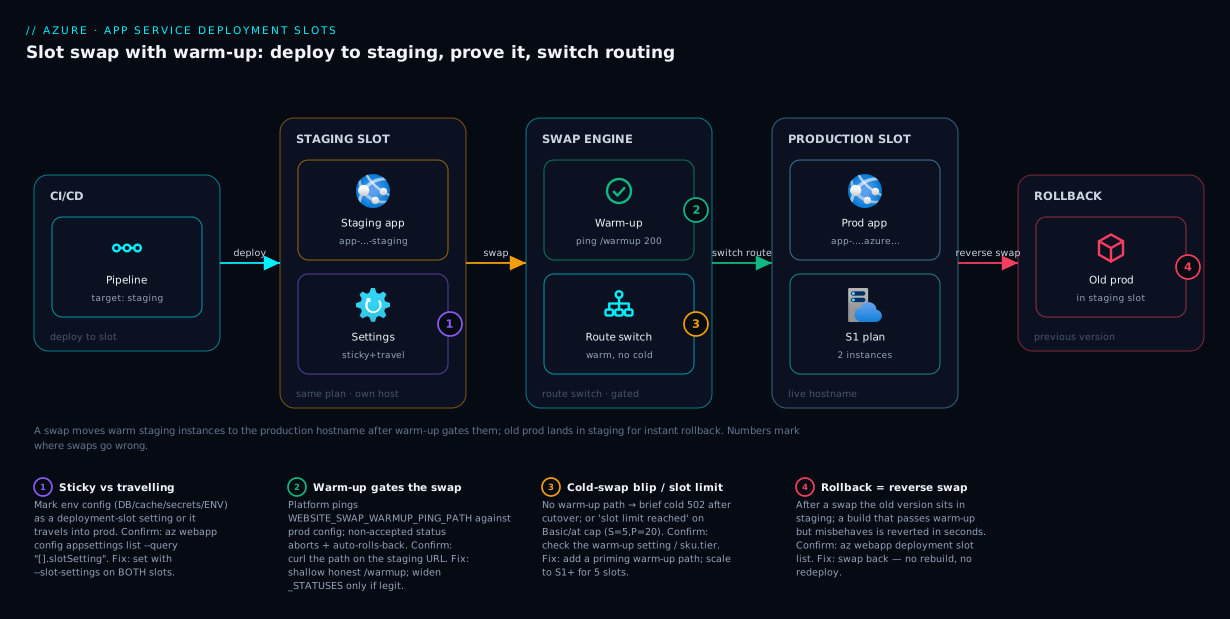
The diagram traces a deploy through slots, left to right, so you can see why production never goes cold. Your CI/CD pushes the new build to the staging slot — a full live app at app-shop-staging.azurewebsites.net on the same plan instances as production, carrying travelling settings (feature flags shipped with the build) and its own slot-sticky settings (its staging database and telemetry). On swap, the platform applies production’s sticky settings to the staging instances, warms them up by pinging WEBSITE_SWAP_WARMUP_PING_PATH against production config, and only on an accepted status switches the internal routing so the warmed instances answer app-shop.azurewebsites.net. No worker boots from cold during the cutover.
Notice what lands where: the instances that were production now sit in the staging slot holding the previous version — which is why rollback is just a reverse swap. The numbered badges mark the four places this goes wrong: a sticky-vs-travelling setting sending the wrong config across (1); a warm-up path that fails or times out, aborting the swap (2); slot exhaustion or a cold-swap blip when warm-up is skipped (3); and the rollback path itself, your recovery when a build passes warm-up but misbehaves under real traffic (4). The whole method is in the picture: warm the new code in isolation, prove it against production config, switch routing atomically, keep the old version one swap away.
Real-world scenario
Finhaven, a fintech, runs its customer dashboard API on Azure App Service: a .NET 8 app on a 2× S1 Standard plan in Central India, deployed from GitHub Actions ~ten times a week. For a year they deployed in place. Each deploy caused a 30–90 second window of slow first requests and the occasional 502 as warm instances reloaded the new build — tolerable individually, but at ten deploys a week it was a steady drip of “the dashboard was slow around 2pm” tickets, and measured availability sat at an embarrassing 99.4%.
The push to fix it came after a Friday deploy shipped a broken database migration path. The app started, served 500s on every dashboard call, and the only rollback was “revert the commit, rebuild, redeploy, wait” — eleven minutes of broken production. The post-incident action item: stop deploying onto production workers.
They set up slots properly. They added a staging slot, moved the deploy to target staging instead of production, and marked the environment-specific settings — DB_CONNECTION, REDIS_CONNECTION, the production APPLICATIONINSIGHTS_CONNECTION_STRING, and ASPNETCORE_ENVIRONMENT — as deployment slot settings (sticky) on both slots, so the staging build couldn’t drag staging’s backends into production. They added a dedicated /warmup endpoint that loaded config, resolved the DI graph, and did one cached read against the production database, then set WEBSITE_SWAP_WARMUP_PING_PATH=/warmup. The pipeline’s final step became a swap with preview: deploy to staging, run a smoke-test job against the staging URL (validating against prod settings in the preview phase), complete the swap — and on any smoke-test failure, --action reset instead.
The first real test came two weeks later: another bad migration. This time it deployed to staging, the smoke-test job got 500s, and the pipeline ran --action reset — production was never touched. The week after, a good build with a slow cold path was caught by warm-up timing out; they widened the warm-up tolerance and the next swap completed cleanly. Measured availability climbed to 99.95% within a month, the “slow around 2pm” tickets stopped, and the rollback drill went from “eleven minutes and a rebuild” to “one reverse swap, under thirty seconds.” Cost stayed flat at ₹14,000 — the staging slot ran on the same plan they already paid for. The lesson on the wall: “Deploy to a slot, prove it against prod config, then swap. Production is a routing target, not a deploy target.”
The before/after, because the shape of the change is the lesson:
| Dimension | Before (in-place deploy) | After (slot + warm-up swap) |
|---|---|---|
| Deploy impact | 30–90 s slow/502 per deploy | Near-zero; warm instances switch in |
| Bad build reaches prod? | Yes, immediately | No — caught in staging by smoke-test + warm-up |
| Rollback | Revert + rebuild + redeploy (~11 min) | One reverse swap (< 30 s) |
| Config safety | Staging DB once leaked to prod | Sticky settings pinned per slot |
| Measured availability | 99.4% | 99.95% |
| Extra cost | — | ₹0 (same plan) |
Advantages and disadvantages
Slots are close to free in money and large in benefit, but not zero-effort and not a fix for everything. Weigh it honestly:
| Advantages | Disadvantages |
|---|---|
| Near-zero-downtime deploys — warm instances switch in, no cold start in production | Only on Standard+ (full 5 slots); Free/Shared have none, Basic is limited |
| Instant rollback — a reverse swap restores the previous version in seconds | Slots share the plan’s CPU/RAM; running a busy staging slot competes with production |
| Warm-up gates the swap — a build that can’t serve aborts the swap automatically | Sticky-vs-travelling settings are a real footgun until you understand the default |
| Swap-with-preview lets you validate the new code against production config before committing | A swap is all-or-nothing; without traffic splitting there’s no gradual rollout |
| No extra bill — slots run on the plan you already pay for | Database/schema changes still need their own forward/backward-compatible strategy |
| Traffic splitting enables real canary releases on the same primitive | Auto-swap removes the human gate; a build passing warm-up still goes live |
| Config changes go through staging, so a one-character setting edit no longer restarts production | More moving parts in the pipeline (slot target, sticky flags, warm-up path to maintain) |
When each matters: slots are right for any customer-facing app deployed more than rarely — the availability and rollback wins are immediate, and largest on frequent CI/CD and cold-start-heavy apps. They matter less if you deploy monthly and tolerate a maintenance window, or on Free/Shared (where you can’t have them anyway). The two disadvantages that bite hardest — sticky settings and stateful schema changes — are addressed by discipline (mark environment config sticky from day one) and a separate database-migration strategy (expand/contract), not by the slot feature itself.
Hands-on lab
This is the centrepiece. You will build the full slot workflow end to end three ways — portal, az CLI, and Bicep — on a free-tier-friendly setup (we use S1 for the full slot feature; delete at the end). Each step states the command, the expected output, and a validation check. Run the CLI track in Cloud Shell (Bash).
Part A — Prerequisites and a production app (CLI)
Step 1 — Set variables and create a resource group. Pick unique names; $RANDOM keeps the hostname globally unique.
RG=rg-slots-lab
LOC=centralindia
PLAN=plan-slots-lab
APP=app-slots-$RANDOM        # globally-unique hostname
echo "App will be: $APP"
az group create -n $RG -l $LOC -o table
Expected: a table row for the resource group with ProvisioningState = Succeeded. Validate: az group exists -n $RG returns true.
Step 2 — Create an S1 (Standard) Linux plan. Standard is the tier that gives the full 5 slots and slot-swap warm-up.
az appservice plan create -n $PLAN -g $RG --is-linux --sku S1 -o table
Expected: a plan row with Sku = S1, Kind = linux. Validate:
az appservice plan show -n $PLAN -g $RG --query "{sku:sku.name, tier:sku.tier, kind:kind}" -o table
# sku=S1, tier=Standard, kind=linux  → slots available
Step 3 — Create the production web app on a built-in runtime. We use a built-in .NET runtime so there’s no container/port complexity; the slot mechanics are identical for containers.
az webapp create -n $APP -g $RG -p $PLAN --runtime "DOTNETCORE:8.0" -o table
Expected: a web app row with DefaultHostName = $APP.azurewebsites.net. Validate: browse to https://$APP.azurewebsites.net — you get the default App Service landing page (HTTP 200). The app is live (the production slot).
Step 4 — Add production-safe settings, including a sticky one. Set Always On (S1 supports it), an ENV_NAME we’ll make sticky to prove it doesn’t move, and a RELEASE value we’ll let travel.
az webapp config set -n $APP -g $RG --always-on true -o none

# A sticky (slot) setting: ENV_NAME must stay bound to whichever slot it's set on
az webapp config appsettings set -n $APP -g $RG \
  --slot-settings ENV_NAME=production -o none

# A travelling setting: RELEASE moves with the content during a swap
az webapp config appsettings set -n $APP -g $RG \
  --settings RELEASE=v1.0.0 -o none
Expected: no error (we used -o none). Validate: list the settings and confirm ENV_NAME is marked sticky and RELEASE is not:
az webapp config appsettings list -n $APP -g $RG \
  --query "[?name=='ENV_NAME' || name=='RELEASE'].{name:name, value:value, slotSetting:slotSetting}" -o table
# ENV_NAME  production  True      ← sticky
# RELEASE   v1.0.0      False     ← travels
Part B — Create and deploy a staging slot (CLI)
Step 5 — Create the staging slot. A slot can clone the production app’s config, which is the usual starting point.
az webapp deployment slot create -n $APP -g $RG --slot staging \
  --configuration-source $APP -o table
Expected: a row for the slot. Validate: the slot is live on its own hostname:
az webapp deployment slot list -n $APP -g $RG --query "[].{slot:name, host:defaultHostName, state:state}" -o table
# staging  app-slots-XXXX-staging.azurewebsites.net  Running
Browse to https://$APP-staging.azurewebsites.net — the default page renders (the slot is a real, running app).
Step 6 — Differentiate the slots so a swap is observable. Set the slot’s sticky ENV_NAME to staging (proves stickiness — it must not move), and bump the travelling RELEASE on the slot to v1.1.0 (proves travelling — it should move on swap).
# Sticky on the slot: staging keeps ENV_NAME=staging
az webapp config appsettings set -n $APP -g $RG --slot staging \
  --slot-settings ENV_NAME=staging -o none

# Travelling on the slot: this new RELEASE should ride into production on swap
az webapp config appsettings set -n $APP -g $RG --slot staging \
  --settings RELEASE=v1.1.0 -o none
Validate: confirm the slot’s values:
az webapp config appsettings list -n $APP -g $RG --slot staging \
  --query "[?name=='ENV_NAME' || name=='RELEASE'].{name:name, value:value, slotSetting:slotSetting}" -o table
# ENV_NAME  staging   True
# RELEASE   v1.1.0    False
Step 7 — Configure swap warm-up on the slot. Point warm-up at the app’s root (the default landing page returns 200) so the swap only completes when the slot answers. In a real app, use a dedicated /warmup or /healthz.
az webapp config appsettings set -n $APP -g $RG --slot staging \
  --slot-settings \
    WEBSITE_SWAP_WARMUP_PING_PATH=/ \
    WEBSITE_SWAP_WARMUP_PING_STATUSES=200 -o none
Note: we mark the warm-up settings sticky so they stay on the slot and don’t travel into production. Validate: they’re present and sticky:
az webapp config appsettings list -n $APP -g $RG --slot staging \
  --query "[?starts_with(name,'WEBSITE_SWAP_WARMUP')].{name:name, value:value, slotSetting:slotSetting}" -o table
Part C — Swap with preview, then complete (CLI)
Step 8 — Record the current production state (baseline). So you can prove the swap worked.
az webapp config appsettings list -n $APP -g $RG \
  --query "[?name=='ENV_NAME' || name=='RELEASE'].{name:name, value:value}" -o table
# Before swap → ENV_NAME=production, RELEASE=v1.0.0
Step 9 — Phase 1: swap with preview. This applies production’s sticky config to the staging instances and pauses — no routing switch yet — so you can validate the incoming build against production config on the staging URL.
az webapp deployment slot swap -n $APP -g $RG \
  --slot staging --target-slot production --action preview -o table
Expected: the command reports the preview swap started. Validate: browse https://$APP-staging.azurewebsites.net — it’s now running with production’s sticky settings applied, while production traffic is untouched. (In a real pipeline this is where your smoke-test job runs.)
Step 10 — Phase 2: complete the swap. Commit the cutover. Warm-up runs against the production-configured instances; only an accepted status completes it.
az webapp deployment slot swap -n $APP -g $RG \
  --slot staging --target-slot production --action swap -o table
Expected: the swap completes without error (it may take 30–60+ seconds while warm-up runs). Validate: the travelling setting moved but the sticky setting did not:
az webapp config appsettings list -n $APP -g $RG \
  --query "[?name=='ENV_NAME' || name=='RELEASE'].{name:name, value:value}" -o table
# After swap → ENV_NAME=production  (sticky: did NOT move — correct)
#              RELEASE=v1.1.0       (travelled: moved with content — correct)
This single check is the whole lesson: ENV_NAME stayed production (sticky), RELEASE became v1.1.0 (travelled). That is exactly the behaviour you want — environment identity pinned, build-coupled config promoted.
Part D — Rollback and canary (CLI)
Step 11 — Roll back with a reverse swap. The previous production version is sitting in the staging slot; swap it back.
az webapp deployment slot swap -n $APP -g $RG \
  --slot staging --target-slot production --action swap -o table

az webapp config appsettings list -n $APP -g $RG \
  --query "[?name=='RELEASE'].{name:name, value:value}" -o table
# RELEASE back to v1.0.0 → rollback succeeded in seconds, no redeploy
Expected: RELEASE is back to v1.0.0. Validate: you restored the previous version with a single swap and no rebuild — this is the rollback drill.
Step 12 — Try a canary traffic split. Send 20% of production traffic to staging, inspect it, then clear it.
az webapp traffic-routing set -n $APP -g $RG --distribution staging=20 -o table
az webapp traffic-routing show -n $APP -g $RG -o table
# Confirms 20% routed to staging
az webapp traffic-routing clear -n $APP -g $RG -o none
Expected: the split is reported, then cleared. Validate: az webapp traffic-routing show after clear returns no active split.
The lab steps mapped to what each proves:
| Step | What you did | What it proves |
|---|---|---|
| 5 | Create staging slot | A slot is a full live app on the same plan |
| 6 | Sticky ENV_NAME + travelling RELEASE |
The two setting flavours behave differently |
| 7 | Warm-up settings on the slot | A swap can be gated by a health path |
| 9 | Swap with preview | You can validate against prod config before committing |
| 10 | Complete swap | Sticky stays, travelling moves — the core behaviour |
| 11 | Reverse swap | Rollback is one swap, no redeploy |
| 12 | Traffic split | Canary is the same primitive |
Part E — The Bicep version (idempotent, reviewable)
The same setup as infrastructure-as-code. This declares the plan, the production app with a sticky and a travelling setting, the staging slot with its own sticky settings and warm-up config. (The swap itself is an operation, not declarative state, so you run it via CLI/pipeline after deploy — Bicep provisions the slots, the pipeline swaps them.)
@description('Location for all resources')
param location string = resourceGroup().location

@description('Globally-unique web app name')
param appName string

var planName = 'plan-slots-lab'

resource plan 'Microsoft.Web/serverfarms@2023-12-01' = {
  name: planName
  location: location
  sku: { name: 'S1', tier: 'Standard' }   // Standard → 5 slots + swap warm-up
  kind: 'linux'
  properties: { reserved: true }           // reserved=true means Linux
}

resource site 'Microsoft.Web/sites@2023-12-01' = {
  name: appName
  location: location
  properties: {
    serverFarmId: plan.id
    httpsOnly: true
    siteConfig: {
      linuxFxVersion: 'DOTNETCORE|8.0'
      alwaysOn: true
      appSettings: [
        { name: 'ENV_NAME', value: 'production' }   // marked sticky below
        { name: 'RELEASE',  value: 'v1.0.0' }       // travels on swap
      ]
    }
  }
}

// Mark ENV_NAME as a deployment-slot (sticky) setting on production
resource prodSlotConfig 'Microsoft.Web/sites/config@2023-12-01' = {
  parent: site
  name: 'slotConfigNames'
  properties: {
    appSettingNames: [ 'ENV_NAME' ]   // sticky app settings (do not swap)
    // connectionStringNames: [ 'DB_CONNECTION' ]  // sticky connection strings go here
  }
}

// The staging slot
resource staging 'Microsoft.Web/sites/slots@2023-12-01' = {
  parent: site
  name: 'staging'
  location: location
  properties: {
    serverFarmId: plan.id
    httpsOnly: true
    siteConfig: {
      linuxFxVersion: 'DOTNETCORE|8.0'
      alwaysOn: true
      appSettings: [
        { name: 'ENV_NAME', value: 'staging' }                       // sticky (per slotConfigNames)
        { name: 'RELEASE',  value: 'v1.1.0' }                        // travels on swap
        { name: 'WEBSITE_SWAP_WARMUP_PING_PATH', value: '/' }        // warm-up gate
        { name: 'WEBSITE_SWAP_WARMUP_PING_STATUSES', value: '200' }
      ]
    }
  }
}

output productionHost string = site.properties.defaultHostName
output stagingHost string = staging.properties.defaultHostName
Deploy and then swap from the pipeline:
# Deploy the infrastructure (provisions plan + app + staging slot)
az deployment group create -g $RG \
  --template-file slots.bicep \
  --parameters appName=$APP -o table

# Swap is an operation, run after deploy
az webapp deployment slot swap -n $APP -g $RG \
  --slot staging --target-slot production --action swap -o table
Validate: az deployment group show -g $RG -n slots --query properties.provisioningState -o tsv returns Succeeded, and the slotConfigNames resource confirms ENV_NAME is sticky:
az webapp config appsettings list -n $APP -g $RG \
  --query "[?name=='ENV_NAME'].slotSetting" -o tsv   # → true
Part F — The portal track (same workflow, click-by-click)
If you prefer the portal (or need to show a teammate), the identical flow:
- Create the slot. Web app → Deployment slots → Add Slot → Name
staging, Clone settings from your production app → Add. The slot appears with its own URL. - Differentiate settings. Slot
staging→ Settings → Environment variables (Configuration) → setENV_NAME=stagingand tick Deployment slot setting (sticky); setRELEASE=v1.1.0and leave the box unticked (travels). Apply (this restarts the slot, not production). - Add warm-up. Same blade → add
WEBSITE_SWAP_WARMUP_PING_PATH=/andWEBSITE_SWAP_WARMUP_PING_STATUSES=200, mark them Deployment slot setting. Apply. - Swap with preview. Web app → Deployment slots → Swap → Source
staging, Targetproduction, toggle Perform swap with preview → Start Swap. The dialog shows the config changes that will apply — read them to confirm sticky settings stay put. Smoke-test the staging URL, then Complete Swap (or Cancel Swap). - Roll back. Deployment slots → Swap again with the same source/target to reverse it.
- Canary. Deployment slots → set a Traffic % on the
stagingrow (e.g. 20) → Save; clear it by setting back to 0.
The portal’s Swap dialog showing “Config changes” is the GUI equivalent of --action preview — it’s the single best place to catch a sticky-vs-travelling mistake before it goes live.
Teardown
Delete everything to stop plan charges:
az group delete -n $RG --yes --no-wait
Cost note: an S1 plan is a few rupees per hour; an hour of this lab is well under ₹60, and deleting the resource group stops the plan, the app, and the slot together. (S1 is the cheapest tier with the full 5-slot + warm-up feature; Basic has only limited slot support.)
Common mistakes & troubleshooting
The failure modes that actually happen, with the exact way to confirm and fix each. First the scannable table, then the detail for the ones that bite hardest.
| # | Symptom | Root cause | Confirm (exact cmd / portal path) | Fix |
|---|---|---|---|---|
| 1 | After a swap, production talks to the staging database/cache | Environment connection string not sticky — it travelled with the content | appsettings list --query "[?name=='DB_CONNECTION'].slotSetting" → false/null |
Mark it --slot-settings on both slots |
| 2 | A swap hangs then fails/aborts, production unchanged | Warm-up path returns a non-accepted status or times out | curl -i the warm-up path on the staging URL; slot logs show it failing |
Fast healthy path; widen WEBSITE_SWAP_WARMUP_PING_STATUSES only if legit |
| 3 | Brief cold 502 / slow first request right after swap | Swap with no warm-up path (or a trivial one) | The slot’s WEBSITE_SWAP_WARMUP_PING_PATH is empty |
Add a warm-up path that primes config + required backend |
| 4 | A feature flag didn’t promote after swap | Flag marked sticky by mistake, so it stayed on the slot | slotSetting on the flag → true |
Un-stick it: set as a normal --settings value |
| 5 | “Cannot add slot — slot limit reached” | Basic (limited) or at the tier cap (S=5, P/I=20) | az appservice plan show --query sku.tier; count slots |
Delete unused slots or scale to S1+ |
| 6 | Settings/changes went to the wrong slot | Forgot --slot staging, so they hit production |
appsettings list (no --slot) shows the value on prod |
Re-apply with the correct --slot; remove the stray |
| 7 | Swap “succeeds” but the new build isn’t live | You deployed to production, not the slot | Slot’s deployment history vs production | Deploy to --slot staging, then swap |
| 8 | Auto-swap configured but never fires | Unsupported for the stack (Linux container) or misconfigured | az webapp deployment slot auto-swap show |
Use a pipeline swap step instead |
| 9 | After swap, Key Vault refs break in prod | A KV ref pointed at the staging vault and travelled | Environment variables blade red error; az webapp identity show |
Make env-specific KV refs sticky; scope each slot’s identity |
| 10 | Staging slot makes production slow | Busy staging load competes for the shared plan’s CPU/RAM | Plan CpuPercentage/MemoryPercentage high while only staging loaded |
Don’t load-test the prod plan’s slot; separate plan |
| 11 | Long-running requests dropped at swap time | In-flight connections cut when routing switches | Failed-request spike exactly at the swap timestamp | Keep requests short; swap in low-traffic windows for long ops |
| 12 | Swap reverted on its own | Warm-up failed the gate → platform auto-rolled-back | Activity log shows the swap then a revert | Fix the build/warm-up path; re-run once warm-up is green |
Three with non-obvious nuance beyond the table. Production hit the staging backend (row 1) because a travelling connection string fails silently — production reads/writes the staging database until the data looks wrong; in Bicep the fix is adding the name to slotConfigNames. The swap hung then aborted (row 2) is the feature working — warm-up couldn’t get an accepted status, so it stopped a bad build going live; reproduce with curl -i https://<app>-staging.azurewebsites.net/warmup and don’t “fix” it by removing warm-up. Key Vault refs broke after a swap (row 9) because managed identities are slot-specific and don’t swap, but a Key Vault reference value pointing at the staging vault does travel unless sticky — so the symptom is a travelled reference, not a missing identity.
Best practices
- Deploy to a slot, never to production. Make
stagingthe deploy target in CI/CD and let the swap be the only thing that writes to production. Production becomes a routing target, not a deploy target. - Mark environment config sticky from day one. Database, cache, queue, telemetry, secrets, and the slot-identity setting (
ASPNETCORE_ENVIRONMENT/ENV_NAME) must be deployment slot settings on every slot, or a swap will leak the wrong backend. - Always set a real, shallow warm-up path. A dedicated
/warmupor/healthzthat loads config, builds the DI graph, and pings the required backend — so the swap proves the build against production config and aborts a broken one. Never make it depend on an optional third-party API, or a transient blip blocks a good deploy; separate liveness (am I up?) from readiness (can I serve?). - Use swap-with-preview for risky releases. Validate the new code against production config on the staging URL, run smoke tests, then complete — or
--action resetwith zero production impact. - Practise rollback before you need it. A reverse swap restores the previous version in seconds; rehearse it so on-call doesn’t improvise during an incident.
- Run at least two instances and don’t load-test on the prod plan. Two instances keep swaps smooth (the phase-1 restart of incoming instances never zeroes staging); but slots share the plan’s CPU/RAM, so a heavy staging load test steals from production — use a separate plan for it.
- Make database changes backward-compatible. Slots swap code, not schema. Use expand/contract migrations so both the old and new build run against the same schema across the swap window.
- Reserve auto-swap for low-risk, fully-tested apps. It removes the human gate; if you want a manual smoke test, use a pipeline swap step instead — and remember auto-swap isn’t supported the same way on Linux/container stacks.
- Manage slots and sticky flags as code. Put
slotConfigNamesand slot definitions in Bicep, reviewed in PRs, so “which setting is sticky” is explicit and never drifts. - Watch telemetry across the swap. Wire Application Insights per environment and watch error rate / latency for a few minutes after every swap — that window is when a config-leak or cold-path issue shows up.
Security notes
- Keep environment secrets slot-sticky. Mark every secret-bearing setting and environment-specific Key Vault reference as a deployment slot setting, so a swap can never carry a production secret into a less-trusted staging slot (or staging credentials into production).
- Each slot has its own managed identity — scope it least-privilege. Identities don’t swap. Grant each slot’s identity only the access that slot needs (the staging identity gets the staging vault, not production’s), using
Key Vault Secrets User, not a broad role. Each slot also has its own*.scm.azurewebsites.netKudu site — restrict every slot’s SCM endpoint, and enforcehttpsOnlyper slot. - Lock down the staging hostname.
app-staging.azurewebsites.netis internet-reachable by default and may run pre-release code. Apply access restrictions (IP rules / Entra auth) so it isn’t publicly browsable, indexed, or hit by bots. - Don’t expose environment identity to anonymous callers. A
/warmupor/healthzpath should return a status, not reveal the slot, database hostnames, versions, or topology. - Mind data isolation across a preview swap. Because a preview swap applies production config to staging, the staging code can then read/write production data — intended, but make sure the staging build is trusted before previewing.
The security controls that also keep releases safe — secure and resilient pull the same way here:
| Control | Setting / mechanism | Secures against | Also prevents |
|---|---|---|---|
| Sticky env secrets / KV refs | --slot-settings / slotConfigNames |
Prod secrets leaking to staging on swap | Swapping the wrong backend into prod |
| Per-slot least-privilege identity | Slot managed identity + scoped RBAC | A slot reaching another env’s secrets | KV-reference break after swap |
| Staging access restrictions | ipSecurityRestrictions per slot |
Public access to pre-release code | Bots/crawlers hitting unfinished features |
| Per-slot SCM lockdown | scmIpSecurityRestrictions |
Unauthorised deploys to a slot | Tampered builds entering the swap pipeline |
| HTTPS-only per slot | httpsOnly, minTlsVersion |
Cleartext / downgrade on staging | “Temporary” TLS-off on a forgotten slot |
Cost & sizing
The headline: slots add no line item to the App Service bill — they run on the plan you already pay for. A staging slot on a 2× S1 plan costs the same as that plan with no slot. What you pay for is the plan SKU and instance count, sized for production load; the slot rides along on those instances, and reverse swaps and swaps-with-preview are free operations on existing instances.
Two things that do move the bill:
- The tier is the gate, not a slot fee. You move to Standard (S1) for the full 5 slots and swap warm-up — and S1 also brings autoscale and daily backups, so the upgrade earns its keep regardless. Basic has only limited slot support; Free/Shared have none.
- A busy staging slot consumes the plan’s CPU/RAM. Idle staging is essentially free, but a slot under heavy load (a load test) effectively needs more plan capacity — so don’t load-test on the production plan. Running two instances (the HA baseline, ~2× the plan) also keeps swaps smooth, since the phase-1 restart of incoming instances never zeroes staging.
A rough monthly picture for a small production API with slots:
| Setup | What you pay for | Rough INR / month | Slots included | Notes |
|---|---|---|---|---|
| 1× S1 + staging slot | One Standard instance | ~₹6,000–7,000 | Up to 5 | Slot is free; one instance = swap less smooth |
| 2× S1 + staging slot | Two Standard instances (HA) | ~₹12,000–14,000 | Up to 5 | Recommended baseline; smooth swaps |
| 2× P1v3 + slots | Two Premium v3 (8 GB, pre-warmed) | ~₹28,000–36,000 | Up to 20 | When you need RAM / pre-warm / more slots |
| Application Insights | Per-GB telemetry (per env) | ~₹1,000–3,000 | n/a | Watch error rate across swaps; sample high traffic |
The sizing rule: choose the smallest tier that includes the slots you actually use (almost always Standard for production+staging), size instance count for production load and smooth swaps (two is a sensible floor), and treat the staging slot as free as long as it’s idle between deploys — because the moment you run sustained load on it, it’s borrowing from production and you’ve under-sized the plan.
Interview & exam questions
1. What is an App Service deployment slot, and how is it different from a separate environment? A slot is a live copy of the web app running on the same App Service plan, with its own hostname, configuration, and deployment. Unlike a separate environment (a different plan/app), a slot shares the production plan’s instances, which is what makes a swap near-zero-downtime — staging instances are already warm on the same plan.
2. Explain exactly what happens during a swap. App Service applies the target slot’s sticky settings to the source slot’s instances, warms them up (pinging the warm-up path against production config), and only then switches the internal routing so the warmed instances answer the production hostname. The previous production version lands in the staging slot. No worker boots from cold during the cutover, so a warmed swap is near-zero-downtime.
3. Which app settings move during a swap and which stay? By default, settings and connection strings travel with the content (so staging’s value reaches production). Settings marked as a deployment slot setting (sticky) stay bound to their slot and never swap. You make environment-defining config (DB, cache, secrets, slot identity) sticky, and let build-coupled config (feature flags) travel.
4. A swap left production talking to the staging database. What went wrong and how do you fix it? The connection string was a normal app setting, not sticky (slotSetting:false), so it travelled with staging’s content into production. Set it on both slots with --slot-settings so each pins its own backend, then swap again to correct production.
5. What is swap warm-up and what does it protect against? The platform pings WEBSITE_SWAP_WARMUP_PING_PATH on the incoming instances (configured with production’s sticky settings) and completes the swap only if it returns a status in WEBSITE_SWAP_WARMUP_PING_STATUSES. If it can’t, the swap aborts and rolls back — protecting production from a build that can’t serve and from post-cutover cold-start blips.
6. What is a swap with preview (multi-phase swap) and when do you use it? Phase 1 applies the target (production) config to the source (staging) slot without switching routing, so you can smoke-test the new build with production configuration on the staging URL; phase 2 completes (or you reset with no impact). Use it for risky releases where you want to validate against prod config before committing.
7. How do you roll back a bad release deployed via slots? Run the swap in reverse — the previous production version is sitting in the staging slot after the original swap, so one reverse swap restores it in seconds, with no rebuild or redeploy. This is the single biggest operational win of slots.
8. What tier do you need for deployment slots, and how many do you get? Free/Shared have none. Basic has limited slot support. Standard (S1–S3) gives up to 5 slots (including production). Premium v3 (P1v3–P3v3) and Isolated give up to 20. Slots add no separate cost — they run on the plan you already pay for.
9. What is traffic splitting and how does it relate to a swap? It routes a percentage of production traffic to a slot (--distribution staging=10) for canary testing, pinning each user to one version per session via the x-ms-routing-name cookie. It is not a swap (production stays as-is); the flow is split → watch telemetry → ramp → swap to promote.
10. What is auto-swap and when should you avoid it? Auto-swap makes a slot automatically swap into a target after every successful deployment to it — hands-off staging→prod promotion. Avoid it when you want a human gate or a manual smoke test (a bad build that passes warm-up still goes live automatically), and note it isn’t supported the same way on Linux/custom-container apps.
11. Why can slots make production slower, and how do you prevent it? Slots share the plan’s CPU/RAM, so a busy staging slot (e.g. a load test) steals resources from production on the same instances. Don’t load-test the production plan’s slot — use a separate plan — and size instance count for combined demand.
12. Slots swap code, not schema — what does that imply for database changes? Because both the old and new build may run against the same database across the swap window (and rollback puts the old build back), schema changes must be backward-compatible (expand/contract) — add columns before using them, don’t drop/rename in the same release. Otherwise a swap or rollback breaks one of the two builds.
These map to AZ-204 (Developer Associate) — implement deployment slots; configure and swap slots; CI/CD to App Service — and AZ-104 (Administrator) — configure App Service deployment slots, scaling, and app settings. A compact cert-mapping for revision:
| Question theme | Primary cert | Exam objective area |
|---|---|---|
| What a slot is; swap mechanics | AZ-204 | Implement App Service; deployment slots |
| Sticky vs travelling settings | AZ-204 / AZ-104 | Configure app settings; slots |
| Warm-up, preview, rollback | AZ-204 | Deploy code; manage releases |
| Traffic splitting / canary | AZ-204 | Implement deployment strategies |
| Tiers & slot limits | AZ-104 | Configure & manage App Service plans |
| Schema-safe deploys with slots | AZ-204 | CI/CD; release management |
Quick check
- During a swap, do app settings travel with the content or stay on the slot by default — and how do you change a given setting’s behaviour?
- You marked your
DB_CONNECTIONcorrectly, but after a swap a feature flag you shipped didn’t take effect. What did you most likely do wrong? - What does swap with preview let you validate that a direct swap does not?
- Name the two app settings that configure swap warm-up, and say what happens if the warm-up path keeps returning a 500.
- You deployed a bad build via a swap and production is broken. What’s the fastest way back, and roughly how long does it take?
Answers
- By default settings travel with the content (staging’s value reaches production on swap). To pin a setting to its slot, mark it as a deployment slot setting (sticky) —
--slot-settingsin the CLI, the “Deployment slot setting” checkbox in the portal, orslotConfigNamesin Bicep. Sticky settings never move during a swap. - You marked the feature flag sticky, so it stayed bound to the slot instead of travelling with the build. Feature flags shipped with the code should be normal (travelling) settings; reserve sticky for environment-defining config (DB, cache, secrets, slot identity).
- Swap with preview applies production’s configuration to the staging slot without switching routing, so you can smoke-test the new build against production config on the staging URL before committing. A direct swap just runs warm-up and cuts over — you don’t get to interactively validate the prod-configured build first.
WEBSITE_SWAP_WARMUP_PING_PATH(the path pinged) andWEBSITE_SWAP_WARMUP_PING_STATUSES(the accepted statuses). If the path keeps returning 500, the warm-up health gate fails and the swap aborts and rolls back — production is never cut over to the broken build.- A reverse swap: the previous production version is sitting in the staging slot after the original swap, so swapping back restores it in seconds (no rebuild, no redeploy). This is why slots make rollback trivial.
Glossary
- Deployment slot — a live copy of the web app on the same App Service plan, with its own hostname, config and deployment; what you swap into production.
- Production slot — the default slot serving live traffic (the web app itself); the target of a swap.
- Source / target slot — in a swap, source = the slot swapping in (staging), target = the slot swapped into (production); direction defines rollback.
- Swap — applies the target’s sticky config to the source instances, warms them up, then switches routing so the warmed instances serve the target hostname — near-zero-downtime.
- Swap with preview (multi-phase) — phase 1 applies the target’s config to the source slot without switching routing (validate on the source URL); phase 2 completes (or reset cancels).
- Slot-sticky setting (deployment slot setting) — a setting marked to stay bound to its slot through a swap; for environment-defining config so the wrong backend/secret never travels.
- Travelling setting — the default: a setting that moves with the slot’s content on a swap; for build-coupled config like feature flags.
WEBSITE_SWAP_WARMUP_PING_PATH— the in-app path pinged on the incoming instances during a swap; the swap completes only if it returns an accepted status.WEBSITE_SWAP_WARMUP_PING_STATUSES— the comma list of accepted warm-up status codes (default200,202).- Auto-swap — a slot configured to swap into a target after each successful deployment; hands-off promotion, no human gate (limited stack support).
- Traffic splitting — routing a % of production traffic to a slot (the
x-ms-routing-namecookie pins a user per session) for canary; not a swap. - Rollback (swap back) — a reverse swap restoring the previous version (sitting in the staging slot after the original swap) in seconds.
slotConfigNames— the App Service config resource (Bicep/ARM) listing which app-setting and connection-string names are sticky.- App Service plan — the VM workers (SKU + instance count) you rent; slots run on it and share its CPU/RAM, which is why a swap is near-zero-downtime.
Next steps
You can now create slots, mark settings sticky, warm up a swap, roll back, and canary — the full release workflow. Build outward:
- Next: Hardening Azure App Service: VNet Integration, Private Endpoints & Zero-Downtime Slots — wrap the slot workflow in private networking and the zero-downtime patterns.
- Related: Azure App Service Deep Dive: Plans, Scaling, Slots, TLS & Networking — the platform mechanics behind every knob you touched here.
- Related: Azure App Service Plans & Tiers Explained — why slots are a Standard+ feature and which tier to pick.
- Related: Troubleshooting Azure App Service: 502/503, Cold Starts & Restart Loops — diagnose a swap that goes wrong (cold-swap 502, warm-up failures, restart loops).
- Related: Azure Key Vault: Secrets, Keys & Certificates — keep environment-specific Key Vault references sticky so a swap never leaks secrets.
- Related: Azure App Configuration: Feature Flags, Dynamic Config & Key Vault References — manage travelling feature flags and config so the right values promote with the build.