You have twelve Windows servers in a rack in your own datacentre, a Kubernetes cluster running on AWS because that team got there first, and a SQL Server box under someone’s desk that nobody will admit owning. Your security team wants a single inventory, your auditors want one policy report, and your boss wants to stop paying for three different patch tools. None of these machines are “in Azure” — and yet you are expected to govern them as if they were. That gap, between where your resources physically run and where you want to manage them from, is exactly what Azure Arc closes.
Azure Arc is not a place you deploy workloads. It is a projection layer: it takes a thing that lives outside Azure — a physical or virtual server, a Kubernetes cluster, a database — and creates a representation of it inside Azure Resource Manager (ARM), Azure’s control plane. Once that representation exists, the machine shows up in the Azure portal with a resource ID, you can tag it, scope Azure RBAC and Azure Policy to it, point Microsoft Defender for Cloud and Azure Monitor at it, and run the same automation you’d run against a native Azure VM. The workload never moves. Only the management moves — up into Azure’s single pane of glass.
This article gives you the mental model first: what Arc actually projects, how the agent on each machine talks back to ARM, and the four flavours of Arc resource. Then we walk the architecture, compare Arc against the alternatives, work a realistic hybrid scenario, and finish with the costs, the security model, and the mistakes that bite first-timers — so you know precisely when Arc earns its keep and the handful of cases where it’s the wrong tool.
What problem this solves
Most organisations are not “all in” on one cloud. They have a datacentre they’re still depreciating, a second cloud they inherited through an acquisition, an edge site in a factory, and a long tail of servers that will outlive three reorgs. Each of these environments comes with its own management tooling: a separate identity system, a separate patch scheduler, a separate vulnerability scanner, a separate monitoring agent. The result is management sprawl — N consoles, N skill sets, N audit reports that never line up, and a security posture that is only as strong as the environment everyone forgets about.
Without Arc, “govern everything the same way” means buying or building a meta-tool that federates all those consoles — expensive, brittle, and always one integration behind. Or it means accepting that your on-prem and other-cloud estate is a second-class citizen: lightly governed, manually patched, and invisible to the Azure-centric controls your team actually knows how to operate. The pain shows up as a failed audit (you couldn’t prove the factory servers were patched), a breach in the environment with the weakest tooling, or simply the slow tax of context-switching between five portals to answer one question.
Arc’s bet is the opposite: instead of teaching Azure tools to reach out to every environment through bespoke connectors, it pulls each environment’s resources in as first-class ARM objects, then lets the controls you already use — RBAC, Policy, Defender, Monitor, Update Manager — operate on them natively. You learn one control plane, not five. Here is who feels this pain most and what Arc changes for them:
| Who hits this | The pain without Arc | What Arc gives them |
|---|---|---|
| Hybrid enterprises (on-prem + Azure) | On-prem servers governed by a separate stack | One inventory, one Policy report, one Defender posture |
| Multicloud teams (AWS/GCP + Azure) | A second cloud nobody governs to Azure’s bar | AWS/GCP VMs & clusters projected into ARM |
| Edge / branch / factory operators | Disconnected sites, manual patching | Centralised patch, config and monitoring |
| Regulated / audited shops | Audit reports that don’t line up across estates | Single compliance view across all environments |
| Platform / SRE teams | N agents, N consoles, N runbooks | GitOps, Policy and automation applied fleet-wide |
Learning objectives
By the end of this article you can:
- Explain Azure Arc as a projection of external resources into Azure Resource Manager, and say plainly what does and does not move.
- Name the four Arc resource types — Arc-enabled servers, Arc-enabled Kubernetes, Arc-enabled data services, and Arc-enabled SQL Server — and pick the right one for a given workload.
- Describe how the Azure Connected Machine agent registers a server and which outbound endpoints and ports it needs.
- Decide between direct internet connectivity, proxy, and private endpoint for an Arc connection, and know the trade-offs.
- Apply Azure Policy, RBAC, Defender for Cloud, Azure Monitor and Update Manager to Arc-managed resources exactly as you would to native Azure ones.
- Choose Arc vs Azure Stack HCI vs lift-and-shift migration vs leaving a workload alone, using a clear decision table.
- Estimate what Arc actually costs (the control-plane projection is free; the value-add services bill per resource) and avoid the surprise line items.
Prerequisites & where this fits
You should already understand the Azure resource hierarchy — that resources live in a resource group, resource groups live in a subscription, and subscriptions roll up under management groups — because Arc resources slot into exactly this hierarchy. If that’s hazy, read Azure Resource Hierarchy Explained: Subscriptions, Resource Groups and Resources first. You should know what Azure RBAC and Azure Policy do at a high level, and be comfortable running az commands in Cloud Shell. Basic familiarity with what a Kubernetes cluster and a SQL Server instance are will help, but you don’t need to be an expert in either.
Arc sits at the governance and operations layer of a hybrid/multicloud estate. It is upstream of the specific control services — once a server or cluster is Arc-enabled, the deeper articles on Management Groups 101: Designing a Hierarchy That Scopes Policy and RBAC and Azure Policy Effects Decoded: Deny vs Audit vs Modify vs DeployIfNotExists tell you how to actually govern it. It pairs with Azure Monitor and Application Insights: Full-Stack Observability for telemetry and Azure Update Manager: Maintenance Configurations, Scheduled Patching, and Hybrid Coverage with Arc for patching. Think of this article as the map; those are the territory.
Core concepts
Four mental models make everything else about Arc obvious.
Arc projects, it does not relocate. The single most important idea: Arc creates a resource representation in ARM that points at a machine running somewhere else. Your VM stays on AWS; your SQL Server stays in the rack. What appears in Azure is a lightweight ARM resource — a Microsoft.HybridCompute/machines object for a server, a Microsoft.Kubernetes/connectedClusters object for a cluster — with the same shape as a native resource: an ID, a location, tags, and the ability to host extensions. Governance attaches to that projection. The data plane (your actual application traffic) never routes through Azure.
The agent is the bridge, and it dials out. On each Arc-enabled server runs the Azure Connected Machine agent (azcmagent). It authenticates the machine to Azure (each machine gets its own Microsoft Entra managed identity — a system-assigned identity it uses to call Azure APIs), reports a heartbeat, and pulls down extensions and policy. Crucially, the agent makes outbound HTTPS (TCP 443) connections to a defined set of Azure endpoints. You do not open any inbound ports from Azure to your environment — Arc never initiates a connection into your network. That outbound-only model is what makes Arc safe to run behind a corporate firewall.
Extensions deliver the capabilities. The projection alone is just an entry in the portal. The value comes from VM extensions (for servers) and cluster extensions (for Kubernetes) that the agent installs on demand: the Azure Monitor Agent for telemetry, the Defender for Cloud sensor for security, the Machine Configuration agent for guest policy, the Flux/GitOps operator for config-as-code. Arc gives you the socket; extensions are what you plug into it. This is why “enabling Arc” and “getting value from Arc” are two steps — onboarding projects the resource, then you choose which capabilities to switch on.
It’s the same Azure control plane, not a parallel one. Because Arc resources are real ARM resources, every Azure governance primitive works on them unchanged. You scope a Policy assignment to a management group, and it applies to native VMs and Arc servers underneath. You grant a user Reader on a resource group, and it covers the Arc clusters in it. You don’t learn a new RBAC model or a new policy language for hybrid — you reuse the one you have. The vocabulary, side by side:
| Concept | One-line definition | Where it lives | Why it matters |
|---|---|---|---|
| Projection | An ARM resource representing an external machine | Azure Resource Manager | The thing you govern; the workload stays put |
| Connected Machine agent | azcmagent on each server |
The server’s OS | Registers it and runs extensions; dials out only |
| Managed identity | Per-machine Entra identity | Microsoft Entra ID | How the machine authenticates to Azure APIs |
| Extension | A capability installed on demand | On the machine/cluster | Delivers Monitor, Defender, GitOps, config |
| Cluster extension | The Kubernetes equivalent of a VM extension | In the cluster | Installs the GitOps/Defender/Monitor operators |
| Resource bridge | A management VM appliance on-prem | Your hypervisor | Enables Arc VM lifecycle on private clouds |
| Connectivity mode | How the agent reaches Azure | Network config | Direct / proxy / private endpoint |
| Heartbeat | Periodic check-in from the agent | Agent → Azure | Drives the Connected/Disconnected status |
The four Arc resource types
“Azure Arc” is an umbrella over four distinct capabilities. People get confused because they’re all “Arc,” but each projects a different kind of thing and brings different features. Get this table straight and most of your Arc confusion evaporates:
| Arc resource type | What it projects | ARM resource type | Headline capabilities | Typical use |
|---|---|---|---|---|
| Arc-enabled servers | A physical or virtual machine (any OS, any location) | Microsoft.HybridCompute/machines |
Inventory, Policy/guest config, Defender, Monitor, Update Manager, extensions, SSH | On-prem & other-cloud VMs and bare metal |
| Arc-enabled Kubernetes | Any CNCF-conformant K8s cluster | Microsoft.Kubernetes/connectedClusters |
GitOps (Flux), Policy, Defender, Monitor, cluster extensions | EKS/GKE/on-prem/edge clusters |
| Arc-enabled data services | Azure data engines running on your K8s | Microsoft.AzureArcData/* |
Azure SQL Managed Instance & PostgreSQL on your infra | Data that must stay on-prem, run anywhere |
| Arc-enabled SQL Server | An existing SQL Server instance | Microsoft.AzureArcData/sqlServerInstances |
Inventory, best-practices assessment, Defender, ESU, PAYG licensing | SQL Server you already run, anywhere |
A few clarifications that trip people up:
- Arc-enabled servers is the foundation. Many of the other capabilities (Defender for Servers, Update Manager, guest Policy) ride on top of a server already being Arc-enabled. If you only ever use one Arc feature, it’s usually this one. The deep mechanics — onboarding at scale, Machine Configuration, and Extended Security Updates — are covered in Azure Arc-Enabled Servers: Onboarding at Scale, Machine Configuration Guest Policy, and Extended Security Updates.
- Arc-enabled Kubernetes projects the cluster, not the nodes. You connect any conformant cluster — EKS, GKE, OpenShift, k3s at the edge — and then push GitOps configs and policy to it from Azure. Full treatment in Azure Arc-Enabled Kubernetes: GitOps, Policy, and Fleet Governance for Hybrid Clusters.
- Arc-enabled data services is the confusing one. It does not project an existing database into Azure. It lets you run Azure’s own data engines — Azure SQL Managed Instance, Azure Database for PostgreSQL — on your Kubernetes (which itself is Arc-enabled), so the data stays in your datacentre while you get cloud-style managed-database features.
- Arc-enabled SQL Server does project an existing SQL Server instance. You point it at SQL Server already running on a machine (often itself an Arc-enabled server), and you get inventory, a best-practices assessment, Defender for SQL, pay-as-you-go licensing, and — critically for old versions — Extended Security Updates delivered through Azure.
What actually moves (and what doesn’t)
The number-one misconception is that Arc “moves your servers to the cloud.” It does not. Internalise this split and you’ll explain Arc correctly to your own stakeholders:
| Plane | Where it lives with Arc | Notes |
|---|---|---|
| Workload / application data | Stays exactly where it runs today | Your app traffic never routes through Azure |
| Compute & storage | Stays on your hardware / other cloud | No VM is copied or relocated |
| Management metadata | Projected into Azure (ARM) | Inventory, tags, resource ID, status |
| Policy & RBAC decisions | Evaluated by Azure, enforced locally | Guest config runs on the machine |
| Telemetry (if enabled) | Sent outbound to Log Analytics | Only what the Monitor extension collects |
| Secrets / identity | Per-machine managed identity in Entra | The machine authenticates to Azure |
The practical consequence: Arc adds a management dependency on Azure (the agent must reach Azure for policy, extensions and status) but not a data-path dependency. If your Azure region had an outage, your Arc-enabled app keeps serving traffic locally; you just temporarily lose the ability to push new config or see fresh telemetry, and the resource shows Disconnected after it misses heartbeats. That property — local survivability, central management — is the whole point.
How a server gets Arc-enabled
The onboarding flow is the same idea for every server, whether it’s one box or ten thousand. You generate a script (or use a service principal for at-scale automation), run it on the machine, and the Connected Machine agent installs, registers, and starts checking in. Here’s the sequence, plainly:
| Step | What happens | Who/what does it |
|---|---|---|
| 1. Register providers | Microsoft.HybridCompute, Microsoft.GuestConfiguration, Microsoft.HybridConnectivity are enabled on the subscription |
One-time, per subscription |
| 2. Generate onboarding | Portal/script produces an install + connect command | You |
| 3. Install agent | azcmagent package installs on the OS |
The script, on the machine |
| 4. Connect | azcmagent connect authenticates and creates the ARM resource |
The agent |
| 5. Identity issued | Machine gets a system-assigned Entra managed identity | Azure |
| 6. Heartbeat begins | Agent reports status; resource shows Connected | The agent |
| 7. Add extensions | You install Monitor/Defender/etc. as needed | You (or Policy) |
A minimal interactive connect (good for a lab or a single server) looks like this. In production you’d use a service principal so it’s non-interactive and scriptable:
# 1. Register the required resource providers (one-time, per subscription)
az provider register --namespace Microsoft.HybridCompute
az provider register --namespace Microsoft.GuestConfiguration
az provider register --namespace Microsoft.HybridConnectivity

# 2. On the target machine, after installing the agent package, connect it.
#    --service-principal-* makes it non-interactive for at-scale onboarding.
azcmagent connect \
  --resource-group "rg-arc-servers" \
  --tenant-id "<tenant-id>" \
  --location "centralindia" \
  --subscription-id "<subscription-id>" \
  --service-principal-id "<sp-app-id>" \
  --service-principal-secret "<sp-secret>" \
  --tags "Environment=Production,Owner=PlatformTeam"
You can also project a server declaratively. Note that the ARM resource is just the representation — the agent on the machine still has to run azcmagent connect to bind to it:
// The Arc machine projection in ARM. The agent on the box connects to this.
resource arcServer 'Microsoft.HybridCompute/machines@2024-07-10' = {
  name: 'web-prod-01'
  location: 'centralindia'
  kind: 'AVS' // or 'SCVMM', 'EPS' (physical), 'HCI' — describes the host platform
  tags: {
    Environment: 'Production'
    Owner: 'PlatformTeam'
  }
  identity: {
    type: 'SystemAssigned' // the per-machine managed identity
  }
}
Once connected, you manage it like any Azure resource. Listing your Arc fleet and checking status is identical to listing native machines, just a different resource type:
# List all Arc-enabled servers and their connection status
az connectedmachine list \
  --query "[].{name:name, status:status, os:osName, rg:resourceGroup}" -o table

# Check one machine's agent status from the box itself
azcmagent show
The endpoints and ports the agent needs
Because the agent is outbound-only, the question is always “what must I allow it to reach?” You don’t open inbound anything. The agent needs HTTPS to a defined set of Azure service endpoints. The essentials:
| Purpose | Endpoint (pattern) | Port | Direction |
|---|---|---|---|
| Agent registration & management | management.azure.com |
443 | Outbound only |
| Microsoft Entra (auth) | login.microsoftonline.com |
443 | Outbound only |
| Connected Machine service | *.his.arc.azure.com |
443 | Outbound only |
| Guest configuration | *.guestconfiguration.azure.com |
443 | Outbound only |
| Agent package / extension download | download.microsoft.com, MCR |
443 | Outbound only |
| Telemetry (if Monitor enabled) | *.ods.opinsights.azure.com (Log Analytics) |
443 | Outbound only |
If your servers can’t reach the public internet at all, you have two options covered in the next section: an outbound proxy, or Azure Arc Private Link (private endpoints) so the traffic rides your ExpressRoute/VPN to Azure privately. There is no mode where Azure reaches in.
Connectivity options: direct, proxy, private link
How the agent reaches Azure is the decision that most often involves your network team. Three models, in increasing order of isolation:
| Mode | How it works | When to use | Trade-off |
|---|---|---|---|
| Direct | Agent → public Azure endpoints over 443 | Simple environments, edge sites with internet | Outbound internet must be allowed; simplest setup |
| Proxy | Agent → corporate proxy → Azure | Enterprise networks that force egress via proxy | Must allow Arc endpoints through the proxy; auth handling |
| Private Link | Agent → private endpoint → Azure backbone via ExpressRoute/VPN | No internet egress; regulated/isolated networks | Setup cost (private endpoints, DNS); per-endpoint billing |
Configuring an outbound proxy is a one-liner on the agent:
# Point the agent at a corporate proxy (and bypass it for internal ranges)
azcmagent config set proxy.url "http://proxy.corp.local:8080"
azcmagent config set proxy.bypass "ArcData,Arc"
A few rules of thumb that save grief:
- Start direct, harden later. For a proof of concept, direct connectivity gets you running in minutes. Move to proxy or Private Link once you’ve proven the value and your security team has weighed in.
- Private Link is per-region and has its own cost. An Azure Arc Private Link Scope routes agent traffic over private endpoints; you pay for those endpoints and must manage private DNS. It’s the right call for air-gapped-ish networks, but it is not free and not zero-effort.
- Don’t forget telemetry egress. Enabling Azure Monitor adds Log Analytics endpoints to the allow-list. Teams allow the core Arc endpoints, turn on Monitor, and then wonder why no data flows — the firewall is dropping the
opinsightstraffic.
Architecture at a glance
Walk the diagram left to right and the whole model clicks. On the far left are your source environments — an on-prem datacentre with physical and virtual servers, an AWS or GCP account running VMs and a Kubernetes cluster, and an edge site. None of these are in Azure. On each server sits the Connected Machine agent; each cluster runs the Arc agents (a small set of pods). Every one of these agents opens outbound HTTPS on TCP 443 — and only outbound — toward Azure. Nothing in Azure ever reaches back into your network; the arrows all point one way, from your estate up to the cloud.
That outbound traffic lands at the Arc control plane, which is just Azure Resource Manager plus Microsoft Entra ID. Here each machine authenticates with its own managed identity and gets projected into ARM as a first-class resource — a HybridCompute/machines object for a server, a Kubernetes/connectedClusters object for a cluster — slotting into the same subscription-and-resource-group hierarchy your native Azure resources live in. Once the projection exists, the governance plane on the right operates on it with zero special-casing: Azure Policy (including guest configuration) evaluates compliance and pushes settings down through the agent, RBAC scopes who can touch what, Microsoft Defender for Cloud assesses security posture, Azure Monitor / Log Analytics ingests telemetry, and Azure Update Manager orchestrates patching. The numbered badges mark the spots where onboarding most often breaks — the agent that can’t reach an endpoint, the cluster that fails GitOps reconciliation, the machine that goes Disconnected — each mapped in the legend to how you confirm it and the fix.
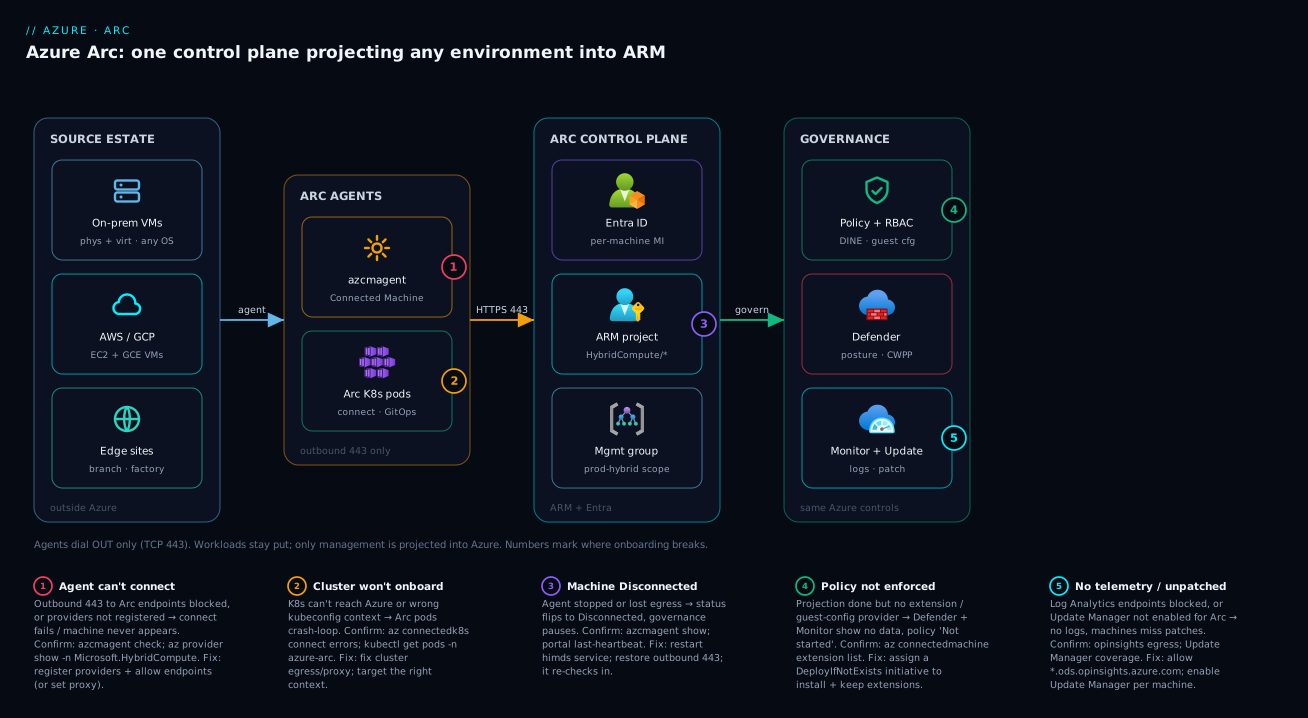
The shape to remember: many environments → outbound 443 → one ARM control plane → the same governance you already run. Workloads stay left; management lives right.
Real-world scenario
Meridian Logistics runs a freight-tracking platform. Their estate is a classic mess of history: 40 Windows and Linux VMs in a co-located datacentre near Pune (the original 2016 build), a 12-node Kubernetes cluster on AWS EKS that a newer team stood up for the tracking microservices, three SQL Server 2016 instances on-prem still running the billing system, and four ruggedised edge servers in regional sort-centres feeding scanner data. The platform team owns “operations” across all of it, but in practice they were running four parallel worlds: SCCM for the on-prem patching, a separate AWS-native toolchain for EKS, a spreadsheet for the SQL inventory, and a “we’ll get to it” plan for the edge boxes.
The breaking point was an audit. The security team had to prove that every server was patched within the SLA and had endpoint protection. They could produce a clean report for Azure-native workloads in minutes — and nothing trustworthy for the other 90% of the estate. The SQL Server 2016 instances were the worst: out of mainstream support and a compliance finding waiting to happen.
They adopted Azure Arc in three waves. Wave one: servers. They Arc-enabled all 44 datacentre and edge servers using a service-principal onboarding script pushed through their existing config-management tool — outbound 443 through the corporate proxy, no inbound changes. Within a day all 44 appeared in one resource group under a prod-hybrid management group, tagged by site and owner. They assigned a single Azure Policy initiative at the management-group level requiring the Azure Monitor Agent and the Defender sensor, and Policy’s DeployIfNotExists effect installed both across the fleet automatically. Wave two: SQL Server. They Arc-enabled the three SQL Server 2016 instances, switched them to pay-as-you-go licensing, enabled Defender for SQL, and — the clincher — turned on Extended Security Updates through Azure, closing the audit finding without an emergency migration. Wave three: Kubernetes. They connected the EKS cluster and wired GitOps (Flux) so its baseline config (namespaces, network policies, the Defender agent) came from a Git repo Azure reconciled.
The outcome that mattered to the boss: one compliance dashboard in Defender for Cloud covering on-prem, AWS and edge; one patch schedule in Update Manager across Windows, Linux and SQL; and a single inventory the auditors accepted. They moved zero workloads — the EKS cluster still ran on AWS, the billing databases in Pune, the scanners on the local edge boxes. All of it was now governed from one place by the same small team using skills they already had. The projection itself cost nothing; they paid only for Defender per server, Update Manager for the non-Azure boxes, the SQL ESU subscription, and a modest Log Analytics bill — far less than the three tools they retired.
Advantages and disadvantages
Arc is powerful but not free of trade-offs. The honest two-column view:
| Advantages | Disadvantages |
|---|---|
| One control plane (RBAC, Policy, Defender, Monitor) across all environments | Adds a management dependency on Azure connectivity and the agent |
| Workloads don’t move — no migration risk or downtime | Value comes from paid add-ons (Defender, Update Manager, telemetry), not the free projection |
| Reuses skills and tooling your team already has | Another agent to deploy, monitor and keep updated on every machine |
| Outbound-only, no inbound exposure — firewall-friendly | Disconnected machines lose central manageability until they reconnect |
| Single compliance/inventory view for audits | Not every Azure service works against Arc resources — coverage varies by feature |
| GitOps + Policy let you govern fleets, not snowflakes | Private Link / air-gapped setups add real network and DNS complexity |
When the advantages dominate: you have a genuinely hybrid or multicloud estate that must be governed to one bar, the workloads can’t or shouldn’t move (latency, data residency, sunk cost, contractual), and you already operate Azure for something. When the disadvantages dominate: you’re single-cloud and all-in on one provider (govern natively, skip the abstraction), the estate is tiny (the per-resource add-on costs and the agent overhead may not pay off), or the environment is truly air-gapped with no path to Azure (Arc needs some outbound reachability). Arc is a governance multiplier for heterogeneous estates, not a default you bolt onto everything.
Hands-on lab
This lab Arc-enables a single Linux VM and applies one piece of governance, using only the free projection plus a no-cost Policy assignment. If you don’t have an on-prem box, a small VM in another cloud (or even a local VM) works — the whole point is that it’s not an Azure VM. Budget ~20 minutes.
1. Prepare the subscription. Register the providers (one-time):
az login
az provider register --namespace Microsoft.HybridCompute --wait
az provider register --namespace Microsoft.GuestConfiguration --wait
az provider register --namespace Microsoft.HybridConnectivity --wait
az group create --name rg-arc-lab --location centralindia
2. Generate and run the onboarding on the target VM. On the non-Azure Linux machine, install the agent and connect interactively (you’ll be given a device-login code):
# On the target Linux VM (not an Azure VM):
wget https://aka.ms/azcmagent -O install_linux_azcmagent.sh
bash install_linux_azcmagent.sh

sudo azcmagent connect \
  --resource-group "rg-arc-lab" \
  --location "centralindia" \
  --subscription-id "<subscription-id>" \
  --tags "Env=Lab"
3. Confirm it’s Connected. From the agent, and from Azure:
# On the machine
sudo azcmagent show --query 'status'   # expect: Connected

# From Cloud Shell
az connectedmachine list -g rg-arc-lab \
  --query "[].{name:name, status:status, os:osName}" -o table
You should now see your machine in the Azure portal under Azure Arc → Machines, with a resource ID, location and tags — a first-class ARM resource that happens to live outside Azure.
4. Govern it. Assign a built-in audit policy so the machine is evaluated like any Azure resource — for example, audit that the machine has the dependency agent or a tag. A simple tag-audit assignment:
# Audit that Arc machines carry an 'Owner' tag (built-in policy)
az policy assignment create \
  --name "audit-arc-owner-tag" \
  --resource-group rg-arc-lab \
  --policy "871b6d14-10aa-478d-b590-94f262ecfa99" \
  --params '{"tagName":{"value":"Owner"}}'
Within a few minutes the compliance result shows your Arc machine evaluated by the same Policy engine that governs native VMs — proof that the projection is real.
5. Tear down. Disconnect the agent (removes the ARM resource and the machine’s identity) and delete the lab group:
# On the machine
sudo azcmagent disconnect

# From Cloud Shell
az group delete --name rg-arc-lab --yes --no-wait
Teardown matters: leaving an agent connected keeps a (free) projection around, but any extensions you added — Monitor, Defender — keep billing until removed. Disconnect cleanly.
Common mistakes & troubleshooting
The failures below are the ones that actually generate support tickets. Each gives the symptom, the real cause, how to confirm it, and the fix:
| # | Symptom | Root cause | Confirm with | Fix |
|---|---|---|---|---|
| 1 | azcmagent connect fails immediately |
Resource providers not registered | az provider show -n Microsoft.HybridCompute --query registrationState |
Register the three providers; retry |
| 2 | Agent installs but can’t connect | Outbound 443 to Arc endpoints blocked | azcmagent check (tests required endpoints) |
Allow the endpoints (or set the proxy); re-run connect |
| 3 | Machine shows Disconnected in portal | Agent stopped, or lost outbound reachability | azcmagent show on the box; check the service is running |
Restart himds service; restore egress; agent re-checks in |
| 4 | “Enabled Arc” but no Monitor/Defender data | Projection done, but no extensions installed | az connectedmachine extension list |
Install the Monitor/Defender extension (or assign a DINE policy) |
| 5 | Onboarding script fails at scale | Interactive login used for many machines | Script prompts for device code | Use a service principal with the onboarding role, not interactive auth |
| 6 | Telemetry endpoints blocked after enabling Monitor | Firewall allows Arc core but not Log Analytics | No data in Log Analytics; opinsights blocked |
Add *.ods.opinsights.azure.com to the allow-list |
| 7 | Policy assigned but not enforced on Arc machine | Guest Configuration provider/extension missing | Compliance shows “Not started” for guest policy | Register Microsoft.GuestConfiguration; ensure the guest config extension is present |
| 8 | Duplicate machine entries in the portal | A reimaged VM re-onboarded with a new identity | Two machines resources, same hostname |
Disconnect the stale one; use consistent naming/IDs |
| 9 | Arc-enabled K8s cluster won’t connect | Cluster can’t reach Azure, or kubeconfig context wrong | az connectedk8s connect errors; agent pods crash-loop |
Fix egress/proxy on the cluster; point at the right context |
| 10 | GitOps config never applies | Flux extension not installed or repo unreachable | kubectl get pods -n flux-system; config status Failed |
Install the GitOps extension; fix repo URL/credentials |
Two diagnostics do most of the work. azcmagent check validates that the machine can reach every required endpoint before you connect — run it first and you’ll pre-empt most of the failures above. And azcmagent show (plus the portal’s Connected/Disconnected status and last-heartbeat time) tells you instantly whether a quiet machine is a network problem or a stopped agent.
Best practices
- Onboard with a service principal, not interactive login. At any scale beyond a handful of machines, generate a service principal scoped to the Azure Connected Machine Onboarding role and bake it into your config-management tooling.
- Project into a deliberate hierarchy. Put Arc resources in resource groups and management groups that mirror your environments (
prod-hybrid,edge-sites) so Policy and RBAC scope cleanly — don’t dump everything in one group. - Tag at onboarding time. Set
Environment,Owner, andSitetags duringazcmagent connect. Tags are how you’ll filter inventory, target policy, and allocate cost later. - Govern with Policy, install with DeployIfNotExists. Don’t hand-install the Monitor and Defender extensions machine by machine. Assign a Policy initiative at the management-group level and let DeployIfNotExists roll the extensions out and keep them present.
- Decide connectivity up front with your network team. Direct for PoCs; proxy or Private Link for production. Document which endpoints are allowed so a future firewall change doesn’t silently break the fleet.
- Keep the agent updated. The Connected Machine agent is software on every box — include it in your patch/update process; an old agent can miss features and fixes.
- Monitor for Disconnected. Alert on machines that miss heartbeats. A Disconnected machine isn’t being governed, isn’t being patched, and isn’t being protected — it’s a silent gap.
- Turn on only the value-add services you’ll use. Defender, Update Manager and telemetry each bill per resource. Enable them where they earn their keep, not blanket-everywhere by reflex.
- Treat Arc-enabled SQL Server as a licensing and ESU play. For old SQL versions, the Extended Security Updates path through Arc is often the single biggest reason to adopt it — prioritise those instances.
- Use GitOps for clusters, not click-ops. For Arc-enabled Kubernetes, drive baseline config through Flux from Git so every cluster converges to the same state and drift self-heals.
Security notes
Arc’s security model is, pleasingly, less exposure than the alternatives — but only if you respect a few principles.
The connection is outbound-only. Arc never opens an inbound path from Azure into your network. The agent dials out over 443; Azure cannot initiate a connection to your machine. Adopting Arc does not poke a hole in your perimeter — any tool that “manages your on-prem from the cloud” by opening inbound ports is a riskier proposition.
Each machine authenticates as itself. Onboarding issues a system-assigned managed identity per machine in Microsoft Entra; the machine uses it to call Azure APIs, with no shared secret on the data path. Protect the onboarding service principal (it can register new machines) far more tightly — scope it to only the Connected Machine Onboarding role, not Contributor, and rotate its secret.
Guard the local agent endpoint. The agent exposes a local identity endpoint so on-box processes can request tokens for the machine’s identity. Restrict which local users/processes can reach it (the agent supports an allow-list) so a low-privileged process can’t borrow the machine’s Azure identity — the on-prem equivalent of locking down IMDS on a cloud VM.
Governance is the security win. Once Arc-enabled, Defender for Cloud and Azure Policy see these machines: vulnerability assessment, secure-score recommendations, and the ability to enforce configuration (via guest configuration) on servers that previously had none of that. Scope RBAC tightly, enable Defender where it matters, and alert on Disconnected machines that have fallen out of coverage. For the deeper guest-config and ESU mechanics, see Azure Arc-Enabled Servers: Onboarding at Scale, Machine Configuration Guest Policy, and Extended Security Updates.
Cost & sizing
The headline that surprises people in both directions: the Arc projection itself is free, but the things you do with it are not. Connecting a server or cluster to Azure Resource Manager — the inventory, the resource ID, the ability to tag and scope policy — costs nothing. You start paying when you switch on the value-add services. The breakdown:
| What you enable | Billing model | Free? | Notes |
|---|---|---|---|
| Arc projection (servers, K8s) | — | Free | Inventory, tags, RBAC, basic Policy audit cost nothing |
| Guest configuration (audit) | Per managed resource | Mostly free at audit | Some guest-config scenarios bill; check the meter |
| Microsoft Defender for Servers | Per server / hour | No | Plan 1 or Plan 2 pricing applies to Arc servers |
| Azure Update Manager (non-Azure machines) | Per machine / month | No | Free for Azure VMs; billed for Arc-enabled machines |
| Azure Monitor (telemetry) | Per GB ingested + retention | No | Driven by how much the agent collects |
| Arc-enabled SQL Server ESU | Per core subscription | No | The reason to adopt for old SQL; cheaper than migration |
| Arc-enabled data services | Per vCore (SQL MI / PostgreSQL) | No | You run Azure data engines on your infra |
| Azure Arc Private Link | Per private endpoint + data | No | Only if you choose the private-endpoint connectivity mode |
Rough sizing intuition for a 50-server hybrid estate (figures are order-of-magnitude, region- and plan-dependent — always price with the Azure calculator):
- Projection: ₹0. Fifty Arc machines in ARM, tagged and governed by Policy audit, add nothing.
- Defender for Servers Plan 2: a few hundred rupees per server per month — tens of thousands monthly for fifty servers. Enable where the security value is real.
- Update Manager (non-Azure machines): a modest per-machine monthly charge for the Arc boxes (Azure VMs are free) — small and predictable.
- Log Analytics ingestion: the genuinely variable cost; it scales with how much you collect. Collect what you’ll actually query — verbose collection across fifty chatty servers is where surprise bills come from.
The right-sizing rule: start with the free projection everywhere, then enable paid services selectively based on which machines truly need Defender, patch orchestration and deep telemetry. Blanket-enabling every add-on by reflex is how a “free” Arc rollout turns into an unexpected invoice.
Interview & exam questions
These map to AZ-900 (cloud concepts, governance), AZ-104 (hybrid management, governance), and AZ-305 (designing hybrid/governance solutions).
1. In one sentence, what does Azure Arc do? It projects resources that run outside Azure — servers, Kubernetes clusters, databases — into Azure Resource Manager as first-class resources, so you can govern, secure and monitor them with the same Azure control plane (RBAC, Policy, Defender, Monitor) you use for native Azure resources. The workloads stay where they are; only management moves to Azure.
2. Name the four Arc resource types.
Arc-enabled servers (Microsoft.HybridCompute/machines), Arc-enabled Kubernetes (Microsoft.Kubernetes/connectedClusters), Arc-enabled data services (Azure SQL MI / PostgreSQL on your own Kubernetes), and Arc-enabled SQL Server (projecting an existing SQL Server instance for inventory, assessment, Defender and ESU).
3. Does Arc move my workloads into Azure? No. Arc creates a management representation in ARM but the compute, storage and application data stay exactly where they run. Arc adds a management dependency on Azure connectivity, not a data-path dependency — the app keeps serving locally even if Azure is unreachable.
4. Which direction does the Connected Machine agent connect, and on what port? Outbound only, over HTTPS on TCP 443, to a defined set of Azure endpoints. Azure never initiates an inbound connection into your network, which is what makes Arc safe behind a firewall.
5. How does an Arc-enabled machine authenticate to Azure? Each machine receives its own system-assigned Microsoft Entra managed identity during onboarding and uses it to call Azure APIs — no shared secret on the data path. The onboarding service principal is separate and should be tightly scoped to the Connected Machine Onboarding role.
6. What’s the difference between Arc-enabled data services and Arc-enabled SQL Server? Arc-enabled SQL Server projects an existing SQL Server instance into Azure for management and ESU. Arc-enabled data services lets you run Azure’s own managed data engines (Azure SQL Managed Instance, PostgreSQL) on your own Arc-enabled Kubernetes, so the data stays on your infrastructure with cloud-style managed features.
7. If a server can’t reach the public internet, can it still be Arc-enabled? Yes — via an outbound proxy or Azure Arc Private Link (private endpoints over ExpressRoute/VPN). It still needs some outbound path to Azure; a truly air-gapped machine with no egress at all cannot be Arc-enabled.
8. How do you get Azure Monitor and Defender onto an Arc server? By installing the corresponding extensions — manually, or (the scalable way) via an Azure Policy initiative using the DeployIfNotExists effect so the extensions are installed and kept present across the fleet automatically.
9. What does Arc cost? The projection (connecting servers/clusters to ARM, inventory, tags, basic Policy audit) is free. You pay for the value-add services per resource: Defender for Servers, Update Manager for non-Azure machines, Log Analytics ingestion, SQL ESU, and Arc data services. Private Link, if used, adds endpoint and data charges.
10. A machine shows “Disconnected” in the portal — what does that mean?
The agent has stopped checking in (heartbeats missed) — usually a stopped agent service or lost outbound reachability. The workload may still be running locally, but it’s no longer being governed, patched or protected from Azure until it reconnects. Confirm with azcmagent show on the box and restore the agent/egress.
11. Why use GitOps with Arc-enabled Kubernetes? GitOps (Flux) drives each cluster’s configuration from a Git repository that Azure reconciles, so fleets of clusters converge to the same declared state and drift self-heals — essential when you’re governing many clusters across clouds and edge from one place.
12. When is Arc the wrong tool? When you’re single-cloud and fully native (govern with that cloud’s tools), when the estate is tiny enough that the agent overhead and per-resource add-on costs don’t pay off, or when an environment is truly air-gapped with no outbound path to Azure.
Quick check
- True or false: enabling Azure Arc on a server migrates that server’s workload into an Azure datacentre.
- Which Azure endpoint does the Connected Machine agent contact for authentication, and which direction/port does it use?
- You’ve Arc-enabled 30 servers but see no Defender findings for them. What step did you skip?
- Which Arc resource type would you use to deliver Extended Security Updates to an old on-prem SQL Server instance?
- Name the three connectivity modes for the Arc agent, from least to most isolated.
Answers
- False. Arc projects a management representation into Azure Resource Manager; the workload, compute and data stay exactly where they run. Only management moves.
login.microsoftonline.com(Microsoft Entra), reached outbound over TCP 443. The agent only ever dials out; Azure never connects inbound.- You installed the projection but never installed the Defender extension (and/or didn’t enable the Defender for Servers plan). Install the extension manually or via a DeployIfNotExists Policy assignment, and enable the plan.
- Arc-enabled SQL Server — it projects the existing instance and lets you receive ESU through Azure (often cheaper and far less risky than an emergency migration).
- Direct (public endpoints) → Proxy (egress via corporate proxy) → Private Link (private endpoints over ExpressRoute/VPN).
Glossary
- Azure Arc — Azure’s projection layer that brings external servers, Kubernetes clusters, and data services into Azure Resource Manager for unified management.
- Projection — The ARM resource that represents an external machine; governance attaches to it while the workload stays put.
- Azure Resource Manager (ARM) — Azure’s control plane; the deployment and management layer where all Azure (and Arc) resources live.
- Connected Machine agent (
azcmagent) — The software installed on each Arc-enabled server that registers it and runs extensions, connecting outbound only. - Arc-enabled servers — Physical or virtual machines projected into Azure (
Microsoft.HybridCompute/machines). - Arc-enabled Kubernetes — Any conformant cluster connected to Azure (
Microsoft.Kubernetes/connectedClusters) for GitOps, Policy and monitoring. - Arc-enabled data services — Running Azure SQL Managed Instance / PostgreSQL on your own Arc-enabled Kubernetes so data stays on your infrastructure.
- Arc-enabled SQL Server — Projecting an existing SQL Server instance for inventory, assessment, Defender, PAYG licensing and ESU.
- Extension — A capability (Monitor, Defender, guest config, GitOps) installed on demand on an Arc resource; the projection alone does nothing until extensions are added.
- Managed identity — The per-machine Microsoft Entra identity used by an Arc resource to authenticate to Azure APIs.
- Heartbeat — The agent’s periodic check-in that drives the Connected / Disconnected status.
- DeployIfNotExists (DINE) — An Azure Policy effect that installs and maintains a resource (e.g. an extension) when it’s missing — the scalable way to roll out Arc capabilities.
- Extended Security Updates (ESU) — Security patches for end-of-support products (e.g. SQL Server 2012/2016) delivered through Azure to Arc-enabled instances.
- Azure Arc Private Link — A connectivity mode routing agent traffic over private endpoints via ExpressRoute/VPN instead of the public internet.
Next steps
- Go deep on the foundation: Azure Arc-Enabled Servers: Onboarding at Scale, Machine Configuration Guest Policy, and Extended Security Updates.
- Govern clusters with config-as-code: Azure Arc-Enabled Kubernetes: GitOps, Policy, and Fleet Governance for Hybrid Clusters.
- Master the governance primitives Arc reuses: Management Groups 101: Designing a Hierarchy That Scopes Policy and RBAC and Azure Policy Effects Decoded: Deny vs Audit vs Modify vs DeployIfNotExists.
- Patch the whole hybrid fleet from one place: Azure Update Manager: Maintenance Configurations, Scheduled Patching, and Hybrid Coverage with Arc.
- Wire up telemetry for your Arc resources: Azure Monitor and Application Insights: Full-Stack Observability.