You have eight subscriptions. Production, staging and dev for two product teams, a shared-services subscription for networking, and a sandbox where people try things. Security asks a simple question: “Can you guarantee that no one, anywhere, can spin up a resource in a banned region, and that the platform team has read access to everything for cost reporting?” If your answer is “I’ll apply the policy to each subscription, and add the RBAC assignment eight times,” you have just signed up to do that again every time someone creates a ninth subscription — and to remember. That is the gap management groups close.
A management group is a container that sits above subscriptions. It is a node in a tree whose leaves are subscriptions, and the entire point of the tree is inheritance: a policy or a role assignment placed on a management group flows down to every subscription beneath it, and to every resource group and resource inside those subscriptions, automatically and forever — including subscriptions that do not exist yet. You assign once, at the right altitude, and Azure enforces it everywhere below. This article is about that altitude: what management groups are, how the four levels of the scope hierarchy inherit governance, and — the part that actually matters — how to shape the tree so it scopes policy and access cleanly instead of becoming a tangle you are afraid to touch.
By the end you will be able to read any management-group hierarchy and predict what a given subscription inherits, design a tree that mirrors how your organization actually governs (not how its org chart happens to look this quarter), and avoid the handful of structural mistakes — flat trees, environment-vs-team confusion, deny-at-the-wrong-level — that force expensive re-parenting later. This is a Basic, concept-first article: we lead with mental models and decision tables, walk one reference architecture, and keep the CLI and Bicep close so you can build it the same afternoon.
What problem this solves
Without management groups, a subscription is your highest unit of governance, and that creates two specific pains. The first is repetition: every guardrail — allowed regions, required tags, denied SKUs, a “platform reads everything” role — has to be stamped onto each subscription individually. With three subscriptions that is tedious; with thirty it is unmanageable, and the real failure mode is drift. Someone creates a new subscription, forgets two of the eleven standard policies, and now you have a compliance hole that no one notices until an audit or an incident. Governance that depends on humans remembering to repeat themselves is governance that is already broken.
The second pain is the absence of a place to express organization-wide intent. “Everything in this company must deny public blob access” is a sentence about the whole tenant, but without management groups there is no object that means “the whole tenant” — only a pile of subscriptions you have to enumerate. You cannot assign a policy to “all of it” because “all of it” is not a thing Azure can point at. Management groups give you that thing: the tenant root group at the very top means everything, and every management group below it means some coherent slice of everything.
Who hits this: any organization past its second or third subscription, and especially anyone adopting an enterprise-scale landing zone, where the management-group tree is the literal foundation everything else is poured onto. It bites hardest when a tenant grows organically — subscriptions created ad hoc, governance bolted on per-subscription — and then someone tries to impose consistent policy and discovers there is no lever that reaches all of it at once. Management groups are the lever. The cost of not using them is paid later, in a migration where you re-parent live subscriptions and pray the inherited policy doesn’t break a running workload.
| Pain without management groups | What it looks like in production | What management groups give you |
|---|---|---|
| Policy repeated per subscription | 30 subscriptions, each configured by hand; new ones drift | Assign once at a group; all subs below inherit |
| No “whole tenant” object | “Deny public IPs everywhere” has nowhere to live | Tenant root group = everything; assign there |
| RBAC re-granted per subscription | Platform team added to each sub manually | One assignment at root; reads everything below |
| New subscriptions start ungoverned | Day-one gap until someone configures them | New sub placed in a group inherits instantly |
| No blast-radius boundary for guardrails | A bad deny hits all subs at once or none | Scope the deny to one branch of the tree |
Learning objectives
By the end of this article you can:
- Explain what a management group is and where it sits relative to the tenant root group, subscriptions, resource groups and resources.
- Describe how policy and Azure RBAC assignments inherit down the four-level scope hierarchy, and predict what any given subscription effectively gets.
- Choose between organizing your tree by environment, by business unit, or by a hybrid — using a decision table rather than guesswork.
- Apply the design rules that keep a hierarchy healthy: shallow depth, a dedicated platform branch, a sandbox branch outside the strict guardrails, and a place for decommissioned subscriptions.
- Create, nest and move management groups with
az account management-groupand define them as Bicep so the tree itself is version-controlled. - Diagnose the common failure modes — inheritance you forgot about, a deny that blocks a legitimate deployment, an RBAC grant placed too high — and know the exact command to confirm what is really in effect.
- Right-size the effort: know what management groups cost (nothing), what their real limits are (depth, count, children), and when a flat structure is genuinely fine.
Prerequisites & where this fits
You should already understand that Azure has a resource hierarchy: resources (a VM, a storage account) live in resource groups, resource groups live in subscriptions, and a subscription is a billing-and-isolation boundary. If those three levels are fuzzy, read Azure Resource Hierarchy Explained: Subscriptions, Resource Groups and Resources first — management groups add a fourth level above all of it, and the inheritance story only makes sense once the bottom three are clear. It also helps to know what a subscription actually is and when you create a new one, covered in Azure Subscriptions Explained: Types, Billing Boundaries and When to Create a New One.
Two adjacent topics are the reason management groups exist, and we lean on both: Azure Policy (the rules that get inherited) and Azure RBAC (the access that gets inherited). You do not need to be expert in either, but a working idea of “a policy denies or audits something” and “a role assignment grants someone permissions at a scope” will make every inheritance example land. The deep treatment of the rules themselves lives in Azure Policy and Governance at Scale: Enforce the Rules Automatically.
Where this fits in the bigger picture: management groups are the top of the governance stack and the foundation of a landing zone. In an Azure Enterprise-Scale Landing Zone: Foundation for Large Organizations, the management-group hierarchy is laid down first, before any workload subscription exists, because everything else — policy, RBAC, networking topology — is scoped onto it. Get the tree right and the rest has somewhere solid to attach. Get it wrong and you re-pour the foundation with the house already standing on it.
| You should know | Why it matters here | Where to learn it |
|---|---|---|
| Resource group → subscription nesting | MGs add the level above; inheritance is the whole point | Azure Resource Hierarchy Explained |
| What a subscription is / when to make one | Subscriptions are the leaves your tree organizes | Azure Subscriptions Explained |
| Azure Policy basics (deny / audit) | Policy is the thing that inherits down the tree | Azure Policy and Governance at Scale |
| RBAC role assignment at a scope | Role assignments inherit down too | Azure Policy and Governance at Scale |
| Landing-zone concept (optional) | The MG tree is its literal foundation | Azure Enterprise-Scale Landing Zone |
Core concepts
Four mental models make every later decision obvious. Read these slowly; the rest of the article is just consequences of them.
A management group is a node in a tree, and the tree has exactly one root. Every Azure tenant has a single, immovable tenant root group (its ID is the tenant/directory ID itself). It is created automatically, you cannot delete or move it, and it is the ancestor of everything. Under it you build a tree of management groups — groups inside groups — and at the bottom, as leaves, sit your subscriptions. A subscription has exactly one parent management group at any time (it cannot belong to two), and a management group can hold both child management groups and subscriptions. The shape of this tree is the only thing you design; the inheritance comes for free.
Inheritance flows strictly downward, and it is cumulative. This is the engine. A policy assignment or a role assignment placed at any node applies to that node and everything beneath it — all descendant management groups, all subscriptions in that branch, all their resource groups, all their resources. It is cumulative, not override-by-proximity: if the root says “deny resources outside India regions” and a child group says “require a costCenter tag,” a subscription two levels down gets both. Crucially for security, RBAC and policy cannot be revoked lower down — a child cannot “turn off” a deny inherited from a parent. The higher you place an assignment, the broader and more unstoppable its reach. That is the lever, and also the footgun.
The four scope levels are one continuous ladder. Azure assigns policy and RBAC at exactly four levels, broadest to narrowest: management group → subscription → resource group → resource, forming a single inheritance chain. Management groups simply extend the ladder you already use upward past the subscription — so a guardrail can now reach across many subscriptions at once. Nothing about how inheritance works is new; there is just a new, higher place to stand.
Effective governance is the union of every level above you. “What does subscription X enforce?” is answered by summing every policy and role assignment from the tenant root down through each ancestor, plus anything on the subscription and its contents. A resource is governed by all its ancestors at once — which is why placement is a design decision: the rung you choose decides the blast radius.
The four scope levels, side by side
| Scope level | What it contains | Assign policy here to govern… | Assign RBAC here to grant access to… | Can you nest it? |
|---|---|---|---|---|
| Tenant root group | All management groups + all subscriptions | The entire tenant — every subscription, forever | Everything in the tenant (use sparingly) | It is the single root; nothing above |
| Management group | Child MGs and/or subscriptions | That whole branch of the tree | All subscriptions in that branch | Yes — up to 6 levels below root |
| Subscription | Resource groups | One subscription and all its resources | One subscription’s resources | No (leaf of the MG tree) |
| Resource group | Resources | All resources in the group | Resources in that group | No |
| Resource | (the thing itself) | Just that resource | Just that resource | No |
Inheritance in one table
The single most important behaviour, made concrete. Read each row as “an assignment placed here is in effect there”:
| Assigned at… | In effect at the subscription? | At its resource groups? | At individual resources? | Can a lower scope cancel it? |
|---|---|---|---|---|
| Tenant root group | Yes (every subscription) | Yes | Yes | No |
| A parent management group | Yes (subs in that branch) | Yes | Yes | No |
| The subscription itself | Yes | Yes | Yes | No |
| A resource group | n/a | Yes (that RG only) | Yes (in that RG) | No |
| A resource | n/a | n/a | Yes (that one) | n/a |
The “cannot cancel it lower down” column is the rule people forget. There is no allow that beats an inherited deny; you cannot un-assign a parent’s role from a child. If a guardrail is in the wrong place, you fix it at the level where it was assigned, not below.
How management groups inherit policy
Azure Policy is the primary reason management groups exist. A policy definition describes a rule (“resources must be in centralindia or southindia”); an assignment binds that definition to a scope and turns it on. Place the assignment on a management group and it evaluates against every resource in every subscription beneath it. The effect — Deny, Audit, Modify, DeployIfNotExists and others — is what happens when a resource matches; for the full effect catalogue see Azure Policy Effects Decoded: Deny vs Audit vs Modify vs DeployIfNotExists.
The design value is that you assign organization-wide guardrails once, at the right node. A Deny on “public network access for storage” at a management group means no team in that branch can ever expose a storage account publicly — not today, not in a subscription created next year. Compare that to per-subscription assignment, where the next subscription is a gap until someone remembers. Inheritance turns “remember to apply the rule” into “the rule is structurally unavoidable below this node.”
Three placement patterns cover almost everything, and choosing among them is the whole skill:
| Policy intent | Assign it at… | Why there | What it would cost you elsewhere |
|---|---|---|---|
| Non-negotiable tenant rule (e.g. allowed regions, no public IPs) | Tenant root or a top-level MG | Reaches everything; impossible to miss a sub | Per-sub assignment drifts as subs grow |
| Environment-specific (e.g. stricter SKUs in prod) | The prod management group |
Hits all prod subs, leaves dev free | Stamping prod subs one by one |
| Team-specific exception or standard | That team’s management group | Scoped to the branch that needs it | Polluting other teams with a niche rule |
Two behaviours to internalise. First, policy is cumulative down the tree — a subscription is evaluated against the union of every assignment on every ancestor, so a resource can be denied by a root policy and audited by a mid-tree policy at the same time. Second, exemptions are deliberate and scoped: when a legitimate workload must violate an inherited policy, you create a policy exemption at the specific subscription or resource group, which is an explicit, auditable carve-out — not a way for a child to silently override a parent. Grouping many related rules into one assignable bundle is the job of initiatives (policy sets); when to bundle versus assign individually is covered in Policy Definitions vs Initiatives: When to Bundle Controls into a Set.
# Assign a built-in "allowed locations" policy to a management group.
# Every subscription under mg-corp now inherits the region restriction.
MG_ID="/providers/Microsoft.Management/managementGroups/mg-corp"
az policy assignment create \
  --name "allowed-locations-corp" \
  --display-name "Allowed locations (Corp)" \
  --scope "$MG_ID" \
  --policy "e56962a6-4747-49cd-b67b-bf8b01975c4c" \
  --params '{ "listOfAllowedLocations": { "value": ["centralindia","southindia"] } }'
// The same assignment as Bicep, deployed at management-group scope.
targetScope = 'managementGroup'

resource allowedLocations 'Microsoft.Authorization/policyAssignments@2024-04-01' = {
  name: 'allowed-locations-corp'
  properties: {
    displayName: 'Allowed locations (Corp)'
    // Built-in "Allowed locations" definition ID:
    policyDefinitionId: '/providers/Microsoft.Authorization/policyDefinitions/e56962a6-4747-49cd-b67b-bf8b01975c4c'
    parameters: {
      listOfAllowedLocations: { value: [ 'centralindia', 'southindia' ] }
    }
  }
}
How management groups inherit RBAC
Azure role-based access control (RBAC) inherits down the exact same tree. A role assignment binds a principal (a user, group, or managed identity), a role definition (Owner, Contributor, Reader, or a custom role) and a scope. Assign it on a management group and the principal holds that role across every subscription, resource group and resource in the branch. This is how you give the platform team Reader over the whole estate with a single assignment, or how you grant a product team Contributor over only their environment by assigning at their management group rather than per-subscription.
The economics mirror policy: one assignment at the right altitude replaces N assignments that would otherwise drift. But RBAC carries a sharper warning, because access is more dangerous than a guardrail. An Owner or Contributor assignment at a management group is enormous — it grants that principal control over everything below, including subscriptions added later. The right instinct is least privilege by altitude: grant broad-but-read-only roles (like Reader for visibility, or Management Group Reader) high in the tree, and grant powerful roles (Owner, Contributor) as low as the job allows — ideally at the subscription or resource group, not the management group.
| Role assigned at a management group | What the principal can do in the branch | When this is appropriate | The risk if over-scoped |
|---|---|---|---|
| Reader | View everything below; change nothing | Platform/cost teams needing estate-wide visibility | Low — read-only, but still sees all metadata |
| Contributor | Create/modify resources, but not grant access | Rare at MG level; maybe a whole-environment ops team | High — can change every workload in the branch |
| Owner | Full control including assigning roles | Almost never at MG level | Severe — can grant others access estate-wide |
| User Access Administrator | Manage role assignments below | Break-glass / dedicated identity admins only | Severe — can self-escalate across the branch |
| Custom role (scoped actions) | Exactly the actions you defined | Tailored platform automation | Depends on the actions granted |
One operational subtlety worth knowing on day one: managing the management-group tree itself — creating, moving, or assigning at the root — requires elevated rights, and by default even a Global Administrator must first be granted access at the root group (Azure provides an “elevate access” path for this). This is a safety feature, not a bug: it stops anyone from quietly attaching policy or RBAC at the most powerful node in your tenant.
# Grant the platform team READ over the entire Corp branch with ONE assignment.
PLATFORM_GROUP_OBJECT_ID="<entra-group-object-id>"
az role assignment create \
  --assignee-object-id "$PLATFORM_GROUP_OBJECT_ID" \
  --assignee-principal-type Group \
  --role "Reader" \
  --scope "/providers/Microsoft.Management/managementGroups/mg-corp"
// Reader for the platform group, at management-group scope.
targetScope = 'managementGroup'

@description('Object ID of the platform-team Entra group')
param platformGroupObjectId string

var readerRoleId = 'acdd72a7-3385-48ef-bd42-f606fba81ae7' // built-in Reader

resource platformReader 'Microsoft.Authorization/roleAssignments@2022-04-01' = {
  name: guid('mg-corp', platformGroupObjectId, readerRoleId)
  properties: {
    principalId: platformGroupObjectId
    principalType: 'Group'
    roleDefinitionId: tenantResourceId('Microsoft.Authorization/roleDefinitions', readerRoleId)
  }
}
Designing the hierarchy: the shapes that work
Now the actual design question: what shape should the tree be? There are three canonical patterns, and the right answer is almost always a small hybrid. The mistake is treating this as an org-chart exercise. You are not modelling who reports to whom; you are modelling how governance differs. Two subscriptions belong under different management groups when they need different policy or different access — not because they belong to different VPs.
By environment groups subscriptions as prod, non-prod (or dev/test), sandbox. The win: environment is usually where guardrails genuinely differ — prod denies risky SKUs and demands tags; dev is looser. The cost: a single team’s prod and dev subs live in different branches, so a team-wide role needs assigning in two places.
By business unit (or team) groups subscriptions as retail, payments, corp-it. The win: each unit’s access and chargeback map cleanly to one branch. The cost: enforcing “prod is strict everywhere” now means repeating the prod policy inside every unit’s branch — the very repetition you came here to avoid.
Hybrid (business unit, then environment) nests environment inside each unit, or environment at the top with units below. This is what most mature tenants and the official landing-zone guidance converge on: a top-level split that captures the platform vs workloads distinction, then environment, with team scoping handled by RBAC rather than extra tree depth.
| Approach | Group the tree by… | Best when | Weak when | Typical depth |
|---|---|---|---|---|
| By environment | prod / non-prod / sandbox | Guardrails differ mostly by environment (common) | Per-team access is the dominant need | 1–2 levels |
| By business unit | retail / payments / corp | Chargeback and team autonomy dominate | Environment guardrails must be uniform | 1–2 levels |
| Hybrid | platform vs workloads, then env | Large org adopting a landing zone | Tiny tenants (it’s overkill) | 2–3 levels |
| Flat (single MG) | one MG over all subs | < ~5 subs, uniform governance | Any divergence in policy/access appears | 1 level |
A reliable decision table for “do these two subscriptions belong in the same group?”:
| If the two subscriptions… | Then… | Because |
|---|---|---|
| Need the same policies and the same access | Put them in the same management group | Inheritance gives both, with one assignment |
| Differ only in policy strictness (prod vs dev) | Separate by environment | Scope the strict policy to the prod branch only |
| Differ only in who has access (team A vs B) | Keep one tree; separate via RBAC scope | Don’t add tree depth just for access |
| Are experimental / throwaway | Put them in a dedicated sandbox group |
Keep loose rules out of the strict branches |
| Are being retired | Move to a decommissioned group |
Park them under quarantine policy, then delete |
Three structural elements that the landing-zone pattern makes standard and that pay off even in a modest tenant: a dedicated platform branch (sometimes split into identity, management, connectivity) for the shared subscriptions that run the estate — hub network, central logging, identity — which have a different governance profile from workloads; a sandbox branch held outside the strict guardrails so engineers can experiment without breaking or being blocked by the rules; and a decommissioned quarantine node with deny-most policy where you park subscriptions on their way out.
What you can and can’t do: rules and limits
Management groups are simple objects, but a few hard rules and real limits shape every design. Knowing them up front prevents the “why won’t it let me” moments.
| Property | Rule / limit | Design implication |
|---|---|---|
| Management groups per tenant | Up to 10,000 | Effectively unlimited for structure; you’ll never hit it |
| Hierarchy depth | Up to 6 levels below the root group | Stay shallow (2–3); depth is a smell, not a feature |
| Levels including root and subscription | 6 MG levels + root + the subscription layer | Don’t design for maximum depth |
| Children per management group | Up to 10,000 direct children (MGs + subs) | A wide group is fine; a deep tree is not |
| Parents per subscription | Exactly one at any time | A sub can’t be governed by two branches at once |
| Tenant root group | Auto-created; cannot be moved or deleted | Don’t put workload-specific policy on the root |
| Moving a subscription/MG | Allowed, but inherited governance changes instantly | Re-parenting can apply or remove deny rules live |
| Deleting a management group | Must be empty (no child MGs or subs) first | Drain a branch before deleting it |
| Region | Management groups are global, not regional | No region to choose; metadata replicates globally |
The two rules that catch people are one parent per subscription and move re-applies inheritance instantly. Because a subscription has a single parent, you cannot have it inherit from both a payments branch and a prod branch simultaneously — you choose one axis as the tree and express the other through policy or RBAC scoping. And because moving a subscription changes its ancestors immediately, a re-parent is a governance change: drag a sub from sandbox into prod and it instantly inherits every prod deny — which may block a resource that was happily running a minute ago. Treat moves as deployments, not drag-and-drop.
Architecture at a glance
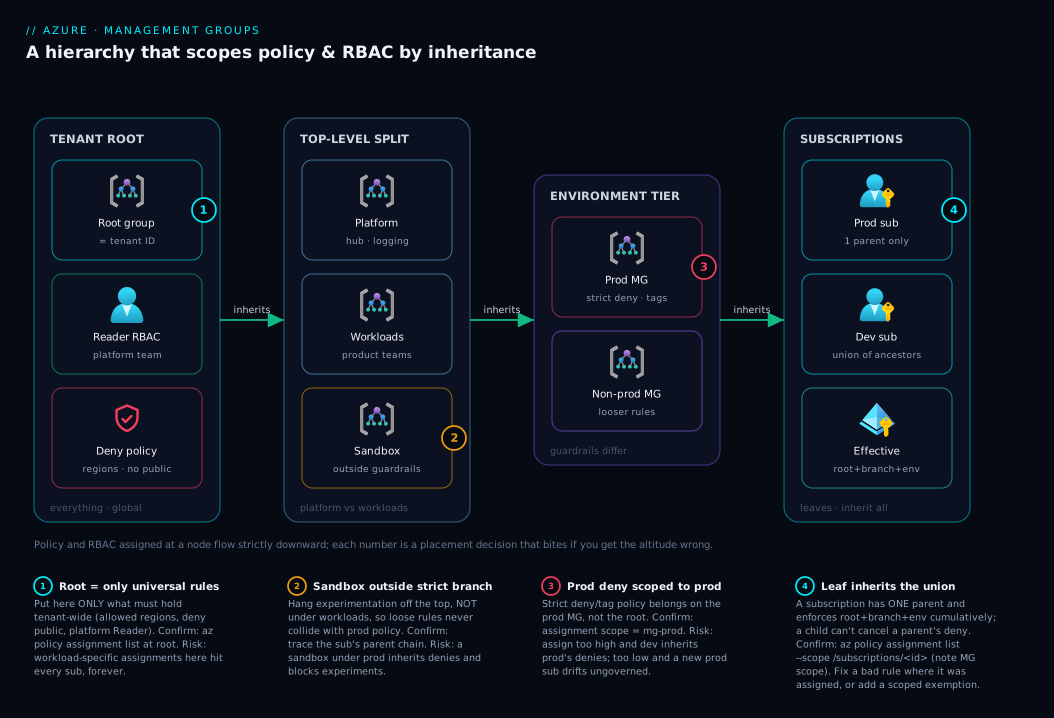
The diagram below is the canonical small-but-real hierarchy, read left to right as four governance zones. On the far left is the tenant root group — the single immovable node that means “everything.” This is where you place only the truly universal, non-negotiable assignments: a Reader role for the platform team so they can see the whole estate, and perhaps one or two Deny policies that must hold tenant-wide (allowed regions, no public blob). Nothing workload-specific lives here, because anything on the root reaches every subscription including ones not yet created.
From the root the tree branches into the second zone, the top-level split that every landing zone uses: a platform management group for the subscriptions that run the estate (hub networking, central logging, identity), and a workloads (often called landing-zones) management group for everything the product teams build. Under workloads sits the third zone, the environment tier — a prod group carrying the strict guardrails and a non-prod group that is deliberately looser — plus a sandbox group hung off the top level, outside the strict branch, so experimentation never collides with production policy. The fourth zone is the leaves: the actual subscriptions, each inheriting the cumulative union of every policy and role from the root down through its specific branch. Follow any left-to-right path and you can read exactly what that subscription enforces: root rules, plus its branch’s rules, plus its environment’s rules. The numbered badges mark the four places where placement decisions bite — and the legend turns each into a “what goes here, and what happens if you get it wrong.”
Real-world scenario
Northwind Retail runs two engineering groups — Storefront and Payments — across eight subscriptions: prod and non-prod for each team, a shared networking subscription, a central logging subscription, and a sandbox. For their first two years everything lived as eight independent subscriptions. Governance was a wiki page titled “things to set up when you make a subscription,” and it was followed about 70% of the time. The breaking point came during a security review: an auditor asked Northwind to prove that no subscription allowed storage accounts with public network access. The platform lead could not — three subscriptions had the policy, five did not, and nobody could say why. Worse, granting the new central FinOps analyst read access to “everything” meant eight separate role assignments, and she was missing two of them, so her cost reports silently excluded the networking and logging subs.
The fix was a management-group hierarchy, designed in an afternoon and rolled out over a week. They created a top-level split: an mg-platform group for the networking and logging subscriptions, and an mg-workloads group for the product subscriptions. Under workloads they added mg-prod and mg-nonprod, and they hung mg-sandbox directly off the root, deliberately outside the strict branch. They placed the “deny public storage” and “allowed regions (central/south India)” policies on the tenant root group so the rule was structurally impossible to miss — every current subscription and every future one inherits it. They assigned Reader to the FinOps Entra group at the root too: one assignment, total visibility, and it auto-covers any subscription added later.
The most instructive part was the migration. When they moved the two prod subscriptions under mg-prod, which carried a stricter Deny on a legacy VM SKU, one Payments prod subscription had three running VMs on exactly that denied SKU. The deny does not delete existing resources — but it blocked the team’s next scale-out deployment with a clear policy-violation error, which is precisely what surfaced the problem. Northwind created a time-boxed policy exemption scoped to that one subscription, opened a ticket to migrate the VMs to a supported SKU, and set the exemption to expire on the migration deadline. The lesson the platform lead wrote on the (now much shorter) wiki page: re-parenting a subscription is a governance change — diff the inherited policy before you move, not after. Six months on, new subscriptions are created empty and dropped into the right group; they inherit the full guardrail set on creation, and the “things to set up” checklist is two lines long.
Advantages and disadvantages
| Advantages | Disadvantages |
|---|---|
| Assign policy and RBAC once, inherited by all subs below — including future ones | Inheritance is invisible at lower scopes; people forget why a deny exists |
| A single object that means “the whole tenant” for org-wide rules | A misplaced deny/role at a high node has a huge blast radius |
| New subscriptions are governed from creation (no day-one gap) | Only one parent per subscription — can’t model two axes in the tree |
| Free — no cost for the groups themselves | Managing the tree needs elevated rights (root access elevation) |
| Mirrors and enables the enterprise-scale landing zone | Over-deep trees become confusing and slow to reason about |
| Re-parenting instantly re-applies the right governance | Re-parenting also instantly re-applies it — can break live workloads |
| Estate-wide reporting/visibility via one Reader grant | Strict prod policy can block legitimate deploys without exemptions |
The advantages dominate the moment you pass a handful of subscriptions; below that, a flat single-management-group structure (or even none) is genuinely fine and the tree is overhead. The disadvantages are almost all placement problems, not tool problems — they bite when an assignment sits at the wrong altitude. Two disciplines neutralise most of them: keep the tree shallow so the inheritance chain is short enough to hold in your head, and document at the assignment why each high-level policy or role exists, because the person debugging a mysterious deny six months from now is staring at a subscription with no local assignment and no clue it’s coming from three levels up.
Hands-on lab
This lab builds a minimal real hierarchy, assigns an inherited policy, proves the inheritance, then tears it down. It needs only an Azure account where you have rights to manage management groups (you may need to elevate access at the root once). Everything here is free.
1. Sign in and confirm you can see the root group.
az login
# List existing management groups (you'll at least see the tenant root group)
az account management-group list -o table
2. Create the top-level split. Create mg-corp under the root, then mg-workloads under it.
# Top-level group under the tenant root
az account management-group create --name "mg-corp" --display-name "Corp"

# Child group nested under mg-corp
az account management-group create --name "mg-workloads" \
  --display-name "Workloads" --parent "mg-corp"
3. Create the environment tier. Add mg-prod and mg-nonprod under workloads.
az account management-group create --name "mg-prod" \
  --display-name "Production" --parent "mg-workloads"
az account management-group create --name "mg-nonprod" \
  --display-name "Non-Production" --parent "mg-workloads"
4. Inspect the tree. Pull the hierarchy and confirm the nesting.
# Expand the tree from mg-corp downward
az account management-group show --name "mg-corp" --expand --recurse \
  --query "{name:displayName, children:children[].{name:displayName, type:type}}" -o json
Expected: mg-corp with a child Workloads, which itself has children Production and Non-Production.
5. Move a subscription into the tree. Use a non-production subscription you own (substitute its ID). This re-parents it under mg-nonprod.
SUB_ID="<your-nonprod-subscription-id>"
az account management-group subscription add \
  --name "mg-nonprod" --subscription "$SUB_ID"
6. Assign an inherited policy at mg-corp. This “allowed locations” assignment now covers every subscription in the branch — including the one you just moved.
az policy assignment create \
  --name "allowed-locations-lab" \
  --display-name "Allowed locations (lab)" \
  --scope "/providers/Microsoft.Management/managementGroups/mg-corp" \
  --policy "e56962a6-4747-49cd-b67b-bf8b01975c4c" \
  --params '{ "listOfAllowedLocations": { "value": ["centralindia","southindia"] } }'
7. Prove the inheritance from the subscription’s point of view. List policy assignments effective at the subscription — the lab assignment appears even though it was set three levels up.
az policy assignment list --scope "/subscriptions/$SUB_ID" \
  --query "[].{name:name, scope:scope}" -o table
# You should see 'allowed-locations-lab' with a management-group scope.
8. (Optional) Watch the guardrail bite. Try to create a resource group in a disallowed region; the inherited policy denies it.
az group create --name "rg-deny-test" --location "westeurope" --subscription "$SUB_ID"
# Expect: RequestDisallowedByPolicy — disallowed by the inherited 'allowed-locations-lab'.
9. Tear down — order matters. Remove the assignment, move the subscription back to the root, then delete the groups from the leaves up (a group must be empty to delete).
az policy assignment delete --name "allowed-locations-lab" \
  --scope "/providers/Microsoft.Management/managementGroups/mg-corp"

# Re-parent the subscription back under the tenant root before deleting groups
TENANT_ROOT=$(az account management-group list --query "[?contains(displayName,'Tenant Root')].name | [0]" -o tsv)
az account management-group subscription add --name "$TENANT_ROOT" --subscription "$SUB_ID"

# Delete leaf-first
az account management-group delete --name "mg-prod"
az account management-group delete --name "mg-nonprod"
az account management-group delete --name "mg-workloads"
az account management-group delete --name "mg-corp"
To define the same tree declaratively (the production approach — version-control your hierarchy), the management groups themselves are Bicep at tenant scope:
// hierarchy.bicep — deploy with: az deployment tenant create
targetScope = 'tenant'

resource corp 'Microsoft.Management/managementGroups@2023-04-01' = {
  name: 'mg-corp'
  properties: { displayName: 'Corp' }
}

resource workloads 'Microsoft.Management/managementGroups@2023-04-01' = {
  name: 'mg-workloads'
  properties: {
    displayName: 'Workloads'
    details: { parent: { id: corp.id } }
  }
}

resource prod 'Microsoft.Management/managementGroups@2023-04-01' = {
  name: 'mg-prod'
  properties: {
    displayName: 'Production'
    details: { parent: { id: workloads.id } }
  }
}
Common mistakes & troubleshooting
The failure modes here are rarely “the tool is broken” — they are placement and inheritance surprises. Each row: the symptom, the real cause, the exact way to confirm it, and the fix.
| # | Symptom | Root cause | Confirm with | Fix |
|---|---|---|---|---|
| 1 | A deployment fails with RequestDisallowedByPolicy but the subscription has no such policy |
The deny is inherited from an ancestor management group | az policy assignment list --scope /subscriptions/<id> (note the MG-scoped entry) |
Move the assignment, scope it tighter, or add a scoped exemption |
| 2 | Removing a role at the subscription doesn’t revoke a user’s access | The role was assigned at a parent management group | az role assignment list --scope /subscriptions/<id> --include-inherited |
Remove it at the MG where it was assigned, not the sub |
| 3 | “You don’t have permission to manage at this scope” on the root | Root-group management needs elevated access first | Check whether access was elevated for your account | Elevate access at the tenant root (one-time, by an admin) |
| 4 | A subscription seems ungoverned despite policies on its team’s group | The sub is parented under the wrong management group | az account management-group show --name <mg> --recurse |
Re-parent the subscription into the correct branch |
| 5 | Can’t delete a management group | The group still contains child groups or subscriptions | az account management-group show --name <mg> --expand |
Move/drain all children, then delete (leaf-first) |
| 6 | Moving a sub into prod suddenly breaks running deploys | Prod branch carries a deny the workload violates | Diff inherited policy before moving; read the deny error | Exemption (time-boxed) + remediate the workload |
| 7 | A guardrail you set “everywhere” misses one subscription | That subscription sits outside the branch you assigned to | Trace the sub’s parent chain to the root | Re-parent it, or assign higher (e.g. tenant root) |
| 8 | Policy assignment at an MG isn’t evaluating new resources | Evaluation is not instant; compliance scan lags | Trigger an on-demand scan; check the assignment scope | Wait for the scan or run az policy state trigger-scan |
| 9 | A DeployIfNotExists/Modify policy at an MG never remediates |
The policy’s managed identity lacks rights in the branch | Check the assignment’s identity and its role | Grant the assignment identity the required role at the MG |
| 10 | Two teams fight over one subscription’s policies | Trying to model two axes (team and env) in one tree | Look at the sub’s single parent chain | Pick one axis for the tree; express the other via RBAC scope |
The meta-lesson across all ten: when a subscription is governed (or not) and has no matching local assignment, walk up the tree — the answer is almost always at an ancestor. --include-inherited (roles) and the scope field on policy assignments (policy) find it fast.
Best practices
- Keep the tree shallow. Two to three levels below the root handles almost every organization. Depth past that makes inheritance hard to reason about and buys nothing; the limit is 6 levels, not a target.
- Design by governance, not org chart. Two subscriptions share a group when they need the same policy and access, not because they share a manager. Re-orgs happen; your tree shouldn’t have to.
- Lead with an environment or platform/workloads split. Most guardrails differ by environment, so
prodvsnon-prod(under aworkloadsgroup, beside aplatformgroup) is the highest-value first cut. - Put truly universal rules on the tenant root — and only those. Allowed regions, deny public network access, the platform Reader role. Anything workload-specific belongs lower.
- Grant power low, grant visibility high.
Readercan sit near the root;Owner/Contributorshould be assigned as low as the job allows. Never default to Owner at a management group. - Use Entra groups, never individual users, for RBAC at management-group scope. Assign the role to a group once; manage membership in Entra. It keeps the high-blast-radius assignments stable and auditable.
- Give experimentation a
sandboxbranch outside the strict guardrails, and retired subscriptions adecommissionedquarantine branch. Both keep the workload branches clean. - Define the hierarchy as code (Bicep) and review changes in PRs. The tree is foundational infrastructure; it deserves version control, not portal clicks.
- Treat re-parenting as a governance deployment. Diff what a subscription will inherit before you move it, because the new ancestors’ deny rules apply instantly.
- Document the why at each high-level assignment. A deny three levels up is invisible to the person debugging it; a one-line description on the assignment saves an hour.
- Prefer policy exemptions over loosening a parent policy. When one workload must violate an inherited rule, carve out a scoped, time-boxed exemption rather than weakening the guardrail for everyone.
Security notes
Management groups are a security control, so the security discipline is mostly about not turning them into a liability. The dominant risk is over-scoped RBAC at a high node: an Owner or User Access Administrator assignment at the tenant root or a top-level group is one of the most powerful grants in the entire tenant, because it confers control over every subscription beneath it, present and future. Treat assignments at the root and top-level groups as privileged actions — restrict who can make them, and audit them. Microsoft deliberately requires elevating access to manage the root group precisely so this node cannot be quietly modified.
Use management groups offensively for security, too: a Deny policy at the tenant root is the strongest possible guardrail because nothing below can cancel it. Tenant-wide rules — deny public blob access, deny resources outside approved regions, require encryption, deny classic (non-ARM) resources — belong here, where they are structurally unavoidable. For the visibility side, a single Reader (or Security Reader) assignment for your security team at the root gives estate-wide read coverage that automatically extends to new subscriptions, closing the gap where a freshly created subscription would otherwise be invisible to monitoring.
| Security concern | At management-group level | Practical rule |
|---|---|---|
| Least privilege | Broad roles here have estate-wide reach | Grant Owner/Contributor as low as possible |
| High-blast-radius assignments | Root/top-level Owner controls everything |
Restrict and audit who can assign at the root |
| Universal guardrails | Root Deny cannot be overridden below |
Put non-negotiable denies on the tenant root |
| Estate-wide visibility | One Reader/Security Reader covers all subs |
Assign it high so new subs are covered automatically |
| Identity hygiene | Group-based assignment, not per-user | Assign to Entra groups; manage membership centrally |
| Break-glass control | User Access Administrator can self-escalate |
Reserve for dedicated, monitored break-glass identities |
Cost & sizing
The headline number is the easy part: management groups are free. There is no charge for the groups, the hierarchy, or the policy and RBAC inheritance they enable. You are not “sizing” a management group the way you size a VM — there is no SKU, no region, no capacity to provision. Their cost is entirely design effort and operational discipline, and the relevant “limits” are structural, not financial.
What management groups do for cost is indirect but significant. Because the tree mirrors how you want to report and govern spend, it is the natural place to attach FinOps practices: cost views, budgets, and tag-enforcement policies scoped to a branch. A Modify/Append policy at a management group that enforces a costCenter tag on every resource turns chaotic billing into clean, allocatable spend across the whole branch — which is exactly the foundation Azure FinOps and Cost Management: Controlling Cloud Spend at Scale builds on. For first-30-days budget and alert basics that you then scope to your tree, see Azure Cost Management for Beginners: Budgets, Alerts and Cost Analysis in Your First 30 Days.
| “Sizing” question | The real answer | Guidance |
|---|---|---|
| What does a management group cost? | Nothing — they are free | Cost is design + discipline, not money |
| How deep should the tree be? | 2–3 levels below root | Limit is 6; depth is a smell, not a goal |
| How many groups should I create? | As many as governance differs | Don’t create a group without a distinct policy/access reason |
| When is a flat structure fine? | Roughly under ~5 subs, uniform rules | A single MG (or none) is genuinely OK then |
| Where does cost governance attach? | Tag-enforcement policy at the branch | Scope Modify/budgets to the MG that owns the spend |
Interview & exam questions
These map to AZ-104 (Azure Administrator) and AZ-305 (Solutions Architect), where management-group design and governance inheritance are recurring themes.
1. What is a management group and why would you use one? A management group is a container above subscriptions in the Azure scope hierarchy. You use it to apply policy and RBAC once, at a node, and have it inherited by every subscription, resource group and resource beneath — eliminating per-subscription repetition and governing new subscriptions automatically.
2. Name the four scope levels Azure assigns policy and RBAC at, broadest to narrowest. Management group → subscription → resource group → resource. Assignments at a higher level are in effect at every lower level via inheritance.
3. How does inheritance behave when a parent and child both have policy? It is cumulative, not override-by-proximity. A subscription gets the union of all ancestor assignments; a child cannot cancel a parent’s deny. Effective governance is the sum of everything from the tenant root down.
4. A subscription can have how many parent management groups? Exactly one at any time. This is why you choose a single axis (e.g. environment) for the tree and express other axes (e.g. team) through RBAC scoping rather than a second parent.
5. What is the tenant root group, and what should you put on it? The single, auto-created, immovable group at the top, whose ID is the tenant ID. Put only truly universal assignments there — allowed regions, deny public access, a platform-team Reader role — because anything on it reaches every subscription, including future ones.
6. Why is an Owner assignment at a management group risky?
It grants full control, including the ability to assign roles, over every subscription in the branch — present and future. The blast radius is enormous, so powerful roles should be assigned as low as the job allows, and broad/read-only roles kept high.
7. You moved a subscription under the prod management group and a deployment started failing. Why?
Re-parenting applies the new ancestors’ governance instantly. The prod branch likely carries a Deny the workload violates. Confirm by listing the subscription’s effective policy assignments; fix with a scoped, time-boxed exemption plus remediation.
8. How do you let one workload legitimately violate an inherited policy? Create a policy exemption scoped to that subscription or resource group — an explicit, auditable carve-out — rather than weakening the parent policy for everyone in the branch.
9. What’s the difference between organizing the tree by environment versus by business unit?
By environment (prod/non-prod) aligns the tree with where guardrails differ, which is usually environment. By business unit aligns with chargeback and team autonomy but forces repeating environment policy in each unit. Most mature designs use a hybrid (platform/workloads at top, then environment).
10. How deep can a management-group hierarchy be, and how deep should it be? Up to 6 levels below the root group. It should be 2–3 — shallow trees keep inheritance reasonable; depth past three rarely earns its complexity.
11. How do you find out why a subscription is enforcing a policy it doesn’t define?
Walk up the tree. List policy assignments at the subscription scope and read the scope field — an inherited one shows a management-group scope. For RBAC, use az role assignment list --include-inherited.
12. Why might managing the tenant root group fail even for a Global Administrator? Root-group management requires elevating access first — a deliberate safety feature so the most powerful node can’t be modified by default. An admin enables access elevation once before assigning policy/RBAC at the root.
Quick check
- A policy is assigned at a top-level management group. Does a subscription created next month under that group inherit it?
- Can a resource group “turn off” a
Denypolicy it inherited from a management group three levels up? - You need the platform team to read every subscription, including future ones, with one action. Where do you assign
Reader? - How many parent management groups can a single subscription have?
- You want strict prod guardrails but loose dev rules for the same team. Do you split the tree by team or by environment?
Answers
- Yes. Inheritance is automatic and forward-looking — any subscription placed under that group inherits the assignment, including ones created after the policy was set. That is the entire value proposition.
- No. Inheritance cannot be cancelled at a lower scope. The deny holds; the only sanctioned carve-out is a scoped policy exemption, created deliberately at the subscription or resource group.
- At the tenant root group. A single
Readerassignment there covers every current subscription and automatically extends to any added later — no per-subscription grants, no drift. - Exactly one. A subscription has a single parent management group at any time, which is why you choose one axis for the tree and use RBAC/policy scoping for the other.
- By environment. Guardrails differ by environment, so a
prodgroup and anon-prodgroup let you scope the strict policy to prod only. Keep the team together via RBAC scope rather than adding a second tree axis.
Glossary
- Management group — A container above subscriptions in the scope hierarchy; a node in a tree whose policy and RBAC assignments are inherited by everything below it.
- Tenant root group — The single, auto-created, immovable management group at the top of every tenant; its ID equals the tenant/directory ID and it is the ancestor of all subscriptions.
- Scope hierarchy — The four-level ladder (management group → subscription → resource group → resource) at which policy and RBAC are assigned and down which they inherit.
- Inheritance — The mechanism by which an assignment at a higher scope is in effect at every lower scope; cumulative and not cancellable from below.
- Subscription — A billing-and-isolation boundary that is a leaf of the management-group tree; has exactly one parent management group.
- Azure Policy — The service that evaluates resources against rules; a policy assignment binds a definition to a scope, and a management-group assignment governs the whole branch.
- Policy effect — What a policy does on match:
Deny,Audit,Modify,DeployIfNotExists,Append, and others. - Policy exemption — A deliberate, scoped, auditable carve-out that lets a specific subscription/resource group not be assessed by an (often inherited) policy.
- Initiative (policy set) — A bundle of policy definitions assigned together as one unit, useful for shipping a whole control set to a management group.
- Azure RBAC — Role-based access control; a role assignment binds a principal, a role definition and a scope, and inherits down the tree like policy.
- Role assignment — The binding of a principal (user/group/identity) to a role at a scope; at a management group it grants access across the whole branch.
- Landing zone — A pre-configured, governed environment for workloads; its management-group hierarchy is the foundation laid before any workload subscription.
- Platform branch — The management group holding shared “run the estate” subscriptions (hub network, central logging, identity), governed separately from workloads.
- Re-parenting — Moving a subscription or management group to a new parent; instantly re-applies the new ancestors’ policy and RBAC.
- Elevate access — The one-time action that grants an admin rights to manage the tenant root group, a safety gate on the most powerful node.
Next steps
- Build on the level below this one with Azure Resource Hierarchy Explained: Subscriptions, Resource Groups and Resources to see how resource groups and resources complete the ladder.
- Master the rules that inherit down the tree in Azure Policy and Governance at Scale: Enforce the Rules Automatically, then go deep on effects in Azure Policy Effects Decoded: Deny vs Audit vs Modify vs DeployIfNotExists.
- Decide how to bundle controls before assigning them with Policy Definitions vs Initiatives: When to Bundle Controls into a Set.
- See the hierarchy in its full production context in Azure Enterprise-Scale Landing Zone: Foundation for Large Organizations.
- Define your tree as code by starting with Deploy Your First Bicep File From Scratch: Author, Validate and Ship in 20 Minutes.