You wrote one Azure Policy that denies storage accounts with public network access, and it works. Then security hands you a list: enforce HTTPS-only, require TLS 1.2, deny public blob access, audit accounts without a private endpoint, require a CostCenter tag, and turn on diagnostic logging — for storage alone. You could assign six policies, one at a time, to every subscription, and then do it again for the eight subscriptions that get onboarded next quarter, and again every time the security list grows. Or you could put all six in a box, label the box “Storage Baseline,” and assign the box once. That box is an initiative — Azure’s UI now calls it a policy set — and choosing when to use one is the single most important governance-at-scale decision after picking the right effect.
A policy definition is one rule: an if condition over a resource, plus a single effect (Deny, Audit, Modify, DeployIfNotExists) that fires when it matches. An initiative is a named collection of policy definitions you assign and track as a unit. That is the entire conceptual difference — an initiative contains nothing a definition doesn’t; it is a wrapper. But the wrapper changes everything about how you operate at scale: one assignment instead of forty, one compliance percentage instead of a spreadsheet of forty, one line to add a control to a hundred subscriptions, and one way to map your rules to a real framework like CIS, PCI-DSS or ISO 27001 so an auditor sees a single “92% compliant against PCI” number instead of being handed a pile of unconnected policies.
This article is about the decision, not the syntax. By the end you’ll know when a rule should stay standalone versus belong in a set, how the one shared effect parameter trick lets the same initiative enforce in prod while only auditing in dev, how compliance rolls up, and the Audit-first rollout that keeps a fifty-control initiative from breaking every pipeline on a Friday. You’ll leave able to look at any pile of controls and say “bundle these, leave that one alone, and here is why.”
What problem this solves
The pain is not writing policies — it is operating them past a handful. Picture governance done one-rule-at-a-time: 60 standalone assignments across a management group, twelve subscriptions and dozens of resource groups. Now answer the auditor’s question: “Are you compliant with PCI-DSS?” There is no single answer — 60 separate percentages, no grouping, no mapping to the 200-odd PCI controls, no way to tell which rules even relate to PCI. You build a spreadsheet by hand, stale the moment a new subscription appears.
Then the change requests start. Security adds one control — “require infrastructure encryption on storage.” Standalone, that means a new assignment on the management group, on every subscription that needs it, and remembered for every future subscription. Miss one and you have a silent gap; multiply by the dozen new controls a year and the toil is constant, the drift inevitable.
What breaks without initiatives is therefore not a deployment; it is governance economics. Standalone policies scale as O(rules × scopes) assignments to maintain. Initiatives collapse that to O(scopes): assign one set per scope, and adding the 61st control is a one-line edit that applies everywhere the set is already assigned. Who hits this: every platform team past the toy stage, anyone chasing a certification, and anyone who has found a subscription that “somehow” never got the encryption policy. The fix: stop treating policies as loose rules and start treating baselines — coherent groups of rules — as the unit you assign.
Learning objectives
By the end of this article you can:
- Explain the relationship between a policy definition, an initiative (policy set), and an assignment — and why an initiative adds no enforcement power, only leverage.
- Decide whether to leave a rule standalone or bundle it into a set, using a decision table rather than instinct.
- Use a shared
effectparameter so one initiative isAuditin dev andDenyin prod without forking it. - Read initiative compliance correctly — how the percentage rolls up from members, and why one noisy
Auditrule drags it down. - Reference and assign built-in initiatives (MCSB, CIS, PCI-DSS, NIST, ISO 27001) instead of authoring regulatory mappings by hand.
- Author a custom initiative in
azCLI and Bicep, expose its parameters, and assign it at a management group with the right enforcement mode. - Avoid the classic traps: the
policyDefinitionReferenceIdcollision, the un-overridable effect, the remediation identity a set quietly needs, and the stale-compliance scan.
Prerequisites & where this fits
You should already understand what a single policy does: a policy definition has an if/then rule and an effect, you assign it to a scope (management group, subscription, or resource group), and assignments inherit downward. If “Deny vs Audit vs Modify vs DeployIfNotExists” is fuzzy, read Azure Policy Effects Decoded first — initiatives are containers for those effects. Be comfortable running az in Cloud Shell, and know the Azure resource hierarchy, because where you assign an initiative is half of getting it right.
This sits in the Governance track — the bridge between “I can write a rule” and “I can govern a tenant.” Initiatives are the backbone of Defender for Cloud (its regulatory-compliance dashboard is driven by built-in initiatives) and of landing zone design, where a small library of standard sets is assigned at the management-group tier so every subscription inherits the same baseline. For the full estate-wide picture, the companion is Azure Policy governance at scale; this article is the focused “definitions vs sets” decision underneath it. Ownership usually splits cleanly: the platform/security team authors definitions and sets, the cloud team owns the scopes they assign to, and security/audit reads the rolled-up compliance.
Core concepts
Four mental models make every later decision obvious.
A definition is an atom; an initiative is a molecule. A policy definition is the smallest unit that does anything — one condition, one effect — and you can assign it directly. An initiative (the portal increasingly says policy set definition) is purely a grouping construct with no rule logic of its own; it denies or audits only through its members. So an initiative is never “more powerful” — it has exactly the power of the policies inside it. What it adds is leverage: you handle the molecule instead of every atom.
An initiative references definitions; it does not copy them. Adding a policy stores a reference — the definition’s ID plus a local policyDefinitionReferenceId (unique within the set) and any pinned parameter values; the rule still lives in the standalone definition. Add a definition to an initiative and every scope where it’s already assigned gets the new rule on the next evaluation — no new assignment, no scope editing. That single property is why initiatives win at scale.
One assignment, many rules, one compliance number. Assign a standalone policy and you get one result; assign an initiative and you get a roll-up across its members. This is the feature auditors care about — “we are 94% compliant against the Azure Security Benchmark” is a sentence an initiative can produce and forty loose policies cannot. (How the roll-up aggregates is its own section below.)
Parameters flow from the assignment, through the initiative, into each definition. The powerful move is a single initiative-level parameter — most commonly effect — passed down to many members at once. Set it on the assignment (Audit in dev, Deny in prod) and every member that honours it switches together. Parameters are how one initiative serves many environments without being forked.
Definition vs initiative: the same power, different leverage
The most useful thing to internalise: an initiative is not a different kind of rule — it is a different operating unit. Hold the two side by side (the Glossary at the end defines every term for lookup):
| Dimension | Standalone definition | Initiative (policy set) |
|---|---|---|
| What it contains | One rule + one effect | References to many definitions |
| Enforcement power | Exactly its own effect | Exactly the sum of its members |
| Assignments to manage | One per rule per scope | One per scope (regardless of rule count) |
| Adding a rule to N scopes | New assignment on each scope | One edit to the set definition |
| Compliance view | One percentage | One roll-up + per-member drill-down |
| Maps to a framework | No | Yes (group + metadata + built-ins) |
| Parameter sharing | Per assignment | One set-level knob to many members |
| Best for | A one-off rule with no siblings | A baseline — a coherent group |
In one sentence: an initiative buys fewer assignments, one number, and framework mapping, at the cost of one extra authoring layer. Everything below is about when that trade is worth taking.
When to bundle and when to leave it standalone
Here is the decision, as a table you can actually use. Run a rule (or a group of rules) down it and the answer falls out:
| If… | Then… | Why |
|---|---|---|
| The rule is a one-off with no siblings | Leave it standalone | A set of one is pure overhead |
| You have 3+ rules covering one theme (storage, tags, network) | Bundle into a themed initiative | One assignment, one baseline |
| You’re chasing a named framework (CIS, PCI, ISO) | Use the built-in initiative | Pre-mapped; don’t reinvent it |
| You assign the same group to many subscriptions | Bundle and assign at the management group | Inherit once, not per-sub |
| Rules must switch Audit→Deny together per environment | Bundle with a shared effect param |
Flip the whole baseline at once |
| You need “X% compliant against <standard>” | Bundle | Only a set produces a roll-up number |
| The rules have wildly different lifecycles/owners | Keep separate (or split sets) | Don’t couple unrelated change cadences |
| You’re still prototyping a single rule | Standalone first, bundle later | Promote into a set once it’s stable |
Two judgement calls hide inside that table. Bundle by coherence, not count — “everything that hardens storage” is a good set; “the ten policies I wrote this sprint” is not. Mind lifecycle coupling: editing any member redeploys the whole set, so don’t mix a stable audited rule with one you tweak weekly. The sweet spot is a handful of baselines (Security, Tagging, Network), each a clear theme, each assigned high.
The one-effect-parameter trick — why it makes sets reusable
This technique turns an initiative from “a folder of policies” into a reusable governance product. A typical member parameterises its own effect — “Storage accounts should disable public network access” accepts Audit, Deny, or Disabled. Hard-code each member’s effect inside the set and you bake a posture in: it’s forever a Deny set, and you need a second set to merely audit the same rules in dev — which is how teams end up with “Storage-Audit” and “Storage-Deny” initiatives that drift apart.
The better pattern: declare one effect parameter on the initiative and wire several members to read from it. Now a single value on the assignment drives the whole baseline — the dev MG gets effect=Audit, the same set on prod gets effect=Deny. One definition, two postures, zero forking; add a control and both inherit it at their own level.
It need not be all-or-nothing — real baselines mix a shared knob with per-member overrides (the Authoring section shows this in code: soft rules read the shared param, security-critical ones pin Deny):
| Pattern | How | When to use |
|---|---|---|
One shared effect for all |
Every member references [parameters('effect')] |
Homogeneous baseline; flip together |
| Shared default + per-member override | Most read the shared param; a few pin their own | A couple of rules must always Deny |
| Grouped effects | Two params (e.g. auditEffect, denyEffect) |
Two tiers of severity in one set |
| No shared param | Each member’s effect fixed in the set | The posture truly never varies |
How initiative compliance rolls up
Compliance is where the payoff and the surprises both live. When an initiative is assigned, the policy engine evaluates each member independently against every in-scope resource, then aggregates: a resource is compliant for the set only when it passes every applicable member — one failing member makes it non-compliant for the whole set — and the set’s overall percentage is the share of resource-evaluations that pass across all members. So one chatty Audit rule flagging 300 resources drags the percentage down even when every other rule is green. The blade lets you drill from the set into each member to see which rule is responsible; always drill before reacting to the headline figure.
Two things routinely confuse people:
| Surprise | What’s really happening | What to do |
|---|---|---|
| Set shows low % right after assignment | Members include Audit rules flagging existing drift |
Drill into members; fix or exempt the noisy ones |
| Number looks “stale” / didn’t move after a fix | Compliance is evaluated on a scan (~24 h) or on change | Trigger an on-demand scan; don’t trust the cached tile |
NotStarted / blank state |
Evaluation hasn’t run yet for new resources/assignment | Wait for the scan or trigger one |
A member shows Compliant with 0 resources |
No in-scope resource matches that rule’s type | Expected; it’s not an error |
The states you will see on the dashboard, and what each means for a set:
| State | Meaning for the initiative | Typical cause |
|---|---|---|
| Compliant | Every applicable member passed for this resource | Resource meets the whole baseline |
| Non-compliant | At least one member failed | One rule flagged it; drill to find which |
| Conflicting | Two members give opposing results | Overlapping rules; reconcile the set |
| Exempt | An exemption suppresses the result | Documented, time-boxed waiver |
| NotStarted | Evaluation pending | New assignment/resource; scan not yet run |
Built-in initiatives — don’t hand-build a framework
Before you author anything, look at what Microsoft already ships: a large catalog of built-in initiatives that map your resources to recognised standards, each maintained as the standard evolves — so you inherit the mapping work instead of doing it by hand. The ones you’ll reach for:
| Built-in initiative | Maps to | Typical use |
|---|---|---|
| Microsoft Cloud Security Benchmark (MCSB) | Microsoft’s own baseline (Defender default) | Default security posture; assigned by Defender for Cloud |
| CIS Microsoft Azure Foundations Benchmark | CIS hardening guide | A widely-recognised security baseline |
| PCI-DSS | Payment-card standard | Cardholder-data workloads |
| NIST SP 800-53 / 800-171 | US federal controls | Gov / regulated workloads |
| ISO/IEC 27001 | International infosec standard | Enterprise certification |
| Azure Security Benchmark (legacy) | Predecessor to MCSB | Older estates; migrate to MCSB |
Two truths about these. First, most built-in regulatory initiatives are Audit-heavy by design — they tell you where you stand against a standard, they don’t block deployments (enforcing a whole standard with Deny everywhere would break a real estate instantly). You layer your own Deny rules on top for the controls you truly want enforced. Second, they drive Defender for Cloud’s regulatory-compliance dashboard, control by control. Treat built-ins as your measurement layer and custom initiatives as your enforcement layer. Find them from the CLI:
# List built-in initiatives (policy SET definitions); filter to a standard you care about
az policy set-definition list \
  --query "[?policyType=='BuiltIn' && contains(displayName,'CIS')].{name:name, display:displayName}" \
  -o table
Assigning a built-in is a one-liner — point an assignment at the set and supply any required parameters (often a Log Analytics workspace for the audit-if-not-exists members):
az policy assignment create \
  --name "cis-baseline-mg" \
  --policy-set-definition "<built-in-initiative-name-from-list>" \
  --scope "/providers/Microsoft.Management/managementGroups/<mg-id>" \
  --display-name "CIS Azure Foundations - audit"
Authoring a custom initiative — az CLI and Bicep
When no built-in fits — your own tagging standard, your storage baseline — you author a custom policy set definition: a JSON array of policy references (each pointing at a definition by ID, with a policyDefinitionReferenceId and optional pinned parameters), plus a parameters block for set-level knobs like effect.
First, the definitions file the set references — an array of { policyDefinitionId, policyDefinitionReferenceId, parameters }, each reference id unique within the set:
[
  {
    "policyDefinitionId": "/providers/Microsoft.Authorization/policyDefinitions/<deny-public-storage-id>",
    "policyDefinitionReferenceId": "denyPublicStorage",
    "parameters": { "effect": { "value": "Deny" } }
  },
  {
    "policyDefinitionId": "/providers/Microsoft.Authorization/policyDefinitions/<require-https-id>",
    "policyDefinitionReferenceId": "requireHttpsOnly",
    "parameters": { "effect": { "value": "[parameters('effect')]" } }
  },
  {
    "policyDefinitionId": "/providers/Microsoft.Authorization/policyDefinitions/<min-tls-id>",
    "policyDefinitionReferenceId": "minTls12",
    "parameters": { "effect": { "value": "[parameters('effect')]" } }
  }
]
Note the trick in action: requireHttpsOnly and minTls12 read the shared [parameters('effect')], while denyPublicStorage is pinned to Deny. Create the set, exposing the shared effect parameter, scoped to a management group so any child can use it:
az policy set-definition create \
  --name "storage-baseline" \
  --display-name "Storage Hardening Baseline" \
  --description "Bundled storage controls: public access, HTTPS, TLS 1.2" \
  --definitions @storage-baseline.definitions.json \
  --params '{ "effect": { "type": "String", "allowedValues": ["Audit","Deny","Disabled"], "defaultValue": "Audit" } }' \
  --management-group "<mg-id>"
Then assign it — Audit for the dev management group, Deny for prod — from the same set definition:
# Dev: measure only
az policy assignment create --name "storage-baseline-dev" \
  --policy-set-definition "storage-baseline" \
  --scope "/providers/Microsoft.Management/managementGroups/mg-dev" \
  --params '{ "effect": { "value": "Audit" } }'

# Prod: enforce
az policy assignment create --name "storage-baseline-prod" \
  --policy-set-definition "storage-baseline" \
  --scope "/providers/Microsoft.Management/managementGroups/mg-prod" \
  --params '{ "effect": { "value": "Deny" } }'
The same set in Bicep, which is how you should actually ship it (policy as code, reviewed, version-controlled):
// A custom initiative (policy SET) with one shared effect knob plus a pinned member.
resource storageBaseline 'Microsoft.Authorization/policySetDefinitions@2023-04-01' = {
  name: 'storage-baseline'
  properties: {
    displayName: 'Storage Hardening Baseline'
    policyType: 'Custom'
    description: 'Bundled storage controls assigned as one unit'
    parameters: {
      effect: {
        type: 'String'
        allowedValues: [ 'Audit', 'Deny', 'Disabled' ]
        defaultValue: 'Audit'
        metadata: { displayName: 'Effect for soft rules' }
      }
    }
    policyDefinitions: [
      {
        policyDefinitionReferenceId: 'denyPublicStorage'
        policyDefinitionId: denyPublicStorageId   // pinned hard control
        parameters: { effect: { value: 'Deny' } }
      }
      {
        policyDefinitionReferenceId: 'requireHttpsOnly'
        policyDefinitionId: requireHttpsId
        parameters: { effect: { value: '[parameters(\'effect\')]' } }
      }
      {
        policyDefinitionReferenceId: 'minTls12'
        policyDefinitionId: minTlsId
        parameters: { effect: { value: '[parameters(\'effect\')]' } }
      }
    ]
  }
}
To assign that set as Bicep, point a Microsoft.Authorization/policyAssignments resource at storageBaseline.id and pass parameters: { effect: { value: { value: 'Deny' } } } (note the nested value — an easy gotcha) plus enforcementMode: 'Default' ('DoNotEnforce' to stage).
A note that saves an hour: if any member uses Modify or DeployIfNotExists, the assignment needs a managed identity and the right RBAC roles — exactly as a standalone DINE/Modify assignment would, and bundling doesn’t remove that. Add identity: { type: 'SystemAssigned' } and a location to the assignment, then grant the union of every member’s roleDefinitionIds, or remediation fails Forbidden.
Scope, inheritance and rollout for a whole set
Because an initiative is the unit you assign, where you assign it matters more than for a single policy — one assignment now carries dozens of rules. The rule of thumb: assign baselines as high as they are universally true. A control every workload must obey belongs at a top management group; one specific to a business unit belongs on that unit’s MG; a one-off belongs on a subscription. Assign high and inheritance does the rest — every child subscription gets the whole baseline with no per-subscription work.
| Scope | Assign a set here when… | Watch out for |
|---|---|---|
| Tenant root MG | The baseline is truly universal | Needs elevated rights; blast radius is everything |
Mid-level MG (e.g. mg-prod) |
A whole environment/BU shares the baseline | The natural home for most baselines |
| Subscription | One subscription needs an extra set | Drift risk if you copy it per-sub |
| Resource group | A short-lived or exceptional case | Easy to forget on teardown |
Rolling out a large set safely is the same Audit-first discipline, with one extra lever. Use enforcement mode DoNotEnforce to assign the whole set without firing any effects — every member evaluates and reports, nothing is blocked — so you see the full blast radius of a fifty-control set before a single deny fires. Once the dashboard is clean (or exemptions cover the legitimate exceptions), flip the assignment to Deny and enforcement mode Default. Never lead a big set with Deny in Default mode.
Architecture at a glance
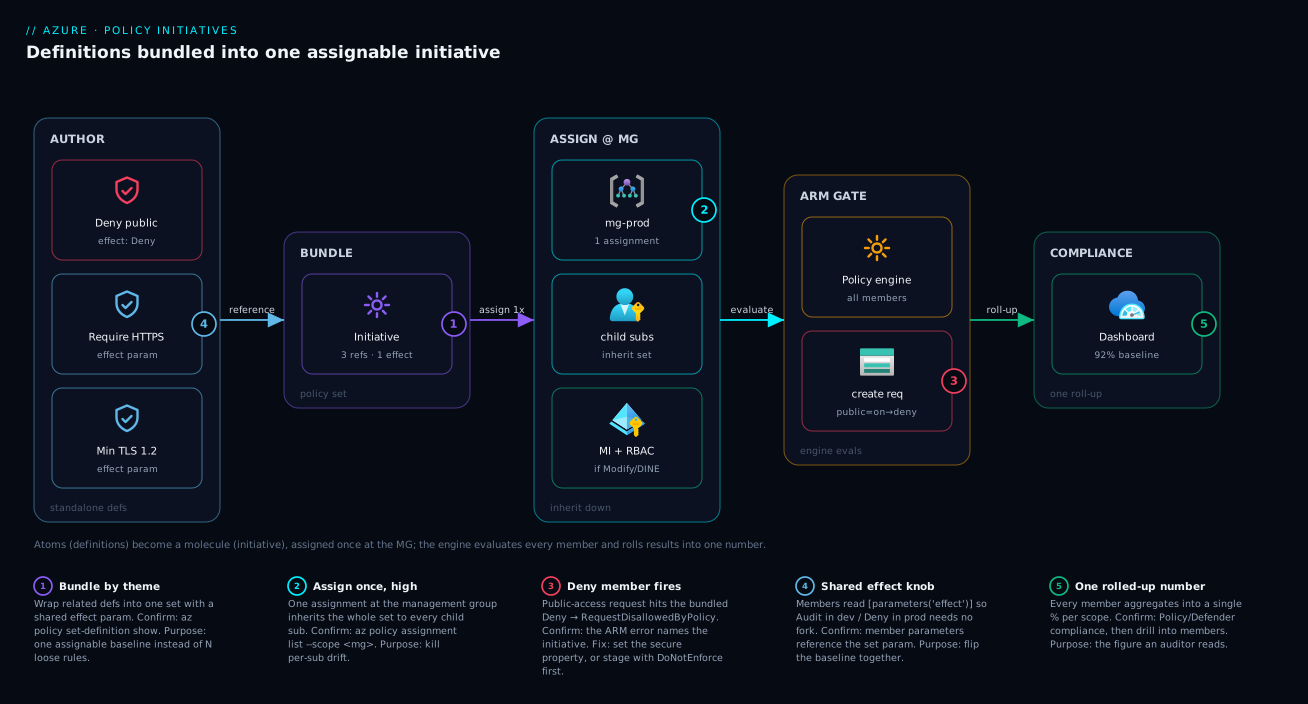
Follow one storage account’s create request left to right. A platform engineer authors several standalone policy definitions — deny public storage, require HTTPS, require TLS 1.2 — then bundles the references into one initiative (policy set) exposing a shared effect parameter and makes exactly one assignment at the prod management group, which inheritance carries down to every child subscription. Now a developer’s pipeline sends a create to Azure Resource Manager (ARM). ARM consults the policy engine, which gathers every member of every assigned initiative inherited from above and evaluates them together — the initiative is invisible here; ARM simply sees its constituent rules.
If the bundled Deny member matches (public access on), ARM rejects the request with RequestDisallowedByPolicy; the Audit-level members instead let it through and record the result. The outcome of all members rolls up into the compliance store as a single initiative percentage on the Defender for Cloud / Policy compliance dashboard — one “92% against this baseline” number, drillable to the rule that failed. Trace it from atoms on the left, through the molecule bundled and assigned once, to the ARM gate, to the rolled-up number on the right — and you see why the initiative is a wrapper that changes operations, not enforcement.
Real-world scenario
Meridian Logistics runs about 25 subscriptions under three management groups — mg-platform, mg-prod, mg-nonprod. Over a year the platform team accumulated 38 standalone policy assignments, and three things had quietly gone wrong: a subscription onboarded in Q2 had somehow never received the “deny public storage” policy (unnoticed for two months); a SOC 2 audit asked “what’s your compliance against CIS?” and the team spent two days hand-correlating 38 loose policies; and every new control meant an engineer assigning it to the right subscriptions and inevitably missing one. The rules were fine. The operating model was the problem.
They consolidated in three moves. First, they grouped their custom rules into three themed initiatives — a Storage Hardening Baseline, a Tagging Baseline (CostCenter, Environment, Owner), and a Network Baseline — each with one shared effect parameter. They resisted a single giant “Meridian Standard” set so the storage and tagging numbers stayed separately readable and the baselines kept their different owners and cadences.
Second, they assigned each baseline once per management group: mg-nonprod got all three with effect=Audit, mg-prod with effect=Deny. Twenty-five subscriptions, six assignments total, down from 38 — and the “missed a subscription” gap became structurally impossible, because new subscriptions inherit the baseline the instant they join the MG. The first prod rollout ran in DoNotEnforce for a week; the dashboard surfaced 22 non-compliant resources; they fixed 19, exempted 3, then flipped to Default. Zero broken pipelines.
Third, for the CIS audit question they assigned the built-in CIS Microsoft Azure Foundations Benchmark at mg-platform in Audit mode — now Defender for Cloud shows a live “CIS: 89% compliant” number the auditor reads directly. One snag: their first custom set with a Modify tagging rule failed remediation Forbidden — bundling hadn’t removed the need for a managed identity and a Tag Contributor role at MG scope. They added both, reran remediation, and thousands of resources got their CostCenter. The lesson: bundle by theme, assign high, stage before you enforce, and remember a set inherits its members’ identity needs.
Advantages and disadvantages
Bundling is a trade, not a free win. The two-column view:
| Advantages | Disadvantages | |
|---|---|---|
| Standalone definition | Simplest possible unit; independent lifecycle; trivial to reason about; no extra authoring layer | O(rules × scopes) assignments; no roll-up number; no framework mapping; drift-prone at scale |
| Initiative (policy set) | One assignment per scope; one compliance number; framework mapping; shared effect knob; add a rule once, applies everywhere |
Extra authoring layer; couples members’ change cadence; referenceId collisions; inherits all members’ identity/RBAC needs; a too-big set’s number is meaningless |
When each matters: the crossover is roughly “three related rules you’ll assign to more than one scope.” Below it, a standalone rule is simpler; above it, the assignment-count and roll-up wins compound fast — and you should still prefer several focused initiatives over one monolith.
Hands-on lab
This lab is free — definitions, set definitions, assignments and evaluation cost nothing. You’ll author a two-rule initiative with a shared effect parameter, assign it as Audit to a resource group, see a noncompliant resource flagged, then flip the set to Deny and watch the next deployment get blocked. (Real life assigns at a management group; a resource group keeps the lab self-contained.)
1. Set up a sandbox resource group.
az group create --name rg-initiative-lab --location eastus
2. Find two built-in storage definitions whose effect is parameterised. “Storage accounts should disable public network access” and “Secure transfer to storage accounts should be enabled” both expose an effect parameter.
az policy definition list \
  --query "[?policyType=='BuiltIn' && (contains(displayName,'public network access') || contains(displayName,'Secure transfer'))].{name:name, display:displayName}" \
  -o table
3. Build the initiative’s definitions file. Capture the two name values from step 2 into the IDs below; both members read the shared [parameters('effect')].
cat > initiative-defs.json <<'JSON'
[
  {
    "policyDefinitionId": "/providers/Microsoft.Authorization/policyDefinitions/<public-access-def-name>",
    "policyDefinitionReferenceId": "denyPublicStorage",
    "parameters": { "effect": { "value": "[parameters('effect')]" } }
  },
  {
    "policyDefinitionId": "/providers/Microsoft.Authorization/policyDefinitions/<secure-transfer-def-name>",
    "policyDefinitionReferenceId": "requireHttps",
    "parameters": { "effect": { "value": "[parameters('effect')]" } }
  }
]
JSON
4. Create the policy set definition with a shared effect parameter.
az policy set-definition create \
  --name "lab-storage-baseline" \
  --display-name "Lab Storage Baseline" \
  --definitions @initiative-defs.json \
  --params '{ "effect": { "type": "String", "allowedValues": ["Audit","Deny","Disabled"], "defaultValue": "Audit" } }'
5. Assign the set as Audit at the resource group.
az policy assignment create \
  --name "lab-baseline-audit" \
  --policy-set-definition "lab-storage-baseline" \
  --scope "$(az group show -n rg-initiative-lab --query id -o tsv)" \
  --params '{ "effect": { "value": "Audit" } }'
6. Create a deliberately noncompliant storage account. It should succeed (Audit never blocks).
az storage account create \
  --name "stinitlab$RANDOM" \
  --resource-group rg-initiative-lab \
  --sku Standard_LRS \
  --public-network-access Enabled
7. Trigger an on-demand scan and read the initiative compliance. Don’t trust the cached tile.
az policy state trigger-scan --resource-group rg-initiative-lab
# after it completes — note the set name appears in the results:
az policy state list \
  --resource-group rg-initiative-lab \
  --query "[].{res:resourceId, set:policySetDefinitionName, state:complianceState}" -o table
You should see the storage account as NonCompliant under your lab-storage-baseline set — flagged by the bundle, not by a loose rule.
8. Flip the whole baseline to Deny. One parameter change drives both members at once.
az policy assignment update \
  --name "lab-baseline-audit" \
  --scope "$(az group show -n rg-initiative-lab --query id -o tsv)" \
  --params '{ "effect": { "value": "Deny" } }'
9. Try another public storage account. Now it should fail with RequestDisallowedByPolicy, naming the initiative.
az storage account create \
  --name "stinitlab$RANDOM" \
  --resource-group rg-initiative-lab \
  --sku Standard_LRS \
  --public-network-access Enabled
# Expect: (RequestDisallowedByPolicy) ... disallowed by policy ... lab-storage-baseline
10. Tear down.
az policy assignment delete --name "lab-baseline-audit" \
  --scope "$(az group show -n rg-initiative-lab --query id -o tsv)"
az policy set-definition delete --name "lab-storage-baseline"
az group delete --name rg-initiative-lab --yes --no-wait
That is the whole operating model in ten steps: author, bundle with a shared knob, assign once, watch Audit flag and Deny block.
Common mistakes & troubleshooting
The failures here are almost all about the wrapper — the references, the shared parameter, the identity — not the rules inside. Match your symptom:
| # | Symptom | Root cause | How to confirm | Fix |
|---|---|---|---|---|
| 1 | Set fails to create / save | Duplicate policyDefinitionReferenceId |
Two members share a reference id in the JSON | Make every policyDefinitionReferenceId unique |
| 2 | Flipping the assignment’s effect does nothing | Members hard-pinned their own effect, not the shared param | Inspect members: do they read [parameters('effect')]? |
Wire members to the shared effect parameter |
| 3 | Remediation tasks fail Forbidden |
A Modify/DINE member needs an identity + RBAC the assignment lacks | Remediation detail → Forbidden; assignment has no identity |
Add system-assigned identity + grant members’ roleDefinitionIds |
| 4 | Initiative compliance looks terrible immediately | Audit members flag pre-existing drift | Drill set → member view; find the noisy rule | Fix/exempt those resources; stage with DoNotEnforce |
| 5 | Number “stale” after a fix | Compliance is scan-based (~24 h) or change-driven | Tile timestamp is old | az policy state trigger-scan |
| 6 | A new subscription isn’t governed | Set assigned per-subscription, not at the MG | Assignment scope is a sub, not the MG | Assign the set at the management group |
| 7 | Big set broke pipelines on rollout | Assigned Deny in Default mode with no Audit phase |
Pipelines fail RequestDisallowedByPolicy tenant-wide |
Re-stage: DoNotEnforce/Audit → fix → enforce |
| 8 | Member parameter “missing value” error | A member needs a param the set neither pins nor exposes | Assignment error names the parameter | Pin it in the reference or surface it on the set |
| 9 | Can’t assign the built-in regulatory set as Deny | Most regulatory built-ins are Audit-only by design | Members are auditIfNotExists, not deny |
Use it to measure; add your own Deny rules to enforce |
| 10 | Conflicting compliance state | Two members give opposing verdicts on a resource | State shows Conflicting |
Reconcile overlapping rules; remove the duplicate |
The meta-lesson: when “the initiative is broken,” check the three wrapper things first — reference ids unique, effect parameter wired, identity present — before you ever suspect the rules themselves.
Best practices
- Bundle by theme, not by count. A set is a coherent baseline (storage, tagging, network), not “the policies I wrote this sprint” — coherence makes the number mean something.
- Prefer a few focused sets over one monolith. Separate Security / Tagging / Network baselines, each with a readable number and an owner; an “everything” set is unreadable.
- Always expose a shared
effectparameter. One initiative assignedAuditin dev andDenyin prod beats two forked sets that drift apart. - Pin only the rules that must never vary. Hard-pin
Denyon security-critical members; let the rest follow the shared knob. - Assign baselines at the management group, never per-subscription. Inherit once; new subscriptions are governed automatically.
- Stage every large set with
DoNotEnforce(or Audit) first. See the blast radius, fix or exempt the gaps, then flip toDefault. - Built-in initiatives for frameworks; custom ones for enforcement. Assign the built-in to measure CIS/PCI; layer your own Deny rules to enforce.
- Treat initiatives as code. Author in Bicep/Terraform, review in PRs, version them — a baseline is infrastructure.
- Keep
policyDefinitionReferenceIds readable and unique.denyPublicStorage, notpolicy3— you read these in compliance drill-downs. - Remember the identity. If any member is Modify/DINE, give the assignment a managed identity and the union of members’ roles, or remediation silently fails.
Security notes
Initiatives are a governance control, so the security considerations are about the wrapper and its reach. First, least privilege on the assignment identity: an initiative with Modify/DeployIfNotExists members runs remediation as a managed identity, and you must grant it exactly the union of its members’ roleDefinitionIds at the narrowest scope that works — no more. Bundling tempts a broad role “to be safe”; resist it, because one over-privileged remediation identity at a management group is a real blast radius. Use a managed identity and RBAC, never a service-principal secret.
Second, who can author and assign is RBAC — Resource Policy Contributor (or Owner) at the scope. Keep set authoring with the platform/security team so coherent baselines aren’t undercut by ad-hoc local sets. Third, don’t mistake Audit for enforcement: a regulatory built-in shows green/red but blocks nothing — security-critical controls (public data endpoints, unencrypted disks, weak TLS) belong in a Deny member you actually enforce. Finally, protect the baseline from accidental removal: a deleted assignment silently un-governs everything below it, so pair policy with resource locks and reviewed IaC. (For the remediation identity, Key Vault and managed identities are the right pattern.)
Cost & sizing
The reassuring headline: Azure Policy — definitions, initiatives, assignments and compliance evaluation — is free. No charge per policy, per initiative, per assignment, or per evaluation; no SKU, no per-scan fee. “Sizing” an initiative is about operational scale, not money.
What carries a cost is what your policies cause. A DeployIfNotExists member that pushes a diagnostic setting to a Log Analytics workspace drives ingestion and retention charges there — a single DINE rule in a widely-assigned initiative can meaningfully move your Monitor bill, and one that enables a paid feature (a backup, a Defender plan) bills for it across every resource it touches. Right-size the consequences, not the policy.
| Cost driver | Free? | What actually bills | Control |
|---|---|---|---|
| Policy/initiative definitions | Free | Nothing | — |
| Assignments & evaluation | Free | Nothing | — |
| Compliance scans | Free | Nothing | — |
| DINE → diagnostic settings | Indirect | Log Analytics ingestion + retention | Scope the workspace; set retention; filter logs |
| DINE → enables a paid feature | Indirect | That feature (backup, Defender plan) | Assign only where you want the feature on |
| Modify → tags/properties | Free | Nothing | — |
| Remediation tasks | Free | Whatever the remediation deploys | Same as DINE consequences |
Operational sizing: you’ll hit “too broad to reason about” long before any platform limit on members — keep sets focused. And because evaluation is free, there’s no cost reason to under-assign. The only bill an initiative produces is for the resources its remediation creates — watch that, not the policy.
Interview & exam questions
These map to AZ-104 (assign policies and initiatives), AZ-305 (governance design), and AZ-500 (regulatory compliance, Defender for Cloud).
-
Difference between a policy definition and an initiative? A definition is a single rule — one
ifcondition, one effect. An initiative (policy set) is a named collection of definitions assigned and tracked as one unit; it adds no enforcement power, only operational leverage (one assignment, one compliance number, framework mapping). -
Why bundle instead of assigning separately? Fewer assignments (one per scope, not one per rule per scope), a single rolled-up percentage, framework mapping, and a shared
effectparameter so the whole baseline flips Audit→Deny at once. Adding a control becomes one edit, not N assignments. -
How does compliance roll up? Each member is evaluated independently; a resource is compliant for the set only if it passes every applicable member, and the percentage aggregates across all members and resources. One noisy Audit member drags the headline down — always drill into the member view.
-
What is
policyDefinitionReferenceId? A member’s local name inside the set, unique within it. The set won’t save if two share one, and you read these ids in compliance drill-downs — keep them unique and descriptive. -
Audit in dev, Deny in prod without forking? Declare a shared
effectparameter, wire members to[parameters('effect')], and supply the value per assignment —Auditfor dev,Denyfor prod. One definition, two postures. -
When should a rule stay standalone? When it’s a genuine one-off, its lifecycle/owner differs from everything else, or it’s still being prototyped. A set of one is pure overhead.
-
Extra wiring if a member is DINE/Modify? The assignment needs a managed identity and the union of those members’
roleDefinitionIdsat an appropriate scope — exactly as a standalone DINE/Modify assignment would. Bundling doesn’t remove it. -
How do built-in regulatory initiatives relate to enforcement? They’re mostly Audit/auditIfNotExists by design — they measure against a standard and feed Defender for Cloud’s dashboard. To enforce a control, add your own Deny rule alongside.
-
How do you safely roll out a fifty-control initiative? Assign with
DoNotEnforce(oreffect=Audit) so members report without firing, review the blast radius, fix or exempt the gaps, then flip toDefault/Deny. Never lead with Deny in Default mode. -
At what scope should a baseline go, and why? As high as it’s universally true — typically a management group — so inheritance carries it to every child subscription, including ones onboarded later. Per-subscription assignment re-introduces the drift initiatives remove.
-
Why might compliance look wrong right after assignment? Either Audit members are flagging real pre-existing drift (drill in), or the result is stale because evaluation runs on a ~24-hour scan or on change — trigger an on-demand scan.
-
The risk of one giant “everything” initiative? Its compliance number becomes meaningless, members with different cadences get coupled, and it’s hard to reason about. Prefer a few focused, themed baselines.
Quick check
- In one sentence, how much enforcement power does an initiative add beyond the policies inside it?
- You need one set to merely audit in dev but deny in prod. What feature makes that possible without copying the set?
- A resource passes four of five members of an initiative. What is its compliance state for the set, and why?
- You added a 61st control to a baseline already assigned at five management groups. How many new assignments must you create?
- Your initiative includes a
Modifymember and remediation failsForbidden. What did you forget?
Answers
- None — an initiative has exactly the power of its members; it adds leverage (one assignment, one number, framework mapping), not new enforcement.
- A shared
effectparameter read by members via[parameters('effect')]; supplyAuditon the dev assignment,Denyon prod. - Non-compliant — a resource is compliant for the set only if it passes every applicable member; one failure makes it non-compliant (drill in to find which).
- Zero — editing the set definition applies the control everywhere the set is already assigned; that’s the core scale win.
- A managed identity on the assignment plus the member’s RBAC role(s) (the union of members’
roleDefinitionIds) at an appropriate scope — bundling doesn’t remove the identity requirement.
Glossary
- Policy definition — The atomic rule: one
ifcondition plus one effect (Deny, Audit, Modify, DeployIfNotExists). - Initiative / policy set definition — A named collection of definitions assigned and tracked as one unit; adds grouping, not rule logic.
policyDefinitionReferenceId— A member’s local name within an initiative, unique within the set; appears in compliance drill-downs.- Initiative parameter — A value declared on the set and passed to members; the shared
effectknob is the canonical example. - Assignment — A definition or initiative bound to a scope; what actually makes rules take effect.
- Scope — The management group, subscription, or resource group an assignment targets; assignments inherit downward.
- Compliance roll-up — The initiative’s aggregate pass/fail: compliant only if every applicable member passes.
- Built-in initiative — A Microsoft-authored, framework-mapped set (MCSB, CIS, PCI-DSS, NIST, ISO 27001) you assign rather than hand-build.
- Enforcement mode —
Default(effects fire) orDoNotEnforce(members report but nothing is blocked/changed) — the safe-rollout lever. - MCSB — The Microsoft Cloud Security Benchmark, Microsoft’s default security baseline initiative used by Defender for Cloud.
- Exemption — A documented, optionally time-boxed waiver suppressing a compliance result for a resource and policy.
- Remediation task — A job that brings existing resources into compliance for Modify/DINE members, running as the assignment’s managed identity.
Next steps
- Lock down the building blocks first: Azure Policy Effects Decoded: Deny vs Audit vs Modify vs DeployIfNotExists.
- See the full estate-wide picture: Azure Policy governance at scale.
- Get the placement right: Azure resource hierarchy explained and where assignments inherit.
- Put baselines where every subscription gets them: Azure enterprise-scale landing zone.
- Protect the baseline from accidental loss: Azure resource locks to prevent accidental deletion.