Every team can answer “is the app up?” Very few can answer the two questions that actually decide whether an outage is a footnote or a front-page incident: how long can we be down, and how much data can we afford to lose. Those two numbers — RTO (Recovery Time Objective) and RPO (Recovery Point Objective) — are the entire vocabulary of business continuity and disaster recovery (BCDR). Everything else (zones, replicas, backups, failover regions, runbooks) is just machinery for hitting the RTO and RPO you committed to. Get the numbers right and the architecture almost designs itself; get them wrong and you either overpay for resilience nobody needs or discover at 3 a.m. that “we have backups” and “we can recover in an hour” are very different statements.
This article builds the mental model from the ground up. We define RTO and RPO precisely (they are targets, not measurements, and they are not the same thing), separate high availability (HA) from disaster recovery (DR) — two ideas people blur constantly — and lay out the resilience spectrum: a ladder on Azure from a single VM in one datacentre up to active-active across regions, each rung buying a smaller RTO/RPO for more money and complexity. You will see where availability zones, paired regions, Azure Backup, zone-redundant storage, and Azure Site Recovery sit on that ladder, and which RTO/RPO band each realistically delivers.
By the end you can take a workload, ask “what does an hour of downtime cost, and how stale can the data be after recovery?”, and translate the answer into a concrete Azure design and a believable monthly bill. This is the foundation the deeper region, backup, and multi-region articles build on — where most teams’ resilience story should start, and where a surprising number of expensive mistakes are quietly prevented.
What problem this solves
Outages are not hypothetical. A region has a bad day, a deployment corrupts a database, a ransomware actor encrypts a file share, an availability zone loses power, or someone fat-fingers a DELETE without a WHERE. The question is never “will something break?” — it is “when it breaks, what’s our plan, and is the plan good enough for this workload?” Without RTO and RPO as a shared language, that conversation has no anchor. Engineering says “we have geo-redundant storage”; the business hears “we’re safe”; nobody has agreed how long recovery takes or how much data vanishes. The gap surfaces only during the incident, which is the worst possible time to discover it.
The second problem is mis-spending. Resilience is a spectrum with a steep cost curve. A marketing microsite and a payments ledger do not need the same protection, but teams routinely apply one blanket policy to both — either gold-plating the microsite or under-protecting the ledger (a single-region app with nightly backups, quietly accepting an RPO of up to 24 hours nobody signed off on). RTO and RPO let you tier workloads: spend the budget where an outage genuinely hurts, and accept cheaper, slower recovery where it doesn’t.
Who hits this: essentially everyone running production on Azure, but it bites hardest on teams that treat “backup” as a synonym for “DR.” A backup is a recovery point; it says nothing about recovery time. If restoring your 2 TB database takes six hours, your RTO is six hours no matter how recent the backup is. BCDR planning forces both numbers into the open, where they can be designed for instead of discovered.
To frame the whole field before the deep dive, here are the failure events this foundation prepares you for, what each one threatens, and the layer of the spectrum that addresses it:
| Failure event | What it threatens | Primary defence | RTO/RPO it drives |
|---|---|---|---|
| Single VM / disk failure | One instance | Availability set / multiple instances | Seconds–minutes / ~0 |
| Datacentre (zone) outage | One physical building | Availability zones | Seconds–minutes / ~0 |
| Whole-region outage | All zones in a region | Paired region + replication/DR | Minutes–hours / seconds–minutes |
| Data corruption / bad deploy | Data integrity, not infra | Backups + point-in-time restore | Hours / your backup interval |
| Accidental / malicious deletion | Data existence | Soft-delete + immutable backup | Hours / backup interval |
| Ransomware | Data + backups together | Immutable, isolated backup copy | Hours–days / last clean point |
Learning objectives
By the end of this article you can:
- Define RTO and RPO precisely, explain why they are independent, and place any workload on a 2-by-2 of “downtime cost vs data-loss cost.”
- Articulate the difference between high availability and disaster recovery, and why a zone-redundant app can still need a DR plan.
- Walk the resilience spectrum from single-instance to active-active and name what each rung costs and what RTO/RPO it buys.
- Map Azure’s building blocks — availability zones, paired regions, Azure Backup, storage redundancy (LRS/ZRS/GRS/GZRS), and Azure Site Recovery — onto the right rung.
- Choose the standard DR strategy (Backup & Restore, Pilot Light, Warm Standby, Active-Active) that fits a given RTO/RPO and budget.
- Read a backup/replication design and tell whether it actually meets a stated RTO/RPO, or only sounds like it does.
- Estimate the rough monthly cost difference between resilience tiers, in INR and USD, and right-size instead of gold-plating.
Prerequisites & where this fits
You should be comfortable with Azure basics: a subscription holds resource groups, which hold resources like VMs, storage accounts, and databases; an Azure region is a geographic area, and within most regions there are physically separate availability zones. You should know how to run az commands in Cloud Shell and read their output. No prior DR experience is assumed — this article is the starting point.
This sits at the very front of the Resilience track. It is the conceptual layer beneath the hands-on guides: once you understand RTO/RPO and the spectrum here, the region mechanics in Azure Regions and Availability Zones Explained, the protection tooling in Azure Backup and Site Recovery for Protection, and the cross-region design in Azure Multi-Region Active-Active Design all slot into place. It pairs naturally with High Availability vs Disaster Recovery: RTO and RPO, which drills the HA/DR distinction further. If your concern is application-level resilience rather than infrastructure, Resiliency Patterns: Retry, Circuit Breaker, Bulkhead is the complementary read.
A quick map of who usually owns each decision, so the conversation reaches the right people early:
| Decision | Who owns it | Why it matters |
|---|---|---|
| RTO / RPO targets per workload | Business + product owner | These are business commitments, not engineering defaults |
| Region and zone topology | Cloud architect | Determines the achievable RTO/RPO floor |
| Backup policy and retention | Platform / ops team | Sets the RPO for data corruption events |
| DR runbook and failover drills | SRE / ops | A plan never tested is a plan that fails |
| Cost ceiling per tier | Finance + architect | Resilience is bought, not free |
Core concepts
Four mental models make every later decision obvious.
RTO is a clock; RPO is a rewind. Picture the moment disaster strikes. RTO (Recovery Time Objective) measures forward from that moment: how long until the service is usable again. RPO (Recovery Point Objective) measures backward: how far back in time your most recent safe data is. An RTO of 1 hour and an RPO of 5 minutes means “we will be back within an hour, having lost at most the last five minutes of data.” They answer different questions — time to restore service versus amount of data lost — and a design can be strong on one and weak on the other. Nightly backups give a cheap, slow RTO with a brutal RPO (up to 24 hours of lost data); synchronous replication gives a near-zero RPO but says nothing on its own about how fast you can fail over.
HA and DR are different jobs. High availability keeps a service running through small, expected failures — a dead disk, a rebooting VM, a single zone losing power — usually automatically, within one region, with little or no data loss. Disaster recovery is the plan for a large, rare event that takes out your primary location entirely — a whole region down, a data-destroying event — and typically involves failing over to a different region, often with a human decision and a measurable recovery window. HA reduces how often you have an outage; DR limits how bad the worst outage gets. A zone-redundant app (great HA) with no second region (no DR) is fully exposed to a regional disaster — a common and dangerous blind spot.
Resilience is a spectrum, and the cost curve is steep. There is no single “resilient” setting; there is a ladder. At the bottom, one VM in one datacentre — cheapest, weakest. At the top, active-active across two regions serving live traffic from both — most expensive, strongest. Each rung up shrinks your RTO and RPO and grows your bill, often non-linearly (active-active can roughly double infrastructure cost because you run a full second copy). The architect’s job is to climb only as high as the workload’s RTO/RPO justifies, no higher.
You cannot exceed your weakest link. Your real RTO is the slowest component to recover; your real RPO is the least recent safe copy across the whole system. A stateless web tier that fails over in 30 seconds is irrelevant if its database takes four hours to restore — the workload’s RTO is four hours. BCDR is a chain, and you measure it end-to-end, not by its strongest part.
The vocabulary in one table
Before the deep sections, pin down every moving part. The glossary at the end repeats these for lookup; this table is the mental model side by side:
| Term | One-line definition | Why it matters to BCDR |
|---|---|---|
| RTO | Max acceptable time to restore service after an outage | Sets your downtime budget; drives the DR strategy |
| RPO | Max acceptable amount of recent data lost | Sets your backup/replication frequency |
| High availability (HA) | Surviving small failures, usually automatically, in-region | Reduces outage frequency; near-zero data loss |
| Disaster recovery (DR) | Recovering from a large failure, often cross-region | Limits worst-case blast radius |
| Availability zone | A physically isolated datacentre within a region | In-region HA against a building-level failure |
| Region pair | Two regions Azure links for residency and recovery | Natural DR target; sequenced platform updates |
| Backup | A point-in-time copy you restore from | Defends against corruption/deletion; sets data RPO |
| Replication | Continuous copying of data to another location | Lowers RPO toward near-zero for DR |
| Failover | Switching production to the standby location | The act of executing DR |
| Failback | Returning production to the original location | The other half of a complete DR plan |
| SLA | The provider’s uptime commitment for a service | A floor on availability, not your RTO/RPO |
RTO and RPO, made concrete
The two numbers are simple to state and easy to get muddled in practice. This section nails them down with real magnitudes, because the band you land in is what selects an architecture.
Reading the two numbers off a timeline
Lay outages on a line. Data is being written continuously. At time T disaster hits. The last protected copy of your data is at some earlier time T − RPO — everything written between then and T is lost. Service comes back at T + RTO — that span is your outage. RPO is governed by how often you protect data (backup interval, replication lag). RTO is governed by how fast you can bring service back (restore speed, failover automation, DNS/traffic cut-over).
A subtle trap: RPO is not the backup schedule, it’s the worst case within it. If you back up every 24 hours and the outage strikes 23 hours after the last backup, you lose 23 hours of data — so a daily backup buys an RPO of up to 24 hours, not “24 hours on average.” Quote RPO as the maximum, because that is what you must survive.
The bands that matter
You rarely need a precise RTO like “47 minutes.” You need to know which band a workload sits in, because each band maps to a class of architecture. Here are the practical bands and what each implies:
| Band | RTO meaning | RPO meaning | Typical mechanism | Rough relative cost |
|---|---|---|---|---|
| Near-zero (seconds) | No perceptible downtime | No data loss | Active-active, synchronous replication | Highest (×1.7–2) |
| Minutes | Brief, automated failover | Seconds of data | Warm standby, async replication | High |
| Tens of minutes | Fast manual failover | Minutes of data | Pilot light, frequent replication | Moderate |
| Hours | Restore-and-redeploy | Hours of data | Backup & restore, geo-redundant backup | Low |
| A day+ | Rebuild from backups | Up to a day of data | Nightly backup only | Lowest |
The decision is rarely “what’s the best we can do?” — it’s “what band does this workload’s cost of being wrong put it in?” That is the next table.
Mapping a workload to a band
For any workload, ask two independent questions: what does an hour of downtime cost? and what does losing recent data cost? The answers place it on a grid, and the grid suggests a tier:
| Downtime cost \ Data-loss cost | Low data-loss cost | High data-loss cost |
|---|---|---|
| Low downtime cost | Single region + backups (RTO hours / RPO hours) — e.g. internal wiki, marketing site | Single region + frequent backup/PITR (RTO hours / RPO minutes) — e.g. analytics store you can rebuild slowly but mustn’t lose entries |
| High downtime cost | Zone-redundant + warm DR (RTO minutes / RPO hours) — e.g. a read-heavy catalog you can repopulate | Zone-redundant + active-active or warm standby (RTO seconds–minutes / RPO seconds) — e.g. payments, ordering, the system of record |
Most organisations have workloads in all four quadrants and waste money applying a single quadrant’s design to everything. Tiering by this grid is the single highest-leverage BCDR decision you make.
High availability vs disaster recovery
These two words get used interchangeably and they are not the same job. Conflating them produces the classic failure: a beautifully zone-redundant application that has no answer at all when the region goes down.
Two different failures, two different plans
| Dimension | High availability (HA) | Disaster recovery (DR) |
|---|---|---|
| Failure it handles | Small, frequent (disk, VM, single zone) | Large, rare (whole region, data destruction) |
| Scope | Usually within one region | Usually a second, separate region |
| Trigger | Automatic (platform/health probe) | Often a human decision (declare a disaster) |
| Typical RTO | Seconds to a few minutes | Minutes to hours |
| Typical RPO | Near-zero | Seconds to hours (depends on replication) |
| Primary cost | Redundancy within a region | A second-region footprint + drills |
| Example mechanism | Multiple instances across zones | Site Recovery / geo-replication + failover |
The line to remember: HA keeps you up through the failures that happen most weeks; DR saves you on the worst day of the decade. They are additive, not alternatives. A serious system has both — zone redundancy and a cross-region recovery plan.
Where the SLA fits (and where it doesn’t)
An Azure service-level agreement (SLA) — for example, the higher availability percentage you get by spreading VM instances across availability zones — is a statement about how often the platform aims to keep a service reachable. It is a useful floor, but it is not your RTO or RPO. The SLA does not promise how fast your specific application recovers from a bad deployment, nor how much data you lose to a corruption event. Vendors sell SLA numbers; architects own RTO/RPO. Treat the SLA as one input to your HA design and nothing more — it never substitutes for a tested recovery plan.
The resilience spectrum on Azure
Now assemble the ladder. Each rung is a real Azure topology; the higher you climb, the smaller your RTO/RPO and the larger your bill. Pick the lowest rung that satisfies the workload’s band.
The four-tier DR strategy ladder
The cloud industry settled on four named DR strategies, ordered by recovery speed and cost. They are the canonical way to talk about where a workload sits:
| Strategy | How it works | Typical RTO | Typical RPO | Standby cost | Best for |
|---|---|---|---|---|---|
| Backup & Restore | Back up data; on disaster, restore and redeploy in another region | Hours | Hours (= backup interval) | Storage only | Cost-sensitive, downtime-tolerant workloads |
| Pilot Light | Core data replicated and a minimal “spark” running in DR; scale up on failover | Tens of minutes | Minutes (async replication) | Small (data + minimal infra) | Important apps that can take a short outage |
| Warm Standby | A scaled-down but running copy in DR; scale up and cut traffic over | Minutes | Seconds–minutes | Moderate (always-running smaller fleet) | Business-critical apps needing fast recovery |
| Active-Active | Both regions serve live traffic; failure removes one with little impact | Seconds (near-zero) | Near-zero | Highest (full second copy) | Mission-critical, no perceptible downtime |
The cost climbs roughly in step with the recovery speed: Backup & Restore parks cheap data and nothing else; Active-Active runs a second production-grade environment full-time. The art is choosing the cheapest strategy whose RTO/RPO still clears the workload’s band.
Azure building blocks, placed on the ladder
The strategies above are abstract; here is the concrete Azure machinery and the rung each one serves. None of these are interchangeable — each defends a different failure scope.
| Building block | What it protects against | Scope | RTO band it enables | RPO band it enables |
|---|---|---|---|---|
| Availability set | VM host/rack/update failures | Within one datacentre | Seconds–minutes | ~0 (HA only) |
| Availability zones | A whole datacentre (zone) failing | Within one region | Seconds–minutes | ~0 (HA only) |
| Zone-redundant storage (ZRS) | A zone failing, for data at rest | Within one region | Transparent | ~0 |
| Azure Backup | Corruption, deletion, ransomware | Per resource; vault can be geo-redundant | Hours | = backup frequency |
| Geo-redundant storage (GRS/GZRS) | A whole region failing, for blobs/files | Cross-region (paired) | Hours (after failover) | Minutes (async) |
| Azure Site Recovery (ASR) | A region failing, for VMs/workloads | Cross-region or zone-to-zone | Minutes–hours | Minutes (continuous) |
| Geo-replication (databases) | A region failing, for managed data | Cross-region | Seconds–minutes (failover) | Seconds (async) / 0 (sync) |
| Front Door / Traffic Manager | Routing traffic away from a dead region | Global | Part of the failover cut-over | n/a (routing layer) |
Two clarifications that prevent expensive confusion. First, HA blocks (sets, zones, ZRS) do not give you DR — they survive a zone, not a region. A region-down event sails straight through zone redundancy. Second, a backup in a geo-redundant vault is still a backup, not a hot standby — its RTO is “restore time,” which for large datasets is hours, regardless of how recent the copy is.
Storage redundancy: the RPO knob for data at rest
Storage redundancy deserves its own look because it is the most common place teams think they have DR and don’t. Azure Storage offers four redundancy levels, each a different point on the cost/durability/availability curve:
| Redundancy | Copies & placement | Survives a zone outage? | Survives a region outage? | Read access in DR | Relative cost |
|---|---|---|---|---|---|
| LRS (Locally redundant) | 3 copies, one datacentre | No | No | — | Lowest |
| ZRS (Zone-redundant) | 3 copies across zones in one region | Yes | No | — | Low–moderate |
| GRS (Geo-redundant) | LRS in primary + async copy in paired region | No (in primary) | Yes (after failover) | No until failover | Moderate |
| GZRS (Geo-zone-redundant) | ZRS in primary + async copy in paired region | Yes | Yes (after failover) | No until failover | Highest |
| RA-GRS / RA-GZRS (Read-access) | GRS/GZRS + read endpoint in secondary | Same as above | Yes | Yes (read-only) anytime | + small premium |
The trap: GRS/GZRS replication is asynchronous, so the secondary lags the primary by a short window — that lag is your storage RPO for a region failure, and it is not zero. And until a failover is initiated (or you use the read-access variants), you cannot read the secondary copy. “We’re on GRS” is a DR posture with an RPO of minutes and an RTO gated by failover, not a magic no-loss guarantee.
Set the redundancy explicitly when you create a storage account — the default is often LRS, which has no regional protection:
# Create a geo-zone-redundant storage account (zone HA + regional DR, async)
az storage account create \
  --name stkvbcdrprod \
  --resource-group rg-bcdr-prod \
  --location centralindia \
  --sku Standard_GZRS \
  --kind StorageV2 \
  --access-tier Hot
resource storage 'Microsoft.Storage/storageAccounts@2023-05-01' = {
  name: 'stkvbcdrprod'
  location: 'centralindia'
  sku: { name: 'Standard_GZRS' }   // ZRS in-region + async copy to the paired region
  kind: 'StorageV2'
  properties: { accessTier: 'Hot' }
}
Region pairs: the default DR direction
Azure organises most regions into region pairs — two regions in the same geography that the platform links for data residency and recovery. Pairs matter for BCDR for three reasons: GRS/GZRS replication targets the paired region automatically, platform updates are sequenced so both halves of a pair are rarely updated at once, and in a broad regional event Azure prioritises recovery one region per pair first. Picking your DR region as the pair of your primary keeps data in-geography (important for compliance) and aligns with how the platform already replicates.
You can confirm which region is paired with yours, and which regions even support zones, from the CLI:
# Show the paired region for your primary (the natural DR target)
az account list-locations \
  --query "[?name=='centralindia'].{region:name, pairedWith:metadata.pairedRegion[0].name}" \
  -o table

# List regions that support availability zones (zonal HA)
az account list-locations \
  --query "[?metadata.physicalLocation!=null].name" -o tsv
Architecture at a glance
The reference shape for a typical business-critical web workload reads left to right as a recovery story. A global routing layer — Azure Front Door or Traffic Manager — sits at the front and decides which region serves a user; it is the lever you pull (or that pulls automatically on health-probe failure) to steer traffic away from a dead region. Behind it, the primary region runs the live application across availability zones: the web/API tier is spread over zones for HA, and the data tier (database plus storage) is zone-redundant so a single datacentre failure is invisible. That zone redundancy is your HA story — it handles the common failures without anyone waking up.
The DR story is the second region. Data flows continuously from primary to the secondary (paired) region by asynchronous replication — geo-redundant storage for blobs/files, geo-replication for the database — giving an RPO of seconds-to-minutes. The secondary runs as warm standby (a smaller, running copy) or pilot light (data warm, compute minimal), so on a regional disaster you scale it up and Front Door cuts traffic over, landing an RTO in the minutes-to-tens-of-minutes band. Layered across both regions, Azure Backup writes point-in-time copies into a geo-redundant vault — the independent defence against corruption, deletion, and ransomware that replication alone cannot give you (replication faithfully copies bad data too). The numbered badges below mark the four points where an RTO/RPO target is actually won or lost.
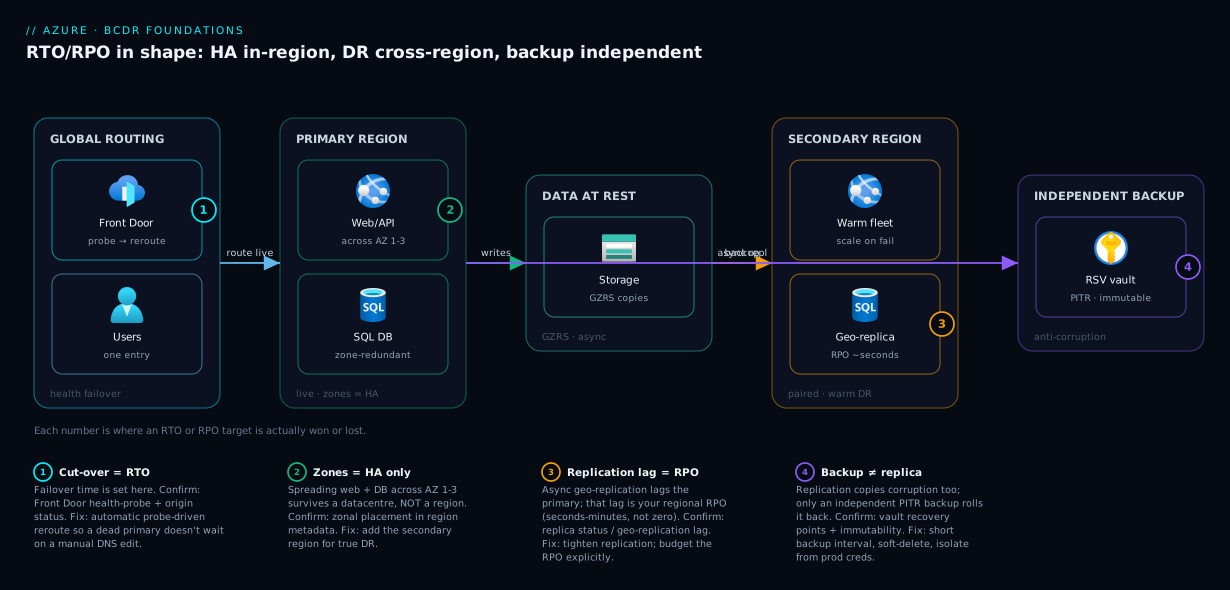
Read the badges as the four levers of your RTO/RPO: (1) the routing cut-over decides failover time; (2) zone redundancy decides whether common failures even register; (3) replication lag decides your regional RPO; (4) an independent, immutable backup decides whether you survive corruption and ransomware at all.
Real-world scenario
KloudMart, a mid-size Indian e-commerce company, ran its order platform as a single-region deployment in Central India: web app and SQL database in one region, nightly backups to a geo-redundant vault, no second region. Leadership believed they were “covered” because backups existed and storage was geo-redundant. The numbers nobody had written down were an RTO of several hours (restore a 1.2 TB database, redeploy the app, repoint DNS) and an RPO of up to 24 hours (the nightly backup).
The reckoning came in two waves. First, a botched schema migration corrupted the orders table at 2 p.m. The team restored from the previous night’s backup — and lost every order placed that day, roughly ₹40 lakh in transactions, because the RPO was 24 hours and replication had faithfully copied the corruption to the GRS secondary. Months later a regional incident took the primary offline for ninety minutes; with no warm standby, the store was down the whole time, because the “DR plan” was a manual restore slower than the outage itself.
The fix was a deliberate tiering exercise. The team classified the order platform as high downtime cost, high data-loss cost and set targets of RTO 15 minutes, RPO 5 minutes. They moved the database to active geo-replication into the paired region (RPO now seconds), stood up a warm standby of the web tier there (smaller fleet, kept running), and put Azure Front Door in front with health-probe-driven failover so a dead primary reroutes automatically. Crucially, they kept Azure Backup with point-in-time restore and a short backup interval as the independent defence against corruption — the lesson from the migration — and enabled vault immutability so ransomware could not destroy the recovery points. They left the low-stakes microsite on its cheap single-region-plus-nightly-backup design, refusing to gold-plate it.
The result: the next regional blip caused a sub-minute automatic failover most customers never noticed, and a later accidental bulk-delete was recovered to within five minutes via point-in-time restore. The extra spend — a scaled-down second-region fleet plus more frequent backups — was a fraction of the single bad afternoon it replaced. The decisive change was not a tool; it was writing the two numbers down and designing to them.
Advantages and disadvantages
Treating BCDR as an explicit RTO/RPO-driven discipline has clear trade-offs:
| Advantages | Disadvantages |
|---|---|
| Spend lands where outages actually hurt (tiering) | Requires up-front classification work per workload |
| Recovery becomes a designed-for number, not a surprise | Higher rungs add real cost and operational complexity |
| Business and engineering share one vocabulary | Targets must be tested (drills), or they’re fiction |
| Right-sizing avoids gold-plating low-stakes apps | Cross-region designs add latency and data-consistency concerns |
| Independent backups defend against corruption/ransomware | More moving parts to monitor, patch, and keep in sync |
| SLA, HA, and DR stop being conflated | Failback (returning to primary) is often under-planned |
When each matters: the up-front classification cost is trivial next to a single mis-tiered incident, so it almost always pays off. The complexity and cost of higher rungs matter most for truly critical workloads — which is exactly why you tier, climbing the ladder only for the systems whose downtime cost justifies it, and leaving everything else on a cheap, honest, lower rung.
Hands-on lab
This lab makes RTO/RPO tangible without a multi-region bill: you will set storage redundancy (the RPO knob for data at rest), inspect the region pair (your DR direction), and create a Recovery Services vault with geo-redundancy (the backup foundation). It is free-tier-friendly except for minimal storage costs; teardown is included.
1. Set variables and a resource group.
RG=rg-bcdr-lab
LOC=centralindia
az group create --name $RG --location $LOC
2. Inspect your region pair — the natural DR target.
az account list-locations \
  --query "[?name=='$LOC'].{region:name, pairedWith:metadata.pairedRegion[0].name}" -o table
# Expected: a row showing centralindia paired with southindia (your DR direction).
3. Create a geo-zone-redundant storage account (HA and DR for data at rest).
az storage account create \
  --name stbcdrlab$RANDOM \
  --resource-group $RG --location $LOC \
  --sku Standard_GZRS --kind StorageV2 --access-tier Hot
# 'provisioningState': 'Succeeded' and 'sku': { 'name': 'Standard_GZRS' } confirm it.
4. Confirm the redundancy you actually got (a frequent surprise — defaults are often LRS).
az storage account list -g $RG \
  --query "[].{name:name, sku:sku.name, location:primaryLocation, secondary:secondaryLocation}" -o table
# 'secondaryLocation' populated = your data is replicating to the paired region.
5. Create a Recovery Services vault with geo-redundant storage (the backup foundation).
az backup vault create --name rsv-bcdr-lab --resource-group $RG --location $LOC
# Set the vault's backup storage redundancy to geo-redundant (cross-region durability)
az backup vault backup-properties set \
  --name rsv-bcdr-lab --resource-group $RG \
  --backup-storage-redundancy GeoRedundant
6. The equivalent Bicep, for repeatable infrastructure.
param location string = 'centralindia'

resource vault 'Microsoft.RecoveryServices/vaults@2023-06-01' = {
  name: 'rsv-bcdr-lab'
  location: location
  sku: { name: 'RS0', tier: 'Standard' }
  properties: {}
}

resource vaultConfig 'Microsoft.RecoveryServices/vaults/backupstorageconfig@2023-06-01' = {
  parent: vault
  name: 'vaultstorageconfig'
  properties: {
    storageModelType: 'GeoRedundant'   // recovery points survive a regional event
  }
}
7. Teardown — delete everything to stop charges.
az group delete --name $RG --yes --no-wait
# Note: a vault with active backup items must have them removed before it deletes.
What you proved: redundancy is an explicit choice (step 3–4), the platform already defines your DR direction via the region pair (step 2), and the vault is the geo-redundant home for the point-in-time copies that defend your RPO against corruption (step 5–6).
Common mistakes & troubleshooting
BCDR fails in predictable ways. Each row is a real failure mode — symptom, the root cause, how to confirm it, and the fix:
| # | Symptom | Root cause | How to confirm | Fix |
|---|---|---|---|---|
| 1 | “We have GRS, so we’re safe” — yet a region outage still took data | GRS replication is async; the lag is your RPO, and you can’t read the secondary until failover | az storage account show --query "{sku:sku.name, secondary:secondaryLocation}" — note it’s async |
Set an RPO budget; use RA-GZRS for read access; pair with backups |
| 2 | Restored from backup but lost a full day of orders | RPO equals the backup interval; nightly backup = up to 24 h loss | Check backup policy schedule in the vault | Shorten the interval / use point-in-time restore on the database |
| 3 | Zone-redundant app went fully down in a regional outage | Zone redundancy is HA, not DR — it doesn’t survive a region | Confirm there is no second-region footprint | Add a DR region (warm standby / pilot light) + global routing |
| 4 | Corruption was faithfully copied to the DR replica | Replication mirrors all writes, including bad ones — it’s not a backup | The bad data exists in both regions | Keep independent point-in-time backups alongside replication |
| 5 | DR plan exists on paper but failover took hours | Never drilled; runbook steps were wrong or manual | No record of a successful failover test | Schedule regular failover drills; automate cut-over |
| 6 | Ransomware encrypted the backups too | Backups were mutable / in the same trust boundary | Vault has no immutability / soft-delete | Enable vault immutability + soft-delete; isolate the copy |
| 7 | Failover worked, but failback was chaos | Failback was never designed | No documented return-to-primary procedure | Plan and test failback as a first-class step |
| 8 | The SLA said 99.99% but recovery still took hours | SLA is platform uptime, not your RTO/RPO | The SLA doc says nothing about your app’s recovery | Own RTO/RPO separately; design and test to them |
| 9 | DR region exists but DNS still pointed at the dead region | No global routing / health-probe failover | TTL-bound DNS with manual change | Front Door / Traffic Manager with automatic health failover |
| 10 | “RPO is 5 minutes” but a dependency lagged hours | Measured one component, not the weakest link | Map RTO/RPO end-to-end across every tier | Set targets on the slowest/stalest component |
The meta-lesson across all ten: a recovery capability you have never tested is a hypothesis, not a plan. Drill it.
Best practices
- Write RTO and RPO down per workload, signed off by the business. Undocumented targets default to “whatever the architecture happens to give,” which is how 24-hour RPOs get accepted by accident.
- Tier your workloads. Use the downtime-cost × data-loss-cost grid; do not apply one resilience policy to a microsite and a payments ledger.
- Separate HA from DR explicitly. Confirm you have both an in-region HA story (zones) and a cross-region DR story for anything critical.
- Keep backups independent of replication. Replication copies corruption; backups give you a clean point to roll back to. You need both.
- Choose storage redundancy deliberately. The default is often LRS (no regional protection). Pick ZRS/GZRS to match the failure scope you must survive.
- Make the DR region the paired region where compliance and latency allow — it aligns with how Azure replicates and sequences updates.
- Drill failover on a schedule. An untested runbook fails when it matters; rehearse it and time the real RTO.
- Plan failback as carefully as failover. Returning to primary is a project of its own, not an afterthought.
- Protect backups against ransomware with vault immutability, soft-delete, and isolation from production credentials.
- Measure RTO/RPO end-to-end. Your real numbers are set by the slowest/stalest component, not the fastest.
- Use global routing for failover. Front Door or Traffic Manager with health probes turns a region failure into an automatic reroute, not a frantic DNS edit.
- Right-size, don’t gold-plate. Climb the spectrum only as high as the workload’s band justifies; over-provisioned resilience is wasted budget.
Security notes
Resilience and security overlap more than teams expect. Backups and replicas are full copies of your data — and therefore full-value targets. Apply the same least-privilege, encryption, and isolation discipline to them as to production. Use Azure RBAC to restrict who can delete or restore from a Recovery Services vault, and enable multi-user authorization (MUA) so a single compromised admin cannot wipe recovery points. Enable vault immutability and soft-delete so backups cannot be silently deleted or encrypted by ransomware — the difference between “we have backups” and “we have backups an attacker cannot reach.”
Keep DR credentials and the DR environment in a separate trust boundary from production where practical: a compromised identity plane should not automatically hand the attacker your recovery copies. Targeting the paired region keeps data in-geography for residency compliance — confirm the secondary satisfies the same regulatory requirements as the primary. All redundancy levels (LRS–GZRS) and Recovery Services vaults encrypt at rest by default; for stricter needs, layer customer-managed keys (CMK) in Key Vault — but the key then needs its own availability plan, or it becomes a new single point of failure for recovery.
Cost & sizing
BCDR cost is driven by how much you keep running in the second location and how much/often you store recovery data. The spectrum’s cost curve is steep precisely because the top rungs run a full second environment full-time. Rough figures (Central India, indicative; always price your own SKUs):
| Tier | What you pay for | Rough relative monthly cost | Indicative INR/mo (small workload) | Indicative USD/mo |
|---|---|---|---|---|
| Backup & Restore | Backup storage + vault | Baseline (×1.0) | ₹1,500–6,000 | $18–72 |
| Pilot Light | Replicated data + minimal compute | ×1.1–1.3 | ₹8,000–20,000 | $95–240 |
| Warm Standby | Smaller always-running second fleet | ×1.4–1.6 | ₹25,000–60,000 | $300–720 |
| Active-Active | Full second production environment | ×1.7–2.0 | ₹60,000–1,20,000+ | $720–1,440+ |
The dominant cost levers, and how to right-size each:
| Cost driver | What inflates it | How to right-size |
|---|---|---|
| Standby compute | Running a full second fleet 24×7 | Use pilot light / warm standby; scale up only on failover |
| Backup storage | Long retention + high frequency on large data | Tier retention; back up frequently only what needs a tight RPO |
| Geo-redundant storage | GZRS premium across all data | Use GZRS for critical data, LRS/ZRS for the rest |
| Cross-region egress | Replication and failover data transfer | Expected with DR; minimise chatty cross-region calls |
| Recovery Services vault | Per-instance protection + storage redundancy | Geo-redundant only where regional durability is required |
Free-tier and cost notes: Azure Backup has no separate compute charge — you pay for protected-instance count and the backup storage consumed. ZRS/GZRS carry a premium over LRS for the extra copies. The cheapest honest posture for a non-critical workload is single-region with scheduled backups to a geo-redundant vault — a low monthly cost that still gives you a real (if hours-scale) recovery. Reserve the expensive rungs for the workloads whose downtime cost genuinely clears the bar.
Interview & exam questions
1. What is the difference between RTO and RPO? RTO (Recovery Time Objective) is the maximum acceptable time to restore service after an outage — measured forward from the disaster. RPO (Recovery Point Objective) is the maximum acceptable amount of recent data lost — measured backward to the last safe copy. They are independent: a design can have a good RTO and a poor RPO, or vice versa.
2. How do high availability and disaster recovery differ? HA survives small, frequent failures (disk, VM, a single availability zone), usually automatically and within one region, with near-zero data loss. DR recovers from large, rare events (a whole region down, data destruction), typically by failing over to a second region, often with a human decision and a measurable recovery window. You generally need both.
3. Does zone redundancy give you disaster recovery? No. Availability zones protect against a datacentre (zone) failing within a region — that is HA. A whole-region outage defeats zone redundancy entirely. For DR you need a presence in a second region.
4. Why is replication not a substitute for backup? Replication copies every write to the secondary, including corrupt or maliciously deleted data — so the bad state appears in both regions. A backup is an independent point-in-time copy you can roll back to. You need replication for low RPO on infrastructure failure and backups for recovery from corruption/ransomware.
5. What is the practical difference between LRS, ZRS, GRS, and GZRS? LRS keeps three copies in one datacentre (no zone or region protection). ZRS spreads them across zones in one region (survives a zone, not a region). GRS adds an async copy in the paired region (survives a region, after failover). GZRS combines in-region zone redundancy with that async cross-region copy. GRS/GZRS replication is asynchronous, so the lag is your storage RPO.
6. What are the four standard DR strategies, from cheapest to most resilient? Backup & Restore (restore and redeploy; RTO hours), Pilot Light (core data warm, minimal compute; RTO tens of minutes), Warm Standby (a scaled-down running copy; RTO minutes), and Active-Active (both regions serve live traffic; RTO near-zero). Cost rises with recovery speed.
7. What is a region pair and why does it matter for BCDR? A region pair is two regions Azure links within a geography. It matters because GRS/GZRS replication targets the paired region automatically, platform updates are sequenced so both are rarely updated together, and recovery is prioritised one region per pair in a broad event. It is the natural, compliance-friendly DR direction.
8. Is an Azure SLA the same as your RTO/RPO? No. An SLA is the platform’s uptime commitment for a service — a floor on availability. It says nothing about how fast your application recovers from a bad deployment or how much data you lose to corruption. RTO/RPO are yours to define, design for, and test.
9. How do you decide which DR strategy a workload needs? Estimate two independent costs — an hour of downtime, and losing recent data — to place the workload on a grid that maps to an RTO/RPO band, which selects a strategy. Tier workloads so spend matches the real cost of an outage.
10. Why must your real RTO/RPO be measured end-to-end? Because a chain is only as strong as its weakest link: your true RTO is the slowest component to recover and your true RPO is the least-recent safe copy across the whole system. A 30-second web failover is meaningless if the database takes four hours to restore.
11. What protects backups from ransomware? Vault immutability and soft-delete (so recovery points cannot be silently deleted or encrypted), multi-user authorization so one compromised admin cannot wipe them, and isolation of the backup copy from production credentials. “Having backups” an attacker can reach is not protection.
12. Which certs cover this material? The HA/DR, RTO/RPO, region-pair, storage-redundancy, and Backup/Site Recovery concepts here map to AZ-104 (Administrator), AZ-305 (Solutions Architect — design for resilience), and the resilience pillar of the Well-Architected/AZ-700 networking content for the routing layer.
Quick check
- An outage strikes at 14:00; your last backup was at 02:00. What is your RPO for this event?
- Your web tier fails over in 30 seconds but the database restore takes 3 hours. What is the workload’s real RTO?
- You are on GZRS. A whole region fails. Is your data automatically readable in the secondary region with no further action?
- Which DR strategy keeps a scaled-down but running copy in the second region?
- True or false: a 99.99% SLA guarantees you will recover from a corrupted database within minutes.
Answers
- Up to 12 hours — RPO is the gap to the last safe copy, so 14:00 minus 02:00. (Daily backups make this up to the full interval in the worst case.)
- 3 hours — the workload’s RTO is set by its slowest-to-recover component, the database, not the fast web tier.
- No — GZRS replication is asynchronous and the secondary is not readable until a failover is initiated, unless you are using the read-access variant (RA-GZRS).
- Warm Standby — a running, scaled-down copy you scale up and cut traffic to (Pilot Light keeps data warm but compute minimal; Active-Active serves live from both).
- False — an SLA is a platform-uptime commitment; it says nothing about recovering your application from corruption, which is governed by your RTO/RPO and your backups.
Glossary
- RTO (Recovery Time Objective): The maximum acceptable time to restore service after an outage; measured forward from the disaster.
- RPO (Recovery Point Objective): The maximum acceptable amount of recent data lost; measured backward to the last safe copy.
- High availability (HA): Surviving small, frequent failures (disk, VM, zone) automatically, usually within one region, with near-zero data loss.
- Disaster recovery (DR): Recovering from large, rare failures (region down, data destruction), typically via a second region and a deliberate failover.
- Availability zone: A physically isolated datacentre within an Azure region, with independent power, cooling, and networking.
- Region pair: Two Azure regions in a geography that the platform links for residency, replication, and sequenced recovery.
- Failover: Switching production to the standby location during a disaster.
- Failback: Returning production to the original primary location after recovery.
- LRS / ZRS / GRS / GZRS: Storage redundancy levels — locally, zone-, geo-, and geo-zone-redundant respectively — trading cost against the failure scope they survive.
- Azure Backup / Recovery Services vault: Azure’s managed point-in-time backup service and the vault that stores recovery points.
- Azure Site Recovery (ASR): Azure’s service for replicating and failing over whole workloads (VMs) to another region or zone.
- Pilot Light / Warm Standby / Active-Active: DR strategies ordered by recovery speed and cost, from minimal-standby to full live second region.
- SLA (service-level agreement): The provider’s uptime commitment for a service — a floor on availability, not a substitute for your RTO/RPO.
- Asynchronous replication: Copying data to a secondary with a small lag; that lag is the RPO for a primary-region failure.
Next steps
- Go deeper on the region/zone mechanics that set your HA floor in Azure Regions and Availability Zones Explained.
- Learn the protection tooling end-to-end in Azure Backup and Site Recovery for Protection.
- Drill the HA-versus-DR distinction further in High Availability vs Disaster Recovery: RTO and RPO.
- Climb to the top rung with Azure Multi-Region Active-Active Design.
- Add the global routing layer that makes failover automatic in Azure Front Door and Traffic Manager for Global Failover.
- Make the application itself resilient with Resiliency Patterns: Retry, Circuit Breaker, Bulkhead.