You bought a domain — say kloudvin.com — and now you need www.kloudvin.com to resolve to your Azure web app, the bare kloudvin.com (the apex) to redirect there too, email to keep working, and a TXT record to prove ownership for a TLS certificate. The registrar’s built-in DNS editor is clunky, has no API, and can’t point your apex at an Azure resource that changes IPs. The clean answer is to host the authoritative DNS for your domain in Azure DNS — Microsoft’s global, anycast, 100%-SLA name service — so every record lives next to the rest of your infrastructure, scriptable in az CLI and Bicep, and the apex can follow your App Service or Front Door automatically.
This article is a hands-on implementation guide. It walks you through the whole job end to end: create a public DNS zone, read the name servers Azure assigns it, delegate the domain from your registrar by pasting those name servers in as the domain’s NS records, then add the record set you actually need — A, AAAA, CNAME, MX, TXT, SRV, CAA — and solve the classic apex-CNAME problem with Azure’s alias records, which let the bare domain track an Azure public IP, Front Door, or Traffic Manager without a fragile hard-coded address. You will do every step twice — once in the portal and once in az CLI — and then capture the whole zone as Bicep so it is reproducible. Each step has the exact command, the expected output, and a validation check, because DNS is the one place where “it looks right” and “it actually resolves” are different claims you must prove with dig/nslookup.
By the end you will understand the one thing that trips up every first-timer: creating a zone in Azure does nothing on the public internet until you delegate. The zone is authoritative only when the parent domain’s NS records point the world at Azure’s name servers. We will make that fork explicit, show you how to confirm delegation actually took, and cover TTL, propagation, the apex alias, and the limits that matter — so you go from a freshly registered domain to fully resolving, Azure-hosted public DNS in under an hour.
What problem this solves
Every public-facing thing you run needs DNS, and the registrar’s free DNS panel is where most teams start — until it stops being enough. It has no API or IaC story, so records drift out of source control. It usually cannot CNAME the apex, so you can’t point kloudvin.com (no www) at an App Service or Front Door whose IP isn’t yours to hard-code. Its TTLs are coarse, its propagation opaque, and when you move the web app to a new region the apex breaks because it was pinned to an old IP. None of this is exotic — it bites the first time you put a real workload behind a real domain.
Hosting the zone in Azure DNS fixes all of it. The records live in a resource group beside your app, governed by Azure RBAC, deployable from Bicep/Terraform, and editable from az. The alias record solves the apex problem natively: the bare domain points at an Azure resource object (a Public IP, Front Door, or Traffic Manager profile), and Azure rewrites the answer automatically when that resource’s address changes — no manual edits, no breakage on failover or region move. And because Azure DNS is anycast across Microsoft’s global edge with a 100% availability SLA, your domain’s reachability isn’t riding on a registrar’s best-effort nameservers.
Who hits this: anyone putting a custom domain on App Service, Front Door, Static Web Apps, an API behind Application Gateway, or a public VM — and anyone who needs MX/TXT/SPF/DKIM records managed as code. The catch this guide makes unmissable is the two-stage model: Azure DNS only becomes authoritative once you delegate the domain to it at the registrar. Create the zone, then hand over the keys with NS records. Skip the second step and you will stare at a perfect-looking zone that resolves nothing.
Learning objectives
By the end of this article you can:
- Explain the DNS delegation chain — root → TLD → your registrar → Azure DNS name servers — and why a zone is inert until the parent delegates to it.
- Create a public DNS zone in Azure and read the four name servers Azure assigns, in the portal,
azCLI, and Bicep. - Delegate your domain by replacing the registrar’s NS records with Azure’s, and confirm the delegation actually took using
dig/nslookupagainst the parent. - Create every common record set —
A,AAAA,CNAME,MX,TXT,SRV,CAA— with the right TTL, and know which record type each real use case needs. - Solve the apex-CNAME problem with an alias record pointing the bare domain at a Public IP, Front Door, or Traffic Manager — and explain why this is impossible with a plain CNAME.
- Validate resolution end to end, troubleshoot the common failures (delegation not taking, stale TTL, apex CNAME rejected, missing trailing dot, wildcard surprises), and tear the lab down cleanly.
- Reason about Azure DNS cost (per zone + per million queries), limits (record sets per zone, records per set), and basic security (RBAC, zone locks, registrar protection).
Prerequisites & where this fits
You need an Azure subscription (the free account works — Azure DNS is cheap, not free, but pennies for one zone), the Azure CLI installed or Cloud Shell open, and a domain you control at a registrar (GoDaddy, Namecheap, Cloudflare Registrar, Google Domains successor, etc.) where you can edit the domain’s name servers. You should be comfortable running az and reading JSON, and it helps to have dig (Linux/macOS) or nslookup (anywhere) handy for validation. No prior DNS-hosting experience is assumed — we define every term.
This sits in the Networking track and is upstream of almost everything public-facing. It pairs with Azure Virtual Networks, Subnets & NSGs (where private name resolution and your network live) and is the public counterpart to private-zone resolution covered in Private Link & Private DNS for PaaS — this article is strictly public zones (the internet-facing kind); private zones resolve names inside your VNet and are a separate resource type. Once your domain resolves to an Azure endpoint, the natural next steps are putting a certificate and WAF in front via Application Gateway with WAF & End-to-End TLS, and choosing where the zone’s resource group lives per your Azure resource hierarchy.
A quick map of who owns which layer of the chain, so you know where to look when a name doesn’t resolve:
| Layer | What lives here | Who owns it | What breaks here |
|---|---|---|---|
Root + TLD (.com) |
Delegation to your registrar | IANA / registry operator | Almost never — not your concern |
| Registrar | Your domain’s NS records | You (at registrar) | Delegation: wrong/missing NS → nothing resolves |
| Azure DNS zone | All your records (A/CNAME/MX/TXT/alias) | You (in Azure) | Wrong record value, TTL, or apex CNAME attempt |
| Resolver (client/ISP) | Caches answers per TTL | The client’s network | Stale answers until TTL expires |
| Target resource | The App Service / IP / Front Door | You (in Azure) | Name resolves but the endpoint is down |
Core concepts
A handful of mental models make every later step obvious. Read these once; the glossary repeats them.
DNS is a delegation tree, and your zone is a branch the parent must point to. Looking up www.kloudvin.com, a resolver asks the root servers who handles .com, then the .com TLD servers who handles kloudvin.com, which answer with the name servers you delegated to. Delegate to Azure DNS and the .com registry returns Azure’s name servers, the resolver asks them for www, and Azure answers authoritatively. Creating the Azure zone publishes records, but only delegation makes the world ask Azure. This two-stage model — create, then delegate — is the single most important idea here.
A zone is the container; record sets are the entries. A DNS zone is the authoritative database for one domain (kloudvin.com). Inside it you create record sets: each is a name + a record type (A, CNAME, MX, …) + a TTL + one or more values. A set is keyed by name and type — www A and www AAAA are two sets on the same name; a www CNAME cannot coexist with any other record on www (a CNAME must be alone). The apex (“root” or @) is the bare domain itself, name @.
TTL is how long the rest of the world caches your answer. Every record set carries a time-to-live in seconds. A resolver that fetches your A record with TTL 3600 reuses it for an hour before re-asking. Long TTLs cut query cost and load; short TTLs (60–300) let changes take effect fast but cost more queries. The trick every pro uses: lower the TTL a day before a planned change, so when you flip the record the old cached answer expires in minutes, not hours.
A CNAME aliases one name to another — but never the apex. A CNAME says “for this name, go ask that other name instead” (www → myapp.azurewebsites.net). The DNS standard forbids a CNAME at the apex, because the apex must also carry the zone’s SOA and NS records and a CNAME may not coexist with other records. So you cannot CNAME kloudvin.com → myapp.azurewebsites.net. This is the universal apex pain.
Azure alias records solve the apex problem the right way. An alias record is an Azure-specific A/AAAA/CNAME whose value is not a literal address but a reference to an Azure resource — a Public IP, a Front Door endpoint, or a Traffic Manager profile. Azure resolves the reference at query time, returns the resource’s current address, and updates it automatically when that address changes. Crucially, an alias A/AAAA record is a real A/AAAA record at the apex, so it is standards-legal where a CNAME is not — letting the bare kloudvin.com follow your Front Door or Public IP with zero hard-coded IPs.
The vocabulary in one table
| Term | One-line definition | Where it lives | Why it matters |
|---|---|---|---|
| DNS zone (public) | Authoritative record database for one domain | Microsoft.Network/dnsZones |
The container for all your records |
| Delegation | Parent domain’s NS records pointing to your name servers | At your registrar | Without it, Azure resolves nothing publicly |
| Name server (NS) | A server authoritative for the zone | Assigned by Azure (4 per zone) | What you paste at the registrar |
| Record set | Name + type + TTL + value(s) | Inside the zone | The actual entries you create |
Apex / root / @ |
The bare domain itself (kloudvin.com) |
Name @ in the zone |
Can’t take a CNAME; needs alias |
| A / AAAA | Name → IPv4 / IPv6 address | Record set | Point a name at an IP |
| CNAME | Name → another name | Record set | Alias www to an Azure hostname |
| MX | Mail exchanger for the domain | Record set on @ |
Where email is delivered |
| TXT | Free-text (SPF, DKIM, verification) | Record set | Domain ownership, email auth |
| Alias record | A/AAAA/CNAME referencing an Azure resource | Record set | Apex → Front Door / Public IP / TM |
| TTL | Seconds resolvers cache the answer | Per record set | Trade change-speed vs query cost/load |
| SOA | Start of authority (zone metadata) | Auto-created on @ |
Serial, refresh, negative-cache TTL |
DNS record types you will actually create
Azure DNS supports every common record type. You won’t use all of them, but you should know which type each task needs — what it does, what its value looks like, and the typical use:
| Type | Purpose | Value example | Typical use on your domain |
|---|---|---|---|
| A | Name → IPv4 | 20.103.85.33 |
Point api at a VM/IP |
| AAAA | Name → IPv6 | 2603:1030:... |
IPv6 endpoint |
| CNAME | Name → another name | myapp.azurewebsites.net |
www → App Service / Front Door |
| MX | Mail delivery host (+priority) | 10 mail.kloudvin.com |
Email routing (Microsoft 365: ...mail.protection.outlook.com) |
| TXT | Arbitrary text | "v=spf1 include:..." |
SPF, DKIM, domain verification |
| NS | Delegate a sub-zone | ns1-01.azure-dns.com |
Auto-created on @; or delegate a subdomain |
| SOA | Zone authority metadata | (auto) | Auto-created; tune negative-cache TTL |
| SRV | Service location (+port/weight) | 0 5 5060 sip.kloudvin.com |
SIP, Teams, LDAP service discovery |
| CAA | Which CAs may issue certs | 0 issue "digicert.com" |
Restrict cert issuance to trusted CAs |
| PTR | IP → name (reverse) | host.kloudvin.com |
Reverse DNS (rare in public forward zones) |
| Alias (A/AAAA/CNAME) | Reference an Azure resource | (resource ID) | Apex → Front Door / Public IP / TM |
Two reading notes that save the most confusion. @ vs www: people put the web app on @ with a CNAME and it’s rejected — www can be a CNAME, @ cannot, so use an alias A for the apex. NS auto-records vs delegation: editing the zone’s own NS set does nothing for resolution; delegation is done at the registrar, not inside the zone.
How delegation actually works (the part everyone skips)
This is the concept that separates “I made a zone” from “my domain resolves.” Walk the lookup of www.kloudvin.com the way a resolver does:
| Step | Resolver asks | Answer it gets | Who answers |
|---|---|---|---|
| 1 | Root: “who handles .com?” |
The .com TLD name servers |
Root servers |
| 2 | .com TLD: “who handles kloudvin.com?” |
Your delegated name servers | .com registry |
| 3 | Azure NS: “what is www.kloudvin.com?” |
The A/CNAME/alias you created |
Azure DNS |
Step 2 is delegation. The answer there is whatever NS records you set at your registrar. If they still point at the registrar’s default name servers, step 3 asks the registrar — which has none of your records — and you get nothing. Point them at Azure’s four name servers and step 3 asks Azure, where your records resolve.
A subtle but important point: the zone’s own NS record set (on @) is created automatically by Azure and is informational — it tells you which name servers Azure assigned; editing it delegates nothing. Delegation happens at the parent, at your registrar, where you replace the domain’s name servers with Azure’s four. Confusing the two — editing the in-zone NS set and expecting the internet to notice — is the most common delegation mistake.
Here is the difference laid out so it sticks:
In-zone NS set (on @) |
Registrar NS / delegation | |
|---|---|---|
| Where | Inside the Azure DNS zone | At your domain registrar |
| Created by | Azure, automatically | You, manually |
| Purpose | Tells you Azure’s name servers | Makes the world ask Azure |
| Effect of editing | None on public resolution | Everything — this is the switch |
| You should | Read it (to copy the values) | Set it (paste Azure’s 4 NS) |
The apex-CNAME problem and how alias records fix it
You want the bare kloudvin.com to serve your site, which lives at myapp.azurewebsites.net or behind Front Door. The instinct is a CNAME: @ → myapp.azurewebsites.net. The standard forbids it — the apex must carry SOA/NS, and a CNAME can’t coexist with other records — so Azure correctly rejects a CNAME on @. You have three legal ways to point the apex, and one is almost always right:
| Approach | How | Pros | Cons |
|---|---|---|---|
| A record with a literal IP | @ A 20.103.85.33 |
Standards-legal, simple | Breaks if the target IP ever changes (region move, failover, scale) |
| Alias A → Public IP | @ A (alias → publicIPAddresses/...) |
Follows the IP automatically; standards-legal at apex | Target must be an Azure Public IP resource |
| Alias A → Front Door / Traffic Manager | @ A (alias → Front Door endpoint or TM profile) |
Apex tracks a global/anycast front end; survives failover | Front Door/TM must be the entry point |
The alias record is the modern answer. An alias A/AAAA at the apex is a real A/AAAA record — so it satisfies the standard — but its value references an Azure resource, and Azure returns that resource’s current address at query time. Move the workload, fail over, or let Front Door change edges, and the apex answer updates with no edit from you. Alias records cost nothing beyond normal query and are the recommended way to host an apex on Azure resources.
Two practical rules: an alias record can target only Azure resources (Public IP, Front Door, Traffic Manager — not an arbitrary external host), and you still use a plain CNAME for www. A common, clean setup is apex as alias A → Front Door and www as CNAME → the same Front Door hostname, so both forms hit the same global front end.
Architecture at a glance
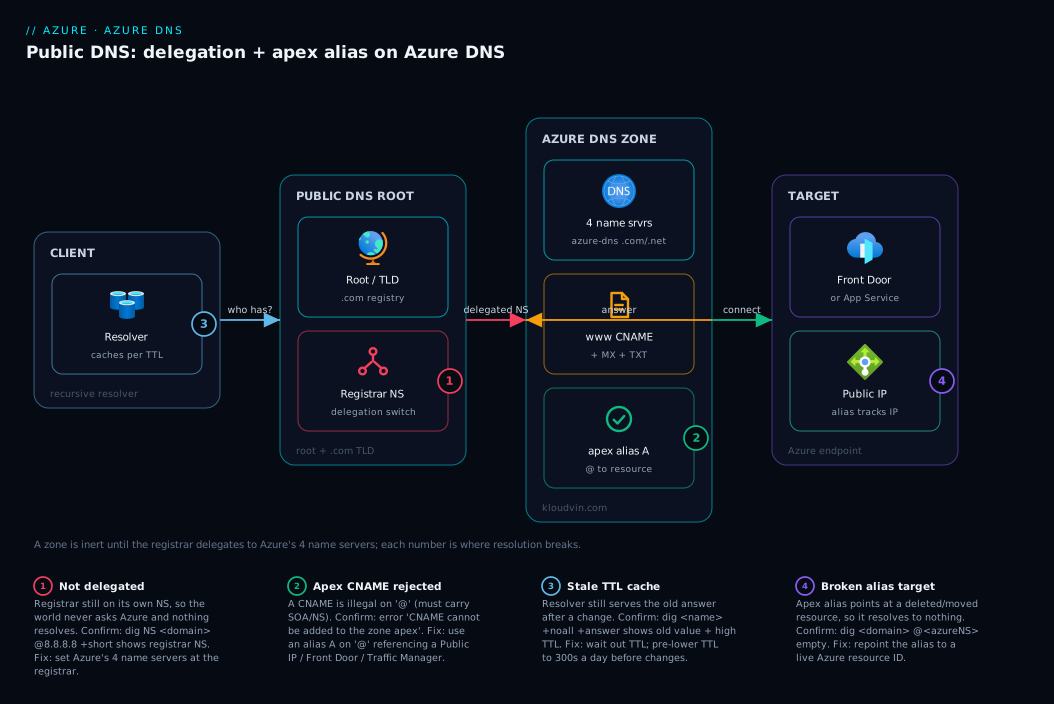
The system is a left-to-right delegation and resolution chain. A user’s resolver starts at the public DNS hierarchy: it learns from the .com registry that kloudvin.com is delegated to four Azure name servers (ns1-NN.azure-dns.com/.net/.org/.info). That delegation is the bridge you build by pasting those four name servers into your registrar’s NS settings — the diagram marks this as the single switch that turns Azure authoritative. The resolver then queries the Azure DNS public zone, which holds your record sets: a www CNAME, an @ apex alias A that references an Azure resource, plus the MX/TXT records that keep mail and verification working. Azure returns the answer, the resolver caches it for the record’s TTL, and the client finally connects to the target — an App Service / Front Door endpoint or a Public IP — which is where the apex alias quietly tracks the resource’s real address.
Follow the numbered badges to see where it goes wrong: delegation not set or wrong at the registrar (the whole chain dead-ends), a CNAME attempted on the apex (rejected — must be an alias A), a stale answer cached past its TTL (your change “didn’t work” until it expires), and an alias pointing at the wrong or deleted Azure resource (resolves to nothing). The legend turns each into a symptom, the one command that confirms it, and the fix.
Real-world scenario
Northwind Retail runs an e-commerce site for the Indian market on Azure. They had registered northwind.co.in years ago at a budget registrar and used its free DNS panel. The site itself ran fine on App Service at northwind-web.azurewebsites.net, with www.northwind.co.in CNAME’d to it — but the bare northwind.co.in (which a third of their customers typed) simply failed, because the registrar’s panel refused to CNAME the apex and the team had hard-coded an old App Service inbound IP into an apex A record. When App Service rotated that inbound IP during a platform migration, the apex went dark for nine hours over a weekend sale before anyone noticed.
The fix was to move authoritative DNS to Azure DNS and stop hard-coding anything. The platform engineer created a public zone northwind.co.in in the same resource group as the web app, copied the four Azure name servers, and logged into the registrar to replace the name servers — the delegation. Inside the zone she recreated every record from the old panel as Bicep: www CNAME to the App Service hostname, the MX records for their Microsoft 365 tenant, the TXT SPF and the domain-verification TXT for their cert. For the apex she put the site behind Azure Front Door (for global caching and WAF) and set the apex as an alias A record → the Front Door endpoint, with www re-pointed as a CNAME to the same Front Door hostname.
The migration was staged to avoid an outage. A day ahead she lowered the TTL on the critical records from 3600 to 300 at the old registrar panel, so caches would hold stale answers for only five minutes during cutover. She delegated in the evening, then watched dig NS northwind.co.in @8.8.8.8 flip from the registrar’s name servers to azure-dns within twenty minutes, confirming delegation took. She validated each record with dig +short www.northwind.co.in and dig northwind.co.in A (the apex now returning Front Door’s address) before raising TTLs back to 3600.
The outcome: the apex now follows Front Door automatically — when Front Door later changed its edge addresses, nothing broke, because the alias resolves live. The whole zone is in the repo, deployed by the same pipeline as the app, RBAC-scoped to the platform team. Total Azure DNS cost runs under ₹60 a month — a rounding error against the avoided outage. The lesson the team wrote down: creating the zone took five minutes; the migration only worked because they delegated, confirmed it, and lowered TTL before cutover.
Advantages and disadvantages
| Advantages | Disadvantages |
|---|---|
Records live next to your infra; managed by RBAC, Bicep/Terraform, az |
Zone is inert until you delegate at the registrar (an extra, manual step) |
| Alias records solve the apex problem and auto-track Azure resources | Alias targets are Azure-only (no arbitrary external host) |
| Global anycast, 100% availability SLA for query resolution | Costs a little (per zone + per query) where a registrar panel is free |
| Fast, scriptable changes; per-record TTL control | Public zones do not support DNSSEC signing in every region/scenario — verify before relying on it |
| One zone, many record types; clean separation from private DNS | Delegation/propagation can take minutes to a few hours to settle globally |
| Cheap at typical volumes (pennies to a few ₹100s/month) | You manage correctness — a wrong record resolves wrongly, fast and globally |
Choose Azure DNS the moment you need IaC, an apex on an Azure resource, RBAC over who edits records, or an SLA on resolution. Stick with the registrar’s free panel only for a throwaway domain with a couple of static records. For anything carrying a real workload — especially an apex on App Service/Front Door — Azure DNS pays for itself the first time the apex doesn’t break during a failover.
Hands-on lab
This is the centerpiece. You will go from a freshly registered domain to fully resolving Azure-hosted public DNS, end to end, in both the portal and az CLI, then capture the zone as Bicep. Use a domain you actually control at a registrar. Throughout, replace kloudvin.com with your domain and rg-dns / eastus with your names.
Prerequisites for the lab:
| Need | How to get it | Verify |
|---|---|---|
| Azure subscription | Free account is fine | az account show -o table |
| Azure CLI ≥ 2.50 or Cloud Shell | az version or open Cloud Shell |
az version |
| A domain at a registrar | Any registrar where you can edit name servers | You can log in to the registrar |
dig or nslookup |
Preinstalled on macOS/Linux; nslookup on Windows |
dig -v / nslookup |
| A target to point at (optional) | An App Service, Front Door, or Public IP | Note its hostname/resource ID |
Set shell variables once (CLI path):
RG=rg-dns
LOC=eastus
ZONE=kloudvin.com          # <-- your domain
az group create --name $RG --location $LOC -o table
Expected: a table showing the resource group Succeeded. (DNS zones are global resources — the location you give the resource group is just where its metadata lives; resolution is global regardless.)
Step 1 — Create the public DNS zone
Portal: Search DNS zones → Create. Set Resource group = rg-dns, Name = kloudvin.com (no www, no trailing dot), leave Resource group location as is. Review + create → Create. After it deploys, Go to resource.
CLI:
az network dns zone create --resource-group $RG --name $ZONE -o table
Expected output (trimmed):
NumberOfRecordSets    ResourceGroup    ZoneName
--------------------  ---------------  -------------
2                     rg-dns           kloudvin.com
The new zone already has 2 record sets: the auto-created SOA and NS sets on @. You did not make those — Azure did. Validate the zone exists:
az network dns zone show --resource-group $RG --name $ZONE --query "{name:name, records:numberOfRecordSets}" -o table
Step 2 — Read the four name servers Azure assigned
This is the value you will paste at your registrar. Azure assigns each zone four name servers from azure-dns.com / .net / .org / .info.
Portal: On the zone’s Overview, the Name servers field lists all four (e.g. ns1-04.azure-dns.com., ns2-04.azure-dns.net., ns3-04.azure-dns.org., ns4-04.azure-dns.info.). Copy them.
CLI:
az network dns zone show --resource-group $RG --name $ZONE --query nameServers -o tsv
Expected (your exact numbers will differ):
ns1-37.azure-dns.com.
ns2-37.azure-dns.net.
ns3-37.azure-dns.org.
ns4-37.azure-dns.info.
Note the trailing dot — that is the fully-qualified form; most registrars accept the name with or without it. Record all four; you need every one (delegation to fewer than the full set is a common cause of flaky resolution).
Step 3 — Delegate the domain at your registrar
This is the switch that makes Azure authoritative. It happens at the registrar, not in Azure.
- Log in to your registrar (GoDaddy, Namecheap, Cloudflare Registrar, etc.).
- Find the domain’s Name Servers (sometimes “DNS” or “Nameservers”), and choose Custom / Use my own nameservers.
- Replace the existing name servers with the four Azure values from Step 2. Remove any registrar defaults — leave only Azure’s four.
- Save. The registrar may warn about propagation time; that is expected.
Registrar UIs vary; the field you want always sets the domain’s NS records (delegation), not an A or CNAME inside the registrar’s DNS editor. If you only see a DNS record editor and no nameserver field, look for “Use custom nameservers” or “Change nameservers” — that is the delegation control.
Do not edit the NS record set inside the Azure zone for delegation. That set is informational. Delegation is exclusively the registrar nameserver change above.
Step 4 — Confirm delegation actually took
Do not trust the registrar’s “saved” message — prove it. Query the parent (.com) for your domain’s NS records; once delegation propagates, the answer is Azure’s name servers, not the registrar’s.
# Ask a public resolver what the parent says your name servers are
dig NS kloudvin.com @8.8.8.8 +short
# Windows:  nslookup -type=NS kloudvin.com 8.8.8.8
Expected once delegation has taken (may take minutes to a couple of hours):
ns1-37.azure-dns.com.
ns2-37.azure-dns.net.
ns3-37.azure-dns.org.
ns4-37.azure-dns.info.
If you still see the registrar’s name servers, delegation has not propagated yet (or wasn’t saved) — wait and re-check. You can also trace the full chain:
dig +trace www.kloudvin.com # watch it walk root -> .com -> azure-dns
What dig NS returns |
Meaning | Action |
|---|---|---|
Azure azure-dns name servers |
Delegation took | Proceed to records |
| Registrar’s old name servers | Not propagated / not saved | Wait; re-check registrar saved Azure’s 4 |
SERVFAIL / nothing |
Typo in NS or domain mid-transfer | Re-enter the 4 NS exactly; wait |
Step 5 — Create A, CNAME, MX and TXT records
Now add the records your domain needs. Each command/portal action creates a record set (name + type) and adds a record to it.
A record — point api at an IPv4 address (e.g. a VM’s public IP):
az network dns record-set a add-record \
  --resource-group $RG --zone-name $ZONE \
  --record-set-name api --ipv4-address 20.103.85.33
CNAME — point www at your App Service hostname:
az network dns record-set cname set-record \
  --resource-group $RG --zone-name $ZONE \
  --record-set-name www --cname kloudvin-web.azurewebsites.net
MX — route mail (example: Microsoft 365; priority 0, on the apex @):
az network dns record-set mx add-record \
  --resource-group $RG --zone-name $ZONE \
  --record-set-name "@" --preference 0 \
  --exchange kloudvin-com.mail.protection.outlook.com
TXT — SPF record on the apex (also how you add a domain-verification token):
az network dns record-set txt add-record \
  --resource-group $RG --zone-name $ZONE \
  --record-set-name "@" \
  --value "v=spf1 include:spf.protection.outlook.com -all"
Portal equivalent: On the zone → + Record set. Set Name (e.g. www, or leave blank for apex @), Type (A/CNAME/MX/TXT…), TTL, and Value, then OK. Each + Record set creates one set.
Set a sensible TTL explicitly (--ttl 3600 for stable records; --ttl 300 if you plan to change it soon). If you omit --ttl on creation Azure defaults to 3600.
Validate each record resolves through Azure (query the zone’s own name server so you skip caches):
NS=$(az network dns zone show -g $RG -n $ZONE --query "nameServers[0]" -o tsv)
dig +short www.kloudvin.com @$NS      # -> kloudvin-web.azurewebsites.net.
dig +short api.kloudvin.com  @$NS     # -> 20.103.85.33
dig MX kloudvin.com @$NS +short       # -> 0 kloudvin-com.mail.protection.outlook.com.
dig TXT kloudvin.com @$NS +short      # -> "v=spf1 include:spf.protection.outlook.com -all"
Step 6 — Point the apex at an Azure resource with an alias record
Now solve the apex. You cannot CNAME @; instead create an alias A record on @ that references an Azure resource. Pick the target you have.
Apex alias A → a Public IP resource:
# Get the Public IP resource ID, then alias the apex to it
PIPID=$(az network public-ip show -g rg-web -n pip-frontend --query id -o tsv)
az network dns record-set a create \
  --resource-group $RG --zone-name $ZONE --name "@" \
  --target-resource $PIPID --ttl 3600
Apex alias A → an Azure Front Door endpoint (or Traffic Manager profile) — same shape, with the Front Door/TM resource ID as --target-resource. The apex now returns the resource’s live address.
Portal: + Record set → Name blank (apex) → Type = A → toggle Alias record set = Yes → Alias type = Azure resource → pick your Public IP / Front Door / Traffic Manager → OK.
The CLI uses
--target-resource(an Azure resource ID) instead of--ipv4-address; supplying a resource ID is what makes it an alias rather than a literal A record. You cannot mix both on one set.
Validate the apex now resolves to the resource’s address:
dig +short kloudvin.com @$NS # -> the Public IP / Front Door address, returned live
If you also want www to ride the same front end, set www as a CNAME (Step 5) to the Front Door hostname, or as an alias CNAME to the Front Door resource.
Step 7 — Capture the whole zone as Bicep
Make it reproducible. This Bicep declares the zone and the record sets you created by hand, including the apex alias. (NS/SOA are managed by Azure — you do not declare them.)
@description('Public DNS zone and core record sets')
param zoneName string = 'kloudvin.com'
param appServiceHost string = 'kloudvin-web.azurewebsites.net'
param apexTargetResourceId string   // Public IP / Front Door / Traffic Manager resource ID

resource zone 'Microsoft.Network/dnsZones@2018-05-01' = {
  name: zoneName
  location: 'global'      // DNS zones are always 'global'
}

// www -> App Service (CNAME)
resource wwwCname 'Microsoft.Network/dnsZones/CNAME@2018-05-01' = {
  parent: zone
  name: 'www'
  properties: {
    TTL: 3600
    CNAMERecord: { cname: appServiceHost }
  }
}

// api -> a literal IPv4 (A)
resource apiA 'Microsoft.Network/dnsZones/A@2018-05-01' = {
  parent: zone
  name: 'api'
  properties: {
    TTL: 3600
    ARecords: [ { ipv4Address: '20.103.85.33' } ]
  }
}

// apex -> Azure resource (ALIAS A) — solves the apex-CNAME problem
resource apexAlias 'Microsoft.Network/dnsZones/A@2018-05-01' = {
  parent: zone
  name: '@'
  properties: {
    TTL: 3600
    targetResource: { id: apexTargetResourceId }   // alias: no ARecords here
  }
}

// MX on apex
resource mx 'Microsoft.Network/dnsZones/MX@2018-05-01' = {
  parent: zone
  name: '@'
  properties: {
    TTL: 3600
    MXRecords: [ { preference: 0, exchange: 'kloudvin-com.mail.protection.outlook.com' } ]
  }
}

// TXT (SPF) on apex
resource txt 'Microsoft.Network/dnsZones/TXT@2018-05-01' = {
  parent: zone
  name: '@'
  properties: {
    TTL: 3600
    TXTRecords: [ { value: [ 'v=spf1 include:spf.protection.outlook.com -all' ] } ]
  }
}

output nameServers array = zone.properties.nameServers   // paste these at the registrar
Deploy and read the name servers it outputs (use these to delegate if you built the zone from Bicep first):
az deployment group create -g $RG \
  --template-file zone.bicep \
  --parameters apexTargetResourceId=$PIPID \
  --query "properties.outputs.nameServers.value" -o tsv
Step 8 — Teardown
Remove everything so you are not billed for an idle zone. Important: also revert the registrar’s name servers (back to the registrar’s defaults or your next provider) — otherwise the domain stays delegated to a zone that no longer exists and will fail to resolve.
# Delete the whole resource group (zone + all record sets)
az group delete --name $RG --yes --no-wait
Then, at the registrar, set the domain’s name servers back to the registrar’s defaults. Confirm with dig NS kloudvin.com @8.8.8.8 +short after propagation. If you only ran the zone for the lab and never delegated, you can skip the registrar step.
| Teardown action | Command / place | Why |
|---|---|---|
| Delete zone + records | az group delete -n rg-dns --yes |
Stops zone + query billing |
| Revert registrar NS | At your registrar | Domain not left delegated to a dead zone |
| Confirm reverted | dig NS <domain> @8.8.8.8 +short |
Prove the domain resolves again |
Common mistakes & troubleshooting
DNS fails quietly and globally, so confirm with a query — never assume. Here is the playbook: symptom → root cause → how to confirm (exact command) → fix.
| # | Symptom | Root cause | Confirm with | Fix |
|---|---|---|---|---|
| 1 | Zone created, nothing resolves publicly | Domain not delegated (registrar still on its own NS) | dig NS <domain> @8.8.8.8 +short shows registrar NS |
Set the 4 Azure NS at the registrar (Step 3) |
| 2 | Resolves from Azure NS but not from 8.8.8.8 |
Delegation not propagated yet | dig <name> @<azureNS> works; @8.8.8.8 doesn’t |
Wait (mins–hours); re-check parent NS |
| 3 | Apex CNAME rejected on create | Standard forbids CNAME at apex | Error: “CNAME … cannot be added to the zone apex” | Use an alias A on @ (Step 6) |
| 4 | Changed a record, old value still served | Resolver cached it for the TTL | dig <name> +noall +answer shows old + high TTL |
Wait out TTL; pre-lower TTL before changes |
| 5 | Apex alias resolves to nothing | Target resource deleted/moved or wrong ID | dig <domain> @<azureNS> empty; check target exists |
Repoint alias to a live Public IP/FD/TM resource |
| 6 | Only some lookups work, flaky | Delegated to fewer than the 4 Azure NS | dig NS <domain> @8.8.8.8 lists <4 |
Add all four NS at the registrar |
| 7 | www works, bare domain doesn’t |
No apex record at all (only www set) |
dig <domain> A @<azureNS> empty |
Add apex alias A (or A) on @ |
| 8 | Trailing-dot / FQDN confusion | Value entered as relative when it should be absolute | Record value shows unexpected suffix (...kloudvin.com.kloudvin.com) |
Enter external hosts as FQDN with trailing dot |
| 9 | MX added but mail bounces | Missing/incorrect SPF/MX or wrong priority | dig MX <domain> +short; check provider’s required values |
Match the mail provider’s exact MX + add SPF TXT |
| 10 | Wildcard catches names you didn’t mean | A * record set answers every unmatched name |
dig random123.<domain> @<azureNS> returns the wildcard |
Scope/remove the * set; add explicit records |
| 11 | TXT verification keeps failing | Quotes/format wrong, or checking before propagation | dig TXT <domain> @<azureNS> vs the exact required string |
Match the token exactly; verify against Azure NS first |
| 12 | Cert issuance blocked | A CAA record disallows your chosen CA |
dig CAA <domain> +short shows a different issuer |
Add/adjust the CAA to allow your CA, or remove it |
Three confirmations worth memorizing:
| Question | The one command |
|---|---|
| Is the domain delegated to Azure? | dig NS <domain> @8.8.8.8 +short |
| What does Azure itself answer (skip caches)? | dig <name> @<azureNS> +short |
| Why is my change not visible yet? | dig <name> +noall +answer (look at the TTL) |
Best practices
- Delegate, then confirm with
dig NS … @8.8.8.8— never assume the registrar save took. Resolution starts only when the parent returns Azure’s name servers. - Use an alias A on the apex (→ Public IP / Front Door / Traffic Manager), never a hard-coded apex IP and never a CNAME on
@. - Lower TTL ~24h before a planned change (to 300s), make the change, then raise it back — so cutovers take minutes, not hours.
- Keep the zone in code (Bicep/Terraform) in the same repo/pipeline as the workload; never hand-edit production records as the source of truth.
- Delegate all four Azure name servers — using fewer makes resolution flaky.
- Put the zone in a dedicated, RBAC-scoped resource group so only the platform team can edit DNS (a wrong record is instantly global).
- Set a
CAArecord to restrict which CAs may issue certificates for your domain. - Use a default TTL of 3600 for stable records; reserve short TTLs for things you change often.
- Enter external hostnames as FQDNs with a trailing dot to avoid the zone-suffix-appended bug.
- Document MX/SPF/DKIM exactly as your mail provider specifies — email records are unforgiving and silent on failure.
- Lock the zone (Azure resource lock) and enable registrar transfer/lock protection so neither the records nor the delegation can be changed accidentally.
Security notes
DNS is trust infrastructure: whoever can edit your zone or your registrar nameservers can hijack your domain. Lock both.
| Control | What it protects | How |
|---|---|---|
| Azure RBAC | Who can edit records | Grant DNS Zone Contributor narrowly; deny broad Contributor on the RG |
| Resource lock | Accidental zone/record deletion | Add a CanNotDelete lock on the zone or RG |
| Registrar lock | Hijacking the delegation itself | Enable registrar/domain transfer lock + 2FA on the registrar account |
| CAA record | Rogue certificate issuance | Restrict issuance to your trusted CA(s) |
| Separate RG/subscription | Blast radius of a mistake | Keep DNS apart from app resources |
| Activity log / alerts | Detecting unauthorized changes | Alert on Microsoft.Network/dnsZones/*/write and delete operations |
Three rules in prose. First, the registrar account is part of your attack surface — if it’s weaker than Azure (no 2FA, shared password), your Azure RBAC is moot, because an attacker re-delegates the domain away. Second, least-privilege the zone: most engineers need read; only the platform team and the pipeline identity need DNS Zone Contributor. Third, a CAA record is cheap insurance — it tells CAs that only your chosen authority may issue certs for the domain. Do not assume your public zone is DNSSEC-protected — confirm current support before relying on it for integrity.
Cost & sizing
Azure DNS bills on two simple axes: hosted zones and queries. There is no per-record charge and no charge for record changes. Rough public-list figures (USD; INR approximate — always check the pricing page for your region):
| Cost axis | What it is | Rough rate | INR (approx) |
|---|---|---|---|
| Hosted public zone | Per zone, per month (first 25 zones tier) | ~$0.50 / zone / month | ~₹42 / zone / month |
| DNS queries | Per million queries (first 1B/month tier) | ~$0.40 / million | ~₹34 / million |
| Record sets | No charge | Free | Free |
| Alias records | No extra charge (beyond normal query) | Free | Free |
| Record changes | No charge | Free | Free |
Sizing reality: a typical single domain generates a few million queries a month, so the bill is the zone fee plus a few rupees of query — well under ₹100/month, often under ₹60. Costs scale only with query volume; a viral spike or a misconfigured client hammering DNS raises the query line, the only thing worth watching. Limits to size against:
| Limit | Value | Note |
|---|---|---|
| Public DNS zones per subscription | 250 (default; raisable) | Plenty for most |
| Record sets per zone | 10,000 (default; raisable via support) | One per name+type |
| Records per record set | 20 | e.g. up to 20 A values on one name |
| Name servers per zone | 4 (Azure-assigned) | Delegate all four |
| Default TTL on create | 3600 s | Set explicitly when it matters |
There is no free tier for Azure DNS, but the cost is so low it rarely registers — the value is in the management model, not in saving money over a free registrar panel. A single domain is pocket change; budget a few ₹100s/month even for many zones.
Interview & exam questions
1. Why does creating an Azure DNS zone not make my domain resolve?
A zone is authoritative only once the parent delegates to it. Until you replace the domain’s NS records at the registrar with Azure’s four name servers, the .com registry still points the world at the registrar, which has none of your records. (AZ-104, AZ-700.)
2. What are the four name servers used for, and where do I put them?
Azure assigns each public zone four name servers (azure-dns.com/.net/.org/.info). You paste all four into the domain’s nameserver settings at the registrar — that is delegation. Editing the zone’s in-Azure NS set delegates nothing.
3. Why can’t I CNAME the apex (@), and what do I use instead?
The standard forbids a CNAME coexisting with other records, and the apex must carry SOA/NS. So a CNAME on @ is illegal. Use an alias A record on @ referencing an Azure resource (Public IP, Front Door, Traffic Manager) — a real A record, legal at the apex. (AZ-700.)
4. What is an alias record and what can it target? An A/AAAA/CNAME whose value references an Azure resource rather than a literal address. It targets a Public IP, Front Door, or Traffic Manager profile, and Azure returns the resource’s current address at query time, updating automatically. It cannot target an external hostname.
5. How do I confirm delegation actually took?
dig NS <domain> @8.8.8.8 +short. If it returns Azure’s azure-dns name servers, delegation propagated; if it returns the registrar’s, it hasn’t (or wasn’t saved).
6. A record change isn’t showing up. Why, and how do I make future changes faster? Resolvers cache the old answer for its TTL. Wait it out — or, before a planned change, lower the TTL (e.g. 300s) a day ahead so caches expire quickly at cutover, then raise it back.
7. What’s the difference between a public DNS zone and a private DNS zone? A public zone is authoritative on the internet (after delegation) and answers anyone. A private zone resolves names only for VNets you link to it (e.g. for private endpoints) and is unreachable from the internet. Different resource types, different use cases.
8. How do you point both kloudvin.com and www.kloudvin.com at the same Front Door?
Apex (@) as an alias A → the Front Door resource; www as a CNAME (or alias CNAME) to the same Front Door hostname. Both forms resolve to the same global front end.
9. What records does email need, and where do they go? At minimum an MX record on the apex (with the right priority) plus a TXT SPF record; usually DKIM and DMARC TXT too. Match the provider’s exact values — email records fail silently.
10. How do you secure an Azure DNS zone? Least-privilege DNS Zone Contributor (not broad Contributor), a resource lock against deletion, a CAA record to restrict cert issuance, and — critically — lock and 2FA the registrar account, since whoever controls delegation controls the domain.
11. What drives Azure DNS cost? Two axes only: hosted zones (per month) and query volume (per million). No charge per record, per change, or for alias records. A single domain costs well under ₹100/month.
12. You moved a web app to a new region and the apex broke. What went wrong and how do you prevent it? The apex was a literal A record with a hard-coded IP that changed on the move. Prevent it with an alias A → the Azure resource (Public IP/Front Door/TM), which tracks the address automatically so a region move or failover doesn’t break the apex.
Quick check
- You created a zone in Azure but the domain still doesn’t resolve on the internet. What is the missing step?
- True or false: you delegate by editing the NS record set inside the Azure DNS zone.
- Your boss wants the bare
kloudvin.comto point at an Azure Front Door endpoint. Which record type do you use, and why not a CNAME? - You changed an A record an hour ago but old clients still get the old IP. What’s happening, and what should you have done before the change?
- Which single
digcommand proves your domain is delegated to Azure’s name servers?
Answers
- Delegation — replace the domain’s name servers at the registrar with Azure’s four name servers (Step 2 → Step 3). The zone is inert until the parent points the world at Azure.
- False. The in-zone NS set is informational (Azure created it). Delegation is done at the registrar by setting the domain’s nameservers to Azure’s four.
- An alias A record on the apex (
@) referencing the Front Door resource. A CNAME is illegal at the apex because the apex must carrySOA/NSand a CNAME can’t coexist with other records; an alias A is a real A record, so it’s legal. - Resolvers cached the old answer for its TTL. Before the change you should have lowered the TTL (e.g. to 300s) a day ahead so caches expired quickly at cutover; now you must simply wait out the old TTL.
dig NS kloudvin.com @8.8.8.8 +short— if it returns theazure-dnsname servers, delegation took.
Glossary
- DNS zone (public) — the authoritative record database for one domain name, hosted as
Microsoft.Network/dnsZones; answers internet queries once delegated. - Delegation — pointing a domain’s NS records (at the registrar) to your name servers; the act that makes Azure DNS authoritative for the domain.
- Name server (NS) — a server authoritative for a zone; Azure assigns four per public zone (
azure-dns.com/.net/.org/.info). - Registrar — the company you bought the domain from; where you set the domain’s name servers (delegation).
- Apex / root /
@— the bare domain itself (kloudvin.com); cannot take a CNAME, so it uses an alias A. - Record set — a name + record type + TTL + one or more values; the unit you create in a zone.
- A / AAAA record — maps a name to an IPv4 / IPv6 address.
- CNAME record — maps a name to another name (an alias); legal on subdomains like
www, illegal on the apex. - Alias record — an A/AAAA/CNAME whose value references an Azure resource (Public IP, Front Door, Traffic Manager); Azure returns the resource’s live address and updates it automatically.
- MX record — names the mail server(s) for a domain, each with a priority/preference.
- TXT record — free-form text, used for SPF, DKIM, DMARC, and domain-ownership verification.
- SOA record — start-of-authority metadata for the zone (serial, refresh, negative-cache TTL); auto-created.
- CAA record — declares which certificate authorities may issue certs for the domain.
- SRV record — locates a service (host + port + priority + weight), e.g. SIP/Teams/LDAP.
- TTL (time-to-live) — seconds resolvers cache a record before re-asking; trade change-speed against query cost/load.
- Propagation — the time for a delegation or record change to be visible across the internet as caches expire.
- FQDN — fully-qualified domain name, written absolute with a trailing dot (
host.kloudvin.com.).
Next steps
You can now host a domain’s public DNS in Azure, delegate it, add every record you need, and point the apex at an Azure resource. Build outward:
- Next: Application Gateway with WAF, mTLS & End-to-End TLS — put a certificate and WAF in front of the endpoint your domain now resolves to.
- Related: Private Link & Private DNS for PaaS — the private side of name resolution, for resolving PaaS names inside your VNet.
- Related: Azure Virtual Networks, Subnets & NSGs — the network your endpoints live in and where private DNS attaches.
- Related: Azure Key Vault: Secrets, Keys & Certificates — store the TLS certificate your domain’s HTTPS endpoint serves.
- Related: Azure Monitor & Application Insights for Observability — alert on DNS zone changes and watch query volume and endpoint health.