Almost every production workload on Azure sits behind a load balancer of some kind. The moment you run more than one copy of an app — two VMs, a scale set, a pool of containers — something has to take the incoming connections and spread them across healthy instances, notice when one dies, and stop sending it traffic. On Azure that “something” is most often the Azure Load Balancer: a Layer-4 (TCP/UDP) traffic distributor built into the software-defined network, with no instances for you to patch, no bandwidth ceiling you provision, and a 99.99% SLA on the Standard tier.
But “load balancing on Azure” is bigger than one product. Azure ships four distinct load-balancing services — Load Balancer (L4, regional), Application Gateway (L7, regional, with a WAF), Traffic Manager (DNS-based, global), and Front Door (L7, global, with WAF and CDN) — and the single most common networking question on the AZ-104, AZ-305, and AZ-700 exams is which one do you pick, and why. Get that wrong in an interview and it shows; get it wrong in a design and you either overpay for a global CDN to balance two VMs in one region, or you try to do TLS termination and path-based routing on a service that only understands ports.
This is the exhaustive lesson. We go deep on the Azure Load Balancer first — every SKU, every frontend, backend, probe, and rule type, and the SNAT mechanics that trip up half of all “why are my outbound calls failing under load” tickets — then step back and build the decision framework across all four services with a clear matrix you can reproduce on a whiteboard.
Learning objectives
- Distinguish Basic vs Standard Load Balancer on every axis that matters — SLA, security model, zones, backend size, outbound behaviour — and know why Basic is being retired.
- Explain the five building blocks of a Load Balancer — frontend IP, backend pool, health probe, load-balancing rule, inbound NAT rule — and configure each.
- Reason about outbound connectivity and SNAT: default SNAT, outbound rules, port allocation, and how to diagnose and fix SNAT port exhaustion.
- Use the advanced features correctly — HA Ports, floating IP (Direct Server Return), session persistence, cross-region load balancing, and Gateway Load Balancer for NVA insertion.
- Create and operate a Load Balancer with both
azCLI and Bicep, and validate it end to end. - Choose between Load Balancer, Application Gateway, Traffic Manager, and Front Door for any scenario, and combine them (global + regional) in real architectures.
Prerequisites & where this fits
You should be comfortable with the basics of an Azure Virtual Network — subnets, NICs, NSGs, public vs private IPs, and the 5 reserved addresses per subnet — because a load balancer is glued to those constructs. If any of that is hazy, read the Azure Virtual Networks deep dive first. This lesson is Module 3 (Networking) of the KloudVin Azure Zero-to-Hero course, sitting alongside the NAT Gateway, Application Gateway, and Front Door lessons; it is core material for AZ-104 (configure load balancing) and a building block for the architecture decisions in AZ-305 and the networking depth in AZ-700.
Core concepts
A few mental models make everything else click.
Layer 4 vs Layer 7. The Azure Load Balancer operates at Layer 4 — it sees TCP and UDP packets, source/destination IP and port, nothing more. It does not read URLs, hostnames, cookies, or TLS certificates; it cannot route /images to one pool and /api to another, and it cannot terminate HTTPS. That ignorance is a feature: it is blisteringly fast, protocol-agnostic (it’ll balance a database, a game server, or a custom binary protocol just as happily as a web app), and adds essentially no latency. When you need URL paths, host headers, cookie affinity, TLS offload, or a Web Application Firewall, you reach for a Layer 7 service (Application Gateway or Front Door) instead — covered in the decision framework below.
Regional vs global. Load Balancer and Application Gateway are regional — they live in one region and distribute across instances in that region (across zones, but not across regions). Traffic Manager and Front Door are global — they make a decision before the request reaches a region (Traffic Manager via DNS, Front Door at Microsoft’s edge) and direct the user to the best region. You very often combine a global service with a regional one.
Pass-through, not proxy. The Azure Load Balancer is a pass-through load balancer, not a proxy. It does not terminate connections and open new ones to the backend; it rewrites the destination and (for inbound) forwards the original packet, so the backend sees the client’s source IP. Application Gateway and Front Door, by contrast, are reverse proxies — they terminate the client connection and originate a fresh one to the backend (so the backend sees the proxy’s IP, and the original client IP arrives in an X-Forwarded-For header).
The five building blocks. Every Azure Load Balancer is assembled from the same parts, and the whole rest of this lesson is just these in detail:
| Component | What it is |
|---|---|
| Frontend IP configuration | The IP(s) clients connect to — public (internet-facing) or private (internal). |
| Backend pool | The set of VMs / NICs / IPs that receive traffic. |
| Health probe | The check that decides which backend members are healthy. |
| Load-balancing rule | Maps frontend:port → backend:port, picking which probe and how to distribute. |
| Inbound NAT rule | Maps a specific frontend:port to one backend instance (e.g. SSH to VM-2). |
Two more — outbound rules and the SNAT mechanism behind them — govern how backends reach out to the internet. We’ll cover those too.
Basic vs Standard: the SKU decision
The first choice when you create a Load Balancer is the SKU, and it is effectively permanent — there is no in-place upgrade from Basic to Standard; you migrate (recreate and cut over, or use Microsoft’s migration scripts). It is also urgent: Basic Load Balancer is being retired on 30 September 2025, after which you cannot create new ones and existing ones lose support. For anything new, the answer is Standard. Here is why, axis by axis.
| Capability | Basic | Standard |
|---|---|---|
| SLA | None | 99.99% (when ≥2 healthy backends) |
| Backend pool size | Up to 300 instances | Up to 1,000 instances |
| Backend pool membership | Availability set or single VMSS only | Any VM/NIC/IP in the VNet; NIC-based or IP-based pools |
| Availability zones | Not zone-aware | Zone-redundant or zonal frontends |
| Security (NSG) | Open by default (NSG optional) | Closed by default — traffic denied unless an NSG explicitly allows it |
| Health probes | TCP, HTTP | TCP, HTTP, HTTPS |
| HA Ports | Not supported | Supported (load-balance all ports) |
| Outbound rules | Not configurable (implicit SNAT only) | Explicit outbound rules with port allocation |
| Cross-region (global) LB | Not supported | Supported (Standard is the regional backend) |
| Diagnostics / metrics | Limited | Full multi-dimensional metrics (SNAT, health, throughput) |
| Pricing model | Free | Charged per rule + per GB processed (details in Cost) |
The two that bite people most:
- Security model. A Basic LB does not change NSG behaviour — if there’s no NSG, traffic flows. A Standard LB is secure by default: the public IP and backends are closed unless an NSG on the subnet/NIC explicitly allows the inbound traffic. New users routinely deploy a Standard LB, get nothing on the frontend, and conclude the LB is broken — when actually they just never opened the port in an NSG. Always pair a Standard LB with an NSG that allows your data ports (and the health-probe source, service tag
AzureLoadBalancer). - Public IP SKU must match. A Standard Load Balancer requires a Standard SKU public IP; a Basic LB uses a Basic public IP. Standard public IPs are always zone-redundant by default and are billed hourly even when idle. You cannot attach a Basic IP to a Standard LB or vice versa.
Gotcha: because there is no upgrade path, choosing Basic to “save money on a quick test” and then needing zones, HA Ports, or the SLA means a full rebuild. Start Standard.
Public vs internal: the frontend type
A Load Balancer is either public (a.k.a. external — internet-facing) or internal (a.k.a. private). The difference is entirely the frontend IP configuration:
| Type | Frontend IP | Reached from | Typical use |
|---|---|---|---|
| Public | A public IP (Standard SKU) | The internet | Front a web tier; outbound SNAT for backends |
| Internal | A private IP from a subnet | Inside the VNet, peered VNets, or on-prem via VPN/ExpressRoute | Front an internal app/database tier; the middle of an n-tier app |
A single Load Balancer resource can host multiple frontend IP configurations — for example, several public IPs each fronting a different service, or a mix. (You cannot, however, mix public and private frontends on the same rule; each rule binds one frontend.) An internal LB’s private IP can be static (you pick it from the subnet, recommended for stability) or dynamic (Azure assigns one). A common n-tier pattern is a public LB in front of the web tier and an internal LB in front of the app tier — the internal one never gets a public IP and is only reachable from inside the network.
Frontend zone behaviour (Standard only):
- Zone-redundant (default for a Standard public IP): the frontend is served from all zones; it survives a single-zone failure. This is what you want almost always.
- Zonal: the frontend is pinned to one zone. Lower cross-zone latency for traffic that stays in-zone, but the frontend dies if that zone does. Use only with a deliberate zonal design.
Backend pools: every way to add members
The backend pool is the set of targets. A Standard LB supports two membership models, and you choose one per pool:
| Model | How members are added | When to use | Limit / gotcha |
|---|---|---|---|
| NIC-based | Reference a VM’s network interface (ipConfiguration) |
The default for VMs and scale sets in the same VNet | Members must be in the same VNet as the LB |
| IP-based | Reference raw private IP addresses | Mixed/decoupled backends, faster bulk membership, members that aren’t simple NICs | A pool is either NIC-based or IP-based — you can’t mix in one pool; IP-based pools can’t be used for outbound SNAT |
Key facts about backend pools:
- Up to 1,000 backend instances per Standard LB.
- Members should be spread across availability zones for resilience; the LB will distribute to all healthy members regardless of zone (subject to your rule config).
- A backend instance can belong to multiple backend pools (e.g., one rule for HTTP, another for a management port).
- Scale sets integrate natively — associate the VMSS to the pool and instances are added/removed automatically as the set scales. This is the standard way to load-balance a VMSS.
- The pool itself is healthy-aware: members failing the probe are taken out of rotation automatically.
Gotcha: NIC-based pools require same-VNet membership. If you peer two VNets and expect to add a VM from the peer, you can’t via NIC — use an IP-based pool (which references the private IP and works across peered VNets, with the right routing).
Health probes: TCP, HTTP, HTTPS
A health probe is how the LB decides which backend members are alive. No healthy members → the rule has nowhere to send traffic. This is the single most important thing to get right, because a misconfigured probe either drops a healthy backend (outage) or keeps sending traffic to a dead one (errors).
| Probe type | What it checks | “Healthy” means | Available on |
|---|---|---|---|
| TCP | Can it complete a TCP handshake on the port? | SYN/SYN-ACK/ACK succeeds | Basic + Standard |
| HTTP | Sends GET <path> to the port |
Backend returns HTTP 200 within the timeout | Basic + Standard |
| HTTPS | Same as HTTP but over TLS | Returns HTTP 200 over TLS | Standard only |
Probe settings, every field:
| Setting | What it does | Default / range | Gotcha |
|---|---|---|---|
| Protocol | TCP / HTTP / HTTPS | — | HTTP/HTTPS catch app-level failures TCP misses (a hung app still accepts TCP) |
| Port | The port probed (can differ from the data port) | — | Probe a real health endpoint, not just the app port |
| Path (HTTP/S) | The URL path requested | / |
Use a lightweight /healthz that checks dependencies, returns 200 fast |
| Interval | Seconds between probes | 5s (min 5) | Lower = faster detection, more probe traffic |
| Unhealthy threshold (Basic) | Consecutive failures before “down” | 2 | Standard uses a fixed model (see below) |
Detection timing. On Standard LB, a backend is marked down after the probe fails and up after it succeeds — the practical detection time is roughly the probe interval. Pick an interval that balances fast failover against probe noise; 5s is the common choice.
Probe source IP. Probes originate from the special Azure address 168.63.129.16 (the same virtual public IP Azure uses for platform DNS/health). Your NSG and host firewall must allow inbound from this address (use service tag AzureLoadBalancer) or every member shows unhealthy — a classic “everything is down and I can’t see why” cause.
Probe-down behaviour. When a probe fails, the LB stops sending new flows to that member. By default existing TCP connections are allowed to continue until they end or idle out; if you need all traffic to a failed/all-down pool to be reset, you can enable connection reset / the “disable on probe-down” behaviours per rule. If all members are unhealthy, the LB by default stops forwarding (you can opt into “all-probes-down” continued forwarding, but you rarely want it).
Gotcha: a TCP probe says “the port is open,” not “the app works.” An app stuck in a redeploy or GC pause often still answers TCP while returning 500s. For web tiers, always use an HTTP/HTTPS probe against a real health endpoint.
Load-balancing rules: distribution, persistence, floating IP
A load-balancing rule ties the pieces together: it maps a frontend IP + port to a backend pool + port, using a named health probe. It is the object that actually distributes traffic.
Every field on a rule:
| Field | What it does | Choices / default | Notes |
|---|---|---|---|
| Frontend IP | Which frontend this rule listens on | one of the LB’s frontends | — |
| Frontend port | Port clients hit | e.g. 80, 443 | With HA Ports, set to 0 (all ports) |
| Backend port | Port traffic is sent to | e.g. 80 | Can differ from frontend port |
| Backend pool | Where traffic goes | one pool | — |
| Health probe | Which probe gates membership | one probe | — |
| Protocol | TCP / UDP / All | TCP | “All” = HA Ports |
| Session persistence | Affinity model (below) | None (5-tuple) | — |
| Idle timeout (TCP) | How long an idle flow is kept | 4 min (4–30) | Raise for long-lived/idle connections; or send TCP keepalives |
| Floating IP (DSR) | Direct Server Return mode | Disabled | For SQL AlwaysOn, certain clustering |
| TCP reset on idle | Send TCP RST when idle timeout hits | Disabled | Helps apps detect dropped flows cleanly |
Distribution mode / session persistence. This decides which backend a given connection lands on:
| Mode | Hash basis | Behaviour | Use when |
|---|---|---|---|
| None (default) | 5-tuple (src IP, src port, dst IP, dst port, protocol) | Each new flow may land on a different backend; best spread | Stateless apps (most web apps behind a 5-tuple-friendly design) |
| Client IP | 2-tuple (src IP, dst IP) | Same client IP → same backend (across ports/protocols) | App needs the same backend per client (some legacy stateful apps) |
| Client IP and protocol | 3-tuple (src IP, dst IP, protocol) | Same client IP + protocol → same backend | Affinity that still separates TCP vs UDP |
Note: this is connection-level affinity by IP, not cookie-based session affinity. For cookie-based affinity you need a Layer-7 service (Application Gateway), which can pin a browser session with a cookie regardless of source IP changes (NAT, mobile networks).
Floating IP (Direct Server Return). Normally the LB rewrites the destination IP to the backend’s IP. With Floating IP enabled, the original frontend IP is preserved all the way to the backend, and the backend is configured with that frontend IP on a loopback — so it responds directly to the client, bypassing the LB on the return path (DSR). This is required for specific scenarios — SQL Server Always On availability group listeners, some clustering, and cases where multiple instances must share the same backend port for different frontends. It is off by default and you should only enable it when a workload explicitly calls for it (it requires backend OS configuration).
HA Ports. Setting the rule protocol to All and the frontend port to 0 creates an HA Ports rule: the LB load-balances every TCP/UDP flow on all ports through one rule. This is purpose-built for network virtual appliances (NVAs) — firewalls, IDS/IPS — in an active-active “firewall sandwich” behind an internal Standard LB, where you must forward arbitrary ports, not just 80/443. HA Ports is Standard-only and works only on internal LBs.
Inbound NAT rules: reaching one specific instance
A load-balancing rule spreads traffic across the whole pool. Sometimes you need the opposite — a deterministic path to one backend instance, typically for management (SSH/RDP). That’s an inbound NAT rule: it maps a specific frontend port to a specific backend instance and port.
Two flavours:
| Type | Maps | Use | Example |
|---|---|---|---|
| Inbound NAT rule (single) | One frontend port → one backend instance:port | Reach a named VM | frontendIP:50001 → VM-1:22, :50002 → VM-2:22 |
| Inbound NAT rule (pool / port range) (recommended) | A range of frontend ports → a backend pool, auto-assigning one port per instance | Scale sets where instances come and go | :50000-50100 → pool, port 22 |
The port-range / pool style is the modern, recommended approach: you don’t hand-maintain a rule per VM, and it works cleanly with scale sets as instances are added or removed. Inbound NAT does not use a health probe (it’s a 1:1 mapping, not load distribution).
Use case: you have a public LB in front of a web pool. Rather than give each VM a public IP for SSH, you add an inbound NAT rule mapping
publicIP:50001→VM1:22and:50002→VM2:22, thenssh -p 50001to reach VM1. No per-VM public IPs, one NSG rule, smaller attack surface.
Outbound connectivity, SNAT, and port exhaustion
This is the part of Azure Load Balancer that generates the most production incidents, so we’ll take it slowly.
The problem. VMs with only private IPs still often need to reach the internet (call an API, pull packages, hit a webhook). To do that, Azure performs Source NAT (SNAT): it rewrites the VM’s private source IP to a public IP and assigns a SNAT port from that public IP so return traffic can be mapped back. Each public IP provides 64,512 SNAT ports, and each outbound flow to a unique destination IP:port consumes one SNAT port (ports are reused per destination, but distinct destinations each need their own).
The four ways a VM gets outbound (and the order of precedence):
| Method | How | Recommendation |
|---|---|---|
| NAT Gateway on the subnet | Dedicated outbound resource, up to 16 public IPs × 64,512 ports each, dynamic on-demand allocation | Best practice — deterministic, massive scale, stable egress IP. See NAT Gateway. |
| LB outbound rule | Explicit rule on a Standard public LB allocating ports per instance | Fine when you already have a public LB and tune ports |
| Instance-level public IP | A public IP directly on the VM NIC | Per-VM egress; doesn’t scale, larger surface |
| Default outbound access | Implicit SNAT Azure gives VMs with no other method | Being retired (Sep 2025) — never rely on it |
Precedence: if a subnet has a NAT Gateway, it wins for outbound — overriding LB outbound rules and default outbound. An instance-level public IP is used for that VM’s own egress. Default outbound applies only when nothing else does (and is going away).
Outbound rules (Standard LB). On a Standard public LB you can define explicit outbound rules to control SNAT precisely:
| Setting | What it controls | Gotcha |
|---|---|---|
| Frontend public IP(s) | The egress IP pool | More IPs = more total ports (64,512 each) |
| Backend pool | Which instances get this egress | IP-based pools can’t be used for outbound |
| Protocol | TCP / UDP / All | Match your outbound traffic |
| Port allocation | Ports per instance (manual) or “use default number of ports” | Manual is safer — see below |
| Idle timeout | Outbound flow idle timeout (4–30 min) | Long-lived idle flows hold ports |
| TCP reset | Send RST on idle timeout | Cleaner connection teardown |
SNAT port exhaustion — the classic incident. Symptoms: outbound connections start failing or timing out intermittently under load, especially apps that open many connections to a few destinations (microservices hammering one API, a chatty database driver, connection-per-request HTTP clients). Cause: the instance ran out of SNAT ports for that destination. Math: if you let the LB auto-allocate ports, the per-instance allocation shrinks as the pool grows (64,512 ports ÷ number of instances), so a big pool can leave each VM with very few ports.
How to prevent / fix it:
- Use a NAT Gateway (best). It allocates ports dynamically on demand across up to 16 IPs (over a million ports), so a single noisy instance can borrow from the whole pool. This is the recommended modern answer and removes the whole class of problem.
- If using LB outbound rules, set port allocation manually to a sane per-instance number and add more frontend public IPs to grow the total pool.
- Reduce port pressure at the app: connection pooling / keep-alive (reuse connections instead of one-per-request), avoid opening thousands of short-lived flows to the same
IP:port. - Lower the idle timeout so abandoned flows release ports sooner, and enable TCP reset on idle.
- Use Private Link / service endpoints for Azure PaaS destinations so that traffic doesn’t consume SNAT at all (it stays on the backbone).
- Watch the metric
SNAT Connection Countand the allocated/used SNAT-port metrics in Azure Monitor; alert before you hit the ceiling.
Gotcha: adding instances to fix throughput can make SNAT exhaustion worse under auto-allocation, because each instance gets a thinner slice of the shared port pool. Fix the egress design (NAT Gateway), don’t just scale out.
Cross-region (global) Load Balancer
A standard Load Balancer is regional. The cross-region (global) Load Balancer is a Standard-tier feature that puts a single, static, geo-anycast public IP in front of regional Standard Load Balancers in multiple regions. It is still Layer 4 — no L7 features — but it adds global reach and failover:
- One global anycast IP that never changes — clients always use the same endpoint.
- Traffic is routed to the closest healthy regional LB by geo-proximity (lowest network latency from the user).
- Automatic regional failover: if a region’s LB becomes unhealthy, traffic shifts to the next-closest region — no DNS change, no TTL wait.
- Preserves the client IP (still pass-through), unlike DNS- or proxy-based global services.
Use it when you need global, low-latency, L4 distribution with instant failover and a stable IP — for example a TCP/UDP service (not HTTP) that must be highly available across regions. If your global service is HTTP(S) and wants WAF/CDN/path routing, Front Door is the L7 answer instead (decision framework below).
Gateway Load Balancer
The Gateway Load Balancer (GWLB) is a specialised SKU for one job: transparently inserting third-party network virtual appliances (firewalls, IDS/IPS, deep-packet-inspection) into the traffic path without re-architecting routing. You “chain” a GWLB to a frontend (a public IP or another LB), and traffic is steered through a bump-in-the-wire pool of NVAs (using VXLAN encapsulation) and back, with source/destination preserved.
- Use it when a security vendor’s appliance must inspect traffic flowing to/from your application and you want that inspection to scale and stay highly available behind a load balancer, transparently.
- It is distinct from the regular public/internal LB; you don’t use GWLB for ordinary app traffic distribution — only for NVA insertion.
After creation: what you can (and can’t) change
| Operation | Allowed? | Notes |
|---|---|---|
| Add/remove frontend IPs | ✅ | Add more public/private frontends to an existing LB |
| Add/remove/edit backend pool members | ✅ | Add VMs, attach a VMSS, switch which NICs/IPs are in the pool |
| Add/edit/delete rules, probes, NAT rules, outbound rules | ✅ | Day-to-day operations |
| Change a probe’s protocol/port/path/interval | ✅ | Takes effect quickly |
| Change a rule’s session persistence, idle timeout, floating IP | ✅ | Floating IP also needs backend OS changes |
| Change the SKU (Basic ↔ Standard) | ❌ | No in-place upgrade — recreate / migrate and cut over |
| Change a public IP’s SKU (Basic ↔ Standard) | ❌ | Tied to the LB SKU; recreate |
| Change a public IP from dynamic→static | ✅ | Standard IPs are static anyway |
| Switch a backend pool NIC-based ↔ IP-based | ❌ (per pool) | A pool’s model is fixed; create a new pool |
| Move an LB to another region | ❌ | Recreate in the target region (IaC makes this trivial) |
The big one to remember for exams and real life: SKU is immutable. Migrating Basic→Standard means new frontend IP(s) (or carefully reusing IPs via Microsoft’s migration tooling), new LB, and a cutover.
Creating a Standard Load Balancer with az CLI
The portal presents these as Basics (subscription/RG, name, region, SKU, type public/internal, tier regional/global), then Frontend IP configuration, Backend pools, Inbound rules (LB rules + NAT rules), Outbound rules, Tags, Review + create. The CLI mirrors that flow:
LOC=eastus
RG=rg-lb-lab

az group create -n $RG -l $LOC

# Standard public IP (zone-redundant by default)
az network public-ip create -g $RG -n pip-lb \
  --sku Standard --allocation-method Static --zone 1 2 3

# Standard public Load Balancer with a frontend + an (empty) backend pool
az network lb create -g $RG -n lb-web \
  --sku Standard --public-ip-address pip-lb \
  --frontend-ip-name fe-web --backend-pool-name be-web

# Health probe (HTTP against /)
az network lb probe create -g $RG --lb-name lb-web \
  -n probe-http --protocol Http --port 80 --path / \
  --interval 5 --threshold 2

# Load-balancing rule: frontend:80 -> backend:80, with the probe
az network lb rule create -g $RG --lb-name lb-web \
  -n rule-http --protocol Tcp \
  --frontend-ip-name fe-web --frontend-port 80 \
  --backend-pool-name be-web --backend-port 80 \
  --probe-name probe-http --idle-timeout 4 --enable-tcp-reset true

# Inbound NAT rule: SSH to a specific instance via frontend port 50001
az network lb inbound-nat-rule create -g $RG --lb-name lb-web \
  -n ssh-vm1 --protocol Tcp \
  --frontend-ip-name fe-web --frontend-port 50001 --backend-port 22

# Outbound rule (explicit SNAT) — manual port allocation, e.g. 10000 ports/instance
az network lb outbound-rule create -g $RG --lb-name lb-web \
  -n outbound-web --protocol All \
  --frontend-ip-configs fe-web --address-pool be-web \
  --outbound-ports 10000 --idle-timeout 4 --enable-tcp-reset true
For an internal LB, swap the frontend for a subnet + private IP:
az network lb create -g $RG -n lb-internal --sku Standard \
  --vnet-name vnet-app --subnet snet-app \
  --frontend-ip-name fe-int --private-ip-address 10.10.2.10 \
  --backend-pool-name be-app
The same, in Bicep
param location string = resourceGroup().location

resource pip 'Microsoft.Network/publicIPAddresses@2023-09-01' = {
  name: 'pip-lb'
  location: location
  sku: { name: 'Standard' }
  zones: ['1','2','3']
  properties: { publicIPAllocationMethod: 'Static' }
}

resource lb 'Microsoft.Network/loadBalancers@2023-09-01' = {
  name: 'lb-web'
  location: location
  sku: { name: 'Standard' }
  properties: {
    frontendIPConfigurations: [
      {
        name: 'fe-web'
        properties: { publicIPAddress: { id: pip.id } }
      }
    ]
    backendAddressPools: [ { name: 'be-web' } ]
    probes: [
      {
        name: 'probe-http'
        properties: {
          protocol: 'Http'
          port: 80
          requestPath: '/'
          intervalInSeconds: 5
          numberOfProbes: 2
        }
      }
    ]
    loadBalancingRules: [
      {
        name: 'rule-http'
        properties: {
          protocol: 'Tcp'
          frontendPort: 80
          backendPort: 80
          enableTcpReset: true
          idleTimeoutInMinutes: 4
          frontendIPConfiguration: {
            id: resourceId('Microsoft.Network/loadBalancers/frontendIPConfigurations', 'lb-web', 'fe-web')
          }
          backendAddressPool: {
            id: resourceId('Microsoft.Network/loadBalancers/backendAddressPools', 'lb-web', 'be-web')
          }
          probe: {
            id: resourceId('Microsoft.Network/loadBalancers/probes', 'lb-web', 'probe-http')
          }
        }
      }
    ]
  }
}
The decision framework: which load-balancing service when
Here is the question that shows up on every Azure networking exam and in every architecture interview. Azure has four load-balancing services. They split cleanly on two axes: global vs regional, and Layer 4 (transport) vs Layer 7 (application/HTTP).
| Layer 4 (TCP/UDP) | Layer 7 (HTTP/S) | |
|---|---|---|
| Global | Cross-region Load Balancer (anycast IP, geo-proximity, L4) | Front Door (edge, WAF, CDN, path/host routing, global failover) |
| Regional | Load Balancer (the subject of this lesson) | Application Gateway (WAF, path/host routing, TLS, cookie affinity) |
The four in one comparison:
| Load Balancer | Application Gateway | Traffic Manager | Front Door | |
|---|---|---|---|---|
| OSI layer | L4 (TCP/UDP) | L7 (HTTP/S) | DNS (no data path) | L7 (HTTP/S) |
| Scope | Regional | Regional | Global | Global |
| How it routes | Pass-through (rewrites dst, keeps client IP) | Reverse proxy in your VNet | Returns a DNS answer; client connects directly | Reverse proxy at Microsoft edge (anycast) |
| TLS termination | ❌ | ✅ | ❌ | ✅ |
| URL path / host routing | ❌ | ✅ | ❌ | ✅ |
| WAF | ❌ | ✅ (WAF SKU) | ❌ | ✅ |
| CDN / caching | ❌ | ❌ | ❌ | ✅ |
| Cookie session affinity | ❌ (IP affinity only) | ✅ | n/a | ✅ |
| Health probes | TCP/HTTP/HTTPS | HTTP/HTTPS | HTTP/HTTPS/TCP endpoint checks | HTTP/HTTPS |
| Backends | VMs/VMSS/IPs in VNet | VMs/VMSS/IPs/App Service/IPs | Any endpoint (Azure or external, by DNS) | Azure or any public origin |
| Non-HTTP protocols | ✅ (any TCP/UDP) | ❌ (HTTP/S, plus WebSocket/HTTP2) | ✅ (it’s just DNS) | ❌ (HTTP/S) |
| Static anycast IP | Cross-region: ✅ | Regional VIP | No (DNS name) | ✅ (edge anycast) |
| Typical SLA | 99.99% | 99.95%+ | 99.99% (DNS) | 99.99% |
Plain-English “which one when”:
- Just balancing TCP/UDP across VMs in one region (web pool, database listener, game server, an internal app tier, an NVA sandwich) → Load Balancer. It’s the cheapest, fastest, protocol-agnostic option and the default for VM/VMSS workloads.
- HTTP(S) in one region and you need path/host routing, TLS offload, cookie affinity, or a WAF → Application Gateway (use the WAF SKU to get the firewall). Classic for an internal/regional web app that must terminate TLS and route
/apivs/web. - Global HTTP(S): users worldwide, you want edge acceleration, caching/CDN, WAF at the edge, and instant global failover → Front Door. The go-to for internet-facing web apps and APIs that serve multiple regions.
- Global, but non-HTTP, or you just need DNS-level routing to existing endpoints (including on-prem or other clouds) without a proxy in the path → Traffic Manager. It only returns DNS answers, so it works for any protocol and any endpoint, but failover is bound to DNS TTL (clients cache the answer) and it does no inspection, TLS, or caching.
The combinations interviewers love:
- Front Door (global) → Application Gateway (regional WAF) → backends. Edge acceleration + WAF globally, then regional L7 routing/WAF and private backends. Used when you want defence-in-depth and regional control.
- Front Door (global) → Load Balancer / App Service (regional). Global entry, simple regional distribution.
- Traffic Manager (global DNS) → Application Gateway (regional) per region. When you need global routing but want App Gateway’s L7 features regionally and Traffic Manager’s protocol-agnostic DNS routing (e.g., routing methods like performance/priority/weighted/geographic).
- Public Load Balancer (web tier) + Internal Load Balancer (app tier) within one region — the canonical n-tier pattern.
Exam tip — the two discriminators that resolve almost every question: (1) global or regional? (worldwide users / multi-region failover ⇒ Traffic Manager or Front Door; one region ⇒ Load Balancer or Application Gateway). (2) HTTP with L7 needs, or raw TCP/UDP? (URL/host routing, TLS, WAF, cookies ⇒ App Gateway or Front Door; anything-on-a-port ⇒ Load Balancer or Traffic Manager). Plot those two answers on the 2×2 grid and the service falls out.
Diagram: Azure load balancing
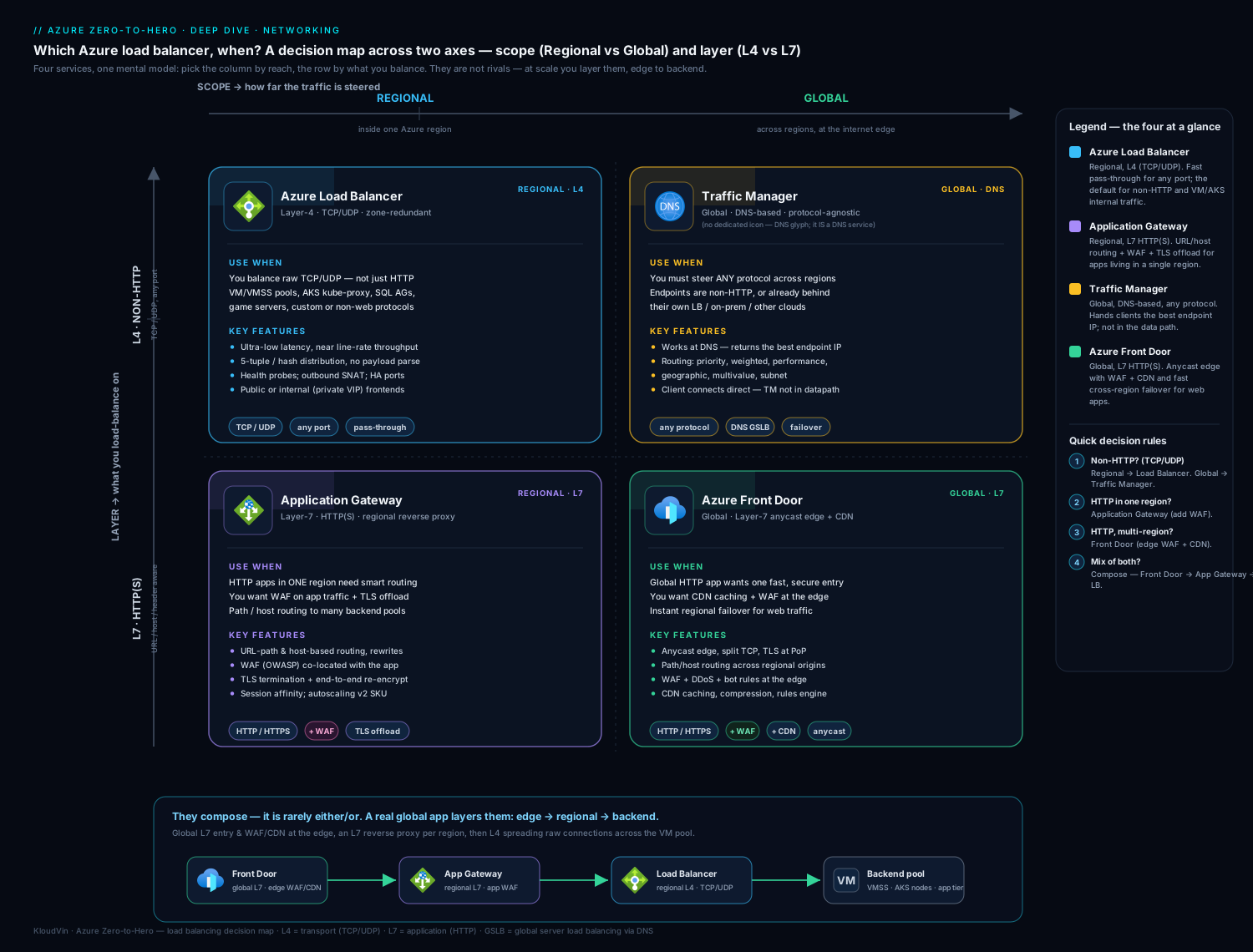
The diagram ties the lesson together: trace a client request hitting the global/edge tier, landing on a regional Standard public Load Balancer, passing a health probe and a load-balancing rule to a zone-spread backend pool; an inbound NAT rule carving out a management port to one VM; backends reaching out via SNAT / NAT Gateway; and an internal LB in front of the app tier. Around the edges sits the four-service decision grid — Load Balancer and Application Gateway regional, Traffic Manager and Front Door global — so you can place any scenario at a glance.
Hands-on lab
Build a Standard public Load Balancer that distributes HTTP across two VMs, prove the distribution works, then tear it all down. Everything is az CLI in Cloud Shell. The only billable pieces are two tiny B1s VMs and a Standard public IP — all deleted at the end.
1. Resource group, VNet, and NSG
LOC=eastus
RG=rg-lb-lab
az group create -n $RG -l $LOC

az network vnet create -g $RG -n vnet-lb -l $LOC \
  --address-prefixes 10.30.0.0/16 \
  --subnet-name snet-web --subnet-prefixes 10.30.1.0/24

# NSG: a Standard LB is CLOSED by default — we MUST allow HTTP and the probe
az network nsg create -g $RG -n nsg-web -l $LOC
az network nsg rule create -g $RG --nsg-name nsg-web -n Allow-HTTP \
  --priority 100 --direction Inbound --access Allow --protocol Tcp \
  --source-address-prefixes Internet --destination-port-ranges 80
az network nsg rule create -g $RG --nsg-name nsg-web -n Allow-LB-Probe \
  --priority 110 --direction Inbound --access Allow --protocol '*' \
  --source-address-prefixes AzureLoadBalancer --destination-port-ranges '*'

az network vnet subnet update -g $RG --vnet-name vnet-lb -n snet-web \
  --network-security-group nsg-web
2. Standard public IP and Load Balancer
az network public-ip create -g $RG -n pip-lb \
  --sku Standard --allocation-method Static --zone 1 2 3

az network lb create -g $RG -n lb-web --sku Standard \
  --public-ip-address pip-lb \
  --frontend-ip-name fe-web --backend-pool-name be-web

az network lb probe create -g $RG --lb-name lb-web -n probe-http \
  --protocol Http --port 80 --path / --interval 5 --threshold 2

az network lb rule create -g $RG --lb-name lb-web -n rule-http \
  --protocol Tcp --frontend-ip-name fe-web --frontend-port 80 \
  --backend-pool-name be-web --backend-port 80 --probe-name probe-http \
  --idle-timeout 4 --enable-tcp-reset true
3. Two VMs, each serving its own hostname, added to the pool
# cloud-init: install nginx and write the VM's hostname to the index page
cat > /tmp/cloud-init-web.txt <<'EOF'
#cloud-config
package_update: true
packages: [nginx]
runcmd:
  - bash -c 'echo "Hello from $(hostname)" > /var/www/html/index.html'
EOF

for i in 1 2; do
  az vm create -g $RG -n web-vm$i -l $LOC \
    --image Ubuntu2204 --size Standard_B1s \
    --vnet-name vnet-lb --subnet snet-web \
    --nsg "" --public-ip-address "" \
    --custom-data /tmp/cloud-init-web.txt \
    --admin-username azureuser --generate-ssh-keys
done

# Add each VM's NIC ipconfig to the backend pool
for i in 1 2; do
  NICID=$(az vm show -g $RG -n web-vm$i --query "networkProfile.networkInterfaces[0].id" -o tsv)
  NIC=$(basename "$NICID")
  IPCFG=$(az network nic show --ids "$NICID" --query "ipConfigurations[0].name" -o tsv)
  az network nic ip-config address-pool add -g $RG \
    --nic-name "$NIC" --ip-config-name "$IPCFG" \
    --lb-name lb-web --address-pool be-web
done
Note: the VMs have no public IP and no per-NIC NSG — they’re reachable only through the LB, and the subnet NSG governs traffic.
4. Test the distribution
LBIP=$(az network public-ip show -g $RG -n pip-lb --query ipAddress -o tsv)
echo "LB public IP: $LBIP"

# Hit it repeatedly — responses should alternate between web-vm1 and web-vm2
for i in $(seq 1 10); do curl -s http://$LBIP/; done
Expected output: a mix of Hello from web-vm1 and Hello from web-vm2 across the ten requests (5-tuple distribution; exact ratio varies). If you see only one name, give cloud-init a minute to finish installing nginx on the other VM, then retry.
5. Validate health and rules
# Backend pool members
az network lb address-pool show -g $RG --lb-name lb-web -n be-web \
  --query "loadBalancerBackendAddresses[].name" -o tsv

# The rule and its probe
az network lb rule show -g $RG --lb-name lb-web -n rule-http \
  --query "{fePort:frontendPort,bePort:backendPort,protocol:protocol}" -o json

# Health probe status via the LB metric (Dimensions: dip status per backend)
az monitor metrics list --resource \
  $(az network lb show -g $RG -n lb-web --query id -o tsv) \
  --metric DipAvailability --interval PT1M -o table | head
Confirm both VMs appear in the pool, the rule maps 80→80/TCP, and the DipAvailability metric shows healthy backends.
Cleanup
az group delete -n $RG --yes --no-wait
Cost note
The Load Balancer itself in this lab costs a few rupees an hour (one rule + small data volume on Standard). The real cost is the two B1s VMs (~₹3–4/hour combined) and the Standard public IP (billed hourly even idle). Run the lab in well under an hour and az group delete immediately and you’ll spend roughly ₹10–20 total. Forgetting the VMs running overnight is what turns a ₹15 lab into a ₹100 surprise — always delete the resource group.
Common mistakes & troubleshooting
| Symptom | Likely cause | Fix |
|---|---|---|
| Standard LB frontend returns nothing | No NSG allowing the data port (Standard is closed by default) | Add an NSG rule allowing your port (e.g. 80/443) inbound, and allow AzureLoadBalancer. |
| All backends show unhealthy | NSG/host firewall blocks the probe from 168.63.129.16; or probe path/port wrong | Allow service tag AzureLoadBalancer; verify the probe port/path returns 200. |
| Traffic goes to a backend that’s actually broken | TCP probe on an app that hangs but keeps the port open | Switch to an HTTP/HTTPS probe against a real /healthz. |
| Outbound calls fail intermittently under load | SNAT port exhaustion | Attach a NAT Gateway; or set manual outbound ports + add public IPs; pool connections. |
| Can’t add a peered-VNet VM to the pool | NIC-based pool requires same-VNet membership | Use an IP-based backend pool. |
| “Can’t attach Basic public IP to this LB” | SKU mismatch (Standard LB needs Standard IP) | Recreate the public IP as Standard. |
| Sessions break / cart empties for some users | App needs affinity but rule is 5-tuple, or NAT changes client IP | Use Client IP persistence (L4) — or move to App Gateway for cookie affinity. |
| Long-lived idle connections drop | TCP idle timeout (default 4 min) elapsed | Raise idle timeout (up to 30 min) and/or send TCP keepalives; enable TCP reset. |
| SQL Always On listener won’t fail over correctly | Floating IP not enabled on the rule (or backend loopback not configured) | Enable Floating IP and configure the listener IP on the nodes. |
| No SLA / can’t use zones or HA Ports | Deployed a Basic LB | Migrate to Standard (no in-place upgrade). |
Best practices
- Use Standard, always. Basic is retiring (Sep 2025) and lacks the SLA, zones, HA Ports, and outbound control. There is no upgrade — start Standard.
- Pair the Standard LB with an NSG that allows your data ports and the
AzureLoadBalancerservice tag; remember Standard is closed by default. - Spread backends across availability zones and use zone-redundant frontends so a single zone failure doesn’t take the service down.
- Probe a real health endpoint (HTTP/HTTPS
/healthzthat checks dependencies), not just a TCP port — and keep it cheap and fast. - Design egress deliberately. Prefer a NAT Gateway for outbound over implicit SNAT; never rely on default outbound access (it’s going away).
- Use IP-based pools when membership crosses VNets or changes in bulk; NIC-based for the simple same-VNet VM/VMSS case.
- Use inbound NAT pools / port ranges for management access to scale sets rather than per-VM rules or per-VM public IPs.
- Right-size idle timeouts and enable TCP reset so dropped flows are detected cleanly and ports release.
- Monitor SNAT (
SNAT Connection Count, allocated/used ports) andDipAvailability(backend health) and alert before limits are hit. - Encode it as IaC (Bicep/Terraform) so you can redeploy in another region — LBs can’t be moved, so reproducibility is your DR.
Security notes
- Standard LB is secure-by-default (closed) — keep it that way by allowing only the exact ports you need via NSG; don’t blanket-allow.
- Don’t give backends public IPs for management — use an inbound NAT rule (or, better, Azure Bastion) so VMs stay private and the attack surface shrinks.
- Restrict the frontend source where you can — NSG
sourcescoped to known IPs/ranges for non-public services; for internet-facing apps, put a WAF (App Gateway/Front Door) in front for L7 protection the LB can’t provide. - The LB has no WAF and no TLS — it cannot inspect or terminate HTTPS. Sensitive web apps belong behind Application Gateway WAF or Front Door WAF, not a bare LB.
- Use a stable, allow-listed egress IP (NAT Gateway or dedicated outbound public IP) so partners can firewall your outbound traffic precisely.
- Lock the control plane with RBAC —
Network Contributorcan change rules, probes, and pools; scope it tightly and audit changes. - Enable DDoS Network Protection on production public IPs fronting the LB for adaptive volumetric mitigation.
Cost & sizing
The Load Balancer bill has a small number of levers:
| Lever | Cost behaviour |
|---|---|
| Basic Load Balancer | Free (but retiring — don’t build new on it) |
| Standard Load Balancer — rules | Charged per rule (load-balancing + outbound + NAT, banded; first few rules a flat hourly, then per additional rule) |
| Standard Load Balancer — data processed | Per GB of data processed by the LB |
| Standard public IP | Billed hourly even when idle (one per frontend) |
| NAT Gateway (if used for egress) | Hourly resource charge + per-GB processed + its public IP(s) |
| Cross-region (global) LB | Standard pricing + the regional LBs behind it |
| Data transfer | Standard egress / inter-zone / cross-region data charges apply to the traffic itself |
Sizing rules of thumb:
- The LB does not have a “size” you provision — it scales automatically; you pay for rules + data, not capacity. So the levers are number of rules, data volume, and number of public IPs.
- Consolidate where sensible: one LB with multiple frontends/rules is usually cheaper and simpler than many small LBs.
- The often-forgotten cost is idle Standard public IPs — every frontend IP bills hourly whether or not traffic flows. Delete unused ones.
- For egress-heavy workloads, the data processed (LB + NAT Gateway) and egress transfer charges dominate — design to keep chatty traffic in-region and use Private Link for PaaS to avoid both SNAT and some egress.
- Compared with Application Gateway and Front Door, the L4 Load Balancer is the cheapest of the four — another reason to use it whenever L7 features aren’t required.
Interview & exam questions
-
What’s the practical difference between Basic and Standard Load Balancer, and why does it matter? Standard adds a 99.99% SLA, availability-zone support, up to 1,000 backends, HTTPS probes, HA Ports, configurable outbound rules, cross-region LB, and full metrics — and it is secure by default (closed until an NSG allows traffic). Basic has none of that and is retiring (Sep 2025). There is no in-place upgrade, so you must start with Standard.
-
A Standard LB returns nothing on its public IP even though backends are running. What’s the most likely cause? No NSG rule allowing the data port. A Standard LB is closed by default; you must add an NSG rule permitting (say) TCP 80/443 inbound and allow the
AzureLoadBalancerservice tag for the probe. -
Explain SNAT and SNAT port exhaustion. How do you fix it? Outbound from private VMs is source-NAT’d to a public IP using one of 64,512 SNAT ports per IP; each unique destination
IP:portconsumes a port. Under heavy outbound to few destinations, ports run out and connections fail intermittently. Fix: use a NAT Gateway (dynamic ports across up to 16 IPs), or set manual outbound port allocation and add public IPs, plus connection pooling and Private Link for PaaS. -
Why can adding more backend VMs make SNAT exhaustion worse? With automatic port allocation, the 64,512 ports are split across instances, so a larger pool means fewer ports per instance. Scaling out shrinks each VM’s share — the answer is to fix egress (NAT Gateway), not add instances.
-
What is the difference between a load-balancing rule and an inbound NAT rule? A load-balancing rule distributes a
frontend:portacross the whole backend pool (uses a probe). An inbound NAT rule maps a specificfrontend:portto one backend instance (e.g. SSH to VM-2) — no distribution, no probe. -
When would you enable Floating IP (DSR) on a rule? For workloads that need the original frontend IP preserved to the backend so the backend responds directly — chiefly SQL Server Always On availability group listeners and some clustering. It requires backend OS loopback configuration and is off by default.
-
What are HA Ports and when do you use them? An HA Ports rule (protocol All, port 0) load-balances all TCP/UDP ports through a single rule on an internal Standard LB — built for active-active NVAs/firewalls (a “firewall sandwich”) that must forward arbitrary ports.
-
Load Balancer vs Application Gateway — how do you choose? Load Balancer is L4 (TCP/UDP, no URL/TLS/WAF, pass-through, cheapest). Application Gateway is L7 (HTTP/S, URL/host routing, TLS termination, cookie affinity, WAF), a regional reverse proxy. Use App Gateway when you need any L7 feature; use LB for raw transport distribution.
-
Traffic Manager vs Front Door — both are “global,” so what’s the difference? Traffic Manager is DNS-based — it returns the best endpoint and the client connects directly; it’s protocol-agnostic (any TCP/UDP, any endpoint incl. on-prem) but failover is bound to DNS TTL and it does no proxying/TLS/caching/WAF. Front Door is an L7 reverse proxy at Microsoft’s edge with WAF, CDN/caching, TLS, path/host routing and near-instant failover — for global HTTP(S) apps.
-
Design: a web app must serve users on three continents with edge caching, a WAF, and regional private backends. What do you put in front? Front Door (global edge: anycast, WAF, CDN, TLS, latency routing) → optionally Application Gateway WAF regionally for L7 control → private backends. If backends are simple VM pools you can go Front Door → Load Balancer per region.
-
What is the cross-region Load Balancer and when is it the right choice over Front Door? A Layer-4 global LB with a single anycast IP fronting regional Standard LBs, routing by geo-proximity with automatic failover and client-IP preservation. Choose it over Front Door when the global service is non-HTTP (TCP/UDP) or needs a static IP and pass-through behaviour rather than L7 proxying/WAF/CDN.
-
What’s the difference between NIC-based and IP-based backend pools? NIC-based pools reference a VM’s NIC ipConfiguration and require same-VNet membership (the default for VMs/VMSS). IP-based pools reference private IPs, allow faster bulk/decoupled membership and cross-peered-VNet backends — but can’t be used for outbound SNAT. A pool is one model or the other, not both.
-
Your app’s user sessions keep breaking behind the LB. Diagnose. The app is stateful but the rule uses default 5-tuple distribution, so each new flow may hit a different backend. Either enable Client IP session persistence (L4 affinity) — fragile when clients share NAT or change IP — or move to Application Gateway for robust cookie-based affinity. Best long-term fix: externalise session state.
Quick check
- What is the source IP address of Azure Load Balancer health probes, and what must you do about it?
- A Standard public LB shows nothing on its frontend though backends are up. What’s the first thing to check?
- How many SNAT ports does one public IP provide, and what consumes one?
- Which load-balancing service operates at L7 and is global?
- True or false: you can upgrade a Basic Load Balancer to Standard in place.
Answers
- 168.63.129.16 — allow it inbound on NSGs/host firewalls via the
AzureLoadBalancerservice tag, or all backends show unhealthy. - The NSG — a Standard LB is closed by default; ensure a rule allows your data port (and the probe).
- 64,512 SNAT ports per public IP; each unique outbound destination
IP:portflow consumes one. - Front Door (L7, global, with WAF/CDN). (Application Gateway is L7 but regional; cross-region LB is global but L4.)
- False — SKU is immutable; you must migrate/recreate and cut over.
Exercise
Extend the lab into a small, realistic design and write up your reasoning:
- Add an internal tier. Deploy a second, internal Standard LB (
fe-inton a newsnet-appsubnet) in front of two “app” VMs, and have your web VMs call the internal LB’s private IP. You now have the canonical public-LB → internal-LB n-tier pattern. - Add deterministic egress. Attach a NAT Gateway to the web subnet and confirm (via
curl ifconfig.mefrom a VM) that outbound now leaves via the NAT Gateway’s IP, not LB SNAT. Note how this removes SNAT-exhaustion risk. - Add management access without public IPs. Create an inbound NAT rule (
:50001→web-vm1:22,:50002→web-vm2:22) and SSH in viassh -p 50001 azureuser@<LBIP>. - Decide the global layer. In a short paragraph, choose between Front Door and Traffic Manager to make this app multi-region, and justify it using the two discriminators (global-vs-regional, L4-vs-L7). State explicitly what each would and wouldn’t give you.
- Clean up with
az group delete.
Deliverable: the working two-tier deployment plus a few sentences on (a) why you chose NIC- or IP-based pools, (b) how you’d size SNAT, and © your global-layer choice.
Certification mapping
| Exam | Where this lesson applies |
|---|---|
| AZ-104 (Administrator) | Configure load balancing — create/configure Azure Load Balancer (SKUs, frontends, backend pools, health probes, LB & NAT rules) and understand Application Gateway at a configuration level; troubleshoot health and connectivity. |
| AZ-305 (Solutions Architect) | Design network solutions — choose the right load-balancing service (the 2×2: global/regional × L4/L7), design for availability zones, multi-region resilience, and combine Front Door/App Gateway/LB. |
| AZ-700 (Network Engineer) | Design and implement load balancing — deep configuration of Load Balancer (outbound rules, SNAT, HA Ports, cross-region), Application Gateway, Front Door, Traffic Manager, and integrating them. |
Glossary
- Frontend IP configuration — the public or private IP clients connect to on a Load Balancer.
- Backend pool — the set of VMs/NICs/IPs that receive load-balanced traffic.
- Health probe — the TCP/HTTP/HTTPS check that determines backend member health.
- Load-balancing rule — maps
frontend:port→backend:portand distributes across the pool. - Inbound NAT rule — maps a specific
frontend:portto a single backend instance (e.g. management). - Outbound rule — explicit SNAT configuration for backend egress (Standard LB).
- SNAT (Source NAT) — rewriting a private source IP to a public IP (and port) for outbound internet access.
- SNAT port exhaustion — running out of the 64,512 SNAT ports per public IP under heavy outbound load.
- HA Ports — a rule that load-balances all TCP/UDP ports (internal Standard LB; for NVAs).
- Floating IP (DSR) — preserves the frontend IP to the backend so it responds directly (e.g. SQL Always On).
- Session persistence / affinity — pinning a client to a backend (None/5-tuple, Client IP/2-tuple, Client IP+protocol/3-tuple).
- Cross-region Load Balancer — a global, L4, anycast LB fronting regional Standard LBs.
- Gateway Load Balancer (GWLB) — a LB SKU for transparently inserting NVAs into the traffic path.
- Application Gateway — Azure’s L7, regional load balancer (URL/host routing, TLS, cookie affinity, WAF).
- Traffic Manager — Azure’s DNS-based, global traffic router (returns the best endpoint; protocol-agnostic).
- Front Door — Azure’s L7, global reverse proxy at the edge (WAF, CDN/caching, TLS, latency routing).
AzureLoadBalancerservice tag — the NSG tag covering the probe source 168.63.129.16.
Next steps
- Continue the course with the Azure App Service deep dive to load-balance and scale PaaS web apps.
- Go deeper on regional L7 with Application Gateway v2 & WAF: L7 routing and TLS.
- Add the global layer with Global traffic management: Front Door & Traffic Manager.
- For advanced LB operations — outbound rules, cross-region, and HA Ports in production — see Azure Load Balancer Standard: outbound rules, cross-region & HA Ports.
- Fix egress for good with Deterministic outbound with Azure NAT Gateway.