Someone created the production SQL database in the wrong resource group. Or finance wants the data team’s workloads billed to a different subscription. Or a proof-of-concept that lived in a sandbox RG is now real and needs to sit beside its siblings. So you open the portal, click Move, and… a dialog warns you that “moving resources may cause downtime” and that “the resource ID of every resource will change.” You hesitate — and you are right to. A resource move in Azure is not a copy and not a redeploy; it is a metadata operation that re-parents existing resources under a new resource group or subscription, keeping the same data and the same regional placement but issuing every moved resource a brand-new resource ID. That ID change is the entire story: anything that referenced the old ID — a role assignment, a lock, a Bicep/Terraform state file, a policy assignment, a saved portal link, an alert rule — now points at a resource that no longer exists at that path.
This article is the implementation guide a senior architect actually follows. We treat a move as a three-act operation: validate (Azure tells you, before touching anything, whether the move is even allowed), move (the operation runs and the source RG/subscription is locked for its duration), and reconcile (you fix everything that referenced the old IDs — RBAC, locks, IaC state, monitoring, dependencies). You will do the real thing end to end three ways — in the portal, with az CLI using the validate-then-move pattern, and via the ARM validateMoveResources/moveResources operations — plus the cross-subscription path and Azure Resource Mover for resources that need orchestration. Every step has expected output, a validation check, and a rollback note, and the option matrices (what can move, what can’t, what breaks, what the error codes mean) are tables you keep open while the move runs.
By the end you will move resources deliberately instead of hopefully: run validate-move first every time, remove resource locks on both source and target before you start, expect role assignments and policy state to not follow the resource, update IaC so your next terraform plan doesn’t try to recreate a resource that simply moved, and know which resources (a handful — VNet-bound, classic, region-pinned) you must redeploy rather than move. The difference between a clean ten-minute move and a half-day outage is almost entirely preparation — and preparation is exactly what a metadata operation rewards.
What problem this solves
Resources end up in the wrong place constantly. A teammate accepted a quickstart’s default RG. A subscription hit a governance boundary and a workload must relocate to one with the right policy or budget. A reorg moved a product to another cost center, and billing follows the subscription, so the resources must follow too. A sandbox graduated to production. None of these are fixable by editing a field — the RG and subscription a resource lives in are part of its identity, encoded in its resource ID, and the only supported way to change them without redeploying is a move.
What breaks when people move blind: a production move runs while a resource lock silently blocks it and the operation half-fails, leaving some resources moved and some not (the resource group is mid-move and read-only for the whole duration, surprising every other engineer). Role assignments scoped at the old RG vanish — the move does not carry RBAC — so the on-call engineer who had Contributor on the old RG suddenly has nothing, mid-incident. Terraform, run by CI the next morning, sees the resource “missing” at its recorded ID and proposes to destroy and recreate it — against a live database. A dependent resource (a NIC’s VNet, a disk’s VM) was left behind because Azure requires coupled resources to move together, and the move was rejected with a cryptic MoveResourcesHaveInvalidState. Each is preventable, and each is a real incident for teams who treated Move as a harmless button.
Who hits this: anyone doing cloud governance, cost allocation, environment promotion, subscription consolidation, or cleaning up after a year of organic growth. It is most painful for teams managing infrastructure as code (state drift), teams with strict locks and policy (lock/RBAC), and anyone moving networking resources (the move-together and not-supported constraints are densest there).
Here is the whole field in one table — the three kinds of move, what changes, and the first thing to check:
| Move type | What changes | What stays the same | Source state during move | First thing to check |
|---|---|---|---|---|
| Within a subscription, across RGs | Resource ID (RG segment); ownership/RBAC at RG scope | Region, data, config, subscription, billing | Both RGs read-only | Locks on both RGs; resource-type supported? |
| Across subscriptions (same tenant) | Resource ID (sub + RG segment); billing; subscription-scoped policy/RBAC | Region, data, config | Both RGs read-only | Target sub has the RP registered + quota + policy allows it |
| Across tenants | Not a resource move — re-parent the subscription to the new tenant | Resources stay put physically | n/a | Transfer the subscription (billing/EA), then RBAC re-grant |
Learning objectives
By the end of this article you can:
- Decide whether a given resource should be moved, redeployed, or left in place, and explain why the resource ID change is the deciding factor.
- Run the mandatory validate-before-move check in the portal, with
az resource invoke-action --action validateMoveResources, and via the ARMvalidateMoveResourcesoperation — and read its pass/fail output. - Move resources across resource groups within a subscription end to end in the portal and CLI, with expected output and validation at each step.
- Move resources across subscriptions in the same tenant, including registering the resource provider in the target and handling the longer lock window.
- Use Azure Resource Mover for the cross-region/cross-subscription scenarios that need dependency orchestration, and know when plain move is enough.
- Identify which resources cannot move and which must move together (VNet + its subnets’ dependents, VM + disks + NICs, and the classic/regional exceptions).
- Reconcile after a move: remove and reapply locks, re-grant RBAC, update Bicep/Terraform so IaC doesn’t recreate the resource, and fix monitoring/alert scopes.
- Map every move failure (
MoveResourcesHaveInvalidState,RequestDisallowedByPolicy,MissingMoveDependentResources, lock and quota errors) to its confirm-command and fix.
Prerequisites & where this fits
You should already understand the Azure Resource Hierarchy Explained: Subscriptions, Resource Groups and Resources — that a resource lives in exactly one resource group, which lives in exactly one subscription under a management group — because a move only ever changes the RG and/or subscription segment of a resource ID, never the region. You should know how to run az in Cloud Shell, read JSON, and that resource locks (CanNotDelete, ReadOnly) and Azure RBAC assignments are scoped to a management group, subscription, RG, or individual resource. Familiarity with Azure Subscriptions Explained: Types, Billing Boundaries and When to Create a New One helps, since cross-subscription moves change who pays.
This sits in the Governance & Operations track, downstream of resource-organisation design — if you are still deciding how to group resources, read Azure Resource Groups Done Right: Lifecycle, Boundaries and Grouping Strategy first, because the best move is the one you never have to make. It pairs with Azure Resource Locks: Prevent Accidental Deletes and Changes in Production (the most common silent blocker of a move) and Importing Brownfield Azure Resources into Terraform Without Downtime (the same state-reconciliation discipline applies after a move).
You need the action Microsoft.Resources/subscriptions/resourceGroups/moveResources/action on the source, plus write on the target RG/subscription. A quick map of who must clear the path before a move starts:
| Layer | What must be true before the move | Who usually owns it | Failure it causes if ignored |
|---|---|---|---|
| Locks (source + target) | No ReadOnly/CanNotDelete lock blocking |
Resource/RG owner | Move rejected or half-completed |
| RBAC (mover) | Mover has moveResources/action on source + write on target |
Subscription owner | AuthorizationFailed |
| Resource provider (target sub) | The resource type’s RP is registered in the target subscription | Subscription owner | Move fails on cross-sub |
| Policy (target scope) | No deny policy that the moved resource would violate |
Governance team | RequestDisallowedByPolicy |
| Quota (target sub) | Target subscription has quota/limit headroom for the type | Subscription owner | Quota error on cross-sub |
| Dependencies | All coupled resources moved together | Resource owner | MissingMoveDependentResources |
Core concepts
Five mental models make every later step obvious.
A move re-parents metadata; it does not relocate or recreate. The resource’s bits stay exactly where they are physically — same region, same backing storage, same running VM. What changes is the management metadata: which resource group (and possibly subscription) Azure records as the parent. Because the resource is not recreated you keep your data, IPs and configuration — but because the parent changes, the resource ID changes, and a resource ID is the canonical address every other thing in Azure uses to point at it.
The resource ID is the thing that breaks. A resource ID looks like /subscriptions/<sub>/resourceGroups/<rg>/providers/<rp>/<type>/<name>. A within-subscription move rewrites the <rg> segment; a cross-subscription move rewrites both <sub> and <rg>. Anything that stored the old ID now references a path with no resource at it: role assignments, resource locks (recreated, not moved), policy assignments and compliance state, diagnostic settings and alert rules targeting the resource, Bicep/Terraform state, and hard-coded references in other resources. The move succeeds at the platform level; the breakage is everything downstream you must reconcile.
Validation is a real, free, side-effect-free pre-flight. The validateMoveResources action simulates the move and returns success or a specific error without moving anything — checking type support, dependency completeness, target-provider registration, and policy. Running it first is non-negotiable: it converts a guess into a yes/no in seconds. The actual move uses the parallel moveResources action.
Coupling is enforced — some resources must move as a set. Azure refuses to orphan tightly-coupled resources. A virtual machine must move with its disks and network interfaces; a NIC can’t move without its VNet (you move the whole VNet and everything bound to it); a child moves with its parent. The validate step names the missing members — the corollary being that you often move a bigger blast radius than intended, because the dependency graph drags neighbours along.
The source is locked for the duration, and not everything can move. While a move runs the source resource group is read-only — no creates, updates or deletes on any resource in it (even ones not being moved) until it completes. And a meaningful list of types simply cannot be moved: some region-pinned, some classic, some explicitly “not supported.” For those the answer is redeploy at the target and decommission the source — a copy, not a move.
The vocabulary in one table
Pin down every moving part before the deep sections.
| Concept | One-line definition | Where it lives | Why it matters to a move |
|---|---|---|---|
| Resource ID | Canonical path /subscriptions/…/resourceGroups/…/providers/… |
Every resource | Changes on move → breaks references |
| Resource group | The container a resource lives in | In a subscription | The RG segment of the ID is rewritten |
| Subscription | Billing + policy + quota boundary | Under a management group | Cross-sub move changes billing & policy scope |
validateMoveResources |
Side-effect-free move simulation | ARM action | Your mandatory pre-flight |
moveResources |
The actual move operation | ARM action | Re-parents the resources |
| Resource lock | CanNotDelete / ReadOnly guard |
RG, sub, or resource | Blocks the move if present on source/target |
| RBAC assignment | A role at a scope | MG/sub/RG/resource | Does not move; re-grant at the new scope |
| Resource provider | The Microsoft.* namespace for a type |
Per subscription | Must be registered in the target sub |
| Azure Resource Mover | Service that orchestrates dependent moves | Regional service | For cross-region / complex dependency moves |
| Move-together set | Coupled resources that must move as one | The dependency graph | Move the whole set or it’s rejected |
Move versus redeploy versus leave it
The first real decision is not how to move but whether to. Three outcomes, and the signal for each:
| Choose… | When | Why | Cost / effort |
|---|---|---|---|
| Move | The type is supported, you want to keep data/IP/config, same region | Metadata-only, no data copy, no new resource | Low; reconcile IDs afterward |
| Redeploy | The type is unsupported for move, or you also need a region change, or you want a clean IaC re-parent | A move can’t change region and won’t help unsupported types | Higher; recreate + cut over + decommission |
| Leave it | The “wrong” placement has no real cost/governance impact | A move always has a reconciliation tail; don’t pay it for cosmetics | Zero; document why |
A move cannot change region — the single most common misconception. If your goal is “this VM should be in centralindia instead of westeurope,” a resource move will not do it; you need Azure Resource Mover (which re-creates the resource in the new region, copying data) or a redeploy. A plain move only re-parents within the same region. Keep the line bright: same region → move; different region → Resource Mover or redeploy. (The full plain-move-versus-Resource-Mover decision is in Step 4.)
Step 1 — Validate before you touch anything
Never move without validating first. The validate action tells you in one call whether the move is allowed and, if not, exactly which resource or rule blocks it — and it changes nothing.
Validate in the portal
Select the resource group, tick the resources to move, choose Move → Move to another resource group (or …another subscription). The wizard runs validation automatically and shows a green check or red error per resource before the OK button does anything — which is why the portal is the safest first move for a beginner.
Validate with az CLI
The CLI exposes validation through az resource invoke-action. Build the source resource IDs and the target RG ID, then ask ARM to simulate:
# Collect the IDs you intend to move (example: two resources in the source RG)
SRC_RG=rg-source
TGT_RG=rg-target
SUB=$(az account show --query id -o tsv)

ID1=$(az resource show -g $SRC_RG -n stkvlabdata --resource-type Microsoft.Storage/storageAccounts --query id -o tsv)
ID2=$(az resource show -g $SRC_RG -n nsg-lab --resource-type Microsoft.Network/networkSecurityGroups --query id -o tsv)
TARGET_ID=/subscriptions/$SUB/resourceGroups/$TGT_RG

# Side-effect-free validation — returns nothing on success, an error body on failure
az resource invoke-action \
  --action validateMoveResources \
  --ids "/subscriptions/$SUB/resourceGroups/$SRC_RG" \
  --request-body "{\"resources\":[\"$ID1\",\"$ID2\"],\"targetResourceGroup\":\"$TARGET_ID\"}"
Expected output on success: HTTP 204 No Content (no body) — that silence is the pass. On failure it returns a JSON error with a code and message naming the offending resource (see the error table below). A non-204 means do not move yet.
Validate via the ARM REST/Bicep operation
The same check is the ARM operation POST .../resourceGroups/{source}/validateMoveResources with a body of { resources, targetResourceGroup }. You rarely hand-author this in a Bicep file — a move is an imperative operation, not a declarative resource — but you can drive it from a deployment script or REST. The shape:
{
  "resources": [
    "/subscriptions/<sub>/resourceGroups/rg-source/providers/Microsoft.Storage/storageAccounts/stkvlabdata"
  ],
  "targetResourceGroup": "/subscriptions/<sub>/resourceGroups/rg-target"
}
For a cross-subscription validation, point targetResourceGroup at an RG in the other subscription’s ID and run the call against the source. For large sets the operation is asynchronous: ARM returns 202 Accepted with a Location header you poll until it resolves to 204 (success) or an error.
The three ways to validate, side by side:
| Method | How you invoke it | Success signal | Best for |
|---|---|---|---|
| Portal wizard | Move blade runs it automatically | Green check per resource | First-timers; small ad-hoc moves |
az resource invoke-action validateMoveResources |
One CLI call with IDs + target | HTTP 204 (no body) | Scripted/repeatable moves, CI gates |
ARM REST validateMoveResources |
POST with JSON body, poll Location |
204 after async poll |
Large sets; pipeline automation |
Validation is only the can-I-move gate — it confirms the move is allowed but says nothing about downstream breakage (RBAC won’t survive, IaC state will drift, alerts/links go stale). The reconciliation steps below are the what-breaks-after work.
Step 2 — Clear the blockers (locks, RBAC, providers, policy)
Validation flags most of these, but clear them proactively so the real move runs clean.
Remove resource locks on source and target
A ReadOnly or CanNotDelete lock anywhere on the source RG, the target RG, or the individual resources will block or partially fail the move (a move both deletes-from-source and creates-at-target conceptually, so both lock types bite). List locks, note them so you can reapply, then remove:
# Find every lock in the source RG (and check the target RG too)
az lock list --resource-group rg-source -o table
az lock list --resource-group rg-target -o table

# Delete a blocking lock (record name/level/notes first so you can reapply after)
az lock delete --name lock-prod-delete --resource-group rg-source
// After the move, reapply the lock at the NEW scope (target RG) via IaC
resource rgLock 'Microsoft.Authorization/locks@2020-05-01' = {
  name: 'lock-prod-delete'
  scope: resourceGroup()        // deploy this into the target RG
  properties: {
    level: 'CanNotDelete'
    notes: 'Prod data — reapplied after move 2026-06-24'
  }
}
Locks do not travel with the resource — a lock is a separate resource at a scope, so after the move you must reapply it at the target. Treat lock removal as a deliberate, time-boxed window, not a casual delete.
Confirm your RBAC and that it won’t follow
You need moveResources/action on the source and write on the target. Check your effective permission, and accept the hard truth that role assignments do not move:
# Do you have the move action on the source RG?
az role assignment list --assignee $(az ad signed-in-user show --query id -o tsv) \
  --resource-group rg-source -o table

# After the move, RBAC at the OLD RG is gone for the moved resources — re-grant at the target
az role assignment create --assignee <principal-id> \
  --role "Contributor" --resource-group rg-target
Note every role assignment scoped at the source RG/resource before you move, so you can recreate the meaningful ones at the target. This is the step most teams forget — and how an on-call engineer loses access mid-move.
Register the resource provider in the target subscription (cross-sub only)
For a cross-subscription move, the resource type’s resource provider must be registered in the target subscription, or the move fails. Register it ahead of time:
# Example: target subscription must have the Storage RP registered before a storage move
az account set --subscription <target-sub-id>
az provider register --namespace Microsoft.Storage
az provider show --namespace Microsoft.Storage --query registrationState -o tsv   # want: Registered
Check target policy won’t deny the move
A deny Azure Policy effect at the target subscription or management group (e.g. “deny storage accounts without a required tag” or “deny resources outside an allowed region”) rejects the incoming resource with RequestDisallowedByPolicy. Validation catches this; pre-check the target scope’s policies and either make the resource compliant first or get an exemption.
The blocker checklist as a table — clear every row before Step 3:
| Blocker | How to detect | How to clear | Reapply after? |
|---|---|---|---|
| Lock on source RG/resource | az lock list -g rg-source |
az lock delete |
Yes — at target |
| Lock on target RG | az lock list -g rg-target |
az lock delete |
Yes |
| Missing move action (RBAC) | az role assignment list |
Grant moveResources/action |
n/a |
| RP not registered (target sub) | az provider show --query registrationState |
az provider register |
n/a |
deny policy at target |
Validate error RequestDisallowedByPolicy |
Fix compliance / exemption | n/a |
| Quota at target (cross-sub) | Validate / quota blade | Request quota increase | n/a |
| Missing dependency in set | Validate error names it | Add the dependent to the move | n/a |
Step 3 — Run the move
With validation green and blockers cleared, the move itself is anticlimactic — the goal.
Move across resource groups (within a subscription)
# Move the validated resources to the target RG in the same subscription
az resource move \
  --destination-group rg-target \
  --ids "$ID1" "$ID2"
Expected: the command blocks while it runs (seconds to a few minutes for a small set), then returns the moved resources’ new representations. During this window both RGs are read-only. Validate the result:
# The resources now live in the target RG with NEW resource IDs
az resource list -g rg-target --query "[].{name:name, type:type}" -o table
az resource list -g rg-source --query "[].{name:name, type:type}" -o table   # should no longer list them
Move across subscriptions (same tenant)
Add --destination-subscription-id. The lock window is typically longer, and everything in Step 2 (RP registration, policy, quota in the target sub) matters:
az resource move \
  --destination-subscription-id <target-sub-id> \
  --destination-group rg-target \
  --ids "$ID1" "$ID2"
Expected: a longer-running operation; on completion the resources appear under the target subscription/RG and billing shifts to the target subscription from the move time. Verify the subscription context:
az resource show --ids <new-resource-id> --query "{name:name, id:id}" -o json
# The id now contains the target subscription and RG segments
What each move command maps to
| Goal | az command |
Key flag | Underlying ARM action |
|---|---|---|---|
| RG → RG, same sub | az resource move |
--destination-group |
moveResources |
| Sub → Sub, same tenant | az resource move |
--destination-subscription-id + --destination-group |
moveResources (cross-sub) |
| Validate first (always) | az resource invoke-action |
--action validateMoveResources |
validateMoveResources |
| Region change | Azure Resource Mover | n/a (separate service) | Microsoft.Migrate/moveCollections |
A move of a single set is all-or-nothing — if it fails partway ARM rolls it back to source — while independent moves are separate transactions. Move related resources as one --ids list.
Step 4 — Use Azure Resource Mover for complex or cross-region moves
When the move involves a region change, or a large web of dependent resources you don’t want to assemble by hand, Azure Resource Mover is the right tool. It is a distinct service (not the moveResources action): you create a move collection, add resources, let it auto-discover dependencies, then run Prepare → Initiate Move → Commit (or Discard) as explicit, resumable phases. Unlike a plain move it creates new resources and copies data — exactly why it can cross regions where a metadata-only move cannot.
# Resource Mover lives under the 'az resource-mover' extension; install it first
az extension add --name resource-mover

# Create a move collection (the orchestration unit), then add resources to it
az resource-mover move-collection create \
  --name mc-relocate --resource-group rg-mover \
  --source-region westeurope --target-region centralindia \
  --location westeurope --identity type=SystemAssigned
The plain-move-versus-Resource-Mover decision, made concrete:
| If you need to… | Use | Why |
|---|---|---|
| Re-parent same-region resources to another RG | az resource move |
Metadata-only, fastest, no data copy |
| Re-parent same-region resources to another subscription | az resource move --destination-subscription-id |
Same, plus billing shifts |
| Move resources to a different region | Resource Mover | Plain move can’t change region |
| Move a VM with all its disks/NICs/VNet across region | Resource Mover | Auto-sequences the dependency graph |
| Stage a move you can rehearse and roll back in phases | Resource Mover | Prepare/Initiate/Commit/Discard lifecycle |
Resource Mover’s phase model is its safety feature — the reason to prefer it for anything high-stakes:
| Phase | What it does | Reversible? |
|---|---|---|
| Add resources | Stages resources + auto-discovers dependencies into a collection | Yes (remove) |
| Prepare | Creates the move infrastructure; validates readiness | Yes |
| Initiate move | Creates the target resources (data copied for cross-region) | Yes (via Discard) |
| Commit | Finalises; you then delete the source | No (after commit, clean up source) |
| Discard | Rolls back an initiated move, deleting the target copies | n/a (this is the rollback) |
Architecture at a glance
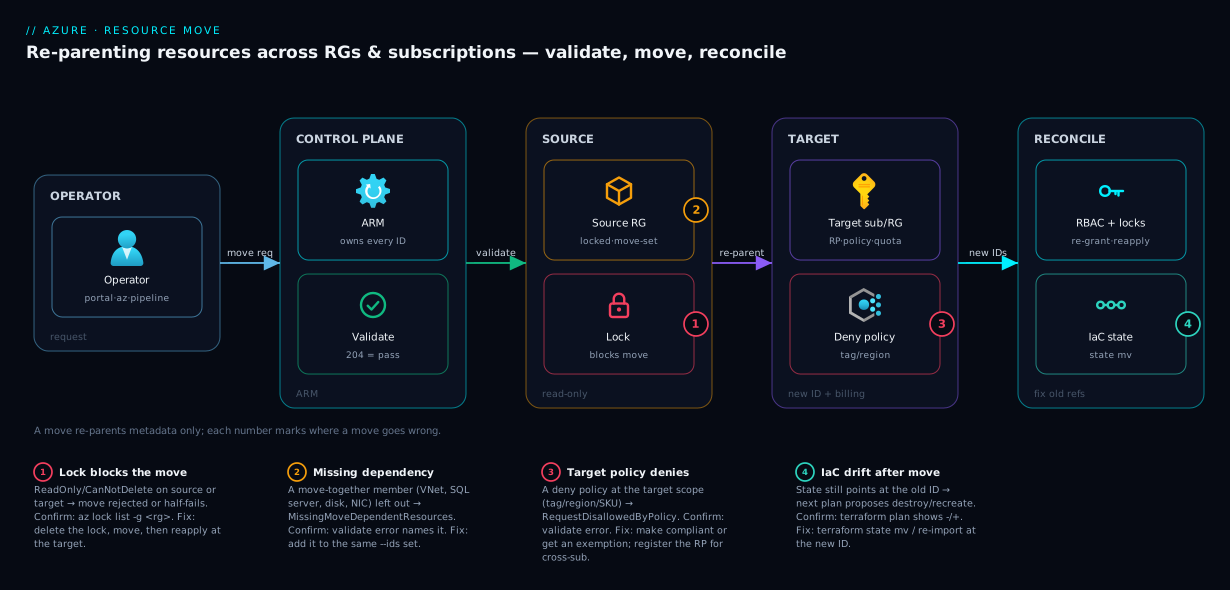
Walk the diagram left to right as the lifecycle of a single move. The operator issues the request — portal, az resource move, or a pipeline — to Azure Resource Manager (ARM), the control plane that owns every resource ID and is the only thing that can re-parent one. ARM first runs the validateMoveResources pre-flight (the dashed loop): it inspects the source resource group and confirms type-support, an intact move-together set, target-provider registration, and that no deny policy or lock stands in the way. Only on a clean validation does ARM execute moveResources, re-parenting the selected resources into the target resource group (and, on a cross-subscription move, a different subscription with its own billing and policy scope). Throughout, both RGs are flipped read-only.
The right-hand zone is the part everyone forgets: reconciliation. The moved resource now has a new ID, so the operator must re-grant RBAC at the new scope, reapply locks, and update IaC state so the next plan doesn’t recreate it. The numbered badges mark the four places a move goes wrong — a lock on the source (1), a missing dependency (2), a deny policy at the target (3), and IaC drift afterward (4) — each narrated in the legend as symptom → confirm → fix. Follow the arrows and you have the whole method: validate, clear blockers, move, reconcile.
Real-world scenario
Northwind Analytics runs a data platform on Azure: an Azure SQL server and database, a storage account (the data lake), a Key Vault, two app services, and the VNet tying them together — about 30 resources, all in rg-data-poc in their Sandbox subscription, all in Central India. The platform started as a proof-of-concept; eighteen months later it is the revenue-reporting backbone. Finance now needs it billed to the new Data-Platform production subscription (the right budget, tag policy, and CanNotDelete lock standard), and the team wants it in a properly named rg-data-prod. Same region, real data, zero appetite for downtime. Three engineers; ~₹95,000/month.
Their first instinct was to redeploy everything from Bicep into the new subscription and cut over — clean, but it meant copying terabytes of lake data and a risky connection-string cutover. The architect pushed back: same region, mostly supported types, so a move keeps the data in place and avoids the copy entirely. They committed to the validate-first discipline.
Validation immediately earned its keep. The first validateMoveResources against the whole set failed with MissingMoveDependentResources — they had selected the SQL database but not its parent server, and the app services’ VNet-integration NICs without the VNet. They expanded to the full move-together groups and re-validated: now it failed with RequestDisallowedByPolicy, because the production subscription had a deny policy requiring a CostCenter tag the POC resources lacked. They tagged the resources and got the silent 204 — then a third surprise: the production subscription had never used the Microsoft.Sql provider, so it wasn’t registered, and az provider register --namespace Microsoft.Sql cleared it. None of these would have been visible without validation; all three would have been a half-failed production move at 2am.
The move ran in two transactions: the networking set (VNet + dependents) first, then the data + compute set. The architect removed the source RG’s CanNotDelete lock for the window (reapplying a fresh one at the target afterward), warned the team that both RGs would be read-only for ~15 minutes, and ran the cross-subscription az resource move. The catch they planned for: role assignments did not follow — their Contributor grants were scoped at the old rg-data-poc, so on completion they had no access until they re-ran their RBAC-as-code at rg-data-prod. Because they expected it, the gap was 90 seconds, not an incident.
The tail was Terraform: the next morning’s CI plan proposed to destroy and recreate the storage account and SQL database, seeing them “missing” at their recorded IDs. The engineer terraform state mv’d each moved resource to its new ID and re-pointed the resource_group_name/subscription in the config; the following plan showed no changes. Customer-visible downtime: zero — resources never stopped; only the control plane re-parented them. The lesson on the wall: “A move is 10% the move and 90% reconciling everything that pointed at the old ID — validate first, and write down what you’ll have to fix.”
The move as a timeline, because the order is the lesson:
| Phase | Action | Result | What it prevented |
|---|---|---|---|
| Plan | Chose move over redeploy (same region) | No data copy of TBs | Days of lake-data egress + risk |
| Validate #1 | validateMoveResources whole set |
MissingMoveDependentResources |
A half-failed move (orphaned DB/NICs) |
| Validate #2 | After expanding the set | RequestDisallowedByPolicy (tag) |
Rejected production move at runtime |
| Prep | Tagged resources; registered Microsoft.Sql RP |
Clean 204 on re-validate | Cross-sub provider failure |
| Move | Removed source lock; 2 transactions | Re-parented, ~15 min read-only | Lock-blocked partial move |
| Reconcile | Re-granted RBAC at target; reapplied lock | 90-second access gap | On-call lockout mid-move |
| IaC | terraform state mv + re-import |
Next plan: no changes | Destroy/recreate of live DB |
Advantages and disadvantages
A metadata move is the right tool surprisingly often, but it has a real reconciliation tail. Weigh it honestly:
| Advantages (why move beats redeploy) | Disadvantages (why it bites) |
|---|---|
| No data copy — terabytes stay in place; the move is metadata-only | The resource ID changes, breaking every downstream reference (RBAC, locks, IaC, alerts) |
| No application downtime — the running resource never stops | Both RGs go read-only for the duration — surprising every other engineer touching them |
| Keeps IPs, config, secrets, endpoints — no cutover of connection strings | RBAC and locks don’t follow — you must re-grant/reapply, risking an access gap |
| Fast — seconds to minutes for typical sets | A move-together set can drag a far larger blast radius than you intended |
| Validate-first gives a definitive yes/no before any change | A meaningful list of types can’t move at all — you still need a redeploy plan for those |
| Cross-sub move shifts billing cleanly from the move time | Cannot change region — the most common thing people think a move does |
| Same supported pattern in portal, CLI, and ARM | IaC drift is near-guaranteed and silent until the next plan proposes a destroy |
The model is right when the type is supported, the region stays the same, and you value keeping data/IP/config in place over a clean-slate redeploy. It bites hardest on IaC-managed estates (state drift), strict-governance subscriptions (locks/policy/RBAC), and networking-heavy sets (move-together density). Every disadvantage is manageable — but only if you anticipate it, which is the point of validating and writing the reconciliation list before you click Move.
Hands-on lab
This is the centerpiece. You will create two resource groups and a small set of resources, validate a move, move the resources across RGs, verify, and reconcile locks/RBAC — then tear it down. It is free-tier-friendly: the only billable resource is a tiny storage account that costs pennies. Run everything in Cloud Shell (Bash).
Part A — Set up the source
Step 1 — Variables and two resource groups.
LOC=centralindia
SRC_RG=rg-move-source
TGT_RG=rg-move-target
SUB=$(az account show --query id -o tsv)
SA=stmovelab$RANDOM        # storage names: 3–24 chars, lowercase+digits, globally unique

az group create -n $SRC_RG -l $LOC -o table
az group create -n $TGT_RG -l $LOC -o table
Expected: two RG rows, provisioningState = Succeeded. The target RG must exist before the move — a move re-parents into an existing RG, it doesn’t create one.
Step 2 — Create movable resources in the source RG. A storage account and a network security group (NSG) — both fully supported for move, and the NSG lets you see a networking resource move cleanly:
az storage account create -n $SA -g $SRC_RG -l $LOC --sku Standard_LRS -o table
az network nsg create -n nsg-movelab -g $SRC_RG -l $LOC -o table

# Capture their resource IDs — these are what you validate and move
ID_SA=$(az storage account show -n $SA -g $SRC_RG --query id -o tsv)
ID_NSG=$(az network nsg show -n nsg-movelab -g $SRC_RG --query id -o tsv)
echo "$ID_SA"; echo "$ID_NSG"
Expected: both IDs printed, each containing /resourceGroups/rg-move-source/ — the RG segment about to change.
Part B — Validate (the mandatory pre-flight)
Step 3 — Run validateMoveResources and read the result.
TARGET_ID=/subscriptions/$SUB/resourceGroups/$TGT_RG

az resource invoke-action \
  --action validateMoveResources \
  --ids "/subscriptions/$SUB/resourceGroups/$SRC_RG" \
  --request-body "{\"resources\":[\"$ID_SA\",\"$ID_NSG\"],\"targetResourceGroup\":\"$TARGET_ID\"}"
Expected on success: no output and a zero exit code (HTTP 204). That silence is the green light. If you instead see a JSON error, read its code against the error table later in this article and fix the cause before proceeding — do not move on a failed validation.
Step 4 — (Optional) Prove validation catches a real problem. Put a ReadOnly lock on the source RG and re-validate to see it fail, then remove it:
az lock create --name lab-readonly --resource-group $SRC_RG --lock-type ReadOnly
# Re-run the Step 3 validate command — it now reports the lock as a blocker
az lock delete --name lab-readonly --resource-group $SRC_RG
This is the single most valuable habit the lab teaches: validation turns “I hope this works” into a definite answer in seconds.
Part C — Move and verify
Step 5 — Move both resources to the target RG (one transaction).
az resource move \
  --destination-group $TGT_RG \
  --ids "$ID_SA" "$ID_NSG"
Expected: the command blocks for a few seconds to a minute, then returns the resources’ new representations. While it runs, both RGs are read-only — try az storage account create in either and it will be rejected until the move finishes (don’t actually leave one running; just know it would fail).
Step 6 — Verify the move landed and the IDs changed.
# Target RG now lists both resources
az resource list -g $TGT_RG --query "[].{name:name, type:type}" -o table

# Source RG no longer lists them
az resource list -g $SRC_RG --query "[].{name:name, type:type}" -o table

# The storage account's ID now contains the TARGET RG segment
az storage account show -n $SA -g $TGT_RG --query id -o tsv
Expected: the target list shows both resources; the source list is empty; the new ID contains /resourceGroups/rg-move-target/. Same resource, same data, new address.
Part D — Reconcile (the part that matters)
Step 7 — Reapply a lock at the new scope. Locks didn’t move; recreate the protection on the target:
az lock create --name prod-nodelete --resource-group $TGT_RG --lock-type CanNotDelete \
  --notes "Reapplied after move $(date +%F)"
az lock list -g $TGT_RG -o table
Step 8 — Re-grant RBAC at the new scope (illustrative). If a principal had a role at the old RG, recreate it at the target. (Substitute a real principal ID; this shows the pattern.)
# Example pattern — the move did NOT carry any role assignments from rg-move-source
# az role assignment create --assignee <principal-id> --role "Reader" --resource-group $TGT_RG
az role assignment list --resource-group $TGT_RG -o table   # confirm what's (not) there
Step 9 — (Bicep) Reapply governance as code at the target. In a real estate you express the target-side governance declaratively so it is reproducible. A minimal Bicep deployed into the target RG:
// deploy with: az deployment group create -g rg-move-target -f reconcile.bicep
targetScope = 'resourceGroup'

@description('Reapply a delete-lock and a baseline role at the post-move scope.')
resource lock 'Microsoft.Authorization/locks@2020-05-01' = {
  name: 'prod-nodelete'
  properties: {
    level: 'CanNotDelete'
    notes: 'Reapplied after resource move'
  }
}
Validation checklist. You created resources, validated a move (and watched a lock make validation fail), moved both resources in one transaction, confirmed the new IDs, and reapplied a lock at the target. The lab steps mapped to what each proves:
| Step | What you did | What it proves | Real-world analogue |
|---|---|---|---|
| 3 | validateMoveResources → 204 |
Validation is a real, free pre-flight | The mandatory first move every time |
| 4 | Lock → validate fails → unlock | Locks silently block moves | The #1 cause of a half-failed move |
| 5 | az resource move (one --ids list) |
A set moves as one transaction | Moving coupled resources together |
| 6 | Verify new IDs / empty source | The resource ID is what changes | Why every downstream reference breaks |
| 7 | Reapply lock at target | Locks don’t travel with the resource | Re-securing prod after a move |
| 8 | Inspect RBAC at target | Role assignments don’t follow | Avoiding the on-call lockout |
Teardown
# Delete both resource groups (removes the storage account, NSG, and locks)
az group delete -n $TGT_RG --yes --no-wait
az group delete -n $SRC_RG --yes --no-wait
If a lock blocks the delete, remove it first (az lock delete), then re-run. Cost note: an empty Standard_LRS storage account costs a negligible amount per hour; an hour of this lab is well under ₹5, and deleting both RGs stops everything.
Common mistakes & troubleshooting
The failure modes you will actually hit, as a scannable playbook first, then the high-bite ones expanded.
| # | Symptom | Root cause | Confirm (exact cmd / portal path) | Fix |
|---|---|---|---|---|
| 1 | Move rejected immediately; mentions a lock | ReadOnly/CanNotDelete lock on source or target |
az lock list -g rg-source; az lock list -g rg-target |
Delete the lock; move; reapply at target |
| 2 | MissingMoveDependentResources / MoveResourcesHaveInvalidState |
A move-together member (VNet, SQL server, disk, NIC) was left out | Read the validate error — it names the missing resource | Add the dependent to the same --ids list |
| 3 | RequestDisallowedByPolicy |
A deny policy at the target scope blocks the resource |
Validate error; target policy assignments blade | Bring resource into compliance (tag/region) or get an exemption |
| 4 | Cross-sub move fails on a type | Resource provider not registered in target subscription | az provider show -n Microsoft.X --query registrationState |
az provider register --namespace Microsoft.X |
| 5 | AuthorizationFailed on the move |
Mover lacks moveResources/action on source or write on target |
az role assignment list --assignee <you> -g rg-source |
Grant the move action / Contributor at the right scope |
| 6 | “This resource type can’t be moved” | The type is unsupported for move (or unsupported cross-sub) | Validate error; the move-support docs/table | Redeploy at target; decommission source |
| 7 | Next terraform plan wants to destroy/recreate the resource |
IaC state still references the old resource ID | terraform plan shows -/+ on a moved resource |
terraform state mv / re-import at new ID; update config |
| 8 | An engineer can’t touch a resource mid-move | Source RG is read-only for the whole move duration | Activity log shows the move in progress | Wait for the move to complete; communicate the window |
| 9 | Lost access to the resource right after the move | Role assignment was scoped at the old RG; didn’t follow | az role assignment list -g rg-target shows it missing |
Re-grant RBAC at the new scope (ideally as code) |
| 10 | Alerts/diagnostic settings stopped firing after move | They targeted the old resource ID | Alert rule scope / az monitor diagnostic-settings list |
Re-point the alert/diagnostic to the new ID |
| 11 | Wanted the resource in another region; move “did nothing” to region | A move never changes region | The resource’s location is unchanged |
Use Azure Resource Mover or redeploy in the target region |
| 12 | Move appears stuck for many minutes | Large set / cross-sub move is genuinely slow, or async-pending | Activity log; poll the operation status | Wait; don’t re-issue (you’ll double-submit); check for a partial rollback |
The entries that bite hardest, expanded:
1. The lock you forgot. A ReadOnly/CanNotDelete lock on the source RG, target RG, or any resource in the set blocks the move (which both removes-from-source and creates-at-target). Confirm: az lock list -g rg-source and -g rg-target. Fix: record the lock, delete it, move, then reapply an equivalent lock at the target — locks never travel with the resource. See Azure Resource Locks: Prevent Accidental Deletes and Changes in Production.
2. The dependency you left behind. Azure rejects a move that would split a move-together set: a SQL database without its server, a NIC without its VNet, a VM without its disks. Confirm: the validate error names the missing member. Fix: add every member of the set to the same --ids list — expect a larger blast radius than your original selection.
3. The policy that says no. A deny effect at the target subscription or management group rejects the incoming resource. Confirm: validate returns RequestDisallowedByPolicy. Fix: make the resource compliant (required tag, allowed region/SKU) or arrange an exemption — common when moving from a loose sandbox into a strict production subscription.
4. The unregistered provider. Cross-subscription moves require the type’s provider registered in the target subscription; one that has never used Microsoft.Sql won’t have it. Confirm: az provider show -n Microsoft.Sql --query registrationState returns NotRegistered. Fix: az provider register --namespace Microsoft.Sql and wait for Registered.
7. The Terraform destroy-and-recreate. The most dangerous tail. State recorded the resource at its old ID; after the move it’s “missing,” so the next plan proposes to destroy the now-orphaned-in-state resource and create a new one — against live infrastructure. Confirm: terraform plan shows a -/+ on a resource you only moved. Fix: terraform state mv (or remove + re-import) to the new ID and re-point resource_group_name/subscription, so the next plan is clean — the same discipline as Importing Brownfield Azure Resources into Terraform Without Downtime.
The move-failure error codes, as a reference:
| Error code | Meaning | Likely cause | First fix |
|---|---|---|---|
MissingMoveDependentResources |
A required dependent wasn’t included | Left a VNet/server/disk out of the set | Add the named dependent to the move |
MoveResourcesHaveInvalidState |
A resource is in a state that can’t be moved | Provisioning/failed/locked resource | Resolve the resource’s state; remove locks |
RequestDisallowedByPolicy |
A deny policy blocked it |
Target policy (tag/region/SKU) violated | Make compliant or get an exemption |
ResourceMoveProviderNotRegistered |
Target sub doesn’t have the RP | Provider never used in target sub | az provider register --namespace … |
AuthorizationFailed |
Caller lacks permission | No moveResources/action or target write |
Grant the right role at the right scope |
ScopeLocked / lock errors |
A lock blocks the operation | ReadOnly/CanNotDelete on src/target |
Remove the lock; reapply after |
MoveResourcesNotSupported |
The type can’t be moved (here) | Unsupported type or unsupported cross-sub | Redeploy at target instead |
Best practices
- Validate before every move — no exceptions.
validateMoveResources(portal auto-runs it; CLI returns a silent 204 on success) converts a guess into a yes/no in seconds and names the exact blocker on failure. - Write the reconciliation list before you move. Enumerate the role assignments, locks, alert rules, diagnostic settings, and IaC references scoped at the source. The move is 10% of the work; reconciliation is 90%.
- Remove locks deliberately, in a time-boxed window, and reapply at the target. Locks don’t travel; treat removal as a controlled step and re-secure the resource the moment the move completes.
- Move a whole move-together set in one
--idslist — one transaction, all-or-nothing, no orphaned dependents; let validation name the full set. - Expect RBAC not to follow and re-grant it (ideally as code) at the new scope immediately, so no one — especially on-call — is locked out mid-operation.
- Register the target subscription’s resource providers ahead of time for cross-sub moves, so a never-used provider doesn’t fail the move.
- Communicate the read-only window. Both source and target RGs are frozen for the move’s duration; tell everyone touching those RGs first.
- Never assume a move changes region. Same region → move; different region → Azure Resource Mover or redeploy. This misconception causes the most wasted effort.
- Reconcile IaC immediately (
terraform state mv/ re-import, or update Bicep) so the nextplan/what-ifshows no changes — never let CI discover the move by proposing a destroy. - Prefer Resource Mover for high-stakes or cross-region moves for its rehearsable, rollback-able Prepare/Initiate/Commit/Discard phases, and document the new IDs in runbooks and dashboards that hard-code old paths. Best of all, avoid the move by getting grouping right up front — see Azure Resource Groups Done Right: Lifecycle, Boundaries and Grouping Strategy.
Security notes
- Re-grant least-privilege RBAC at the new scope, not broad roles. Because role assignments don’t follow the move, the temptation is to slap Contributor on the target RG to “make it work.” Recreate the specific roles, scoped as tightly as before — a move is not a reason to widen access.
- Reapply protective locks immediately. A resource that was
CanNotDelete-locked at the source is unprotected the instant it lands at the target until you reapply the lock. Close that window fast. - Mind the policy boundary change on cross-sub moves. Moving into a different subscription changes which Azure Policy assignments apply — a resource compliant in the sandbox may now violate (or silently escape) controls. Confirm it is in scope of the target’s required policies after the move.
- Watch the billing/ownership shift. A cross-subscription move moves billing to the target from the move time — ensure its cost owners, budgets, and tags are in place so the spend lands in the right cost center (see Azure Cost Management for Beginners: Budgets, Alerts and Cost Analysis in Your First 30 Days).
- Re-point security monitoring. Diagnostic settings, Defender for Cloud coverage, and alert rules that targeted the old ID must be re-pointed; don’t let a moved resource go dark on security telemetry.
- Protect secrets and identities through the move. A move doesn’t rotate secrets or managed identity, but references to the resource — a Key Vault access policy scoped by resource ID, or RBAC for its managed identity — may need updating to the new ID.
- Use the validate step as a security gate. A failed validation surfacing a
denypolicy is the governance layer doing its job — a signal to bring the resource into compliance, not route around.
Cost & sizing
A resource move is free — no charge for the moveResources operation, and because it is metadata-only you copy no data and provision nothing new. The cost story is entirely second-order:
- No data-egress cost on a plain same-region move — the data never moves, the whole financial advantage over a redeploy (which would incur copy time and egress for a multi-terabyte lake).
- Cross-subscription moves shift billing to the target from the move time. No fee for the shift, but ready the target’s budgets, tags, and cost owners first, or a move into an untagged subscription scrambles cost allocation.
- Azure Resource Mover does cost when it crosses regions, because it creates new resources and copies data — you pay for the duplicates during the window plus cross-region egress. Budget for the overlap; delete the source after Commit.
A rough picture for the three move types:
| Move type | Direct Azure cost | Second-order cost | When the bill actually moves |
|---|---|---|---|
| RG → RG, same sub | Free | None | Billing unchanged (same sub) |
| Sub → Sub, same tenant | Free | None (no data copy) | Target sub billed from move time |
| Cross-region (Resource Mover) | Free orchestration, but… | Duplicate resources + data egress during the window | Target region from cutover; delete source to stop double-billing |
There is nothing to “size” in a move itself, but batch sensibly — 200 resources in one set means a longer read-only window than a few logical sets. Group by dependency (each move-together set as one transaction) and acceptable freeze window, not all-at-once.
Interview & exam questions
1. What actually changes when you move an Azure resource to a different resource group, and why does it break things? The resource’s resource ID changes (the RG — and, cross-sub, the subscription — segment is rewritten); the resource itself is not recreated, so data, region, IPs, and config are preserved. It “breaks things” because everything that stored the old ID — role assignments, locks, IaC state, alerts, diagnostic settings — now points at a path with no resource, and must be reconciled.
2. Can a resource move change the resource’s region? No. A move only re-parents within the same region. To change region you use Azure Resource Mover (which recreates the resource in the new region and copies data) or you redeploy. This is the most common misconception about moves.
3. Why must you run validateMoveResources first, and what does a successful validation look like in the CLI? Validation is a side-effect-free simulation that checks type support, dependency completeness, target-provider registration, and target policy — turning a guess into a definite yes/no and naming the blocker on failure. In the CLI (az resource invoke-action --action validateMoveResources) success is HTTP 204 with no body — silence is the pass.
4. Do role assignments and resource locks move with the resource? No to both. RBAC assignments scoped at the source RG/resource do not follow — you must re-grant them at the new scope. Locks are separate resources at a scope and are not moved — you must reapply them at the target after the move. Forgetting either is how people get locked out or leave production unprotected.
5. You move a SQL database but the move is rejected with MissingMoveDependentResources. What happened? The database is part of a move-together set and you left out a required member — here, its parent logical server (and you must move all databases on that server together). Add the server (and siblings) to the same move operation and re-validate. The same applies to NICs without their VNet and VMs without their disks.
6. What extra prerequisite does a cross-subscription move have that a same-subscription move doesn’t? The resource type’s resource provider must be registered in the target subscription (az provider register --namespace Microsoft.X), the target must satisfy any policy and quota constraints, and billing shifts to the target subscription. A same-sub RG move has none of these because the subscription context is unchanged.
7. After a move, your next terraform plan wants to destroy and recreate the moved resource. Why, and how do you fix it without downtime? Terraform state still records the resource at its old ID, so it appears “missing” and the plan proposes to recreate it. Fix it by updating state to the new ID (terraform state mv, or remove and re-import) and re-pointing resource_group_name/subscription in the config, so the following plan shows no changes — never apply the destroy.
8. What is the state of the source resource group while a move is running? Read-only for the entire duration — no create/update/delete on any resource in it (including resources not being moved) until the operation completes. Communicate this window, and schedule moves during low activity, because it freezes everyone working in that RG, not just the resources you’re moving.
9. When do you use Azure Resource Mover instead of a plain az resource move? When you need a region change, a large dependency graph auto-discovered and sequenced, or a rehearsable, rollback-able move via its Prepare → Initiate → Commit → Discard phases. Plain move is metadata-only and same-region; Resource Mover creates new resources and copies data, which is what lets it cross regions.
10. A move into your production subscription fails with RequestDisallowedByPolicy. What’s the fix? A deny Azure Policy at the target scope (requiring a tag or an allowed region/SKU) is blocking the resource. Make it compliant before moving or arrange an exemption — common when moving from a sandbox into a strict production subscription.
11. Are resource moves atomic? A move of a single set (one --ids list) is all-or-nothing — on failure ARM rolls that set back to the source. But independent moves are separate transactions, so one can succeed while another fails. Move coupled resources as one set to share a transaction.
12. Which permission do you need on the source to perform a move? The action Microsoft.Resources/subscriptions/resourceGroups/moveResources/action on the source (via Contributor/Owner at the right scope), plus write on the target RG/subscription. Lacking either yields AuthorizationFailed.
These map to AZ-104 (Administrator) — manage Azure resources, resource groups, locks, RBAC and moving resources — most directly, with the governance/policy angle touching AZ-305 (Solutions Architect) and the IaC-reconciliation discipline relevant to anyone working with Bicep/Terraform. A compact cert-mapping:
| Question theme | Primary cert | Exam objective area |
|---|---|---|
| Move across RG/subscription; validate-first | AZ-104 | Manage Azure identities & governance / resources |
| Locks, RBAC re-grant, read-only window | AZ-104 | Manage resource groups, locks, RBAC |
Policy deny at target, governance impact |
AZ-104 / AZ-305 | Implement & manage governance |
| Cross-region move, Resource Mover, dependencies | AZ-305 | Design migrations / resource organization |
| IaC drift after move (state reconcile) | (role-agnostic) | Bicep/Terraform operational hygiene |
Quick check
- You move a resource to a new resource group. Name the one thing about the resource that changes and the category of things that consequently break.
- True or false: a resource move is the correct way to change a VM’s region from
westeuropetocentralindia. - In the
azCLI, what does a successfulvalidateMoveResourcescall return — and why is that the signal to proceed? - After a cross-subscription move, your on-call engineer suddenly can’t manage the resource. What didn’t follow the move, and what’s the fix?
- Your
validateMoveResourcesfails withMissingMoveDependentResourceson a SQL database. What did you most likely leave out?
Answers
- The resource ID changes (the resource-group — and, cross-sub, subscription — segment is rewritten). Consequently, everything that referenced the old ID breaks: role assignments, locks, IaC state, alert rules, and diagnostic settings. The resource’s data, region, and config are preserved.
- False. A move only re-parents within the same region; it cannot change region. Use Azure Resource Mover (recreates + copies data across regions) or redeploy.
- HTTP 204 with no body — silence. Validation is side-effect-free, so a clean 204 means Azure has confirmed type support, the move-together set, target-provider registration, and policy all pass, and the actual move is safe to run.
- RBAC role assignments did not follow — they were scoped at the old RG/resource and a move doesn’t carry them. Fix by re-granting the engineer’s role (least-privilege) at the new scope, ideally as code so the gap is seconds, not an incident.
- Its parent logical SQL server (and the other databases on that server) — they form a move-together set. Add the server and all its databases to the same move and re-validate.
Glossary
- Resource move — re-parenting an existing resource to a new resource group and/or subscription; metadata-only, no recreate, same region.
- Resource ID — the canonical path
/subscriptions/<sub>/resourceGroups/<rg>/providers/<rp>/<type>/<name>; the RG (and sub) segment is rewritten by a move. validateMoveResources— the side-effect-free ARM action that simulates a move and returns success (HTTP 204) or a specific blocking error.moveResources— the ARM action that performs the actual move of a set of resources.- Move-together set — a group of tightly-coupled resources (VM + disks + NICs; VNet + its bound resources; SQL server + its databases) that must be moved as one transaction.
- Resource lock — a
CanNotDeleteorReadOnlyguard at a scope; blocks a move if present on source/target and does not travel with the resource. - RBAC assignment — a role granted at a scope (MG/sub/RG/resource); does not follow a moved resource and must be re-granted at the new scope.
- Resource provider — the
Microsoft.*namespace for a resource type; must be registered in the target subscription for a cross-sub move. - Azure Resource Mover — a service that orchestrates moves with dependency discovery and a Prepare/Initiate/Commit/Discard lifecycle; the only tool that moves resources across regions (it recreates + copies data).
- Read-only window — the period during a move when both the source and target resource groups are frozen (no create/update/delete) until the operation completes.
- Cross-subscription move — re-parenting to a different subscription in the same tenant; changes billing, policy scope, and requires target-provider registration.
- IaC drift — the post-move mismatch where Bicep/Terraform still references the old ID and proposes to recreate the resource until you reconcile state.
RequestDisallowedByPolicy— a move failure caused by adenyAzure Policy at the target scope blocking the incoming resource.
Next steps
You can now move resources deliberately — validate, clear blockers, move, reconcile. Build outward:
- Foundation: Azure Resource Hierarchy Explained: Subscriptions, Resource Groups and Resources — the model whose IDs a move rewrites.
- Related: Azure Resource Groups Done Right: Lifecycle, Boundaries and Grouping Strategy — get grouping right so you rarely need to move at all.
- Related: Azure Resource Locks: Prevent Accidental Deletes and Changes in Production — the most common silent blocker of a move, and how to reapply protection after.
- Related: Azure Subscriptions Explained: Types, Billing Boundaries and When to Create a New One — why a cross-subscription move shifts billing and policy.
- Related: Importing Brownfield Azure Resources into Terraform Without Downtime — the state-reconciliation discipline that stops a move from triggering a destroy/recreate.