A resource group looks like the simplest object in Azure — a folder you drop resources into — and that misread is exactly why so many subscriptions rot into a swamp where nobody can find anything, nobody can safely delete anything, and a single az group delete once a quarter takes out something it shouldn’t. The truth is that a resource group is not a folder. It is a lifecycle boundary, a deployment scope, a default RBAC and policy inheritance point, and a deletion blast radius, all at once — and the single most consequential design decision in a subscription is which resources share one and which do not. Get that grouping right and operations are calm: you deploy, scale, secure and delete things as coherent units. Get it wrong and every change is a minefield.
This article is the mental model and the decision framework. A resource group is a container inside one subscription that holds resources which (ideally) share a lifecycle — created together, updated together, and torn down together. It carries a single location of its own (which is not where the resources have to live), it is the natural scope for a single Azure Resource Manager (ARM/Bicep) deployment, it inherits Azure RBAC and Azure Policy from above and passes them down to everything inside, and it is the unit az group delete removes wholesale. Every property in that sentence is a design lever, and most teams never think about any of them until the lever snaps back.
By the end you will stop treating resource groups as junk drawers. You will decide — with a repeatable rule, not a gut feeling — how many groups a workload needs and where the seams go; know exactly what a group’s region does and does not control; read RBAC and policy inheritance correctly so you scope permissions at the right altitude; and know how moves, locks, deletion and naming behave so end-of-quarter cleanup is a non-event instead of an incident. This pairs with the broader Azure Resource Hierarchy Explained picture — management groups → subscriptions → resource groups → resources — but here we zoom all the way into the resource-group tier, where the day-to-day decisions live.
What problem this solves
The pain is universal and it compounds quietly. A team starts a project, drops a web app, a database, a storage account and a Key Vault into one resource group named MyApp (or worse, Default-Web-EastUS-1, the auto-generated name nobody renames). Six months later there are forty resources in that group: prod and dev mixed, a shared platform VNet next to ephemeral test databases, a Log Analytics workspace three other teams quietly took a dependency on, and a storage account holding Terraform state. Now somebody needs to delete the dev environment. They can’t — deleting the group would take the shared VNet and the state account with it. So the dev resources linger, the bill creeps, and the group becomes un-deletable: a monument to a grouping decision made in five minutes on day one.
What breaks without a grouping discipline is everything that operates on a resource group as a unit. You cannot grant a team Contributor on “their stuff” because it’s interleaved with shared and other-team resources — so you over-grant at the subscription, or under-grant and field tickets. You cannot lock production without locking the dev resources sharing the group. You cannot delete an environment cleanly because the group spans lifecycles. You cannot reason about a deployment because one Bicep file targeting the group might touch shared infrastructure it shouldn’t own. And you cannot answer “what does this app cost” because cost rolls up by group, and your group mixes three apps and a shared service.
Who hits this: everyone, but hardest on fast-moving teams (optimise for “ship now,” group by convenience, pay later), platform teams (shared services get adopted into app groups and then can’t be moved), and anyone doing environment teardown (the cleanup that should be one command but turns into archaeology). The fix is not a tool — it’s a rule for where the seams go, applied consistently, enforced with policy and naming.
Before the deep dive, here is the whole field in one frame — the four things a resource group actually is, and the failure you get when you ignore each:
| A resource group is a… | Which means it controls… | If you ignore it you get… |
|---|---|---|
| Lifecycle boundary | What’s created, updated and deleted together | Un-deletable groups; orphaned resources; environments you can’t tear down |
| Deployment scope | The natural target of one ARM/Bicep deployment | Sprawling templates that own shared infra; deploy-time blast radius |
| RBAC inheritance point | The default altitude for granting team access | Over-grants at subscription, or per-resource access sprawl |
| Policy inheritance point | Where guardrails (allowed SKUs, regions, tags) land | Inconsistent governance; policy applied per-resource by hand |
| Deletion blast radius | What one az group delete removes wholesale |
Accidental loss of shared/prod resources sharing the group |
Learning objectives
By the end of this article you can:
- Explain precisely what a resource group is — a lifecycle boundary, deployment scope, RBAC/policy inheritance point and deletion blast radius — and what it is not (a network, security or billing boundary in itself).
- State what a resource group’s location controls (where its metadata lives and its region of record) versus what it does not control (resources can sit in other regions), and why that matters for residency and resilience.
- Apply a repeatable grouping decision framework — group by shared lifecycle, then split by environment, then by blast radius and ownership — to any workload, and justify the number of groups it needs.
- Read RBAC and Azure Policy inheritance down the hierarchy correctly, and scope role assignments and policy at the resource-group altitude when that’s the right call.
- Use resource locks (
CanNotDelete,ReadOnly), tags, and a consistent naming convention to make groups self-documenting and safe. - Plan and execute a resource move between groups or subscriptions — knowing which resources can’t move, what the move does to RBAC/locks, and the gotchas that cause failures.
- Delete an environment safely and cleanly, and design groups up-front so teardown is one command.
- Author resource groups and their guardrails as Bicep at subscription scope, so the structure is code, reviewed and repeatable.
Prerequisites & where this fits
You should already understand the Azure management hierarchy at a high level: a tenant (your Entra ID directory) contains management groups, which contain subscriptions, which contain resource groups, which contain resources. You should know how to run az in Cloud Shell, read JSON output, and have at least skimmed a Bicep file. Familiarity with Azure RBAC (roles like Owner, Contributor, Reader assigned at a scope) and the idea of Azure Policy (rules evaluated against resources) will let you move fast through the inheritance sections.
This sits in the Governance & Landing Zone track, one tier below subscriptions. Azure Subscriptions Explained covers the tier above (the real billing and quota boundary); Azure Management Groups: Hierarchy Design Fundamentals covers the tier above that (where org-wide policy and RBAC anchor best). This article is the missing middle: how to carve the resource-group tier inside a subscription. It feeds into Azure Enterprise-Scale Landing Zone and pairs with Azure Tagging Strategy for Cost Allocation, Azure Resource Locks to Prevent Accidental Deletion, and Azure Policy at Scale — each a lever you pull at the resource-group altitude.
A quick map of the hierarchy so we share vocabulary for the inheritance discussion:
| Tier | What it is | What it’s the boundary for | Where governance is usually anchored |
|---|---|---|---|
| Tenant (directory) | Your Entra ID instance | Identity; the root of everything | Global admin; tenant-wide identity policy |
| Management group | A grouping of subscriptions | Org-wide RBAC + policy inheritance | Org guardrails (allowed regions, security baseline) |
| Subscription | A billing + quota container | Billing, quota, the hard service limits | Per-environment or per-BU policy; budgets |
| Resource group | A lifecycle container of resources | Lifecycle, deployment, deletion, default RBAC/policy | Team access; workload-specific guardrails |
| Resource | A single Azure object | The thing itself | Per-resource locks/tags where needed |
Core concepts
Six mental models make every later decision obvious. Internalise these and the grouping framework writes itself.
A resource group holds resources that share a lifecycle. This is the load-bearing idea. The rule every senior architect converges on: resources created, updated and deleted together belong in the same group; resources with different lifecycles belong in different groups. A web app and the database only it uses share a lifecycle — same group. A shared platform VNet that ten workloads depend on does not share a lifecycle with any one of them — its own group. The instant you can’t delete a group “because of that one resource other things need,” you have a lifecycle violation: that resource was grouped wrong.
Every resource lives in exactly one resource group, and every resource group lives in exactly one subscription. A resource cannot be in two groups, and a group cannot span subscriptions. This makes the group an unambiguous unit of ownership and deletion — but it also means moving a resource between groups (or subscriptions) is a real operation with real constraints, not a drag-and-drop, which we cover in depth later. The one-group rule is why the grouping decision is so consequential: there’s no “also belongs to” escape hatch.
The group’s location is metadata, not a cage. A resource group has its own region (location), set at creation, which stores the group’s metadata and is the region of record / default. It does not force resources inside to live there: a group in eastus can contain a VM in westeurope and a storage account in southeastasia. Where the region does matter: a control-plane disruption there can affect management operations on the group’s metadata even while resources elsewhere keep running, and many tools default new resources to it. Pick it deliberately (usually the workload’s primary region), but don’t confuse it with a network or data boundary.
RBAC and Policy flow downhill and accumulate. Both Azure RBAC and Azure Policy are inherited: an assignment at management-group, subscription or resource-group scope applies to everything beneath — so a group is a natural altitude to grant a team access to “their” resources and land workload-specific guardrails. RBAC assignments are additive (effective permission is the union of all that apply — no “deny by a lower scope” for standard roles, though deny assignments and Azure Policy can block actions). Putting access and guardrails at the right altitude — not too high (over-grant), not too low (sprawl) — is most of governance hygiene.
A resource group is the unit of bulk deletion — its blast radius. az group delete removes the group and every resource in it, in dependency order, irreversibly (subject to locks and per-service soft-delete). This is a feature — it’s how you tear an environment down cleanly — and the sharpest footgun in Azure: the wrong group, or a shared resource sleeping in the wrong group, and you’ve deleted something load-bearing. The grouping decision is, in large part, a blast-radius decision — you choose what dies together.
The group is the default deployment scope. An ARM/Bicep deployment most commonly targets a resource group (az deployment group create). One coherent template deploys the resources of one lifecycle into one group — which is exactly why lifecycle-grouped resources are also deploy-grouped. (Bicep can also target subscription, management-group and tenant scope to create groups, policies and assignments — but the workload itself almost always deploys into a group.) Clean grouping and clean deployments are the same discipline viewed twice.
The vocabulary in one table
Pin down every moving part before the deep sections. The glossary repeats these for lookup; this is the mental model side by side:
| Term | One-line definition | Scope it lives at | Why it matters to grouping |
|---|---|---|---|
| Resource group | A lifecycle container of resources | Inside one subscription | The unit of the whole article |
| Lifecycle | Created / updated / deleted together | Conceptual | The primary grouping criterion |
| Location (of the RG) | The group’s region of record / metadata | Per group | Metadata residency; default for new resources |
| RBAC assignment | A role granted to an identity at a scope | MG / sub / RG / resource | Inherited downward; group is a natural altitude |
| Azure Policy | A rule evaluated against resources | MG / sub / RG | Guardrails inherited into the group |
| Resource lock | CanNotDelete or ReadOnly marker |
RG or resource | Protects against accidental delete/change |
| Tag | A key=value label |
Sub / RG / resource | Cost allocation, ownership, automation |
| Move (resource move) | Relocate a resource to another RG/sub | Operation | The escape hatch when grouping was wrong |
| Deployment scope | The target of a Bicep/ARM deployment | RG (usually) | Lifecycle group == deploy group |
| Blast radius | What az group delete removes |
Per group | Grouping is a blast-radius decision |
What a resource group is — and is NOT
The fastest way to design groups well is to be ruthlessly clear about which boundaries a group enforces and which it does not. Beginners assume a resource group is a security or network perimeter; it is not. It is an organisational and lifecycle boundary with inheritance behaviour, and misattributing powers to it leads to designs that lean on the group for isolation it never provides.
| Boundary | Does a resource group enforce it? | What actually enforces it |
|---|---|---|
| Lifecycle (create/update/delete together) | Yes — this is its core purpose | The group itself + your discipline |
| Deployment unit | Yes (default ARM/Bicep target) | Resource Manager |
| Default RBAC altitude | Yes (inheritance + a natural assignment scope) | Azure RBAC |
| Default policy altitude | Yes (inheritance + a natural assignment scope) | Azure Policy |
| Deletion blast radius | Yes | az group delete semantics |
| Network isolation | No — resources in one RG aren’t network-isolated from another | VNets, subnets, NSGs, Private Link |
| Security/identity boundary | No — RBAC is the perimeter, not the group walls | RBAC + deny assignments + Policy |
| Billing boundary | No — billing is per subscription; RG is a cost-reporting dimension | Subscription + Cost Management grouping |
| Quota / limits boundary | No — service quotas are per subscription/region | Subscription quotas |
| Data residency boundary | Partly — only its metadata; resources can be elsewhere | The resource’s own region |
Two of these cause the most confused designs. Resource groups are not a network boundary: two VMs in different groups can share a VNet and talk freely, while two in the same group can be fully isolated — connectivity is the job of the virtual network, subnets and NSGs, not the group. And resource groups are not a billing boundary: your invoice is per subscription. The group is a useful dimension you slice cost by (why clean per-workload grouping makes cost attribution trivial), but it doesn’t cap or separate spend — treat it as a cost-reporting lens, not a wallet.
What the group is good at is being the smallest coherent unit you operate on: deploy, grant, guard, lock, tag, report, delete. Everything here flows from using it for exactly that and nothing more.
The resource-group lifecycle: create → operate → move → delete
A resource group has its own arc, and most of the pain in real subscriptions comes from skipping straight to “operate” with no thought for “delete.” Walk the whole arc once.
Create — with intent, a region and a name
Creating a group is one command, but the three decisions baked in are permanent-ish: its subscription (immutable — a group can’t change subscriptions; only its resources can move), its location (changeable only by recreating; resources inside can be anywhere), and its name (immutable — to rename you create a new group and move resources in).
# Create a resource group with a deliberate name, region and tags
az group create \
  --name rg-shop-prod-eastus \
  --location eastus \
  --tags env=prod workload=shop owner=team-shop costCenter=CC1234 managedBy=bicep
// Subscription-scope Bicep that *creates* the group (note targetScope)
targetScope = 'subscription'

param location string = 'eastus'

resource rg 'Microsoft.Resources/resourceGroups@2024-03-01' = {
  name: 'rg-shop-prod-eastus'
  location: location
  tags: {
    env: 'prod'
    workload: 'shop'
    owner: 'team-shop'
    costCenter: 'CC1234'
    managedBy: 'bicep'
  }
}
The single biggest create-time mistake is accepting an auto-generated group (the Default-*, cloud-shell-storage-* and NetworkWatcherRG groups Azure makes, or the one the portal proposes when you click “Create a resource”). Auto-named groups are how junk drawers are born — name every group yourself, by convention, and tag it at birth.
| Create-time property | Mutable later? | How to change it | Gotcha |
|---|---|---|---|
| Subscription | No | Move resources to a group in another sub | The group object never changes subs |
| Location (region) | Effectively no | Create a new group; move resources | Only affects metadata, not resources’ regions |
| Name | No | Create new group; move resources; delete old | Names are permanent; pick by convention |
| Tags | Yes | az group update --tags |
Tags on the RG don’t auto-inherit to resources |
| RBAC at the group | Yes | az role assignment create/delete |
Additive; inherited downward |
| Policy at the group | Yes | Assign/remove policy at RG scope | Inherited downward; Deny blocks changes |
Operate — grant, guard, lock, tag, report
The operate phase is where the group earns its keep as an altitude: grant a team Contributor on the group (not the subscription); assign a policy for workload-specific rules; place a lock on production groups; keep tags current; read cost sliced by group. Each is a later section.
Move — the escape hatch when grouping was wrong
Grouping is a decision, and decisions age. Azure lets you move resources between groups (and subscriptions) — but it is constrained, not all resources support it, and it has sharp edges (locks, RBAC, dependencies, a brief read-only window). This gets its own deep section because doing it blind causes outages.
Delete — the blast radius you designed for
Deletion is the payoff of good grouping. A well-scoped environment group is deleted with one command and the bill stops:
# Delete an entire environment in one shot (irreversible; respects locks + per-service soft-delete)
az group delete --name rg-shop-dev-eastus --yes --no-wait
That this is terrifying on a badly grouped subscription and routine on a well-grouped one is the entire thesis of the article. Locks are the seatbelt; grouping is the steering.
| Lifecycle stage | Primary command | What you’re really deciding | The failure if you skip the thought |
|---|---|---|---|
| Create | az group create |
Sub, region, name, initial tags | Junk-drawer auto-named groups |
| Operate | az role assignment / az policy / az lock |
Altitude for access + guardrails | Over-grant or per-resource sprawl |
| Move | az resource move |
Fixing a grouping mistake safely | Outage from an unsupported/locked move |
| Delete | az group delete |
The blast radius | Can’t tear down; or delete too much |
Grouping strategy: where the seams go
This is the heart of the article. The question is never “how do I make a resource group” — it’s “how many groups does this workload need, and where do the boundaries fall?” There is a small set of grouping axes, applied in priority order; apply them top-down and the answer is deterministic.
The grouping decision framework (apply in order)
| Priority | Grouping axis | The rule | Concrete example |
|---|---|---|---|
| 1 | Lifecycle | Same create/update/delete cadence → same group | App + its dedicated DB + its Key Vault → one group |
| 2 | Environment | prod / staging / dev / test never share a group | rg-shop-prod-*, rg-shop-dev-* separate |
| 3 | Blast radius / criticality | Things you’d delete-by-accident-fatally get their own group + lock | Shared platform VNet → its own locked group |
| 4 | Ownership / RBAC | One team should own (Contributor) the whole group | Don’t mix two teams’ resources in one group |
| 5 | Policy / compliance | Resources needing different guardrails → different groups | PCI-scoped resources isolated for policy + audit |
| 6 | Region (for DR) | Per-region groups when you operate active/active or paired | rg-shop-prod-eastus, rg-shop-prod-westus |
Read the table top-down: lifecycle decides first, and the lower axes only split further — they never merge things that lifecycle separated. If two resources differ on axis 1, they’re in different groups, full stop; the rest just subdivide within a shared lifecycle. The most common real mistakes are violating axis 1 (a shared service in an app group) and axis 2 (prod and dev in one group).
Shared services: the resources that need their own group
The single most valuable grouping habit is isolating shared, long-lived, cross-cutting resources into their own group(s). By definition they do not share a lifecycle with the apps that use them — and you must never delete them when tearing down a workload.
| Shared resource | Why it needs its own group | What goes wrong if it’s in an app group |
|---|---|---|
| Hub / platform VNet, gateways | Many workloads peer/route through it | Delete the app → delete the network |
| Log Analytics workspace | Multiple workloads send logs here | Teardown breaks others’ observability |
| Shared Key Vault (platform secrets) | Cross-workload secrets/certs | Lose secrets other apps depend on |
| Container registry (ACR) | Many apps pull images from it | Image source vanishes on teardown |
| DNS private zones | Org-wide name resolution | Resolution breaks platform-wide |
| Terraform / state storage account | Holds IaC state for many stacks | Delete the app → lose the state of everything |
| Shared App Configuration / Front Door | Cross-app config / global entry | Global config or entry point disappears |
A clean subscription, then, has a platform/shared group (or a few) that is created once, locked, owned by the platform team, and deliberately not deleted when workloads come and go — plus one group per workload-per-environment for the ephemeral, owned, lifecycle-coherent stuff. This is exactly the split Azure Enterprise-Scale Landing Zone prescribes at scale.
Common grouping patterns, compared
A handful of recognisable patterns, from worst to best for most teams:
| Pattern | What it looks like | Pros | Cons | Good for |
|---|---|---|---|---|
| One giant group | Everything in MyApp |
Simple at first | Un-deletable; over-grant; cost blur | Nothing past a prototype |
| Per-environment only | prod, dev groups span many apps |
Few groups | Can’t delete one app; mixes owners | Tiny single-app shops |
| Per-workload-per-env | rg-<app>-<env>-<region> + shared groups |
Clean lifecycle, RBAC, cost, teardown | More groups to manage | Most teams (recommended) |
| Per-tier | Separate web / data / network groups per app | Fine-grained locks/RBAC per tier | Lots of groups; deploy coordination | Strict separation-of-duties |
| Per-team-per-env | A group per team per environment | Maps to org chart | Lifecycle can drift within | Team-aligned platforms |
The default — per-workload-per-environment, shared services in their own locked groups — makes every operation in this article clean at once: one owner, one lifecycle, one cost rollup, one guardrail set, and a teardown that harms nothing else.
How many resource groups? Practical limits and signals
There is effectively no practical cap on group count (the platform supports very large numbers per subscription), so “too many groups” is almost never the real problem; “the wrong seams” is. The signals you’ve grouped wrong are behavioural, not numeric:
| Signal you’ve grouped wrong | What it means | The fix |
|---|---|---|
| “I can’t delete this group because of one resource” | Lifecycle violation | Move the odd resource to its own/shared group |
| “I had to grant Contributor at the subscription” | RBAC altitude too low/mixed | Re-group so one team owns each group |
| “Our cost report can’t separate app A from app B” | Two workloads share a group | Split by workload |
| “I can’t lock prod without locking dev” | Environments share a group | Split by environment |
| “Deploying app A’s template touches shared infra” | Deploy scope spans lifecycles | Factor shared infra into its own group |
RBAC and Policy inheritance through the group
A resource group is one of four RBAC/Policy scopes (management group, subscription, resource group, resource), and understanding how assignments flow lets you put permissions and guardrails at the right altitude. The rule is absolute: assignments at a higher scope are inherited by everything beneath, and effective permissions are the union of all that apply.
RBAC: additive, inherited, and best anchored where ownership lives
Grant Contributor on rg-shop-prod-eastus and the team can manage every resource in that group but cannot touch a sibling group, the subscription, or other workloads — exactly the isolation a per-workload group buys you. Grant the same role at the subscription and they can touch everything: the over-grant that mixed groups force on you.
# Grant a group (team) Contributor on exactly one resource group — the right altitude
az role assignment create \
  --assignee "11111111-2222-3333-4444-555555555555" \
  --role "Contributor" \
  --scope "/subscriptions/<sub-id>/resourceGroups/rg-shop-prod-eastus"
// Assign Contributor to a group/SP at resource-group scope (deployed at RG scope)
param principalId string

resource ra 'Microsoft.Authorization/roleAssignments@2022-04-01' = {
  name: guid(resourceGroup().id, principalId, 'contributor')
  scope: resourceGroup()
  properties: {
    roleDefinitionId: subscriptionResourceId('Microsoft.Authorization/roleDefinitions',
      'b24988ac-6180-42a0-ab88-46d3c1a2f8db') // Contributor
    principalId: principalId
    principalType: 'Group'
  }
}
The mechanics you must keep straight:
| RBAC fact | What it means in practice | Where it bites |
|---|---|---|
| Inherited downward | MG/sub assignment applies inside every RG/resource | A subscription Owner can do anything in your group |
| Additive (union) | Effective = union of all applicable role grants | You can’t reduce access by a lower-scope role |
| No standard “deny role” | You don’t subtract permissions with a role | Use deny assignments / Azure Policy to block |
| Resource-group altitude | Natural place to grant a team “their stuff” | Per-workload groups make this clean |
| Assignment limits | There is a cap on role assignments per scope | Use groups, not users, to stay well under it |
The single best habit: assign roles to Entra ID groups, at the resource-group scope, for owned workloads — and reserve subscription/management-group assignments for genuinely cross-cutting roles (platform admins, security readers). See Managed Identity: System- vs User-Assigned Patterns for how workloads themselves get identities.
Azure Policy: guardrails that land at the right altitude
Azure Policy is also inherited. A policy assigned at a management group flows into every subscription and group beneath; one assigned at the resource group applies only there. This is why workload-specific guardrails (this app’s group may only use these regions/SKUs, must carry these tags) live well at the group, while org-wide guardrails (no public IPs, approved regions only) belong higher up. The key effects:
| Policy effect | What it does to a non-compliant change | Typical use at the RG altitude |
|---|---|---|
| Deny | Blocks the create/update outright | Restrict SKUs/regions for this workload’s group |
| Audit | Allows but flags non-compliance | Track drift before you enforce |
| Append | Adds fields on create | Force a setting on resources in the group |
| Modify | Alters properties / adds tags | Add a required tag at create |
| DeployIfNotExists | Deploys a related resource if missing | Auto-enable diagnostics for resources in the group |
| DenyAction | Blocks a specific action (e.g., delete) | Extra guard on a critical group |
A practical guardrail every team should have: require core tags on resource groups (env, owner, costCenter) so the group is self-documenting and cost-attributable from birth. For the full effects model, see Azure Policy Effects Explained and the scale picture in Azure Policy at Scale.
Locks, tags and naming: making groups safe and self-documenting
Three lightweight habits turn a bare group into a safe, legible, automatable unit. None of them is hard; skipping them is what makes subscriptions unmanageable.
Resource locks: the seatbelt on deletion
A resource lock is a marker — CanNotDelete or ReadOnly — placed on a group (or a single resource) that overrides RBAC: even an Owner cannot delete (or, for ReadOnly, modify) a locked object until the lock is removed. This is your defence against the az group delete footgun and against the fat-fingered portal delete.
# Put a delete-lock on the production group; nobody (even Owner) can delete its contents until removed
az lock create \
  --name lock-no-delete-shop-prod \
  --lock-type CanNotDelete \
  --resource-group rg-shop-prod-eastus

# List locks you'd need to clear before a (deliberate) teardown
az lock list --resource-group rg-shop-prod-eastus -o table
// A CanNotDelete lock scoped to the resource group it's deployed into
resource rgLock 'Microsoft.Authorization/locks@2020-05-01' = {
  name: 'lock-no-delete'
  scope: resourceGroup()
  properties: {
    level: 'CanNotDelete'
    notes: 'Production environment — remove deliberately before teardown.'
  }
}
| Lock type | Blocks | Allows | Use it on |
|---|---|---|---|
| CanNotDelete | Delete of the locked scope/contents | Read + modify | Every production & shared group |
| ReadOnly | Delete and modify | Read only | Frozen/break-glass or audited resources |
Two gotchas: a ReadOnly lock is more aggressive than it looks — it blocks operations that write even when you think you’re only reading (some “list keys” calls are POST/writes), so prefer CanNotDelete unless you truly want a freeze. And locks are inherited downward but do not stop the data-plane — a CanNotDelete lock on a storage account’s group won’t stop someone deleting blobs inside it. Locks guard the control plane; the dedicated Azure Resource Locks to Prevent Accidental Deletion article goes deeper on the edge cases.
Tags: cost, ownership and automation metadata
A tag is a key=value label. On a group, tags drive cost allocation (Cost Management groups by tag), ownership (who to call), and automation (scripts acting on env=dev). The surprise: tags on a resource group do NOT automatically apply to the resources inside it. Resources must be tagged themselves — via an Azure Policy Modify/Append that inherits the group’s tag, or set in Bicep.
# Set/merge tags on the group (does not cascade to resources)
az group update --name rg-shop-prod-eastus \
  --set tags.env=prod tags.owner=team-shop tags.costCenter=CC1234

# A policy can inherit a tag from the RG to its resources — see the tagging article
| Tag (recommended core set) | Example value | Drives |
|---|---|---|
| env | prod / staging / dev |
Lifecycle, automation, policy targeting |
| workload / app | shop |
Cost rollup per application |
| owner | team-shop |
Who to contact / on-call |
| costCenter | CC1234 |
Chargeback / showback |
| dataClassification | confidential |
Security & compliance handling |
| managedBy | bicep / terraform |
Don’t hand-edit IaC-managed groups |
For the full strategy — which tags, enforced how, and how cost reports consume them — see Azure Tagging Strategy for Cost Allocation.
Naming: a convention that makes groups self-explaining
A consistent name turns a group list into documentation. The widely adopted Cloud Adoption Framework pattern is rg-<workload>-<environment>-<region>[-<instance>]. Names are immutable, so decide the convention once and enforce it (a naming policy or a CI check).
| Segment | Example | Notes |
|---|---|---|
| Prefix | rg- |
Signals the type at a glance |
| Workload / app | shop |
The application or service |
| Environment | prod / dev |
Never mix environments in one group |
| Region | eastus |
The group’s region (often the primary) |
| Instance (optional) | 001 |
For multiples (active/active, scaling units) |
Putting it together: rg-shop-prod-eastus-001. Avoid the auto-generated Default-* names, avoid spaces and ambiguous casing, and keep within the 1–90 character name limit (alphanumerics, underscore, hyphen, period and parentheses; can’t end in a period).
Architecture at a glance
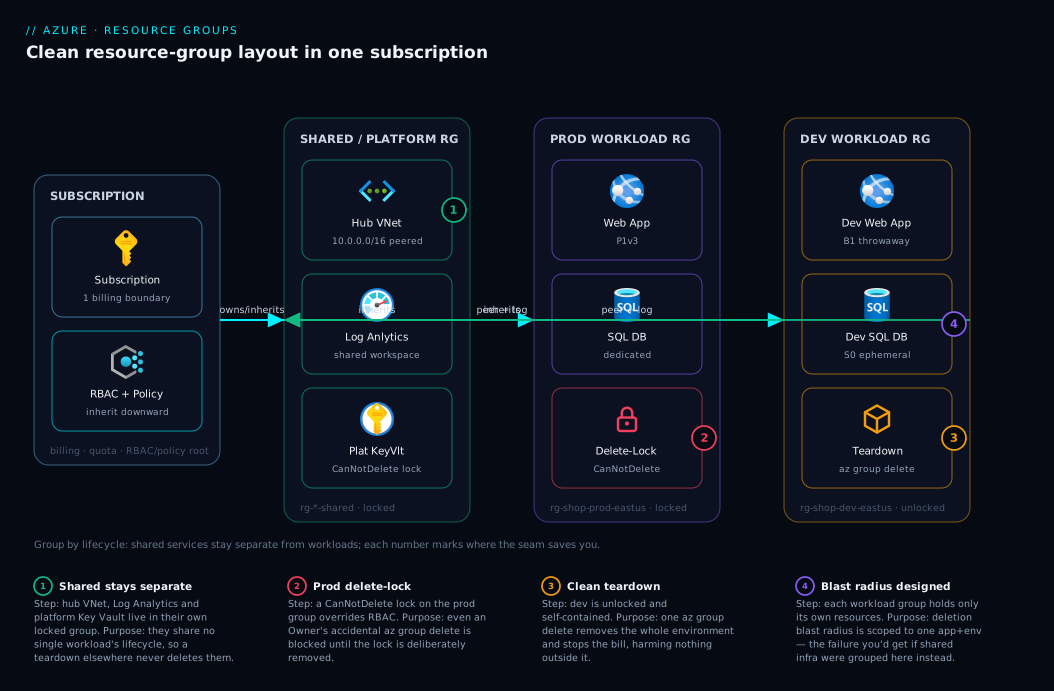
The diagram below is the canonical clean-grouping layout for a single subscription, read left to right. On the far left is the subscription — the billing and quota boundary that contains every group. Inside it, the resources fan into three deliberately separated zones that mirror the grouping framework: a shared/platform group (created once, locked, owned by the platform team) holding the hub VNet, the shared Log Analytics workspace and a platform Key Vault — the long-lived, cross-cutting resources no single workload’s lifecycle should ever delete; a production workload group (rg-shop-prod-eastus) holding exactly one app at one environment — web app, dedicated SQL database, app Key Vault — with a CanNotDelete lock as the seatbelt; and a dev workload group (rg-shop-dev-eastus) holding the throwaway copy of the same app, deliberately unlocked for one-command teardown.
Follow the flows and badges to see why the seams sit where they do. RBAC and Policy descend from the subscription into each group as inheritance (the dashed governance flow), so the platform team owns the shared group and team-shop owns only their two app groups — no over-grant. The app groups depend on the shared group (the prod app peers to the hub VNet and logs to the shared workspace) but do not contain it — that dependency-without-containment is the whole point: delete dev and the shared VNet and workspace are untouched, because they live behind a different seam. The numbered badges mark the four places this design saves you: a lifecycle violation if a shared resource leaks into an app group (1), the lock that stops an accidental prod deletion (2), the clean one-command dev teardown (3), and the deletion blast radius you’d suffer if you grouped wrong (4).
Real-world scenario
Contoso Retail ran a single subscription with one resource group per team — rg-platform-team, rg-shop-team, rg-payments-team. Tidy on day one. By month nine rg-shop-team held forty-one resources: the production web app and database, three developers’ personal test apps, a staging environment, a Log Analytics workspace the payments team had quietly pointed their diagnostics at, and the storage account holding the Terraform state for all three teams (created “somewhere convenient” during bootstrap). Cost reports couldn’t separate prod from dev from staging. Granting a contractor “just the shop dev stuff” was impossible without handing over the production database too, so they got read-only on the whole subscription and were perpetually blocked. And when the team wanted to retire staging, they couldn’t — deleting anything risky threatened the shared workspace and, catastrophically, the shared Terraform state.
The breaking point was a near-miss. An engineer, cleaning up, ran az group delete --name rg-shop-team --yes in the wrong terminal tab — pointed at the team group. It failed only because, weeks earlier, someone had (by luck, not design) put a CanNotDelete lock on the group after a different scare. The lock saved the company from deleting its production retail platform and the Terraform state for three teams in one keystroke. That was the wake-up call.
The remediation followed the framework here exactly. First, they factored out shared services: the Log Analytics workspace, the Terraform state storage account, the hub VNet and a platform Key Vault moved into a new rg-platform-shared-eastus, owned by the platform team, locked CanNotDelete. (The state account was the delicate move — change window, pipelines paused, az resource move, then re-point the Terraform backend; the resource ID changed but the data was intact.) Next, they split per-workload-per-environment — rg-shop-prod-eastus, rg-shop-staging-eastus, rg-shop-dev-eastus, each owned by team-shop via an Entra group with Contributor at the group, prod and staging locked, dev unlocked. They enforced core tags with an Azure Policy Modify plus deny-on-missing-tag, and standardised names. The contractor got Contributor on exactly rg-shop-dev-eastus — unblocked in five minutes, zero access to production.
The payoff showed up within a month. Retiring staging became a one-line az group delete that took out only staging — the shared workspace, state and VNet sat in a different group and never flinched. Cost Management, sliced by the workload and env tags, finally showed real per-app, per-environment spend, surfacing ₹40,000/month of forgotten dev resources nobody had been able to see. The lesson is the one this article opens with: a resource group is not a folder, it’s a blast radius — design where the seams go before you need to delete anything, not after a near-miss teaches you the hard way.
Advantages and disadvantages
Resource groups are not optional — every resource is in one — so the trade-off is really between deliberate grouping and accidental grouping. Stated plainly:
| Advantages of disciplined grouping | Disadvantages / costs |
|---|---|
| Clean lifecycle — deploy and delete coherent units | More groups to create and track (mostly cosmetic) |
| RBAC at the right altitude — one team owns one group | Up-front design effort and a convention to maintain |
| Cost attribution per workload/environment is trivial | Cross-group operations (e.g., a multi-group deploy) need coordination |
| Locks protect production without freezing dev | Moving a mis-grouped resource later is constrained |
| Policy guardrails land per-workload cleanly | Some resources can’t move groups easily (replan needed) |
| One-command, low-risk environment teardown | Discipline must be enforced or it erodes |
| The group list becomes self-documenting | Naming is immutable — mistakes need a recreate+move |
The advantages matter most for any environment that outlives a prototype, anything with more than one team or environment, anything with shared services, and anything where cost attribution or clean teardown matters — eventually, everything. The disadvantages bite only in very small single-app/single-environment shops where one group genuinely is one lifecycle, and even there you should factor state and shared resources out. The disciplines (naming, tags, locks, policy) cost a few hours once and pay back forever; accidental grouping costs a little every day and occasionally a lot all at once.
Hands-on lab
This lab builds the clean layout from the diagram — a shared group plus two workload groups — entirely with free/low-cost resources (we use a storage account and a Key Vault; both are negligible or free at this scale), then demonstrates inheritance, locks and clean teardown. Run it in Cloud Shell. Total cost if you tear down at the end: effectively nil.
Step 1 — Set variables and confirm your subscription.
SUB=$(az account show --query id -o tsv)
LOC=eastus
echo "Using subscription $SUB in $LOC"
Step 2 — Create the three groups with deliberate names and tags.
az group create -n rg-shop-shared-eastus -l $LOC \
  --tags env=shared workload=platform owner=team-platform managedBy=cli
az group create -n rg-shop-prod-eastus   -l $LOC \
  --tags env=prod   workload=shop     owner=team-shop     managedBy=cli
az group create -n rg-shop-dev-eastus    -l $LOC \
  --tags env=dev    workload=shop     owner=team-shop     managedBy=cli
az group list --query "[?tags.workload=='shop' || tags.workload=='platform'].{name:name, env:tags.env}" -o table
Expected: three groups with their env tags — your clean layout exists.
Step 3 — Put a shared resource in the shared group, and a workload resource in each app group. (Storage account names must be globally unique and lowercase; adjust the suffix if taken.)
SUF=$RANDOM
az storage account create -n stshared$SUF -g rg-shop-shared-eastus -l $LOC --sku Standard_LRS
az storage account create -n stprod$SUF   -g rg-shop-prod-eastus   -l $LOC --sku Standard_LRS
az storage account create -n stdev$SUF    -g rg-shop-dev-eastus    -l $LOC --sku Standard_LRS
Step 4 — Lock production; leave dev unlocked.
az lock create --name lock-no-delete --lock-type CanNotDelete -g rg-shop-prod-eastus
az lock list -g rg-shop-prod-eastus -o table   # prod is protected
az lock list -g rg-shop-dev-eastus  -o table   # dev has none
Step 5 — Prove the lock works (expected failure). Try to delete the locked prod group and watch Azure refuse:
az group delete -n rg-shop-prod-eastus --yes 2>&1 | head -n 3
# Expect: an error mentioning the resource is locked / cannot be deleted (ScopeLocked)
That refusal is the seatbelt doing its job — the lock overrode even your Owner rights.
Step 6 — Inspect inheritance. See that RBAC at the subscription is inherited into a group, and that the group is a valid assignment scope:
# Effective assignments visible at the prod group scope (includes inherited ones from the sub)
az role assignment list --scope "/subscriptions/$SUB/resourceGroups/rg-shop-prod-eastus" -o table
Step 7 — Demonstrate a move. Move the dev storage account into the shared group, then back, to feel the operation (note it briefly goes read-only during the move):
DEVID=$(az storage account show -n stdev$SUF -g rg-shop-dev-eastus --query id -o tsv)
az resource move --destination-group rg-shop-shared-eastus --ids "$DEVID"
az resource list -g rg-shop-shared-eastus --query "[].name" -o table   # stdev now here
Step 8 — Clean teardown. Remove the prod lock (deliberately), then delete all three groups. The dev group deletes instantly because it was never locked — exactly the one-command teardown the design buys you:
az lock delete --name lock-no-delete -g rg-shop-prod-eastus
az group delete -n rg-shop-dev-eastus    --yes --no-wait
az group delete -n rg-shop-prod-eastus   --yes --no-wait
az group delete -n rg-shop-shared-eastus --yes --no-wait
az group list --query "[?tags.workload=='shop'].name" -o table   # empties out
You built the canonical layout, watched a lock block a deletion, moved a resource, and tore everything down cleanly — the entire lifecycle in eight steps.
Common mistakes & troubleshooting
The failure modes below are the ones that actually generate tickets and incidents. Each is symptom → root cause → how to confirm → fix.
| # | Symptom | Root cause | Confirm (command / portal path) | Fix |
|---|---|---|---|---|
| 1 | az group delete fails: “ScopeLocked / cannot delete” |
A CanNotDelete lock on the group or a resource |
az lock list -g <rg> |
Remove the lock deliberately, then retry |
| 2 | Can’t delete a group; one resource “in use” | Shared resource grouped with a workload (lifecycle violation) | List the group; spot the cross-cutting resource | az resource move it to a shared group |
| 3 | A resource move fails with “not supported” | That resource type can’t move (some can’t) | Check the move-support docs for the type | Recreate in the target group; don’t move |
| 4 | Move fails: “resource is locked” | A lock on source/target group or resource | az lock list on both groups |
Remove locks, move, re-apply |
| 5 | Team can deploy but not see/manage their group | RBAC granted at the wrong scope (or not at the group) | az role assignment list --scope <rg-id> |
Grant the role at the resource-group scope |
| 6 | Tags on the RG didn’t appear on resources | RG tags don’t cascade to resources | Inspect a resource’s tags vs the group’s | Use a Policy Modify to inherit, or set in IaC |
| 7 | A new resource was created in the wrong group | Portal defaulted to an auto-named/last-used group | Check the resource’s resourceGroup field |
Move it; enforce naming + a “no default RG” habit |
| 8 | Deleting a group didn’t stop all costs | A child service has its own soft-delete/retention | Check for soft-deleted vaults/recovery items | Purge soft-deleted items; check backup vaults |
| 9 | Policy unexpectedly blocks a deploy into a group | An inherited Deny policy from sub/MG applies here |
az policy assignment list --scope <rg-id> |
Bring the resource into compliance or adjust scope |
| 10 | A ReadOnly lock blocks an operation that “only reads” |
Some list/POST operations count as writes | az lock list; check the op’s HTTP method |
Use CanNotDelete instead, or remove temporarily |
| 11 | Two teams keep stepping on one group | Group spans ownership (RBAC mixed) | Map who has Contributor at the group |
Split by workload/team; one owner per group |
| 12 | Region-down event affects group management | Group metadata lives in the affected region | Group’s location field |
Plan group regions; spread groups across regions for DR |
The two that cause most teardown pain are #3 (unsupported move) and #4 (locked move). A move (az resource move) relocates the resource’s management into a new group/subscription, but with sharp edges: the resource is briefly read-only during the move; its ID changes (breaking anything hard-coding the old ID); resource-scoped role assignments and locks do not travel; and not every type supports moving. Check move-support first, do it in a change window, and pause pipelines that reference the resource.
Best practices
- Group by lifecycle first. Resources created, updated and deleted together share a group; everything else is a tie-breaker. If you can’t delete a group cleanly, you’ve grouped wrong.
- One workload, one environment, one group (plus shared groups). This single rule makes RBAC, cost, locks, policy and teardown all clean at once. It’s the recommended default.
- Factor out shared, long-lived services (hub VNet, Log Analytics, state storage, ACR, DNS, platform Key Vault) into their own locked group(s). Never let a workload’s lifecycle delete shared infra.
- Never mix environments in one group. Prod, staging and dev get separate groups so you can lock prod without freezing dev, and tear down dev without risking prod.
- Name every group by convention —
rg-<workload>-<env>-<region>— and never accept auto-generatedDefault-*names. Names are immutable; enforce with a naming policy or CI check. - Tag at birth with a core set (
env,workload,owner,costCenter,managedBy), and use a PolicyModifyto inherit key tags onto resources (RG tags don’t cascade). - Lock production and shared groups with
CanNotDelete. It overrides RBAC and is the cheapest insurance against theaz group deletefootgun; removing a lock should be a deliberate, reviewed act. - Grant RBAC at the group, to Entra groups, not users. Reserve subscription/MG-level roles for genuinely cross-cutting platform and security roles.
- Author groups and their guardrails as code (subscription-scope Bicep) so structure, locks, RBAC and policy are reviewed and reproducible — see Deploy Your First Bicep File.
- Set the group’s region deliberately (usually the workload’s primary region), and for DR spread groups across regions so one region’s control-plane disruption doesn’t pin all your management operations.
- Design teardown up-front. Before you create a group, ask “what happens when I delete this?” If the answer harms anything outside the workload, your seams are wrong.
- Review grouping periodically for drift — new shared dependencies sneaking into app groups, environments creeping together — and remediate with moves before the group becomes un-deletable.
Security notes
Resource-group design is a security control, not just an operations one — the group is the natural altitude for least-privilege RBAC and policy guardrails, and poor grouping forces over-privilege.
| Security concern | How resource-group design addresses it |
|---|---|
| Least privilege | Per-workload groups let you grant a team Contributor on exactly their resources — no subscription-wide over-grant |
| Blast-radius containment | Separating environments and isolating shared services limits what one compromised/mistaken identity can delete |
| Accidental destruction | CanNotDelete locks on prod/shared groups override RBAC, blocking even an Owner’s mistake |
| Guardrail enforcement | Policy at the group (allowed SKUs/regions, required tags, deny public IPs) enforces standards on every resource inside |
| Auditability | Clean per-workload/per-env grouping makes activity-log and cost review meaningful; mixed groups muddy the audit trail |
| Secret isolation | A platform Key Vault in a locked shared group, with app-specific vaults per workload group, scopes secret access by lifecycle and team |
| Data classification | Isolating sensitive (e.g., PCI/PII) resources into their own group lets compliance policy and stricter RBAC apply only there |
Two specifics. First, the group is not a security boundary by itself — RBAC (and deny assignments / Policy) is the perimeter; the group is where you anchor those controls at the right altitude, so don’t assume two groups are network- or identity-isolated just because they’re separate. Second, least-privilege starts at grouping: you cannot grant tightly-scoped access if resources are interleaved, so clean grouping is a prerequisite for least privilege, not a separate task. For the deeper RBAC and secrets picture, see Azure Key Vault: Secrets, Keys & Certificates and Key Vault RBAC vs Access Policies.
Cost & sizing
Resource groups are free — they cost nothing to create, hold or delete; you pay only for the resources inside. So the cost story isn’t the groups themselves; it’s what clean grouping does to your visibility and control of the bill, and the waste bad grouping hides.
| Cost lever | How resource-group design affects it |
|---|---|
| Resource group itself | Free — no charge for the container, at any count |
| Cost attribution | Per-workload/per-env grouping makes Cost Management slice the bill cleanly by group (and by your tags) |
| Hidden waste | Mixed groups bury idle dev/test spend; clean grouping surfaces it (Contoso found ₹40k/month) |
| Teardown savings | Clean groups enable one-command teardown of whole environments — you stop paying immediately |
| Budgets & alerts | Budgets can be scoped per resource group; clean grouping makes per-workload budgets meaningful |
| Chargeback / showback | costCenter/workload tags on groups feed accurate internal billing |
The practical guidance is about groups vs cost reporting, not group “size”: one workload per group (or a workload tag) so per-app cost rolls up cleanly; one environment per group (or an env tag) so prod and dev spend separate; group/tag by team to scope a per-team budget; and isolate env=dev resources in dev groups you can delete wholesale to kill forgotten spend.
Set a budget with alerts per environment group so a runaway dev cost pages you early — mechanics in Azure Cost Management Budgets & Alerts, the at-scale FinOps picture in Azure FinOps at Scale. In INR terms the groups add ₹0; the value is visibility — most teams that adopt clean per-workload grouping find double-digit-percent savings because, for the first time, they can see where the money goes.
Interview & exam questions
These map to the AZ-104 (Administrator), AZ-305 (Solutions Architect) and AZ-900 (Fundamentals) governance objectives.
Q1. What is a resource group, and what does it boundary? A logical container for resources inside one subscription that share a lifecycle. It is the boundary for deployment, lifecycle management, default RBAC/policy inheritance, and bulk deletion — but not a network, security or billing boundary in itself. (AZ-900/AZ-104)
Q2. Can a resource be in two resource groups? Can a group span subscriptions? No to both. Every resource is in exactly one group; every group is in exactly one subscription. To relocate, you move the resource (constrained operation); the group object itself never changes subscription. (AZ-104)
Q3. What does a resource group’s location/region control? It stores the group’s metadata (the region of record) and is the default region for new resources created in tools — but it does not force resources to live there; resources can be in any region. The group’s region matters for metadata residency and control-plane resilience. (AZ-104/AZ-305)
Q4. How do RBAC and Azure Policy behave across the hierarchy?
Both are inherited downward — an assignment at MG/sub/RG applies to everything beneath. RBAC permissions are additive (union) with no standard “deny role”; use deny assignments or Azure Policy (Deny) to block actions. The resource group is a natural altitude to grant a team access to their resources. (AZ-305)
Q5. What is the primary criterion for grouping resources? Shared lifecycle — resources created, updated and deleted together belong in one group. Then split by environment, blast radius, ownership and policy. The signal you’ve grouped wrong is being unable to delete a group cleanly. (AZ-305)
Q6. Why isolate shared services into their own resource group? Because shared, long-lived resources (hub VNet, Log Analytics, state storage, ACR, DNS, platform Key Vault) do not share any one workload’s lifecycle. If they sit in an app group, deleting that app deletes shared infrastructure other workloads depend on. (AZ-305)
Q7. What does a CanNotDelete lock do, and does it override RBAC?
It prevents deletion of the locked scope and its contents — and yes, it overrides RBAC: even an Owner cannot delete until the lock is removed. ReadOnly additionally blocks modifications (and some “read” operations that are technically writes). Locks guard the control plane, not the data plane. (AZ-104)
Q8. Do tags on a resource group apply to the resources inside it?
No. Resource-group tags do not cascade to resources automatically. Use an Azure Policy Modify/Append effect to inherit tags from the group, or set tags on the resources directly in IaC. (AZ-104)
Q9. What are the constraints of moving a resource between groups? The resource is briefly read-only during the move; its resource ID changes; locks and resource-scoped role assignments don’t travel; and not all resource types support moving. Check move support, do it in a change window, and re-create scoped locks/roles afterward. (AZ-104/AZ-305)
Q10. Where should you assign RBAC for a team that owns one workload? At the resource-group scope for that workload’s group, assigned to an Entra ID group (not individual users). Reserve subscription/management-group assignments for cross-cutting platform/security roles. (AZ-305)
Q11. How does grouping affect cost management? Cost is reported (not bounded) per resource group and per tag. Clean per-workload/per-environment grouping makes Cost Management slice the bill meaningfully and lets you scope budgets per group; the subscription, not the group, is the actual billing boundary. (AZ-104/AZ-305)
Q12. What happens when you delete a resource group, and how do you do it safely?
az group delete removes the group and all resources in it, in dependency order, irreversibly (subject to locks and per-service soft-delete). Do it safely by designing per-environment groups up front, locking prod/shared groups, and confirming the group contains only the lifecycle you intend to destroy. (AZ-104)
Quick check
- True or false: a resource group’s region forces every resource inside it to live in that region.
- You can’t delete a resource group “because one resource in it is needed by other workloads.” Which grouping axis did you violate, and what’s the fix?
- A team needs to manage exactly their workload’s resources and nothing else. At which scope do you assign their role, and to what kind of principal?
- Name three shared services that should live in their own group rather than an application’s group.
- Which lock type would you put on a production resource group, and does it override an Owner’s permissions?
Answers
- False. The region stores the group’s metadata (region of record / default for new resources). Resources inside can be in any region.
- You violated lifecycle (axis 1) by grouping a cross-cutting/shared resource with a workload. Fix:
az resource movethat resource into its own (or a shared) group, so the workload group is deletable. - At the resource-group scope of that workload’s group, assigned to an Entra ID group (not individual users) — giving least-privilege
Contributorover exactly their resources. - Any three of: hub/platform VNet & gateways, Log Analytics workspace, Terraform/state storage account, container registry (ACR), DNS private zones, platform Key Vault, shared App Configuration/Front Door.
CanNotDelete— and yes, it overrides RBAC: even an Owner cannot delete the group’s contents until the lock is removed.
Glossary
- Resource group — A logical container inside one subscription holding resources that (should) share a lifecycle; the unit of deployment, RBAC/policy inheritance and bulk deletion.
- Lifecycle — The create/update/delete cadence of resources; the primary criterion for which resources share a group.
- Location (of a resource group) — The group’s own region, storing its metadata; the region of record and default for new resources, not a cage forcing resources to that region.
- Subscription — The billing and quota container that holds resource groups; the actual billing boundary (a group is only a cost-reporting dimension).
- Management group — A tier above subscriptions for inheriting RBAC and policy across many subscriptions.
- Azure RBAC — Role-based access control; roles assigned at a scope (MG/sub/RG/resource), inherited downward, additive (union) with no standard “deny role.”
- Azure Policy — Rules evaluated against resources (effects like
Deny,Audit,Modify,DeployIfNotExists), inherited downward; the way to enforce guardrails and block non-compliant changes. - Resource lock — A
CanNotDeleteorReadOnlymarker on a group/resource that overrides RBAC to prevent deletion (and, forReadOnly, modification). - Tag — A
key=valuelabel on a subscription/group/resource used for cost allocation, ownership and automation; RG tags do not cascade to resources automatically. - Resource move — Relocating a resource to another group/subscription; constrained (read-only window, ID change, locks/roles don’t travel, not all types supported).
- Deployment scope — The target of an ARM/Bicep deployment; most commonly a resource group (
az deployment group create). - Blast radius — What a single
az group deleteremoves; grouping is, in large part, a blast-radius decision. - Shared services — Long-lived, cross-cutting resources (hub VNet, Log Analytics, state storage, ACR, DNS, platform Key Vault) that don’t share any one workload’s lifecycle and belong in their own group(s).
- Cloud Adoption Framework (CAF) naming — The
rg-<workload>-<env>-<region>convention that makes group names self-documenting.
Next steps
- Go up one tier to the real billing/quota boundary in Azure Subscriptions Explained, then to org-wide guardrails in Azure Management Groups: Hierarchy Design Fundamentals.
- Adopt the prescribed platform/workload layout at scale with Azure Enterprise-Scale Landing Zone.
- Make groups self-documenting and cost-attributable with Azure Tagging Strategy for Cost Allocation and protect them with Azure Resource Locks.
- Enforce per-group guardrails with Azure Policy Effects Explained and Azure Policy at Scale.
- Author the whole structure as code starting from Deploy Your First Bicep File, compose it with Azure Verified Modules in Bicep, and validate changes safely with Bicep what-if Preflight Validation.