You opened a fresh main.bicep to stand up a storage account and a Key Vault, and forty lines later you were still typing: minimumTlsVersion, allowBlobPublicAccess, a diagnostic setting, an RBAC role assignment, a private-endpoint block, a @secure() parameter for the SAS, a network ACL with the right default action. Every one of those lines is a place to get it subtly wrong — and you have written the same lines, slightly differently, in five other repos. That is the exact waste Azure Verified Modules (AVM) exists to kill. AVM is Microsoft’s single, official library of pre-built, security-hardened Bicep (and Terraform) modules that you consume from a public registry by version instead of hand-authoring resource blocks — so the storage account you deploy already has TLS 1.2, public access off, diagnostics wired and managed-identity RBAC baked in, reviewed by the product group, not copy-pasted from a blog.
This is the practical guide to using AVM the way a platform team actually does: you will learn the difference between a resource module (one well-architected resource, like avm/res/storage/storage-account) and a pattern module (a multi-resource solution, like a hub-and-spoke network), reference one by its exact br/public: path and pinned version, wire its interface of standardised parameters and outputs, and compose several resource modules into your own pattern you ship to dev/test/prod. We treat AVM not as magic but as ordinary Bicep modules that live in a registry and follow a strict specification — because that is exactly what they are, and understanding the spec is what lets you trust them, override them, and eventually contribute back.
By the end you will stop writing storage and Key Vault boilerplate by hand. When a new project starts you will reach for the registry, pin the version, fill the handful of parameters that genuinely vary, and get a deployment that already passes most of your security review — then know how to extend it, where the version-pinning landmines are, and how to read an AVM module’s source when its interface surprises you. This builds directly on plain Bicep Modules, Loops and Conditions; AVM is what those constructs look like at industrial scale, owned by Microsoft.
What problem this solves
Hand-authored infrastructure rots in three predictable ways, and AVM targets all three. First, drift: the storage module in repo-a set allowBlobPublicAccess: false and the one in repo-b, copied six months later, forgot it — now you have an inconsistent estate and no single place to fix it. Second, incompleteness: a “good enough” hand-rolled module ships the resource but skips the diagnostic setting, the lock, the RBAC assignment and the private endpoint, so every team re-discovers those gaps in production. Third, maintenance burden: when a new API version or security default lands, you must find every copy and update it. AVM moves all three problems to Microsoft: the modules are owned by the product groups, aligned to the Well-Architected Framework (WAF), version-published, and updated centrally — you consume a version and upgrade on your schedule.
What breaks without it is subtle because nothing fails on day one. A hand-rolled estate works fine until an auditor asks “show me that every storage account enforces TLS 1.2 and disables public blob access” and the honest answer is “most of them, probably — let me check 40 templates.” Or a junior engineer copies a five-month-old block that predates a hardening and silently re-introduces a hole. The cost is not a crash; it is the slow accumulation of inconsistency that turns “deploy a storage account” from a one-line decision into a 40-line review every time.
Who hits this: any team past one repository or environment, hardest on platform / landing-zone teams guaranteeing a secure baseline across dozens of application teams, on regulated workloads that must evidence WAF alignment, and on anyone tired of re-litigating the same minimumTlsVersion argument in review. AVM does not remove your responsibility to configure correctly — it gives you a vetted, versioned starting point so the default is already safe, and the only things you type are the values that genuinely differ between deployments. What AVM replaces, and what you still own:
| Concern | Hand-authored Bicep | With AVM | What you still own |
|---|---|---|---|
| Secure defaults | You type TLS, public-access, ACLs each time | Baked into the module, WAF-aligned | Choosing to override a default deliberately |
| API version | You pick and update @2023-05-01 everywhere |
Module pins a tested API version | Upgrading the module version on your schedule |
| Diagnostics / RBAC / locks | Often skipped; re-discovered in prod | First-class interface parameters | Supplying the workspace ID, principal IDs, lock level |
| Consistency across repos | Drifts as copies diverge | One registry path, one version | Pinning the same version across repos |
| Maintenance | You find-and-update every copy | Microsoft updates the module centrally | Reading the changelog before you bump |
Learning objectives
By the end of this article you can:
- Explain what AVM is, why it exists, and the difference between a resource module and a pattern module, and pick the right one for a task.
- Find the exact registry path and available versions of any AVM module, and reference it with a pinned version from
br/public:(and explain why floating to latest is forbidden in infrastructure). - Wire an AVM module’s standardised interface — the common parameters (
name,location,tags,lock,roleAssignments,diagnosticSettings,managedIdentities,privateEndpoints) and its typed outputs — into a real deployment. - Compose several AVM resource modules into your own pattern module, passing one module’s output into another’s input, and ship it to dev/test/prod via parameter files.
- Override an AVM default safely, add a resource the module does not expose, and read an AVM module’s source when its interface surprises you.
- Diagnose the common AVM failures: a non-existent version, an
MSI/registry-restore error, an interface mismatch after a major bump, a name-length violation, and a private-endpoint wiring mistake. - Walk the contribution path — the AVM specification, the module’s lifecycle, and how a module gets published to the public registry — well enough to consume responsibly and to contribute a small fix.
Prerequisites & where this fits
You should already be comfortable with plain Bicep: writing a resource, declaring param/var/output, invoking a local module, and deploying with az deployment group create. If any of that is shaky, do Deploy Your First Bicep File From Scratch and Bicep Modules, Loops and Conditions first — AVM modules are Bicep modules, so everything about parameters, outputs and nested deployments applies unchanged. You need az 2.40.0+ (which bundles a recent Bicep CLI) and Contributor on a subscription or resource group.
This sits in the Infrastructure as Code track, one rung above plain modules and below landing-zone automation. The mental model is a ladder: a single resource → your own local module → a registry-published module → AVM, Microsoft’s officially-owned registry modules. AVM does not replace your Bicep skills; it is where you point them. It pairs with secret management — Azure Key Vault: Secrets, Keys and Certificates — and with governance, because Azure Policy is the platform backstop that enforces what AVM defaults encourage. If your team uses Terraform, AVM ships a parallel library under the same registry-and-version discipline, contrasted with the Terraform on Azure remote-state workflow.
Core concepts
Six mental models make every later step obvious.
AVM is just Bicep modules in a registry — with rules. An AVM module is an ordinary Bicep file (typed parameters and outputs) published to a registry but bound by the AVM specification — mandatory requirements covering naming, the interface, telemetry, testing and WAF alignment. You consume it exactly like any registry module — module x 'br/public:avm/res/...:0.x.y' = { … } — and everything you know about Bicep modules (nested deployments, the 800-resource limit, outputs) still applies. The registry and the spec are the only new ideas.
Two flavours: resource modules and pattern modules. A resource module (avm/res/<service>/<resource>) deploys exactly one logical, WAF-aligned resource; a pattern module (avm/ptn/<area>/<solution>) deploys a multi-resource solution by composing resource modules. A small utility (avm/utl) category holds helpers. The next section drills into this choice — it is the first decision with AVM.
The interface is standardised — that is the whole point. Because every resource module follows the same spec, they share a common interface: the same optional parameters appear with the same names and shape across every module. tags, lock, roleAssignments, diagnosticSettings, managedIdentities, privateEndpoints mean the same thing whether you deploy storage, Key Vault or a VNet. Learn the interface once and you can drive any AVM module. Module-specific parameters (a storage account’s skuName, a vault’s enablePurgeProtection) sit alongside these common ones.
You pin a version, always. AVM modules are published with semantic versions (MAJOR.MINOR.PATCH). You reference an exact version after the colon — …/storage-account:0.9.1 — and you never float. Bicep does not support a “latest” tag for registry modules the way a container image does; you must name a version, and that is a feature. A MAJOR bump can change the interface; a MINOR adds capability; a PATCH fixes a bug. Pinning means a git pull never silently changes what your infrastructure deploys.
Modules during the 0.x line are still evolving. Most AVM modules are pre-1.0.0. Under semantic versioning that means the interface can change between minor versions, not only majors — so even a 0.8.0 → 0.9.0 bump can be breaking. This is the single most important consumption fact: while a module is 0.x, treat every minor bump as potentially breaking, read the release notes, and run what-if before applying. From 1.0.0, normal semver applies and only MAJOR bumps break the interface.
br/public: is an alias for Microsoft’s registry. It is a built-in Bicep alias resolving to the public Microsoft Container Registry (MCR) where AVM modules are hosted (mcr.microsoft.com/bicep/...). On first build Bicep restores (downloads and caches) the referenced module locally, then transpiles against it. No login is needed — the public modules are anonymously pullable; your own modules go to your ACR under a br/ alias you configure in bicepconfig.json.
The vocabulary in one table
Before the deep sections, pin down every moving part. The glossary repeats these for lookup; this table is the mental model side by side:
| Concept | One-line definition | Where it lives | Why it matters |
|---|---|---|---|
| AVM | Microsoft’s official library of WAF-aligned IaC modules | Public registry + spec | The vetted starting point you consume |
| Resource module | One WAF-aligned Azure resource | avm/res/<svc>/<res> |
The unit you reference most |
| Pattern module | A multi-resource solution composed of resource modules | avm/ptn/<area>/<sol> |
A whole architecture in one reference |
| Registry (MCR) | Where public AVM modules are hosted | mcr.microsoft.com/bicep |
The source br/public: points at |
br/public: |
Bicep alias for the public registry | bicepconfig.json (built-in) |
The prefix in every AVM reference |
| Pinned version | The exact MAJOR.MINOR.PATCH after the colon |
Your module line |
Stops silent infra changes on git pull |
| Interface | The standardised common + module parameters | The module spec | Learn once, drive any module |
| Restore | Bicep downloading + caching a registry module | Local module cache | The first-build step that needs network |
| AVM spec | The rules every module must satisfy | AVM docs / GitHub | Why interfaces are consistent and trustworthy |
| Telemetry | An opt-out usage marker AVM emits per deployment | A nested ARM deployment | A harmless extra deployment you can disable |
Resource modules vs pattern modules
The first decision with AVM is always which kind of module. Get this right and the rest of the template writes itself; get it wrong and you either re-implement a solution AVM already ships, or you bolt a heavyweight pattern onto a job that needed one resource.
A resource module owns exactly one resource and its tightly-coupled children. avm/res/storage/storage-account deploys the account plus the blob/file/queue/table services, containers, lifecycle rules, diagnostic settings, private endpoints and RBAC that belong to that account — but not the Log Analytics workspace the diagnostics point at, or the VNet the private endpoint lands in. Those are separate modules you wire together. The boundary is “one logical resource and the things that cannot exist without it.”
A pattern module owns a solution spanning several resources. avm/ptn/network/hub-networking stands up a hub VNet, gateway subnet, Azure Firewall, route tables and the wiring between them — an opinionated, WAF-aligned architecture — by calling many resource modules internally. You hand it high-level parameters (hub CIDR, spoke definitions) and it composes the pieces. Pattern modules save you the most, because the composition — the hard part to get right — is done and tested. The two compare across the dimensions that decide which to use:
| Dimension | Resource module (avm/res) |
Pattern module (avm/ptn) |
|---|---|---|
| Scope | One logical resource + its children | A multi-resource solution / architecture |
| Example | avm/res/key-vault/vault |
avm/ptn/network/hub-networking |
| Parameters | Resource-level (SKU, ACLs, soft-delete) | Solution-level (hub CIDR, spoke list) |
| You compose | Yes — you wire several together | No — composition is inside the module |
| Reuse altitude | Very high; the building block | High; whole-architecture grain |
| When to pick | Deploy one thing the right way | Deploy a known architecture in one go |
| When to avoid | When you need a whole solution | When your shape differs from the pattern |
| Versioning maturity | Many at 0.x, some 1.0+ |
Generally younger; check the version |
The honest guidance: start with resource modules. They are the most numerous, most mature and most flexible, and composing three or four yourself (which the lab does) teaches you how AVM fits together. Reach for a pattern module when one matches your architecture closely; if your shape differs even moderately from its opinions, you will fight its parameters and composing resource modules yourself is cleaner. Never deploy a pattern module to extract a single resource — that is using a crane to hang a picture.
Naming and the registry path
Every AVM module has a predictable path you can often guess before looking it up. The structure is avm/<type>/<grouping>/<name>:
| Path segment | Values | Example |
|---|---|---|
avm |
Fixed prefix | avm |
<type> |
res (resource), ptn (pattern), utl (utility) |
res |
<grouping> |
The Azure service family | storage, key-vault, network |
<name> |
The specific resource/solution | storage-account, vault, virtual-network |
So the full reference for a pinned storage-account module is br/public:avm/res/storage/storage-account:0.9.1. Groupings mirror the Azure resource-provider families; names are kebab-case. When in doubt, the AVM module index on the official site lists every published module, version and status — confirm the exact path and an existing version there rather than guessing, since a wrong path or non-existent version is the most common first-time error (covered in troubleshooting).
Consuming a resource module: the interface in detail
This is the core skill: referencing one AVM resource module and wiring its interface. The shape never changes — module <name> '<br/public path>:<version>' = { name: '<deployment-name>'; params: { … } } — and the params block is where the standardised interface lives. A minimal storage-account reference carries module-specific values (skuName, kind) and the common interface (tags); the safe defaults (TLS 1.2, public access off) are already inside the module:
module storage 'br/public:avm/res/storage/storage-account:0.9.1' = {
  name: 'deploy-storage'                       // the nested-deployment name
  params: {
    name: 'stkvavmlab${uniqueString(resourceGroup().id)}'
    skuName: 'Standard_LRS'
    kind: 'StorageV2'
    tags: { env: 'lab', owner: 'platform' }
    // minimumTlsVersion, allowBlobPublicAccess=false etc. are AVM defaults
  }
}

output storageId string = storage.outputs.resourceId
output storageName string = storage.outputs.name
The common interface parameters
These optional parameters appear on (almost) every AVM resource module with the same name and shape. Learning them once is the leverage AVM gives you — the table below is the one to memorise:
| Common parameter | Type | What it does | Typical value |
|---|---|---|---|
name |
string | The resource name (required, not optional) | 'stkvavmlab…' |
location |
string | Region; defaults to the RG location | resourceGroup().location |
tags |
object | Resource tags | { env: 'prod' } |
lock |
object | A management lock on the resource | { kind: 'CanNotDelete', name: 'no-delete' } |
roleAssignments |
array | RBAC assignments on the resource | [{ roleDefinitionIdOrName: 'Reader', principalId: '<oid>' }] |
diagnosticSettings |
array | Wire logs/metrics to a workspace/EH/storage | [{ workspaceResourceId: law.outputs.resourceId }] |
managedIdentities |
object | System- and/or user-assigned identity | { systemAssigned: true } |
privateEndpoints |
array | Private endpoints for the resource | [{ subnetResourceId: …, service: 'blob' }] |
enableTelemetry |
bool | AVM usage telemetry (default true) |
false to opt out |
Because the shape is identical across modules, wiring diagnostics into a Key Vault looks exactly like wiring it into a storage account — the same diagnosticSettings array with the same workspaceResourceId key. That consistency is what makes AVM compose cleanly.
Reading the outputs
AVM modules return a standardised set of outputs, so chaining one into another is predictable — the ones you use constantly:
| Common output | Type | What you do with it |
|---|---|---|
resourceId |
string | Pass into another module (e.g. a diagnostic target, a private DNS link) |
name |
string | Display, or build dependent names |
resourceGroupName |
string | Cross-reference in multi-RG templates |
location |
string | Propagate region to dependents |
systemAssignedMIPrincipalId |
string | Grant this identity RBAC elsewhere |
privateEndpoints |
array | Inspect the created PE details |
Putting the common interface to work — a storage account with a system-assigned identity, a lock, diagnostics and an RBAC assignment, all via the standard parameters — looks like this:
module storage 'br/public:avm/res/storage/storage-account:0.9.1' = {
  name: 'deploy-storage'
  params: {
    name: 'stappavm${uniqueString(resourceGroup().id)}'
    skuName: 'Standard_ZRS'
    managedIdentities: { systemAssigned: true }
    lock: { kind: 'CanNotDelete', name: 'lock-storage' }
    diagnosticSettings: [ { workspaceResourceId: law.outputs.resourceId } ]
    roleAssignments: [
      { roleDefinitionIdOrName: 'Storage Blob Data Reader', principalId: readerObjectId, principalType: 'User' }
    ]
    tags: { env: 'prod' }
  }
}
Each block — diagnostics, lock, identity, RBAC — would have been a separate hand-written resource in a hand-rolled template, each its own chance of a mistake. AVM collapses them into named interface parameters with vetted implementations.
Pinning and upgrading versions
The version after the colon is load-bearing. The discipline:
| Rule | Why | What it looks like |
|---|---|---|
| Always pin an exact version | No silent infra change on git pull |
…/vault:0.9.1, never a range |
| Pin the same version across repos | Estate consistency | Centralise the version in a shared var/param file |
| Read the changelog before bumping | 0.x minors can break |
Check the module’s release notes on GitHub |
Run what-if after any bump |
See the real delta before applying | az deployment group what-if … |
Treat 0.x minor bumps as breaking |
Pre-1.0 semver allows it |
Test in dev before test/prod |
| Bump deliberately, in a PR | The change is reviewable | One commit: “bump avm storage 0.9.0→0.9.1” |
The practical workflow: keep AVM versions visible (a versions.bicep var or a comment block atop main.bicep), bump one module at a time, run what-if, review the diff in a PR, and promote dev → test → prod. Because Bicep caches modules locally, a build after a bump re-downloads only the new version; CI should cache the module cache to avoid re-pulling every run.
Composing modules into your own pattern
The real power shows up when you compose several AVM resource modules into one template — a Log Analytics workspace, a Key Vault that sends diagnostics to it, and a storage account that also reports there, all wired by passing outputs into inputs. This is exactly what a pattern module does internally; doing it yourself is both the lab and the clearest way to understand AVM. The principle is ordinary Bicep: a module’s outputs.resourceId becomes the next module’s input, and Bicep infers the deployment order from those references — you do not write dependsOn. A three-module composition:
// Deploy a workspace, then a vault and a storage account that both report to it.
param location string = resourceGroup().location

module law 'br/public:avm/res/operational-insights/workspace:0.9.0' = {
  name: 'deploy-law'
  params: {
    name: 'law-avm-${uniqueString(resourceGroup().id)}'
    location: location
  }
}

module vault 'br/public:avm/res/key-vault/vault:0.11.0' = {
  name: 'deploy-vault'
  params: {
    name: 'kv-avm-${uniqueString(resourceGroup().id)}'
    location: location
    enableRbacAuthorization: true
    enablePurgeProtection: true
    diagnosticSettings: [
      { workspaceResourceId: law.outputs.resourceId }   // ← output → input
    ]
  }
}

module storage 'br/public:avm/res/storage/storage-account:0.9.1' = {
  name: 'deploy-storage'
  params: {
    name: 'stavm${uniqueString(resourceGroup().id)}'
    location: location
    skuName: 'Standard_LRS'
    diagnosticSettings: [
      { workspaceResourceId: law.outputs.resourceId }   // ← same workspace
    ]
  }
}

output workspaceId string = law.outputs.resourceId
output vaultUri string = vault.outputs.uri
output storageName string = storage.outputs.name
Three resources, fully WAF-aligned, wired together, in under forty readable lines — and not a single hand-typed minimumTlsVersion or enableSoftDelete. Note how the diagnosticSettings interface is identical on the vault and the storage account; that is the standardised interface paying off.
Composition patterns and their trade-offs
There is more than one way to assemble AVM modules; the right choice depends on reuse and team boundaries:
| Composition style | What it is | When to use it | Trade-off |
|---|---|---|---|
Flat main.bicep |
All AVM modules in one template | Small solution, one team | Grows long; one big deployment |
| Your own wrapper module | Wrap AVM modules in a local module you reuse | Same cluster recurs across repos | One more layer of indirection |
| Consume an AVM pattern module | Let AVM compose for you | Your architecture matches the pattern | Less control; pattern’s opinions |
| Publish your own pattern to ACR | Share your composition org-wide | Many teams need your shape | Publish/version workflow to maintain |
The senior pattern worth naming is the wrapper module: when your organisation has an opinionated shape AVM does not ship — “every app gets a vault + storage + workspace wired our way” — wrap the AVM resource modules in your own module, hard-code your choices, expose only what varies, and optionally publish it to your private ACR. You get AVM’s vetted implementations underneath and your organisation’s opinions on top — modularise-what-recurs, one level up.
Overriding a default and extending a module
AVM defaults are good, not gospel. Override a default by simply passing its parameter — every default is exposed as one. To disable purge protection in a throwaway dev vault, for instance:
module vault 'br/public:avm/res/key-vault/vault:0.11.0' = {
  name: 'deploy-vault'
  params: {
    name: 'kv-dev-${uniqueString(resourceGroup().id)}'
    enablePurgeProtection: false    // override: dev-only, so teardown is clean
    softDeleteRetentionInDays: 7     // override the default retention
  }
}
Add a resource the module does not expose — for something outside the module’s boundary, deploy a sibling resource (or module) and wire it via the AVM module’s outputs. You do not fork; you compose around it:
// AVM deploys the vault; you add a secret alongside it using the vault's output.
resource extraSecret 'Microsoft.KeyVault/vaults/secrets@2023-07-01' = {
  name: '${vault.outputs.name}/connstring'
  properties: { value: connectionString }   // value from a @secure() param
}
The decision table for when to do which:
| Situation | Do this | Do NOT do this |
|---|---|---|
| Change a setting the module exposes | Pass the parameter | Fork the module |
| Need a child resource the module manages | Use the module’s array param (e.g. secrets, containers) |
Add a sibling resource |
| Need something outside the module’s scope | Sibling resource/module wired via outputs | Edit the AVM source |
| The module is missing a capability you need | Open an AVM GitHub issue / contribute | Permanently maintain a private fork |
The AVM specification and contribution path
You need not contribute to consume AVM well, but understanding the specification is what lets you trust the modules. AVM is governed by a published spec — a numbered set of requirements every module satisfies before publication — telling you what you can rely on across all modules. The pillars:
| Spec pillar | What it mandates | Why it matters to you |
|---|---|---|
| Consistent interface | Same common parameters/outputs across modules | Learn the interface once, drive any module |
| WAF alignment | Secure, reliable defaults per Well-Architected | Defaults are safe; you opt out, not in |
| Semantic versioning | MAJOR.MINOR.PATCH, published per release |
Predictable upgrades; pin and bump deliberately |
| Telemetry | An opt-out usage marker per deployment | A harmless extra deployment; can disable |
| Testing | Every module ships automated tests | The module is validated before publish |
| Ownership | A named owner (often the product group) | A real maintainer behind the module |
| Documentation | Auto-generated README with every parameter |
The interface is always documented |
The telemetry detail surprises people: by default a module emits a tiny extra nested deployment whose name encodes a usage GUID (a pid-… name) so Microsoft can measure adoption. It deploys nothing real, costs nothing, and is opt-out per module via enableTelemetry: false — an unexpected pid-… deployment is this, not a rogue resource.
The module lifecycle, so a version number tells you something:
| Stage | Version range | What it means for consumption |
|---|---|---|
| Proposed / orphaned | (no published version) | Not consumable yet; do not reference |
| Initial release | 0.1.0+ |
Usable but interface may change on minors |
| Maturing | 0.x |
Stable-ish; still read minor-bump notes |
| GA | 1.0.0+ |
Normal semver; only majors break interface |
Contributing a module or a fix
The contribution path is more involved than consumption, but the shape is worth knowing. AVM lives in public GitHub repositories (separate ones for Bicep and Terraform); the flow:
| Step | What happens | Who |
|---|---|---|
| 1. Propose | Open an issue for a new module or change | Anyone |
| 2. Claim ownership | A named owner takes the module | Contributor / product group |
| 3. Author to spec | Build the module satisfying every mandatory requirement | Owner |
| 4. Add tests | Ship the required automated tests | Owner |
| 5. Pass CI | The AVM pipeline validates spec compliance | Automated |
| 6. Review | AVM core team reviews | Maintainers |
| 7. Publish | A semantic version lands in the public registry | Automated on merge |
For most teams the realistic contributions are filing precise issues when a module lacks a parameter (far better than a private fork) and contributing a small fix via the repo’s contribution guide. Even if you never contribute, knowing the modules are spec-validated, tested and owned is what justifies trusting them in production — and if you need a private variant, publish your own module to your own ACR rather than forking, via the Bicep registry workflow.
Architecture at a glance
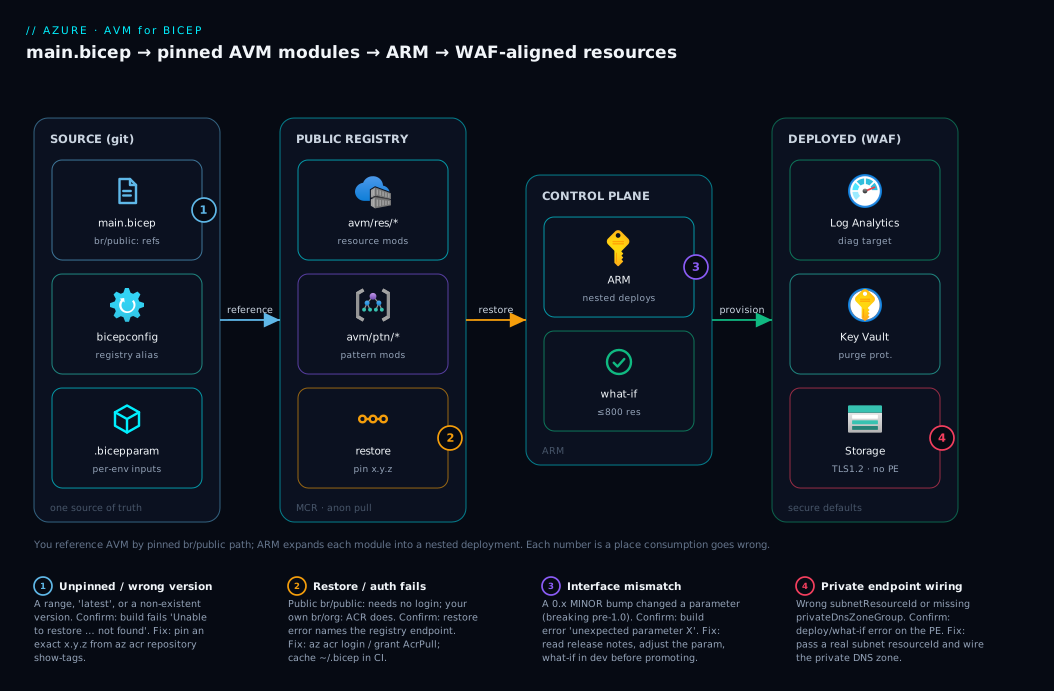
The diagram below is the picture this article builds toward, read left to right. On the far left is the source: your single main.bicep whose module lines reference AVM by pinned br/public: paths, plus a bicepconfig.json defining registry aliases and a .bicepparam per environment. That template points at the public registry (MCR) — the Microsoft endpoint br/public: resolves to — where the AVM resource modules (avm/res/...) and pattern modules (avm/ptn/...) live with their semantic versions. On first build, Bicep restores the exact pinned versions from MCR and caches them locally; this is the one hop that needs network and where a wrong path or non-existent version fails fast.
From there the flow reaches Azure Resource Manager, which expands each AVM module into a nested deployment and provisions the resources in dependency order — a Log Analytics workspace, a Key Vault and a storage account, each already WAF-aligned (TLS 1.2, public access off, diagnostics wired) because the defaults live inside the modules. The numbered badges mark the four places this goes wrong — an unpinned or non-existent version, a registry restore/auth failure, an interface mismatch after a version bump, and a private-endpoint wiring mistake — each mapped in the legend to how you confirm and fix it.
Real-world scenario
Meridian Health, a mid-sized health-tech company, ran twelve application teams against a shared Azure platform, each hand-authoring its own Bicep. The platform team’s quarterly security review kept surfacing the same findings: three storage accounts with public blob access still enabled, two Key Vaults without purge protection, five resources with no diagnostics wired to the central workspace, and a long tail of templates on an old storage API version that predated a hardening. None of it was malice — each gap was a copy-pasted block that had drifted, and with a dozen teams there was no single place to fix any of it.
The platform team adopted AVM over one quarter, starting with the three most-deployed resources — storage account, Key Vault and Log Analytics workspace. They built one internal wrapper module per resource that referenced the corresponding AVM module at a pinned version, hard-coded Meridian’s mandatory choices (every resource sends diagnostics to the central workspace; every prod storage account is ZRS; every vault has purge protection on), and exposed only the parameters teams legitimately varied (name, environment, SKU from an allowed list). They published those wrappers to the platform team’s private ACR under a br/meridian: alias, so teams referenced br/meridian:storage:1.0.0 and got AVM’s vetted implementation with Meridian’s opinions on top.
The numbers told the story. The next review found zero storage accounts with public access and zero vaults without purge protection — not because anyone audited harder, but because those settings now lived inside a versioned module no parameter file could override. Diagnostic coverage of the three types went from ~70% to 100%, because the wrapper wired the workspace automatically. When a new storage capability (an extended soft-delete window) landed, they bumped the underlying AVM version once, tested in dev, ran what-if across the consuming repos, and rolled it out by publishing br/meridian:storage:1.1.0 — one change, not twelve. The platform lead summarised it: “we stopped reviewing whether each team configured storage securely and started reviewing whether they pinned the right version.”
The one pain point: the first Key Vault bump was a minor version on a 0.x module that changed a parameter name — a breaking change inside a minor, exactly the pre-1.0 semver behaviour. Their dev deployment failed at build with a clear “unexpected parameter” error; they read the release notes, adjusted the one parameter, and promoted cleanly. That single failure taught the team the most important AVM discipline (covered in troubleshooting): treat every 0.x minor bump as potentially breaking and always what-if before promoting.
Advantages and disadvantages
AVM is a strong win for any estate past one repo, but it is not free — you trade hand-authoring control for a dependency on Microsoft’s modules and their versioning cadence.
| Advantages | Disadvantages |
|---|---|
| Secure, WAF-aligned defaults baked in — the safe value is the default | A dependency on Microsoft’s release cadence and decisions |
| One vetted implementation instead of N drifting copies | Pre-1.0 modules can break the interface on a minor bump |
| Standardised interface — learn once, drive any module | Less control than hand-authoring; opinions you may not share |
| Maintained centrally; you bump a version, not 12 templates | A wrong path / non-existent version fails the build until fixed |
| Composes cleanly (output → input) into your own patterns | Reading an AVM module’s source to debug is a real skill curve |
| Auto-documented, tested, owned — defensible in audit | Registry restore needs network/cache; CI must cache the modules |
| Free to consume; the public registry needs no login | Telemetry deployment surprises people (harmless, opt-out) |
When each matters: the advantages dominate the moment you have more than one team, repo or environment that must stay consistent and secure — most real organisations. The disadvantages bite mainly during upgrades (the 0.x-minor-can-break reality means you cannot bump blindly) and at the edges (when your shape differs from what a module exposes and you compose around it). For a one-off sandbox resource a three-line hand-written resource is still fine; reach for AVM when consistency, security posture and maintainability matter — which, past the first project, they always do.
Hands-on lab
This is the centrepiece. You will consume an AVM resource module two ways (portal and az CLI), compose three AVM modules into one template, deploy it, validate the WAF-aligned defaults are really there, override a default, and tear it down. Everything is free-tier-friendly — workspace, vault and storage cost effectively nothing at rest — and runs in Cloud Shell or any terminal with az. Do it once end to end and AVM stops being abstract.
Step 0 — Prerequisites and environment check
Confirm your tooling before you write a line. You need az 2.40.0+ (which bundles a recent Bicep CLI that can restore registry modules) and Contributor on a subscription or resource group.
az version                       # az >= 2.40.0
az bicep version                 # Bicep CLI present; if not: az bicep install
az account show -o table         # confirm the right subscription is active
Expected output: az version prints JSON with "azure-cli": "2.4x" or newer; az bicep version prints something like Bicep CLI version 0.3x.x; az account show shows your subscription and State: Enabled. If az bicep version errors, run az bicep install. If your az is below 2.40, upgrade it — older Bicep CLIs have weaker registry-restore behaviour.
Create a working folder and a resource group for the lab.
mkdir -p avm-lab && cd avm-lab
az group create --name rg-avm-lab --location eastus -o table
Expected output: a table row with Name: rg-avm-lab and ProvisioningState: Succeeded.
| Step 0 check | Command | Pass looks like |
|---|---|---|
| CLI version | az version |
azure-cli ≥ 2.40.0 |
| Bicep present | az bicep version |
a 0.3x version string |
| Right subscription | az account show -o table |
the intended sub, Enabled |
| RG created | az group create … |
ProvisioningState: Succeeded |
Step 1 — Find the module and confirm a real version
Before referencing anything, confirm the exact path and an existing version. The authoritative source is the AVM module index on the official site, but you can also list the published tags of a module straight from the registry — these are the versions you are allowed to pin:
# List published versions (tags) of the storage-account resource module in MCR.
az acr repository show-tags \
  --name mcr.microsoft.com \
  --repository bicep/avm/res/storage/storage-account \
  --orderby time_desc -o table
Expected output: a column of semantic-version tags, newest first (e.g. 0.9.1, 0.9.0, 0.8.0, …). Pick a real one — this lab uses 0.9.1 as an example; use a version the command actually returns, since the registry moves on over time. The habit this step builds: never invent a version, always confirm the path and a tag exist before referencing them (a wrong path fails the build; a non-existent version fails the restore).
Step 2 — Consume one AVM module (Bicep + az CLI)
Create storage.bicep referencing the AVM storage-account module by a pinned version. The whole point: you type the values that vary, AVM supplies the secure defaults.
// storage.bicep — one AVM resource module, pinned version
param location string = resourceGroup().location

module storage 'br/public:avm/res/storage/storage-account:0.9.1' = {
  name: 'deploy-storage'
  params: {
    name: 'stavmlab${uniqueString(resourceGroup().id)}'
    location: location
    skuName: 'Standard_LRS'
    kind: 'StorageV2'
    tags: { env: 'lab', purpose: 'avm-demo' }
  }
}

output storageId string = storage.outputs.resourceId
output storageName string = storage.outputs.name
First, build it — this triggers the registry restore (the first build downloads and caches the module). If the path or version is wrong, this is where it fails, fast, before any deployment:
az bicep build --file storage.bicep
Expected output: no errors, and a storage.json (transpiled ARM) appears beside storage.bicep. On first run you may see a one-time “Restoring…” message as Bicep pulls the module from MCR. If you get Unable to restore or not found, re-check the path and version from Step 1.
Now preview with what-if, then deploy:
az deployment group what-if \
  --resource-group rg-avm-lab \
  --template-file storage.bicep

az deployment group create \
  --resource-group rg-avm-lab \
  --template-file storage.bicep \
  --name avm-storage
Expected output: what-if lists a + Microsoft.Storage/storageAccounts create (plus the AVM telemetry nested deployment); create ends with "provisioningState": "Succeeded" and an outputs block containing your storageId and storageName.
| Step 2 check | Command | Pass looks like |
|---|---|---|
| Module restored & built | az bicep build --file storage.bicep |
no error; storage.json created |
| Preview shows one storage create | … what-if |
+ Microsoft.Storage/storageAccounts |
| Deploy succeeds | … create |
provisioningState: Succeeded |
| Outputs returned | (in the create output) | storageName, storageId present |
Step 3 — Consume the same module from the portal
The portal cannot consume a .bicep file with a registry reference directly, but it consumes the transpiled ARM JSON you just built. This is how a team that prefers a UI still benefits from AVM:
- In the portal search bar, type Deploy a custom template and open it.
- Choose Build your own template in the editor.
- Click Load file and select the
storage.jsonproduced byaz bicep buildin Step 2 (it already has the AVM module inlined as a nested deployment). - Click Save, then on the Custom deployment blade choose Subscription and Resource group
rg-avm-lab, set any exposed parameters, and click Review + create. - After validation passes, click Create and wait for Your deployment is complete.
Expected output: the deployment blade shows Deployment succeeded, with the storage account and the AVM nested deployment(s) listed under Deployment details. The key learning: AVM is consumed in the portal via the built ARM, because the portal has no concept of a Bicep registry — az bicep build is the bridge.
| Portal step | Where | Pass looks like |
|---|---|---|
| Open custom template | Search → Deploy a custom template | The editor blade opens |
| Load built JSON | Load file → storage.json |
Template populates |
| Target RG | Custom deployment blade | rg-avm-lab selected |
| Deploy | Review + create → Create | “Deployment succeeded” |
Step 4 — Compose three AVM modules into one template
Now the real value: compose a workspace, a vault and a storage account, wiring diagnostics from the latter two into the former by passing outputs into inputs. Create main.bicep:
// main.bicep — compose three AVM resource modules, wired by outputs
param location string = resourceGroup().location

module law 'br/public:avm/res/operational-insights/workspace:0.9.0' = {
  name: 'deploy-law'
  params: {
    name: 'law-avm-${uniqueString(resourceGroup().id)}'
    location: location
  }
}

module vault 'br/public:avm/res/key-vault/vault:0.11.0' = {
  name: 'deploy-vault'
  params: {
    name: 'kv-avm-${uniqueString(resourceGroup().id)}'
    location: location
    enableRbacAuthorization: true
    enablePurgeProtection: true
    diagnosticSettings: [
      { workspaceResourceId: law.outputs.resourceId }
    ]
  }
}

module storage 'br/public:avm/res/storage/storage-account:0.9.1' = {
  name: 'deploy-storage'
  params: {
    name: 'stavm${uniqueString(resourceGroup().id)}'
    location: location
    skuName: 'Standard_LRS'
    diagnosticSettings: [
      { workspaceResourceId: law.outputs.resourceId }
    ]
  }
}

output workspaceId string = law.outputs.resourceId
output vaultUri string = vault.outputs.uri
output storageName string = storage.outputs.name
Build, preview and deploy:
az bicep build --file main.bicep
az deployment group what-if --resource-group rg-avm-lab --template-file main.bicep
az deployment group create --resource-group rg-avm-lab \
  --template-file main.bicep --name avm-compose
Expected output: what-if shows three resource creates (workspace, vault, storage) plus the modules’ nested deployments; create ends Succeeded and returns workspaceId, vaultUri, storageName. Because the vault and storage diagnosticSettings reference law.outputs.resourceId, Bicep deploys the workspace first automatically — you wrote no dependsOn. (The three pins are illustrative; run the Step-1 tag command and pin versions that exist today.)
| Step 4 check | Command | Pass looks like |
|---|---|---|
| Composition builds | az bicep build --file main.bicep |
no error; main.json created |
| Preview shows 3 creates | … what-if |
workspace + vault + storage + lines |
| Deploy succeeds | … create |
Succeeded; three outputs returned |
| Order inferred | (no dependsOn written) |
workspace deploys before its consumers |
Step 5 — Validate the WAF-aligned defaults are really there
AVM’s promise is that the secure defaults are in the module. Prove it — query the deployed storage account and confirm TLS 1.2 and public-access-off were applied without you typing them:
ST=$(az deployment group show -g rg-avm-lab -n avm-compose \
  --query properties.outputs.storageName.value -o tsv)

az storage account show -g rg-avm-lab -n "$ST" \
  --query "{tls:minimumTlsVersion, publicBlob:allowBlobPublicAccess, https:supportsHttpsTrafficOnly}" -o table
Expected output: a table showing minimumTlsVersion: TLS1_2, allowBlobPublicAccess: False, supportsHttpsTrafficOnly: True — none of which you set in your template. That is the WAF-aligned default living inside the AVM module. Do the same sanity check on the vault’s purge protection:
KV=$(az keyvault list -g rg-avm-lab --query "[0].name" -o tsv)
az keyvault show -n "$KV" --query "properties.enablePurgeProtection" -o tsv   # → true
| Validation | Command | Pass value | Who set it |
|---|---|---|---|
| TLS minimum | az storage account show … minimumTlsVersion |
TLS1_2 |
AVM default |
| Public blob access | … allowBlobPublicAccess |
False |
AVM default |
| HTTPS-only | … supportsHttpsTrafficOnly |
True |
AVM default |
| Vault purge protection | az keyvault show … enablePurgeProtection |
true |
You (explicit) |
Step 6 — Override a default, then re-deploy
Defaults are overridable. Add an override to the storage module to prove the parameter is yours to set — for example, pin the access tier and add a tag, then redeploy and confirm the delta with what-if first:
// in main.bicep, extend the storage module params:
    accessTier: 'Cool'           // override: default is usually Hot
    tags: { env: 'lab', tier: 'cool' }
az deployment group what-if --resource-group rg-avm-lab --template-file main.bicep
Expected output: what-if shows a ~ Microsoft.Storage/storageAccounts modify line changing accessTier from Hot to Cool (and the new tag) — a precise, reviewable delta. Apply it with create again and re-run the Step-5 validation to confirm only what you intended changed. The lesson: every AVM default is a parameter, and what-if shows you exactly what an override moves before you commit.
Step 7 — Tear down
Delete the resource group to remove everything in one shot (storage, vault, workspace and all nested deployments). The vault has purge protection on from Step 4, so it is soft-deleted and retained — that is the protection working as designed; it incurs no cost while soft-deleted and ages out per the retention window.
az group delete --name rg-avm-lab --yes --no-wait
Expected output: the command returns immediately (--no-wait); the RG enters Deleting. Confirm it is gone with az group exists --name rg-avm-lab (eventually false).
| Teardown step | Command | Pass looks like |
|---|---|---|
| Delete the RG | az group delete … --yes --no-wait |
returns immediately; RG Deleting |
| Confirm removal | az group exists --name rg-avm-lab |
false once complete |
| Note the soft-deleted vault | az keyvault list-deleted -o table |
the vault listed (purge-protected) |
If you must reclaim the vault name before the retention window ends and purge protection is off, you would az keyvault purge; with purge protection on (as here) you cannot purge — it must age out, which is the deliberate safety behaviour, not a bug.
Common mistakes & troubleshooting
These are the failures every team hits when adopting AVM — symptom, root cause, how to confirm, and the fix. Most surface either at build/restore time (fast, before deploy) or as an ARM error at deploy time (slower).
| # | Symptom | Root cause | Confirm with | Fix |
|---|---|---|---|---|
| 1 | Unable to restore … not found at build |
Wrong path or a version that doesn’t exist | az acr repository show-tags … --repository bicep/avm/res/<svc>/<res> |
Use the exact path + a real version from the tag list |
| 2 | Build wants a version but you wrote a range/latest |
Bicep registry refs require an exact version | The module line has no concrete :x.y.z |
Pin an exact MAJOR.MINOR.PATCH |
| 3 | unexpected parameter 'X' after a version bump |
A 0.x minor bump changed the interface (breaking) |
Compare your params to the new module README/changelog |
Read release notes; rename/adjust the parameter |
| 4 | The Resource … was not found for a referenced output |
A composed module’s output name changed or you typo’d it | az bicep build error names the missing output |
Use the exact output (resourceId, uri, …) from the module README |
| 5 | Storage/vault name invalid | Name violates the resource’s length/charset rule | Error: name … is not valid; check the rule |
Storage 3–24 lowercase alnum; trim prefix + uniqueString |
| 6 | Private endpoint deploy fails | Wrong subnetResourceId, or missing private DNS zone wiring |
what-if/deploy error on the PE; check the subnet exists |
Pass a real subnet resourceId; wire the privateDnsZoneGroup |
| 7 | First CI build is slow / flaky on restore | The Bicep module cache is not persisted between CI runs | CI logs show “Restoring” every run | Cache ~/.bicep (module cache) in the pipeline |
| 8 | Unexpected pid-… deployment in history |
AVM telemetry nested deployment | az deployment group list shows a pid-… name |
Harmless; set enableTelemetry: false to suppress |
| 9 | MSI/auth error restoring from a private registry |
Consuming your own ACR module without login/RBAC | Restore error mentions the ACR endpoint | az acr login / grant AcrPull; public br/public: needs none |
| 10 | Override “doesn’t apply” | You passed a parameter the module version doesn’t expose | The value is unchanged after deploy; not in module README | Confirm the parameter exists in that version; bump if needed |
| 11 | what-if shows a giant replace on a no-op bump |
A patch bump changed a property AVM now manages | Read the ~/-/+ lines in what-if |
Verify it’s intended; some bumps re-baseline a property |
| 12 | Deployment exceeds 800 resources | A pattern module (or your big composition) created >800 | Failed deployment’s resource count | Split into separate module deployments (each = fresh 800) |
The single most important real-world failure is #3 — a breaking change inside a 0.x minor version. Pre-1.0, semantic versioning permits the interface to change on a minor bump, and AVM uses that latitude. The discipline that prevents the 2 a.m. surprise: pin exact versions, bump one module at a time in a pull request, read the module’s release notes, and run what-if in dev before promoting to test/prod. The reference rules worth memorising:
| AVM consumption rule | Value / behaviour | Why |
|---|---|---|
| Version reference | Exact MAJOR.MINOR.PATCH, no ranges |
Bicep registry refs forbid floating |
Pre-1.0 minor bumps |
May be breaking | Semver allows interface change pre-1.0 |
1.0+ bumps |
Only MAJOR breaks the interface |
Normal semver applies after GA |
| Public registry auth | None required (anonymous pull) | br/public: is anonymously readable |
| Private registry auth | AcrPull / az acr login |
Your own ACR is access-controlled |
| Resources per deployment | 800 (incl. module-expanded resources) | ARM limit; split into modules |
| Telemetry | On by default, opt-out per module | Adoption measurement; harmless |
Best practices
- Always pin an exact module version. Never reference a range or “latest” — Bicep forbids it. Centralise the versions (a comment block or a
versionsvar) so an estate-wide bump is one reviewable change. - Treat every
0.xminor bump as potentially breaking. Read the release notes, test in dev, and runwhat-ifbefore promoting. Only from1.0.0can you trust that minors are non-breaking. - Prefer resource modules and compose them yourself until a pattern module matches your architecture closely. Composing three or four is clean and teaches you AVM; fighting a pattern’s opinions is not.
- Wrap AVM modules in your own module when your organisation has opinions AVM does not encode — hard-code your choices, expose only what varies, and get AVM’s implementation under your policy.
- Run
what-ifafter every version change, not just the first deploy. A one-character version edit can change properties across every consuming resource. - Validate the WAF defaults landed once per resource type with an
az … showquery (Step 5). Trust the module, but verify — especially after a bump. - Cache the Bicep module cache (
~/.bicep) in CI so you do not re-restore every AVM module on every build; it speeds CI and reduces flakiness. - Override by passing parameters, never by forking. For a child resource the module manages, use its array parameter (
secrets,containers); for something outside its scope, compose a sibling resource via outputs. - File issues instead of forking. If a module lacks a parameter, open an AVM GitHub issue rather than maintaining a drifting fork. For a private variant, publish your own module to your ACR.
- Confirm the path and a real version before referencing a new module (Step 1) — a wrong path or non-existent version is the most common first-time failure.
- Mind the 800-resource ceiling with large compositions and pattern modules. If you hit it, split into separate module deployments — each is a fresh budget.
Security notes
AVM is, before anything else, a security control: it moves the secure default from “something each engineer must remember to type” to “something baked into a versioned, owned module.” The Meridian regression — public blob access slipping back via a stale copied block — cannot recur when allowBlobPublicAccess: false lives inside the AVM module rather than a hand-written block a parameter file can override.
| Concern | Risk with hand-authored Bicep | The AVM fix |
|---|---|---|
| Insecure defaults drift | A stale copied block re-enables public access / old TLS | WAF-aligned defaults live inside the module |
| Secrets in templates | Hard-coded secrets; secrets in outputs | Use @secure() params; never output a secret; vault getSecret() |
| Inconsistent RBAC/diagnostics | Often skipped; re-discovered in prod | First-class roleAssignments / diagnosticSettings interface |
| Private networking forgotten | Public endpoint left on in one of N templates | privateEndpoints interface; wrap to make it mandatory |
| Supply-chain trust | Copy-pasted code of unknown provenance | Spec-validated, tested, owned, versioned modules |
| Over-broad deploy identity | Pipeline SPN with Owner everywhere | Scope deployments to the RG; least-privilege the identity |
| Unpinned dependency | “Latest” silently changes infra | Exact version pin; bump is a reviewed PR |
Three specifics. First, the deployment identity: AVM does not change who deploys — a pipeline still needs an identity with rights at the target scope, so grant the minimum (Contributor on the target RG, not Owner on the subscription); see Managed Identity: System vs User-Assigned Patterns. Second, defence in depth: AVM defaults encourage the secure posture, but an Azure Policy with a deny effect on public blob access is the platform backstop that catches anything a deliberately-overridden default would let through — template plus policy. Third, private modules: an ACR hosting your own modules is an access-controlled supply-chain asset — restrict AcrPull and treat it with the rigor in Azure Container Registry: Secure Supply Chain.
Cost & sizing
AVM itself has no cost — the modules are authoring artefacts from a free public registry, and ARM deployments are free. The bill comes entirely from the resources the modules deploy, which is where AVM’s interface helps: a parameter change right-sizes SKU, tier and redundancy per environment in one line, and an if-gated module keeps prod-only resources out of dev.
| Cost driver | Where it shows up | How AVM helps | Rough figure |
|---|---|---|---|
| Consuming AVM | The registry pull | Free; public, anonymous | ₹0 / $0 |
| Resource SKU/tier per env | The deployed resource | Pass the SKU parameter per env | Storage LRS vs ZRS: ZRS ~25% more |
| Diagnostics ingestion | Log Analytics ingestion + retention | The diagnosticSettings interface wires it; you size retention |
~₹230–300/GB ingested (~$2.76/GB) |
| Purge-protected vault | Soft-deleted vault retained | No charge while soft-deleted | ₹0 at rest; ages out per retention |
| Private endpoints | Per-PE hourly + data | privateEndpoints interface, condition for prod only |
~₹600–800/mo (~$7–10) each |
| Pattern-module solutions | The whole architecture it deploys | One reference; cost is the sum of resources | Sum of the resources it stamps |
| CI restore | Network egress (negligible) | Cache the module cache | ~₹0; just build time |
Right-sizing rule of thumb: let the parameter file carry the cost knobs. Dev’s .bicepparam passes the cheapest SKUs (LRS, no private endpoint, short retention) and prod’s the hardened ones (ZRS, private endpoints, longer retention) — the difference is reviewed data, not forked code. The largest controllable line item is usually Log Analytics ingestion, which the diagnosticSettings interface wires but does not size for you — set sensible retention and skip verbose categories you never query. For the storage SKU economics the parameter chooses between, Azure Storage Redundancy: LRS, ZRS, GRS, RA-GRS Explained breaks down the per-GB rates.
Interview & exam questions
These map to AZ-104 (Azure Administrator — IaC/Bicep deployment objectives) and AZ-204 (Developer — provisioning with Bicep). Each is a question and a model answer.
1. What is Azure Verified Modules and why use it? AVM is Microsoft’s single official library of pre-built, WAF-aligned Bicep and Terraform modules consumed from a public registry by version. It gives you secure defaults baked in, one vetted implementation instead of drifting copies, and central maintenance — you bump a version rather than editing every template.
2. What is the difference between a resource module and a pattern module? A resource module (avm/res/...) deploys one WAF-aligned logical resource and its tightly-coupled children (e.g. avm/res/key-vault/vault). A pattern module (avm/ptn/...) deploys a multi-resource solution by composing resource modules internally (e.g. a hub-spoke network). Use resource modules to deploy one thing right; use a pattern module to deploy a whole known architecture.
3. How do you reference an AVM module in Bicep, and why must you pin a version? With a module declaration whose source is br/public:avm/res/<svc>/<res>:<MAJOR.MINOR.PATCH>. You must pin an exact version because Bicep registry references forbid ranges/“latest”, and pinning stops a git pull from silently changing what your infrastructure deploys — you upgrade deliberately.
4. Why is a 0.x minor version bump potentially dangerous? Under semantic versioning, before 1.0.0 the interface is allowed to change on a minor bump, and AVM uses that latitude. So a 0.8.0 → 0.9.0 bump can be breaking — you must read the release notes, test in dev, and run what-if before promoting, rather than assuming minors are safe.
5. What is the AVM common interface? A standardised set of optional parameters that appear with the same name and shape on (almost) every resource module — tags, lock, roleAssignments, diagnosticSettings, managedIdentities, privateEndpoints, enableTelemetry — plus standardised outputs like resourceId and name. Learning it once lets you drive any AVM module.
6. How do you compose AVM modules, and how is deployment order determined? Reference several modules in one template and pass one module’s outputs.resourceId (or other output) into another’s input parameter. Bicep infers the dependency order from those references — you do not write dependsOn. This is exactly what a pattern module does internally.
7. Does consuming public AVM modules require authentication? No. The public AVM modules live in the Microsoft Container Registry and are anonymously pullable via the br/public: alias — no az acr login needed. Authentication (AcrPull) is only required when you consume your own modules from a private ACR.
8. What is AVM telemetry and how do you disable it? By default each AVM module emits a small additional nested deployment (a pid-… name) so Microsoft can measure adoption; it deploys nothing real and costs nothing. You opt out per module with enableTelemetry: false.
9. How do you consume an AVM module from the portal, which has no registry concept? Build the Bicep to ARM JSON with az bicep build (which inlines the AVM module as a nested deployment), then use Deploy a custom template → Build your own template → Load file with the produced .json. The portal consumes the built ARM, not the .bicep.
10. How do you override an AVM default, and when should you fork instead? Pass the corresponding parameter — every AVM default is exposed as one. You should essentially never fork: for a managed child resource use the module’s array parameter, for something outside its scope compose a sibling resource via outputs, and if a capability is missing, file an AVM issue or publish your own wrapper module.
11. What governs AVM modules and why does that matter for trust? A published specification of mandatory requirements (consistent interface, WAF alignment, semantic versioning, automated testing, named ownership, auto-generated docs). Because every module is spec-validated, tested and owned, you can defensibly trust them in production rather than auditing copy-pasted blocks.
12. Your AVM template fails with “exceeded the limit of 800 resources.” What happened, and the fix? A large composition or pattern module expanded past 800 resources, and ARM caps a single deployment at 800. Split the work across separate module deployments — each module is its own nested deployment with a fresh 800-resource budget.
Quick check
- You need a storage account that already has TLS 1.2 and public blob access disabled without typing those settings. What do you reference, and what prefix and version discipline applies?
- A reviewer asks why
avm/res/key-vault/vaultis a resource module but a hub-spoke network is a pattern module. What is the distinction? - You bumped an AVM module from
0.9.0to0.10.0and the build now errors with “unexpected parameter.” Why is a minor bump allowed to break, and what is the safe upgrade routine? - You composed three AVM modules and wrote no
dependsOn, yet the workspace deploys before the vault. How did Bicep know the order? - Consuming
br/public:needs no login, but consumingbr/contoso:mymodule:1.0.0fails with an auth error. Why, and what is the fix?
Answers
- Reference the AVM storage-account resource module,
br/public:avm/res/storage/storage-account, pinned to an exactMAJOR.MINOR.PATCHversion (no ranges/“latest”). The secure defaults live inside the module, so you only pass the values that vary. - A resource module deploys one logical resource and its tightly-coupled children; a pattern module deploys a multi-resource solution by composing several resource modules internally. The Key Vault is one resource; a hub-spoke network is a whole architecture.
- Before
1.0.0, semantic versioning allows the interface to change on a minor bump, and AVM uses that. The safe routine: read the release notes, adjust the changed parameter, test in dev, runwhat-if, then promote dev → test → prod one module at a time in a reviewed PR. - Bicep inferred the dependency from the data flow: the vault’s
diagnosticSettingsreferenceslaw.outputs.resourceId, so the workspace must exist first. References between modules create the order automatically — nodependsOnneeded. br/public:points at the anonymously-pullable public Microsoft Container Registry;br/contoso:is your own access-controlled ACR. Fix it by authenticating —az acr login --name contoso(or granting the deploy identityAcrPull) before the build.
Glossary
- Azure Verified Modules (AVM) — Microsoft’s single official library of pre-built, WAF-aligned Bicep and Terraform modules, consumed from a public registry by version.
- Resource module (
avm/res) — an AVM module that deploys exactly one WAF-aligned logical resource and its tightly-coupled children. - Pattern module (
avm/ptn) — an AVM module that deploys a multi-resource solution by composing resource modules internally. (A smallavm/utlutility category holds helpers.) br/public:— the built-in Bicep alias that resolves to the public Microsoft Container Registry where AVM modules are hosted; needs no authentication. On first build Bicep restores (downloads and caches) the module locally.- Pinned version — the exact
MAJOR.MINOR.PATCHnamed after the colon in a module reference; required, because Bicep forbids floating/“latest”. - Common interface — the standardised optional parameters (
tags,lock,roleAssignments,diagnosticSettings,managedIdentities,privateEndpoints) and outputs that recur identically across AVM modules. - AVM specification — the published set of mandatory and recommended requirements every AVM module must satisfy before publication; the source of the consistent interface and the WAF-aligned (Well-Architected) defaults.
- Telemetry deployment — the small opt-out nested deployment (a
pid-…name) AVM emits per module so Microsoft can measure adoption; deploys nothing real. - Semantic versioning (semver) —
MAJOR.MINOR.PATCH; pre-1.0.0, minor bumps may break the interface; from1.0.0, onlyMAJORbumps do. what-if—az deployment group what-if; previews the exact create/modify/delete delta a deployment (or a version bump) would produce before ARM acts.- Wrapper module — your own local or ACR-published module that references AVM modules underneath and encodes your organisation’s opinions on top.
- Private ACR registry — an access-controlled Azure Container Registry hosting your published modules under a
br/<yourorg>:alias; requiresAcrPull.
Next steps
- Solidify the Bicep constructs AVM is built on: Bicep Modules, Loops and Conditions: Authoring Reusable, DRY Templates.
- Publish your own wrapper modules the secure way, and understand the registry that hosts them: Azure Container Registry: Secure Supply Chain.
- Enforce the secure posture AVM defaults encourage, at the platform level: Azure Policy Effects Explained: Deny, Audit, Modify, DeployIfNotExists.
- Keep secrets out of your AVM templates the right way: Azure Key Vault: Secrets, Keys and Certificates.
- Compare the Bicep registry workflow with the Terraform-on-Azure approach and its module/state model: Terraform on Azure: Remote State, Blob Backend and Locking.