You shipped your first main.bicep, it deployed cleanly, and then reality arrived: you need the same storage account in three regions, four environments, and with a private endpoint in prod but not in dev. The naive answer — copy the resource block, change a name, repeat — is how a 40-line file becomes 1,200 lines of near-identical blocks that drift apart the moment someone edits one and forgets the others. That copy-paste sprawl is the exact problem modules, loops and conditions exist to kill. They are the three constructs that move you from “Bicep that works once” to DRY (Don’t Repeat Yourself) infrastructure you author once and reuse everywhere.
This is a step-by-step implementation guide, and the hands-on lab is its spine. A module is just a Bicep file you call from another Bicep file, passing parameters in and reading outputs back — the unit of reuse, the thing you write once and deploy in dev, test and prod with different inputs. A loop (the for expression) stamps out N copies of a resource or module from an array or a count, so “five subnets” or “one app per region” is one block, not five. A condition (the if keyword) gates whether a resource deploys at all, so the same template gives you a lean dev footprint and a hardened prod one without forking the code. Master these three and a single, reviewed, version-controlled template becomes your entire estate.
By the end you will have refactored a flat template into a parameterised module, deployed a configurable number of resources from a loop, gated a resource behind a boolean, wired module outputs into downstream resources, and run the full author → validate → deploy → verify → teardown loop yourself — in the portal, with the az CLI, and as committed Bicep. This is an Intermediate guide: it assumes you have already shipped one Bicep file (if not, start with Deploy Your First Bicep File From Scratch), and it takes you to the point where one template, not one-file-per-thing, is how you build on Azure.
What problem this solves
A flat Bicep template scales linearly with your estate and then collapses under its own weight. Three storage accounts means three nearly identical resource blocks; add a network rule and you edit it in three places, miss one, and now account number two allows public blob access because someone was in a hurry. Multiply that across virtual networks, subnets, app services, and the four environments every real workload needs, and you are maintaining thousands of lines where a change is a search-and-replace prayer. This is configuration drift at the source-code level, and it is the root of most “it works in dev but not in prod” incidents — the environments diverged because nothing forced them to stay the same.
What breaks without modules, loops and conditions: every new region or environment is a copy-paste-and-edit job, so they silently differ; a reviewer cannot tell a real change from boilerplate noise in a 1,200-line diff; and there is no clean way to say “prod gets a private endpoint and zone redundancy, dev does not” except forking the file into main-dev.bicep and main-prod.bicep that then rot independently. Teams end up with per-environment templates that are 90% identical and 10% subtly, dangerously different.
Who hits this: anyone past their first IaC file. Solo developers who cannot keep three environments in sync; platform teams building landing zones where the same network, policy and identity scaffolding repeats across dozens of subscriptions; anyone studying for AZ-104 or AZ-204, both of which test modular Bicep, loops and conditional deployment. The fix is not more files — it is fewer, parameterised files: a module you write once, a loop that stamps it N times, and a condition that turns parts of it on or off per environment. One source of truth, deployed many ways.
Learning objectives
By the end of this article you can:
- Explain what a Bicep module is, when to extract one, and how parameters flow in and outputs flow out across the module boundary.
- Author a reusable module file, call it from a parent template, and pass values both ways with
moduledeclarations and theoutputsblock. - Deploy N resources or modules from an array or count loop using the
forexpression, including loops over object arrays and over a dictionary withitems(). - Gate a resource or module on a condition with the
ifkeyword, and combine conditions with loops to deploy “the right subset for this environment”. - Use loop indices,
range(), and the@batchSize()decorator to control naming and deployment concurrency. - Reference a resource or module created inside a loop from elsewhere (the indexed-access and collection-output patterns) without hitting the “symbolic name in a loop” errors.
- Ship one parameterised template to dev, test and prod with parameter files (
.bicepparam), and validate every step withwhat-if,azCLI and the portal. - Diagnose the loop/module/condition errors every author hits —
BCP034,BCP120, scope mismatches, nested-loop limits and the 800-resource-per-deployment ceiling — and fix them.
Prerequisites & where this fits
You should already be able to author a small main.bicep with parameters, variables, a resource and an output, transpile it with bicep build, preview with what-if, deploy it with az deployment group create, and tear it down. If any of that is shaky, work through Deploy Your First Bicep File From Scratch first — this guide assumes that loop is muscle memory and builds the reuse layer on top. You also need the Azure CLI (az) version 2.20.0 or later (which bundles the Bicep CLI) or Cloud Shell in the portal, and Contributor on a resource group or subscription to deploy into.
It helps to understand the resource hierarchy — that resources live in a resource group, which lives in a subscription — because modules can target different scopes (you can call a module that deploys into another resource group or even another subscription). If that is fuzzy, skim Azure Resource Hierarchy Explained. Two adjacent skills pair tightly with this one: storing secrets out of your templates with Azure Key Vault: Secrets, Keys and Certificates, and the cloud-agnostic alternative, Terraform on Azure: Remote State, Blob Backend and Locking, whose count, for_each and module blocks are the direct analogues of what you learn here.
Where this sits: modules, loops and conditions are the composition layer of Bicep authoring — one rung above writing a single file, one rung below full pipeline-driven landing zones. Here is how the moving parts relate before we go deeper.
| Construct | What it does | Bicep keyword/syntax | The repetition it removes |
|---|---|---|---|
| Module | Calls another Bicep file as a unit | module name 'path.bicep' = { … } |
Copy-pasting the same resource group of blocks |
| Loop (array) | Deploys one item per array element | [for x in array: { … }] |
N near-identical resource blocks |
| Loop (count) | Deploys a fixed number of copies | [for i in range(0, n): { … }] |
“Make me 3 of these” |
| Condition | Deploys a resource only if true | resource r '…' = if (cond) { … } |
Forking into per-environment files |
| Parameter file | Supplies inputs per environment | .bicepparam / --parameters |
Hard-coded, environment-specific values |
| Output | Returns a value from a module/loop | output x type = … |
Hand-copying IDs between deployments |
Core concepts
Five mental models make every later step obvious.
A module is a Bicep file you call like a function. Any .bicep file can be a module: its parameters are its inputs, its outputs are its return values, and the resources it declares are its body. A parent template uses a module declaration — module stg 'modules/storage.bicep' = { name: 'stgDeploy', params: { … } } — to invoke it. Under the hood, each module becomes a nested deployment (Microsoft.Resources/deployments) in the transpiled ARM, which is why a module gets its own name (the deployment name) and shows up as a separate deployment in the portal. You write the module once and call it from dev, test and prod templates with different params. That is the entire unit of reuse.
A loop is an expression that produces a collection of resources. The for expression — [for item in array: { … }] — tells ARM “create one of these for each element”. You loop over an array (objects or strings), over an integer range with range(start, count), or over a dictionary’s entries with items(). The loop variable is in scope inside the body, and you can also capture the index with [for (item, i) in array: …]. The result is that “five subnets” or “one web app per region” is one block whose length is data-driven — change the array, change how many you get, no code edit.
A condition decides whether a resource exists. Append = if (<boolean>) to a resource or module — resource pe '…' = if (deployPrivateEndpoint) { … } — and ARM deploys it only when the expression is true. The same template then produces a lean dev footprint (no private endpoint, single instance, cheap SKU) and a hardened prod one (private endpoint on, zone-redundant, premium SKU) purely from a parameter, with no forked files. Conditions combine with loops: an if inside a loop body filters which iterations actually deploy.
Names must be unique, and ARM computes them, not you. Two resources of the same type in the same scope cannot share a name, so anything inside a loop must derive a unique name from the loop variable or index — name: 'snet-${subnet.name}' or name: 'stg${i}${uniqueString(resourceGroup().id)}'. The same applies to module deployment names: each iteration of a module loop needs a distinct name, or the second nested deployment overwrites the first. Forgetting this is the single most common loop bug, and it surfaces as a confusing “resource already exists” or a silently missing resource.
Everything resolves at deploy time, against ARM’s limits. Bicep is declarative: you describe the destination, ARM figures out the order and dependencies (it reads your references and builds the graph automatically — you almost never write dependsOn). But ARM has hard ceilings that loops make easy to hit: 800 resources per deployment, 256 parameters / 256 variables / 256 outputs per template, and 64 levels of nested-template (module) depth. A loop that stamps 900 resources fails the whole deployment; the fix is to split across module deployments, each of which is its own 800-resource budget.
The vocabulary in one table
Pin down every moving part before the deep sections. The glossary repeats these for lookup; this is the mental model side by side.
| Concept | One-line definition | Where it lives | Why it matters |
|---|---|---|---|
| Module | A Bicep file invoked from another | modules/*.bicep |
The unit of reuse; a nested deployment |
| Module deployment name | The name of a module call |
Parent’s module block |
Must be unique per call / loop iteration |
| Parameter | A typed input to a template/module | param declaration |
How you vary behaviour per environment |
| Output | A typed return value | output declaration |
Passes IDs/values to downstream resources |
for expression |
Produces a collection of resources | [for … : { }] |
Removes N copy-pasted blocks |
| Loop index | The 0-based position in the loop | [for (x, i) in …] |
Unique names; “first one is special” logic |
range(start, count) |
An integer array for count loops | Built-in function | “Make me N of these” |
items() |
Turns an object into key/value array | Built-in function | Loop over a dictionary/map |
| Condition | if (bool) on a resource/module |
After the = |
Deploys it only when true |
@batchSize(n) |
Deploy loop iterations n-at-a-time | Decorator on the loop | Serialise/throttle dependent or rate-limited resources |
.bicepparam |
A typed parameter file | *.bicepparam |
Per-environment inputs, in git |
| Scope | The RG/sub/MG a module targets | scope: on the module |
Deploy cross-RG / cross-subscription |
Modules: the unit of reuse
A module is the answer to “I keep writing the same handful of resources together.” You extract that cluster — a storage account plus its blob service plus a container, say — into its own file, expose the parts that vary as parameters, and call it wherever you need that cluster. The parent never repeats the body; it just calls the module with different inputs.
Anatomy of a module call
A module declaration has four parts, and three of them are mandatory.
| Part | Syntax | Required? | Notes |
|---|---|---|---|
| Symbolic name | module stg … |
Yes | The Bicep-local handle you reference outputs through |
| Path | 'modules/storage.bicep' |
Yes | Relative path, a registry ref (br/…), or a template spec |
| Deployment name | name: 'stgDeploy' |
Yes | The nested-deployment name in ARM; unique per call |
| Params | params: { … } |
If the module has required params | Must supply every non-defaulted parameter |
| Scope | scope: resourceGroup('other-rg') |
No | Target a different RG/sub/MG than the parent |
| Condition | = if (cond) { … } |
No | Deploy the whole module only when true |
Here is a minimal reusable storage module. Note what is parameterised (everything that varies) and what is fixed (the safe defaults you want everywhere).
// modules/storage.bicep — a reusable storage account
@description('Globally-unique storage account name (3-24 lowercase alphanumeric).')
@minLength(3)
@maxLength(24)
param name string

@description('Azure region. Defaults to the parent resource group location.')
param location string = resourceGroup().location

@description('Redundancy SKU.')
@allowed([ 'Standard_LRS', 'Standard_ZRS', 'Standard_GRS' ])
param sku string = 'Standard_LRS'

@description('Block all public blob access (recommended true).')
param allowBlobPublicAccess bool = false

resource sa 'Microsoft.Storage/storageAccounts@2023-05-01' = {
  name: name
  location: location
  sku: { name: sku }
  kind: 'StorageV2'
  properties: {
    minimumTlsVersion: 'TLS1_2'
    allowBlobPublicAccess: allowBlobPublicAccess
    supportsHttpsTrafficOnly: true
  }
}

output id string = sa.id
output name string = sa.name
output primaryBlobEndpoint string = sa.properties.primaryEndpoints.blob
And the parent that calls it twice with different inputs — no copy-pasted resource block:
// main.bicep
param location string = resourceGroup().location

module dataStg 'modules/storage.bicep' = {
  name: 'data-storage'
  params: {
    name: 'stdata${uniqueString(resourceGroup().id)}'
    location: location
    sku: 'Standard_ZRS'
  }
}

module logsStg 'modules/storage.bicep' = {
  name: 'logs-storage'
  params: {
    name: 'stlogs${uniqueString(resourceGroup().id)}'
    location: location
    // sku omitted → uses the module default Standard_LRS
  }
}

output dataAccountId string = dataStg.outputs.id
Passing values in and out
The module boundary is strict and that is the point: a parent can only influence a module through its parameters, and only read back through its outputs. You reference an output as <symbolicName>.outputs.<outputName> — dataStg.outputs.id. This is also how you chain modules: feed one module’s output into the next module’s params, and ARM infers the dependency and orders them correctly. Never reach into a module’s internal resources from the parent — if the parent needs a value, the module must output it.
| Direction | How | Example | Gotcha |
|---|---|---|---|
| Parent → module | params: { … } |
params: { name: 'stg1' } |
Must supply every required (non-defaulted) param |
| Module → parent | output x type = … |
output id string = sa.id |
Outputs evaluate after the module deploys |
| Module → module | output of A into params of B | params: { stgId: a.outputs.id } |
Creates an implicit dependency; no dependsOn needed |
| Secret out of a module | reference a Key Vault getSecret() |
kv.getSecret('dbPassword') |
Never output a raw secret — it lands in deployment history in plain text |
That last row matters: deployment outputs are stored in ARM deployment history and are readable by anyone with read access to the resource group. Outputting a connection string or password leaks it. Pass secrets via the getSecret() function on an existing Key Vault reference, or via a secure parameter, never as an output.
Module sources: local, registry, or template spec
A module path can point at three things, and which you use depends on how widely the module is shared.
| Source | Path syntax | When to use | Versioning |
|---|---|---|---|
| Local file | 'modules/storage.bicep' |
Within one repo/solution | Git history of the file |
| Bicep registry (ACR) | 'br/MyReg:storage:1.2.0' |
Shared across many repos/teams | Immutable tags in the registry |
| Template spec | 'ts/sub:rg:storageSpec:1.0' |
Versioned, governed catalog in Azure | Versions stored in the spec resource |
| Public registry | 'br/public:avm/res/storage/storage-account:0.9.0' |
Microsoft-maintained Azure Verified Modules | Published semantic versions |
For a single repo, local files are correct and simplest. The moment two repos need the same module, publish it to a private Bicep registry in Azure Container Registry (az bicep publish) so consumers pin a version instead of copying the file — that is how you stop the same module from drifting across teams.
Loops: deploying N from one block
A loop turns “I need several of these” into a single, data-driven block. The shape is [for <item> in <collection>: { <resource body> }], and it works on resources, modules, properties (like an array of subnets inside a VNet), variables and outputs.
The four loop forms
| Form | Syntax | Loops over | Use when |
|---|---|---|---|
| Array of objects | [for s in subnets: { … s.name … }] |
A list of config objects | Each item has several distinct properties |
| Array of strings | [for name in names: { … name … }] |
A simple list | Only the name/one value varies |
| Integer count | [for i in range(0, n): { … i … }] |
range(start, count) |
“Make exactly N copies” |
| Dictionary | [for kv in items(map): { … kv.key … kv.value … }] |
items(object) |
Config is a key→value map |
An array-of-objects loop, the workhorse, stamping subnets into a VNet — the loop is on a property, not a top-level resource:
param subnets array = [
  { name: 'web',  prefix: '10.10.1.0/24' }
  { name: 'app',  prefix: '10.10.2.0/24' }
  { name: 'data', prefix: '10.10.3.0/24' }
]

resource vnet 'Microsoft.Network/virtualNetworks@2023-11-01' = {
  name: 'vnet-app'
  location: resourceGroup().location
  properties: {
    addressSpace: { addressPrefixes: [ '10.10.0.0/16' ] }
    subnets: [ for s in subnets: {
      name: s.name
      properties: { addressPrefix: s.prefix }
    } ]
  }
}
A count loop with range(), creating N storage accounts where the index guarantees a unique name:
param accountCount int = 3

resource accounts 'Microsoft.Storage/storageAccounts@2023-05-01' = [ for i in range(0, accountCount): {
  name: 'stg${i}${uniqueString(resourceGroup().id)}'
  location: resourceGroup().location
  sku: { name: 'Standard_LRS' }
  kind: 'StorageV2'
  properties: { minimumTlsVersion: 'TLS1_2', allowBlobPublicAccess: false }
} ]
Capturing the index
Add (item, i) to get the 0-based index alongside the value. The index is essential for unique naming and for “the first one is special” logic.
param regions array = [ 'eastus', 'westeurope', 'southeastasia' ]

module sites 'modules/webapp.bicep' = [ for (region, i) in regions: {
  name: 'site-${region}'           // unique module deployment name per iteration
  params: {
    name: 'app-${region}-${i}'
    location: region
    isPrimary: (i == 0)            // first region is primary
  }
} ]
| Built-in | Returns | Example | Note |
|---|---|---|---|
range(start, count) |
Integer array [start … start+count-1] |
range(0, 3) → [0,1,2] |
count is a length, not an end index |
length(array) |
Element count | range(0, length(items)) |
Loop a parallel array by index |
items(object) |
Array of { key, value } |
items({ a: 1, b: 2 }) |
Sorted by key; loop a map |
(item, index) |
Loop var + 0-based index | [for (x, i) in arr: …] |
Index for naming and conditionals |
Controlling concurrency with @batchSize
By default ARM deploys all loop iterations in parallel. That is fast and usually right, but sometimes wrong: when iterations depend on each other (sequential resources), when the target service rate-limits creates, or when you want a controlled rollout. The @batchSize(n) decorator deploys n iterations at a time, waiting for each batch before the next.
@batchSize(2)   // deploy 2 at a time, not all at once
resource accounts 'Microsoft.Storage/storageAccounts@2023-05-01' = [ for i in range(0, 6): {
  name: 'stg${i}${uniqueString(resourceGroup().id)}'
  location: resourceGroup().location
  sku: { name: 'Standard_LRS' }
  kind: 'StorageV2'
} ]
@batchSize value |
Behaviour | Use when |
|---|---|---|
| Omitted (default) | All iterations in parallel | Independent resources; fastest |
@batchSize(1) |
Strictly sequential | Iterations depend on the previous one |
@batchSize(n) |
n-at-a-time, batch by batch | Throttle to avoid rate limits; staged rollout |
Conditions: deploy it only when you mean to
A condition appends = if (<boolean>) to a resource or module so it deploys only when the expression is true. This is what lets one template serve every environment: dev gets the minimum, prod gets the works, from a single parameter.
@allowed([ 'dev', 'test', 'prod' ])
param environment string = 'dev'

var isProd = environment == 'prod'

// Private endpoint only in prod
resource pe 'Microsoft.Network/privateEndpoints@2023-11-01' = if (isProd) {
  name: 'pe-data'
  location: resourceGroup().location
  properties: { /* … */ }
}

// Zone-redundant SKU in prod, cheaper LRS elsewhere
module stg 'modules/storage.bicep' = {
  name: 'data-storage'
  params: {
    name: 'stdata${uniqueString(resourceGroup().id)}'
    sku: isProd ? 'Standard_ZRS' : 'Standard_LRS'
  }
}
The reference trap
The one thing that bites everyone: if resource B references conditional resource A, and A did not deploy, B’s reference is null at deploy time and the deployment fails. Bicep has a clean idiom for this — guard the reference with the same condition using a ternary, so B reads A’s property only when A exists.
// Safe: only read pe.id when the private endpoint actually deployed
output privateEndpointId string = isProd ? pe.id : ''
| Condition pattern | Syntax | Result |
|---|---|---|
| Resource only if true | resource r '…' = if (cond) { } |
Resource skipped entirely when false |
| Module only if true | module m '…' = if (cond) { } |
Whole nested deployment skipped when false |
| Pick a value | cond ? 'A' : 'B' |
Ternary; choose a SKU/size/flag inline |
| Safe reference to conditional | cond ? r.id : '' |
Avoids null-reference failure when r is skipped |
| Filter inside a loop | [for x in arr: if (x.enabled) { }] |
Only deploys iterations where the predicate holds |
Combining loops and conditions
The two compose directly: put if (...) after the for to deploy only the matching iterations. This deploys a subnet for every entry that is flagged enabled, skipping the rest, while still keeping one declarative block.
param subnets array = [
  { name: 'web',  prefix: '10.10.1.0/24', enabled: true }
  { name: 'app',  prefix: '10.10.2.0/24', enabled: true }
  { name: 'bastion', prefix: '10.10.9.0/27', enabled: false }
]

// NOTE: conditional loops apply at the resource level, not on a sub-property array.
module subnetMods 'modules/subnet.bicep' = [ for s in subnets: if (s.enabled) {
  name: 'subnet-${s.name}'
  params: { name: s.name, prefix: s.prefix }
} ]
Architecture at a glance
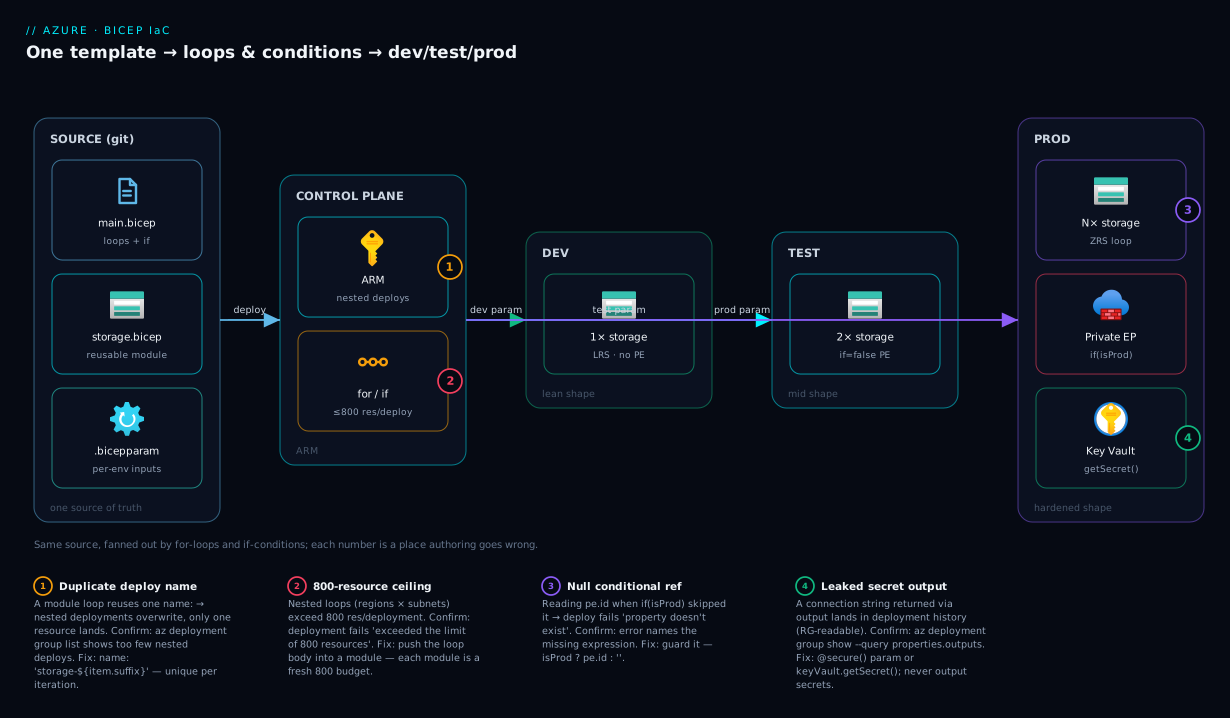
The diagram below is the picture this article builds toward: one parameterised template, fanned out by loops and gated by conditions, deploying the same code into three environments with different shapes. Read it left to right. On the far left, the source is a single repo holding one main.bicep, a reusable modules/storage.bicep, and a .bicepparam file per environment — that is your one source of truth. It flows into Azure Resource Manager, the control plane that receives the deployment, evaluates every for loop into a concrete count of resources and every if condition into deploy-or-skip, and orchestrates the nested module deployments in dependency order.
From ARM the deployment fans out into three environment zones. Dev receives the lean shape: a single storage account, no private endpoint (the if (isProd) evaluated false), cheapest LRS SKU. Test receives a middle shape. Prod receives the full shape: a loop has stamped N zone-redundant storage accounts, the private-endpoint condition is true so a Microsoft.Network/privateEndpoints resource exists, and secrets resolve from Key Vault via getSecret() rather than being passed in plain text. The numbered badges mark the four places this goes wrong in practice — a duplicate module deployment name, a null reference to a skipped conditional resource, the 800-resource ceiling, and a leaked secret in deployment outputs — each mapped in the legend to how you confirm and fix it.
Real-world scenario
Northwind Retail runs an e-commerce platform on Azure and had, until last quarter, three environments defined by three hand-maintained Bicep files: infra-dev.bicep, infra-test.bicep, infra-prod.bicep, each around 600 lines, each 90% identical. The platform engineer who wrote them had left. A regression went out when a junior engineer added a new storage account with public blob access enabled to dev for a quick test, copied the block into prod during a release “to keep them consistent”, and shipped it — prod blob containers were briefly internet-readable until a Defender for Storage alert caught it. The root cause was not the engineer; it was three files that had to be edited in parallel and inevitably diverged.
The fix was a two-week refactor to one parameterised template. They extracted four modules — storage.bicep, network.bicep, appservice.bicep, keyvault.bicep — each exposing only the parameters that legitimately vary per environment and hard-coding the safe defaults (allowBlobPublicAccess: false, minimumTlsVersion: 'TLS1_2') so a junior engineer cannot re-introduce the public-access bug from a parameter file. The storage accounts became a single loop over an array whose length differs by environment (dev: 1, prod: 4). The private endpoint, zone redundancy, and a second region became conditions gated on environment == 'prod'. Environment-specific values moved into dev.bicepparam, test.bicepparam and prod.bicepparam.
The numbers tell the story. Total Bicep dropped from roughly 1,800 lines across three files to about 520 lines across one main.bicep plus four modules — a 71% reduction. A new fourth environment (a staging slot for a Black Friday rehearsal) was created by writing one new 18-line .bicepparam file, not a new 600-line template, and deployed in an afternoon. Crucially, drift became impossible-by-construction: the only differences between environments are now the visible, reviewed values in the parameter files, and the security defaults live in one place. The same change that previously meant “edit three files and pray” is now one edit to one module, reviewed in one pull-request diff.
The one pain point worth flagging: the first prod deployment after the refactor failed with The deployment exceeded the limit of 800 resources because a loop over regions multiplied by a loop over subnets had grown past the ceiling. They split the network into its own module deployment (each module is a fresh 800-resource budget), and it deployed cleanly. That single failure taught the team the most important loop lesson — covered in the troubleshooting section below.
Advantages and disadvantages
Modules, loops and conditions are a near-unambiguous win for any estate past one file, but they are not free — they trade copy-paste sprawl for a layer of indirection you have to understand.
| Advantages | Disadvantages |
|---|---|
| One source of truth; edit a module once, every consumer gets the fix | Indirection: a value’s origin can be three files away (param file → main → module) |
| Environments differ only by visible parameter-file values | Over-modularising tiny resources adds ceremony for no reuse benefit |
| Loops make “N of these” data-driven — change the array, not the code | Loops over loops multiply resource counts fast → 800-resource ceiling |
Conditions kill per-environment forks; no main-prod.bicep to rot |
Conditional references need careful null-guarding or they fail at deploy |
| Reviewable: a real change stands out from boilerplate in the diff | Each module is a nested deployment → more deployment objects to read in errors |
| Modules are versionable/shareable via a registry | Cross-team registry modules add publish/pin workflow overhead |
| Idempotent and deterministic across dev/test/prod | A module-output typo surfaces as a late, sometimes cryptic, error |
When each matters: the advantages dominate the moment you have more than one of anything — more than one environment, region, or instance. The disadvantages bite mainly when you over-apply the pattern (a module wrapping a single resource that is never reused is pure overhead) or when you let loops multiply unchecked. The right altitude is to modularise clusters that deploy together and recur, loop over genuine collections, and condition on real environment differences — not to modularise reflexively. For a single resource group of unique, one-off resources, a flat file is still correct; reach for these constructs when repetition appears, not before.
Hands-on lab
This is the centrepiece. You will start from a flat template, refactor it into a module, add a loop and a condition, ship it to two “environments” via parameter files, and tear it all down. Everything is free-tier-friendly (storage accounts cost nothing at rest with no data) and runs in Cloud Shell or any terminal with az. Do it once end to end and the constructs stop being abstract.
Step 0 — Prerequisites and environment check
Confirm your tooling before you write a line. You need az 2.20.0+ (which bundles Bicep) and Contributor on a subscription.
az version                       # az >= 2.20.0
az bicep version                 # Bicep CLI present; if not: az bicep install
az account show -o table         # confirm the right subscription is active
Expected output: az version prints a JSON blob with "azure-cli": "2.x"; az bicep version prints a version like Bicep CLI version 0.3x.x; az account show shows your subscription name and State: Enabled. If az bicep version errors, run az bicep install.
Create a working folder and a resource group for the lab.
mkdir -p bicep-lab/modules && cd bicep-lab
az group create --name rg-bicep-lab --location eastus -o table
Expected output: a table row with Name: rg-bicep-lab and ProvisioningState: Succeeded.
| Step 0 check | Command | Pass looks like |
|---|---|---|
| CLI version | az version |
azure-cli ≥ 2.20.0 |
| Bicep present | az bicep version |
a 0.3x version string |
| Right subscription | az account show -o table |
the intended sub, Enabled |
| RG created | az group create … |
ProvisioningState: Succeeded |
Step 1 — Start from a flat template (the “before”)
First, the anti-pattern you are about to fix. Create flat.bicep with two near-identical storage blocks — this is what copy-paste produces.
// flat.bicep — the BEFORE: two copy-pasted blocks
param location string = resourceGroup().location

resource dataSa 'Microsoft.Storage/storageAccounts@2023-05-01' = {
  name: 'stdata${uniqueString(resourceGroup().id)}'
  location: location
  sku: { name: 'Standard_LRS' }
  kind: 'StorageV2'
  properties: { minimumTlsVersion: 'TLS1_2', allowBlobPublicAccess: false, supportsHttpsTrafficOnly: true }
}

resource logsSa 'Microsoft.Storage/storageAccounts@2023-05-01' = {
  name: 'stlogs${uniqueString(resourceGroup().id)}'
  location: location
  sku: { name: 'Standard_LRS' }
  kind: 'StorageV2'
  properties: { minimumTlsVersion: 'TLS1_2', allowBlobPublicAccess: false, supportsHttpsTrafficOnly: true }
}
Preview it with what-if — do not deploy it; you are only confirming it is valid and seeing the duplication ARM would create.
az deployment group what-if --resource-group rg-bicep-lab --template-file flat.bicep
Expected output: two + Microsoft.Storage/storageAccounts create lines. Note how the two blocks are identical except the name prefix — that is exactly the repetition the next steps remove.
Step 2 — Extract a reusable module
Create the module file at modules/storage.bicep (the same one from the Modules section — parameterise everything that varies, hard-code the safe defaults).
// modules/storage.bicep
@minLength(3)
@maxLength(24)
param name string
param location string = resourceGroup().location
@allowed([ 'Standard_LRS', 'Standard_ZRS', 'Standard_GRS' ])
param sku string = 'Standard_LRS'
param allowBlobPublicAccess bool = false

resource sa 'Microsoft.Storage/storageAccounts@2023-05-01' = {
  name: name
  location: location
  sku: { name: sku }
  kind: 'StorageV2'
  properties: {
    minimumTlsVersion: 'TLS1_2'
    allowBlobPublicAccess: allowBlobPublicAccess
    supportsHttpsTrafficOnly: true
  }
}

output id string = sa.id
output name string = sa.name
Validate the module compiles on its own (a module is still a valid Bicep file):
az bicep build --file modules/storage.bicep --stdout > /dev/null && echo "module OK"
Expected output: module OK with no errors. If you see a BCP warning about an unused parameter, that is fine — you will use them from the parent next.
Step 3 — Call the module from main.bicep
Replace the flat file with a parent that calls the module twice. Create main.bicep.
// main.bicep
param location string = resourceGroup().location

module dataStg 'modules/storage.bicep' = {
  name: 'data-storage'
  params: { name: 'stdata${uniqueString(resourceGroup().id)}', location: location, sku: 'Standard_ZRS' }
}

module logsStg 'modules/storage.bicep' = {
  name: 'logs-storage'
  params: { name: 'stlogs${uniqueString(resourceGroup().id)}', location: location }
}

output dataAccountId string = dataStg.outputs.id
Preview, then deploy for real.
az deployment group what-if --resource-group rg-bicep-lab --template-file main.bicep
az deployment group create  --resource-group rg-bicep-lab --template-file main.bicep -o table
Expected output: what-if shows two storage-account creates (now via two nested module deployments); create ends with ProvisioningState: Succeeded. Verify the result and note that each module is its own deployment:
az deployment group list --resource-group rg-bicep-lab \
  --query "[].{name:name, state:properties.provisioningState}" -o table
az storage account list --resource-group rg-bicep-lab --query "[].name" -o tsv
Expected output: the deployment list shows the parent deployment plus data-storage and logs-storage as separate nested deployments; the storage list shows two account names. You just proved a module is a nested deployment.
Step 4 — Replace the two calls with a loop
Two calls is still two blocks. Drive it from an array instead. Edit main.bicep to loop a single module over a config array.
// main.bicep — loop version
param location string = resourceGroup().location
param stores array = [
  { suffix: 'data', sku: 'Standard_ZRS' }
  { suffix: 'logs', sku: 'Standard_LRS' }
  { suffix: 'temp', sku: 'Standard_LRS' }
]

module stg 'modules/storage.bicep' = [ for s in stores: {
  name: 'storage-${s.suffix}'                       // unique module deployment name per item
  params: {
    name: 'st${s.suffix}${uniqueString(resourceGroup().id)}'
    location: location
    sku: s.sku
  }
} ]

// Collection output: every account id the loop created
output accountIds array = [ for (s, i) in stores: stg[i].outputs.id ]
Preview and deploy.
az deployment group what-if --resource-group rg-bicep-lab --template-file main.bicep
az deployment group create  --resource-group rg-bicep-lab --template-file main.bicep -o table
Expected output: what-if now shows three storage accounts — one per array element — and three nested module deployments (storage-data, storage-logs, storage-temp). Adding a fourth store is now a one-line array edit, not a new block. Confirm three accounts exist:
az storage account list --resource-group rg-bicep-lab --query "length(@)"
Expected output: 3. You have referenced loop-created modules by index (stg[i].outputs.id) in the collection output — the correct way to read from a loop.
Step 5 — Add a condition for the prod-only resource
Now make the template environment-aware. Add an environment parameter and gate an extra, prod-only storage account behind a condition, and switch SKUs with a ternary.
// add to main.bicep
@allowed([ 'dev', 'test', 'prod' ])
param environment string = 'dev'
var isProd = environment == 'prod'

// A prod-only audit account — deployed ONLY when environment == 'prod'
module auditStg 'modules/storage.bicep' = if (isProd) {
  name: 'storage-audit'
  params: {
    name: 'staudit${uniqueString(resourceGroup().id)}'
    location: location
    sku: 'Standard_GRS'                 // geo-redundant for audit
  }
}

// Safe reference: only read the conditional module's output when it exists
output auditAccountId string = isProd ? auditStg.outputs.id : 'not-deployed-in-${environment}'
Preview with the default (dev) and then overriding to prod to see the condition flip.
# dev: condition false → no audit account
az deployment group what-if --resource-group rg-bicep-lab --template-file main.bicep

# prod: condition true → audit account appears
az deployment group what-if --resource-group rg-bicep-lab --template-file main.bicep \
  --parameters environment=prod
Expected output: the first what-if shows three accounts (no audit); the second shows four (the audit account added). The same template, two shapes, one parameter. Notice the safe isProd ? … : … output guard — without it, reading auditStg.outputs.id in dev would fail with a null reference.
Step 6 — Parameterise per environment with .bicepparam files
Hard-coded --parameters environment=prod does not scale. Create typed parameter files — one per environment — so each environment’s inputs live in git, reviewed.
Create dev.bicepparam:
using './main.bicep'
param environment = 'dev'
param stores = [
  { suffix: 'data', sku: 'Standard_LRS' }
]
Create prod.bicepparam:
using './main.bicep'
param environment = 'prod'
param stores = [
  { suffix: 'data', sku: 'Standard_ZRS' }
  { suffix: 'logs', sku: 'Standard_ZRS' }
  { suffix: 'temp', sku: 'Standard_LRS' }
]
Deploy each with its own param file — same template, different inputs.
az deployment group create --resource-group rg-bicep-lab \
  --template-file main.bicep --parameters dev.bicepparam -o table
Expected output: Succeeded, and the dev param file produces just one storage account (its stores array has one element and environment=dev skips the audit account). Confirm the environment-specific shape:
az storage account list --resource-group rg-bicep-lab --query "length(@)"
| Lab step | What you build | Verify command | Expected |
|---|---|---|---|
| 1 | Flat two-block template | what-if on flat.bicep |
2 create lines |
| 2 | Reusable module | az bicep build … modules/storage.bicep |
compiles, “module OK” |
| 3 | Parent calls module ×2 | az deployment group list |
parent + 2 nested deployments |
| 4 | Module driven by a loop | az storage account list --query length(@) |
3 |
| 5 | Prod-only conditional module | what-if --parameters environment=prod |
4th account appears |
| 6 | Per-env .bicepparam |
deploy with dev.bicepparam |
1 account |
Step 7 — Do it in the portal (Custom deployment)
You will rarely deploy modules from the portal in practice, but knowing the path helps when a teammate hands you a template. Modules referenced by local path cannot be uploaded as a single file to the portal — the portal needs the transpiled, self-contained ARM JSON, which inlines the modules as nested templates. Build it first:
az bicep build --file main.bicep --outfile main.json
Then in the portal:
- Search for and open Deploy a custom template.
- Click Build your own template in the editor.
- Click Load file and select the generated
main.json(the modules are now inlined asMicrosoft.Resources/deploymentsnodes — you can see them in the JSON). - Click Save. The portal renders the parameters (
environment,stores,location). - Select Resource group =
rg-bicep-lab, setenvironment=dev, leave the rest, click Review + create, then Create. - When it completes, open the deployment → Deployment details. You will see the nested module deployments listed exactly as the CLI showed them.
Expected output: the deployment succeeds and the Deployment details pane lists the nested deployments (one per module), confirming that a portal “custom template deploy” of a Bicep file is really a deploy of its transpiled ARM. The portal cannot consume .bicep directly — always az bicep build first, or deploy via CLI.
| Portal field | Value for this lab | Notes |
|---|---|---|
| Template source | main.json (transpiled) |
Portal can’t load .bicep modules by path |
| Resource group | rg-bicep-lab |
Same RG as the CLI steps |
environment |
dev |
Drives the condition |
stores |
(default array) | Edit inline to add/remove accounts |
| Region | inherited from RG | location defaults to RG location |
Step 8 — Validate the whole result
Confirm the deployed estate matches intent before you tear it down.
# All storage accounts and their SKU/TLS/public-access posture
az storage account list --resource-group rg-bicep-lab \
  --query "[].{name:name, sku:sku.name, tls:minimumTlsVersion, public:allowBlobPublicAccess}" -o table

# All deployments (parent + nested modules) and their state
az deployment group list --resource-group rg-bicep-lab \
  --query "[].{name:name, state:properties.provisioningState, ts:properties.timestamp}" -o table
Expected output: every account shows minimumTlsVersion: TLS1_2 and allowBlobPublicAccess: False — the hard-coded module defaults held across every environment, which is the whole point. The deployment list shows the parent plus one nested deployment per module call.
Step 9 — Teardown
Delete the resource group to remove everything at once — accounts, deployments, the lot — so the lab costs nothing.
az group delete --name rg-bicep-lab --yes --no-wait
Expected output: the command returns immediately (--no-wait); deletion completes in the background. Confirm it is gone:
az group exists --name rg-bicep-lab # eventually prints: false
Expected output: false once deletion finishes. Storage accounts cost nothing at rest with no data, but deleting the group is the clean reset and removes the deployment history too.
Common mistakes & troubleshooting
These are the failures every Bicep author hits with modules, loops and conditions — symptom, root cause, how to confirm, and the fix. Most surface as a BCP error at build time (fast, before deploy) or as an ARM error at deploy time (slower).
| # | Symptom | Root cause | Confirm with | Fix |
|---|---|---|---|---|
| 1 | The deployment exceeded the limit of 800 resources |
A loop (or nested loops) created >800 resources in one deployment | Count: regions × subnets …; check the failed deployment’s resource count |
Move the loop into its own module (each module = fresh 800 budget) |
| 2 | BCP120: This expression is being used in an assignment to the "name" property … which requires a value that can be calculated at the start |
A loop-created resource’s name depends on another resource’s runtime property | Build error points at the name: line |
Derive the name from the loop item/index (name: 'stg${i}'), not a runtime reference |
| 3 | Second resource in a module loop overwrites the first; only one ends up deployed | All loop iterations share the same module name: (deployment name) |
az deployment group list shows fewer nested deployments than expected |
Make the module name unique per iteration: name: 'storage-${s.suffix}' |
| 4 | BCP034: The enclosing array expected an item of type … but the provided item was of type … |
Loop body returns the wrong shape (e.g. object where a string is expected) | Build error names both types | Match the loop output to the property’s expected type |
| 5 | Deployment fails reading .outputs.id of a conditional resource |
The conditional resource was skipped (if false) but something referenced it |
Error mentions a null/The language expression property … doesn't exist |
Guard the reference: cond ? r.outputs.id : '' |
| 6 | BCP180 / cannot reference a resource inside a loop without an index |
Referenced a looped resource by symbolic name without [i] |
Build error on the reference line | Index it: stg[0].outputs.id or loop the output too |
| 7 | A secret/connection string appears in deployment history in plain text | The value was returned via output |
az deployment group show … --query properties.outputs shows it |
Never output secrets; use kv.getSecret() or a @secure() param |
| 8 | BCP037: The property "X" is not allowed on objects of type … after refactor |
Param object shape in the array doesn’t match what the module/resource expects | Build error names the unexpected property | Align the array object keys with the module’s parameters |
| 9 | Module deploys to the wrong resource group/subscription | Missing or wrong scope: on the module |
az deployment group list in the expected RG is empty |
Set scope: resourceGroup('target-rg') (and ensure RG exists) |
| 10 | @batchSize ignored / still all-parallel |
Decorator placed on the resource, not the loop, or value ≤ 0 | Re-read the build; iterations still concurrent in the timeline | Put @batchSize(n) directly above the for line; n ≥ 1 |
| 11 | The template parameter 'X' is not found when using a .bicepparam |
Param file declares a param the template doesn’t have (or using points at the wrong file) |
az bicep build-params --file env.bicepparam errors |
Fix the using './main.bicep' path; match param names exactly |
| 12 | Nested loop fails to compile | Bicep does not support resource loops nested inside another resource loop body | Build error about nested iteration | Flatten the data into one array, or split into modules and loop the module |
The single most common real-world failure is #1, the 800-resource ceiling, and the fix is the most important architectural lesson here: a module call is a separate deployment with its own 800-resource budget. When a loop grows past the limit, you do not reduce what you deploy — you push the loop body into a module so each iteration becomes its own nested deployment. The reference limits worth memorising:
| ARM / Bicep limit | Value | What hits it | Workaround |
|---|---|---|---|
| Resources per deployment | 800 | Big or nested loops | Split into module deployments |
| Parameters per template | 256 | Over-parameterised templates | Group into object params |
| Variables per template | 256 | Many computed values | Consolidate; use objects |
| Outputs per template | 256 | Outputting per-loop-item values | Output one array, not N scalars |
| Nested template depth | 64 | Modules calling modules deeply | Flatten the module tree |
| Template request body size | ~4 MB | Huge transpiled JSON from large loops | Modularise; use linked/registry modules |
| Resource group name length | 90 | Generated RG names in loops | Keep generated names short |
| Storage account name | 3–24, lowercase alnum | uniqueString + long prefix |
Trim the prefix; uniqueString is 13 chars |
Best practices
- Modularise clusters that recur, not single resources. A module wrapping one storage account that is never reused is pure ceremony. Extract a module when the same group of resources deploys together in more than one place.
- Parameterise what varies; hard-code safe defaults. Expose region, SKU and name as parameters; bake
allowBlobPublicAccess: falseandminimumTlsVersion: 'TLS1_2'into the module so no parameter file can re-introduce an insecure setting. - Give every module call a meaningful, unique
name. In a loop, derive it from the item or index (storage-${s.suffix}). It is both your uniqueness guarantee and what you read in deployment errors. - Loop over data, condition on environment. Use
forfor genuine collections (subnets, regions, instances) andiffor real environment differences (prod-only private endpoint). Do not fake a loop with a count when an array of objects is clearer. - Always preview with
what-ifbefore deploying a loop or condition change. A one-character array edit can create or destroy N resources;what-ifshows the exact delta before ARM acts. - Guard every reference to a conditional resource with the same condition (
cond ? r.id : ''). A skipped resource referenced unguarded is a guaranteed deploy-time null failure. - Keep one
.bicepparamper environment in git. The only differences between dev/test/prod should be the visible, reviewed values in those files — never edits tomain.bicep. - Never
outputa secret. Outputs land in deployment history readable by anyone with RG read access. UsegetSecret()from an existing Key Vault or a@secure()parameter. - Mind the 800-resource ceiling early. If a loop times another loop, push the inner loop into a module so each iteration is its own deployment budget.
- Pin registry/Verified-Module versions. When you consume a shared module (
br/…:storage:1.2.0), pin the exact version; never float to “latest” in infrastructure. - Add
@descriptionto every parameter and output. It renders in the portal’s custom-deployment UI and inbicep builddocs, and it is the cheapest documentation you will ever write. - Build before you hand a template to the portal. The portal cannot consume
.bicepwith local-path modules —az bicep buildto self-contained ARM JSON first.
Security notes
Modules are a security control, not just a DRY one. By hard-coding the safe posture inside a module and exposing only benign parameters, you make insecure configurations unrepresentable from a parameter file — the Northwind public-blob regression simply cannot recur once allowBlobPublicAccess: false lives in the module body rather than a copy-pasted block.
| Concern | Risk with naive Bicep | The modular/loop/condition fix |
|---|---|---|
| Secrets in templates | Hard-coded passwords; secrets in output history |
@secure() params; kv.getSecret(); never output a secret |
| Insecure defaults drift | One copied block re-enables public access | Bake allowBlobPublicAccess:false, TLS1_2, httpsOnly:true into the module |
| Over-broad deployment identity | Pipeline SPN with Owner everywhere | Scope module deployments to the exact RG; least-privilege the deploy identity |
| Environment blast radius | A prod-only resource accidentally in dev | Gate it on if (isProd); one parameter, not a manual block |
| Cross-scope deploys | A module silently lands in the wrong subscription | Explicit scope:; review the target in what-if |
| Public network exposure in prod | Private endpoint forgotten in one of three files | Conditional if (isProd) private endpoint in the one template |
Two specifics. First, the deployment identity: a module that targets another resource group or subscription needs the deploying principal (your user, or a pipeline’s managed identity / service principal) to have rights at that scope — grant the minimum (Contributor on the target RG, not Owner on the subscription). For identity choices, see Managed Identity: System vs User-Assigned Patterns. Second, enforce the secure defaults at the platform level too: an Azure Policy with a deny effect on public blob access is the backstop that catches anything your modules miss — defence in depth, template plus policy.
Cost & sizing
Modules, loops and conditions have no direct cost — they are authoring constructs; ARM deployments themselves are free. The bill comes entirely from the resources you deploy, and that is exactly where these constructs help: a loop or a condition is the cheapest possible cost lever because it changes how many and which resources exist per environment with a one-line edit.
| Cost driver | Where it shows up | How loops/conditions help | Rough figure |
|---|---|---|---|
| Resource count | Per-resource hourly/usage charges | A count/array loop right-sizes count per env (dev:1, prod:4) | Storage accounts: ~$0 at rest, no data |
| SKU/tier per env | Premium vs standard | Ternary picks SKU: isProd ? 'Premium' : 'Standard' |
LRS vs ZRS vs GRS: GRS ~2× LRS storage rate |
| Prod-only resources | Private endpoint, extra region | if (isProd) keeps them out of dev/test |
Private endpoint ≈ ₹600–800/mo (~$7–10) each |
| Zone redundancy | ZRS/zone-redundant SKUs | Condition it on prod only | ZRS storage ~25% over LRS for the same data |
| Deployment itself | ARM control plane | Free regardless of size | $0 — deployments are not billed |
| Cross-region copies | A for region in regions loop |
The array length is the region count and cost | Each region multiplies the per-region spend |
Right-sizing rule of thumb: let the parameter file carry the cost knobs. Dev’s .bicepparam deploys the minimum count and cheapest SKUs and skips prod-only resources via the condition; prod’s deploys the full count and hardened SKUs. Because the difference is data, not code, you can tune dev down to near-zero (one LRS storage account, no private endpoint) without touching the template — and a finance review reads the parameter files, not 600 lines of Bicep, to see exactly what each environment costs. For storage SKU economics specifically, Azure Storage Redundancy: LRS, ZRS, GRS, RA-GRS Explained breaks down the per-GB rates the ternary chooses between.
Interview & exam questions
These map to AZ-104 (Azure Administrator — IaC/Bicep deployment objectives) and AZ-204 (Developer — provisioning with Bicep). Each is a question and a model answer.
1. What is a Bicep module and what does it become in ARM? A module is a Bicep file invoked from another via a module declaration; its parameters are inputs and outputs are returns. At transpile time each module becomes a nested deployment (Microsoft.Resources/deployments), which is why it needs its own deployment name and appears as a separate deployment in the portal.
2. How do you deploy a variable number of identical resources? Use a for loop — either over an array ([for x in items: { … }]) or an integer count ([for i in range(0, n): { … }]). The count is data-driven, so changing the array or n changes how many deploy with no code change. Each must derive a unique name from the loop item or index.
3. How do you deploy a resource only in production? Append = if (<boolean>) to the resource or module, gating it on a parameter like environment == 'prod'. The same template then produces different shapes per environment from a single parameter, with no forked files.
4. What is the resource limit per ARM deployment, and how do you exceed it? 800 resources per deployment. You do not reduce resources — you push the loop into a module, because each module is a separate nested deployment with its own 800-resource budget.
5. How do you capture the index in a loop and why would you? Use [for (item, i) in array: …]. The 0-based index gives unique names (stg${i}) and enables “first one is special” logic (isPrimary: i == 0).
6. How do you reference a resource created inside a loop? Index it by position — myLoop[0].outputs.id — or loop the output too ([for (x, i) in arr: myLoop[i].id]). Referencing a looped resource by bare symbolic name without an index is a build error.
7. Why must you never return a secret as a module output? Outputs are stored in ARM deployment history and readable by anyone with read access to the resource group, so a connection string or password in an output is leaked. Pass secrets via @secure() parameters or keyVault.getSecret() instead.
8. What does @batchSize(n) do? It overrides the default all-parallel loop behaviour to deploy n iterations at a time, in batches. @batchSize(1) is strictly sequential — used when iterations depend on each other or the target service rate-limits creates.
9. What is the difference between a parameter and a variable in a module? A parameter (param) is an external input supplied by the caller (or a .bicepparam file) and can be overridden per deployment; a variable (var) is computed inside the template and cannot be supplied externally. You parameterise what varies per environment; you use variables for derived values.
10. How do you ship the same template to dev, test and prod? Keep one main.bicep and one .bicepparam file per environment, each with a using './main.bicep' line and the environment-specific parameter values. Deploy with --parameters dev.bicepparam. The only differences between environments are the reviewed values in those files.
11. What goes wrong if you reference a conditional resource that was skipped? The reference is null and the deployment fails (commonly “the language expression property doesn’t exist”). Guard it with the same condition using a ternary: isProd ? pe.id : ''.
12. When should you publish a module to a registry instead of using a local file? When more than one repository or team needs the same module. Publishing to a Bicep registry in ACR (az bicep publish) lets consumers pin an immutable version (br/Reg:storage:1.2.0) instead of copying the file, which prevents the module from drifting across teams.
Quick check
- You need three storage accounts that differ only by name. What single construct removes the copy-paste, and how do you guarantee unique names?
- A reviewer asks why your prod template deploys a private endpoint but dev’s does not, with no separate prod file. What construct makes that possible, and what keyword?
- Your loop creates 900 resources and the deployment fails. What is the limit, and what is the fix (not “deploy fewer resources”)?
- You returned a database connection string as a module
outputand security flagged it. Why is that wrong, and what should you do instead? - A module loop deploys only one resource even though your array has three items. What did you forget?
Answers
- A
forloop over an array (orrange()count). Guarantee unique names by deriving each name from the loop index or item plusuniqueString(resourceGroup().id)— e.g.name: 'stg${i}${uniqueString(resourceGroup().id)}'. - A condition — append
= if (environment == 'prod')to the private-endpoint resource/module. The same template produces both shapes from one parameter. - The limit is 800 resources per deployment. The fix is to move the loop body into a module, because each module is a separate nested deployment with its own 800-resource budget.
- Outputs are stored in deployment history and readable by anyone with read access to the resource group, so the secret is leaked. Use a
@secure()parameter orkeyVault.getSecret()and neveroutputthe secret. - You gave every iteration the same module
name(deployment name), so each nested deployment overwrote the previous. Makenameunique per iteration —name: 'storage-${s.suffix}'.
Glossary
- Module — a Bicep file invoked from another via a
moduledeclaration; the unit of reuse. Becomes a nested deployment in ARM. - Nested deployment — the
Microsoft.Resources/deploymentsresource a module compiles to; each has its own name and its own 800-resource budget. - Parameter (
param) — a typed external input to a template or module, overridable per deployment or via a parameter file. - Output (
output) — a typed value a template or module returns; stored in deployment history (so never put secrets here). forexpression — the loop construct,[for item in collection: { … }], that produces a collection of resources, modules, properties, variables or outputs.- Loop index — the 0-based position captured with
[for (item, i) in array: …], used for unique naming and per-iteration logic. range(start, count)— built-in that produces an integer array for count-based loops;countis a length, not an end index.items()— built-in that converts an object into an array of{ key, value }pairs so you can loop a dictionary.- Condition (
if) —= if (<boolean>)appended to a resource or module so it deploys only when the expression is true. @batchSize(n)— a decorator on a loop that deploys n iterations at a time instead of all in parallel;@batchSize(1)is sequential..bicepparam— a typed parameter file (using './main.bicep'plusparamassignments) holding one environment’s inputs in source control.- Ternary (
cond ? a : b) — inline conditional expression used to pick a value (SKU, size, or a safe reference to a conditional resource). - Scope (
scope:) — the resource group, subscription or management group a module targets, enabling cross-RG/cross-subscription deployment. - Bicep registry — a private module catalog in Azure Container Registry; consumers reference versioned modules with
br/Registry:module:version. - Azure Verified Modules (AVM) — Microsoft-maintained, published Bicep/Terraform modules consumed from the public registry with semantic versions.
- 800-resource limit — the hard ceiling of resources ARM accepts in a single deployment; circumvented by splitting work across module deployments.
Next steps
- Deepen the IaC fundamentals first if any step felt shaky: Deploy Your First Bicep File From Scratch.
- Get secrets out of your templates the right way: Azure Key Vault: Secrets, Keys and Certificates and the secure-parameter /
getSecret()patterns it covers. - Enforce the secure defaults your modules set, at the platform level: Azure Policy Effects Explained: Deny, Audit, Modify, DeployIfNotExists.
- Compare the Bicep approach with the cloud-agnostic alternative and its
for_each/count/moduleanalogues: Terraform on Azure: Remote State, Blob Backend and Locking. - Understand the scopes your modules can target: Azure Resource Hierarchy Explained.