You create a storage account, the portal asks a question — Redundancy: LRS / ZRS / GRS / RA-GRS / GZRS / RA-GZRS — and most people pick the default and move on. Then one of two things happens. Either the bill arrives twice as large as the team next door for the same data, or a regional incident reveals that the “geo-redundant” account someone trusted as highly available was nothing of the sort: the data was safe in another region, but the app could not read it until somebody manually flipped a switch, and the last few seconds of writes were gone. That single dropdown decides three things at once — your durability (will the bytes survive a disk, a datacentre, a whole region failing), your availability (can the app keep reading and writing through a failure), and a meaningful slice of your bill.
Azure Storage redundancy is simply how many copies of your data exist, where they live, and what happens to your reads and writes when something fails. Every option keeps at least three copies at eleven nines of durability, so “will I lose the bytes to a single disk failure” is never the real question. The real questions are: how big a failure does this survive — a disk, a rack, a whole datacentre, an entire region? Is the protection synchronous (the copy is current) or asynchronous (it lags, so a sudden failure loses recent writes)? And does a copy you can actually read from exist, or is the second copy a cold standby you can only touch after a failover? Six SKUs answer differently, and the names encode the answers once you can read them.
By the end you will read those acronyms like a sentence — the first letters give the primary-region layout, the rest the cross-region story. You will know which failure each SKU survives, why GRS is disaster recovery you invoke rather than high availability you get, what RPO and RTO mean for your recovery promises, and you will have a one-page decision table to pick the right SKU from day one — instead of finding out the hard way during the incident.
What problem this solves
The pain shows up in three flavours. The first is paying for protection you don’t need: a team sets every account to GRS “to be safe,” doubling the bill across hundreds of terabytes of scratch data — CI artifacts, caches, regenerable files — nobody would recover from another region. Pure cost for data whose DR plan is “re-run the job.”
The second, and the dangerous one, is trusting geo-redundancy as high availability. Someone sees “data is replicated to a second region” and concludes the app keeps serving through a regional outage. Not with plain GRS/GZRS: the secondary is not reachable normally, only via a manual account failover that takes time. So during the very outage you bought geo to survive, the app is down until a human decides to fail over and waits for it. The protection was real; the expectation was wrong.
The third is silent data loss on failover. Geo-replication is asynchronous — there is always lag — so an unplanned failover loses writes not yet replicated. That window (the Recovery Point Objective) is usually small but never zero, and a team that assumed “no data loss” gets a surprise reconciliation problem. Knowing this changes the design: idempotent writes, a replayable event log, or a synchronous tier for data you truly cannot lose.
Who hits this: essentially everyone, because nearly every Azure service leans on a storage account — VM disks, Function/App Service packages, logs, Terraform state, registry layers, backups, data-lake files — and all of it inherited a redundancy choice somebody made (or defaulted) at creation. Get the model right once and every call afterward is deliberate.
Learning objectives
By the end of this article you can:
- Decode the SKU names — read LRS, ZRS, GRS, RA-GRS, GZRS, RA-GZRS and state, from the letters alone, where the copies live and whether the secondary is readable.
- Name the exact failure each SKU survives — a disk/rack, a full datacentre/zone, or an entire region — and the one it does not.
- Explain why geo-redundancy is DR, not HA — that the secondary is unreachable until a manual account failover, and why that means a non-zero recovery time.
- Define RPO and RTO for storage and explain why asynchronous geo-replication makes RPO non-zero (potential loss of the most recent writes on unplanned failover).
- Choose the right SKU for a workload using durability, availability target, data-sovereignty rules and cost — and justify it.
- Read the real constraints — where zone and geo redundancy are not available, and which conversions need a migration versus a live change.
- Drive the basics with
azCLI and Bicep: create an account at a chosen SKU, change redundancy live where allowed, read from the RA secondary, and run an account failover. - Avoid the three classic mistakes — overpaying with needless geo, mistaking GRS for HA, and assuming zero data loss across a failover.
Prerequisites & where this fits
You should already understand what a storage account is — a named namespace and security-and-billing envelope holding the blob, file, queue and table services (acct.blob.core.windows.net). If that is new, read Azure Storage Account Fundamentals first; this article zooms all the way in on one dropdown it introduces. You should be able to run az in Cloud Shell and read JSON. The substrate underneath every SKU is Azure’s physical geography — availability zones (separate datacentres within one region, the basis of ZRS/GZRS) and region pairs (two linked regions, where the geo copy of GRS/GZRS lands); if those are fuzzy, Azure Regions & Availability Zones Explained is the ground floor, and the recovery vocabulary (RTO/RPO) is covered in Azure Business Continuity & Disaster Recovery: RTO/RPO Fundamentals.
This sits at the foundation of the Storage & Data track. It is a concept/decision article: once you can choose a SKU confidently, the adjacent layers are securing the account (Azure Key Vault: Secrets, Keys & Certificates, Azure Private Endpoint vs Service Endpoint) and, when access breaks, Troubleshooting Azure Storage: 403s, Firewall, Private Endpoint, RBAC & SAS.
Core concepts
Five mental models make every SKU obvious.
Durability is not availability. Durability asks will the bytes survive — and for every SKU the answer is yes to extraordinary degree: at least three copies, eleven nines (99.999999999%) for LRS, more for the others. Availability asks can my app reach the data right now, through this failure? You can have perfect durability and zero availability at once — bytes perfectly safe in a second region your app cannot read. Almost every redundancy misunderstanding collapses these two into one; keep them apart and the rest follows.
Synchronous means current; asynchronous means lagging. A synchronous write is acknowledged only after every copy is durably stored, so all copies are always current — no data-loss window (LRS, ZRS). An asynchronous write is acknowledged as soon as the primary has it, then shipped to the secondary in the background, so the secondary lags — and if the primary is lost suddenly, whatever had not yet shipped is gone. Every cross-region (geo) copy is asynchronous, because synchronously waiting for a datacentre hundreds of kilometres away on every write would cripple latency. This single fact is why geo-redundancy has a non-zero RPO.
The secondary region is dark until you fail over. With GRS or GZRS the second copy exists but your app cannot read or write it normally — the endpoints all point at the primary. You use the secondary only by (a) the RA option, which lights up a read-only endpoint (acct-secondary.blob.core.windows.net); or (b) an account failover, which promotes the secondary to primary. Plain geo is a safe copy you cannot touch until failover; RA adds read access to the lagging copy; neither lets you write without failing over.
Failover is a deliberate, account-wide operation with a clock. An account failover repoints the account so the secondary becomes primary. It is one switch for the whole account (not per-container), something you initiate (Azure does not silently flip it), and it takes time to complete and re-establish geo-replication. So even with GRS, “region down” to “app serving again” includes a human deciding plus the failover completing — that elapsed time is your RTO, which is why geo-redundancy is disaster recovery you invoke, not high availability you get for free.
The name encodes the layout. Read the SKU like a label: Local = three copies in one datacentre, Zone = three across three zones, the middle G adds an asynchronous geo copy in the paired region, RA makes it readable. So RA-GZRS is the maximum on every axis. The next section turns this into a parsing table.
The vocabulary in one place
Every moving part side by side:
| Term | One-line meaning | Why it matters |
|---|---|---|
| Durability | Will the bytes survive a failure | Every SKU is ≥ 11 nines; rarely the deciding factor |
| Availability | Can the app reach the data now | What geo-redundancy does not improve by itself |
| Synchronous | All copies current before write is acked | LRS, ZRS — no data-loss window |
| Asynchronous | Secondary lags the primary | All geo copies — non-zero RPO on unplanned failover |
| Availability zone | A physically separate datacentre in a region | What ZRS/GZRS spread copies across |
| Region pair | Two Azure regions linked for geo-replication | Where the geo copy lands |
| Primary region | Where your reads/writes go normally | The “first letters” of the SKU |
| Secondary region | The geo copy’s location | Dark unless RA (read) or failover (read+write) |
| RA (Read-Access) | Read-only secondary endpoint enabled | Read the lagging copy without failing over |
| Account failover | Promote secondary to primary | Manual, account-wide; defines storage RTO |
| RPO | Max data you might lose | Non-zero for geo (async lag) |
| RTO | How long until you’re serving again | Failover decision + completion time |
Reading the SKU names
Every redundancy SKU is built from a small grammar. Parse it once and the six codes stop being opaque.
| Token in the name | What it tells you | Example |
|---|---|---|
| LRS — Locally-redundant | 3 synchronous copies in one datacentre | Standard_LRS |
| ZRS — Zone-redundant | 3 synchronous copies across 3 availability zones | Standard_ZRS |
| GRS — Geo-redundant | LRS in primary + async LRS in the paired region | Standard_GRS |
| GZRS — Geo-zone-redundant | ZRS in primary + async LRS in the paired region | Standard_GZRS |
| RA- prefix | The geo secondary has a read-only endpoint | Standard_RAGRS, Standard_RAGZRS |
Two reading rules make it click: the part before any “G” is your primary-region story (L = one datacentre, Z = three zones), and a “G” adds an asynchronous copy in the paired region, “RA” makes it readable. The family then lays out from “cheapest, smallest blast radius” to “most expensive, widest”:
| SKU (API name) | Primary layout | Geo copy? | Secondary readable? | Survives up to |
|---|---|---|---|---|
Standard_LRS |
3 copies, 1 datacentre | No | — | A disk / server / rack failure |
Standard_ZRS |
3 copies, 3 zones | No | No (synchronous, no secondary region) | A full datacentre / zone outage |
Standard_GRS |
3 copies, 1 datacentre | Yes (async) | No | A region-wide disaster (after failover) |
Standard_RAGRS |
3 copies, 1 datacentre | Yes (async) | Yes (read-only) | A region disaster; read during outage |
Standard_GZRS |
3 copies, 3 zones | Yes (async) | No | A zone outage and a region disaster |
Standard_RAGZRS |
3 copies, 3 zones | Yes (async) | Yes (read-only) | Zone + region; read during outage |
Notice what the names do not promise: no geo SKU makes the secondary writable without a failover, and none make replication synchronous — the geo copy always lags. And ZRS is the only single-letter-primary SKU that survives a whole datacentre loss, because its copies are already in three buildings. Internalise this table and you have 80% of the topic.
What each SKU actually protects against
Durability is a given; the differentiator is blast radius — how large a failure the SKU rides through without you losing access. Walking up the ladder makes the trade-offs visible.
| Failure event | LRS | ZRS | GRS / RA-GRS | GZRS / RA-GZRS |
|---|---|---|---|---|
| Single disk / drive failure | Survives | Survives | Survives | Survives |
| Server / rack / node failure | Survives | Survives | Survives | Survives |
| Whole datacentre / zone outage | Lost (all 3 copies there) | Survives (other 2 zones) | Lost in primary (geo copy intact) | Survives (other zones) |
| Region-wide disaster | Lost | Lost (one region only) | Survives after failover | Survives after failover |
| Accidental delete / overwrite / ransomware | Not covered | Not covered | Not covered | Not covered |
Two truths jump out. ZRS is the cheapest way to survive losing an entire datacentre — its copies already span three, and a zone outage is far more common than a whole region going dark. And no SKU protects you from yourself: a deleted blob, an overwritten file, a ransomware-encrypted container replicates faithfully to every copy, including the geo secondary. Redundancy answers “what if the infrastructure fails,” never “what if I corrupt the data” — that is the job of soft delete, versioning, immutability and backups.
For when to pick which, the decision table below maps requirements straight to SKUs.
HA vs DR: why geo-redundancy is not high availability
This is the single most expensive misunderstanding in the topic. High availability (HA) means the app keeps serving through a failure automatically, with little or no human action. Disaster recovery (DR) means you can recover after a failure, with a deliberate procedure and a planned recovery time. ZRS delivers HA within a region — a zone dies and reads/writes continue with no action. Geo-redundancy (GRS/GZRS) delivers DR across regions — the data is safe in the pair, but bringing the app back means initiating a failover and waiting for it to complete.
| Property | ZRS (zone HA) | GRS / GZRS (geo DR) | RA-GRS / RA-GZRS |
|---|---|---|---|
| Protects against | Zone/datacentre outage | Region disaster | Region disaster |
| Replication to the protective copy | Synchronous | Asynchronous | Asynchronous |
| Data-loss window (RPO) | Zero | Non-zero (async lag) | Non-zero (async lag) |
| App keeps serving automatically? | Yes (other zones) | No — needs failover | Reads from secondary, writes need failover |
| Human action required at failure | None | Initiate account failover | Initiate failover for writes |
| Recovery time (RTO) | ~Immediate | Failover decision + completion | Same for writes; reads immediate |
| What it is | High availability | Disaster recovery | DR + read scale/standby |
The design implications are immediate. “Stay up through a datacentre failure with no data loss, no manual step” is ZRS — adding GRS does nothing for availability, only a DR copy. “Survive an entire region loss” needs a geo SKU plus a failover runbook plus a small RPO. And true “stay up through a regional outage automatically” is not something storage redundancy delivers — that needs a multi-region application architecture on top; see Azure Multi-Region Active-Active Design. The SKU protects the data; keeping the application serving across regions is your design above it.
RPO and RTO for storage, concretely
Two acronyms govern every DR conversation. RPO (Recovery Point Objective) is the maximum data, in time, you can lose — “at most the last N minutes of writes.” RTO (Recovery Time Objective) is the maximum time you can be down — “serving again within N minutes/hours.” Mapped to storage SKUs:
| Scenario | RPO (data loss) | RTO (time to recover) | What drives it |
|---|---|---|---|
| LRS, datacentre lost | Total (no surviving copy) | Until you restore from backup | No redundancy survives the event |
| ZRS, zone lost | Zero | ~Immediate (other zones serve) | Synchronous, automatic |
| GRS/GZRS, region lost, planned failover | Small (last replicated point) | Failover completion time | Async lag + failover duration |
| GRS/GZRS, region lost, unplanned failover | Non-zero — recent unreplicated writes lost | Decision + failover completion | Async lag is the loss window |
| RA-GRS/RA-GZRS, region lost, reads | n/a for reads (stale-tolerant) | ~Immediate for reads | Secondary endpoint already live |
The crucial line is the unplanned-failover row: because geo-replication is asynchronous, when the primary region is genuinely gone you fail over to whatever had already replicated — writes still in flight are lost. The Last Sync Time shows how far behind the secondary is; everything after it may be gone. This is why “we paid for GRS so we won’t lose data” is wrong, and why critical systems pair geo with idempotent writes, a replayable event log, or a secondary write path.
The decision table — pick a SKU in one read
Match your requirement in the left column to the SKU on the right. This is the one-pager to keep:
| If your requirement is… | …then choose | Why |
|---|---|---|
| Data is reproducible / scratch / derived | LRS | Cheapest; DR plan is “re-run the job” |
| Data must not leave one region (residency) | LRS or ZRS | No geo copy crosses to the paired region |
| Stay up through a datacentre/zone loss, zero data loss, no manual step | ZRS | Synchronous across 3 zones = in-region HA |
| Survive a full regional disaster | GRS / GZRS | Async geo copy in the paired region |
| Regional DR and automatic zone survival | GZRS | ZRS primary + geo; best for critical data |
| Need to read during a primary-region read outage | RA-GRS / RA-GZRS | Read-only secondary endpoint is live |
| App must stay serving across a whole region automatically | (storage SKU alone won’t do it) | Needs multi-region app design above storage |
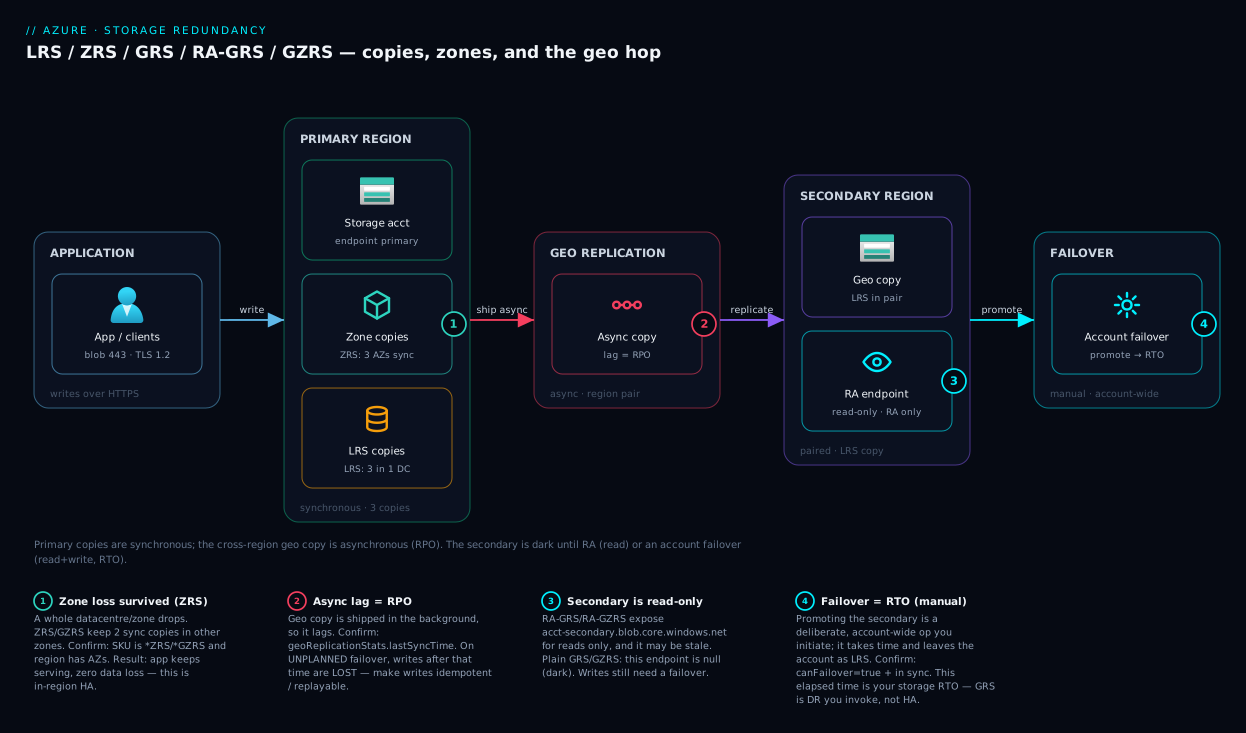
Architecture at a glance
Picture the data flowing left to right through the resilience tiers. Your application writes through the account’s public endpoint (acct.blob.core.windows.net, HTTPS/443) to the primary region, where the layout depends on the SKU’s first letters: LRS-style keeps the three copies in a single datacentre; ZRS-style (ZRS, GZRS) spreads them across three availability zones, so a whole datacentre can drop and writes continue synchronously from the surviving zones — the high-availability half. Every write is acknowledged the instant it is durably stored, keeping latency low.
Then, only if the SKU carries a G, that write is shipped asynchronously across the region pair to the secondary region, landing as a locally-redundant copy hundreds of kilometres away — the disaster-recovery half, and the lag on that hop is your RPO. The secondary stays dark unless you chose an RA SKU (read-only endpoint acct-secondary.blob.core.windows.net); making it writable requires an account failover whose elapsed time is your RTO. The badges mark where this bites: the zone boundary (what ZRS saves you from), the async lag (data lost on unplanned failover), and the failover switch (time to recover).
Real-world scenario
ShopVeda, a mid-size Indian e-commerce company, ran its entire platform on one Standard_GRS storage account in Central India — product images, the order-event journal, and nightly database exports. Someone had set everything to GRS years ago “for safety” and nobody had revisited it. The bill was uncomfortable (geo roughly doubles the storage charge, and they were replicating everything, including 40 TB of regenerable image thumbnails) — but the real reckoning came during a regional incident.
When Central India had a multi-hour service degradation, the on-call runbook said only: “Storage is GRS, data is safe in the paired region.” True — and useless in the moment. Checkout was returning 503s because it could not write order events, and the engineer assumed GRS meant the app would “just read from the other region.” It did not: GRS has no readable secondary, so there was no path to the data without an account failover — never rehearsed, risky to trigger during a partial outage, and one that would have cost time and possibly the most recent order writes (async). They rode it out with checkout down, because failing over felt riskier than waiting.
The post-incident redesign re-tiered by data class. The order-event journal — irreplaceable and must-stay-serving — moved to Standard_GZRS (ZRS primary so a zone failure is survived automatically with zero data loss, plus geo for regional DR), with an app-level secondary write path so a failover would not lose in-flight orders. The product images moved to Standard_RAGZRS so the catalogue keeps rendering from the read-only secondary during a primary-region read outage (stale images for minutes are harmless). And the 40 TB of regenerable thumbnails dropped to Standard_LRS — no geo, because the DR plan for derived data is “re-run the resize job.” That cut the storage bill by roughly a third while improving resilience for the data that mattered, and replaced a one-line runbook with a rehearsed failover and a documented RPO/RTO per data class. The lesson at the top of the new runbook: redundancy is a per-data-class decision, not an account-wide default, and GRS is a recovery plan you practise — not availability you assume.
Advantages and disadvantages
There is no single “best” SKU; each trades cost, blast radius, recovery latency and complexity. The honest two-column view:
| Advantages | Disadvantages | |
|---|---|---|
| LRS | Cheapest; synchronous (no data loss window); simplest; satisfies single-region residency | Zero protection against datacentre/zone or region loss |
| ZRS | Survives a full datacentre/zone outage automatically with zero data loss; true in-region HA; modest premium | Only in zone-enabled regions; no protection from regional disaster |
| GRS | Survives a regional disaster; eleven extra nines of cross-region durability | Secondary is dark (no read); async = non-zero RPO; failover is manual + takes time; ~2× cost |
| RA-GRS | All of GRS plus readable secondary for stale-tolerant reads / standby | Reads may be stale; writes still need failover; cost of GRS + read transactions |
| GZRS | Zone HA and regional DR in one SKU; best resilience for critical data | Highest cost; zone-region-only; geo half still async + manual failover |
| RA-GZRS | Maximum: zone HA + regional DR + readable secondary | Highest cost of all; same async/failover caveats on the geo half |
When does each matter? LRS when the data is reproducible or residency-locked — geo there is pure waste. ZRS for the broad middle of production data: the most resilience-per-rupee, surviving a zone outage automatically. GRS/GZRS when a regulator or board demands survival of a regional catastrophe, or the data is irreplaceable — you accept the cost, the RPO and a failover plan. The RA variants matter only when you have staleness-tolerant read traffic to serve during a primary-region read outage, or want a queryable copy for verification — not as a substitute for HA on the write path.
Hands-on lab
This lab creates a tiny empty account, changes its redundancy, reads its properties, and deletes it — the charge for a few minutes is negligible. You need the Azure CLI signed in (az login). Use your own globally-unique account name.
1. Create a resource group and an LRS account — the floor.
az group create --name rg-redundancy-lab --location centralindia

az storage account create \
  --name stredundlab$RANDOM \
  --resource-group rg-redundancy-lab \
  --location centralindia \
  --sku Standard_LRS \
  --kind StorageV2 \
  --https-only true \
  --min-tls-version TLS1_2
Expected: JSON describing the account with "sku": { "name": "Standard_LRS", "tier": "Standard" }.
2. Read the current redundancy. Note there is no secondary endpoint yet.
ACCT=$(az storage account list -g rg-redundancy-lab --query "[0].name" -o tsv)

az storage account show -n "$ACCT" -g rg-redundancy-lab \
  --query "{sku:sku.name, primary:primaryEndpoints.blob, secondary:secondaryEndpoints.blob, primaryStatus:statusOfPrimary}" -o json
Expected: secondary is null — LRS has no geo secondary.
3. Change redundancy live. LRS↔ZRS and LRS↔GRS are live conversions on a Standard v2 account. Upgrade to Standard_RAGRS to light up a readable secondary:
az storage account update -n "$ACCT" -g rg-redundancy-lab --sku Standard_RAGRS

# Re-read: a secondary endpoint now exists
az storage account show -n "$ACCT" -g rg-redundancy-lab \
  --query "{sku:sku.name, secondary:secondaryEndpoints.blob, secondaryStatus:statusOfSecondary}" -o json
Expected: sku is now Standard_RAGRS and secondary shows an ...-secondary.blob.core.windows.net URL.
4. Inspect geo-replication health — the Last Sync Time. This is how far behind the secondary is; everything written after it is at risk on an unplanned failover.
az storage account show -n "$ACCT" -g rg-redundancy-lab \
  --expand geoReplicationStats \
  --query "{status:geoReplicationStats.status, lastSyncTime:geoReplicationStats.lastSyncTime, canFailover:geoReplicationStats.canFailover}" -o json
Expected: status is Live once replication completes (briefly Bootstrap right after enabling geo); lastSyncTime is a recent UTC timestamp.
5. (Read-only) The failover command — do not run it casually. Account failover promotes the secondary; on a real account it has consequences (see Common mistakes). For reference:
# DR drills only. After failover the account becomes LRS in the new primary
# until you re-enable geo. Initiating it needs the data to be in sync.
az storage account failover --name "$ACCT" --resource-group rg-redundancy-lab
6. Equivalent Bicep — how the redundancy choice should live in source control, not as a portal click:
@description('Globally unique storage account name')
param storageAccountName string
param location string = resourceGroup().location

resource sa 'Microsoft.Storage/storageAccounts@2023-05-01' = {
  name: storageAccountName
  location: location
  sku: {
    name: 'Standard_GZRS'   // zone HA in primary + async geo to the pair
  }
  kind: 'StorageV2'
  properties: {
    minimumTlsVersion: 'TLS1_2'
    supportsHttpsTrafficOnly: true
    allowBlobPublicAccess: false
  }
}

output primaryBlob string = sa.properties.primaryEndpoints.blob
7. Tear down so nothing lingers on the bill:
az group delete --name rg-redundancy-lab --yes --no-wait
Common mistakes & troubleshooting
The model sticks once you have seen how it bites — symptom, root cause, how to confirm, and fix.
| # | Symptom | Root cause | How to confirm | Fix |
|---|---|---|---|---|
| 1 | App down during a regional incident despite GRS | GRS secondary is not readable; needs failover | secondaryEndpoints is null on a plain GRS account |
Use RA-GRS/RA-GZRS for read access, and have a rehearsed failover runbook |
| 2 | Recent writes missing after a failover | Geo-replication is async; in-flight writes lost | Compare write times to geoReplicationStats.lastSyncTime |
Idempotent writes + replayable event log; accept RPO or add a synchronous write path |
| 3 | Storage bill doubled for no clear reason | Geo SKU replicating regenerable data | az storage account show --query sku.name shows *GRS/*GZRS |
Re-tier scratch/derived data to Standard_LRS |
| 4 | “ZRS not allowed in this region” error on create | The region has no availability zones | Check region zone support before choosing ZRS/GZRS | Use a zone-enabled region, or LRS/GRS if zones are unavailable |
| 5 | Cannot change Premium account from LRS to GRS | Premium tiers have limited geo options | kind/sku.tier shows Premium; geo not offered |
Use object replication or app-level copy; or Standard for geo needs |
| 6 | az storage account failover refused |
Secondary not in sync / canFailover false |
geoReplicationStats.canFailover is false |
Wait for Live + in-sync; check lastSyncTime advancing |
| 7 | Reads from -secondary endpoint return 404 for new data |
Secondary lags; object not replicated yet | New blob not yet at lastSyncTime |
Read primary for fresh data; treat secondary as stale-tolerant |
| 8 | Deleted blob is gone from every copy including geo | Redundancy replicates deletes faithfully | The delete propagated to the secondary too | Enable soft delete + versioning; redundancy ≠ backup |
| 9 | After failover the account is now LRS |
Failover leaves the new primary as LRS until re-geo | sku.name reads Standard_LRS post-failover |
Re-enable geo (--sku *GRS) once the new primary is stable |
| 10 | Changing GRS→ZRS seems to do nothing / errors | Some conversions need a migration, not a flag | The requested change isn’t a supported live conversion | Use a supported path (often via an intermediate SKU) or a planned migration / object replication |
The two that cost teams most are #1 and #2: the HA-vs-DR confusion (“geo-redundant” did not mean “stays up”) and the async-lag surprise (assuming zero data loss with no reconciliation plan). #8 is the other classic — redundancy is not backup: no SKU undoes a mistaken delete or ransomware encryption; that is what soft delete, versioning, immutability and point-in-time restore are for.
Best practices
- Decide redundancy per data class, not per account by default — irreplaceable must-stay-serving data and regenerable scratch deserve different SKUs.
- Default production data to ZRS where the region has zones: it survives the likeliest serious failure (a zone outage) automatically — zero data loss, no failover, modest premium.
- Use geo (GRS/GZRS) only when you must survive a region loss — a regulatory mandate or genuinely irreplaceable data. Pay for it deliberately.
- Prefer GZRS over GRS for critical geo workloads — the zone-redundant primary survives the common event (a zone outage) automatically; the geo half handles the rare one.
- Choose RA variants only for staleness-tolerant read traffic (standby reads, replication verification). RA is not HA for writes.
- Never treat redundancy as backup. Pair it with soft delete, blob versioning, and where required immutability and point-in-time restore to cover deletes, overwrites and ransomware.
- Write a failover runbook and rehearse it — who decides, the exact command, the
Last Sync Timeyou can tolerate, and that the account returns as LRS afterward. - Engineer for the RPO you accept on geo — idempotent writes and a replayable event log make an unplanned failover’s lost-write window recoverable.
- Declare the SKU in IaC (Bicep/Terraform) so redundancy is reviewed in pull requests, not clicked silently.
- Right-size by re-tiering down, not just up — auditing for needless geo is one of the highest-ROI cost cleanups in Azure storage.
- Remember conversions differ — some (LRS↔ZRS↔geo on Standard v2) are live flag changes; others need a planned migration or object replication.
Security notes
Encryption is on for every SKU and every copy — at rest by default with platform-managed keys (or customer-managed keys in Key Vault) — and it follows the data to the geo secondary, so a replicated copy is never less protected than the primary. See Azure Key Vault: Secrets, Keys & Certificates for customer-managed keys.
The subtle consideration is data residency and sovereignty. The instant you choose a geo SKU, a full copy lives in the paired region — possibly a different state or country — and if a rule forbids data leaving a jurisdiction, a geo SKU silently violates it (replication is automatic). There, LRS or ZRS are the compliant choice and you achieve DR differently. Always confirm the paired region before enabling geo.
The read-only secondary endpoint on RA SKUs is a second public surface for the same data — lock it down with the same Entra RBAC, firewall rules and private networking as the primary (see Azure Private Endpoint vs Service Endpoint). And because account keys and SAS are valid against the secondary too, the discipline in Troubleshooting Azure Storage: 403s, Firewall, Private Endpoint, RBAC & SAS applies to both endpoints.
Cost & sizing
Redundancy is one of the biggest multipliers on a storage bill, because it changes how many copies of every gigabyte you store. The rough relationship (prices vary by region/tier/meter — treat as orders of magnitude):
| SKU | Relative storage cost | What you’re paying for | When it’s worth it |
|---|---|---|---|
Standard_LRS |
1.0× (baseline) | 3 local copies | Reproducible/residency-locked data |
Standard_ZRS |
~1.25× | 3 copies across 3 zones | Default production single-region data |
Standard_GRS |
~2× | LRS + async geo copy | Must survive a regional disaster |
Standard_RAGRS |
~2× + read transactions | GRS + readable secondary | Geo DR plus stale-tolerant reads |
Standard_GZRS |
~2.5× | ZRS + async geo copy | Critical data: zone HA + regional DR |
Standard_RAGZRS |
~2.5× + read transactions | GZRS + readable secondary | Maximum resilience + secondary reads |
Three things drive the bill: capacity stored (× the redundancy factor), transactions (RA secondary reads billed on top), and geo-replication data transfer (a per-GB charge proportional to write volume — chatty writers pay more for geo than archival ones). To right-size: drop geo on regenerable data to LRS, default the middle to ZRS, reserve GRS/GZRS for data that genuinely needs regional survival. Moving 40 TB from Standard_GRS (~2×) to Standard_LRS (1×) halves its storage charge — tens of thousands of rupees a month for zero loss of real resilience. There is no free tier for geo-redundancy; you pay less only by not replicating data that doesn’t need it.
Interview & exam questions
Q1. What does each letter in RA-GZRS mean? RA = Read-Access (readable secondary), GZ = geo-zone-redundant: zone-redundant in the primary, asynchronously geo-replicated to the paired region, with a read-only secondary endpoint. The maximum-resilience SKU. (AZ-900, AZ-104)
Q2. Is GRS high availability? No — GRS is disaster recovery. The geo secondary is asynchronous and not readable normally; using it requires a manual account failover that takes time and may lose recent writes. HA within a region comes from ZRS. (AZ-104)
Q3. Which SKU survives a full datacentre outage with zero data loss and no manual action? ZRS (and the ZRS-based GZRS/RA-GZRS): its three copies span three availability zones synchronously, so the surviving zones keep serving automatically. (AZ-900, AZ-104)
Q4. Why is the RPO non-zero for GRS/GZRS? Because cross-region geo-replication is asynchronous — writes are acknowledged once the primary has them and shipped to the secondary in the background. On an unplanned failover, writes after the Last Sync Time are lost, so the recovery point sits behind “now.” (AZ-104)
Q5. The difference between RA-GRS and GRS? Only the readable secondary: RA-GRS exposes acct-secondary.blob.core.windows.net for read-only access to the lagging copy any time, whereas GRS’s geo copy is dark until a failover. Neither is writable without failover. (AZ-104)
Q6. A regulator forbids data leaving the country. Which SKUs are safe? LRS and ZRS — all copies stay within the chosen region. Any geo SKU replicates a full copy to the paired region, which may be outside the jurisdiction. (AZ-104, AZ-500)
Q7. Does any redundancy SKU protect against an accidental delete? No — deletes, overwrites and ransomware encryption replicate faithfully to every copy, including the geo secondary. Protection against self-inflicted loss comes from soft delete, blob versioning, immutability and point-in-time restore. (AZ-104, AZ-500)
Q8. After an account failover, what redundancy is the account? It becomes LRS in the new primary until you re-enable geo-redundancy — re-establish the geo SKU once the new primary is stable to restore cross-region protection. (AZ-104)
Q9. Why prefer GZRS over GRS for critical workloads? GZRS has a zone-redundant primary, so a zone/datacentre outage is survived automatically with zero data loss and no failover, while still providing geo DR. Plain GRS has only LRS in the primary, so a zone loss there takes the primary down. (AZ-104)
Q10. What is “Last Sync Time” and why does it matter? It is the timestamp up to which the primary’s data is confirmed replicated to the secondary — the lag. Data written after it may be lost on an unplanned failover, so you check it before failing over to gauge data-loss exposure. (AZ-104)
Q11. Can you change LRS to GRS without downtime or data migration? Yes — on a Standard general-purpose v2 account, LRS↔GRS (and LRS↔ZRS) are live conversions you trigger by updating the SKU. Some other conversions (and Premium accounts) require a planned migration or object replication instead. (AZ-104)
Q12. ZRS vs GZRS — when does the extra cost pay off? When you need both in-region zone HA and survival of a full regional disaster. If only “survive a zone outage” is required, ZRS is sufficient and cheaper. (AZ-104)
Quick check
- Read the SKU
Standard_RAGRS: where do the copies live and which are readable? - Your app must keep serving reads and writes automatically through a single datacentre failure, with no manual step and no data loss. Which SKU?
- True or false: GRS keeps your application available during a regional outage with no action required.
- Why can an unplanned failover from a GRS account lose data?
- A storage account holds 30 TB of nightly-regenerated derived files. What redundancy is appropriate, and why?
Answers
Standard_RAGRS— three synchronous copies in the primary datacentre plus an asynchronous LRS copy in the paired region, and RA exposes that geo copy through a read-only secondary endpoint (lagging, read-only).- ZRS (or GZRS if you also need regional DR). ZRS spreads three synchronous copies across three availability zones, so losing one zone leaves the others serving automatically with zero data loss — in-region HA. GRS would not satisfy this; its secondary needs a manual failover.
- False. GRS is disaster recovery, not HA — its secondary is asynchronous and unreachable without a manual account failover that takes time and may lose recent writes. In-region automatic availability comes from ZRS.
- Because geo-replication is asynchronous: writes are acknowledged once the primary has them and shipped to the secondary in the background, so anything written after the Last Sync Time is lost if the primary is lost suddenly.
Standard_LRS. The data is reproducible — the DR plan is “re-run the job” — so paying ~2× for geo (or even the ZRS premium) is wasted. LRS gives eleven nines at the lowest cost, all regenerable data needs.
Glossary
- Durability — Probability your stored bytes survive; every SKU targets ≥ eleven nines (99.999999999%). Distinct from availability.
- Availability — Whether your app can reach the data now, through a given failure. Geo-redundancy does not by itself improve write availability.
- LRS (Locally-redundant) — 3 synchronous copies in one datacentre. Cheapest; survives disk/rack failure but not a zone or region loss.
- ZRS (Zone-redundant) — 3 synchronous copies across 3 availability zones. Survives a datacentre/zone outage automatically with zero data loss.
- GRS (Geo-redundant) — LRS in primary plus an async LRS copy in the paired region; survives a regional disaster after a manual failover. Secondary not readable.
- RA-GRS — GRS plus a read-only secondary endpoint for reading the lagging copy without failing over.
- GZRS (Geo-zone-redundant) — ZRS in primary plus an async geo copy in the pair; combines in-region zone HA with cross-region DR.
- RA-GZRS — GZRS plus a read-only secondary endpoint. Maximum-resilience SKU.
- Synchronous replication — Write acknowledged only after all copies are durable; no data-loss window (LRS, ZRS).
- Asynchronous replication — Write acknowledged by the primary and shipped to the secondary in the background; the lag creates a non-zero RPO (all geo SKUs).
- Availability zone — A physically separate datacentre in a region, with independent power/cooling/networking. What ZRS/GZRS spread copies across.
- Region pair — Two Azure regions linked for geo-replication; where a GRS/GZRS account’s geo copy lives.
- Account failover — Manual, account-wide promotion of the geo secondary to primary; defines storage RTO and leaves the account as LRS afterward.
- RPO (Recovery Point Objective) — The maximum data loss, measured in time, you can tolerate. Non-zero for geo SKUs because of async lag.
- RTO (Recovery Time Objective) — The maximum time to recover service. For geo storage it is the failover decision plus completion time.
- Last Sync Time — The timestamp up to which the primary’s data is confirmed replicated to the secondary; everything after it is at risk on an unplanned failover.
Next steps
- Start one level up at Azure Storage Account Fundamentals to see how redundancy fits alongside account kinds, access tiers and the auth model.
- Ground the physical substrate with Azure Regions & Availability Zones Explained — zones and region pairs are exactly what ZRS and geo SKUs build on.
- Turn RPO/RTO into a real plan with Azure Business Continuity & Disaster Recovery: RTO/RPO Fundamentals.
- For surviving a regional outage at the application layer (not just the data), read Azure Multi-Region Active-Active Design.
- When access to the account or its secondary endpoint breaks, keep Troubleshooting Azure Storage: 403s, Firewall, Private Endpoint, RBAC & SAS open.