You merged a one-line Bicep change to bump an App Service SKU. The pipeline ran az deployment group create, went green, and three minutes later the on-call channel lit up: the production SQL firewall rules were gone and the storage account’s network ACLs had reset to “allow all”. Nobody asked for that. The Bicep template was complete and authoritative, and a property you didn’t set was treated as “set it back to default” while a resource you didn’t mention got reconciled away. The deployment did exactly what the template said — the problem is nobody saw what the template said it would do before it did it.
That preview — the rendered diff between “what is deployed now” and “what this template would make it” — is what-if. Azure Resource Manager (ARM) compiles your Bicep to an ARM template and runs a preflight What-If operation that returns a coloured, per-property list of every Create, Modify, Delete, Deploy and NoChange it would perform, without changing anything. Run it from your terminal and it’s a sanity check. Run it inside CI on every pull request, post the diff to the PR, and fail the build when the diff contains a destructive change nobody approved — and it becomes a gate: the difference between “we hope this Bicep is safe” and “this Bicep cannot merge until a human has read the exact list of changes.”
This article is the build guide for that gate. You will learn what what-if actually computes (and where its prediction is incomplete), how to read every change type and property-change kind, how to invoke it at the right deployment scope, and — the centrepiece — how to wire it into both GitHub Actions and Azure DevOps with passwordless OIDC federated credentials, post the diff as a PR comment, and block merges containing Delete or unexpected Modify operations. By the end you will never again find out what a deployment did by reading the incident timeline.
What problem this solves
Bicep (and the ARM template it compiles to) is declarative and authoritative: you describe the desired end state, and ARM reconciles the world to match. That is the entire value — and the entire footgun. Many Azure teams deploy Bicep “blind,” running az deployment group create straight from a pipeline with no diff in between. When the template is right, that’s fine. When it’s subtly wrong — a removed property, a renamed resource, a complete-mode deployment that prunes everything not in the file — the first time anyone sees the blast radius is in production.
What breaks without a what-if gate: a property you omitted gets reset to its ARM default (leaving siteConfig.alwaysOn out can turn it off); a resource you renamed is deleted and recreated, losing its data plane and identity; a Complete-mode deployment silently deletes every resource in the group that isn’t in your template; a child resource defined in a different template (a firewall rule, role assignment, diagnostic setting) gets reconciled away because your “authoritative” template doesn’t know about it. None of these are ARM bugs — they are the declarative contract working as designed against an incomplete template. What-if surfaces the contract before it executes.
Who hits this: every team doing Bicep CI/CD, but hardest on (1) teams migrating from click-ops to IaC, where live resources have drifted from any template; (2) teams with multiple templates touching the same resource group, where one’s “authoritative” view erases another’s resources; (3) anyone using Complete deployment mode without understanding it prunes; and (4) change-management processes needing an auditable record of what a release will alter. The gate turns an invisible, post-hoc question (“what did that deploy do?”) into a visible, pre-merge artefact (“here is the diff; approve or reject”).
Learning objectives
By the end of this article you can:
- Explain precisely what a What-If operation computes, how it differs from
validateand--confirm-with-what-if, and the known cases where its prediction is incomplete. - Read every what-if change type (Create, Delete, Modify, Deploy, Ignore, NoChange, NoEffect, Unsupported) and every property-level PropertyChangeType (Create, Delete, Modify, Array, NoEffect).
- Run what-if at the correct deployment scope —
az deployment group/sub/mg/tenant what-if— and choose Incremental vs Complete mode deliberately, knowing which one Complete-mode deletions appear under. - Wire what-if into GitHub Actions and Azure DevOps with passwordless OIDC federated credentials, capturing the result as both human-readable text and machine-readable JSON.
- Post the rendered diff as a pull-request comment and fail the pipeline when the diff contains a
Delete(or any unapprovedModify) change, using the JSON--no-pretty-printoutput and a small parser. - Diagnose the common what-if failures —
NoChangeAndUnsupportednoise, falseModifyon properties ARM normalises, scope/permission errors, and Key VaultgetSecretreferences that block preview. - Right-size the gate: when to block hard, when to require approval, when to allow with a label, and roughly what it costs (essentially nothing) to run on every PR.
Prerequisites & where this fits
You should already be comfortable authoring a basic Bicep file and deploying it — if resource, param, module and az deployment group create are new, start with Deploy Your First Bicep File From Scratch: Author, Validate and Ship in 20 Minutes. You need the Azure CLI (az) 2.20.0 or later (any current CLI is fine), an Azure subscription where you have at least Contributor on a resource group to experiment in, and a Git repo on GitHub or Azure DevOps. Familiarity with YAML CI pipelines is assumed; deep pipeline expertise is not.
This sits in the DevOps / Infrastructure-as-Code track, in the deployment safety layer between authoring and shipping. The trade-offs between declarative tools live in Infrastructure as Code: Terraform, Pulumi, CDK and Cloud-Native Options, and the pipeline mental model (build → test → gate → deploy) in CI/CD Pipelines Explained: From Code Commit to Production. What-if is the IaC analogue of a test stage — your quality gate for infrastructure. It pairs with Azure Policy Effects Decoded: Deny vs Audit vs Modify vs DeployIfNotExists (policy denies a non-compliant deploy at runtime; what-if shows the diff before you submit) and with Azure Resource Locks: Prevent Accidental Deletes and Changes in Production (locks are the runtime backstop; what-if is the pre-merge one).
Where what-if sits among Azure’s validation tools, so you call the right one:
| Tool | What it checks | Talks to live Azure? | Predicts changes? | Use it for |
|---|---|---|---|---|
bicep build / linter |
Syntax, types, lint rules (local) | No | No | Author-time; runs in milliseconds in the editor |
az bicep build |
Compile Bicep → ARM JSON | No | No | Producing the template the pipeline deploys |
az deployment group validate |
Template + parameters are valid against the API | Yes (preflight) | No (only “is it accepted”) | Catching schema/parameter errors early |
az deployment group what-if |
The actual diff vs deployed state | Yes (preflight) | Yes — per-property | The gate: review + block destructive change |
--confirm-with-what-if |
What-if + interactive y/N before deploy | Yes | Yes | Manual safety on create from a terminal |
az deployment group create |
Performs the deployment | Yes | No (it just does it) | The actual deploy, after the gate passes |
Core concepts
Five mental models make every later decision obvious.
What-if computes a diff, not a plan file. Unlike Terraform — which writes a binary plan and applies that exact plan — Azure’s What-If is a read-only preview: ARM evaluates your template against the current state and returns the change list as JSON, persisting nothing you later “apply”. When you run az deployment group create, ARM re-evaluates from scratch; the world may have changed in between. So what-if is a strong signal, not a frozen contract — which is why the gate reviews intent on the PR and still lets the deploy re-evaluate at merge time (seconds later).
Bicep is authoritative; omission is an instruction. A property you don’t set is not “left alone” — for many resource types ARM reconciles it to the API default. Leaving properties.publicNetworkAccess unspecified can flip it back to Enabled; omitting a firewall rule that lives only in another template removes it. What-if shows these as Modify or Delete. The gate is valuable precisely because omission is invisible in the source diff but visible in the what-if diff.
Scope and mode change what gets compared. A deployment targets a scope — resource group, subscription, management group or tenant — and runs in a mode: Incremental (default: only add/modify what’s in the template) or Complete (make the resource group match the template exactly, deleting anything not declared). Run what-if in Complete mode and the resources ARM would prune appear as Delete — either exactly what you want or a five-alarm fire, depending on whether the template owns the whole group.
Change types are the vocabulary; the gate keys off them. Every line what-if returns carries a change type. The dangerous ones are Delete (resource removed) and Modify (changed in place, possibly disruptively); the safe ones are Create, NoChange, Ignore and NoEffect. The gate’s logic is literally: parse the change types; if any Delete (or any Modify not on an allow-list) appears, fail the build. Knowing that some Modify lines are ARM-normalisation noise rather than real changes is what makes the gate trustworthy.
A gate is a policy, not a command. Running what-if is one line. Making it a gate means three more decisions: capture the result in a form a machine can judge (JSON), decide pass/fail against your rules (block on Delete, approve Modify, allow Create), and surface the diff to humans (PR comment). Skip any of the three and you have a log line nobody reads. The lab builds all three.
The vocabulary in one table
Pin down every moving part before the deep sections; the glossary repeats these for lookup.
| Concept | One-line definition | Where it lives | Why it matters to the gate |
|---|---|---|---|
| What-If operation | Preflight that returns the predicted change list | ARM control plane | The diff the gate reads |
| Change type | Per-resource verdict (Create/Modify/Delete/…) | What-if output | The field the gate blocks on |
| PropertyChangeType | Per-property verdict inside a Modify | What-if output | Shows what changed, not just that it did |
| Deployment scope | RG / sub / MG / tenant the deploy targets | az deployment <scope> |
Picks what state is compared |
| Deployment mode | Incremental (add) vs Complete (match exactly) | --mode flag |
Complete surfaces Delete for pruning |
| Incremental mode | Default; only touches declared resources | --mode Incremental |
Safe default; no surprise deletes |
| Complete mode | Prunes anything not in the template | --mode Complete |
Powerful + dangerous; what-if reveals the prune |
| OIDC federated credential | Passwordless trust between CI and Entra app | Entra app registration | How CI authenticates with no stored secret |
--no-pretty-print |
Emit raw JSON instead of coloured text | What-if flag | Machine-readable input to the gate parser |
| Drift | Live state diverged from the template | The world vs the file | What-if’s Modify/Delete lines are drift |
What-if, precisely: what it computes and what it can’t
What-if is a POST to the ARM whatIf endpoint for the scope. ARM expands your template (resolving parameters, functions, copy loops, modules-as-nested-deployments), fetches the current state of the in-scope resources, computes a property-level diff, and returns it — read-only and free. It runs the same preflight validation a real deployment runs, so it also catches schema and parameter errors: a what-if that fails to start is telling you the template is invalid, before you ever deploy.
But the prediction is best-effort, and a senior engineer knows its blind spots: some values are computed server-side at deploy time, some resource providers don’t fully implement the contract, and some references can’t be resolved during preview. The honest list:
| What-if limitation | Why it happens | What you see | How to handle it |
|---|---|---|---|
| Server-computed values not predicted | Some properties are set by the RP at deploy time, not from the template | Modify shows a value as changing to a placeholder, or shows no change where one occurs |
Treat as informational; verify the specific property post-deploy |
| Resource providers with partial support | Not every RP implements the what-if API fully | Unsupported / NoEffect lines, or missing detail |
Don’t block on Unsupported; review manually |
getSecret/Key Vault references |
What-if won’t resolve a keyVault.getSecret() at preview time |
Error or a securestring shown as a token |
Pass a dummy value for preview, or scope the param out of what-if |
| Properties ARM normalises | Casing, default injection, ordering of arrays | False Modify (e.g. "westus" vs "WestUS", added default tags) |
Allow-list known-noisy properties; don’t block on them |
| Newly created child resources’ effect | A resource that another resource will create implicitly | May not appear | Know your resource graph; review related templates |
| Cross-template ownership | Resource managed by a different template/tool | Appears as Delete/Modify because this template doesn’t know it |
The gate is doing its job — investigate ownership |
The practical rule: what-if is excellent at the change types that matter for the gate (Create/Delete/Modify of whole resources) and occasionally noisy at the property level. Block on resource-level Delete with high confidence; treat property-level Modify with a known-noise allow-list.
Two distinctions trip people up — validate versus what-if, and what-if versus Terraform plan. Pin them down side by side so you never reach for the wrong one:
| Question | az deployment ... validate |
az deployment ... what-if |
Terraform plan |
|---|---|---|---|
| Lists the changes? | No — only “template accepted” | Yes — per resource and property | Yes — per resource and attribute |
| Diffs against live state? | No (schema/params only) | Yes (reads current state) | Yes (refreshes state) |
| Persists a plan to apply? | No | No — re-evaluated at create |
Yes — -out=plan applied verbatim |
| Catches a bad template early? | Yes | Yes (it runs preflight too) | At plan time |
| Cost / side effects | Free, read-only | Free, read-only | Free, but refresh hits providers |
The takeaway: validate answers “will ARM accept this?”, what-if answers “what will it do?”, and — unlike Terraform — what-if’s answer is a fresh preview each time, not a frozen plan you later apply. The later create re-evaluates from scratch, so the world may shift between preview and deploy (seconds, in a gated pipeline).
Reading the output: change types and property changes
What-if’s value is entirely in reading its output. The result has two levels: a resource-level change type (the verdict on each resource) and, inside any Modify, a list of property-level changes. The text output colour-codes them: green + Create, red - Delete, purple ~ Modify. The complete change-type vocabulary — keep this table open:
| Change type | Symbol | Meaning | Danger | Gate default |
|---|---|---|---|---|
| Create | + (green) |
Resource does not exist; will be created | Low (additive) | Allow |
| Delete | - (red) |
Resource exists; will be removed | High | Block |
| Modify | ~ (purple) |
Resource exists; properties change in place | Medium–High | Review / allow-list |
| Deploy | ! (blue) |
Resource will be redeployed; effect on properties unknown | Medium | Review |
| NoChange | = (grey) |
Resource exists and template matches; nothing happens | None | Allow (ignore) |
| Ignore | * (grey) |
Resource exists but is out of the template’s scope; left untouched | None | Allow (ignore) |
| NoEffect | x |
Property/resource setting has no effect (read-only/server-set) | None | Allow (ignore) |
| Unsupported | ? |
Resource type doesn’t support what-if (RP limitation) | Unknown | Review manually, don’t auto-block |
NoChange vs Ignore is a frequent confusion: NoChange means “this is in your template and matches reality”; Ignore means “this exists but your template doesn’t manage it.” In Incremental mode, unmanaged resources show as Ignore (safe); in Complete mode they show as Delete — the same resource re-classified purely by mode, which is the whole risk of Complete made visible.
Inside a Modify, each changed property carries a PropertyChangeType:
| PropertyChangeType | Meaning | Example |
|---|---|---|
| Create | Property is being added (was absent) | Adding a tag that didn’t exist |
| Delete | Property is being removed (set to absent/default) | Omitting alwaysOn → reverts to default |
| Modify | Property value changes | sku.name from B1 → P1v3 |
| Array | An array property changes (with nested element diffs) | A new IP added to ipSecurityRestrictions |
| NoEffect | Property is set but ARM will ignore it | A read-only property echoed in the template |
The property level is where you separate signal from noise. A Modify whose only property change is Delete of a property you intentionally left out might be fine — or the bug that turns off Always On. A Modify changing location is almost always a recreate in disguise (you can’t change a region in place). The gate’s allow-list operates here: a Modify limited to tags is allowed; anything touching sku, location, properties.publicNetworkAccess, or any property Delete, requires approval.
A worked reading of a text block, annotated:
Resource changes: 1 to create, 1 to delete, 1 to modify, 2 no change.

  + Microsoft.Storage/storageAccounts/stnewdata          // additive — fine
  - Microsoft.Sql/servers/sql-old/firewallRules/AllowAll  // DESTRUCTIVE — gate blocks
  ~ Microsoft.Web/sites/app-shop-prod
      ~ properties.siteConfig.alwaysOn:  true => false     // omission reverted it — investigate
      + tags.costCenter:                 "CC-1042"         // additive tag — fine
  = Microsoft.Web/serverfarms/plan-shop-prod              // unchanged
  = Microsoft.Insights/components/appi-shop               // unchanged
The summary line at the top (1 to create, 1 to delete…) is the same count the JSON exposes; the detail underneath is what a human reviews in the PR comment.
Choosing scope and mode
What-if exists at four scopes mirroring deployment scopes; the command verb changes per scope. Getting it wrong is the common “why does my what-if show nothing / everything” confusion.
| Scope | What-if command | What it compares | Typical use |
|---|---|---|---|
| Resource group | az deployment group what-if -g <rg> |
Resources in one resource group | The everyday case — app + its dependencies |
| Subscription | az deployment sub what-if -l <region> |
Subscription-level resources (RGs, policy, RBAC) | Landing-zone subscriptions, policy assignments |
| Management group | az deployment mg what-if -m <mg> -l <region> |
MG-level (policy, RBAC across subs) | Governance / org-wide policy |
| Tenant | az deployment tenant what-if -l <region> |
Tenant root (MGs, subscriptions) | Rare; tenant bootstrap |
For most app teams it is resource group scope. The flags you actually pass:
| Flag | Purpose | Notes |
|---|---|---|
-g / --resource-group |
Target RG (group scope only) | Required at group scope |
-f / --template-file |
Path to the .bicep (or ARM .json) |
CLI compiles Bicep automatically |
-p / --parameters |
Parameter file or inline key=value |
Use a .bicepparam or params.json |
--mode |
Incremental (default) or Complete |
Complete surfaces pruning as Delete |
--no-pretty-print |
Emit raw JSON instead of coloured text | The machine-readable form the gate parses |
--result-format |
FullResourcePayloads or ResourceIdOnly |
ResourceIdOnly is terser; full shows property diffs |
--exclude-change-types |
Hide types you don’t care about, e.g. NoChange Ignore |
Cuts noise in the human view |
Incremental vs Complete is the decision that most affects what-if output:
| Aspect | Incremental (default) | Complete |
|---|---|---|
| Resources not in the template | Left untouched (Ignore) |
Deleted (Delete) |
| Risk profile | Safe; additive | High; the template must own the whole RG |
| What-if shows pruning? | No (nothing to prune) | Yes — every unmanaged resource as Delete |
| Good for | App deployments sharing a RG | Single-owner RGs you want kept exactly in sync |
| The classic disaster | — | Running Complete on a shared RG wipes siblings |
The rule: default to Incremental. Reach for Complete only when one template owns the resource group end-to-end and you want drift pruned — and even then, run the Complete-mode what-if in CI first so the Delete list is reviewed.
Wiring the gate: GitHub Actions and Azure DevOps
The gate is three moving parts: authenticate (passwordless, via OIDC), run what-if and capture (text for humans, JSON for the machine), and decide + surface (parse JSON, fail on Delete, post the diff). Authentication first, because storing a service-principal secret in CI is what you’re avoiding.
Passwordless auth with OIDC federated credentials
Both GitHub Actions and Azure DevOps support workload identity federation: register an Entra app registration, add a federated credential that trusts tokens from your specific repo/branch/environment, and grant that app’s service principal RBAC on the target scope. CI then exchanges its native OIDC token for an Azure token at runtime — no secret is stored anywhere. (It’s the OAuth2 client-credentials-with-federation pattern; OIDC/Entra mechanics are in OIDC and OAuth2 on Entra ID: Choosing the Right Flow (Auth Code, PKCE, Client Credentials).)
# 1. App registration + service principal
APP_ID=$(az ad app create --display-name "gha-bicep-whatif" --query appId -o tsv)
az ad sp create --id "$APP_ID"

# 2. Federated credential trusting a specific repo + branch
az ad app federated-credential create --id "$APP_ID" --parameters '{
  "name": "gha-main",
  "issuer": "https://token.actions.githubusercontent.com",
  "subject": "repo:my-org/my-repo:ref:refs/heads/main",
  "audiences": ["api://AzureADTokenExchange"]
}'

# 3. Least privilege for a preview: Reader is enough to READ state
SUB=$(az account show --query id -o tsv)
az role assignment create --assignee "$APP_ID" --role "Reader" \
  --scope "/subscriptions/$SUB/resourceGroups/rg-shop-prod"
The critical, frequently-missed insight: what-if only reads state, so the gate’s identity needs only Reader on the target scope. Granting the what-if job Contributor violates least privilege and means a compromised PR pipeline could deploy. The gated deploy job (post-merge) gets the write role; the preview job stays read-only. Separate identities for preview and deploy is the correct posture.
The role each job needs:
| Pipeline job | Action it performs | Minimum role | Scope |
|---|---|---|---|
| What-if (PR) | Reads state, computes diff | Reader |
The target RG/sub |
| Validate (PR) | Preflight schema check | Reader |
The target RG/sub |
| Deploy (post-merge) | Creates/modifies resources | Contributor (or tighter custom role) |
The target RG/sub |
| Complete-mode deploy | May delete resources | Role including */delete on the types |
The target RG |
GitHub Actions: what-if on every pull request
A minimal but production-shaped workflow: triggers on PRs, authenticates via OIDC, runs what-if in both formats, posts the human diff as a PR comment, and fails if the JSON contains a Delete.
name: bicep-whatif-gate
on:
  pull_request:
    paths: ["infra/**.bicep", "infra/**.bicepparam"]

permissions:
  id-token: write      # REQUIRED for OIDC token exchange
  contents: read
  pull-requests: write # to post the diff as a comment

jobs:
  whatif:
    runs-on: ubuntu-latest
    steps:
      - uses: actions/checkout@v4

      - name: Azure login (OIDC, no secret)
        uses: azure/login@v2
        with:
          client-id: ${{ vars.AZURE_CLIENT_ID }}
          tenant-id: ${{ vars.AZURE_TENANT_ID }}
          subscription-id: ${{ vars.AZURE_SUBSCRIPTION_ID }}

      - name: Run what-if (human-readable, for the PR comment)
        id: whatif_text
        run: |
          az deployment group what-if \
            --resource-group rg-shop-prod \
            --template-file infra/main.bicep \
            --parameters infra/main.bicepparam \
            --exclude-change-types NoChange Ignore \
            > whatif.txt 2>&1 || true
          cat whatif.txt

      - name: Run what-if (JSON, for the gate decision)
        run: |
          az deployment group what-if \
            --resource-group rg-shop-prod \
            --template-file infra/main.bicep \
            --parameters infra/main.bicepparam \
            --no-pretty-print > whatif.json

      - name: Post diff as PR comment
        uses: actions/github-script@v7
        with:
          script: |
            const fs = require('fs');
            const body = '### Bicep what-if\n```\n' +
              fs.readFileSync('whatif.txt','utf8').slice(0, 60000) + '\n```';
            await github.rest.issues.createComment({
              owner: context.repo.owner, repo: context.repo.repo,
              issue_number: context.issue.number, body });

      - name: Fail on destructive change
        run: |
          DELETES=$(jq '[.changes[] | select(.changeType=="Delete")] | length' whatif.json)
          echo "Delete operations: $DELETES"
          if [ "$DELETES" -gt 0 ]; then
            echo "::error::what-if found $DELETES Delete operation(s). Blocking merge."
            jq -r '.changes[] | select(.changeType=="Delete") | "DELETE  " + .resourceId' whatif.json
            exit 1
          fi
Two design points: the text run uses || true so a what-if error doesn’t crash before the comment is posted, while the JSON run is allowed to fail the job if the template is invalid; and the gate step keys off changeType=="Delete" — the simplest defensible rule, hardened below by also flagging risky Modifys.
Azure DevOps: the equivalent pipeline
Azure DevOps uses a workload-identity-federation service connection (the ADO equivalent of the federated credential) and the AzureCLI@2 task — the gate logic is identical, only the wiring differs. If your ADO pipeline is stuck before it even runs, that’s usually an agent/parallelism issue: see Azure DevOps Pipelines Stuck in Queue: No Available Agents & Parallelism Limits.
trigger: none
pr:
  paths:
    include: [ "infra/*.bicep" ]

pool: { vmImage: ubuntu-latest }

steps:
  - task: AzureCLI@2
    displayName: What-if + gate
    inputs:
      azureSubscription: "sc-bicep-whatif"   # workload-identity-federation service connection
      scriptType: bash
      scriptLocation: inlineScript
      inlineScript: |
        az deployment group what-if \
          --resource-group rg-shop-prod \
          --template-file infra/main.bicep \
          --parameters infra/main.bicepparam \
          --exclude-change-types NoChange Ignore | tee whatif.txt

        az deployment group what-if \
          --resource-group rg-shop-prod \
          --template-file infra/main.bicep \
          --parameters infra/main.bicepparam \
          --no-pretty-print > whatif.json

        DELETES=$(jq '[.changes[] | select(.changeType=="Delete")] | length' whatif.json)
        if [ "$DELETES" -gt 0 ]; then
          echo "##vso[task.logissue type=error]what-if found $DELETES Delete op(s)."
          exit 1
        fi
A side-by-side of the two platforms’ wiring so you can port between them:
| Concern | GitHub Actions | Azure DevOps |
|---|---|---|
| Passwordless auth | azure/login@v2 + federated credential |
Workload-identity-federation service connection |
| OIDC permission | permissions: id-token: write |
Built into the service connection |
| Run a CLI step | run: shell, or azure/cli action |
AzureCLI@2 task |
| Post a PR comment | actions/github-script |
PR comment via REST / a marketplace task |
| Fail the build | exit 1 (+ ::error::) |
exit 1 (+ ##vso[task.logissue]) |
| Block the merge | Branch protection → required check | Branch policy → required pipeline + PR validation |
The pipeline failing is only half the gate — make the check required to merge. On GitHub: branch protection on main → “Require status checks to pass” → select whatif. On Azure DevOps: branch policy on main → “Build validation” → require the pipeline, plus a minimum reviewer count so the diff is actually read.
Hardening the gate: from “block on Delete” to a real policy
“Fail on any Delete” is a good first rule, but real pipelines need nuance: some Deletes are expected (decommissioning), some Modifys are dangerous (region/SKU), some are pure noise. A grown-up gate classifies changes into block / approve / allow and lets a human override with an explicit signal. The decision table it implements:
| Change pattern | Verdict | Rationale |
|---|---|---|
Any Delete of a resource |
Block (override via approved-delete label) |
Destructive; must be intentional |
Modify touching location |
Block | Region change = recreate; almost never in place |
Modify touching sku/tier/capacity |
Approve | Often legitimate (scale up), but costs money / may restart |
Modify touching publicNetworkAccess, firewall, network ACLs |
Approve | Security-relevant; review every time |
Modify whose only property change is tags |
Allow | Cosmetic; no runtime impact |
Modify that is a known ARM normalisation (casing, default tag) |
Allow (allow-list) | False positive; not a real change |
Create |
Allow | Additive; cost is the only concern (see Cost section) |
NoChange / Ignore / NoEffect |
Allow (ignore) | Nothing happens |
A more capable gate step that distinguishes these:
# Block on any Delete OR any Modify that touches a high-risk property.
RISKY='location|sku|publicNetworkAccess|ipSecurityRestrictions|networkAcls'

DELETES=$(jq '[.changes[] | select(.changeType=="Delete")] | length' whatif.json)

RISKY_MODS=$(jq --arg r "$RISKY" '
  [ .changes[]
    | select(.changeType=="Modify")
    | .delta[]?                         # property-level changes
    | select(.path | test($r)) ] | length' whatif.json)

echo "Deletes: $DELETES   Risky modifies: $RISKY_MODS"

if [ "$DELETES" -gt 0 ] || [ "$RISKY_MODS" -gt 0 ]; then
  echo "::error::Destructive or high-risk change detected. Requires approval."
  exit 1
fi
The override pattern: when a Delete is intentional, a maintainer adds a label (GitHub) or sets a pipeline variable (ADO) the gate checks before failing — so the default is “block” and bypassing requires a deliberate, auditable action. Never make the bypass silent.
The JSON shape the parser relies on is small and stable — these are the only fields the gate touches, so learn them once:
| JSON path | Type | What it holds | The gate uses it to… |
|---|---|---|---|
.changes[] |
array | One object per in-scope resource | Iterate every predicted change |
.changes[].changeType |
string | Create/Delete/Modify/Deploy/Ignore/NoChange/… |
Make the primary block decision |
.changes[].resourceId |
string | The full resource ID affected | Log what so humans see it in the error |
.changes[].delta[] |
array | Property-level changes (only inside a Modify) |
Inspect which properties change |
.changes[].delta[].path |
string | e.g. properties.sku.name |
Match against the risky-property regex |
.changes[].delta[].propertyChangeType |
string | Create/Delete/Modify/Array/NoEffect |
Tell an added prop from a removed one |
That is the whole contract the parser depends on; everything in the gate (jq selects on changeType, regex on delta[].path) reads only these fields.
Architecture at a glance
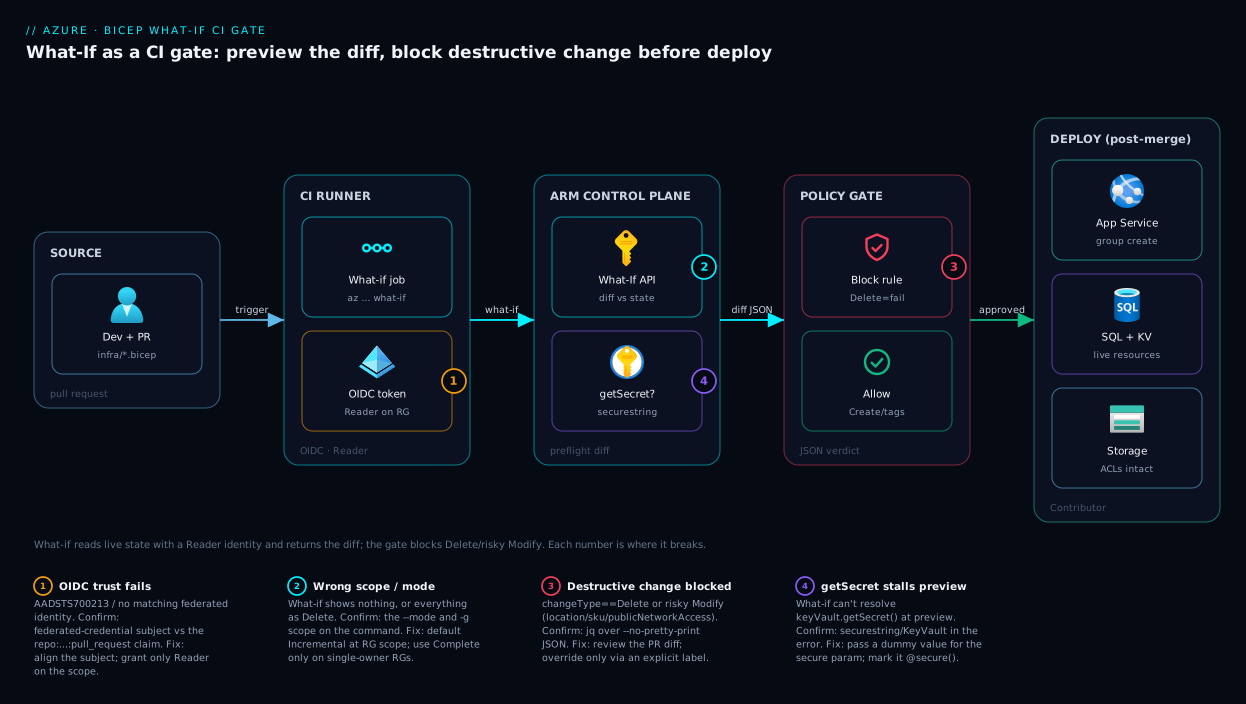
The gate is a left-to-right pipeline: a change starts on a developer’s workstation, flows through CI where the What-If engine in ARM computes the diff against live state, hits a policy gate that blocks destructive changes, and only after merge does a separately-credentialled deploy job touch the real resources. The crucial idea is the split identity: the preview half authenticates with a Reader-only OIDC identity (compute a diff, change nothing), while the deploy half uses a Contributor identity that runs only after the gate and human review pass. Destructive operations are caught at the gate, never in production.
Walking the diagram: a pull request (zone 1) triggers the CI runner (zone 2), which exchanges its OIDC token for a Reader token and calls the ARM What-If endpoint (zone 3). ARM reads the resource group’s current state and returns the change list as JSON and text. The gate parses the JSON: Create/NoChange pass, but any Delete or high-risk Modify (badge 3) fails the build and posts the diff to the PR. Only a merged, approved PR reaches the deploy job (zone 4), which uses the separate Contributor identity to run az deployment group create against the live resources (zone 5) — App Service, SQL, Key Vault, Storage. The numbered badges mark the four common break points: OIDC trust misconfiguration (1), wrong scope/mode hiding or over-reporting changes (2), the destructive-change block (3), and Key Vault getSecret references that stall the preview (4).
Real-world scenario
Northwind Retail runs a flash-sale storefront on Azure: an App Service (P1v3), Azure SQL, a Storage account for product images and a Key Vault, all in rg-shop-prod, managed by a single Bicep template in a GitHub repo. Three squads ship to it. For a year they deployed straight from main with az deployment group create — no preview. It worked until it didn’t.
The incident: a developer refactored the template, extracting the SQL firewall rules into a “cleaner” module. In the refactor, the rule whitelisting the corporate office IP got dropped from the compiled output — a copy-paste error in a for loop. The PR diff looked clean (the module existed; the missing rule was an omission, invisible in source). The deploy went green. Within minutes the office couldn’t reach the production database, and a scheduled job from a fixed IP started failing. Worse, the same deploy omitted siteConfig.alwaysOn (only ever set in the portal, never in Bicep), so Always On flipped off and the next overnight idle period gave customers 40-second cold starts. Two unrelated outages from one “clean” PR. The post-mortem question: how did this merge?
The fix was the gate: a bicep-whatif-gate workflow on every PR touching infra/**, authenticating with a new Reader-only OIDC identity. The next refactor PR — re-attempting the same extraction — produced a what-if comment reading, in red, - Microsoft.Sql/servers/sql-shop/firewallRules/AllowOffice and in purple ~ properties.siteConfig.alwaysOn: true => false. The jq step counted one Delete, set ::error::, and failed the check; branch protection blocked the merge. The reviewer saw the diff, fixed the loop, added alwaysOn: true, and the re-run came back clean: 2 to create, 0 to delete, 0 to modify.
Six months on, the gate had blocked eleven PRs carrying an unintended Delete or Modify — three firewall-rule removals, two accidental Complete-mode templates that would have pruned siblings, one renamed Storage account (delete + recreate, losing the image blobs), and several property reverts. Each would have been a production incident, at a cost of zero plus forty seconds of pipeline time. The cultural change mattered more: reviewers stopped reviewing Bicep source and started reviewing the what-if diff — the actual effect — and infrastructure changes stopped being scary.
Advantages and disadvantages
| Advantages | Disadvantages |
|---|---|
| Shows the real diff (effect), not the source diff (intent) | Prediction is best-effort; some properties not perfectly predicted |
| Catches omission bugs invisible in source review | Property-level Modify can be noisy (ARM normalisation) |
Blocks destructive Delete/Modify before they execute |
Requires CI plumbing + an Entra identity to set up |
| Free — a control-plane read, no resource cost | Adds ~30–90 s to every infra PR |
| Surfaces Complete-mode pruning before it deletes siblings | Can’t resolve getSecret/Key Vault refs at preview without a workaround |
| Auditable artefact for change management | Re-evaluation at deploy means preview ≠ guaranteed apply |
| Works at every scope (RG → tenant) | Some resource providers have partial what-if support |
The advantages dominate on any shared or production resource group, any team doing trunk-based infra development, any change process needing a human-approved record. The disadvantages bite on a throwaway dev sandbox where nothing is precious, or a workload on resource providers with weak what-if support (rare — verify your critical types). For the common case, production Bicep in CI, the trade is overwhelmingly worth it: seconds of pipeline time against eliminated production incidents.
Hands-on lab
The centrepiece. You will stand up a tiny but realistic stack, then see what-if catch a destructive change three ways: in the portal, in az CLI, and wired into a CI gate. Allow 30–45 minutes.
Prerequisites: an Azure subscription with Contributor on a resource group you can create; Azure CLI 2.20+ (az version); jq installed; a GitHub repo you control (for Part E). Replace rg-whatif-lab only if it collides.
Part A — Deploy a baseline stack (so there is state to diff against)
Step 1. Sign in and pick your subscription.
az login
az account set --subscription "<your-subscription-name-or-id>"
az account show --query "{sub:name, id:id}" -o table
Expected output: a one-row table with your subscription name and GUID.
Step 2. Create the lab resource group.
az group create --name rg-whatif-lab --location eastus
Expected output: JSON with "provisioningState": "Succeeded".
Step 3. Author the baseline Bicep. Save as main.bicep:
@description('Base name for resources')
param baseName string = 'whatiflab${uniqueString(resourceGroup().id)}'
param location string = resourceGroup().location

resource plan 'Microsoft.Web/serverfarms@2023-12-01' = {
  name: 'plan-${baseName}'
  location: location
  sku: { name: 'B1', tier: 'Basic' }
  properties: { reserved: true } // Linux
}

resource site 'Microsoft.Web/sites@2023-12-01' = {
  name: 'app-${baseName}'
  location: location
  properties: {
    serverFarmId: plan.id
    httpsOnly: true
    siteConfig: {
      alwaysOn: true                 // <-- we will "accidentally" remove this later
      linuxFxVersion: 'NODE|20-lts'
    }
  }
  tags: { env: 'lab', costCenter: 'CC-1042' }
}

resource storage 'Microsoft.Storage/storageAccounts@2023-05-01' = {
  name: 'st${baseName}'
  location: location
  sku: { name: 'Standard_LRS' }
  kind: 'StorageV2'
  properties: {
    minimumTlsVersion: 'TLS1_2'
    allowBlobPublicAccess: false     // <-- we will "accidentally" flip this later
  }
}
Step 4. Deploy it for real, so there is live state to diff against.
az deployment group create \
  --resource-group rg-whatif-lab \
  --template-file main.bicep \
  --name baseline
Expected output: "provisioningState": "Succeeded", with the three resources in properties.outputResources. Verify with az resource list -g rg-whatif-lab --query "[].name" -o table — the plan, the web app, and the storage account.
Part B — Preview in the Azure portal
The portal runs what-if from the custom deployment experience — handy for a one-off review or teammates who don’t live in the CLI. It’s the same ARM engine behind a form; the CLI in Part C is what you wire into CI.
Step P1. Search Deploy a custom template → Build your own template in the editor. The editor takes ARM JSON, not Bicep: generate it with az bicep build --file main.bicep --stdout, paste, and Save.
Step P2. On the Custom deployment form, set Resource group to rg-whatif-lab and fill any parameters — but do not click Create.
Step P3. Click Review + create: the portal runs preflight validation and shows Validation Passed. To see the diff, use the What-if action on the deployment blade (after a real deploy, the RG’s Deployments entry also lists each operation’s changes).
Step P4. Expected: the portal renders the same classification as the CLI — both call the identical ARM whatIf endpoint. The portal’s value is the visual, shareable review. Discard the deployment (don’t click Create) and return to the CLI.
Part C — Run what-if and read every change type
Step 5. Run what-if against the unchanged template. Because nothing differs from what you just deployed, you should see all NoChange.
az deployment group what-if \
  --resource-group rg-whatif-lab \
  --template-file main.bicep
Expected output: Resource changes: 3 no change. and three = lines. This confirms the baseline is in sync — your first clean what-if.
Step 6. Introduce a safe additive change: add tags: { env: 'lab' } to the storage resource and re-run az deployment group what-if -g rg-whatif-lab -f main.bicep.
Expected output: 1 to modify, 2 no change, and under the storage account a green + tags.env: "lab" — a Modify whose only property change is a tag Create, the allow case.
Step 7. Now the two dangerous changes from the scenario. In main.bicep: (a) delete the alwaysOn: true line from site.siteConfig, and (b) change the storage allowBlobPublicAccess from false to true. Re-run:
az deployment group what-if -g rg-whatif-lab -f main.bicep
Expected output: two ~ (Modify) blocks — ~ properties.siteConfig.alwaysOn: true => false (a property Delete reverting to default, the silent cold-start bug) and ~ properties.allowBlobPublicAccess: false => true (a security regression). This is the moment the gate exists for: neither is obvious in the Bicep source diff (one is an omission), but both are glaring in the what-if diff.
Step 8. Emit the machine-readable JSON and inspect the structure the gate will parse:
az deployment group what-if -g rg-whatif-lab -f main.bicep --no-pretty-print > whatif.json
jq '.changes[] | {id: .resourceId, type: .changeType}' whatif.json
jq '[.changes[] | select(.changeType=="Modify")] | length' whatif.json
Expected: two objects with "type": "Modify", and a count of 2. Drill into the property deltas:
jq -r '.changes[] | select(.changeType=="Modify") | .delta[]? | .path + " (" + .propertyChangeType + ")"' whatif.json
Expected: lines like properties.siteConfig.alwaysOn (Delete) and properties.allowBlobPublicAccess (Modify).
Part D — See a Delete (and Complete-mode pruning)
Step 9. Make what-if show a real resource Delete by switching to Complete mode with a template that omits the storage account. Comment out the entire storage resource in main.bicep, then run Incremental (default) mode:
az deployment group what-if -g rg-whatif-lab -f main.bicep --mode Incremental
Expected: the storage account shows as Ignore (not deleted) — Incremental leaves unmanaged resources alone. Now run Complete mode:
az deployment group what-if -g rg-whatif-lab -f main.bicep --mode Complete
Expected output: the storage account now shows as a red - Microsoft.Storage/storageAccounts/st... — Delete. The same resource went from Ignore to Delete purely by changing the mode: in Incremental nothing is pruned; in Complete, everything not in the template is deleted.
Step 10. Confirm the gate would catch it. With the Complete-mode JSON:
az deployment group what-if -g rg-whatif-lab -f main.bicep --mode Complete --no-pretty-print > whatif.json
DELETES=$(jq '[.changes[] | select(.changeType=="Delete")] | length' whatif.json)
echo "Delete operations: $DELETES"
[ "$DELETES" -gt 0 ] && echo "GATE WOULD FAIL" || echo "gate passes"
Expected: Delete operations: 1 and GATE WOULD FAIL. Restore the storage resource (uncomment it) before continuing, so the lab stack stays intact.
Part E — Wire it as a real CI gate (GitHub Actions)
Step 11. Set up passwordless auth — an app registration plus a Reader-only role assignment for the preview identity:
APP_ID=$(az ad app create --display-name "whatif-lab-gha" --query appId -o tsv)
az ad sp create --id "$APP_ID"
SUB=$(az account show --query id -o tsv)
az role assignment create --assignee "$APP_ID" --role "Reader" \
  --scope "/subscriptions/$SUB/resourceGroups/rg-whatif-lab"
echo "AZURE_CLIENT_ID=$APP_ID  AZURE_TENANT_ID=$(az account show --query tenantId -o tsv)  AZURE_SUBSCRIPTION_ID=$SUB"
Expected: an app ID GUID and the three values you’ll add as GitHub repo variables (Settings → Secrets and variables → Actions → Variables): AZURE_CLIENT_ID, AZURE_TENANT_ID, AZURE_SUBSCRIPTION_ID.
Step 12. Add the federated credential trusting your repo’s pull requests:
az ad app federated-credential create --id "$APP_ID" --parameters '{
  "name": "gha-pr",
  "issuer": "https://token.actions.githubusercontent.com",
  "subject": "repo:<your-org>/<your-repo>:pull_request",
  "audiences": ["api://AzureADTokenExchange"]
}'
Expected: JSON echoing the created credential. The subject ...:pull_request scopes trust to PR-triggered runs.
Step 13. Commit main.bicep to infra/main.bicep, and add .github/workflows/whatif.yml using the GitHub Actions workflow shown earlier (point --resource-group at rg-whatif-lab and --template-file at infra/main.bicep; drop --parameters — this template needs none).
Step 14. Open a pull request that reintroduces a destructive change — delete the alwaysOn line, or (for a hard Delete) add --mode Complete to the workflow’s what-if commands and remove the storage resource. Push and open the PR.
Expected behaviour: the whatif check runs, posts a comment with the coloured diff, and — for a Delete — the Fail on destructive change step prints ::error::what-if found 1 Delete operation(s) and goes red. With branch protection enabled, the Merge button is blocked. You have a working gate.
Step 15 (optional). Add branch protection: repo Settings → Branches → add a rule for main → “Require status checks to pass before merging” → select whatif. Now the gate is enforced, not advisory.
Part F — Teardown
Step 16. Remove everything so there is no cost or leftover identity:
# Delete the lab resource group (all three resources)
az group delete --name rg-whatif-lab --yes --no-wait

# Remove the app registration (and its federated credential + role assignments)
az ad app delete --id "$APP_ID"
Expected: the group deletion runs asynchronously; the app deletion returns immediately. Confirm with az group exists -n rg-whatif-lab (eventually false). Delete the GitHub repo variables and workflow if you no longer need them.
You have now seen what-if classify NoChange, Modify (additive and destructive), Ignore and Delete; read both the human and JSON forms; watched mode flip a resource from Ignore to Delete; and wired it into a CI gate that blocks a destructive merge.
Common mistakes & troubleshooting
The failure modes you will actually hit — symptom, root cause, how to confirm, and the fix.
| # | Symptom | Root cause | Confirm with | Fix |
|---|---|---|---|---|
| 1 | What-if shows everything as a change on first run | Live resources drifted from any template (click-ops history) | Compare a ~ block’s => values to the portal |
Reconcile: import current state into Bicep, accept the one-time diff |
| 2 | What-if shows Delete for resources you didn’t touch |
You ran Complete mode on a shared RG | Check --mode in the command |
Use Incremental; only Complete on single-owner RGs |
| 3 | A property shows Modify but nothing really changed |
ARM normalises casing / injects defaults / reorders arrays | The => values differ only in case or default |
Allow-list that property; don’t block on it |
| 4 | What-if errors instead of showing a diff | Template invalid, or a getSecret()/Key Vault ref can’t resolve at preview |
Read the error; look for securestring/KeyVault in the message |
Fix the template; pass a dummy secure param for preview |
| 5 | (AuthorizationFailed) running what-if |
The CI identity lacks even Reader on the scope |
az role assignment list --assignee <appId> --scope <rg> |
Grant Reader to the preview identity on the target scope |
| 6 | OIDC login fails: AADSTS700213 / no matching federated identity |
Federated credential subject doesn’t match the run (branch/PR/env) |
Compare the credential subject to the actual repo:...: claim |
Fix the subject to match the trigger exactly |
| 7 | What-if shows NoChange but the deploy does change things |
Server-computed property what-if can’t predict | Diff the resource before/after a real deploy | Accept the known limitation; verify that property post-deploy |
| 8 | Gate passes but deploy still deletes a sibling | Preview was Incremental; deploy used Complete (mismatch) | Compare --mode in the what-if step vs the deploy step |
Use the same mode in preview and deploy |
| 9 | PR comment is empty/truncated | What-if errored, or output exceeds the comment size limit | Read the raw whatif.txt artifact |
` |
| 10 | What-if is slow (minutes) | Large scope (sub/MG) or many resources | Time the call; check the scope | Scope to the RG; use ResourceIdOnly result format |
| 11 | Unsupported lines clutter the output |
A resource type’s RP has partial what-if support | The change type is literally Unsupported |
Don’t auto-block on Unsupported; review manually |
| 12 | Parameters differ between preview and deploy | The gate ran with different --parameters than the deploy |
Diff the two parameter files/inputs | Single source of truth: same .bicepparam for both |
The two that waste the most hours are #3 (false Modify noise) and #8 (mode mismatch). For #3, build a small allow-list of properties the gate ignores (casing, tags, ARM-injected defaults) so reviewers trust the diff. For #8, the gate is only honest if the preview uses the same scope, mode and parameters as the deploy — pin all three across both jobs.
A focused reference for the Key Vault / secret case (#4), the most common what-if error:
| getSecret situation | Why what-if struggles | Workaround |
|---|---|---|
param secret string wired from keyVault.getSecret() in a parent |
What-if won’t fetch the secret at preview | Pass a placeholder value for the preview run |
@secure() param with no value in CI |
What-if needs a value to evaluate | Supply --parameters secret=preview-placeholder |
| Secret used only at deploy (not in resource shape) | The value doesn’t affect the diff | Exclude it; it won’t change the change list |
Best practices
- Run what-if on every PR that touches
infra/**, and make the check required to merge. An advisory gate gets ignored under deadline pressure; branch protection makes it real. - Default to Incremental mode; treat Complete as a deliberate, reviewed choice. Most surprise deletions are Complete-mode runs on shared resource groups.
- Give the preview identity
Readeronly; give the deploy identity write — and keep them separate. AContributorpreview identity is needless exposure. - Use passwordless OIDC federated credentials, never a stored client secret. Scope the federated
subjectto the exact branch/PR/environment. - Capture both forms: text for the PR comment, JSON (
--no-pretty-print) for the gate decision. Humans read the diff; the machine judges it — don’tgrepthe coloured text. - Block hard on
Delete; require approval on high-riskModify(region, SKU, network/public-access); allowtags-only changes. Encode the decision table so the verdict is consistent. - Build a known-noise allow-list so reviewers trust the diff. ARM normalisation produces false
Modifys; ignore them explicitly or reviewers rubber-stamp everything. - Pin scope, mode and parameters identically across preview and deploy. One
.bicepparam, one mode, one scope, used by both — anything else is theatre. - Make destructive-change overrides explicit and auditable (a PR label, a pipeline variable) — never a silent bypass. The default is “block”.
- Keep what-if output as a build artifact — your change-management record of who deployed what, with which predicted effect, approved by whom.
- Review the what-if diff, not the Bicep source diff. Omissions and reconciliations are invisible in source and visible in what-if; train reviewers to read the latter.
Security notes
The gate is itself security posture with its own attack surface. Least privilege is the headline: the PR-triggered what-if job must authenticate with a Reader-scoped identity. A pull request can come from a fork or untrusted contributor; if that pipeline held a Contributor token, a malicious PR could deploy or delete. Reader lets it compute a diff and nothing more; the deploy job (only on the protected branch after merge) gets the write role.
Passwordless by default. Use OIDC workload identity federation; do not store an AZURE_CLIENT_SECRET. A federated credential is scoped by subject to a specific repo + branch/PR/environment, so the Entra app can’t be impersonated from a different repo. The token-exchange mechanics are the OAuth2 federated client-credentials flow detailed in OIDC and OAuth2 on Entra ID: Choosing the Right Flow (Auth Code, PKCE, Client Credentials).
Secrets must not leak into the diff. What-if output can echo property values. If your template wires a real secret into a non-@secure() parameter, that value could appear in the PR comment for anyone with repo read access. Mark every secret parameter @secure() (so ARM redacts it), reference secrets via Key Vault rather than inlining them (Azure Key Vault: Secrets, Keys and Certificates Done Right), and pass dummy placeholders for secure params on the preview run so no real secret is evaluated.
Defence in depth — the gate is one layer. What-if blocks bad intent at the PR; it does not replace runtime guards. Pair it with resource locks (Azure Resource Locks: Prevent Accidental Deletes and Changes in Production) so a CanNotDelete lock stops an accidental deletion even if a bad deploy slips through, and with Azure Policy (Azure Policy Effects Decoded: Deny vs Audit vs Modify vs DeployIfNotExists) so a non-compliant resource is denied at deploy time. What-if (pre-merge) + Policy (deploy-time) + locks (runtime): catch it early, deny it at submission, backstop it at the resource. Retain the what-if artifact as audit evidence.
Cost & sizing
The cost story is easy: what-if is free. It is a control-plane read against the ARM whatIf endpoint — it provisions nothing, so there’s no resource or data charge and it doesn’t count against any meaningful quota. The only “cost” is CI minutes: a resource-group-scoped what-if completes in 30–90 seconds — a few seconds of billed runner compute per PR, rounding error.
| Cost driver | Magnitude | Notes |
|---|---|---|
| What-if API call | Free | Control-plane read; no resource provisioned |
| CI runner time | ~30–90 s per PR | The only real cost; pennies on hosted runners |
| Scope size | Larger scope = slower | Sub/MG what-if can take minutes; RG is fast |
| Result format | FullResourcePayloads slower than ResourceIdOnly |
Use ResourceIdOnly if you only need the change list |
| The lab resources | A few INR/USD if left running | B1 plan + Storage; teardown in Part F avoids it |
Rough lab cost if you forget to tear down: an eastus B1 Linux App Service plan is on the order of ₹4,000–4,500 / month (~US$13–14); a Standard_LRS StorageV2 account is a few rupees a day at lab volumes. Part F removes both.
Sizing is about scope, not money: keep the gate at resource-group scope — fastest and most precise. Reserve subscription/MG scope for genuinely subscription-level templates (policy, RBAC, landing zones). If a what-if is slow, the lever is scope and result format, not a bigger runner: narrow the scope and use --result-format ResourceIdOnly when you only need the change list.
| Scope | Typical what-if duration | When the cost (time) is justified |
|---|---|---|
| Resource group | seconds (~30–90 s) | The default; almost always the right scope |
| Subscription | up to a few minutes | Landing-zone / policy / RBAC templates |
| Management group | minutes | Org-wide governance changes |
| Tenant | minutes | Rare; tenant bootstrap only |
Interview & exam questions
Q1. What does a What-If operation compute, and how does it differ from az deployment group validate?
What-if returns the predicted change list — every Create/Modify/Delete/NoChange, down to the property level — by diffing your template against current state, changing nothing. validate only confirms the template and parameters are acceptable; it does not list changes. Use validate to catch a broken template early, what-if to review the effect.
Q2. A teammate says “what-if is just like terraform plan — it saves a plan we then apply.” Correct them.
What-if persists nothing; there is no saved plan to apply. When you later run az deployment group create, ARM re-evaluates against live state from scratch — the world may have changed since the preview. So what-if is a strong signal at review time, not a frozen contract applied verbatim. (Relevant to AZ-104 / AZ-400.)
Q3. In Incremental mode a resource shows as Ignore; the same template in Complete mode shows it as Delete. Why?
Incremental mode only touches declared resources, so an unmanaged one is Ignored. Complete mode makes the resource group match the template exactly, so anything not in it is pruned — Deleted. The mode re-classifies identical state; this is why Complete is dangerous on shared resource groups.
Q4. Your what-if shows ~ properties.location: "eastus" => "EastUS". Should the gate block on it?
No — that’s ARM normalisation noise (casing), not a real change. Blocking on it trains reviewers to ignore the gate. The fix is an allow-list of known-noisy properties (casing, default-injected tags) the gate treats as no-ops, so it only fails on substantive changes.
Q5. Why should the PR-triggered what-if job have only Reader, not Contributor?
What-if only reads state — Reader suffices. A PR can come from an untrusted fork; a Contributor token there could be abused to deploy or delete. The deploy job (post-merge, on the protected branch) gets the write role. Separating preview and deploy identities is least privilege.
Q6. How do you authenticate a what-if pipeline to Azure without storing a secret?
With workload identity federation / OIDC: register an Entra app, add a federated credential whose subject trusts a specific repo + branch/PR/environment, and grant its service principal Reader. CI exchanges its native OIDC token for an Azure token at runtime — no secret stored or rotated.
Q7. What-if returns NoChange for a property, but after deploying you see it did change. Explain.
Some properties are computed server-side at deploy time and can’t be predicted at preview, and some resource providers only partially implement the what-if contract. The prediction is best-effort: resource-level change types are reliable, but property-level predictions can miss server-set values. Accept the limitation and verify post-deploy.
Q8. How does the gate decide pass/fail mechanically, and which output format does it use?
It runs what-if with --no-pretty-print to get JSON, then parses changes[].changeType (and changes[].delta[].path for property risk). Any Delete fails; high-risk Modifys (region, SKU, network/public-access) require approval; tags-only and additive changes pass. It parses the JSON, never greps the coloured text.
Q9. Name three classes of bug what-if catches that a review of the Bicep source would miss.
(1) Omission reverts — a property you didn’t write reverts to its ARM default (alwaysOn turning off); (2) cross-template deletions — a resource managed elsewhere shown as Delete; (3) Complete-mode pruning — siblings in a shared RG shown as Delete. All are invisible in source but visible in the what-if diff.
Q10. What-if errors out with a Key Vault / getSecret message instead of a diff. Why, and how do you fix it for the preview?
What-if can’t resolve a keyVault.getSecret() reference at preview time. Pass a dummy placeholder for the secure parameter on the preview run only (the value doesn’t affect the change list), and mark secret params @secure() so nothing real is evaluated or echoed into the diff. The gate passing on a preview that used a different mode, scope or parameters than the deploy is the other classic trap — pin all three identically across both jobs.
Quick check
- Which what-if change type should the gate block on by default, and which mode makes an unmanaged resource appear under it?
- What CLI flag makes what-if emit machine-readable JSON for the gate to parse, instead of coloured text?
- Why does the PR-triggered what-if job need only the
Readerrole? - A
Modifyline showsproperties.location: "westus" => "WestUS". Real change or noise — and what should the gate do? - Name the three things that must be pinned identically between the preview job and the deploy job for the gate to be honest.
Answers
Delete. An unmanaged resource appears asDeleteunder Complete mode (in Incremental it appears asIgnore). So a Complete-mode what-if is where surprise deletions surface.--no-pretty-print(emits the raw JSON change list; parsechanges[].changeTyperather than grepping the text).- Because what-if only reads state to compute the diff — it changes nothing.
Readeris sufficient, and withholding write from a PR-triggered job (which can come from an untrusted fork) is least privilege. The separate deploy job gets the write role. - Noise — ARM normalises casing, so the region is effectively unchanged. The gate should allow it via a known-noise allow-list; blocking on it erodes trust in the gate.
- Scope, mode, and parameters. If the preview’s scope/mode/parameters differ from the deploy’s, the preview’s “pass” tells you nothing about what the deploy will actually do.
Glossary
- What-If operation — A preflight ARM operation that returns the predicted change list (Create/Modify/Delete/NoChange, per property) by diffing a template against current state, changing nothing.
- Change type — The per-resource verdict in what-if output: Create, Delete, Modify, Deploy, Ignore, NoChange, NoEffect, or Unsupported.
- PropertyChangeType — The per-property verdict inside a
Modify: Create, Delete, Modify, Array, or NoEffect. - Deployment scope — The level a deployment (and its what-if) targets: resource group, subscription, management group, or tenant.
- Deployment mode — Incremental (add/modify only declared resources; others left as
Ignore) or Complete (make the resource group match the template exactly, deleting anything not declared — shown asDelete). Use Complete only when one template owns the whole RG. - Drift — Divergence between live Azure state and the template; what-if’s
Modify/Deletelines are drift made visible. - CI gate — A pipeline check that must pass before a change can merge; here, the what-if diff reviewed and free of unapproved destructive changes.
- OIDC federated credential — A passwordless trust between a CI system and an Entra app registration; CI exchanges its native token for an Azure token, storing no secret. Scoped to a repo + branch/PR/environment via the token
subject(workload identity federation). --no-pretty-print— The what-if flag that outputs raw JSON instead of coloured text — the form the gate parses.--confirm-with-what-if— A flag onaz deployment ... createthat runs what-if and prompts y/N before deploying; a manual terminal safety, not a CI gate.- Preflight validation — The schema/parameter checks ARM runs pre-deployment; what-if runs these too, so an invalid template fails the preview.
- Resource lock — A
CanNotDelete/ReadOnlylock that backstops deletion at runtime; complements what-if’s pre-merge protection.
Next steps
- Solidify the authoring foundation the gate sits on: Deploy Your First Bicep File From Scratch: Author, Validate and Ship in 20 Minutes.
- Add the deploy-time backstop: Azure Policy Effects Decoded: Deny vs Audit vs Modify vs DeployIfNotExists and the runtime one, Azure Resource Locks: Prevent Accidental Deletes and Changes in Production.
- Make the pipeline passwordless and well-understood: OIDC and OAuth2 on Entra ID: Choosing the Right Flow (Auth Code, PKCE, Client Credentials) and CI/CD Secrets and Credential Management: Secure Your Pipelines.
- Place the gate in the wider delivery picture: CI/CD Pipelines Explained: From Code Commit to Production and Infrastructure as Code: Terraform, Pulumi, CDK and Cloud-Native Options.
- If your pipeline stalls before the gate even runs: Azure DevOps Pipelines Stuck in Queue: No Available Agents & Parallelism Limits.