Quick take: CI/CD is the assembly line of software. Every change is built, tested and shipped through the same automated path — so releasing stops being a risky event you schedule for a quiet weekend and becomes a routine thing that happens many times a day.
A small product team released code once a month. Every release was an evening event: a printed checklist, a war-room call, three engineers SSH-ing into servers, and — more often than anyone admitted — a rollback at 11pm when something nobody tested broke in production. After they moved to a CI/CD pipeline, the same checks that used to live in that checklist ran automatically on every change. They started shipping several times a day, each change small enough to reason about, and a bad deploy rolled back with one click. Nothing about their people changed — the path from a developer’s keyboard to production became a machine you can trust instead of a ritual you fear.
This article explains that machine from the ground up. You will learn what CI (continuous integration) and CD (continuous delivery and continuous deployment — two different things) mean, the stages every pipeline moves through (commit → build → test → artifact → deploy), what triggers a pipeline, how pull-request gates and branch policies keep broken code out of your main branch, how code is promoted through environments (dev → staging → production), what an artifact is and why you build it exactly once, how rollback works, and then — the centrepiece — a real first pipeline in GitHub Actions walked line by line so the YAML stops looking like magic. We close with the failures every team hits in their first month.
It’s written for someone who has pushed code to Git but never built a pipeline, or who has used one their team set up and wants to understand what it’s doing. No prior CI/CD experience is assumed.
What problem this solves
Without CI/CD, shipping software is manual, and manual means three things: slow, inconsistent, and scary.
Slow. A human has to remember to run the tests, build the thing, copy files to a server, restart, and check it came up. Releasing becomes a half-day job, so teams release rarely — which makes each release bigger, riskier, and even rarer. A doom loop.
Inconsistent. “It works on my machine” is the oldest bug report in software. When the build happens on a laptop with one person’s versions of everything, the artifact reaching production differs subtly from what was tested — and manual steps get skipped under deadline pressure.
Scary. Because releases are rare and inconsistent, nobody is confident one will go smoothly — so they happen on Friday evenings, behind a change-freeze, with a rollback plan nobody has tested. The fear is rational, and it makes everything worse: less frequent releases, larger batches, more to go wrong.
CI/CD breaks the loop by automating the entire path and running it on every change — the same build, tests and deploy steps, identically, whether it’s a typo fix or a major feature. Because it runs on every change, each change is small, so when something breaks you know exactly which one did it — and releasing stops being scary, so teams ship often in small safe increments, which is the entire point.
Here is who feels the pain without it, and what specifically breaks:
| Without CI/CD, this person… | …hits this problem | …because |
|---|---|---|
| Developer | “My change worked locally but broke in prod” | The build/test environment differs from production |
| Developer | Waits days to know if their change is good | Tests only run at release time, in a batch |
| Reviewer | Approves a PR that breaks the build | No automated check blocks broken code from merging |
| On-call engineer | Spends an hour rolling back by hand | No one-click rollback; the last-good artifact is gone |
| Team lead | Can’t ship a hotfix on a Friday | Releases are manual, risky, and frozen near weekends |
| New hire | Takes a week to make their first deploy | The release process lives in one person’s head |
| Whole team | Ships once a month, in a big scary batch | Every release is manual labour, so they batch it up |
Learning objectives
By the end of this article you can:
- Explain the difference between continuous integration, continuous delivery, and continuous deployment — and say which one a given team is actually doing.
- Name every stage of a pipeline (commit, build, test, artifact, deploy) and describe what happens, and what can go wrong, at each.
- Describe what triggers a pipeline (push, pull request, tag, schedule, manual) and when to use each.
- Explain how pull-request gates and branch protection rules keep broken code out of the main branch.
- Describe how an artifact is built once and promoted unchanged through dev, staging and production environments — and why rebuilding per environment is a bug.
- Explain rollback and the difference between rolling back and rolling forward.
- Read a real GitHub Actions workflow file line by line and explain what each part does.
- Recognise the common first-pipeline failures (flaky tests, slow pipelines, secrets in code, “works on my machine”) and apply the standard fix for each.
Prerequisites & where this fits
You should be comfortable with the basics of Git: what a commit is, what it means to push to a remote, and roughly what a branch and a pull request (PR) are. You don’t need to be a Git expert — if you’ve ever opened a PR on GitHub, you know enough. You should also have a rough idea of what it means to “deploy” an app (get your code running somewhere other than your laptop), even if you’ve only ever done it by hand.
You do not need to know any specific CI/CD tool, any cloud platform, or any infrastructure concepts. We build everything up from zero, and the hands-on lab uses GitHub Actions, which is free for public repositories and needs nothing installed on your machine.
Where this sits in the bigger picture: CI/CD is the connective tissue of modern software delivery. It assumes you already use version control (Git) and it feeds into everything downstream — how you structure branches, how you test, how you deploy, how you monitor. This article is the foundation; the deeper topics build on it. A good map of the neighbouring ideas:
| Topic | How it relates to CI/CD | Where to go deeper |
|---|---|---|
| Git branching strategy | Decides what triggers the pipeline and where code merges | Git Branching Strategies: Trunk-Based, GitFlow and Feature Branches |
| The CI/CD tool itself | The platform that runs your pipeline (Actions, GitLab, Jenkins…) | CI/CD Platforms Compared: GitHub Actions, GitLab CI, Azure DevOps and Jenkins |
| Testing & quality gates | The checks the pipeline runs to decide pass/fail | Shift-Left Testing and Quality Gates in CI/CD |
| Deployment strategies | How the deploy stage rolls out (blue-green, canary, rolling) | Deployment Strategies: Blue-Green, Canary and Rolling Updates |
| Artifacts & registries | Where the built artifact is stored and versioned | Artifact Registries and Package Management in CI/CD |
| Secrets management | How the pipeline gets passwords and keys safely | CI/CD Secrets and Credential Management: Secure Your Pipelines |
Core concepts
Four ideas make everything else click.
A pipeline is an automated path your code travels, the same way every time. Push a change and a series of stages run in order — build, test, package, ship — and if any stage fails, the pipeline stops and the change goes no further. The word is literal: a pipe with stages along it, your change flowing from a commit to running in production. It’s defined in a file that lives in your repository, so the process is version-controlled just like the code.
CI, continuous delivery, and continuous deployment are three different things, often blurred. Pin it down now:
- Continuous Integration (CI) is merging and verifying: every developer integrates into the shared branch frequently (at least daily), and every integration is auto-built and tested to catch “your change broke something” within minutes. CI stops at “the change is verified good.”
- Continuous Delivery (CD) extends CI: every verified change is auto-prepared for release — built into an artifact, deployed to staging, ready for production at the push of a button. The artifact is always releasable; a human decides when to press the button for prod.
- Continuous Deployment (also CD) removes that last human gate: every change passing all checks goes automatically to production.
The relationship is a ladder — CI → continuous delivery → continuous deployment — each rung including the one below. Most teams should start at solid CI, grow into delivery, and adopt full deployment only once their tests and monitoring are trustworthy enough to ship with no human in the loop.
An artifact is the thing you built, and you build it exactly once. The build stage produces an artifact — a packaged, deployable output (a Docker image, a .jar/.zip, an npm package, a binary). The golden rule: build it once, tag it (usually with the Git commit SHA), then promote that same artifact unchanged through every environment. Rebuild for staging and again for production, and the thing in prod is not the thing you tested.
Environments are stages of trust, and code is promoted up through them. The artifact first goes to a low-stakes environment (dev/test), then staging (a production-like rehearsal), and only then production (real users). Each promotion is a checkpoint: pass the checks here, move to the next, higher-trust environment — never “rebuild it there.”
The whole vocabulary in one place, to lock it in before the deep sections:
| Term | One-line definition | Why it matters |
|---|---|---|
| Pipeline | The automated sequence of stages a change runs through | The machine that replaces the manual release checklist |
| Stage | One phase of the pipeline (build, test, deploy…) | A failure in any stage stops the change going further |
| Job / step | A unit of work inside a stage | The actual commands that run (e.g. npm test) |
| Continuous Integration (CI) | Merge + auto-build + auto-test every change | Catches breakage in minutes, not at release |
| Continuous Delivery (CD) | Every change is ready to ship; human presses the button | Always-releasable, with a manual prod gate |
| Continuous Deployment (CD) | Every passing change ships to prod automatically | No human gate; needs strong tests + monitoring |
| Trigger | The event that starts a pipeline run | Push, PR, tag, schedule, or manual |
| Artifact | The packaged, deployable output of the build | Built once, promoted unchanged everywhere |
| Environment | A place the app runs (dev / staging / prod) | Stages of trust; code is promoted upward |
| Promotion | Moving the same artifact to a higher environment | Never rebuild per environment |
| PR gate | Required checks that must pass before a merge | Keeps broken code out of the main branch |
| Rollback | Reverting to the previous good artifact | The “undo” for a bad deploy |
| Runner / agent | The machine that executes the pipeline | Where your build and tests actually run |
CI vs Continuous Delivery vs Continuous Deployment
Because this trips up almost every beginner, here it is side by side. Read the row for your own team and you’ll know where you stand:
| Continuous Integration | Continuous Delivery | Continuous Deployment | |
|---|---|---|---|
| Core promise | Every change is merged & verified fast | Every change is ready to release | Every change is released |
| Automates up to | Build + test | Build + test + deploy to staging | Build + test + deploy to prod |
| Prod deployment | Manual / separate process | Manual approval (a human clicks “go”) | Automatic (no human) |
| What it catches | “Your change broke the build/tests” | The above, plus “it doesn’t deploy cleanly” | The above; relies on tests + monitoring to catch the rest |
| Human gate before prod | N/A | Yes — an approver signs off | No |
| Needs before adopting | A test suite worth trusting | CI + an automated deploy + staging | CD + excellent tests + monitoring + fast rollback |
| Risk level | Low | Low–medium | Medium (mitigated by automation) |
| Good for | Every team, day one | Most teams, once CI is solid | Mature teams shipping low-risk changes |
A plain-English way to remember it: CI answers “is this change good?”, continuous delivery answers “could we ship it right now?” and keeps the answer permanently “yes”, and continuous deployment answers “should we wait for a human?” with “no — if it passed the checks, it ships.” One honest caveat: “CD” is used loosely for both delivery and deployment even by experienced engineers, so when precision matters, say the full words. The practical difference is exactly one thing — whether a human approves the production release. Everything else is identical.
The pipeline stages, end to end
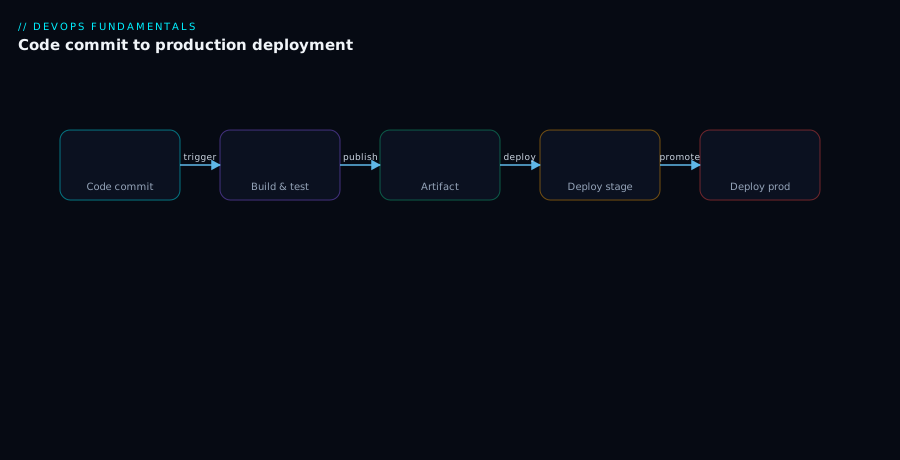
Every pipeline, in every tool, is some arrangement of the same five stages. Learn them once and you can read any pipeline. The flow is commit → build → test → artifact → deploy, and a failure at any stage halts the run so nothing bad moves downstream.
| Stage | What happens | Typical commands | If it fails | Typical time |
|---|---|---|---|---|
| 1. Commit / trigger | A change lands; the pipeline starts | (none — an event triggers it) | Nothing ran yet | instant |
| 2. Build | Compile / package the code | docker build, mvn package, npm run build |
Compile error, missing dependency | seconds–minutes |
| 3. Test | Run automated checks | npm test, pytest, lint, scan |
A failing test or a critical vulnerability | seconds–minutes |
| 4. Artifact | Store the built output, tagged | docker push, upload artifact |
Registry unreachable, auth failure | seconds |
| 5. Deploy | Release the artifact to an environment | kubectl apply, az webapp deploy |
Bad config, unreachable target, failed health check | seconds–minutes |
Walking it: commit/trigger — nothing happens until an event occurs (a push, a PR, a tag); the tool is watching, no human “starts the build,” the push is the start. Build — the pipeline checks out your code on a fresh runner (a clean machine) and compiles/packages it; “fresh and clean” is what stops “works on my machine” from sneaking in, and a compile error or missing dependency fails here, the cheapest place to catch a break. Artifact — if tests pass, the built output is stored and tagged with the Git SHA, the one-and-only thing deployed everywhere from here on. Deploy — the stored artifact goes to dev, then staging, then (after approval, in continuous delivery) production, after which a good pipeline runs a smoke test and can auto-roll-back. The triggers, the gate, the artifact and the deploy each get their own deep section below; here we focus on the test stage, the gate that decides good-versus-bad — usually several kinds of check, fastest-first so failures surface early:
| Check type | What it verifies | Speed | Run order |
|---|---|---|---|
| Lint / format | Code style and obvious mistakes | Very fast | First |
| Unit tests | Individual functions behave correctly | Fast | Early |
| Integration tests | Components work together (DB, API) | Medium | Middle |
| Security scan (SAST/deps) | Known vulnerabilities, risky patterns | Medium | Middle |
| End-to-end (e2e) tests | The whole app works like a user expects | Slow | Last |
The rule is fail fast: run the cheap checks first so a typo caught by the linter in two seconds doesn’t wait behind a ten-minute e2e suite. A single failing test stops the run before an artifact is built — broken code never even gets packaged. (How the deploy stage rolls out — all at once, gradually as a canary, or onto a parallel copy you switch to, blue-green — is its own subject: Deployment Strategies: Blue-Green, Canary and Rolling Updates.)
What triggers a pipeline
A pipeline is started by a trigger — a repository event. The choice matters: too broad wastes runner minutes; too narrow lets changes slip through unverified.
| Trigger | Fires when… | Typically used for | Watch-out |
|---|---|---|---|
| Push | A commit is pushed to a branch | Running CI on the main branch; deploying | Scope to specific branches or you run on every push everywhere |
| Pull request | A PR is opened or updated | The PR gate — build + test the proposed change | Re-runs on every new commit to the PR (correct, but costs minutes) |
| Tag | A version tag (e.g. v1.4.0) is pushed |
Cutting a release / deploying to prod | Tag format must match the trigger’s filter exactly |
| Schedule (cron) | A time-based schedule | Nightly builds, dependency scans, cleanup | Runs even with no code change — can hide a long-broken build |
| Manual (dispatch) | A human clicks “Run” | One-off deploys, the prod approval step | No automatic safety net; relies on the person |
| Upstream / chained | Another pipeline finished | Multi-repo or staged deployment flows | Failures cascade; debugging spans pipelines |
The key pair for a beginner: PR triggers run the gate (verify before merge) and push-to-main triggers run the deploy (ship after merge). Keep the deploy pipeline scoped to main and tags — you do not want every feature-branch push deploying to production.
Pull-request gates and branch protection
This is where CI earns its keep day to day. The pull request (PR) is a proposed change to the shared branch, and it is the first gate — where broken code is caught before it can hurt anyone else.
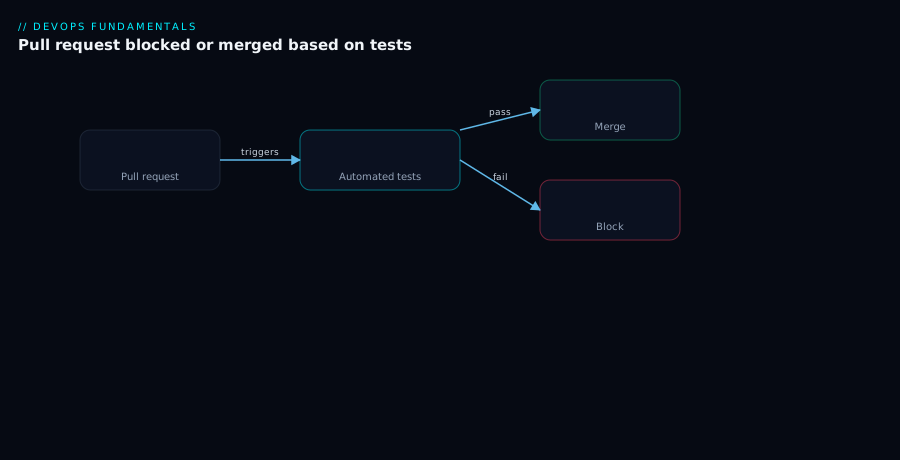
The flow: a developer opens a PR to merge their branch into main; the CI/CD tool runs the checks — build, unit tests, lint, coverage — against the proposed merged code; each check reports a status back onto the PR (green tick or red cross). Then the key piece: branch protection rules mark certain checks as required, so the merge button is physically disabled until every required check is green. A red status blocks the merge — a hard lock that even the PR author can’t override on a protected branch.
| PR gate element | What it does | Why it matters |
|---|---|---|
| Status check | A pass/fail signal a pipeline reports onto the PR | Turns “did the tests pass?” into a visible, automatic answer |
| Required check | A status check marked mandatory in branch protection | Without “required,” the check is advisory — easily ignored |
| Branch protection rule | Rules guarding a branch (e.g. main) |
Enforces the gate; nobody bypasses it accidentally |
| Merge button lock | Merge disabled until all required checks pass | The actual enforcement — green unlocks, red blocks |
| Required reviewers | N human approvals also required | Combines automated checks with human review |
| Up-to-date branch | PR must include the latest main before merge |
Prevents “passed in isolation, breaks once merged” |
The effect is simple and powerful: main only ever receives green PRs, so it stays releasable at all times. A developer whose PR fails doesn’t argue with a human — they push a fix, the checks re-run, until green. The subtlety beginners miss: marking a check required is what makes it a gate; a PR test that isn’t marked required is a green tick everyone is free to ignore. The status check reports; branch protection enforces; you need both.
Environments and promotion
You never ship straight from a laptop to your users. The artifact climbs a ladder of environments, each more production-like and higher-stakes than the last, with each promotion gated.
| Environment | Purpose | Who uses it | What gates entry | Data |
|---|---|---|---|---|
| Dev / test | First landing spot; fast feedback | Developers, the pipeline | Build + unit tests pass | Synthetic / throwaway |
| Staging / pre-prod | Production rehearsal | QA, automated e2e tests | Integration/e2e tests pass in dev | Production-like, anonymised |
| Production | Real users | Everyone (it’s live) | Approval (delivery) or all checks (deployment) | Real |
The non-negotiable rule, restated because beginners break it: the same artifact moves up the ladder. Build myapp:9f3c1a2 once, deploy that to dev, promote that same one to staging, then that same one again to production. Rebuild for production and the prod binary differs from the one that passed staging — “we tested it in staging” becomes a lie. What does change between environments is configuration (connection strings, API keys, feature flags), injected at deploy time, never baked into the artifact.
How promotion happens differs by your CD maturity:
| Promotion style | How dev→staging happens | How staging→prod happens | Maturity |
|---|---|---|---|
| Manual everywhere | A person triggers each deploy | A person triggers it | Just starting |
| Auto to staging, gated to prod | Pipeline deploys automatically | Human approves, then deploys | Continuous delivery |
| Auto all the way | Pipeline deploys automatically | Pipeline deploys automatically | Continuous deployment |
That production gate — auto versus human-approved — is, once again, the entire difference between continuous delivery and continuous deployment.
Artifacts and versioning
Getting the artifact wrong quietly breaks everything downstream. It’s the deployable output of your build, and the two rules that matter are build once and tag traceably.
| Stack | Typical artifact | Where it’s stored | Common tag |
|---|---|---|---|
| Containers | Docker image | Container registry (GHCR, ACR, Docker Hub) | app:<git-sha> or app:1.4.2 |
| Java | .jar / .war |
Maven repo / artifact feed | version + build number |
| Node | npm package / build folder | npm registry / artifact store | semver + commit |
| .NET | .dll / .zip package |
NuGet feed / artifact store | version + build |
| Static site | bundled dist/ folder |
Object storage / CDN | commit SHA |
Tag with the Git commit SHA wherever you can — it ties an artifact unambiguously back to the exact source code that produced it, so when production misbehaves you answer “what code is actually running?” by reading the tag. A human-friendly semantic version (1.4.2) is great for release communication, but the SHA is the ground truth. Where artifacts live and how registries version them is its own topic: Artifact Registries and Package Management in CI/CD.
Rollback: the undo button
Things will go wrong in production despite every gate. Rollback is how you recover fast, and it’s only possible because you kept your previous artifacts. Two ways back:
| Recovery method | What you do | Speed | When to use |
|---|---|---|---|
| Roll back | Redeploy the previous good artifact | Seconds–minutes | A deploy made things worse; revert now, debug later |
| Roll forward | Push a new fix through the pipeline | Minutes–hours | The bug is small and a fix is faster than a revert |
Here’s why build-once-and-keep-the-artifacts pays off: rolling back is just redeploying an artifact you already have and trust. 9f3c1a2 was fine; 7b2d99e broke things; redeploy 9f3c1a2 and you’re back to known-good in under a minute — no rebuild, no scramble. Which is also why immutable, retained artifacts matter: rebuild or overwrite the old image and there’s nothing to roll back to.
Two rollback realities to internalise: rolling back code is easy, but rolling back a database migration is hard (a dropped column is gone), so design migrations to be backward-compatible — and the fastest rollback is one you’ve tested, because a plan nobody has exercised is a hope, not a plan.
Architecture at a glance
Picture the whole journey as a left-to-right assembly line. A change enters at commit (a git push or merge to main triggers a run automatically), flows into build, then test + scan where a single failure stops the run so broken code never reaches an artifact, then artifact where the image is built and pushed exactly once, tagged with the Git SHA, and promoted unchanged from there. It then hits deploy staging (smoke tests confirm health) and finally deploy prod, where a manual gate pauses for a human to sign off — this pause is the line between continuous delivery (gated) and continuous deployment (automatic) — before a canary rollout that lets a bad release roll back in one click. Read the diagram left to right to trace a single commit’s whole life:
The pull request is the first gate, before any deploy machinery runs. A PR against main runs the checks in parallel, and a status gate reads the AND of every required check: all green unlocks the merge button; any red disables it, with no override on a protected branch. A blocked PR loops back to the author until green:
Real-world scenario
Brightcart, a 12-person startup, ran a Node.js storefront API. For their first year they deployed by hand: whoever was free pulled main onto the production VM, ran npm install, restarted with pm2, and eyeballed the homepage. Deploys happened “when we had time” — roughly once every two weeks, each a 45-minute affair with two engineers watching — and about one in four needed a same-evening fix.
The breaking point was a Friday. A one-line typo fix on the checkout button was deployed at 5pm. The npm install quietly pulled a new minor version of a dependency with a breaking change, and the API started returning 500s on checkout. Nobody noticed for forty minutes because the “deploy” was a service restart with no health check. They lost an estimated ₹2,00,000 in abandoned carts before rolling back by hand — fifteen tense minutes. The infuriating part: the code change was a correct one-word fix; the breakage came entirely from the manual, inconsistent process around it.
They spent the next sprint building a pipeline in GitHub Actions. The PR gate came first: every pull request ran npm ci (a clean, locked install — no dependency drift), lint, and the Jest tests, all marked required. Within a week the gate caught two would-be-broken PRs before merge. Next came the deploy pipeline: a push to main built a Docker image tagged with the commit SHA, pushed it to the registry, deployed to staging, smoke-tested /health, then paused for a one-click approval before deploying the same image to production with a health check that auto-rolled-back on failure.
The numbers tell the story. Deploy frequency went from once every two weeks to four times a day; the average deploy from 45 minutes of two engineers to six minutes of nobody’s; change-failure rate from ~25% to under 5%, because the same locked install and tests ran every time. A new hire shipped their first production change on day three. The typo-on-Friday class of incident stopped happening, because the process was no longer the weak link. As the lead put it: “We didn’t get better engineers. We stopped asking humans to do a robot’s job.”
The before-and-after, because the contrast is the lesson:
| Metric | Before (manual) | After (CI/CD) |
|---|---|---|
| Deploy frequency | ~1 per 2 weeks | ~4 per day |
| Time per deploy (human attention) | 45 min, two people | 6 min, zero people |
| Change-failure rate | ~25% | < 5% |
| Time to roll back | ~15 min, manual | < 1 min, one click |
| Time for a new hire’s first deploy | ~1 month | 3 days |
| Friday-evening dread | High | Gone |
Advantages and disadvantages
CI/CD is close to a free lunch, but “close to” is doing real work in that sentence. Weigh it honestly:
| Advantages | Disadvantages |
|---|---|
| Fast feedback — developers learn in minutes if a change broke something, not at release | Up-front investment — building and tuning the first pipeline takes real time |
| Lower risk — small, frequent changes are easier to reason about and revert | Flaky tests sabotage trust — a test that fails randomly trains people to ignore red |
| Consistency — the exact same build/test/deploy runs every time, no skipped steps | Tooling complexity grows — pipelines, runners, registries, secrets all need care |
| Repeatable, auditable releases — every deploy is logged and reproducible | False confidence if test coverage is poor — green doesn’t mean correct, only passed the tests you wrote |
| Faster onboarding — the process is in code, not in one person’s head | Maintenance burden — pipelines need updating as the app and dependencies evolve |
| Frees humans — no one babysits a deploy; the machine does the rote work | Runner cost — minutes add up; broad triggers and slow tests get expensive |
The advantages dominate for any team shipping more than occasionally — almost everyone. The disadvantages are real but manageable, and they share a theme: a pipeline is only as good as the checks inside it. Flaky or shallow tests give you the feeling of safety without the substance — arguably worse than no pipeline, because people trust it. The work isn’t “set up a pipeline”; it’s “set up a pipeline with checks worth trusting, kept fast and honest.”
When CI/CD is not worth it: a throwaway prototype you’ll delete next week. And never automate deployment before you have tests worth gating on — shipping untested code automatically just breaks things faster. Start with CI, earn trust, then automate deployment.
Hands-on lab
Let’s build a real, working CI/CD pipeline in GitHub Actions — free for public repos, nothing installed locally, just the browser plus a few git commands. We’ll build a tiny Node.js app, write one test, create a pipeline that builds and tests it on every push and pull request, then watch the gate block a broken change — which is the whole point.
Step 1 — Create a repository and a tiny app. Create a new public repo on GitHub (call it cicd-lab), clone it, and in the repo folder add a trivial Node project:
# Create a minimal Node app with one function and one test
npm init -y
Create sum.js:
// The world's smallest "app": a function worth testing.
function sum(a, b) {
  return a + b;
}
module.exports = sum;
Create sum.test.js:
// One real test. Jest will run this in the pipeline.
const sum = require('./sum');

test('adds 2 + 3 to equal 5', () => {
  expect(sum(2, 3)).toBe(5);
});
Step 2 — Add Jest and a test script. Install the test runner and wire up npm test:
npm install --save-dev jest
Edit package.json so the scripts block reads:
{
  "scripts": {
    "test": "jest"
  }
}
Confirm it works locally before automating it:
npm test
# Expected: "Tests: 1 passed, 1 total" and a green checkmark
Step 3 — Write the pipeline file. GitHub Actions runs any YAML under .github/workflows/. Create .github/workflows/ci.yml:
# .github/workflows/ci.yml
name: CI                      # the pipeline's display name

on:                            # TRIGGERS — when this pipeline runs
  push:
    branches: [ main ]         # run on every push to main
  pull_request:
    branches: [ main ]         # run on every PR targeting main (the gate)

jobs:
  build-and-test:              # one job; you can have many
    runs-on: ubuntu-latest     # the RUNNER — a fresh, clean Linux VM
    steps:
      - name: Check out the code
        uses: actions/checkout@v4          # pulls your repo onto the runner

      - name: Set up Node.js
        uses: actions/setup-node@v4         # installs Node
        with:
          node-version: '20'

      - name: Install dependencies (clean, locked)
        run: npm ci                          # 'ci' = reproducible install from lockfile

      - name: Run the tests
        run: npm test                        # the GATE — a failure fails the run
Step 4 — Push it and watch the pipeline run. Commit and push:
git add .
git commit -m "Add tiny app, test, and CI pipeline"
git push origin main
Open your repo on GitHub and click the Actions tab. A run named “CI” appears, goes yellow (running), then green (passed); click in to see each step — checkout, set up Node, npm ci, npm test — with its log. You just ran a pipeline. Every push from now on runs these checks automatically.
Step 5 — Turn on the PR gate (branch protection). A green check nobody is required to pass is decoration. Make it real: go to Settings → Branches → Add branch protection rule, set the pattern to main, tick Require status checks to pass before merging, and select the build-and-test check. Save. Now no PR can merge unless that check is green.
Step 6 — Prove the gate works by breaking a test. Create a branch, deliberately break the code, and open a PR:
git checkout -b break-it
Change sum.js so it’s wrong on purpose:
function sum(a, b) {
  return a - b;   // BUG: subtraction, not addition — the test will catch this
}
module.exports = sum;
Commit, push the branch, and open a pull request into main on GitHub:
git add sum.js
git commit -m "Break the sum function (on purpose)"
git push origin break-it
On the PR page, watch the CI check go red — npm test fails because sum(2,3) now returns -1, not 5 — and the merge button is disabled. The broken change is locked out of main. Fix the code (return a + b;), push again, the check re-runs green, and the merge unlocks. That loop — red blocks, fix, green unlocks — is CI in one sentence.
Validation checklist. You wrote an app and a test, created a pipeline that triggers on push and PR, watched it run on a clean runner, made it an enforced gate with branch protection, and proved it blocks broken code and unblocks on a fix — a complete, real CI setup, the same shape huge production systems use, just smaller.
| Step | What you did | What it proves |
|---|---|---|
| 3 | Wrote ci.yml with on: triggers |
A pipeline is just a versioned file in your repo |
| 4 | Pushed and watched it run | The push is the trigger — no human starts the build |
| 5 | Added branch protection | A status check becomes a gate only when required |
| 6 | Broke a test on a PR | Red blocks the merge; green unlocks it — CI in action |
Teardown. Nothing to pay for and nothing running — Actions minutes are free on public repos and no servers were deployed. For a clean slate, delete the cicd-lab repo in Settings → Danger Zone → Delete this repository.
Common mistakes & troubleshooting
These are the failures every team hits in its first month with CI/CD — symptom → cause → confirm → fix. Scan the table, then read the closer notes under it.
| # | Symptom | Root cause | How to confirm | Fix |
|---|---|---|---|---|
| 1 | Build passes in CI, app breaks in prod | Build/test environment differs from production | Compare runner image & versions to prod; check the artifact is the same one | Build once, promote that artifact; pin versions; deploy the tested artifact, not a rebuild |
| 2 | Pipeline is slow; people stop waiting for it | Slow tests run first; no caching; no parallelism | Read the run timing — which step dominates? | Run fast checks first; cache dependencies; parallelise jobs; split slow e2e out |
| 3 | A test fails randomly, passes on re-run | Flaky test (timing, shared state, network) | Re-run with no code change — does red turn green? | Fix or quarantine the flaky test; never “just re-run until green” as a habit |
| 4 | Green pipeline, but real bugs reach users | Shallow test coverage — tests don’t exercise the bug | Check coverage; ask “would a test have caught this?” | Add tests for the gap; treat every prod bug as a missing test |
| 5 | Secrets (passwords, keys) committed in code/YAML | Hard-coded credentials instead of secret store | Search the repo & history for keys; scan with a secret scanner | Move to the tool’s secret store; rotate the leaked secret immediately |
| 6 | Merge button still works despite a red check | Check exists but isn’t marked required | Settings → Branches: is the check in the required list? | Add the check to branch protection as required |
| 7 | PR passed alone, broke main after merge |
PR didn’t include the latest main before merging |
Two PRs touched the same area and merged separately | Require “branch up to date before merge”; re-run on merge |
| 8 | Deploy “succeeds” but the app is down | No health/smoke check after deploy | Hit the app — is it actually serving? | Add a smoke test post-deploy; auto-rollback on failure |
| 9 | Can’t roll back — old artifact is gone | Artifacts overwritten or not retained | Look in the registry: only latest exists? |
Tag by SHA, retain previous artifacts; never rely on a moving latest |
| 10 | Pipeline runs on every feature-branch push, burning minutes | Trigger scoped too broadly | Read the on: block — does it run on all branches? |
Scope triggers to main, tags, and PRs only |
Three of these bite hardest and deserve a closer word. The flaky test (#3) is poison — it teaches the team that red means “re-run,” not “broken,” and once people reflexively re-run red, the gate is dead. Make it deterministic (mock the clock/network, isolate state) or quarantine it until fixed, but never normalise “just hit re-run.” Secrets in the repo (#5): a hard-coded key is in Git history forever, so it isn’t enough to move it to the secret store and reference it by name — you must also rotate the leaked secret, because removing it from the latest commit does not remove it from history (CI/CD Secrets and Credential Management goes deep). The gate that isn’t a gate (#6): you see a green tick yet a red PR merges, always because the check exists but isn’t marked required in branch protection — a status check reports, branch protection enforces, and you need both.
Best practices
- Keep the pipeline fast. A gate nobody waits for isn’t a gate. Aim for the PR check to finish in a few minutes — cache dependencies, parallelise, run the fastest checks first.
- Fail fast. Lint and unit tests in seconds; integration and e2e later. A typo shouldn’t wait behind a ten-minute suite.
- Build once; promote unchanged. One build, tagged with the Git SHA, deployed to dev → staging → prod. Never rebuild per environment — that’s how “tested in staging” becomes a lie.
- Treat pipeline definitions as code. The pipeline file lives in the repo and is reviewed in PRs — a change to how you build is as reviewable as a change to what you build.
- Make every required check actually required in branch protection. An advisory check is decoration; a required one is a gate.
- Keep
mainalways releasable. Only green PRs merge, somainis deployable at any moment — which makes hotfixes and frequent releases safe. - Fix flaky tests immediately — never normalise “re-run.” The first time the team learns red can mean “just try again,” the gate loses all its value.
- Inject configuration at deploy time; never bake it into the artifact. The same artifact runs everywhere; what differs is config, supplied by the environment.
- Add a smoke test after every deploy, and automate rollback. “The deploy command succeeded” is not “the app is serving.”
- Keep secrets in a secret store, never in code or YAML. Reference them by name; rotate anything that leaked.
- Start with CI, then earn CD. Solid build-and-test-on-every-PR first; add automated deployment only once your tests are worth gating releases on.
- Make failures loud and visible — a red status or notification, not something people discover hours later.
Security notes
A CI/CD pipeline is an automated path into production — a high-value target where small mistakes have outsized consequences. The essentials for a beginner:
- Never put secrets in code or pipeline files. Use the platform’s encrypted secret store (GitHub Actions Secrets, GitLab CI variables) and reference them by name. Anything committed to Git is in history forever — assume a leaked secret is compromised and rotate it.
- Give the pipeline least privilege. Deploy credentials should be scoped to exactly what’s needed — one app, not “owner of the whole cloud account.” A compromised pipeline with god-mode credentials is a catastrophe; a narrow one is contained.
- Scan dependencies and code in the pipeline. Add a vulnerability scan and basic static analysis (SAST) as checks, so a known-vulnerable library fails the gate before it ships — part of Shift-Left Testing and Quality Gates in CI/CD.
- Protect the branches that deploy. If a push to
maindeploys to production, branch protection onmainis a production-access control. Require reviews and passing checks; disallow force-pushes and unreviewed merges. - Pin third-party build actions to a specific version, not a moving tag — they run with access to your code and secrets, so prefer well-maintained, trusted sources.
- Keep an audit trail of approvals. The manual production approval should record who approved what, when — for security and incident review.
Cost & sizing
CI/CD cost is mostly runner minutes — the compute time your pipelines consume — plus a little artifact storage. The good news: getting started is usually free.
| Cost driver | What you pay for | How to keep it low |
|---|---|---|
| Runner minutes | Compute time per pipeline run | Fast pipelines, caching, scoped triggers (not every branch) |
| Concurrency | Running many pipelines at once | Fine for big teams; trivial for small ones |
| Artifact storage | Storing built images/packages | Retain a sensible window; prune very old artifacts |
| Self-hosted runners | Your own machines running jobs | Saves per-minute cost at scale; adds maintenance |
Rough figures: GitHub Actions is free for public repositories (unlimited minutes) and has a generous free tier for private repos (a couple of thousand minutes/month), after which it’s a few US cents per minute. For a small team on private repos, a realistic CI bill is ₹0–2,000/month; you’d only climb with very large test suites or broad triggers. The two biggest levers are how fast your pipeline is and how broadly it triggers — so the cheapest optimisation is also a quality one: faster, more focused pipelines cost less and give better feedback.
Interview & exam questions
1. Difference between continuous integration, delivery, and deployment? CI merges every change frequently and auto-builds and tests it. Continuous delivery extends that so every change is deployable with a human approving the prod release. Continuous deployment removes that gate — every passing change ships automatically. The single practical difference between delivery and deployment is whether a human approves the prod release.
2. What are the typical pipeline stages? Commit/trigger → build → test → artifact → deploy. A change triggers a run, code is built on a clean runner, tests gate it, a versioned artifact is stored, and that artifact is deployed. A failure at any stage stops the run.
3. Why build an artifact only once and promote it? So the thing in production is provably the same one that passed staging — rebuilding per environment can introduce differences (dependency drift, baked-in config). Build once, tag by SHA, move that identical artifact up; only config changes between environments.
4. What is a pull-request gate and how is it enforced? Required status checks (build, tests, lint) that run on a PR and must pass before the merge button unlocks. Enforcement comes from branch protection rules marking those checks required — without that, a check is merely advisory.
5. What triggers a pipeline? Repo events: a push, a pull request, a tag, a schedule, a manual dispatch, or another pipeline finishing. PR triggers run the gate and push-to-main triggers run the deploy; deploy pipelines should be scoped narrowly (main + tags).
6. Rollback vs rolling forward? Rollback redeploys the previous good artifact to recover fast; rolling forward pushes a new fix through the pipeline. Rollback is faster and only possible because you retained previous artifacts. Database migrations complicate it, since schema changes aren’t easily undone.
7. What is a flaky test and why is it dangerous? A test that passes and fails non-deterministically (timing, shared state, network). It trains the team to treat red as “re-run” rather than “broken,” destroying trust in the gate. Fix or quarantine it — never normalise re-running until green.
8. Why is “it works on my machine” the problem CI attacks? CI builds and tests on a fresh, clean runner with pinned versions, independent of any laptop, so local-only quirks can’t sneak into what ships.
9. Status check that reports vs one that gates? A check reports a status onto a PR; it gates only when branch protection marks it required, disabling the merge button until green. You need both.
10. When should a team NOT use full continuous deployment? When tests and monitoring aren’t trustworthy enough to ship with no human in the loop — auto-deploying untested code just breaks prod faster. Start with CI, grow into delivery, adopt full deployment only once the safety net is strong.
These map to foundational DevOps interview rounds and to certifications like the GitHub Actions certification, AWS Certified DevOps Engineer, and Azure DevOps (AZ-400), all of which test CI/CD fundamentals, pipeline stages, and branch-protection/gating concepts.
Quick check
- A teammate says “we do CD.” What single question tells you whether they mean continuous delivery or continuous deployment?
- Name the five pipeline stages in order.
- You set up tests on PRs and see a green check, but a colleague just merged a PR with failing tests. What did you forget to configure?
- Why do you build an artifact once and promote it, rather than rebuilding it for production?
- Your production deploy made things worse. What’s the fastest way back, and what made it possible?
Answers
- “Does a human approve the production release, or is it automatic?” A human-approved prod release is continuous delivery; a fully automatic one is continuous deployment. That single gate is the only difference.
- Commit/trigger → build → test → artifact → deploy. A failure at any stage stops the run before the change moves further.
- You forgot to mark the check required in branch protection. The check was reporting a status but not enforcing it, so the merge button stayed enabled. Add it to the required checks list.
- So that the artifact running in production is provably identical to the one that passed staging. Rebuilding per environment can introduce differences (dependency drift, baked-in config), which would make “we tested it in staging” untrue. Only configuration differs between environments.
- Roll back — redeploy the previous good artifact (by its SHA tag). It’s possible because you retained the previous artifacts; rolling back is just redeploying something you already built and trusted, taking under a minute.
Glossary
- Pipeline — the automated sequence of stages a code change runs through, defined in a file in your repo.
- Stage — one phase of the pipeline (build, test, artifact, deploy); a failure halts the run.
- Job / step — units of work inside a pipeline; steps are the actual commands, jobs group them.
- Continuous Integration (CI) — merging every change frequently and auto-building and testing it, to catch breakage in minutes.
- Continuous Delivery (CD) — extending CI so every change is deployable, with a human approving the prod release.
- Continuous Deployment (CD) — like delivery but with the prod approval automated; every passing change ships.
- Trigger — the repo event that starts a run (push, PR, tag, schedule, manual dispatch).
- Runner / agent — the fresh, clean machine the pipeline executes on; that cleanliness defeats “works on my machine.”
- Artifact — the packaged, deployable output of the build; built once and promoted unchanged.
- Tag (artifact) — a label on an artifact, ideally the Git SHA, identifying exactly which source code it contains.
- Environment — a place the app runs (dev, staging, prod); a stage of trust code is promoted up through.
- Promotion — moving the same artifact to the next, higher-trust environment — never rebuilding it.
- Pull request (PR) — a proposed change to a shared branch; the first gate where checks catch broken code.
- Status check — a pass/fail signal a pipeline reports onto a PR; it gates only when branch protection marks it required.
- Branch protection — rules guarding a branch that disable the merge button until required checks are green.
- Smoke test — a quick post-deploy check that the app is alive and serving.
- Rollback — redeploying the previous good artifact to recover from a bad deploy; “roll forward” pushes a new fix instead.
- Flaky test — a test that passes and fails non-deterministically; poison for trust in the gate.
Next steps
You can now read a pipeline, explain every stage, and build a working one. Build outward:
- Next: Git Branching Strategies: Trunk-Based, GitFlow and Feature Branches — decide what triggers your pipeline and how code flows into
main. - CI/CD Platforms Compared: GitHub Actions, GitLab CI, Azure DevOps and Jenkins — choose the tool that runs your pipelines.
- Shift-Left Testing and Quality Gates in CI/CD — make the checks inside your gate worth trusting.
- Deployment Strategies: Blue-Green, Canary and Rolling Updates — go deeper on how the deploy stage rolls out safely.
- CI/CD Secrets and Credential Management: Secure Your Pipelines — get secrets out of your code and pipeline files for good.