Quick take: a build pipeline should produce a versioned artifact once, store it in an artifact registry, and promote that same artifact through dev, staging and production. The registry is the single source of truth for what is allowed to deploy — and the place where you enforce immutability, scanning, retention and trust.
A payments team I worked with rebuilt their Docker image in every environment because each stage ran its own docker build. The staging image and the production image came from the same Git commit but were not byte-for-byte identical — a base image had moved, a transitive npm dependency had published a patch, a build ran on a different day. When production threw an error staging never saw, nobody could reproduce it, because “the image that ran in production” no longer existed anywhere. They were debugging a ghost. Moving to one artifact registry with immutable tags — build once, push once, promote the same digest from dev to prod — turned a two-day investigation into a one-line git log and made rollback a tag change instead of a rebuild-and-pray.
An artifact registry (also called a package registry, repository manager, or binary repository) is a server that stores the outputs of your builds — compiled JARs, npm tarballs, NuGet packages, Python wheels, container images, Helm charts — addressed by name and version, with access control, metadata, retention rules and (increasingly) supply-chain attestations attached. It is the deliberate boundary between build (“turn source into a binary”) and deploy (“run a binary somewhere”). This article is the beginner’s full tour: what a registry is and why source control is the wrong place for binaries, the major package formats and the exact commands to publish and pull each, how versioning, immutability and promotion keep environments honest, how retention/cleanup controls cost, how proxy and virtual/group feeds protect you from the public internet, how authentication works, and how signing, SBOMs and scanning turn a registry into a supply-chain trust anchor. By the end you will treat the registry not as “a place to dump files” but as the most important handoff in your delivery pipeline.
What problem this solves
Without a central artifact registry, three failures show up over and over. First, rebuild drift: each environment builds its own binary, so “the same commit” yields subtly different artifacts and you can no longer guarantee that what you tested is what you shipped. Second, dependency chaos and outages: every build pulls dependencies straight from the public internet (npmjs.com, Maven Central, PyPI, Docker Hub), so a flaky upstream, a deleted package (remember left-pad), a rate limit, or a typosquatted malicious package can break — or poison — your build with no buffer in between. Third, “where is the binary?”: teams email JARs, drop ZIPs in shared drives, or commit compiled output to Git, and within a month nobody can find the exact build that is running in production, let alone roll back to the previous one.
A registry fixes all three. It stores each build output once, addressed by an immutable name+version, so the artifact that passes tests is the literal artifact that deploys. It caches every external dependency the first time you fetch it (a proxy/remote repository), so your build no longer depends on the public internet being up, and you can block or quarantine known-bad packages before they reach a developer. And it is the single catalogued source of truth: every artifact has a URL, a checksum, a publish timestamp, who pushed it, and what it depends on. The cost is real but small — you run (or pay for) a registry, secure it, and impose version discipline — and the payoff is reproducible deploys, fast rollbacks, supply-chain control, and the end of “it builds on my machine.”
Who hits this: essentially every team past a single developer. It bites hardest on teams with multiple environments (the rebuild-drift problem), teams in regulated industries (who must prove exactly what shipped), teams burned by a supply-chain incident, and anyone whose CI fails intermittently because Docker Hub or PyPI had a bad five minutes.
Learning objectives
By the end of this article you can:
- Explain what an artifact registry is, the difference between artifacts and dependencies, and why binaries do not belong in source control.
- Name the major package formats (Maven, npm, NuGet, PyPI, Docker/OCI, Helm) and publish and pull each one with real CLI commands.
- Apply a sane versioning scheme (SemVer, build metadata, the danger of
latest) and explain what immutability guarantees and why it matters. - Design a promotion flow (build once → scan → promote the same artifact dev → staging → prod) and implement it with feed-to-feed promotion or immutable digests.
- Configure retention and cleanup policies that control storage cost without deleting something production still references.
- Set up proxy/remote, hosted/local, and virtual/group repositories, and explain what each protects against.
- Authenticate to a registry from a developer machine and from CI using tokens, identity tokens, and managed identities — and apply least-privilege scopes.
- Build a basic supply-chain trust posture: vulnerability scanning, image signing, and SBOM generation, so consumers can verify what they pull.
Prerequisites & where this fits
You should be comfortable on a command line, understand that a CI/CD pipeline builds your code on every push (see CI/CD Pipelines Explained: From Code Commit to Production), and have used at least one package manager (npm install, pip install, docker pull, mvn). You do not need to know any specific registry product — the concepts transfer across Azure Artifacts, GitHub Packages, AWS CodeArtifact / ECR, Google Artifact Registry, JFrog Artifactory, Sonatype Nexus, Docker Hub and GitLab Package Registry, and we map the vocabulary across them.
Where this sits: the registry is the middle of the delivery chain. Upstream of it is your build, which compiles source into an artifact. Downstream of it is your deployment, which pulls the artifact and runs it. It is the natural home for deployment strategies (you promote the same artifact through environments — see Deployment Strategies: Blue-Green, Canary and Rolling Updates), it pairs with secrets management because pushing and pulling need credentials (see CI/CD Secrets and Credential Management: Secure Your Pipelines), and for infrastructure modules it stores versioned Terraform modules and provider mirrors (see Infrastructure as Code: Terraform, Pulumi, CDK and Cloud-Native Options).
A quick orientation to who owns and consumes the registry during normal work:
| Role | What they do with the registry | Typical permission |
|---|---|---|
| Developer (local) | Pull dependencies; occasionally publish a pre-release | Read on most feeds; write on a dev feed |
| CI pipeline (build) | Publish the build artifact; pull dependencies | Write to a build/dev feed; read on proxies |
| CD pipeline (deploy) | Pull the promoted artifact; promote dev → prod | Read on prod feed; promote permission |
| Platform / DevOps | Create feeds, set retention, configure proxies, manage tokens | Admin |
| Security | Configure scanning, signing policy, quarantine bad packages | Admin / policy |
Core concepts
A handful of mental models make everything else obvious.
An artifact is a build output; a dependency is a build input. Your pipeline takes dependencies (libraries you did not write) plus your source, and produces an artifact (the thing you deploy). A registry stores both — your artifacts in a hosted repository, external dependencies cached in a proxy repository — but the lifecycle differs: you create and version artifacts, you merely consume and cache dependencies. Keeping them in distinct repositories (with a virtual repository in front so consumers see one URL) is the foundational layout.
Source control is for source, not binaries. Git is content-addressed and diff-based; it is superb for text and terrible for large binaries. Committing a 200 MB JAR or a Docker image bloats the repo forever (Git keeps every version), makes clones slow, and gives you none of the metadata (checksums, retention, scanning) a registry provides. The rule: Git stores the recipe; the registry stores the cake. (Large media that genuinely must live near code goes in Git LFS, not the main tree — but build outputs go in the registry.)
Coordinates address an artifact. Every artifact is named by coordinates: a Maven artifact is groupId:artifactId:version (e.g. com.kloudvin:billing-api:1.4.2); an npm package is name@version (@kloudvin/ui@2.1.0); a container image is registry/repository:tag plus an immutable digest (ghcr.io/kloudvin/api:1.4.2@sha256:ab12…). Coordinates are how a build declares exactly what it needs and how a deploy declares exactly what it ships.
Immutability is the contract that makes promotion trustworthy. An immutable artifact cannot be overwritten once published — push 1.4.2 once and 1.4.2 means that exact bytes forever. This is what lets you build in dev, test, and promote the same 1.4.2 to prod knowing nobody swapped it underneath you. Its enemy is the mutable tag (latest, dev, stable): a name that points to different bytes over time, so “deploy latest” means “deploy whatever happens to be there right now” — non-reproducible by construction. Beginners reach for latest; it is the single most common cause of “but it worked yesterday.”
Promotion moves an artifact, not source. You do not rebuild for staging or production. You take the artifact that passed in dev and promote it — either by copying it to a more-trusted feed, or (for containers) by referencing the same immutable digest from the prod environment. The artifact is built once and only its trust level changes as it moves. This is the heart of “build once, deploy many.”
The vocabulary in one table
Pin down every moving part before the deep sections. The glossary at the end repeats these for lookup; this is the mental model side by side:
| Term | One-line meaning | Why it matters |
|---|---|---|
| Artifact | A build output you deploy (JAR, image, wheel) | The thing that must be reproducible |
| Dependency | A build input you consume (a library) | Cached in a proxy so builds don’t hit the internet |
| Repository / feed | A named store for one or more package types | The unit you grant access to and set retention on |
| Coordinates | Name + version that address an artifact | How builds and deploys pin exactly what they use |
| Tag | A human-friendly pointer to a version | Mutable tags (latest) break reproducibility |
| Digest | A content hash (sha256:…) of an image/blob |
Truly immutable; what prod should reference |
| Immutability | A version can’t be overwritten once published | Makes “test it then ship it” honest |
| Promotion | Moving an artifact to a more-trusted feed | Build once, change only trust level |
| Proxy / remote | A repo that caches an upstream public registry | Buffers you from outages and bad packages |
| Hosted / local | A repo for your published artifacts | Where your build output lives |
| Virtual / group | One URL aggregating several repos | Consumers see a single endpoint |
| Retention | Rules for deleting old versions | Controls storage cost |
| SBOM | Software Bill of Materials (list of contents) | Lets consumers audit what’s inside |
Because every product names these differently, here is the Rosetta Stone — the same concept across the registries you are most likely to meet:
| Concept | Artifactory | Nexus | Azure Artifacts | GitHub Packages | AWS | |
|---|---|---|---|---|---|---|
| Your-artifacts store | Local repo | Hosted repo | Feed | Package | CodeArtifact repo / ECR repo | Artifact Registry repo |
| Cache of a public registry | Remote repo | Proxy repo | Upstream source | (limited) | CodeArtifact upstream | Remote repo |
| One URL over several | Virtual repo | Group repo | Feed + upstreams | n/a | CodeArtifact domain | Virtual repo |
| Container images | Docker repo | Docker (hosted/proxy) | n/a (use ACR) | Container registry (ghcr.io) | ECR | Artifact Registry (Docker) |
| Promotion mechanism | Copy/move + properties | Staging (Pro) | Promote to view (@Release) |
Re-tag / move | Copy package versions | Copy / digest reference |
Repository types: hosted, proxy, and virtual
Every mature registry layout uses three kinds of repository. Understanding the trio is the single most useful piece of registry architecture for a beginner.
A hosted (local) repository stores artifacts you publish — your application JARs, your internal npm packages, your container images. A proxy (remote) repository is a caching mirror of an external public registry: the first time anyone requests react@18.3.1, the proxy fetches it from npmjs.com, stores a copy, and serves it; every later request is served from the cache, so your builds keep working even if npmjs.com is down and you have a record of every external package you depend on. A virtual (group) repository aggregates several hosted and proxy repos behind one URL, so a developer or CI job points at a single endpoint and the registry resolves each request from the right backing repo (your internal package from the hosted repo, a public dependency from the proxy).
Why all three: the proxy gives you availability and a security checkpoint for inbound dependencies; the hosted repo gives your own artifacts a home with access control and immutability; the virtual repo gives consumers simplicity (one config line) and gives you freedom to reorganise the backing repos without touching every build. The resolution order in a virtual repo matters — internal/hosted repos should be searched before the public proxy so a malicious public package can never shadow (impersonate) one of your internal package names, a real attack class called dependency confusion.
| Repository type | Stores | Reads from | Writes allowed? | Primary purpose | Key risk it manages |
|---|---|---|---|---|---|
| Hosted / local | Your published artifacts | Your CI / developers | Yes (publish) | A home for your build outputs | Lost/overwritten builds (use immutability) |
| Proxy / remote | Cached copies of upstream packages | The public registry, on demand | No (cache only) | Buffer + checkpoint for external deps | Upstream outage; malicious upstream package |
| Virtual / group | Nothing (it aggregates) | Backing hosted + proxy repos | No (resolves) | One URL for consumers | Dependency confusion (order hosted first) |
A worked layout for a typical org, format by format:
| Format | Hosted repo (yours) | Proxy repo (upstream) | Virtual repo (what builds use) |
|---|---|---|---|
| npm | npm-internal |
npm-proxy → registry.npmjs.org |
npm (internal first, then proxy) |
| Maven | maven-releases + maven-snapshots |
maven-proxy → Maven Central |
maven |
| PyPI | pypi-internal |
pypi-proxy → pypi.org |
pypi |
| NuGet | nuget-internal |
nuget-proxy → api.nuget.org |
nuget |
| Docker/OCI | docker-internal |
docker-proxy → docker.io |
docker |
Package types and how to publish and pull each
A single registry product usually speaks many package formats, each with its own protocol and CLI. You authenticate once (next section) and then use the native tool — npm, mvn, dotnet, pip/twine, docker, helm — pointed at your registry’s URL. Here is the field guide, format by format.
A scan-first overview, then the commands:
| Format | Ecosystem | Artifact unit | Publish tool | Pull tool | Coordinates |
|---|---|---|---|---|---|
| Maven | Java/JVM | .jar / .war + POM |
mvn deploy / Gradle |
mvn / Gradle |
group:artifact:version |
| npm | JavaScript/Node | .tgz tarball |
npm publish |
npm install |
name@version (scopes @org/) |
| NuGet | .NET | .nupkg |
dotnet nuget push |
dotnet add package |
Id + Version |
| PyPI | Python | .whl / .tar.gz |
twine upload |
pip install |
name==version |
| Docker/OCI | Containers | Image (layers + manifest) | docker push |
docker pull |
repo:tag + @sha256: digest |
| Helm | Kubernetes | .tgz chart (OCI) |
helm push |
helm pull / install |
chart:version |
npm packages
npm reads its registry and auth from .npmrc. Point a scope at your feed, then publish and install normally.
# .npmrc — route the @kloudvin scope to your registry, with an auth token
@kloudvin:registry=https://pkgs.kloudvin.dev/npm/
//pkgs.kloudvin.dev/npm/:_authToken=${NPM_TOKEN}

# Publish (version comes from package.json "version")
npm publish

# Install — resolves @kloudvin/* from your feed, everything else via the proxy
npm install @kloudvin/ui@2.1.0
npm versions are immutable by policy on npmjs.org (you cannot re-publish the same version; npm unpublish is heavily restricted) — replicate that immutability in your own feed. Use pre-release tags (2.2.0-rc.1) for candidates and a dist-tag (npm publish --tag next) to mark them without moving latest.
Maven / Gradle (Java)
Maven publishes with mvn deploy to a distributionManagement URL; consumers add the repo to their settings.xml or pom.xml. The crucial Maven distinction is release vs snapshot.
<!-- pom.xml: where 'mvn deploy' pushes -->
<distributionManagement>
  <repository>
    <id>kloudvin-releases</id>
    <url>https://pkgs.kloudvin.dev/maven-releases/</url>
  </repository>
  <snapshotRepository>
    <id>kloudvin-snapshots</id>
    <url>https://pkgs.kloudvin.dev/maven-snapshots/</url>
  </snapshotRepository>
</distributionManagement>
# Credentials live in ~/.m2/settings.xml under matching <server><id>kloudvin-releases</id>...
mvn deploy            # 1.4.2 → releases (immutable); 1.5.0-SNAPSHOT → snapshots (mutable)
| Maven version kind | Example | Repository | Mutable? | Use for |
|---|---|---|---|---|
| Release | 1.4.2 |
maven-releases |
No — publish once | Anything that ships |
| Snapshot | 1.5.0-SNAPSHOT |
maven-snapshots |
Yes — re-published each build | In-progress development only |
The rule: snapshots never go to production. A production deploy references a release version, which the registry holds immutably.
NuGet (.NET)
# Add your feed as a source (credentials via env or a service connection in CI)
dotnet nuget add source "https://pkgs.kloudvin.dev/nuget/v3/index.json" \
  --name kloudvin --username vinod --password "$NUGET_PAT" --store-password-in-clear-text

# Pack and push
dotnet pack -c Release                       # produces bin/Release/Billing.1.4.2.nupkg
dotnet nuget push bin/Release/Billing.1.4.2.nupkg --source kloudvin --api-key "$NUGET_PAT"

# Consume
dotnet add package Billing --version 1.4.2
PyPI (Python)
Python builds a wheel, then twine uploads it; pip installs from your index URL.
# Build the distribution
python -m build                              # creates dist/billing-1.4.2-py3-none-any.whl

# Upload (repository URL + token in ~/.pypirc or env)
twine upload --repository-url https://pkgs.kloudvin.dev/pypi/ \
  -u __token__ -p "$PYPI_TOKEN" dist/*

# Install — point pip at your index (internal first, falls back to proxied PyPI)
pip install billing==1.4.2 --index-url https://pkgs.kloudvin.dev/pypi/simple/
Docker / OCI images
Containers are the format most beginners meet first. You tag an image with the registry hostname, log in, and push; the registry stores the layers and a manifest, and every push yields an immutable digest even though the tag is mutable.
# Tag with the registry + repository + version tag
docker build -t pkgs.kloudvin.dev/docker/api:1.4.2 .

# Log in (token-based auth — see the next section)
echo "$REGISTRY_TOKEN" | docker login pkgs.kloudvin.dev -u vinod --password-stdin

# Push — returns the immutable digest, e.g. sha256:ab12cd...
docker push pkgs.kloudvin.dev/docker/api:1.4.2

# Pull by the IMMUTABLE digest in production, not the mutable tag
docker pull pkgs.kloudvin.dev/docker/api@sha256:ab12cd34ef...
The discipline that prevents the rebuild-drift disaster: build the image once, push it, capture the digest, and have every downstream environment pull that digest. The tag 1.4.2 is for humans; the digest is the contract. Helm charts now ship the same way — helm push chart.tgz oci://pkgs.kloudvin.dev/helm — so Kubernetes deploys reference an immutable chart version too.
| Image reference style | Example | Reproducible? | Use where |
|---|---|---|---|
| Mutable tag | api:latest |
No — points to whatever was last pushed | Never in any environment |
| Version tag | api:1.4.2 |
Mostly — until someone re-pushes the tag | Human-readable deploy manifests, dev |
| Tag + digest | api:1.4.2@sha256:ab12… |
Yes — bytes are pinned | Staging and production |
Versioning, immutability, and promotion
These three are the conceptual core of the whole topic — get them right and most problems never occur.
Versioning: SemVer and the death of latest
Semantic Versioning (SemVer) numbers a release MAJOR.MINOR.PATCH (e.g. 2.4.1): bump MAJOR for a breaking change, MINOR for a backward-compatible feature, PATCH for a backward-compatible fix. Pre-releases append a suffix (2.5.0-rc.1), and you can attach build metadata (2.4.1+build.4567) that doesn’t affect ordering. SemVer lets a consumer say “I’ll take any compatible ^2.4.0” and trust that a 2.x bump won’t break them.
For artifacts that ship, prefer an immutable, traceable version: the SemVer number plus something that ties it to the exact build — the Git commit SHA or a build counter. A common pattern is 1.4.2 for the release and an internal tag like 1.4.2-abc1234 (commit) so you can always trace an artifact back to a commit.
| Version style | Example | Mutable? | Pros | Cons / when to avoid |
|---|---|---|---|---|
| SemVer release | 1.4.2 |
No | Communicates compatibility; human-readable | Needs discipline to bump correctly |
| SemVer pre-release | 1.5.0-rc.1 |
No | Marks a candidate without moving the release line | Don’t deploy to prod |
| Commit SHA tag | api:abc1234 |
No | Perfectly traceable to source | Not human-meaningful on its own |
| Build number | 1.4.2+build.4567 |
No | Ties to a CI run | Metadata, not a version bump |
| Mutable tag | latest, stable, dev |
Yes | Convenient for “newest” | Non-reproducible — never deploy it |
Why latest is dangerous, concretely: docker pull api:latest on Monday and on Friday can give you different images, so two environments “running latest” are running different code and you cannot reproduce a bug or roll back to a known point. Use explicit versions everywhere; reserve mutable tags (if at all) for a developer’s local convenience, never for a pipeline or a production manifest.
Immutability: what it guarantees and how it’s enforced
Immutability means: once a version is published, those bytes are frozen — any attempt to overwrite 1.4.2 is rejected. Most registries let you mark a repository (or specific tags) immutable; npm and PyPI enforce it on the public registries by policy. The guarantee it buys: the artifact you scanned and tested is provably the artifact you deploy, because nobody — not even an accident in CI — can swap it.
| Without immutability | With immutability |
|---|---|
1.4.2 can be re-pushed with different bytes |
1.4.2 is the same bytes forever |
| “Tested” and “deployed” may differ silently | Tested == deployed, provably |
Rollback to 1.4.1 might get a changed 1.4.1 |
Rollback is exact |
| A compromised CI run can poison a released version | A released version can’t be altered |
| Audit/compliance can’t prove what shipped | Checksum/digest proves it |
When you genuinely need to replace a bad build, you don’t overwrite — you publish a new version (1.4.3) and, if necessary, yank/deprecate the bad one (mark it unusable without deleting it, preserving history). That keeps the audit trail intact.
Promotion: build once, change only trust
The promotion model: the build produces an artifact once and stores it in a low-trust feed (e.g. dev or a build feed). It is scanned and tested. If it passes, it is promoted — moved or copied — to a higher-trust feed (staging, then prod) without rebuilding. The same bytes flow through; only the feed (and thus the trust level and access policy) changes.
Two common mechanisms:
- Feed/view promotion (Maven/npm/NuGet/Python): copy or “promote to view” the package from the dev feed to the release feed. Azure Artifacts uses views (
@Local,@Prerelease,@Release); Artifactory/Nexus copy between repos. - Digest reference (containers): you don’t even copy — production references the same immutable digest the build produced, optionally re-tagging it (
api:prod-1.4.2) in the same registry. Nothing is rebuilt.
# Example: promote an npm package version from the dev view to the release view (Azure Artifacts CLI)
az artifacts universal promote --feed kloudvin --name billing --version 1.4.2 \
  --view Release   # the SAME 1.4.2 is now visible to prod consumers — no rebuild
| Promotion stage | Feed / view | Who can read | Gate to enter |
|---|---|---|---|
| Build output | dev / @Local |
Developers, CI | None (just published) |
| Validated | staging / @Prerelease |
QA, staging deploy | Tests + vulnerability scan pass |
| Released | prod / @Release |
Production deploy | Approval + clean scan + signed |
The anti-pattern this kills: a separate docker build per environment. If staging and prod each build their own image, “promotion” is a lie — they are different artifacts. Promotion only means anything if there is exactly one artifact moving through.
Retention, cleanup, and storage cost
Registries grow without bound if you never delete anything — every CI run can push an artifact, and container layers are large. Retention policies automatically delete old versions so storage stays affordable, but the danger is deleting something production still references. The art is keeping enough.
Sensible defaults differ by what the artifact is:
| Artifact class | Keep policy | Rationale |
|---|---|---|
| Released / promoted versions | Keep indefinitely (or years) | You must be able to roll back and audit |
| Versions referenced by a running deploy | Never delete (pin/exclude) | Deleting these breaks scale-out and rollback |
| Snapshot / pre-release / CI builds | Keep last N (e.g. 10) or N days | High volume, low long-term value |
| Untagged / dangling image layers | Delete after a short grace (e.g. 7 days) | Orphaned blobs from overwritten tags |
| Proxy-cached external packages | LRU eviction by size/age | Re-fetchable from upstream if needed |
Two cleanup mechanisms work together. Retention rules (keep last N versions, or delete versions older than X days, often except those tagged release or in a prod view) prune the routine churn. Garbage collection then reclaims the disk: when versions are deleted, the underlying layers/blobs they shared may still be referenced by others, so a separate GC pass deletes only blobs no longer referenced by any manifest.
# Example: an Azure Container Registry cleanup task — purge untagged manifests older than 7 days,
# but KEEP anything tagged for release. Run on a schedule.
az acr run --registry kloudvinacr --cmd \
  "acr purge --filter 'api:.*' --untagged --ago 7d --keep 10" /dev/null
# Example: a Google Artifact Registry cleanup policy (Terraform) — delete prereleases after 30 days,
# keep the most recent 5 of everything.
cleanup_policies {
  id     = "delete-old-prereleases"
  action = "DELETE"
  condition { tag_state = "TAGGED"  tag_prefixes = ["rc-", "snapshot-"]  older_than = "2592000s" }
}
cleanup_policies {
  id          = "keep-recent"
  action      = "KEEP"
  most_recent_versions { keep_count = 5 }
}
The cardinal retention rule: a retention policy must never be able to delete a version a running environment depends on. Always exclude released/prod-view versions and, ideally, query what is currently deployed before any aggressive cleanup. A registry that deletes the image three of your ten pods are still pulling will fail your next scale-out at 3 a.m.
Authentication and access control
You never push or pull anonymously to a private registry. Every format authenticates, and CI should use short-lived, least-privilege credentials rather than a developer’s personal token.
The main credential types, weakest to strongest:
| Credential type | Lifetime | Best for | Risk if leaked |
|---|---|---|---|
| Username + password | Long | Legacy only | Full account compromise |
| Personal Access Token (PAT) | Long-ish, scoped | A developer’s local machine | Scoped, but long-lived |
| Service / deploy token | Configurable, scoped to a feed | A specific CI pipeline or service | Limited to that feed |
| Identity token (OIDC) | Minutes | CI exchanging its workload identity for a registry token | Expires fast; hard to misuse |
| Managed identity / workload identity | Auto-rotated, no secret stored | Cloud CI/runtime pulling from a cloud registry | No secret to leak at all |
The modern best practice is no static secret in CI at all: the pipeline presents its workload identity (GitHub Actions OIDC, Azure managed identity, AWS IAM role, GCP service account) and the registry grants a short-lived token scoped to exactly what that job needs. Keep whatever credentials you do use in a secret store, never in the repo — see CI/CD Secrets and Credential Management: Secure Your Pipelines.
Apply least privilege with scopes: a build pipeline gets write to the dev feed and read on proxies; a deploy pipeline gets read on the prod feed plus promote; developers get read broadly and write only where they genuinely publish.
# Docker login using a short-lived token piped via stdin (never put the token on the command line / in history)
echo "$REGISTRY_TOKEN" | docker login pkgs.kloudvin.dev -u ci-billing --password-stdin

# Cloud-native: get a fresh token from your cloud identity (no stored secret) — Azure example
az acr login --name kloudvinacr     # uses your az session / managed identity; token is short-lived
| Principal | Read | Write | Promote | Admin | Why |
|---|---|---|---|---|---|
| Developer | All feeds | Dev feed only | No | No | Consume broadly; publish only pre-releases |
| Build pipeline | Proxies + dev | Dev/build feed | No | No | Produces artifacts; doesn’t release them |
| Deploy pipeline | Prod feed | No | Yes | No | Pulls + promotes the validated artifact |
| Platform team | All | All | Yes | Yes | Manages feeds, retention, tokens |
Supply-chain trust: scanning, signing, and SBOMs
A modern registry is not just storage — it is where you make an artifact trustworthy before it deploys. Three practices, in increasing maturity.
Vulnerability scanning inspects an artifact (especially a container image) for components with known CVEs. Run it on publish (gate the dev feed) and continuously (new CVEs are disclosed for images you published months ago). Tools: trivy, grype, or the registry’s built-in scanner (ACR/ECR/Artifact Registry integrations). Use the scan as a promotion gate — a critical CVE blocks promotion to prod.
# Scan an image for HIGH/CRITICAL CVEs; non-zero exit fails the pipeline (promotion gate)
trivy image --severity HIGH,CRITICAL --exit-code 1 pkgs.kloudvin.dev/docker/api:1.4.2
Image signing lets a consumer cryptographically verify that an artifact came from your pipeline and wasn’t tampered with. Sigstore Cosign is the common, keyless-friendly tool: sign on publish, verify on deploy (a Kubernetes admission policy can refuse unsigned images).
# Sign the image by its immutable digest, then verify before deploy
cosign sign   pkgs.kloudvin.dev/docker/api@sha256:ab12cd34ef...
cosign verify pkgs.kloudvin.dev/docker/api@sha256:ab12cd34ef... \
  --certificate-identity-regexp '.*kloudvin.*' --certificate-oidc-issuer https://token.actions.githubusercontent.com
SBOM (Software Bill of Materials) is a machine-readable list of everything inside an artifact — every library and version — in a standard format (SPDX or CycloneDX). Generate it at build, store it as an attestation next to the artifact, and you can answer “are we affected by the new OpenSSL CVE?” with a query instead of a fire drill.
# Generate a CycloneDX SBOM for the image and attach it as an attestation
syft pkgs.kloudvin.dev/docker/api:1.4.2 -o cyclonedx-json > sbom.json
cosign attest --predicate sbom.json --type cyclonedx pkgs.kloudvin.dev/docker/api@sha256:ab12cd34ef...
| Trust practice | Question it answers | When to run | Gate it enforces |
|---|---|---|---|
| Vulnerability scan | “Does this have known CVEs?” | On publish + continuously | Block promotion on critical CVE |
| Signing (Cosign) | “Did our pipeline build this, untampered?” | On publish (sign) / on deploy (verify) | Refuse unsigned images at admission |
| SBOM | “What exactly is inside this artifact?” | On build (generate + attest) | Audit / impact analysis on new CVE |
| Dependency policy | “Is this external package allowed?” | On proxy fetch | Quarantine/block disallowed packages |
| Provenance (SLSA) | “What built this, from which source?” | On build (attest) | Verify build provenance before release |
Don’t forget the inbound side: configure the proxy to scan and optionally quarantine newly fetched external packages, and order your virtual repo so internal names resolve before public ones — together these blunt dependency confusion and typosquatting attacks before a bad package ever reaches a build.
Architecture at a glance
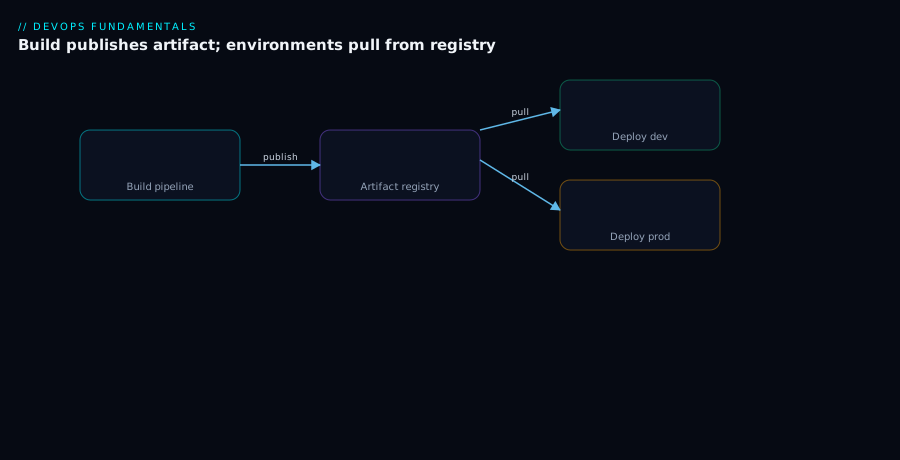
The first diagram traces the artifact’s whole journey. Read it left to right. A developer commits to Git; that triggers the CI build, which compiles the source into a versioned artifact (api:1.4.2) and, in the same step, pulls its dependencies through the registry’s proxy (so the build never touches the public internet directly and every external package is cached and checked). The build publishes the artifact once into the registry’s hosted/dev feed, where it is scanned for vulnerabilities and, on success, signed. From there each environment pulls the same artifact — dev, then staging, then production — and the artifact is promoted between feeds rather than rebuilt. Notice that the arrow from build to registry happens once, and three arrows leave the registry to the three environments: that one-to-many fan-out is the entire value proposition — build once, deploy many.
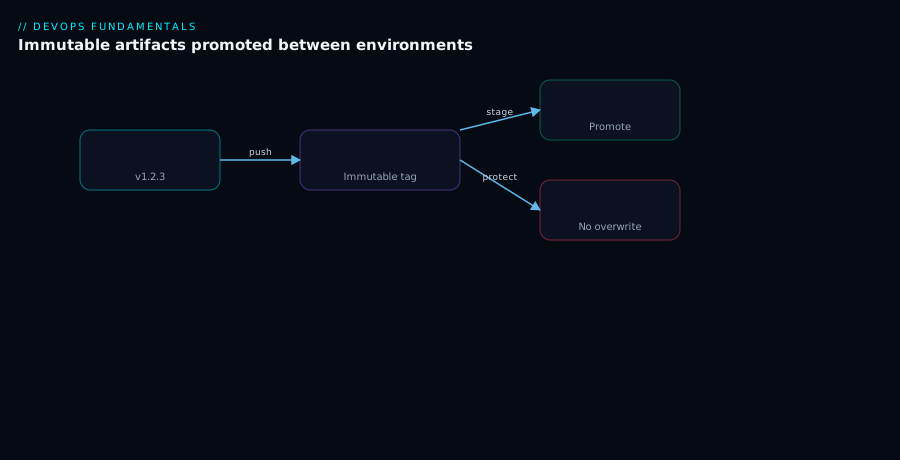
The second diagram zooms into immutability and promotion. The same artifact 1.4.2, built once, moves through the dev → staging → prod feeds as a single frozen set of bytes (identified by its sha256 digest). At each boundary a gate must pass — tests, then a clean vulnerability scan, then approval — but nothing is recompiled; only the artifact’s trust level changes as it advances. Contrast this with the mutable-latest anti-pattern shown alongside, where each environment resolves latest to potentially different bytes and reproducibility is lost. The lesson the diagram teaches: immutability is what makes the promotion arrows meaningful — because 1.4.2 cannot change, “the thing we tested” and “the thing in prod” are provably identical.
Real-world scenario
Finlytic, a 35-engineer fintech, ran four squads shipping a Java billing service, a React dashboard, a Python risk engine and a handful of internal libraries. Each squad built its own way: the dashboard team docker build-ed in every environment, the Java team emailed JARs to QA, and everyone pulled dependencies straight from Maven Central, npmjs.com and PyPI. Two incidents in one quarter forced the issue.
First, a production-only bug in the dashboard that QA could not reproduce. The staging and prod images came from the same commit but were built four hours apart; in between, a transitive npm dependency had shipped a patch that changed a date-formatting edge case. The “same” deploy was two different images, and the prod image had already been overwritten by the next build — it no longer existed to inspect. The post-mortem action item: stop rebuilding per environment.
Second, a supply-chain scare: a popular Python package the risk engine depended on had a malicious version published for six hours before being pulled. Finlytic had no buffer — builds fetched live from PyPI — so for those six hours every CI run could have pulled the bad version. Nobody could even prove whether they had. The action item: cache and check every external dependency.
They stood up JFrog Artifactory (self-hosted, ~₹0 license on the open-source-tier evaluation, then a small team license) with the standard three-tier layout per format: *-proxy remotes caching the public registries, *-internal hosted repos for their own packages, and a virtual repo per format that builds point at — internal resolved first, then proxy. Container images went to Azure Container Registry with immutability on the prod repo. They rewrote pipelines to build once: CI builds billing:1.4.2, pushes it, captures the digest, runs trivy as a promotion gate, signs with cosign, and every environment pulls that digest. Promotion to the @Release view requires a passing scan and a one-click approval. Retention keeps releases forever, prunes pre-releases after 30 days, and GC reclaims dangling layers nightly — except anything tagged for prod.
The results over the next two quarters: zero “can’t reproduce in prod” bugs of the rebuild-drift kind (there is now exactly one artifact per version, kept forever). The next time a malicious package appeared upstream, the proxy’s quarantine blocked it on fetch and flagged it, and the SBOMs let them confirm in minutes that nothing shipped with it. CI also got faster and more reliable — cached dependencies meant builds stopped failing on Docker Hub rate limits and PyPI hiccups, cutting average build time ~25% and eliminating a class of flaky failures. Storage cost settled around ₹6,000/month for the self-hosted registry plus ACR, dwarfed by the engineering time saved on a single avoided incident. The line that went on their wiki: “Build it once, prove what it is, and never let it change.”
Advantages and disadvantages
| Advantages | Disadvantages / costs |
|---|---|
| Build once, deploy many — the tested artifact is the shipped artifact | You must impose version discipline (no latest) — a culture change |
| Reproducible deploys and instant rollback (re-deploy a known version) | A registry is infrastructure to run/pay for and secure |
| Dependency caching — builds survive upstream outages and rate limits | Storage grows without retention policies (real cost) |
| Security checkpoint for inbound deps (quarantine bad/typosquatted packages) | Misconfigured retention can delete something prod needs |
| Single source of truth with checksums, provenance, audit trail | Another access-control surface to manage (tokens, scopes) |
| Supply-chain trust — scanning, signing, SBOMs in one place | Signing/SBOM tooling adds pipeline complexity to learn |
| Faster downstream stages (no rebuild; pull a cached artifact) | A central registry is a dependency — needs HA for critical pipelines |
When the trade-off clearly favours a registry: any team with more than one environment, anyone burned by a supply-chain incident, regulated industries that must prove what shipped, and teams whose CI fails on flaky upstreams. When you can defer it: a solo hobby project with one environment can lean on the public registries directly — though even then a free hosted registry (GitHub Packages) costs nothing and builds the right habits early.
Hands-on lab
Publish a tiny package and a container image to a registry, see immutability in action, and pull by digest — all with free tooling. This lab uses GitHub Packages (free for public repos) and local Docker; substitute your own registry URL if you have one. Run in a Bash shell.
Step 1 — A trivial npm package. Create a folder and package.json.
mkdir artifact-lab && cd artifact-lab
cat > package.json <<'JSON'
{ "name": "@YOURUSER/hello-lab", "version": "1.0.0", "description": "registry lab", "license": "MIT" }
JSON
Step 2 — Point npm at GitHub Packages and authenticate. Create a GitHub PAT with write:packages, then:
cat > .npmrc <<EOF
@YOURUSER:registry=https://npm.pkg.github.com/
//npm.pkg.github.com/:_authToken=${GH_TOKEN}
EOF
Expected: no output; .npmrc now routes your scope and supplies the token.
Step 3 — Publish version 1.0.0.
npm publish
Expected: + @YOURUSER/hello-lab@1.0.0. The version is now in the registry.
Step 4 — Prove immutability. Try to publish 1.0.0 again without changing the version:
npm publish # expect a 409 / "cannot publish over the previously published version"
Expected: the registry rejects the re-publish. That refusal is immutability — 1.0.0 is frozen. To ship a change you must bump the version:
npm version patch      # 1.0.0 → 1.0.1
npm publish            # succeeds — a NEW immutable version
Step 5 — Build and push a container image by tag, then read its digest. (Uses GitHub Container Registry ghcr.io.)
printf 'FROM hello-world\n' > Dockerfile
echo "$GH_TOKEN" | docker login ghcr.io -u YOURUSER --password-stdin
docker build -t ghcr.io/YOURUSER/hello-lab:1.0.0 .
docker push ghcr.io/YOURUSER/hello-lab:1.0.0    # note the "digest: sha256:..." it prints
Expected: the push reports an immutable digest: sha256:…. Copy that digest.
Step 6 — Pull by the immutable digest, not the tag.
docker pull ghcr.io/YOURUSER/hello-lab@sha256:PASTE_DIGEST_HERE
Expected: the pull resolves the exact bytes regardless of where the 1.0.0 tag points later. This is what a production manifest should reference.
Validation checklist. You published an immutable package version, watched the registry refuse to overwrite it, bumped to a new version to ship a change, pushed an image, and pulled it by digest. Map each step to the lesson:
| Step | What you did | What it proves |
|---|---|---|
| 3–4 | Publish, then fail to re-publish 1.0.0 | Immutability is real and enforced |
| 4 | npm version patch → publish 1.0.1 |
You ship changes via new versions, not overwrites |
| 5 | Push image, read its digest | Every image has an immutable digest |
| 6 | Pull by digest | Digest is the reproducible contract, not the tag |
Cleanup. Delete the package versions from your GitHub account’s Packages page (or via the API), and remove local images:
docker rmi ghcr.io/YOURUSER/hello-lab:1.0.0 hello-world 2>/dev/null
cd .. && rm -rf artifact-lab
Common mistakes & troubleshooting
The failures beginners hit most, with how to confirm and fix each:
| # | Symptom | Root cause | Confirm | Fix |
|---|---|---|---|---|
| 1 | “Works in dev, fails in prod” from the same commit | Each environment ran its own build → different bytes | Compare image digests per environment; they differ | Build once; promote the same digest/version everywhere |
| 2 | docker pull api:latest gives different code on different days |
Deploying a mutable tag | The tag’s digest changed between pulls | Pin explicit versions / digests; never deploy latest |
| 3 | Build fails intermittently: “registry timeout” / rate limited | Pulling deps directly from the public internet | Failures correlate with Docker Hub / PyPI outages | Add a proxy repo; pull through it (cached) |
| 4 | Scale-out fails: “manifest unknown” / image not found | Retention/GC deleted a version prod still uses | The version is gone from the registry | Exclude prod/release versions from cleanup; restore from backup |
| 5 | npm publish → 403/401 |
Missing or wrong auth token / scope | .npmrc lacks _authToken or token lacks write:packages |
Add a scoped token; least-privilege write |
| 6 | npm publish → 409 “cannot publish over previous version” |
Re-publishing an existing immutable version | The version already exists | Bump the version (npm version patch) and publish anew |
| 7 | An internal package resolves to a public one | Dependency confusion — proxy searched before internal | The resolved package came from the public proxy | Order virtual repo hosted-first; reserve the scope/name |
| 8 | Image push rejected: “tag is immutable” | Pushing over an immutable tag | Repo has immutability enabled | Push a new version tag; don’t overwrite |
| 9 | Maven SNAPSHOT in production behaving oddly |
A snapshot (mutable) deployed to prod | The deployed version ends in -SNAPSHOT |
Deploy only release versions; block snapshots in prod |
| 10 | Registry disk full / surprise storage bill | No retention policy; every CI run pushed forever | Storage grows linearly with builds | Add retention (keep last N / N days) + GC dangling layers |
| 11 | Promotion “succeeds” but prod runs old code | Promoted a tag, but the deploy pinned a different digest | Deployed digest ≠ promoted digest | Promote and deploy by the same digest |
| 12 | docker login token leaked in CI logs |
Token passed on the command line (echoed) | Token visible in build logs/history | Use --password-stdin; store in a secret store |
The two that cause the most lost hours are #1 (rebuild drift) and #4 (cleanup deleting a live version) — the first because the symptom (a prod-only bug) points you at code, not at the build process; the second because cleanup feels safe until it deletes the wrong thing. Both are prevented by the same disciplines: build once, and never let retention touch a released version.
Best practices
- Build once, deploy many. Produce the artifact a single time and promote that artifact through environments. Never
buildper environment. - Version everything immutably; ban
latestin pipelines and prod. Use SemVer plus a commit/build identifier so every artifact traces to a source commit. - Reference containers by digest in production. Tags are for humans; the
sha256digest is the reproducible contract. - Use the three-tier layout (hosted + proxy + virtual) per format, with internal repos resolved first to defeat dependency confusion.
- Pull all dependencies through a proxy. It buffers outages and rate limits and becomes your inbound security checkpoint.
- Set retention that can never delete a live version. Keep releases/prod-view versions indefinitely; prune snapshots and CI builds; GC dangling layers.
- Authenticate with least privilege and short-lived credentials. Prefer OIDC/managed identity over static PATs; scope build = write-dev, deploy = read-prod + promote.
- Scan on publish and continuously, and gate promotion on it. A critical CVE blocks the move to prod.
- Sign artifacts and generate SBOMs. Let consumers verify provenance (Cosign) and audit contents (SPDX/CycloneDX).
- Keep binaries out of Git. Source control holds the recipe; the registry holds the build output.
- Manage feeds, retention and tokens as code where possible (Terraform/Bicep), reviewed in PRs — config drift in a registry is as dangerous as in infrastructure.
- Make the registry highly available if critical pipelines depend on it — it is now part of your delivery-critical path.
Security notes
- Least-privilege, scoped credentials. A build pipeline writes to a dev feed and reads proxies — nothing more; a deploy pipeline reads prod and promotes. No principal should have blanket admin.
- Prefer keyless/identity auth. OIDC token exchange or managed/workload identity means no static secret to leak. If you must use PATs, store them in a secret manager (never in the repo) and rotate them.
- Immutability is a security control. It prevents a compromised CI run from silently replacing a released artifact; combine it with signing so tampering is detectable.
- Scan inbound and outbound. Scan external dependencies on proxy fetch (quarantine bad ones) and scan your published artifacts continuously (new CVEs land on old images).
- Sign and verify. Sign on publish (Cosign); verify at deploy — a Kubernetes admission policy can refuse unsigned or unverified images, closing the door on tampered or unknown artifacts.
- Defend against dependency confusion and typosquatting. Resolve internal names before public ones, reserve your package scopes/namespaces, and pin versions so a surprise public publish can’t shadow an internal package.
- Protect the registry endpoint. Lock the admin UI and push endpoints behind network controls/SSO; treat the registry like production infrastructure, because it is the gate to production.
Cost & sizing
What drives the bill and how to keep it sane:
- Storage is the main driver. Container layers and historical versions accumulate fast; without retention, cost grows linearly with every CI run. Retention + GC is the single biggest lever.
- Egress/data transfer can matter on cloud registries when many nodes pull large images across regions — keep the registry in the same region as your compute to cut transfer and latency.
- Licensing vs hosting. Managed/cloud registries (Azure Artifacts, GitHub Packages, ECR, Artifact Registry) bill by storage (and sometimes transfer) with a free allowance; self-hosted (Artifactory/Nexus) trades a license/ops cost for control.
- Rough figures. A small team’s managed registry typically lands ₹500–3,000/month (storage-driven) once retention is in place. Self-hosting adds the VM/ops cost (a modest VM, ~₹3,000–8,000/month) but removes per-storage premiums at scale. Either is trivial next to the engineering cost of a single rebuild-drift incident.
| Cost driver | What you pay for | Rough INR / month | How to control it |
|---|---|---|---|
| Storage (managed) | GB of artifacts retained | ₹500–3,000 (small team) | Retention + GC; prune snapshots/CI builds |
| Self-hosted compute | VM running the registry | ₹3,000–8,000 | Right-size the VM; one HA pair if critical |
| Data egress | Cross-region/large image pulls | Variable | Co-locate registry with compute; cache locally |
| Free tiers | GitHub Packages (public), small cloud allowances | ₹0 | Use for OSS / small projects to start |
Free-tier reality: GitHub Packages is free for public repositories, cloud providers include a small storage allowance, and self-hosted Nexus/Artifactory have free open-source tiers — so the entry cost of doing this right is effectively zero.
Interview & exam questions
1. What is an artifact registry and why not just use Git? A registry stores build outputs (binaries: JARs, images, wheels) addressed by name+version, with access control, immutability, retention and metadata. Git is built for text/source and diffing; binaries bloat it permanently, clone slowly, and get none of a registry’s guarantees. Git stores the recipe; the registry stores the cake.
2. Explain “build once, deploy many” and why it matters. The pipeline produces an artifact a single time, then promotes that same artifact through dev → staging → prod without rebuilding. It matters because rebuilding per environment yields subtly different bytes (a moved base image, a patched transitive dependency), so what you tested isn’t what you ship — the root of “works in dev, fails in prod.”
3. Why is deploying the latest tag dangerous? latest is mutable — it points to different bytes over time — so two environments “on latest” can run different code, and you can’t reproduce a bug or roll back to a known point. Always deploy explicit, immutable versions (and reference container digests).
4. What does immutability guarantee, and how do you ship a fix without breaking it? Once published, a version’s bytes are frozen, so “tested” and “deployed” are provably identical and rollbacks are exact. To ship a change you publish a new version (bump SemVer) and optionally yank/deprecate the bad one — you never overwrite.
5. Describe the hosted/proxy/virtual repository trio. Hosted (local) stores your artifacts; proxy (remote) caches an external public registry so builds survive outages and you get a security checkpoint; virtual (group) presents one URL over both, with internal repos resolved first to prevent dependency confusion.
6. What is dependency confusion and how do you prevent it? An attacker publishes a public package with the same name as one of your internal packages, hoping your resolver picks the public one. Prevent it by resolving internal repos before the public proxy, reserving your package scopes/namespaces, and pinning versions.
7. What’s the difference between a Maven release and a snapshot? A release (1.4.2) is immutable and goes to a releases repo — it’s what ships. A SNAPSHOT (1.5.0-SNAPSHOT) is mutable, re-published each build, and is for in-progress development only. Never deploy a snapshot to production.
8. How should CI authenticate to a registry? With short-lived, least-privilege credentials — ideally OIDC/workload identity so there’s no static secret to leak — scoped so a build can write only to a dev feed and a deploy can read prod and promote. Store any tokens in a secret manager, never in the repo, and pass them via stdin (not the command line).
9. How do you keep storage cost under control without breaking production? Apply retention (keep last N / N days for snapshots and CI builds) plus garbage collection of dangling layers — but exclude released/prod-referenced versions so cleanup can never delete something a running environment needs.
10. What are scanning, signing and SBOMs, and how do they fit a registry? Scanning finds known CVEs (gate promotion on it, and rescan continuously). Signing (Cosign) lets consumers verify the artifact came from your pipeline untampered (verify at admission). An SBOM lists everything inside the artifact (SPDX/CycloneDX) so you can audit and answer “are we affected by this new CVE?” fast.
11. A container behaves differently across environments though all use tag 1.4.2. What’s the likely cause? The tag 1.4.2 was re-pushed (it’s mutable unless immutability is on), so different environments pulled different bytes under the same tag. Reference the digest in production and enable tag immutability so a version can’t be overwritten.
12. Where does the registry sit relative to build and deploy, and what gates live there? It’s the boundary between build and deploy: build publishes once; deploy pulls the promoted artifact. The gates that live at the registry are promotion gates — tests passed, vulnerability scan clean, artifact signed, approval given — before a version is allowed into the prod feed/view.
These map to AZ-400 (DevOps Engineer Expert) — design and implement a package management strategy, Azure Artifacts feeds, upstream sources and views — and to general CI/CD and supply-chain-security topics in GitHub Actions, AWS DevOps, and CKA/CKS (image provenance and admission policy).
Quick check
- Your staging and prod environments run “the same commit” but a bug only appears in prod, and the prod image no longer exists to inspect. What practice would have prevented this, in five words?
- True or false: to fix a bad
1.4.2release you should re-push corrected bytes to1.4.2. - What is the difference between a hosted (local) repository and a proxy (remote) repository?
- Why should a production deployment reference a container digest rather than a tag?
- Name one thing a retention policy must never be allowed to delete, and why.
Answers
- “Build once, deploy many.” Building each environment separately produced different bytes; one immutable artifact promoted through environments would have made staging and prod identical and kept the exact image forever.
- False. Immutability means
1.4.2is frozen; you publish a new version (1.4.3) and yank/deprecate the bad one. Overwriting would destroy the guarantee that “tested == deployed.” - A hosted/local repo stores artifacts you publish (your build outputs). A proxy/remote repo caches an external public registry on demand, so your builds survive upstream outages and you gain a checkpoint over inbound dependencies.
- A tag is mutable — it can be re-pushed to point at different bytes — so “deploy
1.4.2” isn’t reproducible. The digest (sha256:…) is a content hash that pins the exact bytes, making the deploy provably identical to what you tested. - A version a running/production environment still references (a released version in the prod view). Deleting it breaks scale-out and rollback — your next new pod can’t pull the image.
Glossary
- Artifact — a build output you deploy (JAR, container image, wheel, NuGet package).
- Dependency — a build input you consume (a third-party library), distinct from an artifact you produce.
- Artifact registry / repository manager — a server that stores artifacts and dependencies by name+version with access control, immutability, retention and metadata.
- Repository / feed — a named store within the registry for one or more package formats; the unit of access control and retention.
- Coordinates — the name+version that uniquely address an artifact (
group:artifact:version,name@version,repo:tag). - Tag — a human-friendly, usually mutable pointer to a version (e.g.
latest,1.4.2). - Digest — a content hash (
sha256:…) of an image/blob; truly immutable and the reproducible reference for production. - Immutability — the guarantee that a published version’s bytes can never be overwritten.
- SemVer (Semantic Versioning) —
MAJOR.MINOR.PATCHversioning that communicates compatibility. - Promotion — moving an artifact to a more-trusted feed/view (dev → staging → prod) without rebuilding.
- Hosted / local repository — stores artifacts you publish.
- Proxy / remote repository — caches an upstream public registry; buffers outages and acts as a security checkpoint.
- Virtual / group repository — one URL aggregating several hosted and proxy repos; resolve hosted first.
- Snapshot vs release (Maven) — a mutable in-development version (
-SNAPSHOT) vs an immutable shippable version. - Retention policy — rules that delete old versions to control storage cost.
- Garbage collection — reclaiming disk by deleting layers/blobs no longer referenced by any manifest.
- Dependency confusion — an attack where a public package shadows an internal one of the same name.
- SBOM (Software Bill of Materials) — a machine-readable inventory of everything inside an artifact (SPDX/CycloneDX).
- Signing (Cosign/Sigstore) — cryptographically proving an artifact’s origin and integrity; verified at deploy.
- OIDC / workload identity — short-lived, keyless authentication for CI, so no static secret is stored.
Next steps
You can now treat the registry as the trusted handoff between build and deploy. Build outward:
- Next: CI/CD Pipelines Explained: From Code Commit to Production — see exactly where the publish-and-promote steps slot into a pipeline.
- Related: Deployment Strategies: Blue-Green, Canary and Rolling Updates — how you promote the same artifact safely into production.
- Related: CI/CD Secrets and Credential Management: Secure Your Pipelines — handle the tokens and identities that push and pull from the registry.
- Related: Infrastructure as Code: Terraform, Pulumi, CDK and Cloud-Native Options — version and store your IaC modules the same disciplined way.
- Related: Centralized Azure Pipeline YAML Templates + Azure Artifacts Feeds — a concrete one-trusted-source feed setup in Azure DevOps.
- Related: GitOps with Argo CD and Flux: Deliver from Git — the deploy side that pulls your promoted, signed artifacts.