Quick take: GitOps makes Git the single source of truth for both application and infrastructure state. A controller running inside the cluster continuously watches a repo and reconciles the live cluster toward the committed manifests. If someone
kubectl edits a resource by hand, the controller detects the drift and (when self-heal is on) reverts it. Deployment becomes agit push; rollback becomes agit revert; the audit log is your commit history.
A platform team of six ran eleven Kubernetes clusters across three regions and two cloud accounts. Manifests lived in a wiki, in kubectl apply muscle memory, and in three people’s heads. Two clusters had quietly diverged — different ingress-nginx versions, a replicas: 1 someone set during an incident and never reverted, a ConfigMap patched live and lost on the next deploy. Nobody could answer “what is actually running in prod-eu?” without reading the cluster. A bad Friday deploy took ninety minutes to roll back because the rollback was re-running the pipeline with last week’s image tag, and the build cache had expired.
They adopted GitOps. Every manifest moved into Git. Argo CD (and later Flux on the edge clusters) ran inside each cluster, watched a repository, and made the live state match the committed state. The cluster became a follower of Git. Drift — including that stray replicas: 1 — was reverted within minutes, automatically. Rollback became git revert <sha> && git push, reconciled in under a minute. “What’s running in prod-eu?” became “read clusters/prod-eu/ on main.” This is the model this article teaches end to end, at the depth a senior platform engineer needs to run it in production — not the marketing version.
You will learn the four GitOps principles and why each one matters operationally, how the reconciliation loop works (observe → diff → act, every few minutes and on every webhook), how drift detection and self-heal differ and when to enable each, how Argo CD and Flux differ and where each wins, the app-of-apps and ApplicationSet patterns for managing dozens of apps and clusters, sync waves and hooks for ordering and migrations, multi-cluster topologies, the three real answers to secrets in Git (SOPS, Sealed Secrets, External Secrets Operator), and how GitOps composes with progressive delivery (Argo Rollouts / Flagger). Everything is grounded in real CRDs, real CLI, and real failure modes — with the tables you keep open while you operate.
What problem this solves
Traditional CI/CD is push-based imperative delivery: a pipeline runner outside the cluster holds cluster credentials, runs kubectl apply or helm upgrade, and hopes the result matches intent. Three structural problems fall out of that model, and GitOps is the direct answer to all three.
First, there is no continuously-enforced source of truth. The pipeline applies a manifest once, at deploy time. Five minutes later someone runs kubectl scale during an incident, an operator mutates a resource, or a helm rollback half-completes — and the live cluster no longer matches anything in version control. The divergence is invisible until it bites. GitOps closes the loop: a controller re-asserts the committed state on a schedule, so the cluster is always converging back to Git, not just at deploy time.
Second, credentials point the wrong way. Push CD requires your CI runner (often a SaaS outside your network) to hold cluster admin credentials and reach the API server — frequently meaning a publicly-exposed control plane or a long-lived kubeconfig in a secrets store. GitOps inverts this to pull-based: the agent runs inside the cluster and reaches out to Git and the registry. No external system needs cluster credentials; the API server can be fully private. This is the single biggest security argument for GitOps.
Third, rollback and audit are afterthoughts. “Roll back” in push CD means re-running an old pipeline, which may no longer be reproducible (expired caches, mutable :latest tags, drifted dependencies). “Who changed this and why?” means correlating pipeline logs, tickets, and Slack. In GitOps, the desired state is the Git history: rollback is git revert, the audit trail is git log and PR reviews, and every production change went through a reviewable, signed, attributable commit.
Who hits these problems: any team running Kubernetes at more than toy scale — multiple environments, multiple clusters, more than a couple of engineers with kubectl access, or a compliance requirement that every production change be reviewed and attributable. It bites hardest on multi-cluster fleets (drift multiplies per cluster), regulated workloads (you must prove what ran and who approved it), and platform teams offering self-service (you need a guardrail that isn’t “trust everyone with cluster-admin”).
To frame the whole field before the deep dive, here is the contrast that drives every later decision:
| Dimension | Push-based imperative CD | Pull-based GitOps |
|---|---|---|
| Source of truth | The pipeline run (ephemeral) | Git repo (durable, versioned) |
| Who applies changes | CI runner outside the cluster | Controller inside the cluster |
| Credential direction | CI → cluster (outbound to API server) | Cluster → Git/registry (inbound only) |
| Enforcement | Once, at deploy time | Continuously (loop + webhook) |
| Drift handling | Invisible until next deploy | Detected; optionally auto-reverted |
| Rollback | Re-run an old pipeline (may not reproduce) | git revert + reconcile |
| Audit trail | Pipeline logs + tickets, scattered | git log, PRs, signed commits |
| API-server exposure | Often public / broad RBAC for CI | Can be fully private |
| Multi-cluster | N pipelines, N credential sets | One repo pattern, agent per cluster |
Learning objectives
By the end of this article you can:
- State the four GitOps principles (declarative, versioned & immutable, pulled automatically, continuously reconciled) and explain the production consequence of each.
- Trace the reconciliation loop for both Argo CD and Flux — observe, diff, act — and reason about reconcile interval, webhooks, and what triggers a sync.
- Distinguish drift detection from self-heal and auto-prune, and decide which to enable per environment without causing fights with HPAs and admission webhooks.
- Choose between Argo CD and Flux (or run both) based on UI needs, multi-tenancy model, Helm strategy, and team operating style — backed by a feature matrix.
- Implement app-of-apps and ApplicationSets to manage dozens of applications and clusters from a single declarative root.
- Order deployments with sync waves, and run migrations/backups/tests with resource hooks (PreSync/Sync/PostSync/SyncFail), or Flux dependsOn + Kustomization ordering.
- Architect multi-cluster GitOps (hub-and-spoke vs standalone agents) and generate per-cluster app definitions safely.
- Keep secrets out of plaintext Git correctly using SOPS, Sealed Secrets, or the External Secrets Operator, and pick the right one per constraint.
- Compose GitOps with progressive delivery (Argo Rollouts / Flagger) so canaries and automated rollback live in Git too.
- Diagnose the real failure modes:
OutOfSyncthat won’t heal, stuckProgressing, drift fights, hook deadlocks, andComparisonError.
Prerequisites & where this fits
You should be comfortable with Kubernetes fundamentals: Deployments, Services, ConfigMaps, Namespaces, RBAC (ServiceAccounts, Roles, ClusterRoles), and reading/writing YAML manifests. You should know how kubectl apply works (server-side vs client-side apply, the last-applied-configuration annotation) and what a CRD and a controller/operator are — GitOps tools are controllers reconciling CRDs. Hands-on experience with Kustomize (bases and overlays) and Helm (charts, values, releases) is assumed; GitOps tools render manifests through exactly those two engines. You should be able to run kubectl, helm, and git from a shell.
This article sits in the delivery & platform-engineering track. It is the deployment-mechanism layer underneath your release strategy: it assumes you understand CI/CD Pipelines Explained: From Code Commit to Production (GitOps replaces the CD half, not the CI half — you still build and test images in a pipeline), and it pairs tightly with Deployment Strategies: Blue-Green, Canary and Rolling Updates and Progressive Delivery and Feature Flags: Release Without Fear, because GitOps is how you store and enforce those strategies declaratively. It leans on Git Branching Strategies: Trunk-Based, GitFlow and Feature Branches (your repo layout is a branching decision) and on Infrastructure as Code: Terraform, Pulumi, CDK and Cloud-Native Options (GitOps is “IaC for the cluster’s runtime state”). Secrets connect to CI/CD Secrets and Credential Management: Secure Your Pipelines, and the operational signals connect to DevOps Observability: Logs, Metrics, Traces and SLOs.
A quick map of who owns what during a GitOps incident, so you call the right layer fast:
| Layer | What lives here | Who usually owns it | Failure classes it can cause |
|---|---|---|---|
| Git repo (desired state) | Manifests, Kustomize/Helm sources | App + platform teams | ComparisonError (bad YAML), wrong path/revision |
| CI (build & push) | Image build, tests, image tag write-back | App / dev team | Stale tag, image not in registry → ImagePullBackOff |
| GitOps controller | Argo CD / Flux, reconcile loop, RBAC | Platform team | Stuck Progressing, won’t self-heal, hook deadlock |
| Rendering engine | Kustomize / Helm template | Platform team | Render diff, Helm hook conflicts, CRD ordering |
| Cluster runtime | API server, controllers, admission webhooks | Platform / SRE | Drift fights (HPA/mutating webhooks), prune disasters |
| Secrets backend | SOPS keys / KMS / Vault / ESO | Security + platform | Secret empty → crash loop, decryption failure |
Core concepts
Five mental models make every later section obvious. Read them once; the rest of the article is consequences.
Git is the desired state; the cluster is the actual state; reconciliation is the function that minimises their difference. This is the entire idea expressed as control theory. You declare what you want in Git (the setpoint). A controller continuously measures what is (the cluster’s live objects) and applies the delta to drive actual toward desired. Everything else — drift, self-heal, sync waves, multi-cluster — is a refinement of this one loop. Crucially, the controller never “does a deploy” in the imperative sense; it converges. A deploy is just “the setpoint moved, so the next reconcile moves the cluster.”
The controller runs inside the cluster and pulls. Argo CD’s application-controller and Flux’s source-controller/kustomize-controller/helm-controller are Pods in the cluster. They reach out to Git (clone/fetch) and the registry, render manifests, and apply them to the local (or a registered remote) API server. No external CI system needs cluster credentials. This pull model is why the API server can be private and why a compromised CI runner can’t directly touch prod — it can only open a pull request.
Drift is any difference between live and desired; how you respond to it is a policy, not a fact. Detection is always on (the diff is computed every reconcile). The response is configurable: report only (show OutOfSync, alert, let a human act), self-heal (revert the live object back to Git automatically), and prune (delete live objects that no longer exist in Git). These are independent knobs. Aggressive self-heal on the wrong resource starts a fight with another controller (an HPA managing replicas, a mutating webhook injecting a sidecar) — so you must know which fields you own and which the platform owns.
Rendering is Kustomize or Helm; GitOps tools don’t invent a new templating language. Argo CD and Flux both call kustomize build or helm template (Flux’s Helm controller does a real Helm release; Argo CD by default renders templates and applies them, with a flag to use real Helm). So “GitOps YAML” is just your normal Kustomize overlays and Helm charts, plus a thin Application (Argo CD) or Kustomization/HelmRelease (Flux) CRD that says which repo, which path, which revision, which cluster/namespace, and which sync policy. Master Kustomize and Helm first; the GitOps layer is a wrapper.
Sync is not atomic, and ordering is explicit. A sync applies many objects. By default they go in a sensible order (namespaces and CRDs first), but cross-resource dependencies (run the DB migration before the new app version; create the namespace before the resources in it) are your responsibility, expressed with sync waves (Argo CD annotations) or dependsOn (Flux). A hook is a special object that runs at a phase boundary (before sync, after sync, on failure) — typically a Job for migrations, smoke tests, or notifications. Get ordering wrong and you get a half-applied state that looks like a flaky deploy but is a missing wave annotation.
The vocabulary in one table
Pin down every moving part before the deep sections. The glossary repeats these for lookup; this is the mental model side by side:
| Term | One-line definition | Argo CD form | Flux form |
|---|---|---|---|
| Desired state | What you want, in Git | The repo path the Application points at |
The path a Kustomization builds |
| Actual state | What’s live in the cluster | Live objects the controller tracks | Live objects the controller tracks |
| Reconciliation | Drive actual → desired | application-controller loop |
kustomize/helm-controller loop |
| App / unit of delivery | A bundle of resources from one source | Application CRD |
Kustomization / HelmRelease CRD |
| Source | Where manifests come from | spec.source (repo/path/revision) |
GitRepository / OCIRepository / HelmRepository |
| Sync / apply | Make the cluster match | “Sync” (manual or auto) | “reconcile” (interval or on-demand) |
| Drift | Live ≠ desired | OutOfSync status |
drift in kustomize-controller |
| Self-heal | Auto-revert drift | syncPolicy.automated.selfHeal |
spec.force / continuous apply |
| Prune | Delete orphaned objects | syncPolicy.automated.prune |
spec.prune: true |
| Ordering | Apply in stages | sync waves (annotation) | dependsOn + health gates |
| Lifecycle hook | Run a Job at a phase | resource hooks (PreSync/PostSync) | Helm hooks / Kustomization deps |
| Fan-out generator | Make N apps from a template | ApplicationSet |
Kustomization per cluster + substitution |
The four GitOps principles
The CNCF OpenGitOps working group distilled GitOps into four principles. They’re not slogans — each one has a concrete operational meaning and a failure mode if you violate it.
| # | Principle | What it means concretely | What breaks if you violate it |
|---|---|---|---|
| 1 | Declarative | The entire system’s desired state is expressed as data (YAML), not scripts/commands | Imperative kubectl steps can’t be diffed, reverted, or reconciled — drift is unmanageable |
| 2 | Versioned & immutable | Desired state is stored in Git: versioned, append-only history, immutable revisions | No audit trail, no atomic rollback, “what changed?” is unanswerable |
| 3 | Pulled automatically | Software agents pull the declared state from the source automatically | Push CD needs cluster creds outside the cluster; humans forget to re-apply |
| 4 | Continuously reconciled | Agents continuously observe and reconcile actual → desired | Drift accumulates silently; the cluster diverges from intent between deploys |
The deep implication of principle 4 is the one people miss: GitOps is not “deploy on merge.” “Deploy on merge” is just push CD triggered by Git. True GitOps continuously reconciles whether or not anything merged — so a manual kubectl edit made at 3 a.m. is reverted at the next reconcile even though no commit happened. If your “GitOps” only acts on a webhook and never re-checks the cluster, you have automated push CD, not GitOps, and you don’t get drift correction.
A second subtlety on principle 2: immutable means you reference a specific revision (a commit SHA or a semver tag), not a moving branch for the artifact you actually run in prod. Pointing prod at HEAD of main is convenient but means “what’s deployed” changes the instant someone merges — you lose the ability to say “prod is at exactly this SHA” and to promote a specific tested revision. Mature setups pin environments to tags or SHAs and promote by changing the pin in a PR.
How the reconciliation loop actually works
The reconciliation loop is the heart of GitOps. Both tools implement the same conceptual cycle — observe, diff, act — differing in component layout and defaults.
The loop, step by step, for a single application:
| Phase | What the controller does | Argo CD component | Flux component |
|---|---|---|---|
| Observe (source) | Fetch the latest manifests from Git/OCI/Helm | repo-server clones & renders |
source-controller fetches GitRepository |
| Observe (live) | List live objects in the target cluster | application-controller (informer cache) |
kustomize-controller (cluster reader) |
| Render | Run Kustomize/Helm to produce the desired manifests | repo-server (kustomize build / helm template) |
kustomize-controller (kustomize build) |
| Diff | Compute the delta (desired − actual), field by field | application-controller |
kustomize-controller |
| Decide | Is it OutOfSync? Should we sync (auto/manual)? |
sync policy | reconcile on interval/event |
| Act (apply) | Server-side apply the delta; create/update/delete | application-controller |
kustomize-controller (SSA) |
| Assess health | Evaluate resource health (Deployments ready, etc.) | health checks (Lua) | health checks / wait |
| Report | Update status, emit events/metrics, notify | status + notifications | Kustomization status + events |
What triggers a reconcile
A reconcile happens on three triggers, and understanding them prevents the “why didn’t my change deploy?” confusion:
| Trigger | When it fires | Default cadence | How to tune |
|---|---|---|---|
| Polling interval | Periodically, regardless of events | Argo CD: ~3 min repo poll; Flux: spec.interval (e.g. 1m/10m) |
Argo CD timeout.reconciliation; Flux per-resource interval |
| Git webhook | On push to the watched repo | Immediate (if configured) | Argo CD webhook endpoint; Flux Receiver |
| Manual / API | A human or pipeline forces it | On demand | argocd app sync; flux reconcile kustomization |
The polling interval is the floor on how fast drift is corrected when self-heal is on, and the floor on deploy latency if you don’t wire webhooks. Setting Flux interval: 1m on every Kustomization across a large fleet hammers the API server and Git; setting it to 10m means drift can persist for ten minutes. The pattern is short interval + webhooks: the webhook handles “deploy fast on merge,” the interval handles “correct drift and catch missed webhooks.” Argo CD additionally watches live objects via Kubernetes informers, so it reacts to drift faster than its poll interval suggests — a kubectl edit is often reverted within seconds, not at the next 3-minute poll.
Server-side apply and three-way diff
The act phase is not a naive overwrite. Both tools use server-side apply (SSA) with field management, computing a three-way diff between (a) the desired manifest, (b) the live object, and © the last-applied state. This is why GitOps doesn’t clobber fields it doesn’t manage — an HPA-managed replicas or a webhook-injected sidecar container is owned by a different field manager and is left alone, unless you also declare that field, which is exactly how drift fights start.
| Diff/apply concept | What it does | Why it matters for GitOps |
|---|---|---|
| Three-way diff | Compares desired vs live vs last-applied | Detects drift precisely, ignores fields you don’t set |
| Server-side apply (SSA) | API server merges based on field ownership | Multiple controllers can co-own one object safely |
| Field manager | The named owner of a set of fields | Argo CD/Flux own only fields they declare |
ignoreDifferences |
Tell the diff to skip certain fields/paths | Stop fighting HPA replicas, webhook mutations, CA bundles |
| Replace vs apply | Recreate the object vs merge-patch | Needed for immutable fields (some CRDs, Job spec) |
A field-ownership example you’ll hit within a week: you set replicas: 3 in Git, but an HPA also manages replicas. With self-heal on, the controller reverts to 3 every reconcile, the HPA scales back up, and the two ping-pong. The fix is to not declare replicas (let the HPA own it) and add ignoreDifferences for /spec/replicas. Knowing which fields you own is the difference between a stable GitOps setup and a flapping one.
Drift detection, self-heal, and prune
These three are independent policies, and conflating them causes most GitOps accidents. Detection is free and always on; the response is what you configure.
| Policy | What it does | Default (Argo CD) | Default (Flux) | Main risk if mis-set |
|---|---|---|---|---|
| Drift detection | Compute and report live vs desired diff (OutOfSync) |
Always on | Always on | None (read-only) |
| Self-heal | Auto-revert live drift back to Git | Off (manual sync) | Continuous apply (effectively on) | Fights other controllers (HPA, webhooks) |
| Auto-sync | Apply new Git revisions automatically | Off | On (per interval) | Bad merge ships instantly without a gate |
| Prune | Delete live objects removed from Git | Off | Off (prune: false) |
A bad render can delete prod objects |
| PruneLast | Prune only after everything else synced healthy | Off | n/a | Safer prune ordering |
| Selective sync | Sync only chosen resources | Manual UI/CLI | n/a | — |
Detection: what counts as drift
Drift is computed by the three-way diff, so it only flags fields the controller manages. The drift you should heal is a manual kubectl edit/scale or a half-applied previous sync — re-assert Git (and capture the lesson in a commit). The drift you should not heal is another controller doing its job: an HPA owning replicas, a mutating webhook injecting a sidecar, cert-manager or a service mesh patching annotations — for those, ignoreDifferences or exclude the resource. And an out-of-band hotfix that should be permanent isn’t really drift: promote it to Git first, and it becomes desired state. The operational rule: self-heal the fields you own; ignore the fields other controllers own. Most “GitOps keeps reverting my change” complaints are someone fighting an HPA or a mutating admission webhook over a field they shouldn’t have declared.
Self-heal and prune in real YAML (Argo CD)
apiVersion: argoproj.io/v1alpha1
kind: Application
metadata:
  name: shop-api
  namespace: argocd
spec:
  project: shop
  source:
    repoURL: https://github.com/acme/shop-deploy.git
    targetRevision: v2.4.1          # pin to a tag, not HEAD, for prod
    path: apps/shop-api/overlays/prod
  destination:
    server: https://kubernetes.default.svc
    namespace: shop
  syncPolicy:
    automated:
      prune: true                    # delete objects removed from Git
      selfHeal: true                 # revert manual drift back to Git
    syncOptions:
      - CreateNamespace=true         # create the target namespace if missing
      - PruneLast=true               # prune only after healthy sync (safer)
      - ApplyOutOfSyncOnly=true      # only apply resources that actually differ
    retry:
      limit: 5
      backoff:
        duration: 10s
        factor: 2
        maxDuration: 5m
  ignoreDifferences:
    - group: apps
      kind: Deployment
      jsonPointers:
        - /spec/replicas            # HPA owns this — don't fight it
The equivalent in Flux (Kustomization)
apiVersion: kustomize.toolkit.fluxcd.io/v1
kind: Kustomization
metadata:
  name: shop-api
  namespace: flux-system
spec:
  interval: 5m                       # reconcile cadence (drift floor)
  retryInterval: 1m
  sourceRef:
    kind: GitRepository
    name: shop-deploy
  path: ./apps/shop-api/overlays/prod
  prune: true                        # delete orphaned objects
  wait: true                         # block until resources are healthy
  timeout: 5m
  force: false                       # true => replace immutable resources
  patches:
    - patch: |
        - op: remove
          path: /spec/replicas       # let HPA own replicas
      target:
        kind: Deployment
        name: shop-api
A hard-won safety note on prune: enabling prune: true plus a bad render (a Kustomize error that produces an empty manifest set, or a path typo that points at an empty directory) can cause the controller to conclude “all these objects were removed from Git” and delete your entire app. Guardrails: keep prune off until you trust the pipeline, use PruneLast, set prune: false on the bootstrap/root app, and (Argo CD) use Validate=true and resource-exclusion. Treat prune like rm -rf with a loaded source.
Argo CD vs Flux: how they differ and how to choose
Both are CNCF-graduated GitOps controllers. They solve the same problem with different philosophies: Argo CD is a single, batteries-included application delivery platform with a strong UI and an application-centric model; Flux is a set of composable single-responsibility controllers (the GitOps Toolkit) with a CLI-and-CRD-first model and tight OCI/Helm integration. Neither is “better” — they fit different teams.
| Dimension | Argo CD | Flux (GitOps Toolkit) |
|---|---|---|
| Architecture | Monolithic-ish: api-server, repo-server, application-controller, redis, dex | Microservices: source-, kustomize-, helm-, notification-, image-controllers |
| UI | First-class web UI (app topology, diff, sync, rollback) | No built-in UI (use flux CLI; Weave GitOps / third-party UIs exist) |
| Primary CRD | Application, ApplicationSet, AppProject |
GitRepository, Kustomization, HelmRelease, OCIRepository |
| Multi-tenancy | AppProject (allowed repos/clusters/namespaces) |
Namespaced reconcilers + RBAC + tenant model |
| Helm strategy | Renders helm template by default (no Tiller); optional native |
Real Helm releases via helm-controller (proper hooks/rollback) |
| Multi-cluster | Hub model: one Argo CD manages many registered clusters | Agent-per-cluster (each cluster runs its own Flux) is idiomatic |
| Image automation | Argo CD Image Updater (separate component) | Built-in image-reflector + image-automation controllers |
| Drift/self-heal | Explicit selfHeal flag; informer-driven, fast |
Continuous apply on interval |
| Progressive delivery | Argo Rollouts (sibling project) | Flagger (sibling project) |
| Notifications | Argo CD Notifications | notification-controller (native) |
| Secrets | Bring-your-own (SOPS/Sealed/ESO via plugins) | Native SOPS decryption in kustomize-controller |
| Operating style | Click-or-CLI; great for app teams & visibility | CLI/CRD/GitOps-native; great for platform automation |
Where each one wins
| If you need… | Lean toward | Why |
|---|---|---|
| A visual app topology + diff/sync for app teams | Argo CD | The UI is best-in-class for self-service and incident triage |
| One control plane managing many clusters | Argo CD | Hub model + ApplicationSet cluster generators |
| Native, first-class Helm releases (real hooks/rollback) | Flux | helm-controller runs actual Helm, not just template |
| Native SOPS decryption with no extra plugins | Flux | Built into kustomize-controller |
| Built-in image-tag automation in-cluster | Flux | image-reflector + image-automation controllers |
| Composable, single-responsibility controllers | Flux | The Toolkit is designed to be assembled |
| A turnkey, all-in-one delivery platform | Argo CD | Fewer moving parts to wire together |
| Strict multi-tenant repo/cluster guardrails with a UI | Argo CD | AppProject + RBAC + SSO out of the box |
Many mature platforms run both: Argo CD for the application teams who want the UI and self-service, Flux for the platform layer (cluster add-ons, image automation) where everything should be CRD-driven and headless. They coexist fine as long as they don’t both manage the same objects.
Component reference
The controllers you’ll actually watch, restart, and read logs from:
| Tool | Component | Responsibility | Where it can break |
|---|---|---|---|
| Argo CD | argocd-application-controller |
Diff, sync, health, self-heal | Stuck syncs, OOM on huge apps, slow reconcile |
| Argo CD | argocd-repo-server |
Clone repos, render Kustomize/Helm | ComparisonError, render OOM, slow Git |
| Argo CD | argocd-server (API/UI) |
API, web UI, RBAC, SSO | Auth/SSO issues, UI down |
| Argo CD | argocd-redis |
Cache for repo-server/controller | Cache loss → slow/incorrect diffs |
| Argo CD | argocd-applicationset-controller |
Generate Applications from generators | Bad generator → app sprawl/deletion |
| Flux | source-controller |
Fetch Git/OCI/Helm artifacts | Auth to repo/registry, large repos |
| Flux | kustomize-controller |
Build Kustomize, SSA, prune, SOPS decrypt | Render errors, prune disasters, decrypt fail |
| Flux | helm-controller |
Reconcile HelmRelease (real Helm) |
Helm upgrade/rollback failures, hook deadlocks |
| Flux | notification-controller |
Alerts + Receiver webhooks |
Missed alerts; webhook receiver down |
| Flux | image-reflector / image-automation |
Scan tags; write new tags to Git | Tag policy mistakes; unwanted commits |
App-of-apps and ApplicationSets: managing the fleet
One Application per microservice per environment per cluster doesn’t scale by hand — fifty services across four clusters is two hundred objects to create and keep consistent. Two patterns solve this: app-of-apps (a root app that points at a directory of child app definitions) and ApplicationSets (a controller that generates Applications from a template + a generator).
App-of-apps
The app-of-apps pattern bootstraps and manages many apps from one root. You create a single Argo CD Application whose source is a directory of more Application manifests. Argo CD syncs the root, which creates the children, which sync their real workloads. It’s GitOps managing GitOps.
# root-app.yaml — the single bootstrap app you create by hand (or via Terraform)
apiVersion: argoproj.io/v1alpha1
kind: Application
metadata:
  name: root
  namespace: argocd
spec:
  project: platform
  source:
    repoURL: https://github.com/acme/gitops.git
    targetRevision: main
    path: bootstrap/apps          # a folder full of Application manifests
  destination:
    server: https://kubernetes.default.svc
    namespace: argocd
  syncPolicy:
    automated: { prune: true, selfHeal: true }
gitops/
├── bootstrap/
│   └── apps/                     # the "app-of-apps" — one Application per child
│       ├── shop-api.yaml         # → apps/shop-api/overlays/prod
│       ├── shop-web.yaml
│       ├── ingress-nginx.yaml    # platform add-on
│       └── cert-manager.yaml
└── apps/
    ├── shop-api/{base,overlays/{dev,prod}}
    └── shop-web/{base,overlays/{dev,prod}}
The trade-off: app-of-apps is simple and explicit (every child is a file you can read), but it’s static — adding a cluster means hand-editing child files, and there’s no templating across them. That’s where ApplicationSets come in.
ApplicationSets and generators
The ApplicationSet controller renders many Applications from one template, driven by a generator that produces a list of parameter sets. This is the scalable answer to “the same app on every cluster” or “an app per directory in the repo.”
| Generator | Produces one Application per… | Classic use |
|---|---|---|
| List | Hard-coded list element | A fixed, small set of clusters/regions |
| Cluster | Registered Argo CD cluster (by label) | Deploy an add-on to every prod cluster |
| Git (directories) | Directory matching a path glob | One app per service folder in a monorepo |
| Git (files) | A config file matching a glob | Per-app config files drive per-app deploys |
| Matrix | Cartesian product of two generators | (every cluster) × (every app) |
| Merge | Merge of generators on a key | Override per-cluster values for a base set |
| Pull Request | Open PR in a repo | Ephemeral preview environments per PR |
| SCM Provider | Repo in an org/group | Onboard every repo in a GitHub org |
A real Cluster generator that deploys ingress-nginx to every cluster labelled env=prod:
apiVersion: argoproj.io/v1alpha1
kind: ApplicationSet
metadata:
  name: ingress-nginx
  namespace: argocd
spec:
  goTemplate: true
  generators:
    - clusters:
        selector:
          matchLabels:
            env: prod              # only clusters labelled env=prod
  template:
    metadata:
      name: 'ingress-nginx-{{.name}}'   # one app per cluster
    spec:
      project: platform
      source:
        repoURL: https://github.com/acme/gitops.git
        targetRevision: main
        path: addons/ingress-nginx
      destination:
        server: '{{.server}}'      # the cluster's API server URL
        namespace: ingress-nginx
      syncPolicy:
        automated: { prune: true, selfHeal: true }
        syncOptions: [CreateNamespace=true]
The power and the danger are the same property: one change to the generator or template fans out to every generated app. A typo in the template can create — or, with prune on, delete — dozens of apps across clusters at once. Treat ApplicationSet changes with the review rigor of an infrastructure change, and consider applicationsSync: create-only or preserveResourcesOnDeletion while you build confidence.
| Pattern | Best for | Strength | Watch-out |
|---|---|---|---|
| Single Application | A handful of apps, one cluster | Dead simple, explicit | Doesn’t scale; copy-paste drift |
| App-of-apps | Bootstrapping a cluster’s full app set | One root to sync everything | Static; per-cluster edits are manual |
| ApplicationSet | Same app across many clusters/dirs | DRY, scales to fleets | Fan-out blast radius; harder to read |
| ApplicationSet + Matrix | (clusters) × (apps) at scale | Maximum DRY | Cartesian sprawl; debugging is harder |
Sync waves and hooks: ordering and lifecycle
A sync applies many objects, but real apps have ordering constraints: the namespace must exist before its resources; a CRD must be installed before a custom resource that uses it; a database migration must run before the new app version starts; a smoke test should run after. GitOps gives you two ordering mechanisms — sync waves (intra-sync ordering of resources) and resource hooks (run a Job at a phase boundary).
Sync waves (Argo CD)
A sync wave is an integer annotation on a resource. Argo CD applies resources in ascending wave order, waiting for each wave’s resources to be healthy before starting the next. Default wave is 0; CRDs/namespaces get applied early automatically, but anything else you order yourself.
# Wave -1: install the CRD first
apiVersion: apiextensions.k8s.io/v1
kind: CustomResourceDefinition
metadata:
  name: widgets.acme.io
  annotations:
    argocd.argoproj.io/sync-wave: "-1"
---
# Wave 0 (default): the app's config and deployment
apiVersion: apps/v1
kind: Deployment
metadata:
  name: shop-api
  annotations:
    argocd.argoproj.io/sync-wave: "0"
---
# Wave 1: only after the app is healthy, apply the ingress
apiVersion: networking.k8s.io/v1
kind: Ingress
metadata:
  name: shop-api
  annotations:
    argocd.argoproj.io/sync-wave: "1"
| Wave use case | Typical wave order | Why |
|---|---|---|
| CRDs / namespaces | -2 to -1 | Must exist before anything that references them |
| Secrets / ConfigMaps | -1 to 0 | App pods need config at start |
| Core workloads (Deployments) | 0 | The app itself |
| Service / Ingress / routes | 1 | Expose only a healthy app |
| Post-deploy jobs / warmup | 2+ | After traffic-ready |
Resource hooks (Argo CD)
A hook is a resource (almost always a Job) annotated to run at a sync phase. The phases are PreSync (before applying the manifests — run DB migrations here), Sync (alongside the main apply), PostSync (after everything is applied and healthy — smoke tests, cache warm), and SyncFail (only if the sync failed — alert, rollback side-effects). A hook delete policy controls cleanup.
apiVersion: batch/v1
kind: Job
metadata:
  name: db-migrate
  annotations:
    argocd.argoproj.io/hook: PreSync                 # run before the app updates
    argocd.argoproj.io/hook-delete-policy: HookSucceeded  # clean up on success
spec:
  template:
    spec:
      restartPolicy: Never
      containers:
        - name: migrate
          image: ghcr.io/acme/shop-api:v2.4.1
          command: ["./migrate", "up"]
| Hook phase | Runs when | Classic job | If it fails |
|---|---|---|---|
| PreSync | Before manifests are applied | DB schema migration, backup | Sync aborts; app not updated |
| Sync | During the apply | Custom apply logic, wave-coupled tasks | Sync marked failed |
| PostSync | After apply + healthy | Smoke test, cache warm, notify | Sync marked failed (app already updated) |
| SyncFail | Only on a failed sync | Alert, compensating cleanup | n/a |
| Skip | Never (skip this object) | Exclude a resource from sync | n/a |
| Hook delete policy | Deletes the hook Job… | Use when |
|---|---|---|
HookSucceeded |
After it succeeds | The common case (keep failures for debugging) |
HookFailed |
After it fails | You clean up failures elsewhere |
BeforeHookCreation |
Before re-creating on next sync | Idempotent re-runs (delete old, run new) |
A migration deadlock to avoid: a PreSync migration Job that itself needs the new app’s config (a ConfigMap applied in the main Sync) will hang — the config isn’t applied yet. Keep PreSync jobs self-contained (own image, own env, own DB connection) and don’t make them depend on objects that only land during Sync.
Flux ordering: dependsOn and health gates
Flux expresses ordering differently — between Kustomizations via dependsOn and health checks (wait: true + healthChecks), and within Helm via real Helm hooks (helm-controller honors pre-install/post-upgrade hooks natively, an advantage over Argo CD’s helm template default).
# infra must be healthy before apps reconcile
apiVersion: kustomize.toolkit.fluxcd.io/v1
kind: Kustomization
metadata: { name: apps, namespace: flux-system }
spec:
  interval: 5m
  dependsOn:
    - name: infra                  # wait for the 'infra' Kustomization first
  sourceRef: { kind: GitRepository, name: gitops }
  path: ./apps
  wait: true                       # block on health
  healthChecks:
    - apiVersion: apps/v1
      kind: Deployment
      name: shop-api
      namespace: shop
| Ordering need | Argo CD mechanism | Flux mechanism |
|---|---|---|
| Resource A before resource B in one app | sync waves | dependsOn between Kustomizations / wave-like split |
| App A before app B | sync waves across child apps | Kustomization.dependsOn |
| Run a migration before deploy | PreSync hook Job | Helm pre-upgrade hook / separate Kustomization |
| Run a test after deploy | PostSync hook Job | post-deploy Kustomization + healthChecks |
| Wait for health before next stage | wave health gating | wait: true + healthChecks |
Multi-cluster GitOps
At fleet scale the question becomes topology: one control plane managing many clusters (hub-and-spoke) versus each cluster running its own agent (standalone). The choice drives blast radius, credential flow, and how you generate per-cluster config.
| Topology | How it works | Pros | Cons |
|---|---|---|---|
| Hub-and-spoke (Argo CD) | One Argo CD manages N registered remote clusters | Single pane of glass; ApplicationSet cluster generators; central RBAC | Hub holds creds to all clusters (blast radius); hub is a SPOF |
| Standalone agent (Flux idiomatic) | Each cluster runs its own Flux watching its own path | Strong isolation; no cross-cluster creds; cluster failure is contained | No single UI; consistency is by convention/automation |
| Argo CD per cluster | An Argo CD instance in each cluster | Isolation + UI per cluster | N control planes to operate/upgrade |
| Hub with agent (Argo CD “agent” mode) | Central UI, but agents pull locally | UI without central creds to data planes | Newer; more moving parts |
The credential-direction trade-off is the crux. Hub-and-spoke means the hub stores a kubeconfig/ServiceAccount token for every spoke — convenient and centrally visible, but a compromised hub can touch every cluster. Standalone agents store no cross-cluster credentials; each cluster pulls only its own config, so the blast radius of any one compromise is one cluster. Regulated and high-isolation environments usually choose standalone (or hub-with-agent) for exactly this reason; teams optimizing for a single operator view choose hub-and-spoke.
Registering a remote cluster with the Argo CD hub:
# Add a spoke cluster to the Argo CD hub (creates a ServiceAccount + stores creds)
argocd cluster add prod-eu-context --name prod-eu --label env=prod --label region=eu

# Now an ApplicationSet cluster generator (env=prod) targets it automatically
argocd cluster list
Per-cluster differences (region, replica counts, hostnames, feature flags) are the real multi-cluster challenge. Don’t fork the whole manifest per cluster; layer them:
| Per-cluster variation strategy | Mechanism | Best for |
|---|---|---|
| Kustomize overlays per cluster | overlays/prod-eu, overlays/prod-us |
Structural differences (resources added/removed) |
| Helm values per cluster | values-prod-eu.yaml |
Parameterized differences (counts, hosts) |
| ApplicationSet template params | {{.region}}, {{.name}} from generator |
Generated, DRY per-cluster apps |
| Flux post-build substitution | ${cluster_region} from a ConfigMap/Secret |
Variable injection without templating engine |
| Config files (Git files generator) | One YAML per cluster drives params | Config-as-data per cluster |
A clean fleet repo layout that scales:
gitops/
├── clusters/
│   ├── prod-eu/                  # what this cluster runs (Flux Kustomizations / Argo apps)
│   ├── prod-us/
│   └── staging/
├── infrastructure/              # add-ons: ingress, cert-manager, monitoring
│   ├── base/
│   └── overlays/{prod,staging}/
└── apps/                        # the actual workloads
    ├── base/
    └── overlays/{prod-eu,prod-us,staging}/
Secrets in GitOps: the three real answers
GitOps has one notorious gap: you must not commit plaintext secrets to Git, yet Git is your source of truth. There are exactly three production-grade patterns, and choosing among them is a real decision with real trade-offs. (A base64-encoded Secret is not encryption — base64 is encoding; anyone with repo read access trivially decodes it. Never do this.)
| Approach | How it works | What’s in Git | Decryption / fetch happens | Key/secret store |
|---|---|---|---|---|
| SOPS (+ age/KMS) | Encrypt secret values before commit; controller decrypts at apply | Encrypted YAML (values ciphered, keys readable) | In-cluster (Flux native; Argo via plugin) | age key / cloud KMS / Vault |
| Sealed Secrets | Encrypt a Secret to a SealedSecret only the cluster controller can open |
SealedSecret CRD (ciphertext) |
In-cluster controller unseals → Secret |
Controller’s private key (per cluster) |
| External Secrets Operator (ESO) | Store secrets in an external manager; sync into Secrets |
ExternalSecret reference (no secret data) |
ESO fetches from the external store | Azure Key Vault / AWS SM / GCP SM / Vault |
SOPS
SOPS (Secrets OPerationS) encrypts the values of a YAML/JSON file with a key from age, PGP, or a cloud KMS, leaving the keys readable so diffs are meaningful. You commit the encrypted file; the controller decrypts it in-cluster before applying. Flux’s kustomize-controller has native SOPS decryption; Argo CD does it via a config-management plugin (e.g. ksops).
# secret.enc.yaml — committed to Git; only values are ciphertext
apiVersion: v1
kind: Secret
metadata:
  name: shop-db
  namespace: shop
stringData:
  DB_PASSWORD: ENC[AES256_GCM,data:9f3a...,iv:...,tag:...,type:str]
sops:
  age:
    - recipient: age1q9...        # the cluster's age public key
      enc: |
        -----BEGIN AGE ENCRYPTED FILE-----
        ...
        -----END AGE ENCRYPTED FILE-----
# Tell Flux to decrypt with the cluster's age key (mounted as a Secret)
apiVersion: kustomize.toolkit.fluxcd.io/v1
kind: Kustomization
metadata: { name: apps, namespace: flux-system }
spec:
  interval: 5m
  sourceRef: { kind: GitRepository, name: gitops }
  path: ./apps
  decryption:
    provider: sops
    secretRef:
      name: sops-age            # holds the age private key
Sealed Secrets
Sealed Secrets (Bitnami) gives each cluster a controller with a private key. You encrypt a normal Secret into a SealedSecret CRD using the cluster’s public key (kubeseal); only that cluster’s controller can decrypt it. The SealedSecret is safe in Git; the controller unseals it into a real Secret at runtime.
# Encrypt a Secret to a SealedSecret using the cluster's public cert
kubectl create secret generic shop-db --namespace shop \
  --from-literal=DB_PASSWORD='s3cr3t' --dry-run=client -o yaml \
  | kubeseal --controller-namespace kube-system --format yaml > sealed-shop-db.yaml
# Commit sealed-shop-db.yaml — it's encrypted to THIS cluster only
External Secrets Operator
ESO keeps the secret outside Git entirely — in Azure Key Vault, AWS Secrets Manager, GCP Secret Manager, or HashiCorp Vault — and commits only a reference. The operator fetches the value and projects it into a Kubernetes Secret, refreshing on an interval. Git never contains the secret in any form, encrypted or not.
apiVersion: external-secrets.io/v1beta1
kind: ExternalSecret
metadata:
  name: shop-db
  namespace: shop
spec:
  refreshInterval: 1h
  secretStoreRef:
    name: azure-kv               # points at a SecretStore (Key Vault + workload identity)
    kind: SecretStore
  target:
    name: shop-db                # the K8s Secret ESO will create
  data:
    - secretKey: DB_PASSWORD
      remoteRef:
        key: shop-db-password    # the secret name in Key Vault
Choosing among them
| If you… | Pick | Why |
|---|---|---|
| Want secrets versioned in Git with full audit and rotation via PR | SOPS | Encrypted values live in Git; diff-friendly; KMS-backed |
| Want the simplest “encrypt to this cluster” with no external dependency | Sealed Secrets | One controller, per-cluster key, no cloud secret store needed |
| Already run a cloud secret manager / Vault and want a single source for all apps | ESO | Secret never touches Git; central rotation; one store of record |
| Are on Flux and want zero extra plugins | SOPS | Native decryption in kustomize-controller |
| Need cross-team secret governance and rotation policy | ESO | The external store enforces RBAC/rotation centrally |
| Approach | Rotation story | Key blast radius | Multi-cluster | Extra components |
|---|---|---|---|---|
| SOPS | Re-encrypt + PR (or rotate KMS key) | KMS/age key compromise = all secrets | Same encrypted file works if all clusters share recipients | None (Flux) / plugin (Argo) |
| Sealed Secrets | Re-seal with kubeseal + PR |
Per-cluster key (compromise = one cluster) | Re-seal per cluster (keys differ) | Sealed-secrets controller |
| ESO | Rotate in the external store (no Git change) | External store IAM is the boundary | One store, all clusters reference it | ESO + cloud store/Vault |
The deeper point for all three: GitOps stores the reference or ciphertext, never the plaintext, and the cluster (or the operator) holds the decryption capability. This preserves the GitOps property (everything is in Git) without the catastrophe of plaintext credentials in version history — which, once pushed, are effectively leaked forever even after deletion.
Progressive delivery on top of GitOps
GitOps gets the desired manifests onto the cluster; it does not, by itself, do canary or blue-green rollouts with metric-based automated rollback. That’s progressive delivery, and it composes on top of GitOps via two sibling projects: Argo Rollouts (pairs with Argo CD) and Flagger (pairs with Flux). The key insight: the Rollout/Canary definition itself lives in Git — so your release strategy is also versioned, reviewed, and reconciled.
| Concern | Plain GitOps | GitOps + progressive delivery |
|---|---|---|
| Get new manifests live | Yes | Yes (unchanged) |
| Shift traffic gradually (canary) | No | Yes (Rollouts/Flagger steps) |
| Analyze metrics, auto-rollback on SLO breach | No | Yes (AnalysisTemplate / metric checks) |
| Blue-green with manual gate | No (just replace) | Yes (preview service + promote) |
| Where the strategy is defined | n/a | In Git (a Rollout / Canary CRD) |
Argo CD manages a Rollout (a drop-in Deployment replacement) the same way it manages any resource — but the Rollout controller then drives the canary steps and consults an AnalysisTemplate (Prometheus/Datadog queries) to decide promote-or-abort:
apiVersion: argoproj.io/v1alpha1
kind: Rollout
metadata:
  name: shop-api
  namespace: shop
spec:
  replicas: 6
  strategy:
    canary:
      steps:
        - setWeight: 10          # send 10% of traffic to the new version
        - pause: { duration: 5m }
        - analysis:              # query metrics; abort if they breach
            templates: [{ templateName: success-rate }]
        - setWeight: 50
        - pause: { duration: 5m }
        - setWeight: 100
  selector: { matchLabels: { app: shop-api } }
  template:
    metadata: { labels: { app: shop-api } }
    spec:
      containers:
        - name: api
          image: ghcr.io/acme/shop-api:v2.4.1
For Flux, Flagger watches a normal Deployment and a Canary CRD; on each image change it spins up a canary, ramps traffic via your service mesh/ingress, runs metric checks, and promotes or rolls back — all reconciled by Flux.
| Tool | Pairs with | Traffic shaping via | Metric sources | Rollback trigger |
|---|---|---|---|---|
| Argo Rollouts | Argo CD | SMI, Istio, NGINX, ALB, Gateway API | Prometheus, Datadog, Wavefront, Kayenta | AnalysisTemplate failure |
| Flagger | Flux | Istio, Linkerd, NGINX, App Mesh, Gateway API | Prometheus, Datadog, CloudWatch | Metric threshold breach |
The full pattern: CI builds and pushes the image and writes the new tag to Git; GitOps reconciles the new Rollout/Deployment; progressive delivery ramps traffic with metric gates and auto-rolls-back on breach — and that rollback is also just the controller reverting to the previous healthy state, which you can capture as a git revert. For the strategy mechanics, see Progressive Delivery and Feature Flags: Release Without Fear and the GitOps-specific deep dive Progressive Delivery: Canary, Blue-Green and Automated Rollback with GitOps.
Architecture at a glance
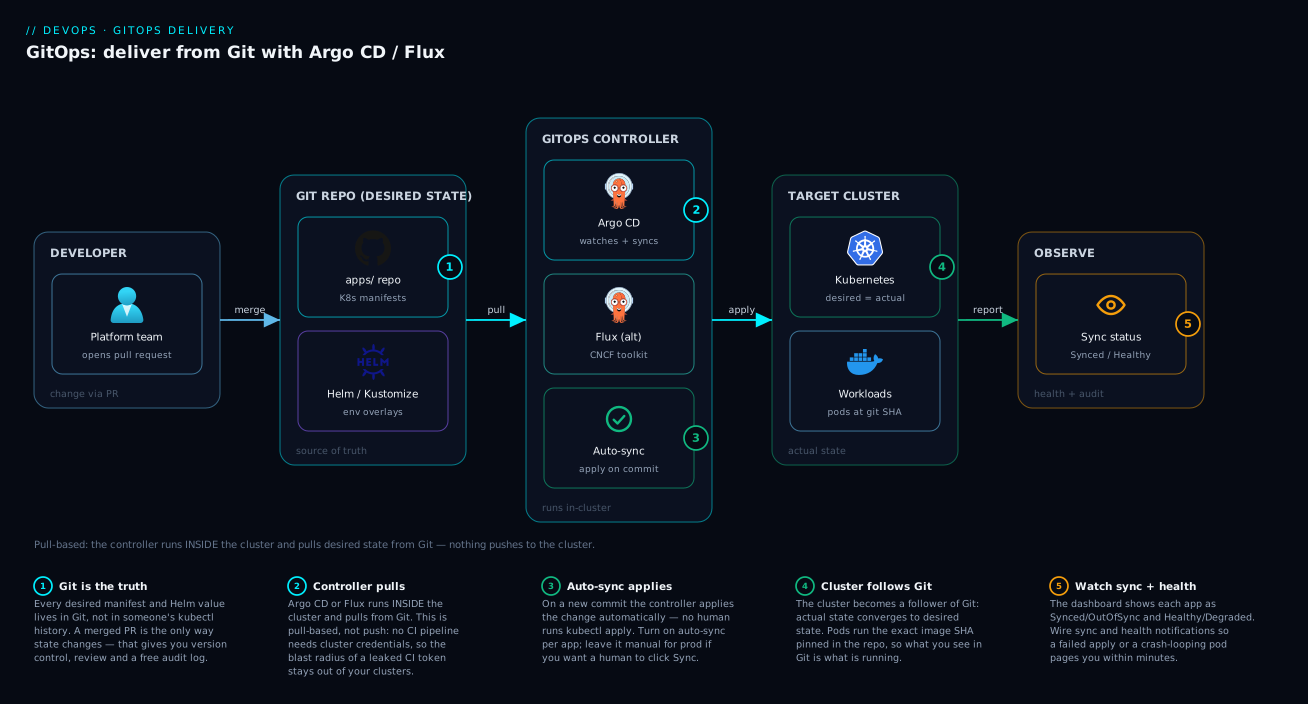
The first diagram shows the GitOps machine end to end. Read it left to right. A developer opens a pull request against the deployment repo (changing an image tag, a replica count, a config value); reviewers approve and merge to main. That commit is now the desired state in Git. The GitOps controller running inside the cluster — Argo CD’s application-controller (via repo-server) or Flux’s source- and kustomize-controller — pulls the repo, renders it through Kustomize or Helm, and diffs the result against the live cluster state. Where they differ, the controller server-side-applies the delta to the Kubernetes API server, which rolls out the change to workloads (Deployments, Services, Ingress). Notice the arrow directions: every credential-bearing connection points outward from the cluster (to Git and the registry) or inward to the local API server — nothing external holds cluster admin. The CI pipeline is off to the side: it builds the image, pushes it to the registry, and writes the new tag back to Git — it never touches the cluster directly.
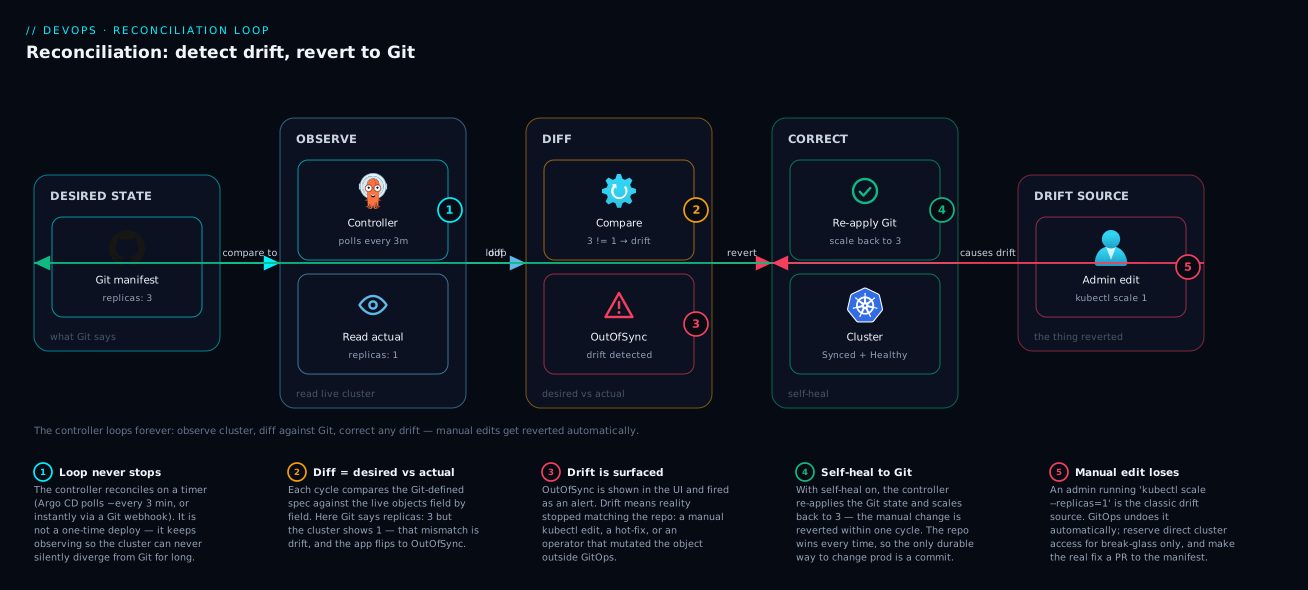
The second diagram zooms into the reconciliation loop and the drift case specifically. The controller runs a continuous cycle: observe the desired state (latest revision from Git) and the actual state (live objects via informers/cluster reads), diff them, and if they differ, act (apply) — then re-assess health and loop. The drift path is the interesting one: when an operator runs a manual kubectl edit or kubectl scale against the cluster, the actual state diverges from desired. The very next observe-diff detects the divergence and marks the app OutOfSync; with self-heal enabled, the act phase reverts the live object back to the Git-defined state, returning the loop to Synced. With self-heal off, the loop simply reports OutOfSync and waits for a human to sync — the divergence is visible but not auto-corrected. This is the difference between “GitOps that enforces” and “GitOps that only notifies,” and the diagram makes the branch explicit.
Real-world scenario
Northwind Logistics runs a freight-tracking platform on Kubernetes: 38 microservices across four AKS clusters — prod-eu, prod-us, staging, and dev — operated by an eight-person platform team. Before GitOps, each cluster was deployed by a per-cluster Azure Pipelines stage running helm upgrade with cluster admin credentials stored as pipeline secrets. The control planes were public (the SaaS runner needed to reach them). Drift was rampant: prod-eu had ingress-nginx 1.9 while prod-us had 1.7 because a chart bump only ran in one region; three services had replicas hand-bumped during past incidents and never reverted; and “what’s in prod?” required kubectl get against each cluster.
The trigger to change was an audit finding plus an outage. A junior engineer, paging at 2 a.m., ran kubectl set image directly on prod-us to ship a hotfix faster than the pipeline. It worked — and then the next scheduled pipeline run, an hour later, redeployed the old image from Git, silently reverting the fix and re-breaking the service. Forty-five minutes of confusion followed because nobody connected the redeploy to the regression. The lesson was stark: with no continuous reconciliation, the cluster and the repo were two separate truths, and whichever wrote last won.
They adopted Argo CD in a hub-and-spoke topology (one Argo CD instance managing all four clusters) for the application teams who wanted the UI, plus Flux on the cluster-add-on layer (ingress, cert-manager, monitoring) where the platform team wanted everything headless and CRD-driven. The deployment repo was restructured: apps/ with Kustomize bases and per-cluster overlays, infrastructure/ for add-ons, and a bootstrap/ app-of-apps. An ApplicationSet with a Cluster generator deployed the platform add-ons to every cluster labelled env=prod, so a chart bump now hit prod-eu and prod-us from one PR — ending the version-skew problem permanently. Secrets moved to SOPS with an Azure KMS key per environment (Flux decrypts in-cluster), so the database passwords lived in Git as ciphertext, rotatable by PR.
The migration ran in waves over six weeks: dev first (self-heal off, observe drift for two weeks to build trust and find which fields fought controllers — they discovered three HPAs and the Istio sidecar injector needed ignoreDifferences), then staging, then the two prod clusters with self-heal and prune on but PruneLast=true. The AKS API servers were switched to private clusters — possible only because the SaaS runner no longer needed inbound access; Argo CD pulled from inside.
The payoff was concrete. The 2-a.m. hotfix scenario reversed: a manual kubectl edit on prod-us was now reverted by Argo CD within ~20 seconds (informer-driven self-heal), forcing the right behavior — open a PR. Rollback of a bad release dropped from a 45-minute pipeline re-run to a git revert that reconciled in under a minute. Drift across the fleet went to zero and stayed there; “what’s running in prod-eu?” became “read clusters/prod-eu on main.” An auditor’s “prove every production change was reviewed and attributable” was satisfied by git log and the PR history. The platform spend was unchanged — GitOps added two small controller deployments per cluster — but the mean time to recover for deployment incidents fell roughly 70%, and the audit risk of public control planes was eliminated. The sentence the team painted on the wall: “The cluster is a follower of Git. If you want to change prod, change the repo — the cluster will catch up, and if you don’t, it’ll undo you.”
The migration as a timeline, because the order is the lesson:
| Phase | Action | Self-heal / prune | What it proved |
|---|---|---|---|
| Week 1–2 | Onboard dev; observe drift only |
Off / off | Found which fields fight controllers (HPA, Istio) |
| Week 3 | Add ignoreDifferences; enable self-heal on dev |
On / off | Self-heal stable once field ownership is right |
| Week 4 | staging with self-heal + PruneLast |
On / on (last) | Prune is safe with guardrails |
| Week 5 | prod-us then prod-eu |
On / on (last) | Manual edits auto-revert in ~20 s |
| Week 6 | Private AKS API servers; SOPS secrets; ApplicationSet add-ons | On / on | Pull model enables private control planes; version skew gone |
Advantages and disadvantages
GitOps is a strong default for Kubernetes delivery, but it is not free of cost or sharp edges. Weigh it honestly:
| Advantages | Disadvantages |
|---|---|
| Git is the audit log — every change is a reviewed, attributable, revertible commit | Kubernetes-centric — the mature tooling targets K8s; non-K8s estate needs other tools |
| Continuous drift correction — the cluster can’t silently diverge from intent | Self-heal fights other controllers if you declare fields you don’t own (HPA, webhooks) |
| Pull model — no external system holds cluster creds; API servers can be private | Learning curve — CRDs, reconcile semantics, waves/hooks, sync policies are non-trivial |
Trivial rollback — git revert reconciles to the previous state in seconds |
Prune is dangerous — a bad render with prune on can delete production objects |
| DRY multi-cluster — ApplicationSets/overlays manage fleets from one source | Secrets need extra tooling — SOPS/Sealed/ESO is mandatory, not optional |
| Separation of duties — CI builds artifacts; CD is a Git change app teams can review | Two sources of latency — webhook + interval; mis-tuned, deploys feel slow or drift lingers |
| Reproducible environments — the repo is the environment; rebuild a cluster from Git | Debugging is indirect — you debug a controller’s view, not a direct kubectl apply |
| Strategy-as-code — canary/blue-green live in Git via Rollouts/Flagger | Operational surface — more controllers to run, upgrade, and monitor |
GitOps is right for teams running Kubernetes at real scale who want auditability, drift safety, and a private control plane — which is most production Kubernetes. It is overkill for a single small cluster with one or two engineers, where a simple kubectl apply in CI is plenty and the CRD/operator overhead isn’t justified. It is a poor fit as your only delivery model if much of your estate is non-Kubernetes (VMs, serverless, managed PaaS) — there, GitOps covers the K8s slice and you use the platform’s own IaC/CD for the rest. And it is not a substitute for testing: GitOps faithfully deploys whatever you merged, including a broken manifest — the gate is your PR review and CI, not the reconciler.
Hands-on lab
Stand up Argo CD on a local cluster, deploy an app from Git, watch self-heal revert a manual change, then roll back via Git. Free-tier-friendly (a local kind or minikube cluster; no cloud spend). Run in a Bash shell with kubectl, helm/kustomize, and git available.
Step 1 — Create a local cluster and install Argo CD.
kind create cluster --name gitops-lab
kubectl create namespace argocd
kubectl apply -n argocd -f \
  https://raw.githubusercontent.com/argoproj/argo-cd/stable/manifests/install.yaml
kubectl -n argocd rollout status deploy/argocd-server --timeout=180s
Expected: the argocd-* pods reach Running; argocd-server rollout completes.
Step 2 — Get the admin password and the CLI logged in.
# Initial admin password is stored in a secret
ARGOCD_PWD=$(kubectl -n argocd get secret argocd-initial-admin-secret \
  -o jsonpath='{.data.password}' | base64 -d)
echo "admin password: $ARGOCD_PWD"

# Port-forward the UI/API and log in with the CLI
kubectl -n argocd port-forward svc/argocd-server 8080:443 >/tmp/pf.log 2>&1 &
sleep 3
argocd login localhost:8080 --username admin --password "$ARGOCD_PWD" --insecure
Expected: 'admin:login' logged in successfully. The UI is at https://localhost:8080.
Step 3 — Create an Application pointing at the public guestbook sample.
argocd app create guestbook \
  --repo https://github.com/argoproj/argocd-example-apps.git \
  --path guestbook \
  --dest-server https://kubernetes.default.svc \
  --dest-namespace default \
  --sync-policy automated --self-heal --auto-prune
argocd app get guestbook
Expected: the app appears with Sync Status: OutOfSync then Synced, Health: Healthy once pods start.
Step 4 — Confirm the deployed state.
kubectl get deploy,svc -l app.kubernetes.io/instance=guestbook
argocd app get guestbook --refresh
Expected: a guestbook-ui Deployment with the replica count defined in Git (1), Synced/Healthy.
Step 5 — Introduce drift and watch self-heal revert it.
# Manually scale the deployment OUT of band — this is "drift"
kubectl scale deploy guestbook-ui --replicas=5
# Watch Argo CD detect OutOfSync and self-heal back to the Git value (1)
watch -n 2 'kubectl get deploy guestbook-ui -o jsonpath="{.spec.replicas}"; echo'
Expected: replicas briefly show 5, then Argo CD reverts them to 1 within seconds (informer-driven self-heal). The app momentarily goes OutOfSync then back to Synced. This is the core GitOps property in action — the cluster follows Git, not your manual edit.
Step 6 — Roll back via Git semantics (history + sync).
# Argo CD tracks sync history; view it
argocd app history guestbook
# Roll back to a previous synced revision by ID (simulates 'git revert' + reconcile)
argocd app rollback guestbook <REVISION_ID>
argocd app get guestbook
Expected: the app re-syncs to the chosen historical revision. In a real repo this is git revert <sha> && git push, after which Argo CD reconciles automatically.
Validation checklist. You installed an in-cluster controller, deployed an app whose source of truth is a Git repo, proved self-heal by reverting a manual kubectl scale, and rolled back via history. No kubectl apply of the app itself ever happened from your shell — the controller did it. The lab steps mapped to what each proves:
| Step | What you did | What it proves |
|---|---|---|
| 1–2 | Install Argo CD in-cluster, log in | The controller runs inside the cluster (pull model) |
| 3 | Create an Application from a Git repo | Git is the source of truth; the app is declarative |
| 5 | Scale out of band, watch revert | Drift detection + self-heal enforce desired state |
| 6 | Roll back via history | Rollback is a Git-history operation, fast and exact |
Cleanup.
argocd app delete guestbook --yes
kind delete cluster --name gitops-lab
# stop the port-forward
kill %1 2>/dev/null || true
Cost note. Entirely local (kind/minikube) — zero cloud spend. On a managed cluster, Argo CD itself is a handful of small pods; the cost is the cluster you already run.
Common mistakes & troubleshooting
This is the playbook you bookmark. First a scannable table, then the worst offenders expanded.
| # | Symptom | Root cause | Confirm (exact cmd / UI path) | Fix |
|---|---|---|---|---|
| 1 | App flaps Synced↔OutOfSync; replicas ping-pong |
Self-heal fighting an HPA/webhook over a field you declared | argocd app diff <app> shows /spec/replicas; check HPA exists |
Don’t declare the field; add ignoreDifferences for that path |
| 2 | ComparisonError / app won’t render |
Bad Kustomize/Helm (missing file, bad values, wrong path) | argocd app get <app>; repo-server logs; kustomize build <path> locally |
Fix the manifest/path; validate render in CI before merge |
| 3 | App stuck Progressing, never Healthy |
A resource never reaches health (CrashLoop, bad image, failed hook) | kubectl get pods; argocd app get health tree; pod logs |
Fix the workload (image tag, config, hook); check ImagePullBackOff |
| 4 | Prune deleted production objects | Render produced empty/fewer manifests with prune on | Argo CD events; Git diff that emptied a path | Restore from Git; use PruneLast, prune:false on roots, validate renders |
| 5 | New image built but not deployed | No webhook + long interval, or tag not written to Git | argocd app get revision vs latest commit; check CI tag write-back |
Wire Git webhook; ensure CI commits the new tag; argocd app sync |
| 6 | Secret empty → app crash-loops |
SOPS/Sealed/ESO decryption or fetch failed | kustomize-controller logs (decrypt error); kubectl get secret empty |
Fix key/KMS access; reseal; check ESO SecretStore auth |
| 7 | Sync hangs on a PreSync hook | Migration Job needs config that lands only during Sync | kubectl get job; hook Job pod logs |
Make PreSync self-contained; don’t depend on Sync-phase objects |
| 8 | ApplicationSet created/deleted dozens of apps | A template/generator typo fanned out | kubectl get applications -A; ApplicationSet controller logs |
Revert the generator; use preserveResourcesOnDeletion; review fan-out |
| 9 | App OutOfSync forever, diff shows server-default fields |
Diffing fields the API server defaults/mutates | argocd app diff shows defaulted fields (e.g. status, CA bundles) |
ignoreDifferences; exclude managed fields |
| 10 | Sync fails: namespace not found | Target namespace doesn’t exist and isn’t created | Sync error “namespaces … not found” | CreateNamespace=true syncOption (or wave the namespace first) |
| 11 | Wrong cluster/namespace got the app | destination server/namespace misconfigured |
argocd app get destination; argocd cluster list |
Correct destination; verify cluster registration/labels |
| 12 | Helm hooks behave differently than expected (Argo CD) | Argo CD renders helm template (no real Helm lifecycle) |
App shows Helm hooks as plain resources | Use Argo CD hooks/waves, or --helm native, or use Flux helm-controller |
| 13 | Reconcile slow / controller OOM on a huge app | Massive app/repo overwhelms repo-server/controller | controller/repo-server memory; reconcile duration metric | Split into smaller apps; raise resources; cache; shard controllers |
| 14 | Out-of-band hotfix keeps getting reverted | Self-heal reverting a manual fix that isn’t in Git | App goes OutOfSync right after the manual change |
Put the fix in Git (PR) first; then it’s desired state, not drift |
The expanded form for the two that bite hardest:
Prune deleted production objects (#4). With prune: true, a render that produces an empty or reduced manifest set — a Kustomize error, a deleted file, a path typo pointing at an empty directory — makes the controller conclude those objects were removed from Git and delete them from the cluster. Confirm: application events show Pruned/Deleted for resources you didn’t intend to remove, and the Git diff emptied a path or broke the render. Fix: re-sync the corrected manifests to restore. Prevent recurrence with PruneLast=true, prune: false on the bootstrap/root app, CI render validation (kustomize build must produce the expected object count), and resource-exclusion for critical objects. Treat prune as rm -rf with a loaded source.
Secret is empty and the app crash-loops (#6). The secrets layer failed silently — SOPS couldn’t decrypt (missing age/KMS key, or KMS IAM denied), Sealed Secrets can’t unseal (wrong cluster’s key), or ESO can’t fetch (bad SecretStore auth / Key Vault RBAC). The Secret ends up empty or missing, the app reads a blank value, and it crash-loops — looking like an app bug. Confirm: kubectl get secret <name> -o yaml shows no data or a missing resource; the relevant controller logs show a decrypt/fetch error (kustomize-controller for SOPS, the sealed-secrets controller, or external-secrets). Fix: restore the controller’s access to the key/store (KMS IAM, age key Secret, Key Vault role assignment), or re-seal/re-encrypt with the correct key. Never “fix” it by committing a plaintext secret — that leaks it into history permanently.
Best practices
- Pin production to a tag or SHA, not a moving branch. “Prod is at exactly
v2.4.1” is a property worth keeping; promote by changing the pin in a reviewed PR, so you always know — and can reproduce — what’s live. - Separate the app source repo from the deployment (config) repo. CI builds and tests the app in its repo and writes the new image tag to the deployment repo. This keeps the CD trigger reviewable and stops app-code churn from spamming the reconciler.
- Own the fields you set; ignore the rest. Don’t declare
replicasif an HPA owns it; addignoreDifferencesfor webhook-injected and server-defaulted fields. This single discipline prevents most self-heal flapping. - Roll out self-heal and prune in stages. Start observe-only (detect drift, don’t act), find the fields that fight controllers, then enable self-heal, then prune with
PruneLast. Never enable prune on a root/bootstrap app you don’t fully trust. - Validate renders in CI before merge. Run
kustomize build/helm template(and a policy check likekubeconform/conftest) in the PR pipeline so a broken manifest never reaches the reconciler — a broken render plus prune is a deletion event. - Use sync waves for real ordering only. CRDs/namespaces before their consumers; migrations (PreSync) before deploy; ingress after the app is healthy. Don’t over-engineer waves where Kubernetes’ own dependency handling suffices.
- Keep PreSync hooks self-contained. A migration Job must carry its own image and config; if it depends on objects that only land during Sync, it deadlocks.
- Treat ApplicationSet/generator changes as infrastructure changes. They fan out to many apps/clusters; review them with that blast radius in mind, and use
preserveResourcesOnDeletionwhile building confidence. - Never commit plaintext secrets; pick one of SOPS / Sealed Secrets / ESO. Base64 is not encryption. Decide per constraint (in-Git ciphertext vs external store) and apply it consistently.
- Wire short interval + webhooks. The webhook deploys fast on merge; the interval corrects drift and catches missed webhooks. Tune Flux
intervalper resource so you don’t hammer the API server fleet-wide. - Make the API server private once you’re pull-based. The biggest security win of GitOps is that no external CI needs inbound cluster access — capture it by locking down the control plane.
- Alert on GitOps signals, not just app health. App
OutOfSyncduration, sync failures,ComparisonError, controller reconcile latency, and prune events are leading indicators of a delivery problem.
The signals worth alerting on before the next incident:
| Alert on | Signal | Why it’s leading |
|---|---|---|
App OutOfSync for too long |
Argo CD app_sync_status / Flux not-ready |
Drift not healing, or a stuck sync |
| Sync/reconcile failures | argocd_app_sync_total{phase=Failed} / Flux events |
A bad merge or render is failing to apply |
ComparisonError |
Argo CD app condition | Manifests don’t render — deploys are blocked |
| Reconcile latency rising | controller reconcile duration metric | Repo/app too large; controller under-resourced |
| Prune/delete events | application events | Catch an unintended deletion fast |
| Secret decrypt/fetch errors | kustomize/ESO controller logs | Secrets layer broke before apps crash-loop |
Security notes
- The pull model is the headline control — use it fully. Because the controller pulls from inside the cluster, no external system needs cluster admin credentials. Make the API server private, scope CI to only writing to Git/registry, and you’ve removed the largest attack surface of push CD (a compromised SaaS runner with a prod
kubeconfig). - Scope the controller’s RBAC tightly. Argo CD’s
AppProjectand Flux’s namespaced reconcilers + RBAC limit which repos, clusters, and namespaces a tenant can deploy to. Don’t run everything as cluster-admin; bound each team to its own destinations. - Sign your commits and verify them. Argo CD and Flux can require GPG-signed commits (Flux
verifyonGitRepository) so only signed, attributable revisions are reconciled — closing the “someone pushed an unsigned change” gap. - Never put plaintext secrets in Git. Once pushed, a secret is in history forever (and on every clone), so deletion doesn’t help — you must rotate it. Use SOPS/Sealed/ESO so Git only ever holds ciphertext or a reference, and the cluster/operator holds the decryption capability.
- Lock down the GitOps UI/API. Argo CD’s server is powerful (sync, rollback, exec). Put it behind SSO (OIDC), enforce RBAC, restrict network access, and don’t expose it to the internet without authentication.
- Protect the deployment repo like production. Branch protection, required reviews, and required status checks on the deployment repo are your production change control — a merge there changes prod. Treat repo write access as prod access.
- Pin and scan images; pin chart/CRD sources. Reference images by digest where possible, scan them in CI, and pin Helm chart and CRD versions so a moved tag can’t silently change what reconciles.
- Use workload identity for secret backends. With ESO/SOPS-KMS, the controller should authenticate to Key Vault/KMS via workload identity / IRSA / managed identity, not a long-lived static credential.
The security controls mapped to what they prevent:
| Control | Mechanism | Prevents |
|---|---|---|
| Private API server + pull model | No inbound cluster access | Compromised CI runner touching prod |
Bounded AppProject / namespaced RBAC |
Per-tenant repo/cluster/ns allowlist | A team deploying outside its blast radius |
| Signed-commit verification | GPG verify on the source |
Unattributable/unauthorized revisions reconciling |
| SOPS / Sealed / ESO | Ciphertext or reference in Git | Secret leakage via version history |
| SSO + RBAC on the GitOps UI | OIDC + role bindings | Unauthorized sync/rollback/exec |
| Branch protection on deploy repo | Required reviews/checks | Unreviewed production changes |
| Image digest pinning + scanning | Digest refs + CI scan | Tampered/unknown images reconciling |
Cost & sizing
GitOps adds little to the bill — its cost is operational, not infrastructural. The components are a few small controller Pods per cluster; the spend you already have is the cluster.
- Controller footprint. Argo CD is a handful of pods (server, repo-server, application-controller, redis); Flux is a set of small controllers. On a modest cluster they fit comfortably in a few hundred millicores and a few hundred MB to a couple of GB total — negligible against the workloads they manage. The exception is very large apps/repos, where
repo-server(render) andapplication-controller(diff) memory grows; split big apps and raise limits rather than running one giant Application. - Hub vs per-cluster. A hub-and-spoke Argo CD is one control plane to run (cheaper to operate) but a single point of failure; per-cluster agents multiply the (small) footprint but isolate failure. The cost difference is operational overhead, not cloud spend.
- Webhook vs interval. This is a load decision, not a billing one: a too-short Flux
intervalacross hundreds of Kustomizations hammers the API server and Git provider (risking rate limits), while a too-long interval delays drift correction. Short interval + webhooks is the efficient middle. - Secret backends carry their own small cost. ESO with a cloud secret manager incurs the manager’s per-secret/per-operation charge; SOPS with KMS incurs KMS key + decrypt-call charges; Sealed Secrets is free (in-cluster key). All are tiny next to the value of not leaking credentials.
- The real saving is MTTR and toil. GitOps doesn’t lower your cloud bill; it lowers the cost of operating — faster rollback, no drift firefighting, reproducible clusters, and audit you don’t assemble by hand. Northwind’s spend was flat but deployment-incident MTTR fell ~70%.
A rough sizing picture and what drives each cost:
| Item | Footprint / cost | Drives the cost | Watch-out |
|---|---|---|---|
| Argo CD control plane | ~4 small pods; few hundred mCPU / few hundred MB–2 GB | Number & size of apps; render load | repo-server OOM on huge Helm charts |
| Flux controllers | Several small pods; modest CPU/MEM | Number of sources/Kustomizations; intervals | Too-short intervals → API-server/Git load |
| Hub cross-cluster creds | No spend; operational risk | Number of spokes | Hub compromise = fleet blast radius |
| ESO + cloud secret manager | Per-secret/op charge (small) | Secret count + refresh interval | Frequent refresh = more API calls/cost |
| SOPS + KMS | KMS key + decrypt calls (small) | Number of encrypted files/reconciles | Key access must be tightly scoped |
| Sealed Secrets | Free (in-cluster key) | n/a | Per-cluster key; re-seal per cluster |
Interview & exam questions
1. What are the four GitOps principles, and which one distinguishes GitOps from “deploy on merge”? Declarative, versioned & immutable, pulled automatically, and continuously reconciled. The fourth — continuous reconciliation — is what distinguishes true GitOps: it re-asserts desired state on a schedule regardless of whether anything merged, so a manual kubectl edit is reverted even with no new commit. “Deploy on merge” only acts on a webhook and never re-checks the cluster, so it doesn’t correct drift.
2. Why is the pull model more secure than push-based CD? In pull-based GitOps the controller runs inside the cluster and reaches out to Git/registry, so no external system needs cluster admin credentials and the API server can be private. Push CD requires the (often SaaS) runner to hold a powerful kubeconfig and reach the control plane, expanding the attack surface to “compromise the runner, own the cluster.”
3. Explain drift detection vs self-heal vs prune. Drift detection computes and reports the diff between live and desired (always on, read-only). Self-heal automatically reverts live drift back to Git. Prune deletes live objects that no longer exist in Git. They’re independent policies — you can detect without healing, and heal without pruning — and prune is the dangerous one because a bad render can delete production objects.
4. An app flaps OutOfSync and replicas keep changing. Diagnose. Self-heal is fighting another controller (almost always an HPA managing replicas, or a mutating webhook) over a field you declared in Git. Fix by not declaring the field (let the HPA own replicas) and adding ignoreDifferences for that path so the diff stays clean. The rule: own the fields you set, ignore the fields other controllers set.
5. Compare Argo CD and Flux at a high level. Argo CD is an all-in-one, application-centric platform with a first-class UI, the Application/ApplicationSet model, and a hub multi-cluster pattern. Flux is the GitOps Toolkit — composable single-responsibility controllers (source/kustomize/helm/image), CLI-and-CRD-first with no built-in UI, native SOPS decryption, real Helm releases, and idiomatic agent-per-cluster. Choose Argo CD for UI/self-service and central multi-cluster; Flux for headless platform automation, native Helm, and in-cluster image automation.
6. What is the app-of-apps pattern and when do you outgrow it? A single root Application points at a directory of more Application manifests, so syncing the root bootstraps all children — GitOps managing GitOps. You outgrow it when you need the same app across many clusters or per-directory generation, because app-of-apps is static (per-cluster edits are manual). That’s when you move to ApplicationSets with generators.
7. What problem do sync waves and resource hooks solve? Ordering. A sync applies many objects but has dependencies: CRDs/namespaces before their consumers, a DB migration before the new app (PreSync hook), ingress after the app is healthy (later wave), a smoke test after deploy (PostSync hook). Sync waves order resources within a sync; hooks run Jobs at phase boundaries (PreSync/Sync/PostSync/SyncFail).
8. How do you handle secrets in GitOps? Never commit plaintext (base64 is not encryption). Three patterns: SOPS (encrypt values in Git, controller decrypts in-cluster via age/KMS — native in Flux), Sealed Secrets (encrypt to a per-cluster controller key; only that cluster can unseal), and External Secrets Operator (keep secrets in Key Vault/Secrets Manager/Vault, commit only a reference). Git holds ciphertext or a reference; the cluster/operator holds the decryption capability.
9. How does GitOps relate to progressive delivery? GitOps gets the desired manifests onto the cluster but doesn’t itself do canary/blue-green with metric-based rollback. Argo Rollouts (with Argo CD) and Flagger (with Flux) add that — and crucially the Rollout/Canary definition lives in Git, so the release strategy is versioned and reconciled too. CI builds the image, GitOps reconciles it, progressive delivery ramps traffic with metric gates and auto-rolls-back.
10. Why can enabling prune delete your production app, and how do you prevent it? If a render produces an empty or reduced manifest set (a Kustomize error, a deleted file, a path typo), the controller concludes those objects were removed from Git and deletes them. Prevent it with PruneLast=true, prune: false on root/bootstrap apps, CI render validation (assert the expected object count), and resource-exclusion for critical objects. Treat prune like rm -rf with a loaded source.
11. What’s the difference between hub-and-spoke and standalone-agent multi-cluster, and what’s the security trade-off? Hub-and-spoke runs one control plane (e.g. Argo CD) that holds credentials to many registered clusters — single pane of glass, but the hub is a SPOF and its compromise reaches every cluster. Standalone agents (idiomatic Flux) run one controller per cluster watching only its own config, holding no cross-cluster credentials — strong isolation, contained blast radius, but no single UI. Regulated/high-isolation estates lean standalone.
12. A new image was built but isn’t running in the cluster. What do you check? Whether the new tag was written to the deployment repo (CI write-back), and whether a webhook fired or you’re waiting on the poll interval. Confirm with argocd app get (deployed revision vs latest commit) or Flux’s reconcile status. Fix by ensuring CI commits the tag, wiring a Git webhook, or forcing argocd app sync / flux reconcile. GitOps only deploys what’s in Git — if CI didn’t commit the tag, nothing changed.
These map to CKA/CKAD (Kubernetes objects, controllers, RBAC), the Argo CD / Flux project knowledge expected in platform-engineering interviews, and cloud certs where the deployment target lives — AZ-204 (deploy to AKS), AZ-400 (DevOps, release strategies, secrets), and the secrets angle touches AZ-500. A compact cert mapping:
| Question theme | Primary focus | Exam relevance |
|---|---|---|
| GitOps principles, pull vs push | Concept / architecture | AZ-400, platform-engineering interviews |
| Reconciliation, drift, self-heal | Controller mechanics | CKA/CKAD, Argo CD/Flux knowledge |
| Argo CD vs Flux, ApplicationSets | Tooling decision | Platform-engineering interviews |
| Secrets (SOPS/Sealed/ESO) | Secure delivery | AZ-400 / AZ-500 |
| Progressive delivery integration | Release strategy | AZ-400 |
| Multi-cluster topology & security | Architecture | AZ-400, cloud-specific (AKS/EKS/GKE) |
Quick check
- Your “GitOps” pipeline only acts on a webhook when something merges and never re-checks the cluster. Which GitOps principle is it violating, and what capability do you lose?
- An app is flapping
Synced↔OutOfSyncand the deployment’sreplicaskeeps changing. What is almost certainly happening, and what are the two fixes? - True or false: committing a base64-encoded
Secretto Git is an acceptable way to store secrets in GitOps. - You enabled
prune: trueand a chunk of production disappeared after a merge. What likely happened, and name two guardrails that prevent it. - You build a new image in CI, but it never deploys. Name two things to check.
Answers
- It violates continuous reconciliation (principle 4) — it’s automated push CD triggered by Git, not GitOps. You lose drift correction: a manual
kubectl editmade when nothing merged is never detected or reverted, so the cluster silently diverges from intent between deploys. - Self-heal is fighting another controller — almost always an HPA (or a mutating webhook) that owns
replicas, which you also declared in Git. The two fixes are: (a) stop declaringreplicasin the manifest so the HPA owns it, and (b) addignoreDifferencesfor/spec/replicasso the diff stays clean. - False. Base64 is encoding, not encryption — anyone with repo read access decodes it instantly, and once pushed it’s in history forever. Use SOPS, Sealed Secrets, or External Secrets Operator so Git holds ciphertext or a reference only.
- A render produced an empty or reduced manifest set (Kustomize error, deleted file, or a path typo pointing at an empty directory), so the controller concluded those objects were removed from Git and deleted them. Guardrails:
PruneLast=true, keepprune: falseon root/bootstrap apps, and validate renders in CI (assert the expected object count) before merge. - Check (a) whether CI wrote the new image tag to the deployment repo (the desired state must actually change in Git) and (b) whether a webhook fired or you’re waiting on the poll interval — confirm the deployed revision vs the latest commit with
argocd app get/fluxstatus, and force a sync if needed.
Glossary
- GitOps — an operating model where Git is the single source of truth for declarative infrastructure and apps, and an in-cluster agent continuously reconciles the cluster toward the committed state.
- Reconciliation loop — the continuous observe → diff → act cycle a GitOps controller runs to drive actual cluster state toward the desired state in Git.
- Desired state / actual state — what you declared in Git versus what is live in the cluster; reconciliation minimizes their difference.
- Drift — any difference between the live cluster and the Git-declared state; detected by the three-way diff.
- Self-heal — automatically reverting live drift back to the Git-defined state (Argo CD
selfHeal; Flux continuous apply). - Prune — deleting live objects that no longer exist in Git; powerful and dangerous (a bad render can delete production).
- Argo CD — a CNCF GitOps controller with a first-class UI and an application-centric model (
Application,ApplicationSet,AppProject). - Flux — the CNCF GitOps Toolkit: composable single-responsibility controllers (source/kustomize/helm/image), CRD-and-CLI-first, native SOPS and real Helm.
- Application (Argo CD) — the CRD declaring a source (repo/path/revision), a destination (cluster/namespace), and a sync policy.
- Kustomization / HelmRelease (Flux) — the CRDs that build a Kustomize path or run a Helm release and reconcile them.
- App-of-apps — a root Argo CD
Applicationpointing at a directory of moreApplicationmanifests, bootstrapping many apps from one. - ApplicationSet — an Argo CD controller that generates many
Applications from a template plus a generator (List/Cluster/Git/Matrix/PR/SCM). - Sync wave — an integer annotation ordering resource application within a sync; Argo CD waits for each wave to be healthy before the next.
- Resource hook — a Job run at a sync phase (PreSync/Sync/PostSync/SyncFail), e.g. a DB migration before deploy or a smoke test after.
- dependsOn (Flux) — ordering between Kustomizations, with
wait/healthChecksto gate on health before the next reconciles. - Three-way diff / server-side apply — comparing desired vs live vs last-applied and merging by field ownership, so controllers co-own objects without clobbering.
- ignoreDifferences — telling the diff to skip certain fields/paths (e.g. HPA-owned
replicas, webhook mutations) to stop self-heal fights. - SOPS — encrypts secret values in Git via age/PGP/KMS; the controller decrypts in-cluster (native in Flux).
- Sealed Secrets — encrypts a
Secretinto aSealedSecretonly a per-cluster controller can unseal. - External Secrets Operator (ESO) — syncs secrets from an external manager (Key Vault/Secrets Manager/Vault) into Kubernetes
Secrets; Git holds only a reference. - Argo Rollouts / Flagger — progressive-delivery controllers (canary/blue-green with metric-based rollback) that compose on top of Argo CD / Flux, with the strategy defined in Git.
- Hub-and-spoke / standalone agent — multi-cluster topologies: one control plane managing many registered clusters, versus one agent per cluster holding no cross-cluster credentials.
Next steps
You can now run GitOps in production — reconcile from Git, correct drift, manage a fleet, handle secrets, and layer on canaries. Build outward:
- Next: Progressive Delivery: Canary, Blue-Green and Automated Rollback with GitOps — put Argo Rollouts/Flagger on top of what you just built, with the strategy in Git.
- Related: CI/CD Pipelines Explained: From Code Commit to Production — the build-and-test half that feeds image tags into your GitOps repo.
- Related: Deployment Strategies: Blue-Green, Canary and Rolling Updates — the release-strategy mechanics GitOps stores declaratively.
- Related: Infrastructure as Code: Terraform, Pulumi, CDK and Cloud-Native Options — how GitOps relates to (and complements) IaC for cluster and cloud resources.
- Related: CI/CD Secrets and Credential Management: Secure Your Pipelines — the secrets discipline behind SOPS/Sealed/ESO.
- Related: Deploy Argo CD on Kubernetes with OIDC SSO, RBAC, and ApplicationSets for Multi-Cluster GitOps — a hands-on build of the multi-cluster Argo CD setup described here.