You inherit a delivery platform that started as one Azure DevOps project with one repo, one pipeline and the hosted agents Microsoft gives you for free. Two years later it is forty repositories, ninety pipelines, six teams, and the free agent minutes ran out in week three. Every team copy-pasted the same hundred lines of YAML, every team wrote its own Terraform a little differently, every team published NuGet packages to a feed only that team can see, and the “build server” is a single beefy VM somebody pinned to a desk under their monitor. Nothing is wrong exactly — it all ships — but the blast radius of any change is the whole org, nobody can answer “where does this artifact come from,” and the security team has just discovered that a build agent has owner on production. This is the moment a delivery org needs platform engineering: not more pipelines, but a paved road — an opinionated, reusable, governed structure that every team drives on without rebuilding the road each time.
This article is the architecture of that paved road, grounded in a real enterprise shape. One Azure DevOps organisation split into projects each with exactly one job: an IaC project holding Terraform modules with one Git repo per module; a pipeline-templates project holding centralized reusable YAML that every other pipeline extends; a packages project hosting Azure Artifacts feeds (Maven, NuGet, npm, Python) with internal-feed enforcement; and many application projects (web apps, function apps, mobile) that consume the modules, the templates and the feeds. Every pipeline in every project runs on one shared self-hosted agent fleet — Azure DevOps scale-set agents backed by a VM Scale Set in the hub of a hub-spoke network — elastic, ephemeral, autoscaled, and able to reach private endpoints that Microsoft-hosted agents never could. The deploy target underneath is a Cloud Adoption Framework (CAF) landing zone: a management-group hierarchy, a Key Vault per scope, hub-spoke VNets with private endpoints, Private DNS Zones and peering.
By the end you will be able to draw the project boundaries the way a platform team draws them and defend why each line is where it is — the reuse it buys, the RBAC it enforces, the blast radius it contains. You will know when scale-set agents beat Microsoft-hosted (and when they don’t), how the autoscaling and ephemeral-VM lifecycle actually behaves, how the fleet’s hub placement lets a pipeline reach a private Azure SQL or a private Artifacts-less internal NuGet feed, and roughly what the whole thing costs per month. This is the overview blog of a six-part enterprise-CI/CD series; the PR, CI, CD, mobile and database pipelines each get their own deep dive. Here we build the stage on which all of them run.
What problem this solves
The pain a single-project, hosted-agent org hits is not abstract; it shows up as five recurring incidents. Reuse rots: the same hundred lines of build YAML live in ninety pipelines, so a single change — a new mandatory security scan, a bumped SDK version — is a ninety-pull-request migration nobody finishes, and the pipelines drift apart until “the build” means ninety subtly different things. Provenance evaporates: an app restores packages from wherever it can reach — public nuget.org, a team feed, a developer’s local cache — so the same binary has three possible origins and a supply-chain audit is impossible. Blast radius is the whole org: one project means one set of permissions, one set of service connections, one set of secure files; a compromised pipeline or an over-broad token can touch everything because there is no boundary to stop it. Agents become pets: that one VM under the desk has hand-installed tools nobody documented, no patching, no scaling, and when it dies on a Friday the entire org stops shipping. Private networking is impossible: Microsoft-hosted agents live on Microsoft’s network with public egress, so the day you lock your Azure SQL, Key Vault and Artifacts behind private endpoints — which every enterprise eventually must — the hosted agents can no longer reach them and every deploy fails with a timeout.
What breaks without the paved road is therefore consistency, traceability, isolation, reliability and reachability — the exact five properties an enterprise audit, a security review and an SRE on-call all depend on. Each one is solved by a deliberate structural decision: reuse by centralized templates, provenance by a single governed feed with upstream sources, blast radius by project boundaries with scoped RBAC, reliability by an autoscaled fleet with managed images, and reachability by hub placement on a private network. Miss any one and you are back to the incident list.
Who hits this: every organisation past roughly three teams or twenty pipelines. Below that, a single project and hosted agents are genuinely fine — the paved road is overhead you do not need yet. Above it, the cost of not having structure compounds: onboarding a new app goes from “copy the neighbour’s pipeline and pray” to “reference the templates, the feed and the modules — done in an afternoon,” and that delta is the entire value of platform engineering. The table below frames the field — every structural decision this article makes, the pain it removes, and the one mechanism that delivers it.
| Decision | Pain it removes | Mechanism | Owned by |
|---|---|---|---|
| Project per responsibility | Org-wide blast radius; tangled RBAC | Separate ADO projects (IaC, templates, packages, apps) | Platform team |
| Repo per Terraform module | Monolith state; can’t version a module | One Git repo + semver tag per module | Platform / module owners |
| Centralized YAML templates | 90 copies of the same pipeline | extends/template from a shared repo |
Platform team |
| Single governed Artifacts feed | Untraceable package origins | One org feed + upstream sources + feed enforcement | Platform team |
| Shared VMSS agent fleet | Pet build VMs; no scaling; no private reach | Scale-set agents in an agent pool | Platform team |
| Hub placement on private net | Hosted agents can’t reach private PaaS | VMSS in Hub VNet; spoke peering; private DNS | Platform + network |
| CAF landing zone target | Ungoverned subscriptions; no guardrails | Management groups + Azure Policy + Key Vault per scope | Cloud platform / governance |
Learning objectives
By the end of this article you can:
- Lay out an Azure DevOps organisation as a set of single-responsibility projects — IaC, pipeline-templates, packages, and application projects — and justify each boundary by reuse, RBAC and blast radius.
- Explain why each Terraform module gets its own Git repo (independent versioning, isolated state, granular RBAC, focused PRs) and how root configs consume modules by Git source plus tag.
- Design centralized pipeline templates (
extendsfor governance,templatefor reuse, parameters and${{ }}compile-time expressions) so one change propagates to every consumer pipeline. - Stand up a single Azure Artifacts feed with upstream sources for Maven/NuGet/npm/Python and enforce that CI restores only from the internal feed, killing untraceable package origins.
- Choose scale-set (VMSS) self-hosted agents over Microsoft-hosted when you need private-network reach, custom images, more power, or controlled cost — and recognise when hosted agents are the right call.
- Configure the VMSS agent pool’s autoscaling and ephemeral-agent lifecycle (max capacity, idle count, “delete after each use”) and manage the golden image that every agent boots from.
- Place the fleet in the hub of a hub-spoke network so pipelines reach private endpoints, resolve Private DNS Zones, and deploy into a CAF management-group hierarchy with a Key Vault per scope.
- Estimate the monthly cost of the platform (VMSS compute, parallel jobs, Artifacts storage) in INR/USD and right-size the fleet against real concurrency.
Prerequisites & where this fits
You should be comfortable with the Azure DevOps building blocks: an organisation contains projects; a project contains Repos (Git), Pipelines (YAML), Artifacts (feeds), Boards and Test Plans; pipelines run jobs on agents drawn from agent pools; and pipelines reach Azure through service connections (ideally workload-identity federation, not stored secrets). You should know basic Git branching strategies (this platform uses GitFlow), what a CI/CD pipeline does end to end, and the shape of Terraform modules with remote state. Familiarity with the Azure CAF landing zone and hub-spoke topology will make the networking sections land faster, and the Azure DevOps scale-set agents hardening deep dive is the security companion to the fleet we stand up here.
Where this fits: this is the platform-engineering overview — the altitude where you decide structure — and it sits above the individual pipelines that ride on it. The same idea, told as a maturity curve, is the DevOps architecting ladder from a single pipeline to a platform and, for the IaC side, the Terraform architecting ladder from a single module to a platform. The deep dives that consume this stage are the PR-gate pipeline, the CI pipeline (secrets from Key Vault with zero plaintext), the CD promotion pipeline (blue-green via slots), the mobile pipelines, and the Liquibase database pipeline — each its own article in this series.
A quick map of who owns which seam, so during an incident you call the right team:
| Layer | What lives here | Who owns it | What a failure here looks like |
|---|---|---|---|
| ADO organisation & projects | Project structure, org policies, parallel jobs | Platform team | Wrong RBAC scope; no free agent capacity |
| Pipeline-templates repo | Centralized extends/template YAML |
Platform team | One template bug breaks every pipeline |
| IaC project (module repos) | Terraform modules, versions, root state | Platform / module owners | Bad module tag breaks every consumer’s plan |
| Packages project (feeds) | Azure Artifacts feeds, upstream sources | Platform team | Feed down or untraceable → CI restore fails |
| Application projects | App repos, app pipelines, app slots | App / dev teams | App build/deploy fails (their code) |
| Agent fleet (VMSS) | Scale-set agents, golden image, autoscale | Platform team | No agents → every pipeline queues forever |
| Hub-spoke network | Hub VNet, peering, private endpoints, DNS | Network team | Agent can’t reach private PaaS → timeouts |
| CAF landing zone | Mgmt groups, Azure Policy, Key Vault per scope | Cloud platform / governance | Policy denies a deploy; missing scope KV |
Core concepts
Six mental models make every later decision obvious, so pin them down before the deep sections.
An organisation is a blast-radius boundary, and a project is the unit you draw it with. Azure DevOps gives you exactly two nesting levels that matter for isolation: the organisation (one billing and identity boundary, one set of parallel-job grants, one Microsoft Entra tenant binding) and the project (its own repos, pipelines, feeds, service connections, secure files, environments and security groups). Permissions, service connections and secrets do not automatically cross a project boundary — that is the whole point. So you put things in separate projects precisely when you want a wall between them: the team that can change a Terraform module should not, by default, be able to publish a NuGet package or deploy a web app. One project = one set of keys.
Reuse lives in three different planes, and you must not confuse them. Code reuse for infrastructure is a Terraform module (consumed by Git source + version). Code reuse for pipelines is a YAML template (consumed by extends/template). Reuse for binaries is an Azure Artifacts package (consumed by a feed restore). These are three separate reuse mechanisms with three separate homes — the IaC project, the templates project, the packages project — and a healthy platform keeps them strictly apart. A module is not a template; a template is not a package. Collapsing them (e.g. copy-pasting a module’s HCL into every root, or vendoring a package’s source into every app) is exactly the rot the structure exists to prevent.
Repo-per-module is what makes a module a product. A Terraform module in its own Git repo (main.tf, variables.tf, outputs.tf, locals.tf, .tpl templates) can be tagged with a semantic version (1.0, 2.0, 2.1), have its own PR gate and tests, have RBAC scoped to its owners, and be consumed at a pinned version by any number of root configurations via source = "git::https://...//?ref=2.1". A consumer that pins 2.1 is immune to a breaking change you make on main — they upgrade on their schedule. Put all modules in one monorepo and you lose every one of those properties: you cannot version a single module independently, a PR touches unrelated modules, and one team’s experiment shares state and blast radius with everyone’s production.
A template is a contract, and extends makes it mandatory. A pipeline-templates repo exposes reusable YAML in two flavours. A template include is opt-in reuse — a pipeline pulls in a stage or a set of steps it chooses. An extends template is governance — the consumer pipeline declares “I extend the platform template,” and the platform template decides the overall shape, can inject mandatory steps (a security scan, a provenance stamp) the consumer cannot remove, and can be locked so a pipeline that doesn’t extend it is rejected. The platform team owns these templates; app teams pass parameters. Because templates expand at compile time (the ${{ }} expression syntax runs before the run starts), the platform can enforce rules structurally, not just by hoping people follow a wiki.
The agent fleet is cattle, not a pet — and it lives where your private resources live. A Microsoft-hosted agent is a fresh, Microsoft-managed VM per job on Microsoft’s network; you get clean isolation and zero maintenance, but no custom image, limited power, capped minutes, and — critically — public egress only. A self-hosted scale-set agent is a VM the platform team owns, booted from a golden image you build, running in a VNet you choose, autoscaled by Azure DevOps against a VM Scale Set, and ephemeral (“delete after each use”) so every job gets a clean machine like the hosted ones but with your tools and your network reach. Placing that VMSS in the hub of a hub-spoke network is what lets a build agent open a private connection to Azure SQL, pull from a private Container Registry, or read a Key Vault that has its public endpoint disabled — none of which a hosted agent can do.
The landing zone is the governed target, not a free-for-all subscription. Pipelines do not deploy into “Azure”; they deploy into a CAF landing zone — a management-group hierarchy (Tenant Root → org → Landing Zone → Corporate → Corp Non-Production / Corp Production) where Azure Policy sets guardrails (allowed regions, required tags, deny-public-IP), each scope has its own Key Vault, and the network is hub-spoke with private endpoints to PaaS, Private DNS Zones for name resolution and VNet peering tying spokes to the hub. The pipeline’s service connection is scoped to a subscription under one of those management groups, and Policy will deny a deploy that breaks a guardrail before any resource is created. The platform’s job is to make the paved road and the landing zone fit together so a compliant deploy is the easy path.
The vocabulary in one table
The glossary at the end repeats these for lookup; this table is the mental model side by side.
| Concept | One-line definition | Where it lives | Why it matters here |
|---|---|---|---|
| Organisation | Billing + identity + parallel-job boundary | Azure DevOps top level | One org; projects sit inside it |
| Project | Repos + pipelines + feeds + RBAC unit | Inside the org | The blast-radius wall you draw |
| Terraform module | Versioned infra building block | One Git repo in the IaC project | Reused by Git source + tag |
| Root config | Composition that calls modules | App or env repo | Pins module versions; holds state |
| YAML template | Reusable pipeline shape/steps | Pipeline-templates repo | extends (govern) / template (reuse) |
| Azure Artifacts feed | Hosted package registry | Packages project | One governed origin + upstream |
| Upstream source | Proxy to a public registry | On the feed | Caches nuget.org/npm/PyPI/Maven |
| Agent pool | Named set of agents | Org or project | Pipelines target it by name |
| Scale-set agent | Self-hosted agent on a VMSS | Hub VNet | Elastic, ephemeral, private-reachable |
| Golden image | Pre-baked agent VM image | Compute Gallery | Every agent boots from it |
| Service connection | Pipeline → Azure auth | Per project | Scoped to a subscription; use WIF |
| Landing zone | Governed deploy target | Mgmt-group hierarchy | Where every pipeline ships to |
| Private endpoint | Private IP for a PaaS service | Spoke subnet | What only hub agents can reach |
Designing the organisation: one org, many single-responsibility projects
The first and most consequential decision is the project layout. A project in Azure DevOps is the strongest isolation boundary you get short of a whole new organisation: it has its own repos, its own pipeline library and templates, its own Artifacts feeds, its own service connections, its own secure files and variable groups, its own environments and approvals, and its own security groups and permissions. Things do not leak across that boundary unless you deliberately open a hole (a cross-project pipeline resource, a feed shared org-wide, a service connection shared to another project). So the design question is simply: what do you want walled off from what? The enterprise answer is four kinds of project, each owning exactly one responsibility.
The four projects and why each is its own wall:
| Project | Holds | Consumed by | Why a separate project (the wall it draws) |
|---|---|---|---|
| IaC | Terraform module repos (one per module) + root configs | App teams, platform | Module change must not grant package-publish or app-deploy rights; isolate infra blast radius |
| Pipeline-templates | Centralized reusable YAML (extends/template) |
Every pipeline in every project | One template = org-wide reach; lock down who can edit the thing everyone runs |
| Packages | Azure Artifacts feeds (Maven, NuGet, npm, Python) | Every build that restores/publishes | Single governed package origin; feed permissions independent of app RBAC |
| Application(s) | App source repos + app pipelines (web, function, mobile) | End users / production | App teams own their code & deploys without touching shared platform assets |
Why split IaC out (and not just “have a Terraform folder”)
The IaC project is where the platform team and module owners live. It holds the Terraform module repos — one Git repo per module, each with main.tf, variables.tf, outputs.tf, locals.tf and any .tpl templates — plus the root configurations that compose those modules into real environments and hold the azurerm remote state. Separating it from the application projects buys three things. First, RBAC: the people who can change how a VNet or a Key Vault is provisioned are a small, audited set, distinct from the dozens of app developers; you do not want a frontend developer able to alter the network module that every team depends on. Second, blast radius: a bad Terraform change can destroy infrastructure, so its pipelines, state and service connections sit behind their own wall with their own approvals. Third, lifecycle: infrastructure changes on a different cadence and through a different review (a platform CCB, not a feature sprint) than application code.
Why split pipeline-templates out
The templates project holds the centralized YAML every other pipeline extends. This is the highest-leverage and highest-risk repo in the organisation: a single change here propagates to every pipeline that references it. That is exactly why it is its own project with tightly restricted write access. App teams have read (they reference templates by repository resource) but not write; only the platform team merges changes, behind a PR gate with required reviewers. The payoff is enormous: add a mandatory Veracode scan to the build template once, and ninety pipelines get it on their next run with zero per-team PRs. The risk is symmetric — a typo in the template breaks ninety pipelines at once — which is why this project gets the strictest branch policies and the most testing.
Why split packages out
The packages project hosts the Azure Artifacts feeds: a Maven feed for the JVM apps, a NuGet feed for .NET, an npm feed for the frontends, a Python (PyPI) feed for the data/ML tooling — or one multi-protocol feed with views. Keeping feeds in their own project decouples package permissions from app permissions: who may publish a shared library is a platform decision, not something an app team grants itself. It also makes the feed the single governed origin for binaries — with upstream sources proxying the public registries so every external package is cached and recorded — which is the foundation of supply-chain traceability. CI pipelines enforce restoring only from this feed, so “where did this binary come from” always has one answer.
Why many application projects (and not one big app project)
Each application — or each closely-related group of apps owned by one team — gets its own project (or its own area within a project, depending on team size). This gives every app team their own repos, their own pipelines, their own deployment environments and approvals, and their own service connections, without the ability to touch the shared platform assets. A web-app team breaking their own pipeline cannot break the templates everyone uses; a mobile team’s signing certificates live in their secure files, not in a shared blast radius. The application projects are consumers — they reference the templates (read), restore from the feed (read/publish to app-scoped feeds), and call the modules (read) — and that consumer relationship is what the whole structure is built to make safe and repeatable.
What each project consumes from the others — the dependency graph in one table:
| Application project needs… | From project | How it’s referenced | Permission it needs there |
|---|---|---|---|
| Build/deploy pipeline shape | Pipeline-templates | resources.repositories + extends |
Read on the templates repo |
| Infra (VNet, KV, slots…) | IaC | Root config calls module by Git source + tag | Read on module repos |
| Packages to restore | Packages | Feed nuget.config/.npmrc with feed URL |
Feed Reader (+ Publisher for its own libs) |
| Agents to run on | (org-level pool) | pool: name: vmss-linux |
Pool user (granted at org/project) |
| Azure to deploy into | (its own) service connection | azureSubscription: in a deploy task |
Service-connection user (in this project) |
Organisation-level settings that apply across all projects
A few things live at the organisation level and are shared by every project: the agent pools (you want one shared fleet, so the pool is org-scoped and granted to projects), the parallel-job grants (the number of concurrent jobs you have bought — this is org billing), the Entra tenant binding and conditional-access policy, and org-wide policies (e.g. “disallow anonymous access,” “limit scope of service-connection creation”). Getting these right once is part of the paved road. The split between what is org-level and what is project-level:
| Setting | Org-level or project-level | Why | Who sets it |
|---|---|---|---|
| Agent pools (the VMSS fleet) | Org-level, granted to projects | One shared fleet, many consumers | Platform team |
| Parallel jobs (concurrency you bought) | Org-level (billing) | Capacity is purchased per org | Platform team |
| Entra tenant + conditional access | Org-level | One identity boundary | Identity / platform |
| Project-scoped build identity | Project-level (recommended) | Limit a pipeline’s reach to its project | Platform team |
| Service connections | Project-level | Scope Azure auth to the project’s subs | App + platform |
| Secure files / variable groups | Project-level | Secrets isolated per project | App + platform |
| Repos, pipelines, feeds, environments | Project-level | The whole point of a project | Each team |
Repo-per-module: structuring the Terraform IaC project
Inside the IaC project, the defining choice is one Git repo per Terraform module. This is not bureaucracy; it is what turns a module from “some shared HCL” into a versioned product with an owner, a contract and a release cadence. The reference platform’s modules each carry the same skeleton — main.tf (the resources), variables.tf (the inputs/contract), outputs.tf (what consumers read back), locals.tf (computed values, naming, tag merges) and .tpl templates (rendered config, e.g. a cloud-init or an app settings file) — and each is tagged with a semantic version so consumers pin exactly what they trust.
What each file in a module repo is for:
| File | Purpose | Changes when | Consumer-visible? |
|---|---|---|---|
main.tf |
Declares the resources the module creates | You add/alter a resource | No (internal) |
variables.tf |
The module’s input contract (typed, validated) | You add/rename an input | Yes — this is the API |
outputs.tf |
Values consumers read back (IDs, FQDNs) | You expose new outputs | Yes — this is the API |
locals.tf |
Naming, tag merges, computed values | Internal logic changes | No (internal) |
*.tpl |
Templated files rendered via templatefile() |
The rendered config changes | No (internal) |
README.md |
Usage, inputs, outputs, examples | The contract changes | Yes — the docs |
versions.tf |
Required Terraform + provider versions | You bump a provider floor | Indirectly (constraints) |
Why repo-per-module beats the monorepo
The case is concrete. With a repo per module you get independent semantic versioning — azurerm-keyvault can ship 2.1 while azurerm-vnet sits at 4.0, and a consumer upgrades each on its own schedule. You get isolated blast radius and state — a PR to one module cannot accidentally re-plan another, and one module’s experiment never shares state with another’s production. You get granular RBAC — the networking module’s owners are not automatically the database module’s owners. And you get focused PRs and reviews — a diff is about one module, reviewed by its owners, with that module’s own tests and PR gate. The monorepo trades all of that away for the single convenience of “one clone.”
Repo-per-module versus monorepo, decision-grade:
| Dimension | Repo per module | Monorepo of modules | Winner for an enterprise |
|---|---|---|---|
| Independent versioning | Each module tags its own semver | All modules share one tag/commit | Repo-per-module |
| Blast radius of a PR | One module only | Any module (shared history) | Repo-per-module |
| State isolation | Natural — separate consumers | Risk of shared/tangled state | Repo-per-module |
| RBAC granularity | Per-module owners | Whole-repo permissions | Repo-per-module |
| PR review focus | One module, its owners | Mixed, noisy diffs | Repo-per-module |
| Cross-module refactor | Multiple coordinated PRs | One PR | Monorepo (rare case) |
| Discovery / “where is X” | Need an index/registry | One place to browse | Monorepo (mitigable) |
| Clone/setup friction | Many small repos | One clone | Monorepo (minor) |
How a root config consumes a module (Git source + version pin)
A root configuration — the thing that actually composes modules into an environment and holds state — references each module by Git source and a ref tag. Pinning to a tag (not a branch) is the rule: it makes the consumer immune to upstream changes until they choose to bump.
# root/non-prod/main.tf — a Non-Prod composition pinning module versions
module "network" {
  source = "git::https://dev.azure.com/acme/IaC/_git/azurerm-vnet//?ref=4.0"

  resource_group_name = local.rg
  location            = "centralindia"
  address_space       = ["10.20.0.0/16"]
  subnets             = local.subnets
  tags                = local.tags
}

module "keyvault" {
  source = "git::https://dev.azure.com/acme/IaC/_git/azurerm-keyvault//?ref=2.1"

  name                = "kv-corp-nonprod"
  resource_group_name = local.rg
  location            = "centralindia"
  # private-endpoint into the spoke; public access disabled (CAF guardrail)
  public_network_access_enabled = false
  private_endpoint_subnet_id    = module.network.subnet_ids["snet-pe"]
  tags                          = local.tags
}
The backend keeps azurerm remote state in a storage account (one state per root/environment), with state locking via the blob lease — and Non-Prod and Prod are separate root configs with separate state and separate apply pipelines, so a Prod apply can never be triggered by a Non-Prod change.
# root/non-prod/backend.tf — azurerm remote state, isolated per environment
terraform {
  backend "azurerm" {
    resource_group_name  = "rg-tfstate"
    storage_account_name = "sttfstateacme"
    container_name       = "nonprod"          # prod uses a different container
    key                  = "corp-nonprod.tfstate"
  }
}
How module versions flow from author to consumer:
| Stage | Action | Mechanism | Result |
|---|---|---|---|
| Author | Change azurerm-keyvault, open PR |
Module PR gate (fmt, validate, tests) | Reviewed change on a branch |
| Release | Merge + tag 2.2 |
git tag 2.2 (semver) |
Immutable, consumable version |
| Consume | Root bumps ?ref=2.1 → ?ref=2.2 |
Git source pin in module block |
Opt-in upgrade, one consumer at a time |
| Plan | Non-Prod apply pipeline runs plan |
terraform init && plan |
Diff reviewed before apply |
| Apply | Approve → apply to Non-Prod |
Gated apply pipeline | Infra changes in Non-Prod only |
| Promote | Repeat ref bump in Prod root | Separate Prod state + pipeline | Same version, promoted deliberately |
Versioning discipline follows standard semver, mapped to Terraform module reality:
| Change to a module | Semver bump | Example | Consumer impact |
|---|---|---|---|
| New optional input (defaulted) | Minor (2.1 → 2.2) |
Add tags with a default |
None until they use it |
| New output | Minor | Expose private_ip |
None; available if wanted |
| Bug fix, no contract change | Patch (2.1.0 → 2.1.1) |
Fix a locals typo |
Safe to take |
| Rename/remove an input | Major (2.x → 3.0) |
Drop a deprecated var | Breaking — they must edit |
| Change a default that alters resources | Major | Default SKU change | Breaking — re-plan/replace |
The deeper mechanics of authoring and consuming modules — input validation, for_each over collections, nested modules, the registry pattern — are their own topic in Terraform module design, composition & versioning; the remote-state-at-scale concerns (state-per-environment, locking, partial config) live in Terraform remote state at scale.
Centralized pipeline templates: write the build once, run it ninety times
The pipeline-templates project exists so that “the build” is one thing, defined once, that every pipeline inherits. Azure DevOps gives you two reuse primitives, and the platform uses both deliberately. A template include stitches reusable fragments — a stage, a job, a set of steps — into a pipeline that chooses to pull them in (opt-in reuse). An extends template flips control: the consumer pipeline declares it extends the platform template, and the platform template owns the overall shape and can inject mandatory steps the consumer cannot remove (governance). The reference platform makes the PR, CI and CD pipelines all extends a platform template, so a security scan, a feed-enforcement step or a provenance stamp is structurally present in every run, not a thing teams remember to add.
The two reuse primitives, side by side:
| Aspect | template (include) |
extends (governance) |
|---|---|---|
| Who controls the overall shape | The consumer pipeline | The platform template |
| Can it inject mandatory steps? | No — consumer assembles | Yes — consumer can’t remove them |
| Typical use | Reuse a job/steps fragment | Enforce a whole pipeline shape |
| Consumer writes | - template: x.yml@templates |
extends: { template: ci.yml@templates } |
| Enforceable org-wide? | By convention | Yes — can require extends |
| Best for | Shared steps, DRY | PR/CI/CD governance, compliance |
Referencing the templates repo and extending it
A consumer pipeline declares the templates repo as a repository resource, then extends a template from it, passing parameters. The app team writes a handful of lines; the platform owns the hundred lines behind them.
# azure-pipelines.yml in an APPLICATION repo — extends the platform CI template
resources:
  repositories:
    - repository: templates
      type: git
      name: Templates/pipeline-templates   # Project/Repo in the same org
      ref: refs/tags/v3.4.0                 # pin the template version

trigger:
  branches: { include: [ development, release/*, main ] }

extends:
  template: ci/build-deploy.yml@templates
  parameters:
    appName: shop-web
    language: dotnet
    feed: acme-internal
    deployEnvironments: [ Dev, SIT, QA, Staging, UAT, PreProd, Production ]
Pinning the template with ref: refs/tags/v3.4.0 is the same discipline as pinning a Terraform module: the consumer takes platform changes on its own schedule, and the platform can ship v3.5.0 without breaking anyone who hasn’t bumped. Leaving ref off (floating on the default branch) means every platform merge instantly hits every pipeline — fast propagation, zero safety; choose it consciously.
The platform template: parameters, compile-time expressions, mandatory steps
The template itself uses typed parameters and ${{ }} compile-time expressions (these expand before the run starts, so they can drive structure — loop over environments, conditionally include a stage), and it bakes in the steps the platform mandates.
# ci/build-deploy.yml in the TEMPLATES repo (abridged)
parameters:
  - name: appName
    type: string
  - name: language
    type: string
    values: [ dotnet, node, python, java ]
  - name: feed
    type: string
  - name: deployEnvironments
    type: object
    default: []

stages:
  - stage: Build
    pool:
      name: vmss-linux          # the shared self-hosted fleet, by name
    jobs:
      - job: build
        steps:
          - template: ../steps/restore-internal-feed.yml@templates   # feed enforcement (mandatory)
            parameters: { feed: ${{ parameters.feed }} }
          - template: ../steps/build-${{ parameters.language }}.yml@templates
          - template: ../steps/veracode-sca.yml@templates            # SCA scan (mandatory)
          - template: ../steps/publish-artifact.yml@templates

  # Compile-time loop: one deploy stage per environment, generated from the parameter
  - ${{ each env in parameters.deployEnvironments }}:
      - stage: Deploy_${{ env }}
        dependsOn: Build
        jobs:
          - deployment: deploy
            environment: ${{ env }}        # ADO Environment → checks/approvals attach here
            strategy:
              runOnce:
                deploy:
                  steps:
                    - template: ../steps/deploy-appservice-slot.yml@templates
                      parameters: { appName: ${{ parameters.appName }}, env: ${{ env }} }
Two things make this powerful and safe. The restore-internal-feed and veracode-sca steps are inside the template, so a consumer that extends it cannot drop them — governance by structure. And the ${{ each env in … }} loop generates one deploy stage per environment at compile time, so the long Dev→SIT→QA→Staging→UAT→PreProd→Production chain is one loop in the template, not seven copy-pasted stages in every app. The deeper template patterns — step/job/stage templates, extends with required parameters, template expressions and conditionals — are the subject of the Azure DevOps reusable YAML template library and the multistage environments-and-approvals deep dive.
Where each kind of logic belongs — the contract between platform and app team:
| Concern | Lives in the template (platform) | Lives in the app pipeline (team) |
|---|---|---|
| Mandatory security scans | Yes — injected, unremovable | No |
| Feed-enforcement restore | Yes | No |
| Overall stage shape (Build→Deploy×N) | Yes | No |
| Which environments to deploy to | Default, overridable | Passed as a parameter |
| App name / language / feed | Parameterised | Supplied as parameters |
| App-specific build quirks | Optional hook step | Yes, via a parameter or a hook |
| Approvals / checks per environment | On the Environment object | No (attached to ADO Environments) |
Parameters versus variables — a constant source of confusion, settled:
parameters |
variables |
|
|---|---|---|
| Evaluated | Compile time (${{ }}) |
Runtime ($( )) and $[ ] |
| Can shape structure (loops, conditions) | Yes | No |
| Typed (string/number/boolean/object/step) | Yes | Strings only |
| Settable at queue time | Yes (runtime parameters) | Via UI/variable groups |
| Right for template inputs | Yes | No |
| Right for secrets | No | Yes (from a variable group / Key Vault) |
The packages project: one governed Azure Artifacts feed with upstream sources
The packages project hosts Azure Artifacts — Azure DevOps’s package registry — and its job is to be the single, governed origin for every binary the platform builds or consumes. It serves the four ecosystems the apps use: NuGet (.NET), npm (frontends), Maven (JVM) and Python/PyPI (data and ML tooling). You can run one feed with multiple protocols or one feed per ecosystem; the enterprise pattern is usually one organisation feed (e.g. acme-internal) that all four protocols publish to and restore from, plus app-scoped feeds where a team needs a private space.
The killer feature is upstream sources. A feed with upstream sources configured will, on a cache miss, fetch the requested package from the public registry, serve it, and save a copy in the feed — so every external dependency you have ever used is recorded and re-served from one place. That is the mechanism that makes provenance real: builds restore from acme-internal, the feed either has the package (an internal library or a previously-cached public one) or pulls it once from upstream and remembers it, and “where did this binary come from” always resolves to the feed.
The feed’s two jobs and how upstream sources deliver them:
| Capability | What it does | Why it matters | How it’s configured |
|---|---|---|---|
| Host internal packages | Your shared libraries live here | Reuse of your binaries, versioned | Publish from CI to the feed |
| Proxy/cache public registries | First request fetches + caches from upstream | Provenance + resilience to upstream outages | Upstream sources on the feed |
| Single restore origin | Apps point at one feed URL | Traceability; no “wherever I can reach” | nuget.config / .npmrc / pip.conf |
| Retention | Prune unused versions | Control storage cost | Retention policies on the feed |
Views (@local, @prerelease, @release) |
Promote quality levels | Ship only vetted versions downstream | Feed views + promotion |
Per ecosystem, the upstream a feed proxies and the client config that points at it:
| Ecosystem | Public upstream proxied | Client config file | Restore command |
|---|---|---|---|
| NuGet (.NET) | nuget.org | nuget.config (<packageSources>) |
dotnet restore |
| npm (frontend) | registry.npmjs.org | .npmrc (registry=) |
npm ci |
| Maven (JVM) | Maven Central | settings.xml (<repositories>) |
mvn -s settings.xml |
| Python (PyPI) | pypi.org | pip.conf (index-url) |
pip install -r |
Internal-feed enforcement: the rule that makes provenance non-optional
Hosting a feed is not enough — a build can still bypass it and restore straight from nuget.org if its config allows. Internal-feed enforcement is the practice (baked into the CI template’s restore step) of ensuring the build resolves packages only through the feed: the client config lists the feed as the single source, public registries are reached only via the feed’s upstream, and the restore authenticates to the feed with the pipeline’s identity. The reference platform’s CI pipeline does this in a mandatory template step so no app team can quietly restore from the public internet.
<!-- nuget.config committed in the app repo — the feed is the ONLY source -->
<?xml version="1.0" encoding="utf-8"?>
<configuration>
  <packageSources>
    <clear />  <!-- removes nuget.org as a direct source; upstream handles public packages -->
    <add key="acme-internal"
         value="https://pkgs.dev.azure.com/acme/Packages/_packaging/acme-internal/nuget/v3/index.json" />
  </packageSources>
</configuration>
# steps/restore-internal-feed.yml (TEMPLATES repo) — mandatory, injected by extends
steps:
  - task: NuGetAuthenticate@1                 # auth the agent to the feed with the pipeline identity
  - script: dotnet restore --configfile nuget.config
    displayName: 'Restore (internal feed only)'
The <clear/> element is the load-bearing line: it removes any inherited public source, so the feed (and only the feed, with public packages arriving through its upstream) can satisfy the restore. The companion practices — feed views to gate quality, retention to control cost, and immutability of published versions — are covered in Azure DevOps Artifacts feeds, upstream sources & versioning and the broader artifact registry management overview.
What internal-feed enforcement buys, and the failure it prevents:
| Without enforcement | With enforcement | Risk removed |
|---|---|---|
| Builds restore from nuget.org directly | Builds restore only via the feed | Untraceable package origin |
| Public outage breaks the build | Feed serves the cached copy | Build resilience |
| A typosquatted package can slip in | Feed-mediated, scannable, auditable | Supply-chain attack surface |
| “It worked on my machine” drift | One source of truth for versions | Reproducibility |
| Veracode SCA sees partial inventory | Full dependency inventory in one place | Incomplete security scanning |
Feed RBAC — who can do what — kept separate from app permissions by virtue of living in the packages project:
| Feed role | Can | Typical holder |
|---|---|---|
| Reader | Restore/consume packages | Every build identity |
| Collaborator | Restore + save from upstream | CI build identities |
| Contributor | Publish package versions | Library-owning teams / CI |
| Owner | Manage feed, upstreams, retention, permissions | Platform team |
The centralized agent fleet: scale-set agents on a VM Scale Set
Every pipeline in every project runs on one shared self-hosted agent fleet: an Azure DevOps agent pool backed by an Azure VM Scale Set (VMSS), placed in the hub of the hub-spoke network. Azure DevOps manages the scaling of that VMSS for you (you do not write autoscale rules; the service adds and removes VMs based on queued jobs), each agent boots from a golden image the platform builds, and agents are ephemeral — configured to be deleted after each job so every run gets a clean machine. This is the single most important infrastructure decision after the project layout, because it determines what your pipelines can reach, how fast they start, what they cost, and how much you maintain.
Why self-hosted scale-set agents over Microsoft-hosted
Microsoft-hosted agents are genuinely excellent for many teams: a fresh, clean, Microsoft-patched VM per job, zero maintenance, broad pre-installed toolsets. You move off them for specific, concrete reasons. Private-network reach is the big one: hosted agents have public egress only, so the moment your Key Vault, Azure SQL, Storage and Artifacts sit behind private endpoints (the CAF default), hosted agents time out and your deploys fail — a self-hosted agent in the hub reaches them over the private network. Custom image: bake your exact SDK matrix, internal CA certs, and tooling once into a golden image instead of installing on every run. Power and time: pick the VM SKU you want (more vCPU/RAM, faster disk) and run jobs longer than the hosted timeout. Cost at scale: past a certain concurrency, owning a right-sized, autoscaling fleet that scales to zero off-hours is cheaper than buying many hosted parallel jobs. Caching: a warm Docker layer cache or package cache on a longer-lived image cuts build times.
The decision, made honestly — when each wins:
| Need | Microsoft-hosted | Self-hosted scale-set (VMSS) | Pick |
|---|---|---|---|
| Reach private endpoints / private PaaS | No (public egress only) | Yes (hub VNet) | Scale-set |
| Zero infrastructure maintenance | Yes | You own image + fleet | Hosted |
| Custom tools / SDK matrix / internal CAs | Limited (install per run) | Yes (golden image) | Scale-set |
| Clean VM per job (isolation) | Yes | Yes (ephemeral “delete after use”) | Tie |
| Large/long builds (CPU, RAM, time) | Capped SKU + timeout | Yes (any SKU) | Scale-set |
| Lowest effort for a small team | Yes | Overhead not worth it | Hosted |
| Cost at high concurrency | Per-parallel-job, always on | Scale to zero off-hours | Scale-set (at scale) |
| Warm caches (Docker layers, packages) | Cold each run | Yes (image/cache disk) | Scale-set |
A focused comparison of the three agent models you will weigh:
| Property | Microsoft-hosted | Scale-set agents (VMSS) | Plain self-hosted (static VM) |
|---|---|---|---|
| Who manages capacity | Microsoft | Azure DevOps scales the VMSS | You (manual) |
| Clean machine per job | Yes | Yes (ephemeral) | No (state accumulates) |
| Network | Microsoft public | Your VNet (hub) | Your VNet |
| Image | Microsoft-maintained | Your golden image | Hand-built (pet) |
| Scales to zero | N/A | Yes (idle 0) | No |
| Patching | Microsoft | You (rebuild image) | You (in place — drifts) |
| Best for | Small/medium, public | Enterprise platform | Legacy / special hardware |
How Azure DevOps scales the VMSS (and why you don’t write autoscale rules)
A common misconception is that you configure VMSS autoscale rules (CPU thresholds) for agents. You don’t — and you should disable VMSS’s own autoscale on this scale set. Azure DevOps owns the scaling of an agent-pool VMSS: you register the scale set as an agent pool and give the pool two numbers — a maximum number of agents and a number of agents to keep on standby (idle/spare). Azure DevOps then watches the job queue and adds VMs up to the maximum when jobs are waiting, and removes idle VMs down to the standby count (which can be 0) when they aren’t. Because agents are ephemeral, a VM that finishes a job is destroyed and a fresh one is created to maintain the standby buffer — so you trade a little cost (the standby VMs) for fast job starts (no cold boot on the first queued job).
The pool’s scaling knobs — the entire control surface:
| Setting | What it controls | Typical value | Trade-off if too high / too low |
|---|---|---|---|
| Maximum number of agents | Hard ceiling on fleet size | 20–50 | Too low → jobs queue; too high → runaway cost |
| Number of agents to keep on standby | Warm spare VMs ready for instant pickup | 1–3 (0 off-hours) | Higher = faster starts, more idle cost |
| Delete agent after each use | Ephemeral clean machine per job | Enabled | Off → state/secrets accumulate across jobs |
| Save uncached image / re-image | Whether VMs are recreated from base | Recreate | Reuse risks drift; recreate is clean |
| Time to live (idle) | How long an idle agent lingers before removal | Short | Longer = warmer, costlier |
| VMSS own autoscale | (should be off — ADO scales it) | Disabled | On → fights Azure DevOps’s scaling |
# Register an existing VMSS as an Azure DevOps elastic agent pool (az devops CLI)
az pipelines pool create --name vmss-linux \
  --vmss-resource-id $(az vmss show -g rg-hub-agents -n vmss-ado-linux --query id -o tsv) \
  --vmss-os-type Linux \
  --max-capacity 30 \
  --desired-idle 2 \
  --recycle-after-each-use true \
  --org https://dev.azure.com/acme
--recycle-after-each-use true is the ephemeral flag — each agent runs exactly one job, then the VM is torn down and a clean one takes its place. --desired-idle 2 keeps two warm agents so the first queued job doesn’t wait for a boot; --max-capacity 30 caps spend.
The golden image: what every agent boots from
An agent is only as good as its image. The platform builds a golden image — a VM image with the OS, the agent prerequisites, the SDK/tool matrix (the runtimes your builds need), internal CA certificates, the Azure CLI, Terraform, language toolchains, Docker, and the Azure Pipelines agent itself (or it self-installs on first boot) — published to an Azure Compute Gallery (Shared Image Gallery), and points the VMSS at it. You rebuild the image on a cadence (monthly, or when a CVE drops) using a tool like Packer or Azure VM Image Builder, version it, and roll the VMSS to the new version. Because agents are ephemeral and recreated from the image, patching means publishing a new image — there is no in-place drift to manage, which is exactly why this beats hand-patched static VMs.
What goes in the image and why:
| Layer | Examples | Why bake it (vs install per run) |
|---|---|---|
| Base OS (hardened) | Ubuntu LTS / Windows Server, CIS-tuned | Consistent, patched, compliant start |
| Agent + prereqs | Pipelines agent, git, jq, unzip | Agent comes up instantly |
| Cloud tooling | az CLI, Terraform, kubelogin |
Every infra/deploy job needs them |
| Language toolchains | .NET SDK, Node, Python, JDK, Maven | Avoid per-run installs (slow, flaky) |
| Container tooling | Docker / BuildKit, registry creds helper | Builds + scans need it; warm layer cache |
| Internal trust | Corporate root CA, internal feed certs | Reach internal TLS endpoints |
| Scanners/agents | Veracode wrapper, Datadog agent | Mandatory steps run without setup |
# Point the VMSS at a versioned image from the Compute Gallery (Terraform, abridged)
resource "azurerm_linux_virtual_machine_scale_set" "ado" {
  name                = "vmss-ado-linux"
  resource_group_name = "rg-hub-agents"
  location            = "centralindia"
  sku                 = "Standard_D4s_v5"   # 4 vCPU / 16 GB — sized for builds
  instances           = 0                    # ADO drives the count; start at 0

  source_image_id = azurerm_shared_image_version.agent.id   # the golden image version

  # NIC into the HUB VNet so agents reach private endpoints across peering
  network_interface {
    name    = "nic"
    primary = true
    ip_configuration {
      name      = "ipcfg"
      primary   = true
      subnet_id = azurerm_subnet.hub_agents.id
    }
  }
  # disable VMSS-native autoscale; Azure DevOps manages scaling
  upgrade_mode = "Manual"
}
The full security treatment of these agents — image hardening, the ephemeral lifecycle as a security control, identity and secret handling, and locking the fleet down — is the dedicated scale-set agents hardening article; the same ephemeral-autoscaling pattern on Kubernetes is covered in self-hosted runners with autoscaling and ephemeral Kubernetes.
Hub placement and private networking: what only this fleet can reach
The fleet lives in a subnet of the Hub VNet. Spokes (the application landing-zone VNets) peer to the hub, and the PaaS services the apps use — Key Vault, Azure SQL/MySQL/PostgreSQL, Storage, the Container Registry, the Artifacts-backed internal feeds — are fronted by private endpoints in spoke subnets with Private DNS Zones resolving their names to private IPs. Because the agent sits in the hub and the hub peers to every spoke, an agent can open a private connection to any of those services; because the hub uses the Private DNS Zones (linked to the hub VNet), kv-corp-prod.vault.azure.net resolves to the private IP, not the public one. A Microsoft-hosted agent, on Microsoft’s public network, resolves that same name to the public endpoint — which is disabled — and times out. Hub placement is the difference between “deploy works” and “deploy hangs for four minutes then fails.”
The private-reach matrix — what the agent talks to and how:
| Target | Reached via | DNS resolution | Why hosted agents fail |
|---|---|---|---|
| Key Vault (secrets at CI time) | Private endpoint in spoke | Private DNS Zone privatelink.vaultcore.azure.net |
Public KV endpoint disabled |
| Azure SQL / MySQL / PostgreSQL | Private endpoint | privatelink.database.windows.net etc. |
DB firewall blocks public |
| Container Registry (image pull) | Private endpoint | privatelink.azurecr.io |
Registry public access off |
| Storage (state, artifacts) | Private endpoint | privatelink.blob.core.windows.net |
Storage firewall blocks public |
| App Service deploy (private) | Private endpoint / VNet | privatelink.azurewebsites.net |
Site private-access only |
| Internal package feed (private) | Hub egress / private | Internal DNS | Reaches feed but not private PaaS |
# Hub VNet + agent subnet + peering to a spoke (Terraform, abridged)
resource "azurerm_subnet" "hub_agents" {
  name                 = "snet-ado-agents"
  resource_group_name  = "rg-hub-network"
  virtual_network_name = azurerm_virtual_network.hub.name
  address_prefixes     = ["10.0.4.0/24"]
}

resource "azurerm_virtual_network_peering" "hub_to_spoke" {
  name                      = "hub-to-corp-prod"
  resource_group_name       = "rg-hub-network"
  virtual_network_name      = azurerm_virtual_network.hub.name
  remote_virtual_network_id = azurerm_virtual_network.spoke_corp_prod.id
  allow_forwarded_traffic   = true
  allow_virtual_network_access = true
}
The networking design behind this — when to use hub-spoke versus Virtual WAN, how private endpoints and Private DNS scale, the peering and DNS gotchas — is covered in hub-spoke vs Virtual WAN enterprise topology, private endpoints and DNS at scale, and Azure Private Link with Private DNS for PaaS; peering specifics are in VNet peering, gateway transit & global peering.
Ephemeral agents and clean-machine guarantees
“Delete agent after each use” gives self-hosted agents the property people love about hosted ones: no state survives a job. A leaked secret written to disk, a poisoned package cache, a left-behind credential — all gone when the VM is destroyed after the job. The cost is that you can’t rely on a warm cache across jobs on the same VM (each VM does one job); you get warmth from the image (pre-baked tools) and from an external cache (a pipeline cache step, a registry pull-through) instead. For a security-sensitive platform this trade is almost always correct: clean machines are a control, not a nicety.
Ephemeral vs persistent agents — the trade in full:
| Property | Ephemeral (delete after use) | Persistent (reused VM) |
|---|---|---|
| Secrets/state across jobs | None survive (control) | Accumulate (risk) |
| Cache warmth across jobs | None (use image/external cache) | Warm (faster, riskier) |
| Drift over time | None (recreated) | Accumulates |
| Cost | Slightly higher (recreate VMs) | Lower (reuse) |
| Job start latency | Standby buffer hides it | Instant if idle VM exists |
| Right for | Enterprise / regulated | Dev sandboxes, special cases |
The deploy target: a CAF landing zone with a Key Vault per scope
Pipelines deploy into a Cloud Adoption Framework (CAF) landing zone, and understanding its shape is part of the paved road because Azure Policy in that hierarchy will accept or reject what your pipeline tries to create. The landing zone is a management-group hierarchy: Tenant Root at the top, then an org management group, then a Landing Zone group, then Corporate, splitting into Corp Non-Production and Corp Production. Subscriptions live under those leaf groups, and Azure Policy assigned at each level cascades down — allowed regions, mandatory tags, deny public IPs, require private endpoints, enforce diagnostic settings. A pipeline’s service connection is scoped to a subscription under one of those groups, so a Non-Prod pipeline literally cannot deploy to a Prod subscription, and a deploy that violates a guardrail is denied by Policy before any resource exists.
The management-group hierarchy and what governs each level:
| Scope (top → leaf) | Purpose | Policy assigned here (examples) | Key Vault at this scope |
|---|---|---|---|
| Tenant Root | Org-wide root | Break-glass, root guardrails | — |
| org | The enterprise | Allowed regions, required tags | — |
| Landing Zone | Where workloads land | Deny public IP, require PE, diag settings | — |
| Corporate | Corp-connected workloads | Network/firewall baselines | — |
| Corp Non-Production | Dev/SIT/QA/Staging/UAT subs | Relaxed cost guardrails, non-prod SKUs | KV (non-prod secrets) |
| Corp Production | Pre-Prod/Production subs | Strict change control, prod SKUs | KV (prod secrets) |
A Key Vault per scope is the rule: non-prod secrets live in a non-prod Key Vault, prod secrets in a prod Key Vault, each behind a private endpoint with public access disabled, each with access granted to exactly the identities that need it (the CI pipeline’s managed identity for that environment, the apps in that scope). Separating the vaults means a non-prod pipeline credential can never read a production secret — the same blast-radius logic as the project boundaries, applied to secrets. The CI pipeline fetches its secrets from the scope’s Key Vault at run time (the agent reaches the private endpoint from the hub), so nothing is stored in plaintext in the pipeline; that pattern is the subject of secret management with Key Vault and managed identity, zero plaintext.
Key Vault per scope — what each holds and who reads it:
| Key Vault | Scope | Holds | Read by |
|---|---|---|---|
kv-corp-nonprod |
Corp Non-Production | Dev/SIT/QA/Staging/UAT secrets | Non-prod CI identity + non-prod apps |
kv-corp-prod |
Corp Production | Pre-Prod/Production secrets | Prod CD identity + prod apps |
| Per-scope, private | Always | Connection strings, API keys, certs | Only that scope’s identities |
The hub-spoke network underneath ties it together: the Hub VNet holds shared services (the agent VMSS, and typically a firewall/DNS), each spoke VNet is a workload’s network with subnets, private endpoints to its PaaS, and Private DNS Zones for resolution, and VNet peering connects each spoke to the hub. The full landing-zone design — accelerators, policy initiatives, the management-group blueprint — is the subject of the CAF landing zones deep dive and the enterprise-scale landing zone article; the management-group design itself is in management-group hierarchy design, and policy-at-scale in Azure Policy governance at scale.
How the pipeline and the landing zone meet — the seam:
| Pipeline element | Landing-zone counterpart | Effect |
|---|---|---|
| Service connection (Non-Prod) | Subscription under Corp Non-Production | Can only touch non-prod |
| Service connection (Prod) | Subscription under Corp Production | Can only touch prod; gated |
| Deploy task creates a resource | Azure Policy at the scope | Denied if it breaks a guardrail |
| CI secret fetch | Key Vault at the scope (private) | Agent reaches it from the hub |
| App network | Spoke VNet + private endpoints | Agent reaches via hub peering |
Architecture at a glance
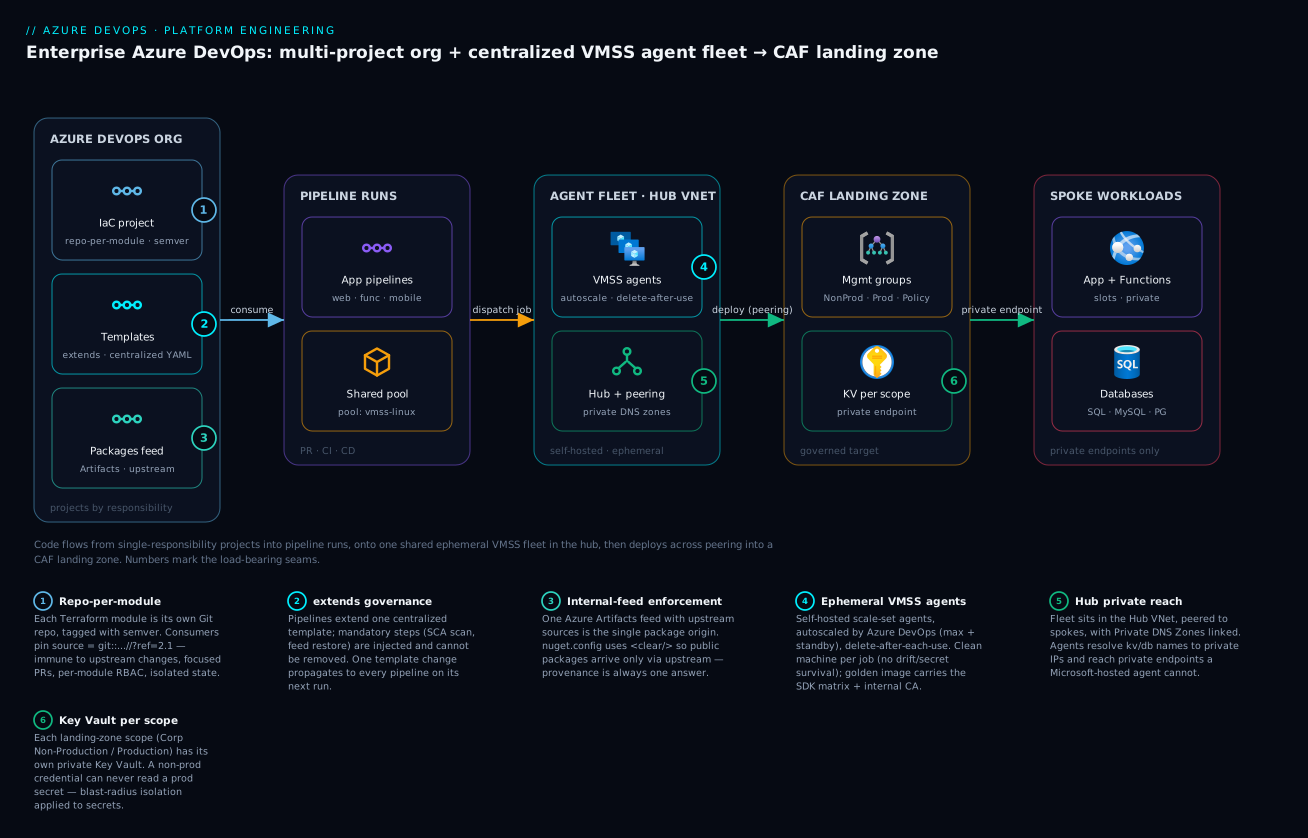
Read the platform left to right and the whole paved road falls into place. On the left is the Azure DevOps organisation, carved into single-responsibility projects: the IaC project (Terraform modules, one repo per module, plus root configs and remote state), the pipeline-templates project (the centralized YAML every pipeline extends), the packages project (the Azure Artifacts feed with upstream sources), and the application projects (web, function and mobile repos and pipelines). These projects feed a stream of pipeline runs — PR-gate, CI and CD — and every one of those runs is dispatched to the same place: the shared agent pool. That pool is the bridge to the next zone.
In the centre sits the agent fleet — Azure DevOps scale-set agents on a VM Scale Set, ephemeral and autoscaled, booting from a golden image in a Compute Gallery — and crucially it lives in the Hub VNet. From the hub, peered to the spokes, the agents reach the right of the diagram: the CAF landing zone, where the management-group hierarchy (Corp Non-Production / Corp Production) governs a set of subscriptions, each scope has its Key Vault behind a private endpoint, and the spoke VNets host the app’s App Service / Functions and databases (Azure SQL / MySQL / PostgreSQL) reachable only over private endpoints with Private DNS. Follow the arrows: code and config flow from the projects into pipeline runs; runs flow onto the fleet; the fleet, from the hub, deploys across peering into the landing zone — and reads each scope’s Key Vault privately on the way. The numbered badges mark the load-bearing seams the rest of this article has detailed.
Real-world scenario: a retail platform onboards its eighth team
A mid-sized retail company — call it NorthRetail — runs an e-commerce stack on Azure: a storefront web app, a catalogue API, a payments function app, an Android and an iOS app, and a MySQL-backed inventory service. They started, as everyone does, with one Azure DevOps project, the free Microsoft-hosted agents, and packages restored straight from nuget.org and npmjs. By the time a seventh team joined, the cracks were structural: the build YAML existed in eleven near-identical copies, a security audit could not establish where the payment SDK binary came from, and — the breaking point — the platform team locked Key Vault and Azure MySQL behind private endpoints to pass a PCI review, and every hosted-agent deploy began failing with dial tcp … i/o timeout. The hosted agents simply could not reach the now-private database and vault.
The platform team re-cut the organisation along the paved-road lines over a quarter. They created four projects: IaC (they split their one giant Terraform configuration into eight module repos — azurerm-vnet, azurerm-keyvault, azurerm-mysql, azurerm-appservice, azurerm-function, azurerm-frontdoor, azurerm-acr, azurerm-monitoring — each tagged, each owned), pipeline-templates (one extends template for PR, CI and CD, with Veracode SCA and internal-feed restore baked in as unremovable steps), packages (one acme-internal feed with NuGet/npm/Maven/Python upstream sources; <clear/> in every nuget.config), and per-team application projects. Then they stood up the agent fleet: a Standard_D4s_v5 VMSS in the hub subnet, registered as an org pool vmss-linux with max 30 / idle 2 / delete-after-each-use, booting from a Packer-built golden image carrying the .NET/Node/Python/JDK matrix, the internal CA, Terraform and the Veracode wrapper.
The day they pointed pipelines at the new pool, the private-endpoint deploys that had been timing out just worked — the agents resolved kv-corp-prod.vault.azure.net to its private IP through the hub-linked Private DNS Zone and read the secret over peering. The eleven copies of build YAML collapsed into one extends; when the security team mandated a new container scan two weeks later, the platform added it to the template once and all thirty-odd pipelines inherited it on their next run. The supply-chain audit that had been impossible became a single feed export. The numbers that mattered: onboarding the eighth team — the storefront-mobile squad — took one afternoon (reference the templates, add a nuget.config with the feed, pin the modules they needed) versus the two weeks the seventh team had taken under the old copy-paste regime. The fleet scaled to zero overnight, so the off-hours bill was the standby buffer alone. The one thing that went wrong: the first golden image shipped without the corporate root CA, so the first builds failed TLS to the internal feed with unable to get local issuer certificate — a thirty-minute fix (add the CA to the image, republish, roll the VMSS) that taught them to treat the image as a versioned, tested artifact like any other.
Advantages and disadvantages
The paved-road platform is not free — it is a real investment that pays back at scale. The honest two-column view:
| Advantages | Disadvantages |
|---|---|
| One change to a template/module/feed propagates everywhere | Up-front design + migration cost (a quarter, not a sprint) |
| Project boundaries contain blast radius and scope RBAC | More moving parts to learn (projects, pools, images) |
| Single feed = traceable, resilient supply chain | Feed/upstream is a dependency to operate |
| VMSS agents reach private endpoints hosted agents can’t | You own the golden image and its patch cadence |
| Ephemeral agents = clean machine + no drift | Slightly higher compute cost than reused VMs |
| Scale to zero off-hours controls cost | Standby buffer and image storage have a baseline cost |
| Repo-per-module = independent versioning + focused PRs | Many small repos need a discovery index/registry |
| CAF landing zone enforces guardrails before deploy | Policy can deny a deploy you didn’t expect (learning curve) |
| Onboarding a new app drops to an afternoon | Below ~3 teams, the structure is overhead you don’t need |
When each matters: the reuse and propagation advantages dominate the more teams and pipelines you have — at ninety pipelines, a one-PR template change is transformational; at three pipelines, it’s barely worth the indirection. The private-network reach advantage is binary and non-negotiable the moment your PaaS goes private — there is no hosted-agent workaround, so for any enterprise heading toward private endpoints the VMSS fleet is mandatory, not optional. The blast-radius and RBAC advantages matter most under audit and after the first security incident, when “who could have touched this” needs a crisp answer. The disadvantages are mostly front-loaded: the design and migration cost is paid once, the operational cost (image cadence, feed care) is ongoing but modest, and the “overhead below three teams” caveat is a genuine reason to not build this prematurely.
Hands-on lab: stand up the skeleton of the platform
This lab builds a minimal but real version of the platform: an org with the four project types, a feed with upstream sources, a templates repo a pipeline extends, and a VMSS agent pool. It uses the Azure DevOps CLI (az devops) and az. You need an Azure DevOps organisation, an Azure subscription, and az with the azure-devops extension (az extension add --name azure-devops). Costs are minimal if you keep the VMSS at idle 0 and delete it at the end.
Step 1 — Set defaults and create the four projects.
az devops configure --defaults organization=https://dev.azure.com/<yourorg>
for p in IaC Templates Packages Shop-Web; do
  az devops project create --name "$p" --visibility private \
    --query "{name:name,id:id}" -o table
done
Expected: four projects listed. These are your blast-radius boundaries.
Step 2 — Create the governed feed with upstream sources.
# A project-scoped feed in the Packages project, with public upstreams enabled
az artifacts universal  # (verify the extension is present)
az devops invoke --area packaging --resource feeds --route-parameters project=Packages \
  --http-method POST --in-file feed.json   # feed.json defines name + upstreamEnabled:true
If you prefer the portal for the feed: Packages project → Artifacts → Create Feed → enable “Use packages from public sources through this feed” (that switch is the upstream-sources toggle). Expected: a feed acme-internal that proxies nuget.org/npmjs/PyPI/Maven on first request.
Step 3 — Put a template in the Templates repo. Create ci/build.yml in the Templates project’s repo:
# ci/build.yml — a tiny extends template with a mandatory step
parameters:
  - name: appName
    type: string
stages:
  - stage: Build
    pool: { name: vmss-linux }       # the fleet you'll create in step 5
    jobs:
      - job: build
        steps:
          - script: echo "Building ${{ parameters.appName }}"
          - script: echo "MANDATORY scan step (consumer can't remove this)"
            displayName: 'Veracode SCA (mandatory)'
Step 4 — Make the app pipeline extend it. In the Shop-Web repo, add azure-pipelines.yml:
resources:
  repositories:
    - repository: templates
      type: git
      name: Templates/Templates
extends:
  template: ci/build.yml@templates
  parameters: { appName: shop-web }
Create the pipeline: az pipelines create --name shop-web-ci --repository Shop-Web --branch main --yml-path azure-pipelines.yml --project Shop-Web --skip-first-run. Expected: a pipeline that, when run, shows the mandatory scan step you defined in the template, not in the app YAML.
Step 5 — Create the VMSS and register it as an elastic pool.
# A small VMSS (start at 0 instances; ADO will scale it)
az vmss create -g rg-lab-agents -n vmss-lab \
  --image Ubuntu2204 --vm-sku Standard_B2s --instance-count 0 \
  --orchestration-mode Uniform --upgrade-policy-mode Manual \
  --disable-overprovision --load-balancer '""' --admin-username azureuser --generate-ssh-keys

az pipelines pool create --name vmss-linux \
  --vmss-resource-id $(az vmss show -g rg-lab-agents -n vmss-lab --query id -o tsv) \
  --vmss-os-type Linux --max-capacity 2 --desired-idle 0 --recycle-after-each-use true
Expected: an agent pool vmss-linux. With --desired-idle 0, no VM runs until a job queues; when you run the shop-web-ci pipeline, Azure DevOps spins up a VM, runs the one job, and tears it down.
Step 6 — Run it and watch the seam work.
az pipelines run --name shop-web-ci --project Shop-Web --open
Expected: the run queues, the VMSS scales 0→1, the agent picks up the job, the mandatory scan step from the template executes, and the VM is deleted afterward (ephemeral). You have now reproduced, in miniature, every load-bearing idea in this article.
Teardown.
az vmss delete -g rg-lab-agents -n vmss-lab
az pipelines pool delete --pool-id $(az pipelines pool list --query "[?name=='vmss-linux'].id|[0]" -o tsv) --yes
for p in IaC Templates Packages Shop-Web; do az devops project delete --id $(az devops project show --project "$p" --query id -o tsv) --yes; done
Common mistakes & troubleshooting
The failure modes below are the ones that actually bite when standing up or running this platform. Each is symptom → root cause → how to confirm → fix.
| # | Symptom | Root cause | Confirm (exact path/command) | Fix |
|---|---|---|---|---|
| 1 | Deploys hang then fail i/o timeout to KV/DB |
Agent can’t reach the private endpoint (hosted agent, or VMSS not in hub) | From the agent: nslookup kv.vault.azure.net returns public IP |
Put VMSS in hub subnet; link Private DNS Zone to the agent VNet |
| 2 | Jobs queue forever, never start | Pool max capacity hit, or no parallel jobs bought, or image won’t boot | Pool → Agents (all busy/offline); Org settings → Parallel jobs | Raise max capacity / buy parallel jobs / fix the image |
| 3 | Build restores from nuget.org despite the feed | Missing <clear/> — public source still inherited |
dotnet restore log shows nuget.org as a source |
Add <clear/> before the feed <add> in nuget.config |
| 4 | TLS failure to internal feed unable to get local issuer certificate |
Corporate root CA not in the golden image | openssl s_client -connect feed:443 shows untrusted chain |
Add the CA to the image trust store; republish; roll VMSS |
| 5 | A template change breaks every pipeline at once | Consumers float on the template’s default branch (no ref pin) |
Pipelines reference …@templates with no ref |
Pin ref: refs/tags/vX.Y.Z; roll the tag deliberately |
| 6 | terraform plan fails after a module change you didn’t make |
Root config pins a branch, not a tag, so it moved | Module block has ?ref=main instead of ?ref=2.1 |
Pin to a semver tag; bump intentionally |
| 7 | Pipeline can deploy to Prod from a Non-Prod branch | Service connection scoped too broadly (or shared) | Service connection → resource scope is whole-tenant/MG | Scope each connection to one subscription; separate Non-Prod/Prod |
| 8 | App team can edit the shared templates | Templates repo write access too broad | Templates project → Repos → Security shows app teams as Contributors | Restrict to Reader for consumers; PR gate + required reviewers |
| 9 | Secrets visible in pipeline logs | Variable not marked secret, or echoed | Run log prints the value | Mark variables secret / use Key Vault refs; never echo secrets |
| 10 | Agent runs out of disk mid-build | Image disk too small for the workload (Docker layers, artifacts) | Agent diag: No space left on device |
Larger OS disk / data disk in the image; prune in-job |
| 11 | First job after idle is slow (cold) | Standby (desired idle) set to 0 |
Pool shows 0 idle agents; first job waits for boot | Set desired idle ≥ 1 during business hours |
| 12 | Deploy denied: RequestDisallowedByPolicy |
A CAF Azure Policy guardrail blocks the resource | Activity log → the deny with the policy name | Comply with the guardrail (tags/region/PE), or request an exemption |
| 13 | VMSS scaling fights itself / odd instance counts | VMSS native autoscale left enabled alongside ADO | VMSS → Scaling shows autoscale rules | Disable VMSS autoscale; let Azure DevOps manage the count |
| 14 | Cross-project pipeline can’t read another repo | Project-scoped build identity lacks cross-project rights | Run error: TF401019/access denied on the repo |
Grant the build identity read on that repo, or share the resource |
The private-endpoint timeout (the single most common one)
Symptom 1 deserves detail because it is the failure that pushes teams to self-hosted agents in the first place, and it is easy to half-fix. The deploy task tries to read a Key Vault secret or connect to Azure MySQL and hangs for the connection timeout, then fails. The cause is almost always DNS: even with the VMSS in the hub and peering in place, if the Private DNS Zone (e.g. privatelink.vaultcore.azure.net) is not linked to the VNet the agent resolves from, the agent gets the public IP for the vault — which is firewalled off — and times out. Confirm by running nslookup kv-corp-prod.vault.azure.net from an agent (or a Bash/PowerShell step in a debug pipeline): a private IP (10.x) means DNS is correct; a public IP means the zone link is missing.
# In a debug pipeline step on the agent — prove what the name resolves to
nslookup kv-corp-prod.vault.azure.net
# private IP (10.x) → good;  public IP → Private DNS Zone not linked to the agent's VNet
The fix is to link the Private DNS Zone to the hub VNet (and ensure spoke zones are reachable), so the agent resolves the private IP. This same DNS-linkage trap is the root of most “it works from one VNet but not another” private-endpoint incidents, and is dissected in private endpoints and DNS at scale.
Best practices
- One organisation, projects by responsibility. IaC, templates, packages, apps — draw each boundary to scope RBAC and contain blast radius, not by accident of history.
- One Git repo per Terraform module, tagged with semver. Pin consumers to tags (
?ref=2.1), never branches; bump deliberately; keepmain.tf/variables.tf/outputs.tf/locals.tfconsistent across modules. extendsfor governance,templatefor reuse. Put mandatory steps (security scans, feed enforcement, provenance) inside anextendstemplate so consumers cannot remove them; pin the template version withref.- One governed feed with upstream sources, and enforce it.
<clear/>the public source; restore only via the feed; let upstream proxy and cache public packages so provenance is always one answer. - Centralized scale-set agents, ephemeral, scaled by Azure DevOps. Set max capacity and a small standby; enable delete-after-each-use; disable VMSS-native autoscale.
- Treat the golden image as a versioned, tested artifact. Bake the SDK matrix, internal CA and tooling; rebuild on a cadence and on CVEs; roll the VMSS; never hand-patch agents in place.
- Place the fleet in the hub and fix DNS first. Link Private DNS Zones to the agent’s VNet so private endpoints resolve privately; verify with
nslookupbefore blaming the app. - Scope service connections tightly and split Non-Prod/Prod. One connection per subscription; use workload-identity federation, not stored secrets; never share a Prod connection into a Non-Prod pipeline.
- A Key Vault per landing-zone scope, private. Non-prod secrets in the non-prod vault, prod in prod; fetch at run time from the agent over the private endpoint; nothing in plaintext.
- Restrict write on the shared assets. Templates and module repos are platform-owned with PR gates and required reviewers; app teams have read.
- Scale to zero off-hours. Drop standby to 0 outside business hours to make the fleet’s idle cost the storage of the image, not running VMs.
- Index your modules and templates. With many small repos, publish a discovery index (a wiki page, a Backstage catalogue) so teams find the
2.1of the vault module without grepping the org.
Security notes
The platform’s security posture is mostly structural — it comes from the boundaries, not from bolt-ons. Least privilege by project: because a project is the RBAC boundary, a compromised app pipeline is contained to its project’s repos, feeds and service connections; it cannot reach the templates everyone runs or the modules that build the network. Workload-identity federation over secrets: service connections should use WIF (federated credentials, no stored client secret) so there is no long-lived secret to leak; the connection trades a short-lived token with Entra at run time. Ephemeral agents as a control: delete-after-each-use means a secret written to an agent’s disk, a poisoned cache, or a planted credential does not survive the job — the clean machine is a security guarantee, not just a hygiene nicety, and is the core argument of the scale-set agents hardening deep dive. Private everything: with the fleet in the hub and PaaS behind private endpoints, build/deploy traffic to Key Vault, databases, registry and storage never traverses the public internet. Key Vault per scope: non-prod credentials cannot read prod secrets because they are in different, privately-reachable vaults with separate access. Internal-feed enforcement as supply-chain defence: routing every package through one feed with upstream sources means typosquatting and dependency-confusion attacks hit a scannable, auditable choke point rather than reaching builds directly — pair it with DevSecOps SAST/DAST/SCA policy gates. RBAC discipline: use least-privilege custom roles for the pipeline identities and user-assigned managed identities where an identity must be shared across resources.
The identity-and-secret seams to lock down:
| Seam | Risk if loose | Control |
|---|---|---|
| Service connection auth | Stored secret leaks → tenant access | Workload-identity federation (no secret) |
| Service connection scope | Over-broad → cross-env deploys | Scope to one subscription; split Non-Prod/Prod |
| Agent disk between jobs | Secret/cache survives a job | Ephemeral (delete after each use) |
| Templates write access | Anyone alters every pipeline | Platform-only write; PR gate; pin ref |
| Feed publish rights | Rogue package in the supply chain | Contributor limited; upstream + SCA scan |
| Key Vault access | Non-prod reads prod secrets | KV per scope; private endpoint; scoped access |
| Pipeline logs | Secrets printed | Mark secret; Key Vault refs; never echo |
Cost & sizing
The platform’s bill has three real drivers: agent compute (the VMSS VMs while they run), parallel jobs (Azure DevOps concurrency you buy on top of the self-hosted free grant), and Azure Artifacts storage (feed size beyond the free tier). The headline saving of self-hosted scale-set agents is that they scale to zero: outside business hours the fleet runs the standby buffer only (often zero), so you pay for VMs when jobs actually run, not 24/7. Figures below are indicative (Central India, mid-2026) and round for planning.
| Cost driver | What it is | Indicative price | Lever to reduce it |
|---|---|---|---|
| VMSS agent compute | Per-VM per-hour while running | D4s_v5 ≈ ₹16–20/hr (~$0.19–0.24) |
Scale to zero off-hours; right-size SKU; spot for non-prod |
| Self-hosted parallel jobs | Concurrency for self-hosted agents | 1 free, then ≈ ₹1,250/mo (~$15) each | Buy only the concurrency you actually queue |
| Microsoft-hosted parallel jobs | If you keep some hosted | 1 free (private), then ≈ ₹3,300/mo (~$40) each | Prefer self-hosted at scale |
| Azure Artifacts storage | Feed size | 2 GiB free, then per-GiB/mo | Retention policies; prune old versions |
| Compute Gallery image | Golden image versions stored | Storage of image versions | Keep a few versions; delete old ones |
| Standby agents (idle) | Warm VMs kept ready | The VM hourly rate × idle count × hours | Idle 0 off-hours; 1–2 in business hours |
Sizing the fleet is a concurrency problem, not a guess. Estimate peak concurrent jobs (how many pipeline jobs run at the busiest minute), set max capacity a little above it, and set standby to cover the typical baseline so jobs start instantly. Each ephemeral agent runs one job, so max-capacity is roughly your peak-concurrent-jobs target.
| If your peak concurrent jobs is… | Set max capacity ≈ | Standby (business hrs) | Parallel jobs to buy |
|---|---|---|---|
| ~5 | 8 | 1 | ~5–8 |
| ~15 | 20 | 2 | ~15–20 |
| ~30 | 35–40 | 2–3 | ~30 |
| Bursty (CI storms) | Higher max, low standby | 1–2 | Cover the burst |
A worked monthly estimate for a ~15-concurrent-job platform: a D4s_v5 fleet running, say, 200 VM-hours/month (jobs only, scaled to zero otherwise) ≈ ₹3,500–4,000 compute; ~15 self-hosted parallel jobs (minus the 1 free) ≈ ₹17,500/mo; Artifacts a few GiB over free ≈ a few hundred rupees. The dominant line is parallel jobs, not compute — which is the counterintuitive lesson: at scale you buy concurrency, and the VMs themselves, scaled to zero, are comparatively cheap. The broader cloud economics and TCO view applies if you are comparing against staying on hosted agents entirely.
Interview & exam questions
Q1. Why split an Azure DevOps organisation into separate IaC, templates, packages and application projects instead of one project? A project is the strongest isolation boundary short of a new org — its own repos, pipelines, feeds, service connections and RBAC. Splitting by responsibility scopes permissions (a module change doesn’t grant package-publish or app-deploy rights) and contains blast radius (a broken app pipeline can’t break the templates everyone runs). It also lets each concern have its own lifecycle and approvals.
Q2. Why one Git repo per Terraform module rather than a monorepo?
Repo-per-module gives independent semantic versioning (each module tags its own 2.1), isolated state and blast radius, granular per-module RBAC, and focused PRs reviewed by that module’s owners. A consumer pins ?ref=2.1 and is immune to upstream changes until it bumps. A monorepo trades all of that for a single clone.
Q3. What is the difference between extends and template in Azure Pipelines, and when do you use each?
template is opt-in reuse — a pipeline includes a stage/job/steps it chooses. extends is governance — the consumer declares it extends a platform template, which owns the overall shape and can inject mandatory steps the consumer cannot remove. Use extends to enforce security scans and feed enforcement org-wide; use template for DRY fragments.
Q4. How does internal-feed enforcement work and why does it matter?
You make the build resolve packages only through one Azure Artifacts feed, with public registries reached solely via the feed’s upstream sources. In nuget.config this means <clear/> to drop the public source, leaving only the feed. It matters for provenance (one origin for every binary), resilience (cached copies survive upstream outages), and security (a scannable, auditable choke point against typosquatting and dependency confusion).
Q5. When do you choose self-hosted scale-set agents over Microsoft-hosted, and when not? Choose scale-set agents for private-endpoint reach (the decisive one once PaaS goes private), custom images, larger SKUs/longer jobs, warm caches, and cost at high concurrency. Stay on hosted when you’re a small team that values zero maintenance and doesn’t need private networking — the fleet’s overhead isn’t worth it below roughly three teams.
Q6. Who manages the scaling of an agent-pool VMSS — you or Azure DevOps? Azure DevOps. You register the VMSS as an elastic pool and give it a maximum agent count and a standby (idle) count; Azure DevOps watches the job queue and adds/removes VMs. You should disable the VMSS’s own autoscale rules so they don’t fight Azure DevOps’s scaling.
Q7. Why place the agent fleet in the hub of a hub-spoke network? Because the hub peers to every spoke and is linked to the Private DNS Zones, an agent in the hub can reach private endpoints (Key Vault, Azure SQL/MySQL/PostgreSQL, ACR, Storage) and resolve their names to private IPs. A Microsoft-hosted agent on the public network resolves those names to disabled public endpoints and times out.
Q8. What does “ephemeral / delete after each use” buy you, and what does it cost? It guarantees a clean machine per job: no secret, cache or credential survives across jobs, eliminating drift and a class of leaks — a security control. The cost is no cross-job cache warmth (you get warmth from the image instead) and slightly higher compute from recreating VMs.
Q9. What is a CAF landing zone and how does it relate to where pipelines deploy? It’s the governed target: a management-group hierarchy (Tenant Root → org → Landing Zone → Corporate → Corp Non-Production / Corp Production) with Azure Policy guardrails cascading down, a Key Vault per scope, and a hub-spoke network with private endpoints/DNS/peering. A pipeline’s service connection is scoped to a subscription under one group, and Policy denies a non-compliant deploy before any resource is created.
Q10. Why a Key Vault per landing-zone scope instead of one shared vault? So a non-prod pipeline credential can never read a production secret — the vaults are separate, privately reachable, and access is granted only to that scope’s identities. It applies the same blast-radius logic as the project boundaries, to secrets.
Q11. A deploy fails with i/o timeout to Key Vault from a self-hosted agent in the hub. What’s the most likely cause and how do you confirm it?
The Private DNS Zone (privatelink.vaultcore.azure.net) isn’t linked to the VNet the agent resolves from, so the agent gets the vault’s public IP (firewalled) instead of the private one. Confirm with nslookup kv….vault.azure.net on the agent: a public IP means the zone link is missing; link it to the agent’s VNet.
Q12. Which Azure certifications does this map to? AZ-400 (Designing and Implementing Microsoft DevOps Solutions) for the pipeline/agent/Artifacts design; AZ-104/AZ-305 for the landing-zone, networking and identity pieces; and Terraform Associate for the module/state discipline. The platform-engineering framing also aligns with the practices in the DORA/platform-engineering body of knowledge.
Quick check
- Name the four single-responsibility projects in this organisation design and one reason each is its own project.
- Why must a root config pin a Terraform module to a tag (
?ref=2.1) rather than a branch? - Which template mechanism —
extendsortemplate— lets the platform inject a mandatory security step a consumer cannot remove? - What single line in
nuget.configenforces that the build restores only through the internal feed? - Why can a Microsoft-hosted agent not deploy to a Key Vault that has its public endpoint disabled, and what fixes it?
Answers
- IaC (isolate infra blast radius and module RBAC), pipeline-templates (one repo reaches every pipeline — restrict who edits it), packages (single governed feed; package permissions independent of app RBAC), application (teams own code/deploys without touching shared platform assets).
- A tag is immutable, so the consumer is immune to upstream changes until it deliberately bumps; a branch moves, so an unrelated module change can break your
planwithout you changing anything. extends— the consumer extends the platform template, which owns the shape and injects unremovable steps;templateis opt-in reuse the consumer assembles.<clear/>— it removes any inherited public source (e.g. nuget.org), leaving only the feed, so public packages can arrive only via the feed’s upstream.- The hosted agent is on Microsoft’s public network and resolves the vault name to its (disabled) public IP, so it times out; a self-hosted scale-set agent in the hub, with the Private DNS Zone linked, resolves the private IP and reaches it over peering.
Glossary
- Azure DevOps organisation — the top-level billing, identity and parallel-jobs boundary; contains projects.
- Project — the isolation unit inside an org: its own repos, pipelines, feeds, service connections, environments and RBAC.
- Terraform module — a versioned infrastructure building block (
main.tf/variables.tf/outputs.tf/locals.tf/.tpl), here one per Git repo, consumed by Git source + tag. - Root config — the composition that calls modules into a real environment and holds the azurerm remote state; Non-Prod and Prod are separate.
- YAML template — reusable pipeline YAML;
extendsfor governance (mandatory shape/steps),templatefor opt-in reuse. ${{ }}(compile-time expression) — template-expression syntax evaluated before the run, able to shape structure (loops, conditionals).- Azure Artifacts feed — Azure DevOps’s package registry; the single governed origin for binaries.
- Upstream source — a feed proxy to a public registry (nuget.org, npmjs, PyPI, Maven Central) that fetches and caches on first request.
- Internal-feed enforcement — ensuring builds restore only via the feed (
<clear/>the public source), for provenance and supply-chain safety. - Agent pool — a named set of agents pipelines target with
pool: name:. - Scale-set agent — a self-hosted Azure DevOps agent backed by a VM Scale Set, autoscaled by Azure DevOps, ephemeral and VNet-placed.
- Golden image — the pre-baked VM image (OS, tools, CA, agent) every scale-set agent boots from, stored in an Azure Compute Gallery.
- Ephemeral agent — an agent deleted after each job (“delete after each use”) so no state survives between jobs.
- Service connection — the pipeline’s authenticated link to Azure, ideally via workload-identity federation; scoped to a subscription.
- CAF landing zone — the governed deploy target: management-group hierarchy + Azure Policy + Key Vault per scope + hub-spoke network.
- Management group — a scope above subscriptions where Azure Policy and RBAC cascade down the hierarchy.
- Private endpoint — a private IP for a PaaS service in a VNet subnet, resolved by a Private DNS Zone; reachable from the hub fleet, not from hosted agents.
- Hub-spoke — a topology with a central Hub VNet (shared services, the agent VMSS) and peered spoke VNets (workloads, private endpoints).
Next steps
- Go deep on the fleet’s security: Azure DevOps self-hosted scale-set agents hardening.
- Build the templates that ride on this stage: Azure DevOps reusable YAML template library and multistage environments & approvals.
- Govern the supply chain: Azure Artifacts feeds, upstream sources & versioning and DevSecOps SAST/DAST/SCA policy gates.
- Master the deploy target: CAF landing zones deep dive and hub-spoke vs Virtual WAN topology.
- Solidify the IaC discipline: Terraform module design, composition & versioning and Terraform remote state at scale.
- See the maturity curve end to end: the DevOps architecting ladder from a single pipeline to a platform.