You have eleven services, each with its own azure-pipelines.yml, and each file is four hundred lines that are ninety percent identical: the same build-test-scan-publish dance, the same AzureCLI@2 deploy block, the same approval gate. When the security team mandates a new SBOM step, you open eleven pull requests. When someone fat-fingers a pool name in service number seven, it ships to production with the wrong agent and nobody notices for a week. This is pipeline sprawl — the tax every team pays for treating CI/CD as eleven snowflakes instead of one library with eleven callers.
Azure DevOps YAML templates are the fix. A template is a .yml file containing a reusable fragment of a pipeline — a single step, a group of steps, a whole job, or an entire stage — which other pipelines pull in and parameterise. You author the build-test-deploy logic once, in one file (ideally one repository), give it parameters for the bits that vary per caller (project name, environment, agent pool), and every pipeline references it. The new SBOM step becomes one commit. The fat-fingered pool name becomes a typed parameter with a values: allow-list that fails validation before the run starts.
This article is a step-by-step implementation guide. By the end you will have built a real, four-level template library — step → job → stage → an extends governance template — published it in a dedicated repository, pinned consumers to a specific version with a ref, and consumed it from a separate pipeline that does a genuine build-and-deploy. You will do every piece in both the portal and the az CLI (az pipelines / az repos), with a Bicep companion for the deploy target, expected output at each step, validation, and teardown. We treat the four template types as a layered design — each composing the level below — and go deep on the single hardest part in practice: whether a value is resolved at compile time (template expressions, ${{ }}) or at runtime (variables, $( )), because almost every confusing template bug lives in that gap.
What problem this solves
Without templates, a pipeline is copy-paste-inherited. Team A writes a good pipeline; Team B copies it; six months later they have drifted, and the “standard” build exists in fourteen mutually-incompatible dialects. There is no single place to fix a bug, add a control, or upgrade a task version. Worse, there is no enforcement: nothing stops a team deleting the security scan, skipping the approval, or deploying from an unprotected branch — each pipeline is sovereign, editable by whoever owns the repo.
What breaks, concretely: a mandated change (new compliance step, task major-version bump, an end-of-life agent pool) requires touching every pipeline by hand, so it never fully lands and you carry partial coverage for months. A subtle defect — a wrong condition, a missing dependsOn, a deploy that runs on PR builds — is duplicated everywhere and fixed nowhere. Audits become archaeology: “show me that every production deploy goes through a manual approval and a security scan” has no single answer across fourteen pipelines.
Who hits this: any organisation past three or four pipelines. It bites hardest on platform/DevOps teams accountable for CI/CD standards with no mechanism to enforce them, regulated shops that must prove every deploy ran a fixed set of gates, and fast-growing teams where a new microservice should inherit the golden path on day one. The fix inverts ownership: a central template library owns the how, individual pipelines own only the what (their parameters), and an extends template makes the golden path mandatory, not optional.
Here is the whole field in one frame — the four template kinds, what each wraps, and when you reach for it:
| Template kind | What it wraps | Inserted with | Typical owner | Use it when |
|---|---|---|---|---|
| Step template | One or more steps: |
- template: under steps: |
Platform team | A reusable action (build, test, scan, publish) used in many jobs |
| Job template | One or more jobs: |
- template: under jobs: |
Platform team | A reusable unit of work with its own pool/workspace (a whole build job) |
| Stage template | One or more stages: |
- template: under stages: |
Platform team | A reusable phase (a full “deploy to an environment” stage) |
| Variable template | A variables: block |
- template: under variables: |
Platform / app | Shared constants and settings injected into many pipelines |
| Extends template | The entire pipeline shape | extends: template: at root |
Security / governance | You must enforce structure and gates an app team cannot remove |
Learning objectives
By the end of this article you can:
- Author all four template types — step, job, stage, and variable — and a root extends template, and explain how each composes the level below it into a layered library.
- Declare typed parameters (
string,number,boolean,object,step,stepList,jobList,stageList) withdefault:andvalues:allow-lists, and pass them from a consumer pipeline. - Tell compile-time template expressions (
${{ }}) apart from runtime variables ($( )/$[ ]), predict which one a given construct uses, and choose the right one for conditional insertion versus runtime branching. - Reuse templates across repositories with a
resources: repositories:declaration, and pin consumers to an immutable version using a branch, tag, or commitref. - Use an extends template with a
stepList/stageListparameter to make a security scan or approval gate impossible to remove. - Drive the whole workflow in both the portal and the
azCLI (az pipelines,az repos), and validate a pipeline without running it using the Preview API. - Diagnose common template failures — unresolved parameters, expression-vs-variable confusion,
refdrift,each/ifinsertion bugs — from their exact error strings.
Prerequisites & where this fits
You should be comfortable with a basic Azure DevOps YAML pipeline: a pipeline file lives in a repo, it has trigger, pool, and steps (or stages → jobs → steps), and a run executes on a Microsoft-hosted or self-hosted agent. You should know what a task is (e.g. AzureCLI@2, DotNetCoreCLI@2), what a stage/job/step is, and how a service connection lets a pipeline authenticate to Azure. Basic Git (branches, tags, commits) is assumed, and you will want an Azure DevOps organization and project plus a subscription for the deploy step.
This sits in the DevOps / Pipeline-as-Code track. It is the structural backbone under everything else: once your logic lives in templates, the Azure DevOps Library: Variable Groups, Secure Files & Key Vault-Linked Secrets layer supplies the secret values your templates consume, and Azure Artifacts: Private Feeds, Upstream Sources & Package Versioning Strategy is what a publish step pushes to. When a templated run won’t start, the failure usually lands in Azure DevOps Pipelines Stuck in Queue: No Available Agents & Parallelism Limits. The IaC your deploy stage applies is authored with Bicep Modules, Loops & Conditions: Authoring Reusable, DRY Infrastructure Templates — note the symmetry: Bicep modules are to infrastructure what YAML templates are to pipelines.
A quick map of who owns what once the library exists, so responsibility is unambiguous:
| Layer | What lives here | Who owns it | What a consumer can change |
|---|---|---|---|
| Extends template (root) | Mandatory shape: gates, approvals, allowed pools | Security / platform | Only the parameters it exposes |
| Stage templates | “Deploy to env X” phases, approvals | Platform team | Stage parameters (env, region) |
| Job templates | Build/test units, pool, workspace | Platform team | Job parameters (project, config) |
| Step templates | Single actions (build, scan, publish) | Platform team | Step parameters (paths, flags) |
| Consumer pipeline | extends: or - template: + parameter values |
App team | Their values only |
| Variable groups / Key Vault | Secret values the templates read | App + platform | The secret contents |
Core concepts
Five mental models make every later step obvious.
A template is a text include with typed inputs. When Azure DevOps compiles a pipeline, a - template: reference is expanded in place — the referenced file’s content is spliced into the parent with its parameters: substituted. The unit of reuse is set by what kind of node the template contributes: a file whose top-level key is steps: is a step template (insertable only where steps are legal); jobs: → job template; stages: → stage template; variables: → variable template. You cannot insert a job template under steps: — the shape must match the slot.
Parameters are typed, compile-time; variables are strings, runtime. A parameter has a type and optional default, is passed by the caller, and is substituted before the run with template expression syntax ${{ parameters.name }}. A variable is a runtime string, referenced with macro syntax $(name) (or runtime-expression $[ ]), whose value may not exist until a prior step sets it. This single distinction is the root of most template confusion, and the section on it below is the most important in the article.
Templates compose into layers. A step template is the atom. A job template consumes step templates; a stage template consumes job templates; an extends template consumes stage templates and wraps the whole pipeline. You build bottom-up — atoms first — and each layer provides structure and defaults while delegating the level below. This is exactly how Bicep modules nest: small, single-purpose, parameterised units.
Cross-repo reuse needs a declared resources and a ref. Templates in another repository aren’t visible until you declare that repo under resources: repositories: (alias, name, ref). The ref pins which version you consume: a branch (refs/heads/main — moves with the branch), a tag (refs/tags/v1.4.0 — immutable if you don’t move it), or an exact commit SHA. Pinning is the difference between “my pipeline silently changed because the platform team merged to main” and “my pipeline upgrades when I bump the tag, deliberately.”
An extends template enforces; a regular template merely offers. A normal - template: insertion is opt-in — a consumer can choose not to call it. An extends: template is different: the consumer’s entire pipeline is the extends template, and it can only fill the parameters the template exposes. Pass a stepList parameter, wrap it with mandatory steps the template controls, add branch policies and environment checks, and a platform team makes a security scan or a manual approval non-removable. Offering is a convention; extending is a control.
The vocabulary in one table
Pin down every moving part before the deep sections. The glossary repeats these for lookup; this is the mental model side by side:
| Concept | One-line definition | Syntax / where | Why it matters |
|---|---|---|---|
| Step template | Reusable steps: fragment |
- template: x.yml under steps: |
The atom of reuse |
| Job template | Reusable jobs: fragment |
- template: x.yml under jobs: |
A whole build unit with a pool |
| Stage template | Reusable stages: fragment |
- template: x.yml under stages: |
A full deploy phase |
| Variable template | Reusable variables: block |
- template: x.yml under variables: |
Shared constants |
| Extends template | The whole pipeline shape | extends: { template: x.yml } |
Enforces structure/gates |
| Parameter | Typed, compile-time input | parameters: [{name,type,default}] |
The knob a caller turns |
| Template expression | Compile-time substitution | ${{ ... }} |
Evaluated before the run |
| Macro variable | Runtime string substitution | $( name ) |
Value known at run time |
| Runtime expression | Runtime, lazily evaluated | $[ ... ] |
Cross-stage/job values |
resources: repositories |
Declared external repo | top-level resources: |
Makes cross-repo templates visible |
ref |
The version of a repo to use | ref: refs/tags/v1.0.0 |
Pins the template version |
extends + stepList |
Inject caller steps into a fixed shell | type: stepList param |
Enforce gates around caller steps |
Template types, layer by layer
This is the bulk. We build the library bottom-up: the step template (the atom), then the job template that consumes it, then the stage template that consumes the job, then the variable template, then the extends template that wraps everything. For each: what it is, how you declare its parameters, the default-and-allow-list discipline, and the gotcha.
Step templates — the atom
A step template is a .yml file whose top-level key is steps:. It contributes one or more steps wherever steps are legal — inside a job, or the implicit single job of a simple pipeline. This is where the actual work lives: a build, a test run, a scan, a publish.
# templates/steps/build-dotnet.yml  (a STEP template)
parameters:
  - name: project          # which .csproj/.sln to build
    type: string
  - name: configuration
    type: string
    default: 'Release'
    values: [ 'Debug', 'Release' ]   # allow-list: anything else fails validation
  - name: dotnetVersion
    type: string
    default: '8.0.x'

steps:
  - task: UseDotNet@2
    inputs:
      packageType: 'sdk'
      version: ${{ parameters.dotnetVersion }}
  - task: DotNetCoreCLI@2
    displayName: 'Build ${{ parameters.project }} (${{ parameters.configuration }})'
    inputs:
      command: 'build'
      projects: ${{ parameters.project }}
      arguments: '--configuration ${{ parameters.configuration }}'
A consumer inserts it under steps: and passes the parameters:
steps:
  - template: templates/steps/build-dotnet.yml
    parameters:
      project: 'src/Api/Api.csproj'
      configuration: 'Release'
The values: list is your cheapest governance: configuration: 'Staging' fails at compile time, never reaching an agent. Every parameter substitution uses the compile-time ${{ }} form, because the value is known before the run.
The parameter types you can declare:
| Parameter type | Accepts | Example default | Notes / gotcha |
|---|---|---|---|
string |
Any text | 'Release' |
The default if type: is omitted |
number |
Numeric (still YAML-quoted often) | 1 |
Compared numerically in ${{ }} |
boolean |
true / false |
false |
Use in ${{ if }} conditions |
object |
A YAML map or list | {} / [] |
For structured config; iterate with each |
step |
A single step | — | Inject one caller-supplied step |
stepList |
A list of steps | [] |
Inject many caller steps (extends pattern) |
job / jobList |
One/many jobs | [] |
Inject jobs into a stage template |
deployment / deploymentList |
One/many deployment jobs | [] |
For environment-targeted jobs |
stage / stageList |
One/many stages | [] |
Inject stages (root extends pattern) |
Job templates — a unit of work with a pool
A job template wraps one or more jobs:. A job owns its pool, workspace, timeout, and a set of steps — which are very often themselves step-template references. This is where “a build” becomes a self-contained, reusable unit.
# templates/jobs/build-job.yml  (a JOB template that consumes the step template)
parameters:
  - name: project
    type: string
  - name: configuration
    type: string
    default: 'Release'
  - name: pool
    type: string
    default: 'ubuntu-latest'
    values: [ 'ubuntu-latest', 'windows-latest' ]   # only sanctioned pools
  - name: runTests
    type: boolean
    default: true

jobs:
  - job: build
    displayName: 'Build & test'
    pool:
      vmImage: ${{ parameters.pool }}
    steps:
      - template: ../steps/build-dotnet.yml      # compose the atom
        parameters:
          project: ${{ parameters.project }}
          configuration: ${{ parameters.configuration }}
      - ${{ if eq(parameters.runTests, true) }}:  # COMPILE-TIME conditional insertion
        - task: DotNetCoreCLI@2
          displayName: 'Test'
          inputs:
            command: 'test'
            projects: ${{ parameters.project }}
The ${{ if eq(parameters.runTests, true) }}: block is conditional insertion: when runTests is false, the test step is not even present in the compiled pipeline — removed at compile time, not skipped at runtime. That differs fundamentally from a runtime condition: (which keeps the step but marks it skipped). The next deep section is dedicated to this crux.
Reach for a job template when the reusable unit needs its own pool/agent, its own workspace, must run in parallel with other units, or targets an environment (use a deployment job for that). Reach for a step template when it’s a single action (build, scan, publish) reused across many different jobs — steps are sequential and pool-less, jobs parallelise and carry the pool.
Stage templates — a full phase
A stage template wraps one or more stages:. A stage is a major phase (Build, Deploy-Dev, Deploy-Prod) with its own dependsOn, condition, and jobs — frequently job-template references. The classic stage template is “deploy to one environment,” parameterised by environment name, so one definition produces Dev, Test, and Prod stages.
# templates/stages/deploy-stage.yml  (a STAGE template)
parameters:
  - name: environment
    type: string                         # 'dev' | 'test' | 'prod'
  - name: serviceConnection
    type: string
  - name: resourceGroup
    type: string
  - name: dependsOn
    type: object
    default: []                          # let the caller wire ordering

stages:
  - stage: deploy_${{ parameters.environment }}
    displayName: 'Deploy to ${{ parameters.environment }}'
    dependsOn: ${{ parameters.dependsOn }}
    jobs:
      - deployment: deploy
        environment: ${{ parameters.environment }}   # binds approvals/checks
        strategy:
          runOnce:
            deploy:
              steps:
                - task: AzureCLI@2
                  displayName: 'az deployment group create'
                  inputs:
                    azureSubscription: ${{ parameters.serviceConnection }}
                    scriptType: 'bash'
                    scriptLocation: 'inlineScript'
                    inlineScript: |
                      az deployment group create \
                        --resource-group ${{ parameters.resourceGroup }} \
                        --template-file $(Pipeline.Workspace)/drop/main.bicep
Binding the deployment job to an environment: attaches approvals and checks — configure a manual-approval check on the prod environment once, and every stage targeting it inherits the gate. dependsOn is an object parameter so the caller controls ordering (Deploy-Prod dependsOn Deploy-Test, etc.).
The constructs that legally live at each template level — get this wrong and you hit “the template references an unexpected value”:
| You can put… | In a step template | In a job template | In a stage template |
|---|---|---|---|
steps: (tasks/scripts) |
Yes (top level) | Inside a job | Inside a job in a stage |
pool: |
No | Yes | Per job |
job: / deployment: |
No | Yes (top level) | Inside stages[].jobs |
dependsOn, condition (stage) |
No | Job-level only | Yes (top level) |
environment: (approvals) |
No | On a deployment job |
On a deployment job |
- template: (step) |
Yes | Yes (under steps) | Yes (deep under steps) |
Variable templates — shared constants
A variable template contributes a variables: block. Use it for non-secret values shared across pipelines (region, image-tag prefix, common flags). Secrets belong in a variable group linked to Key Vault, not a checked-in template.
# templates/vars/common.yml  (a VARIABLE template)
parameters:
  - name: environment
    type: string
    default: 'dev'

variables:
  - name: azureRegion
    value: 'centralindia'
  - name: imageTagPrefix
    value: 'svc'
  - ${{ if eq(parameters.environment, 'prod') }}:
    - name: minReplicas
      value: '3'          # prod-only constant, inserted at compile time
Consumed under variables::
variables:
  - template: templates/vars/common.yml
    parameters:
      environment: 'prod'
Note the variables: list form (- name:/value:) — required when you mix templates and conditional insertion. The map form (key: value) does not allow - template: entries.
Extends templates — enforcing the shape
An extends template is the governance capstone. Instead of choosing to call your templates, the consumer’s whole pipeline declares extends: your template and supplies only parameters. Because you own the outer shape, you wrap the caller’s steps with mandatory ones they cannot remove.
# templates/governed-pipeline.yml  (an EXTENDS template)
parameters:
  - name: buildSteps        # the caller's steps go HERE, sandwiched by ours
    type: stepList
    default: []

stages:
  - stage: build
    jobs:
      - job: build
        pool: { vmImage: 'ubuntu-latest' }
        steps:
          - task: CredScan@3                 # MANDATORY pre-step (the caller can't drop it)
            displayName: 'Mandatory secret scan'
          - ${{ each step in parameters.buildSteps }}:  # splice the caller's steps
            - ${{ step }}
          - task: PublishBuildArtifacts@1     # MANDATORY post-step
            displayName: 'Mandatory artifact publish'
The consumer:
# azure-pipelines.yml in the APP repo — it can ONLY fill buildSteps
extends:
  template: templates/governed-pipeline.yml@templatesRepo
  parameters:
    buildSteps:
      - script: dotnet build
      - script: dotnet test
The app team supplies what to build; the template guarantees the scan runs before and the publish after, with no syntax for the consumer to remove them. Pair it with a branch policy and a repo/environment check that a run must extend a named template for hard enforcement.
When to use extends versus plain - template: insertion:
| Situation | Plain - template: |
extends: |
|---|---|---|
| Reuse logic, trust the team | Yes | Overkill |
| Enforce mandatory gates (scan, approval) | Can be skipped | Yes |
| Caller needs full control of structure | Yes | No (you own the shape) |
| Regulated / audited golden path | Insufficient | Yes |
| Inject caller steps into a fixed shell | Awkward | Yes (stepList) |
| One reusable action among many | Yes | No |
Compile-time expressions vs runtime variables
This is the section that prevents most template bugs. Azure DevOps evaluates a pipeline in two phases, and a value belongs to exactly one. Get the phase wrong and your conditional inserts the wrong thing, your variable is empty, or your if never fires.
Phase 1 — compile time (template expansion). Before any agent runs, the service expands templates, substitutes parameters, evaluates ${{ }} template expressions, and resolves ${{ if }} / ${{ each }} insertions. Everything in ${{ }} is known now: parameter values and a subset of compile-time predefined variables. The output is one fully-expanded YAML document.
Phase 2 — runtime. The agent runs that document. Macro variables $( ) are substituted as each step runs; runtime expressions $[ ] are evaluated for things known only during the run (a previous job’s output, a variable a script set). A condition: is a runtime decision — the step exists in the document but may be skipped.
The practical rule: ${{ parameters.x }} decides what the pipeline is; $(x) uses a value while it runs. Conditional insertion (${{ if }}) changes the document; conditional execution (condition:) changes whether an existing step runs.
| Aspect | ${{ }} template expression |
$( ) macro variable |
$[ ] runtime expression |
|---|---|---|---|
| Evaluated | Compile time (expansion) | Runtime (step start) | Runtime (job/stage start) |
| Operates on | Parameters, compile-time vars | Variables (strings) | Variables, dependencies |
| Can change pipeline structure | Yes (if/each insertion) |
No | No |
| Sees a prior step’s output var | No (doesn’t exist yet) | Yes | Yes |
| Typical use | Parameters, conditional insertion | Use a value in a script/input | dependsOn outputs, cross-stage |
| If you misuse it | Empty/literal text or no insertion | $(x) printed literally |
Unresolved at compile, errors |
A worked contrast that bites everyone:
parameters:
  - name: deployProd
    type: boolean
    default: false

steps:
  # COMPILE-TIME insertion: if false, this step is absent from the run entirely
  - ${{ if eq(parameters.deployProd, true) }}:
    - script: echo "Prod deploy step compiled in"

  # RUNTIME condition: the step is always compiled in, but may be skipped
  - script: echo "Always present, runs only on main"
    condition: eq(variables['Build.SourceBranch'], 'refs/heads/main')

  # Using a runtime variable inside a script (correct macro syntax)
  - script: echo "Building branch $(Build.SourceBranchName)"
Two failure modes to recognise on sight:
| What you wrote | What you expected | What actually happens | The fix |
|---|---|---|---|
${{ if eq(variables.myOutput, 'x') }} where myOutput is set by a prior step |
Insert when the prior step set it | Never inserts — output doesn’t exist at compile time | Use a runtime condition: with $[ dependencies… ] |
condition: eq('${{ parameters.env }}', 'prod') |
Runtime check of the param | Works, but the param was already known — you could have used ${{ if }} to not emit the step at all |
Prefer ${{ if }} for parameter-driven structure |
pool: $(poolName) |
Pick the pool from a variable | pool is read at compile time; macro may not resolve |
Make poolName a parameter and use ${{ }} |
displayName: $(buildId) in a template |
Show the build id | Often fine, but template-time fields prefer ${{ }} |
Use predefined ${{ variables… }} where compile-time |
Template expression functions you will actually use inside ${{ }}:
| Function | Does | Example |
|---|---|---|
eq(a,b) / ne(a,b) |
Equality / inequality | ${{ if eq(parameters.env,'prod') }} |
and(...) / or(...) / not(x) |
Boolean logic | ${{ if and(eq(...),ne(...)) }} |
coalesce(a,b) |
First non-empty | ${{ coalesce(parameters.tag, 'latest') }} |
format('{0}-{1}',a,b) |
String build | displayName: ${{ format('Deploy {0}', parameters.env) }} |
contains(s,sub) |
Substring test | ${{ if contains(parameters.env,'prod') }} |
each x in list |
Iterate (insertion) | ${{ each s in parameters.steps }} |
convertToJson(o) |
Object → JSON string | passing structured config |
Cross-repo templates and version pinning
A real library lives in its own repository for independent versioning, ownership, and branch policies. Consumers in other repos declare that repository as a resource and pin a ref:
# Consumer pipeline in the APP repo
resources:
  repositories:
    - repository: templatesRepo        # the alias you'll use as @templatesRepo
      type: git                        # 'git' = same Azure DevOps org
      name: Platform/pipeline-templates # Project/Repo
      ref: refs/tags/v1.2.0            # PIN to an immutable tag

stages:
  - template: templates/stages/deploy-stage.yml@templatesRepo   # note @alias
    parameters:
      environment: 'prod'
      serviceConnection: 'sc-prod'
      resourceGroup: 'rg-shop-prod'
The @templatesRepo suffix tells the compiler “this template lives in that declared repo, not this one.” Omit it and the compiler looks in the local repo and fails to find the file.
The ref choices — the single most consequential decision in a shared library:
ref value |
Resolves to | Stability | When to use | Risk |
|---|---|---|---|---|
refs/heads/main |
Latest commit on a branch | Moves every merge | Internal teams wanting auto-updates | A platform merge silently changes your run |
refs/tags/v1.2.0 |
The tagged commit | Immutable if you never move the tag | Production pinning (recommended) | A re-tagged version changes silently |
| Exact commit SHA | One commit | Fully immutable | Reproducible/audited builds | Manual bumps; no auto-fixes |
refs/heads/release/* |
A release branch tip | Moves within a release line | Patch-level auto-updates | Still moves; less than main |
Versioning the library matters as much as pinning the consumer. Treat it like a package:
| Library practice | Why | How |
|---|---|---|
Semantic version tags (v1, v1.2, v1.2.0) |
Consumers pin a precision they trust | git tag v1.2.0 on the templates repo |
A moving major tag (v1) |
Auto-patch within a major | Re-point v1 → newest v1.x on release |
Branch policy on main |
No unreviewed change to the golden path | Require PR + reviewers on the templates repo |
| Changelog per release | Consumers know what a bump does | CHANGELOG.md in the templates repo |
| Deprecate, don’t break | Don’t silently change parameter meaning | Add new params with defaults; warn, then remove |
Cross-repo also affects checkout: by default only the consumer’s own repo (self) is checked out. If a job needs the template repo’s files (not just its templates), add - checkout: templatesRepo. Templates are fetched by the service regardless — checkout is only for needing their files as content on the agent.
Architecture at a glance
The library is a left-to-right composition. On the far left is the app team’s consumer pipeline — a thin file that contains almost no logic, just an extends: (or a set of - template: references) plus the parameter values that make it their service. That file declares the central pipeline-templates repository as a resources: repositories: entry, pinned to a tagged ref, so it reads from an immutable, separately-governed source rather than copy-pasted YAML. When a run is queued, Azure DevOps fetches the pinned templates, expands them in place, substitutes the typed parameters at compile time, and produces one fully-resolved pipeline document.
That document is the composed library: the extends template wraps the whole shape, embedding mandatory gates (a secret scan before, an artifact publish after) around the caller’s stepList; inside it, stage templates form each phase (Build, Deploy-Dev, Deploy-Prod); each stage’s jobs are job templates carrying the pool and workspace; and each job’s steps are step templates — the atoms doing the build, test, scan, and the AzureCLI@2/Bicep deploy. The final stage binds to a protected environment, which is where the manual-approval check fires before anything reaches production. Read the diagram left to right: consumer → pinned templates repo → compile-time expansion → the four nested template layers → the gated deploy into Azure.
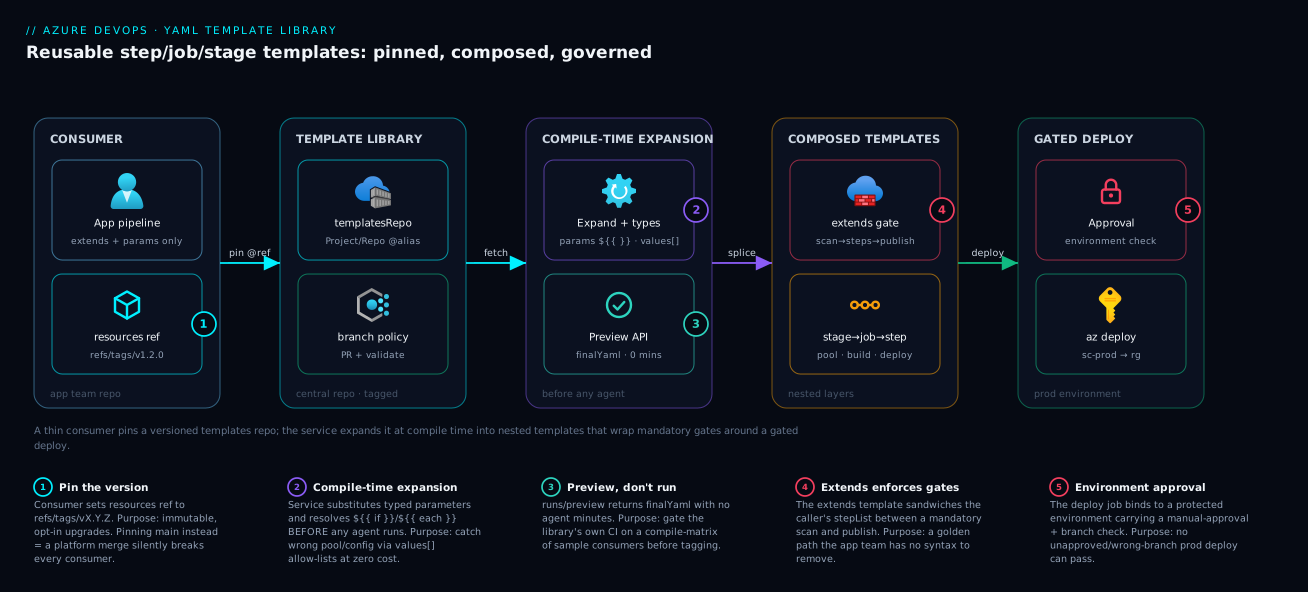
Real-world scenario
Northwind Retail runs an e-commerce platform on Azure: a storefront API, catalog, payments, an inventory worker, and seven smaller microservices — eleven pipelines, each grown by copy-paste from the storefront’s original. By 2026 they had drifted badly: catalog still used DotNetCoreCLI@2 with a deprecated argument; payments deployed straight from feature branches because someone had deleted the condition; three services had no security scan at all. When the platform team was told to add a mandatory SBOM generation step for a compliance audit, they estimated three weeks of eleven coordinated pull requests — with a high chance some would be missed.
Instead they spent a week building a library in a new pipeline-templates repo: a build-dotnet.yml step template (with a configuration allow-list so nobody could ship a Debug build), a build-job.yml job template pinning the pool to ubuntu-latest, a deploy-stage.yml stage template parameterised by environment and bound to protected dev/test/prod environments, and the keystone — a governed-pipeline.yml extends template wrapping every caller’s build steps with a mandatory CredScan before and SBOM + artifact publish after. They tagged it v1.0.0.
The migration converted the eleven pipelines one at a time to extends: governed-pipeline.yml@templatesRepo, each now a fifteen-line file: a resources block pinned to refs/tags/v1.0.0, an extends, and a buildSteps list. The payments-from-feature-branch bug vanished because the deploy stage’s condition now lived in the template, not the deletable consumer. The deprecated argument vanished because the build logic was central. When the SBOM mandate landed again two months later for a second framework, it was one commit and a tag bump to v1.1.0; teams adopted it by changing one line — ref: refs/tags/v1.1.0 — at their own pace, with a changelog telling them exactly what changed.
The lesson: their first cut pinned every consumer to refs/heads/main. Two days in, an engineer merged a half-finished parameter rename to main, and all eleven pipelines failed validation at once — a self-inflicted org-wide CI/CD outage. They reverted, moved every consumer to tag pinning, and adopted a rule: main is for development, consumers reference only tags, and a tag is cut only after the library’s own validation pipeline (a matrix of sample consumers compiled via the Preview API) goes green. The second SBOM mandate then took an afternoon instead of three weeks, and the audit passed because every pipeline provably extended one governed template.
Advantages and disadvantages
| Advantages | Disadvantages |
|---|---|
| One place to fix a bug or add a control (DRY) | A bad change to a shared template breaks many pipelines at once |
Typed parameters + values: catch errors at compile time |
Compile-time vs runtime distinction is a real learning curve |
extends makes gates non-removable (real governance) |
extends reduces consumer flexibility (sometimes too much) |
| Version pinning gives controlled, opt-in upgrades | Pinning to main causes silent breakage; tags require discipline |
| New services inherit the golden path on day one | An over-abstracted library can be harder to read than inline YAML |
| Cross-repo separation enables independent ownership | Cross-repo adds resources/ref/checkout complexity |
| Conditional insertion keeps runs lean (no skipped clutter) | Deeply nested templates make a run’s source-of-truth harder to trace |
When each side matters: the advantages dominate the moment you pass ~3–4 pipelines or have any compliance requirement — consolidation and enforcement pay for themselves, and typed parameters eliminate a whole class of “wrong pool / wrong config” incidents. The disadvantages matter most for very small teams (one or two pipelines, where a library is premature abstraction) and genuinely bespoke pipelines that share little. The compile-time/runtime learning curve is real but one-time — budget an afternoon for ${{ }} vs $( ) and it stops being a source of bugs. The cardinal rule: pin to tags, never main, and you avoid the one failure mode (shared-template breakage) that turns the biggest advantage into the biggest risk.
Hands-on lab
This is the centerpiece. You will build the full library — step → job → stage → extends — publish it in a templates repo, consume it from a separate pipeline pinned to a tag, run a real build-and-deploy, validate without running via the Preview API, and tear it down. Every step is done in both the portal and az CLI, with a Bicep companion for the deploy target.
Prerequisites. An Azure DevOps organization and project (free tier is fine); the Azure CLI with the azure-devops extension; an Azure subscription; and a service connection (you’ll create one). Set defaults so you don’t repeat --org/--project:
# One-time: install the extension and sign in
az extension add --name azure-devops
az login
az devops login    # paste a PAT with Build (read/write) + Code (read/write) scopes

# Set org + project defaults for every later command
ORG=https://dev.azure.com/your-org
PROJECT=Shop
az devops configure --defaults organization=$ORG project=$PROJECT
Expected output: az extension add is silent on success; az devops configure prints nothing — verify with az devops configure --list showing your organization and project.
Step 1 — Create the two repositories
You need a templates repo (the library) and an app repo (the consumer); keeping them separate is the whole point.
Portal: Repos → Files → repo dropdown → New repository, create pipeline-templates, then shop-api.
CLI:
az repos create --name pipeline-templates --query "{name:name, id:id}" -o table
az repos create --name shop-api          --query "{name:name, id:id}" -o table
Expected output: a table with each repo’s name and a GUID id. Clone both locally (or use the portal’s web editor for the next steps):
git clone $ORG/$PROJECT/_git/pipeline-templates
git clone $ORG/$PROJECT/_git/shop-api
Step 2 — Author the step template (the atom)
In the pipeline-templates repo, create templates/steps/build-dotnet.yml:
# pipeline-templates : templates/steps/build-dotnet.yml
parameters:
  - name: project
    type: string
  - name: configuration
    type: string
    default: 'Release'
    values: [ 'Debug', 'Release' ]

steps:
  - task: UseDotNet@2
    inputs:
      packageType: 'sdk'
      version: '8.0.x'
  - task: DotNetCoreCLI@2
    displayName: 'Build ${{ parameters.project }}'
    inputs:
      command: 'build'
      projects: ${{ parameters.project }}
      arguments: '--configuration ${{ parameters.configuration }}'
Validation: every reference is a ${{ parameters.* }} (compile-time) substitution — no runtime $( ) here, because all inputs are known before the run.
Step 3 — Author the job template that composes it
Create templates/jobs/build-job.yml:
# pipeline-templates : templates/jobs/build-job.yml
parameters:
  - name: project
    type: string
  - name: pool
    type: string
    default: 'ubuntu-latest'
    values: [ 'ubuntu-latest', 'windows-latest' ]

jobs:
  - job: build
    displayName: 'Build & publish artifact'
    pool:
      vmImage: ${{ parameters.pool }}
    steps:
      - template: ../steps/build-dotnet.yml      # relative path to the atom
        parameters:
          project: ${{ parameters.project }}
      - task: PublishBuildArtifacts@1
        displayName: 'Publish drop'
        inputs:
          PathtoPublish: '$(Build.ArtifactStagingDirectory)'
          ArtifactName: 'drop'
Validation: the inner - template: ../steps/build-dotnet.yml is a relative path in the same repo (no @alias needed); pool is a parameter with a values: allow-list, so an unsanctioned pool fails at compile time.
Step 4 — Author the stage template
Create templates/stages/deploy-stage.yml — a parameterised “deploy to one environment” phase:
# pipeline-templates : templates/stages/deploy-stage.yml
parameters:
  - name: environment
    type: string
  - name: serviceConnection
    type: string
  - name: resourceGroup
    type: string

stages:
  - stage: deploy_${{ parameters.environment }}
    displayName: 'Deploy to ${{ parameters.environment }}'
    jobs:
      - deployment: deploy
        environment: ${{ parameters.environment }}
        pool: { vmImage: 'ubuntu-latest' }
        strategy:
          runOnce:
            deploy:
              steps:
                - download: current
                  artifact: drop
                - task: AzureCLI@2
                  displayName: 'Deploy Bicep'
                  inputs:
                    azureSubscription: ${{ parameters.serviceConnection }}
                    scriptType: 'bash'
                    scriptLocation: 'inlineScript'
                    inlineScript: |
                      az group create -n ${{ parameters.resourceGroup }} -l centralindia
                      az deployment group create \
                        --resource-group ${{ parameters.resourceGroup }} \
                        --template-file $(Pipeline.Workspace)/drop/main.bicep
Validation: the deployment job binds to environment: ${{ parameters.environment }} (this attaches the approvals from Step 8), and the deploy uses the caller-supplied serviceConnection — the template never hard-codes credentials.
Step 5 — Author the extends (governance) template
Create templates/governed-pipeline.yml — the keystone composing the layers below:
# pipeline-templates : templates/governed-pipeline.yml
parameters:
  - name: project
    type: string
  - name: serviceConnection
    type: string
  - name: resourceGroup
    type: string

stages:
  - stage: build
    jobs:
      - template: jobs/build-job.yml          # compose the job template
        parameters:
          project: ${{ parameters.project }}
  - template: stages/deploy-stage.yml         # compose the stage template
    parameters:
      environment: 'prod'
      serviceConnection: ${{ parameters.serviceConnection }}
      resourceGroup: ${{ parameters.resourceGroup }}
Commit and push the templates repo, then tag it so consumers can pin an immutable version:
git add . && git commit -m "feat: template library v1.0.0"
git push
git tag v1.0.0 && git push origin v1.0.0
Expected output: git push origin v1.0.0 reports * [new tag] v1.0.0 -> v1.0.0. Confirm via CLI:
az repos ref list --repository pipeline-templates --filter tags \
  --query "[].name" -o tsv
# Expect: refs/tags/v1.0.0
Step 6 — Add the deploy target (Bicep) and the consumer pipeline
In the shop-api repo, add a trivial Bicep target main.bicep (a storage account, just to deploy something):
// shop-api : main.bicep — the thing the deploy stage applies
param location string = resourceGroup().location
param namePrefix string = 'shop'

resource sa 'Microsoft.Storage/storageAccounts@2023-05-01' = {
  name: '${namePrefix}${uniqueString(resourceGroup().id)}'
  location: location
  sku: { name: 'Standard_LRS' }
  kind: 'StorageV2'
  properties: { minimumTlsVersion: 'TLS1_2', allowBlobPublicAccess: false }
}

output storageName string = sa.name
Now the consumer pipeline azure-pipelines.yml — a thin file that pins the templates repo and extends the governed template:
# shop-api : azure-pipelines.yml — the CONSUMER (almost no logic of its own)
trigger:
  - main

resources:
  repositories:
    - repository: templatesRepo
      type: git
      name: Shop/pipeline-templates      # Project/Repo (same org)
      ref: refs/tags/v1.0.0              # PIN to the immutable tag

extends:
  template: templates/governed-pipeline.yml@templatesRepo
  parameters:
    project: '**/*.csproj'
    serviceConnection: 'sc-shop'
    resourceGroup: 'rg-shop-lab'
Validation: the @templatesRepo suffix points the compiler at the declared repo and ref pins v1.0.0. Commit and push (don’t run yet — Step 7 creates the service connection).
Step 7 — Create the service connection
The deploy needs a service connection named sc-shop to your subscription.
Portal: Project settings → Service connections → New service connection → Azure Resource Manager → Workload identity federation (recommended) (or Service principal), pick the subscription, name it sc-shop, and grant access to all pipelines (or this pipeline).
CLI (service-principal style; substitute your IDs):
SUB_ID=$(az account show --query id -o tsv)
TENANT=$(az account show --query tenantId -o tsv)
# Create an SP scoped to the lab RG path (least privilege for the lab)
az ad sp create-for-rbac --name sp-shop-lab \
  --role Contributor --scopes /subscriptions/$SUB_ID > sp.json
# Wire it as an Azure RM service connection
export AZURE_DEVOPS_EXT_AZURE_RM_SERVICE_PRINCIPAL_KEY=$(jq -r .password sp.json)
az devops service-endpoint azurerm create \
  --name sc-shop \
  --azure-rm-service-principal-id   $(jq -r .appId sp.json) \
  --azure-rm-subscription-id        $SUB_ID \
  --azure-rm-subscription-name      "$(az account show --query name -o tsv)" \
  --azure-rm-tenant-id              $TENANT
Expected output: a JSON object with the endpoint id and name: sc-shop. Authorize it for all pipelines if prompted.
Step 8 — Create the pipeline and the protected environment
Register the shop-api pipeline (pointing at its azure-pipelines.yml) and create the prod environment the deploy stage binds to.
Portal: Pipelines → New pipeline → Azure Repos Git → shop-api → Existing YAML file → /azure-pipelines.yml → Save. Then Pipelines → Environments → New environment → prod, and add an Approvals and checks → Approvals with yourself as approver.
CLI:
# Create the pipeline from the YAML in the repo
az pipelines create --name shop-api \
  --repository shop-api --repository-type tfsgit \
  --branch main --yml-path azure-pipelines.yml --skip-first-run true \
  --query "{id:id, name:name}" -o table
Expected output: a table with the pipeline id and name: shop-api. (Environment creation and the approval check are done in the portal — the approval gate is what makes the prod deploy pause for sign-off.)
Step 9 — Validate WITHOUT running (the Preview API)
Before consuming agent minutes, compile-check the pipeline. The Preview run mode expands all templates and returns the final YAML (or the validation error) without queuing a run:
PIPELINE_ID=$(az pipelines show --name shop-api --query id -o tsv)
# Call the Preview API: previewRun=true returns the expanded YAML, runs nothing
az devops invoke \
  --area pipelines --resource preview \
  --route-parameters project=$PROJECT pipelineId=$PIPELINE_ID \
  --http-method POST --api-version 7.1-preview.1 \
  --in-file <(echo '{"previewRun": true}') \
  --query finalYaml -o tsv
Expected output: the fully-expanded pipeline YAML — you’ll see the mandatory build job, the composed steps from build-dotnet.yml, and the deploy_prod stage, all spliced together. If a parameter is missing or a template path is wrong, you get the exact validation error here, for free, instead of after queuing.
Step 10 — Run it and watch the gates fire
Queue a real run:
az pipelines run --name shop-api \
  --query "{id:id, status:status, url:'_build/results?buildId='}" -o table
Expected output: a run id and status: notStarted/inProgress. Watch it:
RUN_ID=$(az pipelines runs list --pipeline-ids $PIPELINE_ID \
  --top 1 --query "[0].id" -o tsv)
az pipelines runs show --id $RUN_ID --query "{status:status, result:result}" -o table
The run executes the build stage (build → publish artifact), then the deploy_prod stage pauses on the manual approval you configured. Approve it in the portal (the run → Review → Approve). The AzureCLI@2 step then runs az deployment group create, creating the storage account in rg-shop-lab. Confirm the deploy:
az storage account list -g rg-shop-lab --query "[].name" -o tsv
# Expect: a 'shop<hash>' storage account
Step 11 — Prove governance: try to skip the gate
This proves enforcement. The consumer’s azure-pipelines.yml has no place to remove the build job or the deploy stage — they live in the extends template. Try to add an arbitrary stage at the root: you can’t, because extends: means the consumer only supplies parameters. The only way to change the build-then-deploy shape is to edit pipeline-templates (a different repo, behind its own branch policy) — exactly the control you wanted.
Step 12 — Upgrade by bumping the tag
Change the library (add a test step to build-dotnet.yml), commit, and tag v1.1.0. The consumer is unaffected until it opts in — proof of pinning:
# in pipeline-templates after the change
git commit -am "feat: add test step" && git push
git tag v1.1.0 && git push origin v1.1.0
Then upgrade the consumer by changing one line in shop-api/azure-pipelines.yml: ref: refs/tags/v1.1.0. Re-run; the new step appears. This is the whole value proposition — controlled, opt-in, one-line upgrades across every consumer.
Validation checklist
What each step proved:
| Step | What you did | What it proves | Real-world analogue |
|---|---|---|---|
| 2–4 | Authored step → job → stage templates | Layered composition works bottom-up | The reusable library itself |
| 5 | Authored the extends template | Mandatory gates wrap caller steps | The non-removable golden path |
| 5 | Tagged v1.0.0 |
The library is versioned like a package | Release management |
| 6 | Thin consumer with a pinned ref |
Consumers carry no logic, only params | A new service onboarding in 15 lines |
| 9 | Preview API validation | You catch errors with zero agent minutes | CI gate on the templates repo |
| 10 | Real run through the approval | The environment gate fires before prod | Audited production deploys |
| 11 | Couldn’t skip the gate | extends enforces, doesn’t merely offer |
The compliance guarantee |
| 12 | Bumped to v1.1.0 |
Upgrades are one-line and opt-in | Org-wide change in one commit |
Teardown
# Delete the Azure resources the deploy created
az group delete -n rg-shop-lab --yes --no-wait

# Delete the pipeline, the service connection's SP, and (optionally) the repos
az pipelines delete --id $PIPELINE_ID --yes
az ad sp delete --id $(jq -r .appId sp.json)
rm -f sp.json
# Repos can be deleted in Project settings → Repositories, or:
az repos delete --id $(az repos show --repository shop-api --query id -o tsv) --yes
az repos delete --id $(az repos show --repository pipeline-templates --query id -o tsv) --yes
Cost note. The entire lab runs on Microsoft-hosted agents (the free tier grants a limited number of parallel-job minutes per month) and a single Standard_LRS storage account that exists for minutes — total cost is effectively zero, well under ₹10, and the teardown removes everything. The templates repo itself consumes no agent minutes; only runs do.
Common mistakes & troubleshooting
The failure modes that actually cost you time, as a scannable table first, then the worst offenders expanded with the exact confirm path.
| # | Symptom | Root cause | Confirm (exact path / command) | Fix |
|---|---|---|---|---|
| 1 | “A template expression is not allowed in this context” | Used ${{ }} where only runtime is valid (or vice-versa) |
Read the line; check if the value is compile- or run-time | Move parameter-driven logic to ${{ }}; runtime values to $( )/$[ ] |
| 2 | A ${{ if }} block never inserts |
Condition reads a variable (runtime), not a parameter | The variable is set by a step/variables: not parameters: |
Make it a parameter, or switch to a runtime condition: |
| 3 | “Template file … not found” on a cross-repo ref | Missing @alias, or repo not declared in resources |
Check resources: repositories: and the @alias suffix |
Declare the repo; append @templatesRepo to the path |
| 4 | “Unexpected value ‘jobs’” (or ‘stages’) | Inserted a job/stage template under the wrong key | The - template: is under steps: but the file has jobs: |
Match template kind to slot (step↔steps, job↔jobs) |
| 5 | Consumer broke after a platform merge | Pinned to refs/heads/main |
The ref: is a branch, not a tag |
Pin to refs/tags/vX.Y.Z |
| 6 | “Required parameter X not provided” | Caller omitted a param with no default |
The template’s parameters: lacks a default for X |
Pass X, or give it a sensible default: |
| 7 | $(myVar) prints literally as text |
Variable not defined at runtime, or a typo | Run log shows the literal $(myVar) |
Define the variable; check scope; use $[ ] for outputs |
| 8 | Allow-list rejection at queue time | Param value not in values: |
Error names the value and the allowed set | Use an allowed value, or extend values: deliberately |
| 9 | each loop emits nothing |
Iterated an empty/object param with wrong type | type: is string not object/stepList |
Declare the right collection type |
| 10 | Deploy stage runs on PR builds | No condition/trigger guard in the template |
The run triggered on a PR | Add condition: eq(variables['Build.Reason'],'IndividualCI') or a branch guard |
| 11 | Approval never prompts | deployment job not bound to an environment |
The job is a plain job:, not deployment: |
Use a deployment job with environment: |
| 12 | Output of job A unseen by ${{ if }} in stage B |
Output vars don’t exist at compile time | The if is ${{ }} referencing dependencies |
Use runtime condition: ... $[ dependencies... ] |
The ones that bite hardest, expanded:
1. “A template expression is not allowed in this context.”
Cause: A compile-time ${{ }} expression where the schema only evaluates at runtime, or a runtime $( ) where the field is read at compile time (like pool: selection driven by a value that should be a parameter).
Confirm: Read the offending line and ask: is this value knowable before the run (a parameter, a compile-time variable) or only during it (a step output, a user-set variable)? The phase mismatch is the bug.
Fix: Parameter-driven structure → make it a parameter and use ${{ }}. A value produced during the run → $( ) (scripts/inputs) or $[ ] (dependency outputs).
2. A ${{ if }} block silently never inserts.
Cause: The condition references a variable that doesn’t exist at compile time (set by a later step or a runtime variables:), so ${{ if }} sees empty.
Confirm: In the Preview API finalYaml, the conditional block is simply absent. Check whether you’re testing a parameters.* (compile-time, works) or a variables[...] (often runtime).
Fix: Caller choice → make it a parameter and keep ${{ if }}. Genuine runtime value → use a runtime condition: on the step instead.
3. “Template file … not found” on a cross-repo reference.
Cause: Referenced a template in another repo without the @alias suffix, or never declared that repo under resources: repositories:.
Confirm: Check the - template: path ends with @templatesRepo, and that resources: repositories: has a matching repository: alias.
Fix: Add the resources block (alias, name: Project/Repo, ref:), and append @<alias> to every cross-repo path.
5. A consumer broke after the platform team merged to main.
Cause: The consumer pinned ref: refs/heads/main, picking up every commit — including half-finished ones.
Confirm: The resources block shows ref: refs/heads/main, and the break coincides with a templates-repo merge.
Fix: Pin to an immutable tag (refs/tags/vX.Y.Z); reserve main for development and upgrade by bumping the tag.
11. The manual approval never prompts; the deploy just runs.
Cause: The deploy job is a plain job:, not a deployment: bound to an environment: — approvals/checks attach to environments, so a non-deployment job has nothing to gate.
Confirm: The job key is - job: not - deployment:, or has no environment:; the Environments blade shows no run history.
Fix: Make it a - deployment: job with environment: ${{ parameters.environment }} and configure an Approvals check on that environment.
Best practices
- Keep templates small and single-purpose. One step template does one thing (build, or scan, or publish) — compose them in job templates. A 300-line “do everything” template is as bad as the copy-paste it replaced.
- Pin consumers to tags, never
main.refs/tags/vX.Y.Zgives controlled, opt-in upgrades;refs/heads/maingives org-wide outages the day someone merges work-in-progress. - Version the library like a package. Semantic tags, a moving major tag (
v1) for auto-patch if you want it, aCHANGELOG.md, and a branch policy requiring PR review on the templates repo’smain. - Type every parameter and add
values:allow-lists. A typedboolean/numberand an enumeratedstringcatch wrong pools, wrong configs, and wrong environments at compile time — free governance before any agent runs. - Prefer
${{ if }}insertion over runtimecondition:for parameter-driven structure. Don’t compile in a step only to skip it; if a parameter says “no tests,” don’t emit the test step at all. Reservecondition:for genuinely runtime decisions. - Always give a sensible
default:where one exists. It makes the template easy to adopt and avoids “required parameter not provided” friction; reserve no-default params for truly caller-specific values. - Validate with the Preview API in the templates repo’s own CI. Compile a matrix of representative consumers on every PR to the library — catch a breaking parameter change before you tag, not after consumers fail.
- Use
extendsfor anything you must enforce. Gates, approvals, allowed pools — if a consumer must not be able to remove it, it belongs in an extends template, not an opt-in- template:. - Bind production deploys to a protected
environment. Approvals, branch controls, and business-hours checks attach to environments; adeploymentjob is the only way to gate them. - Document each template’s parameters at the top of the file. A short comment block per parameter (purpose, allowed values, default) is the API docs your consumers read.
- Don’t put secrets in variable templates. Checked-in YAML is not a secret store; use a variable group linked to Key Vault and reference it, so secrets never live in Git.
- Name templates by what they produce, in folders by kind (
steps/,jobs/,stages/) — discoverability matters once the library has twenty files.
Security notes
- Secrets never in templates. A template is plaintext YAML in a repo; anything secret belongs in a variable group linked to Azure Key Vault, referenced by the pipeline — templates consume the reference, not the value.
- Least-privilege service connections. Scope the deploy identity to the specific subscription/resource-group it targets, and prefer workload identity federation over a long-lived secret. One over-privileged connection shared by every pipeline is a blast radius you don’t want.
- Lock the templates repo with branch policies. Because the library defines the enforced shape, a careless merge edits every consumer — require PR review, a green validation pipeline, and restrict who can push to
main/tags. - Enforce gates with
extends, not convention. A- template:a team should call is a suggestion; anextends:template they must use (backed by an environment/repo check that the run extends the approved template) is a control. - Protect production with environment checks. Bind prod deploys to an
environmentcarrying a manual approval, branch control (deploy only frommain), and optionally business-hours checks — none bypassable by a consumer. - Pin to immutable refs for supply-chain safety. A tag (or SHA) means the template content that ran is the content you reviewed;
maincould be anything merged since. For regulated builds, pin the SHA. - Restrict authorization. Don’t “grant access to all pipelines” — authorize each connection/group to the specific pipelines that need it, so a new or compromised pipeline can’t borrow production credentials.
The security controls and what each prevents:
| Control | Mechanism | Prevents | Where to set it |
|---|---|---|---|
| Secrets out of YAML | Variable group + Key Vault link | Secret leak via repo history | Pipelines → Library |
| Least-privilege deploy identity | Scoped service connection + WIF | Over-broad blast radius | Project settings → Service connections |
| Library branch policy | PR review + required validation | Unreviewed change to the golden path | Repos → Branches → Policies |
| Enforced golden path | extends + required-template check |
Teams skipping mandatory gates | Environment/repo checks |
| Prod gate | Environment approval + branch control | Unapproved/wrong-branch prod deploy | Pipelines → Environments → Checks |
| Reproducible templates | Tag / SHA ref pinning |
Supply-chain drift from main |
Consumer resources: ref: |
Cost & sizing
Templates themselves cost nothing — they are YAML files; the cost is in the runs they produce, identical whether the logic is templated or copy-pasted. So “sizing” is about agent parallelism and agent minutes, plus the indirect savings templates create.
- Microsoft-hosted parallel jobs are the meter. A free tier grants a limited monthly allowance for private projects; beyond that you buy additional parallel jobs (a flat monthly fee per concurrent job). Templates don’t change minutes consumed, but a
values:allow-list lets you standardise on the cheapest sanctioned pool, preventing a stray (pricier)windows-latestwhereubuntu-latestwould do. - Self-hosted agents trade the parallel-job fee for VM cost you manage — templates re-point a whole fleet to a new pool by changing one
pooldefault, not every file. - The real saving is human time and incident cost. Eleven pipelines into one library turns a multi-week change into one commit, and typed allow-lists prevent misconfigured-deploy incidents whose cost dwarfs any agent bill.
- Validation is nearly free. The Preview API consumes no agent minutes, so gating the library on a compile-matrix of sample consumers is free insurance against a breaking change.
Rough figures (private project, INR/USD approximate, region-dependent):
| Cost driver | What you pay for | Rough figure | Templates’ effect | Watch-out |
|---|---|---|---|---|
| Hosted free tier | 1 free parallel job, capped monthly minutes | ₹0 | None on minutes; standardises pool | Cap throttles concurrency |
| Extra Microsoft-hosted parallel job | Per concurrent job, flat monthly | ~₹3,000–3,500 / job / mo | None on price; prevents pricier-pool drift | Buy only the concurrency you need |
| Self-hosted parallel job | Per concurrent job (cheaper) + your VM | small fee + VM cost | One param re-points the whole fleet | You patch/run the VMs |
| Preview API validation | Service-side compile | ₹0 (no agent minutes) | Free pre-merge safety net | — |
| Storage account (lab target) | Standard_LRS, minutes of life | ~₹0 (negligible) | — | Delete the RG after |
Interview & exam questions
1. What are the four kinds of Azure DevOps YAML templates and what does each wrap? Step (a steps: fragment — one or more tasks), job (a jobs: fragment — a unit of work with its own pool), stage (a stages: fragment — a full phase like deploy-to-env), and variable (a variables: block). A fifth, the extends template, wraps the entire pipeline shape to enforce structure. Each is inserted only where its node kind is legal.
2. Explain the difference between ${{ }} and $( ). ${{ }} is a template expression evaluated at compile time, operating on parameters and compile-time variables — it can change the pipeline’s structure via if/each insertion. $( ) is a macro variable substituted at runtime as a step runs, operating on string variables whose values may only exist during the run. The rule: ${{ }} decides what the pipeline is; $( ) uses a value while it runs.
3. How do you reuse a template that lives in a different repository? Declare the other repo under resources: repositories: with an alias, name (Project/Repo), and a ref, then reference the template with the @alias suffix (- template: x.yml@myAlias). Without both the resources declaration and the @alias, the compiler looks in the local repo and reports “template not found.”
4. What is a ref and why pin to a tag instead of a branch? The ref selects which version of the template repo a consumer uses. Pinning refs/heads/main means every merge to that branch silently changes your pipeline (and can break it mid-flight). Pinning refs/tags/vX.Y.Z gives an immutable, deliberate, opt-in upgrade — you change one line to adopt a new version. Tags (or a commit SHA) are the production-safe choice.
5. How does an extends template enforce a mandatory step a consumer can’t remove? The consumer’s whole pipeline declares extends: yourTemplate and can only fill the parameters it exposes (e.g. a stepList for build steps). The template sandwiches that list with mandatory steps it controls — scan before, publish after — and the consumer has no syntax to drop them. Backed by a check that runs must extend the named template, it becomes a hard control.
6. What is the difference between conditional insertion (${{ if }}) and a runtime condition:? ${{ if }} is evaluated at compile time and removes the step from the document entirely when false — it never appears in the run. A condition: keeps the step in the document but marks it skipped at runtime when false. Use insertion for parameter-driven structure (cleaner runs); use condition: for decisions only known at runtime.
7. Why might a ${{ if }} block referencing a variable never fire? Because that variable doesn’t exist at compile time — ${{ }} is evaluated before the run, so a variable set by an earlier step (an output) or a runtime variables: value reads as empty and the block never inserts. If the value is a caller choice, make it a parameter; if it’s genuinely runtime, use a condition: with $[ dependencies… ] instead.
8. What parameter types support injecting a caller’s steps into a fixed template shell? step (one) and stepList (many) for steps; job/jobList, deployment/deploymentList, and stage/stageList for higher levels. The stepList parameter is the core of the extends pattern — the caller passes their steps and the template each-splices them between mandatory gates.
9. How do you validate a templated pipeline without running it? Use the Preview run mode (the runs/preview API with {"previewRun": true}), which expands every template, substitutes parameters, and returns the final composed YAML (or the validation error) with zero agent minutes consumed. It’s the ideal CI gate on the templates repo itself.
10. Where do approvals attach, and how does a stage template wire them? Approvals and checks attach to an environment, not to a pipeline or job directly. A stage template gates production by using a deployment job bound to environment: ${{ parameters.environment }}; you configure a manual-approval check on that environment once, and every stage targeting it inherits the gate.
11. What’s the risk of clientAffinity-style “grant access to all pipelines” on a service connection, and the fix? It lets any pipeline in the project (including a new or compromised one) use that connection’s identity — potentially production credentials. The fix is to authorize each service connection (and variable group) only to the specific pipelines that need it, keeping least privilege and a small blast radius.
12. Why is a template library “the same idea as Bicep modules”? Both invert duplication into a parameterised, versioned, single-source-of-truth unit: a Bicep module is reusable infrastructure with params; a YAML template is a reusable pipeline fragment with parameters. You compose small units, give them typed inputs and defaults, pin versions, and fix bugs once.
These map to AZ-400 (DevOps Engineer Expert) — design and implement a pipeline strategy, manage pipeline templates and reuse, implement a release/approval strategy — and touch AZ-104 where service connections and environments intersect with governance. A compact cert mapping:
| Question theme | Primary cert | Objective area |
|---|---|---|
| Template types & composition | AZ-400 | Design & implement pipelines; reuse |
${{ }} vs $( ), insertion vs condition |
AZ-400 | Implement pipeline logic |
Cross-repo resources & ref pinning |
AZ-400 | Manage pipeline dependencies/versioning |
extends & enforced gates |
AZ-400 | Implement approvals/governance |
| Environments & approvals | AZ-400 / AZ-104 | Release strategy; secure deployments |
| Service connections & least privilege | AZ-104 / AZ-500 | Secure pipeline identities |
Quick check
- You want a build step removed from the run entirely (not just skipped) when a
runTestsparameter isfalse. Which construct do you use, and why is a runtimecondition:the wrong choice? - A consumer pipeline references
templates/deploy.yml@templatesRepobut gets “template file not found.” Name the two things that must both be present for a cross-repo reference to resolve. - True or false: pinning consumers to
refs/heads/mainis the recommended way to keep them automatically up to date. - Your
${{ if eq(variables.deployResult, 'succeeded') }}block never inserts, even when the prior job succeeded. Why? - You must guarantee every pipeline runs a security scan that app teams cannot delete. Which template mechanism do you use, and what binds the production approval?
Answers
- Use compile-time conditional insertion:
${{ if eq(parameters.runTests, true) }}:. WhenrunTestsisfalse, the step is not emitted into the compiled document at all. A runtimecondition:is wrong because it keeps the step in the run and merely marks it skipped — the parameter is known at compile time, so you can remove the step entirely for a cleaner run. - (a) The other repo must be declared under
resources: repositories:with a matching alias, name (Project/Repo), andref; and (b) the template reference must carry the@aliassuffix. Missing either makes the compiler look in the local repo and fail. - False.
refs/heads/mainpicks up every merge — including work-in-progress — and can break all consumers at once. Pin to an immutable tag (refs/tags/vX.Y.Z); upgrade deliberately by bumping the tag. - Because
${{ if }}is evaluated at compile time, before any job runs, so a runtime output variable likedeployResultdoesn’t exist yet and reads as empty. Use a runtimecondition:referencing$[ dependencies.<job>.outputs[...] ]instead, or make the gate a parameter. - Use an
extendstemplate that sandwiches the caller’sstepListbetween a mandatory scan (before) and publish (after) — there’s no syntax for the consumer to remove them. The production approval is bound to a protected environment via adeploymentjob (environment: ...), with a manual-approval check configured on that environment.
Glossary
- Template — a
.ymlfile containing a reusable pipeline fragment (steps, jobs, stages, or variables) that other pipelines insert and parameterise. - Step template — a template whose top-level key is
steps:; the atom of reuse, inserted understeps:. - Job template — a template whose top-level key is
jobs:; a unit of work with its own pool, inserted underjobs:. - Stage template — a template whose top-level key is
stages:; a full phase, inserted understages:. - Variable template — a template contributing a
variables:block of shared constants. - Extends template — a template referenced via root
extends:that owns the entire pipeline shape, used to enforce mandatory structure and gates. - Parameter — a typed (
string/number/boolean/object/step/stepList/stage…), compile-time input declared in a template and supplied by the caller. - Template expression
${{ }}— a compile-time substitution evaluated during template expansion, before the run; can change pipeline structure viaif/each. - Macro variable
$( )— a runtime string substitution applied as a step runs. - Runtime expression
$[ ]— a runtime-evaluated expression for values known only during the run, such as a prior job’s output. - Conditional insertion — a
${{ if }}/${{ each }}block that adds or removes nodes from the compiled pipeline at compile time. resources: repositories:— the top-level block declaring an external repository (alias, name,ref) so its templates are visible.ref— the version (branch, tag, or commit) of a referenced repository a consumer uses; pin to a tag for immutability.- Service connection — a stored credential/identity that lets a pipeline authenticate to Azure (or another service); scope it least-privilege.
- Environment — a deployment target object that carries approvals and checks; a
deploymentjob binds to it to gate a stage. - Preview API — the
runs/previewendpoint that expands templates and returns the final YAML (or error) without queuing a run or consuming agent minutes. stepListparameter — a parameter holding a list of steps, the core of theextendspattern: the caller’s steps spliced between mandatory ones.
Next steps
You can now build, version, and enforce a reusable pipeline library. Build outward:
- Next: Azure DevOps Library: Variable Groups, Secure Files & Key Vault-Linked Secrets — supply the secret values your templates consume, the right way (never in YAML).
- Related: Bicep Modules, Loops & Conditions: Authoring Reusable, DRY Infrastructure Templates — the same composition discipline applied to the infrastructure your deploy stage applies.
- Related: Azure Artifacts: Private Feeds, Upstream Sources & Package Versioning Strategy — what your templated publish step pushes to, and how to version it.
- Related: Azure DevOps Pipelines Stuck in Queue: No Available Agents & Parallelism Limits — when a templated run won’t even start, the failure usually lands here.
- Related: Setting Up Azure App Service Deployment Slots: Swap, Warm-Up and Slot-Sticky Settings — the zero-downtime deploy target your stage template can drive.