You have a working YAML pipeline. It builds, it tests, it deploys — and somewhere in step four it reaches for a database connection string, an API key, and a .pfx signing certificate. Right now those values are probably pasted straight into the YAML, or worse, committed to the repo as plaintext. The moment a second pipeline needs the same connection string, you copy-paste it again, and a credential rotation means hunting through every .yml file in the organisation. This is the problem the Azure DevOps Library solves: a single, central, access-controlled place to store the values your pipelines consume, so secrets live in one place, masked, and shared by reference instead of by copy.
The Library holds three things, and this article walks you through all three end to end. A variable group is a named bag of key/value pairs you attach to a pipeline; each value can be a plain string or a secret (encrypted at rest, masked in logs, never echoed back). A secure file is a binary you can’t paste into YAML — a certificate, a keystore, an SSH key, a service-account JSON — that the Library stores encrypted and a pipeline downloads at runtime into a temporary location. And the feature that makes it production-grade: a variable group can be linked to an Azure Key Vault, so the actual secret values live in Key Vault (rotated, audited, RBAC-controlled) and the Library holds only a reference. Your pipeline reads $(SqlPassword) and Azure DevOps fetches it live from the vault at run time.
By the end you will have built one of each, by hand, three ways — in the Azure DevOps portal, with the az CLI (az pipelines / az devops extensions), and as Bicep for the Key Vault side — consumed every value from a real YAML pipeline, watched a secret get masked in the logs, and torn it all down. No prior Library experience is assumed; if you can run a pipeline, you can follow this.
What problem this solves
Without the Library, secrets sprawl. The connection string that started in one pipeline gets duplicated into the next, then into a third for staging with one character changed, and now nobody is sure which is canonical. Rotating it means editing several files across several repos, and you will miss one. Plaintext secrets in YAML are committed to git history forever — even deleting the line doesn’t remove it from earlier commits, exactly the secret-sprawl problem that haunts CI/CD.
It also breaks separation of duties: when the password is in the YAML, anyone who can read the repo can read the password. The Library lets a security or platform team own the secret (especially via Key Vault) while developers consume it by name, never seeing the value.
Who hits this: every team past their first pipeline. It bites hardest with multiple environments that share most variables but differ on a few, when the same secret feeds several pipelines, when compliance demands an audit trail, and when you must ship a code-signing cert or kubeconfig that simply cannot be a YAML string. The Library answers all of these; the Key Vault link answers the audit-and-rotation ones specifically.
| Pain without the Library | What it looks like in practice | What the Library gives you |
|---|---|---|
| Secret duplicated across pipelines | Same connection string pasted in 5 .yml files |
One variable group, referenced by all |
| Secret committed to git | Password sits in commit history forever | Secret value encrypted in the Library, never in the repo |
| Rotation is manual and error-prone | Edit every file, miss one, outage | Rotate once in Key Vault; pipelines pick it up next run |
| Devs can read prod credentials | Repo read = secret read | Key Vault-backed value; consumer never sees it |
| Certs/keys can’t be YAML | No clean way to ship a .pfx |
Secure file, downloaded to a temp path at runtime |
| No access audit | “Who used this secret?” → no answer | Key Vault access logs + Library permissions |
Learning objectives
By the end of this article you can:
- Explain the three things the Azure DevOps Library holds — variable groups, secret variables, and secure files — and when to reach for each.
- Create a variable group and add both plain and secret variables in the portal and with
az pipelines variable-group. - Consume a variable group from a YAML pipeline, reference an individual variable, and confirm a secret is masked in the logs.
- Upload a secure file, authorise a pipeline to use it, and download it at runtime with the
DownloadSecureFiletask. - Link a variable group to an Azure Key Vault so secrets resolve live from the vault, including the identity and RBAC wiring that makes it work.
- Provision the Key Vault side as Bicep and grant the Azure DevOps service connection’s identity the right role.
- Diagnose the common failures — masked-but-empty variables,
403from Key Vault, secrets that won’t pass into a script, and pipeline-not-authorised errors.
Prerequisites & where this fits
You need an Azure DevOps organisation and project, the ability to run a basic YAML pipeline, and at least Project Administrator (or sufficient Library permissions). For the Key Vault section you also need an Azure subscription, rights to create a vault and assign roles on it, and an ARM service connection linking the project to that subscription (the portal can create one). CLI sections use the Azure CLI with the azure-devops extension (az extension add --name azure-devops); the Bicep section uses az deployment group.
This sits at the foundation of the CI/CD secrets story, upstream of nearly every deployment pipeline you write — the CI/CD pipeline you build consumes these values. It pairs with Azure Key Vault, where the real secrets should live, and managed identities, the model that lets the pipeline reach the vault without a password. For the cleanest setup the service connection itself can use workload identity federation, removing the last service-principal secret.
Here is where each piece lives, so you know which portal you are in at each step:
| Thing | Where it lives | Who typically owns it | Scope |
|---|---|---|---|
| Variable group | Azure DevOps → Pipelines → Library | Build / platform team | One project |
| Secret variable | Inside a variable group (or pipeline) | Same as group | The group it lives in |
| Secure file | Azure DevOps → Pipelines → Library → Secure files | Build / platform team | One project |
| Key Vault (the real secret) | Azure subscription / resource group | Security / platform team | Subscription |
| Service connection (the link) | Azure DevOps → Project settings → Service connections | Project admin | One project |
Core concepts
A handful of mental models make every later step obvious.
A variable group is a named bag of key/value pairs. You create it once in the Library, name it (e.g. web-app-prod), and add variables. Pipelines pull the whole bag in with one variables: - group: web-app-prod line, and every key becomes a $(KeyName) macro. Change a value and every referencing pipeline gets it on its next run — the point of centralising.
A secret variable is encrypted and masked, not just hidden. Click the padlock and a variable becomes a secret: encrypted at rest, never displayed again in the UI (overwrite-only), and scrubbed from logs — if P@ssw0rd! appears in your output, Azure DevOps replaces it with ***. Masking is best-effort string matching, not magic: a secret that is split, transformed, or one character long can leak, which is why short or low-entropy secrets are a bad idea here.
Secrets are not automatically environment variables. This trips up everyone once. A plain variable is injected into the task’s environment so a script reads it directly. A secret is not — you must explicitly map it with an env: block (env: { MY_SECRET: $(SqlPassword) }). Forget that and your script sees an empty value even though the variable “exists.” It’s deliberate, so secrets don’t silently flow into every child process.
A secure file is for binaries you can’t paste. A .pfx, a .jks keystore, an SSH key, a kubeconfig — anything not sensible as a text variable. The Library stores it encrypted; at runtime DownloadSecureFile@1 pulls it to a temporary path ($(<reference>.secureFilePath)) cleaned up when the job ends. It never lives in your repo.
Key Vault linking moves the source of truth out of Azure DevOps. Tick “Link secrets from an Azure Key Vault as variables” and the group stops storing values and starts storing names — each maps to a secret of the same name in a vault. At run time, Azure DevOps uses the service connection’s identity to fetch the current value, so rotation, versioning, soft-delete, purge protection, and access logging all happen in Key Vault. The cost: you now need the vault, the connection, and the right RBAC — most of the lab’s wiring. (Every term above is in the Glossary.)
Variable groups, step by step
A variable group is the unit you’ll use most. It has a name, a description, variables (each plain or secret), and pipeline permissions controlling which pipelines may consume it. A separate Security tab controls which users can read/edit it — keep those distinct: pipeline permissions gate runs, Security gates people.
What a variable becomes in a run
When a pipeline references the group, each variable surfaces as a $(Name) macro. Plain variables also appear as environment variables (upper-cased, dots→underscores) inside tasks; secrets do not. This is the rule you will forget and re-learn:
| Variable kind | $(Name) macro works |
Auto-injected as env var | Visible in logs | How a script reads it |
|---|---|---|---|---|
| Plain | Yes | Yes | Yes (printed normally) | Directly ($MYVAR / %MYVAR%) or $(Name) |
| Secret | Yes | No | No (masked as ***) |
Only via explicit env: mapping |
Plain vs secret — when to use which
Use a plain variable for non-sensitive values you might want to see in logs: environment names, resource group names, feature flags, API base URLs. Use a secret for anything whose disclosure is a problem: passwords, connection strings, API keys, tokens, signing material. When in doubt, mark it secret — the only cost is the env: mapping.
| If the value is… | Make it… | Because |
|---|---|---|
An environment name (prod) |
Plain | Not sensitive; handy in logs |
| A resource group / app name | Plain | Not sensitive; reused widely |
A feature flag (true/false) |
Plain | Config, not a secret |
| A connection string | Secret | Contains credentials |
| An API key / token | Secret | Disclosure = compromise |
| A password | Secret | Obvious |
| A short PIN-like value | Reconsider | Masking is unreliable below ~4–6 chars |
Scope: pipeline-level vs group-level vs Key Vault
You can define variables in three escalating places; choosing the right one keeps things tidy:
| Define it… | Use when | Trade-off |
|---|---|---|
| Inline in the pipeline YAML | One pipeline, non-secret, rarely changes | Not shared; duplicated if reused |
| In a variable group | Shared across pipelines; value lives in DevOps | Central, but DevOps is the source of truth |
| In a Key Vault-linked group | Real secrets needing rotation/audit | Most setup; needs vault + connection + RBAC |
Secure files, step by step
Some things genuinely cannot be a variable: a code-signing .pfx, a .jks keystore, an SSH private key, a kubeconfig. You upload these as secure files, encrypted at rest in the Library and not readable from the UI after upload — they exist only to be pulled into a pipeline at run time. The DownloadSecureFile@1 task fetches the file to a temporary, job-scoped path exposed as $(<name>.secureFilePath), deleted when the job ends, so it never persists on a shared agent or lands in your artifacts unless you deliberately copy it (don’t).
| Property | What it is | Notes |
|---|---|---|
| Name | The file name shown in the Library | Used to reference it in the task |
secureFile input |
Which file the task downloads | Must match the Library name |
secureFilePath output |
Temp path the file lands at | $(referenceName.secureFilePath) |
| Pipeline authorisation | Which pipelines may use it | Same gate as variable groups |
| Lifetime | When the file is removed | End of job; never persisted |
| Max size | Upload size ceiling | ~10 MB per file (keep certs/keys small) |
Reach for a secure file (not a secret variable) whenever the content is binary, larger than a comfortable string, or a task specifically expects a file path — signtool wanting a .pfx, kubectl wanting a kubeconfig.
Linking a variable group to Azure Key Vault
This is the upgrade that turns a convenient store into a production secrets pipeline. Instead of typing secret values into the group, you point it at an Azure Key Vault; each linked variable corresponds to a secret of the same name in that vault, and at run time Azure DevOps authenticates with the service connection’s identity and reads the live value. The chain of trust has four links; all four must line up or the run fails:
| Link | What it is | How you set it | Failure if missing |
|---|---|---|---|
| Service connection | Identity of the project in Azure (SPN or workload-identity-federated) | Project settings → Service connections | “No service connection” / cannot list vaults |
| RBAC on the vault | That identity’s permission to read secrets | Key Vault Secrets User role assignment |
403 Forbidden when fetching |
| Vault access model | RBAC vs legacy access policies | Vault property enableRbacAuthorization |
Wrong model → role/policy ignored |
| Secret name match | Linked variable name == secret name | Pick secrets when linking | Variable resolves empty / not found |
Two Key Vault access models exist, and you must know which yours uses because the grant is completely different:
| Access model | How permission is granted | Recommended? | Grant for DevOps |
|---|---|---|---|
Azure RBAC (enableRbacAuthorization: true) |
Role assignments (e.g. Key Vault Secrets User) |
Yes — modern default | Assign the role to the connection’s identity |
| Access policies (legacy) | Per-identity policy entries (Get/List on secrets) | Only for older vaults | Add a policy granting get/list on secrets |
Once linked, you can no longer edit secret values in Azure DevOps — that is intentional; you manage them in the vault, and you choose which secrets are exposed:
| Behaviour once linked | What it means |
|---|---|
| Values are read-only in DevOps | Source of truth is the vault |
| Only selected secrets are exposed | You pick which vault secrets map to variables |
| Resolved at run time, per run | Always the current value; rotation is automatic |
| All linked variables are secret | They are masked in logs by definition |
| Disabled/expired secret | Resolves to empty or errors; check vault state |
Architecture at a glance
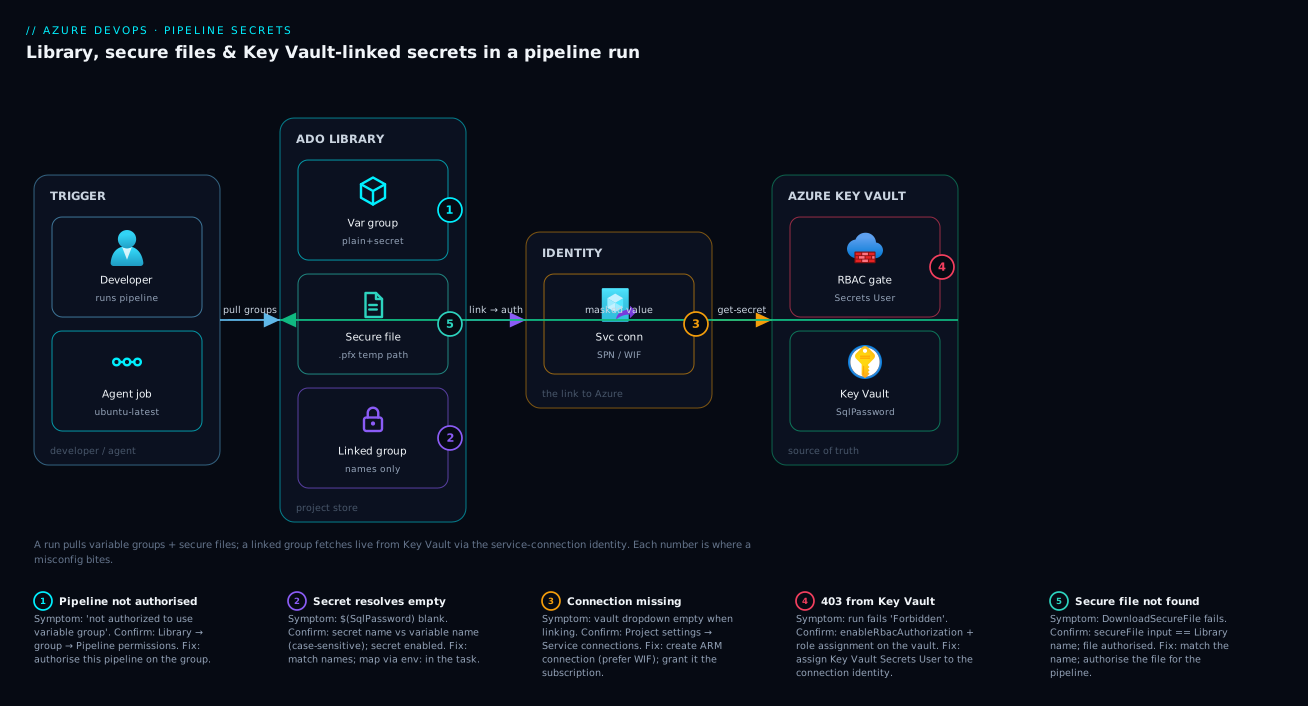
Follow a single run from left to right. A developer triggers the pipeline; the agent job asks the Library for the variable groups the YAML references. For an ordinary group the values come straight back from Azure DevOps storage. For a Key Vault-linked group, Azure DevOps holds only the secret names — it uses the project’s service connection (an Entra identity) to call the linked Key Vault, which checks that identity’s RBAC before returning each secret. Values flow back as masked secret variables, any secure file the job needs is pulled by DownloadSecureFile to a temporary path, and every secret is scrubbed from the logs on the way out.
The diagram shows that path with the points where a misconfiguration bites: an unauthorised pipeline (the permission gate), a missing RBAC role (the 403), a secret-name mismatch (empty variable), and a secret left unmapped into a script’s env: (the silent empty). Trace the arrows once and the troubleshooting section reads like a map.
Real-world scenario
Northwind Retail runs an online store on Azure App Service across dev, test, and prod with a single multi-stage YAML pipeline. At first the SQL connection string, the payment-gateway API key, and a code-signing .pfx were all pasted into the YAML, with per-environment copies differentiated by a suffix. A junior engineer once committed a production connection string into a feature branch while debugging; it sat in git history for three weeks before a routine pipeline secret scan flagged it, forcing an emergency rotation and an awkward incident review.
The platform team rebuilt it around the Library. They created three variable groups — store-dev, store-test, store-prod — and linked only store-prod to a Key Vault kv-store-prod, where the production SQL password and payment key now live. Dev and test, being low-risk, kept their non-production secrets as ordinary masked variables. The .pfx became a secure file authorised only to the release pipeline, downloaded at sign time with DownloadSecureFile@1.
The payoff showed up two months later when the payment provider rotated their API key on a Friday. Previously that meant editing several YAML files and re-running; now a security engineer updated one secret in kv-store-prod and the next prod deployment picked it up automatically — no YAML change, and a clean Key Vault audit log of exactly when the pipeline’s identity read the new value. The one snag: the first prod run after linking failed with 403 Forbidden, because the service connection’s identity had been created but never granted a role on the vault. Assigning Key Vault Secrets User fixed it in one command, and they baked it into their landing-zone Bicep so every future vault ships with the grant. Credential-rotation time dropped from “schedule a change window” to “one command, next run.”
Advantages and disadvantages
The Library — especially the Key Vault link — is a clear win, but not free of trade-offs:
| Advantages | Disadvantages |
|---|---|
| One central place; no copy-paste sprawl | Another resource to set up and govern |
| Secrets encrypted at rest and masked in logs | Masking is best-effort; short/transformed secrets can leak |
| Key Vault link = rotate once, audit everywhere | More moving parts (vault + connection + RBAC) to misconfigure |
| Devs consume by name, never see prod values | Requires discipline on pipeline permissions |
| Secure files keep certs/keys out of the repo | Secure files capped (~10 MB); not for large blobs |
| Per-pipeline authorisation limits blast radius | Default “open access” can be too permissive if not tightened |
| Works in portal, CLI, and IaC | Key Vault link adds a small per-run latency and a vault dependency |
The centralisation and rotation benefits matter the moment you have more than one pipeline or environment; the audit benefit matters under compliance (PCI, SOC 2), where “who accessed this credential and when” must be answerable — that is a Key Vault link, not plain variables. The disadvantages bite teams that link a vault but skip the RBAC step (the classic 403), or leave groups open to all pipelines so an unrelated pipeline can read production secrets. Best practices below fixes both.
Hands-on lab
This is the centrepiece. End to end you will: create a variable group with a plain and a secret variable, consume it from a real YAML pipeline and watch the secret get masked, upload and download a secure file, then provision a Key Vault, link a group to it, and prove the secret resolves live from the vault. Library steps are shown in both the portal and az CLI; the Key Vault side in CLI and Bicep. Every step lists the expected output, and teardown is at the end. The whole lab fits in the free tier (a Standard Key Vault costs pennies; the Library is free).
Prerequisites for the lab
| Need | How to get it | Check |
|---|---|---|
| Azure DevOps org + project | dev.azure.com (free) |
You can open Pipelines |
| A repo with a YAML pipeline | New repo + starter pipeline | A run has succeeded once |
| Azure CLI + devops extension | az extension add --name azure-devops |
az devops -h works |
| Azure subscription | Free/pay-as-you-go | az account show returns it |
| Rights to create a vault + assign roles | Owner/Contributor + User Access Administrator on the RG | You can run role assignments |
Set shell variables and authenticate once (replace the org/project/subscription values):
# Azure DevOps context
export ADO_ORG="https://dev.azure.com/your-org"
export ADO_PROJECT="store-platform"
az devops configure --defaults organization=$ADO_ORG project="$ADO_PROJECT"

# Sign in to Azure DevOps (browser or PAT). For PAT:
# export AZURE_DEVOPS_EXT_PAT=xxxxxxxx   # PAT with Variable Groups (read/write) + Secure Files
az devops login --organization $ADO_ORG   # paste PAT when prompted, if using one

# Azure context
az login
az account set --subscription "<your-subscription-id>"
export RG="rg-store-lab"
export LOCATION="centralindia"
export KV="kv-store-lab-$RANDOM"
Expected output: az devops configure prints nothing on success; az account show returns your subscription JSON. The $KV name must be globally unique, which $RANDOM handles.
Part A — Create a variable group (portal)
- In Azure DevOps, go to Pipelines → Library. Click + Variable group.
- Name it
store-dev. Add a description like “Dev environment variables for the store app.” - Click + Add and create a plain variable: name
envName, valuedev. Leave the padlock open. - Click + Add again: name
SqlPassword, valueDevP@ssw0rd-Change-Me-123. Click the padlock so it turns closed — this makes it a secret. - Click Save.
- Open the group’s Pipeline permissions (the access icon) and either authorise your specific pipeline or note that it is currently open. We will tighten this later.
Expected result: the group appears in the Library list. Re-opening it shows envName = dev in plaintext and SqlPassword as ******** with no way to reveal it — correct; secrets are write-only after save.
Part A (alt) — Create the same group with az CLI
The CLI creates the group with its first (plain) variable, then you add the secret separately with --secret true:
# Create the group with the plain variable
az pipelines variable-group create \
  --name "store-dev" \
  --description "Dev environment variables for the store app" \
  --variables envName=dev \
  --authorize true \
  --output table

# Capture the group id it returns
export VG_ID=$(az pipelines variable-group list \
  --group-name "store-dev" --query "[0].id" -o tsv)

# Add the SECRET variable to that group
az pipelines variable-group variable create \
  --group-id $VG_ID \
  --name SqlPassword \
  --value 'DevP@ssw0rd-Change-Me-123' \
  --secret true \
  --output table
Expected output: the first command prints a table with the new group’s Id and Name; the secret-add command prints the variable with IsSecret = True and value null (the CLI won’t echo a secret). --authorize true opens the group to pipelines.
Part B — Consume the group from a YAML pipeline
- In your repo, create or edit
azure-pipelines.ymlbelow. It references the group, prints the plain variable, and proves the secret is masked — note the explicitenv:mapping required to use a secret in a script.
trigger: none   # run manually for the lab

pool:
  vmImage: ubuntu-latest

variables:
  - group: store-dev      # pulls in envName and SqlPassword

steps:
  - script: |
      echo "Environment is: $(envName)"          # plain var: prints 'dev'
      echo "Trying to print the secret directly:"
      echo "Secret via macro: $(SqlPassword)"     # WILL be masked as ***
    displayName: "Plain vs secret in logs"

  - script: |
      # A secret is NOT auto-injected; map it explicitly via env:
      if [ -z "$MAPPED_SECRET" ]; then
        echo "MAPPED_SECRET is EMPTY — mapping is wrong"
      else
        echo "MAPPED_SECRET length is: ${#MAPPED_SECRET}"  # prints a number, never the value
      fi
    displayName: "Read secret correctly via env mapping"
    env:
      MAPPED_SECRET: $(SqlPassword)   # the ONLY correct way to pass a secret to a script
- Commit and push, then run the pipeline manually (Run pipeline).
- Open the run logs.
Expected output: the first step prints Environment is: dev, and the secret line shows Secret via macro: *** — masked. The second step prints MAPPED_SECRET length is: 25 — proving the script received the secret without exposing it. If you instead see MAPPED_SECRET is EMPTY, you forgot or mis-typed the env: block — the single most common Library mistake.
Part C — Upload and download a secure file
- Create a throwaway “certificate” locally to stand in for a real
.pfx(the mechanics are identical):
echo "PRETEND-CERTIFICATE-BYTES" > ./lab-cert.pfx
-
Portal route: Library → Secure files tab → + Secure file → upload
lab-cert.pfx. After upload, open it and under Pipeline permissions authorise your pipeline (or leave open for the lab). -
CLI route (alternative to the portal upload):
az pipelines secure-file upload \
  --path ./lab-cert.pfx \
  --name lab-cert.pfx \
  --output table
Expected output: a table with the file Name and Id. It is now encrypted in the Library and can’t be downloaded from the UI.
- Add a download step to your pipeline to pull it at run time:
  - task: DownloadSecureFile@1
    name: certFile                 # reference name for the output path
    displayName: "Download signing cert"
    inputs:
      secureFile: lab-cert.pfx     # must match the Library name exactly

  - script: |
      echo "Cert landed at: $(certFile.secureFilePath)"
      ls -l "$(certFile.secureFilePath)"   # proves the file exists at a temp path
    displayName: "Verify secure file present"
- Run the pipeline again.
Expected output: the log shows Cert landed at: /home/vsts/work/_temp/lab-cert.pfx and ls -l lists the file. The path is job-scoped and the file is removed when the job ends — re-running gives a fresh download.
Part D — Provision a Key Vault (CLI)
Now the production-grade path: an RBAC-enabled Key Vault with a secret in it.
# Resource group
az group create --name $RG --location $LOCATION --output table

# RBAC-enabled Key Vault (modern access model)
az keyvault create \
  --name $KV \
  --resource-group $RG \
  --location $LOCATION \
  --enable-rbac-authorization true \
  --output table

# Grant YOURSELF the officer role so you can write secrets
export ME=$(az ad signed-in-user show --query id -o tsv)
export KV_ID=$(az keyvault show --name $KV --query id -o tsv)
az role assignment create \
  --assignee $ME \
  --role "Key Vault Secrets Officer" \
  --scope $KV_ID

# Create the secret the pipeline will read (name must match the variable name)
az keyvault secret set \
  --vault-name $KV \
  --name SqlPassword \
  --value 'ProdP@ssw0rd-From-Vault-987' \
  --output table
Expected output: keyvault create returns the vault with enableRbacAuthorization: true; the role assignment prints the assignment object; secret set returns the secret metadata (value not echoed). If secret set fails with Forbidden, the role hasn’t propagated — wait 30–60 s and retry; RBAC is eventually consistent.
Part D (alt) — The Key Vault as Bicep
For repeatable, reviewable infrastructure, here is the same vault, secret, and the role assignment for the service connection’s identity as Bicep. Pass the connection identity’s object (principal) id as a parameter.
@description('Key Vault name (globally unique)')
param kvName string

@description('Location')
param location string = resourceGroup().location

@description('Object ID of the Azure DevOps service connection identity (SPN or workload identity)')
param devopsPrincipalId string

@description('Initial SQL password secret value')
@secure()
param sqlPassword string

resource kv 'Microsoft.KeyVault/vaults@2023-07-01' = {
  name: kvName
  location: location
  properties: {
    sku: { family: 'A', name: 'standard' }
    tenantId: subscription().tenantId
    enableRbacAuthorization: true          // RBAC, not access policies
    enableSoftDelete: true
    softDeleteRetentionInDays: 7
    enablePurgeProtection: true
  }
}

resource sqlSecret 'Microsoft.KeyVault/vaults/secrets@2023-07-01' = {
  parent: kv
  name: 'SqlPassword'                      // name MUST match the linked variable
  properties: {
    value: sqlPassword
  }
}

// Built-in role: Key Vault Secrets User (read secret values)
var secretsUserRoleId = '4633458b-17de-408a-b874-0445c86b69e6'

resource devopsRead 'Microsoft.Authorization/roleAssignments@2022-04-01' = {
  name: guid(kv.id, devopsPrincipalId, secretsUserRoleId)
  scope: kv
  properties: {
    principalId: devopsPrincipalId
    roleDefinitionId: subscriptionResourceId('Microsoft.Authorization/roleDefinitions', secretsUserRoleId)
    principalType: 'ServicePrincipal'
  }
}
Deploy it:
az deployment group create \
  --resource-group $RG \
  --template-file keyvault.bicep \
  --parameters kvName=$KV devopsPrincipalId=<connection-object-id> \
               sqlPassword='ProdP@ssw0rd-From-Vault-987'
Expected output: Succeeded, with the vault, the SqlPassword secret, and a role assignment granting the DevOps identity Key Vault Secrets User. Commit this artefact so every environment’s vault ships pre-granted — exactly what fixed Northwind’s 403.
Part E — Grant the service connection and link the group
If you created the vault with the CLI (not Bicep), grant the service connection’s identity the read role now. Find its object id in Project settings → Service connections → (your ARM connection) → Manage Service Principal.
# Grant the DevOps service connection identity read access to secrets
az role assignment create \
  --assignee <service-connection-object-id> \
  --role "Key Vault Secrets User" \
  --scope $KV_ID
Now link a variable group to the vault (the portal is clearest the first time):
- Library → + Variable group → name it
store-prod. - Toggle Link secrets from an Azure Key Vault as variables to on.
- Choose your Azure subscription (via the service connection) and the Key Vault
$KV. - Click + Add under the variable list and select the
SqlPasswordsecret. Click OK, then Save. Authorise your pipeline under Pipeline permissions.
Expected result: the group shows SqlPassword with a Key Vault icon and no editable value — read-only because it lives in the vault. Empty subscription/vault dropdowns mean the service connection is missing or lacks permission (see troubleshooting).
Part F — Prove the secret resolves from the vault
- Point a stage at the linked group and read the value the same safe way as before:
  - stage: ProdCheck
    jobs:
      - job: readVaultSecret
        pool: { vmImage: ubuntu-latest }
        variables:
          - group: store-prod        # the Key Vault-linked group
        steps:
          - script: |
              if [ -z "$VAULT_SECRET" ]; then
                echo "VAULT_SECRET EMPTY — check RBAC / secret name"
              else
                echo "Vault secret length: ${#VAULT_SECRET}"   # 27 here
              fi
            displayName: "Read Key Vault-backed secret"
            env:
              VAULT_SECRET: $(SqlPassword)
- Run the pipeline.
Expected output: Vault secret length: 27 — the pipeline fetched ProdP@ssw0rd-From-Vault-987 live from Key Vault, masked it, and never printed it. Change the secret in the vault (az keyvault secret set ... --value 'something-longer') and re-run: the printed length changes with no pipeline edit, proving rotation flows through. VAULT_SECRET EMPTY means a name mismatch or a missing env:; a run failing with 403 means the role assignment is missing or hasn’t propagated.
Teardown
Remove everything so you incur no cost:
# Delete the Azure resource group (vault + secret + role assignments)
az group delete --name $RG --yes --no-wait

# Purge the soft-deleted vault so the name is reusable (purge protection note below)
az keyvault purge --name $KV --location $LOCATION   # works only if purge protection allows

# Delete the variable groups
az pipelines variable-group delete --group-id $VG_ID --yes
PROD_VG_ID=$(az pipelines variable-group list --group-name store-prod --query "[0].id" -o tsv)
az pipelines variable-group delete --group-id $PROD_VG_ID --yes

# Delete the secure file
az pipelines secure-file delete \
  --id $(az pipelines secure-file list --query "[?name=='lab-cert.pfx'].id | [0]" -o tsv) --yes

# Local cleanup
rm -f ./lab-cert.pfx
Expected output: each delete returns silently or with a confirmation. Note: with enablePurgeProtection: true, az keyvault purge is rejected until the retention window passes — the protection working as designed; the name stays reserved meanwhile.
Common mistakes & troubleshooting
These are the failures you will actually hit, in rough order of frequency — symptom, root cause, the exact way to confirm, and the fix.
| # | Symptom | Root cause | Confirm | Fix |
|---|---|---|---|---|
| 1 | Secret arrives empty in a script | Secret not mapped via env: (secrets aren’t auto-injected) |
Echo ${#VAR} → 0; the env: block is missing/typo’d |
Add env: { VAR: $(SecretName) } to the task |
| 2 | 403 Forbidden fetching from Key Vault |
Connection identity has no read role on the vault | Run log shows Forbidden; vault has no Secrets User for that SPN |
Assign Key Vault Secrets User to the connection’s object id |
| 3 | Linked variable resolves empty | Secret name ≠ variable name, or secret disabled | Vault has no secret by that exact name (case-sensitive) | Rename to match; enable the secret |
| 4 | Pipeline can’t use the group | Group not authorised for that pipeline | Run error: “not authorized to use variable group” | Library → group → Pipeline permissions → authorise it |
| 5 | Vault dropdown empty when linking | No/invalid service connection, or it lacks list perms | Project settings → Service connections shows none/failed | Create an ARM connection; grant it access to the subscription |
| 6 | RBAC role assigned but still 403 |
Vault uses access policies, not RBAC | az keyvault show ... enableRbacAuthorization is false |
Switch to RBAC, or add a Get/List access policy instead |
| 7 | Secret printed in full in logs | Value transformed/concatenated so masking missed it | Log shows the literal secret | Don’t reshape secrets in logs; mask matches the exact string only |
| 8 | DownloadSecureFile fails: not found |
secureFile input name ≠ Library file name |
Task error names the missing file | Match the name exactly; authorise the file for the pipeline |
| 9 | Recently assigned role still denied | RBAC propagation delay | Worked after waiting | Wait 30–60 s and re-run; RBAC is eventually consistent |
| 10 | Can’t edit a value in a linked group | Linked groups are read-only by design | UI shows the value greyed with a vault icon | Edit the secret in Key Vault, not in DevOps |
| 11 | Two groups define the same variable | Later group in the list wins; confusion | Both - group: entries define X |
Avoid name collisions; order matters, last wins |
| 12 | Secret leaks via an echo of a URL |
Secret embedded in a larger string you printed | Connection string with the password printed | Never print composed strings containing secrets |
Two dominate real incidents. #1 (empty secret) is the universal first stumble — internalise that secrets need env: and half your issues vanish. #2 and #6 are the Key Vault 403 family: check both enableRbacAuthorization (right model) and the role assignment (grant present), because one without the other still fails.
Best practices
- Mark every sensitive value as a secret. The padlock is free; the only cost is the explicit
env:mapping you should be doing anyway. Never let a plain variable hold a credential. - Link production secrets to Key Vault; keep dev/test simple. Secrets needing rotation and audit belong in a vault; low-risk non-production values can stay as masked variables.
- Use RBAC vaults and grant the minimum role.
Key Vault Secrets Useris all a pipeline needs — never Officer or Administrator on a consuming identity. - Lock down pipeline permissions. Authorise each group and secure file only to the pipelines that need it; default open access lets any pipeline read any secret.
- One vault per environment. Separate
kv-app-prodfromkv-app-devso a dev pipeline can never reach a prod secret and blast radius stays bounded. - Never map a secret you don’t use. Expose only the secrets a pipeline consumes; don’t link the whole vault “just in case.”
- Keep secret names identical across vault and group. The link matches by name, case-sensitively — a convention (
<App>-<Purpose>) prevents drift. - Don’t print, compose, or transform secrets in scripts. Masking is literal; build a connection string in a logged step and the password is exposed. Pass secrets straight into the tool’s secure input.
- Prefer workload identity federation for the service connection. No client secret to rotate — one fewer credential and the cleanest chain.
- Codify the vault and its role assignment in IaC so a new environment never repeats the
403. - Rotate by editing the vault, never the pipeline — a one-line vault change picked up on the next run.
Security notes
The Library is a security control, so configure it like one. Least privilege has two surfaces: the people surface (the group’s Security tab) and the pipeline surface (Pipeline permissions). Tighten both — a developer who can edit a linked group can change which secrets are exposed even without seeing values. On the vault, the consuming identity should hold only Key Vault Secrets User — read, nothing more.
Encryption is handled for you: secret variables and secure files are encrypted at rest in Azure DevOps, and Key Vault encrypts its secrets with platform or customer-managed keys. The value you must protect is in transit through your own scripts — once a secret is in a job’s memory, it is your job not to leak it (no printing, composing, or writing it to an artifact).
Identity is the linchpin of the Key Vault path: the pipeline reaches the vault as the service connection’s identity, not a stored password — and the cleanest form is workload identity federation, with no service-principal secret at all (see Secretless CI/CD). Pair the vault with soft-delete and purge protection (the Bicep enables both) so a deleted secret is recoverable and can’t be permanently destroyed by mistake. And audit: Key Vault’s diagnostic logs record every secret read with the calling identity, so you can answer “which pipeline read this credential, and when” — something plain variables never can.
Cost & sizing
The Library itself is free — variable groups, secret variables, and secure files cost nothing. The only meaningful cost is the Key Vault when you use the link, and it is tiny: a Standard vault has no fixed monthly fee, you pay per operation (secret reads), and at pipeline scale — a handful of reads per run, a few hundred runs a month — this rounds to a few rupees.
| Component | What you pay for | Rough cost | Free-tier note |
|---|---|---|---|
| Variable groups / secrets | Nothing | Free | Unlimited in the Library |
| Secure files | Nothing | Free | ~10 MB per file cap |
| Key Vault (Standard) | Per 10,000 operations | ~₹2–3 / 10K ops (~$0.03) | No monthly base fee |
| Key Vault (Premium / HSM) | Per-op + HSM key cost | Higher; only if you need HSM keys | Not needed for secrets |
| Service connection | Nothing (the identity is free) | Free | Federated = no secret to manage |
Right-sizing here is about dependency, not money. Each linked variable is a vault read per run, so the real decision is which secrets justify a vault: link the production ones that need rotation and audit, and leave trivial non-production values as plain Library variables. Use Standard, not Premium — Premium’s HSM-backed keys are for cryptographic operations, not storing pipeline secrets.
Interview & exam questions
Q1. What is a variable group and why use one? A named set of key/value pairs in the Library, shared across pipelines via variables: - group: <name>. It centralises config and secrets so a value is defined once and referenced everywhere — no copy-paste, and rotation is a single edit. (AZ-400.)
Q2. How does a secret variable differ from a plain one? A secret is encrypted at rest, write-only in the UI, and masked as *** in logs. Crucially it is not auto-injected as an environment variable — a script must receive it through an explicit env: mapping.
Q3. Why does my secret arrive empty in a script? Secrets are not auto-injected into the task environment; you must map them with env: { VAR: $(SecretName) }. Without that block the script sees nothing even though the variable exists.
Q4. What does linking a variable group to Key Vault do? The group stores only secret names; values stay in the vault and Azure DevOps fetches them at run time via the service connection’s identity. Rotation, versioning, and auditing then happen in the vault.
Q5. A Key Vault-linked pipeline fails with 403 — cause and fix? The connection’s identity lacks read permission. On an RBAC vault assign Key Vault Secrets User; on a legacy access-policy vault add a get/list secrets policy. Confirm the model via enableRbacAuthorization.
Q6. What is a secure file and when do you use it? An encrypted binary in the Library (cert, keystore, SSH key, kubeconfig) that can’t sensibly be a text variable. DownloadSecureFile@1 pulls it at run time to a temporary, job-scoped path removed when the job ends.
Q7. Minimum role a pipeline identity needs to read Key Vault secrets? Key Vault Secrets User — read access to secret values and nothing else. Never assign Officer/Administrator to a consuming identity.
Q8. How does rotation work with a linked group? Update the secret in the vault; the next run fetches the new value automatically. No YAML edit, no pipeline change — the central benefit of linking.
Q9. Why is masking sometimes incomplete? Masking is literal string matching against the exact value. Transform, split, or compose it (e.g. build a connection string) and the new string isn’t masked. Never reshape or print secrets.
Q10. Security tab vs Pipeline permissions on a group? Security controls which users can read/edit the group; Pipeline permissions control which pipelines may consume it at run time. Both follow least privilege.
Q11. Where should production secrets live? In Key Vault, linked to the group — that gives rotation, soft-delete, purge protection, and auditing. Plain masked variables are acceptable only for low-risk, non-production values.
Q12. How do you make the service connection itself secretless? Use workload identity federation for the ARM connection, so it authenticates via a federated credential — no service-principal password to store or rotate.
Quick check
- You reference
- group: web-prodand try to read$(ApiKey)in a Bash step, but it’s empty. What did you forget? - A linked variable group fails at run time with
403 Forbiddenfrom Key Vault. What is the most likely missing piece? - Which task downloads a secure file at run time, and where does the file end up?
- You need to ship a
.pfxcode-signing cert to a pipeline. Variable or secure file? - After linking a group to Key Vault, you can no longer edit a secret’s value in Azure DevOps. Is that a bug?
Answers
- The explicit
env:mapping. Secrets are not auto-injected; addenv: { ApiKey: $(ApiKey) }to the task so the script receives it. - The service connection’s identity has no read role on the vault. Assign it
Key Vault Secrets User(RBAC vault) or aget/listsecrets access policy (legacy vault). DownloadSecureFile@1. It writes the file to a temporary, job-scoped path exposed as$(<referenceName>.secureFilePath), removed when the job ends.- A secure file — a
.pfxis binary and can’t be a sensible text variable; download it at run time withDownloadSecureFile@1. - No, by design. A linked group is read-only because the source of truth is the vault; edit the secret in Key Vault and the pipeline picks it up on the next run.
Glossary
- Library — The Azure DevOps project-level store for variable groups and secure files (Pipelines → Library).
- Variable group — A named set of key/value pairs shared across pipelines via
variables: - group: <name>. - Secret variable — A variable marked with the padlock: encrypted at rest, masked in logs, write-only in the UI, not auto-injected into scripts.
- Plain variable — A non-secret value, visible in logs and auto-injected as an environment variable in tasks.
- Secure file — An encrypted binary (cert, keystore, key, kubeconfig) downloaded at run time by
DownloadSecureFile@1. - Key Vault link — A variable group whose values are read live from an Azure Key Vault at run time instead of stored in DevOps.
- Service connection — The authenticated link from an Azure DevOps project to an Azure subscription; its identity reaches the vault.
Key Vault Secrets User— The built-in RBAC role granting read access to secret values; the minimum a pipeline identity needs.enableRbacAuthorization— A vault property selecting the RBAC access model (vs legacy access policies).- Masking — Azure DevOps replacing a secret’s exact string with
***in logs; literal matching, so transformed secrets can leak. - Pipeline permissions — The authorisation gate controlling which pipelines may consume a group or secure file.
DownloadSecureFile@1— The pipeline task that fetches a secure file to a temporary path at run time.- Workload identity federation — A secretless way for a service connection to authenticate, removing the service-principal client secret.
- Soft-delete / purge protection — Key Vault features that make deleted secrets recoverable and prevent permanent destruction within a retention window.
Next steps
- Azure Key Vault: Secrets, Keys and Certificates Done Right — go deeper on the vault that should back your production secrets.
- CI/CD Secrets and Credential Management: Secure Your Pipelines — the broader secrets-management picture across CI/CD platforms.
- Managed Identities Deep Dive: User-Assigned Identities, Federated Credentials, and RBAC Patterns for Azure Workloads — the identity model behind the Key Vault grant.
- Secretless CI/CD: Workload Identity Federation for GitHub Actions and AKS — remove the last stored secret from your service connection.
- CI/CD Pipelines Explained: From Code Commit to Production — the pipeline these variables and files feed into.