You wrote a small library — a helper package your team reuses across five services — and now every service has a copy-pasted folder of it. When you fix a bug you fix it five times, and one service always lags. The grown-up answer is to publish the library once as a versioned package and have every service depend on helpers 1.4.2 the way it depends on a package from npm or NuGet.org. The place that stores your packages privately and serves them to your builds and developers is a feed. In Azure that service is Azure Artifacts — part of Azure DevOps — and a feed is its central object.
Azure Artifacts does two jobs that are really one. First, it hosts your private packages — the internal libraries and tools you don’t want on the public internet — served over the standard protocols (NuGet, npm, Maven, Python/PyPI, Cargo, Universal Packages) so your existing dotnet restore, npm install and pip install just work against a private URL. Second, through upstream sources, it is a caching proxy in front of the public registries: a build that needs lodash or Newtonsoft.Json pulls it through your feed, the feed saves a copy, and from then on that exact version is yours forever even if the public one disappears. One feed becomes the single source of truth for every package the org builds with, public and private alike.
This article is the mental-model tour: what a feed is and what scope to give it, how upstream sources mirror the public world, how versioning and immutability behave (why you can’t re-push 1.0.0), and how views (@local, @prerelease, @release) promote a build to “blessed for production” without moving bytes. It is concept-first — definitions, comparison grids, one architecture walkthrough, and a short troubleshooting section — concrete on real protocols and commands, without every advanced knob.
What problem this solves
Without a package feed, code reuse degrades into copy-paste: a shared library lives as a folder duplicated across repos, a submodule everyone forgets to update, or a hand-built .dll/.tgz emailed around. There is no version anyone can pin, no single place to publish, and no clean way to say “service A is on the old version, B is on the new.” Every fix is an N-times fix. The second pain is the public registry itself — when every build pulls lodash straight from npmjs.com you have a hard dependency on a service you don’t control: a package can be unpublished (it has happened, and broke thousands of builds), an outage stops your whole CI fleet, and you have no inventory of which third-party versions you ship.
Azure Artifacts solves both. A private feed gives internal libraries a real home with real versions, governed by Azure DevOps permissions and reused via a normal restore. Upstream sources put that feed in front of the public registries, so third-party packages are cached on first use, pinned forever, and served fast from inside Azure — an uncontrolled external dependency becomes an auditable, resilient, local one. The moment a second service wants the first’s code, you want a feed.
Learning objectives
By the end of this article you can:
- Explain what an Azure Artifacts feed is, the difference between project-scoped and organization-scoped feeds, and which to choose.
- Describe how upstream sources cache and proxy public registries (npmjs, NuGet.org, PyPI, Maven Central, crates.io), and why a cached version is then immutable and yours.
- Name the package protocols Azure Artifacts supports and which client tool each one uses to restore and publish.
- Reason about package versioning — SemVer, prerelease tags, and feed immutability (why
1.0.0can never be re-pushed). - Use views (
@local,@prerelease,@release) to promote a package from published to release-blessed without rebuilding it. - Wire a feed into a build: a
nuget.config/.npmrcfor local dev and a pipeline task that authenticates and restores from the feed. - Set sane retention and clean up wasted storage, and pick the right billing model so the feed stays cheap.
- Diagnose the day-one failures: 401 on restore, “version already exists,” an upstream package that won’t appear, and a missing Project Collection Build Service permission.
Prerequisites & where this fits
You should have an Azure DevOps organization (dev.azure.com/<org>) with a project, and be comfortable with your stack’s package manager — dotnet/nuget, npm, pip/twine, or mvn — at the “I can run a restore and read a .csproj/package.json” level. Basic SemVer (MAJOR.MINOR.PATCH) and a high-level grasp of CI pipelines help. No Azure Artifacts experience is assumed — that is what this builds.
This sits in the DevOps / supply-chain track. It is the package layer a CI/CD pipeline publishes to and restores from; the same upstream model used by language-agnostic registries everywhere is covered platform-neutrally in Artifact Registries and Package Management in CI/CD. The pipeline that produces the packages is CI/CD Pipelines Explained: From Code Commit to Production, and the push credentials are governed by CI/CD Secrets and Credential Management: Secure Your Pipelines. Azure Artifacts stores application packages; for container images the equivalent is a registry — Securing Azure Container Registry: Private Endpoints, ACR Tasks, Content Trust, and Geo-Replication. Keep that distinction clear: a feed is not a container registry, and a .nupkg is not a Docker image.
Core concepts
Six mental models make every later decision obvious.
A feed is a private, multi-protocol package catalogue. The central object in Azure Artifacts: a named container (e.g. shared-libs) holding packages and serving them over the standard protocols. One feed holds NuGet, npm, Maven, Python, Cargo and Universal packages side by side — clients only see the slice matching their protocol. You publish to and restore from it with the same tools you use against the public registries; only the source URL changes.
A feed has a scope, and scope decides reach. A feed is either project-scoped (belongs to one project, inheriting its visibility and permissions) or organization-scoped (lives at the org level, shareable across every project). Project-scoped is the modern default; org-scoped exists for cross-cutting “everyone uses this” packages. You cannot change scope after creation, so pick deliberately.
An upstream source makes your feed a caching proxy of a public registry. Configure an upstream — say npmjs — and a client asks the feed for a package. If the feed has it, it serves it; if not, it fetches from the upstream, saves a copy, and serves it transparently. From that moment the version is in your feed: restores are local and fast, pinned even if the public copy disappears. One feed URL now serves both your private packages and the public world.
Once a version is saved, it is immutable. A published (name, version) pair can never be overwritten — not your packages, not cached upstream ones. Push mylib 1.0.0, realise it was broken, and you cannot re-push 1.0.0; you publish 1.0.1. This is a feature: every consumer pinned to 1.0.0 is guaranteed it never changes. It is also the rule beginners trip over first.
Versioning is SemVer, and prerelease tags carry meaning. Packages use Semantic Versioning — MAJOR.MINOR.PATCH plus an optional prerelease suffix like -beta.1 or -ci.20260624.3. A prerelease version (1.5.0-beta.2) sorts below the matching release (1.5.0) and is only restored when a client opts into prereleases — so a build can publish 1.5.0-ci.<n> continuously without those ever being picked up by a stable-only dotnet restore.
Views gate which packages a consumer sees. Every feed has built-in views: @local (everything published or cached), @prerelease, and @release, each addressable in the URL (.../shared-libs@release/...). Promoting to a view is a metadata operation — it moves no bytes — that says “this build is blessed at this bar.” Production points at @release and only sees promoted packages, so an unfinished 1.5.0-ci.7 can never leak into prod.
The vocabulary in one table
Pin down every moving part before the deep sections — the glossary repeats these for lookup; this is the model side by side:
| Concept | One-line definition | Where it lives | Why it matters |
|---|---|---|---|
| Azure Artifacts | The package-hosting service in Azure DevOps | Per org | The product; feeds live inside it |
| Feed | A private, multi-protocol package catalogue | Org or project | The thing you publish to / restore from |
| Feed scope | Project-scoped vs org-scoped reach | Set at creation | Who can see and share the feed |
| Upstream source | A proxy/cache of a public registry | Feed setting | Pulls + pins public packages locally |
| Package | A versioned, named artifact (.nupkg/.tgz/…) |
In a feed | The unit you depend on |
| Version (SemVer) | MAJOR.MINOR.PATCH[-prerelease] |
Per package | How consumers pin and upgrade |
| Immutability | A published version can’t be overwritten | Feed behaviour | Guarantees pins never change |
| View | A label-gated slice (@local/@prerelease/@release) |
Per feed | Promotion / quality gating |
| Promotion | Moving a package into a view (metadata only) | Per package | “Bless” a build for a stage |
| Retention policy | Auto-delete old unpromoted versions | Per feed | Controls storage cost |
| PAT / service connection | The credential a client/pipeline uses | DevOps | How auth happens on push/restore |
Feeds: scope, visibility and protocols
Get a feed’s three properties right from the start: scope, permissions, and the protocols it serves.
Project-scoped vs organization-scoped
The first and least-reversible choice is scope. A project-scoped feed lives inside one project (dev.azure.com/<org>/<project>/_packaging) and inherits that project’s permissions and visibility. An organization-scoped feed lives at the org root (dev.azure.com/<org>/_packaging) and is offered to every project. Project-scoped is the recommended default; org-scoped is the older model, still right when a feed is genuinely shared by many teams.
| Dimension | Project-scoped feed | Organization-scoped feed |
|---|---|---|
| Lives at | A specific project | The organization root |
| Best for | A team’s / project’s packages | Truly cross-org shared libraries |
| Permissions | Inherit the project’s | Managed at org level |
| Discoverability | Within the owning project | Across all projects |
| Default for new feeds | Yes (recommended) | Legacy / deliberate choice |
| Change after creation | No — pick deliberately | No — pick deliberately |
A simple rule: start project-scoped; reach for org-scoped only when several projects must share one feed governed in one place. You cannot migrate between scopes, so a wrong guess means recreating the feed and re-pointing consumers.
Feed permissions — the four roles
Access is governed by four built-in roles — coarse on purpose; a beginner needs exactly these.
| Role | Can read packages | Can publish packages | Can manage upstreams/retention | Can manage permissions | Typical holder |
|---|---|---|---|---|---|
| Reader | Yes | No | No | No | Consumers; broad teams |
| Collaborator | Yes | Yes (incl. save upstream pkgs) | No | No | Build identities, contributors |
| Contributor | Yes | Yes | No | No | Developers who publish |
| Owner | Yes | Yes | Yes | Yes | Feed admin |
The one that trips up CI: a pipeline that publishes needs Contributor (or Collaborator). Its identity is the Project Collection Build Service; with only Reader, the publish step 403s even though restores work — the single most common feed-permission mistake.
The protocols a feed serves
One feed can host several package types at once, clients seeing only their type. Know which tool maps to which protocol — the tool is what authenticates and restores.
| Protocol | Package format | Client tool to restore/publish | Source file that points at the feed |
|---|---|---|---|
| NuGet | .nupkg |
dotnet / nuget |
nuget.config |
| npm | .tgz |
npm / yarn / pnpm |
.npmrc |
| Python (PyPI) | .whl / .tar.gz |
pip (restore) / twine (publish) |
pip.conf / index-url |
| Maven | .jar / .pom |
mvn / Gradle |
settings.xml / build.gradle |
| Cargo | crate | cargo |
.cargo/config.toml |
| Universal Packages | any files | az artifacts universal (Azure CLI) |
n/a (CLI args) |
Universal Packages are the catch-all: when your artifact is not a language package — a folder of binaries, a model file, a zipped tool — you still version and store it in the same feed via the Azure CLI. It keeps “everything we version” in one place.
Upstream sources: your feed as a private mirror
Upstream sources turn a feed from “a place for our packages” into the single source of truth for every package, ours and the world’s — the concept worth understanding well.
How the cache-through flow works
Configure an upstream — say npmjs — and point clients at the feed’s npm registry URL instead of registry.npmjs.org. Now when npm install lodash runs:
- The client asks the feed for
lodash. - If the feed already has that version (published or cached), it serves it directly — fast, local, no internet.
- If not, the feed fetches it from the upstream, saves a copy, and serves it.
- Every later request for that version is a local hit, pinned forever.
The experience is identical to the public registry — same command, same package — but the first fetch permanently brings that version under your control. You gain an inventory of the third-party versions your org uses, and builds that no longer depend on the public registry being up.
What upstream sources give you
Each benefit maps to a failure it prevents:
| Benefit | What it gives you | The pain it prevents |
|---|---|---|
| Caching | Public packages saved on first use | Re-fetching the same package thousands of times |
| Resilience | Builds keep working if the public registry is down | A registry outage halting all CI |
| Immutable pinning | The cached version can never change/disappear | An unpublished/yanked package breaking builds |
| Single source | One feed URL serves public + private | Juggling multiple registry sources per client |
| Inventory / audit | A clear list of every external version used | “Which third-party versions do we actually ship?” |
| Order control | Your private package can shadow a public name | Name collisions; deciding which wins |
That last row matters for safety: with private packages listed ahead of the public upstream, a request resolves locally first — a dependency-confusion guard (see Security notes) against an attacker slipping a malicious public package with your internal name into your build.
Which public registries can be upstreams
Each protocol proxies its matching public registry. You can also add another Azure Artifacts feed as an upstream — how a “release” feed pulls from a “build” feed.
| Protocol | Public upstream it proxies | Also supports as upstream |
|---|---|---|
| NuGet | NuGet.org | Another Azure Artifacts feed |
| npm | npmjs.com | Another Azure Artifacts feed |
| Python | PyPI (pypi.org) | Another Azure Artifacts feed |
| Maven | Maven Central (and others) | Another Azure Artifacts feed |
| Cargo | crates.io | Another Azure Artifacts feed |
One subtle point: saving an upstream package requires the Collaborator/Contributor role. A pure Reader restores already-cached packages, but the first identity to pull a brand-new version needs save permission, or the fetch is refused — usually why new public packages fail for some identities but work for others.
Versioning, immutability and promotion
The part beginners most often get wrong — three ideas: how versions are ordered, why they can’t be reused, and how to bless a build without rebuilding it.
SemVer and prerelease ordering
Packages version with SemVer: MAJOR.MINOR.PATCH, optionally a prerelease suffix and build metadata. The rules that affect your restores:
| Version form | Example | Meaning | Restored by a “stable only” client? |
|---|---|---|---|
| Release | 1.4.2 |
A stable, public-for-your-org release | Yes |
| Prerelease | 1.5.0-beta.2 |
An unfinished candidate; sorts below 1.5.0 |
No (only if prereleases enabled) |
| CI prerelease | 1.5.0-ci.20260624.3 |
A per-build version from a pipeline | No (unless explicitly requested) |
| Build metadata | 1.4.2+sha.abc123 |
Annotates a build; ignored for precedence | Same as 1.4.2 |
The upshot: a pipeline can publish a fresh prerelease per commit (1.5.0-ci.<build>), none picked up by a stable-only restore until you cut a real 1.5.0. Prerelease tags are how “every build is published” coexists with “consumers only see finished versions.”
Immutability: why you can’t re-push 1.0.0
A published (name, version) pair is immutable. Push mylib 1.0.0 once and it is fixed forever: you cannot overwrite it or re-upload different bytes, and a re-push fails with “version already exists” (409 Conflict). This applies to your packages and cached upstream ones equally — and it is correct: every consumer pinned to 1.0.0 is guaranteed the bits never change, the whole value of a pinned dependency. The rules to internalise:
| Situation | Allowed? | What to do instead |
|---|---|---|
| Re-publish the same version with new bytes | No (409) | Publish a new version (1.0.1) |
| Publish a higher version | Yes | Normal flow |
Fix a broken 1.0.0 already consumed |
No (can’t edit it) | Ship 1.0.1; tell consumers to upgrade |
| Hide a bad version from new restores | Yes — unlist it | Unlist keeps existing pins working, hides it from search |
| Permanently remove a version | Yes — delete (admin) | Breaks anyone who pinned it; use sparingly |
The key nuance: for a bad release, unlist 1.0.0 (hidden from search, still served to existing pins) and ship 1.0.1 — almost never delete, which breaks pins.
Views and promotion
You published 1.5.0 (and a string of 1.5.0-ci.<n> builds). How does production know which is safe? Views — three built-in, addressable in the URL:
| View | Contains | Who points here | Promotion needed to appear? |
|---|---|---|---|
@local |
Everything published or cached into the feed | Developers; default restore | No — automatic |
@prerelease |
Packages promoted to the prerelease bar | QA / integration consumers | Yes — promote to it |
@release |
Packages promoted as production-blessed | Production builds / consumers | Yes — promote to it |
A consumer restoring from .../shared-libs@release/... sees only packages promoted to @release. Promotion moves a package into the view as a metadata change — no bytes copied, nothing rebuilt — instant and free. The workflow that falls out:
| Stage | Action | View the package now satisfies |
|---|---|---|
| CI publishes a build | dotnet nuget push → feed |
@local |
| QA accepts the candidate | Promote to prerelease view | @prerelease (and @local) |
| Release sign-off | Promote to release view | @release (and lower) |
| Production restores | Restore from @release URL |
Sees only blessed packages |
Promotion via the Azure CLI:
# Promote a package version into the @Release view of a feed
az artifacts universal promote \
  --organization https://dev.azure.com/contoso \
  --feed shared-libs \
  --name internal.helpers --version 1.5.0 \
  --view Release
(For NuGet/npm the same promotion happens from the package’s portal page or REST API — identical in principle.) Promoted packages are exempt from retention deletion, so retention only cleans up unpromoted clutter — promotion doubles as “keep forever.”
Wiring a feed into clients and pipelines
Two pieces of plumbing: a client config file so local dev restores from the feed, and a pipeline step so CI authenticates and restores.
Local developer config
A NuGet nuget.config at the repo root points dotnet/nuget at the feed — the upstream means this one source also serves NuGet.org:
<?xml version="1.0" encoding="utf-8"?>
<configuration>
  <packageSources>
    <clear />
    <!-- One source: serves private packages AND, via upstream, NuGet.org -->
    <add key="shared-libs"
         value="https://pkgs.dev.azure.com/contoso/_packaging/shared-libs/nuget/v3/index.json" />
  </packageSources>
</configuration>
An npm .npmrc is the same idea — registry=https://pkgs.dev.azure.com/<org>/_packaging/shared-libs/npm/registry/ with always-auth=true — with the credential supplied by the Azure Artifacts Credential Provider locally or the pipeline task in CI. You do not commit a token in either case.
Pipeline authentication and restore
In an Azure Pipelines YAML build the platform injects credentials for you — no PAT to manage. For NuGet:
steps:
  - task: NuGetAuthenticate@1            # auth the build identity to the feed (no PAT)
  - script: dotnet restore              # restore via the repo's nuget.config
  - script: |                           # pack + push the built package back
      dotnet pack -c Release -o $(Build.ArtifactStagingDirectory)
      dotnet nuget push "$(Build.ArtifactStagingDirectory)/*.nupkg" --source "shared-libs" --api-key az
For npm the equivalent task is npmAuthenticate@0, then a normal npm publish. The key idea: in a pipeline you authenticate with a task, not a secret — and the build identity authorised on the feed is why its feed role matters.
The feed itself is created from the Azure CLI (az artifacts feed create, in the lab) — there is no ARM/Bicep resource type for a feed, since feeds live in Azure DevOps, not a Resource Manager resource group.
Architecture at a glance
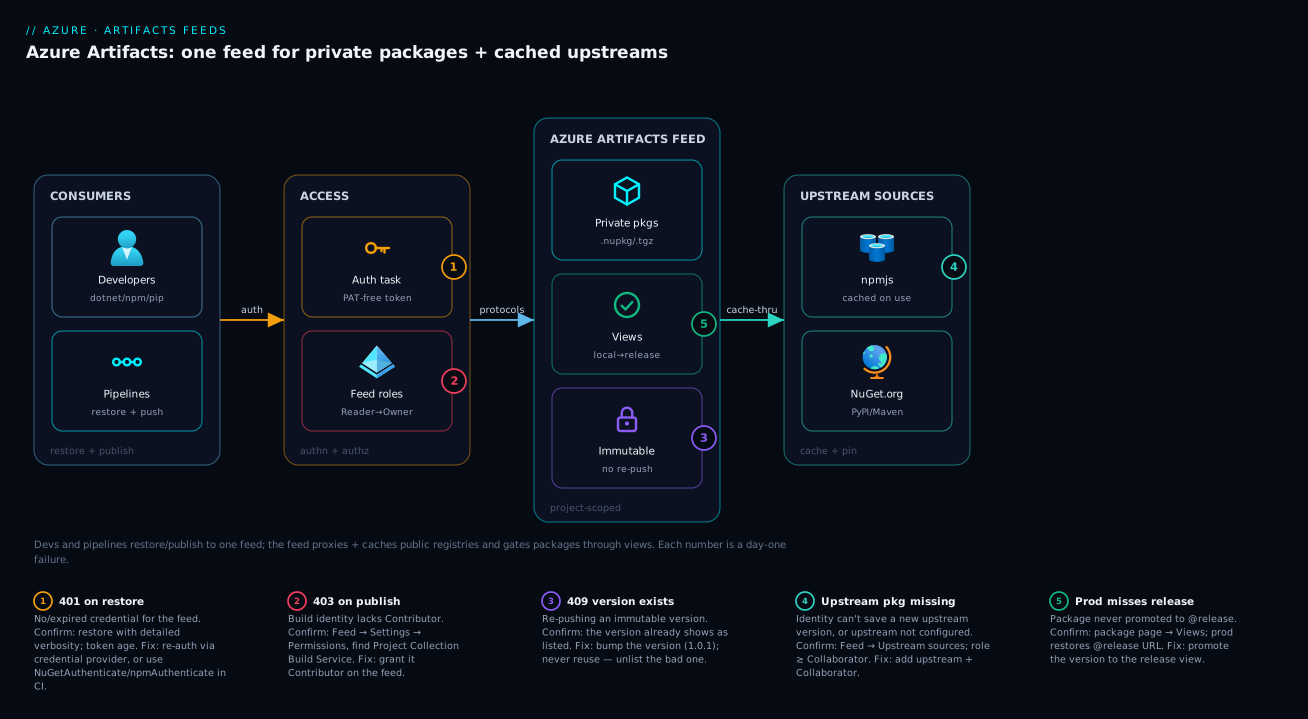
Read the diagram left to right and you read the whole system. On the left are the two consumers — developers running dotnet/npm/pip locally and Azure Pipelines builds running restore and push — speaking the same protocols to the same place, differing only in how they authenticate (credential provider vs injected token). Neither talks to npmjs.com or NuGet.org directly; they talk to the feed.
In the centre sits the feed — the single source of truth. It serves your private packages and, via upstream sources, transparently proxies the public registries (npmjs, NuGet.org, PyPI, Maven) on the right: a public package it hasn’t seen is fetched once, cached, and pinned forever. Wrapped around it are two governance layers to hold together: views (@local → @prerelease → @release) gating which packages a consumer sees, and permissions/retention gating who publishes and how long unpromoted versions survive. A package’s lifecycle: into @local, promoted up the views as it earns trust, restored by production only from @release.
Real-world scenario
Northwind Retail runs eight microservices across two Azure DevOps projects. Their shared code — a Northwind.Common library of DTOs, validation and HTTP helpers — lived as a copied folder in all eight repos. A security fix to the validation logic took a week to land everywhere, and one forgotten service shipped the vulnerable code to production. Separately, a 40-minute npmjs.com incident had stopped every CI build the previous month, and nobody could say which third-party versions were in production.
The platform team stood up Azure Artifacts: one project-scoped feed, northwind-shared, with upstream sources for NuGet.org and npmjs. Each repo’s nuget.config/.npmrc pointed at the feed’s single source URL — which, thanks to the upstreams, served both Northwind.Common and every public package the builds needed — and the NuGetAuthenticate@1 / npmAuthenticate@0 tasks went into the pipelines, no PATs committed.
Northwind.Common became a real package: its pipeline published 2.0.0-ci.<build> prereleases per commit, and a tagged release published 2.0.0, which a release stage promoted to @release. The eight services restored from the @release view, so an unfinished build could never leak in. The next security fix was a one-line bump from 2.0.0 to 2.0.1 in each service — minutes, not a week — and because the old version stayed immutable, nothing un-upgraded broke.
Two stumbles taught the feed’s rules. The publish step first 403’d: the Project Collection Build Service had only Reader; Contributor fixed it. Then a developer tried to re-push 2.0.0 after a release-notes typo, hit “version already exists,” and learned to ship 2.0.1. Within a sprint the outage risk was gone, “which third-party versions do we ship?” had a one-screen answer, and Northwind.Common had a single owner and timeline — for a few rupees a month, a rounding error against a week of duplicated fixes.
Advantages and disadvantages
A feed is the right default for any multi-repo team, but with real trade-offs.
| Advantages | Disadvantages |
|---|---|
| One private home for internal packages, with real versions | Another service to learn and govern (roles, views, retention) |
| Upstreams cache + pin public packages; survive registry outages | First fetch of a new public version needs save permission |
| Immutable versions guarantee pins never change | You can’t fix a published version in place — must bump |
| Views promote builds with zero rebuild/byte-copy | Promotion discipline is a process you must actually run |
| Standard protocols — existing tools “just work” | Storage and per-user billing grow if retention is ignored |
| Tied into Azure DevOps identity and pipelines natively | Not a container registry — images still need ACR |
| Single source URL per client (public + private) | Tied to Azure DevOps; not a neutral cross-cloud registry |
The advantages matter most the moment you have a second consumer of any internal code, or want builds independent of the public internet. The disadvantages bite on a tiny single-repo project (overkill) or an org wanting a cloud-neutral registry. For most teams already in Azure DevOps, the calculus is clearly in favour.
Hands-on lab
This lab creates a feed, publishes a tiny private package, and restores it — within the free tier (2 GiB; first five users free with Basic access). Teardown is one command.
1. Install the Azure DevOps CLI extension and sign in.
az extension add --name azure-devops
az devops login   # paste a PAT when prompted, or use az login context
ORG=https://dev.azure.com/<your-org>
PROJ=<your-project>
2. Create a project-scoped feed.
az artifacts feed create --organization $ORG --project $PROJ --name lab-feed
# Note the feed URL it returns; the npm registry form is:
#   https://pkgs.dev.azure.com/<org>/_packaging/lab-feed/npm/registry/
3. Create a tiny package project pointed at the feed. In a new folder, add an .npmrc (registry=https://pkgs.dev.azure.com/<org>/_packaging/lab-feed/npm/registry/ and always-auth=true), then:
mkdir lab-pkg && cd lab-pkg && npm init -y # set a scoped name, e.g. "@labco/hello": "1.0.0"
4. Authenticate and publish. The credential helper supplies the token (never paste one into .npmrc):
npx vsts-npm-auth -config .npmrc   # writes a short-lived token to ~/.npmrc
npm publish                        # Expect: + @labco/hello@1.0.0  (in the @local view)
5. Prove immutability by re-publishing 1.0.0 unchanged:
npm publish # Expect FAILURE: 409 Conflict — "version already exists". Bump to 1.0.1 to publish.
6. Restore from a fresh consumer to confirm it serves (copy the same .npmrc into a new folder):
npm install @labco/hello@1.0.0 # pulled from your feed, not the public registry
The portal view at dev.azure.com/<org>/<project>/_packaging?_a=feed&feed=lab-feed shows the package in @local.
7. Teardown — deleting the feed removes its packages and stops billing:
FEEDID=$(az artifacts feed list --organization $ORG --project $PROJ --query "[?name=='lab-feed'].id" -o tsv)
az artifacts feed delete --organization $ORG --project $PROJ --id $FEEDID
You created a private registry, proved versions are immutable, and restored a package across “repos” — the whole loop, free.
Common mistakes & troubleshooting
The failures you actually hit in week one — symptom → root cause → confirm → fix.
| # | Symptom | Root cause | How to confirm | Fix |
|---|---|---|---|---|
| 1 | 401 Unauthorized on restore/publish |
No / expired credential for the feed | Re-run with -Verbosity detailed; check token age |
Re-auth (vsts-npm-auth / NuGet cred provider); in CI use the *Authenticate task |
| 2 | 403 Forbidden on publish from a pipeline |
Build identity lacks Contributor on the feed | Feed → Settings → Permissions; look for Project Collection Build Service | Grant Contributor to the build service identity |
| 3 | 409 Conflict — version already exists |
Re-pushing an existing immutable version | The version is already listed in the feed | Bump the version (1.0.1); never reuse a version |
| 4 | A public package won’t appear from the upstream | Identity lacks save permission, or upstream not configured | Feed → Upstream sources; check role is ≥ Collaborator | Add the upstream; ensure the identity is Collaborator/Contributor |
| 5 | Restore pulls from the public registry, not the feed | Client still points at the public source | Inspect effective nuget.config/.npmrc sources |
Set a single feed source (<clear/> other sources) |
| 6 | Prod restore is missing a “released” package | Package never promoted to @release |
Package page → Views; or restore URL uses @release |
Promote the version to the release view |
| 7 | Feed storage / bill creeping up | Retention disabled; CI prereleases piling up | Feed → Settings → Retention policies | Enable retention (keep N recent, delete unpromoted) |
| 8 | Old latest keeps resolving after a “fix” |
You deleted nothing; a bad version is still listed | Search shows the bad version as listed | Unlist the bad version; ship a higher one |
| 9 | Two packages with the same name collide | Private and upstream share a name; order ambiguous | Feed upstream order; which source wins | Keep the feed (private) ahead of the public upstream |
| 10 | Universal Package push fails / not found | Wrong feed or missing az artifacts syntax |
az artifacts universal --help; check feed name |
Use az artifacts universal publish/download with the feed |
The one distinction that costs the most time: 401 vs 403. Both feel like a login problem, but a 401 means no/expired credential (re-auth), while a 403 means you authenticated fine but the identity lacks the role (fix feed permissions) — confusing them sends you debugging the wrong layer.
Best practices
- Start project-scoped; go org-scoped only when several projects truly share the feed. Scope can’t be changed later.
- Use upstream sources for every public registry your builds touch — one feed URL, cached, pinned, outage-resilient.
- Keep private packages ordered ahead of the public upstream — resolves internal names first and blocks dependency confusion.
- Never reuse a version; bump instead. Treat every published
(name, version)as carved in stone — because it is. - Publish CI builds as prereleases (
1.5.0-ci.<n>) so they never leak into stable restores; cut a clean version for real releases. - Promote to
@releaseand have production consume@releaseonly. Promotion is free, instant, and doubles as “keep forever.” - Authenticate pipelines with the
*Authenticatetask, never a committed PAT — the build identity is what you authorise. - Grant the Project Collection Build Service Contributor on feeds it publishes to — the most common publish failure is a missing role.
- Enable retention to delete old, unpromoted versions (promoted packages are exempt, so it only removes clutter).
- Prefer unlist over delete for a bad version, so existing consumers keep working while new restores skip it.
- Keep one source in client configs (
<clear/>then add the feed) so restores can’t silently fall back to the public registry. - Don’t store container images in a feed — use Securing Azure Container Registry: Private Endpoints, ACR Tasks, Content Trust, and Geo-Replication; feeds are for application packages.
Security notes
A feed is part of your supply chain — treat its access and contents accordingly.
- Least privilege by role. Broad consumers get Reader, publishers Contributor, and Owner is reserved for the few managing upstreams, retention and permissions. The build identity needs Contributor only on feeds it publishes to — not Owner.
- Dependency-confusion defence. The classic attack publishes a malicious public package using your internal name, hoping your build resolves the public one. Mitigate by keeping private packages ahead of the public upstream, and (best) restoring from a view of only vetted packages so no unexpected public name can satisfy a dependency. This is a real, exploited attack class.
- No secrets in client config. A committed
nuget.config/.npmrcholds only the feed URL, never a token. Use the credential provider locally and*Authenticatetasks in CI so credentials are short-lived and out of source — the discipline of CI/CD Secrets and Credential Management: Secure Your Pipelines. - Prefer pipeline-injected identity over long-lived PATs. A PAT is a broad, long-lived bearer secret; the authenticate tasks avoid one entirely. If you must use a PAT (e.g. an external agent), scope it to Packaging (read/write) only and rotate it.
- Immutability is an integrity control. A pinned
1.4.2is guaranteed identical on every restore — integrity by construction. Don’t undermine it by deleting versions casually. - Audit what you cache. Upstream caching gives an inventory of every external version in use — the prerequisite for responding to a CVE quickly.
Cost & sizing
Billing has two drivers — users and storage — and a generous free floor, so most small teams pay nothing.
| Driver | Free allowance | What you pay beyond it | Notes |
|---|---|---|---|
| Users | First 5 users free (with Basic access) | Per-user/month for additional users | Users with a Visual Studio subscription are typically already covered |
| Storage | First 2 GiB free | Per-GiB/month, tiered, above 2 GiB | Counts saved private and cached upstream packages |
| Data transfer (restore) | Included | Included | No separate egress charge for normal restores |
The usual cost driver is storage, and the biggest avoidable one is un-retained CI prereleases: a pipeline publishing a new 1.x-ci.<n> per commit accumulates thousands of versions. Retention policies (Feed → Settings → Retention) are the lever — keep the latest N per package, delete older unpromoted ones (promoted versions exempt). Turn retention on early and the curve stays flat.
Rough intuition: a team of five with a handful of internal libraries stays inside the free 5 users + 2 GiB — effectively ₹0/month. You start paying when you cross five contributing users or let cache + un-retained builds push storage past 2 GiB; both are gentle per-unit charges. Against the cost of duplicated code and registry outages, a feed is one of the cheapest reliability wins in Azure DevOps.
Interview & exam questions
1. What is an Azure Artifacts feed? A private, multi-protocol package catalogue in Azure DevOps that hosts your packages (NuGet, npm, Maven, Python, Cargo, Universal) and, via upstream sources, caches public registries. Clients publish to and restore from it with standard tools against a private URL.
2. Project-scoped vs organization-scoped feed — which and why? Project-scoped feeds live in one project and inherit its permissions; org-scoped feeds live at the org root and are shareable across all projects. Project-scoped is the modern default; org-scoped suits genuinely cross-cutting libraries. Scope is fixed at creation.
3. What does an upstream source do? It makes the feed a caching proxy of a public registry (or another feed): a not-yet-cached package is fetched from upstream, saved, and served, then pinned forever. This gives outage resilience and an inventory of every external version used.
4. Why can’t you re-publish version 1.0.0? Feeds are immutable — a published (name, version) can never be overwritten, so re-pushing returns a 409 “version already exists.” This guarantees every consumer pinned to 1.0.0 gets identical bits; to change anything you publish 1.0.1.
5. What are views, and what is promotion? Views (@local, @prerelease, @release) are label-gated slices; @local is automatic, the others require promotion. Promotion moves a package into a view as a metadata-only operation (no rebuild), letting production consume only blessed packages from @release.
6. How do prerelease versions affect restores? A prerelease suffix (1.5.0-beta.1) sorts below the matching release (1.5.0) and is only restored when the client enables prereleases. This lets a pipeline publish per-commit -ci.<n> builds without ordinary stable restores picking them up.
7. A pipeline publish fails with 403 but restores work — why? The build identity (Project Collection Build Service) has Reader but not Contributor. Restores need read; publishing needs Contributor (or Collaborator). Grant the build service Contributor on the feed.
8. How does a feed defend against dependency confusion? By resolving private packages ahead of the public upstream and/or consuming from a view of only vetted packages, the feed stops a malicious public package that mimics an internal name from satisfying a dependency — removing the ambiguity the attack relies on.
9. Unlist vs delete a version — when each? Unlist hides a version from search but still serves it to consumers who pinned it (no breakage); delete removes it entirely and breaks pins. For a bad release, unlist and ship higher; delete only to purge bytes.
10. How are pipelines authenticated without a PAT? The NuGetAuthenticate@1 / npmAuthenticate@0 tasks inject short-lived credentials for the build identity at runtime — no committed token, with the build identity’s feed role authorising it. This maps to Azure DevOps (AZ-400) supply-chain expectations.
11. Azure Artifacts vs a container registry? Azure Artifacts stores application packages over package protocols; a container registry (ACR) stores OCI/Docker images. Different artifact types, different clients — a .nupkg is not an image. Feed for packages, ACR for images.
12. What drives Azure Artifacts cost and how do you control it? Two drivers: users (first 5 free) and storage (first 2 GiB free, then per-GiB). Storage dominates, mostly from un-retained CI prereleases; enable retention to delete old unpromoted versions and the bill stays minimal.
Quick check
- You publish
mylib 2.1.0, then realise it has a bug. Can you re-push corrected bits as2.1.0? What do you do? - A developer’s
npm install lodashsucceeds, but a teammate’s identical command fails to fetch a brand-new lodash version. What permission is likely missing? - Production must never see unfinished builds. Which view should production restore from, and what action puts a package there?
- Your CI publishes
1.4.0-ci.55on every commit, yetdotnet restorein a service never picks those up. Why? - You want internal libraries and public NuGet packages to come from one source URL. What feature makes that possible?
Answers
- No — versions are immutable; re-pushing
2.1.0returns a 409 “version already exists.” Publish2.1.1(and unlist2.1.0so new restores skip it while existing pins still work). - The save-upstream permission — the teammate’s identity is only a Reader, which can restore already-cached packages but not save a new upstream version. Grant Collaborator/Contributor.
- The
@releaseview; a package appears there only after you promote it to that view (a metadata-only operation). - Because
-ci.55is a prerelease version — it sorts below1.4.0and is only restored when prereleases are explicitly enabled, so a stable-only restore ignores it. - Upstream sources — configuring the public registry as an upstream on your feed lets that single feed URL serve both your private packages and cached public ones.
Glossary
- Azure Artifacts — The package-hosting service within Azure DevOps that provides feeds and upstream sources.
- Feed — A private, multi-protocol package catalogue you publish to and restore from.
- Feed scope — Whether a feed is project-scoped (one project) or organization-scoped (whole org); fixed at creation.
- Upstream source — A configured proxy/cache of a public registry (or another feed) that fetches, saves and pins packages on first use.
- Package — A named, versioned artifact (
.nupkg,.tgz,.whl,.jar, crate, or Universal Package files). - SemVer — Semantic Versioning:
MAJOR.MINOR.PATCH, optionally a prerelease suffix and build metadata. - Prerelease version — A version with a suffix like
-beta.1that sorts below the matching release and is opt-in to restore. - Immutability — The rule that a published
(name, version)pair can never be overwritten or re-published. - View — A label-gated slice of a feed (
@local,@prerelease,@release) addressable in the URL. - Promotion — Moving a package into a view as a metadata-only change (no rebuild/byte copy); also exempts it from retention.
- Unlist — Hiding a version from search/“latest” while still serving it to consumers who pinned it.
- Retention policy — A feed rule that auto-deletes old, unpromoted package versions to control storage.
- Universal Package — A feed-stored bundle of arbitrary files versioned and moved with
az artifacts universal. - Project Collection Build Service — The default Azure Pipelines identity; needs Contributor on a feed to publish.
- Dependency confusion — A supply-chain attack where a malicious public package mimics an internal name; mitigated by source order and views.
Next steps
- Artifact Registries and Package Management in CI/CD — the platform-neutral model behind feeds and upstreams.
- CI/CD Pipelines Explained: From Code Commit to Production — the pipeline that publishes to and restores from your feed.
- CI/CD Secrets and Credential Management: Secure Your Pipelines — keep feed credentials out of source.
- Securing Azure Container Registry: Private Endpoints, ACR Tasks, Content Trust, and Geo-Replication — the image equivalent, for containers.
- Git Branching Strategies: Trunk-Based, GitFlow and Feature Branches — how branch flow maps to prerelease versions and promotion.