Quick take: A branching strategy is a team agreement about how code travels from a developer’s laptop to production — not a Git feature you switch on. Trunk-based development keeps everyone integrating into one branch many times a day and leans on feature flags to hide unfinished work. GitFlow uses a web of long-lived branches (
main,develop,release/*,hotfix/*) and suits scheduled, versioned releases. GitHub Flow is the lightweight middle ground: branch frommain, open a pull request, merge, deploy. The single biggest predictor of pain is not which model you pick — it is how long your branches live.
A team of twenty engineers I worked with ran long-lived feature branches. Each branch forked off main and lived for two to four weeks. By the time a branch came back, main had moved on by hundreds of commits, so every merge was a multi-hour conflict-resolution session, and the quarterly “release branch” needed three full days of stabilisation before anyone trusted it. Nobody had decided to work this way — it was just what happened when no one chose a strategy. Switching to short-lived branches that merged daily, with feature flags hiding incomplete work, cut their merge conflicts by roughly 80% and let them ship twice a week instead of once a quarter.
That story is the whole article in miniature. Branching in Git is cheap — a branch is just a movable pointer (41 bytes: a ref file holding one commit hash) to a commit, so creating one is instant and free. The expensive part is divergence: the longer two lines of work evolve independently, the more they drift, and the more the eventual reconciliation hurts. Every branching strategy is, underneath, a different answer to one question: how do we keep divergence small enough to stay sane while still letting people work in parallel? This guide walks you through the four strategies you will actually meet — trunk-based, GitFlow, GitHub Flow and plain feature branches — with the real git commands, the merge-versus-rebase decision, branch-protection rules, how releases and hotfixes flow, how versioning and tags fit, and a clear when-to-use matrix so you can choose deliberately instead of by accident.
What problem this solves
Without an agreed branching strategy, a team drifts into one of two failure modes. The first is integration paralysis: everyone works on their own long-lived branch, main and the branches diverge, and merges become dreaded multi-hour events (“merge hell”). The second is release ambiguity: nobody can answer “what is on production right now?” or “is main safe to deploy?” because commits land in an unclear order, half-finished features sit in shared branches, and there is no clean line between “in development” and “released.”
A branching strategy fixes both by making three things explicit and shared across the team:
- Where work begins — which branch you cut a new feature, fix or experiment from.
- How work comes back — the merge or rebase mechanics, the review gate, and what must be green before code lands.
- What is releasable, and how releases are cut — which branch (or tag) represents production, and how a version ships out the door.
Who hits this pain? Essentially every team above one person, but it bites hardest on growing teams (5→50 engineers) where ad-hoc habits stop scaling, on teams shipping to customers on a schedule (where a botched release is visible and expensive), and on teams adopting CI/CD for the first time, because automated pipelines force you to define exactly what “ready to deploy” means. The cost of getting it wrong is measured in conflict-resolution hours, delayed releases, and the slow erosion of trust in main. Getting it right is mostly free — it is a set of conventions plus a handful of host-side rules.
Learning objectives
By the end of this article you can:
- Explain what a Git branch actually is (a pointer to a commit) and why divergence, not branching, is the thing that hurts.
- Describe trunk-based development, GitFlow, GitHub Flow and the feature-branch pattern, and name the right one for a given team and release cadence.
- Choose between merge, squash merge and rebase for integrating a branch, and explain the history each one produces and the trade-offs.
- Set up branch protection on
main(required reviews, required status checks, linear history) on GitHub or Azure Repos. - Handle releases and emergency hotfixes correctly in each model, without orphaning fixes or skipping them on future releases.
- Apply semantic versioning with annotated Git tags, and explain how tags differ from branches.
- Run a realistic feature workflow end to end with real
gitcommands — branch, commit, rebase, push, pull request, merge, tag, clean up. - Recognise the special considerations a monorepo adds, and avoid the most common beginner branching mistakes.
Prerequisites & where this fits
You should be comfortable with the everyday Git verbs: git clone, git add, git commit, git push, git pull, and have seen git status and git log. You should know that Git is distributed — every clone is a full copy of the history — and that a remote (usually origin, hosted on GitHub, GitLab, Bitbucket or Azure Repos) is the shared copy the team coordinates through. You do not need to know rebase, cherry-pick or reflog yet; we build those up here.
Branching strategy sits at the foundation of your delivery pipeline. It is the layer below CI/CD: your pipeline triggers on branch events (a push to a feature branch runs tests; a merge to main builds and deploys), so the branching model and the pipeline are designed together. It pairs directly with CI/CD Pipelines Explained: From Commit to Production, feeds into Deployment Strategies: Blue-Green, Canary and Rolling, and leans heavily on Progressive Delivery and Feature Flags — feature flags are what make trunk-based development practical. If you measure delivery performance, the choices here move every one of the DORA Metrics for Platform Engineering.
A quick map of the moving parts and who owns each decision:
| Layer | What it decides | Lives where | Who owns it |
|---|---|---|---|
| Branching model | How code flows laptop → prod | Team convention (a doc) | Tech lead / team |
| Branch naming | feature/*, fix/*, release/* |
Convention + linter | Team |
| Integration method | Merge / squash / rebase | Repo setting + habit | Team / maintainer |
| Branch protection | Reviews, status checks, who can push | Host (GitHub/Azure) settings | Repo admin |
| Versioning | How releases are numbered | Tags + a VERSION/CHANGELOG |
Release owner |
| CI/CD triggers | What runs on which branch event | Pipeline YAML | DevOps / platform |
Core concepts
Five mental models make every later decision obvious.
A branch is a pointer, not a copy. When you run git branch feature/login, Git writes a tiny file (.git/refs/heads/feature/login) containing one 40-character commit hash. That is the entire branch. The commits themselves are shared in one object database; the branch just points into it. This is why branches are instant and free, and why “delete the branch after merging” is harmless — you are only deleting a label, not the commits. The special pointer HEAD tells Git which branch you are currently on.
Divergence is the real cost. Two branches diverge the moment each gains a commit the other does not have. The set of commits unique to each side is what a merge or rebase must reconcile. A branch that lives two hours has tiny divergence and merges cleanly; a branch that lives three weeks has huge divergence and merges painfully. Every strategy in this article is fundamentally a policy on how much divergence you tolerate before forcing integration.
Integrating means choosing a history shape. When a branch comes back, you pick how the commits join: a merge commit ties the two histories together and preserves the branch’s shape; a rebase replays your commits on top of the latest target so history stays linear; a squash collapses the branch into a single commit. Same code result, very different history — and history is what you read during an incident at 2 a.m.
main is a promise. In almost every modern strategy, one branch (main, formerly master) is the source of truth, and the team agrees on what it promises: usually “always builds, passes tests, and is safe to deploy.” That promise is enforced by branch protection (you cannot push directly; changes arrive via reviewed, CI-green pull requests). The stronger that promise, the less stabilisation you need at release time.
Decouple deploy from release. A subtle but load-bearing idea: deploying code (shipping the binary to production) is not the same as releasing a feature (turning it on for users). Feature flags let you merge and deploy unfinished code that stays dark until you flip a switch. This is what lets trunk-based teams integrate constantly without exposing half-built features — they ship the code dark and release it later.
The vocabulary in one table
Pin down every moving part before the deep sections. The glossary at the end repeats these for lookup; this table is the mental model side by side:
| Term | One-line definition | Why it matters |
|---|---|---|
| Branch | A movable pointer to a commit | Cheap to make; divergence is the cost |
main / master |
The default integration / source-of-truth branch | The line that must stay releasable |
HEAD |
Pointer to the branch you’re currently on | “Where am I” |
| Upstream / remote-tracking | The remote branch your local branch follows | Drives git pull / git push |
| Merge commit | A commit with two parents joining histories | Preserves branch shape; non-linear |
| Fast-forward | Moving a pointer forward with no merge commit | Linear; only when no divergence |
| Rebase | Replay your commits onto a new base | Linear history; rewrites commit IDs |
| Squash | Collapse a branch into one commit | Clean history; loses per-commit detail |
| Cherry-pick | Copy one commit onto another branch | How hotfixes back/forward-port |
| Tag | A fixed label on a specific commit | Marks a release version |
| Feature flag | A runtime switch hiding/showing a feature | Decouples deploy from release |
| Branch protection | Host rules guarding a branch | Enforces reviews + green CI |
The four strategies, side by side
Before the deep dives, here is the landscape. Four strategies dominate real teams. They differ mainly in how many long-lived branches exist and how long feature branches live.
| Strategy | Long-lived branches | Feature branch lifespan | Releases happen from | Best fit |
|---|---|---|---|---|
| Trunk-based | main only (optional short release/*) |
Hours to ~1 day | main (or a release branch cut from it) |
CI/CD, high deploy frequency, mature testing |
| GitHub Flow | main only |
Hours to a few days | main (deploy on merge) |
Web apps, SaaS, continuous deployment |
| GitFlow | main + develop |
Days to weeks | release/* then main |
Scheduled/versioned releases, multiple supported versions |
| Feature branches (ad-hoc) | main (+ maybe develop) |
Anything (danger: weeks) | Whatever you merged into | Default habit; safe only if kept short |
A second lens — the trade-offs each model makes — clarifies why you’d pick one:
| Dimension | Trunk-based | GitHub Flow | GitFlow |
|---|---|---|---|
| Integration frequency | Very high (many/day) | High (per PR) | Low (per release cycle) |
| Merge-conflict risk | Low | Low–medium | High |
| Branch count to reason about | 1 | 1 | 4+ |
| Ceremony / overhead | Lowest | Low | Highest |
| Needs feature flags | Yes (essential) | Helpful | Optional |
| Supports multiple released versions | Awkward | No | Yes (its strength) |
| Onboarding difficulty | Low (few rules) | Lowest | Medium (many rules) |
| Release cadence it suits | Continuous | Continuous | Scheduled |
Trunk-based development
Trunk-based development (TBD) keeps a single shared branch — the trunk, almost always main — perpetually healthy and releasable. Developers create very short-lived branches (often a single sitting), open a pull request, get a fast review, merge, and delete the branch. Crucially, incomplete work is hidden behind feature flags, so you can merge code for a half-built feature without exposing it. The goal is to integrate every change with everyone else’s work constantly — the opposite of letting a branch marinate.
Why it works: divergence never grows large, so merges are trivial and integration bugs surface within hours of being written, when they are cheap to fix. It is the model that high-performing teams in the DORA research correlate with, and it is the natural fit for continuous integration in the literal sense (everyone integrates continuously).
What it demands: discipline and tooling. Your test suite must be fast and trustworthy because main is deployed often. You need feature flags to manage unfinished work. And the team has to genuinely keep branches short — a “short-lived” branch that quietly lives a week is just GitFlow with extra steps.
# Trunk-based: start from a fresh main, do a small slice, get it back fast.
git switch main
git pull --ff-only                      # take the latest trunk, no merge commit
git switch -c add-rate-limit-flag       # short-lived branch (no long prefix needed)

# ... make a small change, guarded by a flag so it ships dark ...
git add .
git commit -m "Add rate limiter behind 'rate_limit' flag (off by default)"

git push -u origin add-rate-limit-flag  # push, open a PR, merge within hours
For very small teams practising true TBD, some developers even commit straight to main (no PR) with pair programming as the review. Most teams keep a short-branch-plus-PR loop because it integrates with branch protection and CI. Both are “trunk-based” — the defining trait is the short lifespan and the single integration line, not whether a PR exists.
GitHub Flow
GitHub Flow is the lightweight, opinionated workflow GitHub popularised. It has exactly one long-lived branch, main, which is always deployable. The loop is: branch off main for any change, commit, push, open a pull request, discuss/review, get CI green, merge to main, and deploy. There is no develop, no release branch, no hotfix branch — a hotfix is just another short branch off main.
It is essentially trunk-based development with the pull request made mandatory and the branches allowed to live a little longer (a few days rather than hours). It maps perfectly onto SaaS and web apps that deploy continuously, because “merge to main” and “deploy” are the same event. It is the easiest model to teach a new team — there are barely any rules.
Its limitation is the flip side of its simplicity: it assumes you deploy from the tip of main and do not need to support multiple released versions in parallel. If you ship versioned software where customers run v2.3 and v3.1 and both need patches, GitHub Flow alone has no place to put those parallel maintenance lines — that is GitFlow’s territory.
git switch main && git pull --ff-only
git switch -c fix/login-redirect-loop
# ... fix the bug, add a regression test ...
git commit -am "Fix infinite redirect when session cookie is expired"
git push -u origin fix/login-redirect-loop
# Open PR → review → CI green → "Squash and merge" → main auto-deploys.
GitFlow
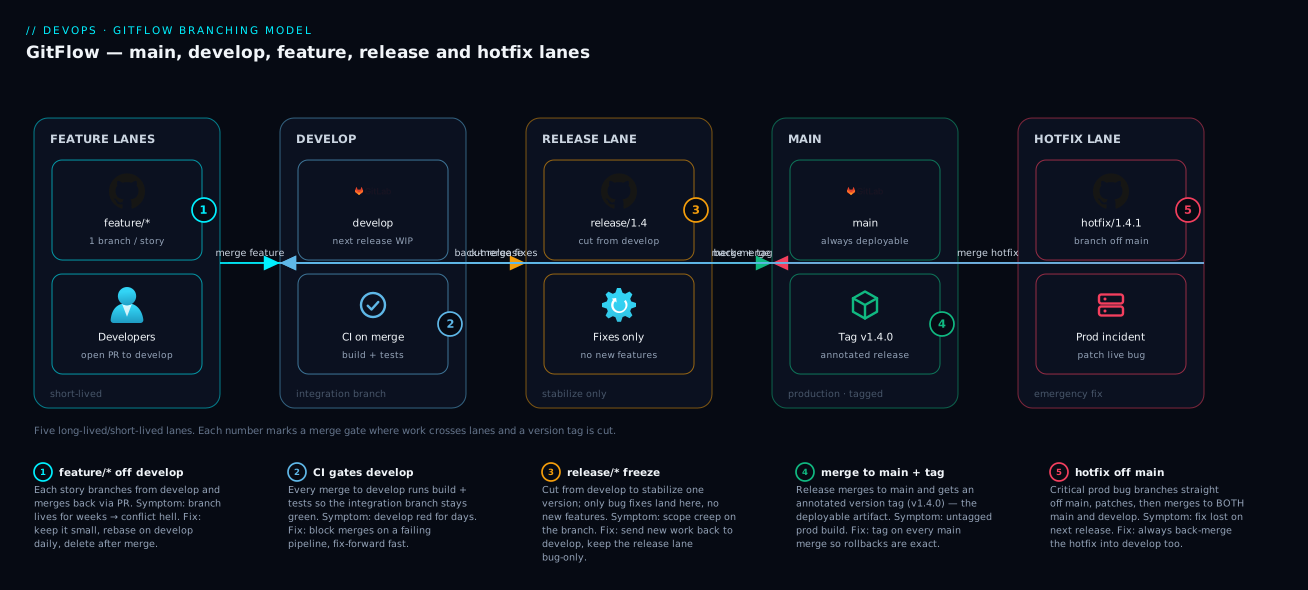
GitFlow (Vincent Driessen’s 2010 model) is the heavyweight, ceremony-rich strategy built for scheduled, versioned releases. It defines five branch types with strict rules:
| Branch | Lives | Branches from | Merges into | Purpose |
|---|---|---|---|---|
main (master) |
Forever | — | — | Production history; every commit is a tagged release |
develop |
Forever | main (once) |
— | Integration branch; the “next release” accumulates here |
feature/* |
Days–weeks | develop |
develop |
One feature in progress |
release/* |
Days | develop |
main and develop |
Stabilise a release; bump version, fix last bugs |
hotfix/* |
Hours | main |
main and develop |
Emergency fix to production |
The flow: features grow on feature/* and merge into develop. When develop has enough for a release, you cut a release/* branch — feature work continues on develop while the release branch gets only stabilisation commits (bug fixes, version bump, changelog). When stable, the release branch merges into main (which you tag with the version) and back into develop (so the fixes aren’t lost). Emergencies skip develop entirely: a hotfix/* branches off main, fixes the bug, and merges into both main (tagged as a patch) and develop.
GitFlow’s strength is exactly its complexity: it gives you a clean place for parallel work — the next release stabilises while new features keep flowing, and production can be patched without disturbing either. Its weakness is also that complexity: four-plus long-lived branches, frequent merges in two directions, and slower integration (features sit on develop until a release cycle). For a team that deploys continuously, GitFlow is friction with no payoff. The model’s own author later noted it was designed for versioned software with explicit releases, not for web apps that ship constantly.
# GitFlow without the helper tooling, using plain git.
# Start a feature off develop:
git switch develop && git pull --ff-only
git switch -c feature/saml-sso
# ... work, commit ...
git switch develop && git merge --no-ff feature/saml-sso   # keep the feature's shape

# Cut a release:
git switch -c release/1.4.0 develop
# bump version, fix last bugs, commit
git switch main && git merge --no-ff release/1.4.0
git tag -a v1.4.0 -m "Release 1.4.0"
git switch develop && git merge --no-ff release/1.4.0      # carry fixes back
git branch -d release/1.4.0
(There is a git flow command-line extension that scripts these moves, but it is just a wrapper around the plain commands above.)
Plain feature branches (and why they’re a trap)
The feature-branch pattern — “every piece of work gets its own branch off main, merge it back when done” — is the default mental model most people start with, and it underpins all three strategies above. There is nothing wrong with branches per feature; the trap is the unstated lifespan. Left ungoverned, feature branches quietly become long-lived, and you slide into the integration-paralysis failure mode from the opening story.
The fix is not to abandon feature branches but to put a clock on them. Treat any branch older than a day or two as a smell. Keep features small enough to finish quickly; if a feature is genuinely large, decompose it behind a feature flag and merge the pieces as they’re ready. “Feature branches, kept short” is really just GitHub Flow or trunk-based development by another name — and that is the point.
| Feature-branch trait | Healthy | Unhealthy (the trap) |
|---|---|---|
| Lifespan | Hours to ~2 days | Weeks |
| Size | One small slice | A whole epic |
Rebased/updated against main |
Daily | Never |
| Unfinished work | Hidden behind a flag | Blocking the merge |
| Merge experience | Clean, fast | Multi-hour conflict marathon |
Merge vs rebase vs squash
Once a branch is ready, you choose how it joins the target. The three options produce the same code but very different history. This choice trips up more beginners than any other in Git, so go slowly.
Merge (a true merge commit). git merge --no-ff feature creates a new merge commit with two parents — the tip of the target and the tip of your branch — stitching both histories together. History becomes a graph: you can see exactly which commits belonged to the feature and when it landed. Nothing is rewritten, so it is the safest option and the right default for shared/public branches. The downside is a busier, non-linear log full of merge commits.
Rebase. git rebase main (run on your feature branch) takes your branch’s commits, removes them temporarily, fast-forwards your branch to the latest main, then replays your commits on top one by one. The result is a clean, linear history as if you had started your work from the current main. The catch: replaying creates new commits with new hashes — it rewrites history. That is fine on a private branch nobody else has pulled, but never rebase a branch other people are working on, because you rewrite commits out from under them.
Squash. “Squash and merge” (a host feature, or git merge --squash) collapses all of a branch’s commits into a single new commit on the target. You get the cleanest possible main history — one tidy commit per feature — at the cost of losing the per-commit detail of how the feature was built. Most SaaS teams love this: the messy “wip”, “fix typo”, “actually fix it” commits on the branch vanish, and main reads as one logical change per feature.
| Method | Command | Resulting history | Rewrites hashes? | Safe on shared branch? | Best for |
|---|---|---|---|---|---|
| Merge (no-ff) | git merge --no-ff feature |
Non-linear; merge commits preserve branch shape | No | Yes | Auditable history; GitFlow; release branches |
| Fast-forward merge | git merge feature (when no divergence) |
Linear; no merge commit | No | Yes | Trivial updates with zero divergence |
| Rebase then FF | git rebase main then merge |
Linear; looks like serial work | Yes (your branch) | No (only private branches) | Clean linear history before opening/landing a PR |
| Squash merge | “Squash and merge” / git merge --squash |
Linear; one commit per feature | Yes (collapses) | Yes (target unaffected) | Tidy main; hiding messy WIP commits |
A practical, widely used recipe that gets the best of both: rebase your private feature branch on the latest main before opening the PR (to resolve conflicts on your side and keep things current), then squash-merge the PR (for a clean main). You keep main linear and readable, and you never rewrite anyone else’s work.
# Keep a private feature branch current without a merge commit:
git switch feature/cart-totals
git fetch origin
git rebase origin/main          # replay your commits on the latest main
# If conflicts: fix files, then:
git add <fixed-files>
git rebase --continue           # or 'git rebase --abort' to bail out safely
git push --force-with-lease     # safe force: refuses if someone else pushed
The golden rule of rebasing: only rebase commits that exist only on your machine (or a branch only you use). Once you have shared a branch and others may have based work on it, switch to merging. The --force-with-lease flag is the safer cousin of --force: it refuses to overwrite the remote if it changed since you last fetched, protecting you from clobbering a teammate’s push.
Branch protection and policies
A strategy is only as strong as what the host enforces. Branch protection rules (GitHub) or branch policies (Azure Repos / GitLab “protected branches”) turn “we agree main is sacred” into a rule the server upholds. Without them, the agreement is aspirational; with them, a direct push to main is simply rejected.
The core protections you’ll set on main:
| Protection | What it does | Typical setting | Why |
|---|---|---|---|
| Require a pull request | No direct pushes; all changes via PR | On | Forces review + CI gate |
| Required approvals | N reviewers must approve | 1–2 | Catch bugs; share knowledge |
| Dismiss stale approvals | Re-approve after new commits | On | Approval reflects final code |
| Require status checks | Named CI jobs must pass | build + test (+ lint, scan) | main stays green |
| Require branches up to date | PR must be rebased/merged with main first |
On (or auto via merge queue) | Avoid “passed in isolation, broke on merge” |
| Require linear history | No merge commits (squash/rebase only) | Optional | Keep main log flat |
| Require signed commits | Commits must be GPG/SSH-signed | Optional (regulated orgs) | Provenance/integrity |
| Include administrators | Rules apply to admins too | On | No silent bypass |
| Restrict who can push | Only specific teams/apps | As needed | Limit release-branch writers |
| Require conversation resolution | All review threads resolved | On | Nothing slips through review |
On GitHub you set these in Settings → Branches → Branch protection rules (or the newer Rulesets), or as code with the API/Terraform. On Azure Repos it’s Project Settings → Repositories → Policies per branch. A small but high-value addition is a merge queue (GitHub) or batch/serialised merge: it tests each PR against the current main just before merging, so two PRs that each pass alone but conflict in combination can’t both land and break the build.
# Create a GitHub branch-protection rule with the gh CLI (illustrative).
gh api -X PUT repos/:owner/:repo/branches/main/protection \
  -F required_pull_request_reviews.required_approving_review_count=1 \
  -F required_status_checks.strict=true \
  -F 'required_status_checks.contexts[]=build' \
  -F 'required_status_checks.contexts[]=test' \
  -F enforce_admins=true \
  -F required_linear_history=true \
  -F restrictions=null
A useful companion is a CODEOWNERS file: it auto-requests (and can require) review from the owning team when a PR touches certain paths — invaluable in a monorepo where one repo holds many teams’ code.
Releases, tags and versioning
A branch says “work in progress”; a tag says “this exact commit is version X.” Tags are how you mark releases, and they behave differently from branches: a branch moves as you commit; a tag is fixed to one commit forever (unless you force-move it, which you should not). Always prefer annotated tags (-a) over lightweight ones — annotated tags are real objects carrying a tagger, date and message, and they’re what git describe and release tooling expect.
Semantic Versioning (SemVer) is the near-universal convention: MAJOR.MINOR.PATCH (e.g. 2.4.1). Bump MAJOR for breaking changes, MINOR for backward-compatible features, PATCH for backward-compatible bug fixes. Pre-releases append a suffix (2.4.0-rc.1, 2.4.0-beta). This makes a version mean something to consumers: a patch is safe to take blindly, a major requires reading the changelog.
| Change type | SemVer bump | Example | Consumer impact |
|---|---|---|---|
| Breaking API change | MAJOR | 2.4.1 → 3.0.0 |
May require code changes |
| New backward-compatible feature | MINOR | 2.4.1 → 2.5.0 |
Safe to adopt |
| Backward-compatible bug fix | PATCH | 2.4.1 → 2.4.2 |
Safe; should “just work” |
| Pre-release / candidate | suffix | 3.0.0-rc.1 |
Testing only, not stable |
| Build metadata | +meta |
2.5.0+build.42 |
Ignored for precedence |
How tagging maps onto each strategy:
| Strategy | Where you tag | When |
|---|---|---|
| Trunk-based | A commit on main (often via a short release/* cut from it) |
At each release / deploy you want to mark |
| GitHub Flow | The merge commit on main you deployed |
On deploy, if you version at all |
| GitFlow | The merge into main from release/* or hotfix/* |
Every release and every hotfix |
# Tag a release on the current commit, annotated, then push the tag.
git switch main && git pull --ff-only
git tag -a v1.4.0 -m "Release 1.4.0: SAML SSO, rate limiting"
git push origin v1.4.0          # tags are NOT pushed by 'git push' alone

git describe --tags             # e.g. v1.4.0-3-g9f2c1ab  (3 commits past v1.4.0)
git tag -l 'v1.4.*'             # list patch releases of 1.4
Two beginner gotchas. First, git push does not push tags — you must push them explicitly (git push origin <tag> or git push --tags). Second, don’t move a published tag: other people and pipelines may already reference v1.4.0; if it must change, cut v1.4.1 instead. For automation, release-please, semantic-release or GitVersion can compute the next version and create the tag from your commit messages (which is why Conventional Commits like feat:/fix: are popular — they map straight onto SemVer bumps).
Hotfixes: patching production without breaking flow
The hotfix is where branching strategies earn their keep. A bug is live in production; you must fix it now, without shipping the half-finished features sitting in your integration branch. Each model has a defined path, and the universal danger is the orphaned fix — patching production but forgetting to carry the fix back into your mainline, so the next release silently reintroduces the bug you just fixed.
| Strategy | Hotfix path | Risk to guard against |
|---|---|---|
| Trunk-based / GitHub Flow | Short branch off main → fix → PR → merge → deploy main; tag patch |
Low (one line); just don’t bypass review under pressure |
| GitFlow | hotfix/* off main → fix → merge to main (tag) and develop |
Forgetting the merge back into develop |
| Released-version maintenance | Fix on the release tag/branch (release/2.3), then forward-port to main |
Forgetting to forward-port; fixing only the old line |
In GitFlow the rule is mechanical: a hotfix merges into two places. If you support older versions in production (customers on 2.3 while you ship 3.1), you fix on the 2.3 maintenance line and then cherry-pick or forward-port the same fix onto main so 3.x also gets it.
# GitFlow hotfix: fix prod, tag a patch, carry the fix forward.
git switch main && git pull --ff-only
git switch -c hotfix/1.4.1-null-deref
# ... fix the bug, add a regression test, commit ...
git switch main && git merge --no-ff hotfix/1.4.1-null-deref
git tag -a v1.4.1 -m "Hotfix 1.4.1: null deref in checkout"
git push origin main v1.4.1
git switch develop && git merge --no-ff hotfix/1.4.1-null-deref   # don't orphan it
git branch -d hotfix/1.4.1-null-deref

# Cherry-pick one commit onto an older maintenance branch:
git switch release/2.3
git cherry-pick <commit-sha>     # copies just that fix; new hash, same change
Monorepo notes
A monorepo holds many projects/services in one repository. The branching strategy (trunk-based, GitFlow, etc.) is unchanged, but a few realities shift. Because everyone shares one main, you must avoid per-team long-lived branches at all costs — they’d diverge across the entire codebase. Monorepos therefore push you strongly toward trunk-based development, and Google’s famously enormous monorepo is the canonical example.
What changes in practice:
| Concern | Polyrepo (one repo per project) | Monorepo (many projects, one repo) |
|---|---|---|
main health |
Per repo | Shared by everyone — must stay green |
| Branch lifespan | Per team’s habit | Must be short; long branches diverge everywhere |
| Versioning | One version per repo via tags | Often per-package tags (pkg-a/v1.2.0) or a release tool |
| Ownership in review | Whole repo | Path-scoped via CODEOWNERS |
| CI cost per push | Build that project | Build only affected projects (Nx/Bazel/Turborepo) |
| Atomic cross-project change | Hard (multiple PRs) | Easy (one PR spans projects) |
The headline trade-off: a monorepo makes a sweeping change across many services atomic (one PR, one merge, everything consistent) — a real superpower — but it raises the stakes on main staying green and pushes hard toward short branches and path-scoped ownership. For tagging, teams either tag per-package (service-billing/v2.1.0) or let a release tool manage independent versions.
Architecture at a glance
Picture two contrasting pictures of how code reaches production. The first is the GitFlow world: a permanent main carrying tagged releases, a permanent develop where the next version accumulates, transient feature/* branches sprouting from and folding back into develop, a release/* branch peeling off develop to stabilise and then merging into both main (tagged) and back to develop, and hotfix/* branches shooting straight off main to patch production and likewise merging back in two directions. Follow the arrows and you can see why GitFlow is powerful but busy — code travels several hops, and merges happen in both directions to keep the lines in sync.
The second picture is trunk-based development, and it is deliberately almost boring by comparison: a single main line, very short feature branches that touch down and merge within a day, and — the key element — feature flags wrapping any code that isn’t ready, so unfinished work ships into main and onward to production but stays dark until you flip the switch. Releases are simply points on main you choose to deploy and tag. The diagram below traces a developer cutting a short branch, merging back into the trunk behind a flag, the trunk flowing continuously to production, and the flag later being flipped to release the feature to users — deployment and release as two separate moments.
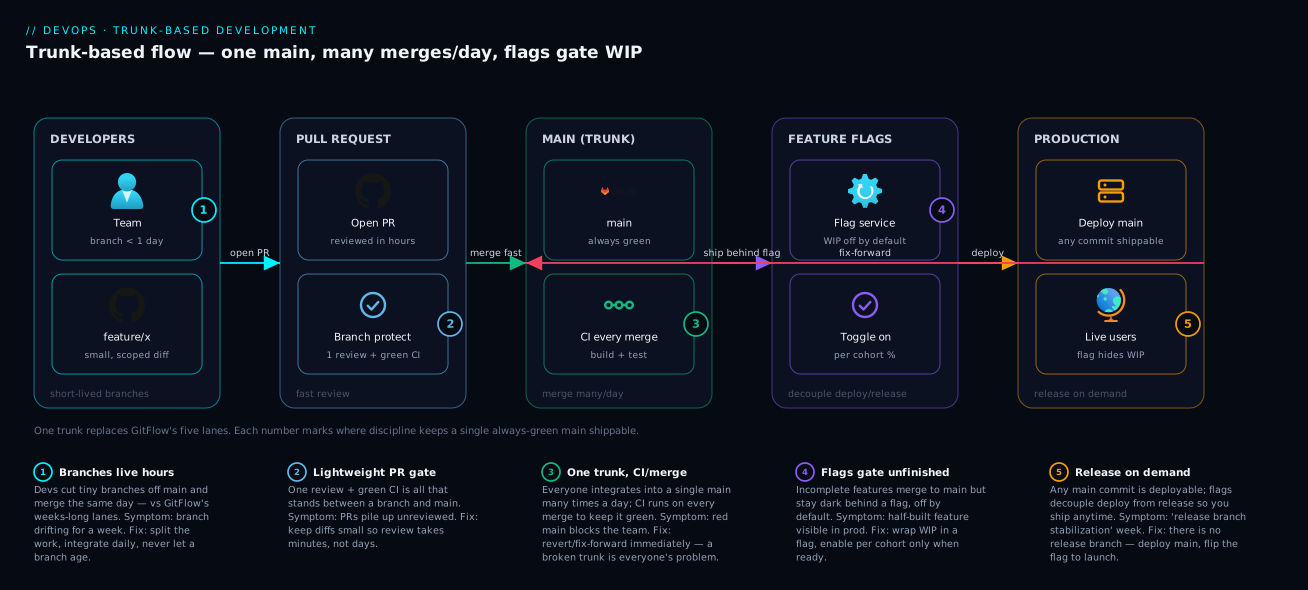
Read together, the two diagrams are the decision: many coordinated branches for scheduled, multi-version releases, versus one trunk plus flags for continuous delivery. Everything else in this article is detail hanging off that contrast.
Real-world scenario
Acme Retail runs an e-commerce platform: a React storefront, a checkout API, and a billing service, with about 22 engineers split across three squads. They began on ad-hoc feature branches. By their own measurement, the median feature branch lived 18 days, main received roughly 40 merges a week, and each merge of a stale branch took an average of 90 minutes of conflict resolution. Their quarterly release required a release branch frozen for three days of manual stabilisation, and twice that year a hotfix shipped to production was forgotten on develop, so the bug returned in the next release — a textbook orphaned fix.
The platform team ran a four-week migration. First they enforced branch protection on main: PR required, one approval, build + test status checks mandatory, linear history on, and a CODEOWNERS file routing the storefront/checkout/billing paths to the owning squads. Second, they capped branch age — any PR open longer than two days got flagged in standup — and split large features behind feature flags from the Progressive Delivery and Feature Flags toolkit so a partially built “new checkout” could merge dark. Third, they moved to GitHub Flow with squash-merge: branch off main, rebase on main before opening the PR, squash-merge when green, and let the merge to main trigger a deploy.
The results over the next quarter were concrete. Median branch lifespan dropped from 18 days to under 1 day. Conflict-resolution time per merge fell from 90 minutes to under 10, because branches no longer drifted. The three-day release freeze disappeared — every merge to main was already releasable, so they deployed on demand and tagged the commit they shipped. Deployment frequency rose from quarterly to roughly daily, and lead time for changes (a DORA metric) collapsed from weeks to hours. The two-orphaned-hotfixes problem vanished outright: with a single main, there is no second branch to forget. The billing squad, which genuinely needed to support two released versions for enterprise customers, kept a single long-lived release/3.x maintenance branch and forward-ported fixes to main with cherry-pick — a small, deliberate exception rather than the default.
The lesson Acme took away: they never needed a fancier tool. They needed to kill divergence — short branches, flags for unfinished work, and a server-enforced promise that main is always green.
Advantages and disadvantages
| Advantages | Disadvantages | |
|---|---|---|
| Trunk-based | Tiny divergence; trivial merges; fastest feedback; correlates with elite delivery | Requires fast/trusted tests + feature flags + real discipline |
| GitHub Flow | Simplest to teach; PR-gated; perfect for continuous deploy | No place for multiple parallel released versions |
| GitFlow | Clean parallel work; supports versioned/multi-version releases; explicit hotfix path | Heavy ceremony; 4+ branches; slow integration; merges in two directions; overkill for web apps |
| Feature branches (ad-hoc) | Familiar, flexible, works at any size | Silently becomes long-lived → merge hell; release ambiguity |
When does each advantage actually matter? Trunk-based pays off when you deploy often and have the test coverage to trust frequent releases — its discipline cost is real but small next to the integration pain it removes. GitHub Flow wins for the majority of SaaS/web teams who deploy from main and never support old versions. GitFlow earns its complexity only when you genuinely ship versioned releases on a schedule or maintain several versions at once; outside that, the ceremony is pure tax. And ad-hoc feature branches are fine right up until a branch quietly ages past a couple of days — the moment to convert the habit into a governed short-branch model.
Hands-on lab
This walkthrough runs a realistic GitHub-Flow / trunk-based loop end to end with plain git, locally — no host account needed. You’ll create a repo, simulate divergence, rebase to keep history clean, merge, tag a release, handle a hotfix, and clean up. Every command is copy-pasteable.
1. Create a repo and a first commit.
mkdir branching-lab && cd branching-lab
git init -b main
printf "# Branching Lab\n\nv0\n" > README.md
git add README.md
git commit -m "chore: initial commit"
Expected: git log --oneline shows one commit on main.
2. Start a short-lived feature branch.
git switch -c feature/add-greeting
printf "Hello, KloudVin!\n" > greeting.txt
git add greeting.txt
git commit -m "feat: add greeting file"
3. Simulate divergence on main (a teammate landed something).
git switch main
printf "v0 — updated docs\n" >> README.md
git commit -am "docs: update README"
git switch feature/add-greeting        # back to your branch; it's now behind main
git log --oneline --graph --all now shows the two lines diverging.
4. Rebase your feature onto the updated main (keep history linear).
git rebase main
git log --oneline --graph --all
Expected: your feat: add greeting file commit now sits on top of the docs: update README commit — a straight line, no merge commit. (If the same lines had been edited on both sides you’d get a conflict; you’d fix the file, git add it, then git rebase --continue.)
5. Merge the feature into main.
git switch main
git merge feature/add-greeting          # fast-forward: no divergence after rebase
git log --oneline --graph
Expected: a clean linear history; main now contains the greeting. (To force a merge commit and preserve the branch boundary instead, you’d use git merge --no-ff feature/add-greeting.)
6. Tag a release.
git tag -a v1.0.0 -m "Release 1.0.0: greeting feature"
git tag -l
git show v1.0.0 --stat
Expected: git tag -l lists v1.0.0; git show displays your tag message and the commit it points to.
7. Handle a hotfix off the release.
git switch -c hotfix/1.0.1-typo main
printf "Hello, KloudVin! (welcome)\n" > greeting.txt
git commit -am "fix: correct greeting wording"
git switch main
git merge --no-ff hotfix/1.0.1-typo
git tag -a v1.0.1 -m "Hotfix 1.0.1: greeting wording"
Expected: git log --oneline shows the hotfix merged and v1.0.1 tagged.
8. Clean up merged branches.
git branch -d feature/add-greeting hotfix/1.0.1-typo   # safe delete (merged only)
git branch --merged main                                # confirm nothing stale remains
Expected: both branches are gone; only main remains. (git branch -d refuses to delete an unmerged branch — a safety net; -D forces it.)
9. Teardown.
cd .. && rm -rf branching-lab
You’ve now exercised the full loop — branch, diverge, rebase, merge, tag, hotfix, clean up — which is exactly what a real GitHub-Flow / trunk-based day looks like, minus the pull request the host adds.
Common mistakes & troubleshooting
| # | Symptom | Root cause | How to confirm | Fix |
|---|---|---|---|---|
| 1 | Merge takes hours; huge conflicts | Long-lived branch; massive divergence | git log --oneline main..feature | wc -l shows a big number |
Keep branches short; rebase on main daily; split work behind flags |
| 2 | “Updates were rejected” on git push |
Remote moved; your branch is behind | git status says “behind ‘origin/…’ by N commits” |
git pull --rebase then push; for a rebased private branch git push --force-with-lease |
| 3 | Rebase rewrote commits a teammate had | Rebased a shared branch | Teammate’s git pull now conflicts / duplicates commits |
Never rebase shared branches; git pull --rebase to recover; merge instead |
| 4 | The release shipped without my tag | git push doesn’t push tags |
git ls-remote --tags origin lacks the tag |
git push origin <tag> or git push --tags |
| 5 | A hotfix reappeared as a bug next release | Orphaned fix — patched main/prod but not develop |
git branch --contains <hotfix-sha> missing develop |
Merge the hotfix into develop too (GitFlow); or use a single main |
| 6 | “detached HEAD” warning | Checked out a tag/commit, not a branch | git status says “HEAD detached at …” |
git switch -c fix/from-tag to branch from here, or git switch main |
| 7 | Lost commits after a bad rebase/reset | History rewrite dropped commits | git reflog still lists the old tip |
git reset --hard <sha-from-reflog> or git branch rescue <sha> |
| 8 | PR passed CI but broke main on merge |
Tested in isolation, not against latest main |
main build red right after merge |
Require “branch up to date” / enable a merge queue |
| 9 | Accidentally committed to main locally |
Forgot to branch first | git log shows your work on main |
git switch -c feature/x (carries the commits), then reset main to origin/main |
| 10 | Can’t delete a branch: “not fully merged” | Branch has unmerged commits | git branch --no-merged lists it |
Merge it, or git branch -D to force-delete if truly unwanted |
| 11 | Wrong commits on the wrong branch | Branched from the wrong base | git log --graph shows unexpected ancestry |
git rebase --onto <new-base> <old-base> feature |
| 12 | Conflict markers (<<<<<<<) committed into a file |
Resolved a conflict but left markers / didn’t finish | git grep -n '^<<<<<<<' finds them |
Edit the file to the intended result, git add, finish the merge/rebase |
Two recovery habits that save the most pain: git reflog is your undo history — almost nothing is truly lost for ~90 days, because the reflog records every position HEAD held, and you can git reset --hard or branch back to any of them. And git status literally tells you what to do at each step of a merge/rebase (“fix conflicts and run git rebase --continue”, “or --abort”). Read it instead of guessing.
Best practices
- Put a clock on branches. Treat any branch older than ~2 days as a problem to solve, not a normal state. Short branches are the single highest-leverage habit.
- Protect
mainon the server. Require PRs, at least one review, and greenbuild+testchecks. An unenforced rule is a wish. - Decouple deploy from release with feature flags. Merge unfinished work dark; flip it on when ready. This is what makes constant integration safe.
- Pull with rebase on feature branches (
git pull --rebase) to keep history linear and avoid noisy “Merge branch ‘main’ into…” commits. - Rebase private branches, merge shared ones. Only rewrite history nobody else has; use
--force-with-lease, never bare--force. - Squash-merge PRs if you want a
mainthat reads as one logical change per feature. - Name branches consistently (
feature/,fix/,hotfix/,release/) and use Conventional Commits (feat:,fix:) so tooling can compute versions. - Tag every release with an annotated tag, push it explicitly, and never move a published tag.
- Carry hotfixes everywhere they’re needed — back to
developin GitFlow, forward-port tomainfor maintenance branches. - Delete merged branches to keep the branch list a true picture of work in flight.
- Pick the model that matches your release cadence, not the most famous one — continuous deploy → trunk-based/GitHub Flow; scheduled/multi-version → GitFlow.
- Write the strategy down in a short
CONTRIBUTING.mdso the agreement is explicit and new hires learn it in minutes.
Security notes
Branching is also a control surface. Branch protection is a security boundary, not just hygiene: requiring reviews and status checks on main means no single person can push unreviewed code to the line that ships to production, which directly counters insider risk and compromised-account risk. Apply rules to administrators too (enforce_admins) so there is no silent bypass.
Guard the supply chain at the branch:
- Require status checks that include security scans — SAST, dependency/SCA, and secret scanning — so vulnerable or secret-leaking code can’t merge to
main. This is the branching side of Pipeline Secrets Management. - Enable secret scanning + push protection so credentials are blocked at push time, not discovered after they’re in history. Remember Git history is permanent: a secret committed and “deleted” in a later commit is still in the repo — it must be rotated, and the history scrubbed (e.g.
git filter-repo). - Require signed commits (GPG/SSH) on protected branches in regulated environments to prove provenance and prevent commit spoofing.
- Use
CODEOWNERSas a required reviewer for sensitive paths (auth, crypto, CI config, IaC) so changes there always get expert eyes. - Restrict who can push to release/tag refs and protect tags too, so an attacker can’t move a release tag to malicious code.
- Scope service-account and CI tokens to least privilege — a CI bot that needs to push tags shouldn’t have admin over branch-protection settings.
Cost & sizing
Branching itself is essentially free — branches are pointers, and Git stores history compactly. The costs are indirect and mostly about people and pipeline minutes, which is where the strategy choice shows up on the bill.
| Cost driver | Where it shows up | How the strategy affects it |
|---|---|---|
| Engineer hours in merge conflicts | Salaries / lost throughput | Short branches (TBD/GitHub Flow) slash this; long branches inflate it |
| CI minutes per push/PR | Hosted-runner billing | More, smaller PRs = more runs but cheaper each; monorepos need affected-only builds to control cost |
| Release stabilisation effort | Engineer time per release | GitFlow’s release freeze costs days; trunk-based removes it |
| Hosted runner / repo plan | GitHub/Azure DevOps subscription | Branch protection + merge queues may need paid tiers for private repos |
| Storage / LFS | Repo hosting | Driven by large binaries, not by branch count |
For a small team, hosting is cheap or free: GitHub gives unlimited private repos with branch protection on the free tier (advanced rulesets and some org controls need a paid plan), and GitLab/Bitbucket are similar. Azure DevOps offers free CI minutes monthly and per-user pricing beyond a small free seat count. In INR terms, a 10–20 person team typically spends on the order of a few thousand rupees a month once you add paid CI minutes and a team plan — and the real money is the engineer time you reclaim by killing divergence. Right-sizing advice: don’t pay for GitFlow’s complexity (in tooling or human overhead) unless you actually ship versioned releases; for most teams the cheapest and fastest option is short branches on main. For monorepos, invest early in affected-only CI (Nx, Turborepo, Bazel) — otherwise every push rebuilds everything and your CI bill scales with repo size, not change size.
Interview & exam questions
Q1. What actually is a Git branch? A movable pointer (a ref file holding a single commit hash) to a commit. Branches are cheap because they’re just labels into a shared object store; the cost of branching is the divergence that accumulates, not the branch itself.
Q2. Contrast trunk-based development with GitFlow.
Trunk-based uses one branch (main) with very short-lived branches and feature flags, integrating many times a day — ideal for CI/CD and frequent deploys. GitFlow uses long-lived main + develop plus feature/release/hotfix branches for scheduled, versioned releases. TBD minimises divergence; GitFlow manages parallel release lines at the cost of ceremony.
Q3. When would you merge versus rebase?
Merge (especially --no-ff) to preserve history and on shared branches — it’s non-destructive. Rebase to keep a private branch’s history linear before landing it. The golden rule: never rebase commits others may have based work on, because rebasing rewrites commit hashes.
Q4. What does squash-merge do and why use it?
It collapses all of a branch’s commits into one commit on the target. Teams use it to keep main reading as one logical change per feature and to hide messy WIP commits — at the cost of losing per-commit granularity.
Q5. How do feature flags relate to branching?
They decouple deploy from release: code merges and deploys while hidden behind a flag, then is turned on later. This is what makes trunk-based development practical — you can integrate unfinished work into main without exposing it.
Q6. Explain semantic versioning and how it maps to commits.
MAJOR.MINOR.PATCH: breaking → MAJOR, backward-compatible feature → MINOR, backward-compatible fix → PATCH. With Conventional Commits, fix: → PATCH, feat: → MINOR, and a BREAKING CHANGE: footer → MAJOR, which lets tools auto-compute versions and tags.
Q7. How does a tag differ from a branch?
A branch moves as you commit; a tag is pinned to one commit permanently. Use annotated tags (-a) for releases. And git push doesn’t push tags — you push them explicitly.
Q8. How do you handle a hotfix in GitFlow, and what’s the classic mistake?
Branch hotfix/* off main, fix, then merge into both main (tagged as a patch) and develop. The classic mistake is the orphaned fix: merging only into main, so the next release from develop reintroduces the bug.
Q9. What is branch protection and why does it matter?
Host-enforced rules on a branch — require PRs, reviews, status checks, linear history, etc. It turns “we agree main is sacred” into a server-upheld rule, and it’s a security boundary preventing unreviewed code from reaching production.
Q10. Why do monorepos push teams toward trunk-based development?
Everyone shares one main, so a long-lived branch would diverge across the entire codebase. Short branches keep divergence small; ownership is handled per-path via CODEOWNERS, and CI builds only affected projects to control cost.
Q11. You rebased and force-pushed, and a teammate lost commits. What now?
Use git reflog (yours and theirs) to find the old tips and recover with git reset --hard/a rescue branch. Going forward, never rebase shared branches; if you must force-push your own branch, use --force-with-lease so it refuses when the remote changed.
Q12. How would you keep main green when two PRs pass alone but conflict together?
Require branches to be up to date before merge, or enable a merge queue that tests each PR against the current main just before merging — so a combination that breaks the build can’t both land.
Quick check
- True or false: creating a branch in Git copies all the files into a new folder.
- Which integration method rewrites commit hashes and must never be used on a shared branch?
- In GitFlow, a
hotfix/*branch must merge into which two branches? - What does
git push origin maindo to your tags? - What single practice most reduces merge conflicts across every branching strategy?
Answers
- False. A branch is just a pointer (a ref holding one commit hash) into the shared object database — no files are copied.
- Rebase. It replays your commits as new commits with new hashes; safe only on private branches.
main(tagged as a patch) anddevelop— so the fix isn’t orphaned and lost on the next release.- Nothing —
git pushdoes not push tags. You must push them explicitly withgit push origin <tag>orgit push --tags. - Keeping branches short-lived (merging frequently), because it minimises divergence — the actual cause of conflicts.
Glossary
- Branch — A movable pointer to a commit; the unit of parallel work. Cheap to create.
main/master— The default integration branch and usual source of truth; modern repos usemain.develop— In GitFlow, the long-lived branch where the next release accumulates before stabilisation.HEAD— Pointer to the commit/branch you currently have checked out.- Divergence — The commits unique to each side of two branches; what a merge/rebase reconciles. The real cost of branching.
- Merge commit — A commit with two parents that joins two histories; preserves branch shape (non-linear).
- Fast-forward — Advancing a branch pointer with no merge commit, possible only when there’s no divergence.
- Rebase — Replaying your commits onto a new base to keep history linear; rewrites commit hashes.
- Squash — Collapsing a branch’s commits into a single commit on the target.
- Cherry-pick — Copying a single commit onto another branch (how fixes are back/forward-ported).
- Tag — A fixed label on a specific commit, used to mark a release; prefer annotated tags (
-a). - Semantic Versioning (SemVer) —
MAJOR.MINOR.PATCHversioning where the number encodes compatibility. - Feature flag — A runtime switch that hides or shows a feature, decoupling deploy from release.
- Branch protection / policy — Host-enforced rules guarding a branch (required reviews, status checks, linear history).
CODEOWNERS— A file mapping repo paths to owning reviewers, auto-requested (or required) on matching PRs.- Merge queue — A host mechanism that tests each PR against the current
mainjust before merging to keep it green. - Trunk-based development — A single trunk (
main) with very short branches and feature flags; constant integration. - GitHub Flow — Lightweight workflow: branch off
main, PR, merge, deploy; one long-lived branch. - GitFlow — Heavyweight model with
main+develop+feature/release/hotfixfor scheduled, versioned releases. - Monorepo — One repository holding many projects/services; favours trunk-based development.
Next steps
- CI/CD Pipelines Explained: From Commit to Production — how your branching model triggers builds, tests and deploys.
- Deployment Strategies: Blue-Green, Canary and Rolling — how the code that leaves
mainactually rolls out to users. - Progressive Delivery and Feature Flags — the flag tooling that makes trunk-based development safe.
- DORA Metrics for Platform Engineering — how branch lifespan and integration frequency move deployment frequency and lead time.
- GitOps with Argo CD and Flux — when the Git branch/tag is the deploy trigger and the source of truth for environments.