Two failures cost a platform team most of its credibility. The first is drift: forty application pipelines that each hand-rolled their own dotnet build, their own Veracode invocation, their own slot-swap dance — so when a vulnerability disclosure says “every build must add a software composition scan by Friday,” the answer is “we have to edit forty repos, and twelve of them have subtly different YAML, and three are owned by people who left.” The second is supply-chain blindness: a developer types npm install left-pad and the package comes from the public registry, unscanned, unpinned, un-mirrored — and nobody can answer “where did this binary in production actually come from?” Both failures share one root cause: there is no single way to build, and no single trusted source of dependencies. This article is about building those two things on Azure DevOps, the way a real platform team does it for an enterprise with one Azure DevOps organisation, many projects, and a shared agent fleet.
The fix is two coupled pieces of platform plumbing. First, a centralized YAML template library living in its own pipeline-templates project: extends templates that wrap an entire pipeline in a governance shell, plus stage / job / step templates for the reusable building blocks (restore, build, scan, test, publish, deploy), all parameterised with typed parameters and template expressions so one library serves a web app, a function app, an Android build and a Liquibase changelog without forking. A pipeline in any application project references that library through a repository resource, and the organisation enforces it with a required-template check so a pipeline literally cannot run unless it extends the approved template. Second, Azure Artifacts feeds — one feed per ecosystem (Maven, NuGet, npm, Python) in a dedicated packages project, with upstream sources that proxy the public registries, retention policies, and the part that actually buys you supply-chain trust: feed enforcement that forces every restore through the internal feed and blocks the public registries outright, so nothing enters a build that the feed didn’t see and didn’t cache.
By the end you will be able to design and operate both. You will know when to reach for extends versus a plain template: include, how ${{ }} compile-time expressions differ from $[ ] runtime expressions and why that distinction decides whether your governance can be bypassed, how to wire a repository resource with OIDC workload-identity service connections so no human PAT is anywhere in the pipeline, how to stand up a feed with upstreams and lock builds to it with .npmrc / nuget.config / Maven settings.xml / pip.conf, and how to prove — at audit time — that every dependency in a production artifact passed through your trusted source. This is the connective tissue of the six-part enterprise CI/CD series: the CI/CD pipeline mental model and artifact registry management are upstream of it; the deployment and progressive-delivery pieces are downstream.
What problem this solves
Picture the enterprise this series is built around. One Azure DevOps organisation. Inside it, separate projects by responsibility: an IaC project holding Terraform modules (one Git repo per module — main.tf, variables.tf, outputs.tf, locals.tf, .tpl templates); a pipeline-templates project holding the centralized reusable YAML; a packages project hosting the Azure Artifacts feeds; and many application projects — web apps, function apps, mobile apps — that consume the modules, the templates and the feeds. A centralized self-hosted agent fleet on an Azure VM Scale Set sits in the hub network, shared across every project, elastic and ephemeral. The deploy target is a CAF landing zone: a management-group hierarchy (Tenant Root → org → Landing Zone → Corporate → Corp Non-Production / Corp Production), a Key Vault per scope, hub-spoke networking with Private Endpoints to PaaS.
Without a template library, every one of those application projects writes its own pipeline from scratch. The web team’s azure-pipelines.yml and the function-app team’s are 80% identical and 20% subtly, dangerously different. A security control — “run Veracode SCA before publish,” “restore only from the internal feed,” “gate production on two lead approvals” — has to be re-implemented, correctly, in every repo, and re-verified every time someone edits their pipeline. The half-life of a copy-pasted pipeline is about six weeks before it diverges. When the org needs to change how everyone builds (new scanner, new compliance gate, new agent pool name), it becomes a forty-pull-request migration with no guarantee of completeness. Drift is the tax you pay for decentralised pipeline authoring.
Without feed enforcement, every build reaches out to the public internet for its dependencies. npm hits registry.npmjs.org, pip hits PyPI, dotnet restore hits api.nuget.org, Maven hits Maven Central. Each of those is a supply-chain entry point you do not control: a typosquatted package name, a compromised maintainer account, a dependency-confusion attack where an attacker publishes a public package with the same name as your private one and a higher version number, and your build happily pulls the attacker’s code. You also cannot answer the auditor’s question — “enumerate every third-party binary in this release and where it came from” — because the answer is “the internet, at build time, unrecorded.” And you have no resilience: the day npmjs.org has an outage, every build in the org fails. A trusted internal feed with upstream caching and public-registry blocking turns ‘the internet’ into ‘one source we mirror, scan, retain and can reason about.’
Who hits this: every platform/DevEx team standardising CI/CD across more than a handful of teams. It bites hardest in regulated enterprises (finance, healthcare, government) where “prove the provenance of every dependency” and “prove every pipeline ran the mandatory controls” are audit findings, not nice-to-haves. The two halves reinforce each other: the template library is where you enforce the feed (the restore step in the shared template points at the internal feed and nothing else), and the required-template check is what makes that enforcement non-optional.
To frame the whole field before the deep dive, here are the two problems, what breaks without each, and the Azure DevOps primitive that solves it:
| Problem | What breaks without it | Who hits it | The Azure DevOps primitive | Enforced by |
|---|---|---|---|---|
| Pipeline drift | 40 divergent pipelines; a control change = 40 PRs | Any team standardising CI/CD at scale | Centralized YAML templates (extends + step/job/stage) |
Required-template check on environments/service connections |
| Cross-project reuse | Copy-paste templates into every repo; no single source | Multi-project orgs | repository resource referencing the templates repo |
Repo permissions + repositories resource lock |
| Supply-chain entry points | Builds pull unvetted public packages directly | Everyone running npm/pip/nuget/maven |
Azure Artifacts feed + upstream sources | Feed enforcement: lock config + block public registries |
| Dependency confusion | Attacker’s public package shadows your private one | Anyone with internal + public packages of similar names | Internal feed as the only source; upstreams behind it | Config files (.npmrc/nuget.config/settings.xml/pip.conf) + agent network policy |
| Provenance / audit | “Where did this binary come from?” = unanswerable | Regulated enterprises | Feed as the single recorded source; retention | Retention + the feed’s package-origin metadata |
| PAT sprawl | Long-lived tokens in pipelines; rotation nightmare | Every pipeline touching Azure / feeds | OIDC workload-identity service connections | Workload-identity federation; no stored secret |
Learning objectives
By the end of this article you can:
- Decide when to use an
extendstemplate (whole-pipeline governance shell) versus atemplate:step/job/stage include, and explain whyextendsis the one that makes controls non-bypassable. - Author a reusable template library with typed
parameters(includingobjectandstepListtypes), template expressions (${{ if }},${{ each }},${{ parameters.x }}), and conditional insertion — so one library serves web apps, function apps, mobile and database pipelines. - Reference the centralized templates repo from any application project with a
repositoryresource (type: git,ref, and the@<alias>syntax), and pin it to a tag for reproducibility. - Lock the org down with a required-template check on protected resources (environments, service connections, agent pools) so a pipeline cannot run unless it extends the approved template.
- Stand up Azure Artifacts feeds for Maven, NuGet, npm and Python — feed + view + upstream source — and set sensible retention policies.
- Implement feed enforcement: generate the correct
.npmrc/nuget.config/ Mavensettings.xml/pip.confin the shared template, force restores through the internal feed, and block the public registries so dependency confusion and unvetted pulls are impossible. - Authenticate everything PAT-lessly with OIDC / workload-identity service connections, the
AzureCLI@2andnpmAuthenticate@0/NuGetAuthenticate@1tasks, and explain the token-exchange flow. - Operate the system: version the templates with semantic tags, run a fan-out migration, and troubleshoot the dozen ways templates and feeds fail in production.
Prerequisites & where this fits
You should already understand Azure Pipelines YAML basics: a pipeline has stages → jobs → steps, runs on an agent pool (here, a self-hosted VM Scale Set pool), uses variables and variable groups, and connects to Azure through a service connection. You should know what a PR pipeline versus a CI pipeline versus a CD pipeline does at a high level, what an Azure Artifacts feed is conceptually (a package host), and the four package ecosystems (Maven for Java, NuGet for .NET, npm for Node, Python/PyPI). Familiarity with one package manager’s config file (.npmrc, nuget.config, Maven settings.xml, pip.conf) helps a lot.
This sits at the platform-engineering / CI/CD-foundations layer — the layer every application pipeline stands on. It assumes the conceptual grounding from the CI/CD pipeline explained and artifact registry management deep-dives, and it pairs with pipeline secrets management (the templates pull secrets from Key Vault) and Git branching strategies (the templates fire on the GitFlow branch model: feature/* → development → release/* → main, plus hotfix/*, with semantic version tags). It is upstream of the deployment-strategy and progressive-delivery pieces — those describe what the CD stages do; this describes the template every CD stage is built from. On the IaC side, the same versioning discipline appears in Terraform module design, composition & versioning.
A quick map of which project owns what, and which primitive lives where, so you call the right team during an incident:
| Azure DevOps project | What it holds | One repo per… | Owns these primitives | Consumed by |
|---|---|---|---|---|
| IaC project | Terraform modules | one Git repo per module | module source + version tags; remote state config | Root configs in app projects; Non-Prod/Prod apply pipelines |
| Pipeline-templates project | Centralized reusable YAML | one repo (or a few) for all templates | extends, stage/job/step templates; the contract |
Every application pipeline (via repository resource) |
| Packages project | Azure Artifacts feeds | feeds, not repos | feeds, views, upstreams, retention, feed permissions | Every CI build (restore) and publish step |
| Application projects (web/func/mobile) | App source + thin azure-pipelines.yml |
one repo per app | only the call to the template + app params | The shared agent fleet runs them |
| Hub network (shared infra) | Agent VM Scale Set pool | — | the elastic agents, their egress policy | All projects’ pipelines schedule here |
Core concepts
Six mental models make every later decision obvious.
A template is compile-time text substitution, not a runtime call. When a pipeline references a template, Azure DevOps expands it at queue time — before any job runs — into one flat YAML document. ${{ }} template expressions are evaluated then, during expansion, on the server. $[ ] runtime expressions and $(var) macros are evaluated later, on the agent, when the step runs. This single distinction governs everything: a control written with ${{ }} is baked into the compiled pipeline and cannot be skipped by runtime variable trickery; a control gated on a $[ ] runtime variable can be. Governance lives at compile time.
extends is a contract; template: is a building block. A template: reference includes a chunk of steps/jobs/stages into a pipeline you still control. An extends reference inverts control: the application pipeline says “I extend this template, and here are my parameters” — and the template decides the entire shape of the pipeline, only letting the app fill in pre-defined holes (often a stepList parameter the template wraps in scanning and gates). With extends, the platform team owns the skeleton; the app team owns the muscle. That is what makes a required-template check meaningful: it asserts “this pipeline extends our template,” and our template is the one that runs the mandatory Veracode scan and points the restore at the internal feed.
The repository resource makes another project’s templates referenceable. Templates in the same repo are referenced by path (template: steps/build.yml). Templates in another repo — like the central templates project — need a repository resource: you declare resources.repositories with a repository: templates, type: git, name: <project>/<repo>, and a ref (branch or tag). Then you reference templates as template: build.yml@templates. The @templates alias is the whole trick for cross-project reuse, and pinning ref to a tag (refs/tags/v3.2.0) makes builds reproducible: a moving main ref means a template change silently alters every pipeline mid-flight.
A feed is a package host with upstream proxies. An Azure Artifacts feed stores packages (the ones you publish) and proxies the public registries through upstream sources. When a build asks the feed for lodash@4.17.21, the feed checks its cache; on a miss it fetches from the npmjs.org upstream, saves a copy, and serves it. From then on the package exists in your feed forever (subject to retention), independent of npmjs.org. A view (@local, @prerelease, @release) is a filtered slice of a feed you can promote packages into — production consumers point at @release, so a package only reaches prod after you promote it.
Feed enforcement is config + network, working together. Pointing a build at the feed is necessary but not sufficient: a developer can add a second registry line, or the agent can reach the public internet directly. Enforcement is two layers. Config layer: the shared template generates the package-manager config (.npmrc, nuget.config, settings.xml, pip.conf) so the only source is the feed, and (critically) does not leave the public registry configured as a fallback — the feed’s upstream is the only path to public packages. Network layer: the agent fleet’s egress is restricted so it cannot reach registry.npmjs.org / pypi.org / api.nuget.org directly at all; the only route to a public package is through the feed. Config without network is bypassable; network without config breaks legitimate restores. You need both.
PAT-less means workload-identity federation. A Personal Access Token is a long-lived bearer secret — if it leaks, it is valid until it expires or is revoked, and rotating it across N pipelines is painful. Workload-identity federation (OIDC) replaces it: the service connection trusts Azure AD, and at runtime the pipeline gets a short-lived token by exchanging an OIDC ID-token (proving “I am this pipeline in this org”) for an Azure AD access token. No secret is stored anywhere. The same principle covers feed auth: the npmAuthenticate / NuGetAuthenticate / pip / Maven tasks mint a short-lived feed token from the build’s identity, so there is no PAT in any .npmrc either.
The vocabulary in one table
Pin down every moving part before the deep sections. The glossary repeats these for lookup; this is the mental model side by side:
| Concept | One-line definition | Where it lives | Why it matters |
|---|---|---|---|
extends template |
A template that owns the whole pipeline shape | Templates repo | Makes controls non-bypassable; the governance shell |
template: include |
A reusable chunk of steps/jobs/stages | Templates repo | The building blocks (restore, build, scan, deploy) |
parameters |
Typed inputs evaluated at compile time | Top of a template | Type-safe reuse; object/stepList/boolean etc. |
Template expression ${{ }} |
Compile-time evaluation (server, at expansion) | Anywhere in YAML | Governance & conditionals that can’t be bypassed |
Runtime expression $[ ] |
Evaluated on the agent at run time | Conditions, variables | Late binding; not safe for governance |
repository resource |
Reference to another repo (e.g. templates) | resources.repositories |
Cross-project template reuse via @alias |
| Required-template check | “This pipeline must extend template X” | On a protected resource | Forces every pipeline through the shared template |
| Feed | A package host (per ecosystem) | Packages project | The single trusted dependency source |
| Upstream source | A proxied public registry behind the feed | On the feed | Caches public packages; the only route to them |
| View | A filtered, promotable slice of a feed | On the feed | @release gates what prod can consume |
| Retention policy | Rule that prunes old/unused package versions | On the feed | Controls storage cost & cleans clutter |
| Feed enforcement | Force internal feed; block public registries | Template config + agent egress | Stops dependency confusion & unvetted pulls |
| Service connection (OIDC) | PAT-less identity to Azure / feeds | Project settings | Short-lived tokens; no stored secret |
stepList parameter |
A parameter whose value is a list of steps | Template parameters |
Lets the app inject build steps the shell wraps |
Templates, end to end: extends vs includes vs the four template types
Azure Pipelines has exactly four things you can templatise, plus one special relationship (extends). Get these four straight and the rest is mechanics. Here is the complete taxonomy — what each can contain, where it plugs in, and when to reach for it:
| Template type | What it contains | Referenced as | Plugs in at | Use it for |
|---|---|---|---|---|
| Step template | One or more steps: |
- template: steps/x.yml@templates under steps: |
Inside a job | A reusable action: restore, scan, publish, swap |
| Job template | One or more jobs: |
- template: jobs/x.yml@templates under jobs: |
Inside a stage | A reusable unit of work on one agent |
| Stage template | One or more stages: |
- template: stages/x.yml@templates under stages: |
At pipeline root | A reusable promotion stage (Dev, SIT, …) |
| Variable template | A variables: block |
- template: vars/x.yml@templates under variables: |
Anywhere variables go | Shared variable sets (feed URLs, pool names) |
extends (special) |
The whole pipeline (stages/jobs/steps) |
extends: { template: x.yml@templates } |
Replaces the pipeline body | The governance shell — the most important one |
And the decision that trips people up — extends versus a plain template: include. They are not interchangeable; the difference is who owns the pipeline’s shape:
| Question | extends template |
template: include |
|---|---|---|
| Who owns the pipeline skeleton? | The template (platform team) | The app pipeline (app team) |
| Can the app team skip the wrapped controls? | No — the template wraps everything | Yes — they choose where/whether to include |
| What does the app provide? | Parameters only (often a stepList) |
Whatever they want; the include is one piece |
| Enforceable by a required-template check? | Yes (the check asserts extends) |
No (an include is not detectable as mandatory) |
| Typical use | Org-wide CI/CD governance shell | Shared building blocks within a pipeline |
| Compile-time guarantee | Template’s structure is the pipeline | Only the included chunk is guaranteed |
The shape of the extends template (the governance shell)
The whole strategy rests on one file in the templates repo: an extends template that defines the entire CI pipeline shape and exposes a small, typed surface for the app team. The app’s azure-pipelines.yml becomes almost trivial — declare the templates repo, then extends the shell with parameters:
# azure-pipelines.yml  (in an APPLICATION project — web app)
# This is the ENTIRE app pipeline. The shell owns the rest.
resources:
  repositories:
    - repository: templates                 # local alias
      type: git
      name: Platform/pipeline-templates     # <project>/<repo> in the same org
      ref: refs/tags/v3.2.0                  # pin to a tag — reproducible

trigger:
  branches:
    include: [ development, release/*, main ]   # GitFlow

extends:
  template: ci/web-app.yml@templates         # the governance shell
  parameters:
    projectName: shop-web
    buildConfiguration: Release
    feed: corp-npm                           # which internal feed to enforce
    runIntegrationTests: true
    extraBuildSteps:                          # a stepList the shell wraps in scans
      - script: npm run build:css
        displayName: Build CSS
The shell itself (ci/web-app.yml) owns the order, the scans, the feed enforcement and the gates. The app cannot reorder them, cannot remove the Veracode scan, cannot repoint the restore. The app only fills the holes the shell exposes:
# ci/web-app.yml  (in the PIPELINE-TEMPLATES project)
parameters:
  - name: projectName
    type: string
  - name: buildConfiguration
    type: string
    default: Release
  - name: feed
    type: string
  - name: runIntegrationTests
    type: boolean
    default: true
  - name: extraBuildSteps          # stepList: app-supplied steps, WRAPPED by the shell
    type: stepList
    default: []

stages:
  - stage: Build
    jobs:
      - job: build
        pool: vmss-linux-shared    # the shared VM Scale Set agent pool
        steps:
          # 1. PAT-less auth to Azure + the feed (no stored secret)
          - template: steps/auth-oidc.yml@templates
          # 2. FEED ENFORCEMENT: write .npmrc that points ONLY at the internal feed
          - template: steps/feed-enforce-npm.yml@templates
            parameters: { feed: ${{ parameters.feed }} }
          # 3. Restore from the internal feed (public registries are blocked)
          - script: npm ci
            displayName: Restore (internal feed only)
          # 4. App-supplied build steps, but they run INSIDE the shell
          - ${{ each step in parameters.extraBuildSteps }}:
              - ${{ step }}
          - script: npm run build -- --configuration ${{ parameters.buildConfiguration }}
            displayName: Build
          # 5. MANDATORY Veracode SCA — the app cannot remove this
          - template: steps/veracode-sca.yml@templates
            parameters: { projectName: ${{ parameters.projectName }} }
          # 6. Tests + coverage
          - script: npm test -- --coverage
            displayName: Unit tests + coverage
          - ${{ if eq(parameters.runIntegrationTests, true) }}:
              - template: steps/integration-tests.yml@templates
          # 7. Publish the artifact
          - template: steps/publish-artifact.yml@templates
            parameters: { projectName: ${{ parameters.projectName }} }
Notice the three mechanisms doing the work: the ${{ each step in parameters.extraBuildSteps }} loop injects the app’s steps in a position the shell chooses (so scans run after, always); the ${{ if eq(...) }} conditionally inserts the integration-test template at compile time; and the Veracode and feed-enforcement templates are unconditional — there is no parameter that turns them off. The app team gets flexibility exactly where the platform team grants it, and nowhere else.
Step templates: the reusable building blocks
Step templates are the workhorses. Each is a small, single-purpose file the shell composes. A clean step template declares its own parameters and nothing more:
# steps/veracode-sca.yml@templates  — mandatory SCA scan, reused everywhere
parameters:
  - name: projectName
    type: string
  - name: failBuildOnSeverity
    type: string
    default: 'High'        # fail the build on High/Critical findings
    values: [ 'Critical', 'High', 'Medium', 'Low' ]

steps:
  - task: Veracode@3
    displayName: 'Veracode SCA (${{ parameters.failBuildOnSeverity }}+ fails build)'
    inputs:
      ConnectionDetailsSelection: 'Service Connection'
      AnalysisService: 'veracode-sca-connection'   # OIDC/credentialed service connection
      veracodeAppProfile: ${{ parameters.projectName }}
      failBuildOnPolicyFail: true
      failBuildOnSeverity: ${{ parameters.failBuildOnSeverity }}
The matrix of step templates a real platform library ships — each one a file in steps/, each reused across web, function, mobile and database pipelines:
| Step template | Purpose | Key parameters | Reused by |
|---|---|---|---|
steps/auth-oidc.yml |
PAT-less Azure + feed login | serviceConnection |
Every pipeline |
steps/feed-enforce-npm.yml |
Write .npmrc → internal feed only |
feed |
Node web/func/mobile |
steps/feed-enforce-nuget.yml |
Write nuget.config → internal feed |
feed |
.NET web/func |
steps/feed-enforce-maven.yml |
Write settings.xml → internal feed |
feed |
Java apps, Android |
steps/feed-enforce-pip.yml |
Write pip.conf → internal feed |
feed |
Python apps/functions |
steps/keyvault-secrets.yml |
Pull secrets from the scope’s Key Vault | keyVaultName, secretsFilter |
CI/CD that needs secrets |
steps/veracode-sca.yml |
Software composition analysis | projectName, failBuildOnSeverity |
Every CI build |
steps/veracode-pipeline-scan.yml |
Static pipeline scan (PR gate) | artifactPath |
PR pipeline |
steps/veracode-container-scan.yml |
Container image scan | image |
Containerised apps |
steps/publish-artifact.yml |
Publish build output | projectName, path |
Every CI build |
steps/liquibase-update.yml |
DB changelog apply/rollback | changelog, target |
Database pipelines |
steps/slot-swap.yml |
Blue-green slot swap | appName, slot |
CD deploy stages |
steps/datadog-release.yml |
Mark a release/deployment in Datadog | service, version, env |
CD deploy stages |
Job and stage templates: composing units of work and promotions
Job templates package a unit of work that runs on one agent; stage templates package a promotion stage. The CD pipeline’s seven-environment promotion (Dev → SIT → QA → Staging → UAT → Pre-Prod → Production) is a single stage template, instantiated seven times with different parameters, rather than seven hand-written stages:
# stages/deploy-env.yml@templates  — one reusable promotion stage
parameters:
  - name: env
    type: string                          # Dev | SIT | QA | Staging | UAT | PreProd | Production
  - name: appName
    type: string
  - name: keyVaultName
    type: string
  - name: requireApproval
    type: boolean
    default: false                        # Production sets this true
  - name: runContainerScan
    type: boolean
    default: true

stages:
  - stage: Deploy_${{ parameters.env }}
    jobs:
      - deployment: deploy
        environment: ${{ parameters.appName }}-${{ parameters.env }}   # the protected resource
        pool: vmss-linux-shared
        strategy:
          runOnce:
            deploy:
              steps:
                - template: steps/keyvault-secrets.yml@templates
                  parameters: { keyVaultName: ${{ parameters.keyVaultName }} }
                - ${{ if eq(parameters.runContainerScan, true) }}:
                    - template: steps/veracode-container-scan.yml@templates
                      parameters: { image: $(imageRef) }
                - template: steps/slot-swap.yml@templates       # blue-green via slots
                  parameters: { appName: ${{ parameters.appName }}, slot: staging }
                - template: steps/datadog-release.yml@templates
                  parameters: { service: ${{ parameters.appName }}, version: $(Build.BuildNumber), env: ${{ parameters.env }} }
The CD shell then loops the environments, marking only Production as gated. Because environment: is a protected resource, the production environment carries the approval check (leads + production managers) and the required-template check — the gate lives on the resource, not in the YAML the app team could edit:
# cd/web-app.yml@templates  — the CD governance shell
parameters:
  - name: appName
    type: string
  - name: environments
    type: object
    default:
      - { name: Dev,        kv: kv-corp-nonprod, approve: false }
      - { name: SIT,        kv: kv-corp-nonprod, approve: false }
      - { name: QA,         kv: kv-corp-nonprod, approve: false }
      - { name: Staging,    kv: kv-corp-nonprod, approve: false }
      - { name: UAT,        kv: kv-corp-nonprod, approve: false }
      - { name: PreProd,    kv: kv-corp-prod,    approve: false }
      - { name: Production, kv: kv-corp-prod,    approve: true  }   # GATED

stages:
  - ${{ each e in parameters.environments }}:
      - template: stages/deploy-env.yml@templates
        parameters:
          env: ${{ e.name }}
          appName: ${{ parameters.appName }}
          keyVaultName: ${{ e.kv }}
          requireApproval: ${{ e.approve }}
That ${{ each e in parameters.environments }} loop is the entire seven-stage promotion in five lines. Change the promotion path once, in the template, and every app inherits it. The full reuse hierarchy, from the smallest unit to the whole pipeline:
| Level | Template | Instantiated | Owns |
|---|---|---|---|
| Whole pipeline | extends: ci/web-app.yml |
Once per app | Order, scans, gates, feed enforcement |
| Stage | stages/deploy-env.yml |
7× (one per env) | One promotion stage |
| Job | jobs/build-node.yml |
Per build matrix | One agent’s unit of work |
| Step | steps/veracode-sca.yml |
Many | One reusable action |
| Variables | vars/feeds.yml |
Imported | Shared feed URLs, pool names |
Parameters and template expressions: the type system that makes reuse safe
Templates are only reusable if they are parameterised correctly, and Azure Pipelines gives you a real (if small) type system to do it. Getting the types right is what lets one template serve a web app and a Liquibase changelog without if-soup. Every parameter type, what it accepts, and when you reach for it:
| Parameter type | Accepts | Default if omitted | Use it for |
|---|---|---|---|
string |
Any string | '' |
Names, configs, paths |
number |
Numeric | 0 |
Counts, timeouts |
boolean |
true/false |
false |
Feature toggles (runIntegrationTests) |
object |
Arbitrary YAML (maps/lists) | {} / null |
The environment list; nested config |
step |
A single step | — | Inject one step |
stepList |
A list of steps | [] |
App-supplied build steps the shell wraps |
job |
A single job | — | Inject a job |
jobList |
A list of jobs | [] |
Inject multiple jobs |
deployment |
A single deployment job | — | Inject a deployment |
deploymentList |
A list of deployment jobs | [] |
Inject multiple deployments |
stage |
A single stage | — | Inject a stage |
stageList |
A list of stages | [] |
Inject multiple stages |
container |
A container resource | — | Parameterise the job container |
containerList |
A list of containers | [] |
Multiple containers |
The values: constraint on a parameter is an underused governance lever — it rejects anything off the allow-list at compile time, before a single agent spins up:
parameters:
  - name: environment
    type: string
    values: [ Dev, SIT, QA, Staging, UAT, PreProd, Production ]  # anything else: compile error
  - name: failBuildOnSeverity
    type: string
    default: High
    values: [ Critical, High, Medium, Low ]
Compile-time vs runtime: the distinction that decides whether governance holds
This is the single most important conceptual point in the entire template story, and where most “my condition didn’t work” bugs come from. There are three ways to reference a value, evaluated at three different times:
| Syntax | Name | Evaluated | On | Can it be used for governance? | Example |
|---|---|---|---|---|---|
${{ expr }} |
Template expression | Compile time (expansion) | Server, before run | Yes — baked into compiled YAML | ${{ if eq(parameters.prod, true) }} |
$[ expr ] |
Runtime expression | Run time | Agent, as the step runs | No — late, bypassable | condition: $[ eq(variables.x, 'y') ] |
$(var) |
Macro | Run time (string sub) | Agent | No | --config $(buildConfiguration) |
Why it matters for governance: a control you gate with ${{ if }} becomes part of the compiled pipeline — if the parameter says “include the Veracode step,” the step is physically in the YAML that runs, and no runtime variable can remove it. A control gated with $[ ] or a condition: on a runtime variable can be flipped by someone who can set that variable (a queue-time variable, a variable group). Rule: anything that must always happen is either unconditional or gated only on ${{ }} expressions over parameters, never on runtime variables.
The compile-time expression toolkit you actually use in templates:
| Expression | What it does | Example |
|---|---|---|
${{ parameters.x }} |
Insert a parameter’s value | feed: ${{ parameters.feed }} |
${{ if <cond> }}: |
Conditionally insert YAML | ${{ if eq(parameters.prod, true) }}: |
${{ elseif }} / ${{ else }} |
Branch the insertion | promotion-path variants |
${{ each x in list }}: |
Loop-insert YAML | the 7-environment loop |
${{ variables.x }} |
Insert a compile-time variable | template-set vars |
eq / ne / and / or / not |
Boolean logic | and(eq(...), ne(...)) |
coalesce(a, b) |
First non-empty | coalesce(parameters.tag, 'latest') |
format('{0}-{1}', a, b) |
String format | environment naming |
containsValue(list, x) |
Membership | feature flags |
A worked conditional-insertion example — the shell adds a container-scan step only for containerised apps, decided entirely at compile time:
parameters:
  - name: isContainer
    type: boolean
    default: false

steps:
  - script: npm run build
    displayName: Build
  - ${{ if eq(parameters.isContainer, true) }}:
      - task: Docker@2
        inputs: { command: build, repository: $(imageName) }
      - template: steps/veracode-container-scan.yml@templates
        parameters: { image: $(imageName) }
  - ${{ else }}:
      - template: steps/publish-artifact.yml@templates
If isContainer is false, the Docker and container-scan steps are not in the compiled pipeline at all — not “present but skipped,” genuinely absent. That is the power and the gotcha of compile-time conditionals.
Cross-project reuse: the repository resource and pinning
Templates in the central project are useless to an application project until that project can reference them across the project boundary. The mechanism is the repository resource. The full anatomy:
resources:
  repositories:
    - repository: templates          # the alias you'll use as @templates
      type: git                      # git = Azure Repos in THIS org
      name: Platform/pipeline-templates   # <project>/<repo>
      ref: refs/tags/v3.2.0          # branch (refs/heads/main) or tag (refs/tags/vX)
      # trigger: none                # (optional) don't trigger app builds on template commits
Every field, what it accepts, and the gotcha:
| Field | Accepts | Default | Gotcha |
|---|---|---|---|
repository |
An alias string | — | This is the @alias you reference templates by |
type |
git, github, githubenterprise, bitbucket |
git |
git = Azure Repos in the same org; cross-org needs a service connection |
name |
<project>/<repo> (or <repo> if same project) |
— | Must include the project for a different project |
ref |
refs/heads/<branch> or refs/tags/<tag> |
default branch | A moving branch ref = non-reproducible builds |
endpoint |
A service connection name | — | Required for GitHub/Bitbucket/cross-org |
trigger |
Branch filters or none |
(inherits) | Controls whether template commits trigger this pipeline |
The single most important decision here is pin to a tag, not a branch. If ref is refs/heads/main, then the instant someone merges a change to the templates repo, every application pipeline that references main picks it up on its next run — a template change you intended to canary across two apps silently ships to all forty, mid-sprint, with no app-team awareness. Pinning to refs/tags/v3.2.0 means each app upgrades deliberately by bumping the tag. The trade-off table:
ref strategy |
Reproducible? | Upgrade model | Blast radius of a template change | Use when |
|---|---|---|---|---|
refs/heads/main |
No | Automatic, instant | All apps at once | Never for prod; maybe a sandbox |
refs/heads/release/3.x |
Mostly | Auto within a major line | All apps on that line | You want auto patch/minor, manual major |
refs/tags/v3.2.0 (pinned) |
Yes | Manual per app | Zero until an app bumps | Production — the default |
refs/tags/v3 (rolling major) |
Partial | Auto patch/minor in v3 | Apps on v3 | Balance of safety + low upkeep |
Referencing a template from the resource then uses the @alias:
extends:
  template: ci/web-app.yml@templates   # @templates resolves to the pinned repo+ref
steps:
  - template: steps/veracode-sca.yml@templates
    parameters: { projectName: shop-web }
One subtlety teams miss: when you reference a template from a repository resource, only the templates are read from that repo at compile time — but the checkout behaviour of your job is separate. If a template needs files from the templates repo at run time (a script, a .tpl), you must explicitly checkout: templates in the job; otherwise only the app repo is checked out and the script isn’t on disk. Compile-time template expansion and run-time file availability are two different things.
Required-template checks and governance: making the shell non-optional
A shared template that teams can use is worth something; a shared template they must use is worth an order of magnitude more, because now your controls are guaranteed, not aspirational. Azure DevOps enforces this with checks on protected resources — and the specific one here is the required-template check.
The mechanism: a protected resource (an environment, a service connection, an agent pool, a variable group, a repository, or a secure file) can carry a set of checks that must pass before a pipeline is allowed to use that resource. One of those check types is “Require a template — the pipeline using this resource must extends one of these specified templates.” Because every real pipeline must use some protected resource (the production environment, the Azure service connection, the agent pool), you attach the required-template check to those resources, and now no pipeline can deploy to production — or even use the shared service connection — unless it extends your approved governance shell.
The complete set of checks you compose on a protected resource, and what each guarantees:
| Check type | What it gates on | Guarantees | Typical placement |
|---|---|---|---|
| Required template | Pipeline must extends template X@repo |
Mandatory controls (scans, feed, gates) ran | Service connection + prod environment |
| Approvals | Named humans/groups must approve | Human sign-off (leads + prod managers) | Production environment |
| Branch control | Run only from allowed branches | Only main/release/* deploy to prod |
Prod environment + service connection |
| Business hours | Run only in a time window | No Friday-night prod deploys | Production environment |
| Exclusive lock | One run at a time through the resource | No concurrent prod deploys | Production environment |
| Evaluate artifact | Policy (e.g. image signature) passes | Provenance/compliance of the artifact | Container registry resource |
| Invoke REST / Azure Function | External gate returns success | Change-management/CMDB ticket open | Production environment |
| Required reviewers (repo) | PR approvals on the templates repo | Template changes are reviewed | Templates repository |
Configuring the required-template check via the CLI (it’s also a few clicks in the resource’s Approvals and checks blade):
# Conceptually: on the 'azure-prod' service connection, require pipelines to extend the shell.
# (Set under Project settings > Service connections > azure-prod > Approvals and checks >
#  + > Required template; or via the checks REST API.)
az devops service-endpoint show \
  --id <prod-service-connection-id> \
  --org https://dev.azure.com/contoso-platform \
  --project Platform
The required-template check’s configuration names the exact template(s) the pipeline must extend:
| Field in the check | Example value | Effect |
|---|---|---|
| Repository type | Azure Repos Git | Where the required template lives |
| Repository | Platform/pipeline-templates |
The templates repo |
| Ref | refs/tags/v3.2.0 (or a branch) |
Which version is mandated |
| Path to required template | ci/web-app.yml |
The exact governance shell |
When a pipeline that does not extend the named template tries to use the protected resource, the run is blocked with a message that it failed the required-template check — before any step executes. The crucial property: a malicious or careless app team cannot copy your steps into their own pipeline and skip the scan, because their pipeline does not extends your template, so it cannot use the production environment or the shared service connection at all. Governance is enforced at the resource boundary, not by trusting the YAML.
A defence-in-depth layering of governance controls, weakest to strongest:
| Layer | Mechanism | Bypassable by | Strength |
|---|---|---|---|
| Convention | “Please use the shared template” (docs) | Anyone, anytime | None |
| Code review | PR reviewers catch non-compliant pipelines | A reviewer who waves it through | Weak |
| Compile-time controls | ${{ }}-gated mandatory steps in the shell |
Not using the shell at all | Medium (only if the shell is used) |
| Required-template check | Resource refuses non-extending pipelines | Removing the check (admin-only, audited) | Strong |
| + Branch control + approvals | Layered checks on the prod resource | Multiple admins colluding | Strongest |
Azure Artifacts feeds: feeds, views, upstreams and retention
Now the other half of “one trusted source.” An Azure Artifacts feed is a per-organisation (or per-project) package host that speaks the native protocol of each ecosystem — npm, NuGet, Maven and PyPI all talk to the same feed over their own wire formats. The enterprise model is one feed per ecosystem in the packages project, each with an upstream source to the matching public registry. The mental picture: a build asks the feed for a package; the feed serves it from cache, or fetches-and-caches it from the upstream on a miss; published packages live alongside the cached ones; and views slice the feed so production only sees promoted versions.
First, the core feed objects and what each is for:
| Object | What it is | Why it exists | Scope |
|---|---|---|---|
| Feed | A package container for one or more ecosystems | The trusted source itself | Org or project |
| View | A filtered, promotable slice (@local, @prerelease, @release) |
Gate what consumers see; promote to prod | On a feed |
| Upstream source | A proxied external registry (npmjs, NuGet.org, Maven Central, PyPI) | Cache public packages; the only route to them | On a feed |
| Package | A specific name+version (published or cached) | The thing you restore | In a feed/view |
| Feed permission | Reader / Collaborator / Contributor / Owner | Who can read/publish/administer | On a feed |
| Retention policy | Rule pruning old/unused versions | Cap storage; clean clutter | On a feed |
Feed-level permission roles, least to most, so you grant the minimum:
| Role | Can read packages | Can publish | Can save from upstream | Can administer | Give it to |
|---|---|---|---|---|---|
| Reader | Yes | No | No | No | Read-only consumers / dashboards |
| Collaborator | Yes | No | Yes (save upstream packages) | No | Most build identities (restore + cache) |
| Contributor | Yes | Yes | Yes | No | CI publish identities |
| Owner | Yes | Yes | Yes | Yes | Platform/feed admins only |
A subtle but important default: the build service identity (the pipeline’s automatic identity) typically needs Collaborator so a restore can save a public package from the upstream into the feed on first use. If it’s only a Reader, the first build that needs a not-yet-cached public package fails with a permission error that looks like a missing package. Publish identities need Contributor.
Creating the feeds and wiring upstream sources
Create one feed per ecosystem and attach the public-registry upstream. With the az artifacts CLI:
ORG=https://dev.azure.com/contoso-platform
PROJ=Packages

# One feed per ecosystem (project-scoped feeds in the Packages project)
az artifacts universal  # (feeds are created via the Feeds UI or the REST API; the
                        #  azure-devops CLI manages feeds via 'az artifacts' subcommands)

# Create feeds (REST/UI); then add upstream sources. Conceptually:
#   corp-npm     -> upstream: npmjs        (https://registry.npmjs.org)
#   corp-nuget   -> upstream: NuGet Gallery(https://api.nuget.org/v3/index.json)
#   corp-maven   -> upstream: Maven Central(https://repo.maven.apache.org/maven2)
#   corp-python  -> upstream: PyPI         (https://pypi.org)
Upstreams come in two flavours, and you should understand both: a public upstream (npmjs, NuGet.org, Maven Central, PyPI) proxies the internet; a feed-to-feed upstream lets one feed consume another internal feed (e.g. a shared-libraries feed feeding an app-team feed). The order of upstreams matters — the feed resolves a package by walking upstreams in order, so put internal feed-to-feed upstreams before public ones to prefer your own packages. That ordering is itself a dependency-confusion defence: an internal package always wins over a public package of the same name.
| Upstream kind | Source | Use it for | Resolution priority |
|---|---|---|---|
| Public registry | npmjs / NuGet.org / Maven Central / PyPI | Cache + proxy public packages | Place last |
| Feed-to-feed (internal) | Another Azure Artifacts feed | Share internal libraries across teams | Place first (prefer internal) |
| Same-org / same-project | A sibling feed | Org-wide shared components | First |
Views: promoting packages so production only sees what you bless
A feed ships with three views by default: @local (everything — published + cached upstream), @prerelease, and @release. You promote a package version into a view (manually, or in the CI pipeline after it passes gates). Production consumers point their config at feed@release, so a freshly published 1.4.0-rc1 is invisible to prod until you promote the final 1.4.0 to @release. This is the package-level analogue of the slot-swap: nothing reaches production until it’s promoted.
| View | Contains | Consumers point here | Promote into it when |
|---|---|---|---|
@local |
All published + all cached upstream versions | CI builds, dev | (automatic — it’s everything) |
@prerelease |
Versions you promote for testing | SIT/QA pipelines | A build passes CI and is ready to test |
@release |
Versions you promote for production | Production restore / prod apps | A version is blessed for prod |
# Promote a package version to @release after it passes the gates (in the CI pipeline)
az artifacts package promote \
  --feed corp-nuget \
  --name Contoso.Shared.Logging \
  --version 1.4.0 \
  --view Release \
  --org $ORG --project $PROJ
Retention: capping storage and pruning clutter
Feeds grow without bound — every cached upstream version and every CI prerelease accumulates. Retention policies prune automatically. The key safety rule: retention never deletes a version that is promoted to a view (@release/@prerelease) or that another package depends on — so promoting to @release is also how you pin a version against retention. The knobs:
| Retention setting | What it does | Typical value | Protects |
|---|---|---|---|
| Max versions per package | Keep the newest N versions | 50–200 | Caps per-package sprawl |
| Days since last download | Delete versions unused for N days | 30–90 | Prunes dead cached packages |
| Always retain promoted | Never delete a version in a view | (on) | @release/@prerelease versions |
| Always retain depended-on | Never delete a version another package needs | (on) | Transitive integrity |
# Set feed retention: keep 100 versions, delete versions not downloaded in 60 days
az artifacts universal  # retention is configured per feed under Feed settings > Retention,
                        #  or via the Feeds REST API (Set retention policy).
A worked sizing intuition: a busy npm feed proxying a large dependency tree can cache tens of thousands of package-versions in a quarter. Without retention, that’s real storage cost on Azure Artifacts’ per-GB-over-2-GB-free billing; with “delete versions not downloaded in 60 days” plus “keep last 100 + always retain promoted,” the feed stays lean while never losing a production-bound package.
Feed enforcement: forcing the internal feed and blocking the public registries
This is the section that turns “we have a feed” into “we have supply-chain trust.” Having a feed is worthless if builds can still reach the public registries directly — a developer adds a second registry line, or the agent’s egress is open, and unvetted packages flow straight in, and dependency-confusion attacks work. Enforcement is two layers that must both hold.
The config layer: the shared template generates the package-manager configuration so the feed is the only configured source, and — this is the part people get wrong — does not leave the public registry configured as a sibling source. Public packages are reachable only through the feed’s upstream, never directly. The network layer: the shared agent VM Scale Set’s egress is locked down (NSG / Azure Firewall / no public NAT to the registry endpoints) so even a hand-edited config that names registry.npmjs.org cannot connect. The matrix of what each layer stops:
| Threat | Config layer alone | Network layer alone | Both together |
|---|---|---|---|
| Accidental direct public pull (default config) | Stopped | Stopped | Stopped |
| Developer adds a public registry line | Bypassable | Stopped | Stopped |
| Dependency confusion (public shadows private) | Stopped (internal-first) | Partially | Stopped |
| Outage of the public registry | Resilient (feed cache) | n/a | Resilient |
| Exfiltration via a rogue postinstall to a public host | Not addressed | Stopped (egress lock) | Stopped |
| Audit: “every dep came from the feed” | Provable | Provable | Provable |
npm enforcement: the .npmrc the template writes
The shared steps/feed-enforce-npm.yml writes a project .npmrc that names only the feed registry and authenticates PAT-lessly. There is no registry=https://registry.npmjs.org line anywhere — npm’s only registry is the feed, and public packages arrive through the feed’s npmjs upstream:
# steps/feed-enforce-npm.yml@templates
parameters:
  - name: feed
    type: string
steps:
  - script: |
      cat > .npmrc <<EOF
      registry=https://pkgs.dev.azure.com/contoso-platform/Packages/_packaging/${{ parameters.feed }}/npm/registry/
      always-auth=true
      EOF
    displayName: 'Write .npmrc (internal feed ONLY)'
  - task: npmAuthenticate@0           # injects a SHORT-LIVED token into .npmrc — no PAT
    inputs:
      workingFile: .npmrc
The npmAuthenticate@0 task is the PAT-less magic: it reads the .npmrc, recognises the Azure DevOps feed URL, and writes a short-lived credential for the build’s own identity — so the committed .npmrc carries no secret. A developer who tries to add registry=https://registry.npmjs.org locally still can’t get past the agent’s blocked egress in CI.
NuGet enforcement: the nuget.config with a single source
For .NET, the template writes a nuget.config whose <packageSources> is cleared and repopulated with only the feed. The <clear/> element is essential — it wipes the inherited default nuget.org source so it cannot act as a fallback:
# steps/feed-enforce-nuget.yml@templates
parameters:
  - name: feed
    type: string
steps:
  - script: |
      cat > nuget.config <<EOF
      <?xml version="1.0" encoding="utf-8"?>
      <configuration>
        <packageSources>
          <clear />   <!-- wipe inherited nuget.org so it CANNOT be a fallback -->
          <add key="${{ parameters.feed }}"
               value="https://pkgs.dev.azure.com/contoso-platform/Packages/_packaging/${{ parameters.feed }}/nuget/v3/index.json" />
        </packageSources>
      </configuration>
      EOF
    displayName: 'Write nuget.config (internal feed ONLY)'
  - task: NuGetAuthenticate@1         # short-lived feed credential, no PAT
    inputs:
      nuGetServiceConnections: ''     # uses the build identity by default
That <clear /> is the single most important line for NuGet supply-chain trust. Without it, nuget.org remains a configured source inherited from machine/user config, and a dependency-confusion package on nuget.org can win. With it, the feed (internal-first upstream resolution) is the only door.
Maven enforcement: settings.xml with a mirror
For Java/Maven, enforcement uses a mirror in settings.xml: <mirrorOf>*</mirrorOf> redirects all repositories — including Maven Central — through the feed. Even a pom.xml that declares Central directly is transparently redirected to the feed:
# steps/feed-enforce-maven.yml@templates
parameters:
  - name: feed
    type: string
steps:
  - script: |
      mkdir -p ~/.m2
      cat > ~/.m2/settings.xml <<EOF
      <settings>
        <mirrors>
          <mirror>
            <id>${{ parameters.feed }}</id>
            <mirrorOf>*</mirrorOf>   <!-- ALL repos (incl. Central) go through the feed -->
            <url>https://pkgs.dev.azure.com/contoso-platform/Packages/_packaging/${{ parameters.feed }}/maven/v1</url>
          </mirror>
        </mirrors>
        <servers>
          <server>
            <id>${{ parameters.feed }}</id>
            <username>azdo</username>
            <password>\${env.SYSTEM_ACCESSTOKEN}</password>  <!-- short-lived build token -->
          </server>
        </servers>
      </settings>
      EOF
    displayName: 'Write settings.xml (mirrorOf=* → internal feed)'
    env:
      SYSTEM_ACCESSTOKEN: $(System.AccessToken)
<mirrorOf>*</mirrorOf> is Maven’s equivalent of NuGet’s <clear/>: it makes the feed the universal intermediary, so a pom.xml cannot route around it by naming Central explicitly. The SYSTEM_ACCESSTOKEN is the build’s own short-lived token — no PAT.
Python/pip enforcement: pip.conf with index-url, not extra-index-url
The Python gotcha is lethal and worth memorising: --extra-index-url is not enforcement — it’s the dependency-confusion vulnerability. extra-index-url adds the feed alongside PyPI, and pip resolves the highest version across all indexes — so an attacker’s higher-versioned public package on PyPI wins. Enforcement uses index-url (the single primary index) pointed at the feed, with no extra-index-url to PyPI:
# steps/feed-enforce-pip.yml@templates
parameters:
  - name: feed
    type: string
steps:
  - task: PipAuthenticate@1          # short-lived token for the feed
    inputs:
      artifactFeeds: '${{ parameters.feed }}'
  - script: |
      cat > pip.conf <<EOF
      [global]
      index-url = https://pkgs.dev.azure.com/contoso-platform/Packages/_packaging/${{ parameters.feed }}/pypi/simple/
      # NO extra-index-url to pypi.org — that would re-open dependency confusion
      EOF
      export PIP_CONFIG_FILE=$PWD/pip.conf
    displayName: 'Write pip.conf (index-url = internal feed ONLY)'
The four ecosystems’ enforcement primitives, side by side — the “what makes the feed the only source” line for each:
| Ecosystem | Config file | The enforcement primitive | The fallback you must NOT leave | PAT-less auth task |
|---|---|---|---|---|
| npm | .npmrc |
registry=<feed> (single registry) |
A second registry= to npmjs |
npmAuthenticate@0 |
| NuGet | nuget.config |
<clear/> + single <add> |
Inherited nuget.org source |
NuGetAuthenticate@1 |
| Maven | settings.xml |
<mirrorOf>*</mirrorOf> |
Any non-mirrored repo | SYSTEM_ACCESSTOKEN server |
| Python | pip.conf |
index-url=<feed> (primary) |
extra-index-url=pypi.org |
PipAuthenticate@1 |
The network layer makes config tamper-proof — the agent fleet’s egress policy. Because the agents are a centralized VM Scale Set in the hub, you set this once for everyone:
| Egress control | Mechanism | Effect |
|---|---|---|
| Block direct registry endpoints | NSG / Azure Firewall application rules | registry.npmjs.org, pypi.org, api.nuget.org, repo.maven.apache.org unreachable from agents |
| Allow only the feed + Azure DevOps | Firewall allow-list (FQDN) | pkgs.dev.azure.com, dev.azure.com, Azure service tags |
| Private Endpoint to the feed (where available) | Private Link | Feed traffic stays on the backbone |
| Deny-by-default egress | Hub firewall default rule | Anything not explicitly allowed is dropped |
With both layers in place, the audit answer becomes airtight: every third-party byte in a production artifact passed through the feed (config forces it, network guarantees it), the feed recorded its origin, and retention kept the evidence. Dependency confusion is structurally impossible because the internal-first upstream ordering means an internal name always beats a public one, and there is no direct path to the public registry to exploit anyway.
Authentication: PAT-less, OIDC and workload identity end to end
Every cross-boundary action in this system — the templates repo checkout, the Azure deployment, the feed restore/publish, the Key Vault read — needs an identity. The enterprise rule is no human PATs anywhere. Three identity mechanisms cover the whole surface:
| Mechanism | What it authenticates | Lifetime | Secret stored? | Use it for |
|---|---|---|---|---|
| Workload-identity (OIDC) service connection | Pipeline → Azure (ARM, Key Vault) | Short-lived (minutes) | None (federated) | All Azure deploys, KV reads |
Build service identity (System.AccessToken) |
Pipeline → Azure DevOps (feeds, repos) | Per-job, short-lived | None (platform-minted) | Feed restore/publish, repo checkout |
| Service connection with secret (legacy) | Pipeline → external system | Long-lived | Yes (rotate!) | Only where OIDC isn’t supported (some Veracode/Applivery setups) |
Workload-identity federation (OIDC): the token-exchange flow
A workload-identity service connection federates Azure DevOps with Azure AD. There is no client secret. At runtime, the flow is: the pipeline requests an OIDC ID-token from Azure DevOps that asserts “I am pipeline P in org O, on branch B”; it presents that to Azure AD, which validates the federated-credential subject (sc://<org>/<project>/<service-connection>) against the app registration’s federated-identity-credential and, if it matches, issues a short-lived Azure AD access token; the pipeline uses that token for ARM/Key Vault. Nothing is stored; a leaked log reveals at most a token valid for minutes.
# steps/auth-oidc.yml@templates — PAT-less Azure auth used by every pipeline
parameters:
  - name: serviceConnection
    type: string
    default: azure-prod-oidc      # a WORKLOAD-IDENTITY service connection (no secret)
steps:
  - task: AzureCLI@2
    displayName: 'Azure login (OIDC, short-lived token)'
    inputs:
      azureSubscription: ${{ parameters.serviceConnection }}
      scriptType: bash
      scriptLocation: inlineScript
      inlineScript: |
        az account show --query "{sub:id, tenant:tenantId}" -o json
        # The token here is federated & short-lived — no PAT, no client secret.
Creating the federated service connection (and the App Registration’s federated credential) via the CLI:
# 1. App registration + service principal (the workload identity)
az ad app create --display-name "azdo-prod-oidc"
APP_ID=$(az ad app list --display-name azdo-prod-oidc --query "[0].appId" -o tsv)
az ad sp create --id "$APP_ID"

# 2. Federated credential: trust the Azure DevOps service-connection subject
az ad app federated-credential create --id "$APP_ID" --parameters '{
  "name": "azdo-prod",
  "issuer": "https://vstoken.dev.azure.com/<org-guid>",
  "subject": "sc://contoso-platform/Platform/azure-prod-oidc",
  "audiences": ["api://AzureADTokenExchange"]
}'

# 3. Grant the SP least-privilege RBAC on the target scope (Corp Production MG / RG)
az role assignment create --assignee "$APP_ID" \
  --role "Contributor" \
  --scope "/providers/Microsoft.Management/managementGroups/corp-production"
The subject (sc://<org>/<project>/<service-connection>) is the security boundary: only that service connection in that project can exchange a token for this identity. A different project’s pipeline cannot impersonate it. The comparison that justifies the switch:
| Property | PAT / client secret | Workload-identity (OIDC) |
|---|---|---|
| Stored secret | Yes (in the service connection) | No |
| Lifetime if leaked | Until expiry/rotation (often months) | Minutes |
| Rotation effort | Manual, across N connections | None (nothing to rotate) |
| Blast radius of a leak | Full account/scope until revoked | One short-lived token |
| Audit trail | Token-level | Per-exchange, attributable to the pipeline |
| Setup cost | Low | Moderate (federated credential) |
Feed auth without a PAT
Feed restore/publish uses the build service identity via System.AccessToken and the *Authenticate@* tasks — never a PAT in the .npmrc/nuget.config. The identity is the pipeline’s own Project Collection Build Service (or the project build service), which you grant Collaborator (restore+cache) or Contributor (publish) on the feed. The token is minted per-job and expires with it. This is why none of the enforcement snippets above contain a secret — the *Authenticate task injects a short-lived credential at run time.
Architecture at a glance
Read the diagram left to right; it traces a real run from a developer’s push through the shared template, the trusted feed, and out to the landing zone. On the left, a developer pushes to the application repo in one of the many application projects — the thin azure-pipelines.yml that does nothing but declare the repository resource and extends the governance shell. The push schedules a job on the centralized agent fleet — the VM Scale Set in the hub network, shared by every project, elastic and ephemeral. The agent first resolves the repository resource to the pipeline-templates project, pulling the pinned-tag extends template and the step/job/stage templates it composes; this is where the pipeline’s shape — scans, gates, ordering — is fixed at compile time, beyond the app team’s reach.
The agent then authenticates PAT-lessly: a workload-identity OIDC service connection exchanges a short-lived token for Azure, and the build identity mints a feed token. Restore flows to the packages project’s Azure Artifacts feed — and only there: the template-written config makes the feed the single source, and the agent’s locked egress means the public registries (npmjs, PyPI, NuGet.org, Maven Central) are reachable only as upstreams behind the feed, never directly (the badge on that hop is the supply-chain choke point). The feed serves cached packages or fetches-and-caches from its upstreams. After build, the mandatory Veracode scan runs (the app cannot remove it), the artifact is published, and the CD shell promotes through the environments — Dev → … → Production — pulling secrets from the Key Vault per scope, doing blue-green slot swaps, and marking the release in Datadog, with the production environment carrying the required-template check plus the leads/managers approval gate. Notice the two governance choke points the whole design hinges on: the required-template check on the protected resources (nothing runs unless it extends the shell) and feed enforcement at the restore hop (nothing enters the build the feed didn’t see).
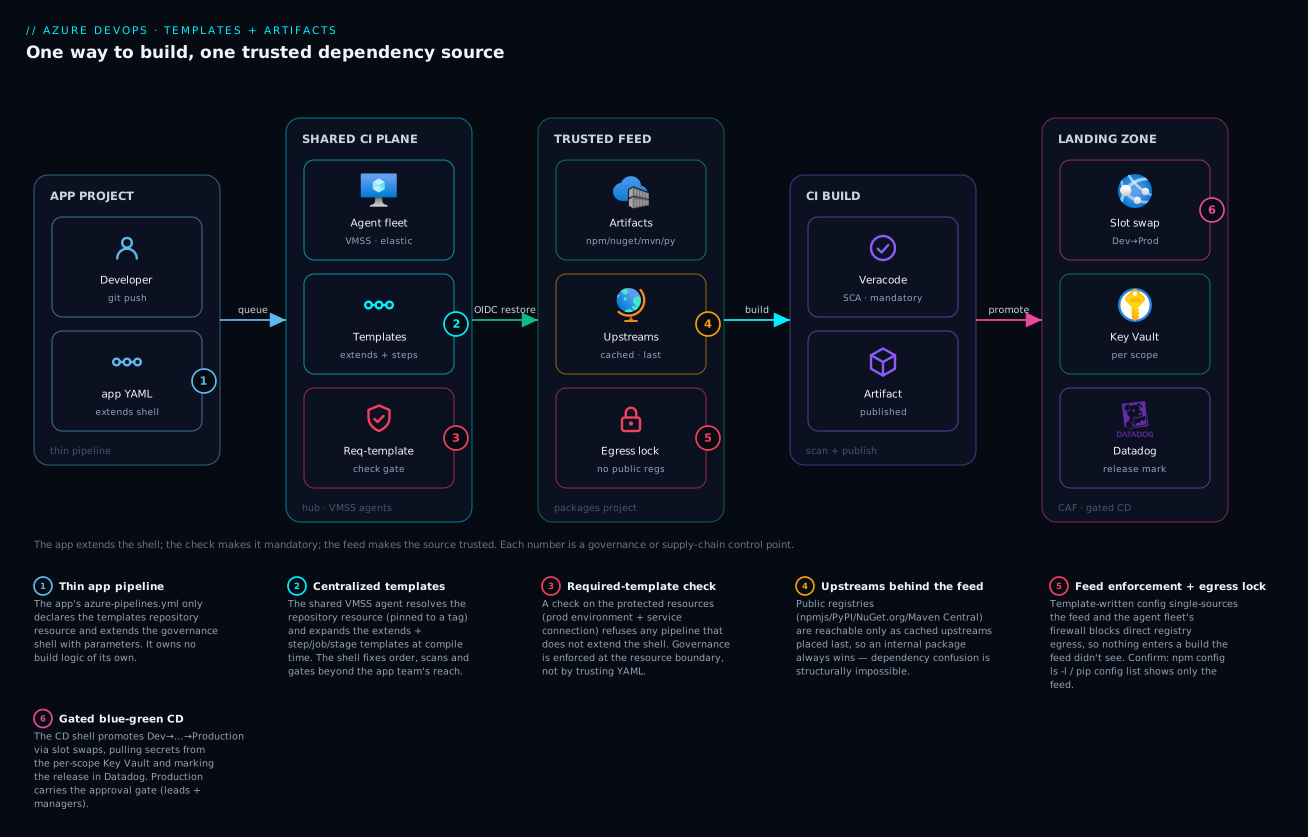
The method the diagram encodes is the whole article in one sentence: the app provides parameters, the shell provides the pipeline, the check makes the shell mandatory, and the feed makes the dependency source trusted — so every team builds the same way from the same source, provably.
Real-world scenario
Meridian Insurance runs a digital-claims platform on Azure: eleven application projects (a customer web portal, an agent portal, six function-app microservices, an Android and an iOS app, and a quoting engine), all in one Azure DevOps organisation, deploying into a CAF landing zone. The platform team is five engineers. Eighteen months ago every project owned its own azure-pipelines.yml. The pipelines had drifted: nine of eleven ran a Veracode scan, two didn’t; restore sources were a mix of the internal NuGet feed, direct nuget.org, and one project pulling npm straight from npmjs.org; three pipelines still carried a hard-coded PAT in a variable group. The monthly Azure DevOps + Artifacts spend was about ₹1,40,000.
The breaking point was an audit finding ahead of a regulatory review: “demonstrate that every third-party dependency in the production claims portal originates from a controlled source, and that every pipeline executes the mandated composition scan.” The team could demonstrate neither. Worse, a near-miss had already happened — a developer on the quoting engine had run pip install with --extra-index-url pointed at the internal feed and PyPI still primary, and a typosquatted package (requesocks instead of requests) had been pulled into a feature branch. It never reached production, but it proved the door was open.
The remediation was exactly this article’s two pieces, rolled out over a quarter. First, the team built a pipeline-templates project with an extends shell per app type (web, function, mobile, database) and step templates for auth-OIDC, the four feed-enforcement configs, Veracode SCA/pipeline/container scans, Key Vault secrets, slot-swap and Datadog release marking. They versioned it with semantic tags and started every app on refs/tags/v1.0.0. Second, they stood up four Azure Artifacts feeds (corp-npm, corp-nuget, corp-maven, corp-python), each with the public upstream placed last and a shared-libraries feed-to-feed upstream placed first, retention at “keep 100 + delete unused-90-days + always retain promoted,” and the build identity granted Collaborator.
The enforcement was the hard, valuable part. They converted every config to single-source: .npmrc with one registry, nuget.config with <clear/>, Maven <mirrorOf>*</mirrorOf>, and — the fix for the actual near-miss — pip.conf with index-url only, no extra-index-url. Then they locked the agent VM Scale Set egress with an Azure Firewall policy that allowed pkgs.dev.azure.com and Azure service tags and denied the four public registry FQDNs. Finally, they attached a required-template check to the production environments and the shared Azure service connection naming ci/web-app.yml@v1.x (and the per-type equivalents), and migrated each app to OIDC workload-identity service connections, deleting the three hard-coded PATs.
The migration itself was a fan-out: a tracking pipeline that, project by project, replaced the old azure-pipelines.yml with the thin extends version, ran it against a canary branch, and only merged when the shell run was green. Two function apps needed a stepList parameter for bespoke build steps (handled by the shell’s extraBuildSteps), and the Android app needed the Applivery distribution step wired into the mobile shell. The result, six weeks in: all eleven pipelines extended the shell; the required-template check made non-compliance impossible (a tenth team that tried to ship a hand-rolled pipeline was blocked at the prod environment, which became the moment the policy proved itself); the audit answer became a one-liner — “all dependencies route through four feeds with locked egress; here is the feed package-origin report”; PATs went to zero; and the spend dropped to about ₹1,18,000 because retention pruned years of accumulated cached packages and the shared agent fleet replaced per-project Microsoft-hosted parallelism. The lesson on the team wall: “A pipeline you can’t enforce is a suggestion. A feed you can bypass is decoration.”
The remediation as a before/after, because the deltas are the lesson:
| Dimension | Before (drift) | After (centralized + enforced) |
|---|---|---|
| Pipelines running Veracode SCA | 9 of 11 | 11 of 11 (unconditional in the shell) |
| Restore sources | Mixed: feed + npmjs + nuget.org | One feed per ecosystem; public only via upstream |
| Dependency-confusion exposure | Open (--extra-index-url, direct npmjs) |
Closed (single-source config + egress lock) |
| Hard-coded PATs | 3 | 0 (OIDC workload identity) |
| Control change (e.g. new scanner) | 11 PRs, no guarantee | 1 template tag bump |
| Audit: dependency provenance | Unanswerable | One feed-origin report |
| Non-compliant pipeline reaching prod | Possible | Blocked by required-template check |
| Monthly spend | ₹1,40,000 | ₹1,18,000 |
Advantages and disadvantages
Centralisation is a genuine trade, not a free win — it concentrates power (and risk) in the platform team. Weigh it honestly:
| Advantages (why centralize + enforce) | Disadvantages (the cost of doing so) |
|---|---|
| One change updates every pipeline (bump a tag) — no N-PR migrations | The templates repo is a single point of failure; a bad tag can break every app at once |
| Controls (scans, feed, gates) are guaranteed, not aspirational, via the required-template check | The platform team becomes a bottleneck for template changes; app teams wait on them |
| Supply-chain trust is structural: dependency confusion is impossible, provenance is provable | App teams lose flexibility; legitimately-bespoke pipelines need new stepList/parameter holes |
| PAT-less OIDC removes the largest class of long-lived secrets | Workload-identity federation has a steeper setup and a learning curve |
| Feed caching gives resilience to public-registry outages and faster restores | Feeds cost storage (per-GB over free tier) and need retention tuning or they sprawl |
| Audit answers become one-liners (feed origin report; required-template attestation) | Egress lockdown can break legitimate tools that phone home; you must allow-list deliberately |
New apps onboard in minutes (a 15-line extends file) |
Debugging a failed run means reading expanded YAML across repos, not one local file |
| The shared agent fleet centralises cost, patching and egress policy | One agent-pool/egress misconfiguration affects every project simultaneously |
When each side wins: centralisation is unambiguously right past ~5 teams, in any regulated context, and anywhere “prove the control ran” or “prove the dependency source” is a real question. It’s overkill for a two-person startup with one repo. The disadvantages are all manageable — pin tags to bound blast radius, expose enough stepList/parameter surface that app teams rarely need template changes, canary template tags on two apps before org-wide, and treat the templates repo with the same rigor (reviews, tests, versioning) as production code. The failure mode to avoid is a rigid shell with no flexibility holes — app teams will route around governance the moment it blocks legitimate work, and a bypassed control is worse than an honest one because it’s invisible.
Hands-on lab
Stand up a minimal version of the whole system in your own Azure DevOps org: a templates repo with an extends shell, a feed with enforcement, a thin app pipeline that extends the shell, and a required-template check that blocks a non-compliant pipeline. Free-tier-friendly (Azure DevOps free tier + one feed under 2 GB). You’ll need an org, the az devops CLI extension, and a self-hosted or Microsoft-hosted agent.
Step 1 — Install the CLI extension and set defaults.
az extension add --name azure-devops
ORG=https://dev.azure.com/<your-org>
az devops configure --defaults organization=$ORG
Step 2 — Create the projects. One for templates, one for packages, one for the demo app.
az devops project create --name Platform   --org $ORG
az devops project create --name Packages   --org $ORG
az devops project create --name DemoApp     --org $ORG
Expected: three project JSON blobs with state: wellFormed.
Step 3 — Create the templates repo and push an extends shell. In the Platform project, create a repo pipeline-templates and add two files — ci/web-app.yml (the shell) and steps/feed-enforce-npm.yml. Use the shell and step-template YAML from the sections above (trim to: write .npmrc, npm ci, a placeholder “scan” script, and the extraBuildSteps loop). Commit and tag:
az repos create --name pipeline-templates --project Platform --org $ORG
# ... add ci/web-app.yml and steps/feed-enforce-npm.yml, commit ...
git tag v1.0.0 && git push origin v1.0.0
Step 4 — Create the npm feed with an npmjs upstream. In the Packages project, create feed corp-npm (Feeds UI → New feed → scope: project), and under the feed’s settings add an Upstream source → npmjs. Grant the DemoApp Build Service Collaborator on the feed (Feed settings → Permissions).
Step 5 — Add the thin app pipeline that extends the shell. In DemoApp, add azure-pipelines.yml:
resources:
  repositories:
    - repository: templates
      type: git
      name: Platform/pipeline-templates
      ref: refs/tags/v1.0.0
trigger: [ main ]
extends:
  template: ci/web-app.yml@templates
  parameters:
    projectName: demo
    feed: corp-npm
    extraBuildSteps:
      - script: echo "app-specific build step"
        displayName: App step
Create and run the pipeline:
az pipelines create --name demo-ci --project DemoApp \
  --repository DemoApp --branch main --yml-path azure-pipelines.yml --org $ORG
az pipelines run --name demo-ci --project DemoApp --org $ORG
Expected: the run expands the shell, writes a single-registry .npmrc, restores from corp-npm (first restore caches packages from the npmjs upstream into the feed — verify they appear in the feed UI), runs the placeholder scan and the app step inside the shell.
Step 6 — Prove enforcement: try to bypass it. Create a second pipeline in DemoApp from a hand-rolled YAML that does not extend the shell (just npm ci directly). Then attach a required-template check to a protected resource the run needs. Easiest in the lab: create an environment demo-prod, add a deployment stage to the compliant pipeline that targets it, and on the environment add Approvals and checks → Required template → Platform/pipeline-templates, ci/web-app.yml. Add the same environment to the non-compliant pipeline.
# Create the environment (UI: Pipelines > Environments > New). Then add the
# required-template check via the environment's "Approvals and checks" blade.
Run the non-compliant pipeline. Expected: it is blocked before deploy with a required-template-check failure — it doesn’t extend ci/web-app.yml, so it can’t use demo-prod. The compliant pipeline passes. That block is the lesson.
Validation checklist. You built a templates repo with a tagged extends shell, a feed with an upstream and locked enforcement config, a thin app pipeline that extends the shell, and a required-template check that physically blocks a non-extending pipeline from a protected resource. Map of what each step proves:
| Step | What you did | What it proves |
|---|---|---|
| 3 | Tagged extends shell in a templates repo |
The governance shell is versioned and reusable |
| 4 | Feed + npmjs upstream + Collaborator | The trusted source caches public packages |
| 5 | Thin app extends the shell | The app provides params; the shell provides the pipeline |
| 5 | Single-registry .npmrc restore |
Config-layer feed enforcement works |
| 6 | Required-template check blocks a bypass | Governance is enforced at the resource boundary |
Cleanup.
az devops project delete --id $(az devops project show --project DemoApp   --query id -o tsv) --org $ORG --yes
az devops project delete --id $(az devops project show --project Packages  --query id -o tsv) --org $ORG --yes
az devops project delete --id $(az devops project show --project Platform  --query id -o tsv) --org $ORG --yes
Cost note. Azure DevOps free tier covers five users, the feed storage is free under 2 GB, and one Microsoft-hosted parallel job is free (1,800 min/month) — this lab costs ₹0 if you stay in the free tier and delete the projects after.
Common mistakes & troubleshooting
This is the section you bookmark. The dozen ways centralized templates and feed enforcement fail in production — symptom, root cause, the exact place to confirm, and the fix. First as a scannable table, then the high-value entries in detail.
| # | Symptom | Root cause | Confirm (exact path / command) | Fix |
|---|---|---|---|---|
| 1 | Template X@templates not found |
repository resource missing, wrong name/ref, or no read permission |
Pipeline run → expansion error; check resources.repositories and the tag exists |
Add/fix the resource; ensure the build identity can read the templates repo |
| 2 | Template change shipped to all apps unexpectedly | ref pinned to a branch (main), not a tag |
The resource’s ref: refs/heads/main |
Pin to refs/tags/vX.Y.Z; upgrade per app deliberately |
| 3 | ${{ if }} condition “doesn’t work” |
Used a runtime variable in a compile-time expression | The condition references variables.x set at runtime |
Gate on parameters (compile-time), or use condition: for runtime |
| 4 | Mandatory scan got skipped | Control gated on a runtime variable a user can set | The step has condition: $[ ... ] over a queue-time var |
Make it unconditional or gate only on ${{ }} over parameters |
| 5 | npm ci pulls from npmjs.org despite the feed |
A second registry= line, or inherited user .npmrc |
npm config ls -l on the agent shows the public registry |
Single registry= in project .npmrc; block egress to npmjs |
| 6 | NuGet still restores from nuget.org | Missing <clear/> in nuget.config |
The inherited nuget.org source is active |
Add <clear/> before the single <add> |
| 7 | pip pulls a typosquatted public package | --extra-index-url instead of index-url |
pip config list shows extra-index-url=pypi.org |
Use index-url=<feed> only; remove extra-index-url |
| 8 | First build needing a public package fails 401/404 | Build identity is Reader, can’t save from upstream | Feed → Permissions: identity is Reader | Grant Collaborator (restore+cache) |
| 9 | Feed restore 401 even with the feed configured | No *Authenticate task, or a stale PAT in config |
.npmrc/nuget.config has no token / a hard-coded PAT |
Add npmAuthenticate@0/NuGetAuthenticate@1; remove PATs |
| 10 | Required-template check passes when it shouldn’t | Check points at a branch the app pinned away from | Check config ref vs the app’s repository ref |
Align the check’s ref; require a tag range |
| 11 | Pipeline blocked: “did not satisfy required template” | App pipeline doesn’t extends the named template |
Run → checks tab → required-template failed | Convert the app to extends the shell (correct behaviour!) |
| 12 | Script from the templates repo “file not found” at runtime | Template expanded, but the repo wasn’t checked out | Job has no checkout: templates |
Add - checkout: templates to make its files available |
| 13 | OIDC login fails: AADSTS70021 no matching federated credential |
Federated-credential subject doesn’t match the service connection |
App registration → Federated credentials vs sc://org/project/conn |
Fix the subject to exactly sc://<org>/<project>/<connection> |
| 14 | Promoted package vanished after retention ran | Version wasn’t in a view; retention pruned it | Feed → package history shows deletion | Promote prod versions to @release (retention never deletes promoted) |
| 15 | Slow restores / intermittent feed timeouts | Upstream ordering puts a slow public registry first | Feed → Upstream sources order | Put internal feed-to-feed upstreams first, public last |
#2 — A template change shipped to every app at once (branch ref)
The most dangerous operational mistake. Someone references the templates repo with ref: refs/heads/main. They merge an “improvement” to the shell. The next run of every application pipeline — across all projects — picks it up instantly. A change you meant to canary on two apps is now live on forty, and if it had a bug, you’ve broken the entire org’s CI in one merge.
Confirm. Grep the application pipelines (or the templates resource) for refs/heads/:
# Any app pinning to a branch instead of a tag is a latent org-wide-blast-radius bug
grep -rn "refs/heads/" --include="azure-pipelines.yml" .
Fix. Pin every app to refs/tags/vX.Y.Z. Adopt semantic versioning on the templates repo (v3.2.0), canary a new tag on two apps, then roll the tag bump across the rest as a deliberate, reviewable change. A rolling major tag (v3) is an acceptable middle ground for auto-patch with manual-major.
#4 — A mandatory control got skipped at runtime
You wrote the Veracode step with condition: and(succeeded(), eq(variables['runScan'], 'true')). Someone sets a queue-time variable runScan=false and ships unscanned code. The control looked enforced but was gated on a value a user controls at runtime.
Confirm. Read the expanded YAML (Pipelines → run → ⋯ → Download logs, or the “View YAML” on the run) and look for any condition: referencing a runtime variable on a control step.
Fix. Mandatory controls are unconditional or gated only on ${{ }} template expressions over parameters (which are fixed at compile time and not settable at queue time unless you expose them as such). Never gate a security control on a runtime variable. If you must allow opt-out, make it a parameter with values: [true] for prod paths so it can’t be flipped.
#5–#7 — Restore still reaches the public registry
The single most common feed-enforcement failure across all three ecosystems: the build appears configured for the feed but a public source is still active. npm: a second registry= line or an inherited ~/.npmrc. NuGet: missing <clear/> so the inherited nuget.org is still a source. pip: --extra-index-url (which adds PyPI as a co-equal index and resolves the highest version across both — the dependency-confusion hole).
Confirm. Ask each tool what it actually sees:
npm config ls -l | grep registry          # should show ONLY the feed
dotnet nuget locals all --list             # then inspect the effective nuget.config sources
pip config list                            # must NOT contain extra-index-url
mvn help:effective-settings                # mirror must be <mirrorOf>*</mirrorOf>
Fix. Single source per the enforcement section: one registry= for npm, <clear/>+single <add> for NuGet, index-url (not extra) for pip, <mirrorOf>* for Maven — and back it with the agent egress block so a hand-edited config can’t connect anyway.
#8 / #9 — Feed auth and permission failures
Two different 401/404 classes that look identical. #8: the first build needing a not-yet-cached public package fails because the build identity is only a Reader and can’t save the package from the upstream into the feed. #9: any restore fails because there’s no *Authenticate task minting a token (or there’s a stale hard-coded PAT).
Confirm. Feed → Settings → Permissions shows the identity’s role; the run log shows either “permission denied saving package” (#8) or “401 Unauthorized” with no token (#9).
Fix. #8: grant the build identity Collaborator (read + save-from-upstream) or Contributor (also publish). #9: add the ecosystem’s *Authenticate task and remove any committed PAT — the task injects a short-lived token for the build’s own identity.
#11 — “Pipeline did not satisfy the required template” (this is success)
A team’s pipeline is blocked with a required-template-check failure. This is not a bug — it’s the control working: their pipeline doesn’t extends the mandated shell, so it cannot use the protected resource (prod environment / shared service connection). The fix is to make them compliant, not to remove the check.
Confirm. Run → Checks tab shows “Required template: failed,” naming the template they must extend.
Fix. Convert the offending pipeline to the thin extends form. If they have a legitimate need the shell doesn’t cover, add a stepList/parameter hole to the shell — don’t grant an exception, or you’ve reopened the governance gap.
#13 — OIDC federated-credential mismatch
The workload-identity login fails with AADSTS70021: No matching federated identity record found. The federated credential’s subject on the app registration doesn’t exactly match the service-connection subject the pipeline presents.
Confirm. App registration → Federated credentials → compare the subject to the required sc://<org>/<project>/<service-connection-name>. A common slip is using the project display name with a space vs the URL-safe name, or the wrong issuer GUID.
Fix. Set the federated credential’s subject to exactly sc://<org>/<project>/<connection>, issuer to https://vstoken.dev.azure.com/<org-guid>, and audiences to api://AzureADTokenExchange. Re-test the service connection’s “Verify” button.
Best practices
Hard-won rules for running this in production:
| # | Practice | Why |
|---|---|---|
| 1 | Pin app pipelines to template tags, never branches | Bounds the blast radius of a template change to apps that deliberately bump |
| 2 | Version the templates repo semantically (vMAJOR.MINOR.PATCH) |
App teams reason about upgrades; breaking changes are signalled by a major bump |
| 3 | Make mandatory controls unconditional or ${{ }}-gated only |
A control gated on a runtime variable is not a control |
| 4 | Enforce the shell with a required-template check on protected resources | Convention and review are bypassable; the resource boundary is not |
| 5 | Expose enough stepList/parameter holes that app teams rarely fork |
A rigid shell gets routed around; flexibility inside governance keeps everyone in the system |
| 6 | Single-source the package config (one registry / <clear/> / index-url / <mirrorOf>*) |
Any co-equal public source reopens dependency confusion |
| 7 | Back config enforcement with agent egress lockdown | Config alone is hand-editable; network makes it tamper-proof |
| 8 | Order upstreams internal-first, public-last | An internal package always wins over a same-named public one |
| 9 | Promote prod-bound versions to @release; let consumers point there |
Production never sees an unpromoted/prerelease version, and retention won’t prune it |
| 10 | Go PAT-less with OIDC workload identity everywhere it’s supported | Removes the largest class of long-lived, hard-to-rotate secrets |
| 11 | Treat the templates repo like production code — reviews, tests, a CI that lints the templates | A bug in the shell is a bug in every pipeline |
| 12 | Canary a new template tag on two apps before rolling org-wide | Catches a regression on 2 pipelines, not 40 |
| 13 | Grant the build identity Collaborator (restore) / Contributor (publish), never Owner | Least privilege on the feed |
| 14 | Set feed retention early (“keep N + delete-unused + always-retain-promoted”) | Feeds sprawl into real storage cost otherwise |
Security notes
The security posture of this system is its whole reason for existing; here are the controls and the threats they close, mapped to least-privilege, isolation and provenance:
| Control | Threat it closes | Mechanism |
|---|---|---|
| Required-template check | A team ships code skipping mandatory scans/gates | Resource refuses pipelines that don’t extend the shell |
| Feed enforcement (config + egress) | Unvetted public packages enter a build | Single-source config + blocked direct egress |
| Internal-first upstream order | Dependency confusion (public shadows private) | Feed resolves internal names before public |
| OIDC workload identity | Long-lived PAT/secret leak | Short-lived federated tokens; nothing stored |
| Build identity least privilege | Over-broad feed/repo access | Collaborator/Contributor, never Owner; scoped service principals |
| Per-scope Key Vault | Secrets in pipeline variables/config | Templates pull secrets at runtime from the scope’s Key Vault |
| Branch control on prod resources | Deploys from arbitrary branches | Only main/release/* reach Production |
| Approvals (leads + prod managers) | Unilateral production change | Human gate on the production environment |
| Feed package-origin metadata + retention | “Where did this come from?” unanswerable | Recorded provenance, retained evidence |
| Templates-repo review gate | A malicious template change | Required reviewers on the templates repo PRs |
Two specifics worth calling out. First, the OIDC subject is the trust boundary — sc://<org>/<project>/<connection> means only that exact service connection can mint the identity’s token; scope the service principal’s RBAC to the narrowest management-group/resource-group it needs (Corp Non-Production for non-prod connections, Corp Production for prod), never a broad subscription Owner. Second, egress lockdown also stops exfiltration — a malicious postinstall/build script that tries to phone home to an attacker host is blocked by the same deny-by-default firewall that blocks the public registries; this is a defence the config layer alone cannot provide.
Cost & sizing
What actually drives the bill, and how to right-size:
| Cost driver | What it is | Rough figure | Right-size by |
|---|---|---|---|
| Azure Artifacts storage | Total feed storage across all feeds | First 2 GB free, then ~₹17/GB/month (≈$0.20/GB) | Retention: keep-N + delete-unused-90d + always-retain-promoted |
| Parallel jobs (self-hosted) | Concurrent pipeline runs on your agents | 1 self-hosted parallel job free; extra ~₹1,250/mo (≈$15) each | Right-size concurrency to peak demand; self-hosted is cheap |
| Agent VM Scale Set compute | The shared agent fleet’s VMs | VM hourly × instances; autoscale to ~0 off-hours | Scale-set autoscale; small SKUs for most builds, larger only where needed |
| Microsoft-hosted minutes (if used) | Hosted-agent build minutes | 1,800 free min/mo (private); then ~₹3.3/min (≈$0.04) | Prefer the self-hosted fleet for steady load |
| Azure DevOps users | Basic licences | First 5 free; then ~₹500/user/mo (≈$6) | Stakeholder (free) for read-only roles |
The economics favour centralisation. A shared self-hosted VM Scale Set fleet with autoscale costs far less than every project paying for Microsoft-hosted parallelism, and one well-tuned retention policy across four feeds keeps Artifacts storage in or near the free 2 GB band even at enterprise scale. A realistic mid-size enterprise (≈15 teams, 4 feeds, a 4-instance autoscaling agent fleet, ~50 builds/day) lands around ₹1,00,000–₹1,40,000/month all-in — and the marginal cost of the templates+feeds discipline itself is near-zero; it mostly saves money by replacing per-project hosted parallelism and pruning years of cached-package sprawl. The real ROI is non-monetary: the audit answers, the eliminated PATs, and the one-tag-bump control changes.
Interview & exam questions
Production-grade questions and model answers — useful for AZ-400 (Designing and Implementing Microsoft DevOps Solutions) and platform-engineering interviews.
1. What’s the difference between an extends template and a template: step include, and why does it matter for governance?
A template: include pulls a chunk of steps/jobs/stages into a pipeline the app team still controls — they choose where and whether to include it. An extends template owns the entire pipeline shape; the app supplies only parameters. Only extends is enforceable via a required-template check, because the check asserts “this pipeline extends template X” — so extends is what makes mandatory controls non-bypassable.
2. Explain compile-time vs runtime expressions and the security implication.
${{ }} template expressions evaluate at compile time (server, during expansion) and are baked into the compiled YAML; $[ ] runtime expressions and $(var) macros evaluate later on the agent. A security control gated on a ${{ }} expression over a parameter cannot be removed at runtime; one gated on a runtime variable can be flipped by anyone who sets that variable. Mandatory controls must be unconditional or ${{ }}-gated only.
3. How do you reference a template that lives in a different Azure DevOps project?
Declare a repository resource (resources.repositories) with an alias, type: git, name: <project>/<repo>, and a ref; then reference templates as template: path.yml@<alias>. Pin ref to a tag, not a branch, for reproducibility.
4. What does a required-template check enforce, and where do you attach it?
It enforces that any pipeline using a protected resource (environment, service connection, agent pool, etc.) must extends one of the named templates. Attach it to the resources every real pipeline must use — the production environment and the shared Azure service connection — so no pipeline can deploy or even authenticate without going through the governance shell.
5. What is dependency confusion, and how does an Azure Artifacts feed prevent it? Dependency confusion is when an attacker publishes a public package with the same name as your private one but a higher version, and a build that resolves across both sources pulls the attacker’s. A feed prevents it by being the single source with internal-first upstream resolution (an internal name always wins) and by enforcement (config single-sources the feed; egress blocks the public registry), so there’s no co-equal public source to exploit.
6. Why is pip’s --extra-index-url a security problem and what’s the fix?
extra-index-url adds the feed alongside PyPI as a co-equal index; pip resolves the highest version across all indexes, so a higher-versioned malicious PyPI package wins — exactly the dependency-confusion hole. The fix is index-url (single primary index) pointed at the feed, with no extra-index-url.
7. What’s the NuGet equivalent of that mistake, and the fix?
Leaving the inherited nuget.org source active. The fix is <clear/> in nuget.config before a single <add> for the feed, which wipes inherited sources so nuget.org can’t be a fallback. (Maven’s equivalent is <mirrorOf>*</mirrorOf>.)
8. How does PAT-less (OIDC / workload-identity) authentication work?
The service connection federates Azure DevOps with Azure AD with no stored secret. At runtime the pipeline gets an OIDC ID-token asserting its identity (sc://org/project/connection), exchanges it at Azure AD for a short-lived access token (validated against the app registration’s federated credential subject), and uses that for ARM/Key Vault. Nothing is stored; a leak exposes only a minutes-long token.
9. Why pin the templates repository resource to a tag instead of a branch?
A branch ref (main) means any merge to the templates repo instantly changes every pipeline that references it — an org-wide blast radius with no per-app awareness. A tag (v3.2.0) makes builds reproducible and upgrades deliberate: each app bumps the tag when ready.
10. What feed permission does a build identity need, and why does the first build sometimes fail without it? Collaborator (read + save-from-upstream) for restore, Contributor for publish. With only Reader, the first build that needs a not-yet-cached public package fails because the identity can’t save it from the upstream into the feed — a permission error that masquerades as a missing package.
11. How do views (@release) protect production?
A view is a promotable slice of a feed. You promote a version into @release after it passes gates; production consumers point at feed@release, so an unpromoted or prerelease version is invisible to prod. Retention also never deletes a promoted version, so @release doubly protects prod-bound packages.
12. A team’s pipeline is blocked with “did not satisfy required template.” Is this a bug? What do you do?
No — it’s the control working. Their pipeline doesn’t extend the mandated shell, so it can’t use the protected resource. The fix is to convert them to the extends form, not to remove the check. If they have a legitimate uncovered need, add a stepList/parameter hole to the shell rather than granting an exception.
Quick check
- Which template kind lets you enforce mandatory controls with a required-template check —
extendsor atemplate:include — and why? - You write
condition: eq(variables['deployProd'], 'true')on a Veracode step. Why is that not a safe way to make the scan mandatory? - In a
repositoryresource, what does pinningreftorefs/tags/v3.2.0buy you overrefs/heads/main? - For NuGet feed enforcement, what single XML element wipes the inherited
nuget.orgsource, and where does it go? - Why is
index-url(notextra-index-url) the correct pip enforcement, in one sentence?
Answers
extends— it owns the whole pipeline shape, so the required-template check can assert the pipeline extends your governance shell (which runs the mandatory steps); atemplate:include is just an optional chunk the app team can omit.- Because
variables['deployProd']is a runtime value a user can set at queue time, so the scan can be skipped; mandatory controls must be unconditional or gated only on compile-time${{ }}parameter expressions. - Reproducibility and a bounded blast radius — a tag means template changes don’t reach the app until it deliberately bumps; a branch ref ships every template commit to every referencing pipeline instantly.
<clear />, placed inside<packageSources>before the single<add>for the feed.index-urlmakes the feed the single primary index, whereasextra-index-urladds PyPI as a co-equal index and pip resolves the highest version across both — reopening dependency confusion.
Glossary
| Term | Definition |
|---|---|
extends template |
A template that defines the entire pipeline shape; the app supplies only parameters. The governance shell. |
template: include |
A reusable chunk of steps/jobs/stages/variables pulled into a pipeline the app still controls. |
Template expression ${{ }} |
An expression evaluated at compile time (during expansion, on the server) and baked into the compiled YAML. |
Runtime expression $[ ] |
An expression evaluated at run time on the agent; late-bound and not safe for governance. |
Macro $(var) |
A string substitution performed at run time on the agent. |
| Parameter | A typed compile-time input to a template (string, boolean, object, stepList, …). |
stepList |
A parameter type whose value is a list of steps, letting the app inject steps the shell wraps. |
repository resource |
A declared reference to another repo (e.g. the templates repo), referenced via @alias. |
| Required-template check | A check on a protected resource that requires the pipeline to extends a named template. |
| Protected resource | An environment, service connection, agent pool, variable group, repo or secure file that can carry checks. |
| Feed | An Azure Artifacts package host (per ecosystem) that stores published packages and proxies public registries. |
| Upstream source | A proxied external registry (npmjs/NuGet.org/Maven Central/PyPI) or another feed, behind the feed. |
| View | A promotable, filtered slice of a feed (@local, @prerelease, @release). |
| Retention policy | A rule that prunes old/unused package versions, never deleting promoted or depended-on ones. |
| Feed enforcement | Forcing restores through the internal feed and blocking the public registries (config + agent egress). |
| Dependency confusion | An attack where a higher-versioned public package shadows a same-named private one. |
| Workload-identity (OIDC) federation | PAT-less auth: a short-lived token is exchanged from a federated identity; no secret stored. |
| Build service identity | The pipeline’s automatic Azure DevOps identity, used (PAT-lessly) for feed and repo access. |
Next steps
- Internalise the conceptual model first with CI/CD pipeline explained and go deeper on package hosting with artifact registry management.
- Wire the secrets half — the templates pull from Key Vault — via pipeline secrets management.
- Align the templates’ triggers to your branch model with Git branching strategies explained.
- Build the CD side the templates feed into: deployment strategies (blue-green, canary, rolling) and progressive delivery with feature flags.
- Apply the same versioning-and-composition discipline to the IaC project with Terraform module design, composition & versioning.