A release manager once told me the most expensive line in their whole delivery system was a single sentence in a runbook: “merge to main and it goes to prod.” It sounds clean. It is a trap. The day a hotfix and a feature both needed to ship, the day an auditor asked “who approved the 14:32 production deploy,” the day a botched swap took the checkout API down for nine minutes — every one of those days traced back to a branching model that could not express the difference between work in progress, a candidate being hardened, and the exact bytes running in production. This article is about closing that gap. It is the branching-and-promotion half of a six-part enterprise CI/CD series, and it assumes the platform you are building on: an Azure DevOps organisation carved into purpose-built projects (IaC modules, centralized YAML templates, Azure Artifacts feeds, and many application projects), served by a shared self-hosted agent fleet on a Virtual Machine Scale Set in the hub network, deploying into a CAF landing zone of management groups, Key Vaults and a hub-spoke network.
We are going to wire two things together until they are inseparable: a branching strategy (GitFlow — feature/* → development → release/* → main, plus hotfix/*, with semantic version tags) and a multi-stage CI/CD model built from three distinct pipeline types. The PR pipeline gates every merge with lint, code analysis, unit tests, coverage and Veracode scans. The CI pipeline pulls secrets from Key Vault, restores from the internal Azure Artifacts feed under strict enforcement, builds, scans, tests, and publishes versioned artifacts. The CD pipeline promotes one immutable build through seven environments — Dev → SIT → QA → Staging → UAT → Pre-Prod → Production — using Azure DevOps Environments with approvals and checks to make the production release genuinely gated, and App Service deployment slots to do blue-green so the swap is the only thing the user ever notices. And because the most senior thing in any delivery system is not the deploy but the un-deploy, we end on rollback you have actually rehearsed.
By the end you will be able to map any branch to a precise stage, write the branch policies that make development and main un-bypassable, build a CD stage template that warms a staging slot and swaps it under an approval gate, and roll a release back in under two minutes by swapping the slots back — without a redeploy. We will stay concrete throughout: real Azure DevOps YAML, real az/az pipelines CLI, real Terraform for the Environments and slots, real Veracode/Datadog/Liquibase mechanics. No invented product features, no “in today’s fast-paced world.” Just the system, end to end, the way a 22-year platform engineer wires it when an auditor is watching and the pager is armed.
What problem this solves
The pain is rarely a single broken deploy. It is the slow accumulation of ambiguity. Without a branching model that maps cleanly to environments, three failure modes recur in every team I have walked into. First, you cannot answer “what is in production right now.” If main is both where features land and where releases cut, then “the head of main” and “the bytes in prod” drift apart the moment someone merges after a release froze. Second, hotfixes corrupt the release train. An urgent prod fix committed to a long-lived integration branch either ships untested work alongside it, or forces a frantic cherry-pick that misses a file. Third, the gate is theatre. “We require approval” means nothing if the approver is the same person who wrote the change, or if anyone with push access can bypass the policy on a Friday night.
The multi-stage half solves a parallel set of problems. A single-stage “build-and-deploy” pipeline rebuilds per environment, so the artifact tested in QA is not the artifact that reaches production — a different compiler invocation, a newer transitive dependency, a moved feed package, and now your QA sign-off certifies bytes that no longer exist. It also conflates build concerns with release concerns: secrets, environment configuration, slot warm-up and approvals all get crammed into one YAML that no one can reason about. And it makes rollback a redeploy — pulling an old commit, rebuilding, hoping the feed still has the same versions — which is exactly the slow, error-prone path you do not want at 02:00 during an incident.
Who hits this: every enterprise past a handful of services. It bites hardest where compliance requires an audit trail (who approved, what scanned, what shipped), where multiple teams share environments and a bad merge blocks everyone, and where production is genuinely high-stakes — payments, health, anything with an SLA and a regulator. The reference platform here is built precisely for that world: the branching model expresses every state of the work, the three pipelines separate the concerns, the seven environments give risk somewhere to be caught, and blue-green slots plus a swap-back rollback make the riskiest moment — going live — both fast and reversible. To frame the whole field before we dive in, here is the spine of the system: every branch, the pipeline it triggers, the environment it targets, and the gate that guards it.
| Branch | Lifetime | Triggers | Lands in / promotes to | Version tag cut here? | Primary gate |
|---|---|---|---|---|---|
feature/* |
Hours–days | PR pipeline (on PR to development) |
Merged into development |
No | PR policy: 1+ review, build green, scans pass |
development |
Permanent | CI pipeline → CD to Dev/SIT/QA | Dev → SIT → QA | No | Branch policy + CI gate |
release/x.y |
Days–weeks | CI pipeline → CD to Staging/UAT/Pre-Prod | Staging → UAT → Pre-Prod | Release candidate (x.y.0-rc.n) |
Stabilisation gate; no new features |
main |
Permanent | CI pipeline → CD to Production | Production | Final (x.y.0) |
Production approval + checks |
hotfix/* |
Hours | PR + CI → CD fast-track to Prod | Production, then back-merge | Patch (x.y.z) |
Same prod gate, expedited approvers |
Learning objectives
By the end of this article you can:
- Map the full GitFlow model —
feature/*,development,release/*,main,hotfix/*and semantic version tags — onto a seven-environment promotion path, and explain which branch is the source of truth for production. - Write Azure DevOps branch policies (required reviewers, build validation, status checks, merge strategy, path filters) that make
developmentandmainun-bypassable, and reason about who can still override. - Distinguish the three pipeline types — PR gate, CI build-test-publish, and multi-stage CD — and explain what each owns, what it must never do, and how the artifact flows immutably between them.
- Build a CD stage template that promotes one build through Dev → SIT → QA → Staging → UAT → Pre-Prod → Production, parameterised so every stage reuses the same logic with per-environment config.
- Implement blue-green via App Service deployment slots: deploy to a
stagingslot, warm it (Always On, app-init warm-up paths), validate it, then swap it into production with near-zero downtime, and tune slot-sticky settings. - Configure Azure DevOps Environments with approvals and checks (manual approval, business hours, Azure Function/REST check, exclusive lock) so the production release is gated, authorised by leads and production managers, and fully audited.
- Design and rehearse a rollback strategy — slot swap-back for the live tier, redeploy-pinned-artifact as the fallback, and a Liquibase down-changeset for the database — with the exact
azandaz pipelinescommands.
Prerequisites & where this fits
You should be comfortable with Git (branches, merges, rebases, tags), with YAML pipelines in Azure DevOps (stages, jobs, steps, templates, parameters, variables), and with the App Service mental model: an App Service plan is the rented compute, a web app runs on it, and deployment slots are swappable copies of that app sharing the plan. You should know what a service connection is (the credential Azure DevOps uses to act against Azure), what a variable group is (and that it can be backed by Key Vault), and roughly what managed identity does. Familiarity with semantic versioning (MAJOR.MINOR.PATCH) is assumed.
This is article four of a six-part series and it sits on top of the platform the earlier parts establish. The organisation, project layout and shared agent fleet come from Enterprise Azure DevOps at Scale: Multi-Project Structure (IaC, Templates, Packages, Apps) + a Centralized VMSS Agent Fleet. The reusable YAML and the internal-feed enforcement this article leans on come from Centralized Azure Pipeline YAML Templates + Azure Artifacts Feeds: One Way to Build, One Trusted Dependency Source. The deploy target — the CAF management-group hierarchy, the Key Vault per scope, the hub-spoke network with the agent VMSS — is the Azure Enterprise-Scale Landing Zone. And the scan/test/observe/mobile/database mechanics that the pipelines call into are covered in Shift-Left Security, Testing, Observability — and Mobile + Database Delivery — on Azure DevOps. If GitFlow versus trunk-based is new to you, read Git Branching Strategies: Trunk-Based, GitFlow and Feature Branches first; if blue-green versus canary is, read Deployment Strategies: Blue-Green, Canary and Rolling Updates.
A quick map of which platform layer owns each concern in this article, so you know who to call when a stage fails:
| Concern | Where it lives | Who usually owns it | What this article does with it |
|---|---|---|---|
| Branch policies & merge rules | Azure Repos (per repo) | Platform + repo leads | Defines the GitFlow policy set |
| Pipeline definitions | App projects, referencing the templates project | App teams (templates by platform) | PR / CI / CD YAML and stage templates |
| Reusable templates | Templates project | Platform engineering | extends / template: consumed here |
| Artifacts feeds | Packages project | Platform engineering | CI publishes; CD never rebuilds |
| Shared agents | VMSS in the hub | Platform engineering | Every job runs on the vmss-linux pool |
| Environments + approvals | Azure DevOps Environments | Platform + release managers | Gates Staging/Pre-Prod/Production |
| App Service + slots | Spoke (App Service) | App + platform | Blue-green swap target |
| Key Vault (per scope) | Landing-zone scopes | Platform + security | Source of CI/CD secrets |
Core concepts
Six mental models make every later decision obvious. Get these straight and the YAML writes itself.
A branch is a claim about a state of the work, not a folder. feature/* says “unverified, in progress.” development says “integrated, continuously verified, deployable to the lower environments.” release/x.y says “feature-frozen, being hardened into a shippable candidate.” main says “this is what is in (or last shipped to) production.” hotfix/* says “an urgent fix to live, bypassing the normal train.” The whole point of GitFlow over trunk-based-with-flags is that these states are named and enforced, which a regulated enterprise needs because an auditor asks questions in exactly those terms. Trunk-based is faster for high-maturity teams shipping many times a day; GitFlow is the right call when releases are batched, change advisory boards exist, and “what is the production source of truth” must have a one-word answer (main).
The artifact is immutable and built exactly once. The single most important rule in multi-stage CD: the CI pipeline produces one versioned build artifact, and every CD stage deploys that same artifact — Dev gets the same bytes as Production. You never rebuild per environment. This is what makes a QA sign-off mean something: the thing QA approved is the literal thing that ships. It is also what makes rollback fast — the old artifact is still in the pipeline’s artifact store and in the Artifacts feed, ready to redeploy without a compile.
Configuration is per-environment; code is not. If the artifact is identical everywhere, the difference between environments lives entirely in configuration: connection strings, feature flags, scale settings, secrets. In this platform that means a Key Vault per scope plus slot-sticky app settings, injected at deploy time. The deploy step is parameterised by environment; the artifact is not. Mixing config into the artifact (baking an appsettings.Production.json into the build) re-introduces the per-environment-build problem through the back door.
A pipeline type is a separation of concerns, not a file. “PR / CI / CD” are three responsibilities. The PR pipeline answers “is this change safe to merge?” — fast, read-only, no deploy. The CI pipeline answers “can we produce a trustworthy, versioned artifact from development/release/main?” — secrets, restore-with-enforcement, build, scan, test, publish. The CD pipeline answers “can we safely promote this exact artifact through the environments to production?” — deploy, validate, gate, swap, observe. Keeping them separate is what lets each be reasoned about, owned, and audited independently.
An environment is a risk-catching opportunity with a gate. Seven environments is not bureaucracy; each catches a different class of risk that the previous one cannot. Dev catches “does it deploy at all.” SIT (System Integration Test) catches “do the services talk to each other.” QA catches “does it pass the test suites.” Staging catches “does it run on production-like infra and config.” UAT (User Acceptance Test) catches “do the humans who asked for it accept it.” Pre-Prod catches “does it survive production-scale load and the real network.” Production is the goal. Azure DevOps Environments model these as first-class objects you attach approvals and checks to — so the gate is enforced by the platform, recorded, and not bypassable by a push.
Blue-green is two identical slots and a swap. An App Service deployment slot is a fully-functioning copy of your app on the same plan, with its own hostname. Blue-green means: production traffic is on the production slot (“blue”); you deploy the new release to the staging slot (“green”); you warm and validate green privately; then you swap — Azure re-points the production hostname to the green instance after the platform confirms it responds. The swap is near-instant and, crucially, reversible: swap again and blue is live. That reversibility is your fastest rollback. The subtlety is slot settings — which app settings stick to a slot and which travel with the swap — and warm-up, because a cold green slot that swaps in produces exactly the cold-start latency users notice.
The vocabulary in one table
Pin down every moving part before the deep sections. The glossary at the end repeats these for lookup; this is the mental model side by side.
| Term | One-line definition | Lives where | Why it matters here |
|---|---|---|---|
| GitFlow | Branch model: feature/development/release/main + hotfix | Azure Repos | Maps states of work to environments |
development |
Permanent integration branch | A repo | Source for Dev/SIT/QA |
release/x.y |
Short-lived hardening branch | A repo | Source for Staging/UAT/Pre-Prod |
main |
Production source of truth | A repo | Source for Production; tagged x.y.0 |
hotfix/* |
Urgent fix branched off main |
A repo | Fast-track to prod, then back-merge |
| Semantic tag | MAJOR.MINOR.PATCH annotated tag |
On a commit | Names the immutable release |
| Branch policy | Enforced merge rules | Per branch | Makes the gate un-bypassable |
| PR pipeline | Pre-merge validation (no deploy) | Pipelines | “Is this safe to merge?” |
| CI pipeline | Build-test-publish, makes the artifact | Pipelines | “Produce one trustworthy build” |
| CD pipeline | Multi-stage promotion to prod | Pipelines | “Promote that build safely” |
| Pipeline artifact | The immutable published build | Pipeline run | Deployed unchanged to every env |
| Environment | First-class deploy target object | Azure DevOps | Anchors approvals + checks |
| Approval / check | Gate on an Environment | On an Environment | Enforces the gated release |
| Deployment slot | Swappable copy of an App Service | The App Service | Blue-green green slot |
| Swap | Re-point prod hostname to a slot | App Service | Go-live + instant rollback |
| Slot setting | App setting pinned to a slot | App config | Keeps prod config from travelling |
| Variable group | Named set of pipeline variables | Library | Per-env config, Key Vault-backed |
| Service connection | Credential to act on Azure | Project settings | How CD authenticates to deploy |
The branching strategy in depth
GitFlow on this platform is not the textbook diagram — it is the textbook diagram bound to seven environments and three pipelines. Walk the lifecycle of one change end to end, then we will enumerate every branch, policy and tag.
A developer cuts feature/PAY-1421-idempotency-keys off development. They push commits; opening a pull request back into development triggers the PR pipeline (never a deploy). Lint, static analysis, unit tests, coverage threshold and the Veracode SCA/pipeline/container scans must go green, and at least one human must approve, before the branch policy will allow the merge. On merge, development advances and its CI pipeline fires: it builds one artifact, versions it, scans and tests it, publishes it, and the CD pipeline rolls that artifact through Dev → SIT → QA. Features accumulate on development until the team decides to ship a release.
To ship, someone cuts release/2.4 off development. This branch is feature-frozen — only bug fixes and stabilisation land here. Its CI builds a release-candidate artifact (2.4.0-rc.1) and CD promotes it through Staging → UAT → Pre-Prod, where it faces production-like infra, real user acceptance, and production-scale load. Each fix on release/2.4 bumps the rc (-rc.2, -rc.3). When the candidate is accepted, release/2.4 is merged into main and an annotated tag 2.4.0 is cut on that merge commit. main’s CI builds the final artifact from the tagged commit; CD takes it through the gated Production stage. Finally main is merged back into development so the fixes made during stabilisation are not lost. If production then breaks, hotfix/2.4.1 branches off main, gets the expedited prod gate, ships as tag 2.4.1, and is merged back into both main and development.
Every branch, enumerated
The full branch reference — naming, base, merge target, who can push, and the merge strategy the policy enforces.
| Branch type | Example | Branches from | Merges to | Direct push allowed? | Enforced merge strategy |
|---|---|---|---|---|---|
| Integration | development |
(long-lived) | release/* (by cut) |
No (PR only) | Squash on feature merge |
| Feature | feature/PAY-1421-... |
development |
development |
Author only, on the branch | Squash (1 commit per feature) |
| Release | release/2.4 |
development |
main and back to development |
Leads only | Merge commit (no-FF, preserves history) |
| Production | main |
(long-lived) | back to development |
No (PR/merge only) | Merge commit |
| Hotfix | hotfix/2.4.1 |
main |
main and development |
Leads only | Merge commit |
| Bugfix (on release) | bugfix/PAY-1500-... |
release/2.4 |
release/2.4 |
Author only | Squash |
Branch naming convention
Consistency here is what lets pipeline trigger filters and path filters work. The convention this platform enforces (validated by a PR check that rejects non-conforming names):
| Pattern | Use | Example |
|---|---|---|
feature/<JIRA>-<slug> |
New work toward development |
feature/PAY-1421-idempotency-keys |
bugfix/<JIRA>-<slug> |
Fix on a release branch | bugfix/PAY-1500-null-on-refund |
release/<MAJOR>.<MINOR> |
Hardening a version | release/2.4 |
hotfix/<MAJOR>.<MINOR>.<PATCH> |
Urgent prod fix | hotfix/2.4.1 |
spike/<slug> |
Throwaway exploration (no PR) | spike/grpc-streaming-test |
Semantic version tags
Tags are how an immutable, human-meaningful name attaches to the exact commit a release was built from. Use annotated tags (they carry author, date and message and are what git describe and the pipeline read), never lightweight ones. The scheme and what bumps each component:
| Tag | Bumps when | Cut on | Built by | Example |
|---|---|---|---|---|
MAJOR (3.0.0) |
Breaking API/contract change | main merge |
main CI |
3.0.0 |
MINOR (2.4.0) |
Backward-compatible feature release | main merge |
main CI |
2.4.0 |
PATCH (2.4.1) |
Bug/security fix, no new features | main merge (from hotfix) |
main CI |
2.4.1 |
-rc.N (2.4.0-rc.3) |
Each release-candidate iteration | release/* |
release CI | 2.4.0-rc.3 |
Build metadata (+<buildId>) |
Every CI run (traceability) | any | any CI | 2.4.0+20260628.4 |
Cutting the tag from the pipeline (so it is automatic and tied to the exact built commit) uses git tag -a against the checked-out SHA. A minimal CI step that tags main builds:
- ${{ if eq(variables['Build.SourceBranch'], 'refs/heads/main') }}:
  - script: |
      VERSION=$(cat version.txt)               # e.g. 2.4.0, single source of truth in the repo
      git tag -a "$VERSION" -m "Release $VERSION (build $(Build.BuildId))"
      git push origin "$VERSION"
    displayName: 'Tag the release on main'
    env:
      # the agent's checkout uses the build service identity; it needs Contribute + Create-tag on the repo
      GIT_AUTHOR_NAME: 'Azure DevOps'
Why GitFlow here and not trunk-based
This decision gets re-litigated in every architecture review, so make it explicitly. The trade-off, dimension by dimension:
| Dimension | GitFlow (this platform) | Trunk-based + feature flags |
|---|---|---|
| Release cadence fit | Batched, scheduled releases | Many deploys/day |
| “What’s in prod?” answer | main / latest tag — one word |
The flag state — needs a lookup |
| Audit & CAB fit | Native (named branches, tags, gates) | Needs extra tooling to reconstruct |
| Hotfix isolation | Clean (hotfix/* off main) |
Cherry-pick / flag-off |
| Merge overhead | Higher (more long-lived branches) | Lower |
| Risk of long-lived divergence | Higher (release branches drift) | Lower (everything merges fast) |
| Best when | Regulated, batched, gated | High-maturity, high-frequency |
If your org is shipping ten times a day with mature flagging, trunk-based wins — see Progressive Delivery with Feature Flags. This platform chose GitFlow because releases are scheduled, a change advisory board signs off, and “what is in production” must be answerable without a tooling query.
Branch policies: making the gate real
A branching model is only as strong as the policies that enforce it. In Azure DevOps these attach to a branch and block the “Complete” button until satisfied. The full policy set this platform applies to development and main (and a lighter set to release/*):
| Policy | development |
main |
release/* |
What it enforces |
|---|---|---|---|---|
| Require a minimum number of reviewers | 1 (2 for sensitive paths) | 2 | 1 | Human review before merge |
| Prohibit the most recent pusher from approving | On | On | On | The author can’t self-approve |
| Reset approvals on new push | On | On | On | Re-review after changes |
| Check for linked work items | On (warn) | On (require) | On (require) | Traceability to Jira |
| Check for comment resolution | On | On | On | No open threads at merge |
| Build validation (PR pipeline) | Required | Required | Required | Tests/scans green before merge |
| Status checks (Veracode policy) | Required | Required | Required | External scan gate |
| Limit merge types | Squash only | Merge commit only | Squash only | Clean, intentional history |
| Automatically include reviewers (path) | CODEOWNERS-style groups | + security team | app leads | Right eyes on right files |
| Bypass policies permission | Denied to all | Denied to all | Lead group only | Closes the back door |
The single most important row is the last one. A policy that anyone with “Bypass policies when completing pull requests” can ignore is not a control. Lock it down explicitly.
Configuring policies as code
Branch policies are clickable in the UI, but on a platform with many repos you set them via the az repos CLI (and increasingly the azuredevops Terraform provider) so they are consistent and reviewable. Setting build validation and minimum reviewers on main:
# Resolve the repo id
REPO_ID=$(az repos show --repository payments-api --query id -o tsv)

# Require the PR pipeline (build validation) to pass on PRs into main
az repos policy build create \
  --repository-id "$REPO_ID" --branch main \
  --build-definition-id 142 \
  --display-name "PR build must pass" \
  --manual-queue-only false --queue-on-source-update-only true \
  --valid-duration 720 --blocking true --enabled true

# Require 2 reviewers, block self-approval, reset on push
az repos policy approver-count create \
  --repository-id "$REPO_ID" --branch main \
  --minimum-approver-count 2 \
  --creator-vote-counts false \
  --reset-on-source-push true \
  --allow-downvotes false \
  --blocking true --enabled true
The equivalent with the Terraform azuredevops provider, which is how the platform keeps it in the IaC project:
resource "azuredevops_branch_policy_min_reviewers" "main" {
  project_id = var.project_id
  enabled    = true
  blocking   = true

  settings {
    reviewer_count                         = 2
    submitter_can_vote                     = false   # author can't approve
    last_pusher_cannot_approve             = true
    on_push_reset_approved_votes           = true
    allow_completion_with_rejects_or_waits = false

    scope {
      repository_id  = azuredevops_git_repository.payments_api.id
      repository_ref = "refs/heads/main"
      match_type     = "Exact"
    }
  }
}

resource "azuredevops_branch_policy_build_validation" "main" {
  project_id = var.project_id
  enabled    = true
  blocking   = true

  settings {
    display_name                = "PR build must pass"
    build_definition_id         = azuredevops_build_definition.pr_pipeline.id
    valid_duration              = 720   # minutes; expires stale validations
    queue_on_source_update_only = true

    scope {
      repository_id  = azuredevops_git_repository.payments_api.id
      repository_ref = "refs/heads/main"
      match_type     = "Exact"
    }
  }
}
Path filters and CODEOWNERS-style reviewers
On a service with mixed content you do not want a one-line README change to demand the security team. Path filters scope build validation and automatic reviewers scope who is required by file. Map the sensitive paths explicitly:
| Path glob | Auto-included reviewer group | Min reviewers | Build validation |
|---|---|---|---|
/src/payments/** |
Payments leads | 2 | Full PR pipeline |
/infra/** (Terraform) |
Platform + security | 2 | Plan + tfsec/Checkov |
/db/changelog/** (Liquibase) |
DBA group | 2 | Liquibase validate |
/docs/**, *.md |
(none required) | 1 | Lint only |
/.azure-pipelines/** |
Platform engineering | 2 | Template lint |
Pipeline type 1 — the PR pipeline (the merge gate)
The PR pipeline has one job: decide whether a change is safe to merge. It is fast, read-only, and never deploys. It triggers from the branch policy’s build validation on a PR into development, release/* or main. Everything it runs must be a gate — green to allow the merge, red to block it.
What it runs, in order, and why each is here:
| Stage / step | Tool | Gate condition | Typical time | Why pre-merge |
|---|---|---|---|---|
| Branch-name check | Script | Name matches convention | <5 s | Keep filters working |
| Lint / format | language linter | No errors | 10–40 s | Style is cheap to enforce early |
| Static code analysis | SonarQube / built-in | No new blocker issues | 1–4 min | Catch bugs before review |
| Unit tests | test runner | All pass | 1–6 min | Fastest correctness signal |
| Code coverage | coverage tool | ≥ threshold (e.g. 80% on new code) | (with tests) | Stop coverage erosion |
| Veracode SCA | Veracode | No new high/critical CVE | 1–3 min | Vulnerable deps caught early |
| Veracode Pipeline Scan | Veracode | No new flaws above policy | 1–5 min | Fast SAST on the diff |
| Veracode Container scan | Veracode | Base image within policy | 1–4 min | Image CVEs before merge |
| PR review | Humans | 1–2 approvals, no open threads | — | Judgement the machine lacks |
A representative PR pipeline that extends the centralized template (so every repo gets the same gate) and never deploys:
# azure-pipelines-pr.yml  (referenced by the branch policy build validation)
trigger: none                     # PR-only; the policy queues it, not a branch push
pr:
  branches:
    include: [ development, main, 'release/*' ]
  paths:
    exclude: [ docs/*, '**/*.md' ]   # docs PRs skip the heavy gate

resources:
  repositories:
    - repository: templates
      type: git
      name: Platform/pipeline-templates    # the centralized templates project
      ref: refs/tags/templates-3.2.0        # pinned template version

extends:
  template: pr/pr-gate.yml@templates
  parameters:
    language: dotnet
    coverageThreshold: 80
    veracode:
      sandboxScan: true            # Pipeline Scan (fast), not the full Policy scan
    pool: vmss-linux               # the shared VMSS agent pool in the hub
And a sketch of the template it extends, showing the gate shape — note unit-tests and the Veracode steps run as required steps, and there is no deploy:
# pr/pr-gate.yml  (in the templates project)
parameters:
  - name: language
    type: string
  - name: coverageThreshold
    type: number
    default: 80
  - name: pool
    type: string
  - name: veracode
    type: object
    default: {}

stages:
  - stage: Validate
    displayName: 'PR Gate'
    jobs:
      - job: gate
        pool: ${{ parameters.pool }}
        steps:
          - template: steps/branch-name-check.yml
          - template: steps/lint.yml
            parameters: { language: ${{ parameters.language }} }
          - template: steps/unit-tests.yml
            parameters:
              language: ${{ parameters.language }}
              coverageThreshold: ${{ parameters.coverageThreshold }}
          - template: steps/veracode-pipeline-scan.yml
            parameters: ${{ parameters.veracode }}
          - template: steps/veracode-sca.yml
          - template: steps/veracode-container-scan.yml
What the PR pipeline must never do
This list prevents the most common anti-patterns, where a PR pipeline grows into a slow, side-effecting monster that teams start skipping:
| Never | Why | Where it belongs instead |
|---|---|---|
| Deploy anything | A PR is unmerged, unversioned | CD pipeline |
| Publish artifacts to the feed | The change isn’t merged yet | CI pipeline |
| Run full integration tests against shared envs | Slow, flaky, blocks merges | CI (integration) / CD (smoke) |
| Use long-lived production secrets | Blast radius on a fork PR | Read-only, scoped, or none |
| Take > ~10 min | Developers context-switch and rage-skip | Push slow checks to CI |
| Mutate the database | Side effects from unmerged code | CI/CD against owned envs |
Pipeline type 2 — the CI pipeline (build, scan, test, publish)
When a merge lands on development, release/* or main, the CI pipeline runs. Its job is to produce one trustworthy, versioned, immutable artifact and publish it. This is the only pipeline that builds. Everything downstream consumes its output unchanged. The defining behaviours of this platform’s CI:
- Secrets from Key Vault, never plaintext. The CI job links a Key Vault-backed variable group (or fetches at runtime via the
AzureKeyVault@2task) using the platform’s service connection + managed identity — never a secret pasted into a variable. - Restore from the internal Azure Artifacts feed, with enforcement. The build restores dependencies only from the org’s feed (which proxies and curates upstreams). Enforcement means the build fails if a package is pulled from a public source — closing the door on dependency confusion and unvetted code.
- Build once, version deterministically. The version comes from
version.txt+ the build number, applied to assembly metadata and the artifact name, so the bytes carry their own identity. - Scan and test the built artifact, then publish it as both a pipeline artifact and (for libraries) a feed package.
The CI flow, step by step:
| Phase | Step | Tool | Output / gate |
|---|---|---|---|
| Setup | Link Key Vault variable group | Key Vault + MI | Secrets in-memory only |
| Restore | Restore with feed enforcement | Artifacts feed | Fails on public-source pull |
| Build | Compile + stamp version | language toolchain | Versioned binaries |
| Scan | Veracode SCA on built deps | Veracode | No new high/critical |
| Test | Unit + integration tests | test runner | All pass |
| Package | Produce artifact (zip / image / package) | toolchain / Docker | Immutable artifact |
| Publish | Pipeline artifact + feed package | Azure DevOps / feed | Available to CD |
| Tag | Annotated version tag (on main) |
git | Immutable release name |
A CI pipeline that extends the centralized CI template, links Key Vault, enforces the feed, and publishes:
# azure-pipelines-ci.yml
trigger:
  branches:
    include: [ development, main, 'release/*' ]
  paths:
    exclude: [ docs/*, '**/*.md' ]
pr: none                              # CI runs on merge, not on PR

resources:
  repositories:
    - repository: templates
      type: git
      name: Platform/pipeline-templates
      ref: refs/tags/templates-3.2.0

variables:
  - group: payments-ci-secrets        # Key Vault-backed variable group (DB password, Veracode keys)

extends:
  template: ci/build-test-publish.yml@templates
  parameters:
    language: dotnet
    feed: Platform/corp-nuget          # internal feed; enforcement is inside the template
    enforceInternalFeed: true
    runIntegrationTests: true
    publishImage: true
    acr: corpacr.azurecr.io
    pool: vmss-linux
The feed-enforcement mechanic that makes “internal only” real — a NuGet example where the build uses only the org feed and fails if anything resolves elsewhere:
# steps/restore-enforced.yml  (inside the CI template)
steps:
  - task: NuGetAuthenticate@1        # auth the agent to the org feed via the build identity
  - script: |
      # nuget.config in the repo lists ONLY the internal feed as <packageSources>,
      # with <clear/> first so no public nuget.org leaks in.
      dotnet restore --configfile ./nuget.config --locked-mode
      # --locked-mode fails if packages.lock.json would change: no silent new/transitive deps.
    displayName: 'Restore (internal feed only, locked)'
Pulling a secret at runtime instead of (or in addition to) the variable group, scoped to the exact secrets the build needs:
- task: AzureKeyVault@2
  inputs:
    azureSubscription: 'sc-payments-nonprod'   # the service connection (MI-backed)
    KeyVaultName: 'kv-payments-nonprod'
    SecretsFilter: 'veracode-api-id,veracode-api-key,sql-app-password'
    RunAsPreJob: true
  displayName: 'Fetch CI secrets from Key Vault'
Publishing the immutable artifact that CD will consume:
- task: PublishPipelineArtifact@1
  inputs:
    targetPath: '$(Build.ArtifactStagingDirectory)/app'
    artifact: 'app-$(version)'      # name carries the version → traceable, immutable
  displayName: 'Publish build artifact'
Non-Prod vs Prod CI — separate pipelines, separate identities
Mirroring the IaC pattern of separate Non-Prod and Prod apply pipelines, the platform runs separate CI pipelines (or stages) per environment class, each with its own service connection and Key Vault scope, so a Non-Prod build can never touch Prod secrets. The split:
| Aspect | Non-Prod CI (development, release/*) |
Prod CI (main) |
|---|---|---|
| Service connection | sc-payments-nonprod |
sc-payments-prod (restricted) |
| Key Vault scope | kv-payments-nonprod |
kv-payments-prod |
| Who can run | App team | App team + release approval to publish |
| Tag cut | -rc.N |
Final x.y.z |
| Feed view | Same internal feed | Same internal feed |
| Triggers | development, release/* |
main only |
Pipeline type 3 — the multi-stage CD pipeline
This is where the article lives. The CD pipeline takes the one artifact the CI pipeline published and promotes it through seven environments, gating where risk demands it and using blue-green slots for the live tiers. The promotion path is fixed and ordered:
Dev → SIT → QA → Staging → UAT → Pre-Prod → Production.
Each stage is the same logic (a reusable stage template) parameterised by environment: which App Service, which slot strategy, which Key Vault/variable group, which tests, which approvals. The progression of what each stage does and how it is gated:
| # | Stage | Purpose | Source branch | Deploy style | Tests run | Gate |
|---|---|---|---|---|---|---|
| 1 | Dev | Does it deploy + boot? | development |
Direct to default slot | Smoke | Auto (none) |
| 2 | SIT | Do services integrate? | development |
Direct to default slot | Integration (WebdriverIO API) | Auto on Dev success |
| 3 | QA | Do the test suites pass? | development |
Direct to default slot | UI (Playwright) + API | Auto; QA can hold |
| 4 | Staging | Prod-like infra/config? | release/* |
Slot deploy (no swap) | Smoke on slot | Manual approval (QA lead) |
| 5 | UAT | Do users accept it? | release/* |
Slot deploy | Acceptance (manual + Playwright) | Business approval |
| 6 | Pre-Prod | Survives prod-scale load + real network? | release/* |
Slot deploy + Azure Load Test (JMX) | Load + smoke | Manual approval (perf) |
| 7 | Production | Go live | main (tagged) |
Slot deploy → warm → swap | Post-swap smoke + Datadog | Gated: leads + prod managers |
The CD pipeline shell — note dependsOn chains the stages, each stage’s environment: is the Azure DevOps Environment that carries its approvals/checks, and the same deploy-stage.yml template is reused with different parameters:
# azure-pipelines-cd.yml
trigger: none                         # CD is triggered by a successful CI run, not a push
resources:
  pipelines:
    - pipeline: ci                    # consume the CI pipeline's artifact
      source: payments-api-ci
      trigger:
        branches:
          include: [ development, 'release/*', main ]
  repositories:
    - repository: templates
      type: git
      name: Platform/pipeline-templates
      ref: refs/tags/templates-3.2.0

stages:
  # ---- Lower environments: development branch ----
  - template: cd/deploy-stage.yml@templates
    parameters:
      stage: Dev
      environment: payments-dev            # AzDO Environment (no approval)
      webapp: app-payments-dev
      slotStrategy: direct
      variableGroup: payments-dev
      tests: [ smoke ]
      condition: eq(variables['resources.pipeline.ci.sourceBranch'], 'refs/heads/development')

  - template: cd/deploy-stage.yml@templates
    parameters:
      stage: SIT
      environment: payments-sit
      dependsOn: Dev
      webapp: app-payments-sit
      slotStrategy: direct
      variableGroup: payments-sit
      tests: [ integration ]

  - template: cd/deploy-stage.yml@templates
    parameters:
      stage: QA
      environment: payments-qa
      dependsOn: SIT
      webapp: app-payments-qa
      slotStrategy: direct
      variableGroup: payments-qa
      tests: [ ui, api ]

  # ---- Pre-production: release/* branch ----
  - template: cd/deploy-stage.yml@templates
    parameters:
      stage: Staging
      environment: payments-staging          # approval: QA lead
      dependsOn: QA
      webapp: app-payments-prod              # same app as prod...
      slotStrategy: slot                     # ...deploy to the 'staging' slot, no swap
      slot: staging
      variableGroup: payments-staging
      tests: [ smoke ]

  - template: cd/deploy-stage.yml@templates
    parameters:
      stage: UAT
      environment: payments-uat              # approval: business
      dependsOn: Staging
      webapp: app-payments-uat
      slotStrategy: slot
      slot: staging
      variableGroup: payments-uat
      tests: [ acceptance ]

  - template: cd/deploy-stage.yml@templates
    parameters:
      stage: PreProd
      environment: payments-preprod          # approval: perf lead
      dependsOn: UAT
      webapp: app-payments-preprod
      slotStrategy: slot
      slot: staging
      variableGroup: payments-preprod
      tests: [ load, smoke ]

  # ---- Production: main (tagged) ----
  - template: cd/deploy-stage.yml@templates
    parameters:
      stage: Production
      environment: payments-production       # gated: leads + prod managers + business hours
      dependsOn: PreProd
      webapp: app-payments-prod
      slotStrategy: blue-green               # deploy staging slot → warm → swap
      slot: staging
      variableGroup: payments-production
      tests: [ smoke ]
      condition: eq(variables['resources.pipeline.ci.sourceBranch'], 'refs/heads/main')
The reusable deploy-stage template
Every stage above calls one template. Its skeleton shows the deployment-job pattern — deployment: jobs bind to an environment: (which is what triggers approvals), strategy: runOnce gives preDeploy/deploy/routeTraffic/postRouteTraffic/on: hooks, and the slot logic branches on slotStrategy:
# cd/deploy-stage.yml  (templates project)
parameters:
  - name: stage
    type: string
  - name: environment
    type: string
  - name: webapp
    type: string
  - name: slotStrategy
    type: string            # direct | slot | blue-green
    default: direct
  - name: slot
    type: string
    default: production
  - name: variableGroup
    type: string
  - name: tests
    type: object
    default: []
  - name: dependsOn
    type: object
    default: []
  - name: condition
    type: string
    default: succeeded()

stages:
  - stage: ${{ parameters.stage }}
    dependsOn: ${{ parameters.dependsOn }}
    condition: ${{ parameters.condition }}
    variables:
      - group: ${{ parameters.variableGroup }}    # per-env, Key Vault-backed
    jobs:
      - deployment: deploy
        environment: ${{ parameters.environment }}  # ← approvals/checks fire HERE
        pool: vmss-linux
        strategy:
          runOnce:
            deploy:
              steps:
                - download: ci
                  artifact: app-$(version)          # the ONE immutable artifact
                # ---- direct deploy (lower envs) ----
                - ${{ if eq(parameters.slotStrategy, 'direct') }}:
                  - template: steps/deploy-webapp.yml
                    parameters: { webapp: ${{ parameters.webapp }}, slot: production }
                # ---- slot deploy, no swap (Staging/UAT/PreProd) ----
                - ${{ if eq(parameters.slotStrategy, 'slot') }}:
                  - template: steps/deploy-webapp.yml
                    parameters: { webapp: ${{ parameters.webapp }}, slot: ${{ parameters.slot }} }
                # ---- blue-green: deploy slot → warm → swap (Production) ----
                - ${{ if eq(parameters.slotStrategy, 'blue-green') }}:
                  - template: steps/deploy-webapp.yml
                    parameters: { webapp: ${{ parameters.webapp }}, slot: ${{ parameters.slot }} }
                  - template: steps/warmup-slot.yml
                    parameters: { webapp: ${{ parameters.webapp }}, slot: ${{ parameters.slot }} }
                  - template: steps/swap-slot.yml
                    parameters: { webapp: ${{ parameters.webapp }}, slot: ${{ parameters.slot }} }
            on:
              failure:
                steps:
                  - template: steps/notify-datadog.yml
                    parameters: { event: deploy_failed, stage: ${{ parameters.stage }} }
What separates each environment
The reason there are seven, not three. Each environment’s distinguishing infra, data and config — this is the table that justifies the cost of running them:
| Env | Infra fidelity | Data | Scale | Config source | Who signs off |
|---|---|---|---|---|---|
| Dev | Minimal (B-tier) | Synthetic | 1 instance | kv-...-nonprod |
Auto |
| SIT | Service deps wired | Synthetic + stubs | 1 instance | kv-...-nonprod |
Auto |
| QA | Like Staging, smaller | Curated test set | 1–2 | kv-...-nonprod |
QA team |
| Staging | Production-identical SKU | Masked prod-like | Prod-like | kv-...-prod-shaped |
QA lead |
| UAT | Production-like | Business test data | Prod-like | UAT vault | Business owner |
| Pre-Prod | Production clone | Masked prod snapshot | Production scale | Prod-shaped | Perf lead |
| Production | Production | Real | Real | kv-...-prod |
Leads + prod mgrs |
Blue-green with App Service deployment slots
The live tiers (Pre-Prod and Production) do not deploy over the running app. They deploy to a staging slot, warm it, validate it, and swap. This is blue-green: the running production instance is “blue,” the freshly-deployed slot is “green,” and the swap atomically re-points the production hostname to green. Understanding the swap precisely is what makes it safe.
What the swap actually does
A swap is not a copy of files. Azure applies the target slot’s app settings/connection strings to the source slot’s instances, restarts and warms them, waits for them to respond, then switches the routing rules so the production hostname now points at those (now-warm) instances — and the old production instances become the staging slot. The mechanics that matter:
| Property | Behaviour | Consequence |
|---|---|---|
| Warm-up before routing | Target settings applied to source, instances restarted + pinged | A cold slot is warmed before it serves users |
| Atomic hostname re-point | Routing switches once instances are responsive | Near-zero downtime; no half-swapped state |
| Slot settings stay put | “Slot setting”-marked config does not travel | Prod keeps prod connection strings |
| Reverse is a swap | Swapping again restores the prior state | Instant rollback |
| In-flight requests | Existing connections drain on old instances | No mid-request kills if drained |
Slot settings vs travelling settings — the make-or-break detail
When you swap, app settings and connection strings marked as “deployment slot settings” (sticky) stay with the slot; everything else travels with the app. Get this wrong and your green slot swaps into production carrying staging’s database connection string, or production’s ASPNETCORE_ENVIRONMENT becomes Staging. The rule of thumb: anything that identifies the environment is a slot setting; anything that is the application’s behaviour travels. The canonical split:
| Setting | Slot-sticky? | Why |
|---|---|---|
ASPNETCORE_ENVIRONMENT / ENV |
Sticky | Identifies the environment; must not travel |
| Database connection string | Sticky | Prod must keep the prod DB after swap |
APPLICATIONINSIGHTS_CONNECTION_STRING / Datadog DD_ENV |
Sticky | Telemetry must stay per-env |
| Key Vault references (vault URI) | Sticky | Each env points at its own vault |
| Feature flag connection (App Config endpoint) | Sticky | Per-env config store |
| Feature flag values | Travels | They’re part of the release behaviour |
WEBSITE_RUN_FROM_PACKAGE artifact pointer |
Travels | It IS the code being promoted |
| Build/version label | Travels | The version is the release |
Marking a setting sticky via az (the --slot-settings flag is what makes it stay):
# These names will NOT travel on swap — they pin to whichever slot they're set on
az webapp config appsettings set \
  --name app-payments-prod --resource-group rg-payments-prod --slot production \
  --slot-settings ASPNETCORE_ENVIRONMENT=Production DD_ENV=production

az webapp config connection-string set \
  --name app-payments-prod --resource-group rg-payments-prod --slot production \
  --slot-settings --connection-string-type SQLAzure \
  --settings Default="@Microsoft.KeyVault(SecretUri=https://kv-payments-prod.vault.azure.net/secrets/sql-conn/)"
In Terraform, sticky_settings declares which keys never travel — this is how the platform keeps it from drifting:
resource "azurerm_linux_web_app" "payments" {
  name                = "app-payments-prod"
  resource_group_name = azurerm_resource_group.payments.name
  location            = var.location
  service_plan_id     = azurerm_service_plan.payments.id

  site_config {
    always_on = true                       # mandatory for warm slots + warm-up
    application_stack { dotnet_version = "8.0" }
  }

  app_settings = {
    ASPNETCORE_ENVIRONMENT = "Production"
    DD_ENV                 = "production"
  }

  # These keys are pinned to the slot they live on; a swap does NOT carry them across.
  sticky_settings {
    app_setting_names       = ["ASPNETCORE_ENVIRONMENT", "DD_ENV", "APPLICATIONINSIGHTS_CONNECTION_STRING"]
    connection_string_names = ["Default"]
  }
}

resource "azurerm_linux_web_app_slot" "staging" {
  name           = "staging"
  app_service_id = azurerm_linux_web_app.payments.id

  site_config {
    always_on = true
    application_stack { dotnet_version = "8.0" }
  }

  app_settings = {
    ASPNETCORE_ENVIRONMENT = "Staging"     # sticky → stays on the staging slot
    DD_ENV                 = "staging"
  }
}
Warming the slot before the swap
A swap warms the target slot’s instances after applying source settings, but you still want the green slot already warm and validated before you initiate the swap, so the swap is a formality, not a gamble. Two levers: Always On (keeps the worker resident so it is never idle-unloaded) and application initialization warm-up (applicationInitialization paths the platform hits before considering the instance ready). Set Always On and the warm-up paths so the slot is hot:
# Always On on the slot (prevents idle unload of the green slot)
az webapp config set --name app-payments-prod --resource-group rg-payments-prod \
  --slot staging --always-on true

# Tell App Service which paths to hit to warm the slot before it's "ready"
az webapp config appsettings set --name app-payments-prod --resource-group rg-payments-prod \
  --slot staging \
  --settings WEBSITE_SWAP_WARMUP_PING_PATH=/health/ready WEBSITE_SWAP_WARMUP_PING_STATUSES=200
The warm-up step in the deploy template actively pings the slot’s own hostname and fails the deploy if it does not go healthy — so a broken green slot never reaches the swap:
# steps/warmup-slot.yml
steps:
  - script: |
      SLOT_URL="https://app-payments-prod-staging.azurewebsites.net/health/ready"
      for i in $(seq 1 30); do
        code=$(curl -s -o /dev/null -w "%{http_code}" "$SLOT_URL")
        echo "warm-up attempt $i → HTTP $code"
        [ "$code" = "200" ] && exit 0
        sleep 10
      done
      echo "##vso[task.logissue type=error]Staging slot never returned 200 on /health/ready"
      exit 1
    displayName: 'Warm + validate the green slot'
The swap step
Once green is warm and validated, swap. The deploy template does it via az webapp deployment slot swap, which is the same operation the portal “Swap” button performs:
# steps/swap-slot.yml
steps:
  - task: AzureCLI@2
    inputs:
      azureSubscription: 'sc-payments-prod'
      scriptType: bash
      scriptLocation: inlineScript
      inlineScript: |
        az webapp deployment slot swap \
          --name app-payments-prod --resource-group rg-payments-prod \
          --slot staging --target-slot production
    displayName: 'Swap staging → production (go live)'
Swap-with-preview (two-phase) for the highest-risk releases
For releases where you want to validate production config on the green instances before committing, use swap with preview: phase one applies the production slot settings to the staging instances (so they are running production config) without changing routing; you validate; phase two completes the swap. The two-phase commands:
# Phase 1: apply target (production) config to the staging instances, do NOT route yet
az webapp deployment slot swap --action preview \
  --name app-payments-prod --resource-group rg-payments-prod \
  --slot staging --target-slot production
# ... run your verification against the staging slot now carrying prod config ...

# Phase 2: complete the swap (route production traffic to it)
az webapp deployment slot swap --action swap \
  --name app-payments-prod --resource-group rg-payments-prod \
  --slot staging --target-slot production

# (or cancel and revert the applied config)
az webapp deployment slot swap --action reset \
  --name app-payments-prod --resource-group rg-payments-prod \
  --slot staging --target-slot production
Slot strategy comparison
When to use direct deploy, slot-no-swap, blue-green swap, or swap-with-preview — the decision table:
| Strategy | Downtime | Rollback speed | Use for | Cost |
|---|---|---|---|---|
| Direct to default slot | Brief (restart) | Slow (redeploy) | Dev/SIT/QA | Lowest |
| Slot deploy, no swap | None (not live) | n/a (pre-prod) | Staging/UAT/Pre-Prod validation | +slot |
| Blue-green swap | Near-zero | Instant (swap back) | Production | +slot |
| Swap with preview | Near-zero | Instant + pre-validated | Highest-risk prod releases | +slot |
Azure DevOps Environments, approvals & checks — the gated release
The promotion path is enforced by Azure DevOps Environments. An Environment is a named, first-class object (payments-production, payments-staging, …) that a deployment job targets via environment:. Attaching approvals and checks to an Environment is what makes the gate real: the deployment job pauses until every check passes, and every approval is recorded with who, when and a comment — your audit trail.
The full catalogue of checks this platform uses and what each guards:
| Check type | What it does | Where used | Configured by |
|---|---|---|---|
| Approvals | Named approvers must click Approve | Staging, UAT, Pre-Prod, Production | Release managers |
| Business hours | Only proceeds within a time window | Production | Platform |
| Exclusive lock | One run at a time per environment | Production | Platform |
| Invoke REST API | Calls an endpoint; pass/fail gates | Production (change ticket check) | Platform |
| Azure Function | Runs a function as a gate | Pre-Prod (load-result check) | Platform |
| Query Azure Monitor | Pass only if metric within bounds | Production (error-rate guard) | Platform/SRE |
| Evaluate artifact | Policy on the artifact (e.g. signed) | Production | Security |
| Required template | Deploy must use an approved template | All | Platform |
| Branch control | Only these branches may deploy here | Production (main only) |
Platform |
The production gate, concretely
Production for this platform requires: two approvers from the leads group AND one production manager, a business-hours window, an exclusive lock, a branch control restricting it to main, and a REST check that the change ticket is approved. Layered, these make an unauthorised or out-of-window production deploy structurally impossible. Creating the Environment and attaching the gates via the az devops CLI / REST, then Terraform:
# Create the Environment (idempotent) via the REST surface
az devops invoke \
  --area distributedtask --resource environments \
  --route-parameters project="Payments" \
  --http-method POST --in-file env-production.json
The Terraform that attaches the approval and a branch-control check to the Environment (the platform keeps gates in IaC so they cannot be quietly loosened):
resource "azuredevops_environment" "production" {
  project_id = var.project_id
  name       = "payments-production"
}

# Manual approval: leads group + a production manager, must comment
resource "azuredevops_check_approval" "prod" {
  project_id           = var.project_id
  target_resource_id   = azuredevops_environment.production.id
  target_resource_type = "environment"

  requester_can_approve      = false                # the person who queued can't approve
  approvers                  = [data.azuredevops_group.leads.origin_id,
                                data.azuredevops_group.prod_managers.origin_id]
  minimum_required_approvers = 2
  timeout                    = 43200                # minutes (30 days) before it auto-rejects
  instructions               = "Confirm CAB ticket, scan results, and Pre-Prod load sign-off."
}

# Branch control: only main may deploy to production
resource "azuredevops_check_branch_control" "prod" {
  project_id               = var.project_id
  target_resource_id       = azuredevops_environment.production.id
  target_resource_type     = "environment"
  display_name             = "Only main deploys to Production"
  allowed_branches         = "refs/heads/main"
  verify_branch_protection = true                   # branch must itself be policy-protected
}

# Business hours: production deploys only 09:00-17:00 on weekdays
resource "azuredevops_check_business_hours" "prod" {
  project_id           = var.project_id
  target_resource_id   = azuredevops_environment.production.id
  target_resource_type = "environment"
  display_name         = "Production change window"
  time_zone            = "India Standard Time"
  monday    { start_time = "09:00" end_time = "17:00" }
  tuesday   { start_time = "09:00" end_time = "17:00" }
  wednesday { start_time = "09:00" end_time = "17:00" }
  thursday  { start_time = "09:00" end_time = "17:00" }
  friday    { start_time = "09:00" end_time = "17:00" }
}
Approval vs check — they are different gates
A common confusion that leads to a weak gate. The distinction:
| Approval | Check | |
|---|---|---|
| Who decides | A human clicks Approve | An automated condition |
| Examples | Lead sign-off, prod manager | Business hours, REST, branch control, Azure Monitor |
| Records | Who/when/comment | Pass/fail + the evaluation |
| Bypassable | Only by Environment admins (audited) | No (it’s a condition) |
| Use together | Yes — human judgement + machine guardrails | Yes |
Who approves what
The RACI of the gates, so the right people are on the right Environment and no single person can push to prod alone:
| Environment | Approver(s) | What they’re certifying |
|---|---|---|
| Staging | QA lead | “QA suites passed; ready for prod-like validation” |
| UAT | Business owner | “Users accept the change” |
| Pre-Prod | Performance lead | “Survives production-scale load” |
| Production | 2× leads + production manager | “Authorised, scanned, ticketed, in-window release” |
Rollback strategy — the part you rehearse
A delivery system is judged by how fast it can un-ship. This model gives you three rollback mechanisms, in order of speed, and the discipline is to know which applies and to have rehearsed it before the incident. The mechanisms:
| Rollback mechanism | Speed | Reverses what | When to use | Pre-condition |
|---|---|---|---|---|
| Slot swap-back | Seconds | The live app version | Bad release just swapped in | Prior version still on the staging slot |
| Redeploy pinned artifact | Minutes | The app version (slot gone) | Staging slot already overwritten | Old artifact in feed/pipeline store |
| Liquibase down-changeset | Minutes | The database schema | Schema change broke the old code | Down-changeset authored + tested |
| Feature-flag kill | Instant | A behaviour, not a deploy | Bad behaviour behind a flag | The change shipped flagged-off |
Mechanism 1 — swap back (the two-minute rollback)
Because production went live by swapping the green slot in, the previous version is still running on what is now the staging slot. Rolling back is simply swapping again — the production hostname re-points to the prior, still-warm instances. No rebuild, no redeploy, no waiting for an image pull:
# The entire rollback: swap the slots back. The previous version is live in seconds.
az webapp deployment slot swap \
  --name app-payments-prod --resource-group rg-payments-prod \
  --slot staging --target-slot production
Wrap it as a one-button rollback pipeline so on-call does not type commands under pressure — it targets the same gated Environment (so the swap-back is still authorised and recorded), but with an expedited approver set:
# azure-pipelines-rollback.yml — one-click swap-back, still gated + audited
trigger: none
parameters:
  - name: webapp
    type: string
    default: app-payments-prod
pool: vmss-linux
stages:
  - stage: Rollback
    jobs:
      - deployment: swapBack
        environment: payments-production       # same gate; expedited approvers in an incident
        strategy:
          runOnce:
            deploy:
              steps:
                - task: AzureCLI@2
                  inputs:
                    azureSubscription: 'sc-payments-prod'
                    scriptType: bash
                    scriptLocation: inlineScript
                    inlineScript: |
                      az webapp deployment slot swap \
                        --name ${{ parameters.webapp }} --resource-group rg-payments-prod \
                        --slot staging --target-slot production
                - template: steps/notify-datadog.yml@templates
                  parameters: { event: rollback_swap_back }
Mechanism 2 — redeploy a pinned artifact
If the staging slot has since been overwritten (a later release deployed to it), swap-back no longer has the old version to return to. Then you redeploy the previous immutable artifact — which still exists because CI published it and the feed retains it. You do not rebuild; you re-run CD pinned to the prior run’s artifact (or trigger the CD pipeline with the older CI run as the artifact source):
# Re-run the CD pipeline using a specific prior CI run as the artifact source
az pipelines run --name payments-api-cd \
  --branch main \
  --parameters ciRunId=48217        # the run that produced 2.4.0, the last-known-good
This is why immutability matters: rollback-by-redeploy is trustworthy only because the artifact you are redeploying is byte-identical to what shipped before.
Mechanism 3 — the database
App rollback is fast; the database is the trap. If your migration ran forward-only and is not backward-compatible, the old code now meets a schema it cannot use, and swapping back the app makes it worse. Two disciplines defuse this. First, expand/contract migrations: a release that needs a schema change does it in backward-compatible steps (add the new column nullable, deploy code that writes both, backfill, then a later release removes the old) so old and new code both work against the intermediate schema. Second, keep a Liquibase down-changeset ready and tested:
# Roll the database back one changeset (Liquibase), secrets from Key Vault
liquibase --changeLogFile=db/changelog/changelog-master.xml \
  --url="jdbc:postgresql://psql-payments-prod.postgres.database.azure.com:5432/payments" \
  --username="$DB_USER" --password="$DB_PASSWORD" \
  rollbackCount 1
The Liquibase mechanics (changelog prep, update, rollback, secrets from Key Vault) against Azure MySQL/PostgreSQL/MS SQL are covered end to end in Shift-Left Security, Testing, Observability — and Mobile + Database Delivery — on Azure DevOps.
Deciding to roll back — the signal
You roll back on signal, not vibes. Datadog (release tracking) watches the new version’s error rate, latency and saturation against the prior version; the production Environment can even carry a Query Azure Monitor check that fails the deploy if error rate spikes. The decision table on-call uses:
| Signal after go-live | Threshold | Action |
|---|---|---|
| 5xx error rate vs baseline | > 2× for 3 min | Swap back |
| p95 latency vs baseline | > 1.5× sustained | Swap back |
| Health-check failures | Any instance unhealthy post-swap | Swap back |
| Datadog deployment-tracking regression | New version worse on a tracked monitor | Swap back |
| A flagged behaviour misbehaving | Any | Kill the flag (not a rollback) |
| Schema-related errors | Any | Swap back and run down-changeset |
Architecture at a glance
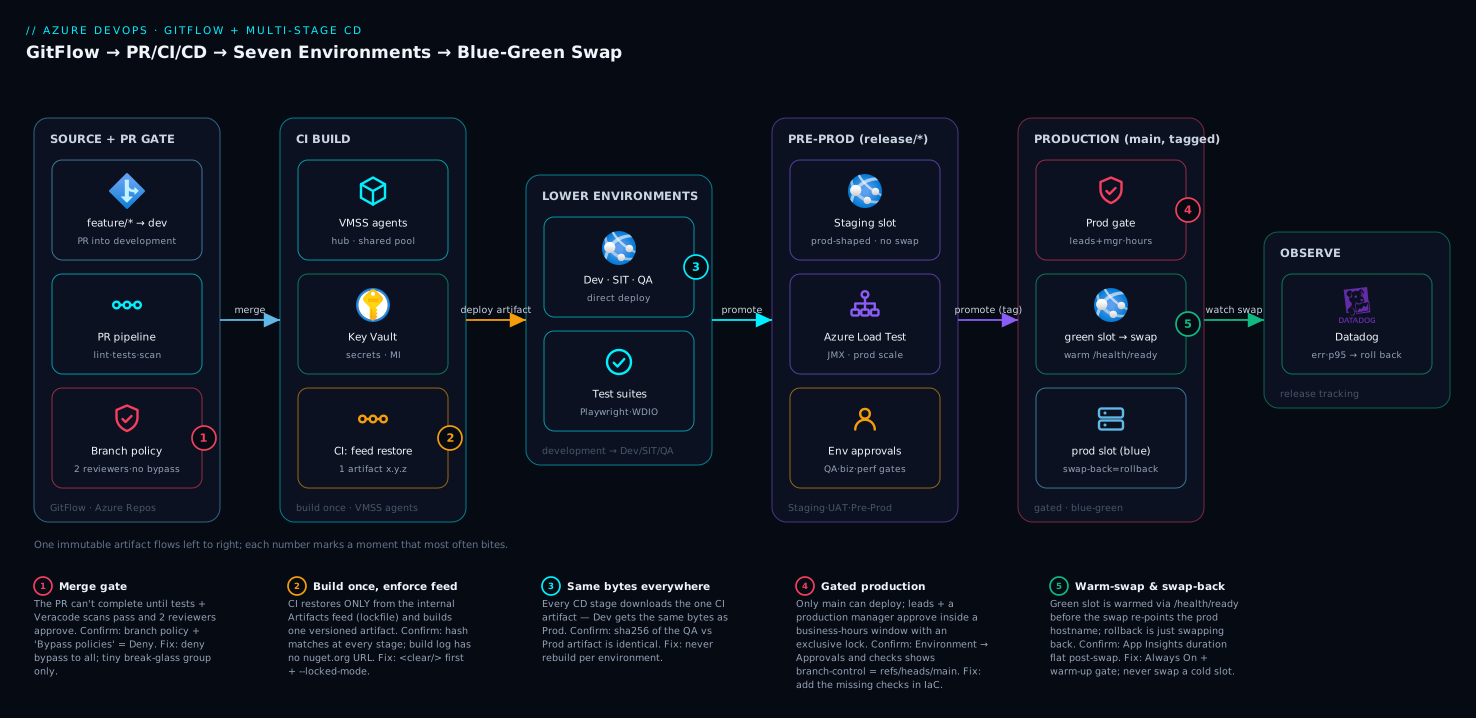
Read the system left to right and you can trace any change from a keystroke to production. On the far left, a developer’s feature/* branch opens a pull request into development; the PR pipeline runs on the shared VMSS agent fleet as a pure gate — lint, tests, coverage and Veracode scans — and the branch policy refuses the merge until they are green and a human has approved. The merge advances development (or, later, release/* or main), which triggers the CI pipeline: it pulls secrets from the Key Vault for that scope, restores from the internal Azure Artifacts feed under enforcement, builds one immutable, versioned artifact, runs Veracode SCA plus unit and integration tests, and publishes that artifact. From there the multi-stage CD pipeline takes over and never rebuilds — it promotes that single artifact rightward through the seven environments.
Follow the artifact across the environment band: it deploys directly to Dev, SIT and QA (smoke, integration, then Playwright/WebdriverIO suites), then — on release/* — to the staging slot of the production-shaped App Service for Staging, UAT and Pre-Prod, where an Azure Load Test (JMX) proves it at production scale. Each pre-prod and production stage is fronted by an Azure DevOps Environment carrying approvals and checks; the Production gate demands lead + production-manager sign-off inside a business-hours window. At the right edge, Production go-live is blue-green: the artifact lands on the green staging slot, the platform warms it via the /health/ready warm-up path, and a swap atomically re-points the production hostname — with a swap-back held in reserve as the instant rollback. Datadog watches the release throughout for the error-rate and latency signals that decide whether the new version stays. The numbered badges mark the five moments that most often bite: the merge gate, feed enforcement, the artifact hand-off, the production approval, and the swap itself.
Real-world scenario
The platform: “Meridian Pay”, a regulated payments unit running 40-odd services on Azure App Service behind the shared Azure DevOps platform described above. They came to me after a quarter from hell: two production incidents both rooted in delivery, not code. The first was a Friday “quick fix” merged straight to main that also dragged in a half-finished feature someone had merged earlier the same day — because main was doubling as both the integration and the release branch. The second was a swap that took the payments API down for nine minutes: the green slot had never been warmed, so when it swapped in, every instance cold-started under live traffic and the gateway timed out. Their release manager’s exact words: “I cannot tell you what is in production without SSH-ing into a box.”
We rebuilt the delivery model, not the apps. First, GitFlow with a hard rule: development is the only place features integrate, release/x.y is feature-frozen, main is only ever advanced by a release or hotfix merge, and every production deploy corresponds to a tag. We made main’s branch policy require two reviewers, prohibit self-approval, restrict completion to merge commits, and — the line that mattered most — denied “bypass policies” to everyone, including the leads who had been using it. Second, one artifact: the CI pipeline now builds once from the tagged commit and the CD pipeline promotes that exact zip through all seven environments; we proved it by hashing the artifact at Dev and at Production and showing they matched. Third, blue-green done right: every production release deploys to the staging slot with Always On, the pipeline pings /health/ready until it returns 200 across all instances, and only then swaps. The warm-up step alone eliminated the nine-minute class of incident — the slot is hot before it ever serves a user.
The results over the next two quarters: zero swap-induced downtime (the warm-up gate caught three would-be-cold releases and failed them before the swap), mean time to roll back fell from ~35 minutes to under 2 because rollback became “swap the slots back” instead of “rebuild the previous commit,” and — the one the auditors cared about — every production change now has a named approver, a CAB ticket reference, a version tag, and a scan record, reconstructable from the Environment’s approval history. The one genuine cost was the extra App Service slot per service and the discipline tax of release branches; the payments director signed off on both in about thirty seconds once we put the nine-minute incident’s revenue impact next to the slot’s monthly cost. The DORA metrics moved too — see DORA Metrics & Platform Engineering for how we tracked change-failure-rate and MTTR through this.
Advantages and disadvantages
No model is free. The honest two-column trade-off of this architecture — GitFlow + three pipelines + seven environments + blue-green slots — before the nuance:
| Advantages | Disadvantages |
|---|---|
main/tag is an unambiguous “what’s in prod” |
More long-lived branches → more merging |
| Immutable artifact → QA sign-off is meaningful | Seven environments cost compute + upkeep |
| Gated, audited production release (CAB-ready) | Approvals add latency to every release |
| Blue-green swap → near-zero-downtime go-live | An extra App Service slot per service ($) |
| Rollback = swap back (seconds, no rebuild) | Slot-settings mistakes can leak config |
| Hotfix path isolated from the release train | GitFlow merge ceremony slows fast teams |
| Separation of concerns → each pipeline auditable | Three pipelines = more YAML to maintain |
| Feed enforcement closes dependency-confusion | Stricter, so “just push it” is impossible |
The disadvantages matter most in two situations. If you are a small, high-trust team shipping many times a day, the GitFlow ceremony and the seven environments are pure drag — trunk-based with flags and a lean Dev/Staging/Prod is the better fit. If you are cost-constrained, the per-service extra slot and the pre-prod clone are real money; you can collapse SIT/QA or share a pre-prod, accepting that you catch integration and load issues later. The advantages dominate precisely when the disadvantages hurt least: regulated, batched-release, multi-team, high-stakes-production environments, which is exactly the platform this series targets. The art is not “always do all of this” — it is knowing which controls your risk profile actually requires.
Hands-on lab
This lab builds the blue-green core end to end on a single App Service and proves the swap-and-rollback loop, plus the Environment gate — the two ideas you most need to feel in your hands. It needs Standard tier (S1) for slots, which is cheap and you delete at the end. Replace names as needed.
1. Create a resource group, plan and web app (with a staging slot). Slots require Standard or higher:
az group create -n rg-bg-lab -l centralindia

az appservice plan create -n plan-bg-lab -g rg-bg-lab --sku S1 --is-linux

az webapp create -n app-bg-lab-$RANDOM -g rg-bg-lab --plan plan-bg-lab \
  --runtime "DOTNETCORE:8.0"
APP=$(az webapp list -g rg-bg-lab --query "[0].name" -o tsv)

# Create the green slot
az webapp deployment slot create -n "$APP" -g rg-bg-lab --slot staging
2. Make settings sticky and turn on Always On (so the slot can be warmed).
az webapp config set -n "$APP" -g rg-bg-lab --always-on true
az webapp config set -n "$APP" -g rg-bg-lab --slot staging --always-on true

# A sticky setting that identifies the slot and must NOT travel on swap
az webapp config appsettings set -n "$APP" -g rg-bg-lab --slot production \
  --slot-settings SLOT_NAME=production
az webapp config appsettings set -n "$APP" -g rg-bg-lab --slot staging \
  --slot-settings SLOT_NAME=staging
3. Deploy “v1” to production and “v2” to the staging slot. Use a trivial difference so you can see the swap. (In a real pipeline this is the immutable artifact; here we just set a setting that the app echoes, or deploy two zips.)
# A non-sticky setting → it WILL travel on swap, so it marks the live version
az webapp config appsettings set -n "$APP" -g rg-bg-lab --slot production --settings APP_VERSION=v1
az webapp config appsettings set -n "$APP" -g rg-bg-lab --slot staging   --settings APP_VERSION=v2
4. Warm and validate the green slot before swapping. Confirm it responds:
SLOT_HOST=$(az webapp show -n "$APP" -g rg-bg-lab --slot staging --query defaultHostName -o tsv)
curl -s -o /dev/null -w "staging slot → HTTP %{http_code}\n" "https://$SLOT_HOST"
5. Swap — go live. The production hostname now serves what was the staging slot:
az webapp deployment slot swap -n "$APP" -g rg-bg-lab --slot staging --target-slot production

# APP_VERSION travelled (v2 is now live); SLOT_NAME did NOT (prod still says production)
az webapp config appsettings list -n "$APP" -g rg-bg-lab --slot production \
  --query "[?name=='APP_VERSION' || name=='SLOT_NAME']" -o table
6. Roll back — swap again. This is the entire rollback. The previous version is live in seconds, no rebuild:
az webapp deployment slot swap -n "$APP" -g rg-bg-lab --slot staging --target-slot production
# APP_VERSION is back to v1; you just rolled back by swapping.
7. Add an Environment gate (in Azure DevOps). Create an Environment and require approval, then target it from a one-stage pipeline so you watch the deploy pause for approval:
az pipelines create --name bg-lab-cd --repository <your-repo> --branch main \
  --yml-path azure-pipelines-bg-lab.yml --skip-first-run true
# In Pipelines → Environments → New 'bg-lab-prod' → Approvals and checks → add yourself as approver.
# azure-pipelines-bg-lab.yml — minimal gated deploy
trigger: none
pool: vmss-linux
stages:
  - stage: Production
    jobs:
      - deployment: deploy
        environment: bg-lab-prod        # ← will pause here for your approval
        strategy:
          runOnce:
            deploy:
              steps:
                - task: AzureCLI@2
                  inputs:
                    azureSubscription: '<service-connection>'
                    scriptType: bash
                    scriptLocation: inlineScript
                    inlineScript: |
                      az webapp deployment slot swap -n "$APP" -g rg-bg-lab \
                        --slot staging --target-slot production
                  env: { APP: app-bg-lab-xxxx }
8. Teardown. Delete everything so the slot/plan stops billing:
az group delete -n rg-bg-lab --yes --no-wait
What you proved: a slot is a real running copy; a swap is atomic and re-points the hostname; sticky settings stay, non-sticky travel; rollback is just swapping back; and an Environment makes a deploy wait for a human. That is the production model in miniature.
Common mistakes & troubleshooting
The failure modes that actually page you, with the exact signal, the command or blade that confirms it, and the fix. This is the differentiator — scan the table, then read the detail for your row.
| # | Symptom | Root cause | Confirm (exact command / path) | Fix |
|---|---|---|---|---|
| 1 | Swap “succeeds” but the site is slow for minutes | Green slot was cold; no warm-up | App Insights request duration spikes post-swap | Always On + /health/ready warm-up gate before swap |
| 2 | After swap, prod points at the wrong database | Connection string not marked slot-sticky | az webapp config connection-string list — not under slotSetting |
Mark it --slot-settings; re-verify sticky_settings |
| 3 | Production deployed from a feature branch | No branch control on the Environment | Environment → Approvals and checks shows no branch control | Add azuredevops_check_branch_control = refs/heads/main |
| 4 | “It worked in QA but broke in prod” | Per-environment rebuild (different artifact) | Hash artifact in QA vs Prod — they differ | Build once in CI; CD downloads the same artifact |
| 5 | Anyone can complete a PR despite policy | “Bypass policies” granted broadly | Repo → Security → “Bypass policies when completing PRs” = Allow | Deny it to all; grant to a tiny break-glass group only |
| 6 | CD ran but skipped Production | Stage condition branch mismatch |
Pipeline run → Production stage “skipped” | Fix condition: eq(... 'refs/heads/main'); check trigger branch |
| 7 | Approval never appears; deploy just runs | deployment job not bound to the Environment |
YAML shows a job: not deployment: … environment: |
Use a deployment job with environment: |
| 8 | Restore pulls a public package despite “internal only” | nuget.config lacks <clear/>; lock not enforced |
Build log shows nuget.org URL; no --locked-mode |
<clear/> first; --locked-mode / lockfile |
| 9 | Hotfix fixed prod but the bug came back next release | Hotfix never merged back to development |
git log development lacks the hotfix commit |
Always back-merge main → development |
| 10 | Swap-back doesn’t roll back the schema | DB migration ran forward-only | App rolled back but schema is v2 | Expand/contract migrations + Liquibase down-changeset |
| 11 | Two prod deploys collide / race | No exclusive lock on the Environment | Two runs in the Production stage simultaneously | Add the exclusive-lock check |
| 12 | Secrets visible in pipeline logs | Secret echoed / not a secret variable | Pipeline log prints the value | Use Key Vault-backed group; never echo secrets |
| 13 | CD didn’t trigger after CI | Pipeline-resource trigger branch filter wrong | CD run history empty after a CI run | Match pipelines.trigger.branches to the CI source branch |
1 — The cold-slot swap (the nine-minute outage)
The most expensive blue-green mistake. You swap a green slot that has never received a request, so every instance cold-starts under full production load — runtime boot, JIT, pool prime — and the gateway times out while they warm. Confirm: Application Insights shows request duration spiking immediately after the swap timestamp, with a burst of 502/504. Fix: turn on Always On for the slot and gate the swap behind a warm-up that pings /health/ready until every instance returns 200 (the warmup-slot.yml step above). The swap then routes to already-warm instances. Never swap a slot you have not warmed. The cold-start mechanics underneath are dissected in Troubleshooting Azure App Service: 502/503 Errors, Cold Starts & Restart Loops.
2 — Config that travelled when it shouldn’t have
After a swap, production starts talking to the staging database, or runs as ASPNETCORE_ENVIRONMENT=Staging, because those settings were not marked slot-sticky and so travelled with the app. Confirm: az webapp config appsettings list --slot production shows the value that belongs to staging; the connection-string list shows slotSetting: false on something that identifies the environment. Fix: mark every environment-identifying setting --slot-settings (or sticky_settings in Terraform), then swap-test in a lab to confirm the right values stay put. The rule: environment identity is sticky; application behaviour travels.
3 — Production deployable from any branch
If the Production Environment has no branch control, a misconfigured pipeline (or a person) can deploy to it from development or a feature branch — the gate you thought you had does not exist. Confirm: Environment → Approvals and checks shows no branch-control entry. Fix: add the branch-control check restricting to refs/heads/main with verify_branch_protection = true, so only the policy-protected main can reach production.
4 — Different bytes in QA and prod
The subtlest and most dangerous. A pipeline that rebuilds in each stage means QA approved one artifact and production runs another — a newer transitive dependency resolved, a moved feed package, a different compiler run. Confirm: compute the artifact’s hash at the QA deploy and the Production deploy (sha256sum the downloaded zip) — if they differ, you are rebuilding. Fix: build exactly once in CI, publish a pipeline artifact, and have every CD stage download that same artifact. The hash must be identical end to end.
5 — The bypassable policy
A branch policy that privileged users can bypass is not a control. Confirm: Repo → Settings → Security, check “Bypass policies when completing pull requests” and “Bypass policies when pushing” — if these are Allow for any broad group, the gate is theatre. Fix: set both to Deny for everyone, and create a tiny, audited break-glass group for genuine emergencies (with an alert when it is used).
6 — The silently-skipped Production stage
The pipeline goes green but Production never ran — the stage condition did not match the trigger branch, so it was skipped (not failed), which is easy to miss. Confirm: the run’s stage view shows Production as Skipped. Fix: verify the condition (e.g. eq(variables['resources.pipeline.ci.sourceBranch'], 'refs/heads/main')) matches how the CD pipeline was actually triggered, and that the CI run that triggered it was on main.
7 — The approval that never shows
You added an approval to the Environment but the deploy ran straight through without pausing. Almost always the job is a plain job:, not a deployment: job bound to the Environment — approvals only fire on deployment jobs that declare environment:. Confirm: the YAML for the stage uses - job: (wrong) instead of - deployment: with environment: (right). Fix: convert it to a deployment job targeting the Environment.
8 — The feed-enforcement leak
“Internal feed only” is only true if the config forbids public sources and the lockfile is enforced. A nuget.config without <clear/> still inherits nuget.org; a restore without locked mode silently pulls new transitives. Confirm: the build log shows a https://api.nuget.org/... URL, or packages.lock.json changed during restore. Fix: put <clear/> first in <packageSources>, list only the internal feed, and restore with --locked-mode (or the equivalent lockfile gate for npm/Maven/pip). The feed setup and enforcement detail live in Centralized Azure Pipeline YAML Templates + Azure Artifacts Feeds.
9 — The hotfix that wasn’t back-merged
A hotfix shipped to production via hotfix/2.4.1 → main but was never merged back into development, so the next release from development reintroduces the bug. Confirm: git log development --oneline | grep <hotfix-commit> returns nothing. Fix: make back-merge mandatory — main → development after every hotfix and every release — ideally enforced by an automation that opens the back-merge PR.
10 — Rollback that doesn’t roll back the database
You swap back to roll the app back, but the database migration ran forward-only, so the old code now meets a schema it does not understand. Confirm: the app is on the previous version but queries fail with column/constraint errors; the schema is at the new version. Fix: use expand/contract (backward-compatible) migrations so old and new code both work against the intermediate schema, and keep a Liquibase down-changeset ready. Database rollback is covered in depth in Shift-Left Security, Testing, Observability — and Mobile + Database Delivery — on Azure DevOps.
11 — Colliding production deploys
Two pipeline runs hit the Production stage at once (a re-run plus the original, or two merges), and they race on the swap. Confirm: the Environment shows two concurrent runs in the Production stage. Fix: add the exclusive lock check to the Production Environment so only one run proceeds and the other queues.
12 — Secrets in the logs
A script step echoes a value that came from a secret, and now it is in the (retained, possibly widely-readable) pipeline log. Confirm: open the run log and search for the value. Fix: source secrets from a Key Vault-backed variable group (which masks them), never echo/Write-Host them, and rotate anything that leaked. See Secret Management in Pipelines with Key Vault & Managed Identity.
13 — CD that never triggers after CI
You merged, CI ran green, but the CD pipeline never started. The pipeline-resource trigger in the CD YAML did not match the branch the CI run was on. Confirm: the CD pipeline’s run history is empty after the CI run completed. Fix: ensure the CD pipeline’s resources.pipelines.trigger.branches includes the branch CI ran on (development/release/*/main), and that the CI pipeline name in source: is exact.
Best practices
The rules a senior engineer enforces on this platform, distilled:
| # | Practice | Why it matters |
|---|---|---|
| 1 | Build the artifact once; deploy it everywhere | QA sign-off is meaningless if prod runs different bytes |
| 2 | main is the only production source of truth |
One-word answer to “what’s in prod” |
| 3 | Every production release has a semantic tag | Immutable, human-meaningful, reconstructable |
| 4 | Deny “bypass policies” to everyone; tiny break-glass group | A bypassable gate is no gate |
| 5 | Never swap a slot you haven’t warmed and validated | Cold swap = the nine-minute outage |
| 6 | Mark every environment-identifying setting slot-sticky | Stops prod config from travelling on swap |
| 7 | Bind production deploys to main via branch control |
Closes the “deploy from anywhere” hole |
| 8 | Use deployment jobs + Environments for every gated stage |
Approvals only fire on deployment jobs |
| 9 | Always back-merge main → development |
Hotfixes and release fixes don’t regress |
| 10 | Rollback = swap back; keep the prior artifact pinned | Seconds, not a rebuild, during an incident |
| 11 | Restore from the internal feed with a lockfile | Closes dependency confusion |
| 12 | Keep gates and policies in IaC, not just the UI | They can’t be quietly loosened |
| 13 | Expand/contract DB migrations + a tested down-changeset | App rollback without a schema mismatch |
| 14 | Run every job on the shared VMSS pool, not hosted | Hub network access, private endpoints, scale |
| 15 | Pin template versions (@templates at a tag) |
A template change can’t silently alter prod |
Security notes
Delivery is an attack surface, and this model is built to shrink it. Least privilege per environment class: Non-Prod and Prod use separate service connections mapped to separate managed identities with access only to their own Key Vault scope — a compromised Non-Prod pipeline cannot read Prod secrets. No plaintext secrets, ever: every secret enters via a Key Vault-backed variable group or the AzureKeyVault@2 task, resolved at runtime via managed identity; the pipeline definition (in Git, widely readable) contains references, never values. Internal-feed enforcement is a supply-chain control: restoring only from the curated org feed, with a lockfile, blocks dependency-confusion and unvetted transitive code. Veracode at three points — PR (fast pipeline/SCA/container), CI (SCA on the built artifact), CD (policy + container scans before prod) — means vulnerable code is gated at merge, at build and at release. The production gate is an authorisation control: branch control limits the source to main, approvals require named leads plus a production manager, and the business-hours window plus exclusive lock prevent rushed or racing deploys — all recorded for audit. Finally, the agents live in the hub network behind private endpoints, so builds reach PaaS over the private network, not the public internet. For the identity mechanics underneath, see Secret Management in Pipelines with Key Vault & Managed Identity and, for the OIDC alternative to long-lived credentials, GitHub Actions → Azure with OIDC Federated Credentials.
Cost & sizing
What actually drives the bill in this delivery model, and how to right-size it. The four cost centres:
| Cost centre | What drives it | Rough scale | How to right-size |
|---|---|---|---|
| App Service plans (×7 envs) | SKU × instances × envs | Biggest line | Lower SKUs for Dev/SIT/QA; prod-grade only Staging/Pre-Prod/Prod |
| Deployment slots | One extra slot per app (Standard+) | +1 slot/app | Slot shares the plan — no extra plan, but needs S1+ |
| VMSS agents | Agent VM size × count × hours | Scales with concurrency | Autoscale to zero off-hours; right-size the VM SKU |
| Azure DevOps | Parallel jobs + user licences | Per parallel job/user | Buy parallelism to match peak concurrency, not headcount |
The slot subtlety drives most “surprise” cost questions: a deployment slot does not need its own plan — it runs on the same App Service plan as the production app, sharing its compute. The cost of blue-green is therefore not a second environment; it is the requirement to be on Standard (S1) or higher (Basic and Free do not support slots), which for a small prod app is on the order of a few thousand INR/month. The seven environments are the real spend, and the lever is fidelity tiering: Dev/SIT/QA on B-tier or small S1; Staging, Pre-Prod and Production on the production SKU because their whole job is to be production-like. The VMSS agents bill for VM time, so autoscaling the scale set down (even to zero) outside working hours is the single biggest agent saving. On Azure DevOps itself, the cost is parallel jobs (self-hosted parallelism is far cheaper than Microsoft-hosted) and licences — buy enough parallel jobs to clear your peak queue, not one per developer. As a rough order of magnitude for a single service across all seven environments with shared agents: the slots and lower environments are modest; the production-grade Staging/Pre-Prod/Prod plans dominate, which is exactly why fidelity tiering is where you optimise. For App Service tier specifics see Azure App Service Plans & Tiers Explained: Free to Isolated.
Interview & exam questions
Twelve questions a senior platform/DevOps role (and the AZ-400 Designing and Implementing Microsoft DevOps Solutions exam) will probe, with model answers.
Q1. Why must the CI pipeline build the artifact exactly once? So the bytes tested in QA are the literal bytes that reach production. If each environment rebuilds, a newer transitive dependency or moved feed package can change the artifact, invalidating every downstream sign-off. Build once, publish a pipeline artifact, and have every CD stage deploy that same artifact — provable by an identical hash end to end. (AZ-400: artifact management.)
Q2. What does an App Service slot swap actually do, and why is it near-zero-downtime? The swap applies the target slot’s app settings to the source slot’s instances, restarts and warms them, waits until they respond, then atomically re-points the production hostname’s routing to those now-warm instances; the old instances become the staging slot. Because routing only switches after the instances are responsive, users see no cold start — provided you also warmed the slot beforehand.
Q3. Which app settings should be marked as slot (sticky) settings, and why?
Anything that identifies the environment — ASPNETCORE_ENVIRONMENT, the database connection string, the telemetry/DD_ENV config, the Key Vault URI. These must not travel on swap or production would inherit staging’s config. Settings that are the release behaviour (the code/version, feature-flag values) should travel.
Q4. How do you make a branch policy genuinely un-bypassable? Require reviewers (min count), prohibit the author/last-pusher from approving, reset approvals on push, require build validation and external status checks — and critically, deny the “Bypass policies when completing/pushing” permission to everyone, reserving it for a small audited break-glass group. Without the last step the rest is advisory.
Q5. Why use a deployment job rather than a regular job in CD?
A deployment job binds to an Environment, which is what triggers approvals and checks, records deployment history per environment, and supports strategies (runOnce, canary, rolling) with lifecycle hooks. A plain job has no Environment, so no approvals fire — a common reason a gate “doesn’t work.”
Q6. Walk me through a two-minute production rollback in this model.
Production was swapped from the staging slot, so the previous version is still running on what is now the staging slot. Rolling back is az webapp deployment slot swap --slot staging --target-slot production again — re-pointing the hostname to the prior instances in seconds, no rebuild. The only caveat is the database: forward-only migrations break this, so use expand/contract plus a Liquibase down-changeset.
Q7. What is the difference between an approval and a check on an Environment? An approval is a human clicking Approve (recorded with who/when/comment); a check is an automated condition — business hours, branch control, an Invoke-REST/Azure-Function gate, an Azure Monitor query. Approvals capture judgement; checks capture guardrails. Production uses both: lead/manager approvals and branch-control + business-hours + exclusive-lock checks.
Q8. Why seven environments — isn’t Dev/Staging/Prod enough? Each catches a distinct risk: Dev (does it deploy), SIT (do services integrate), QA (do suites pass), Staging (prod-like infra/config), UAT (do users accept), Pre-Prod (survives prod-scale load + real network), Production. Collapsing them is legitimate for lower-risk apps, but a regulated, high-stakes platform wants each risk class caught before the one after it.
Q9. How does GitFlow keep a hotfix from corrupting the release train?
The hotfix branches off main (production), not the integration branch, so it carries only the fix — no half-done features ride along. It ships to prod via the same gate, gets a patch tag, then is merged back into both main and development. The release branch in flight is untouched.
Q10. What is “swap with preview” and when would you use it? A two-phase swap: phase one applies the production slot settings to the staging instances (so they run production config) without changing routing, letting you validate; phase two completes the swap (or you reset). Use it for the highest-risk releases where you must verify the app under production configuration before committing traffic.
Q11. How do you enforce that builds only use vetted dependencies?
Restore exclusively from the internal Azure Artifacts feed (a curated proxy of upstreams), with the package-source config clearing public sources (<clear/>) so nothing leaks in, and a lockfile enforced (--locked-mode / packages.lock.json) so no new or transitive package sneaks in silently. This blocks dependency-confusion attacks.
Q12. Where do Veracode scans run in this model, and why three places? PR (fast Pipeline Scan + SCA + container, gating the merge), CI (SCA on the actually-built artifact), and CD (Policy scan + container scan before production). Three points because each catches a different window: at merge (cheap, on the diff), at build (the real artifact and its resolved deps), and at release (the final policy gate before prod).
Quick check
- Your QA team approved build
2.4.0-rc.3, but production is throwing an error QA never saw. What is the first thing you check about the artifact? - After a production swap, the app starts using the staging database. Which single setting property was wrong?
- You added an approval to the
payments-productionEnvironment, but deploys run straight through. What is the most likely YAML mistake? - A hotfix fixed production last week; this week’s release reintroduced the same bug. What step was skipped?
- Production needs to be rolled back now. What is the command, and what is the one thing that can stop it from fully rolling back?
Answers
- That it is the same bytes. Hash the artifact deployed to QA and the one deployed to Production; if they differ, your pipeline is rebuilding per environment instead of promoting one immutable artifact. Fix: build once in CI,
downloadthe same artifact in every CD stage. - The connection string was not marked as a slot (sticky) setting, so it travelled with the app on swap. Mark it
--slot-settings(Terraformsticky_settings) so environment-identifying config stays pinned to its slot. - The stage uses a plain
job:instead of adeployment:job bound toenvironment: payments-production. Approvals/checks only fire ondeploymentjobs that target an Environment. - The back-merge of
main→developmentafter the hotfix. Without it,developmentnever received the fix, so the next release built from it reintroduced the bug. Make back-merge mandatory. az webapp deployment slot swap --slot staging --target-slot production(swap back to the prior instances). The thing that can stop a full rollback is a forward-only database migration — if the schema moved and is not backward-compatible, the old code meets a schema it cannot use; expand/contract migrations and a Liquibase down-changeset prevent this.
Glossary
| Term | Definition |
|---|---|
| GitFlow | A branching model with long-lived development and main, short-lived feature/*, release/* and hotfix/* branches, suited to scheduled, gated releases. |
development |
The permanent integration branch where features merge; source for the Dev/SIT/QA stages. |
release/x.y |
A short-lived, feature-frozen branch where a version is stabilised; source for Staging/UAT/Pre-Prod. |
main |
The production source of truth; only advanced by release/hotfix merges and tagged with the shipped version. |
hotfix/* |
An urgent fix branched off main, fast-tracked to production, then back-merged to main and development. |
| Semantic version tag | An annotated Git tag MAJOR.MINOR.PATCH naming the exact commit a release was built from. |
| Branch policy | Azure DevOps rules attached to a branch (reviewers, build validation, status checks, merge type) that block PR completion until satisfied. |
| PR pipeline | The pre-merge gate: lint, analysis, unit tests, coverage and Veracode scans; never deploys. |
| CI pipeline | Builds one immutable, versioned artifact from development/release/main: Key Vault secrets, feed restore with enforcement, build, scan, test, publish. |
| CD pipeline | The multi-stage pipeline that promotes the one artifact through the seven environments to production. |
| Pipeline artifact | The immutable build output published by CI and downloaded unchanged by every CD stage. |
| Environment (Azure DevOps) | A first-class deploy-target object that deployment jobs bind to, carrying approvals, checks and deployment history. |
| Approval | A gate requiring a named human to click Approve; recorded with who/when/comment. |
| Check | An automated gate condition on an Environment (business hours, branch control, REST/Function, Azure Monitor query, exclusive lock). |
| Deployment slot | A fully-functioning, swappable copy of an App Service on the same plan, with its own hostname; the blue-green “green.” |
| Swap | Re-pointing the production hostname’s routing to a (warmed) slot’s instances; the go-live action and the instant rollback. |
| Slot (sticky) setting | An app setting/connection string pinned to a slot that does not travel on swap. |
| Swap with preview | A two-phase swap that applies target config to the source instances for validation before completing the route switch. |
| Variable group | A named set of pipeline variables (optionally Key Vault-backed) supplying per-environment configuration. |
| Service connection | The credential (managed-identity-backed) Azure DevOps uses to act against an Azure subscription. |
| Expand/contract migration | A backward-compatible schema change that lets old and new code run against an intermediate schema, enabling app rollback. |
Next steps
- Stand up the platform this article assumes: Enterprise Azure DevOps at Scale: Multi-Project Structure (IaC, Templates, Packages, Apps) + a Centralized VMSS Agent Fleet.
- Centralise the YAML these pipelines
extendsand lock down the feed: Centralized Azure Pipeline YAML Templates + Azure Artifacts Feeds. - Go deep on the scan/test/observe and mobile/database delivery the stages call into: Shift-Left Security, Testing, Observability — and Mobile + Database Delivery — on Azure DevOps.
- Master the slot mechanics underneath the blue-green swap: Setting Up Azure App Service Deployment Slots: Swap, Warm-Up and Slot-Sticky Settings.
- Build the whole pipeline muscle from the ground up: CI/CD Pipelines Explained: From Code Commit to Production, and provision the App Service + slots the blue-green swap runs on with Terraform Module: Azure App Service (Web App).