There is a connection string in your pipeline right now. Maybe it’s a pipeline variable marked “secret,” maybe it’s a GitHub Actions secret, maybe it’s pasted into a Bicep parameter file someone forgot to .gitignore. It works, the deploy is green, and it is a liability that will outlive the engineer who added it. Plaintext secrets in CI/CD — passwords, API keys, connection strings, certificates living anywhere a human or a pipeline can read them as cleartext — are the single most common way credentials leak in cloud shops, and the leak is rarely dramatic. It’s a Write-Host $env:DB_PASSWORD line added for debugging, a service-principal secret rotated on paper but never in the seven pipelines that use it. The goal of this article is a pipeline where there is no plaintext secret to leak — not hidden, not masked, not present.
That goal is reachable on Azure with three building blocks that snap together: Azure Key Vault (the managed secret/key/certificate store that holds the real values), managed identity (an Azure-issued identity your compute carries, with no password you manage), and workload identity federation (OIDC trust that lets a pipeline outside Azure — GitHub Actions, an Azure DevOps service connection — get an Azure token with no stored secret at all). Layer Key Vault references on top and your app reads a secret from an app setting whose value is a pointer, not the secret. The pattern is not “store the secret somewhere safer.” It is “replace the secret with an identity and a reference, so the pipeline holds a capability, not a credential.”
By the end you will hold the mental models that make this obvious — why a managed identity beats a service-principal secret, why a federated credential beats both, where a secret still has to exist (Key Vault, encrypted at rest) — plus the comparison grids and decision tables to pick the right identity per pipeline, a copy-pasteable lab, and the failure modes that quietly reintroduce plaintext.
What problem this solves
Every pipeline needs to prove who it is (to authenticate to Azure) and read configuration (connection strings, keys, tokens) to do its job. The naive answer to both is “store a secret.” Store a service-principal client secret so the pipeline can log in; store the database password as a pipeline variable so the app can connect. Both answers create a credential that now lives in your CI system, gets copied into forks and clones, lands in build logs, and must be manually rotated everywhere before it expires — which, in practice, nobody does until it breaks production at 3 a.m. on the day it silently expired.
What breaks without a zero-plaintext approach is not usually a movie-style breach. It’s the slow rot: a secret committed to git history three years ago that still works because nobody rotated it (the Key Vault secrets, keys and certificates fundamentals explain why “delete the commit” doesn’t remove it from history); a build log a contractor can read that printed $(sqlPassword); a single shared service-principal secret behind forty pipelines, so rotating it means a forty-pipeline outage nobody will schedule. Each is invisible until an auditor, an attacker, or an expiry finds it.
Who hits this: every team running CI/CD against Azure — Azure DevOps or GitHub Actions deploying infrastructure (Terraform, Bicep) and apps (App Service, AKS, Functions). It bites hardest where pipelines were set up fast and “we’ll fix the secrets later” became permanent, where one service principal accreted permissions across projects, and where developers debug by printing environment variables. The fix is not a scanner that catches secrets in logs after the fact (useful, but reactive). It is an architecture where the pipeline authenticates with a federated identity (no secret), the deploy grants compute a managed identity (no secret), and the app reads config through Key Vault references (the secret stays in the vault). Remove the plaintext and there is nothing for the scanner to catch.
To frame the whole field before the deep dive, here is every place a secret hides in a typical pipeline, what it really is, and what replaces it under this model:
| Where the secret hides today | What it actually is | Who can read it | Zero-plaintext replacement |
|---|---|---|---|
Pipeline variable (secret: true) |
A stored value, masked in logs | Anyone who can edit the pipeline or print it | Key Vault reference via variable group / OIDC fetch |
| GitHub Actions secret | An encrypted repo/org secret | Repo admins; any workflow that runs | Workload identity federation (no secret to store) |
| Service-principal client secret | A password for an app registration | CI system; whoever has the SP | Managed identity or federated credential |
| Bicep / Terraform parameter file | Plaintext in a file (often committed) | Anyone with repo access | getSecret() / azurerm_key_vault_secret data source |
| App setting (raw connection string) | Plaintext config on the app | App admins; anyone reading config | Key Vault reference @Microsoft.KeyVault(...) |
.env file on a build agent |
Plaintext on disk | Anyone on the agent | Fetched at runtime via managed identity |
Learning objectives
By the end of this article you can:
- Explain, in one breath, why a managed identity is safer than a service-principal secret, and why a federated credential is safer than both — and pick the right one per pipeline.
- Distinguish the three things a pipeline authenticates to and for: logging into Azure, deploying resources, and the app reading config — and apply zero-plaintext to each independently.
- Set up workload identity federation (OIDC) for both GitHub Actions and Azure DevOps so the pipeline logs into Azure with no stored client secret.
- Use Key Vault references so an App Service / Function / Container App reads a secret from an app setting that is a pointer, resolved at runtime by the app’s managed identity — never a plaintext value.
- Read secrets in Terraform and Bicep without ever putting a plaintext value in a parameter file or state, and understand where Terraform state still leaks if you’re careless.
- Choose between the RBAC and access-policy permission models on Key Vault and grant least-privilege (
Key Vault Secrets User, notContributor) to each identity. - Spot the failure modes that reintroduce plaintext — debug
echos, secrets in logs, state files, fork pull requests — and apply the exact control that closes each.
Prerequisites & where this fits
You should already understand the basics of Azure identity and Key Vault: that Microsoft Entra ID issues tokens, that a service principal is the identity of an app/automation in your tenant, and that Key Vault stores secrets/keys/certificates encrypted at rest with access governed by either RBAC or access policies. You should be comfortable running az in Cloud Shell, reading JSON output, and have a working CI/CD pipeline (Azure DevOps or GitHub Actions) that deploys something to Azure today. Familiarity with Bicep or Terraform helps because the IaC examples are where most plaintext leaks live.
This sits in the DevSecOps / Identity track, at the seam between your pipeline and Azure. It assumes the identity fundamentals from Managed identity: system-assigned vs user-assigned patterns and the vault permission model from Key Vault RBAC vs access policies. It is upstream of the day-2 reality in Key Vault 403 Forbidden: firewall, RBAC, soft-delete recovery, because once secrets live in the vault, access failures become your new failure class. If your pipeline is Azure DevOps, it pairs with Azure DevOps variable groups, secret files & Key Vault link; the OIDC trust itself builds on the flows in OAuth2 & OIDC flows on Entra ID.
A quick map of the three concerns this article keeps separate — confusing them is why people “do Key Vault” and still leak secrets:
| Concern | The question | Naive (plaintext) answer | Zero-plaintext answer |
|---|---|---|---|
| Pipeline → Azure (authN) | “How does the pipeline log in?” | Stored SP client secret | Federated credential (OIDC), no secret |
| Pipeline → resources (authZ) | “What can it do once in?” | Owner/Contributor everywhere | Scoped RBAC role on the target RG |
| App → config (runtime secrets) | “How does the app read the DB password?” | Plaintext app setting | Key Vault reference + managed identity |
Keep those three rows distinct. Most “we use Key Vault” stories fix only the third row and leave a plaintext service-principal secret authenticating the whole pipeline — the biggest credential in the system, untouched.
Core concepts
Five mental models make every later decision obvious.
A secret is a credential you must protect and rotate; an identity is a capability the platform protects for you. A client secret (or a database password, or an API key) is a string that grants access to whoever holds it — so it must be stored, transmitted, masked, and rotated, and every one of those steps is a chance to leak it. A managed identity flips this: Azure issues your compute (a VM, App Service, Function, Container App, AKS pod) an identity with no password you ever see, minting short-lived tokens on demand and rotating the underlying credential automatically. There is no secret to put in a pipeline variable because there is no secret at all. This is the whole game: prefer an identity over a secret wherever an identity is possible.
Workload identity federation removes the last secret. Managed identity solves authentication for compute running inside Azure. But a GitHub Actions runner or an Azure DevOps Microsoft-hosted agent runs outside Azure — historically you gave it a service-principal client secret to log in, the very plaintext you’re trying to kill. Workload identity federation (also called OIDC federation) establishes a trust: you register a federated credential on an Entra app/identity that says “trust OIDC tokens from this GitHub repo on this branch” or “from this Azure DevOps service connection.” The pipeline presents a short-lived OIDC token its platform issued; Entra validates the trust and exchanges it for an Azure access token. No client secret is stored anywhere — the pipeline proves its identity by being that pipeline, not by holding a secret.
There is exactly one place a secret legitimately lives: Key Vault, encrypted at rest. Some secrets are irreducible — a third-party API key, a database password for a server that only speaks SQL auth, a TLS private key. Those must exist somewhere. The discipline is to keep them in Key Vault (encrypted, access-logged, RBAC-governed, soft-delete protected) and let everything else reference them at runtime rather than copy them. The pipeline and the app never hold the value; they hold a reference (a vault URI) and an identity authorized to dereference it. The blast radius of a leak collapses to “someone read the vault audit log,” not “the secret is in forty places.”
Authentication and authorization are separate, and both must be least-privilege. Getting a token (authN) is not the same as being allowed to do something (authZ). A federated pipeline identity logs into Azure with no secret — good — but grant it Owner on the subscription and you’ve traded a secret-leak risk for a token-theft-equals-tenant-takeover risk. The zero-plaintext win is real only when paired with scoped RBAC: the deploy identity gets Contributor on one resource group, the app’s identity gets Key Vault Secrets User on one vault. Removing the plaintext and then granting * is moving the lock from the door to the welcome mat.
Masking is not protection; absence is. CI systems “mask” secret variables in logs (replacing them with ***). Masking is a fallback that fails constantly — it misses base64-encoded values, multi-line secrets, values in a child process’s output, and anything a developer deliberately prints transformed. Zero-plaintext makes masking irrelevant: if the pipeline never holds the cleartext, there is nothing to mask and nothing to leak. Treat every masked secret as a known liability you haven’t removed yet, not a solved problem.
The vocabulary in one table
Before the deep sections, pin down every moving part. The glossary at the end repeats these for lookup; this table is the mental model side by side:
| Concept | One-line definition | Where it lives | Why it matters to zero-plaintext |
|---|---|---|---|
| Key Vault secret | A name → encrypted value (with versions) | A Key Vault | The one legitimate home for an irreducible secret |
| Managed identity | An Azure identity with no password you hold | On compute (App Service, VM, AKS…) | Replaces an SP secret for in-Azure compute |
| System-assigned MI | MI tied to one resource’s lifecycle | On the resource | Auto-deleted with the resource; 1:1 |
| User-assigned MI | Standalone MI you attach to many | Its own resource | Reuse across resources; survives them |
| Service principal | The identity of an app registration | Entra ID | Has a secret unless federated |
| Client secret | A password for a service principal | Wherever you stored it | The plaintext you’re trying to eliminate |
| Federated credential | OIDC trust on an app/identity | Entra app or user-assigned MI | Lets external CI log in with no secret |
| Workload identity federation | The OIDC trust mechanism | Entra ↔ GitHub/ADO | Removes the last stored secret |
| Key Vault reference | App setting whose value is a vault pointer | App setting | App reads secret without holding it |
| RBAC (data plane) | Role assignments on the vault | Vault scope | Key Vault Secrets User = least-privilege read |
| Access policy | Per-principal permission list on a vault | Vault config | Older model; mutually exclusive with RBAC |
The three identity options, head to head
Everything in this article reduces to a single choice repeated in different places: how does this actor authenticate? There are three answers, and they form a clear hierarchy. Understand the trade-offs once and apply them everywhere.
| Dimension | Service principal + secret | Managed identity | Federated credential (OIDC) |
|---|---|---|---|
| Stored secret? | Yes — a client secret/cert | No — platform-managed | No — OIDC token exchange |
| Works for in-Azure compute? | Yes | Yes (preferred) | Via MI federation |
| Works for external CI (GitHub/ADO)? | Yes (but stores a secret) | No | Yes (preferred) |
| Rotation burden | You rotate it, everywhere | Automatic | None (no secret) |
| Leak surface | Pipeline vars, logs, clones | Token only, short-lived | OIDC token only, single-use |
| Expiry failure mode | Silent outage on expiry | None | None |
| Setup complexity | Low (but ongoing cost) | Low | Medium (one-time trust) |
| Best for | Legacy only / last resort | Anything running in Azure | GitHub/ADO pipelines logging into Azure |
Read the hierarchy top to bottom: a stored client secret is the thing to remove; a managed identity is the answer when the workload runs inside Azure; a federated credential is the answer when it runs outside. Both no-secret options share one superpower — there is no long-lived credential to steal, so “where is it stored?”, “who can read it?”, and “is it rotated?” simply stop applying.
When you still need a service principal secret
A few cases still require a stored credential: a third-party SaaS that only accepts a client secret, a tool predating OIDC support, an on-prem agent that can’t reach the OIDC issuer. When you genuinely must, the rule is: put the secret in Key Vault, give it the shortest viable expiry, scope its permissions tightly, and reference it — never inline it. A secret that lives only in the vault and is fetched at runtime is a managed liability; the same secret pasted into a pipeline variable is an unmanaged one.
| If the actor is… | And it runs… | Use | Why |
|---|---|---|---|
| App Service / Function / Container App | In Azure | System-assigned managed identity | Lifecycle-bound, zero secret, simplest |
| Several apps sharing one identity | In Azure | User-assigned managed identity | One identity, one grant, many consumers |
| AKS workload (per-pod identity) | In Azure | Workload Identity (MI + federation) | Pod-scoped token, no node-wide secret |
| GitHub Actions workflow | Outside Azure | Federated credential on an Entra app | OIDC login, no AZURE_CLIENT_SECRET |
| Azure DevOps pipeline | Outside Azure | Workload-identity service connection | OIDC login, no SP secret in the connection |
| A SaaS that only takes a secret | Anywhere | SP secret in Key Vault, referenced | Irreducible — contain it, don’t spread it |
Eliminating plaintext at the pipeline login (OIDC federation)
The biggest plaintext secret in most setups is the one nobody thinks about: the service-principal client secret the pipeline uses to log into Azure. It authenticates the entire deploy, so it’s the highest-value credential you own — typically sitting in a CI secret store, copied into every fork, expiring on a date no one tracks. Workload identity federation deletes it.
The OIDC handshake, conceptually
The pipeline platform (GitHub, Azure DevOps) acts as an OIDC issuer. When a workflow runs, it mints a short-lived, single-audience OIDC token encoding verifiable claims: which repo, which branch (ref), which environment, which pull-request context. You register a federated credential on an Entra app (or user-assigned MI) whose subject must match those claims. At login the pipeline sends its OIDC token to Entra; Entra checks issuer, audience and subject against the federation and, on a match, returns an Azure access token. No secret was held — the pipeline proved identity by presenting a token its own platform vouched for, scoped to that run.
The subject claim is where most setups go wrong, so enumerate the shapes:
| Pipeline | Subject (subject/sub) example |
Triggered by | Gotcha |
|---|---|---|---|
| GitHub — branch | repo:org/repo:ref:refs/heads/main |
Push/PR to main |
Branch name must match exactly |
| GitHub — environment | repo:org/repo:environment:prod |
Job targeting environment: prod |
Use environments for prod gates |
| GitHub — tag | repo:org/repo:ref:refs/tags/v1.2.3 |
Tag push | One credential per tag pattern |
| GitHub — pull request | repo:org/repo:pull_request |
PR builds | Forks don’t get secrets/OIDC by default |
| Azure DevOps | service-connection-scoped (set automatically) | Pipeline using the connection | Created for you by the WIF connection wizard |
Each federated credential matches exactly one subject pattern; add several to cover main plus your environments plus tags. The audience is almost always api://AzureADTokenExchange for Azure logins — the wrong audience is a common cause of AADSTS70021 (“No matching federated identity record found”).
GitHub Actions: federated login with zero secrets
Create an app registration, add a federated credential for the branch/environment, grant it scoped RBAC, then log in with azure/login using only the client ID, tenant ID and subscription ID — three non-secret identifiers — plus id-token: write so the runner can request its OIDC token.
# 1. App registration + service principal
APP_ID=$(az ad app create --display-name "gh-deploy-shop" --query appId -o tsv)
az ad sp create --id "$APP_ID"

# 2. Federated credential: trust pushes to main of this repo (no secret created)
az ad app federated-credential create --id "$APP_ID" --parameters '{
  "name": "gh-main",
  "issuer": "https://token.actions.githubusercontent.com",
  "subject": "repo:contoso/shop:ref:refs/heads/main",
  "audiences": ["api://AzureADTokenExchange"]
}'

# 3. Scoped RBAC: Contributor on ONE resource group, not the subscription
SP_OID=$(az ad sp show --id "$APP_ID" --query id -o tsv)
az role assignment create --assignee "$SP_OID" --role "Contributor" \
  --scope $(az group show -n rg-shop-prod --query id -o tsv)
# .github/workflows/deploy.yml — note: NO client secret anywhere
permissions:
  id-token: write      # lets the runner request its OIDC token
  contents: read
jobs:
  deploy:
    runs-on: ubuntu-latest
    environment: prod
    steps:
      - uses: actions/checkout@v4
      - uses: azure/login@v2
        with:
          client-id: ${{ vars.AZURE_CLIENT_ID }}        # not a secret
          tenant-id: ${{ vars.AZURE_TENANT_ID }}         # not a secret
          subscription-id: ${{ vars.AZURE_SUBSCRIPTION_ID }}  # not a secret
      - run: az group show -n rg-shop-prod -o table
The three values are repository variables (vars), not secrets, because none is sensitive — a client ID and tenant ID are public identifiers. There is nothing in this workflow an attacker could steal and replay from outside the repo: the OIDC token is minted by GitHub only for runs of this repo on this branch.
Azure DevOps: the workload-identity service connection
Azure DevOps offers a workload identity federation service-connection type that replaces the old secret-bearing connection. Created via the new-service-connection wizard, it federates the connection’s identity with Entra and stores no secret; pipelines reference it by name and the platform handles the token exchange.
| Service-connection type | Stores a secret? | Rotation | Recommendation |
|---|---|---|---|
| SP (automatic, secret) | Yes — auto-created secret | Expires; manual renew | Migrate away |
| SP (manual, secret/cert) | Yes | You manage | Migrate away |
| Workload identity federation | No | None | Default for all new connections |
| Managed identity (self-hosted agent) | No | None | When the agent runs on an Azure VM/VMSS |
Migrating an existing secret-based connection to workload identity is a supported in-place conversion in the Azure DevOps UI — do it, then delete the orphaned client secret in Entra so it can’t be used.
Key Vault references: the app reads a secret it never holds
Federation fixes the pipeline’s login. The other half is the application’s runtime secrets — the database password, the third-party key — which historically sat as plaintext app settings. A Key Vault reference replaces that plaintext value with a pointer; App Service, Functions and Container Apps resolve it at startup using the app’s managed identity, inject the real value into the process environment, and never persist the cleartext in your config.
The reference syntax is an app-setting value naming a secret:
# The app setting's VALUE is a pointer, not the secret
az webapp config appsettings set -n app-shop-prod -g rg-shop-prod --settings \
  "DbConnection=@Microsoft.KeyVault(SecretUri=https://kv-shop.vault.azure.net/secrets/db-conn/)"

# The app needs an identity, and that identity needs read on the vault
az webapp identity assign -n app-shop-prod -g rg-shop-prod
PRINCIPAL=$(az webapp identity show -n app-shop-prod -g rg-shop-prod --query principalId -o tsv)
az role assignment create --assignee "$PRINCIPAL" --role "Key Vault Secrets User" \
  --scope $(az keyvault show -n kv-shop --query id -o tsv)
The reference forms differ in how they handle rotation — the detail that bites:
| Reference form | Example | Resolves to | Picks up rotation? |
|---|---|---|---|
| Unversioned (recommended) | SecretUri=.../secrets/db-conn/ |
Current version | Yes — within ~24 h (or on app restart) |
| Versioned (pinned) | SecretUri=.../secrets/db-conn/<guid> |
That exact version | No — stays pinned until you change it |
Alternate VaultName+SecretName |
@Microsoft.KeyVault(VaultName=kv-shop;SecretName=db-conn) |
Current version | Yes |
Use the unversioned form so a rotated secret flows through without a config change; pin a version only when you deliberately want immutability. In the Environment variables blade each reference shows a green “Resolved” tick or a red error with the reason — your first diagnostic when a reference looks broken.
Where Key Vault references work — and where they don’t
The mechanism is identical in spirit across the PaaS compute family, but the surface differs:
| Compute | Key Vault reference support | How the identity resolves it |
|---|---|---|
| App Service (Web App) | Native, in app settings & connection strings | System- or user-assigned MI |
| Azure Functions | Native, same syntax as Web Apps | System- or user-assigned MI |
| Container Apps | Native secret-from-Key-Vault binding | User-assigned MI (recommended) |
| AKS | Via Secrets Store CSI driver (not app-setting refs) | Workload Identity per pod |
| VM / VMSS app | App fetches via SDK + IMDS token | System- or user-assigned MI |
On AKS the equivalent is the Secrets Store CSI driver with the Azure Key Vault provider, which mounts secrets as files (or syncs to Kubernetes Secrets) using the pod’s Workload Identity — same principle, different plumbing.
Secrets in IaC: Bicep and Terraform without plaintext
Infrastructure-as-code is where plaintext loves to hide, because a parameter file feels like config, not a secret store. The rule: a secret value must never appear as a literal in a template, parameter file, variables file, or — for Terraform — in committed state. Reference it from the vault instead.
Bicep: getSecret() and @secure()
Bicep can pull a secret from an existing vault at deploy time so it reaches a module without ever being a literal. The getSecret() function works on an existing-vault reference and feeds a @secure() parameter, which Bicep keeps out of deployment outputs and logs.
// Reference an EXISTING vault; never put the secret value in this file
resource kv 'Microsoft.KeyVault/vaults@2023-07-01' existing = {
  name: 'kv-shop'
}

module sql 'sql.bicep' = {
  name: 'sql-deploy'
  params: {
    // The value is fetched from the vault at deploy time, not stored here
    adminPassword: kv.getSecret('sql-admin-password')
  }
}
// sql.bicep — the receiving module marks the param @secure()
@secure()
param adminPassword string
// ...used to set the SQL server admin password; never emitted as an output
| Bicep construct | What it does | Plaintext risk it removes |
|---|---|---|
@secure() on a param |
Excludes the value from logs/outputs/history | Secret leaking into deployment history |
kv.getSecret('name') |
Pulls secret from existing vault at deploy | Secret as a literal in a .bicepparam file |
existing vault reference |
Read a vault you didn’t author here | Hard-coding secret values to “wire up” a module |
Avoid output of a secret |
Never return a secret as a module output | Secrets appearing in az deployment show |
The one rule that catches most leaks: never output a secret. Deployment outputs are stored on the deployment object and readable by anyone with reader access to the resource group history.
Terraform: data sources, and the state-file trap
Terraform reads a secret from the vault with a data source, never a literal. But it has a notorious sharp edge: any secret it touches is written to state in plaintext. Terraform doesn’t encrypt state itself — your backend must, and it must be locked down.
# Read the secret from the vault — not a literal in any .tf or .tfvars
data "azurerm_key_vault" "shop" {
  name                = "kv-shop"
  resource_group_name = "rg-shop-prod"
}

data "azurerm_key_vault_secret" "sql_admin" {
  name         = "sql-admin-password"
  key_vault_id = data.azurerm_key_vault.shop.id
}

resource "azurerm_mssql_server" "this" {
  # ...
  administrator_login_password = data.azurerm_key_vault_secret.sql_admin.value
  # WARNING: this value is now in terraform.tfstate as plaintext
}
| Terraform concern | The trap | The control |
|---|---|---|
| Secret in state | Any read/used secret is plaintext in tfstate |
Remote backend with encryption at rest + tight RBAC (see remote state on a blob backend) |
| Provider auth | Storing an SP secret for the provider | OIDC: use_oidc = true (see Terraform provider auth 401/403) |
terraform plan output |
Secret visible in plan diff/log | sensitive = true on outputs/variables; don’t log plans |
.tfvars files |
Plaintext secrets committed | Never put secrets in tfvars; use data sources |
The honest summary: Terraform cannot keep a secret it manages out of state. The discipline is twofold — minimise which secrets Terraform touches (prefer Key Vault references the app resolves at runtime, so Terraform only sets a pointer), and treat the state backend as a secret store in its own right: encrypted blob, private endpoint, RBAC-locked, versioned. The provider itself should authenticate with OIDC (use_oidc = true) so no SP secret feeds Terraform either.
Rotation, expiry and the lifecycle of the secrets that remain
A zero-plaintext architecture still contains a handful of irreducible secrets in the vault, but rotation becomes a single-vault operation instead of a many-pipeline scramble. Understand the lifecycle knobs:
| Lifecycle control | What it governs | Default | Recommendation |
|---|---|---|---|
| Secret versions | Each set creates a new version; old ones retained |
Latest is “current” | Reference unversioned → new version flows through |
Expiry (exp) |
An expiry date on a secret version | None | Set on SP secrets/certs; alert before it |
Activation (nbf) |
Not-before date | None | Use for pre-staged rotations |
| Soft-delete | Retains deleted vault/secret for recovery | On (90 days), can’t disable | Leave on; it’s your undo |
| Purge protection | Blocks early purge during retention | Off (recommended on for prod) | Turn on for prod vaults |
| Rotation policy (keys) | Auto-rotate keys on a schedule | None | Use for keys; secrets often need app coordination |
| Event Grid notifications | SecretNearExpiry, SecretExpired events |
Off | Wire to an alert/automation |
The rotation flow that keeps zero downtime: write the new secret version before it’s needed (apps referencing the unversioned URI pick it up within the refresh window or on restart), verify, then disable the old version. Because consumers hold a reference not a copy, you rotate once in the vault instead of chasing forty pipelines. For certificates specifically, Key Vault can manage the full lifecycle (issue, renew, rotate) from an integrated CA, removing the human from the renewal loop entirely.
Architecture at a glance
Walk the path a secret-free deploy takes, left to right. A developer pushes to main; GitHub Actions starts a run and, because the workflow has id-token: write, the runner asks GitHub for a short-lived OIDC token scoped to repo:contoso/shop:ref:refs/heads/main. The runner presents that token to Microsoft Entra ID, which matches it against the federated credential registered on the deploy app — issuer, audience and subject all check out — and returns an Azure access token. No client secret existed at any point. Holding that token, the pipeline runs az/Bicep against resource group rg-shop-prod, where its identity has only Contributor on that one RG (badge 2 is where over-broad RBAC would bite). The deploy creates an App Service and assigns it a managed identity, then writes an app setting whose value is a Key Vault reference — a pointer, not a password.
Now the runtime path. When the app boots, it reads that app setting, sees the @Microsoft.KeyVault(...) pointer, and uses its own managed identity (a platform-issued token, no stored secret) to call Key Vault, where it has been granted exactly Key Vault Secrets User. The vault — protected by soft-delete and purge protection, optionally behind a private endpoint — returns the secret value, which the platform injects into the process environment. The application connects to Azure SQL with a value it fetched but never stored in config. Trace the whole left-to-right flow and count the stored plaintext secrets: zero. The badges mark the four places this can still fail or leak — a broken federation subject, an over-scoped role, a missing vault grant, and a secret accidentally printed to the build log — each with the one check that confirms it.
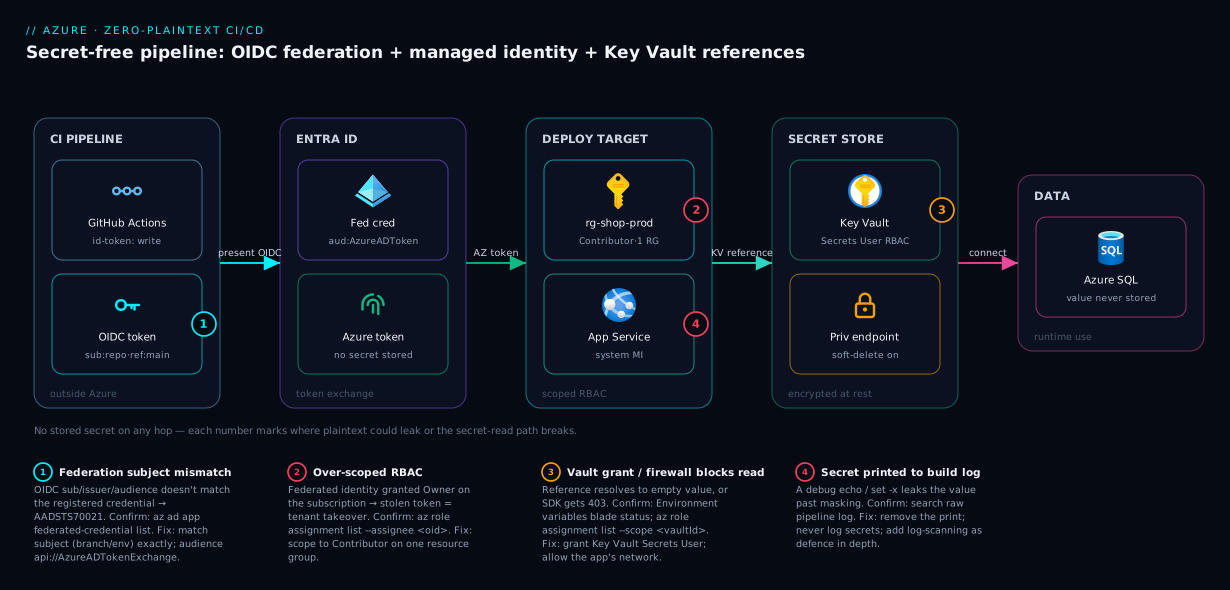
The diagram is deliberately a path, not a checklist: follow the arrows and you can narrate, hop by hop, exactly where a secret would have lived in the old design and what replaced it.
Real-world scenario
Northwind Retail runs an e-commerce platform on Azure: an App Service front end, an Azure SQL backend, a payments integration with a third-party gateway, all deployed by twelve Azure DevOps pipelines built up over four years. A routine security review flagged the problem: a single service principal — sp-deploy-prod, Owner on the production subscription — authenticated nine of the twelve pipelines with a client secret stored in each pipeline’s variable group, valid for 26 months because “rotating it would break everything.” Three pipelines printed $(SqlAdminPassword) and the payment gateway key into build logs contractors could read, and the SQL password sat as a plaintext app setting. By the security team’s count there were six distinct copies of the database password across pipelines, app settings and a .tfvars file in a repo.
The first instinct — “scan the logs and rotate the secret” — would have fixed nothing structural. The platform team instead applied the three-row model. Row one (pipeline login): they converted every service connection to workload identity federation, deleted the sp-deploy-prod client secret from Entra, and split the one Owner identity into per-project identities each Contributor on a single resource group — removing the highest-value plaintext secret and shrinking the blast radius from “subscription” to “one app’s RG.” Row two (authZ): least-privilege RBAC meant a compromised pipeline could no longer touch unrelated resources.
Row three (runtime secrets): the SQL password and gateway key moved into a Key Vault with soft-delete and purge protection on. The web app got a system-assigned managed identity granted Key Vault Secrets User, and the plaintext app setting became an unversioned Key Vault reference. The Terraform provisioning SQL was changed to read the password via an azurerm_key_vault_secret data source instead of a .tfvars literal — and because Terraform writes touched secrets to state, they moved state to an encrypted, RBAC-locked blob backend behind a private endpoint.
Debug Write-Host lines were deleted and a log-scanning gate added (defence in depth, not the primary control). Result: zero plaintext secrets in any pipeline variable, log, or repo; the one remaining secret (the gateway key) lived only in the vault, fetched at runtime, on a 90-day rotation with an Event Grid SecretNearExpiry alert. When the gateway key was next rotated, it was a one-line vault update that nine pipelines and the app picked up automatically — the 26-month-stale-secret problem could not recur, because there was no longer a secret to go stale anywhere but the vault.
The timeline of what changed and what it bought:
| Phase | State | Change | Plaintext secrets remaining |
|---|---|---|---|
| Before | At risk | One Owner SP secret in 9 pipelines; 6 copies of DB password | Many (pipelines, logs, app, tfvars) |
| Week 1 | Login fixed | OIDC federation on all connections; SP secret deleted | DB password + gateway key still plaintext |
| Week 2 | AuthZ scoped | Per-project Contributor on single RGs | Same as above |
| Week 3 | Runtime fixed | Key Vault + MI + Key Vault references; Terraform via data source; state locked down | Zero in pipelines/app; one in vault only |
| Steady state | Operating | Rotation = one vault update; expiry alerts wired | One (vault, encrypted, audited) |
Advantages and disadvantages
The identity-and-reference model removes plaintext but introduces its own operational surface. Weigh it honestly:
| Advantages (why this model wins) | Disadvantages (why it costs you) |
|---|---|
| No stored secret to leak, copy, or forget to rotate — the failure class disappears | A new dependency at boot/deploy: if the identity lacks vault access, the app/deploy fails (a 403 instead of a wrong value) |
| Federated pipeline login means no expiry-day outages | One-time setup of federation (subjects, audiences) has a learning curve and easy-to-get-wrong subject claims |
| Rotation is a single-vault operation, not a many-pipeline scramble | You must run Key Vault as production infrastructure: networking, RBAC, soft-delete, monitoring |
| Least-privilege RBAC shrinks blast radius even if a token is stolen | Over-broad RBAC silently undoes the win — the lock moves to the welcome mat if you grant * |
| Vault audit logs give you a single chokepoint to see who read what | A vault outage or firewall misconfig becomes a new single point of failure for secret reads |
| Managed identities are free; no per-secret credential management | Key Vault transactions and (Premium/HSM) cost money; high-RPS secret reads need caching |
| Works uniformly across App Service, Functions, Container Apps, AKS | AKS uses a different mechanism (CSI driver) than app-setting references — two patterns to know |
The advantages dominate for any team with more than a couple of pipelines or any compliance obligation — the moment you have “six copies of the password,” the single-chokepoint model pays for itself. The disadvantages bite teams that adopt Key Vault as a checkbox: they move secrets in, never set up networking or monitoring, and discover at 3 a.m. that a vault firewall change broke every app’s secret read. The pattern is right; treating the vault as fire-and-forget is the trap.
Hands-on lab
Stand up the full zero-plaintext loop end to end: a vault holding a secret, a web app with a managed identity reading it via a Key Vault reference, and least-privilege RBAC — no plaintext anywhere. Free-tier-friendly (B1 plan; delete at the end). Run in Cloud Shell (Bash).
Step 1 — Variables and resource group.
RG=rg-zeroplaintext-lab
LOC=centralindia
KV=kv-zpl-$RANDOM        # vault names are globally unique
APP=app-zpl-$RANDOM      # app hostname is globally unique
az group create -n $RG -l $LOC -o table
Step 2 — Create a Key Vault using the RBAC permission model.
az keyvault create -n $KV -g $RG -l $LOC \
  --enable-rbac-authorization true \
  --retention-days 90 -o table
Expected: a vault with enableRbacAuthorization: true. The RBAC model (not access policies) is the modern default — permissions are Azure role assignments, auditable like any other resource.
Step 3 — Put a secret in the vault. You need Key Vault Secrets Officer on the vault to write; grant yourself, then set the secret.
ME=$(az ad signed-in-user show --query id -o tsv)
az role assignment create --assignee "$ME" --role "Key Vault Secrets Officer" \
  --scope $(az keyvault show -n $KV --query id -o tsv)
# wait a few seconds for the role to propagate, then:
az keyvault secret set --vault-name $KV --name db-conn \
  --value "Server=tcp:demo.database.windows.net;Database=shop;..." -o table
Expected: a secret named db-conn. This is the only place the value will ever live in plaintext-at-rest (encrypted by the vault).
Step 4 — Create a B1 plan and a web app with a system-assigned managed identity.
az appservice plan create -n plan-zpl -g $RG --is-linux --sku B1 -o table
az webapp create -n $APP -g $RG -p plan-zpl --runtime "DOTNETCORE:8.0" -o table
az webapp identity assign -n $APP -g $RG -o table
Expected: the identity assign output shows a principalId (a GUID) — the app now has an identity with no secret you hold.
Step 5 — Grant the app’s identity least-privilege read on the vault. Key Vault Secrets User allows get/list on secrets — nothing more.
PRINCIPAL=$(az webapp identity show -n $APP -g $RG --query principalId -o tsv)
az role assignment create --assignee "$PRINCIPAL" --role "Key Vault Secrets User" \
  --scope $(az keyvault show -n $KV --query id -o tsv) -o table
Step 6 — Wire the Key Vault reference as an app setting. The value is a pointer, not the secret.
SECRET_URI=$(az keyvault secret show --vault-name $KV --name db-conn --query id -o tsv)
# strip the version so it tracks the current version (unversioned reference)
BASE_URI="${SECRET_URI%/*}/"
az webapp config appsettings set -n $APP -g $RG --settings \
  "DbConnection=@Microsoft.KeyVault(SecretUri=$BASE_URI)" -o table
az webapp restart -n $APP -g $RG
Step 7 — Confirm the reference resolved (without ever printing the secret).
az webapp config appsettings list -n $APP -g $RG \
  --query "[?name=='DbConnection'].{name:name, value:value}" -o table
Expected: the value shown is the @Microsoft.KeyVault(...) reference string — not the connection string. In the portal, Settings → Environment variables → DbConnection shows a green “Key Vault Reference / Resolved” status. The app process receives the real value at runtime; your config, CLI output and logs only ever show the pointer.
Validation checklist. You created a vault on the RBAC model, stored the only plaintext-at-rest copy of the secret there, gave the app a passwordless managed identity, granted it read-only on the vault, and replaced the plaintext app setting with a reference that resolves at runtime. Nowhere in the pipeline, the CLI output, or the app config does the cleartext secret appear. Map each step to what it proves:
| Step | What you did | What it proves | Real-world analogue |
|---|---|---|---|
| 2 | RBAC-model vault | Permissions are auditable role assignments | Every new prod vault |
| 4 | System-assigned MI | Compute can have an identity with no secret | Default for in-Azure apps |
| 5 | Key Vault Secrets User |
Least-privilege beats Contributor | Scoping every identity |
| 6 | Key Vault reference | The app reads a pointer, not a value | Removing plaintext app settings |
| 7 | Confirm value is the pointer | The cleartext never surfaces in config/logs | The audit that proves zero plaintext |
Cleanup (avoid lingering plan and vault charges).
az group delete -n $RG --yes --no-wait
# the vault is soft-deleted (90-day retention); to fully reclaim the name:
az keyvault purge -n $KV --no-wait
Common mistakes & troubleshooting
The architecture removes plaintext, but several mistakes quietly reintroduce it or break the secret-read path — symptom, root cause, how to confirm, fix:
| # | Symptom | Root cause | Confirm (exact command / portal path) | Fix |
|---|---|---|---|---|
| 1 | AADSTS70021: No matching federated identity record found |
OIDC subject/issuer/audience mismatch | Compare token’s sub to the federated credential: az ad app federated-credential list --id <appId> |
Make the credential subject match the run (branch/env) exactly; audience api://AzureADTokenExchange |
| 2 | App boots but DB connection is empty/garbled | Key Vault reference failed to resolve (no value, not an error) | Environment variables blade shows red error; az webapp config appsettings list --query "[?contains(value,'KeyVault')]" |
Grant MI Key Vault Secrets User; check vault firewall; verify secret exists & URI |
| 3 | Caller is not authorized... does not have secrets get permission (403) |
Identity lacks data-plane read, OR vault still on access-policy model | az role assignment list --assignee <principalId> --scope <vaultId>; check enableRbacAuthorization |
Assign Key Vault Secrets User (RBAC) or add a get/list access policy — match the vault’s model |
| 4 | Secret value appears in the build log | A echo/Write-Host/set -x printed it, or a step transformed it past masking |
Search the raw log; check for set -x, debug print steps |
Remove the print; never log secrets; add log-scanning as defence in depth |
| 5 | Rotated the secret but the app still uses the old value | App setting references a pinned version | Inspect the SecretUri for a trailing version GUID |
Use the unversioned URI; or restart the app to force refresh |
| 6 | Terraform exposes the secret in plan/state |
Secret used as a resource arg lands in state plaintext | grep the state (don’t commit it!); plan output shows the value |
Lock down/encrypt the backend; sensitive = true; minimise secrets Terraform touches |
| 7 | Fork PR can’t authenticate / secrets unavailable | GitHub doesn’t expose secrets/OIDC to fork PRs by default | Workflow run from a fork; id-token request fails |
Expected & correct — run deploys only on trusted refs/environments, not fork PRs |
| 8 | Vault read works locally, fails in pipeline | Different identity in CI than at your desk; CI identity not granted | az account show in the pipeline; check the SP/MI object ID’s role assignments |
Grant the pipeline’s identity (federated SP) read on the vault |
| 9 | Key Vault reference resolves but app 500s under load | Hitting Key Vault per request instead of caching the injected env var | App Insights dependency calls to vault.azure.net per request |
Read the injected app setting once at startup; don’t call the vault per request |
| 10 | Secret read intermittently times out | Vault firewall set to “selected networks” excluding the app’s egress | Vault → Networking shows selected-networks; app has no allowed route | Add a private endpoint or allow the app’s outbound; enable “trusted Microsoft services” |
| 11 | New env (prod) federation fails though main works |
Only one federated credential (for main) exists; env subject differs |
az ad app federated-credential list shows no environment:prod entry |
Add a federated credential per subject pattern you use |
| 12 | After deleting the vault by mistake, secrets “gone” | Soft-delete retained them but they look absent | az keyvault list-deleted shows the vault |
Recover within retention: az keyvault recover -n <vault> |
Two deserve emphasis. #2 vs #3 is subtle: a failed Key Vault reference resolves to an empty value (the app sees garbage, no obvious error), whereas an app calling the vault via SDK gets an explicit 403 — the empty-value case is nastier because nothing says “denied,” so check the Environment variables blade’s resolution status first. #4 and #6 are the two ways plaintext sneaks back in after you’ve done everything else right — a debug print and Terraform state — so treat both as first-class review items. For the broader vault-access failure taxonomy the dedicated Key Vault 403 Forbidden playbook is the deeper reference.
Best practices
- Prefer an identity over a secret, always. In-Azure compute gets a managed identity; external CI gets a federated credential. Reach for a stored secret only when an identity is genuinely impossible, and then put it in the vault.
- Federate every pipeline login. Convert Azure DevOps service connections to workload identity and use
azure/loginOIDC in GitHub Actions. Then delete the orphaned client secrets in Entra so they can’t be replayed. - Scope RBAC to the smallest target. Deploy identities get Contributor on one resource group, never Owner on the subscription. App identities get Key Vault Secrets User on one vault, never Contributor.
- Use unversioned Key Vault references so rotation flows through without a config change; pin a version only when you deliberately want immutability.
- Never
outputa secret in Bicep, never put one in.tfvars, never echo one in a log. These are the three classic reintroductions of plaintext; make them review-blocking. - Treat Terraform state as a secret store. Encrypted blob backend, private endpoint, RBAC-locked, versioned — because any secret Terraform touches is plaintext in state.
- Turn on soft-delete and purge protection on production vaults; they are your only undo for a fat-fingered delete or a malicious purge.
- Set expiry on the secrets that remain (SP secrets, certs) and wire Event Grid
SecretNearExpiryto an alert so rotation is proactive, not reactive. - Read the injected secret once at startup, not per request. Key Vault references inject into the environment; calling the vault on every request adds latency and can throttle.
- Use one vault per app/environment boundary (or at least per trust boundary) so a compromised identity can’t read another app’s secrets, and audit logs stay legible.
- Run secret-scanning as defence in depth, not the primary control. A scanner that catches secrets in logs is a safety net; the real control is that there’s no plaintext to catch.
- Document which secrets are irreducible. Maintain a short list of the genuine third-party secrets in the vault; everything not on it should be an identity or a reference.
Security notes
The whole article is a security control, so these notes are the sharp edges specific to this pattern.
Least privilege is the other half of zero-plaintext. Removing the stored secret then granting the federated identity Owner is a lateral move, not a win — you’ve swapped “secret leaks” for “stolen token equals tenant takeover.” The two halves are inseparable: no plaintext and tightly scoped RBAC. Audit role assignments on deploy identities as carefully as you used to guard the secret.
The federated trust is the new crown jewel. Anyone who can register a federated credential on your deploy app, or modify the subject to trust an attacker-controlled repo/branch, can mint legitimate tokens with no secret to steal. Lock down who can edit app registrations and federated credentials; treat that permission like you’d treat handing out the old client secret.
Network-isolate the vault for sensitive workloads. A vault open to the public internet is reachable by anyone with a valid token; pair RBAC with a private endpoint (see Private Endpoint vs Service Endpoint) so even a stolen token can’t read it from outside your network. Allow “trusted Microsoft services” where App Service/Functions need it.
Encryption is handled at rest — your job is access and transit. Key Vault encrypts secrets at rest by default (Premium adds HSM-backed keys). The risks you own are who can read (RBAC) and from where (networking), plus ensuring the secret never gets copied out into a less-protected place — the whole point of references over copies.
Audit the read path. Enable Key Vault diagnostic logs to a Log Analytics workspace so every SecretGet is recorded — the single chokepoint that lets you answer “who read this secret and when” after an incident. Without it, the vault’s blast-radius advantage is theoretical.
| Security control | What it protects against | How to set it |
|---|---|---|
Scoped RBAC (Secrets User) |
Over-privileged identities | Role assignment at vault scope, not subscription |
| Federated-credential lockdown | Forged-trust token minting | RBAC on app registrations; review federated creds |
| Private endpoint on vault | Token-replay from outside the network | Private endpoint + “selected networks” + trusted services |
| Soft-delete + purge protection | Accidental/malicious secret deletion | --retention-days 90, purge protection on |
Diagnostic logs (AuditEvent) |
Undetected secret reads | Diagnostic setting → Log Analytics |
| Expiry + near-expiry alerts | Silent expiry outages | Secret exp + Event Grid SecretNearExpiry |
Cost & sizing
The identity layer is free; the costs are Key Vault transactions and the vault tier. Managed identities, federated credentials and Key Vault references cost nothing. Key Vault bills per 10,000 operations, plus a per-key/certificate charge on Premium and for HSM-backed material.
| Item | Pricing basis | Rough cost | Notes |
|---|---|---|---|
| Managed identity | — | Free | No per-identity charge |
| Workload identity federation | — | Free | No charge for federated credentials |
| Key Vault (Standard) secrets ops | Per 10,000 operations | ~₹2–3 / 10k ops (~$0.03) | Cache the injected value; don’t read per request |
| Key Vault (Premium) | Per 10k ops + per HSM key | Higher; HSM keys billed monthly | Use Premium only when you need HSM-backed keys |
| Certificate operations | Per renewal/operation | Small per-op; CA cert cost separate | Vault-managed renewal removes human toil |
| Private endpoint on vault | Per endpoint-hour + data | ~₹600–900 / month (~$7–11) per endpoint | Adds the network-isolation security benefit |
| Log Analytics for audit logs | Per GB ingested | Pennies for vault audit volume | Cheap insurance for the read-path audit |
The number that actually bites is operations from reading the vault per request. A high-traffic app that calls Key Vault on every request instead of reading the once-injected env var can rack up millions of operations and hit throttling — the fix is architectural (read at startup, cache), not a bigger SKU. For most apps the vault bill is rounding error; the private endpoint (if you add one) is the largest line item, and it buys a real security control. There is no perpetual free Key Vault, but a small app’s vault bill is typically a few rupees a month — far cheaper than one leaked credential.
Interview & exam questions
Q1. Why is a managed identity more secure than a service-principal client secret? A managed identity has no password you store, transmit, or rotate — Azure mints short-lived tokens on demand and rotates the underlying credential automatically. There is no long-lived secret to leak into a pipeline variable, log, or repo, which eliminates an entire class of credential exposure. Maps to AZ-500 identity topics.
Q2. What is workload identity federation and what problem does it solve? It’s an OIDC trust between Entra ID and an external token issuer (GitHub Actions, Azure DevOps). The pipeline presents a short-lived OIDC token its platform minted; Entra validates issuer/audience/subject against a registered federated credential and returns an Azure token. It removes the stored service-principal secret that external CI otherwise needs to log into Azure.
Q3. How does a Key Vault reference let an app use a secret without holding it? The app setting’s value is a pointer (@Microsoft.KeyVault(SecretUri=...)), not the secret. At startup the platform uses the app’s managed identity to fetch the real value from the vault and injects it into the process environment. The cleartext never appears in config, CLI output, or logs — only the pointer does.
Q4. What’s the difference between a versioned and an unversioned Key Vault reference? A versioned reference pins a specific secret version and ignores rotation; an unversioned reference tracks the current version and picks up a rotated secret within the refresh window (or on restart). Use unversioned so rotation flows through without a config change; pin only for deliberate immutability.
Q5. Where does Terraform leak secrets even when you read them from Key Vault, and how do you mitigate it? Any secret Terraform reads or sets is written to state in plaintext — Terraform doesn’t encrypt state itself. Mitigate with an encrypted, RBAC-locked, private-endpoint remote backend, sensitive = true outputs, and minimising which secrets Terraform touches (prefer setting a Key Vault reference the app resolves at runtime).
Q6. A pipeline gets AADSTS70021: No matching federated identity record found. What’s wrong? The OIDC token’s subject, issuer, or audience doesn’t match any registered federated credential. Most often the subject (e.g. branch or environment) differs from the credential, or the audience isn’t api://AzureADTokenExchange. Fix by aligning the federated credential’s subject to the actual run and using the correct audience.
Q7. Why isn’t “masking secrets in logs” sufficient? Masking is a fallback that fails on base64/encoded values, multi-line secrets, transformed values, and child-process output. It treats a present secret as safe. Zero-plaintext makes masking irrelevant by ensuring the pipeline never holds the cleartext at all — absence, not masking, is the control.
Q8. When choosing between RBAC and access policies on a Key Vault, what guides you and why? Prefer the RBAC model: permissions are Azure role assignments, auditable like any other resource, with least-privilege roles such as Key Vault Secrets User. Access policies are the older per-principal model, mutually exclusive with RBAC on a given vault. New vaults should use RBAC.
Q9. A Key Vault reference fails to resolve. Why might the app show no error but behave wrongly? A failed reference resolves to an empty value rather than throwing, so the app receives garbage (e.g. an empty connection string) with no “denied” message. Confirm via the Environment variables blade’s resolution status; the cause is usually a missing Key Vault Secrets User grant, a vault firewall, or a wrong/stale URI.
Q10. Why must zero-plaintext be paired with scoped RBAC? Removing the stored secret but granting the identity broad rights (Owner) trades a secret-leak risk for a token-theft-equals-takeover risk. The win is real only when the federated/managed identity is least-privilege — Contributor on one RG, Secrets User on one vault — so a stolen token’s blast radius is small.
Q11. How do you rotate a secret with zero downtime under this model? Write the new secret version in the vault before it’s needed; consumers using the unversioned reference pick it up on refresh or restart. Verify, then disable the old version. Because consumers hold a reference (not a copy), you rotate once in the vault instead of updating every pipeline.
Q12. For AKS, how do workloads read Key Vault secrets without plaintext? Via the Secrets Store CSI driver with the Azure Key Vault provider, authenticated by the pod’s Workload Identity (MI + federation). Secrets mount as files (optionally synced to Kubernetes Secrets). Same identity-not-secret principle as app-setting references, with Kubernetes-suited plumbing.
Quick check
- What are the three separate concerns this article keeps distinct, and which credential type fits each?
- Why is a federated credential preferable to a managed identity for a GitHub Actions runner?
- In a Key Vault reference, what is actually stored in the app setting — the secret or something else?
- Name the one place Terraform reintroduces plaintext even when you read secrets from the vault, and the mitigation.
- You see
AADSTS70021on a pipeline login. What three claims should you check?
Answers
- Pipeline → Azure login (federated credential / OIDC), pipeline → resources authorization (scoped RBAC role), and app → runtime config (Key Vault reference + managed identity). Confusing them is why teams “use Key Vault” yet still keep a plaintext SP secret for login.
- A GitHub runner runs outside Azure, so a managed identity (which is for in-Azure compute) doesn’t apply directly; a federated credential lets the external runner log in via OIDC token exchange with no stored secret. (A user-assigned MI can also be federated, but the federation is the key part.)
- A pointer —
@Microsoft.KeyVault(SecretUri=...). The platform resolves it to the real value at runtime using the app’s managed identity and injects it into the environment; the cleartext never lives in the app setting. - Terraform state — any secret it touches is written to
tfstatein plaintext. Mitigate with an encrypted, RBAC-locked, private-endpoint remote backend,sensitive = true, and minimising secrets Terraform handles (prefer setting a reference the app resolves at runtime). - The issuer (must be the pipeline platform’s OIDC issuer), the audience (
api://AzureADTokenExchangefor Azure), and the subject (must match the run — branch/environment/tag — exactly against a registered federated credential).
Glossary
- Azure Key Vault — Managed service that stores secrets, keys and certificates encrypted at rest, with access governed by RBAC or access policies and full audit logging.
- Secret (Key Vault) — A named, versioned value (e.g. a connection string or API key) stored encrypted in a vault; consumers fetch it by name/URI rather than copying it.
- Managed identity — An Entra identity assigned to Azure compute, with no password the user manages; the platform issues and rotates tokens automatically. System-assigned (lifecycle-bound) or user-assigned (standalone, reusable).
- Service principal — The identity of an application/automation in an Entra tenant. Without federation it authenticates with a client secret or certificate.
- Client secret — A password for a service principal; the canonical “plaintext credential” this article aims to eliminate.
- Workload identity federation — An OIDC trust that lets an external workload (GitHub Actions, Azure DevOps) obtain an Azure token by presenting a platform-issued OIDC token, with no stored secret.
- Federated credential — The configuration on an Entra app or user-assigned MI that defines which OIDC issuer/subject/audience to trust.
- OIDC token — A short-lived, signed token minted by the pipeline platform encoding verifiable claims (repo, branch, environment) used in the federation exchange.
- Key Vault reference — An App Service/Functions/Container Apps app-setting value of the form
@Microsoft.KeyVault(...)that is resolved to the real secret at runtime by the app’s managed identity. - RBAC (Key Vault data plane) — The role-assignment permission model for vault access;
Key Vault Secrets Usergrants least-privilege secret read. - Access policy — The older per-principal Key Vault permission model, mutually exclusive with RBAC on a given vault.
- Soft-delete / purge protection — Vault features that retain deleted secrets/vaults for a retention period and (with purge protection) block early permanent deletion.
- Secrets Store CSI driver — The Kubernetes mechanism that mounts Key Vault secrets into pods, authenticated by Workload Identity, the AKS analogue of app-setting references.
@secure()(Bicep) — A parameter decorator that excludes a value from deployment outputs, logs and history.- Terraform state — Terraform’s record of managed resources; stores any secret it touches in plaintext, so the backend must encrypt and protect it.
Next steps
- Managed identity: system-assigned vs user-assigned patterns — pick the right identity shape before you wire references and federation.
- Key Vault RBAC vs access policies — the permission model underneath every grant in this article.
- Key Vault 403 Forbidden: firewall, RBAC, soft-delete recovery — the day-2 failure class once secrets live in the vault.
- Azure DevOps variable groups, secret files & Key Vault link — apply the runtime-reference pattern inside Azure DevOps pipelines.
- Terraform Azure provider authentication 401/403 — federate Terraform’s own login with OIDC so no SP secret feeds it.