A pipeline that compiles and deploys is table stakes. The pipeline that earns its keep is the one that refuses to ship — the one that blocks a merge because a transitive dependency carries a known-exploited CVE, fails a promotion because the p95 under load crossed your budget, holds a production release until two leads click approve, and the moment the swap completes drops a deployment marker into your observability tool so the next regression is pinned to that version in seconds. Everything between “git push” and “users are served” is a series of gates, and a senior platform team’s real product is the placement and honesty of those gates. This article is about the security, testing and observability gates on an enterprise Azure DevOps platform — and then about the two delivery surfaces that always get bolted on last and break in production first: mobile (Android + iOS, signing and the store) and database (schema versioning that has to roll forward and back without losing a row).
The reference platform is a single Azure DevOps organisation carved into purpose-built projects — an IaC project (Terraform modules, one Git repo per module), a templates project (centralised reusable YAML), a packages project hosting Azure Artifacts feeds (Maven, NuGet, npm, Python), and many application projects that consume all three — with a centralised self-hosted agent fleet on a VM Scale Set in the hub network running every job elastically. Pipelines come in three shapes: a PR pipeline that gates merges, a CI pipeline that fetches secrets, restores from the internal feed, builds and tests, and a CD pipeline that promotes an artifact through Dev → SIT → QA → Staging → UAT → Pre-Prod → Production with a gated production release. Veracode scans sit at every layer; Datadog watches the result. We wire all of that concretely — real azure-pipelines.yml, az/az pipelines CLI, Terraform, and Veracode/Datadog/Liquibase/Applivery mechanics — and never invent a product feature.
This is the part of the six-blog series where the pipeline stops being plumbing and becomes a control plane: Veracode scans placed and tuned to block real risk without crying wolf, secrets fetched from Key Vault over OIDC so nothing reusable is ever stored, a testing layer that genuinely gates promotion, Datadog wired to pin every regression to a release — then the two awkward surfaces, mobile and database, shipped with the same rigour.
What problem this solves
Without disciplined gates, “DevOps” degrades into “deploy faster,” and deploying broken things faster is just a faster outage. The failure modes are specific and they compound. A developer adds left-pad-shaped transitive dependency with a critical CVE and nobody notices until a customer’s scanner does. A secret gets pasted into a YAML variable “just for now” and leaks in a build log six months later. A release that “passed all tests” had no load test, and the first flash-sale of real traffic exhausts the connection pool. A mobile build ships unsigned, or signed with the wrong provisioning profile, and the App Store rejects it the night before launch. A schema migration runs forward fine, then a hotfix needs to be rolled back and there is no down-path, so an engineer hand-edits production tables at 03:00. Each of these is preventable by a gate that should have existed.
The deeper problem is where the gate lives. Security scanning that only runs in CI (after merge) lets bad code into the trunk; it has to shift left to the PR. Secrets fetched with a stored Personal Access Token (PAT) are a credential waiting to leak; they move to federated OIDC so there is no secret to steal. A test suite whose failures get retried until green is not a gate, it is theatre. Observability bolted on after an incident can’t tell you which release caused it; the deployment marker has to be emitted by the pipeline at swap time. And mobile and database get treated as side-quests when they are first-class delivery surfaces with their own unforgiving gates — code signing and irreversible DDL.
This bites every enterprise running more than a handful of services on Azure DevOps, and it bites hardest at the seams — the PR→CI→CD handoffs, the secret-fetch step, the mobile signing step, the database migration step — because that’s where a missing or dishonest gate does the most damage. The fix is never “add more pipelines”; it is “put the right gate at the right hop and make it fail closed.”
To frame the whole field before the deep dive, here is the gate map: each control, the pipeline stage it belongs in, what it blocks, and the single signal that tells you it fired.
| Gate | Lives in | Blocks | Fails closed on | First signal it fired |
|---|---|---|---|---|
| Veracode SCA | PR + CI | Known-vuln / bad-licence dependencies | Policy-breaking CVE or licence | Scan summary lists a failing component |
| Veracode Pipeline Scan | PR | New flaws in changed code (fast SAST) | New finding above severity floor | pipeline-scan exit code ≠ 0 |
| Veracode Policy Scan | CD (pre-Prod) | A build that violates the org policy | Any open policy-affecting flaw | Policy compliance = “Did Not Pass” |
| Veracode Container Scan | PR + CD | Vulnerable base image / OS packages | CVE above threshold in the image | Image scan flags a CVE class |
| Key Vault via OIDC | CI + CD | A build with no/leaked secrets | Wrong federated subject or RBAC | AADSTS700213/403 on the KV task |
| Internal-feed enforcement | CI | Packages from public registries | Restore source not the feed | “package not found” from the feed |
| Test layer (load/UI/API) | CD per stage | A regression in latency/UX/contract | A threshold/criteria breach | Stage fails on a test gate |
| Production approval | CD (Prod) | An unauthorised release | Missing lead/manager sign-off | Stage waits on a “checks” gate |
| Datadog deploy marker | CD (post-swap) | (Detective, not preventive) | n/a — it records | Deployment overlay on the dashboard |
| Mobile signing | Mobile CI | An unsigned/mis-signed binary | Missing cert/profile | “No signing certificate” / profile error |
| Liquibase changeset | DB pipeline | An ad-hoc/irreversible schema change | Checksum drift / failed precondition | validationFailed or checksum error |
Learning objectives
By the end of this article you can:
- Place Veracode SCA, Pipeline Scan, Policy Scan and Container scanning at the correct PR/CI/CD hop, wire each into
azure-pipelines.yml, and tune severity/policy so they block real risk without false-positive noise. - Fetch secrets from Azure Key Vault through a variable group linked over a workload-identity (OIDC) service connection, eliminating stored PATs and secret strings, and diagnose the federated-credential failures when it breaks.
- Enforce internal-feed-only restores against an Azure Artifacts feed (npm/NuGet/Maven/Python) so a typosquatted public package can never enter a build.
- Build a real testing layer as a promotion gate: Azure Load Test running a JMX plan with pass/fail criteria, Playwright for UI, WebdriverIO for API — and decide which runs at which stage.
- Drive blue-green via App Service deployment slots (staging slot → swap) and a gated production release authorised by leads and production managers.
- Emit Datadog deployment/release events from CD, tag traces and monitors with the deployed version, and use SLO/burn-rate monitors to pin a bad release.
- Build mobile pipelines (Android + iOS) that run SCA, enforce the feed, version, build APK/IPA, install the iOS signing certificate and provisioning profile, and distribute via Applivery → Alpha/TestFlight → Play Store/App Store.
- Version a database with Liquibase — changelogs,
update/rollback, preconditions and secret retrieval — against Azure Database for MySQL / PostgreSQL and Azure SQL, with a real rollback path.
Prerequisites & where this fits
You should already understand the platform’s spine: the multi-project Azure DevOps org, the centralised scale-set agents, the GitFlow branching model (feature/* → development → release/* → main, plus hotfix/*) and semantic version tags, and the three pipeline shapes (PR, CI, CD). You should be comfortable reading YAML pipelines with stages/jobs/steps and extends against centralised templates, running az and az pipelines in a shell, and the basics of App Service deployment slots. If any of that is shaky, read the upstream pieces first: The CI/CD Pipeline Explained, Git Branching Strategies Explained, and Azure DevOps Artifacts Feeds, Upstream Sources & Versioning.
This article is the security-and-delivery half of the series. The structural half — projects, modules, templates, agents, the IaC and landing-zone plumbing — lives in its companion pieces; here we assume the pipelines exist and focus on the gates inside them and the surfaces they ship to. It pairs tightly with Shift-Left Testing & Quality Gates (the testing philosophy), Pipeline Secrets Management and Workload Identity Federation for Secretless CI/CD (the OIDC mechanics), and Deployment Strategies: Blue-Green, Canary & Rolling (the slot-swap pattern). The supply-chain angle deepens in Software Supply Chain: SBOM, VEX & Admission Verification.
A quick map of who owns each gate, so you route an alert to the right team during an incident:
| Layer | What lives here | Who usually owns it | What breaks if it’s wrong |
|---|---|---|---|
| PR pipeline | Lint, SAST, SCA, container scan, review | App team + AppSec | Bad code/deps enter the trunk |
| CI pipeline | Secret fetch, feed restore, build, tests, publish | App team + Platform | Unsigned/insecure artifacts |
| Service connection | OIDC federation to Entra | Platform / Identity | Secret fetch fails or over-permits |
| Key Vault (per scope) | Secrets, certs, keys | Platform + AppSec | Boot-time/connect-time failures |
| Artifacts feed | Maven/NuGet/npm/Python packages | Packages team | Supply-chain poisoning |
| CD pipeline | Promotion, tests, swap, approvals | App team + Release mgmt | Wrong thing reaches prod |
| Datadog | Deploy markers, APM, SLOs, monitors | SRE / Observability | Blind to which release broke |
| Mobile pipeline | Signing, versioning, store distribution | Mobile team + Platform | Store rejection / leaked cert |
| Database pipeline | Liquibase changelogs, rollback | App team + DBA | Irreversible/lost-data migration |
Core concepts
Six mental models make every later decision obvious.
A gate is only a gate if it fails closed. A scan that warns but doesn’t break the build, a test whose failures are retried until green, an approval that everyone rubber-stamps — these are decorations, not controls. The defining property of a real gate is that the default outcome of “something is wrong” is “the pipeline stops.” Throughout this article, the question for every step is: does a failure here actually block the merge / promotion / release, or does it just log? If it only logs, it is not protecting you.
Shift-left means earlier, not more. The cheapest place to catch a vulnerability is the PR, before the bad code is in the trunk and before anyone has built on top of it. So the fast checks — SAST on the diff, SCA on dependencies, a container scan on the image — run in the PR pipeline as merge gates. The slower, authoritative checks — a full Veracode Policy Scan against the org policy — run later, in CD before production, where a few extra minutes are affordable. You do not run every scan everywhere; you run the right scan at the right speed/cost point.
Secrets are fetched, never stored. The platform’s secret model is: secrets live in Key Vault (one per landing-zone scope), and pipelines reach them at run time through a variable group that is linked to the vault, authenticated by a service connection using workload-identity federation (OIDC). There is no PAT, no client secret, no password = "..." anywhere — Azure DevOps presents a short-lived federated token to Entra ID, Entra trusts the pipeline’s identity, and Key Vault RBAC authorises the read. A leaked build log contains nothing reusable.
The artifact is immutable and the feed is the only source. CI produces one versioned artifact (a zip, a NuGet package, a container image tagged with the semantic version) and that same artifact is promoted through every environment — you never rebuild per stage. Its inputs come only from the internal Azure Artifacts feed with public registries blocked, so a typosquatted public package can never enter the build. Provenance flows from “what we built” to “what we shipped” with no gap.
Testing is a layered gate, not a phase. Different tests answer different questions and belong at different stages: a fast unit/integration suite in CI proves the code is internally correct; WebdriverIO API tests prove the contract holds; Playwright UI tests prove the user journey works; Azure Load Test driving a JMX plan proves it survives load. A promotion is blocked when the relevant test for that stage breaches its criteria. “All tests passed” is meaningless unless you can name which tests and what they asserted.
Observability is wired by the pipeline, at the moment of change. The single most useful observability signal is “a deployment happened, here, at this version.” The CD pipeline emits that to Datadog as a deployment event the instant the slot swaps, and tags APM traces and monitors with the version. When a monitor or SLO burn-rate alert fires twelve minutes later, the deployment overlay shows it started right after release 2.4.0 — and the rollback is a swap-back, not an investigation.
The vocabulary in one table
Pin down every moving part before the deep sections; the glossary repeats these for lookup.
| Concept | One-line definition | Where it lives | Why it matters here |
|---|---|---|---|
| PR pipeline | Pipeline that gates a merge | Triggered by PR to develop/main |
Where shift-left scans block bad code |
| CI pipeline | Build + test + publish artifact | Triggered on merge / tag | Fetches secrets, restores feed, scans |
| CD pipeline | Promotes one artifact through envs | Triggered after CI | Test gates, swap, approvals, markers |
| Veracode SCA | Software Composition Analysis | PR + CI step | Finds vulnerable/bad-licence deps |
| Veracode Pipeline Scan | Fast SAST on the changed code | PR step | Blocks new flaws pre-merge |
| Veracode Policy Scan | Full scan vs the org policy | CD pre-Prod step | Authoritative pass/fail |
| Service connection (OIDC) | Federated identity to Entra/Azure | Project settings | Secretless auth to Azure/KV |
| Variable group (KV-linked) | Group of vars sourced from a vault | Library | Pulls secrets at run time |
| Azure Artifacts feed | Private package registry | Packages project | Internal-feed enforcement |
| Azure Load Test | Managed JMeter load runner | Azure resource + CD step | Load gate with pass/fail criteria |
| Playwright / WebdriverIO | UI / API test frameworks | CD test stages | Journey + contract gates |
| Deployment slot | Swappable copy of an App Service | On the App Service plan | Blue-green via swap |
| Datadog deployment event | A “deploy happened” marker | Posted by CD | Pins regressions to a release |
| Applivery | Mobile app distribution platform | Mobile CD target | Internal/beta app distribution |
| Liquibase changelog | Ordered set of DB changesets | In the app repo | Versioned, reversible schema |
Shift-left security: wiring Veracode into PR, CI and CD
Veracode is not one scan; it is a family, and each member answers a different question at a different cost. Putting the right one at the right hop is the whole skill. Here is the family, mapped to the question it answers, the stage it belongs in, and what “fail” means.
| Veracode scan | Question it answers | Speed | Belongs in | A “fail” means |
|---|---|---|---|---|
| Pipeline Scan (SAST) | “Did this diff introduce a code flaw?” | Seconds–minutes | PR (merge gate) | New flaw at/above your severity floor |
| SCA (Agent / upload) | “Do our dependencies carry known CVEs / bad licences?” | Fast | PR + CI | A component violates the SCA policy |
| Static (Policy) Scan | “Does the whole build meet the org policy?” | Minutes–hours | CD, pre-Production | Policy compliance = Did Not Pass |
| Container / image scan | “Is the base image / OS layer vulnerable?” | Minutes | PR + CD | CVE above threshold in the image |
| SCA SBOM export | “What exactly is in this artifact?” | Fast | CI (publish) | (Record, not a gate) |
Pipeline Scan as the PR merge gate
The Veracode Pipeline Scan is a fast static analysis designed for exactly this: run it on the pull request, fail the build on new findings above a severity you choose, and the developer fixes it before merge. The key tuning levers are --fail_on_severity (the floor that breaks the build) and a baseline file so pre-existing findings don’t block today’s unrelated change — you gate on new flaws, not the historical backlog.
# PR pipeline — Veracode Pipeline Scan as a merge gate (runs on the scale-set fleet)
trigger: none
pr:
  branches: { include: [ development, main ] }
  paths: { exclude: [ docs/*, '**/*.md' ] }

pool: { name: 'selfhosted-vmss-linux' }   # centralised hub agent fleet

steps:
  - script: |
      mvn -q -s $(npmrcPath) package -DskipTests   # build the scan target from the internal feed
    displayName: 'Build artifact to scan'

  - script: |
      curl -sSO https://downloads.veracode.com/securityscan/pipeline-scan-LATEST.zip
      unzip -q pipeline-scan-LATEST.zip pipeline-scan.jar
      java -jar pipeline-scan.jar \
        --veracode_api_id "$(VERACODE_API_ID)" \
        --veracode_api_key "$(VERACODE_API_KEY)" \
        --file target/app.jar \
        --fail_on_severity "Very High, High" \
        --baseline_file veracode-baseline.json \
        --json_output_file results.json
    displayName: 'Veracode Pipeline Scan (fail on High+)'
    # non-zero exit on a failing finding → the PR is blocked
The --fail_on_severity choice is a policy decision, not a default. Too strict (everything) drowns the team in noise and they start ||true-ing the step — the worst outcome, a disabled gate that looks enabled; too loose lets real flaws through. The pragmatic floor for a PR gate is Very High + High, with Medium reported but non-blocking, and a baseline so the backlog is paid down deliberately rather than blocking unrelated work.
| Lever | What it controls | Recommended PR setting | Trade-off if wrong |
|---|---|---|---|
--fail_on_severity |
Severity floor that breaks the build | "Very High, High" |
Too strict → ` |
--baseline_file |
Findings to ignore (pre-existing) | A committed baseline | No baseline → backlog blocks every PR |
--fail_on_cwe |
Break on specific CWE ids | Your “never-merge” CWEs | Over-listing re-creates the noise problem |
--issue_details |
Verbose finding output | true in PR logs |
Verbose logs; fine for a gate |
| Scan target | The exact binary scanned | The built artifact, not source tree | Scanning the wrong file → false confidence |
SCA — the dependency gate (PR and CI)
Software Composition Analysis answers “what’s in our dependency tree and is any of it dangerous?” It runs twice: in the PR to block a developer adding a vulnerable or badly-licensed dependency, and again in CI as a defence-in-depth check on the assembled build. SCA policy distinguishes vulnerability severity (block High+ CVEs, especially known-exploited ones) from licence policy (block copyleft licences that legal hasn’t cleared). The output also feeds the SBOM you publish with the artifact.
# CI pipeline (excerpt) — Veracode SCA via the agent, after restore from the internal feed
  - script: |
      curl -sSL https://tools.veracode.com/veracode-cli/install | sh
      ./veracode sca scan --recursive . \
        --fail-on-severity high \
        --fail-on-cvss 7.0 \
        --format table
    displayName: 'Veracode SCA (block High / CVSS ≥ 7.0)'
    env:
      SRCCLR_API_TOKEN: $(VERACODE_SCA_TOKEN)   # from the KV-linked variable group, not inline
A subtle point that catches teams: SCA must run after the restore, because it analyses the resolved dependency graph (the exact versions the feed gave you), not the declared ranges in your manifest — a ^1.2.0 that resolves to a vulnerable 1.2.9 is only visible post-restore. And because restore comes from the internal feed, SCA scans what actually ships.
| SCA policy dimension | What it gates on | Block when… | Allow/mitigate when… |
|---|---|---|---|
| Vulnerability severity | CVE severity of a component | High / Very High, or known-exploited | Low/Medium with no exploit + a tracked ticket |
| CVSS threshold | Numeric score | ≥ 7.0 (your floor) |
Below floor, or vendor-disputed (VEX) |
| Licence policy | SPDX licence class | Un-cleared copyleft (GPL family) | Permissive (MIT/Apache/BSD) |
| Transitive depth | Direct vs transitive | Always scan transitive | (Never ignore transitive — that’s where it hides) |
| Fix availability | Is there a fixed version? | Block if a safe upgrade exists | Time-boxed mitigation if no fix yet |
Policy Scan in CD and Container scanning at both ends
The Static (Policy) Scan is the authoritative one: it uploads the full build and evaluates it against the organisation’s policy (severity rules, scan frequency, grace periods). It is slower, so it runs in CD before Production, not per-PR — a release does not reach prod unless policy compliance is “Passed.” This is the gate auditors care about, and the one you must never relax to ship; the right move for a real un-fixable finding is a time-boxed mitigation/exception recorded in Veracode, not lowering the policy.
# CD pipeline (pre-Production stage) — Veracode Policy Scan must pass before prod
  - task: Veracode@3
    displayName: 'Veracode Policy Scan (authoritative gate)'
    inputs:
      ConnectionDetailsSelection: 'Service Connection'
      AnalysisService: 'veracode-platform'         # OIDC-backed service connection
      veracodeAppProfile: 'enterprise-web-api'
      version: '$(Build.BuildNumber)'
      filepath: '$(Pipeline.Workspace)/drop/app.zip'
      failBuildOnPolicyFail: true                   # ← fails closed on policy violation
      importResults: true
      maximumWaitTime: '60'
Container scanning closes the image-layer gap that SAST/SCA on application code miss: a perfectly clean app on a base image with a vulnerable OpenSSL is still vulnerable. It runs in the PR (so a base-image bump is reviewed) and again in CD (so the exact image being promoted is verified). Here is how the four scan types divide the attack surface — none is redundant.
| Scan | Covers | Misses | Without it you ship… |
|---|---|---|---|
| Pipeline Scan (SAST) | Your source code flaws (injection, XSS) | Dependency + image issues | Injectable code |
| SCA | Third-party library CVEs + licences | Your own bugs, OS layer | A known-vuln library |
| Policy Scan | Whole-build vs org policy (authoritative) | (Slow; not per-PR) | A non-compliant build |
| Container scan | Base image + OS package CVEs | App logic, app deps | A vulnerable runtime image |
A discipline that keeps all of this honest: every scan reads its credentials from the KV-linked variable group, never an inline secret, and every scan fails the build on a real finding — the moment a team adds continueOnError: true to “unblock the release,” the gate is gone and the audit trail lies. For the broader supply-chain picture, see Software Supply Chain: SBOM, VEX & Admission Verification.
Secrets without secrets: Key Vault, variable groups and OIDC
The platform’s secret model has one rule: nothing reusable is ever stored in the pipeline. Secrets live in Key Vault (one per landing-zone scope — Corp Non-Prod, Corp Prod, each with its own vault), and pipelines read them at run time through a variable group linked to the vault, authenticated by a service connection that uses workload-identity federation (OIDC). No PAT, no client secret, no stored credential — Azure DevOps mints a short-lived token, Entra ID trusts the pipeline’s federated identity, and Key Vault RBAC authorises the specific secrets read.
Why OIDC, concretely
A classic Azure service connection stores a client secret (or certificate) for an app registration. That secret is a long-lived credential sitting in Azure DevOps that can leak and be replayed. Workload-identity federation removes it entirely: the app registration trusts a federated credential whose subject is the pipeline’s identity (org/project/pipeline), so Entra issues a token to that pipeline without any stored secret. Rotation becomes a non-event because there is nothing to rotate.
| Auth model | Stored credential | Rotation burden | Blast radius if leaked | Verdict |
|---|---|---|---|---|
| PAT in a variable | A long-lived token | Manual, frequent | Full token replay | Never — the anti-pattern |
| Service principal + client secret | A client secret | Periodic, manual | Replayable until expiry | Legacy; avoid for new work |
| Service principal + certificate | A certificate | Cert lifecycle | Cert theft | Better, still a stored credential |
| Workload-identity federation (OIDC) | None | None | No reusable artifact | The standard |
Create the service connection with workload identity, then link a variable group to the vault through it:
# Create an Azure RM service connection using workload identity federation (OIDC)
az devops service-endpoint azurerm create \
  --name 'azure-corp-nonprod-oidc' \
  --azure-rm-service-principal-id "$APP_ID" \
  --azure-rm-subscription-id "$SUB_ID" --azure-rm-subscription-name 'Corp-NonProd' \
  --azure-rm-tenant-id "$TENANT_ID" \
  --organization "$ADO_ORG" --project 'enterprise-web'
# (Federated credential on the app registration trusts this connection's subject)

# Grant the app registration's identity least-privilege RBAC on the vault
az role assignment create \
  --assignee "$APP_OBJECT_ID" \
  --role 'Key Vault Secrets User' \
  --scope $(az keyvault show -n kv-corp-nonprod --query id -o tsv)
The federated credential on the Entra side is the load-bearing piece — its subject must match the pipeline exactly. In Terraform (the platform manages app registrations and federations as IaC):
resource "azuread_application_federated_identity_credential" "ado_pipeline" {
  application_id = azuread_application.cicd.id
  display_name   = "ado-enterprise-web-ci"
  audiences      = ["api://AzureADTokenExchange"]
  issuer         = "https://vstoken.dev.azure.com/${var.ado_org_id}"
  # subject ties the token to THIS org/project/pipeline — a mismatch is the #1 failure
  subject        = "sc://${var.ado_org}/${var.ado_project}/azure-corp-nonprod-oidc"
}
Linking the variable group and consuming a secret
A variable group in the Azure DevOps Library, with “Link secrets from an Azure key vault” enabled, exposes chosen vault secrets as pipeline variables — fetched fresh each run, never persisted in the definition.
# CI pipeline — consume KV-backed secrets via a linked variable group
variables:
  - group: 'corp-nonprod-kv'   # linked to kv-corp-nonprod via the OIDC service connection

steps:
  - task: AzureKeyVault@2
    inputs:
      azureSubscription: 'azure-corp-nonprod-oidc'   # OIDC service connection
      KeyVaultName: 'kv-corp-nonprod'
      SecretsFilter: 'sql-conn-string,sca-token,datadog-api-key'
      RunAsPreJob: true
  - script: |
      # secrets are now env vars for THIS job only; never echoed
      ./deploy.sh   # reads $(sql-conn-string) etc. from the environment
    displayName: 'Use secrets (no plaintext, no echo)'
Two rules keep this safe: mark every linked secret as secret so Azure DevOps masks it in logs (a value pasted as a plain variable is not masked), and scope the variable group per environment so the Prod vault group is linked only in the Production stage, behind the approval gate, and a Non-Prod run physically cannot read a Prod secret. The deeper mechanics are covered in Azure DevOps Variable Groups, Secret Files & Key Vault Link, and the zero-plaintext pattern in Secret Management in Pipelines with Key Vault & Managed Identity.
| Secret-handling rule | Why | What breaks if ignored |
|---|---|---|
| Link from Key Vault, don’t paste | No secret in the pipeline definition | A secret committed to YAML/Git |
| Use OIDC, not a stored credential | Nothing reusable to leak | A replayable PAT/client secret |
| Mark linked vars as secret | Masking in logs | Secret printed in a build log |
| Scope groups per environment | Prod secrets only in Prod stage | Non-Prod run reads Prod secret |
| Least-privilege RBAC on the vault | Limit blast radius | Pipeline can read every secret |
Never echo $(secret) |
Masking can’t catch transforms | Re-encoded secret leaks unmasked |
The artifact: internal-feed enforcement and an immutable build
CI builds once and produces an immutable, versioned artifact that every later environment promotes unchanged. Its dependencies come only from the internal Azure Artifacts feed with public registries blocked — a typosquatted reqeusts or a hijacked npm package cannot enter the build because the build is not allowed to talk to the public registry at all. Enforcement is per-ecosystem, in the restore config:
# .npmrc committed to the repo — restore ONLY from the internal feed
registry=https://pkgs.dev.azure.com/enterprise/_packaging/corp-npm/npm/registry/
always-auth=true
# no public registry fallback configured → a package not in the feed FAILS the restore
<!-- NuGet.config — single internal source, public nuget.org NOT listed -->
<configuration>
  <packageSources>
    <clear />
    <add key="corp-nuget"
         value="https://pkgs.dev.azure.com/enterprise/_packaging/corp-nuget/nuget/v3/index.json" />
  </packageSources>
</configuration>
The feed’s upstream sources are the controlled valve: the Packages team configures which public packages may flow into the feed and at which versions, so a developer needing a new public package requests it upstream rather than a build silently reaching the internet. Versioning and upstream mechanics are covered in Azure DevOps Artifacts Feeds, Upstream Sources & Versioning and the general pattern in Artifact Registry Management.
| Ecosystem | Restore config | Internal-feed enforcement | Public-registry risk it blocks |
|---|---|---|---|
| npm | .npmrc |
registry= set to feed; no fallback |
Typosquats, hijacked maintainers |
| NuGet | NuGet.config |
<clear/> then single feed source |
Malicious package id squat |
| Maven | settings.xml |
<mirror> of central → feed |
Dependency confusion |
| Python | pip.conf / pip.ini |
index-url = feed only |
PyPI typosquats |
The CI build then assembles, versions (the semantic tag from GitFlow, e.g. 2.4.0), runs SCA on the resolved graph, runs unit + integration tests, and publishes the single artifact plus its SBOM. From here, nothing is rebuilt — CD promotes this artifact.
| CI stage step | What it produces | Why it’s here (not in CD) |
|---|---|---|
| Fetch secrets (KV/OIDC) | Run-time secrets | Build needs feed/signing creds |
| Restore (internal feed) | Resolved dependency graph | Provenance starts here |
| SCA scan | Vuln/licence verdict + SBOM input | Scan what actually ships |
| Build + version | The versioned artifact | One build, promoted everywhere |
| Unit + integration tests | Internal-correctness verdict | Fast feedback before publish |
| Publish artifact + SBOM | Immutable promotion input | CD consumes, never rebuilds |
The testing layer as a promotion gate
CD promotes the artifact through Dev → SIT → QA → Staging → UAT → Pre-Prod → Production, and the testing layer is what makes a promotion conditional. Each framework answers a different question and runs where that question matters: WebdriverIO for API contract, Playwright for UI journeys, Azure Load Test (a managed JMeter runner driving a JMX plan) for load. A stage does not promote if its relevant test breaches criteria.
| Test type | Tool | Question | Runs at | Gate criterion |
|---|---|---|---|---|
| Unit | (framework) | Is a function correct? | CI | Coverage + pass rate |
| Integration | (framework) | Do components work together? | CI | All pass |
| API contract | WebdriverIO | Does the API honour its contract? | SIT / QA | Suite passes, no contract drift |
| UI journey | Playwright | Can a user complete the flow? | QA / Staging / UAT | Critical journeys pass |
| Load | Azure Load Test (JMX) | Does it survive realistic load? | Pre-Prod | p95 + error-rate within budget |
Azure Load Test driving a JMX plan
Azure Load Test runs your existing JMeter .jmx plan at cloud scale and — critically for a gate — supports pass/fail criteria (e.g. “p95 response time < 800 ms” and “error rate < 1%”). Wire it into the Pre-Prod stage; a breach fails the stage and the release does not proceed.
# CD pipeline — Pre-Prod load gate using Azure Load Testing + a JMX plan
  - task: AzureLoadTest@1
    displayName: 'Load test (JMX) — gate on p95 + error rate'
    inputs:
      azureSubscription: 'azure-corp-nonprod-oidc'   # OIDC service connection
      loadTestConfigFile: 'load/config.yaml'         # references the .jmx + criteria
      resourceGroup: 'rg-loadtest'
      loadTestResource: 'alt-enterprise'
# load/config.yaml — the JMX plan plus pass/fail criteria (the actual gate)
testName: 'web-api-peak'
testPlan: 'load/web-api.jmx'
engineInstances: 4
failureCriteria:
  - avg(response_time_ms) > 800
  - percentage(error) > 1
  - p95(response_time_ms) > 1200    # ← breach here fails the stage → no promotion
The load test lives at Pre-Prod, not earlier, because it needs a production-like environment to mean anything and it is expensive per run — so you run it once at the last gate before prod. The JMX plan should model real peak: concurrency, think-time, and the chatty outbound calls that cause connection-pool and SNAT problems under load.
| Azure Load Test knob | What it controls | Typical gate value | Watch-out |
|---|---|---|---|
engineInstances |
Parallel load generators | 2–10 (model real peak) | More engines = more cost/run |
failureCriteria |
The pass/fail rules | p95, avg, error-% thresholds | No criteria → it’s not a gate |
Test plan (.jmx) |
The traffic model | Real concurrency + think-time | A toy plan gives false confidence |
| Server-side metrics | App/infra metrics during run | App Service + DB metrics | Correlate breaches to a resource |
| Where it runs | Stage placement | Pre-Prod | Earlier = too noisy/expensive |
Playwright (UI) and WebdriverIO (API)
Playwright drives a real browser through the critical user journeys (login, checkout, the money paths) against a deployed environment; it gates the UI stages. WebdriverIO exercises the API contract — status codes, schemas, auth — and gates the integration stages. Both produce JUnit-format results that Azure DevOps surfaces in the Tests tab, so a failure is visible and blocking, not buried in a log.
# CD — Playwright UI gate (QA stage), publishing results so failures block + are visible
  - script: |
      npm ci
      npx playwright install --with-deps chromium
      npx playwright test --reporter=junit
    displayName: 'Playwright UI journeys'
    env:
      BASE_URL: 'https://web-qa.enterprise.internal'
  - task: PublishTestResults@2
    condition: always()
    inputs:
      testResultsFormat: 'JUnit'
      testResultsFiles: 'results.xml'
      failTaskOnFailedTests: true   # ← a failed journey fails the stage
The discipline that separates a gate from theatre: a failed test is a blocked release, not a retry-until-green — flakiness is a bug in the test, not a reason to add --retries=5 and ship anyway. The testing philosophy and quality-gate design are expanded in Shift-Left Testing & Quality Gates.
| Discipline | Right way | The anti-pattern it prevents |
|---|---|---|
| Failures block | failTaskOnFailedTests: true |
“Tests ran” but didn’t gate |
| Flakiness is a bug | Fix the test/selector | Blanket --retries masking real breaks |
| Results are visible | Publish JUnit → Tests tab | Failure buried in stdout |
| Right test, right stage | UI at QA, load at Pre-Prod | Running everything everywhere |
| Test the deployed env | Point at the stage URL | Testing localhost, shipping prod |
Blue-green by slot swap and the gated production release
Production deploys are blue-green via App Service deployment slots: CD deploys to the staging slot, warms it, runs final checks, then swaps staging into production — an atomic, near-zero-downtime cutover with an instant swap-back if anything is wrong. The production swap is gated: an Azure DevOps environment with required approvals (leads + production managers) holds the release until a human authorises it.
# CD — Production stage: deploy to staging slot, warm, then gated swap
  - stage: Production
    dependsOn: PreProd
    jobs:
      - deployment: deploy_prod
        environment: 'production'      # ← approvals (leads + prod managers) configured on this environment
        strategy:
          runOnce:
            deploy:
              steps:
                - task: AzureWebApp@1
                  inputs:
                    azureSubscription: 'azure-corp-prod-oidc'
                    appName: 'web-enterprise-prod'
                    deployToSlotOrASE: true
                    slotName: 'staging'         # deploy to staging slot first
                    package: '$(Pipeline.Workspace)/drop/app.zip'
                - task: AzureAppServiceManage@0
                  inputs:
                    azureSubscription: 'azure-corp-prod-oidc'
                    action: 'Swap Slots'
                    webAppName: 'web-enterprise-prod'
                    sourceSlot: 'staging'        # swap staging → production (blue-green cutover)
The approval lives on the environment, not in YAML, so it cannot be edited away in a PR — a clean separation of “who can change the pipeline” from “who can authorise a release.” Configure it as a check:
# The 'production' environment carries an approval check (leads + prod managers)
# configured in the Azure DevOps Environments UI; the stage targeting it WAITS for sign-off.
az pipelines run --name 'web-enterprise-cd' --branch main   # halts at Production until approved
| Production-release control | Mechanism | Why it’s placed here |
|---|---|---|
| Deploy to staging slot first | deployToSlotOrASE + slotName |
Never deploy straight to live |
| Warm-up before swap | Slot warm-up ping path | Production never serves cold workers |
| Atomic swap | Swap Slots action |
Near-zero-downtime cutover |
| Instant rollback | Swap back | The old version is one swap away |
| Human approval | Environment check (leads + mgrs) | Authorisation, not in editable YAML |
| Container/Policy scan pre-swap | Veracode in the stage | No unscanned image reaches prod |
The slot-swap blue-green pattern, warm-up and rollback mechanics are detailed in Deployment Strategies: Blue-Green, Canary & Rolling and the App Service specifics in Hardening App Service: VNet Integration, Private Endpoints & Zero-Downtime Slots and App Service Deployment Slots: Swap Warm-Up Setup.
Datadog observability and release tracking
The most valuable observability signal is “a change happened, here, at this version” — and the pipeline is the only thing that knows it at the exact instant. So CD emits a deployment event to Datadog the moment the slot swaps, tags APM traces and metrics with the version, and lets SLO/burn-rate monitors do the rest; when something regresses, the deployment overlay pins it to a release without a hunt.
Posting a deployment marker from CD
The cleanest way is the Datadog Events API (or the datadogci deployment mark CLI for DORA-style change tracking), called as the last step of a successful production swap, with the Datadog API key pulled from Key Vault.
# CD — post a deployment marker to Datadog immediately after the production swap
  - script: |
      curl -sS -X POST "https://api.datadoghq.com/api/v1/events" \
        -H "DD-API-KEY: $(datadog-api-key)" \
        -H "Content-Type: application/json" \
        -d '{
          "title": "Deploy web-enterprise '"$(Build.BuildNumber)"' to Production",
          "text": "Slot swap complete. version:'"$(Build.BuildNumber)"' service:web-enterprise",
          "tags": ["service:web-enterprise","env:prod","version:'"$(Build.BuildNumber)"'","source:azure-devops"],
          "alert_type": "info"
        }'
    displayName: 'Datadog deployment marker'
Tagging traces with the version (via DD_VERSION in the App Service settings, set by the deploy) is what makes “this release’s error rate” a question Datadog can answer. With Unified Service Tagging (service, env, version) consistent across the marker, the APM traces and the monitors, a single dashboard correlates a regression to a release.
| Datadog signal | Where it comes from | What it answers | Tag that ties it together |
|---|---|---|---|
| Deployment event | CD posts it at swap | “When did this version go live?” | version, env, service |
| APM trace | App, instrumented | “What’s slow / failing, in which version?” | version |
| SLO + burn-rate monitor | Datadog config | “Are we burning the error budget?” | service, env |
| Change overlay | Deployment events on a graph | “Did this start at a release?” | version |
| Monitor → rollback signal | Burn-rate breach post-deploy | “Should we swap back?” | version, env |
SLOs and the rollback decision
Define an SLO (e.g. 99.9% of requests under 800 ms over 30 days) and a multi-window burn-rate monitor on it; after a deploy marker, a fast-burn alert that starts right at the overlay is your rollback trigger — swap the slot back (web/function) or run a Liquibase rollback (database) to the previous tagged changeset. The idea that monitors inform automated or human rollback connects to Observability: Logs, Metrics, Traces & SLOs and the DORA framing in DORA Metrics & Platform Engineering.
| Burn-rate window | Detects | Typical threshold | Action |
|---|---|---|---|
| Fast (e.g. 5m/1h) | Acute regression post-deploy | 14.4× budget burn | Page on-call; consider swap-back now |
| Slow (e.g. 1h/6h) | Gradual degradation | 6× budget burn | Investigate; likely roll back at leisure |
| SLO status | Overall budget health | < target remaining | Freeze risky releases |
| Deploy-correlated | Breach aligned to a marker | Overlay alignment | Roll back that version |
Mobile delivery: Android and iOS pipelines
Mobile is where pipelines that work everywhere else fall over, because two constraints have no web equivalent: code signing (iOS especially is unforgiving — wrong cert or provisioning profile and the build or the store rejects it) and store distribution (a human-reviewed, multi-track release process). The platform runs separate Android and iOS pipelines that still obey the same rules — SCA, internal-feed enforcement, versioning — then add the mobile-specific steps: build the APK/IPA, install the iOS signing certificate, and distribute via Applivery → Alpha/TestFlight → Play Store/App Store.
The two platforms differ at almost every step; knowing the row removes the guesswork.
| Step | Android | iOS |
|---|---|---|
| Agent | Linux scale-set agent | macOS agent (Xcode required) |
| Build output | .apk / .aab |
.ipa |
| Signing material | Keystore (.jks) + passwords |
Certificate (.p12) + provisioning profile |
| Signing step | apksigner / Gradle signingConfig |
Install cert to keychain + profile |
| Versioning | versionCode + versionName |
CFBundleVersion + CFBundleShortVersionString |
| Beta track | Applivery → Play Internal/Alpha | Applivery → TestFlight |
| Store | Play Store | App Store (App Store Connect) |
The Android pipeline
Android builds on a Linux agent. The keystore and its passwords come from Key Vault (secret file + secret variables), never committed; SCA runs on the Gradle graph, the feed is enforced via Gradle/Maven settings, the version is stamped, the signed .aab is built, and Applivery distributes to the Alpha track.
# Mobile (Android) pipeline — SCA, feed-enforced build, sign, distribute via Applivery
pool: { name: 'selfhosted-vmss-linux' }
variables:
  - group: 'mobile-corp-kv'   # keystore password, Applivery token — KV-linked
steps:
  - task: DownloadSecureFile@1
    name: keystore
    inputs: { secureFile: 'release.jks' }          # keystore stored as a secure file, not in Git
  - script: ./veracode sca scan --fail-on-severity high .
    displayName: 'Veracode SCA (Gradle graph)'
  - script: |
      ./gradlew bundleRelease \
        -PversionCode=$(Build.BuildId) -PversionName=2.4.0 \
        -Pandroid.injected.signing.store.file=$(keystore.secureFilePath) \
        -Pandroid.injected.signing.store.password=$(keystore-password)
    displayName: 'Build + sign signed AAB (internal-feed restore)'
  - script: |
      curl -sS -X POST "https://api.applivery.io/v1/apps/$(APPLIVERY_APP)/builds" \
        -H "Authorization: bearer $(applivery-token)" \
        -F "package=@app/build/outputs/bundle/release/app-release.aab" \
        -F "versionName=2.4.0" -F "tags=alpha"
    displayName: 'Distribute to Applivery (Alpha)'
The iOS pipeline — the certificate dance
iOS must run on a macOS agent and the signing setup is what breaks. The platform installs the Apple distribution certificate (.p12, from Key Vault as a secure file) into a temporary keychain, installs the provisioning profile, then builds and exports the .ipa with the matching code-sign identity. A mismatch between certificate, profile, bundle id and export method is the single most common failure.
# Mobile (iOS) pipeline — install cert + profile, build IPA, distribute via Applivery → TestFlight
pool: { name: 'selfhosted-vmss-macos' }   # macOS agent with Xcode
variables:
  - group: 'mobile-ios-corp-kv'
steps:
  - task: InstallAppleCertificate@2
    inputs:
      certSecureFile: 'distribution.p12'        # from Key Vault / secure files
      certPwd: '$(p12-password)'
      keychain: 'temp'                          # ephemeral keychain on the agent
  - task: InstallAppleProvisioningProfile@1
    inputs:
      provisioningProfileLocation: 'secureFiles'
      provProfileSecureFile: 'enterprise_appstore.mobileprovision'
  - script: ./veracode sca scan --fail-on-severity high .
    displayName: 'Veracode SCA'
  - task: Xcode@5
    inputs:
      actions: 'archive'
      scheme: 'EnterpriseApp'
      packageApp: true
      exportOptions: 'plist'
      exportOptionsPlist: 'ios/ExportOptions.plist'   # method must match the profile (app-store)
      signingOption: 'manual'
      signingIdentity: 'Apple Distribution'
      provisioningProfileName: 'Enterprise AppStore'
    displayName: 'Build + sign IPA'
  - script: |
      curl -sS -X POST "https://api.applivery.io/v1/apps/$(APPLIVERY_IOS_APP)/builds" \
        -H "Authorization: bearer $(applivery-token)" \
        -F "package=@output/EnterpriseApp.ipa" -F "tags=testflight"
    displayName: 'Distribute to Applivery (→ TestFlight)'
The distribution ladder exists because each rung widens the audience and adds review — Applivery gives internal testers an over-the-air install with no review, TestFlight/Play tracks add Apple/Google beta review, and the public store is the final fully-reviewed release. Treating these as one undifferentiated “ship it” is how an untested build reaches real users.
| Distribution rung | Audience | Review | Use for |
|---|---|---|---|
| Applivery | Internal testers / QA | None (private) | Fast OTA installs of every build |
| TestFlight (iOS) | External beta testers | Apple beta review | Pre-release beta on iOS |
| Play Internal / Alpha | External beta testers | Google review | Pre-release beta on Android |
| App Store | Public | Full Apple review | Production iOS release |
| Play Store | Public | Google review | Production Android release |
| Mobile failure mode | Tell-tale | Fix |
|---|---|---|
| iOS: wrong/expired cert | “No signing certificate found” | Install the current distribution .p12 to the keychain |
| iOS: profile/bundle mismatch | “Provisioning profile doesn’t match” | Align bundle id + profile + export method |
| iOS: export method wrong | Archive ok, export fails | ExportOptions.plist method = app-store |
| Android: unsigned/debug-signed | Store rejects upload | Use the release keystore signingConfig |
| Either: version not bumped | Store: “version already exists” | Stamp versionCode/CFBundleVersion per build |
| Either: secret in repo | Keystore/cert committed | Move to Key Vault / secure files |
| Either: public dep pulled | SCA flags an unexpected package | Enforce the internal feed in Gradle/CocoaPods |
Database delivery: versioning with Liquibase
Schema is the one delivery surface where “roll forward” is not enough — a bad migration must roll back without losing data, and ad-hoc DDL on production is forbidden. Liquibase makes schema a versioned, reviewable, reversible artifact: an ordered set of changesets in a changelog, each with a forward change and (ideally) a rollback, tracked in the database via DATABASECHANGELOG. The pipeline gets its connection secrets from Key Vault, validates the changelog, runs update to apply pending changesets, and can rollback to a tag — against Azure Database for MySQL, Azure Database for PostgreSQL, and Azure SQL with the same model.
The changelog and a reversible changeset
A changeset declares its change and its rollback. Liquibase auto-generates rollbacks for many operations, but for anything lossy (dropping a column) you write the rollback explicitly — that discipline is what makes 03:00 survivable.
<!-- db/changelog/changelog-master.xml — ordered, each change reversible -->
<databaseChangeLog xmlns="http://www.liquibase.org/xml/ns/dbchangelog">
  <changeSet id="2024.05-add-orders-status" author="vinod">
    <addColumn tableName="orders">
      <column name="status" type="varchar(20)" defaultValue="pending"/>
    </addColumn>
    <rollback>
      <dropColumn tableName="orders" columnName="status"/>   <!-- explicit reverse -->
    </rollback>
  </changeSet>

  <changeSet id="2024.05-tag-release-2.4.0" author="vinod">
    <tagDatabase tag="2.4.0"/>   <!-- a named point you can roll back TO -->
  </changeSet>
</databaseChangeLog>
The database pipeline
# Database pipeline — secrets from KV, validate, update; rollback is a separate, gated job
variables:
  - group: 'corp-prod-kv'    # KV-linked: db-url, db-user, db-password
steps:
  - script: |
      liquibase --url="$(db-url)" --username="$(db-user)" --password="$(db-password)" \
                --changeLogFile=db/changelog/changelog-master.xml \
                validate                                   # checksum + structure check (fails closed)
    displayName: 'Liquibase validate'
  - script: |
      liquibase --url="$(db-url)" --username="$(db-user)" --password="$(db-password)" \
                --changeLogFile=db/changelog/changelog-master.xml \
                updateSQL > update-preview.sql            # human-reviewable preview of the DDL
      liquibase --url="$(db-url)" --username="$(db-user)" --password="$(db-password)" \
                --changeLogFile=db/changelog/changelog-master.xml \
                update                                     # apply pending changesets
    displayName: 'Liquibase update (apply pending)'
# Rollback job (run only on a release failure, behind approval)
  - script: |
      liquibase --url="$(db-url)" --username="$(db-user)" --password="$(db-password)" \
                --changeLogFile=db/changelog/changelog-master.xml \
                rollback 2.4.0           # roll the schema back to the tagged point
    displayName: 'Liquibase rollback to tag 2.4.0'
The three engines differ in connection string, driver and a few DDL behaviours; Liquibase abstracts most of it but the JDBC URL and lock behaviour vary.
| Target | JDBC URL shape | Driver | Azure auth note |
|---|---|---|---|
| Azure Database for MySQL | jdbc:mysql://srv.mysql.database.azure.com:3306/db?useSSL=true |
MySQL Connector/J | Entra or password from KV; SSL required |
| Azure Database for PostgreSQL | jdbc:postgresql://srv.postgres.database.azure.com:5432/db?sslmode=require |
PostgreSQL JDBC | Entra or password from KV; sslmode=require |
| Azure SQL | jdbc:sqlserver://srv.database.windows.net:1433;database=db;encrypt=true |
mssql-jdbc | Entra token or KV password; encrypt on |
| Liquibase command | What it does | When to run | Gate behaviour |
|---|---|---|---|
validate |
Checksum + structural sanity | Every run, first | Fails closed on drift/error |
status |
Lists pending changesets | Before update (visibility) | Informational |
updateSQL |
Previews the DDL (no apply) | Before update (review) | Human review of generated SQL |
update |
Applies pending changesets | The deploy | Stops on a failing changeset |
tag |
Names a rollback point | Per release | Enables rollback <tag> |
rollback <tag> |
Reverts to a named point | On release failure | Gated, separate job |
| Liquibase discipline | Why | What breaks without it |
|---|---|---|
Every lossy change has an explicit <rollback> |
Auto-rollback can’t reverse a drop | No down-path at 03:00 |
| Tag each release | A named point to roll back to | Rollback target is ambiguous |
| Never edit an applied changeset | Checksums detect tampering | validate fails / drift |
| Secrets from Key Vault | No DB password in Git/logs | Leaked production credentials |
Preview with updateSQL |
Review the actual DDL | A surprising migration in prod |
| One changelog, all envs | Same schema everywhere | Env-specific drift |
The Terraform modules that provision these databases — and the secret-rotation that feeds Liquibase — live in Terraform Module: Azure MySQL Flexible Server, Terraform Module: Azure PostgreSQL Flexible Server and Terraform Module: Azure SQL Database, with the Key Vault module in Terraform Module: Azure Key Vault.
Architecture at a glance
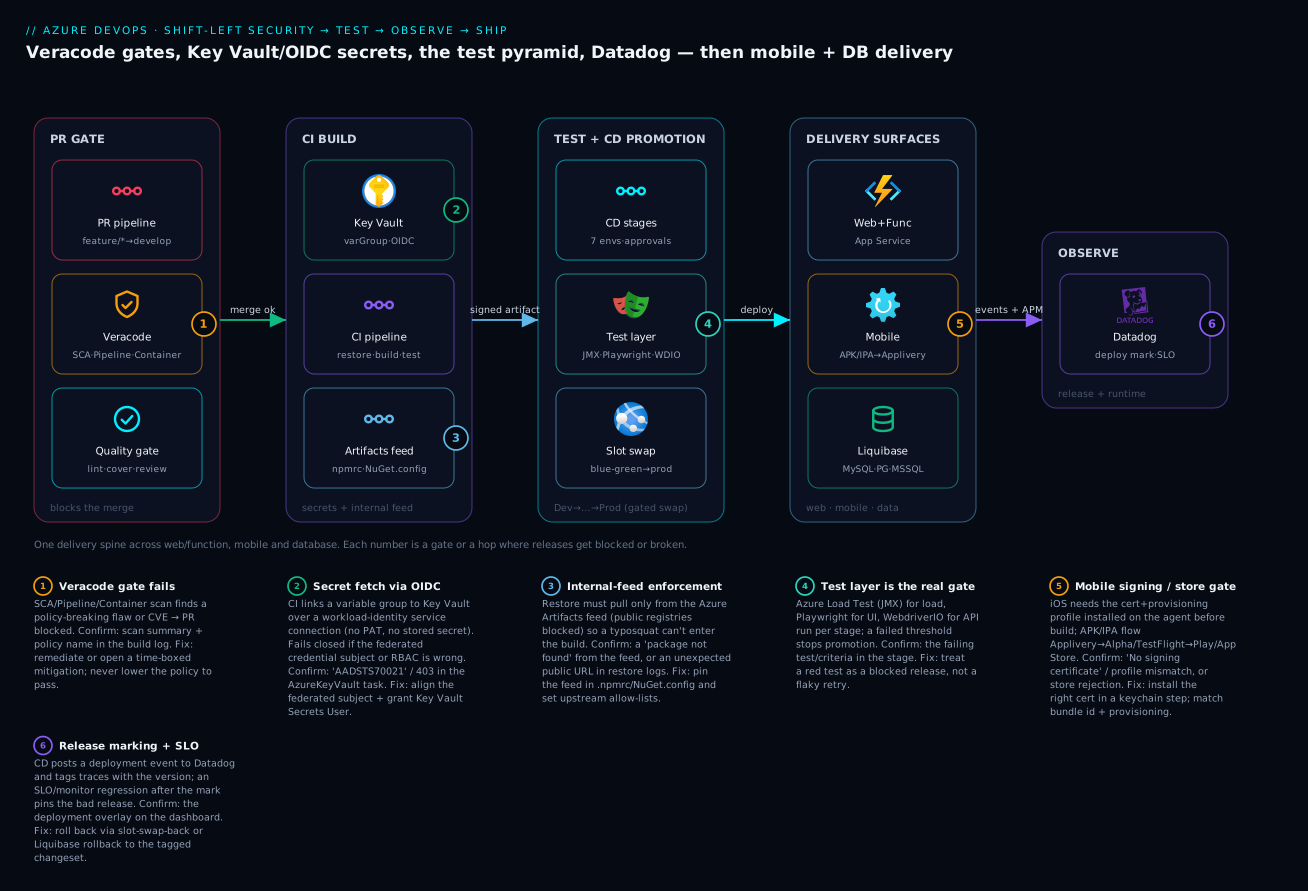
Follow the artifact left to right. A feature/* branch opens a pull request into development; the PR pipeline fires on the centralised scale-set fleet and runs the shift-left gates — lint, code analysis, unit tests with coverage, and Veracode Pipeline Scan (SAST), SCA and a Container scan. A finding above your severity floor blocks the merge (badge 1). Merge clean, and the CI pipeline takes over: it fetches secrets from Key Vault through a variable group linked over an OIDC service connection (badge 2 — no stored credential), restores only from the internal Azure Artifacts feed with public registries blocked (badge 3), builds and versions one immutable artifact, runs SCA again, executes unit + integration tests, and publishes the artifact plus its SBOM.
CD then promotes that single artifact through Dev → SIT → QA → Staging → UAT → Pre-Prod → Production. The testing layer is the gate (badge 4): WebdriverIO checks the API contract, Playwright drives the UI journeys, and Azure Load Test runs the JMX plan with p95/error-rate criteria at Pre-Prod — a breach stops the line. The Production stage deploys to the staging slot, warms it, runs the authoritative Veracode Policy Scan and Container scan, then waits on a gated approval (leads + production managers) before the slot swap cuts blue-green to live. The same spine feeds three surfaces: web + function apps on App Service, the mobile pipelines that sign and ship APK/IPA via Applivery → Alpha/TestFlight → the stores (badge 5), and Liquibase changelogs that version Azure MySQL/PostgreSQL/MS SQL with a real rollback path. The instant the swap completes, CD posts a deployment event to Datadog and tags traces with the version (badge 6) — so when an SLO burn-rate monitor fires twelve minutes later, the overlay pins it to exactly this release.
Real-world scenario
Northwind Retail Group (a fictional but representative enterprise) ran a Black-Friday-scale flash sale on a platform exactly like this one: an Azure DevOps org, scale-set agents, the three-pipeline model, Veracode gates, Datadog, plus an iOS/Android app and an Azure MySQL backing store managed by Liquibase. Eleven days before the sale, three near-misses landed in one week — and each was caught by a gate, which is the point.
First, a developer bumped a logging library and the PR Pipeline Scan stayed green but SCA flagged a transitive Very High CVE pulled in by the new version, with a fixed release available. The merge was blocked; the developer pinned the fixed transitive version (sourced through the internal feed’s upstream allow-list), SCA went green, and the bad dependency never reached the trunk. Total cost: twenty minutes. Had SCA only run in CI (post-merge), the vulnerable tree would have been in development and on top of it by the time anyone noticed.
Second, the Pre-Prod Azure Load Test failed its criterion: at modelled peak the p95 climbed to 1,640 ms against an 800 ms budget, and the error rate touched 3%. The JMX plan reproduced the flash-sale concurrency that no unit test ever would. Server-side metrics in the load-test run showed the App Service plan CPU-pinned and the MySQL connection count flat-lined at its ceiling — a classic connection-pool exhaustion under load. The team raised the pool size, added a read replica for the catalogue queries (a Liquibase-free config change), and the re-run passed at p95 720 ms. The release did not promote until it did. Without the load gate, the first real customers would have been the load test.
Third — and this is the one that proves observability earns its place — the successful release two days before the sale introduced a subtle regression: a new feature flag path that, under a specific locale, threw on checkout for about 0.4% of sessions. Unit and Playwright tests didn’t cover that locale. But CD had posted a Datadog deployment marker at swap, and a fast-burn SLO monitor on the checkout success-rate fired nineteen minutes later. The dashboard overlay pinned it precisely to release 2.4.0. The on-call did not investigate code; they swapped the slot back (a forty-second operation), checkout recovered, and the fix shipped the next morning behind the same gates. The mobile app had gone out through Applivery → TestFlight a week earlier, caught a signing-profile mismatch (wrong export method in ExportOptions.plist) that the iOS pipeline failed on, got corrected, and reached the App Store cleanly. Northwind’s leads later described the week not as “three incidents” but as “three gates doing their job” — gates as the product, which is the entire thesis of this article.
Advantages and disadvantages
The honest trade-offs of running this much gating and surface coverage:
| Advantages | Disadvantages |
|---|---|
| Bad code/deps/images blocked before merge (shift-left) | More pipeline complexity and minutes (cost) |
| No stored secrets — OIDC removes the leak class | OIDC setup (federated subjects) is fiddly to get right |
| Internal-feed enforcement kills supply-chain confusion | A new public dep needs an upstream request (friction) |
| Tests are real gates, not theatre | Flaky tests block releases until fixed (forces discipline) |
| Blue-green swap = near-zero-downtime + instant rollback | Slots add plan cost and warm-up complexity |
| Datadog markers pin regressions to a release in seconds | Telemetry + Datadog cost; tagging hygiene required |
| Mobile + DB are first-class, gated surfaces | macOS agents + signing + Liquibase rollback discipline |
| Auditable: every gate has a pass/fail record | “Did Not Pass” can block a release under deadline pressure |
When each matters: the security and feed gates matter most for regulated or high-trust workloads (finance, health) where a single bad dependency is an incident; the load gate matters most for spiky-traffic workloads (retail, ticketing); the Datadog/rollback loop matters most where MTTR is the business metric; and the mobile/DB discipline matters most where those surfaces are revenue paths, not afterthoughts. The cost is real but asymmetric — a few extra pipeline minutes and some setup against the price of one prevented production incident.
Hands-on lab
You can prove the core ideas — a blocking scan gate, a KV-linked secret over OIDC, an internal-feed restore, and a Liquibase update/rollback — on free or near-free tiers. This lab uses an Azure DevOps free org, a free-tier App Service, and Liquibase Community against a free-tier Azure Database for PostgreSQL.
1. Create the org, project and a service connection with OIDC.
az extension add --name azure-devops
az devops configure --defaults organization=https://dev.azure.com/<you>
az devops project create --name 'lab-delivery'
# In Project Settings → Service connections, create an Azure RM connection with
# "Workload Identity federation (automatic)" — this provisions the app reg + federated credential.
2. Stand up a Key Vault and grant the connection’s identity read access.
az group create -n rg-lab -l eastus
az keyvault create -n kv-lab-<unique> -g rg-lab --enable-rbac-authorization true
az keyvault secret set --vault-name kv-lab-<unique> --name 'db-password' --value 'P@ssw0rd-lab!'
# Grant the service connection's app registration "Key Vault Secrets User" on this vault
SP_OBJ=$(az ad sp list --display-name '<your-connection-sp>' --query '[0].id' -o tsv)
az role assignment create --assignee "$SP_OBJ" --role 'Key Vault Secrets User' \
  --scope $(az keyvault show -n kv-lab-<unique> --query id -o tsv)
3. Link a variable group to the vault (Library → + Variable group → “Link secrets from an Azure key vault”, pick the OIDC connection and kv-lab-<unique>, add db-password).
4. Add a blocking scan gate to a PR pipeline. A minimal azure-pipelines.yml that fails on a planted finding (use any SAST you have, or the Veracode Pipeline Scan if you have a trial; the principle is the non-zero exit):
trigger: none
pr: { branches: { include: [ main ] } }
pool: { vmImage: 'ubuntu-latest' }   # free hosted agent for the lab
steps:
  - script: |
      # stand-in for a scan: fail the build if a forbidden pattern is present
      if grep -rn "TODO-INSECURE" src/ ; then echo "Gate failed"; exit 1; fi
    displayName: 'Blocking scan gate (fail closed)'
Open a PR that adds TODO-INSECURE and watch the merge get blocked; remove it and watch it pass. That non-zero exit is the gate.
5. Liquibase update and rollback against free-tier PostgreSQL.
az postgres flexible-server create -n pg-lab-<unique> -g rg-lab \
  --tier Burstable --sku-name Standard_B1ms --public-access 0.0.0.0 \
  --admin-user labadmin --admin-password 'P@ssw0rd-lab!'
# changelog with one reversible changeset + a tag (as shown earlier), then:
liquibase --url="jdbc:postgresql://pg-lab-<unique>.postgres.database.azure.com:5432/postgres?sslmode=require" \
  --username=labadmin --password='P@ssw0rd-lab!' \
  --changeLogFile=changelog.xml update
liquibase ... rollback 1.0   # confirm the column is gone again
6. Teardown — delete the resource group and the project to stop all charges:
az group delete -n rg-lab --yes --no-wait
az devops project delete --id $(az devops project show --project lab-delivery --query id -o tsv) --yes
Expected outcomes: the PR is genuinely blocked by the failing step; the pipeline reads db-password from the vault with no secret in the YAML; and the Liquibase rollback cleanly reverses the update. Those three behaviours are the load-bearing ideas of the whole article, proven for under the cost of a coffee.
Common mistakes & troubleshooting
The failure modes that cost the most time, with the exact signal and fix. This is the section to keep open during an incident.
| # | Symptom | Root cause | Confirm with | Fix |
|---|---|---|---|---|
| 1 | Veracode step “passes” but flaws still ship | continueOnError/` |
true` on the scan | |
| 2 | SCA misses a vulnerable dependency | Scanned manifest, not resolved graph | SCA ran before restore | Run SCA after restore; scan transitive |
| 3 | KV task: AADSTS700213 / 403 |
Federated subject or RBAC mismatch | The error in the AzureKeyVault task log | Align federated subject; grant Key Vault Secrets User |
| 4 | Secret printed in a build log | Plain variable (not marked secret), or echo |
Search the log for the value | Mark as secret; never echo; link from KV |
| 5 | Restore pulls a public package | Public registry not removed/blocked | Restore log shows a public URL | <clear/>/single registry=; feed-only |
| 6 | Load test “passes” but prod falls over | No failureCriteria set |
The config has no thresholds | Add p95/error-% criteria; model real peak |
| 7 | Tests “ran” but didn’t block | failTaskOnFailedTests not set / results not published |
Tests tab empty; stage green on failures | Publish JUnit; failTaskOnFailedTests: true |
| 8 | Prod deploy caused downtime | Deployed straight to production, not staging slot | No slot in the deploy task | Deploy to staging slot → warm → swap |
| 9 | Regression not tied to a release | No Datadog deploy marker / no version tag |
No overlay on the dashboard | Post the deploy event; set DD_VERSION |
| 10 | iOS build: “No signing certificate” | Cert not installed on the agent keychain | Xcode log; keychain empty | InstallAppleCertificate@2 with the .p12 |
| 11 | iOS export fails after archive | ExportOptions.plist method ≠ profile |
Export step error | Set method app-store; match the profile |
| 12 | Store: “version already exists” | Version not bumped per build | Store console; build number static | Stamp versionCode/CFBundleVersion |
| 13 | Liquibase validate fails |
An applied changeset was edited (checksum drift) | validate reports a checksum error |
Never edit applied changesets; add a new one |
| 14 | Rollback impossible | Lossy change had no <rollback> |
The changeset drops a column, no reverse | Always write explicit rollback for drops |
| 15 | Pipeline stuck “no agent” | Scale-set fleet at capacity / wrong pool name | Pipeline queue shows waiting | Scale the VMSS; fix the pool name |
Two deserve a sentence more. #3 (the OIDC 403) is the most common new-platform failure: the federated credential’s subject must exactly match the service-connection subject (sc://org/project/connection) and the app registration must have an RBAC role on the vault — both, not either. #6 (the toothless load test) is insidious because the stage goes green; a load test without failureCriteria is a load report, not a gate. The App Service slot/swap and SNAT failure classes behind #8 and #6 are dissected hop-by-hop in Troubleshooting Azure App Service: 502/503, Cold Starts & Restart Loops.
Best practices
- Make every gate fail closed. A scan, test or policy check that only logs is not a control. The default behaviour of “something is wrong” must be “the pipeline stops.” Audit your pipelines for
continueOnError: trueon any gate step. - Shift the fast scans left, keep the slow one late. SAST (Pipeline Scan), SCA and container scan on the PR; the authoritative Veracode Policy Scan in CD before Production. Don’t run the slow scan per-PR or the fast ones only post-merge.
- Never store a reusable secret. Use OIDC service connections and Key Vault-linked variable groups; mark linked variables as secret; scope Prod secret groups to the Prod stage only.
- Enforce the internal feed everywhere.
.npmrc,NuGet.config, Mavensettings.xml,pip.conf— single internal source, public registries blocked, upstream allow-listed by the Packages team. - Build once, promote the same artifact. No per-stage rebuilds. Version with the GitFlow semantic tag and carry the SBOM with the artifact.
- Put the right test at the right stage. API contract (WebdriverIO) and integration early; UI journeys (Playwright) mid; Azure Load Test (JMX) at Pre-Prod with real pass/fail criteria. A test without a blocking assertion is theatre.
- Deploy blue-green via slot swap, warm before swap, gate the swap. Staging slot → warm-up ping → authoritative scan → human approval (leads + prod managers) → swap. Keep the swap-back ready as the rollback.
- Emit a deployment marker the instant you swap. Post the Datadog deploy event and set
DD_VERSIONso the next regression is pinned to a release; back it with multi-window burn-rate SLO monitors. - Treat mobile signing as a first-class secret operation. Certs/keystores live in Key Vault as secure files, installed to an ephemeral keychain per run; match cert + profile + bundle id + export method.
- Make schema reversible by construction. Every lossy Liquibase change carries an explicit
<rollback>; tag every release; never edit an applied changeset; preview DDL withupdateSQL. - Distribute mobile up the ladder, not in one jump. Applivery (internal) → TestFlight/Play Internal (beta) → public store; each rung is a wider, more-reviewed audience.
- Keep the agent fleet healthy. The centralised scale-set fleet is shared across every project; size it for peak concurrency and watch the queue, or every gate slows down at once.
Security notes
- OIDC over stored credentials, everywhere. The whole secret model exists to ensure a leaked build log contains nothing reusable. Use workload-identity federation for every Azure/Key Vault interaction; reserve any remaining stored credential for systems that genuinely cannot federate, and rotate those aggressively. The pattern is detailed in Workload Identity Federation for Secretless CI/CD.
- Least privilege on the vault and the feed. The pipeline identity gets
Key Vault Secrets User(read), not Contributor; the Prod vault is reachable only from the Prod stage. Feed permissions separate “consume” from “publish.” - The scans are a security control, not a checkbox. Veracode SCA/SAST/Policy/Container gates are part of your security posture; relaxing a policy to make a release go out is a security decision that must be logged as a time-boxed mitigation, not a silent toggle.
- Protect signing material like the crown jewels. Keystores,
.p12certificates and provisioning profiles are identity — store them in Key Vault as secure files, install to ephemeral keychains, never commit them, and rotate on staff changes. A leaked iOS distribution cert can sign malware as you. - Mask and minimise telemetry secrets. The Datadog API key is a secret (from KV); never embed it in a committed config. Ensure traces and logs don’t carry secrets or PII into Datadog.
- Guard the database credentials and the blast radius. Liquibase reads DB secrets from Key Vault; the migration identity should have exactly the DDL rights it needs and no more, and the connection must be TLS-enforced (
sslmode=require/encrypt=true). - Lock down the agents. The scale-set fleet sits in the hub network with access to many environments; it is a high-value target. Keep images patched, scope its network egress, and never let untrusted PR code run with production credentials.
| Control | Mechanism | Secures against | Also prevents |
|---|---|---|---|
| OIDC service connections | Federated identity to Entra | Leaked/replayed credentials | Rotation breakage |
| KV-linked variable groups | Secrets fetched at run time | Secrets in pipeline definitions | Plaintext in Git |
| Internal-feed enforcement | Single feed + upstream allow-list | Supply-chain/typosquat attacks | Dependency confusion |
| Veracode gates | SCA/SAST/Policy/Container | Vulnerable code/deps/images | Shipping a known-exploited CVE |
| Signing material in KV | Secure files + ephemeral keychain | Cert/keystore theft | Malware signed as you |
| Least-privilege DB identity | Scoped DDL rights + TLS | Over-broad migration access | Accidental destructive change |
| Hardened scale-set agents | Patched images, scoped egress | Compromised shared runner | Prod creds in untrusted PR runs |
Cost & sizing
The bill here is mostly pipeline minutes, agents, tooling licences and telemetry — and almost all of it is cheap relative to one prevented incident.
- Self-hosted scale-set agents dominate compute cost — you pay for VMSS instances (per-vCPU-hour) sized for peak concurrency, buying parallelism so gates don’t queue. Right-size to your real peak job count, not your worst-ever spike. macOS agents for iOS are the pricey outlier; they only run for mobile-iOS builds, so keep that pipeline lean.
- Azure Load Test charges per virtual-user-hour, but because it runs Pre-Prod only the cost is a handful of runs per release, not per commit — the stage placement is the cost control.
- Veracode is a per-app/subscription licence with effectively zero marginal cost per scan, so run the gates freely once licensed. Datadog bills per host + ingested GB + custom metric — use adaptive sampling on high-volume services so a flash sale doesn’t spike the bill; deploy events and SLO monitors are negligible.
- Applivery is per-seat SaaS; Azure Artifacts is free to a storage threshold then per-GB; Liquibase Community is free.
| Cost driver | What you pay for | Rough INR / month | What it buys | Watch-out |
|---|---|---|---|---|
| Scale-set agents (VMSS) | vCPU-hours at peak concurrency | ₹15,000–40,000 | Gates don’t queue | Over-provisioning idle instances |
| macOS agent (iOS) | Mac minutes / a self-hosted Mac | ₹8,000–20,000 | iOS signing + build | Only needed for mobile-iOS |
| Azure Load Test | Virtual-user / engine hours | ₹2,000–8,000 (few runs) | The load gate | Don’t run it per-PR |
| Datadog | Hosts + ingested GB + monitors | ₹20,000–80,000+ | Release tracking + SLOs | Sample high-volume telemetry |
| Veracode | Per-app/subscription licence | (licence-dependent) | Security gates | Licence, not per-scan |
| Azure Artifacts | Storage beyond free tier | ₹0–3,000 | The internal feed | Prune old package versions |
| Applivery | Per-seat / per-app SaaS | (plan-dependent) | Mobile distribution | Right-size seats |
A pragmatic mid-size posture — a shared scale-set fleet, a small macOS pool, Datadog with sampling, Veracode licensed, Azure Load Test at Pre-Prod — lands in the low lakhs per month for an org running dozens of services, and the single largest line is almost always Datadog ingestion, not the pipelines. The cheapest optimisation is sampling telemetry and right-sizing the agent fleet; the most expensive mistake is a missing gate.
Interview & exam questions
1. Where do you place a Veracode Pipeline Scan versus a Policy Scan, and why? The Pipeline Scan (fast SAST) runs in the PR pipeline as a merge gate, failing on new findings above a severity floor so bad code never reaches the trunk. The Policy Scan (full, authoritative, evaluated against the org policy) is slower and runs in CD before Production, so a release can’t go live unless policy compliance passes. Fast-and-early vs authoritative-and-late.
2. What makes a scan or test an actual gate rather than decoration? It fails closed — a real finding or failed assertion produces a non-zero exit that stops the pipeline. The anti-patterns are continueOnError/||true on a scan and --retries masking flaky tests; both make the step run without blocking, which is theatre.
3. How does the platform fetch secrets without storing any credential? Secrets live in Key Vault; pipelines read them through a variable group linked to the vault, authenticated by a service connection using workload-identity federation (OIDC). Azure DevOps mints a short-lived federated token, Entra trusts the pipeline’s identity, and Key Vault RBAC authorises the read — there is no PAT or client secret to leak.
4. A KV task fails with AADSTS700213 / 403. What two things do you check? The federated credential subject on the app registration must exactly match the service-connection subject (sc://org/project/connection), and the app registration’s identity must have an RBAC role (Key Vault Secrets User) on the vault. Both are required; a mismatch in either yields the 403.
5. Why must SCA run after the restore? SCA analyses the resolved dependency graph — the exact transitive versions the feed served — not just the declared ranges in the manifest. A ^1.2.0 that resolves to a vulnerable 1.2.9 is only visible post-restore, and transitive dependencies are where most CVEs hide.
6. What is internal-feed enforcement and what attack does it stop? Restores are configured to pull only from the internal Azure Artifacts feed, with public registries removed/blocked and upstreams allow-listed. It stops dependency confusion / typosquatting — a malicious package on a public registry cannot enter the build because the build never contacts the public registry.
7. Why does the Azure Load Test live at Pre-Prod and need failure criteria? It needs a production-like environment to be meaningful and it’s expensive per run, so it runs once at the last gate before prod, not per-commit. Without failureCriteria (p95, error-rate thresholds) it’s a load report, not a gate — the criteria are what make a breach block the promotion.
8. How does blue-green work here and how do you roll back? CD deploys to the staging slot, warms it, runs the authoritative scan, waits on a gated approval, then swaps staging into production — an atomic, near-zero-downtime cutover. Rollback is an immediate swap-back to the previous slot, a seconds-long operation, not a redeploy.
9. How do you tie a production regression to a specific release? CD posts a Datadog deployment event the instant the slot swaps and sets DD_VERSION so traces/metrics carry the version. A multi-window burn-rate SLO monitor that fires after the marker shows, via the deployment overlay, that the regression started at exactly that release — making the rollback decision obvious.
10. What’s different and dangerous about the iOS pipeline? It must run on a macOS agent, and code signing is unforgiving: the distribution certificate (.p12) is installed to an ephemeral keychain, the provisioning profile installed, and the .ipa exported with a method (app-store) that must match the profile and bundle id. A mismatch between cert, profile, bundle id and export method is the most common failure.
11. Why is the distribution ladder (Applivery → TestFlight/Play Internal → store) better than one “ship it” step? Each rung widens the audience and adds review: Applivery gives internal testers OTA installs with no review; TestFlight/Play tracks add Apple/Google beta review for external testers; the public store is the final, fully-reviewed release. Collapsing them risks an untested build reaching real users.
12. How does Liquibase make a schema change reversible, and why does it matter? Each changeset declares a forward change and (for lossy operations, explicitly) a <rollback>, tracked in DATABASECHANGELOG; you tag each release and can rollback <tag> to a named point. It matters because a forward-only migration leaves no safe down-path — a bad release becomes manual surgery on production tables instead of a clean, tested revert.
These map to AZ-400 (DevOps Engineer Expert) — designing build/release pipelines, security and compliance (Veracode-style gates), secrets management, test integration, and release strategies — with the identity/secrets angle touching AZ-500 and the App Service/slot mechanics touching AZ-204.
| Question theme | Primary cert | Objective area |
|---|---|---|
| Scan placement (PR/CI/CD), gates | AZ-400 | Implement security & compliance in pipelines |
| OIDC service connections, KV secrets | AZ-400 / AZ-500 | Manage secrets; secure pipelines |
| Internal-feed enforcement, artifacts | AZ-400 | Manage package/feed strategy |
| Test integration as gates | AZ-400 | Implement continuous testing |
| Blue-green slot swap, approvals | AZ-400 / AZ-204 | Release strategy; App Service deploy |
| Datadog markers, SLOs, rollback | AZ-400 | Implement monitoring & feedback |
Quick check
- A Veracode scan step shows green, yet a vulnerable dependency reached production. What’s the single most likely cause in the pipeline YAML, and how do you confirm it?
- Your CI’s AzureKeyVault task fails with a 403 / AADSTS700213. Name the two things that must both be correct for OIDC secret access.
- True or false: running the Azure Load Test on every PR is the right way to catch performance regressions early.
- Production was briefly down during a deploy that “used slots.” What was almost certainly missed, and what’s the correct sequence?
- A schema migration needs to be rolled back but there’s no down-path. What Liquibase discipline would have prevented this, and what command would the rollback have used?
Answers
- A gate step with
continueOnError: true(or a shell|| true/failBuildOnPolicyFail: false) so the scan ran but never blocked. Confirm by reading the Veracode task config in the YAML — a real gate has the fail-on-finding behaviour enabled and no error suppression. - (a) The federated credential
subjecton the app registration must exactly match the service-connection subject (sc://org/project/connection), and (b) the app registration’s identity must hold an RBAC role (Key Vault Secrets User) on the vault. Both, not either. - False. The load test needs a production-like environment and is expensive per run, so it belongs at Pre-Prod with explicit
failureCriteria. Per-PR it would be noisy, slow and costly, and usually run against an environment too small to be meaningful. - The deploy went straight to production (or the staging slot wasn’t warmed before swap). The correct sequence is deploy to the staging slot → warm-up ping → run the authoritative scan → gated approval → swap staging into production, with the old slot kept as an instant swap-back.
- Every lossy change (e.g. a
dropColumn) must carry an explicit<rollback>, and each release should be tagged (tagDatabase). The rollback would then beliquibase rollback <tag>(e.g.rollback 2.4.0) to revert the schema to that named point cleanly.
Glossary
- PR pipeline — the pipeline triggered by a pull request that gates a merge; where shift-left scans (SAST/SCA/container), lint, unit tests and review must pass before code enters the trunk.
- CI pipeline — fetches secrets, restores from the internal feed, builds and versions one immutable artifact, runs SCA + unit/integration tests, and publishes the artifact plus its SBOM.
- CD pipeline — promotes that single artifact through Dev → SIT → QA → Staging → UAT → Pre-Prod → Production, gating each stage on the relevant test and gating the production swap behind human approval.
- Veracode SCA — Software Composition Analysis; finds known-vulnerable and badly-licensed dependencies in the resolved graph; runs in PR and CI.
- Veracode Pipeline Scan — fast static analysis (SAST) on the changed code, run in the PR as a merge gate with a severity floor.
- Veracode Policy Scan — the authoritative full scan evaluated against the organisation’s policy; runs in CD before Production and must pass.
- Veracode Container scan — checks the base image / OS layer for CVEs; runs in PR and CD.
- Service connection (OIDC) — an Azure DevOps connection using workload-identity federation; authenticates to Azure/Key Vault with a short-lived token and no stored secret.
- Variable group (Key Vault-linked) — a Library group whose values are fetched fresh from a vault at run time; how pipelines consume secrets without storing them.
- Internal-feed enforcement — configuring restores (
.npmrc/NuGet.config/settings.xml/pip.conf) to pull only from the Azure Artifacts feed, blocking public registries. - Azure Load Test — a managed JMeter runner that executes a
.jmxplan at scale with pass/fail criteria; used as the load gate at Pre-Prod. - Deployment slot / swap — a swappable copy of an App Service (e.g. staging); swapping it into production is the blue-green cutover, and swapping back is the rollback.
- Datadog deployment event — a marker posted by CD at swap time that, with consistent
service/env/versiontags, pins later regressions to a specific release via the deployment overlay. - Applivery — a mobile distribution platform for internal/beta over-the-air installs, upstream of TestFlight/Play tracks and the public stores.
- Liquibase changelog / changeset — an ordered, versioned set of database changes (each with a forward change and, for lossy ones, an explicit
<rollback>) tracked inDATABASECHANGELOG;tagDatabasenames a release point androllback <tag>reverts to it cleanly.
Next steps
You can now place every security, test and observability gate on an Azure DevOps platform and ship the mobile and database surfaces that usually get neglected. Build outward:
- Next: Shift-Left Testing & Quality Gates — the testing philosophy and gate design behind the Playwright/WebdriverIO/load layer here.
- Related: Workload Identity Federation for Secretless CI/CD — go deeper on the OIDC mechanics that remove stored secrets.
- Related: Azure DevOps Variable Groups, Secret Files & Key Vault Link — the secret-consumption plumbing in detail.
- Related: Azure DevOps Artifacts Feeds, Upstream Sources & Versioning — internal-feed enforcement and curated upstreams.
- Related: Deployment Strategies: Blue-Green, Canary & Rolling — the slot-swap pattern and its alternatives.
- Related: Software Supply Chain: SBOM, VEX & Admission Verification — what to do with the SBOM the build publishes.
- Related: Observability: Logs, Metrics, Traces & SLOs — the SLO/burn-rate foundation behind the Datadog rollback loop.