You created an Azure OpenAI resource, you found the model you want — gpt-4o, say — and then the portal asked a question nobody warned you about: what deployment type? Standard. Global Standard. Data Zone Standard. Provisioned. Batch. They all serve the same model with the same API, so the natural reaction is to pick the first one and move on. That choice quietly decides three things you will care about a lot later: where your prompts are physically processed (your region, a geographic zone, or anywhere in the world), how much throughput you can push before you start eating 429 Too Many Requests, and how the bill is computed (pay-per-token versus a fixed hourly reservation). Pick wrong and you either overpay for capacity you don’t use, or you ship a chatbot that throttles the moment real traffic arrives, or you fail a data-residency audit because tokens left the country.
A deployment in Azure OpenAI is not the model — it is a named endpoint that binds one model version to one capacity-and-residency contract. The same gpt-4o weights sit behind every deployment type; what differs is the pool of compute the request is allowed to land on and the promise about where that compute lives. Standard keeps processing in the region you chose. Global Standard routes to whichever Microsoft datacentre worldwide has free capacity, for the best price and the highest default limits. Data Zone Standard is the middle ground: processing stays inside a geographic boundary (the EU, or the US) for residency, with more headroom than a single region. Provisioned (sold in PTU — Provisioned Throughput Units) reserves dedicated capacity so latency is predictable and you never share a queue. Batch trades immediacy for a ~50% discount on work you can wait up to 24 hours for.
This article is the mental model and the decision guide. By the end you can look at a workload — an internal copilot, a customer-facing RAG assistant, a nightly document-enrichment job — and name the right deployment type, its residency, the throughput ceiling, and roughly what it costs, with the exact az CLI and Bicep. We lead with concepts, put every option side by side in comparison grids and decision tables, walk the request path in one diagram, and close with the handful of mistakes — chiefly the 429 you didn’t plan for and the residency you assumed — that bite in the first month.
What problem this solves
The pain is real and it shows up in three flavours. The first is throttling under load. You demo a chatbot to ten people and it’s flawless; you launch to ten thousand and it returns 429 with a Retry-After header, because a Standard deployment’s tokens-per-minute (TPM) and requests-per-minute (RPM) limits are a shared, regional, quota-bounded pool, not a private lane. Nobody planned for the limit because the portal never made it loud. The second is a data-residency surprise: a Global Standard deployment can process a prompt in any Microsoft region on earth, which is great for price and availability and a problem if your compliance team promised customers that data never leaves the EU. The third is cost shock in both directions — teams who put a steady, high-volume workload on pay-per-token Standard and overpay versus a PTU reservation, and teams who reserve PTU for a spiky low-volume app and pay for idle capacity they never use.
What breaks is subtle, because nothing errors at creation time — the deployment is created, the API works, the first requests succeed. The failure is operational and arrives later: the throttle during a launch, the audit finding, the invoice. Because all five types share one API surface and one model catalogue, the difference is invisible in code (the same /chat/completions call regardless); the decision lives entirely in the deployment configuration, the thing developers skip because it “just worked.”
Who hits this: essentially everyone building on Azure OpenAI. It bites hardest on teams shipping their first production GenAI feature (the throttle nobody sized for), regulated industries — finance, healthcare, public sector — that must prove where inference happens (the residency trap), and anyone scaling from prototype to steady high volume (the Standard-vs-PTU cost crossover). The fix is never “call a different API.” It is “choose the deployment type whose capacity model and residency promise match the workload” — which means understanding all five before you click create.
To frame the whole field before the deep dive, here is every deployment type, the one promise that defines it, and the workload it’s built for:
| Deployment type | The defining promise | Where inference runs | Billing model | Built for |
|---|---|---|---|---|
| Standard (Regional) | Processing stays in your region | The single region you deployed to | Pay-per-token | Dev/test, data-residency to one region, low–moderate volume |
| Global Standard | Best price, highest limits, anywhere | Any Microsoft region worldwide (dynamic) | Pay-per-token (lowest) | Most production apps where global processing is acceptable |
| Data Zone Standard | Residency to a zone (EU or US), more headroom | Within the EU or US data zone | Pay-per-token | Residency-bound apps that outgrow one region |
| Provisioned (Global / Data Zone) | Dedicated capacity, predictable latency, no throttle | Global or zone, on reserved PTU | Reserved (hourly / monthly / yearly PTU) | Steady high-volume, latency-sensitive production |
| Batch (Global / Data Zone) | ~50% cheaper for async work | Global or zone, off-peak | Pay-per-token at ~50% off | Large offline jobs tolerant of up to 24 h turnaround |
Learning objectives
By the end of this article you can:
- Explain what an Azure OpenAI deployment is and why the deployment type — not the model — decides residency, throughput and cost.
- Distinguish Standard, Global Standard, Data Zone Standard, Provisioned (PTU) and Batch, and state the one promise that defines each.
- Read data residency correctly: which types keep processing in your region, which keep it in a geographic zone, and which can process anywhere — and the difference between data at rest and data in transit/processing.
- Reason about quota in the right units (TPM and RPM), explain why you get
429 Too Many Requests, and use theRetry-Afterheader and exponential back-off correctly. - Decide when Provisioned Throughput (PTU) beats pay-per-token, estimate the PTU a workload needs, and choose between hourly, monthly and yearly reservations (and spillover to Standard).
- Create any deployment type with both
az cognitiveservicesCLI and Bicep, setting the SKU name and capacity correctly. - Map a real workload (chatbot, RAG assistant, nightly pipeline) to the right deployment type and defend the choice on residency, throughput and INR/USD cost.
Prerequisites & where this fits
You should know the basics of Azure OpenAI: it is the Azure-hosted version of OpenAI’s models (GPT-4o, GPT-4.1, o-series reasoning models, embeddings, DALL·E, Whisper) exposed through your own Azure resource with Entra ID auth, private networking and your subscription’s compliance boundary — distinct from the public OpenAI API. You should be comfortable running az in Cloud Shell, reading JSON output, and the idea that an Azure OpenAI resource (a kind of Cognitive Services / Azure AI Services account) is the parent under which you create one or more model deployments. A passing familiarity with tokens (the unit models bill and rate-limit in) helps; if “TPM” is new, the Core concepts section defines it.
This sits at the very start of the AI/ML track — it is the decision you make before you write a line of prompt code. It is upstream of building anything: the Enterprise RAG Platform on Azure OpenAI with Private Endpoints and Azure AI Search for RAG: Vector Indexing, Hybrid Search, Semantic Ranking, and Indexer Pipelines both assume you have already chosen a deployment type. If you are wiring Azure OpenAI into a regulated enterprise, An Enterprise Landing Zone for Azure OpenAI: Networking, Quotas, and Gateways is the networking-and-governance layer around this choice, and an Enterprise GenAI Gateway: Governing LLM Access Across Providers is how large orgs pool and meter these deployments. For the certification angle, this is foundational for AI-900: Generative AI & Azure OpenAI Fundamentals.
Bring the right people into the decision, because each cares about a different property of the deployment: the developer asks “will the API throttle me?” (TPM/RPM quota vs PTU), compliance/legal asks “where is data processed?” (Regional vs Data Zone vs Global), finance asks “pay-per-token or reserve?” (Standard pricing vs PTU), SRE asks “is latency predictable?” (dedicated PTU vs shared), and product asks “real-time or can it wait?” (Standard/PTU vs Batch). One field on one deployment answers all five.
Core concepts
Five mental models make every later comparison obvious.
A deployment binds a model version to a capacity-and-residency contract. When you “deploy gpt-4o,” you create a named object (the deployment name, e.g. gpt-4o-chat) that your code targets in the API path. Behind that name sit three choices: which model and version (e.g. gpt-4o 2024-08-06), which deployment type / SKU (Standard, GlobalStandard, DataZoneStandard, ProvisionedManaged, …), and how much capacity (TPM for pay-per-token, or PTU for provisioned). The model weights are identical across types; the deployment type is the contract about where it runs and how much you can push. This is why you can have two deployments of the same model — one Standard for dev, one GlobalStandard for prod — under one resource.
“Where it runs” has three scopes, and they are not the same as where data is stored. Inference (the act of processing your prompt) happens in one of three scopes depending on type: Regional (only the Azure region of your resource), Data Zone (anywhere within a geographic boundary — currently the EU or the US), or Global (any Microsoft datacentre worldwide, chosen dynamically per request for capacity). Crucially, Azure OpenAI does not train on your data and does not persist your prompts/completions as part of the service beyond the optional, region-bound abuse-monitoring window — so the residency question is mostly about where bytes are processed in transit, not a permanent data store. For most teams the rule is simple: if a contract says “processed only in the EU,” you need Data Zone (EU) or a Regional EU deployment, not Global.
Throughput is metered in tokens-per-minute and requests-per-minute, and exceeding it returns 429. Pay-per-token deployments (Standard, Global, Data Zone) draw from a quota measured in TPM (tokens per minute) that you assign per deployment, with a coupled RPM (requests per minute) derived from it (historically ~6 RPM per 1,000 TPM). Send tokens faster than the assigned TPM and the service returns 429 Too Many Requests with a Retry-After header telling you how long to wait. Quota is per region, per model, per subscription — a pool you allocate across your deployments — and it is a limit, not a guarantee of capacity. This single fact explains most “it worked in demo, throttled in prod” incidents.
Provisioned Throughput (PTU) buys a dedicated lane, Batch buys a discount. A Provisioned deployment reserves PTUs (dedicated processing capacity) so throughput is guaranteed and isolated — predictable latency, no 429 from noisy neighbours; you pay the reservation whether used or not, so it wins only above a utilisation crossover. A Batch deployment processes a file of many requests asynchronously within a 24-hour window at ~50% of the pay-per-token price, on a separate enqueued-token quota that doesn’t compete with real-time traffic. Both are detailed in their own sections below; the mental model is “reserve for steady latency-sensitive load, batch for cheap offline volume.”
The vocabulary in one table
Before the deep sections, pin down every moving part. The glossary at the end repeats these for lookup; this table is the mental model side by side:
| Concept | One-line definition | Where it lives | Why it matters |
|---|---|---|---|
| Resource (account) | The parent Azure AI/Cognitive Services account | Subscription / resource group | Holds keys, endpoint, networking, identity |
| Model | The underlying weights (e.g. gpt-4o) |
Microsoft’s catalogue | Identical across deployment types |
| Deployment | A named endpoint binding model+type+capacity | Under the resource | The thing your code targets |
| Deployment type / SKU | Standard, GlobalStandard, DataZone…, Provisioned, Batch | The deployment’s sku.name |
Decides residency, throughput, cost |
| TPM | Tokens per minute the deployment may process | Quota, per deployment | The pay-per-token throughput ceiling |
| RPM | Requests per minute (coupled to TPM) | Derived from TPM | Caps request count independent of size |
| Quota | The TPM pool per region/model/subscription | Subscription-level | What you allocate across deployments |
| 429 | “Too Many Requests” — you hit the limit | Returned by the API | The signal you under-sized or need PTU |
| PTU | Provisioned Throughput Unit (dedicated capacity) | Provisioned deployment capacity |
Predictable latency, no shared-pool 429 |
| Spillover | Overflow from Provisioned to a Standard deployment | Provisioned config | Absorbs bursts above reserved PTU |
| Data residency | The geographic scope where inference runs | Implied by the type | Region vs Zone vs Global |
| Batch | Async bulk processing at ~50% off, 24 h window | A Batch deployment | Cheap offline volume |
The five deployment types, option by option
This is the heart of the article. For each type: what it is, what it promises, the trade-off, the limit, and when to pick it. First, the master comparison grid you’ll scan most — every type across the dimensions that drive the decision:
| Dimension | Standard (Regional) | Global Standard | Data Zone Standard | Provisioned (PTU) | Batch |
|---|---|---|---|---|---|
sku.name |
Standard |
GlobalStandard |
DataZoneStandard |
GlobalProvisionedManaged / DataZoneProvisionedManaged |
GlobalBatch / DataZoneBatch |
| Inference location | Your region only | Any Microsoft region worldwide | Within EU or US zone | Global or zone (reserved) | Global or zone (off-peak) |
| Data residency | Strongest (single region) | Weakest (worldwide processing) | Zone-bounded (EU/US) | Per the provisioned scope | Per the batch scope |
| Billing | Pay-per-token | Pay-per-token (lowest) | Pay-per-token | Reserved PTU (hour/month/year) | Pay-per-token ~50% off |
| Throughput model | Regional TPM quota | Highest default TPM | Higher than regional | Dedicated PTU (guaranteed) | Separate enqueued-token quota |
| Latency profile | Shared, variable | Shared, variable | Shared, variable | Predictable, dedicated | Async (up to 24 h) |
| Default limits | Lowest | Highest | Middle | Sized to your PTU | High enqueued cap |
| Model availability | Subset (region-dependent) | Widest, newest first | Wide | Wide (PTU-eligible) | Wide (batch-eligible) |
| Best for | Dev/test, strict 1-region residency | Most production apps | Residency + scale | Steady, latency-sensitive prod | Offline bulk jobs |
| Worst for | High volume (low limits) | Strict residency | — | Spiky/low volume (idle cost) | Anything real-time |
Standard (Regional) — processing pinned to one region
What it is. The original type (sku.name = Standard): your prompt is processed only in your resource’s region (e.g. swedencentral, eastus).
What it promises. The strongest data residency — inference never leaves your chosen region. If the posture is “everything in Sweden,” Regional Standard is the literal answer.
The trade-off & limit. The lowest default TPM limits and the narrowest, slowest model availability (new models land on Global first; a region may not offer every version), plus exposure to single-region capacity pressure.
When to pick it. Dev/test, a hard single-region residency requirement, low-to-moderate volume. Don’t use it for high-volume production unless residency forces it — you’ll fight the limits.
Global Standard — best price, highest limits, processed anywhere
What it is. A pay-per-token deployment routed dynamically to whichever Microsoft datacentre worldwide has spare capacity (sku.name = GlobalStandard). This is the type the portal nudges you toward.
What it promises. The lowest per-token price, highest default TPM/RPM limits, and first access to new models — pooling global capacity lets Microsoft offer more headroom and route around busy regions.
The trade-off & limit. Residency is the weakest — a single conversation may be processed in any region on earth. (Microsoft doesn’t train on your data, and data at rest like abuse logs still honours your geography — but if a regulator requires processing stay in a zone/country, Global is out.) Latency is shared and variable.
When to pick it. The default for most apps where global processing is fine — internal tools, consumer apps without strict residency, anything cost-sensitive. Don’t use it when legal promised in-EU/in-country processing.
Data Zone Standard — residency to a zone, with more headroom
What it is. The middle path: processing confined to a geographic data zone — currently the EU or the US — routing among regions within that boundary (sku.name = DataZoneStandard).
What it promises. A residency guarantee at zone granularity (data processed only within the EU, or only within the US) combined with higher limits and availability than one region — threading the needle for orgs bound to a jurisdiction that have outgrown a single region’s quota.
The trade-off & limit. Residency is zone-level, not country-level (“somewhere in the EU,” not “only in Germany” — that needs Regional), and as pay-per-token, latency is still shared.
When to pick it. Regulated workloads (GDPR-bound EU apps, US public-sector) needing residency and production limits — the common production choice for European enterprises.
Provisioned (PTU) — a dedicated lane with predictable latency
What it is. You reserve dedicated capacity in PTUs, as GlobalProvisionedManaged or DataZoneProvisionedManaged (you still choose the residency scope); capacity is the PTU count, not TPM.
What it promises. Guaranteed throughput and predictable, low latency on isolated capacity — no shared quota pool, no 429 from noisy neighbours. Buy it commitment-free hourly, or monthly/yearly for a discount; spillover to a paired Standard deployment absorbs bursts above your reserved PTU.
The trade-off & limit. You pay for the reservation whether you use it or not — a spiky or low-volume app burns money on idle PTU, which only beats pay-per-token above a utilisation crossover. A minimum PTU per model applies, so it’s not for tiny workloads.
When to pick it. Steady, high-volume, latency-sensitive production — a busy customer assistant, a high-QPS RAG backend, anything with a response-time SLA. Don’t use it for bursty or low-traffic apps.
Batch — half price for work that can wait
What it is. Asynchronous bulk processing: upload a JSONL file of many requests, get a results file within a 24-hour window (sku.name = GlobalBatch / DataZoneBatch).
What it promises. ~50% of the pay-per-token price and a separate enqueued-token quota that doesn’t compete with real-time deployments — a huge offline job won’t starve your live chatbot.
The trade-off & limit. No immediacy — results land within 24 hours, not seconds.
When to pick it. Embedding a corpus, bulk-classifying tickets overnight, summarising an archive, generating synthetic data — high volume, no user waiting. Don’t use it for request/response traffic.
The residency decision, as a table
Residency is the dimension people get wrong, so isolate it. Match your obligation to the type:
| Your residency obligation | Acceptable types | Avoid | Note |
|---|---|---|---|
| Data processed only in one country/region | Standard (Regional) in that region | Global, Data Zone | Strongest; smallest limits |
| Data processed only in the EU | Data Zone (EU), or Regional EU | Global Standard | Zone = “somewhere in EU” |
| Data processed only in the US | Data Zone (US), or Regional US | Global Standard | Zone = “somewhere in US” |
| No residency constraint | Global Standard (best price/limits) | — | The common default |
| Residency + dedicated latency | DataZoneProvisionedManaged | Global Provisioned | Reserve within the zone |
The throughput half of the decision is just as mechanical: low or variable traffic stays on pay-per-token (Global for the best limits); high, steady, latency-sensitive traffic moves to Provisioned (PTU) for a dedicated lane; high-but-bursty keeps a PTU floor with Standard spillover for the peaks; and high-but-offline volume goes to Batch. The PTU-vs-pay-per-token math is a utilisation crossover, covered in detail in the sizing section below.
Quota, limits and the 429 you will meet
Because pay-per-token throughput is quota-bounded, the 429 is not an edge case — it’s the thing you design around. The mechanics, plainly: every pay-per-token deployment is assigned a slice of your subscription’s TPM quota for that model in that region. The service also enforces a coupled RPM so a flood of tiny requests can’t sneak past the token limit. Exceed either and you get 429 Too Many Requests with a Retry-After header (in seconds). Your job is to respect that header with exponential back-off, not hammer the endpoint.
The error and limit reference you’ll keep open:
| Code | Meaning | Likely cause | How to confirm | Fix |
|---|---|---|---|---|
| 429 Too Many Requests | You exceeded TPM or RPM | Traffic above assigned quota; spiky bursts | Retry-After header present; Azure Monitor TokenTransaction / throttle metrics |
Back off per Retry-After; raise quota; move to PTU |
| 429 (insufficient quota at deploy) | Not enough quota to create/scale the deployment | Region/model quota already allocated | Portal “Quotas” blade shows 0 available | Request a quota increase; deploy in another region; use Global |
| 400 model/version not available | Model or version not offered for this type/region | Asking for a model the region/type doesn’t have | Model catalogue per region; deployment list | Choose a supported model/version or use Global |
| 401 / 403 | Auth/RBAC failure | Wrong key, or missing Cognitive Services OpenAI User role |
az role assignment list; key check |
Grant the role; use the correct key/identity |
| 404 deployment not found | Wrong deployment name in the API path | Code targets a name that doesn’t exist | az cognitiveservices account deployment list |
Use the exact deployment name |
| 408 / 504 timeout | Long generation exceeded client/gateway timeout | Big max_tokens, slow model, gateway cap |
Compare duration to client timeout | Stream the response; raise timeout; reduce max_tokens |
How to read and react to throttling — the distinctions that save time:
| Distinction | The trap | How to tell them apart |
|---|---|---|
Quota 429 vs PTU-exceeded 429 |
Both say “Too Many Requests” | On Standard it’s the shared quota; on Provisioned it’s your own PTU ceiling — only the latter is fixed by buying more PTU you own |
| TPM limit vs RPM limit | You’re under your token budget but still throttled | Many tiny requests can hit RPM before TPM; batch/coalesce calls |
| Quota (a limit) vs capacity (reality) | Assuming quota guarantees throughput | Quota is the cap you may request; Global/regional capacity can still vary — PTU is the only guarantee |
A correct retry is non-negotiable. The official SDKs honour Retry-After; if you call REST directly, implement exponential back-off with jitter and cap the retries:
# A throttled response looks like this (note the Retry-After header, in seconds):
#   HTTP/1.1 429 Too Many Requests
#   Retry-After: 12
#   { "error": { "code": "429", "message": "Requests to the ... have exceeded ..." } }
# React: wait Retry-After seconds, then retry with exponential back-off + jitter.
Inspect your real token consumption and throttling in Azure Monitor before you decide you need more quota or PTU:
// Token usage and throttling for an Azure OpenAI resource (last 24h), per deployment
AzureMetrics
| where ResourceProvider == "MICROSOFT.COGNITIVESERVICES"
| where MetricName in ("TokenTransaction", "ProcessedPromptTokens", "GeneratedTokens")
| summarize tokens = sum(Total) by bin(TimeGenerated, 5m), Resource
| order by TimeGenerated desc
The quota and limit reference, in real units (exact numbers vary by model/region — confirm in the portal Quotas blade; the shape is what matters):
| Limit | Standard (Regional) | Global Standard | Data Zone Standard | Provisioned | Batch |
|---|---|---|---|---|---|
| Default TPM ceiling | Lowest | Highest | Middle | N/A (PTU instead) | Separate enqueued quota |
| RPM coupling | ~6 RPM / 1K TPM | ~6 RPM / 1K TPM | ~6 RPM / 1K TPM | Per PTU | N/A |
| Throughput guarantee | No (shared) | No (shared) | No (shared) | Yes (PTU) | No (best-effort) |
| Scope of quota | Region · model · sub | Region · model · sub | Zone · model · sub | Reserved PTU | Enqueued tokens · sub |
429 on noisy neighbour |
Possible | Possible | Possible | No (isolated) | N/A |
| Minimum to deploy | 1 TPM unit | 1 TPM unit | 1 TPM unit | Model-specific min PTU | File of requests |
Sizing Provisioned Throughput (PTU)
PTU is where the money decision lives, so size it deliberately. A PTU is a unit of dedicated processing capacity; the number you need depends on your tokens-per-minute throughput, the model, and your prompt/completion shape (input vs output token mix). Microsoft publishes a capacity calculator in the portal — feed it your peak TPM and it returns the PTU count. The reservation then comes in three commitment terms, cheapest the longer you commit.
The PTU commitment options, side by side:
| Commitment | How you pay | Relative price | Cancel/flex | Use when |
|---|---|---|---|---|
| Hourly (no commitment) | Per hour, on-demand | Highest per-PTU | Stop anytime | Validating PTU sizing; bursty seasons |
| Monthly reservation | Fixed monthly | Lower | Term-locked | Steady production, month-to-month |
| Yearly reservation | Fixed yearly | Lowest | Term-locked | Mature, predictable high volume |
The decision that actually matters is PTU vs pay-per-token, and it’s a utilisation crossover. Pay-per-token costs scale linearly with tokens; PTU is a fixed cost regardless of use. Below a certain sustained utilisation, pay-per-token is cheaper; above it, PTU wins (and adds predictable latency on top). The rule of thumb:
| If your traffic is… | Cheaper option | Reasoning |
|---|---|---|
| Low or sporadic | Pay-per-token (Global) | You’d pay for idle PTU most of the day |
| Moderate with big peaks | PTU floor + Standard spillover | Reserve the steady base, spill the spikes |
| High and steady (~daytime-flat) | Monthly PTU | High utilisation amortises the reservation |
| High, steady, 24×7, predictable for a year | Yearly PTU | Lowest unit cost; latency guarantee included |
Spillover deserves a moment: a Provisioned deployment can be configured to overflow traffic that exceeds its reserved PTU onto a paired pay-per-token (Standard/Global) deployment, rather than returning 429. This lets you reserve for the common load and let rare spikes cost a little extra on-demand — the best of both for bursty-but-mostly-steady workloads.
Architecture at a glance
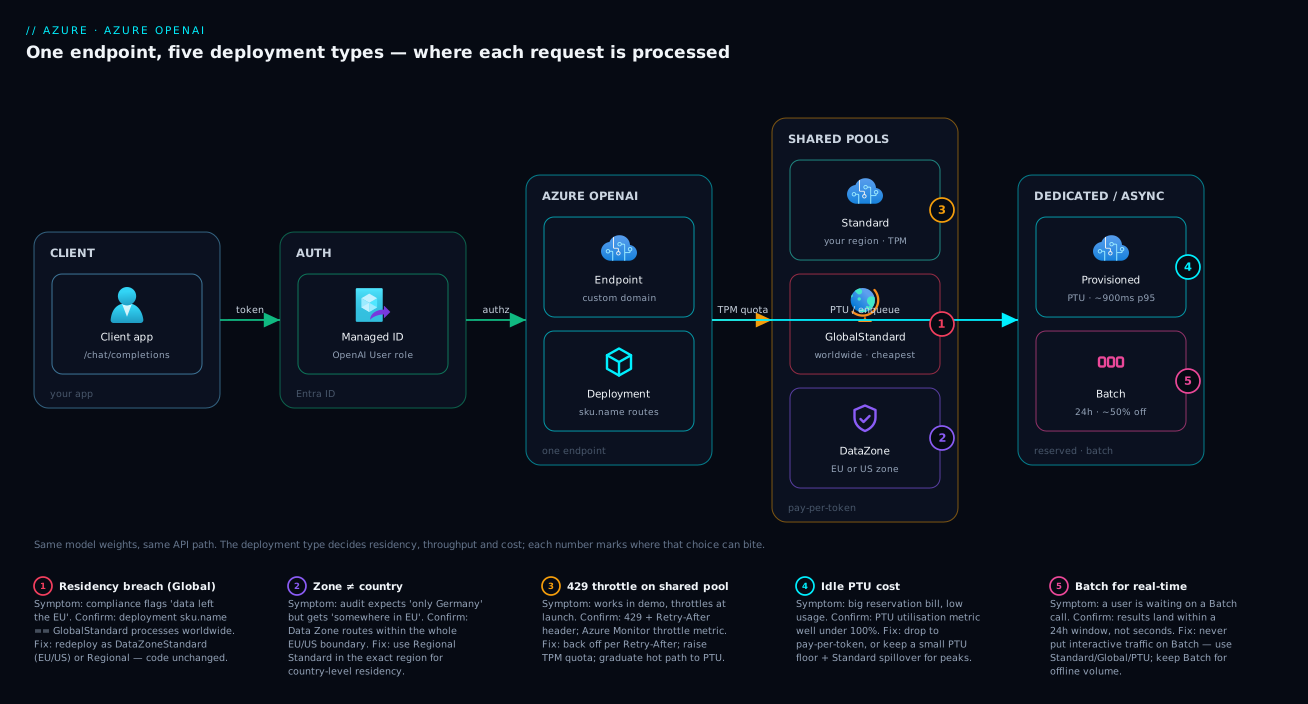
The diagram traces one request and shows where each deployment type sends it. Read it left to right. A client app calls your Azure OpenAI endpoint (the same /chat/completions URL regardless of type), authenticating with Entra ID (a managed identity holding the Cognitive Services OpenAI User role) rather than a raw key. The request reaches the deployment, and here the type decides the path: a Standard deployment processes it on shared capacity in your region; a Global Standard deployment routes it to any Microsoft region worldwide with free capacity; a Data Zone deployment keeps it inside the EU or US boundary; a Provisioned deployment runs it on your reserved PTU lane with predictable latency; and Batch drops it into an async queue for cheap, within-24-hour processing.
Notice the two things every path shares and the one place they diverge. They share the endpoint and auth (your code never changes) and they share the model weights (identical gpt-4o everywhere) — the divergence is purely which compute pool and which geography the request lands on, which is exactly the residency-and-throughput contract you chose at deployment time. The numbered badges mark the failure points: a quota 429 on the shared pools, a residency breach if you put regulated data on Global, the idle-cost risk on an under-utilised PTU lane, and the latency mismatch of sending real-time traffic to Batch.
Real-world scenario
Medkart Health, a fictional but realistic Indian health-tech firm, is building three GenAI features on Azure OpenAI and has to choose a deployment type for each. Their compliance counsel has one hard rule: patient-facing data must be processed within the EU (their largest customer is a German hospital group bound by GDPR), while internal-only tooling has no residency constraint. The platform team is five engineers; the GenAI budget is roughly ₹4,00,000/month.
Feature one is an internal engineering copilot over their own runbooks — ~50,000 TPM at peak, no patient data, no residency rule. They put it on Global Standard gpt-4o: lowest price, highest limits, worldwide processing fine because it’s internal. It cost almost nothing and never throttled. No residency need + moderate volume → Global pay-per-token.
Feature two is the patient-facing symptom-checker in the hospital portal — bound by “process in the EU.” The team’s first instinct was Global Standard (the portal’s default), which could have processed German patient prompts in eastus; counsel caught it in review. They switched to Data Zone Standard (EU) gpt-4o, keeping inference inside the EU with more headroom than a single Frankfurt region. Volume was moderate and variable, so pay-per-token with retry/back-off fit. EU residency + variable volume → Data Zone Standard.
Feature three is a nightly job tagging 80,000 clinical documents for search indexing — huge volume, nobody waiting, runs at 02:00. On Global Standard the projected token cost made the CFO wince, and running it by day would have eaten the symptom-checker’s quota. They moved it to Batch (Data Zone EU) — same EU residency (patient data), ~50% cheaper, and a separate enqueued-token quota so it never competes with the live assistant. The job finishes in ~4 hours, inside the 24-hour window. High offline volume + EU residency → Data Zone Batch.
Three months in, the symptom-checker’s traffic grew steady and clinic-peak latency complaints appeared — the shared pool occasionally throttled and p95 wandered. The team ran the PTU capacity calculator on measured peak TPM, sized a small DataZoneProvisionedManaged reservation for the daytime base, and added spillover to the existing Data Zone Standard deployment for spikes. p95 dropped from a wandering 2–6 s to a flat ~900 ms, throttling vanished, and because daytime utilisation was high the monthly PTU came in cheaper than the pay-per-token bill it replaced. Landed spend settled near ₹3,70,000, under budget. The whiteboard lesson: “The deployment type is a four-way decision — residency, volume, latency, cost — made per feature, not per company.”
The three features as a decision table, because the reasoning is the lesson:
| Feature | Residency need | Volume / shape | Latency need | Chosen type | Why |
|---|---|---|---|---|---|
| Internal copilot | None | Moderate, bursty | Relaxed | Global Standard | Cheapest, highest limits, internal-only |
| Patient symptom-checker | EU | Moderate, variable → steady | Tight at peak | Data Zone Std → + PTU | EU residency; PTU for predictable latency |
| Nightly doc tagging | EU | Very high, offline | None | Data Zone Batch | ~50% cheaper; separate quota; async ok |
Advantages and disadvantages
Having one API with five capacity-and-residency contracts behind it is both the strength and the foot-gun of Azure OpenAI. Weigh it honestly:
| Advantages (why this model helps you) | Disadvantages (why it bites) |
|---|---|
| One endpoint, one SDK — your code never changes across types; you can switch deployment type without touching the app | The decision is invisible in code, so developers skip it and discover residency/throttle problems in production |
| Global Standard gives the cheapest tokens and highest limits with zero capacity planning | Global’s worldwide processing silently violates residency rules you didn’t realise you had |
| Data Zone offers a real residency guarantee and production-grade scale | Zone residency is “EU/US,” not country-level — easy to over-promise |
Provisioned gives guaranteed throughput and predictable latency — no noisy-neighbour 429 |
You pay for reserved PTU whether used or not; wrong for spiky/low volume |
| Batch is ~50% cheaper and isolates bulk work from real-time quota | Anything interactive on Batch is broken by design (up to 24 h) |
| Quota is a flexible pool you allocate per deployment and can raise | Pay-per-token quota is a limit, not a guarantee — capacity can still vary; only PTU guarantees |
| Spillover blends reserved + on-demand for bursty-steady workloads | Mis-tuned spillover either throttles (too little PTU) or overspends (too much on-demand) |
The model is right for almost everyone because it’s flexible — you start on Global Standard for free-ish, prove the product, then graduate the hot path to PTU and push offline volume to Batch, all without rewriting the app. It bites teams who treat “deployment type” as a throwaway field: the ones who never read the residency implication, who size for demo traffic and get throttled at launch, or who reserve PTU for a workload that doesn’t justify it. Every disadvantage is manageable — but only if you make the four-way decision (residency · volume · latency · cost) on purpose.
Hands-on lab
Create one resource and deploy the same model two ways — a Global Standard deployment and a Data Zone Standard deployment — to feel that the type, not the code, is the variable. Then list both and tear down. Everything here is pay-per-token (you pay only for tokens you actually send, which in this lab is ~zero), and the resource itself has no standing charge. Run in Cloud Shell (Bash).
Step 1 — Variables and resource group.
RG=rg-aoai-lab
LOC=swedencentral          # a region offering both Global and Data Zone (EU) types
ACC=aoai-lab-$RANDOM       # globally-unique account name
az group create -n $RG -l $LOC -o table
Step 2 — Create the Azure OpenAI (Azure AI Services) account.
az cognitiveservices account create \
  --name $ACC --resource-group $RG --location $LOC \
  --kind OpenAI --sku S0 \
  --custom-domain $ACC -o table
Expected: an account row with kind = OpenAI. The custom domain is required for Entra ID (token-based) auth.
Step 3 — Deploy gpt-4o as Global Standard (note --sku-name GlobalStandard).
az cognitiveservices account deployment create \
  --name $ACC --resource-group $RG \
  --deployment-name gpt4o-global \
  --model-name gpt-4o --model-version "2024-08-06" --model-format OpenAI \
  --sku-name GlobalStandard --sku-capacity 10 -o table
Expected: a deployment named gpt4o-global. The --sku-capacity 10 is 10 × 1,000 = 10,000 TPM of quota assigned to this deployment.
Step 4 — Deploy the same model as Data Zone Standard (the only change is --sku-name).
az cognitiveservices account deployment create \
  --name $ACC --resource-group $RG \
  --deployment-name gpt4o-datazone \
  --model-name gpt-4o --model-version "2024-08-06" --model-format OpenAI \
  --sku-name DataZoneStandard --sku-capacity 10 -o table
Expected: a second deployment gpt4o-datazone, identical model, EU-zone residency. (If your subscription lacks Data Zone quota in this region, the call returns a quota error — that itself is the lesson about quota being per-type.)
Step 5 — List both deployments and read their SKUs.
az cognitiveservices account deployment list \
  --name $ACC --resource-group $RG \
  --query "[].{name:name, model:properties.model.name, sku:sku.name, capacity:sku.capacity}" -o table
Expected: two rows, same model, different sku (GlobalStandard vs DataZoneStandard) — proof the type is the variable.
Step 6 — The Bicep equivalent (the production way to manage this).
param location string = resourceGroup().location
param accountName string

resource aoai 'Microsoft.CognitiveServices/accounts@2024-10-01' = {
  name: accountName
  location: location
  kind: 'OpenAI'
  sku: { name: 'S0' }
  properties: {
    customSubDomainName: accountName
    publicNetworkAccess: 'Enabled'   // lock down with private endpoint in real prod
  }
}

resource gpt4oGlobal 'Microsoft.CognitiveServices/accounts/deployments@2024-10-01' = {
  parent: aoai
  name: 'gpt4o-global'
  sku: { name: 'GlobalStandard', capacity: 10 }   // capacity = TPM in thousands
  properties: {
    model: { format: 'OpenAI', name: 'gpt-4o', version: '2024-08-06' }
  }
}

resource gpt4oDataZone 'Microsoft.CognitiveServices/accounts/deployments@2024-10-01' = {
  parent: aoai
  name: 'gpt4o-datazone'
  sku: { name: 'DataZoneStandard', capacity: 10 }
  // For a Provisioned lane instead, set sku.name to 'DataZoneProvisionedManaged'
  // and capacity to your PTU count from the portal capacity calculator.
  properties: {
    model: { format: 'OpenAI', name: 'gpt-4o', version: '2024-08-06' }
  }
  dependsOn: [ gpt4oGlobal ]   // serialise deployments under one account
}
Validation checklist. You created one resource, deployed identical gpt-4o weights under two different types, and confirmed the only difference is sku.name (and therefore residency + limits). You saw the API path and model are constant; the contract is what changed.
| Step | What you did | What it proves |
|---|---|---|
| 3 | Deploy GlobalStandard |
Worldwide processing, highest limits, lowest price |
| 4 | Deploy DataZoneStandard, same model |
Type is a config flag, not a code change |
| 5 | List and compare SKUs | Identical model, different residency/throughput contract |
| 6 | Bicep with both + PTU note | The production, reviewable way to choose the type |
Cleanup.
az group delete -n $RG --yes --no-wait
Cost note. The S0 account has no standing fee; the lab sends essentially no tokens, so the cost is effectively zero. Deleting the resource group removes everything. (In real use, the bill is tokens × price for pay-per-token, or the PTU reservation for Provisioned.)
Common mistakes & troubleshooting
Six failure modes catch people in their first month. Symptom → root cause → how to confirm → fix.
| # | Symptom | Root cause | Confirm | Fix |
|---|---|---|---|---|
| 1 | App throttles (429) at launch though demo was fine |
Standard/Global TPM quota sized for demo, not prod | Retry-After header; Azure Monitor throttle metric |
Raise quota; add back-off; graduate hot path to PTU |
| 2 | Compliance flags “data left the EU” | Deployed Global Standard for regulated data | Deployment sku.name == GlobalStandard |
Redeploy as Data Zone (EU) or Regional EU |
| 3 | Big PTU bill, low usage | Reserved PTU for spiky/low-volume traffic | PTU utilisation metric far below 100% | Drop to pay-per-token, or right-size PTU + spillover |
| 4 | 404 deployment not found |
Code targets the model name, not the deployment name | az ...deployment list vs the name in code |
Use the exact deployment name in the API path |
| 5 | 400 model not available for a new model |
Model not yet offered for that type/region | Model catalogue per region/type | Use Global Standard (gets new models first) or a supported region |
| 6 | Nightly job starves the live chatbot of quota | Bulk work run on the same Standard quota pool | Throttling spikes during the batch window | Move offline volume to Batch (separate quota) |
The expanded reasoning for the three that bite hardest:
1. Throttled at launch. The most common GenAI incident. A Standard or Global deployment’s TPM is a limit you assigned, often left at the small default that was ample for a demo. Real traffic blows past it and the service returns 429 with Retry-After. Confirm: the header is present, and the Azure Monitor throttled-request metric spikes. Fix: first implement correct exponential back-off (the SDKs do this; respect Retry-After); then request a quota increase for that model/region; if the load is steady and latency-sensitive, move the hot path to a Provisioned (PTU) deployment so you stop sharing a pool entirely.
2. Residency breach on Global. Because Global Standard is the portal’s nudge and the cheapest, regulated teams pick it without realising a prompt can be processed in any region worldwide. Confirm: check the deployment’s sku.name; GlobalStandard means worldwide processing. Fix: redeploy the regulated workload as DataZoneStandard (EU or US) or a Regional Standard in the required country. The application code does not change — only the deployment.
3. Paying for idle PTU. PTU is a fixed reservation; point a spiky or low-volume app at it and you pay for capacity that sits idle most of the day. Confirm: the PTU utilisation metric runs well under 100% for long stretches. Fix: if utilisation is chronically low, move to pay-per-token (Global); if it’s high-but-bursty, keep a smaller PTU floor and add spillover to a Standard deployment for the peaks.
Best practices
- Start on Global Standard, graduate deliberately. For most apps it’s the cheapest, highest-limit, fastest-to-new-models default. Move the proven, hot, latency-sensitive path to PTU later — don’t reserve capacity for an unproven feature.
- Decide residency before you click create. Ask “where must this data be processed?” first. Global = worldwide; Data Zone = EU/US; Regional = one country. The default (Global) is the wrong answer for regulated data.
- Always implement retry with
Retry-Afterback-off.429is expected on pay-per-token, not exceptional. Use the official SDK retry behaviour or exponential back-off with jitter; never hammer a throttled endpoint. - Size PTU from measured TPM, not a guess. Run the workload on pay-per-token first, read the real token throughput in Azure Monitor, then use the portal capacity calculator to size PTU. Reserve for the steady base and spill the peaks.
- Push offline volume to Batch. Anything not user-facing — embedding a corpus, bulk classification, nightly enrichment — belongs on Batch: ~50% cheaper and on a separate quota so it never starves live traffic.
- Authenticate with Entra ID, not keys. Use a managed identity with the
Cognitive Services OpenAI Userrole; disable local (key) auth where you can. Rotate any keys you must keep. - Separate quota by environment. Keep dev and prod deployments (and ideally subscriptions/resources) apart so a load test in dev can’t exhaust prod’s quota pool.
- Pin the model version. Deploy a specific version (e.g.
gpt-4o2024-08-06) rather than auto-update, so a silent model change doesn’t shift behaviour or cost under you. - Monitor tokens, throttling and PTU utilisation. Alert on
429rate, TPM approaching quota, and PTU utilisation (both too high → throttle, and chronically low → waste). - One endpoint behind a gateway at scale. For many apps/teams, front Azure OpenAI with an Enterprise GenAI Gateway to pool quota, meter usage and enforce policy centrally.
Security notes
- Identity over keys. Prefer Entra ID auth with a system- or user-assigned managed identity holding the least-privilege
Cognitive Services OpenAI Userrole. Disable key-based local auth (disableLocalAuth) where your clients support tokens; if you keep keys, store them in Key Vault and rotate them. - Keep the endpoint private. Set
publicNetworkAccesstoDisabledand reach the resource over a Private Endpoint so prompts never traverse the public internet. This is orthogonal to the deployment type but essential for regulated data — see Azure Private Link and Private DNS: Keeping PaaS Off the Public Internet. - Residency is a security property here. For regulated workloads the deployment type is part of your data-protection posture: Global processes worldwide, Data Zone confines to EU/US, Regional to one country. Document the choice in your data-flow diagram, not just the network rules.
- Mind abuse-monitoring data. Azure OpenAI’s optional abuse-monitoring retains a short, region-bound window of prompts/completions for safety. For sensitive workloads you can apply for modified abuse monitoring / no human review; know your residency obligations cover this store too.
- Content filtering is on by default. The built-in content filters run regardless of deployment type; tune the policy to your use case rather than disabling it, and log filter decisions for audit.
- Least-privilege the management plane. Creating/scaling deployments and reading keys are powerful actions — scope
Cognitive Services Contributortightly and audit it; data-plane callers should only have the OpenAI User role.
The security-relevant settings that also shape these decisions:
| Control | Setting / mechanism | Secures against | Note |
|---|---|---|---|
| Token auth | Managed identity + Cognitive Services OpenAI User |
Leaked keys | Disable local auth where possible |
| Private networking | publicNetworkAccess: Disabled + Private Endpoint |
Prompts on the public internet | Pair with Private DNS |
| Residency | Deployment type (Regional/Data Zone/Global) | Cross-border processing | Document in the data-flow diagram |
| Key storage | Key Vault + rotation | Hard-coded secrets | Only if you must keep keys |
| Abuse-monitoring scope | Modified abuse monitoring (by approval) | Unwanted prompt retention | Region-bound; check obligations |
Cost & sizing
The bill is driven by which capacity model you chose and how much you actually use:
- Pay-per-token (Standard / Global / Data Zone) bills input + output tokens at a per-1K-token rate that varies by model. Global Standard is the cheapest per token; Data Zone is a small premium for the residency guarantee; Regional Standard is comparable but with the lowest limits. You pay only for what you send — ideal for low/variable volume.
- Provisioned (PTU) bills the reservation, not the tokens — a fixed cost per PTU per hour (on-demand), or cheaper per month/year. It only wins above a utilisation crossover: high, steady traffic amortises the reservation and you get predictable latency for free; low/spiky traffic wastes it.
- Batch bills pay-per-token at ~50% off — the cheapest way to process large offline volume.
- The crossover is the whole game. Below the crossover, pay-per-token; above it, PTU. Measure real TPM before reserving; use spillover so you reserve the base and pay on-demand only for spikes.
Rough INR/USD figures (illustrative — confirm current pricing, which changes; relative shape is the point):
| Workload | Best fit | Rough monthly (INR) | Rough monthly (USD) | Note |
|---|---|---|---|---|
| Dev/test, occasional | Standard / Global pay-per-token | ₹0–4,000 | $0–50 | Pay only for tokens sent |
| Internal copilot, moderate | Global Standard | ₹15,000–60,000 | $180–720 | Cheapest tokens, highest limits |
| Regulated app, EU, moderate | Data Zone Standard | ₹20,000–80,000 | $240–960 | Small residency premium |
| Busy prod, steady, latency-SLA | Monthly PTU | ₹1,50,000+ | $1,800+ | Fixed; wins at high utilisation |
| Nightly bulk enrichment | Batch | ~50% of pay-per-token | ~50% off | Separate quota, async |
Cost discipline lives in the Azure FinOps and Cost Management: Controlling Cloud Spend at Scale track: tag deployments by team/feature, alert on token spend and PTU utilisation, and review the pay-per-token-vs-PTU crossover quarterly as traffic grows.
Interview & exam questions
1. What is an Azure OpenAI “deployment,” and what does the deployment type decide? A deployment is a named endpoint that binds one model version to a capacity-and-residency contract; your code targets the deployment name. The model weights are identical across types — the type (Standard, Global, Data Zone, Provisioned, Batch) decides where inference is processed (region/zone/global), the throughput model (shared TPM quota vs dedicated PTU), and the billing (pay-per-token vs reservation).
2. Standard vs Global Standard — the core trade-off? Standard (Regional) processes only in your region (strongest residency) but has the lowest limits; Global Standard routes to any Microsoft region worldwide for the lowest price, highest limits, and earliest access to new models, at the cost of the weakest residency. Pick Global by default unless residency forbids worldwide processing.
3. When does Data Zone Standard make sense? When you need a residency guarantee at zone granularity — data processed only within the EU or only within the US — combined with higher limits and availability than a single region. It’s the common production choice for GDPR-bound European apps that have outgrown one region’s quota.
4. Why does a Standard deployment return 429, and how should the app react? Pay-per-token deployments draw from a shared TPM/RPM quota that is a limit, not a guarantee; exceeding it returns 429 Too Many Requests with a Retry-After header. The app must back off for Retry-After seconds with exponential back-off and jitter — never retry immediately. Persistent throttling means raise quota or move to PTU.
5. What is a PTU, and when does Provisioned beat pay-per-token? A PTU (Provisioned Throughput Unit) is dedicated, reserved model capacity that guarantees throughput and predictable latency with no shared-pool 429. It beats pay-per-token above a utilisation crossover — high, steady, latency-sensitive traffic — because the fixed reservation is amortised; below that crossover, pay-per-token is cheaper.
6. What does “spillover” do for a Provisioned deployment? It overflows traffic that exceeds the reserved PTU onto a paired pay-per-token (Standard/Global) deployment instead of returning 429. This lets you reserve for the steady base load and absorb rare spikes on-demand — ideal for bursty-but-mostly-steady workloads.
7. When is Batch the right deployment type? For high-volume offline work where latency is irrelevant — embedding a corpus, bulk classification, nightly enrichment. It’s ~50% cheaper than pay-per-token and uses a separate enqueued-token quota, so it doesn’t starve real-time deployments; results land within a 24-hour window.
8. A regulated EU app was deployed as Global Standard. What’s the risk and the fix? The risk is a data-residency breach — a Global deployment can process EU patient/customer prompts in any region worldwide. The fix is to redeploy as Data Zone (EU) or Regional in the required country; only the deployment changes, not the application code.
9. Your code calls the model but gets 404 deployment not found. Why? The API path must target the deployment name (e.g. gpt4o-chat), not the model name (gpt-4o). Confirm the exact deployment name with az cognitiveservices account deployment list and use it in the request.
10. How do you decide quota vs PTU sizing for a new app? Run it on pay-per-token first, measure real TPM in Azure Monitor, then use the portal capacity calculator to convert peak TPM to PTU. If utilisation will be high and steady, reserve PTU (monthly/yearly for discount) and add spillover; if low or spiky, stay on pay-per-token.
These map to AI-900 (Azure AI Fundamentals) — generative-AI and Azure OpenAI service concepts; AI-102 (Azure AI Engineer) — deploying and consuming Azure OpenAI models, managing quota and content filtering; and the cost/residency angle touches AZ-305 (Solutions Architect) for data-residency and reservation decisions. A compact cert-mapping:
| Question theme | Primary cert | Objective area |
|---|---|---|
| Deployment types, model concepts | AI-900 | Generative AI on Azure |
| Quota, PTU, content filtering, deploy | AI-102 | Implement Azure OpenAI solutions |
| Residency, reservations, cost design | AZ-305 | Design data storage & governance |
Quick check
- Two deployments serve the same
gpt-4oweights. Name three things that can still differ between them. - Your compliance team requires that prompts are processed only inside the EU. Which deployment type(s) satisfy this, and which must you avoid?
- A pay-per-token deployment returns
429 Too Many Requests. What header tells you what to do, and what should the app do? - True or false: Provisioned (PTU) is always cheaper than pay-per-token for a production app.
- You have an 80,000-document nightly enrichment job that no user waits on. Which deployment type fits and why?
Answers
- The deployment type / SKU (and thus residency: region vs zone vs global), the throughput contract (shared TPM quota vs dedicated PTU), and the billing model (pay-per-token vs reservation). The model weights are identical; everything around them can differ.
- Data Zone Standard (EU) or a Regional Standard deployment in an EU region satisfy it (Data Zone keeps inference “somewhere in the EU”; Regional pins it to one country). Avoid Global Standard, which can process the prompt in any Microsoft region worldwide.
- The
Retry-Afterheader (seconds) tells you how long to wait. The app should back off for that duration with exponential back-off and jitter — never retry immediately. Sustained429means raise quota or move to PTU. - False. PTU is a fixed reservation; it only beats pay-per-token above a utilisation crossover — high, steady traffic. For spiky or low-volume apps, the reserved capacity sits idle and pay-per-token is cheaper.
- Batch (Global or Data Zone for residency). It’s ~50% cheaper than pay-per-token, runs asynchronously within a 24-hour window, and uses a separate enqueued-token quota so it doesn’t starve real-time deployments — perfect for high-volume offline work.
Glossary
- Azure OpenAI resource (account) — the Azure AI Services / Cognitive Services account (kind
OpenAI) that holds your endpoint, keys, identity and networking; deployments are created under it. - Model — the underlying weights (e.g.
gpt-4o,text-embedding-3-large); identical across deployment types. - Deployment — a named endpoint binding one model version to a deployment type and capacity; your code targets the deployment name.
- Deployment type / SKU — Standard, GlobalStandard, DataZoneStandard, GlobalProvisionedManaged, DataZoneProvisionedManaged, GlobalBatch, DataZoneBatch — the value of
sku.namethat sets residency, throughput and cost. - Standard (Regional) — pay-per-token deployment that processes only in your resource’s region; strongest residency, lowest limits.
- Global Standard — pay-per-token deployment routed to any Microsoft region worldwide; lowest price, highest limits, earliest new models, weakest residency.
- Data Zone Standard — pay-per-token deployment confined to a geographic zone (EU or US); residency guarantee with more headroom than one region.
- Provisioned (PTU) — reserved, dedicated capacity (
*ProvisionedManaged) giving guaranteed throughput and predictable latency; billed hourly/monthly/yearly. - PTU (Provisioned Throughput Unit) — the unit of dedicated processing capacity you reserve; sized from your peak TPM via the capacity calculator.
- Batch — asynchronous bulk processing (
*Batch) at ~50% off, within a 24-hour window, on a separate enqueued-token quota. - TPM (tokens per minute) — the pay-per-token throughput quota assigned per deployment.
- RPM (requests per minute) — the request-count limit coupled to TPM (historically ~6 RPM per 1,000 TPM).
- Quota — the TPM pool per region, per model, per subscription that you allocate across deployments; a limit, not a capacity guarantee.
- 429 (Too Many Requests) — the throttling response when you exceed TPM/RPM; carries a
Retry-Afterheader. - Spillover — configuring a Provisioned deployment to overflow excess traffic to a paired pay-per-token deployment instead of throttling.
- Data residency — the geographic scope where inference is processed: region (Standard), zone (Data Zone), or global (Global).
- Capacity calculator — the portal tool that converts your peak TPM into a required PTU count for a given model.
Next steps
You can now pick the right deployment type on residency, volume, latency and cost. Build outward:
- Next: Enterprise RAG Platform on Azure OpenAI with Private Endpoints — put your chosen deployment behind private networking and a retrieval pipeline.
- Related: Azure AI Search for RAG: Vector Indexing, Hybrid Search, Semantic Ranking, and Indexer Pipelines — the retrieval layer that feeds your model deployment.
- Related: An Enterprise Landing Zone for Azure OpenAI: Networking, Quotas, and Gateways — governance, quota management and networking around these deployments at scale.
- Related: Enterprise GenAI Gateway: Governing LLM Access Across Providers — pool quota, meter usage and enforce policy across many deployments and teams.
- Related: AI-900: Generative AI & Azure OpenAI Fundamentals — the certification grounding for these concepts.