Certifications prove you can pass an exam. A portfolio proves you can build, and that is what gets you past the résumé screen and into a room where someone asks, “walk me through something you shipped.” After twenty-two years of hiring cloud engineers, I can tell you the candidates who stand out are not the ones with the most badges — they are the ones with a GitHub profile full of working, well-documented Azure projects that map cleanly onto the job they want.
This lesson is that map: a deliberately ordered ladder of six projects, each rung harder than the last and each chosen because it demonstrates a cluster of skills a hiring manager is actively looking for. For every project you get the brief (what you are building and why it matters), the Azure services it exercises, a build outline, the GitHub deliverable that makes it legible to a recruiter, and a copy-paste, quantified résumé bullet to adapt the day you finish. We close with a GitHub presentation standard — an undocumented repo is worth almost nothing in a job hunt — and a mapping from each project to the certifications and roles it supports.
Build these in order. By the top of the ladder you will have a portfolio that tells a coherent story: I can deploy, automate, containerise, integrate, operate, and analyse on Azure. That story is the job.
Learning objectives
By the end of this lesson you can:
- Explain why a portfolio beats a certification in a hiring conversation, and what a hiring manager actually inspects when they open your GitHub.
- Build the six ladder projects — Cloud Resume Challenge, IaC landing zone, 3-tier AKS app, event-driven serverless, observability/SRE, and a data pipeline — using the right Azure services for each.
- Produce, for each project, a GitHub deliverable that is self-explanatory: a README, an architecture diagram, a live link where relevant, and a cost note.
- Write quantified résumé bullets that survive a recruiter’s six-second scan and give an interviewer something concrete to probe.
- Present a repository to the GitHub presentation standard so a stranger can understand, trust, and reproduce your work in under five minutes.
- Map each project to the certifications and roles it supports, so your portfolio and your exam plan reinforce each other.
Prerequisites & where this fits
You should have finished the bulk of the Azure Zero-to-Hero course (or have equivalent hands-on time): you know the resource hierarchy, the portal and az CLI, VNets/NSGs, identity and RBAC, at least one compute model, and the basics of Terraform or Bicep. This is the portfolio capstone of the course’s career track, sitting just before the final interview-and-certification-prep lesson, because the projects you build here become the raw material for your interview stories. You will need an Azure subscription (free tier plus a little pay-as-you-go is enough — every project has a cost note and cleanup), a GitHub account, and the patience to document as you go.
Core concepts: what a portfolio actually proves
Before the projects, internalise three ideas — they determine whether your effort converts into offers.
A portfolio is evidence, not decoration. A certification says “I learned the material for an exam.” A deployed project with clean IaC, a CI/CD pipeline, and a written README says “I made independent technical decisions, handled the messy parts, and can explain them.” Interviewers trust the second far more, because it is much harder to fake.
Quantify everything you can and document as you build — both are covered in depth in the presentation standard below. With that settled, each rung of the ladder adds a distinct, hireable skill cluster while reusing what came before:
| Rung | Project | New skill cluster it proves | Builds on |
|---|---|---|---|
| 1 | Cloud Resume Challenge | End-to-end cloud + first CI/CD + first IaC | — |
| 2 | IaC Landing Zone | Governance, networking, Terraform at scale | IaC from rung 1 |
| 3 | 3-tier app on AKS | Containers, Kubernetes, secrets, real CI/CD | Networking + IaC |
| 4 | Event-driven serverless | Messaging, decoupling, idempotency, DLQ | Functions + IaC |
| 5 | Observability / SRE | Monitoring, KQL, SLOs, on-call discipline | Everything above |
| 6 | Data pipeline | Data engineering, ETL, BI | Storage + identity |
Project 1 — The Cloud Resume Challenge
The brief. Host your CV as a static website on Azure, behind a CDN with HTTPS on a custom domain, with a JavaScript visitor counter that reads and increments a value in a serverless API backed by a database — all deployed through CI/CD from IaC, with nothing touched by hand. It is the single best first cloud project ever devised because it forces you through every layer — front end, DNS, TLS, CDN, serverless compute, a database, IaC, and a pipeline — in one finishable package. Recruiters recognise it on sight, which is a feature.
Azure services. Azure Storage (static website hosting) · Azure Front Door or CDN (edge cache + custom domain + managed TLS) · Azure Functions (HTTP-triggered API, consumption) · Azure Cosmos DB (serverless, the counter store) · GitHub Actions · Bicep or Terraform · Application Insights.
Build outline.
- Write the CV as a single clean static HTML/CSS page and host it via static website hosting on a Storage account (the
$webcontainer). - Put Front Door in front for HTTPS, a custom domain, and edge caching; add the CNAME and let Front Door manage the certificate.
- Build an HTTP-triggered Azure Function that increments a counter document in serverless Cosmos DB and returns it as JSON — reaching Cosmos via a managed identity, not a connection string — and call it from the page with a few lines of JavaScript.
- Express every resource (storage, Front Door, function app, Cosmos, role assignments) as Bicep or Terraform.
- Wire a GitHub Actions workflow: on push, deploy the IaC, publish the function, and sync the site to
$web, gated by a unit test for the counter logic.
GitHub deliverable. One repo with the front-end, the function and its test, the IaC, and the workflow YAML. The README leads with a live link to your CV, an architecture diagram, a “how it works” section, and a cost note (well under ₹100/month, often near zero on free grants). A green Actions badge signals a working pipeline at a glance.
Résumé bullet (copy-paste, then adapt the numbers).
Built and deployed a serverless personal website on Azure (Storage static site + Front Door CDN + Functions + Cosmos DB) fully automated via Bicep and GitHub Actions, achieving sub-100ms cached page loads, a managed-TLS custom domain, and total hosting cost under ₹100/month.
Project 2 — An Infrastructure-as-Code Landing Zone
The brief. Stand up a small but real enterprise-scale landing zone entirely in Terraform: a management-group hierarchy, subscription-level RBAC, a handful of Azure Policy guardrails, and a hub-and-spoke network with a shared hub (firewall or Bastion, DNS) peered to one or two workload spokes. This moves you from “I can deploy a resource” to “I can lay the foundation a whole organisation builds on” — exactly the leap from junior to platform/cloud engineer. It mirrors Microsoft’s Cloud Adoption Framework, so it doubles as AZ-305 study.
Azure services. Management groups · Azure RBAC (role assignments, custom roles) · Azure Policy (built-in initiatives + a custom policy) · Virtual Networks + peering · Azure Firewall or Bastion + NAT Gateway · Azure Private DNS · Log Analytics · Terraform, ideally with Azure Verified Modules (AVM).
Build outline.
- Design the management-group tree (e.g. a “platform” group and a “landing zones” group with a sandbox child) and assign RBAC at the group level so it inherits down.
- Author Terraform that creates the groups and assigns built-in policy initiatives (deny public IPs, require tags, allowed locations) plus at least one custom policy to show you know the language.
- Build the hub VNet with a shared service (Azure Firewall for egress control, or Bastion + NAT Gateway as a cheaper variant) and a Private DNS zone; build one or two spoke VNets, peer them to the hub, and route spoke egress through the firewall via a UDR.
- Centralise diagnostics into one Log Analytics workspace; use AVM modules where they exist, remote state in a storage account, and a
plan/applysplit. - Add a CI workflow running
terraform fmt -check,validate, andplanon pull requests so reviewers see the diff before merge.
GitHub deliverable. A Terraform repo with a clear module layout (modules/, environments/), a terraform-docs-generated inputs/outputs table, an architecture diagram of the management-group tree and hub-spoke topology, and a cost note (Azure Firewall is the expensive bit — call it out and offer the Bastion/NAT variant). State the number of policies and environments you support.
Résumé bullet.
Designed and deployed a Cloud Adoption Framework-aligned Azure landing zone in Terraform (Azure Verified Modules) — a management-group hierarchy, 12+ Azure Policy guardrails, RBAC inheritance, and a hub-and-spoke network with centralised egress and DNS — provisioning a governed multi-subscription foundation in a single reproducible
apply.
Project 3 — A Three-Tier Application on AKS with CI/CD
The brief. Containerise a three-tier application (web front end → API → database) and run it on Azure Kubernetes Service, with images built and pushed to a private Azure Container Registry, deployed via CI/CD, and with secrets pulled from Key Vault into pods through the Secrets Store CSI driver rather than baked into manifests. This is the flagship “I can do Kubernetes in production” project — the hardest rung so far and the one that most reliably unlocks DevOps and platform-engineer interviews, because it exercises the entire container lifecycle: build, store, deploy, configure, expose, and secure.
Azure services. Azure Kubernetes Service (AKS) · Azure Container Registry (ACR) · Azure Key Vault + the Secrets Store CSI driver (with workload identity) · Azure Database for PostgreSQL Flexible Server · an ingress controller (managed NGINX or Application Gateway for Containers) · GitHub Actions or Azure DevOps · Terraform/Bicep.
Build outline.
- Take or write a simple three-tier app — front-end container, API container, managed PostgreSQL. (A to-do app or small store is plenty; the architecture is the point, not the domain.)
- Provision AKS, ACR, Key Vault, and PostgreSQL in Terraform/Bicep. Attach ACR to AKS so it pulls without registry credentials, and enable workload identity and the Secrets Store CSI driver add-on.
- Build images in CI and push to ACR, tagged with the Git SHA so every deploy is traceable.
- Write a Helm chart/manifests — Deployments, Services, an Ingress with TLS, and a SecretProviderClass that mounts the database credentials from Key Vault into the API pods via the CSI driver — so no secret lives in YAML or source.
- Wire CI/CD: build and push on merge, then
helm upgradeagainst the cluster using an OIDC-federated credential (no long-lived service-principal secret in GitHub). - Add readiness/liveness probes, resource requests/limits, and a horizontal pod autoscaler so it behaves like a real workload.
GitHub deliverable. A repo (or small mono-repo) with app code, Dockerfiles, the chart/manifests, the IaC, and the pipeline. README with an architecture diagram (browser → ingress → API → PostgreSQL, with ACR and Key Vault alongside), “deploy it yourself” steps, and a cost note (the AKS control plane is free on the Free tier; node VMs and PostgreSQL are the spend — give an hourly figure and remind readers to az aks stop when idle). State explicitly that no secret ever lands in Git — exactly what a security-minded interviewer wants to hear.
Résumé bullet.
Containerised and deployed a 3-tier application on Azure Kubernetes Service with a GitHub Actions CI/CD pipeline (build → push to private ACR → Helm deploy via OIDC), injecting all database credentials from Azure Key Vault through the Secrets Store CSI driver and workload identity so zero secrets live in source control or manifests.
Project 4 — An Event-Driven Serverless System
The brief. Build a system where components communicate through events and messages instead of direct calls: a producer raises events, Event Grid routes them, a Service Bus queue buffers work, Azure Functions process messages, results land in Cosmos DB, and poison messages flow to a dead-letter queue. This proves you understand asynchronous, decoupled architecture — the pattern behind virtually every scalable modern system — plus the operational realities everyone forgets the first time: retries, idempotency, ordering, and what happens when a message simply cannot be processed.
Azure services. Azure Event Grid (event routing / pub-sub) · Azure Service Bus (queues/topics, sessions, dead-letter queue) · Azure Functions (event- and message-triggered) · Azure Cosmos DB (result store, with change feed) · Application Insights · Bicep/Terraform.
Build outline.
- Pick a small scenario — e.g. “an order is placed → validate → enrich → persist → notify,” each step a function. A producer (HTTP function or blob event) emits an event to an Event Grid topic.
- Event Grid routes to a handler that drops a message onto a Service Bus queue, decoupling ingestion rate from processing rate.
- A Service Bus-triggered Function processes each message. Make the handler idempotent (safe to run twice) and let the binding’s retry policy handle transient failures.
- Configure the queue’s dead-letter behaviour and add a second function that reads the DLQ so failures are visible, not silent.
- Persist results to Cosmos DB (optionally hang a change-feed-triggered function off it for a downstream stage), and turn on distributed tracing in Application Insights to follow one event end-to-end across the hops.
GitHub deliverable. A repo with each function, the IaC for the topic/queue/Cosmos/function apps, and the pipeline. The architecture diagram is the star — show the event flow with arrows, the queue, and the DLQ branch. Document your retry and idempotency strategy in prose (the senior signal) and include a cost note (consumption Functions, Service Bus Standard, and serverless Cosmos make this cheap — a few hundred rupees a month at rest, less if you tear it down).
Résumé bullet.
Engineered an event-driven serverless pipeline on Azure (Event Grid → Service Bus → Functions → Cosmos DB) with idempotent message handlers, automatic retry, and dead-letter-queue handling for poison messages, sustaining decoupled async processing with end-to-end distributed tracing in Application Insights.
Project 5 — Observability and SRE
The brief. Take one of your earlier apps (the AKS app or serverless system are ideal) and make it observable and operable to a Site Reliability Engineering standard: instrument it with Application Insights, build KQL dashboards, define a Service-Level Objective with an error budget, wire alerts to an action group, and write a runbook for what an on-call engineer does when those alerts fire. Most candidates can build something; far fewer can run it. This proves you think about production after the deploy — the difference between a developer and a cloud engineer, and an instant differentiator in SRE and platform interviews.
Azure services. Application Insights + Azure Monitor (metrics, logs, distributed tracing) · Log Analytics + KQL (queries, workbooks, dashboards) · Azure Monitor alerts + action groups · Azure Dashboards or Managed Grafana · optionally Azure Chaos Studio.
Build outline.
- Instrument the target app with Application Insights to capture requests, dependencies, exceptions, and traces.
- Define a clear SLI and SLO — e.g. “99.5% of API requests succeed and return in under 500ms over a rolling 30 days” — write the KQL that measures it, and add a query showing error-budget burn.
- Build a workbook/dashboard (request volume, success rate, P50/P95/P99 latency, top exceptions, dependency health) treated as a product: it should answer “is the service healthy?” at a glance.
- Create alerts on the SLI breaching threshold, route them to an action group, and tune them to fire on real problems, not noise.
- Write a runbook (Markdown in the repo) per alert: what it means, how to confirm, first diagnostics, mitigation, escalation — the deliverable that makes senior reviewers nod. Optionally inject a fault with Chaos Studio and screenshot the alert firing and dashboard reacting.
GitHub deliverable. A repo (or /ops folder on an existing project) with the saved KQL queries, the workbook/dashboard as code, the alert and action-group IaC, and the runbooks. The README states your SLO and measured SLI, embeds a dashboard screenshot, and includes a cost note (Log Analytics bills on ingested GB — mention sampling and a daily cap). Numbers are abundant here: SLO target, measured availability, P95 latency, mean time to detect.
Résumé bullet.
Implemented end-to-end observability and SRE practices for an Azure workload — Application Insights instrumentation, KQL dashboards, a 99.5% availability SLO with error-budget tracking, threshold alerts wired to action groups, and per-alert runbooks — reducing mean-time-to-detect to under five minutes and validating the alerting loop with Chaos Studio fault injection.
Project 6 — A Data Pipeline to Power BI
The brief. Build an analytics data pipeline: ingest raw data with Azure Data Factory (or Synapse pipelines), land it in a Data Lake organised in medallion bronze/silver/gold layers, transform it (Spark or SQL), and serve it to a Power BI report. This rounds out your portfolio with the data-engineering dimension that pure-app portfolios lack and opens the door to data-platform and analytics-engineering roles. It reuses your storage and identity skills, so it is a natural top rung.
Azure services. Azure Data Factory or Synapse pipelines (orchestration, integration runtimes) · Azure Data Lake Storage Gen2 · Synapse Spark/SQL or Microsoft Fabric (transformation) · Power BI (serving) · Key Vault (linked-service secrets) · optionally Microsoft Purview. Microsoft Fabric is the strategic direction for new analytics work — building the modern variant in Fabric is a strong signal.
Build outline.
- Pick a public dataset with some volume and mess (weather, transit, open-government data — anything that needs cleaning).
- Build an ADF/Synapse pipeline that ingests the raw data into the bronze layer of a Data Lake Gen2 account on a schedule, parameterised so it is not hard-coded to one file.
- Transform bronze → silver (cleaned, typed, de-duplicated) → gold (aggregated, business-ready) with Spark or SQL, storing linked-service credentials in Key Vault, not in the pipeline JSON.
- Connect Power BI to the gold layer and build a small report with two or three meaningful visuals and one calculated measure; add pipeline monitoring (success/failure alerts) and a retry policy on ingestion.
- Optionally rebuild the flow in Microsoft Fabric (Data Factory + Lakehouse + Power BI in one workspace) and note in the README why Fabric is where Microsoft is investing.
GitHub deliverable. A repo with the pipeline definitions (ADF JSON or Synapse/Fabric artefacts exported), the transformation notebooks/SQL, and the IaC for the lake and Key Vault. README with an architecture diagram of the medallion flow (source → bronze → silver → gold → Power BI), a screenshot or published link to the report, and a cost note (ADF bills per pipeline run and data-flow compute hour; pause Spark pools and use the smallest sizes). Quantify rows processed, run time, and number of transformation stages.
Résumé bullet.
Built an end-to-end Azure analytics pipeline — Azure Data Factory ingestion into an ADLS Gen2 medallion lake (bronze/silver/gold), Spark/SQL transformations with Key Vault-secured linked services, and a Power BI serving layer — processing 1M+ rows per run on a scheduled, monitored, retry-safe workflow.
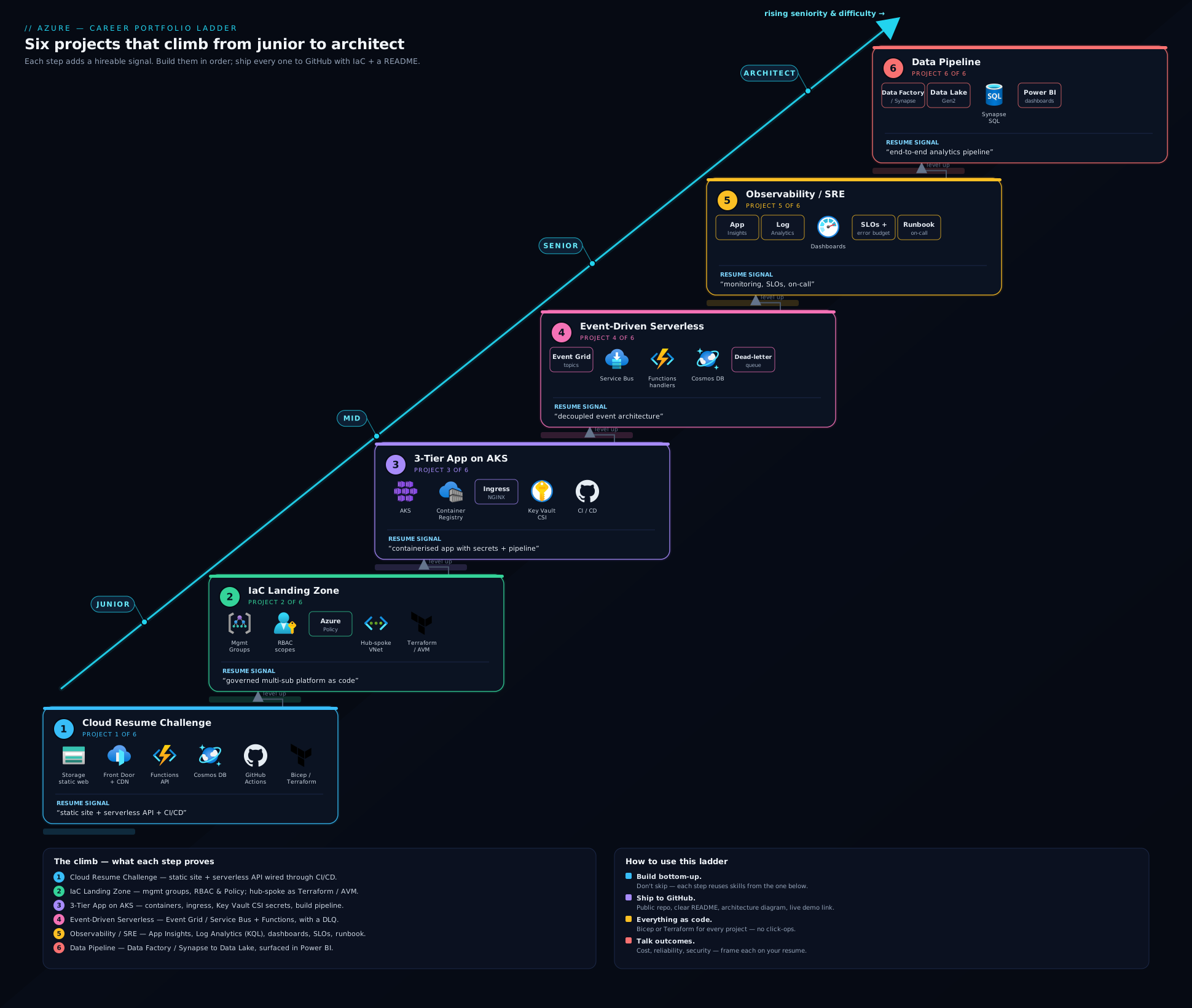
The diagram above shows the six projects as a rising ladder, with each rung’s headline Azure services and the skill cluster it proves — read it as the order to build in and the story your finished GitHub profile will tell.
How to present each project on GitHub: the presentation standard
A project that is not legible to a stranger in five minutes is, for hiring purposes, half-finished. Hold every repo to this standard — it is the difference between a portfolio that gets you interviews and a graveyard of half-documented experiments.
The README is the product. A recruiter will read the README and look at the diagram; many never open the source. Lead with a one-sentence description of what the project does, then the diagram, then how it works, how to run it, and a cost note — with the most impressive thing (the live link or green CI badge) at the very top.
| README element | Why it matters | What “good” looks like |
|---|---|---|
| One-line summary | The six-second scan | “Serverless CV site on Azure, fully automated with Bicep + GitHub Actions.” |
| Architecture diagram | Shows you think in systems | A clean PNG/SVG of the components and data flow, embedded inline |
| Live link / demo | Proof it actually runs | A working URL, or a short GIF/screenshot if it can’t stay live |
| “How it works” | Demonstrates understanding | A few paragraphs explaining the key decisions, not just the steps |
| “Deploy it yourself” | Shows reproducibility | Exact commands; assume a clean machine |
| Cost note | Signals cost-awareness (rare and valued) | “≈₹X/month; run terraform destroy to stop the meter.” |
| Tech badges / CI status | Instant credibility | A green Actions badge proves the pipeline is real |
A few points deserve emphasis. The architecture diagram need not be fancy — a clean drawing (draw.io, Excalidraw, the Azure icon set) of components and data flow proves you think in systems, and is the single highest-leverage addition to a repo. Keep a live link wherever it is cheap to run one (the Cloud Resume should be permanently live); for costly projects like AKS or data pipelines, provide a screen-recording or annotated screenshots and note in the README that it is torn down to save cost — that sentence itself signals judgement. Always include the cost note: almost no junior portfolio mentions money, so naming the rough monthly cost, the expensive component, and the teardown command instantly sets you apart. Finally, keep the repo clean — meaningful commits, a sensible layout, a .gitignore that excludes state and secrets, and no credentials ever committed (a leaked key in Git history is an instant rejection from a security-conscious team; these projects teach managed identity and Key Vault precisely so there is nothing to leak). Pin a handful of these repos to your profile so they greet every visitor.
Common mistakes & troubleshooting
| Symptom / mistake | Likely cause | Fix |
|---|---|---|
| Repo has great code but gets no interview traction | No README, no diagram, no live link — illegible to a non-author | Apply the presentation standard; lead with summary, diagram, and live link |
| Résumé bullet reads as “built X on Azure” and lands flat | No quantification | Add a number: cost, latency, deploy time, rows, SLO, environments |
| Secrets accidentally committed to Git | Connection strings/keys hard-coded in manifests or pipeline JSON | Use managed identity + Key Vault (CSI driver, linked services); purge history; rotate the secret |
| Azure bill spikes after a project | Left AKS nodes, Azure Firewall, or Synapse pools running | Add a cost note and a teardown command; az aks stop, terraform destroy, pause pools |
| AKS pods can’t pull images | ACR not attached to the cluster | az aks update --attach-acr, or grant AcrPull to the kubelet identity |
| Functions silently drop messages | No dead-letter handling; non-idempotent handler reprocesses on retry | Configure the DLQ, add a DLQ-reader function, make handlers idempotent |
| Alerts never fire (or fire constantly) | Thresholds untuned; SLI query wrong | Validate the KQL against real data; tune thresholds; test with Chaos Studio |
| Trying to build all six at once and finishing none | Scope overload | Build strictly in ladder order; ship and document rung n before starting n+1 |
Best practices
- Build in order, finish each rung. A finished, documented Cloud Resume project beats four half-built repos. Shipping is the skill being demonstrated.
- Automate from project one. Every project deploys through IaC and a pipeline. Click-ops in the portal teaches you the menus; automation teaches you the job.
- Document as you build, not at the end. Write the README while the decisions are fresh; you will forget why you chose Front Door over CDN a week later.
- Reuse across rungs. Your landing-zone network can host your AKS app; your AKS app can be the thing you instrument in the observability project. A connected portfolio tells a stronger story than six disconnected toys.
- Quantify relentlessly. If you can measure it — cost, latency, throughput, coverage, error budget — put the number in the README and the résumé bullet.
- Pin and curate. Pin your best four-to-six repos on your GitHub profile and write a profile README that links them in ladder order.
Security notes
These projects are also a chance to demonstrate secure-by-default habits, which hiring managers weight heavily:
- Never commit secrets. Use managed identity and Key Vault everywhere a credential would otherwise appear — that is why the AKS project uses the CSI driver and the data pipeline uses Key Vault-backed linked services. A leaked key in public Git history is a hard rejection, and it is permanent unless you rewrite history and rotate.
- Prefer OIDC federation over stored credentials in CI, so no service-principal secret sits in repo settings. Use it in every pipeline.
- Apply least privilege. Scope role assignments to the resource or resource group, not the subscription, and use built-in roles like
AcrPullrather thanOwner. - Lock down the network in the landing zone (deny public IPs by policy, route egress through the firewall, use Private Endpoints/Private DNS for PaaS) and keep data private in the pipeline (private lake, Key Vault-secured linked services, Purview for lineage).
Cost & sizing
The whole ladder is buildable for a modest amount if you are disciplined — and being disciplined is itself the lesson. The single highest-leverage habit is to add a destroy/stop command to every README and actually run it between demos: every project bills on the resources that exist right now.
| Project | Main cost driver | Keep it cheap by |
|---|---|---|
| 1 — Cloud Resume | Front Door (minimal); rest near free | Leave it live — it’s pennies and it’s your demo |
| 2 — Landing Zone | Azure Firewall | Use the Bastion + NAT variant for dev; destroy when idle |
| 3 — AKS app | Node VMs, PostgreSQL | Smallest node SKU; az aks stop; Burstable PostgreSQL |
| 4 — Serverless | Service Bus + Cosmos | Consumption Functions, serverless Cosmos, tear down at rest |
| 5 — Observability | Log Analytics ingestion (per GB) | Sampling + a daily ingestion cap |
| 6 — Data pipeline | ADF runs + Spark/Synapse compute | Smallest pools, pause when idle, schedule sparingly |
Interview & exam questions
- “Why should I hire you over someone with more certifications?” — Certifications show I learned the material; my portfolio shows I can apply it. I’ve shipped six end-to-end Azure projects — all automated and documented — and can walk you through the decisions in any of them.
- “Walk me through your Cloud Resume Challenge architecture.” — Browser → Front Door edge cache → static site in Storage; the visitor counter calls an HTTP Function that increments serverless Cosmos via managed identity; everything is Bicep, deployed by GitHub Actions with a unit test gating the pipeline.
- “What is a landing zone and why does it matter?” — A pre-provisioned, governed environment (management groups, RBAC, policy guardrails, hub-spoke network) that gives application teams a safe, compliant place to deploy without reinventing governance — the foundation the Cloud Adoption Framework prescribes.
- “How do AKS pods get database credentials without secrets in the repo?” — The Secrets Store CSI driver mounts secrets from Key Vault into the pod at runtime, authenticated by workload identity. No secret lives in YAML or Git — only a
SecretProviderClassreference. - “How does your CI/CD authenticate to Azure without a stored secret?” — OIDC federation: GitHub Actions exchanges a short-lived token via a federated credential on a managed identity, so there is no service-principal secret in repo settings to leak or rotate.
- “How do you stop an event-driven system losing messages?” — Buffer with a Service Bus queue, make handlers idempotent so retries are safe, rely on the binding’s retry policy for transient faults, and configure a dead-letter queue with a reader function so poison messages are visible.
- “What’s the difference between an SLI, an SLO, and an error budget?” — An SLI is the measured indicator (e.g. % of fast, successful requests); an SLO is the target (99.5% over 30 days); the error budget is the allowed shortfall (0.5%). In my observability project I measured the SLI in KQL, alerted on the SLO, and tracked budget burn.
- “Why a medallion (bronze/silver/gold) architecture, and Synapse vs Fabric vs Databricks?” — Bronze is raw and immutable for replay, silver cleaned and conformed, gold aggregated and business-ready — clear contracts make the pipeline debuggable. Synapse is the established Azure warehouse+Spark platform, Databricks the lakehouse leader, and Microsoft Fabric is Microsoft’s strategic SaaS direction; for greenfield work I’d lean Fabric and say why.
Quick check
- What is the defining advantage of a portfolio over a certification in a hiring conversation?
- Why is the Cloud Resume Challenge such a strong first cloud project?
- In the AKS project, which mechanism keeps database secrets out of your manifests and Git?
- Name the three medallion layers in the data pipeline and what each is for.
- What single sentence in a README signals cost-awareness and sets a junior portfolio apart?
Answers
- A portfolio is evidence you can build and make independent decisions, which is far harder to fake than passing an exam — interviewers trust it more and can probe it concretely.
- It forces you through every layer in one finishable package — front end, DNS, TLS, CDN, serverless compute, a database, IaC, and CI/CD — and recruiters recognise it on sight.
- The Secrets Store CSI driver mounts secrets from Key Vault into pods at runtime via workload identity; only a
SecretProviderClassreference exists in source. - Bronze = raw, immutable, replayable; silver = cleaned, typed, conformed; gold = aggregated, business-ready for serving to BI.
- A cost note with a teardown command — e.g. “≈₹X/month; run
terraform destroyto stop the meter” — almost no junior portfolio has one.
Exercise
Build Project 1, the Cloud Resume Challenge, end to end — and present it to the standard in this lesson. Follow the build outline above: a static CV site in Azure Storage, fronted by Azure Front Door (HTTPS + custom domain + caching), with an HTTP Function that increments a serverless Cosmos counter via managed identity, every resource in Bicep/Terraform, deployed through a GitHub Actions workflow that runs a unit test. Then do the two things that turn a working project into a hiring asset: write the README to the presentation standard (one-line summary, embedded architecture diagram, live link, “how it works”, deploy steps, cost note with teardown command, green Actions badge), and draft your quantified résumé bullet from the template above with your real numbers (cached latency, monthly cost, deploy time).
When you can hand a stranger that repo URL and they understand and trust it in five minutes, you have completed the first rung — and you have a template for the other five.
Certification mapping
This portfolio is the practical complement to the Azure certification ladder; each project reinforces specific exams and roles.
| Project | Reinforces certification(s) | Target roles it supports |
|---|---|---|
| 1 — Cloud Resume | AZ-900, AZ-204 (Functions, Cosmos) | Junior cloud / cloud developer |
| 2 — IaC Landing Zone | AZ-305 (architecture, CAF), AZ-104 | Cloud / platform engineer, architect |
| 3 — AKS app | AZ-400 (CI/CD), AZ-104, CKA/CKAD | DevOps / platform engineer |
| 4 — Event-driven serverless | AZ-204, AZ-305 (messaging patterns) | Cloud / backend developer, architect |
| 5 — Observability / SRE | AZ-104, AZ-400 (monitoring), SRE practice | SRE, platform / DevOps engineer |
| 6 — Data pipeline | DP-900, DP-203/DP-700 | Data engineer, analytics engineer |
Taken together, the six projects give you concrete, demonstrable evidence for the AZ-104 → AZ-305 → AZ-400 core ladder and branch credibly into the DP data track — exactly the spread a versatile cloud engineer needs.
Glossary
- Landing zone — a pre-provisioned, governed Azure environment (management groups, RBAC, policy, hub-spoke network) that application teams deploy into safely.
- Hub-and-spoke — a network topology with a central hub VNet (shared services like firewall and DNS) peered to workload spoke VNets.
- Secrets Store CSI driver — a Kubernetes component that mounts secrets from an external store (Azure Key Vault) into pods at runtime, so no secret lives in manifests.
- Workload identity — a way for Kubernetes pods to authenticate to Azure as a managed identity, without stored credentials.
- Dead-letter queue (DLQ) — a queue that holds messages a consumer could not process, so failures are inspectable rather than silently lost.
- Idempotent — an operation safe to run more than once with the same effect; essential for message handlers that may receive retries.
- SLI / SLO / error budget — the measured reliability indicator / the target for it / the allowed shortfall before you must stop shipping and fix reliability.
- Runbook — a written, step-by-step guide for what an on-call engineer does when a specific alert fires.
- Medallion architecture — a data-lake layering pattern: bronze (raw), silver (cleaned), gold (aggregated, business-ready).
- OIDC federation (in CI/CD) — authenticating a pipeline to Azure with a short-lived federated token instead of a stored service-principal secret.
- Quantified résumé bullet — an achievement statement that includes a concrete number (cost, latency, throughput, coverage) so it is credible and memorable.
Next steps
You now have a build plan for a portfolio that tells a complete story — deploy, automate, containerise, integrate, operate, analyse — and the standard to make every repo legible to a hiring manager. Build the six in order, document as you go, and pin them to your profile.
- Next lesson: Azure Interview & Certification Prep: Scenarios + AZ-104/AZ-305 Roadmap — turn these projects into interview wins, with the certification ladder, a topic-to-lesson map, and a bank of scenario and system-design questions with model answers.
Related reading to go deeper on individual rungs:
- Building a Platform Layer with Azure Verified Modules and Terraform — go further on the IaC landing-zone rung with vetted, composable modules.
- Azure Key Vault, Workload Identity & Secrets — the secret-handling foundation behind the AKS and data-pipeline projects.
- AKS Secrets Store CSI: Key Vault Sync & Rotation — the exact mechanism the 3-tier AKS project uses to keep secrets out of Git.
- Azure Data Integration & Analytics: Data Factory, Synapse & Microsoft Fabric — the data-platform depth behind the pipeline project.