You finished the course. You can build a landing zone, wire up identity, route traffic through a firewall, and reason about cost. Now you need to prove it — in an interview room and in an exam centre. Those are two different games with one shared foundation: the ability to explain a sound decision, out loud, under mild pressure. This capstone lesson turns everything you’ve learned into that ability.
We’ll lay out the certification ladder (which exam, in what order, and who each is for), map every course module to the exam objectives and interview themes it serves, then drill the part most people fluff — scenario and system-design questions, with model answers you can adapt rather than memorise. We finish with behavioural prompts, a “explain it to a non-technical stakeholder” exercise, and a study plan that fits around a job.
Learning objectives
By the end of this lesson you can:
- Choose the right Azure certification path for your role and sequence AZ-900, AZ-104, AZ-305, and specialties sensibly.
- Map any course topic to the exam objective and interview theme it supports, so your revision is targeted, not scattered.
- Answer scenario and system-design questions using a repeatable structure (clarify → constraints → design → trade-offs → operate).
- Give crisp model answers across identity, networking, HA/DR, cost, governance, and security.
- Handle behavioural questions and translate a technical decision for a non-technical stakeholder.
- Build and execute a realistic 6–10 week study plan and walk into exam day calm.
Prerequisites & where this fits
This is the final lesson of Module 10 — Resilience, Cost & Capstone and the capstone after the capstone: it assumes you have worked through the whole Azure Zero-to-Hero path, or have equivalent hands-on experience. You don’t need new tooling — you need the course content, a free Azure account to keep practising in, and a study partner or rubber duck for the mock-interview drill. If a term here is unfamiliar, the topic map below points you straight back to the lesson that teaches it.
The certification ladder
Microsoft’s role-based certifications are designed to be climbed in order. Each rung assumes the one below it, even when it isn’t a formal prerequisite. Start where your current knowledge sits, not where your ambition is.
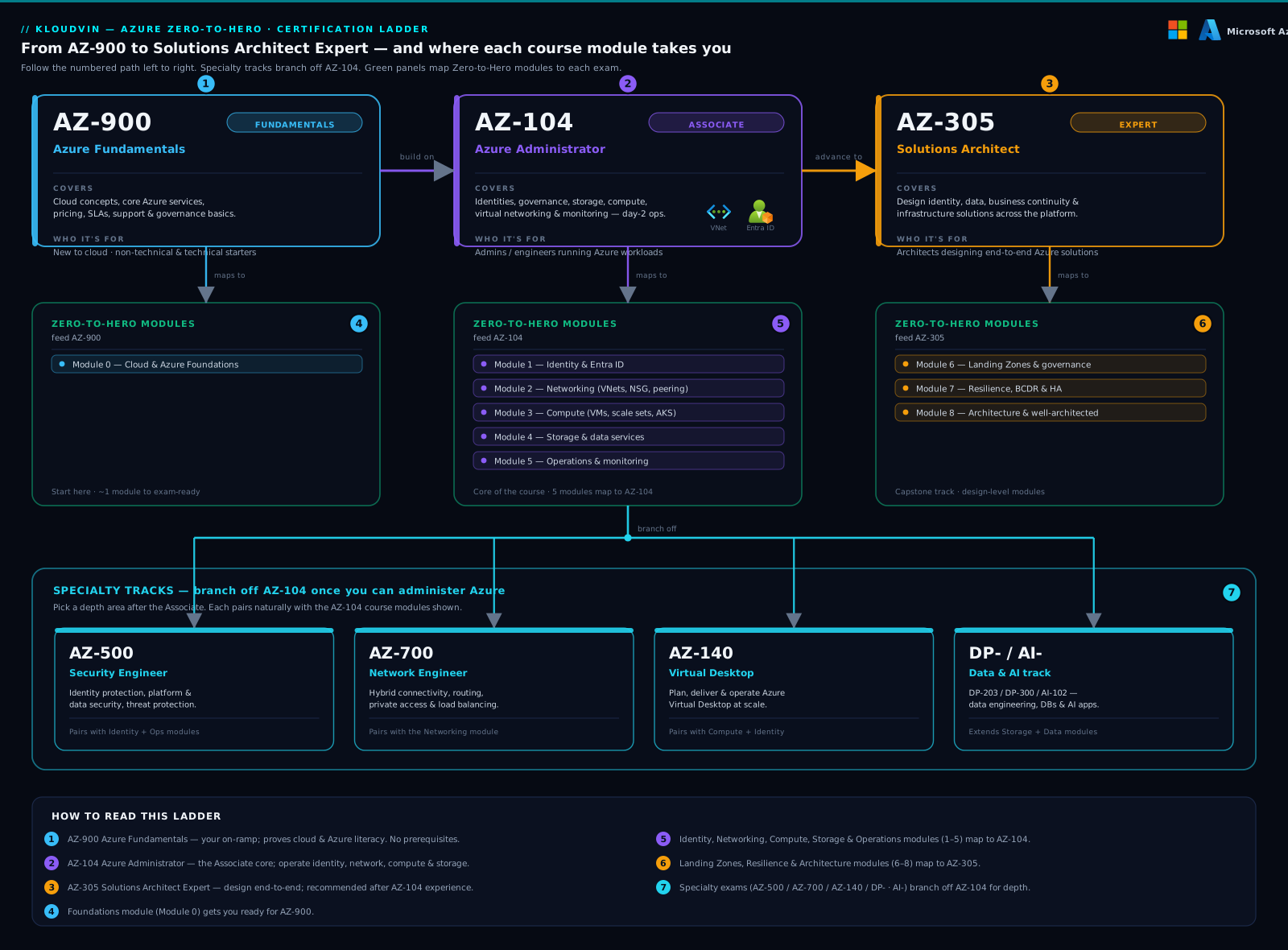
The diagram shows the main trunk — AZ-900 → AZ-104 → AZ-305 — with specialty branches hanging off the AZ-104 level, and a column linking each rung to the course modules that prepare you for it. Read it top to bottom as a route, left to right as “what feeds what”.
| Exam | Certification | Level | What it covers | Who it’s for |
|---|---|---|---|---|
| AZ-900 | Azure Fundamentals | Foundational | Cloud concepts (IaaS/PaaS/SaaS, shared responsibility), core Azure services, the account model, pricing/SLAs, basic governance and security. No hands-on required. | Career-changers, salespeople, managers, anyone new to Azure who needs the vocabulary and the mental model. |
| AZ-104 | Azure Administrator Associate | Associate | Managing identities & governance, storage, compute (VMs, App Service, containers), virtual networking, and monitoring/backup. Heavy on doing, not designing. | Sysadmins, ops engineers, anyone who operates an Azure estate day to day. The single most useful Azure cert for most jobs. |
| AZ-305 | Solutions Architect Expert | Expert | Designing solutions: identity/governance, data storage, business continuity (HA/DR), and infrastructure — choosing services and trade-offs, not clicking buttons. | Architects and senior engineers who make design decisions. Requires AZ-104-level operational knowledge as a foundation. |
A few honest notes on the trunk:
- AZ-900 is optional but cheap insurance. If you’ve done this course, you already know its content. It’s a confidence builder and a CV line, and it’s the right first exam if cloud is genuinely new to you. Skip straight to AZ-104 if you’re already comfortable.
- AZ-104 is the workhorse. It’s the cert most employers actually ask for, and it’s where “I read about it” becomes “I’ve done it”. Don’t rush past it to AZ-305 — the architect exam quietly assumes you can already administer.
- AZ-305 is a design exam, not a trivia exam. It rewards judgement: given constraints, pick the service and justify it. That’s exactly what the interview scenarios below train.
Specialty options (the branches)
Once you’re at AZ-104 level, you can branch sideways into a specialty that matches your work. These are not “higher” than AZ-305 — they’re deeper in one domain:
| Exam | Focus | Who it’s for |
|---|---|---|
| AZ-500 | Azure Security Engineer — identity hardening, platform protection, Defender for Cloud, Sentinel, data/app security. | Security engineers; anyone owning the controls auditors ask about. Pairs naturally with Modules 2 and 6. |
| AZ-700 | Azure Network Engineer — hybrid connectivity, core networking, routing, private access, load balancing. | Network specialists; the natural deepening of Module 3. |
| AZ-140 | Azure Virtual Desktop — designing and operating AVD at scale. | End-user-computing and VDI specialists. |
| DP-203 / DP-300 | Data engineering / database administration on Azure. | Data engineers and DBAs deepening Module 5. |
| AZ-400 | DevOps Engineer Expert — CI/CD, IaC, release strategy (builds on AZ-104 or the Developer cert AZ-204). | Platform/DevOps engineers; the deepening of Modules 8 and 9. |
The sensible majority path for an infrastructure-leaning engineer is AZ-900 (optional) → AZ-104 → AZ-305, with AZ-500 or AZ-700 added when your day job pulls you toward security or networking. Pick the branch you already work in — a cert you can back with stories beats a cert you crammed.
Topic-to-lesson map
Targeted revision beats re-reading everything. Use this table to jump from an interview theme or exam objective straight to the course lesson that owns it. Every linked lesson is part of the Azure Zero-to-Hero path.
| Theme / exam domain | Mostly tested in | Course lessons to revise |
|---|---|---|
| Cloud & account model — IaaS/PaaS/SaaS, subscriptions, RGs, regions, ARM | AZ-900, AZ-104 | What Is Azure?; Working with Azure: Portal, CLI, PowerShell & Cloud Shell |
| Identity & access — Entra ID, RBAC, PIM, Conditional Access | AZ-104, AZ-305, AZ-500 | Entra ID Fundamentals; Landing Zone Identity; PIM for Azure roles; Conditional Access token protection |
| Networking — VNets, NSGs, peering, hub-spoke, egress, private access | AZ-104, AZ-305, AZ-700 | VNet basics; NAT Gateway egress; Private Endpoints & DNS; Virtual WAN |
| Compute & hosting — VMs/VMSS, App Service, Functions, Container Apps | AZ-104, AZ-305 | App Service hardening; Functions Flex Consumption; Container Apps |
| Storage & data — Blob, Files, SQL, Cosmos DB, Redis | AZ-104, AZ-305, DP-* | Blob data protection; Azure SQL Hyperscale; Cosmos DB partition keys |
| Security & secrets — Key Vault, encryption/CMK, Defender, Policy | AZ-500, AZ-305 | Key Vault & workload identity; Policy as Code |
| Governance & landing zones — management groups, CAF, guardrails | AZ-305 | Landing Zone with the CAF; Resource organization; Governance & cost guardrails |
| HA/DR & resilience — zones, region pairs, RTO/RPO, failover | AZ-305 | Active-Active Multi-Region; Site Recovery runbooks; Backup hardening |
| Cost / FinOps — tagging, budgets, Reservations, Savings Plans | AZ-900, AZ-305 | FinOps on Azure; Commitment strategy |
| Operations & IaC — monitoring, patching, Bicep/Terraform, pipelines | AZ-104, AZ-400 | Azure Monitor end to end; AVM & Terraform platform; Capstone landing zone |
How to answer a scenario question
Before the question bank, internalise the shape of a good answer. Interviewers aren’t checking whether you memorised a service list — they’re checking whether you think like an engineer. Use this five-beat structure for any open-ended scenario:
- Clarify. Ask one or two sharp questions. “Is this internet-facing or internal? What’s the RTO target? Is there a compliance regime in play?” This alone separates seniors from juniors.
- State constraints & assumptions. Make the unstated explicit: “I’ll assume a single tenant, prod workload, and a tolerance for a few minutes of downtime.”
- Propose a design. Name specific Azure services and how they connect. Be concrete.
- Surface trade-offs. Every choice costs something — money, complexity, latency. Naming the downside of your own answer is the strongest signal you can send.
- Address day-2 / operate. How is it monitored, secured, patched, and paid for? Architecture that can’t be operated isn’t a finished answer.
The “Common mistakes” section later lists the anti-patterns of this structure. Practise saying these beats out loud — the goal is for them to feel automatic.
Interview questions (with model answers)
These are realistic mid-to-senior Azure questions, grouped by theme. The model answers are reference shapes, not scripts — adapt them to the role and to your own experience. Where a question maps to a course lesson, revise that lesson if the answer doesn’t yet feel like yours.
Identity & access
Q1. A developer needs to read secrets from Key Vault from an Azure Function. How do you grant access without storing any credentials?
Model answer: Enable a managed identity on the Function (system-assigned is simplest for a 1:1 mapping). Grant that identity the minimum it needs on the vault — with the RBAC data-plane model, the Key Vault Secrets User role scoped to the specific vault, not the subscription. The Function’s SDK then acquires a token from the Entra ID instance metadata endpoint at runtime; there is no secret in app settings, in code, or in a pipeline. The trade-off versus a connection string is that managed identities only work for Azure-hosted compute, so local development uses the developer’s own Entra identity via the Azure CLI credential. This is the pattern from Key Vault & workload identity.
Q2. What’s the difference between Entra ID roles and Azure RBAC roles? Give an example of each.
Model answer: They govern different planes. Entra ID roles (e.g. Global Administrator, User Administrator) manage the directory — users, groups, app registrations, tenant settings. Azure RBAC roles (e.g. Owner, Contributor, Reader) manage Azure resources — subscriptions, resource groups, VMs, storage. A User Administrator can create accounts but can’t deploy a VM; a Contributor can deploy a VM but can’t reset a user’s password. The classic mistake is assuming Owner on a subscription lets you manage Entra — it doesn’t. Scope RBAC at the lowest level that works (resource group over subscription) and prefer just-in-time elevation with PIM over standing Owner access.
Networking
Q3. Design connectivity for three application teams that must share central network services (firewall, DNS) but stay isolated from each other.
Model answer (using the five-beat structure): I’d clarify the scale and whether on-prem connectivity is needed. Assuming a handful of spokes and a single region, I’d use a hub-and-spoke topology: one hub VNet holding Azure Firewall and Private DNS, and one spoke VNet per team, each peered to the hub but not to each other. Default routes (UDRs) in each spoke send egress through the firewall for inspection and logging. Teams are isolated because peering is non-transitive — spoke-to-spoke traffic has no path unless I explicitly create one. Trade-offs: the hub is a shared blast radius and a cost centre, and at large scale I’d switch to Azure Virtual WAN to avoid managing peering and route tables by hand. Operate: NSG flow logs and firewall logs into Log Analytics. This is VNet basics plus Virtual WAN.
Q4. An app behind a NAT Gateway is intermittently failing outbound connections under load. What’s happening and how do you fix it?
Model answer: That’s classic SNAT port exhaustion. Every outbound flow to the same destination IP:port consumes a SNAT port from a finite pool; under load, or with chatty connections that aren’t reused, the pool drains and new connections fail. The fixes, in order: ensure the application reuses connections (HTTP keep-alive, pooled DB connections) so it isn’t burning a port per request; add more public IPs to the NAT Gateway to multiply the port pool; and reduce the TCP idle timeout so ports are reclaimed faster. NAT Gateway is the right tool precisely because it scales SNAT ports far beyond default outbound or a load balancer’s outbound rules. This is the NAT Gateway lesson.
HA / DR
Q5. The business wants an RTO of a few minutes and an RPO near zero for a customer-facing web app. Walk me through an architecture.
Model answer: Clarify: “near zero” RPO means I cannot lose committed data, which pushes me toward synchronous or multi-write data, and a few-minute RTO rules out manual rebuilds. I’d run active-active across two regions: identical per-region “stamps” (compute + regional data), fronted by Azure Front Door for global ingress and health-probe-based failover. For data, the choice drives everything — Cosmos DB with multi-region writes gives near-zero RPO with conflict resolution; if it’s relational, Azure SQL with auto-failover groups gives a fast, near-synchronous failover with a small RPO. Trade-offs: active-active roughly doubles cost and forces me to handle data conflicts and “split-brain”, so if the business could tolerate a larger RTO I’d offer active-passive as the cheaper option and let them choose. Operate: automated failover with tested runbooks, plus regular failover drills — an untested DR plan is a hope, not a plan. This maps to Active-Active Multi-Region and Site Recovery runbooks.
Q6. What’s the difference between availability zones and region pairs, and when do you use each?
Model answer: Availability zones are physically separate datacentres within one region, with independent power/cooling/network. Spreading instances across zones protects against a datacentre-level failure with no added latency to speak of and no data-residency change — it’s the default for production HA. Region pairs are two regions in the same geography that Microsoft updates sequentially and uses for paired services; you fail over to the paired region to survive a whole-region outage or for data residency. Rule of thumb: use zones for HA (the common case) and a second region for DR (the rarer, bigger event). They compose — a serious design is zone-redundant within each region and multi-region across them.
Cost
Q7. Leadership says the Azure bill is “too high” and growing. How do you investigate and bring it down without breaking anything?
Model answer: I treat cost as an engineering signal, not a finance complaint, in three moves. Inform: get visibility and attribution first — a mandatory tag taxonomy (CostCenter, Owner, Environment, Application) enforced with Azure Policy, and Cost Analysis grouped by those tags to find where the money goes. You can’t optimise what you can’t attribute. Optimise: act on Azure Advisor rightsizing recommendations, delete orphaned disks/IPs/old snapshots, move non-prod to auto-shutdown schedules, and — only for steady, predictable baseline load — buy Reservations or Savings Plans for 1–3 year commitment discounts. Operate: set Budgets with alerts so it never silently creeps again. Trade-off: commitments save the most but reduce flexibility, so I’d only commit the portion of spend I’m confident is permanent. This is the FinOps and Commitment strategy lessons.
Governance
Q8. A new team is onboarding. How do you give them a subscription that’s productive but can’t drift out of compliance?
Model answer: This is a landing zone question. I’d place their subscription under the right management group in the CAF hierarchy so it inherits the platform’s guardrails automatically. Those guardrails are Azure Policy initiatives assigned at the management-group scope — e.g. deny disallowed regions, require tags, enforce diagnostic settings, deny public IPs on certain resources. Identity and networking come pre-wired (RBAC groups, a spoke VNet peered to the hub). The team gets Contributor on their subscription but never Owner at a higher scope, and elevation is just-in-time via PIM. Trade-off: heavy-handed Deny policies frustrate teams, so I’d lean on Audit/Deploy-if-not-exists for things I can auto-remediate and reserve Deny for genuine non-negotiables. This is Landing Zone with the CAF, Resource organization, and Governance.
Security
Q9. How would you secure traffic to a PaaS service like Azure SQL or Storage so it never traverses the public internet?
Model answer: Use a Private Endpoint — it projects the PaaS service into your VNet as a private IP, so clients reach it over the Microsoft backbone, not its public endpoint. Critically, you must also fix DNS: the service’s public FQDN has to resolve to the private IP, which means a Private DNS zone (e.g. privatelink.database.windows.net) linked to the VNet, ideally centralised in the hub. Then disable public network access on the service itself so the public endpoint is genuinely closed. Trade-off: private endpoints add per-endpoint cost and DNS complexity at scale, which is exactly why the Private Endpoints & DNS at scale lesson centralises the zones and automates the records. Pair this with managed identity for auth and you’ve removed both the network and the credential attack surface.
Behavioural & stakeholder questions
Technical depth gets you shortlisted; communication gets you hired. Two flavours come up constantly.
Behavioural (“tell me about a time…”). Use the STAR structure — Situation, Task, Action, Result — and keep it to a tight ninety seconds. Have two or three stories ready that you can flex to most prompts:
- “Tell me about a production incident you handled.” — Pick one where you diagnosed under pressure and, crucially, what you changed afterward so it couldn’t recur. The follow-up (“what was the root cause?”) matters more than the firefight.
- “Tell me about a time you disagreed with a technical decision.” — Show you can argue a position and commit to the team’s choice. Interviewers are probing for ego, not stubbornness.
- “Describe a trade-off you made between speed and quality (or cost and resilience).” — There’s no wrong answer if you can name what you optimised for and why given the context.
“Explain this to a non-technical stakeholder.” This tests whether you actually understand something — you can only simplify what you’ve truly internalised. The rules: drop the jargon, reach for an analogy, and lead with the business impact, not the mechanism.
Example — explaining a landing zone to a finance director: “Think of it like building out an office floor before staff move in — we’ve already put in the locks, the wiring, the fire alarms, and the signage to each department. So when a new team needs space, they move in the same day and the safety and budget controls are already there. Without it, every team builds their own floor from scratch, and that’s where overspend and security gaps creep in.”
Notice what the analogy does: no mention of management groups or Policy, but the value (speed, safety, cost control) lands. Practise this for three or four core concepts — identity, networking, DR, and cost are the usual suspects.
Quick check
- You’re new to cloud and want one credential before job-hunting for an Azure admin role. Which exam, and is AZ-900 required first?
- In a scenario question, what should you almost always do before proposing a design?
- Name the planes that Entra ID roles and Azure RBAC roles each govern.
- An app’s outbound connections fail under heavy load behind a NAT Gateway. What’s the most likely cause?
- When would you use availability zones versus a second region?
Answers
- Target AZ-104 (Azure Administrator) — it’s the cert employers ask for. AZ-900 is not a prerequisite; take it first only if cloud is genuinely new to you and you want a confidence builder, otherwise go straight to AZ-104.
- Clarify the requirements — ask one or two sharp questions (internet-facing or internal? RTO/RPO? compliance?). Jumping to a design without clarifying is the most common junior tell.
- Entra ID roles govern the directory (users, groups, app registrations, tenant settings). Azure RBAC roles govern Azure resources (subscriptions, resource groups, and the resources in them).
- SNAT port exhaustion — the finite SNAT port pool drains under load. Fix with connection reuse, more public IPs on the NAT Gateway, and a shorter idle timeout.
- Use availability zones for high availability within a region (the default for production); use a second region for disaster recovery or data residency. Strong designs do both.
Exercise
Run a 30-minute mock-interview drill. Pair up with someone (or record yourself answering aloud — talking to a wall counts).
- Pick three questions from the bank above, one each from a different theme (e.g. one networking, one HA/DR, one governance).
- Answer each out loud, without notes, deliberately walking the five beats: clarify → constraints → design → trade-offs → operate. Time yourself; aim for two to three minutes per answer.
- For one of the three, also do the stakeholder version — re-explain your design to an imaginary non-technical manager using an analogy and business impact.
- Self-score against the rubric below, then redo your weakest answer once more.
| Signal | Weak (1) | Strong (3) |
|---|---|---|
| Clarified first | Jumped straight to services | Asked 1–2 sharp scoping questions |
| Named trade-offs | Presented one option as obviously correct | Named the downside of own design and an alternative |
| Concrete services | Vague (“some load balancer”) | Specific and correct (“Front Door for global ingress”) |
| Day-2 thinking | Stopped at architecture | Covered monitoring, security, and cost |
| Communication | Rambled / jargon wall | Structured, calm, jargon adjusted to audience |
If you score below 2 on any row, the topic map tells you which lesson to revisit. Do this drill weekly in the run-up to interviews and the structure becomes muscle memory.
Study plan & exam-day tips
A realistic plan around a job (per exam, 6–10 weeks).
| Phase | Weeks | What you do |
|---|---|---|
| Map the gap | 1 | Read Microsoft’s official skills measured outline for your target exam. RAG-rate each line (red/amber/green) against the topic map above. |
| Close the reds | 2–4 | Work the linked course lessons for every red line — do the labs, don’t just read. Hands-on memory outlasts crammed memory. |
| Active recall | 4–7 | Take Microsoft’s free official practice assessment for the exam. For every wrong answer, go back to the source and re-do the relevant lab. Repeat until you’re consistently above ~80%. |
| Mock & polish | last 1–2 | Run the mock-interview drill (it doubles as scenario revision), re-take the practice assessment cold, and skim your weakest two domains. |
A few principles that matter more than any single resource:
- Free, official, current: use Microsoft Learn modules and the official practice assessment as your spine — they track the live exam. Treat third-party dumps as a red flag, not a shortcut; they’re often outdated and against exam policy.
- Labs over videos. You’re trained for the exam and the job at once. The course labs were built for exactly this.
- AZ-104 and AZ-305 are partly case-study / scenario exams. They reward the same judgement as the interview drill — so your interview prep is your exam prep.
Exam-day tips.
- Use the review-and-flag feature. Answer everything, flag the uncertain ones, and come back — don’t sink ten minutes into question three.
- Case studies appear first and lock behind you. When the exam opens with a case study, read the requirements tab carefully and answer all its questions before moving on — you usually can’t return to that section.
- Eliminate, don’t agonise. Most questions have two clearly wrong options; kill those first, then decide between the remaining two on the strongest constraint in the stem (cost, RTO, “least privilege”, “minimise administrative effort”).
- Watch the qualifier words. “Most cost-effective”, “least effort”, “highest availability” change the right answer — the technically-correct-but-expensive option is often the trap.
- Online or on-site, settle the logistics early. For online proctoring, test your webcam and clear your desk well before the slot; arriving flustered costs you the first few questions.
Certification mapping
This lesson is meta — it maps to the exams rather than teaching a single objective — but it directly serves:
- AZ-104 — Azure Administrator: the scenario questions on identity, networking, storage, and monitoring rehearse the “manage and operate” objectives; the study plan targets the official skills outline.
- AZ-305 — Azure Solutions Architect: the system-design questions (HA/DR, governance, multi-region, cost trade-offs) and the clarify→trade-offs answer structure mirror exactly how AZ-305’s case-study items are scored — design a solution given constraints.
Use the topic-to-lesson map above as your personal objective tracker for both.
Glossary
- Role-based certification: a Microsoft cert tied to a job role (Administrator, Architect) rather than a single product.
- AZ-900 / AZ-104 / AZ-305: Azure Fundamentals (foundational), Administrator Associate, and Solutions Architect Expert — the main certification trunk.
- Specialty exam: a deep, single-domain cert (e.g. AZ-500 security, AZ-700 networking) sitting beside, not above, AZ-305.
- Skills measured: Microsoft’s official published outline of what an exam tests; the source of truth for revision.
- Practice assessment: Microsoft’s free official mock exam that mirrors the real question style.
- STAR: Situation–Task–Action–Result — the structure for behavioural answers.
- Scenario / system-design question: an open-ended “design this” prompt judged on reasoning and trade-offs, not recall.
- RTO / RPO: Recovery Time Objective (how long until you’re back) and Recovery Point Objective (how much data you can lose) — the two numbers every DR answer needs.
- Case study (exam format): a set of exam questions sharing one detailed business scenario; common in AZ-104 and AZ-305.
Next steps
You’ve reached the end of the Azure Zero-to-Hero path — the next step is the real one: book an exam, or walk into an interview. To keep sharpening the design judgement these scenarios depend on, go deeper on the three domains interviewers probe hardest:
- Active-Active Multi-Region on Azure: Building for RTO Near Zero — the HA/DR scenarios, taken to principal-engineer depth.
- FinOps on Azure: From Cost Visibility to Engineered Savings — the cost questions, as an engineering discipline.
- Designing an Azure Landing Zone with the Cloud Adoption Framework — the governance and architecture backbone behind half the AZ-305 case studies.