This is the capstone of the Azure Zero-to-Hero course. Everything you have learned so far — what a subscription is, how to drive Azure from the CLI, how Microsoft Entra ID and RBAC work — now comes together into one project: designing and building a production-ready Azure landing zone. A landing zone is the pre-built, governed environment that your applications “land” in. Networking, identity, policy guardrails, monitoring, and cost controls are wired up first, so that when an application team shows up, they inherit security and consistency on day one instead of re-inventing it (and getting it wrong) on every project.
We will work the way a real platform team does: start from a business brief, make explicit design decisions, then build in stages — each stage reusing a deeper lesson from the course so you always know where to go for detail. You will end with a small but genuinely real landing zone running in your own free-tier subscription, a set of acceptance criteria to prove it works, and a self-assessment rubric to grade yourself the way an Azure Review Board would.
Learning objectives
By the end of this capstone you can:
- Translate a business brief into a concrete Azure landing-zone design across management groups, subscriptions, networking, identity, governance, monitoring, and cost.
- Justify the core decisions — why a management-group hierarchy, why platform vs application subscriptions, why hub-spoke.
- Build the foundation with Bicep, Terraform, and
az, deploying a management group, resource groups, a hub VNet, a policy assignment, and a Log Analytics workspace. - Apply policy guardrails (required tags, deny public IPs) and a monitoring + cost baseline so the platform stays compliant on its own.
- Verify the result against explicit acceptance criteria and grade it with a self-assessment rubric.
- Know exactly which course lesson to open for any single design area when you build the full thing for real.
Prerequisites & where this fits
This is the final, Advanced lesson of the Azure Zero-to-Hero course and it assumes the whole course. You should be comfortable with the account model (tenant → management group → subscription → resource group → resource), driving Azure from Cloud Shell with the az CLI, and the basics of Microsoft Entra ID and RBAC. If any of those feel shaky, work through the earlier lessons first — this capstone links back to them at each stage rather than re-teaching them. You will also lean on the deeper KloudVin landing-zone series (linked throughout) for production detail beyond what one lesson can hold.
The brief
Our fictional company is Northwind Freight, a mid-size logistics firm moving from a single hand-built subscription (one engineer clicked it together two years ago, nobody remembers what is in it) to a governed Azure foundation. Leadership wants three things, in their words:
- “Stop the wild west.” Every resource must be tagged, owned, and monitored. No more orphaned public IPs and no mystery spend.
- “Let app teams move fast — safely.” A new project team should get a ready-to-use, isolated environment with guardrails already on, without filing a networking ticket.
- “Show me the bill, by team.” Finance needs cost broken down per workload and per environment, with alerts before budgets blow.
Translated into platform language, Northwind needs: a management-group hierarchy for inherited policy and RBAC; separate subscriptions for shared platform services versus application workloads; a hub-spoke network so connectivity is centralized; an identity baseline of least-privilege RBAC granted to groups; policy guardrails that enforce tagging and block risky resources; a monitoring baseline funnelling logs to one place; and cost controls with budgets and alerts. That is exactly an Azure landing zone — and exactly the eight design areas of Microsoft’s Cloud Adoption Framework.
Design decisions
A landing zone is mostly a set of decisions. Implementation is the easy part once the decisions are explicit and defensible. Here are the seven that matter, with the reasoning a reviewer will expect — and the course lesson that owns each in depth.
1. Management-group hierarchy
Decision: adopt the CAF reference hierarchy rather than a flat tenant. Management groups let you assign policy and RBAC once and inherit everywhere beneath them, including subscriptions that do not exist yet.
Tenant Root Group
└── northwind                    (top-level MG — company guardrails)
    ├── platform                 (shared services)
    │   ├── identity             (Entra Connect, domain services)
    │   ├── management           (Log Analytics, automation, backup)
    │   └── connectivity         (hub VNet, firewall, DNS)
    ├── landingzones             (application workloads)
    │   ├── corp                 (internal — no public ingress)
    │   └── online               (internet-facing)
    ├── sandbox                  (experiments — loose policy)
    └── decommissioned           (quarantine before deletion)
A policy assigned at landingzones (for example, “deny public IP on a NIC”) flows to corp, online, and every future subscription under them. New teams inherit guardrails automatically. Detail: Azure landing zone — resource organization.
2. Platform vs application subscriptions
Decision: the subscription is the unit of scale and the blast-radius / billing boundary — so split by responsibility, not convenience. Platform subscriptions (connectivity, management, identity) are owned by the platform team and rarely change. Application (landing-zone) subscriptions are handed one-per-workload-or-environment to app teams.
| Subscription | Lives under | Owned by | Purpose |
|---|---|---|---|
sub-connectivity |
platform/connectivity | Platform | Hub VNet, Firewall, DNS, gateways |
sub-management |
platform/management | Platform | Log Analytics, automation, backup vault |
sub-identity |
platform/identity | Platform | Entra Connect, domain services |
sub-corp-prod |
landingzones/corp | App team | Internal production workloads |
sub-online-prod |
landingzones/online | App team | Internet-facing production workloads |
This gives Finance a clean per-team bill (subscription = cost boundary) and limits blast radius: a misconfiguration in one app subscription cannot touch another. Detail: Azure landing zone — resource organization.
3. Hub-spoke networking
Decision: centralize shared network services in a hub VNet (firewall, DNS, Bastion, VPN/ExpressRoute gateway) and give each workload a spoke VNet peered to the hub. Force spoke egress through the hub firewall with a route table (UDR). This means one place to inspect and log traffic, one place to attach hybrid connectivity, and spokes that stay small and disposable.
The alternative — a flat VNet shared by everyone, or full-mesh peering between workloads — does not scale and erases the security boundary between teams. Detail: Azure landing zone — network topology.
4. Identity baseline
Decision: Microsoft Entra ID is the control plane. Grant Azure RBAC roles to groups, never individuals, and scope them at the management-group or subscription level rather than per-resource. Privileged roles (Owner, User Access Administrator) are made eligible, not active, through Privileged Identity Management (PIM) so engineers activate them just-in-time with MFA and approval.
Least privilege is the rule: app teams get Contributor on their own subscription and nothing above it; the platform pipeline identity gets Owner only at the management group it manages. This builds directly on the Entra ID + RBAC lesson and goes deeper in Azure landing zone — identity & access.
5. Policy guardrails
Decision: governance is preventive, not a quarterly audit. Assign Azure Policy initiatives at the management-group scope so they inherit. The three Northwind needs first:
- Require tags (
costCenter,owner,env) — deny resources without them, so Finance gets clean cost attribution. - Deny public IPs on NICs in the
corpbranch — internal workloads stay private by construction. - DeployIfNotExists (DINE) — auto-onboard new resources to Log Analytics and Microsoft Defender for Cloud, so monitoring is never forgotten.
Always dry-run a new initiative in DoNotEnforce mode first, read the compliance results, then flip enforcement on. Detail: Azure landing zone — governance and, for shipping policy through CI/CD, Azure Policy as code.
6. Monitoring baseline
Decision: one central Log Analytics workspace in the management subscription. Every subscription’s diagnostic settings, Defender for Cloud, and Activity Logs funnel into it. Centralizing means security can query across the whole estate, and DINE policy can enforce onboarding automatically. Detail: Azure landing zone — governance.
7. Cost controls
Decision: a budget with alerts per subscription, plus mandatory tags so Cost Management can slice spend by costCenter and env. Alerts fire at 80% and 100% of budget to the subscription owner before the month closes. This answers Northwind’s “show me the bill, by team” directly. For the full discipline, see Azure FinOps & cost engineering.
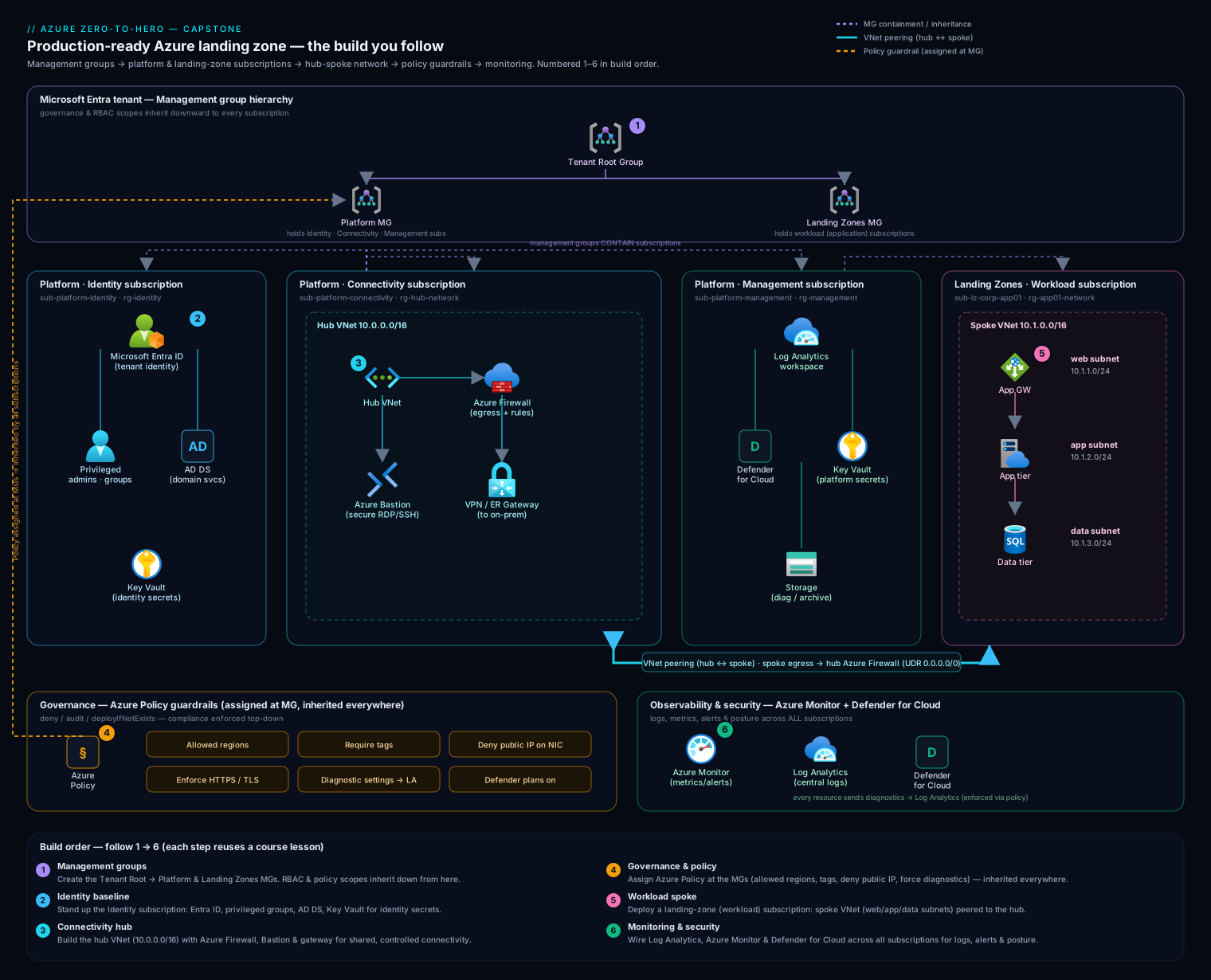
The diagram above is the target state we are building toward: the management-group hierarchy on the left inherits policy and RBAC down into the platform and application subscriptions; the hub VNet in the connectivity subscription peers to each spoke; and everything reports to the central Log Analytics workspace in the management subscription. Keep it open as a map while you build — each stage below fills in one part of it.
Staged build plan
You do not build a landing zone in one giant deployment — you build it in stages, validating each before the next. Here is the plan; each stage names the deeper lesson to open if you need more than the snippet. The hands-on lab that follows builds a free-tier slice of stages 1, 3, 4, and 5 end to end.
| Stage | What you build | Reuse lesson |
|---|---|---|
| 0. Foundations | Account, Cloud Shell, CLI context | Earlier course lessons + CAF overview |
| 1. Resource organization | Management groups + subscription layout | Resource organization |
| 2. Identity | RBAC to groups, PIM for privileged roles | Identity & access |
| 3. Networking | Hub VNet, firewall subnet, spoke peering, UDR | Network topology |
| 4. Governance | Required-tags + deny-public-IP + DINE policy | Governance |
| 5. Monitoring | Central Log Analytics + diagnostic settings | Governance |
| 6. Cost | Budgets + alerts per subscription | FinOps & cost engineering |
| 7. Automation | Wrap it all in IaC + a pipeline | Policy as code |
Representative IaC for the core pieces
You will use a mix in real life: Bicep for Azure-native resources and tenant-scoped objects (management groups, policy), Terraform when you want one tool across clouds, and az for glue and verification. Here are representative snippets for each core piece.
Management group (Bicep, tenant scope):
targetScope = 'tenant'

resource northwind 'Microsoft.Management/managementGroups@2023-04-01' = {
  name: 'northwind'
  properties: { displayName: 'Northwind Freight' }
}

resource landingzones 'Microsoft.Management/managementGroups@2023-04-01' = {
  name: 'landingzones'
  properties: {
    displayName: 'Landing Zones'
    details: { parent: { id: northwind.id } }
  }
}
Hub VNet + firewall subnet (Terraform):
resource "azurerm_virtual_network" "hub" {
  name                = "vnet-hub-eus"
  resource_group_name = azurerm_resource_group.connectivity.name
  location            = "eastus"
  address_space       = ["10.10.0.0/16"]
}

resource "azurerm_subnet" "firewall" {
  name                 = "AzureFirewallSubnet" # exact name is mandatory
  resource_group_name  = azurerm_resource_group.connectivity.name
  virtual_network_name = azurerm_virtual_network.hub.name
  address_prefixes     = ["10.10.1.0/26"]
}
Required-tags policy assignment (Bicep, management-group scope):
targetScope = 'managementGroup'

resource requireCostCenter 'Microsoft.Authorization/policyAssignments@2024-04-01' = {
  name: 'require-tag-costcenter'
  properties: {
    displayName: 'Require costCenter tag on resources'
    // built-in: "Require a tag on resources"
    policyDefinitionId: tenantResourceId(
      'Microsoft.Authorization/policyDefinitions',
      '871b6d14-10aa-478d-b590-94f262ecfa99')
    parameters: { tagName: { value: 'costCenter' } }
    enforcementMode: 'Default'
  }
}
Log Analytics workspace (az):
az monitor log-analytics workspace create \
  --resource-group rg-management \
  --workspace-name law-northwind-central \
  --location eastus \
  --sku PerGB2018 \
  --retention-time 30
Hands-on lab — build a free-tier landing-zone slice
You will build a real, working slice of the landing zone using the az CLI in Azure Cloud Shell — no installs. We keep it inside a single subscription so it stays free-tier-friendly (a management group, resource groups, two VNets with peering, a tagging policy, and a Log Analytics workspace cost nothing or pennies). Everything goes into resource groups you delete at the end.
Note on scope: creating real platform and application subscriptions needs an enrollment you may not have on a personal account, so the lab models the hierarchy with a management group and models platform-vs-app separation with resource groups + tags. The commands are identical in shape to the real thing.
1. Set context. Open Azure Cloud Shell, pick Bash, and confirm where you are:
az account show --output table
SUB_ID=$(az account show --query id -o tsv)
echo "Working in subscription: $SUB_ID"
2. Create a management group (stage 1). This needs no enrollment and is free:
az account management-group create \
  --name northwind-demo \
  --display-name "Northwind Freight (demo)"
Expected: JSON describing the new group. (It can take a minute to appear in the portal — that is normal.)
3. Create platform and application resource groups (modelling the subscription split), each tagged for cost attribution:
az group create -n rg-connectivity -l eastus \
  --tags costCenter=platform owner=platform-team env=shared

az group create -n rg-management -l eastus \
  --tags costCenter=platform owner=platform-team env=shared

az group create -n rg-corp-prod -l eastus \
  --tags costCenter=logistics owner=app-team env=prod
4. Build the hub VNet and a spoke, then peer them (stage 3):
# Hub network in the connectivity RG
az network vnet create -g rg-connectivity -n vnet-hub \
  --address-prefix 10.10.0.0/16 \
  --subnet-name AzureFirewallSubnet --subnet-prefix 10.10.1.0/26

# Spoke network in the corp app RG
az network vnet create -g rg-corp-prod -n vnet-corp-spoke \
  --address-prefix 10.20.0.0/16 \
  --subnet-name snet-workload --subnet-prefix 10.20.1.0/24

# Get resource IDs for peering
HUB_ID=$(az network vnet show -g rg-connectivity -n vnet-hub --query id -o tsv)
SPOKE_ID=$(az network vnet show -g rg-corp-prod -n vnet-corp-spoke --query id -o tsv)

# Peer both directions
az network vnet peering create -g rg-corp-prod -n spoke-to-hub \
  --vnet-name vnet-corp-spoke --remote-vnet "$HUB_ID" \
  --allow-vnet-access

az network vnet peering create -g rg-connectivity -n hub-to-spoke \
  --vnet-name vnet-hub --remote-vnet "$SPOKE_ID" \
  --allow-vnet-access
5. Assign a tagging guardrail (stage 4). Assign the built-in Require a tag on resources policy, scoped to the corp resource group, requiring costCenter:
az policy assignment create \
  --name require-costcenter \
  --display-name "Require costCenter tag" \
  --scope "/subscriptions/$SUB_ID/resourceGroups/rg-corp-prod" \
  --policy "871b6d14-10aa-478d-b590-94f262ecfa99" \
  --params '{ "tagName": { "value": "costCenter" } }'
6. Create the central Log Analytics workspace (stage 5):
az monitor log-analytics workspace create \
  --resource-group rg-management \
  --workspace-name law-northwind-demo \
  --location eastus \
  --sku PerGB2018 --retention-time 30
7. Validate. Prove the slice exists and is wired correctly:
# Management group present
az account management-group show --name northwind-demo -o table

# Peering shows "Connected" both ways
az network vnet peering list -g rg-corp-prod --vnet-name vnet-corp-spoke \
  --query "[].{name:name, state:peeringState}" -o table

# Policy assignment present at the corp RG
az policy assignment list \
  --scope "/subscriptions/$SUB_ID/resourceGroups/rg-corp-prod" \
  --query "[].displayName" -o table

# Workspace provisioned
az monitor log-analytics workspace show \
  -g rg-management -n law-northwind-demo \
  --query provisioningState -o tsv
Expected: the peering state reads Connected for spoke-to-hub, the policy displayName appears, and the workspace provisioningState is Succeeded. You now have, in miniature, every pillar of the landing zone: hierarchy, platform/app separation, hub-spoke, a guardrail, and central monitoring.
8. Cleanup. Delete the resource groups (this removes the VNets, peering, policy assignment scoped to the RG, and workspace), then the management group:
az group delete -n rg-corp-prod --yes --no-wait
az group delete -n rg-connectivity --yes --no-wait
az group delete -n rg-management --yes --no-wait
az account management-group delete --name northwind-demo
Cost note: Empty VNets, peering, a tagging policy, a management group, and a workspace with no ingested data are free or a few pennies; deleting the resource groups the same day keeps this comfortably in free-tier territory.
Common mistakes & troubleshooting
| Symptom | Likely cause | Fix |
|---|---|---|
| Management group not visible after create | Propagation delay; you lack the Management Group Contributor role at the root | Wait ~1 min and refresh; ensure your account has tenant-level MG permissions (the first MG op requires enabling MG access in the tenant) |
| Policy denies a resource you expected to succeed | A deny policy is broader than intended (e.g. deny-public-IP catching a load balancer) | Read the policyEvaluationDetails in the error; narrow the policy with notIn/exclusions and re-test in DoNotEnforce first |
VNet peering stuck in Initiated |
Peering created on only one side | Create the peering in both directions; both must exist for state to become Connected |
| DINE policy never onboards new resources | No remediation task; the remediation identity lacks the role at scope | Trigger remediation (az policy remediation create) and grant the assignment’s managed identity the role it needs |
az policy assignment create fails on --params |
JSON quoting mangled in the shell | Put the JSON in a .json file and pass --params @file.json, or use Cloud Shell where quoting is consistent |
| Spoke VM cannot reach the internet after you add a firewall | UDR default route sends traffic to the firewall, but no firewall rule allows it | Add an Azure Firewall network/application rule, or remove the UDR while testing connectivity |
Best practices
- Decide before you deploy. Write the design decisions down (the seven above) and review them with stakeholders. IaC is cheap to change; an undocumented hierarchy is not.
- Inherit, don’t repeat. Assign policy and RBAC at the highest sensible scope (management group) so new subscriptions are governed automatically.
- Subscriptions are cheap; use them as boundaries. One per workload-or-environment beats cramming everything into one giant subscription.
- Dry-run governance. New initiatives go in
DoNotEnforce, you read compliance, then you enforce. Never flip a deny on blind. - Everything is code. The platform team owns the hierarchy/policy/hub in one repo; app teams own their spokes via PR. Deploy through a pipeline, never the portal, for anything that must be reproducible. See Azure Policy as code.
- Tag from day one.
costCenter,owner,envare not optional — they are what makes cost, ownership, and cleanup possible.
Security notes
The landing zone is your security baseline, so treat it that way. Grant RBAC to groups, scoped high, least-privilege; make privileged roles eligible via PIM, not standing. Keep corp workloads private by policy (deny public IPs; reach them through Bastion or the firewall, never a public NIC). Force all egress through the hub firewall with a UDR so traffic is inspected and logged in one place. Turn on Microsoft Defender for Cloud and enforce its onboarding with DINE policy so coverage cannot drift. Funnel every diagnostic and Activity Log into the central Log Analytics workspace so security can hunt across the whole estate. And never embed secrets in IaC — use a pipeline identity with workload identity federation rather than a long-lived service-principal secret.
Quick check
- Why assign policy and RBAC at a management group rather than on each subscription?
- What is the difference between a platform subscription and an application (landing-zone) subscription?
- In hub-spoke, what forces a spoke’s outbound traffic through the hub firewall?
- Why should RBAC roles be granted to groups and scoped high rather than to individuals per-resource?
- Why dry-run a new policy initiative in
DoNotEnforcemode before enforcing it?
Answers
- Because management groups inherit — a single assignment flows to every current and future subscription beneath them, so new teams are governed automatically instead of someone remembering to re-apply guardrails each time.
- Platform subscriptions hold shared services (connectivity, management, identity) owned by the platform team and changing rarely; application subscriptions are handed one-per-workload to app teams and are the blast-radius/billing boundary for that workload.
- A route table (UDR) whose default route (
0.0.0.0/0) has next hop = the firewall’s private IP, attached to the spoke subnet — this is “forced tunneling.” - Group-based, high-scope, least-privilege RBAC is auditable and manageable: you add/remove a person from a group instead of hunting per-resource assignments, and you avoid both privilege creep and standing admin rights.
DoNotEnforceevaluates compliance without blocking anything, so you can read what would be denied and fix scope or exclusions before a too-broad deny breaks legitimate deployments (including your own platform bootstrap).
Exercise
Extend the lab into the cost pillar. Using the rg-corp-prod resource group from the lab (or recreate it), create a budget with an alert so an owner is notified before spend exceeds a threshold:
az consumption budget create \
  --budget-name corp-prod-monthly \
  --amount 10 \
  --category Cost \
  --time-grain Monthly \
  --start-date 2026-06-01 --end-date 2026-12-31 \
  --resource-group rg-corp-prod
Then answer in two or three sentences: how does requiring the costCenter tag (from the lab) combine with this budget to satisfy Northwind’s “show me the bill, by team” requirement? Clean up afterward.
Capstone deliverables & self-assessment rubric
To call the capstone “done,” produce these deliverables:
- A design document stating the seven decisions and their justification.
- The architecture diagram of your target state (you have a template above).
- IaC (Bicep and/or Terraform) for management group(s), resource groups, hub + spoke networking, at least one policy assignment, and a Log Analytics workspace.
- A short acceptance test (the validation commands) that proves the build and a clean teardown.
Acceptance criteria — the build passes if all are true:
Self-assessment rubric — grade each area 0–3 and aim for 2+ everywhere before you consider yourself “hero” level:
| Area | 0 — Not done | 1 — Started | 2 — Solid | 3 — Production-grade |
|---|---|---|---|---|
| Resource organization | Flat / ad-hoc | MGs exist, no plan | CAF hierarchy, platform/app split | Subscription vending automated |
| Networking | Single flat VNet | Hub + spoke exist | Peered + UDR egress | Firewall rules, DNS, Bastion, hybrid |
| Identity | Per-user Owner | Some groups used | Group RBAC, scoped high | PIM JIT, least privilege everywhere |
| Governance | No policy | A few audits | Required-tags + deny assigned | DINE auto-remediation, shipped as code |
| Monitoring | Nothing central | Workspace exists | Diagnostics flow in | Defender + alerts + workbooks |
| Cost | No tags/budgets | Tags inconsistent | Tags + budgets + alerts | Per-team chargeback, anomaly alerts |
| Automation | Portal-built | Some scripts | Bicep/Terraform for all | Pipeline-deployed, PR-gated |
Interview questions
Q: Walk me through how you would design an Azure landing zone for a company moving off a single subscription. Start from the business drivers, then the eight CAF design areas. Adopt a management-group hierarchy (platform / landing zones / sandbox / decommissioned) for inherited policy and RBAC; split subscriptions by responsibility (platform vs application) so each workload is its own blast-radius and billing boundary; centralize networking in a hub with peered spokes and forced-tunnel egress; grant least-privilege RBAC to groups with PIM for privileged roles; enforce tagging and deny risky resources via policy at MG scope; funnel all telemetry into one Log Analytics workspace; and add per-subscription budgets. Deliver it all as IaC through a PR-gated pipeline.
Q: Why management groups instead of just applying policy per subscription? Inheritance and scale. One assignment at an MG flows to every current and future subscription beneath it, so governance is automatic for new teams and you have a single place to change a guardrail — versus drift and toil when each subscription is configured by hand.
Q: A deny policy is blocking a legitimate deployment. How do you debug it?
Read policyEvaluationDetails in the error to find which assignment and definition denied it. Decide whether the policy is correct (the resource genuinely violates intent) or too broad. If too broad, narrow it with parameters/exclusions (notIn, excluded scopes) and validate in DoNotEnforce before re-enabling. Avoid blanket exemptions — they erode the guardrail.
Q: Platform team owns the hierarchy and hub; app teams own workloads. How do you structure that so app teams move fast without breaking governance? Two ownership layers in IaC: the platform repo owns MGs, policy, and the hub; app teams own their spokes and workloads and ship via PR into their own subscription, where guardrails already inherit. App teams get Contributor on their subscription and no rights above it, so they cannot weaken platform policy. This is “subscription democratization.”
Q: How do you keep monitoring from drifting as teams add resources? Enforce it with DeployIfNotExists policy that auto-onboards new resources to the central Log Analytics workspace and Defender for Cloud, with remediation tasks for existing ones. Coverage becomes a property of the platform, not something a team must remember.
Q: How does this design answer “show me the bill by team”?
Subscriptions are the billing boundary (one per workload/env), and a require-tags policy guarantees every resource carries costCenter/owner/env. Cost Management then slices spend by subscription and tag, and per-subscription budgets with alerts warn owners before they overrun.
Certification mapping
This capstone maps most directly to AZ-305: Designing Microsoft Azure Infrastructure Solutions — the architect exam — across these objective domains:
- Design identity, governance, and monitoring solutions — management-group hierarchy, RBAC strategy, Azure Policy, and a Log Analytics monitoring baseline are all core AZ-305 design topics.
- Design infrastructure solutions / network architecture — hub-spoke topology, peering, and forced-tunnel egress.
- Design data and storage / business continuity — touched via where workloads land (extend with the DR lesson for full coverage).
- Recommend governance & cost solutions — policy guardrails, tagging, and budgets.
It also reinforces AZ-104 (Administrator) skills — managing resource groups, RBAC, VNets/peering, and policy with the CLI — since the design here is what an AZ-104 admin operates day to day.
Glossary
- Landing zone — a pre-provisioned, governed Azure environment (networking, identity, policy, monitoring) that workloads “land” in.
- Management group — a container above subscriptions for applying policy and RBAC that inherit downward.
- Platform subscription — a subscription for shared services (connectivity, management, identity) owned by the platform team.
- Application (landing-zone) subscription — a subscription handed to an app team for one workload/environment; the blast-radius and billing boundary.
- Hub-spoke — a network topology with shared services in a central hub VNet and workloads in peered spoke VNets.
- UDR (route table) — a user-defined route that overrides default routing, used to force spoke egress through the hub firewall.
- Azure Policy initiative — a grouped set of policy definitions assigned together at a scope to enforce or audit rules.
- DeployIfNotExists (DINE) — a policy effect that auto-deploys a required configuration (e.g. Log Analytics onboarding) when missing.
- PIM — Privileged Identity Management; makes privileged roles eligible/just-in-time rather than always-on.
- Acceptance criteria — the explicit, testable conditions a build must satisfy to be considered done.
Next steps
Congratulations — that is the Azure Zero-to-Hero capstone. The natural next lesson is the course finale on getting hired and certified: Azure Interview & Certification Prep: Scenarios + AZ-104/AZ-305 Roadmap.
To take any single pillar from this capstone to full production depth, build on the KloudVin landing-zone series:
- Designing an Azure Landing Zone with the Cloud Adoption Framework — the end-to-end blueprint and the eight design areas.
- Azure landing zone — resource organization — management groups and subscription strategy in depth.
- Azure landing zone — network topology — hub-spoke, firewall, DNS, and connectivity.
- Azure landing zone — identity & access — RBAC, PIM, and the identity baseline.
- Azure landing zone — governance — policy, monitoring, and compliance.
- Azure Policy as code — shipping all of the above through a CI/CD pipeline.