You finished the order-checkout feature, and now three things must happen when an order is placed: charge the card, email a receipt, and update the warehouse. The clean way is to not do all three inside the web request — you drop a message somewhere durable and let background workers pick it up. So you reach for Azure Service Bus, Azure’s enterprise message broker, and immediately hit the first fork in the road: do you create a queue or a topic? They look almost identical in the portal. They cost the same per operation. They both hold messages. Pick the wrong one and six months later you are re-plumbing a live system because “email” and “warehouse” are now fighting over the same messages and each only sees half of them.
This article is about that one decision, made calmly and correctly. A queue is point-to-point: every message is delivered to exactly one consumer, and competing workers share the load. A topic is publish-subscribe: every message is copied to every subscription, so each independent consumer gets its own private stream. That is the whole idea in two sentences — “one message, one handler, share the work” versus “one message, many handlers, each gets a copy.” Everything else (subscriptions, filters, sessions, dead-letter queues, sizing) hangs off that single distinction, and once it clicks the rest of Service Bus stops being intimidating.
By the end you will look at any feature request — “process each payment once,” “let any team subscribe to order events,” “only the EU service should see EU orders” — and know within seconds whether it wants a queue, a topic, or a topic with filtered subscriptions. You will write both with az CLI and Bicep, send and receive a message hands-on for free, and recognise the handful of mistakes (consumers stealing each other’s messages, a forgotten dead-letter queue swallowing failures, a subscription with no rule) that turn a simple broker into a 2 a.m. incident.
What problem this solves
Without a broker, your checkout endpoint must charge the card, call the email service, and call the warehouse API synchronously, inside the HTTP request the customer is waiting on. If the email provider is slow, the customer waits. If the warehouse API is down, checkout fails and you have already taken the money. You have coupled three independent jobs to one request and to each other, and any one failing takes the others down. Service Bus removes this: the endpoint writes one durable message and returns; the slow, failure-prone work happens asynchronously in workers that retry, scale, and fail in isolation.
But “put it on a queue” is only half an answer, because messaging splits into two shapes and choosing wrong is expensive. If only one worker type should handle each message — charge this payment once, however many instances run — you want a queue, where the broker hands each message to a single competing consumer. If several independent consumers each react to the same event — billing, analytics, the fraud team, and a new team next quarter — you want a topic, where each consumer owns a subscription and gets its own copy, oblivious to the others.
The expensive mistake is using a queue when you actually have multiple independent consumers — people do it because a queue is simpler and “it works in the demo.” A second consumer appears, both point at the same queue, and now they compete: each message goes to one of them, so billing processes half the orders and analytics the other half, and neither is complete. The fix is to migrate to a topic — but by then it is a live system with in-flight messages and downstream contracts. The right shape on day one costs nothing; the wrong one costs a migration. Anyone building order processing, event fan-out, command pipelines, or decoupled microservices hits this fork — worth thirty minutes now.
Learning objectives
By the end of this article you can:
- Explain point-to-point (queue) versus publish-subscribe (topic) in one sentence each and say which a given requirement needs.
- Identify the competing-consumers pattern and why pointing two different services at one queue is a bug, not load balancing.
- Describe what a subscription is, how it relates to a topic, and why a topic with no subscriptions throws messages away.
- Use subscription filters (correlation and SQL rules) to route only the relevant messages to each consumer.
- Reason about sessions (FIFO + grouping), dead-letter queues, duplicate detection, and message TTL at a conceptual level and know when each matters.
- Create a queue, a topic, and a subscription with both
az servicebusCLI and Bicep, and send/receive a message hands-on on the free-of-charge Basic tier. - Pick the right Service Bus tier (Basic vs Standard vs Premium) for a workload and know which features each unlocks.
- Avoid the common traps: consumers stealing messages, an ignored dead-letter queue, a missing filter, and confusing Service Bus with Storage queues or Event Grid/Hubs.
Prerequisites & where this fits
You should be comfortable with the idea of an HTTP request and a background worker, know roughly what a microservice is, and be able to run az commands in Azure Cloud Shell or a local terminal logged in with az login. No prior messaging experience is assumed — that is the point of a Basic article. If you have ever used a real-world post box (drop a letter, the postman delivers it later, you do not wait at the box) you already have the queue intuition.
This sits at the front of the integration and decoupling track, upstream of anything event-driven. Once you understand queues versus topics, Azure Functions Triggers and Bindings for Beginners shows how a function fires automatically on a Service Bus message with no polling code, and Azure Functions and Serverless Patterns: Event-Driven Compute shows the broader patterns. It pairs with Azure Storage Account Fundamentals: Blobs, Files, Queues and Tables, whose Storage queues are the simpler sibling you will learn to tell apart below, and with Azure Monitor and Application Insights: Full-Stack Observability for watching queue depth and dead-letter counts.
Service Bus is the brokered, transactional member of Azure’s messaging family. Its cousins solve adjacent problems, and confusing them is the most common beginner error, so anchor the landscape first:
| Service | Shape | Best for | Throughput profile | Mental model |
|---|---|---|---|---|
| Service Bus queue/topic | Brokered messages, pull | Commands, business transactions, order/billing flows | Thousands/sec (higher on Premium) | A reliable post office with registered mail |
| Storage queue | Brokered messages, pull | Simple, cheap task offload, huge backlog | Thousands/sec, very cheap | A plain mailbox, no frills |
| Event Grid | Reactive events, push | “Something happened” notifications, serverless glue | Millions/sec, near-real-time | A doorbell that pushes to handlers |
| Event Hubs | Telemetry stream, partitioned | High-volume logs, IoT, clickstream ingestion | Millions of events/sec | A firehose with a replayable tape |
Service Bus is the choice when each message matters individually and you need delivery guarantees, ordering, transactions, and dead-lettering — not raw event volume. With that frame set, the rest of this article lives entirely inside Service Bus.
Core concepts
Four mental models make every later decision obvious. Read them once; they are the whole article in miniature.
A message is a durable unit of work, not a function call. When you send a message you are not invoking code — you write a small, durable record (a body plus metadata) into a broker and walk away. Some worker receives it later, maybe in 50 ms, maybe after it scales up. The sender (publisher) and the receiver (consumer) never talk directly and need not be online at the same time. That temporal decoupling is the value: the warehouse can be down for maintenance and orders still pile up safely, processed when it returns.
A queue is point-to-point: one message, exactly one consumer. A queue holds messages in order and hands each to one receiver. Run ten identical workers on the same queue and the broker spreads messages across them — the competing-consumers pattern, and how you scale the same job. The key word is identical: competing consumers are interchangeable instances of one logical handler (“payment workers”), because any message goes to exactly one of them. Point two different handlers (payments and analytics) at one queue and they steal messages from each other.
A topic is publish-subscribe: one message, a copy to every subscription. A topic looks like a queue to a sender, but has no consumers of its own — it has subscriptions, and each receives its own independent copy of every message. Billing, analytics, and fraud each have a subscription; one published order becomes three copies, each consumed independently. Add a fourth team next quarter and you add a fourth subscription — the publisher does not change and the existing three are untouched. A subscription behaves exactly like a queue; the topic is the fan-out in front of it.
Filters decide which messages a subscription even sees. By default a subscription copies everything on the topic. A filter (a rule on the subscription) narrows that — “only region = 'EU'” or “only Label = 'HighValue'”; non-matching messages are never copied to it. This is how one topic serves many consumers that each care about a slice: the EU service subscribes with region = 'EU', the US service with region = 'US', and neither sees the other’s orders, all from one publish.
These four ideas — durable async work, queue = one consumer, topic = a copy per subscription, filters = a copy per matching subscription — answer almost every design question. Pin the vocabulary side by side before the deep dive:
| Term | One-line definition | Queue world | Topic world |
|---|---|---|---|
| Namespace | The container/endpoint you connect to | Holds queues | Holds topics |
| Queue | Ordered store delivering each message to one consumer | The thing itself | — |
| Topic | A send target that fans out to subscriptions | — | The thing itself |
| Subscription | A per-consumer copy of a topic’s stream (acts like a queue) | — | Where consumers read |
| Message | A durable body + metadata unit of work | What you send/receive | Same |
| Publisher/Sender | The code that sends a message | Writes to the queue | Writes to the topic |
| Consumer/Receiver | The code that processes a message | Reads from the queue | Reads from a subscription |
| Filter/Rule | A condition on a subscription | n/a | Picks which messages get copied |
| Dead-letter queue (DLQ) | A sub-queue for messages that can’t be delivered | Per queue | Per subscription |
And the one decision the whole article exists to make — read the requirement, pick the shape:
| If the requirement is… | It wants… | Because |
|---|---|---|
| “Process each item exactly once” | A queue | One message → one consumer |
| “Scale the same job across many workers” | A queue (competing consumers) | Broker splits the backlog automatically |
| “Several teams each react to every event” | A topic (one subscription each) | Each subscription gets its own copy |
| “Add new consumers later without re-plumbing” | A topic | Add a subscription; publisher unchanged |
| “Each consumer cares about only a slice” | A topic + filters | Per-subscription rules copy only matches |
| “Unsure, but the system will grow” | A topic with one subscription | Acts like a queue now; subscribers later |
Point-to-point: the queue model
A queue is the simplest brokered primitive and the right default when one logical consumer handles each message. Picture order-payment: every order produces one “charge this card” message; exactly one payment worker processes it; you may run many instances for throughput, but each message is charged once. That is a textbook queue.
Competing consumers — scaling the same job
A queue scales via the competing-consumers pattern. Deploy N identical payment workers all calling ReceiveMessage on the same queue; the broker gives each message to exactly one of them, so they share the backlog (1,000 messages, 10 workers, ~100 each). Add workers under load, remove them when quiet — throughput scales horizontally with no coordination code, because the broker is the coordinator. The trap, worth stating twice: this only works when the workers are interchangeable. “Competing” means competing for the same job. The moment two consumers are different responsibilities, a queue is the wrong tool — you want a topic.
Locks, completion, and at-least-once delivery
In the default Peek-Lock mode the broker does not delete a received message — it locks it (invisible to others) for a lock duration (up to 5 min, renewable) while the consumer works. The consumer then completes it (delete — success), abandons it (release for retry), or dead-letters it (set aside as un-processable). If the consumer crashes mid-work, the lock expires and the message reappears. This is why Service Bus is at-least-once: a message is never lost, but a crash after work-but-before-complete can redeliver it, so your handler must be idempotent (processing twice does no harm). The alternative, Receive-and-Delete, deletes on receive (at-most-once, faster, but a crash loses the message) and suits only throwaway data.
Here is the full receive-mode and disposition picture — the knobs that govern how a message moves through a queue or subscription:
| Concept | What it does | Default / typical | When to change | Gotcha |
|---|---|---|---|---|
| Peek-Lock | Lock, process, then complete/abandon/dead-letter | The safe default | Use whenever loss is unacceptable | Forgetting to complete → redelivery storm |
| Receive-and-Delete | Delete on receive (at-most-once) | Off | Only for disposable/idempotent reads | A crash loses the message |
| Lock duration | How long a locked message stays invisible | 30 s (max 5 min) | Long-running handlers (or renew the lock) | Lock expiry mid-work → duplicate processing |
| Max delivery count | Retries before auto-dead-letter | 10 | Lower for fail-fast; higher for flaky deps | Hit it → message lands in the DLQ |
| Complete | Acknowledge success, delete the message | Explicit call | Always, on success | Skip it and the message comes back |
| Abandon | Release the lock for an immediate retry | Explicit call | Transient failure you want retried now | Counts toward max delivery count |
| Dead-letter | Move a message to the DLQ for later inspection | Explicit or automatic | Poison/un-processable messages | The DLQ needs its own consumer/alert |
Ordering, sessions, and FIFO
A plain queue is roughly first-in-first-out, but the moment you have competing consumers, strict global order is gone — ten workers process in parallel, so message #7 may finish before #5. When order within a group matters (all events for one order ID processed in sequence), you enable sessions: each message carries a SessionId, and the broker locks an entire session to one consumer at a time, guaranteeing in-order, single-threaded processing per session while still load-balancing different sessions across workers. Sessions are how you get FIFO-per-key without serialising the whole queue. They are a Standard/Premium feature and add state, so turn them on only when you genuinely need per-group ordering.
Publish-subscribe: the topic model
A topic exists for one reason: multiple independent consumers each need their own copy of every message. The sending code is identical to a queue — you send to the topic’s name — but downstream, every subscription receives an independent copy and is consumed separately. This is fan-out: the difference between “process each order once” (queue) and “let every interested team react to each order” (topic).
Subscriptions are independent queues behind a fan-out
The most useful thing to internalise: a subscription is just a queue that the topic feeds. Everything you learned about queues — Peek-Lock, complete/abandon, max delivery count, a dead-letter queue, sessions — applies to a subscription unchanged. The topic only adds the fan-out and the per-subscription filter. So a topic with three subscriptions is operationally three independent queues fed by one send: billing reads its subscription at its own pace, analytics reads its own, and if analytics is slow or down, billing is unaffected. Crucially, a topic with zero subscriptions discards every message — there is nowhere to copy it. A “lost messages” mystery on a new topic is almost always “nobody created a subscription yet.”
This is where the queue-vs-topic choice becomes concrete. The same order event, handled three ways, makes the trade-off unmistakable:
| Requirement | Queue behaviour | Topic behaviour | Right choice |
|---|---|---|---|
| Charge each order once | Exactly one payment worker gets each message | Every subscription gets a copy → charged N times | Queue |
| Billing and analytics and fraud each react | They compete; each sees ~1/3 of orders | Each subscription gets its own full copy | Topic |
| Add a new consumer later | New consumer competes, steals messages | Add a subscription; others untouched | Topic |
| One job, scale to 10 workers | Competing consumers share the load | Need a subscription, then competing consumers on it | Queue (or a single subscription) |
| EU service sees only EU orders | Can’t filter; reads everything or nothing | Subscription filter region = 'EU' |
Topic + filter |
Filters and rules — routing without the publisher knowing
By default each subscription copies every message. A filter narrows it, and the publisher never has to know who is listening — consumers declare their interest on their own subscription. There are three rule kinds, in increasing power and cost. A correlation filter matches system/Application properties by exact value (Label = 'HighValue', a CorrelationId) — cheapest and fastest, prefer it. A SQL filter evaluates a SQL-92-like boolean (region = 'EU' AND amount > 1000), more expressive but heavier. A true filter (1=1) matches everything — the default when you create a subscription without a rule. A subscription can also carry a SQL action that modifies properties on the copied message. The catch: a subscription created via API/Bicep without an explicit rule gets a default $Default true-filter, so to actually filter you must add your rule and usually remove the default.
The filter types side by side, with the rule of thumb baked in:
| Filter type | Matches on | Example | Cost / speed | Use when |
|---|---|---|---|---|
| Correlation filter | Exact match on system + Application properties |
Label = 'EU', CorrelationId = 'abc' |
Cheapest, fastest | Routing by a known label/key (most cases) |
| SQL filter | SQL-92 boolean over properties | region = 'EU' AND amount > 1000 |
More CPU per message | Range/compound conditions |
True filter (1=1) |
Everything | (the default) | Trivial | The subscription wants the whole stream |
False filter (1=0) |
Nothing | (temporarily mute) | Trivial | Disable a subscription without deleting it |
| SQL action | (modifies, not filters) | SET priority = 'high' |
Adds processing | Enrich/tag copies per subscription |
A concrete picture: one orders topic, four subscriptions. billing has a true filter (wants every order). eu-fulfilment has a correlation filter region = 'EU'. us-fulfilment has region = 'US'. high-value-review has a SQL filter amount > 5000. One published order with region = 'EU', amount = 9000 lands in three of the four subscriptions (billing, eu-fulfilment, high-value-review) and skips us-fulfilment — all decided by the broker, with the publisher blissfully unaware that any of these consumers exist.
Reliability features shared by both
Whether you choose a queue or a topic-subscription, the same reliability machinery applies — because a subscription is a queue. Knowing these exist (even if you enable them later) is part of why you choose Service Bus over a plain Storage queue.
Dead-letter queue (DLQ). Every queue and subscription has a built-in dead-letter sub-queue, addressed <entity>/$DeadLetterQueue. Messages land there automatically on exceeding max delivery count (default 10 — a “poison message”), on TTL expiry, or on a filter error; code can also explicitly dead-letter a message. The DLQ is a holding pen you must monitor and drain, or failures pile up invisibly. The most common silent failure in all of Service Bus is “the DLQ filled up and nobody was watching.”
Time-to-live (TTL). Each message has a TTL; past it the broker discards (or dead-letters) it. Set it so stale work doesn’t run hours late — a charge from a checkout the user abandoned shouldn’t fire tomorrow.
Duplicate detection. On Standard/Premium, duplicate detection over a time window drops repeat MessageIds, giving a practical exactly-once send (useful when a publisher retries after a blip). It costs storage and throughput — enable it only where double-sends are a real risk.
Auto-forwarding and batching. A queue or subscription can auto-forward to another entity (chaining, fan-in), and clients batch for throughput. Tuning levers, not day-one decisions.
The shared feature set, with the one-line reason each matters:
| Feature | What it gives you | Default | Tier needed | Why it matters |
|---|---|---|---|---|
| Dead-letter queue | Holding pen for un-deliverable messages | On (built-in) | All | Failures are captured, not lost — but you must drain it |
| Max delivery count | Auto-dead-letter after N failed tries | 10 | All | Stops a poison message looping forever |
| Message TTL | Expire stale messages | Long (entity-level cap) | All | Old work doesn’t execute late |
| Duplicate detection | Drop repeat MessageIds in a window |
Off | Standard/Premium | Practical exactly-once on retried sends |
| Sessions (FIFO) | In-order processing per SessionId |
Off | Standard/Premium | Ordering within a group (per order/user) |
| Auto-forward | Chain one entity into another | Off | Standard/Premium | Fan-in, routing topologies |
| Scheduled messages | Deliver at a future time | Off | All | Delayed/at-a-time processing |
Architecture at a glance
Walk the path left to right. A publisher — your checkout API or an Azure Functions app — connects to a Service Bus namespace (the *.servicebus.windows.net endpoint, AMQP over TLS on port 5671) and sends an order message. It sends to one of two targets. If it sends to the orders-payment queue, the broker holds the message and hands it to exactly one of the competing payment workers — one card charge per order, scaled across instances. That is the point-to-point lane: one message, one handler.
If instead the publisher sends to the orders topic, the topic fans the message out to each of its subscriptions, every one an independent queue with its own optional filter. The billing subscription (true filter) gets every order; the eu-fulfilment subscription (correlation filter region = 'EU') gets only EU orders; the analytics subscription gets a copy for the data team. Each subscription is read by its own consumer at its own pace, fully isolated from the others. Across both lanes, any message that fails past its max delivery count drops into that entity’s dead-letter queue, where a separate monitor drains and alerts. The numbered badges mark the spots that bite: a topic with no subscription (messages vanish), two different services on one queue (they steal each other’s messages), a missing filter (a subscription drowns in irrelevant copies), and an unwatched DLQ (silent failure).
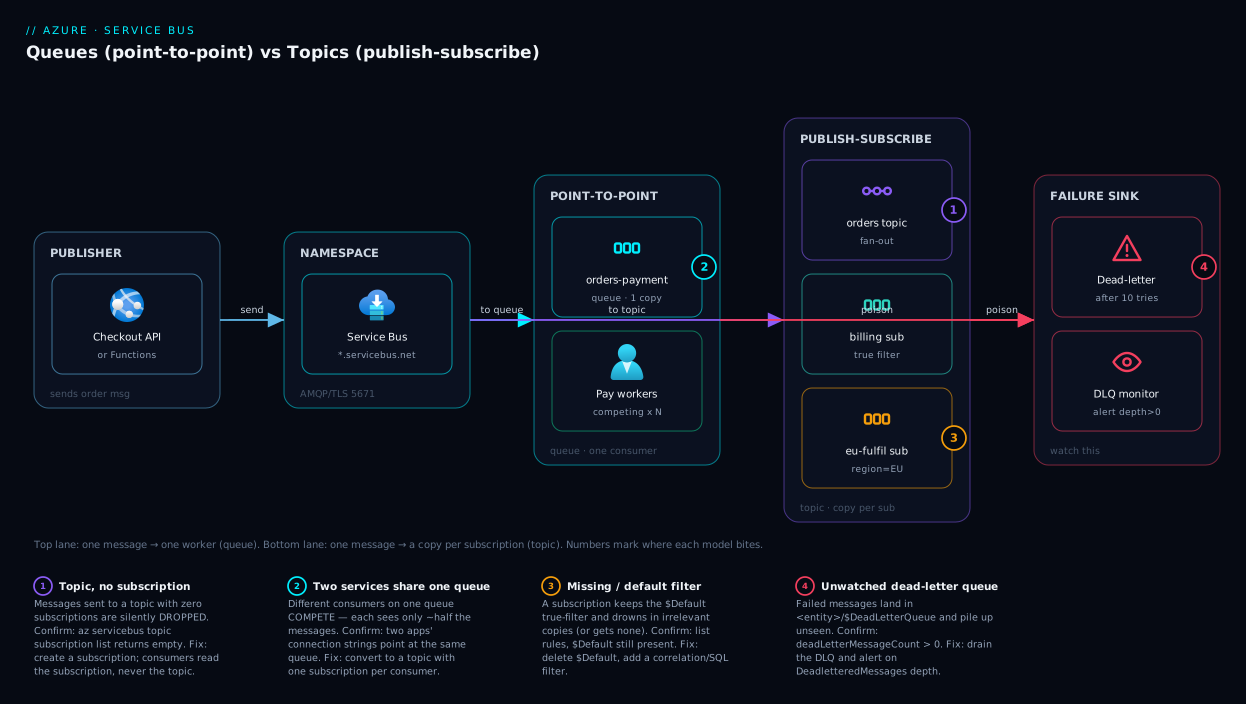
The diagram is the article in one picture: the top lane is “one message, one handler, share the work” (queue); the bottom lane is “one message, a filtered copy per subscriber” (topic). Choosing between them is choosing which lane your requirement belongs in.
Real-world scenario
Lumio Retail, a mid-size Indian e-commerce shop (the same team from our App Service war stories), shipped order processing on a single Service Bus queue called orders. The checkout API dropped an order message; a fulfilment worker read the queue, charged the card and told the warehouse. Clean, simple, worked for a year on the Standard tier at a few hundred orders a day.
Then the data team built an analytics worker for real-time revenue dashboards and — reasonably, they thought — pointed it at the same orders queue. Within an hour the dashboards looked wrong and, worse, some orders were never fulfilled. Textbook competing consumers: the two workers now competed for the same messages, so each order went to one of them. Roughly half went to analytics (which charged nothing and shipped nothing) and half to fulfilment. Every order analytics “won” was silently dropped from fulfilment — paid for, never shipped. They noticed only when customers raised “where is my order?” tickets.
The on-call engineer’s first instinct, scaling out the fulfilment worker, did nothing — more competing consumers on the same queue just split the messages three ways instead of two. The real diagnosis was that the two workers were different responsibilities sharing one queue, the exact anti-pattern this article warns about. The fix: convert to a topic named orders with two subscriptions, fulfilment and analytics. Each published order now produced two copies; fulfilment drained its subscription (every order charged and shipped, once), analytics drained its own (every order counted). Migrating live took a careful cut-over — stand up the topic alongside, dual-publish briefly, drain the old queue, switch publishers fully — but the design change was tiny.
The lesson now on Lumio’s integration checklist: one queue serves exactly one logical consumer; two independent consumers means a topic. A month later they added a third subscription, fraud-review, with a SQL filter amount > 50000 — and the publisher code did not change one line, the property that makes pub-sub worth the upfront thought. They also wired a dead-letter alert on fulfilment/$DeadLetterQueue so a poison order is never again found via customer tickets. The bill across the change: unchanged — Standard tier, a few hundred rupees a month — because cost is per operation, not per pattern.
Advantages and disadvantages
Neither shape is “better”; each fits a different requirement. The trade-off in one grid:
| Dimension | Queue (point-to-point) | Topic (publish-subscribe) |
|---|---|---|
| Consumers per message | Exactly one | One copy per subscription (many) |
| Best for | Commands, “do this once” work | Events, “tell everyone who cares” |
| Adding a consumer | New consumer competes for messages | Add a subscription, zero impact on others |
| Filtering | None (all-or-nothing) | Per-subscription filters |
| Simplicity | Simplest — one entity | One extra layer (topic + subscriptions) |
| Storage cost | One copy of each message | One copy per subscription |
| Risk if misused | Two services steal each other’s messages | Forgotten subscription drops messages; fan-out multiplies cost |
| Throughput scaling | Competing consumers on the queue | Competing consumers per subscription |
The decision is really about how many distinct things must react to each message. One logical handler (even if scaled to many instances) → queue: it is simpler, cheaper (one copy), and competing consumers give you horizontal scale for free. Several independent handlers, or an unknown/growing set of future consumers → topic: the per-subscription copy is the whole point, and the ability to add subscriber #4 without touching the publisher or subscribers #1–3 is worth the small extra structure. The two real risks mirror each other: misuse a queue and independent consumers cannibalise the stream; misuse a topic and you either forget a subscription (silent loss) or fan out so widely that the per-subscription storage and processing multiply your bill. When genuinely unsure and you expect the system to grow, a topic with a single subscription is a cheap hedge — it behaves like a queue today and lets you add subscribers tomorrow without a migration.
Hands-on lab
This lab creates a namespace, a queue, and a topic with two subscriptions, then sends and receives a message. Because topics need Standard, we use a Standard namespace (still inexpensive; a queue-only project could use Basic). Everything tears down in one command. Run it in Cloud Shell.
Step 1 — Variables and resource group.
RG=rg-sbus-lab
LOC=centralindia
NS=sbus-lab-$RANDOM   # namespace names are globally unique
az group create --name $RG --location $LOC
Step 2 — Create a Standard namespace (Standard so we get topics; Basic would do for queues alone):
az servicebus namespace create \
  --resource-group $RG --name $NS --location $LOC --sku Standard
Expected: JSON with "status": "Active" and a serviceBusEndpoint of https://<ns>.servicebus.windows.net:443/.
Step 3 — Create a queue (the point-to-point lane):
az servicebus queue create \
  --resource-group $RG --namespace-name $NS --name orders-payment \
  --max-delivery-count 10 --lock-duration PT30S
Step 4 — Create a topic and two subscriptions (the pub-sub lane):
az servicebus topic create \
  --resource-group $RG --namespace-name $NS --name orders

az servicebus topic subscription create \
  --resource-group $RG --namespace-name $NS --topic-name orders \
  --name billing --max-delivery-count 10

az servicebus topic subscription create \
  --resource-group $RG --namespace-name $NS --topic-name orders \
  --name analytics --max-delivery-count 10
Step 5 — Add a filter so analytics only sees high-value orders. New subscriptions get a default $Default true-rule; replace it with a SQL filter:
# Remove the default catch-all rule, then add a SQL filter
az servicebus topic subscription rule delete \
  --resource-group $RG --namespace-name $NS --topic-name orders \
  --subscription-name analytics --name '$Default'

az servicebus topic subscription rule create \
  --resource-group $RG --namespace-name $NS --topic-name orders \
  --subscription-name analytics --name HighValue \
  --filter-sql-expression "amount > 5000"
Step 6 — Send and receive a message. The CLI does not send data-plane messages, so use the portal Service Bus Explorer (namespace → Queues → orders-payment → Service Bus Explorer → Send messages), send a test message with body {"orderId":1}, then Peek or Receive it on the same blade. For the topic, send to orders with a custom property amount = 9000 and confirm a copy appears under both the billing and analytics subscriptions; send amount = 100 and confirm it appears under billing only (the filter excluded analytics). That single experiment proves the entire fan-out-plus-filter model.
Step 7 — Inspect counts (queue depth and dead-letter, from the CLI):
az servicebus queue show \
  --resource-group $RG --namespace-name $NS --name orders-payment \
  --query "{active:countDetails.activeMessageCount, dlq:countDetails.deadLetterMessageCount}"
Step 8 — Tear down (deleting the group removes the namespace and all charges):
az group delete --name $RG --yes --no-wait
The same topology in Bicep, so you can keep it as code:
param location string = resourceGroup().location
param namespaceName string = 'sbus-lab-${uniqueString(resourceGroup().id)}'

resource ns 'Microsoft.ServiceBus/namespaces@2022-10-01-preview' = {
  name: namespaceName
  location: location
  sku: { name: 'Standard', tier: 'Standard' }
}

resource paymentQueue 'Microsoft.ServiceBus/namespaces/queues@2022-10-01-preview' = {
  parent: ns
  name: 'orders-payment'
  properties: {
    maxDeliveryCount: 10
    lockDuration: 'PT30S'
    deadLetteringOnMessageExpiration: true
  }
}

resource ordersTopic 'Microsoft.ServiceBus/namespaces/topics@2022-10-01-preview' = {
  parent: ns
  name: 'orders'
}

resource billingSub 'Microsoft.ServiceBus/namespaces/topics/subscriptions@2022-10-01-preview' = {
  parent: ordersTopic
  name: 'billing'
  properties: { maxDeliveryCount: 10 }   // no rule = default true-filter, gets every message
}

resource analyticsSub 'Microsoft.ServiceBus/namespaces/topics/subscriptions@2022-10-01-preview' = {
  parent: ordersTopic
  name: 'analytics'
  properties: { maxDeliveryCount: 10 }
}

resource analyticsRule 'Microsoft.ServiceBus/namespaces/topics/subscriptions/rules@2022-10-01-preview' = {
  parent: analyticsSub
  name: 'HighValue'
  properties: {
    filterType: 'SqlFilter'
    sqlFilter: { sqlExpression: 'amount > 5000' }
  }
}
Note the Bicep subtlety: declaring a named rule does not auto-remove the implicit $Default rule, so a subscription can end up matching everything and your filter. For “only matching messages,” create the subscription with your single named rule as the sole rule (or delete $Default as in the CLI step).
Common mistakes & troubleshooting
The failures below are the ones that actually page people. Symptom → root cause → how to confirm → fix:
| # | Symptom | Root cause | Confirm | Fix |
|---|---|---|---|---|
| 1 | Two services each process ~half the messages | Two different consumers on one queue (competing) | Both apps’ connection strings point at the same queue | Convert to a topic with one subscription per consumer |
| 2 | Brand-new topic: messages sent, nothing received | Topic has no subscription (or consumer reads the topic, not a subscription) | az servicebus topic subscription list returns empty |
Create a subscription; consumers read the subscription |
| 3 | A subscription gets messages it shouldn’t | Default $Default true-filter still present |
List rules; $Default is there alongside yours |
Delete $Default, keep only your filter rule |
| 4 | Messages “disappear”; failures unnoticed | They went to the dead-letter queue, unwatched | deadLetterMessageCount > 0 on the entity |
Drain <entity>/$DeadLetterQueue; alert on DLQ depth |
| 5 | Same message processed twice | Handler not idempotent + at-least-once redelivery (lock expired or abandon) | Duplicate side-effects; lock duration < processing time | Make handler idempotent; renew lock or raise lock duration |
| 6 | A message keeps reappearing, never completes | Consumer never calls Complete (or crashes before it) | Delivery count climbing toward max | Complete on success; check for an exception before completion |
| 7 | Throughput stuck despite more workers (topic) | New workers added to the topic, not to a subscription | Workers configured with topic name, no subscription | Point competing consumers at the subscription |
| 8 | Messages processed wildly out of order | Expecting FIFO with competing consumers | Multiple consumers, no sessions, parallel processing | Enable sessions with a SessionId for per-group order |
| 9 | MessagingEntityNotFound on send/receive |
Wrong name, wrong namespace, or entity not created | Name/namespace mismatch in the connection | Match the exact entity + namespace; create it first |
| 10 | Unauthorized / 40103 on connect |
Bad SAS key or missing RBAC role on the namespace | Check the connection string / role assignment | Use a valid key or grant Azure Service Bus Data Sender/Receiver |
| 11 | Subscription storage/cost growing fast | A subscription nobody consumes keeps accumulating copies | High activeMessageCount on an idle subscription |
Consume or delete it; set a sensible TTL |
| 12 | Sender blocked / QuotaExceeded |
Queue/topic hit its max size; messages not drained | Size near MaxSizeInMegabytes |
Scale consumers; raise max size; on Premium, larger quotas |
The two that cause the most damage deserve a sentence each. Mistake #1 (competing consumers across different services) is the Lumio incident — it is silent (no error, messages just split) and corrupts business outcomes, so the rule “one queue = one logical consumer” is non-negotiable. Mistake #4 (the unwatched dead-letter queue) is the quiet killer — Service Bus captures failures instead of losing them, which is a feature, but only if you watch the DLQ. Wire a metric alert on DeadletteredMessages from day one; the cost is one alert rule and it saves you from learning about failures via customers. To confirm DLQ contents fast:
# Active vs dead-lettered counts on a subscription
az servicebus topic subscription show \
  --resource-group $RG --namespace-name $NS --topic-name orders --name billing \
  --query "{active:countDetails.activeMessageCount, dlq:countDetails.deadLetterMessageCount}"
Best practices
- One queue serves exactly one logical consumer. The moment a second, different consumer appears, switch to a topic with one subscription each. This single rule prevents the most common (and most silent) Service Bus bug.
- When in doubt and growth is likely, use a topic with one subscription. It behaves like a queue today and lets you add subscribers tomorrow with zero migration — cheap insurance against a future re-plumb.
- Consumers read subscriptions, not topics. You never receive from a topic; you receive from a subscription. Burn this in to avoid the “nothing arrives” mystery.
- Always give a topic at least one subscription before publishing. A topic with no subscription silently drops every message.
- Make message handlers idempotent. Service Bus is at-least-once; design so processing the same message twice is harmless, and you never fear a redelivery.
- Use Peek-Lock and Complete explicitly. Reserve Receive-and-Delete for genuinely disposable data — a crash there loses the message.
- Monitor the dead-letter queue and alert on its depth. A DLQ that nobody drains is failures piling up in the dark.
- Set a sensible TTL and max delivery count. Stale work shouldn’t run late, and a poison message shouldn’t loop forever — let it dead-letter and move on.
- Prefer correlation filters over SQL filters when an exact-match label suffices — they are cheaper and faster; reserve SQL filters for ranges and compound logic.
- Right-size the tier to the feature, not the volume. Basic for simple queues; Standard for topics/sessions/dedup; Premium only when you need isolation, predictable latency, or higher throughput.
- Use managed identity + RBAC over connection-string keys for production senders and receivers; scope to Data Sender / Data Receiver.
- Keep messages small and put large payloads in storage. Send a pointer (a blob URL) for anything heavy; the broker is for coordination, not bulk data.
Security notes
- Prefer Entra ID + RBAC over SAS keys. Assign the app’s managed identity the built-in Azure Service Bus Data Sender (publish-only) or Azure Service Bus Data Receiver (consume-only) role at the namespace or entity scope, rather than sharing a connection string with an embedded SAS key. Least privilege means a sender that cannot read and a receiver that cannot publish.
- If you must use SAS, scope and rotate it. Create per-purpose shared access policies (a
send-only policy for publishers, alisten-only policy for consumers) instead of using the namespace-wideRootManageSharedAccessKey, and rotate keys on a schedule. Keep the connection string in Azure Key Vault: Secrets, Keys and Certificates Done Right, never in source. - Encryption is on by default. Data is encrypted in transit (TLS, AMQP over 5671) and at rest with Microsoft-managed keys; Premium adds customer-managed keys (CMK) if your compliance posture requires them.
- Lock down the network on Premium. The Premium tier supports Private Endpoints and IP firewall rules so the namespace is reachable only from your VNet, not the public internet — see Azure Private Endpoint vs Service Endpoint: Secure PaaS Access. Basic/Standard are public-endpoint only.
- Don’t put secrets in message bodies. A message can sit in a queue or DLQ for a long time; treat the body as data that may be inspected in the portal. Reference secrets, don’t embed them.
- Separate sender and receiver identities. The checkout API needs send; the workers need receive. Splitting the roles limits blast radius if one identity leaks.
Cost & sizing
Service Bus pricing has two shapes. Basic and Standard bill per million operations (every send, receive, even a lock renewal is an operation), plus a small base charge on Standard — so the bill scales with traffic and a low-volume app costs a few rupees a month. Premium bills per Messaging Unit (MU) per hour — a fixed capacity reservation (1/2/4/8/16 MU) with predictable performance and no per-operation charge — so it has a meaningful floor (roughly ₹50,000+/month for 1 MU) and is for serious, latency-sensitive throughput, not a starter project.
The cost lever most people miss is that fan-out multiplies operations and storage: a topic with five subscriptions turns one send into one send plus five deliveries and stores up to five copies — correct and intended, but “add a subscription” is not free at high volume. The other lever is idle subscriptions accumulating messages: a subscription nobody consumes keeps copies (and storage cost) until they expire, so delete unused subscriptions and set a TTL.
The tiers, what they unlock, and rough Indian-rupee figures:
| Tier | Billing model | Rough cost | Queues | Topics | Sessions / Dedup | Max message size | Private Endpoint |
|---|---|---|---|---|---|---|---|
| Basic | Per-million operations | A few ₹/month at low volume | Yes | No | No | 256 KB | No |
| Standard | Per-million ops + small base | ~₹600–1,500/month typical | Yes | Yes | Yes | 256 KB | No |
| Premium | Per Messaging Unit / hour | ~₹50,000+/month (1 MU) | Yes | Yes | Yes | 100 MB | Yes |
Sizing guidance: start on Standard for almost everything — topics, sessions, and dedup, billed by usage, so small is cheap and busy scales smoothly. Drop to Basic only for a pure-queue side project to shave the base charge. Reach for Premium when you need predictable low latency under load, network isolation (Private Endpoints), large messages (100 MB vs 256 KB), or isolation from noisy neighbours. The rule: choose the tier by the feature you need (topics → Standard; private networking or big messages → Premium) and let the billing model follow.
Interview & exam questions
1. Difference between a queue and a topic, one sentence each. A queue is point-to-point: each message goes to exactly one consumer, with workers competing to share the load. A topic is publish-subscribe: each message is copied to every subscription, so independent consumers each get their own stream.
2. Two different services must both react to every order. Queue or topic? A topic with one subscription per service. On a single queue they would compete and each see only a fraction of orders; a topic gives each subscription a full copy. This is the canonical queue-misuse trap.
3. What is the competing-consumers pattern and when is it correct? Multiple identical instances read one queue/subscription and the broker gives each message to one of them, sharing the backlog for horizontal scale. Correct only for interchangeable instances of one handler; two different handlers on one queue is a bug, not load balancing.
4. What is a subscription, and what happens to a topic with no subscriptions? A subscription is a per-consumer copy of a topic’s stream and behaves like a queue you read from. A topic with no subscriptions discards every message — a frequent “lost messages” cause on new topics.
5. Name the main subscription filter types. Correlation filter (cheap exact-match on properties), SQL filter (a SQL-92 boolean for ranges/compound logic), and the default true filter (1=1, matches everything). Prefer correlation filters when an exact label suffices.
6. Why is Service Bus “at-least-once,” and what must your handler do? In Peek-Lock a message is locked, processed, then completed; a crash before completion (or lock expiry) redelivers it, so it can be processed twice. Your handler must be idempotent.
7. What is a dead-letter queue and how do messages get there? A built-in sub-queue on every queue/subscription for un-deliverable messages. They arrive on exceeding max delivery count, on TTL expiry, on a filter error, or by explicit dead-lettering. Monitor and drain it, or failures pile up unseen.
8. When do you need sessions, and what do they guarantee? When messages in a group (all events for one order ID) must be processed in order. A session locks all messages with the same SessionId to one consumer at a time — in-order per session, while different sessions load-balance across workers. Standard/Premium only.
9. Which tier do you need for topics, and what does Premium add? Topics require Standard or Premium (Basic is queues only). Premium adds reserved Messaging Units (predictable latency), Private Endpoints + IP firewall, customer-managed keys, large messages (100 MB vs 256 KB), and isolation from noisy neighbours.
10. How do you secure a namespace for least privilege? Use Entra ID + RBAC: the publisher’s identity gets Azure Service Bus Data Sender, the consumer’s gets Data Receiver, scoped to namespace or entity — not a shared SAS string. If SAS is required, use per-purpose send-only / listen-only policies (never the root key) and rotate them.
11. When would you pick a Storage queue over Service Bus? For a simple, very cheap task queue with a huge backlog where you do not need topics, sessions/FIFO, transactions, duplicate detection, or dead-lettering. Service Bus wins when each message matters individually and you need those enterprise features.
12. Orders are sometimes not fulfilled after you added an analytics worker. Diagnose. The analytics worker was pointed at the same queue as fulfilment, so the two compete — each order goes to one of them, and analytics silently drops the ones it “wins.” Fix by converting to a topic with separate fulfilment and analytics subscriptions.
These map to AZ-204 (Developer Associate) — develop message-based solutions; Azure Service Bus queues and topics — and the integration design portions of AZ-305 (Solutions Architect) — design a messaging architecture, choose between Service Bus, Event Grid, Event Hubs and Storage queues. The security angle (RBAC, SAS, Private Endpoints) touches AZ-500.
Quick check
- A message must be processed by exactly one of ten identical worker instances. Queue or topic?
- Billing, analytics, and fraud must each receive every order event. Queue or topic, and what does each consumer read from?
- You send messages to a brand-new topic but nothing is ever received. What is the most likely cause?
- Your handler occasionally processes the same message twice. Is this a bug in Service Bus, and what’s the fix?
- True or false: pointing two different services at the same queue is a valid way to load-balance work.
Answers
- Queue. Ten identical instances are competing consumers of one logical handler; each message goes to exactly one of them, sharing the load. That is precisely what a queue does.
- Topic. Each of the three is an independent consumer that needs its own copy, so each gets a subscription and reads from its subscription (never from the topic directly). One published order becomes three copies.
- The topic has no subscriptions (or the consumer is trying to read the topic instead of a subscription). A topic with no subscription silently discards every message — create a subscription and have consumers read from it.
- Not a bug — Service Bus is at-least-once, so a crash or lock expiry between processing and completing causes a redelivery. The fix is to make your handler idempotent (and ensure the lock duration exceeds processing time, or renew the lock).
- False. Two different services on one queue compete and each sees only a fraction of the messages. Load-balancing applies only to identical instances of the same handler; different responsibilities need a topic with separate subscriptions.
Glossary
- Service Bus — Azure’s enterprise message broker for reliable, transactional, brokered messaging (queues and topics).
- Namespace — the container and
*.servicebus.windows.netendpoint that holds your queues and topics; the thing you connect to. - Queue — an ordered message store that delivers each message to exactly one consumer (point-to-point).
- Topic — a send target that fans out each message to every attached subscription (publish-subscribe).
- Subscription — a per-consumer copy of a topic’s stream; behaves like a queue you read from. A topic needs at least one.
- Point-to-point — the queue model: one message → one consumer; many workers compete to share the load.
- Publish-subscribe (pub-sub) — the topic model: one message → a copy per subscription, each consumed independently.
- Competing consumers — multiple identical workers reading one queue/subscription, each message going to one of them; horizontal scale for the same job.
- Filter / rule — a condition on a subscription (correlation, SQL, or true) deciding which messages get copied into it.
- Peek-Lock — receive mode that locks a message while you process, then complete/abandon/dead-letter it; the safe default.
- Complete / Abandon / Dead-letter — acknowledge success (delete), release for retry, or set aside as un-processable, respectively.
- Dead-letter queue (DLQ) — built-in sub-queue (
<entity>/$DeadLetterQueue) holding messages that exceeded retries, expired, or were explicitly dead-lettered. - Max delivery count — the number of failed delivery attempts (default 10) before a message is auto-dead-lettered.
- Session — a way to process all messages sharing a
SessionIdin order, locked to one consumer at a time (Standard/Premium). - Duplicate detection — broker-side dropping of repeat
MessageIds within a window, for practical exactly-once sends (Standard/Premium). - TTL (time-to-live) — how long a message lives before it is discarded or dead-lettered.
- At-least-once — the delivery guarantee where a message is never lost but may be redelivered, so handlers must be idempotent.
- Messaging Unit (MU) — the reserved-capacity billing unit of the Premium tier (1/2/4/8/16 MU).
- SAS — Shared Access Signature; a token/key authorising send or listen on a namespace or entity (prefer Entra ID + RBAC instead).
Next steps
You can now choose point-to-point or publish-subscribe with confidence. Build outward:
- Next: Azure Functions Triggers and Bindings for Beginners — let a function fire automatically on each Service Bus message, no polling loop required.
- Related: Azure Functions and Serverless Patterns: Event-Driven Compute — the broader event-driven patterns these queues and topics enable.
- Related: Azure Storage Account Fundamentals: Blobs, Files, Queues and Tables — when the simpler, cheaper Storage queue is the right call instead.
- Related: Azure Monitor and Application Insights: Full-Stack Observability — alert on queue depth and dead-letter counts before customers do.
- Related: Azure Key Vault: Secrets, Keys and Certificates Done Right — keep connection strings and SAS keys out of source and rotate them safely.