A retail-analytics company runs Databricks workspaces in three places at once — production lakehouse on AWS, a marketing data-science team on Azure, and a recently-acquired subsidiary still on GCP. Their data lands in S3, ADLS Gen2, and GCS buckets owned by different cloud accounts, and right now every job authenticates with a long-lived access key pasted into a cluster’s Spark config. The security team found one of those keys in a notebook checked into Git — the same class of mistake that has bitten this org before — and the mandate landed the next morning: no static cloud keys on any cluster, every storage path governed centrally, every table owned by a real team, and an audit trail of who read which prefix. Unity Catalog is the answer. It is the account-level governance plane for Databricks: a single metastore per region holds a three-level catalog.schema.table namespace, a storage credential wraps the cloud IAM principal Databricks assumes without a key, and an external location binds that credential to a bucket path you can GRANT on. This guide builds all of it, concretely, across all three clouds, and leaves the static keys gone for good.
Unity Catalog is not “Hive metastore with permissions bolted on” — it is a deliberate re-architecture of where governance lives. In the legacy world, each workspace had its own hive_metastore: a per-workspace catalog with table ACLs that only some cluster types honoured, secrets stashed in Spark configs, and no identity that spanned workspaces. Unity Catalog moves the metastore up to the account level, gives every object a global owner, replaces pasted keys with assumed roles, and records lineage and audit automatically. The cost of that power is a steeper model — the object hierarchy, the credential→location→table chain, the privilege inheritance rules, and the cluster access modes that decide whether a cluster can even see Unity Catalog. Get those wrong and you get PERMISSION_DENIED errors that look like IAM bugs but are actually grant bugs, or the reverse.
By the end of this guide you will be able to stand up a metastore-governed lakehouse from nothing: create the cloud IAM principal with the exact Databricks trust, wrap it in a storage credential, bind external locations by prefix, create catalogs and schemas with managed-table storage, grant least-privilege to SCIM-synced groups, register managed and external tables, read lineage and ship audit logs, share data across organisations with Delta Sharing, pick the right cluster access mode, and migrate an existing hive_metastore workspace onto Unity Catalog without downtime. Every step has real CLI, Terraform, and SQL, the expected output, and a troubleshooting table for when it does not work the first time.
What problem this solves
Without Unity Catalog, governance in Databricks is a patchwork that does not survive an audit. Access to storage is granted by a cloud access key living in a cluster’s Spark config or a notebook — long-lived, copy-pasteable, and impossible to attribute to a person. Table permissions, where they exist at all, live in the per-workspace hive_metastore and are enforced only on specific cluster types (legacy Table ACL clusters), so a user on a “no isolation” cluster bypasses them entirely by reading the underlying files. Identity does not span workspaces: the same engineer is a different principal in each workspace, groups are maintained by hand, and a leaver removed from the corporate directory keeps Databricks access until someone notices. There is no built-in lineage, no central audit of “who read which table,” and no governed way to share data with another team or another company short of copying files.
What breaks in production without it is predictable and expensive. A leaked key grants the blast radius of an entire bucket, not one prefix. Two teams pack tables into the same path and a careless re-grant of the parent exposes both. A migration to a new cloud account means re-pasting keys into dozens of clusters. An auditor asks “who accessed the PII table last quarter” and the honest answer is “we cannot tell you.” A data-science team wants to share a curated table with a partner and ends up emailing a Parquet dump. Each of these is a governance gap that Unity Catalog closes structurally — not with a policy document, but with a mechanism the platform enforces.
Who hits this: any organisation past the proof-of-concept stage running Databricks on more than one workspace, anyone subject to SOC 2 / HIPAA / PCI / GDPR who must prove access control and lineage, any multi-cloud or post-acquisition estate with storage in more than one cloud, and any team that has ever found a cloud key in source control. The fix is almost never “rotate the key and move on” — it is “remove the key as a concept” by moving to assumed identities and a central metastore that owns the namespace.
To frame the whole field before the deep dive, here is the governance gap Unity Catalog closes, mechanism by mechanism:
| Governance gap (legacy hive_metastore) | What goes wrong | How Unity Catalog closes it |
|---|---|---|
| Static cloud keys in Spark config | Leak = whole-bucket blast radius; no attribution | Storage credential assumes a role/identity; no key on the cluster |
| Per-workspace metastore | Same table governed differently per workspace | One account-level metastore per region, attached to many workspaces |
| Table ACLs honoured by only some clusters | Users bypass by reading files on no-isolation clusters | Access modes: only Unity-Catalog-capable clusters run governed workloads |
| No global identity | Groups maintained per workspace; leavers linger | Account-level identity + SCIM from Entra/Okta; deprovision is automatic |
| No lineage | Cannot answer “what feeds this table” | Column- and table-level lineage captured automatically |
| No central audit | Cannot answer “who read this prefix” | system.access.audit records every grant and access |
| No governed sharing | Data copied/emailed across teams or orgs | Delta Sharing: share live tables without copying |
Learning objectives
By the end of this guide you can:
- Explain the Unity Catalog object model end to end — account, metastore, catalog, schema, table/view/volume, storage credential, external location, share, recipient — and how each level inherits or overrides governance.
- Create a storage credential that wraps an AWS IAM role, an Azure Access Connector managed identity, or a GCP service account, and finalise the trust relationship (external ID, RBAC role, SA binding) so it validates.
- Create external locations by prefix with non-overlapping URLs, grant
READ FILES/WRITE FILES/CREATE EXTERNAL TABLEon them, and reason about the credential→location→table delegation chain. - Distinguish managed tables (Databricks owns the storage and lifecycle) from external tables (you own the path), choose between them, and know what
DROPdoes to each. - Apply the privilege and ownership model — the full privilege list, inheritance from catalog to schema to table,
OWNERsemantics,GRANT/REVOKE/SHOW GRANTS, and theUSE CATALOG/USE SCHEMAtraversal requirement. - Read data lineage and configure Delta Sharing to publish a live table to another organisation without copying it.
- Pick the correct cluster access mode (Standard/Shared, Single-user/Assigned, No-isolation) for a workload and explain what each can and cannot do under Unity Catalog.
- Migrate a workspace off
hive_metastore— upgrade external tables in place, deep-clone managed tables, repoint jobs, and decommission the legacy metastore. - Codify the whole estate in Terraform and operate it: validate, audit, troubleshoot
PERMISSION_DENIEDand access-denied failures, and tear down inside-out without deleting data.
Prerequisites & where this fits
You should be comfortable in Databricks: workspaces, clusters, notebooks, jobs, and SQL warehouses; the medallion (bronze/silver/gold) pattern; and Delta Lake basics (Delta is the default table format). You need working knowledge of at least one cloud’s IAM — AWS IAM roles and trust policies, Azure managed identities and RBAC, or GCP service accounts and bucket IAM — because the storage-credential trust is configured on the cloud side. Terraform 1.6+ and the databricks/databricks provider familiarity helps, as does SQL GRANT/REVOKE from any relational database.
You need these accounts and rights in place before step 1:
- A Databricks account on the E2 (AWS), Azure, or GCP platform, and account admin rights (or a delegated metastore admin) — Unity Catalog objects are account-scoped, so account-console access matters as much as workspace access.
- A Unity Catalog metastore for your region. There is one metastore per region per account; if one already exists, attach your workspaces to it rather than creating a second. Creating it requires account-admin and an initial metastore root storage location.
- Databricks CLI v0.205+ (the unified CLI, not the legacy
databricks-cli) authenticated via OAuth U2M or a service principal:databricks auth login --host https://<account>.cloud.databricks.com. - Cloud admin rights to create the principal: AWS IAM (role + trust + permission policy), Azure (an Access Connector for Databricks plus RBAC), or GCP (a service account + bucket IAM).
- Terraform 1.6+, provider
databricks/databricks ~> 1.40, plus the relevant cloud provider; HashiCorp Vault reachable if you source bootstrap secrets from it. - Workforce SSO federated (Okta or Microsoft Entra ID) with SCIM provisioning of users and groups into the Databricks account so grants target real teams, and a leaver removed in the IdP loses Databricks access automatically.
This sits at the foundation of the data-governance track. It is upstream of any pipeline work — Deploy Databricks Asset Bundles for Job and Pipeline CI/CD assumes the catalogs and locations you build here already exist, and a Lakehouse: Medallion Architecture Unifying Streaming and Batch is the workload pattern these governed locations serve. On Azure specifically, the storage layer is Azure Data Lake Storage Gen2 with the Bronze/Silver/Gold medallion, and the access failures you will debug overlap with Troubleshooting Azure Storage 403s: firewall, private endpoint, RBAC, SAS. The identity backbone — assumed roles instead of keys — is the same philosophy as Workload Identity Federation for Secretless CI/CD and slots into a broader Zero-Trust Architecture Blueprint: Identity, Network, Data.
A quick map of who owns what during a Unity Catalog incident, so you escalate to the right person fast:
| Layer | What lives here | Who usually owns it | Failure classes it causes |
|---|---|---|---|
| Account console | Metastore, account identity, metastore admins | Platform / IAM admins | Metastore not assigned; user not in account |
| Cloud IAM | Role/identity, trust policy, bucket IAM | Cloud platform team | Credential validate fails; access-denied at read |
| Storage credential | The assumed-identity handle | Metastore admin | Wrong ARN/connector; missing external ID |
| External location | URL→credential binding, file grants | Metastore admin / data platform | Overlap rejection; READ FILES denied |
| Catalog / schema | Namespace, managed-table storage | Data domain owners | USE CATALOG missing; wrong managed location |
| Table / view | The data, ownership, column grants | Data product teams | SELECT denied; managed vs external DROP surprise |
| Cluster access mode | What the cluster can see in UC | Platform + users | “Unity Catalog not available on this cluster” |
Core concepts
Six mental models make every later step obvious.
Governance lives at the account, not the workspace. The single biggest shift from hive_metastore is that the metastore is an account-level object, created once per region and attached to one or more workspaces. Catalogs, schemas, tables, storage credentials, external locations, shares, and identity all live above the workspace. A workspace is now a compute-and-UI surface onto the shared metastore, not the owner of its own namespace. This is why you manage Unity Catalog from the account console (or account-level CLI/Terraform), and why granting access to a group in one workspace makes it visible in every workspace attached to the same metastore.
The namespace is three levels: catalog.schema.table. Every securable data object is addressed as catalog.schema.object. The catalog is the top container (often per domain or per environment — prod, analytics, mlops). The schema (a.k.a. database) groups related tables inside a catalog. The table, view, volume, function, or model is the leaf. Legacy two-level database.table references resolve against the special hive_metastore catalog, which is exactly how the platform keeps old code working while you migrate. To read prod.silver.orders you must hold USE CATALOG on prod, USE SCHEMA on prod.silver, and SELECT on the table — traversal privileges are required at every level, not just the leaf.
Storage access is an assumed identity, never a key. A storage credential is a metastore object that wraps a cloud IAM principal — an AWS IAM role, an Azure managed identity (via an Access Connector), or a GCP service account. Databricks assumes that principal at query time for a short-lived token; no static access key ever lands on a cluster. One storage credential can back many external locations. An external location binds one credential to one cloud://bucket/prefix URL, and it is the object you GRANT file-level access on. Tables and volumes created under that prefix inherit governance from the external location. The chain — cloud IAM principal → storage credential → external location → table — is identical in shape on every cloud.
Managed tables are owned by Databricks; external tables are owned by you. A managed table stores its data in the metastore’s (or catalog’s, or schema’s) managed storage location, and Unity Catalog owns its full lifecycle: DROP TABLE deletes the underlying files (after a retention window). An external table points at a path you control under an external location; DROP TABLE removes only the metastore registration and leaves the files. Managed tables get automatic optimisation (predictive optimization, liquid clustering) and are the recommended default; external tables exist for data you must own directly, share with non-Databricks tools, or keep at a fixed path.
Privileges inherit down and ownership is absolute. Privileges granted at the catalog level apply to all current and future schemas and tables inside it; granted at the schema level they apply to all tables in that schema. Every object has an OWNER (a user or, better, a group) who can do anything to it and grant on it regardless of other grants — ownership trumps the privilege list. GRANT, REVOKE, and SHOW GRANTS manage the rest. You grant to groups synced from your IdP, never individuals, so deprovisioning is the IdP’s job.
The cluster must be Unity-Catalog-capable. A cluster has an access mode that determines whether it can talk to Unity Catalog at all and which features it supports. Standard (formerly “Shared”) mode supports multiple users with full UC enforcement; Dedicated (formerly “Single-user”/“Assigned”) mode is for one user/group and supports things Shared cannot (some ML libraries, RDD APIs); No-isolation shared and legacy modes cannot use Unity Catalog. Pick the wrong mode and a perfectly-granted table throws “Unity Catalog is not available” — a cluster problem, not a grant problem.
The vocabulary in one table
Before the deep sections, pin every moving part. The glossary repeats these for lookup; this is the mental model side by side:
| Concept | One-line definition | Scope / where it lives | Why it matters |
|---|---|---|---|
| Account | The top-level Databricks org container | Above all workspaces | Where identity + metastores live |
| Metastore | The governance root for a region | One per region per account | Holds the whole namespace |
| Catalog | Top container of the 3-level namespace | In a metastore | Per-domain/per-env isolation |
| Schema (database) | Groups tables inside a catalog | In a catalog | The middle namespace level |
| Table / view / volume | The data leaf (or a logical view, or files) | In a schema | What you SELECT/read |
| Storage credential | Wraps the assumed cloud IAM principal | Metastore object | Secret-free storage access |
| External location | Binds one credential to one URL | Metastore object | The object you grant files on |
| Managed table | Data Databricks owns + lifecycles | In managed storage | DROP deletes files |
| External table | Data you own at a fixed path | Under an external location | DROP keeps files |
| Grant / privilege | A right (SELECT, READ FILES, …) |
On any securable | How access is given |
| Owner | The principal who can do anything | On every object | Trumps the privilege list |
| Access mode | What a cluster can see in UC | Cluster config | Wrong mode = no UC |
| Lineage | Auto-captured upstream/downstream graph | system.access |
“What feeds this table” |
| Delta Sharing | Open protocol to share live tables | Share + recipient | Cross-org sharing, no copy |
The Unity Catalog object model
The object model is the spine of everything that follows. Unity Catalog secures two parallel hierarchies that meet at the external location: the data namespace (metastore → catalog → schema → table/view/volume/function/model) and the storage governance (storage credential → external location → path). The data namespace is what analysts query; the storage governance is what platform engineers manage. A managed table lives entirely inside the data namespace (its files sit in managed storage you rarely touch); an external table bridges both (its registration is in the namespace, its files live under an external location).
Every object in either hierarchy is a securable — it has an owner, can be granted on, and appears in SHOW GRANTS. Here is the full securable inventory, what you grant on each, and who typically owns it:
| Securable | What it is | Key privileges you grant on it | Typical owner |
|---|---|---|---|
| Metastore | Region governance root | CREATE CATALOG, CREATE STORAGE CREDENTIAL, CREATE EXTERNAL LOCATION |
Metastore admin (group) |
| Catalog | Top namespace container | USE CATALOG, CREATE SCHEMA, CREATE TABLE, BROWSE |
Data-domain platform group |
| Schema | Database inside a catalog | USE SCHEMA, CREATE TABLE, CREATE VOLUME, CREATE FUNCTION |
Domain team |
| Table | A Delta (or other) table | SELECT, MODIFY |
Data-product team |
| View | A saved query | SELECT |
Data-product team |
| Volume | Governed files (managed/external) | READ VOLUME, WRITE VOLUME |
Domain team |
| Function | A UDF | EXECUTE |
Domain team |
| Registered model | An MLflow model in UC | EXECUTE |
ML team |
| Storage credential | Assumed-identity handle | CREATE EXTERNAL LOCATION, CREATE EXTERNAL TABLE, READ FILES (rarely) |
Platform admins |
| External location | Credential↔URL binding | READ FILES, WRITE FILES, CREATE EXTERNAL TABLE, CREATE EXTERNAL VOLUME |
Platform admins |
| Connection | Lakehouse Federation source | USE CONNECTION, CREATE FOREIGN CATALOG |
Platform admins |
| Share / Recipient | Delta Sharing outbound | USE SHARE, SET SHARE PERMISSION |
Sharing admins |
The three special, account-level system catalogs are worth naming early because you will use them constantly: system (the catalog holding system.access.audit, system.access.table_lineage, system.billing.usage, and more — read-only governance telemetry you must enable), samples (read-only example datasets), and the per-metastore hive_metastore catalog (the legacy two-level namespace, present so old code keeps working during migration). You do not create or drop these.
A note on naming, because it bites later: object names are case-insensitive but case-preserving, may contain only alphanumerics and underscores unless quoted with backticks, and must be unique within their parent. Plan a convention before you create anything — environment-prefixed catalogs (prod_retail, dev_retail), layer-named schemas (bronze, silver, gold), and credential/location names that encode cloud + scope (sc-lakehouse-aws-prod, ext-lakehouse-aws-silver). Renaming a catalog or schema later is possible but rewrites every fully-qualified reference in your jobs.
Storage credentials: the assumed-identity handle
The storage credential is the metastore object that holds the cloud IAM principal Databricks assumes. It is created once per principal and shared by many external locations. The mechanism differs per cloud — an assumed role on AWS, a managed identity on Azure, a generated service account on GCP — but the contract is the same: Databricks holds a reference to the principal and exchanges it for a short-lived token at access time. No key is stored.
Here is how the three clouds map onto the same abstraction:
| Aspect | AWS | Azure | GCP |
|---|---|---|---|
| Principal type | IAM role (assumed via STS) | Managed identity on an Access Connector | Service account (Databricks-generated) |
| Trust mechanism | Trust policy: Databricks UC master role + sts:ExternalId |
RBAC role assignment on the storage account | IAM binding on the bucket |
| Who creates the principal | You (then add trust) | You create the Access Connector; Azure makes the MI | Databricks generates the SA on credential create |
| The bind step | aws iam update-assume-role-policy with external ID |
az role assignment create (Storage Blob Data Contributor) |
gcloud storage buckets add-iam-policy-binding |
| Self-referencing trust quirk | Trust must include the role’s own ARN (self-assume) | None | None |
| What you reference in UC | aws_iam_role.role_arn |
azure_managed_identity.access_connector_id |
databricks_gcp_service_account (empty → generated) |
AWS — IAM role with the Databricks trust policy
Databricks assumes the role; the trust policy must name the Databricks Unity Catalog master role for your account and require the credential’s external ID (a value Databricks generates). The chicken-and-egg is real: you cannot set the final trust until the credential exists, and the credential will not validate until the trust is set. The supported pattern is a two-pass create — a bootstrap trust first, then the real trust once you read back the external ID. (AWS also requires the trust to permit the role to assume itself, a documented quirk for the cross-account validation handshake.)
# Permission policy: scope to the exact bucket, nothing wider
cat > /tmp/uc-s3-policy.json <<'JSON'
{
  "Version": "2012-10-17",
  "Statement": [
    {
      "Effect": "Allow",
      "Action": ["s3:GetObject","s3:PutObject","s3:DeleteObject","s3:ListBucket","s3:GetBucketLocation"],
      "Resource": [
        "arn:aws:s3:::acme-lakehouse-prod",
        "arn:aws:s3:::acme-lakehouse-prod/*"
      ]
    }
  ]
}
JSON

# Bootstrap trust (self-assuming placeholder; tightened in step 2)
cat > /tmp/uc-trust-bootstrap.json <<'JSON'
{ "Version": "2012-10-17",
  "Statement": [{ "Effect": "Allow",
    "Principal": { "AWS": "arn:aws:iam::111122223333:root" },
    "Action": "sts:AssumeRole" }] }
JSON

aws iam create-role \
  --role-name databricks-uc-lakehouse-prod \
  --assume-role-policy-document file:///tmp/uc-trust-bootstrap.json
aws iam put-role-policy \
  --role-name databricks-uc-lakehouse-prod \
  --policy-name uc-s3-access \
  --policy-document file:///tmp/uc-s3-policy.json
Azure — Access Connector for Databricks (managed identity)
The Access Connector for Databricks is a first-party Azure resource and the only supported way to give Unity Catalog an Azure identity. Create it, then grant its managed identity Storage Blob Data Contributor on the storage account (not the resource group — RBAC scope matters, and a role on the RG passes validation but fails real writes).
az databricks access-connector create \
  --resource-group rg-data-prod \
  --name ac-uc-lakehouse-prod \
  --location eastus \
  --identity-type SystemAssigned

PRINCIPAL_ID=$(az databricks access-connector show \
  -g rg-data-prod -n ac-uc-lakehouse-prod \
  --query identity.principalId -o tsv)

az role assignment create \
  --assignee-object-id "$PRINCIPAL_ID" \
  --assignee-principal-type ServicePrincipal \
  --role "Storage Blob Data Contributor" \
  --scope "/subscriptions/<sub-id>/resourceGroups/rg-data-prod/providers/Microsoft.Storage/storageAccounts/acmelakehouseprod"
GCP — Databricks-generated service account
On GCP, Unity Catalog generates the service account for you when you create the credential. You confirm the bucket here and apply the IAM binding once Databricks returns the generated SA email (in the next section).
gsutil ls -b gs://acme-lakehouse-prod   # confirm the bucket exists and is the right one
# (IAM binding applied after Databricks returns the generated SA email)
Creating the credential in Unity Catalog
Now wrap each principal in a storage credential. On AWS, read back the external ID and finalise the trust. On Azure, reference the Access Connector ID. On GCP, bind the generated SA on the bucket.
# AWS — reference the role ARN; Databricks returns an external_id
databricks storage-credentials create --json '{
  "name": "sc-lakehouse-aws-prod",
  "aws_iam_role": { "role_arn": "arn:aws:iam::111122223333:role/databricks-uc-lakehouse-prod" },
  "comment": "Prod lakehouse S3 access",
  "skip_validation": true
}'

# Read the external_id and the role's own ARN, then write the REAL trust
EXT_ID=$(databricks storage-credentials get sc-lakehouse-aws-prod \
  | python3 -c 'import json,sys;print(json.load(sys.stdin)["aws_iam_role"]["external_id"])')

cat > /tmp/uc-trust.json <<JSON
{ "Version": "2012-10-17", "Statement": [{
    "Effect": "Allow",
    "Principal": { "AWS": [
      "arn:aws:iam::414351767826:role/unity-catalog-prod-UCMasterRole-14S5ZJVKOTYTL",
      "arn:aws:iam::111122223333:role/databricks-uc-lakehouse-prod"
    ] },
    "Action": "sts:AssumeRole",
    "Condition": { "StringEquals": { "sts:ExternalId": "${EXT_ID}" } } }] }
JSON

aws iam update-assume-role-policy \
  --role-name databricks-uc-lakehouse-prod \
  --policy-document file:///tmp/uc-trust.json
databricks storage-credentials validate --storage-credential-name sc-lakehouse-aws-prod
The principal ARN
414351767826:...UCMasterRole...is Databricks’ fixed Unity Catalog role for your account region. Copy the exact value the Databricks UI shows for your account — it is account-specific, and guessing it is the single most common reasonvalidatefails.
# Azure — reference the Access Connector resource ID
databricks storage-credentials create --json '{
  "name": "sc-lakehouse-azure-prod",
  "azure_managed_identity": {
    "access_connector_id": "/subscriptions/<sub-id>/resourceGroups/rg-data-prod/providers/Microsoft.Databricks/accessConnectors/ac-uc-lakehouse-prod"
  },
  "comment": "Prod lakehouse ADLS Gen2 access"
}'

# GCP — create, then bind the generated SA on the bucket
databricks storage-credentials create --json '{
  "name": "sc-lakehouse-gcp-prod",
  "databricks_gcp_service_account": {},
  "comment": "Prod lakehouse GCS access"
}'
GCP_SA=$(databricks storage-credentials get sc-lakehouse-gcp-prod \
  | python3 -c 'import json,sys;print(json.load(sys.stdin)["databricks_gcp_service_account"]["email"])')
gcloud storage buckets add-iam-policy-binding gs://acme-lakehouse-prod \
  --member="serviceAccount:${GCP_SA}" \
  --role="roles/storage.objectAdmin"
The IAM permissions each cloud’s principal actually needs — the least-privilege set, not the broad “admin” role:
| Cloud | Minimum role / actions | What it covers | Over-grant to avoid |
|---|---|---|---|
| AWS | s3:GetObject, PutObject, DeleteObject, ListBucket, GetBucketLocation on the bucket + /* |
Read/write/list governed paths | s3:* or account-wide Resource: "*" |
| AWS (with KMS) | + kms:Decrypt, kms:GenerateDataKey on the key |
SSE-KMS encrypted buckets | Granting on * KMS keys |
| Azure | Storage Blob Data Contributor on the storage account |
Read/write blobs (Delta writes) | Storage Blob Data Reader (write fails); RG-level scope |
| Azure (file events) | + EventGrid + queue roles |
Auto Loader file notifications | Skipping and falling back to slow directory listing |
| GCP | roles/storage.objectAdmin on the bucket |
Read/write/list objects | roles/storage.admin (bucket-management rights) |
External locations: binding a credential to a path
An external location binds one storage credential to one cloud://bucket/prefix URL and becomes the object you grant file access on. Use distinct prefixes per domain or layer (/bronze, /silver, /gold) so you can grant teams different paths under the same bucket — and so the next rule does not block you.
# AWS (s3:// scheme)
databricks external-locations create --json '{
  "name": "ext-lakehouse-aws-silver",
  "url": "s3://acme-lakehouse-prod/silver",
  "credential_name": "sc-lakehouse-aws-prod",
  "comment": "Silver-layer curated tables (AWS)"
}'

# Azure (abfss scheme: container@account.dfs.core.windows.net)
databricks external-locations create --json '{
  "name": "ext-lakehouse-azure-silver",
  "url": "abfss://lakehouse@acmelakehouseprod.dfs.core.windows.net/silver",
  "credential_name": "sc-lakehouse-azure-prod"
}'

# GCP (gs:// scheme)
databricks external-locations create --json '{
  "name": "ext-lakehouse-gcp-silver",
  "url": "gs://acme-lakehouse-prod/silver",
  "credential_name": "sc-lakehouse-gcp-prod"
}'
Databricks rejects overlapping URLs — you cannot have two external locations where one path is a prefix of the other. That guardrail stops a careless re-grant of a parent path from silently widening access, and it is why you plan the prefix hierarchy up front. The URL scheme per cloud, and the overlap rule in practice:
| Cloud | URL scheme | Example | Overlap behaviour |
|---|---|---|---|
| AWS | s3:// |
s3://bucket/silver |
s3://bucket/ and s3://bucket/silver → rejected |
| Azure | abfss:// (ADLS Gen2) |
abfss://container@acct.dfs.core.windows.net/silver |
Same overlap rule across container path |
| GCP | gs:// |
gs://bucket/silver |
Same overlap rule |
| (any) | trailing slash | normalised | …/silver and …/silver/ treated as the same |
A subtle but important object you can create on top of an external location is a volume — a governed handle to non-tabular files (CSV drops, images, ML artifacts) under a path. A managed volume lives in managed storage; an external volume points at a prefix under an external location. Volumes are how you give a team READ VOLUME/WRITE VOLUME to raw files without granting READ FILES on the whole external location. The relationship between locations, volumes, and tables:
| Object on a path | What it governs | Granted with | Use when |
|---|---|---|---|
| External location | The raw path itself | READ FILES, WRITE FILES |
Platform-level path delegation |
| External volume | A named file area under the path | READ VOLUME, WRITE VOLUME |
Team needs raw-file access, not whole path |
| External table | A Delta/Parquet table at a sub-path | SELECT, MODIFY |
Tabular data you own the files for |
| Managed table | A table in managed storage | SELECT, MODIFY |
Default — Databricks owns lifecycle |
Catalogs, schemas, and managed storage
With credentials and locations in place, build the data namespace. A catalog is the top container; a schema groups tables. Crucially, you can attach a managed storage location to a metastore, a catalog, or a schema — that location is where managed tables physically land, and a more specific level overrides a broader one. Best practice is to give each catalog (or environment) its own managed location backed by its own external location/credential, so a prod catalog’s managed tables never share a bucket with dev.
-- Create a catalog with its own managed storage (isolates prod managed tables)
CREATE CATALOG IF NOT EXISTS prod
  MANAGED LOCATION 's3://acme-lakehouse-prod/managed/prod'
  COMMENT 'Production retail lakehouse';

-- Schemas (medallion layers) inside it
CREATE SCHEMA IF NOT EXISTS prod.bronze COMMENT 'Raw ingested data';
CREATE SCHEMA IF NOT EXISTS prod.silver COMMENT 'Cleaned, conformed';
CREATE SCHEMA IF NOT EXISTS prod.gold   COMMENT 'Curated marts';

-- A schema can pin its own managed location, overriding the catalog's
CREATE SCHEMA IF NOT EXISTS prod.sensitive
  MANAGED LOCATION 's3://acme-lakehouse-prod/managed/prod-sensitive';
resource "databricks_catalog" "prod" {
  name            = "prod"
  storage_root    = "s3://acme-lakehouse-prod/managed/prod"
  comment         = "Production retail lakehouse"
  isolation_mode  = "ISOLATED"   # bind to specific workspaces only
}

resource "databricks_schema" "silver" {
  catalog_name = databricks_catalog.prod.name
  name         = "silver"
  comment      = "Cleaned, conformed"
}
The managed-storage precedence and why each level exists:
| Managed location set at | Applies to | Override-able by | When to use this level |
|---|---|---|---|
| Metastore (root) | All managed tables with no closer location | Catalog, schema | Last-resort default; avoid for multi-env |
| Catalog | All managed tables in the catalog | Schema | The recommended primary boundary (per env/domain) |
| Schema | Managed tables in that schema | (most specific) | Isolate especially sensitive schemas |
A catalog also has an isolation mode that controls which workspaces can see it. OPEN exposes the catalog to every workspace on the metastore; ISOLATED (a.k.a. binding to specific workspaces) restricts it so, for example, only the production workspace sees the prod catalog. Combined with environment-prefixed catalogs, this is how you stop a dev workspace from even listing prod data:
| Isolation mode | Visibility | Use for |
|---|---|---|
OPEN |
Every workspace attached to the metastore | Shared reference/sample catalogs |
ISOLATED + workspace bindings |
Only explicitly bound workspaces | prod (prod workspace only), regulated domains |
Managed vs external tables
This is the decision people get wrong most often, and the cost of getting it wrong is data loss or orphaned files. A managed table stores its data in the managed location and Unity Catalog owns its lifecycle — DROP TABLE deletes the data files after the retention window, and the platform applies automatic maintenance (predictive optimization, liquid clustering, auto-compaction). An external table points at a path you control under an external location — DROP TABLE removes only the registration and leaves every file in place.
-- Managed table: no LOCATION; lands in the catalog's managed storage
CREATE TABLE prod.silver.orders (
  order_id BIGINT, customer_id BIGINT, amount DECIMAL(12,2), order_ts TIMESTAMP
) USING DELTA;

-- External table: explicit LOCATION under a granted external location
CREATE TABLE prod.silver.orders_ext (
  order_id BIGINT, customer_id BIGINT, amount DECIMAL(12,2), order_ts TIMESTAMP
) USING DELTA
LOCATION 's3://acme-lakehouse-prod/silver/orders_ext';
Choose deliberately. The default should be managed unless a specific requirement forces external:
| Dimension | Managed table | External table |
|---|---|---|
| Storage location | Catalog/schema managed location (you rarely touch) | A path you specify under an external location |
DROP TABLE effect |
Deletes data files (after retention) | Removes registration only; files remain |
| Lifecycle owner | Unity Catalog | You |
| Auto-optimisation | Predictive optimization, liquid clustering, auto-compaction | Manual OPTIMIZE/VACUUM |
| Format | Delta (managed format) | Delta, Parquet, CSV, JSON, ORC, etc. |
| Access by non-Databricks tools | Via Delta Sharing / UniForm | Direct path access possible (governed) |
| Migration source friendly | Requires data move (clone) | Can be upgraded in place from hive |
| Recommended for | New tables, the default everywhere | Data you must own at a fixed path or share with external engines |
| Biggest gotcha | DROP is destructive — protect with grants/ownership |
Orphaned files after DROP; you pay storage for them |
A few format notes that matter at the table level: managed tables are always Delta; UniForm lets a managed Delta table also expose Iceberg/Hudi metadata so external engines read it without copying; and VACUUM on a Delta table (managed or external) physically removes files older than the retention threshold (default 7 days) — run it carefully, because it also removes the ability to time-travel beyond that window. Drop, vacuum, and retention interact in ways worth tabulating:
| Operation | Managed table | External table | Reversible? |
|---|---|---|---|
DROP TABLE |
Files retained ~7 days then GC’d | Registration gone, files stay forever | UNDROP within retention |
VACUUM (default 7d) |
Old versions physically deleted | Same | No — beyond-window time travel lost |
TRUNCATE TABLE |
Data removed, schema kept | Data files removed, schema kept | No |
Catalog/schema DROP CASCADE |
Drops + GCs managed tables under it | Drops registrations; external files stay | UNDROP per table within retention |
Privileges, grants, and ownership
Governance becomes real at the GRANT. Unity Catalog has a defined privilege list, privileges inherit down the namespace, and ownership trumps everything. Always grant to groups synced from your IdP, never to individuals — the whole point of SCIM is that membership (and therefore access) follows the directory.
The privilege list you will actually use, by securable:
| Privilege | Securable it applies to | What it allows | Inherits to children? |
|---|---|---|---|
USE CATALOG |
Catalog | Traverse into the catalog (required to reach anything inside) | n/a (traversal) |
USE SCHEMA |
Schema | Traverse into the schema | n/a (traversal) |
CREATE SCHEMA |
Catalog | Create schemas | — |
CREATE TABLE |
Catalog / schema | Create tables/views | Yes (down) |
CREATE VOLUME |
Catalog / schema | Create volumes | Yes |
CREATE FUNCTION |
Catalog / schema | Create UDFs | Yes |
SELECT |
Catalog / schema / table / view | Read data | Yes (down) |
MODIFY |
Catalog / schema / table | Insert/update/delete/merge | Yes |
READ VOLUME / WRITE VOLUME |
Volume | Read / write governed files | — |
EXECUTE |
Function / model | Run a UDF / use a model | — |
READ FILES / WRITE FILES |
External location | Read / write raw paths | — |
CREATE EXTERNAL TABLE |
External location / credential | Register external tables on the path | — |
CREATE EXTERNAL VOLUME |
External location | Register external volumes | — |
CREATE EXTERNAL LOCATION |
Metastore / storage credential | Create new external locations (admin) | — |
CREATE STORAGE CREDENTIAL |
Metastore | Create credentials (admin) | — |
BROWSE |
Catalog / schema | See object names without data access | Yes |
APPLY TAG |
Catalog / schema / table | Set governance tags | Yes |
ALL PRIVILEGES |
Any | Every applicable privilege | Yes |
The traversal rule is the one people miss: to SELECT from prod.silver.orders, the principal needs USE CATALOG on prod, USE SCHEMA on prod.silver, and SELECT on the table (or inherited from the schema/catalog). Granting SELECT on the table alone, without USE on its parents, yields a confusing “does not have permission” error.
-- Layered, least-privilege grants to SCIM-synced groups
GRANT USE CATALOG ON CATALOG prod TO `data-engineers`;
GRANT USE CATALOG ON CATALOG prod TO `marketing-analysts`;

-- Engineers can build and write silver; analysts can only read it
GRANT USE SCHEMA, CREATE TABLE, MODIFY, SELECT ON SCHEMA prod.silver TO `data-engineers`;
GRANT USE SCHEMA, SELECT                       ON SCHEMA prod.gold   TO `marketing-analysts`;

-- File-level grants live on the EXTERNAL LOCATION, not the credential
GRANT READ FILES, WRITE FILES, CREATE EXTERNAL TABLE
  ON EXTERNAL LOCATION `ext-lakehouse-aws-silver` TO `data-engineers`;

-- Admin delegation: creating locations is granted on the CREDENTIAL
GRANT CREATE EXTERNAL LOCATION ON STORAGE CREDENTIAL `sc-lakehouse-aws-prod` TO `platform-admins`;

-- Inspect and audit who has what
SHOW GRANTS ON SCHEMA prod.silver;
SHOW GRANTS `marketing-analysts` ON CATALOG prod;
resource "databricks_grants" "silver_schema" {
  schema = "${databricks_catalog.prod.name}.${databricks_schema.silver.name}"
  grant {
    principal  = "data-engineers"
    privileges = ["USE_SCHEMA", "CREATE_TABLE", "MODIFY", "SELECT"]
  }
  grant {
    principal  = "marketing-analysts"
    privileges = ["USE_SCHEMA", "SELECT"]
  }
}
Ownership is the override switch. Every object has exactly one owner — set it to a group, not a person, so it survives departures. The owner can read, write, grant, alter, and drop the object regardless of the privilege list, and only the owner (or a metastore admin) can transfer ownership or drop the object.
ALTER TABLE  prod.silver.orders OWNER TO `data-product-orders`;
ALTER SCHEMA prod.silver         OWNER TO `data-platform`;
ALTER CATALOG prod               OWNER TO `data-platform`;
The admin roles and what each can do — the privilege ceiling matters for who you put where:
| Role | Granted how | Can do | Cannot do |
|---|---|---|---|
| Account admin | Account console | Create/assign metastores, manage account identity, set metastore admin | Bypass object grants for data (still needs grants) |
| Metastore admin | Set on the metastore (a group) | Manage all objects in the metastore, create credentials/locations, transfer ownership | Account-level identity management |
| Object owner | ALTER … OWNER TO |
Anything to that object + grant on it | Touch sibling objects they don’t own |
| Workspace admin | Workspace setting | Manage clusters, jobs, workspace settings | Govern UC objects (unless also UC-privileged) |
The three privilege patterns you grant on credentials vs locations — getting this wrong either over-grants or denies confusingly:
| Where you grant | Privilege | Effect | Common mistake |
|---|---|---|---|
| External location | READ FILES / WRITE FILES |
Data teams read/write the path | Granting this on the credential instead |
| External location | CREATE EXTERNAL TABLE |
Teams register tables on the path | Forgetting it → “cannot create table here” |
| Storage credential | CREATE EXTERNAL LOCATION |
Admins mint new locations from the credential | Granting to data teams → they self-provision |
| Storage credential | READ FILES (direct) |
Read a path with no external location | Rarely correct; prefer an external location |
Lineage, audit, and system tables
Two of the mandate’s requirements — “an audit trail of who read which prefix” and the ability to answer “what feeds this table” — are met by features Unity Catalog captures automatically once you enable the system tables. Data lineage records, per table and per column, the upstream sources and downstream consumers of every read/write run through a Unity-Catalog-capable cluster or SQL warehouse — no instrumentation, no manual tagging. Audit logs record every governance action (grants, credential use, table access) and land in system.access.audit. Billing/usage lands in system.billing.usage so you can attribute DBU spend to catalogs and warehouses.
Enable the system schemas (account admin, one-time), then query them like any other table:
-- Enable the system catalog schemas (account/metastore admin)
-- (via REST/CLI: databricks unity-catalog metastores ... or the account console)
-- Query lineage: what reads from prod.silver.orders?
SELECT source_table_full_name, target_table_full_name, entity_type, event_time
FROM system.access.table_lineage
WHERE source_table_full_name = 'prod.silver.orders'
  AND event_time > current_date() - INTERVAL 7 DAYS
ORDER BY event_time DESC;

-- Audit: who used a storage credential / read an external location in the last day?
SELECT event_time, user_identity.email AS who, action_name, request_params
FROM system.access.audit
WHERE service_name = 'unityCatalog'
  AND action_name IN ('getCredential','generateTemporaryTableCredential','createTable')
  AND event_time > current_timestamp() - INTERVAL 1 DAY
ORDER BY event_time DESC;
The system schemas you will actually use:
| System schema / table | What it records | Key columns | Typical use |
|---|---|---|---|
system.access.audit |
Every governed action across services | event_time, user_identity, action_name, request_params |
“Who read/changed what” |
system.access.table_lineage |
Table-to-table read/write edges | source_table_full_name, target_table_full_name, event_time |
Impact analysis |
system.access.column_lineage |
Column-to-column edges | source_column_name, target_column_name |
PII propagation tracing |
system.billing.usage |
DBU consumption records | usage_quantity, sku_name, workspace_id |
Cost attribution by catalog/warehouse |
system.compute.clusters |
Cluster configuration history | cluster_id, data_security_mode |
Audit access modes in use |
system.information_schema.* |
ANSI catalog metadata | object + privilege views | Programmatic grant reporting |
Lineage capture has real boundaries worth knowing so you do not over-trust it: it covers operations run through Unity-Catalog-capable compute (SQL warehouses, Standard/Dedicated clusters), it does not capture reads via direct file paths that bypass tables, and it is retained for a bounded window (around a year for the lineage system tables; check current limits for your account). For a permanent record, ship system.access.audit to your SIEM/observability stack rather than relying on the system table alone.
Delta Sharing: governed cross-org sharing
The last mandate item — sharing curated data with the acquired subsidiary and external partners without emailing Parquet — is Delta Sharing, an open protocol built into Unity Catalog. You create a share (a named collection of tables/volumes/notebooks), add a recipient (the consuming party, identified either by another Databricks/UC metastore for Databricks-to-Databricks sharing, or by a bearer token for open sharing with any client), and grant the recipient access to the share. The recipient reads live data — no copy, no pipeline, governed and auditable on your side.
-- Create a share and add curated tables to it
CREATE SHARE IF NOT EXISTS retail_gold_share
  COMMENT 'Curated gold marts for the acquired subsidiary';
ALTER SHARE retail_gold_share ADD TABLE prod.gold.daily_sales;
ALTER SHARE retail_gold_share ADD TABLE prod.gold.product_catalog;

-- Recipient identified by their UC metastore sharing ID (Databricks-to-Databricks)
CREATE RECIPIENT IF NOT EXISTS subsidiary_dbx
  USING ID 'aws:us-east-1:<their-metastore-sharing-id>'
  COMMENT 'Acquired subsidiary Databricks account';

-- Grant the recipient the share
GRANT SELECT ON SHARE retail_gold_share TO RECIPIENT subsidiary_dbx;
resource "databricks_share" "retail_gold" {
  name = "retail_gold_share"
  object { name = "prod.gold.daily_sales";     data_object_type = "TABLE" }
  object { name = "prod.gold.product_catalog"; data_object_type = "TABLE" }
}
resource "databricks_recipient" "subsidiary" {
  name                = "subsidiary_dbx"
  authentication_type = "DATABRICKS"
  data_recipient_global_metastore_id = var.subsidiary_metastore_id
}
resource "databricks_grants" "share_to_recipient" {
  share = databricks_share.retail_gold.name
  grant { principal = databricks_recipient.subsidiary.name; privileges = ["SELECT"] }
}
The two sharing modes and when each fits:
| Mode | Recipient identified by | Recipient tooling | Use when |
|---|---|---|---|
| Databricks-to-Databricks | The recipient’s UC metastore sharing ID | Any UC workspace (mounts as a catalog) | Both sides on Databricks/UC |
| Open sharing | A bearer token + credential file | Any Delta-Sharing client (pandas, Spark, Power BI) | Partner not on Databricks |
What you can share, and what stays governed on your side:
| Shareable object | Notes | Governance retained |
|---|---|---|
| Delta tables (managed/external) | Live, no copy; supports change data feed if enabled | Revoke = instant cut-off |
| Views | Shared as read-only logical objects | Underlying tables stay private |
| Volumes (files) | Share governed file areas | Path-level control |
| Notebooks | Share read-only notebook files | — |
| Partitioned subsets | Share only partitions matching a filter | Row-scope without copying |
Cluster access modes: what compute can see Unity Catalog
A perfectly-granted table still throws “Unity Catalog is not available on this cluster” if the cluster’s access mode (also called data security mode) is wrong. The access mode decides whether the cluster talks to Unity Catalog at all and which language/feature set it supports. This is a cluster-configuration problem masquerading as a permission problem, and it wastes hours if you do not know the modes cold.
| Access mode (new name) | Older name | UC support | Languages | Multi-user | Notable limits |
|---|---|---|---|---|---|
| Standard | Shared | Full | SQL, Python, Scala | Yes (isolated per user) | Some RDD APIs, certain ML libs, DBFS-root writes restricted |
| Dedicated | Single-user / Assigned | Full | SQL, Python, Scala, R | No (one user/group) | Fewer restrictions; good for ML; no fine-grained multi-user isolation |
| No-isolation shared | No-isolation | None | SQL, Python, Scala | Yes | Cannot use Unity Catalog — legacy only |
| Legacy Table ACL | — | hive only | SQL, Python | Yes | Pre-UC governance; migrate off |
| SQL warehouse | — | Full | SQL | Yes | The default for BI/SQL; always UC-capable |
The practical guidance: use SQL warehouses for BI and SQL workloads (always UC-capable, serverless option available), Standard clusters for shared multi-user engineering, and Dedicated clusters only when a workload needs something Standard restricts (specific ML libraries, R, RDD-level APIs, or single-user ML model training). Set it explicitly so nobody spins up a no-isolation cluster and bypasses governance:
# Cluster create (REST/CLI/Terraform) — pin the data security mode
{
  "cluster_name": "eng-standard",
  "spark_version": "15.4.x-scala2.12",
  "node_type_id": "i3.xlarge",
  "data_security_mode": "USER_ISOLATION",   # Standard/Shared
  "num_workers": 2
}
resource "databricks_cluster" "eng" {
  cluster_name       = "eng-standard"
  spark_version      = "15.4.x-scala2.12"
  node_type_id       = "i3.xlarge"
  data_security_mode = "USER_ISOLATION"     # USER_ISOLATION=Standard, SINGLE_USER=Dedicated
  autotermination_minutes = 30
  num_workers        = 2
}
The data_security_mode values you set in IaC/REST and what they mean:
data_security_mode value |
Maps to | Use for |
|---|---|---|
USER_ISOLATION |
Standard (Shared) | Multi-user engineering with UC |
SINGLE_USER |
Dedicated (Single-user) | One-user ML/advanced workloads with UC |
NONE |
No-isolation | Legacy non-UC only (avoid) |
LEGACY_TABLE_ACL / LEGACY_* |
Pre-UC modes | Migration interop only |
Architecture at a glance
The governance model is a three-link chain, identical in shape on every cloud, sitting under a single account-level metastore. Walk it left to right: a cloud IAM principal (AWS role / Azure managed identity via an Access Connector / GCP service account) is granted read/write on exactly one bucket by the cloud’s own IAM — and nothing wider. A Unity Catalog storage credential wraps that principal as the secret-free handle Databricks assumes for a short-lived token, so no access key ever exists on the cluster. A Unity Catalog external location binds one credential to one cloud://bucket/prefix URL and becomes the object you GRANT on; tables, volumes, and COPY INTO paths under that prefix inherit governance from it. Above the chain, the metastore holds the catalog → schema → table namespace, managed tables land in catalog-scoped managed storage, and system.access.audit / system.access.table_lineage record every read and grant. Around it sit the operational tools that provision and watch the whole thing.
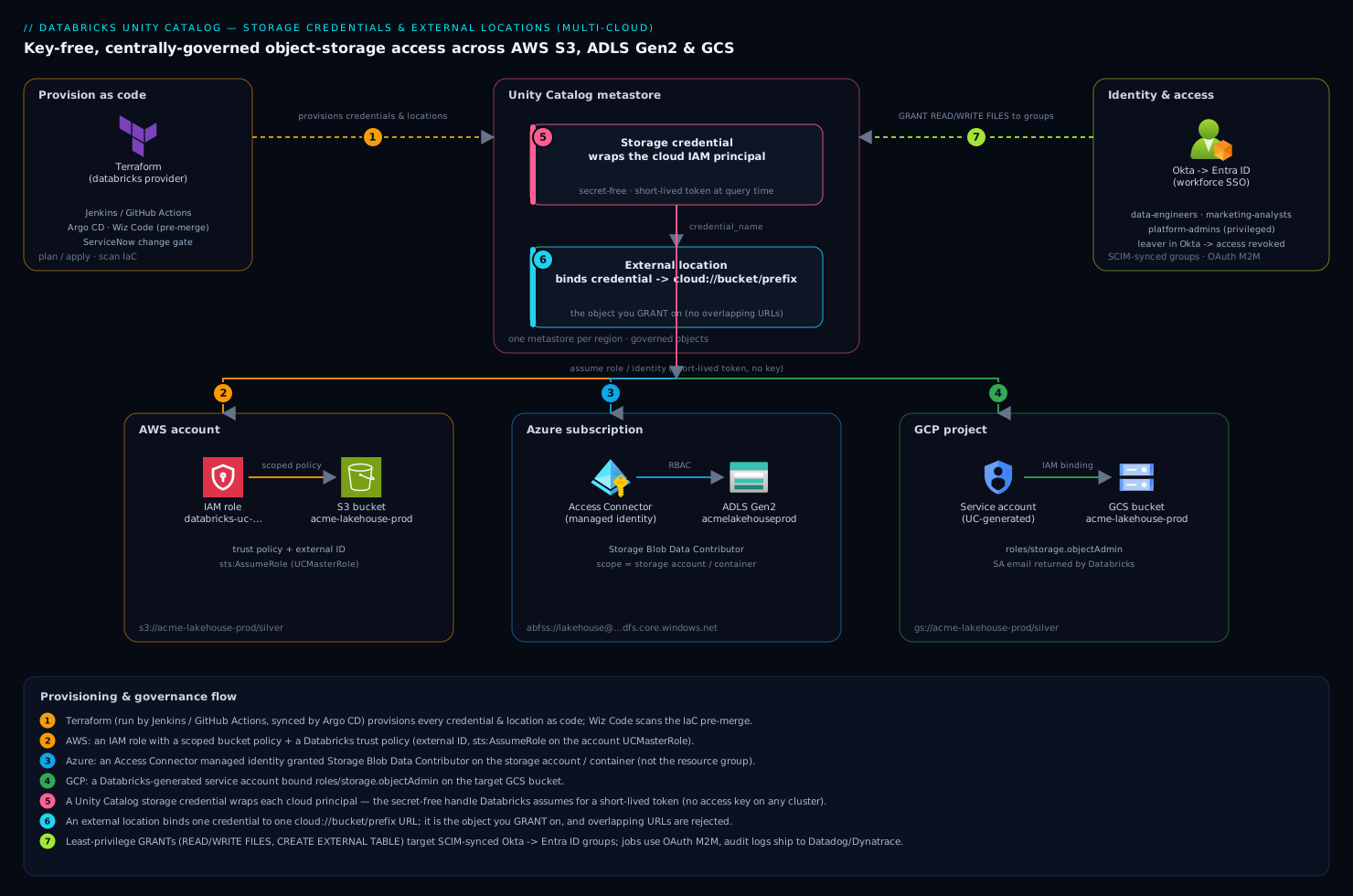
Around that chain sit the operational tools: Terraform (with Jenkins or GitHub Actions running plan/apply, and Argo CD syncing the workspace-config repo) provisions every credential, location, catalog, and grant as code; HashiCorp Vault holds the few bootstrap secrets and the Databricks PAT used by CI; Okta/Entra ID authenticate the humans and service principals and SCIM-sync the groups grants target; Wiz (with Wiz Code scanning the IaC pre-merge) continuously checks that no governed bucket drifted public and no credential over-grants; Dynatrace/Datadog ingest the Unity Catalog audit and billable-usage system tables for access dashboards and alerts; ServiceNow carries the change request that approves a new external location or catalog into production. The result is the destination the mandate asked for: every storage path on every cloud governed by one model, every table owned by a real team, and an audit log that names every reader.
Real-world scenario
Acme Retail Analytics runs the three-workspace estate from the introduction: a production lakehouse in an AWS us-east-1 workspace (S3, ~140 TB across bronze/silver/gold), a marketing data-science team in an Azure East US workspace (ADLS Gen2, ~12 TB), and the Northwind subsidiary they acquired six months ago, still on a GCP us-east1 workspace (GCS, ~8 TB). Before Unity Catalog, each workspace had its own hive_metastore, every job authenticated with a pasted access key, and the security team had no answer to “who read the loyalty-PII table.” The trigger was a quarterly access review failing audit because access could not be attributed — and a week later, a contractor’s S3 key turning up in a notebook committed to a public-ish internal repo.
The platform team (four engineers) ran a four-week migration. Week 1: created one metastore per region (us-east-1, eastus, us-east1), attached each workspace, and stood up the credential→location chain per cloud — three storage credentials, nine external locations (bronze/silver/gold per cloud), all in Terraform behind a Jenkins plan/apply gated by a ServiceNow change. Entra ID SCIM provisioned acme-data-engineers, acme-marketing-analysts, northwind-analysts, and acme-platform-admins into each account. Week 2: upgraded the AWS workspace’s external tables in place (the registration moved to UC, the files never moved — 140 TB stayed put) and deep-cloned the handful of true managed tables into a prod catalog with catalog-scoped managed storage. Week 3: repeated for Azure and GCP, and turned on system.access.audit and system.access.table_lineage, shipping both to Datadog with an alert on any getCredential outside business hours and any WRITE FILES to a gold location. Week 4: stood up a retail_gold_share Delta Share so Northwind’s analysts read Acme’s curated gold.daily_sales live instead of receiving a nightly CSV — and a reverse share so Acme reads Northwind’s product master.
The numbers that mattered: zero static cloud keys remained on any cluster (a Wiz Code rule now fails any PR reintroducing fs.s3a.access.key); the failed access review passed the next quarter because SHOW GRANTS plus system.access.audit produced a complete who-read-what report in minutes; the fragile 90-minute Northwind CSV pipeline was deleted entirely, replaced by a live share; and a DROP TABLE scare — an analyst dropped what they thought was a scratch table — was recoverable because it was a managed table and UNDROP brought it back. The one thing that bit them: a week-two validate failure on the GCP credential traced to the generated service-account binding not yet propagating — resolved once the team internalised the GCP bind-after-create ordering and the cluster access modes.
Advantages and disadvantages
| Advantages | Disadvantages |
|---|---|
| No static cloud keys — Databricks assumes a role/identity per request | Steeper model: object hierarchy, credential chain, access modes to learn |
| One account-level metastore governs many workspaces consistently | One metastore per region — multi-region estates manage several |
Automatic table + column lineage and central audit (system.*) |
Lineage only covers UC-capable compute; bounded retention |
| Least-privilege grants to IdP-synced groups; ownership model | Traversal rule (USE CATALOG/USE SCHEMA) trips newcomers |
Managed tables get auto-optimisation and safe UNDROP |
Managed DROP is destructive; external DROP orphans files |
| Delta Sharing for governed cross-org sharing, no copies | Cluster access modes restrict some libs (Standard) or multi-user (Dedicated) |
| Terraform-native; the whole estate is reproducible | Migration off hive_metastore is real project work, not a flip |
| Cross-cloud governance under one model (S3/ADLS/GCS) | Cross-cloud reads incur egress + transfer cost |
When do the advantages decisively outweigh the cost? When you run more than one workspace, when you are subject to any compliance regime that demands access control and lineage, when you operate across clouds or accounts, and the moment a key has leaked. The disadvantages bite hardest on small single-workspace setups that genuinely do not need account-level governance, and on teams that adopt UC without first agreeing a naming and prefix convention — the model rewards planning and punishes ad-hoc growth. The migration cost is real but one-time; the daily operating model is simpler and safer than the key-paste world it replaces.
Hands-on lab
This is the centrepiece. You will build the full chain on one cloud (AWS shown; Azure/GCP variations noted) end to end: cloud IAM principal → storage credential → external location → catalog/schema → managed and external tables → least-privilege grants → lineage/audit check → Delta Share → validation of the negative case → teardown. Every step has the command, the expected output, and a validation. Use a non-production account and a throwaway bucket. Estimated time: 45–60 minutes. Estimated cost: a few cents of S3 plus whatever DBUs a small cluster/SQL warehouse burns during the lab (single-digit dollars if you tear down promptly).
The lab at a glance — what each step proves:
| Step | What you build | What it proves |
|---|---|---|
| 0 | Prereqs: CLI auth, metastore confirmed | You can talk to the account-level UC API |
| 1 | IAM role + permission policy (bucket-scoped) | The cloud principal exists, least-privilege |
| 2 | Storage credential + finalised trust | Databricks assumes the role with no key |
| 3 | External location + validate |
Credential↔URL binding works |
| 4 | Catalog + schemas (managed storage) | The namespace exists, isolated |
| 5 | Managed + external tables | Both table types behave as documented |
| 6 | Least-privilege grants to groups | Access is by group, traversal-correct |
| 7 | Lineage + audit query | “Who read what” / “what feeds this” answerable |
| 8 | Delta Share | Governed cross-org sharing works |
| 9 | Negative test | An ungranted group is correctly blocked |
| 10 | Teardown (inside-out) | Nothing orphaned; data preserved by choice |
Step 0 — Authenticate and confirm the metastore
# Unified CLI v0.205+ — OAuth login to the workspace
databricks auth login --host https://<workspace>.cloud.databricks.com

# Confirm a metastore is assigned to this workspace's region
databricks metastores current
Expected output (abridged):
{ "metastore_id": "b2c3...", "metastore_name": "metastore-us-east-1", "default_catalog_name": "main" }
Validation: a metastore_id is returned. If you get “no metastore assigned,” stop — an account admin must create and assign one before continuing.
Step 1 — Create the bucket-scoped IAM role (AWS)
aws s3 mb s3://acme-uc-lab-$RANDOM --region us-east-1   # note the exact name it prints
BUCKET=acme-uc-lab-XXXX   # paste the created name

cat > /tmp/lab-policy.json <<JSON
{ "Version":"2012-10-17","Statement":[{
  "Effect":"Allow",
  "Action":["s3:GetObject","s3:PutObject","s3:DeleteObject","s3:ListBucket","s3:GetBucketLocation"],
  "Resource":["arn:aws:s3:::${BUCKET}","arn:aws:s3:::${BUCKET}/*"] }] }
JSON
cat > /tmp/lab-trust-boot.json <<'JSON'
{ "Version":"2012-10-17","Statement":[{ "Effect":"Allow",
  "Principal":{"AWS":"arn:aws:iam::111122223333:root"},"Action":"sts:AssumeRole" }] }
JSON

aws iam create-role --role-name databricks-uc-lab \
  --assume-role-policy-document file:///tmp/lab-trust-boot.json
aws iam put-role-policy --role-name databricks-uc-lab \
  --policy-name uc-lab-s3 --policy-document file:///tmp/lab-policy.json
Validation: aws iam get-role --role-name databricks-uc-lab --query Role.Arn -o text returns the role ARN. (Azure: create an Access Connector and assign Storage Blob Data Contributor. GCP: confirm the bucket; the SA is generated in step 2.)
Step 2 — Create the storage credential and finalise trust
databricks storage-credentials create --json "{
  \"name\":\"sc-uc-lab\",
  \"aws_iam_role\":{\"role_arn\":\"$(aws iam get-role --role-name databricks-uc-lab --query Role.Arn -o text)\"},
  \"skip_validation\":true }"

EXT_ID=$(databricks storage-credentials get sc-uc-lab \
  | python3 -c 'import json,sys;print(json.load(sys.stdin)["aws_iam_role"]["external_id"])')
ROLE_ARN=$(aws iam get-role --role-name databricks-uc-lab --query Role.Arn -o text)
UC_MASTER="arn:aws:iam::414351767826:role/unity-catalog-prod-UCMasterRole-XXXXX"  # YOURS from the UI

cat > /tmp/lab-trust.json <<JSON
{ "Version":"2012-10-17","Statement":[{ "Effect":"Allow",
  "Principal":{"AWS":["${UC_MASTER}","${ROLE_ARN}"]},
  "Action":"sts:AssumeRole",
  "Condition":{"StringEquals":{"sts:ExternalId":"${EXT_ID}"}} }] }
JSON
aws iam update-assume-role-policy --role-name databricks-uc-lab \
  --policy-document file:///tmp/lab-trust.json

databricks storage-credentials validate --storage-credential-name sc-uc-lab
Expected output (abridged):
{ "results": [ { "operation": "READ", "result": "PASS" }, { "operation": "WRITE", "result": "PASS" } ] }
Validation: all operations PASS. If you see AbacException/InvalidClientTokenId, the trust or external ID is wrong — re-read the external ID and confirm UC_MASTER matches your UI exactly (this is the #1 lab failure).
Step 3 — Create and validate the external location
databricks external-locations create --json "{
  \"name\":\"ext-uc-lab\",
  \"url\":\"s3://${BUCKET}/lab\",
  \"credential_name\":\"sc-uc-lab\" }"

databricks external-locations validate --external-location-name ext-uc-lab
databricks external-locations get ext-uc-lab
Validation: validate returns PASS for read/write/list; get shows the URL bound to sc-uc-lab. If you later add a second location whose URL is a prefix of this one, expect a rejection — that is the overlap guardrail.
Step 4 — Create the catalog and schemas
Run this in a notebook or SQL editor attached to a Standard cluster or a SQL warehouse (a UC-capable compute — a no-isolation cluster will fail here):
CREATE CATALOG IF NOT EXISTS lab
  MANAGED LOCATION 's3://acme-uc-lab-XXXX/lab/managed'
  COMMENT 'Unity Catalog lab catalog';
CREATE SCHEMA IF NOT EXISTS lab.silver COMMENT 'Lab silver layer';
SHOW SCHEMAS IN lab;
Validation: SHOW SCHEMAS IN lab lists silver (and the default information_schema). If CREATE CATALOG errors with “Unity Catalog is not available on this cluster,” your compute is the wrong access mode — switch to a SQL warehouse or a Standard cluster.
Step 5 — Create managed and external tables
-- Managed (no LOCATION): lands in lab's managed storage; DROP deletes files
CREATE TABLE lab.silver.orders (id BIGINT, amount DECIMAL(10,2), ts TIMESTAMP) USING DELTA;
INSERT INTO lab.silver.orders VALUES (1, 99.50, current_timestamp());

-- External (explicit LOCATION under the external location): DROP keeps files
CREATE TABLE lab.silver.orders_ext (id BIGINT, amount DECIMAL(10,2), ts TIMESTAMP)
USING DELTA LOCATION 's3://acme-uc-lab-XXXX/lab/orders_ext';
INSERT INTO lab.silver.orders_ext VALUES (1, 99.50, current_timestamp());

DESCRIBE EXTENDED lab.silver.orders;      -- Type: MANAGED
DESCRIBE EXTENDED lab.silver.orders_ext;  -- Type: EXTERNAL, Location: s3://.../orders_ext
Validation: DESCRIBE EXTENDED shows Type: MANAGED for the first and Type: EXTERNAL (with the S3 location) for the second. To prove the lifecycle difference: DROP TABLE lab.silver.orders_ext; then check the path still holds Delta files (aws s3 ls s3://$BUCKET/lab/orders_ext/) — they remain. UNDROP TABLE lab.silver.orders would restore the managed one within retention.
Step 6 — Grant least-privilege to a group
-- Assumes a SCIM-synced group 'lab-analysts' exists in the account; create one if needed
GRANT USE CATALOG ON CATALOG lab TO `lab-analysts`;
GRANT USE SCHEMA, SELECT ON SCHEMA lab.silver TO `lab-analysts`;
GRANT READ FILES ON EXTERNAL LOCATION `ext-uc-lab` TO `lab-analysts`;
SHOW GRANTS `lab-analysts` ON SCHEMA lab.silver;
Validation: SHOW GRANTS lists USE_SCHEMA and SELECT for lab-analysts. A member of the group can now SELECT * FROM lab.silver.orders; a non-member cannot (you confirm the negative in step 9).
Step 7 — Read lineage and audit
-- Create a downstream table so lineage has an edge to show
CREATE TABLE lab.silver.orders_summary AS
  SELECT date(ts) AS d, sum(amount) AS total FROM lab.silver.orders GROUP BY date(ts);

-- Lineage: orders -> orders_summary (may take a minute to populate)
SELECT source_table_full_name, target_table_full_name, event_time
FROM system.access.table_lineage
WHERE target_table_full_name = 'lab.silver.orders_summary'
ORDER BY event_time DESC LIMIT 5;

-- Audit: your own recent UC actions
SELECT event_time, action_name FROM system.access.audit
WHERE service_name='unityCatalog' AND event_time > current_timestamp() - INTERVAL 1 HOUR
ORDER BY event_time DESC LIMIT 10;
Validation: the lineage query eventually returns an edge from lab.silver.orders to lab.silver.orders_summary; the audit query lists your createTable/getCredential events. (System tables must be enabled at the account — if the query errors, enable system.access first.)
Step 8 — Publish a Delta Share
CREATE SHARE IF NOT EXISTS lab_share COMMENT 'Lab outbound share';
ALTER SHARE lab_share ADD TABLE lab.silver.orders_summary;
SHOW ALL IN SHARE lab_share;
-- For a real recipient you'd: CREATE RECIPIENT ...; GRANT SELECT ON SHARE lab_share TO RECIPIENT ...;
Validation: SHOW ALL IN SHARE lab_share lists lab.silver.orders_summary. Creating a recipient and granting completes the cross-org path; for the lab, listing the share contents is sufficient proof the object exists.
Step 9 — Prove the negative (the audit point)
The mandate was about control, so prove access is actually denied where it should be. As a user not in lab-analysts (or after revoking), confirm the block:
-- Run as a principal without the grant — expect PERMISSION_DENIED
SELECT * FROM lab.silver.orders;
-- Error: [INSUFFICIENT_PERMISSIONS] User does not have SELECT on table lab.silver.orders
Validation: the query fails with an explicit insufficient-permissions error naming the missing privilege — and that denial appears in system.access.audit. That is the difference between “we think it’s locked down” and “we can prove it.”
Step 10 — Teardown (inside-out, data preserved by choice)
Order matters: you cannot drop a credential while a location references it, nor a location while tables sit under it. Unwind from the leaves inward.
-- 1. Drop dependent objects first
DROP SHARE IF EXISTS lab_share;
DROP TABLE IF EXISTS lab.silver.orders_summary;
DROP TABLE IF EXISTS lab.silver.orders;       -- managed: files GC'd after retention
DROP TABLE IF EXISTS lab.silver.orders_ext;   -- external: files REMAIN
DROP SCHEMA IF EXISTS lab.silver;
DROP CATALOG IF EXISTS lab;
# 2. Revoke + remove the location, then the credential
databricks external-locations delete ext-uc-lab --force
databricks storage-credentials delete sc-uc-lab

# 3. Cloud side last — detach IAM, then optionally empty/delete the bucket
aws iam delete-role-policy --role-name databricks-uc-lab --policy-name uc-lab-s3
aws iam delete-role --role-name databricks-uc-lab
# Keep or remove the bucket — note external-table files still live under /lab/orders_ext
aws s3 rm s3://$BUCKET --recursive   # ONLY if you want the lab data gone
aws s3 rb s3://$BUCKET
Validation: databricks storage-credentials get sc-uc-lab returns “not found.” With Terraform, the same unwind is terraform destroy letting the provider compute reverse dependency order — never race deletes by hand. In production, never delete the bucket during a governance teardown; removing governance should not remove data.
Common mistakes & troubleshooting
The differentiator. Each row is a real failure mode with the symptom, the root cause, the exact way to confirm it, and the fix. Scan to your symptom.
| # | Symptom | Root cause | Confirm (exact command/path) | Fix |
|---|---|---|---|---|
| 1 | validate fails: AbacException / InvalidClientTokenId (AWS) |
Wrong UC master-role ARN or missing sts:ExternalId in trust |
databricks storage-credentials get sc-… (read external_id); compare trust to UI’s master ARN |
Rewrite trust with the exact UI master ARN + real external ID; include the role’s own ARN (self-assume) |
| 2 | validate passes but writes fail (Azure) |
RBAC role is Storage Blob Data Reader, or scoped to the resource group not the account |
az role assignment list --assignee <principalId> -o table |
Assign Storage Blob Data Contributor on the storage account |
| 3 | GCP credential validate fails right after create |
SA binding not applied / not yet propagated | gcloud storage buckets get-iam-policy gs://bucket |
Add roles/storage.objectAdmin for the generated SA; retry after propagation |
| 4 | Cannot create external location: overlaps with existing |
New URL is a prefix of (or contained by) an existing location | databricks external-locations list and compare URLs |
Use a narrower, non-overlapping prefix; redesign the prefix hierarchy |
| 5 | SELECT fails: User does not have permission despite a table SELECT grant |
Missing USE CATALOG/USE SCHEMA traversal grant |
SHOW GRANTS <group> ON CATALOG <c> and … ON SCHEMA <c.s> |
GRANT USE CATALOG/USE SCHEMA on the parents |
| 6 | “Unity Catalog is not available on this cluster” | Cluster access mode is No-isolation/legacy | Cluster UI → access mode; or system.compute.clusters.data_security_mode |
Use a SQL warehouse, or set USER_ISOLATION/SINGLE_USER |
| 7 | WRITE FILES/COPY INTO denied for an analyst |
File grant on the credential not the external location (or not granted at all) | SHOW GRANTS ON EXTERNAL LOCATION <loc> |
GRANT WRITE FILES ON EXTERNAL LOCATION <loc> TO <group> |
| 8 | Cannot delete storage credential | An external location still references it | databricks external-locations list --query "[?credential_name=='sc-…']" |
Delete/repoint the locations first, then the credential |
| 9 | DROP TABLE deleted data you wanted to keep |
It was a managed table | DESCRIBE EXTENDED <t> showed Type: MANAGED |
UNDROP TABLE <t> within retention; use external tables for owned paths |
| 10 | External table DROP left files costing money |
External DROP removes registration only |
aws s3 ls s3://bucket/prefix/ shows files remain |
Manually delete the path if intended; budget for it otherwise |
| 11 | Access works on cluster A, denied on cluster B for same user | Cluster B is single-user assigned to a different user, or wrong mode | Compare both clusters’ access mode + assigned principal | Assign correctly, or use Standard for shared access |
| 12 | Firewalled storage: validate times out, no clear error |
Storage account/bucket firewall blocks Databricks egress | Storage network rules; check NCC/private endpoint config | Add the workspace VPC/VNet or NCC private endpoint to the storage allow-list |
| 13 | Old job still uses a pasted key after grant exists | Stale fs.s3a.access.key in cluster Spark config / notebook |
Grep cluster policies + notebooks for access.key/secret.key |
Strip the key; let Wiz Code fail any PR reintroducing it |
| 14 | Lineage/audit query errors: object not found | system schemas not enabled |
SHOW SCHEMAS IN system |
Enable system.access (and billing) at the account/metastore |
| 15 | CREATE TABLE denied even as owner of the schema |
Missing CREATE EXTERNAL TABLE on the external location (for external tables) |
SHOW GRANTS ON EXTERNAL LOCATION <loc> |
Grant CREATE EXTERNAL TABLE on the location |
| 16 | Migration: upgraded table reads empty / wrong path | External-table upgrade pointed at the wrong location/prefix | DESCRIBE EXTENDED compares Location to the real data path |
Recreate the external table with the correct LOCATION |
The two distinctions that save the most time during an incident:
| Distinction | The trap | How to tell them apart |
|---|---|---|
| IAM/trust failure vs grant failure | Both surface as “denied” | A validate failure is cloud-side (trust/RBAC/SA); a PERMISSION_DENIED on SELECT with validate passing is a UC grant problem |
Managed vs external before you DROP |
Destructive surprise | DESCRIBE EXTENDED <t> → Type: line. Always check before dropping anything you might want back |
Migrating from hive_metastore
Most real adoptions are migrations, not greenfield. The legacy per-workspace hive_metastore keeps working (it is exposed as the hive_metastore catalog), so you migrate incrementally rather than in a big-bang cutover. The two core moves: external tables upgrade in place (the registration moves to a UC catalog, the files never move), and managed hive tables must have their data moved (deep-clone or CREATE TABLE AS SELECT into a UC managed table). Databricks provides UCX, an open-source assessment-and-migration toolkit, to inventory the workspace and automate much of this.
The migration phases and what each entails:
| Phase | What you do | Tooling | Risk to manage |
|---|---|---|---|
| 1. Assess | Inventory hive tables, jobs, mounts, ACLs | UCX assessment | Hidden direct-path reads, DBFS mounts |
| 2. Set up UC | Metastore, credentials, locations, catalogs, groups | CLI/Terraform | Naming/prefix design (hard to change later) |
| 3. Upgrade externals | SYNC external tables into UC in place |
SYNC / UCX |
Wrong target location/prefix |
| 4. Migrate managed | Deep-clone or CTAS managed hive tables | CLONE / CTAS |
Storage cost during dual-write; cutover timing |
| 5. Repoint workloads | Change jobs/notebooks to 3-level names | Asset Bundles / code review | Two-level refs still hitting hive_metastore |
| 6. Decommission | Remove mounts, keys; freeze hive writes | Policy + Wiz Code | A job nobody knew about still using hive |
The SYNC command upgrades an external table (or a whole schema of them) into a UC catalog without moving data:
-- Dry-run first: see what would be upgraded
SYNC SCHEMA prod.bronze FROM hive_metastore.bronze DRY RUN;

-- Upgrade a single external table in place (files stay put)
SYNC TABLE prod.bronze.events FROM hive_metastore.bronze.events;

-- Managed hive table → UC managed table (this DOES move data)
CREATE TABLE prod.silver.customers DEEP CLONE hive_metastore.silver.customers;
The decision per source table type:
| Source (hive) | Target (UC) | Method | Data movement |
|---|---|---|---|
| External table | External table | SYNC TABLE … FROM … |
None (in place) |
| External table | Managed table | CREATE … DEEP CLONE |
Copied into managed storage |
| Managed table | Managed table | DEEP CLONE or CTAS |
Copied (managed → managed) |
| View | View | Recreate referencing UC names | None (logical) |
| DBFS mount path | External location/volume | Recreate as governed location | None; re-grant access |
A migration sequencing rule that prevents the most common post-migration incident: keep the old hive_metastore references readable during the transition (don’t drop hive tables the day you upgrade), repoint jobs to three-level names in a controlled wave, and only freeze/decommission hive once system.access.audit shows no traffic to the legacy catalog for a full business cycle. A job nobody remembered, still writing to a hive-managed table, is the classic way a migration “completes” and then breaks a report a week later.
Best practices
- One metastore per region; attach, don’t multiply. Resist creating a second metastore in a region — it fragments governance and identity. Plan regions deliberately.
- Agree a naming + prefix convention before creating anything. Environment-prefixed catalogs (
prod_*,dev_*), layer-named schemas (bronze/silver/gold), cloud-and-scope-encoded credential/location names. Renaming later rewrites every reference. - Grant to IdP-synced groups, never individuals. SCIM from Entra/Okta means access follows the directory and leavers are deprovisioned automatically. An individual grant is technical debt.
- Own every object with a group. Set
OWNERto a team group so ownership survives departures and a single person leaving never orphans a table. - Default to managed tables. They get auto-optimisation, safe
UNDROP, and Databricks-managed lifecycle. Use external tables only when you must own the path or share with non-Databricks engines. - Grant files on the external location, admin rights on the credential.
READ FILES/WRITE FILES/CREATE EXTERNAL TABLEbelong on the location;CREATE EXTERNAL LOCATIONis the admin delegation on the credential. - Plan non-overlapping prefixes and grant at the narrowest level a team needs. The overlap guardrail is your friend — design the hierarchy so you never want to grant on a parent path.
- Pin cluster access modes; ban no-isolation for governed work. Use SQL warehouses for BI, Standard for shared engineering, Dedicated only when a workload needs it. Enforce via cluster policies.
- Enable system tables on day one and ship audit to your SIEM.
system.access.auditand lineage are the audit story; don’t discover you needed them after an incident. - Codify everything in Terraform and gate prod behind change control. Credentials, locations, catalogs, grants as code;
planon PR,applyon merge, ServiceNow change for prod. - Treat
DROPas dangerous andVACUUMas irreversible. CheckDESCRIBE EXTENDEDbefore dropping; understand the retention window before vacuuming. - Migrate incrementally and verify with audit before decommissioning hive. Keep legacy readable, repoint in waves, freeze only when audit shows zero traffic.
Security notes
The architecture is secret-free by design: no cloud access key ever lands on a cluster — Databricks assumes a role/identity for a short-lived token, scoped by cloud IAM to one bucket and by the external-location grant to one prefix and one team. Keep the chain tight at both ends: least-privilege IAM on the cloud side (the exact s3:*/blob/object actions on the exact bucket, never *), and least-privilege GRANT on the Databricks side with traversal grants no broader than needed. Set object ownership to groups and treat CREATE EXTERNAL LOCATION and storage-credential ownership as privileged — only platform-admins, gated behind a ServiceNow change and an enablement sign-off.
Use SCIM from Okta/Entra ID so deprovisioning is automatic — a leaver removed in the IdP loses Databricks access the same day, including any group-derived grants. Enforce cluster access modes with cluster policies so nobody spins up a no-isolation cluster and reads files around the governance layer; for the most sensitive catalogs, bind them to specific workspaces (ISOLATED) so a dev workspace cannot even list them. Layer column masks and row filters on tables holding PII so the same SELECT returns different data by group. Let Wiz verify continuously that no governed bucket drifted public and no credential over-grants, with Wiz Code catching the same in IaC before merge, and a rule that fails any PR reintroducing fs.s3a.access.key or a pasted secret. Pipe system.access.audit to Dynatrace/Datadog with alerts on credential creation, off-hours getCredential, and WRITE FILES to gold, so misuse is a page, not a forensic discovery after the fact. For storage behind a firewall, prefer private connectivity (NCC private endpoints, VNet/VPC integration) over IP allow-lists, and keep encryption-at-rest keys (SSE-KMS / CMK) under your control with the credential granted only Decrypt/GenerateDataKey, not key administration.
Cost & sizing
Unity Catalog governance itself adds no Databricks line item — you pay for the DBUs clusters and SQL warehouses consume and the underlying cloud storage, requests, and egress. The cost levers are operational. Cross-cloud egress is the big one: a job in an AWS workspace reading a GCS external location pays GCP egress and cross-cloud transfer, so co-locate compute with the bucket it reads and reserve cross-cloud reads for genuine federation or sharing. Consolidate credentials — one storage credential backs many external locations, so you neither need nor should create a credential per bucket. Right-size and auto-terminate compute via cluster policies and serverless SQL warehouses, since the governance layer does nothing to stop an idle all-purpose cluster from burning DBUs; managed tables’ predictive optimization and liquid clustering reduce both query cost and the OPTIMIZE/VACUUM jobs you would otherwise run. System-table storage is cheap but unbounded if you index everything forever — ship audit to your observability stack with sensible retention rather than querying the raw system tables for long history.
Rough figures to anchor planning (USD/INR, indicative — confirm against your contract):
| Cost driver | Rough magnitude | Lever |
|---|---|---|
| Unity Catalog governance | $0 (no per-object charge) | n/a — included |
| Compute (DBUs) | The dominant cost; per-DBU by SKU/tier | Serverless SQL, autoscale, auto-terminate, Standard over always-on |
| Cloud storage | ~$0.02–0.025/GB-month (S3/ADLS/GCS standard) | Lifecycle tiering of cold bronze; VACUUM stale versions |
| Storage requests | Fractions of a cent per 1k requests | Fewer small files; auto-compaction |
| Cross-cloud egress | ~$0.08–0.12/GB out + transfer | Co-locate compute and data; share live instead of copying |
| Delta Sharing | No copy = no duplicate storage | Replaces nightly export pipelines (DBU + egress saved) |
| System-table queries | Compute to query; cheap storage | Ship to SIEM with retention; don’t scan years of raw audit |
There is no free tier for production Unity Catalog (it requires the standard/premium-plus account tiers and real compute), but the lab in this guide costs single-digit dollars if you tear down promptly — a few cents of S3, a small SQL warehouse or Standard cluster for under an hour, and nothing left running. The Wiz/CrowdStrike/observability subscriptions are fixed platform costs amortised across all workspaces, not per-location.
Interview & exam questions
-
What is the difference between a storage credential and an external location? A storage credential wraps the cloud IAM principal Databricks assumes (an AWS role, Azure managed identity, or GCP service account) and is shared by many locations; an external location binds one credential to one
cloud://bucket/prefixURL and is the object youGRANTfile access on. The credential is the identity; the location is the path-scoped securable. -
Why must an AWS storage credential’s trust policy include the role’s own ARN? Unity Catalog’s cross-account validation performs a self-assume handshake, so the trust must allow both the Databricks UC master role and the role itself, gated by the
sts:ExternalIdcondition. Omitting the self-reference is a commonvalidatefailure. -
A user has
SELECTon a table but still gets “permission denied.” Why? They are missing the traversal grants —USE CATALOGon the catalog andUSE SCHEMAon the schema. Unity Catalog requiresUSEat every namespace level above the object, not justSELECTon the leaf. -
What happens to the data when you
DROPa managed vs an external table? Dropping a managed table removes the registration and the data files (after a retention window, recoverable viaUNDROP). Dropping an external table removes only the registration; the files remain at their path and you keep paying for them. -
Why can’t a “no-isolation” cluster query Unity Catalog tables? No-isolation (and legacy) access modes are not Unity-Catalog-capable — UC enforcement requires Standard (
USER_ISOLATION) or Dedicated (SINGLE_USER) mode, or a SQL warehouse. The error is a cluster-config problem, not a grant problem. -
How does ownership interact with grants? Every object has exactly one owner who can do anything to it and grant on it regardless of the privilege list — ownership trumps grants. Set owners to groups so they survive departures; only the owner or a metastore admin can transfer ownership or drop the object.
-
How many metastores should a multi-region, multi-cloud estate have? One metastore per region per account — you attach workspaces in that region to it. A three-region estate has three metastores; you do not get one global metastore, and you should not create multiple metastores in the same region.
-
What does Delta Sharing give you over copying data? It shares live tables/volumes via an open protocol — Databricks-to-Databricks (recipient’s metastore ID) or open (bearer token for any Delta-Sharing client) — with no copy, governed and revocable on the provider side. Revoking the share cuts access instantly; there is no stale exported copy to chase.
-
How do you migrate an external hive table to Unity Catalog without moving 100 TB? Use
SYNC TABLE … FROM hive_metastore.…to upgrade it in place — only the registration moves into the UC catalog; the underlying files never move. Managed hive tables, by contrast, requireDEEP CLONE/CTAS, which does copy data. -
Where do you grant
READ FILESvsCREATE EXTERNAL LOCATION?READ FILES/WRITE FILES/CREATE EXTERNAL TABLEare granted on the external location (data-team access to the path);CREATE EXTERNAL LOCATIONis granted on the storage credential as an admin delegation. Mixing them up either over-grants self-provisioning or denies data access. -
What is the catalog isolation mode and when do you use
ISOLATED? A catalog’s isolation mode controls which workspaces see it —OPENexposes it to every workspace on the metastore,ISOLATEDrestricts it to explicitly bound workspaces. UseISOLATEDto keep aprodcatalog invisible to dev workspaces and to satisfy regulated-domain isolation. -
Which certifications/skills map to this? Databricks Data Engineer Associate/Professional and Databricks Certified Data Analyst cover Unity Catalog governance, the namespace, and grants; cloud-specific IAM (AWS SAA/Security, Azure AZ-500/DP-203, GCP Professional Data Engineer) covers the trust side. Real competency is demonstrated by standing up the credential→location→grant chain and a migration, not by recall.
Quick check
- You create a storage credential on AWS and
validatereturnsAbacException. Name the two most likely causes. - A schema-owner can’t create an external table on a granted external location. What single privilege is missing, and where do you grant it?
- An analyst dropped a table and panics. What is the first command you run to determine whether the data is recoverable?
- A job throws “Unity Catalog is not available on this cluster.” Is this a grant problem or a compute problem, and what fixes it?
- You need to share a curated gold table with a partner who does not use Databricks. Which Delta Sharing mode do you use, and how is the recipient identified?
Answers
- The trust policy uses the wrong UC master-role ARN (it is account-specific — copy it from the UI), and/or the
sts:ExternalIdcondition is missing or wrong (read the real external ID back from the credential). Often the role’s own ARN is also missing from the trust (self-assume). CREATE EXTERNAL TABLE, granted on the external location (not the credential, not the schema):GRANT CREATE EXTERNAL TABLE ON EXTERNAL LOCATION <loc> TO <group>.DESCRIBE EXTENDED <table>— if theType:line saidMANAGED, the files are recoverable withUNDROP TABLE <table>within the retention window; ifEXTERNAL, the files were never deleted and remain at the path.- A compute problem — the cluster’s access mode is No-isolation or legacy. Fix it by using a SQL warehouse or a cluster in Standard (
USER_ISOLATION) or Dedicated (SINGLE_USER) mode. - Open sharing — the recipient is identified by a bearer token + credential file and reads with any Delta-Sharing client (pandas, Spark, Power BI). Databricks-to-Databricks would require them to be on UC.
Glossary
- Account (Databricks): The top-level organisation container above all workspaces; where account-level identity and metastores live.
- Metastore: The Unity Catalog governance root for a region (one per region per account), holding the entire
catalog.schema.tablenamespace. - Catalog: The top level of the three-level namespace; a container for schemas, usually per environment or domain.
- Schema (database): The middle namespace level; groups related tables/views/volumes inside a catalog.
- Storage credential: A metastore object wrapping the cloud IAM principal (AWS role / Azure managed identity / GCP service account) Databricks assumes without a static key.
- External location: A metastore object binding one storage credential to one
cloud://bucket/prefixURL; the object you grant file access on. - Managed table: A table whose data lives in managed storage and whose lifecycle Unity Catalog owns;
DROPdeletes the files (recoverable viaUNDROP). - External table: A table at a path you control under an external location;
DROPremoves only the registration and leaves the files. - Volume: A governed handle to non-tabular files (managed or external) under a path, granted with
READ VOLUME/WRITE VOLUME. - Privilege: A specific right (
SELECT,READ FILES,USE CATALOG, …) granted on a securable; inherits down the namespace where applicable. - Owner: The single principal (ideally a group) who can do anything to an object and grant on it, overriding the privilege list.
- Access mode (data security mode): A cluster setting (Standard/
USER_ISOLATION, Dedicated/SINGLE_USER, No-isolation) that determines whether the cluster can use Unity Catalog. - Lineage: Automatically captured table- and column-level upstream/downstream graph, queryable in
system.access.table_lineage/column_lineage. - Audit (system.access.audit): The system table recording every governed action — grants, credential use, table access — for the “who did what” trail.
- Delta Sharing: An open protocol built into Unity Catalog for sharing live tables/volumes across organisations without copying, via shares and recipients.
- hive_metastore: The legacy per-workspace catalog, exposed in Unity Catalog as the
hive_metastorecatalog so two-level references keep working during migration. - UCX: Databricks’ open-source toolkit for assessing a workspace and automating migration from
hive_metastoreto Unity Catalog. - Access Connector for Databricks: The first-party Azure resource carrying the managed identity a storage credential references on Azure.
Next steps
- Deploy Databricks Asset Bundles for Job and Pipeline CI/CD — ship governed pipelines that read the catalogs and locations you just built.
- Lakehouse: Medallion Architecture Unifying Streaming and Batch — the bronze/silver/gold workload pattern these external locations serve.
- Real-Time Analytics with Databricks, Confluent and Kafka on AWS — feed governed tables from streaming sources.
- Azure Data Lake Storage Gen2 with the Bronze/Silver/Gold Medallion — the ADLS storage layer behind an Azure external location.
- Workload Identity Federation for Secretless CI/CD — the same key-free, assumed-identity philosophy applied to your pipelines.
- Zero-Trust Architecture Blueprint: Identity, Network, Data — where this data-plane governance fits in the larger zero-trust picture.