A data lake that nobody trusts is just an expensive folder of files. The pattern that turns a pile of CSVs and JSON dumps into something a business will actually report on is the medallion architecture — three named layers, Bronze, Silver and Gold, each with a clear contract about how clean the data is, who may touch it, and what it is allowed to be used for. On Azure, the storage substrate underneath all three is Azure Data Lake Storage Gen2 (ADLS Gen2): an ordinary storage account with one switch flipped — the hierarchical namespace (HNS) — that turns flat blob “folders” into real directories with atomic renames and POSIX-style access control. Get the zone layout right and every downstream engine (Databricks, Synapse, Microsoft Fabric, even a plain az script) inherits a tidy, governable lake. Get it wrong and you spend the next two years apologising for a raw/ container with four million tiny files and no idea which ones are safe to delete.
This article is the design guide I wish every data engineer read before they created their first container. We treat Bronze, Silver and Gold not as buzzwords but as engineering contracts: Bronze is an immutable, append-only copy of source data exactly as it arrived; Silver is conformed, deduplicated, schema-enforced data that an engineer trusts; Gold is the aggregated, business-shaped tables that a dashboard or finance team consumes. You will learn the storage layout that makes those contracts real — container strategy, folder and partition conventions, file formats (Parquet vs Delta Lake), the RAW/STAGING/CURATED mapping, and the access model (HNS ACLs layered with Azure RBAC) that lets you give the ingestion job write to Bronze and nothing else.
By the end you will be able to stand up the account correctly the first time (HNS on — because you cannot turn it on later), draw the three zones with the right boundaries, choose Parquet or Delta per layer for the right reasons, partition so your queries prune instead of scan, and reason about the bill before it surprises you. Every design choice comes with both the az CLI and a Bicep snippet, real limits and SKUs, and a short troubleshooting section for the failure modes that bite hardest — because the gap between a lakehouse that scales and one that collapses is almost entirely in the layout, not the engine on top.
What problem this solves
Without a layered design, a lake degrades in a predictable way. Someone creates a data container and starts dropping files. Ingestion writes straight into the same place that analysts read from, so a half-finished load is visible to a dashboard mid-run. Nobody knows which copy is canonical, so three teams each build their own “cleaned” version. Schema drift — a source that quietly renames a column or changes a date format — silently corrupts a report, and because the raw bytes were transformed in place, there is no pristine copy to replay from. Six months in, the lake is a swamp: untrusted, un-auditable, and impossible to refactor because everything reads from everything.
The medallion layout solves this by making trust a property of location. Data physically moves through zones, and each move is a checkpoint where quality improves and the contract tightens. Bronze keeps the original bytes forever, so any bug in your transformation logic is recoverable by reprocessing — you never lose the source of truth. Silver is where you enforce schema and dedupe, so consumers downstream never see malformed rows. Gold is small, fast, and business-named, so a Power BI report or a finance query hits a table shaped for it rather than scanning raw events. The zones also give you a natural place to hang access control, retention and cost tiering: lock Bronze down to ingestion identities and tier it to Cool/Cold for cheap long-term retention; open Gold to analysts on Hot for speed.
Who hits the pain without this: any team that started a lake “just to get data landed” and never imposed structure. It bites hardest on regulated workloads (you must prove lineage and who-touched-what), multi-team platforms (everyone writing everywhere), and cost-sensitive shops (raw data on Hot storage with no lifecycle policy is a quiet five-figure annual leak). The medallion pattern is not Azure-specific — it originated with Databricks — but on ADLS Gen2 it becomes concrete: containers, directories, ACLs and lifecycle rules you can express in Bicep and audit in the portal.
To frame the whole article, here is the contract each zone enforces and what breaks if you skip it:
| Zone | Also called | Data state | Who writes | Who reads | What breaks if you skip it |
|---|---|---|---|---|---|
| Bronze | Raw, Landing | Source bytes, untouched, append-only | Ingestion only | Engineers (rarely) | No replay source; a transform bug is unrecoverable |
| Silver | Cleansed, Conformed, Staging | Deduped, schema-enforced, typed | Transform jobs | Engineers, ML, advanced analysts | Consumers see malformed/duplicate rows |
| Gold | Curated, Presentation, Serving | Aggregated, business-modelled | Aggregation jobs | BI tools, finance, apps | Dashboards scan raw events; slow and costly |
Learning objectives
By the end of this article you can:
- Explain what makes ADLS Gen2 different from a plain blob account, and why hierarchical namespace must be enabled at creation time.
- Define the Bronze, Silver and Gold contracts precisely — data state, write/read identities, file format and retention for each.
- Choose a container strategy (zone-per-container vs zone-per-folder) and a folder/partition convention that makes queries prune rather than full-scan.
- Decide Parquet vs Delta Lake per layer and explain what Delta’s transaction log buys you (ACID, time travel, schema enforcement) on object storage.
- Design the access model by layering POSIX ACLs on Azure RBAC, and grant least privilege so ingestion can write Bronze but not read Gold.
- Apply lifecycle management and access tiers to push cold Bronze data to Cool/Cold/Archive and keep Gold on Hot.
- Diagnose the classic lake failures — the small-file problem, schema drift, “rename is slow,” wrong-tier cost blowups, and ACL-vs-RBAC permission confusion.
- Right-size and cost-model a medallion lake, including transaction costs, redundancy choice, and the cost difference between layers.
Prerequisites & where this fits
You should already understand the basics of an Azure storage account — what a container is, the difference between block blobs and files, and the redundancy options (LRS, ZRS, GRS). If those are fuzzy, read Azure Storage Account Fundamentals and Azure Storage Redundancy Decoded: LRS vs ZRS vs GRS vs RA-GRS and How to Choose first. You should be comfortable running az in Cloud Shell, reading JSON output, and reasoning about RBAC role assignments. Familiarity with columnar file formats (Parquet) and SQL helps but is not required — we define the moving parts.
This sits at the storage and layout layer of a data platform, upstream of every processing engine. The medallion zones are where data lives; the engines that move it between zones — Data Factory, Databricks, Synapse, Fabric — sit on top and are covered elsewhere. For the engine that typically lands Bronze, see Build Your First Data Factory Pipeline: Copy Data from Blob Storage into Azure SQL. For the wider catalogue of where each Azure data service fits, The Azure Data Platform Map: Ingest, Store, Process and Serve Across Fabric, Synapse and Databricks is the map this article zooms into.
A quick orientation of which layer owns what, so you know whose problem a given symptom is:
| Concern | Lives at | Owned by | This article covers it? |
|---|---|---|---|
| Bytes on disk, folders, ACLs | ADLS Gen2 account | Platform / data eng | Yes — the core |
| Moving data Bronze→Silver→Gold | ADF / Databricks / Fabric | Data engineering | Mechanism: no; layout it writes to: yes |
| Table format & ACID | Delta / Parquet on the lake | Data engineering | Yes — format choice |
| Catalogue, lineage, classification | Purview / Unity Catalog | Governance | Mentioned, not deep |
| BI semantic model | Power BI / Fabric | Analytics | No (it reads Gold) |
| Cost tiering & lifecycle | Storage account policy | Platform / FinOps | Yes |
Core concepts
Five mental models make every later decision obvious.
A lake is trust expressed as location. The whole point of medallion is that where a file sits tells you how much you can trust it. A path under bronze/ is, by contract, raw and possibly dirty; a path under gold/ is, by contract, validated and business-ready. Engines don’t enforce this — you do, by only ever writing clean data to Silver and only ever aggregating into Gold. The zones are a discipline made physical. Break the discipline (let a job write half-cleaned data into Gold) and the contract is worthless.
ADLS Gen2 is a blob account with a hierarchical namespace. A normal blob container is flat: 2026/06/file.csv is not a folder structure, it is a single blob whose name contains slashes. Listing or renaming a “folder” means scanning and rewriting every blob with that prefix — slow and non-atomic. Hierarchical namespace changes the storage engine so directories are first-class objects: a rename of a directory is a single atomic metadata operation, listings are fast, and you get POSIX ACLs per file and directory. This is the feature that makes the account a data lake rather than just object storage. Crucially, HNS can only be enabled when the account is created — you cannot toggle it on an existing account, so getting this right at creation is the single most important decision in the whole design.
The medallion contract is append-forward, never-rewrite-backward. Data flows one direction: Bronze → Silver → Gold. Bronze is immutable and append-only — you add new files, you never edit old ones, because Bronze is your replay source. Silver is rebuilt from Bronze, Gold from Silver. This directionality is what makes the lake recoverable: if you find a bug in your Silver logic, you fix the code and reprocess from Bronze; you have not destroyed anything. If you ever find yourself “fixing” data by editing Bronze in place, the architecture has already failed.
A table format is a contract layered on files. Raw Parquet is just columnar files in a directory — fast to scan, but with no concept of a transaction, no way to update a single row, and no protection against a reader seeing a half-written dataset. Delta Lake (and the similar Apache Iceberg / Hudi) adds a transaction log — a _delta_log/ directory of JSON + checkpoint files that records every commit. That log buys you ACID transactions, time travel (query the table as of a past version), schema enforcement (reject writes that don’t match), and upserts/deletes (MERGE) — all on plain object storage. Choosing Parquet vs Delta per layer is one of the central design decisions below.
Partitioning is how queries avoid reading everything. A lake table is a directory tree of files. If you organise it as .../event_date=2026-06-24/ (Hive-style partitioning), an engine that filters WHERE event_date = '2026-06-24' reads only that one directory — partition pruning. Pick the wrong partition key (high-cardinality, like user_id) and you create millions of tiny directories and the lake crawls. Pick the right one (a date, a region) and queries are orders of magnitude cheaper. Partition strategy is layout, and layout is this article’s job.
The vocabulary in one table
Pin down every moving part before the deep sections. The glossary at the end repeats these for lookup; this is the mental model side by side:
| Term | One-line definition | Where it lives | Why it matters |
|---|---|---|---|
| ADLS Gen2 | Blob storage + hierarchical namespace | Storage account | The lake substrate |
| HNS | Real directories, atomic rename, ACLs | Account setting (creation-time) | Makes it a lake, not flat blobs |
| Container | Top-level division of the account | In the account | Often = a zone |
| Bronze | Raw, immutable source copy | A container/folder | Replay source of truth |
| Silver | Cleansed, deduped, typed data | A container/folder | What consumers trust |
| Gold | Aggregated, business tables | A container/folder | What BI/apps read |
| Delta Lake | Transaction log over Parquet | _delta_log/ in a table dir |
ACID + time travel on the lake |
| Parquet | Columnar file format | Files in a directory | Fast scans, no transactions |
| Partition | Folder-per-value split (date=…) |
Table directory tree | Enables query pruning |
| ACL | POSIX permission on file/dir | HNS metadata | Fine-grained path access |
| RBAC | Azure role on a scope | Account/container scope | Coarse data-plane access |
| Lifecycle policy | Auto-tier/delete by age | Account management policy | Controls Bronze cost |
| Access tier | Hot/Cool/Cold/Archive per blob | Blob property | Price vs latency trade-off |
What makes ADLS Gen2 a lake (not just storage)
The starting point is a StorageV2 account with hierarchical namespace enabled. Everything in the medallion design assumes HNS is on, because three of its capabilities are load-bearing: atomic directory rename (so a job can stage into a temp folder and “publish” by rename), fast recursive listing (so engines enumerate partitions quickly), and POSIX ACLs (so you grant write to one zone without granting the whole account). Without HNS you have a blob account that looks like a lake until you try to rename a directory of a million files and the operation takes hours and is not atomic.
The decision matrix for the account itself:
| Setting | Recommended for a lake | Why | Gotcha |
|---|---|---|---|
| Kind | StorageV2 |
Only kind that supports HNS + all features | BlobStorage/Storage (classic) do not |
| Hierarchical namespace | Enabled | Directories, atomic rename, ACLs | Cannot enable later — must be at creation |
| Performance | Standard (Premium for low-latency analytics) | Standard fits batch lakes; Premium block blob for high IOPS | Premium costs more, no Archive tier |
| Redundancy | ZRS (or GZRS if you need geo) | Survives a zone outage in-region | LRS is cheapest but single-zone |
| Default access tier | Hot for active, set per-blob later | New blobs inherit account default | Bronze should move to Cool/Cold via lifecycle |
| Min TLS version | TLS 1.2 | Security baseline | 1.0/1.1 are deprecated |
| Public network access | Disabled (use Private Endpoint) | Keep the lake off the public internet | Breaks tools not on the VNet if mis-scoped |
| Allow shared key access | Disabled (prefer Entra ID) | Forces identity-based auth, no shared secrets | Some legacy tools still need keys |
| Blob soft delete | Enabled (7–30 days) | Recover accidental deletes | Adds a little storage cost |
Create the account with HNS on via CLI:
az storage account create \
  --name kvlakeprod \
  --resource-group rg-lake-prod \
  --location centralindia \
  --sku Standard_ZRS \
  --kind StorageV2 \
  --hns true \
  --min-tls-version TLS1_2 \
  --allow-blob-public-access false \
  --allow-shared-key-access false \
  --default-action Deny
The same in Bicep, which is what you should actually commit so the lake is reproducible:
resource lake 'Microsoft.Storage/storageAccounts@2023-05-01' = {
  name: 'kvlakeprod'
  location: 'centralindia'
  sku: { name: 'Standard_ZRS' }
  kind: 'StorageV2'
  properties: {
    isHnsEnabled: true            // hierarchical namespace — creation-time only
    minimumTlsVersion: 'TLS1_2'
    allowBlobPublicAccess: false
    allowSharedKeyAccess: false
    supportsHttpsTrafficOnly: true
    networkAcls: { defaultAction: 'Deny' }
  }
}
The single line that matters most is isHnsEnabled: true. If you ship an account without it and only discover later that you needed a lake, your only path is to create a new account and copy everything across with azcopy — there is no in-place upgrade. Treat HNS as a one-way door you walk through at creation. (For bulk copies during such a migration, AzCopy Essentials: Copy, Sync and Resume Large Transfers is the tool.)
ADLS Gen2 vs plain blob, side by side
The differences that actually change your design:
| Capability | Plain blob (flat) | ADLS Gen2 (HNS) |
|---|---|---|
| “Folders” | Name prefixes only | Real directory objects |
| Rename a directory | Copy + delete every blob (slow, non-atomic) | Single atomic metadata op |
| Recursive list | Prefix scan | Fast directory walk |
| Per-file/dir permissions | No (container-level only) | POSIX ACLs |
| Analytics endpoint | blob.core.windows.net |
also dfs.core.windows.net |
| Best for | Images, backups, static sites | Data lakes, analytics |
| Lifecycle/tiering | Yes | Yes |
| Cost | Same base, fewer features | Same base + ACL metadata |
The dfs (Data Lake) endpoint is what analytics engines target; the blob endpoint still works for blob-style operations. One account, two front doors onto the same data.
The three zones as engineering contracts
The heart of the design is treating each zone as a contract with explicit, enforceable terms. Below is what each contract specifies. The discipline is simple to state and easy to violate: only ever write data that meets a zone’s contract into that zone.
Bronze — raw, immutable, replayable
Bronze is a faithful copy of source data, landed exactly as it arrived, and never edited. If a CSV came with a typo’d header, Bronze keeps the typo. If JSON arrived with mixed types in a field, Bronze keeps the mess. The reason is recovery: Bronze is your replay source. Every Silver and Gold table is derived from Bronze, so as long as Bronze is intact you can rebuild everything downstream by re-running code. The cardinal rule is append-only — you add new files (typically partitioned by ingestion date), you never overwrite.
Bronze design choices:
| Aspect | Bronze choice | Rationale |
|---|---|---|
| Mutability | Append-only, immutable | It is the replay source |
| File format | Source format (CSV/JSON) or raw Parquet | Preserve fidelity; don’t transform yet |
| Partitioning | By ingestion date (ingest_date=) |
Matches how you load and expire it |
| Schema | None enforced — schema-on-read | Capture even malformed data |
| Retention | Long (often years) | Audit + replay; tier to Cool/Cold |
| Access | Write: ingestion identity only; Read: engineers + transform jobs | Least privilege |
| Tier | Hot briefly, then Cool/Cold via lifecycle | Most Bronze is rarely re-read |
Silver — conformed, deduplicated, trusted
Silver is where data becomes trustworthy. The transform job reads Bronze, applies schema enforcement (reject or quarantine rows that don’t match the expected types), deduplicates (a record that arrived twice becomes one), conforms (standardise date formats, units, codes), and often joins reference data to enrich. The output is typed, clean and stable — this is the layer ML pipelines and advanced analysts build on. Silver is usually Delta so you get upserts (MERGE new data into existing tables) and schema enforcement for free.
| Aspect | Silver choice | Rationale |
|---|---|---|
| Mutability | Updatable via MERGE (Delta) |
Incremental upserts from Bronze |
| File format | Delta Lake | ACID, schema enforcement, time travel |
| Partitioning | By a business/query key (e.g. event_date, region) |
Match how it’s queried |
| Schema | Enforced — bad rows rejected/quarantined | This is where trust begins |
| Dedup | Yes — by natural/business key | Consumers must not see dupes |
| Access | Write: transform jobs; Read: eng, ML, analysts | Wider read than Bronze |
| Tier | Hot (actively queried) | Performance matters here |
Gold — aggregated, business-shaped, served
Gold is the presentation layer: small, fast tables modelled for consumption — star schemas, pre-aggregated summaries, KPI tables named in business terms (daily_revenue_by_region, not events_v3). A Power BI report or a finance query hits Gold and reads a few thousand pre-shaped rows instead of scanning billions of raw events. Because Gold is derived and rebuildable from Silver, you can recompute it freely; it does not need the deep retention Bronze does.
| Aspect | Gold choice | Rationale |
|---|---|---|
| Mutability | Overwrite or MERGE per refresh |
Recomputed from Silver |
| File format | Delta (or Parquet for read-only marts) | ACID if updated; Parquet if append-once |
| Partitioning | Often none or coarse | Tables are small; over-partitioning hurts |
| Schema | Strict, business-named columns | Consumers depend on stable shape |
| Granularity | Aggregated / modelled | Fast for BI |
| Access | Write: aggregation jobs; Read: BI, finance, apps | Widest read audience |
| Tier | Hot | Latency-sensitive serving |
The contracts compared
The whole pipeline on one row each — keep this open while designing:
| Property | Bronze | Silver | Gold |
|---|---|---|---|
| Trust level | None (raw) | High (validated) | Highest (business-ready) |
| Format | Source / raw Parquet | Delta | Delta / Parquet |
| Schema | On-read, none enforced | Enforced | Strict, named |
| Mutability | Append-only | MERGE upserts |
Overwrite / MERGE |
| Partition key | Ingest date | Query/business key | None or coarse |
| Typical volume | Largest | Medium | Smallest |
| Retention | Years | Months–years | Rebuildable |
| Tier | Cool/Cold | Hot | Hot |
| Read audience | Engineers | Eng + ML + analysts | BI + finance + apps |
A note on naming: many teams use raw / staging / curated or landing / enriched / serving instead of bronze/silver/gold. The names don’t matter; the contracts do. Pick one vocabulary and use it consistently across containers, code and docs.
Layout: containers, folders and partitions
With the contracts clear, the next decision is physical layout. There are two common strategies, and the choice has real consequences for access control and blast radius.
Container strategy: zone-per-container vs zone-per-folder
| Strategy | Layout | Pros | Cons | Use when |
|---|---|---|---|---|
| Zone-per-container | bronze/, silver/, gold/ are separate containers |
Clean RBAC at container scope; clear blast-radius boundary; easy lifecycle-per-zone | More containers to manage | Most production lakes — recommended |
| Zone-per-folder | One lake container, bronze/silver/gold as top folders |
Fewer containers; one place | Access control must be all-ACL; one bad policy hits all zones | Small lakes, single team |
| Account-per-zone | Separate storage accounts per zone | Hardest isolation; per-zone limits | Cross-account joins; more infra; cost | Strict regulatory isolation only |
For most teams, zone-per-container wins: you can assign Storage Blob Data Contributor on just the bronze container to your ingestion identity, Storage Blob Data Reader on gold to your BI service principal, and apply a different lifecycle policy per container. Within each container, organise by source/domain then table then partition.
Folder and partition convention
A convention that scales (zone-per-container shown):
bronze/                      # container
  <source-system>/           # e.g. salesforce, web-events
    <entity>/                # e.g. accounts, pageviews
      ingest_date=2026-06-24/
        part-0001.json

silver/                      # container
  <domain>/                  # e.g. sales, marketing
    <table>/                 # e.g. accounts, sessions  (Delta table dir)
      _delta_log/
      event_date=2026-06-24/
        part-0001.snappy.parquet

gold/                        # container
  <subject-area>/            # e.g. finance, product
    <mart-table>/            # e.g. daily_revenue_by_region (Delta)
      _delta_log/
      part-0001.snappy.parquet
Why this shape:
| Convention | Reason |
|---|---|
| Source-system first in Bronze | Maps to who/what landed it; easy to scope ingestion ACLs per source |
| Domain/subject-area first in Silver/Gold | Maps to how analysts think and to data-product ownership |
key=value partition folders (Hive-style) |
Every engine recognises it → automatic partition pruning |
| Partition by date in Bronze/Silver | Time is the most common filter and a natural retention unit |
_delta_log/ present |
Marks a Delta table; do not write stray files into a table directory |
Partition key selection
This is where lakes most often go wrong. The rules:
| Rule | Why | Anti-pattern |
|---|---|---|
| Partition by low-cardinality columns | Few, large partitions = efficient | Partitioning by user_id → millions of tiny dirs |
| Aim for files ~128 MB–1 GB each | Sweet spot for Parquet/Delta scan | Thousands of <1 MB files (the small-file problem) |
| Partition by columns you filter on | Pruning only helps if queries use the key | Partitioning by a column nobody filters |
| Keep partition depth shallow (1–2 levels) | Deep nesting slows listing | year=/month=/day=/hour=/region=/... |
| Let date be the default partition | Most queries are time-bounded | No partitioning → full-table scans |
A practical heuristic: if a partition column would produce more than a few thousand partitions, or partitions smaller than ~100 MB, it is too granular. Daily date partitions on a table that grows a few GB/day are usually right; switch to monthly if daily produces tiny files, or add hourly only if you genuinely query by hour and volume justifies it.
File format: Parquet vs Delta per layer
The other central design decision is the table format. Both store data as columnar Parquet under the hood; Delta adds a transaction log that turns a directory of files into a table with database-like guarantees.
| Capability | Raw Parquet | Delta Lake |
|---|---|---|
| Storage engine | Columnar files | Columnar files + _delta_log/ |
| ACID transactions | No | Yes |
| Concurrent writers | Unsafe (last-writer-wins, partial reads) | Safe (optimistic concurrency) |
| Update / delete a row | Rewrite the file/partition manually | UPDATE / DELETE / MERGE |
| Schema enforcement | No (reader infers) | Yes (rejects mismatched writes) |
| Schema evolution | Manual | Controlled (mergeSchema) |
| Time travel (query old version) | No | Yes (by version or timestamp) |
| Compaction | DIY | OPTIMIZE (and Z-ordering) |
| Reader compatibility | Universal | Needs a Delta-aware reader |
| Overhead | Minimal | Small (log files, checkpoints) |
The transaction log is the whole story. Each commit writes a JSON file to _delta_log/ describing which Parquet files were added/removed; periodic checkpoints compact that history. A reader consults the log to know exactly which files form the current (or a past) version — so two jobs writing at once don’t corrupt each other, and a reader never sees a half-written dataset. That is ACID on object storage, which raw Parquet cannot give you.
Per-layer recommendation:
| Layer | Recommended format | Why |
|---|---|---|
| Bronze | Source format, or raw Parquet | Preserve fidelity; you only append; ACID less critical |
| Silver | Delta | MERGE upserts, schema enforcement, time travel — the trust layer needs these |
| Gold | Delta (Parquet acceptable for append-once marts) | ACID refresh; or simple Parquet if a mart is write-once-read-many |
A reasonable simplification for smaller shops: use Delta for Silver and Gold and keep Bronze in whatever the source emits (plus a raw Parquet copy if you want columnar replay). The benefit of Delta grows with concurrency and the need for upserts; if Bronze is strictly append-once partitioned files, raw formats are fine there.
Architecture at a glance
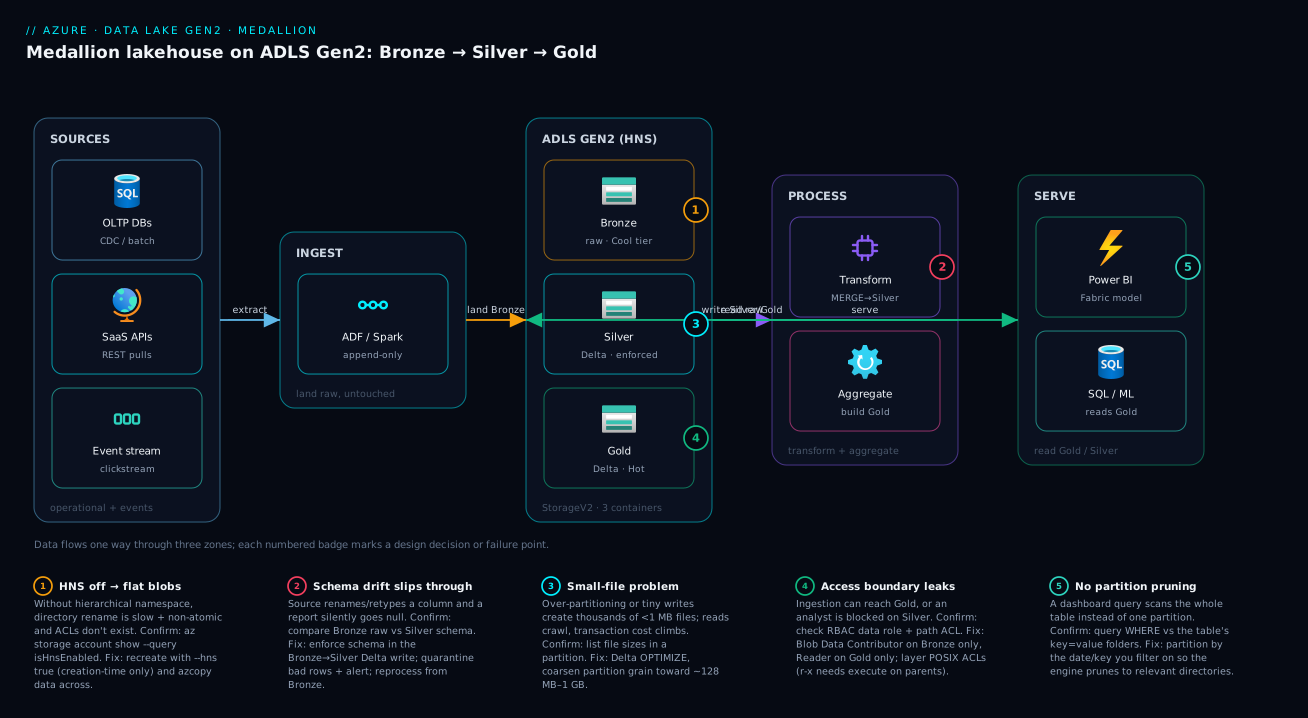
The diagram below traces one record’s journey through the lakehouse, left to right. On the far left, source systems — operational databases, SaaS APIs, and event/clickstreams — emit data. An ingestion layer (Data Factory or a Databricks/Functions job) lands that data, untouched, into the Bronze container of the ADLS Gen2 account, partitioned by ingest date. Inside the account, the hierarchical namespace is what makes the three containers behave like real, governable directories rather than flat blob prefixes. From Bronze, a transform job reads the raw files, enforces schema, deduplicates and conforms, and MERGEs the result into Silver Delta tables partitioned by a business date. A second aggregation job reads Silver and builds the small, business-named Gold Delta tables. On the right, the serve layer — Power BI / Fabric, a SQL endpoint, and ML pipelines — reads Gold (and Silver, for ML) but never touches Bronze.
The badges mark the five places this design most often fails or forces a decision: the creation-time HNS toggle (badge 1), the schema-enforcement gate at the Bronze→Silver boundary (badge 2), small-file accumulation that needs compaction (badge 3), the ACL-plus-RBAC access boundary that keeps ingestion out of Gold (badge 4), and partition pruning on the serving path that decides whether a dashboard query scans a directory or the whole table (badge 5). Notice the arrows only ever flow forward — Bronze → Silver → Gold → serve — which is the directionality that keeps the lake replayable.
Real-world scenario
Northwind Retail Analytics (a fictional but typical mid-market retailer) ran their reporting off a single ADLS Gen2 container called data. Three teams — web analytics, finance, and merchandising — each wrote into it and each read from it. Their nightly Power BI refresh queried raw clickstream JSON directly, scanning roughly 1.2 TB every run and taking 40 minutes; finance and web analytics had each built a slightly different “cleaned sales” dataset, and the two never quite agreed. Worse, a source change (the e-commerce platform renamed order_total to gross_amount) silently zeroed a revenue column in a board report for two weeks before anyone noticed — and because the ingestion job had transformed the data in place, there was no pristine copy to recompute from. They had a swamp.
The remediation was a medallion redesign over six weeks. They created a new account with HNS enabled (the old one, it turned out, had HNS off — explaining why directory renames in their staging logic took minutes) and three containers: bronze, silver, gold. Ingestion (a Data Factory pipeline) was repointed to write raw JSON into bronze/<source>/<entity>/ingest_date=…/, append-only, on Hot for 30 days then Cool via a lifecycle policy. A Databricks job read Bronze, enforced schema (quarantining rows where types didn’t match into a silver_quarantine path), deduplicated by order ID, and MERGEd into silver Delta tables partitioned by order_date. A second job aggregated Silver into gold/finance/daily_revenue_by_region and gold/product/sessions_daily — a few hundred thousand rows total.
The results were concrete. The nightly Power BI refresh dropped from 40 minutes to under 3, because it now reads a small Gold Delta table instead of scanning 1.2 TB of raw JSON. The schema-rename incident became a non-event: when the source renamed a column again months later, the Silver schema-enforcement step rejected the malformed rows into quarantine and raised an alert the same night, instead of silently corrupting a report — and because Bronze still held the original bytes, they reprocessed cleanly once the mapping was fixed. Access was tightened with RBAC + ACLs: the ingestion identity got Blob Data Contributor on bronze only; the BI service principal got Blob Data Reader on gold only; data engineers read bronze/silver. Storage cost actually fell about 18% despite keeping more history, because the lifecycle policy moved the now-immutable Bronze off Hot to Cool and Cold, and the duplicate “cleaned” datasets were deleted. The single biggest unlock was not performance — it was that all three teams finally reported off the same Gold tables and stopped arguing about whose numbers were right.
Advantages and disadvantages
The medallion pattern on ADLS Gen2 is not free; it adds copies and pipeline stages. The trade-off:
| Advantages | Disadvantages |
|---|---|
| Raw data preserved → full replay/recovery | Data is stored multiple times (Bronze + Silver + Gold) |
| Trust is location-based and auditable | More pipeline stages to build and operate |
| Schema enforcement stops bad data spreading | Latency: data passes through stages before it’s “Gold” |
| Clear access boundaries per zone | Requires discipline; easy to violate contracts |
| Cost tiering per layer (cold Bronze, hot Gold) | Storing three copies costs more raw bytes |
| Engine-agnostic (Databricks, Synapse, Fabric all read it) | Governance/catalogue still needed on top |
| Refactor Silver/Gold logic without losing source | Small-file and compaction management needed |
When each side matters: the advantages dominate for any multi-team, regulated, or report-critical platform — the recoverability and trust-by-location are worth the extra copies, and tiering offsets much of the storage cost. The disadvantages bite hardest for tiny, single-purpose datasets where a full three-zone pipeline is overkill — if you have one source, one consumer, and no compliance need, a single cleaned Delta table may be enough; don’t build three zones for a 10 GB table nobody else touches. The added latency (raw → Bronze → Silver → Gold) matters for near-real-time needs; for those, you keep the medallion zones but stream through them (e.g. structured streaming writing Delta), rather than abandoning the pattern.
Hands-on lab
This lab creates a medallion-shaped lake with az only — no Spark required — so you can see the layout, ACLs and tiering concretely. It uses one small storage account; tear it down at the end. Substitute your own names.
1. Create an HNS-enabled account and the three containers.
RG=rg-lake-lab
ACCT=kvlakelab$RANDOM          # must be globally unique, lowercase
az group create -n $RG -l centralindia

az storage account create -n $ACCT -g $RG -l centralindia \
  --sku Standard_LRS --kind StorageV2 --hns true \
  --min-tls-version TLS1_2 --allow-blob-public-access false

# Create zone containers (filesystems)
for z in bronze silver gold; do
  az storage fs create -n $z --account-name $ACCT --auth-mode login
done
Expected: three filesystems listed by az storage fs list --account-name $ACCT --auth-mode login -o table.
2. Land a Bronze file in a date-partitioned path.
echo '{"order_id":1,"gross_amount":42.50,"order_date":"2026-06-24"}' > order.json

az storage fs directory create -f bronze \
  -n "salesforce/orders/ingest_date=2026-06-24" \
  --account-name $ACCT --auth-mode login

az storage fs file upload -f bronze \
  -s order.json \
  -p "salesforce/orders/ingest_date=2026-06-24/part-0001.json" \
  --account-name $ACCT --auth-mode login
Expected: the file appears under the partitioned directory; az storage fs file list -f bronze -p salesforce/orders --account-name $ACCT --auth-mode login -o table shows it.
3. Set a POSIX ACL — give a group read on Silver, no access to Gold.
# Grant an Entra group read+execute on the silver filesystem root (recursively)
GROUP_OID=$(az ad group show --group "data-analysts" --query id -o tsv)

az storage fs access set-recursive \
  --acl "group:$GROUP_OID:r-x" \
  -p "/" -f silver \
  --account-name $ACCT --auth-mode login
Expected: az storage fs access show -p "/" -f silver --account-name $ACCT --auth-mode login shows the group ACL entry. (r-x = read + traverse; directories need execute to be entered.)
4. Apply a lifecycle policy: move Bronze to Cool after 30 days, Cold after 90, delete after 365.
cat > policy.json <<'EOF'
{
  "rules": [{
    "name": "bronze-tiering",
    "enabled": true,
    "type": "Lifecycle",
    "definition": {
      "filters": { "blobTypes": ["blockBlob"], "prefixMatch": ["bronze/"] },
      "actions": { "baseBlob": {
        "tierToCool":   { "daysAfterModificationGreaterThan": 30 },
        "tierToCold":   { "daysAfterModificationGreaterThan": 90 },
        "delete":       { "daysAfterModificationGreaterThan": 365 }
      }}
    }
  }]
}
EOF

az storage account management-policy create \
  --account-name $ACCT -g $RG --policy @policy.json
Expected: the policy is created; verify with az storage account management-policy show --account-name $ACCT -g $RG.
5. Teardown — delete everything.
az group delete -n $RG --yes --no-wait
What you proved: HNS gives you real directories and partition paths, ACLs scope access per zone/path, and a lifecycle policy controls Bronze cost automatically — the three pillars of the design, without needing a processing engine to see them.
Common mistakes & troubleshooting
The failures below are the ones that recur across real lakes. Each is symptom → root cause → how to confirm → fix.
| # | Symptom | Root cause | Confirm | Fix |
|---|---|---|---|---|
| 1 | Directory rename takes minutes; staging “publish” is slow | HNS is off — it’s a flat blob account | az storage account show -n <acct> --query isHnsEnabled returns false |
Recreate the account with --hns true; copy data over with azcopy |
| 2 | Queries scan the whole table; costs/time huge | No partitioning, or filtering on a non-partition column | Check the table dir for key=value folders; check the query’s WHERE vs partition key |
Partition by the date/region you filter on; rewrite the table partitioned |
| 3 | Thousands of tiny files; reads crawl | Small-file problem — too many small writes / over-partitioning | List file sizes in a partition; many <1 MB files | Compact: Delta OPTIMIZE; coarsen partition grain; batch writes |
| 4 | A column silently went null/wrong in a report | Schema drift — source changed, no enforcement | Compare Bronze raw vs Silver; check Silver schema | Enforce schema in Silver (Delta); quarantine bad rows; alert |
| 5 | App can list a directory but gets 403 reading a file | ACL missing execute on parent dirs, or read on the file | az storage fs access show -p <path> -f <fs> |
Grant --x on each parent dir + r-- on the file (or r-x recursive) |
| 6 | New user has RBAC role but still 403 on data | Confusing RBAC vs ACL, or RBAC propagation delay | Check both role assignment and path ACL | Assign Blob Data Reader/Contributor and/or set ACLs; wait for RBAC propagation |
| 7 | Bill spikes; data is on Hot but rarely read | Cold Bronze data left on Hot tier, no lifecycle | Check blob tiers; check for a management policy | Add a lifecycle policy to tier Bronze to Cool/Cold |
| 8 | Reads from “Archive” fail / are unavailable | Archive tier is offline — needs rehydration | Blob tier shows Archive |
Rehydrate to Hot/Cool first (hours); don’t Archive actively-read data |
| 9 | Two jobs writing same Parquet dir corrupt it | Raw Parquet has no transaction control | Concurrent writers, partial files | Use Delta for any concurrently-written table |
| 10 | Half-written data appears in a dashboard | Writing in place into a read path (no atomicity) | Refresh shows partial rows | Write to a temp/staging dir, then atomic rename; or use Delta commits |
| 11 | Deleted a file by mistake; it’s gone | Soft delete not enabled | az storage account blob-service-properties show — soft delete off |
Enable blob soft delete (7–30 days) before you need it |
| 12 | Engine can’t read the lake from a VM | Public access Disabled, no Private Endpoint/VNet path | Network rules defaultAction: Deny, no PE |
Add a Private Endpoint or service endpoint for the engine’s subnet |
Three reading notes that save the most time:
- 403 on data is almost always one of three things: missing RBAC data-plane role (control-plane Owner/Contributor does not grant data access — you need a Blob Data role), a missing ACL on the path, or a network rule blocking the caller. Check all three; they fail identically.
- “Slow/expensive query” is almost always layout, not engine: no partitioning or the small-file problem. Fix the directory shape before you scale the cluster.
- “Data corrupted/half-written” means you used a format without transactions on a concurrently-written path. Move that table to Delta.
Best practices
- Enable HNS at creation, always, for any analytics account. You cannot add it later. Even if you start small, you will want it.
- One vocabulary, used everywhere. Pick bronze/silver/gold (or raw/staging/curated) and use the exact names in containers, code, ACLs and docs. Mixed naming breeds confusion.
- Bronze is append-only and immutable. Never edit Bronze in place. It is your replay source; protect it like one.
- Enforce schema at the Bronze→Silver boundary. Quarantine bad rows, alert, and keep Bronze intact so you can reprocess. This single gate prevents most silent-corruption incidents.
- Use Delta for Silver and Gold. You want ACID,
MERGEupserts, schema enforcement and time travel — they are the difference between a table and a pile of files. - Partition by what you filter on, at the right grain. Date is the default. Avoid high-cardinality keys; target ~128 MB–1 GB files; keep depth shallow.
- Compact regularly. Run Delta
OPTIMIZEto fight the small-file problem; schedule it as part of the pipeline, not as a firefight. - Zone-per-container for clean RBAC. Separate containers let you grant least privilege at container scope and apply per-zone lifecycle.
- Tier Bronze down, keep Gold Hot. A lifecycle policy moving Bronze to Cool/Cold after it’s no longer actively read is the cheapest big cost win in a lake.
- Prefer Entra ID over account keys. Disable shared-key access; use managed identities and RBAC + ACLs. No long-lived secrets.
- Keep the lake off the public internet. Private Endpoint +
defaultAction: Deny; allow only the subnets your engines run in. - Express the whole thing in Bicep. Account, containers, network rules and lifecycle policy as code, so the lake is reproducible and reviewable.
Security notes
The lake holds your most sensitive raw data, so the access model is not an afterthought. ADLS Gen2 gives you two complementary layers, and you usually use both.
RBAC vs ACL — when each applies:
| Mechanism | Granularity | Best for | Note |
|---|---|---|---|
| Azure RBAC | Account / container scope | Coarse “this identity can read/write this container” | Control-plane roles (Owner/Contributor) do not grant data access — use Storage Blob Data roles |
| POSIX ACLs | File / directory | Fine-grained “this group reads this folder” | Layered on top of RBAC; needed for sub-container precision |
| Both together | — | Default for a real lake | RBAC for broad zone access, ACLs for path-level exceptions |
The key data-plane roles to know:
| Role | Grants | Use for |
|---|---|---|
| Storage Blob Data Reader | Read/list blobs | BI / analyst read on Gold |
| Storage Blob Data Contributor | Read/write/delete blobs | Ingestion (Bronze), transform jobs |
| Storage Blob Data Owner | Full + set ACLs/POSIX | Platform admins managing ACLs |
Layered guidance:
- Least privilege per zone. Ingestion identity → Contributor on
bronzeonly. Transform job → readbronze, writesilver. BI → Reader ongoldonly. No identity should have blanket access to all zones. - Use managed identities, not keys. Disable
allowSharedKeyAccess. For the patterns, see Managed Identities Demystified: System vs User-Assigned and When to Use Each. - Encryption is on by default (Microsoft-managed keys). For regulatory needs, bring customer-managed keys in Key Vault — see Azure Key Vault: Secrets, Keys and Certificates Done Right.
- Network isolation: Private Endpoint over the public internet;
defaultAction: Denywith only your engine subnets allowed. Compare the access models in Azure Private Endpoint vs Service Endpoint: Secure PaaS Access. - Soft delete + immutability for Bronze: enable blob soft delete, and consider immutable (WORM) policies for compliance retention so even an admin can’t alter raw data within the window.
- Audit access via Azure Monitor diagnostic logs on the storage account, so who-read-what is recorded — essential for regulated lakes.
Cost & sizing
What actually drives a lake’s bill, in rough order: stored capacity (GB-months, tier-dependent), redundancy multiplier, transaction count (per 10,000 operations), and data egress. The medallion pattern stores data multiple times, but disciplined tiering usually makes the total cheaper than an untiered single copy.
| Cost driver | Driven by | How to control |
|---|---|---|
| Stored capacity | Total GB × tier price | Tier Bronze to Cool/Cold/Archive via lifecycle |
| Redundancy | LRS < ZRS < GRS < GZRS | Pick the minimum that meets your DR need |
| Transactions | Read/write/list ops per 10k | Compact small files (fewer ops); avoid chatty listing |
| Early-deletion fees | Cool/Cold/Archive min-retention | Don’t tier data you’ll re-read soon |
| Egress | Cross-region / internet reads | Keep compute in-region; Private Endpoint |
Access-tier economics (relative — always check current pricing for your region):
| Tier | Storage price | Access price | Min retention | Use for |
|---|---|---|---|---|
| Hot | Highest | Lowest | None | Gold, active Silver |
| Cool | Lower | Higher | 30 days | Bronze after ~30 days |
| Cold | Lower still | Higher still | 90 days | Older Bronze, rarely read |
| Archive | Lowest | Highest (offline) | 180 days | Compliance retention, almost never read |
For a sense of scale: a lake holding ~10 TB of Bronze that is rarely re-read, tiered to Cool/Cold, costs a small fraction of keeping it on Hot — often the single biggest line-item saving in the whole platform. The standing storage cost for tens of TB on Standard is typically a few hundred to low thousands of INR per TB-month depending on tier and redundancy; the transaction and egress costs are usually dwarfed by capacity for a batch lake but can dominate for chatty, small-file workloads (another reason to compact). For the full tier model and worked numbers, see Blob Access Tiers Explained: Hot, Cool, Cold and Archive Cost Trade-offs in Practice, and for the redundancy multiplier, Azure Storage Redundancy Decoded: LRS vs ZRS vs GRS vs RA-GRS and How to Choose.
Sizing rules of thumb:
| If… | Then |
|---|---|
| Bronze is rarely re-read after landing | Lifecycle to Cool at ~30d, Cold at ~90d |
| You need in-region zone resilience | ZRS (not LRS) |
| You need cross-region DR | GZRS / RA-GZRS (accept higher cost) |
| Files are <100 MB and numerous | Compact before the small-file tax compounds |
| A mart is small and read constantly | Keep it Hot; don’t tier Gold |
Interview & exam questions
Q1. What single setting makes a storage account a Data Lake Gen2, and what’s the catch? The hierarchical namespace (HNS), which gives real directories, atomic directory rename and POSIX ACLs. The catch is that it can only be enabled at account creation — you cannot toggle it on an existing account, so you’d have to recreate and copy data. (AZ-305, DP-203)
Q2. Describe the Bronze, Silver and Gold contracts in one sentence each. Bronze is raw, immutable, append-only source data (the replay source); Silver is deduplicated, schema-enforced, conformed data that consumers trust; Gold is aggregated, business-modelled tables shaped for BI and apps. (DP-203)
Q3. Why is Bronze append-only? Because it is the replay source of truth — every Silver/Gold table is derived from it, so if a transform has a bug you fix the code and reprocess from Bronze. Editing Bronze in place would destroy the ability to recover. (DP-203)
Q4. What does Delta Lake add over raw Parquet, and where do you most need it?
A transaction log giving ACID transactions, time travel, schema enforcement and MERGE upserts/deletes — all on object storage. You need it most in Silver (upserts and schema enforcement) and Gold (atomic refresh). (DP-203)
Q5. A query scans the entire table and is slow/expensive. What’s the likely layout cause? Either no partitioning or the query filters on a column that isn’t the partition key, so there’s no partition pruning — plus possibly the small-file problem. Partition by the date/key you filter on and compact. (DP-203)
Q6. RBAC vs ACL on ADLS Gen2 — when do you use each? RBAC grants coarse access at account/container scope (use Storage Blob Data roles — control-plane roles don’t grant data access); ACLs grant fine-grained file/directory access layered on top. Real lakes use both: RBAC for broad zone access, ACLs for path-level precision. (AZ-500, DP-203)
Q7. An identity has Contributor on the storage account but gets 403 reading blobs. Why? Contributor is a control-plane role — it can manage the account but does not grant data-plane access. You need a Storage Blob Data role (Reader/Contributor) and/or the right ACL. (AZ-500)
Q8. How do you control the cost of Bronze data that’s rarely re-read? A lifecycle management policy that tiers Bronze blobs to Cool, then Cold, then optionally Archive (or deletes) by age — keeping Gold on Hot. Tiering is the biggest single cost lever in a lake. (AZ-104, AZ-305)
Q9. Why prefer zone-per-container over zone-per-folder?
Zone-per-container gives clean RBAC at container scope (grant ingestion write to bronze only), a clear blast-radius boundary, and per-zone lifecycle policies — versus one container where access is all-ACL and one bad policy affects everything. (AZ-305)
Q10. What is the small-file problem and how do you fix it?
Too many tiny files (from over-partitioning or many small writes) make reads slow and inflate transaction costs, because each file is a separate I/O. Fix by compacting (Delta OPTIMIZE), coarsening partition grain, and batching writes toward ~128 MB–1 GB files. (DP-203)
Q11. How does the medallion pattern stop schema-drift corruption? Schema enforcement at the Bronze→Silver boundary (a Delta capability) rejects or quarantines rows that don’t match the expected schema and alerts, instead of silently passing bad data downstream — and because Bronze keeps the original bytes, you can reprocess once the source change is mapped. (DP-203)
Q12. Is the medallion pattern Azure-specific? No — it originated with Databricks and applies on any object store. On Azure it becomes concrete as ADLS Gen2 containers/directories with ACLs, lifecycle policies and Delta tables, but the same Bronze/Silver/Gold contracts apply on S3 or GCS. (DP-203)
Quick check
- Why must you decide on hierarchical namespace before creating the account?
- Which zone is append-only and why?
- What does Delta’s
_delta_log/directory give you that raw Parquet cannot? - You partition a table by
user_idand reads get slow — what went wrong? - An app has Storage Blob Data Reader on the account but gets 403 listing a directory in
gold/. Name two things to check.
Answers
- Because HNS can only be enabled at creation — there is no in-place upgrade; fixing it later means recreating the account and copying all data.
- Bronze — it is the immutable replay source of truth; every downstream table is derived from it, so you append new files and never edit old ones.
- A transaction log, giving ACID transactions, time travel, schema enforcement and
MERGEupserts/deletes on object storage. - High-cardinality partitioning —
user_idcreates millions of tiny directories/files (the small-file problem), so reads must open enormous numbers of files. Partition by a low-cardinality column you actually filter on (e.g. date). - Check (a) whether a path-level ACL is missing — RBAC Reader is account-wide but ACLs can still gate a specific directory, and the directory needs execute to be traversed; and (b) whether a network rule (
defaultAction: Denywithout the caller’s subnet/PE) is blocking it.
Glossary
- ADLS Gen2 — Azure Data Lake Storage Gen2: a
StorageV2account with hierarchical namespace enabled, the substrate for analytics lakes. - Hierarchical namespace (HNS) — the setting that gives real directories, atomic directory rename and POSIX ACLs; creation-time only.
- Medallion architecture — the Bronze/Silver/Gold layering pattern that improves data quality and trust as data moves through zones.
- Bronze (Raw/Landing) — immutable, append-only copy of source data exactly as it arrived; the replay source.
- Silver (Cleansed/Conformed) — deduplicated, schema-enforced, typed data that downstream consumers trust.
- Gold (Curated/Serving) — aggregated, business-modelled tables shaped for BI, finance and apps.
- Delta Lake — an open table format adding a transaction log (
_delta_log/) over Parquet for ACID, time travel and schema enforcement. - Parquet — a columnar file format; fast to scan but with no transaction semantics on its own.
- Partition — a
key=valuedirectory split (e.g.event_date=2026-06-24) that lets engines prune to relevant data. - Partition pruning — skipping non-matching partition directories when a query filters on the partition key.
- Small-file problem — too many tiny files (from over-partitioning or small writes) that slow reads and inflate transaction costs.
- Compaction / OPTIMIZE — merging small files into larger ones to fix the small-file problem (a Delta operation).
- ACL — POSIX-style access control entry on a file or directory in an HNS account.
- RBAC role — an Azure role (e.g. Storage Blob Data Reader) granting data-plane access at account/container scope.
- Lifecycle management policy — account rules that auto-tier or delete blobs by age.
- Access tier — Hot/Cool/Cold/Archive setting per blob trading storage price against access price/latency.
- Schema enforcement — rejecting or quarantining writes that don’t match a table’s expected schema (a Delta capability).
Next steps
- For the engine that typically lands Bronze and moves data between zones, read Build Your First Data Factory Pipeline: Copy Data from Blob Storage into Azure SQL.
- To see where this lake sits among all Azure data services, read The Azure Data Platform Map: Ingest, Store, Process and Serve Across Fabric, Synapse and Databricks.
- To lock down the lake’s access model, read Managed Identities Demystified: System vs User-Assigned and When to Use Each and Azure Private Endpoint vs Service Endpoint: Secure PaaS Access.
- To control the bill as Bronze grows, read Blob Access Tiers Explained: Hot, Cool, Cold and Archive Cost Trade-offs in Practice and Azure Storage Redundancy Decoded: LRS vs ZRS vs GRS vs RA-GRS and How to Choose.