The first time you open the Azure portal looking for “the data service,” you get a wall. Data Factory, Synapse, Databricks, Fabric, Cosmos DB, SQL Database, Data Lake Storage, Event Hubs, Stream Analytics, Data Explorer, Purview — a dozen products with overlapping names, each marketing page swearing it does everything. A beginner reasonably concludes Azure has ten ways to do one thing and no way to tell which is right. That conclusion is wrong, but the confusion is real and it costs teams months: they pick a service because it topped a search result, build on it, and discover six months in that they chose a streaming engine for a batch reporting problem, or a data warehouse for a key-value lookup.
The fix is not to memorise the catalog. It is to hold one mental model — the data pipeline has four stages, and every Azure data service belongs to one or two of them. Data is ingested (moved in), stored (landed durable and cheap), processed (cleaned, joined, aggregated, modelled) and served (handed to a dashboard, an API, or an ML model). Once you can look at any service and say “that’s a store, that’s a process engine, that’s a serve layer,” the wall turns into a map. This article hands you that map, then answers the one question every Azure data conversation in 2026 circles back to: Fabric, Synapse, or Databricks?
By the end you can place any headline Azure data service into the four-stage model, tell a transactional database from an analytical one, tell batch from streaming, and make a defensible first call between the three big analytics platforms — not from their brochures, but from the shape of your workload. We stay concrete (real SKUs, limits, az commands) but at the altitude a beginner needs: a map you can navigate, not a tour of every street.
What problem this solves
The pain is choice paralysis followed by expensive lock-in. A team needs to “do analytics on our data.” Someone googles, lands on Synapse, spins up a dedicated SQL pool, and starts loading data. Three months later they realise 90% of their queries are over the last hour of events (a streaming problem), the dedicated pool bills a flat amount every hour whether or not anyone queries it, and the data scientists wanted notebooks and Spark, not T-SQL. Now data, code and pipelines sit on the wrong foundation, and migrating means redoing the work.
What breaks without the map is a series of category errors the four-stage model prevents: conflating transactional stores (many small reads/writes — your app’s database) with analytical stores (scanning billions of rows — your reporting engine) and running heavy reports against production until it falls over; conflating batch (a chunk on a schedule) with streaming (each event as it arrives) and picking a tool that can’t hit the needed latency; or treating cheap Data Lake Storage and a modelled data warehouse as interchangeable.
Who hits this: every team starting a data project on Azure — developers asked to “add reporting,” engineers new to the catalog, architects scoping a platform, and anyone studying for DP-900 (Azure Data Fundamentals) or DP-203 (Data Engineering), where this landscape is the core of the exam. Those certs are really testing one skill: can you name the right category of service for a described workload.
To frame the whole field before the deep dive, here is the four-stage model with the headline services that live in each stage:
| Stage | What happens here | The question it answers | Headline Azure services |
|---|---|---|---|
| Ingest | Move data in from sources | “How does data get here, and how fresh?” | Data Factory / Fabric Data Factory, Event Hubs, IoT Hub, Database Migration Service |
| Store | Land it durably and cheaply | “Where does the raw and curated data live?” | Data Lake Storage Gen2 (ADLS), Blob Storage, OneLake, SQL Database, Cosmos DB |
| Process | Clean, join, aggregate, model | “What transforms raw into useful?” | Fabric, Synapse, Databricks (Spark/SQL), Stream Analytics, Data Explorer |
| Serve | Hand results to consumers | “Who reads the result, and how fast?” | Power BI, Synapse/Fabric SQL endpoints, Cosmos DB, SQL Database, Azure AI Search |
Notice that several services appear in more than one stage. That is not the catalog being messy — it is real. Cosmos DB stores and serves. Fabric ingests, processes and serves. The model still holds: you place a service by the job it is doing in your pipeline, not by a fixed label.
Learning objectives
By the end of this article you can:
- Describe the ingest → store → process → serve model and place any headline Azure data service into the stage(s) it belongs to.
- Tell a transactional (OLTP) store from an analytical (OLAP) store, and explain why you never run heavy reports against the app’s production database.
- Tell batch processing from stream processing and pick the right engine for a stated latency requirement.
- Distinguish a data lake (cheap files, schema-on-read) from a data warehouse (modelled SQL, schema-on-write) and explain the lakehouse that merges them.
- Make a first, defensible call between Microsoft Fabric, Azure Synapse Analytics and Azure Databricks from the shape of a workload and the team that owns it.
- Read a left-to-right reference architecture for a typical analytics platform and name what each box does.
- Stand up the cheapest possible “store + serve” slice (a Data Lake plus a serverless SQL query) with
azCLI and Bicep, and tear it down. - Reason about what drives the bill in each stage and pick the consumption vs provisioned model that fits.
Prerequisites & where this fits
You should be comfortable with the absolute basics of Azure: what a subscription and resource group are, how to run az commands in Cloud Shell, and roughly what a relational database and a file in cloud storage are. You do not need any prior data-engineering background — that is the point of this article. If the words “SQL,” “JSON,” and “CSV” mean something to you, you have enough.
This sits at the very front of the Data track — the map you read before going deep on any single service. Downstream are the focused deep-dives: the storage foundation in Azure Storage Account Fundamentals: Blobs, Files, Queues and Tables, the transactional-database choices in Azure SQL Database Purchasing Models: DTU vs vCore and How to Pick Without Overpaying and Choosing a Cosmos DB API: NoSQL vs MongoDB vs Cassandra vs Gremlin vs Table Decoded, and the event-driven ingest patterns in Azure Functions Triggers and Bindings for Beginners: Connecting Code to Events Without Boilerplate. When analytics feeds machine learning as a serve consumer, Anatomy of an Azure ML Workspace: Compute Targets, Datastores, Environments, and the Job Lifecycle picks up the thread.
Core concepts
Six mental models make every later decision obvious. Read them once; the rest of the article just applies them.
The pipeline has four stages, and they flow left to right. Data moves ingest → store → process → serve — almost never skipping a stage, rarely flowing backward. When you are lost in the catalog, ask of any service: which stage is this doing work in? That one question collapses the wall into a line.
Transactional and analytical stores are opposite by design. A transactional (OLTP — Online Transaction Processing) store (Azure SQL, Cosmos DB) is tuned for many tiny operations at millisecond latency; an analytical (OLAP — Online Analytical Processing) store (a Synapse/Fabric warehouse) is tuned to scan billions of rows and aggregate in one big query. Using one for the other’s job is the most common and painful mistake here — heavy reports lock the OLTP database and degrade the app; tiny key-lookups on the OLAP warehouse are slow and wasteful.
A data lake is cheap files; a data warehouse is a modelled SQL surface. Data Lake Storage Gen2 (ADLS) is blob storage with a hierarchical namespace — you dump CSV, JSON and Parquet into folders cheaply and impose structure only on read (schema-on-read). A data warehouse enforces structure on write (schema-on-write) and queries fast because the data is modelled. The lakehouse (the idea behind Fabric and Databricks) keeps data as open files in the lake but adds a transactional table layer (Delta Lake) on top — warehouse-like SQL and lake-cheap storage in one place.
Batch and streaming are two time models. Batch processes a bounded chunk on a schedule (“every night, aggregate yesterday’s orders”); streaming processes each event as it arrives (“as each reading lands, update the running average”). Batch tolerates minutes-to-hours of latency and is cheaper and simpler; streaming gives sub-second latency at always-on cost. Pick by the freshness the business needs, not by what sounds impressive.
Compute is separate from storage, billed apart. Modern Azure analytics decouples the data (cheap in the lake) from the engine that queries it. The same Parquet files can be read by Spark and a SQL endpoint and Power BI without copying — so “where it lives” (store) and “what queries it” (process/serve) are different decisions, and you can swap the engine later without moving the data.
Consumption and provisioned are the two billing shapes. Consumption / serverless charges per query or data processed and costs nothing when idle — ideal for spiky workloads. Provisioned / dedicated reserves capacity that bills continuously, cheaper per unit at steady high volume but wasteful when idle. The wrong choice is the most common surprise bill on Azure: a dedicated pool left running over a weekend nobody queried.
The vocabulary in one table
Pin down every moving part before the deep sections. The glossary repeats these for lookup; this is the mental model side by side:
| Term | One-line definition | Stage | Why it matters |
|---|---|---|---|
| OLTP | Transactional store — many tiny reads/writes | Store / Serve | The app’s database; never run reports on it |
| OLAP | Analytical store — scan-and-aggregate | Store / Process / Serve | The reporting engine; built for big queries |
| Data lake | Cheap files, schema-on-read | Store | Where raw data lands; ADLS Gen2 / OneLake |
| Data warehouse | Modelled SQL, schema-on-write | Store / Serve | Fast curated queries; the BI source |
| Lakehouse | Lake files + transactional table layer | Store / Process | Fabric & Databricks; warehouse SQL on lake files |
| Delta / Parquet | Columnar open file formats | Store | The physical layer under a lakehouse |
| Batch | Process a bounded chunk on a schedule | Process | Cheaper, simpler, minutes-to-hours latency |
| Streaming | Process each event as it arrives | Process | Seconds latency; always-on cost |
| Medallion | Bronze→Silver→Gold layered curation | Store / Process | Raw → cleaned → business-ready convention |
| Consumption | Pay per query/data; zero when idle | Billing | For spiky/unpredictable workloads |
| Provisioned | Reserved capacity billed continuously | Billing | For steady high volume |
| OneLake | Fabric’s single tenant-wide data lake | Store | “OneDrive for data”; one copy, many engines |
Stage 1 — Ingest: how data gets in
Ingestion moves data from where it is born — an app database, a SaaS API, a file drop, a fleet of devices — into your platform. The right tool depends on what the source is and how fresh the data must be.
The workhorse for batch ingestion (databases, files, SaaS on a schedule) is Azure Data Factory (ADF) and its twin inside Fabric, Fabric Data Factory — a low-code orchestrator with 90+ connectors whose Copy activity moves data and Mapping Data Flows transform it without Spark code. For streaming ingestion (continuous events), the front door is Azure Event Hubs, buffering up to millions of events per second for downstream processors; for device telemetry, IoT Hub adds per-device identity and bidirectional messaging on the same backbone. For a one-time migration, the Azure Database Migration Service (DMS) does the lift once with minimal downtime. Pick from the source and freshness:
| If the source is… | And you need… | Use | Why |
|---|---|---|---|
| Databases / files / SaaS APIs | Scheduled batch loads | Data Factory (or Fabric Data Factory) | 90+ connectors, low-code, Copy activity |
| Application / clickstream events | Sub-second streaming at scale | Event Hubs | Millions of events/sec, partitioned buffer |
| IoT devices / telemetry | Per-device identity + control | IoT Hub | Device twins, bidirectional messaging |
| Code-driven, event-per-record | Glue / lightweight reaction | Functions / Logic Apps | Trigger on a queue/blob, transform, forward |
| An existing on-prem / cloud DB | A one-time move into Azure | Database Migration Service | Assessment + online migration tooling |
The two mistakes here: hand-writing copy scripts in a VM cron job instead of a pipeline tool that gives retries, monitoring and lineage for free; and reaching for streaming (Event Hubs) when a nightly batch (Data Factory) would do — paying for always-on ingestion to solve a once-a-day problem.
Stage 2 — Store: where the data lives
Storage splits along the OLTP/OLAP and lake/warehouse lines from the core concepts. There are four kinds of place data lands, and choosing among them is the most consequential decision in the pipeline because everything downstream sits on it.
The data lake — ADLS Gen2 / OneLake is the cheap, bulk landing zone for raw and semi-structured data (CSV, JSON, Parquet files in folders). ADLS Gen2 is simply a storage account with hierarchical namespace enabled (real folders and file-level security). In Fabric, this layer is OneLake — a single, tenant-wide lake auto-provisioned for the whole organisation (“OneDrive for data”), so every Fabric workload reads and writes the same copy without exporting.
The transactional databases — Azure SQL Database and Cosmos DB are OLTP stores that also serve. Azure SQL Database is the managed relational engine for structured, strongly-consistent app data; Cosmos DB is the globally-distributed NoSQL store for flexible-schema, low-latency, planet-scale workloads. Data lives here when an application reads and writes it directly at millisecond latency — not when you want to scan it for reports.
The data warehouse — the SQL surface in Fabric/Synapse is the modelled, indexed, OLAP store for analytical SQL over curated data (the Fabric Warehouse item; in Synapse, the dedicated SQL pool). It holds clean, business-ready data that BI tools and analysts query fast.
A convention you meet everywhere is the medallion architecture: data flows through Bronze (raw), Silver (cleaned, conformed) and Gold (aggregated, business-ready) layers, usually all as Delta tables in the same lake. It is a convention, not a product — a shared vocabulary for “how raw is this data.” How to choose the storage home:
| Data shape & access pattern | Store it in | Why | Don’t use it for |
|---|---|---|---|
| Raw / semi-structured files, cheap bulk | ADLS Gen2 / OneLake | Schema-on-read, lake-cheap, open formats | Millisecond app reads of single rows |
| Structured app data, strong consistency | Azure SQL Database | Relational, ACID, mature tooling | Scanning billions of rows for reports |
| Flexible-schema, global, low-latency | Cosmos DB | Multi-region, single-digit-ms, NoSQL | Complex multi-table JOINs / heavy analytics |
| Curated, modelled, analytical SQL | Fabric / Synapse Warehouse | Columnar, indexed, built to scan | Tiny per-record key lookups |
| Hot search over text/vectors | Azure AI Search | Inverted + vector index, relevance | System of record / durable truth |
The classic beginner error is treating ADLS Gen2 and a warehouse as the same thing because both “hold data.” They are opposite ends of the cost/structure trade-off — the lake is cheap, unstructured and slow to query precisely; the warehouse is pricier, structured and fast. A healthy platform uses both (raw in the lake, curated in the warehouse), which is exactly what the lakehouse formalises.
Stage 3 — Process: turning raw into useful
Processing is where raw data becomes worth serving: cleaned, joined, deduplicated, aggregated, modelled. The split is batch vs streaming, and within batch, Spark (code-first) vs SQL (declarative).
Batch with Spark is distributed compute for large-scale transformation in Python/Scala/SQL notebooks — the home turf of Azure Databricks and the Spark engine inside Fabric and Synapse, for complex transforms on huge data written by engineers. Batch with SQL is declarative T-SQL transformation over a warehouse (Fabric/Synapse Warehouse, Synapse serverless SQL pool), for teams that think in SQL over tabular data. Low-code batch — Mapping Data Flows / Dataflows Gen2 — lets analysts transform visually with no Spark code, for straightforward ETL.
Streaming processing handles events as they arrive. Azure Stream Analytics runs SQL-like continuous queries over an Event Hubs stream (windowed aggregations, filtering, alerting) with no infrastructure to manage. Fabric Real-Time Intelligence (built on the Eventhouse / KQL engine — formerly Azure Data Explorer) is the newer home for high-volume telemetry; standalone Azure Data Explorer (ADX) does the same job with blisteringly fast KQL (Kusto Query Language) over time-series and logs. How to pick the engine:
| Workload | Latency | Team writes… | Use | Notes |
|---|---|---|---|---|
| Heavy transforms on huge data | Minutes–hours (batch) | Python/Scala/SQL | Databricks / Spark (Fabric or Synapse Spark) | Most flexible; needs engineering skill |
| Tabular ELT over a warehouse | Minutes (batch) | T-SQL | Fabric / Synapse Warehouse SQL | Fast if data is already structured |
| Simple visual ETL | Minutes (batch) | Drag-and-drop | Mapping Data Flows / Dataflows Gen2 | Low-code; analyst-friendly |
| Continuous event aggregation | Seconds (stream) | SQL-like | Stream Analytics | Serverless; windowed queries |
| High-volume logs / telemetry | Sub-second query | KQL | Fabric Real-Time Intelligence / ADX | Time-series superpower |
The dominant mistake here is reaching for streaming when the need is a daily report — streaming is harder to build, harder to debug, and always-on expensive. If “yesterday’s numbers by 9am” is acceptable, a nightly batch is the right, cheaper, calmer answer.
Stage 4 — Serve: handing results to consumers
Serving is the last mile: making processed data available to the people and systems that consume it. The consumer dictates the surface.
For dashboards, the answer is almost always Power BI, now deeply fused into Fabric; DirectLake mode lets it read Delta files in OneLake directly with no import or separate copy — the fastest path from lake to dashboard. For ad-hoc SQL, every lakehouse/warehouse exposes a SQL analytics endpoint — a standard T-SQL connection string that existing tools (SSMS, ODBC apps) can hit. For applications needing low-latency reads, you push the curated output back into an OLTP serve layer (Cosmos DB or Azure SQL Database) so the app gets millisecond reads without touching the analytical engine — the “serving database” pattern. For search and AI, Azure AI Search serves text and vector embeddings for full-text and semantic/RAG retrieval, and curated Gold data feeds Azure Machine Learning or Azure OpenAI. How to pick the surface:
| The consumer is… | They want… | Serve via | Why |
|---|---|---|---|
| Business users | Interactive dashboards | Power BI (DirectLake on Fabric) | Native BI; reads OneLake directly |
| Analysts / BI tools | Ad-hoc T-SQL | SQL analytics endpoint | Standard connection string, familiar tools |
| A live application | Millisecond key reads | Cosmos DB / Azure SQL | OLTP serve layer; don’t hit the warehouse |
| Search / chatbot | Full-text + vector retrieval | Azure AI Search | Relevance ranking, RAG-ready |
| An ML model | Curated training/inference data | Azure ML / Azure OpenAI | Consumes the Gold layer as features |
The mistake to avoid: pointing a popular dashboard directly at the raw lake or the production app database at scale. The serve layer exists so hundreds of concurrent users hit a fast, isolated surface — not your raw files and not your system of record.
Fabric vs Synapse vs Databricks: the decision everyone asks
Once you can place services into stages, the question that remains is the platform choice for the process + serve core. In 2026 three names dominate; they overlap enough to confuse but have distinct centres of gravity.
Microsoft Fabric is the newest and Microsoft’s strategic direction — a single SaaS platform bundling every stage (Data Factory, OneLake, Spark + Warehouse + Real-Time Intelligence, and Power BI) into one product with one capacity-based bill and one copy of data in OneLake. You buy a Fabric capacity (F SKU) and everything runs on it; it is the best default for teams that want an integrated, low-friction platform and are already invested in Power BI.
Azure Synapse Analytics is the previous-generation integrated service (serverless + dedicated SQL pools, Spark pools, pipelines in Synapse Studio). It is mature and widely deployed, but Microsoft’s investment has shifted to Fabric and much of its functionality re-homed there. For greenfield projects Microsoft now steers you to Fabric; Synapse remains relevant for existing estates and where a dedicated pool’s predictable provisioned model is wanted.
Azure Databricks is the best-of-breed Spark and lakehouse platform — a first-party Azure service from the creators of Spark and Delta Lake — and the strongest choice for heavy, code-first data engineering and data science/ML at scale (most powerful Spark engine, MLflow lifecycle, Unity Catalog governance). It is process-centric: it stores data in your own lake and serves to Power BI or downstream rather than bundling BI itself. Side by side, at the altitude that drives a first decision:
| Dimension | Microsoft Fabric | Azure Synapse | Azure Databricks |
|---|---|---|---|
| Shape | Unified SaaS, all stages | Integrated PaaS (legacy) | Best-of-breed Spark/lakehouse |
| Microsoft’s direction | Strategic, actively pushed | Maintenance; superseded by Fabric | First-party, partner platform |
| Primary persona | BI + general analytics teams | Existing Synapse estates | Data engineers / scientists |
| Storage | OneLake (built-in) | ADLS Gen2 (bring your own) | ADLS / your lake (bring your own) |
| Compute model | Capacity (F SKU), shared | Serverless + dedicated pools | Clusters / SQL warehouses |
| Code vs low-code | Both, leans low-code + Power BI | Both | Code-first (notebooks) |
| BI included | Power BI native | Power BI integration | External (connects to Power BI) |
| Best when | One integrated platform, fast start | You already run Synapse | Heavy Spark / ML, multi-cloud |
A blunt decision rule for a beginner: fresh start wanting one platform with great BI → Fabric; already running Synapse → stay until you have reason to move; heavy code-first engineering or serious ML at scale → Databricks. All three read the same Delta files in a lake, so the choice is less about data lock-in than about the engine, the bill model, and the team’s skills.
Architecture at a glance
Picture the data flowing left to right through the four stages. On the far left, sources — your application’s SQL database, a stream of clickstream or IoT events, and SaaS APIs — are the origin. They feed the ingest zone: Data Factory runs scheduled batch copies from the databases and files, while Event Hubs buffers the high-velocity event stream at up to millions of events per second. Both land their output in the store zone — a Data Lake Storage Gen2 / OneLake lake holding raw Parquet/Delta files cheaply, organised into Bronze, Silver and Gold medallion layers.
From the lake, the process zone does the work: a Spark / Warehouse engine (Fabric, Synapse or Databricks) runs batch transforms over the lake files, refining Bronze into curated Gold tables, while Stream Analytics runs continuous windowed queries directly on the Event Hubs stream for low-latency aggregates. The refined output is exposed through the serve zone: Power BI reads the Gold layer (via DirectLake) for dashboards, a SQL analytics endpoint lets analysts run T-SQL, and a serving database (Cosmos DB / Azure SQL) holds hot results for the live application to read at millisecond latency. The numbered badges mark the four places beginners most often go wrong — the OLTP-vs-OLAP boundary at the source, the cheap-files-vs-warehouse choice in the store, the batch-vs-stream fork in processing, and pointing a dashboard at the wrong surface in serve.
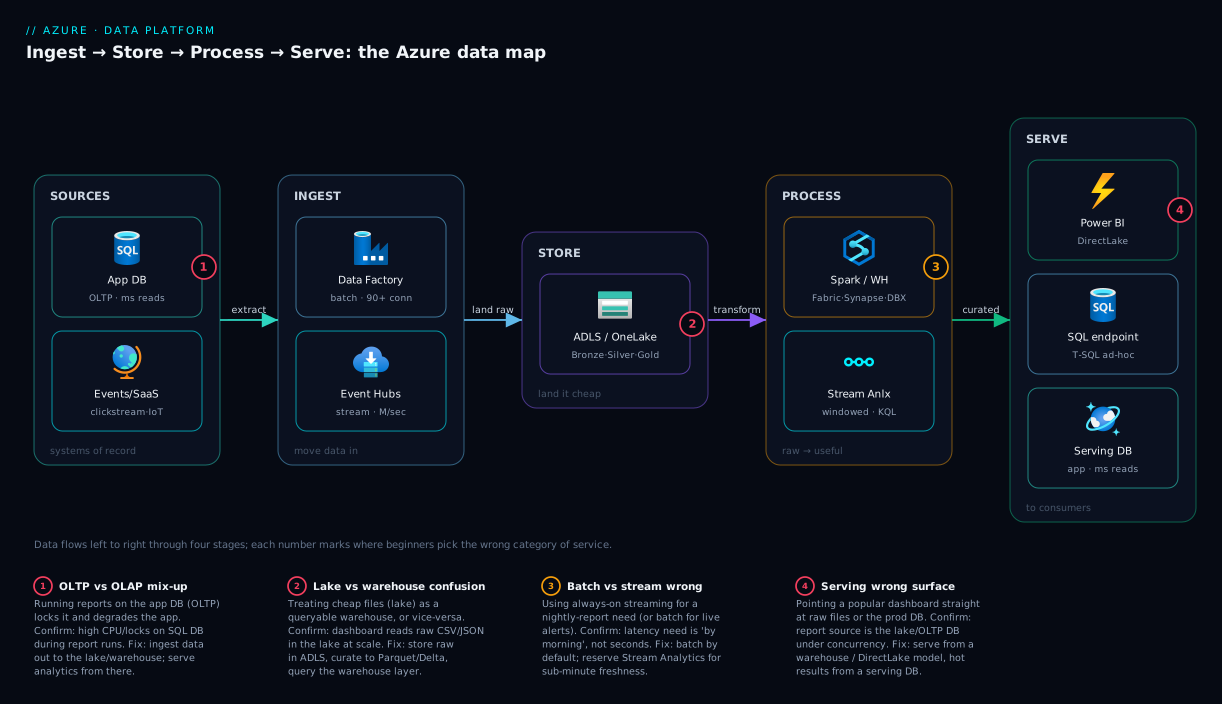
Read the diagram as a sentence: sources flow into ingest, ingest lands in the lake, the lake is refined by process, and process feeds the serve surfaces each consumer needs. If you can narrate that sentence over any real architecture, you understand the landscape.
Real-world scenario
Northwind Retail, a fictional but typical mid-size online retailer, ran its storefront on an Azure SQL Database and, as it grew, asked the dev team to “add a sales dashboard.” The team pointed Power BI straight at the production SQL Database and wrote a few aggregate queries over the Orders and OrderLines tables. It worked beautifully in the demo.
Then Black Friday arrived. As order volume spiked, the dashboard queries — full scans aggregating millions of rows — collided with live checkout writes on the same database. Lock contention and CPU saturation slowed checkout to a crawl; customers saw timeouts at the worst possible moment. The team had committed the cardinal sin: running an OLAP workload (scan-and-aggregate reporting) against an OLTP system (the live transactional store). Scaling the database up bought a little headroom and a much bigger bill, but the architecture was wrong, not just under-sized.
The fix mapped directly onto the four-stage model. They added an ingest step — a nightly Data Factory pipeline, plus an Event Hubs stream of order events for near-real-time tiles — that copied data out of the production database into a store layer: an ADLS Gen2 lake in medallion layers. A process step transformed Bronze raw orders into a curated Gold sales model. Already heavy on Power BI and wanting one integrated platform with minimal operations, they chose Microsoft Fabric: OneLake held the data, a Fabric Warehouse modelled Gold, and Power BI with DirectLake served the dashboard — now reading a dedicated analytical surface, completely isolated from checkout.
The results were what the model predicts. Checkout latency returned to baseline and held through the next peak, because reporting no longer touched the transactional database. The dashboard got faster under load, because a columnar warehouse is built to scan. And the bill went down versus the over-scaled SQL Database, because the heavy analytical compute moved onto a right-sized Fabric capacity the team could pause outside business hours. The lesson on the whiteboard: transactional and analytical are different jobs; give each its own home. Knowing the four-stage map on day one would have skipped the Black Friday incident entirely.
Advantages and disadvantages
The biggest architectural decision is whether to adopt a unified platform (Fabric) or to compose best-of-breed services (e.g. Databricks for processing + ADLS + Power BI). Here is the honest trade-off:
| Unified platform (Fabric) | Composed best-of-breed | |
|---|---|---|
| Advantages | One bill, one copy of data (OneLake), fastest to stand up, least integration work, native Power BI | Pick the strongest tool per stage, avoid single-vendor lock-in, deepest capability (e.g. Databricks Spark) |
| Disadvantages | Less depth than specialist tools in each stage, newer/less battle-tested in places, capacity sizing is its own skill | More integration glue, multiple bills and SKUs, more services to operate and secure, steeper learning curve |
The unified platform wins for smaller and BI-centric teams, organisations already on Microsoft 365 and Power BI, and anyone valuing time-to-first-dashboard over squeezing maximum performance from each layer — one team owns ingest-to-dashboard without stitching five products together. Best-of-breed wins for large data-engineering organisations with heavy Spark/ML workloads, multi-cloud strategies, deep existing Databricks investment, and workloads where one stage (usually processing) is demanding enough that the specialist engine’s performance justifies the integration cost.
For most beginners and mid-size teams, the unified platform is the right starting bet — you can introduce a specialist engine later for a specific heavy workload, since all three read the same open Delta files in the lake.
Hands-on lab
This lab stands up the cheapest possible store + serve slice — a Data Lake holding a file, queried by serverless SQL, with no provisioned compute. It is free-tier-friendly (a tiny file costs effectively nothing; serverless SQL bills per data scanned — a few KB here). Everything is az CLI plus one Bicep file, torn down at the end.
Step 1 — Set variables and create a resource group.
RG=rg-datalab
LOC=eastus
SA=datalab$RANDOM           # storage account names are globally unique, lowercase
az group create --name $RG --location $LOC
Step 2 — Create an ADLS Gen2 storage account (the data lake). The defining flag is --enable-hierarchical-namespace true, which turns a plain blob account into a Data Lake Gen2 account with real folders.
az storage account create \
  --name $SA --resource-group $RG --location $LOC \
  --sku Standard_LRS --kind StorageV2 \
  --enable-hierarchical-namespace true
The same in Bicep (the isHnsEnabled property is the lake switch):
param location string = resourceGroup().location
param storageName string

resource lake 'Microsoft.Storage/storageAccounts@2023-05-01' = {
  name: storageName
  location: location
  sku: { name: 'Standard_LRS' }
  kind: 'StorageV2'
  properties: {
    isHnsEnabled: true           // hierarchical namespace = ADLS Gen2
    minimumTlsVersion: 'TLS1_2'
    allowBlobPublicAccess: false
  }
}
Step 3 — Create a filesystem (container) and upload a tiny CSV as your “raw” data.
# Create the lake filesystem (the top-level container)
az storage fs create --name raw --account-name $SA --auth-mode login

# Make a 3-row sample file and upload it to the bronze folder
printf 'id,region,amount\n1,APAC,120\n2,EMEA,90\n3,APAC,210\n' > sales.csv
az storage fs file upload \
  --file-system raw --account-name $SA --auth-mode login \
  --source sales.csv --path bronze/sales.csv
Step 4 — Understand the serve step (serverless SQL over the lake). The cheapest analytical query surface is Synapse serverless SQL (or the Fabric SQL endpoint), which runs T-SQL directly over files in the lake with no data loaded and no cluster running — you pay only per data scanned. Once a Synapse workspace is attached to this lake, the query is simply:
-- Serverless SQL: query the CSV in the lake directly, no import, pay-per-scan
SELECT region, SUM(amount) AS total
FROM OPENROWSET(
    BULK 'https://<your-account>.dfs.core.windows.net/raw/bronze/sales.csv',
    FORMAT = 'CSV', PARSER_VERSION = '2.0', HEADER_ROW = TRUE
) AS rows
GROUP BY region;
-- Expected:  APAC 330  |  EMEA 90
That query is the whole landscape in miniature: data stored as a cheap file in the lake, processed/served by a serverless engine that scans it on demand, with zero idle cost — no warehouse or Spark cluster provisioned to get an answer.
Step 5 — Tear down so nothing bills overnight.
az group delete --name $RG --yes --no-wait
To go further, the same lake can be attached to a Microsoft Fabric trial capacity and queried by Power BI with DirectLake — but the slice above already proves you understand store-and-serve without spending anything meaningful.
Common mistakes & troubleshooting
These are the failures beginners actually hit when they first build on the Azure data landscape — each as symptom → root cause → how to confirm → fix.
| # | Symptom | Root cause | How to confirm | Fix |
|---|---|---|---|---|
| 1 | App slows to a crawl when reports run | OLAP queries on the OLTP database | High CPU/locks on SQL DB during report runs (sys.dm_exec_requests) |
Move analytics off; ingest to a lake/warehouse, serve from there |
| 2 | Surprise bill from a dedicated pool | Provisioned compute left running while idle | Cost analysis shows flat hourly charge with no queries | Pause/scale the pool; use serverless for spiky work |
| 3 | “Cannot create file” on the storage account | Hierarchical namespace not enabled — it’s a blob account, not a lake | az storage account show ... --query isHnsEnabled returns false |
Recreate with --enable-hierarchical-namespace true (can’t toggle later) |
| 4 | Dashboard is slow with many users | Power BI pointed straight at raw lake files or the app DB | Report source is the lake/OLTP DB, not a warehouse/model | Serve from a warehouse / DirectLake semantic model |
| 5 | Streaming pipeline costs far more than expected | Used streaming where a nightly batch would do | Latency requirement is “by morning,” not seconds | Replace Stream Analytics with a Data Factory batch schedule |
| 6 | Access denied querying the lake from SQL | Identity lacks Storage Blob Data Reader on the lake | az role assignment list shows no data-plane role |
Grant Storage Blob Data Reader; data-plane RBAC ≠ control-plane |
| 7 | “It works in dev, fails at scale” on serverless SQL | Scanning huge uncompressed CSV/JSON repeatedly | Bytes-processed metric is large per query | Convert to Parquet; partition; the engine scans far less |
| 8 | Two teams report different numbers | Multiple copies of the data drifted apart | Same metric sourced from different exports | Single copy in OneLake/lake; everyone reads it (no exports) |
| 9 | Chose the wrong platform, now stuck | Picked Fabric/Synapse/Databricks before knowing the workload | The engine doesn’t match team skills (T-SQL team on Spark, etc.) | Re-evaluate against the comparison table; data is portable (Delta) |
| 10 | Cosmos DB query for a report is slow/expensive | Ran an analytical scan on a key-value OLTP store | High RU/s burn on a cross-partition aggregate | Use the OLAP layer for reports; Cosmos for point reads |
The meta-lesson across all ten: nearly every “data platform problem” a beginner hits is a category error — using a store/engine from one stage to do another stage’s job. Re-read the four-stage model and the row usually fixes itself.
Best practices
- Separate transactional from analytical, always. Never run reports against the production app database. Ingest data out to a lake/warehouse and serve analytics from there — this single rule prevents the most common production incident in this space.
- Start with the lake, then add the warehouse. Land raw data cheaply in ADLS Gen2 / OneLake first (you can always reprocess it), and build the curated warehouse layer on top. Raw data you didn’t keep is gone forever.
- Adopt the medallion convention (Bronze → Silver → Gold) even on day one. It gives every engineer a shared word for “how clean is this data” and keeps raw, conformed, and business-ready data separate.
- Prefer serverless/consumption until volume is steady and high. Pay-per-query keeps idle cost at zero; only move to provisioned/dedicated when sustained usage makes the flat rate cheaper.
- Store curated data as Parquet/Delta, not CSV/JSON. Columnar compressed formats cut scan volume (and therefore cost and latency) by an order of magnitude on analytical queries.
- Keep one copy of the data. With OneLake (or a single lake), every engine reads the same files — no exports, no drift, no “which number is right” arguments.
- Choose the platform from the workload and the team, not the brochure. Use the Fabric/Synapse/Databricks table: integrated + BI-centric → Fabric; heavy Spark/ML → Databricks; existing estate → Synapse.
- Batch by default; stream only when the business needs seconds. Streaming is harder and always-on costly; reach for it only when sub-minute freshness is a real requirement.
- Govern from the start with Microsoft Purview and RBAC. Catalog, lineage, and least-privilege are far cheaper to add before data sprawls than after.
- Pause what you can. Dedicated pools and Fabric capacities can be paused; schedule them off outside business hours to stop paying for idle compute.
Security notes
The data landscape concentrates an organisation’s most sensitive asset in one place, so identity and isolation matter more here than almost anywhere else. The non-negotiables for a beginner:
- Use Entra ID identities, not keys. Authenticate pipelines and engines to storage with managed identities and Entra ID, not storage account keys or SAS tokens embedded in config. A leaked key is a full breach of the lake.
- Understand data-plane vs control-plane RBAC. Creating a storage account (control plane,
Owner/Contributor) does not grant permission to read the data inside it (data plane, Storage Blob Data Reader/Contributor). The mistake-table row #6 is this exact trap — you must grant the data-plane role explicitly. - Keep traffic off the public internet. Use Private Endpoints to reach storage, SQL, and analytics over the Azure backbone instead of public endpoints — see Azure Private Endpoint vs Service Endpoint: Secure PaaS Access for the mechanics.
- Encrypt and isolate by default. Data is encrypted at rest automatically; enforce TLS 1.2+ in transit (
minimumTlsVersion), disable public blob access, and consider customer-managed keys for regulated data. Store secrets in Azure Key Vault: Secrets, Keys and Certificates Done Right and reference them, never inline. - Govern and classify. Microsoft Purview scans the estate to catalog data, track lineage, and flag sensitive columns (PII), so you know what you hold and where before an auditor asks.
- Apply least privilege per layer. Analysts get read on the Gold serve layer, not write on Bronze; engineers get the lake, not the production OLTP store. Scope roles to the smallest container/path that works.
Cost & sizing
The bill in the data landscape is driven by three things: storage volume (cheap), compute time/scanned data (the big lever), and data movement/egress (often overlooked). The dominant rule is that idle provisioned compute, not storage, is what blows budgets.
| Cost driver | What you pay for | Rough scale | How to control it |
|---|---|---|---|
| Lake storage (ADLS Gen2) | Per GB-month stored | ~₹1.5–2 / GB-month (LRS hot) | Cheap; use cool/archive tiers for cold data |
| Serverless SQL | Per TB of data scanned | ~₹430 (~$5) per TB scanned | Parquet + partitioning cuts bytes scanned drastically |
| Spark / dedicated compute | Per node-hour while running | Significant; flat when on | Pause when idle; right-size cluster; autoscale |
| Fabric capacity (F SKU) | Per capacity unit, hourly | Tiered by F2…F64+ | Pause outside hours; start small (F2/F4) |
| Streaming (Event Hubs / Stream Analytics) | Throughput units / streaming units, always-on | Continuous | Only use when seconds-latency is required |
| Data egress | Per GB leaving the region | Per-GB after free allowance | Keep compute in the same region as the lake |
Sizing guidance for a beginner. Start as small and serverless as possible. For an exploratory or low-volume project, ADLS Gen2 plus serverless SQL (the lab above) can cost a few hundred rupees a month or less — you pay for tiny storage and the small amounts you scan. Graduate to a provisioned Fabric capacity or Spark cluster only when steady, heavy usage makes the flat rate worth it, and even then choose the smallest SKU (Fabric F2/F4) and pause it when idle. The single biggest cost mistake is leaving a dedicated SQL pool or Spark cluster running 24×7 for a workload that runs one hour a night — paying 24× for what you use. Azure’s free account includes storage allowances, and Microsoft Fabric offers a free trial capacity for building the whole ingest-to-dashboard pipeline at no cost while you learn — the right place to start before committing budget.
Interview & exam questions
These map to DP-900 (Azure Data Fundamentals) and DP-203 (Data Engineering on Azure).
-
What are the four stages of a data pipeline, and name a service in each? Ingest (Data Factory, Event Hubs), Store (ADLS Gen2 / OneLake, SQL Database), Process (Fabric/Synapse/Databricks Spark, Stream Analytics), Serve (Power BI, SQL endpoint, Cosmos DB). The stages flow left to right and a service is placed by the job it does.
-
Explain OLTP vs OLAP and give an Azure example of each. OLTP handles many small transactional reads/writes with low latency (Azure SQL Database, Cosmos DB); OLAP scans and aggregates large volumes for analysis (Synapse/Fabric Warehouse). You never run heavy OLAP reports on an OLTP system or it degrades the app.
-
What is the difference between a data lake and a data warehouse? A data lake (ADLS Gen2) stores raw/semi-structured files cheaply with schema-on-read; a data warehouse stores curated, modelled data with schema-on-write for fast analytical SQL. A lakehouse combines both by adding a transactional table layer (Delta) over lake files.
-
What is a lakehouse, and which Azure products embody it? A lakehouse keeps data as open files in the lake but adds ACID table semantics (Delta Lake) so you get warehouse-like SQL on lake-cheap storage in one place. Microsoft Fabric and Azure Databricks are the two primary lakehouse platforms on Azure.
-
When would you choose streaming over batch processing? When the business needs sub-minute (often sub-second) freshness — live dashboards, fraud detection, real-time alerting. If “by tomorrow morning” is acceptable, batch is cheaper, simpler, and the correct choice.
-
What is OneLake and why does it matter? OneLake is Fabric’s single, tenant-wide data lake — “OneDrive for data” — automatically provisioned so every Fabric workload reads and writes one copy of the data without exporting. It eliminates data duplication and drift across engines.
-
Compare Microsoft Fabric, Synapse, and Databricks at a high level. Fabric is a unified SaaS platform spanning all stages with native Power BI (Microsoft’s strategic direction); Synapse is the previous-generation integrated PaaS now largely superseded by Fabric; Databricks is the best-of-breed Spark/lakehouse platform for heavy code-first engineering and ML.
-
Which service ingests millions of events per second, and which orchestrates scheduled batch copies? Event Hubs ingests high-volume streaming events; Azure Data Factory (or Fabric Data Factory) orchestrates scheduled, connector-based batch copies and transformations.
-
What does the medallion architecture describe? A convention of layering data as Bronze (raw, as-ingested), Silver (cleaned and conformed) and Gold (aggregated, business-ready), usually as Delta tables in the lake. It is a naming/organisation pattern, not a product.
-
Why is decoupling storage from compute important? Because data sits cheaply in the lake while multiple engines (Spark, SQL, Power BI) query the same files independently — you scale or change the engine without moving the data, and you pay for storage and compute separately.
-
What is the difference between consumption and provisioned billing, with an example? Consumption/serverless charges per query or data scanned and costs nothing when idle (Synapse serverless SQL); provisioned/dedicated reserves capacity billed continuously, cheaper at steady high volume (a dedicated SQL pool, a Fabric capacity). Idle provisioned compute is the top cause of surprise bills.
-
A team needs a sales dashboard but reports are slowing the app. What’s the architecture? Ingest data out of the OLTP database (Data Factory/Event Hubs) into a lake (ADLS/OneLake), process it into a curated Gold model, and serve the dashboard from a warehouse / Power BI DirectLake — isolating analytics from the transactional system entirely.
Quick check
- In which stage does Event Hubs primarily operate, and which does Power BI serve?
- You need millisecond key-lookups for a live app and also nightly aggregate reporting over the same data. Which store serves each need?
- Your storage account throws “cannot create file” when used as a lake. What single property is almost certainly wrong?
- A T-SQL-centric team with an existing Synapse deployment wants minimal disruption. Which of the three platforms do you steer them toward, and which would you pick for a greenfield BI-centric project?
- Name the columnar file format you should use for curated analytical data, and one reason why.
Answers
- Event Hubs is in the ingest stage (streaming front door); Power BI is in the serve stage (dashboards/BI).
- Serve the live app’s millisecond reads from an OLTP store (Cosmos DB or Azure SQL Database); serve the reporting from an OLAP layer (a Fabric/Synapse Warehouse) fed by ingesting the data out of the OLTP store. Never run the reports on the OLTP system directly.
- Hierarchical namespace is not enabled (
isHnsEnabled/--enable-hierarchical-namespaceisfalse) — it is a plain blob account, not ADLS Gen2, and you cannot toggle it after creation. - Keep the existing team on Synapse (least disruption); choose Microsoft Fabric for the greenfield BI-centric project (unified SaaS, native Power BI, Microsoft’s strategic direction).
- Parquet (or Delta, which is Parquet-based) — it is columnar and compressed, so analytical queries scan far less data, cutting both latency and cost dramatically versus CSV/JSON.
Glossary
- Ingest / Store / Process / Serve — the four stages of a data pipeline; every Azure data service belongs to one or two of them.
- OLTP (Online Transaction Processing) — a store tuned for many small, low-latency reads/writes; the application’s database (Azure SQL, Cosmos DB).
- OLAP (Online Analytical Processing) — a store tuned to scan and aggregate large volumes for analysis; the reporting engine (a warehouse).
- Data lake (ADLS Gen2) — a storage account with hierarchical namespace enabled; cheap bulk storage for raw/semi-structured files with schema-on-read.
- Data warehouse — a modelled, indexed, SQL-queryable analytical store with schema-on-write; the Fabric/Synapse Warehouse.
- Lakehouse — an architecture that adds ACID table semantics (Delta) over open lake files, combining lake economics with warehouse SQL.
- Delta Lake / Parquet — the open, columnar table/file formats backing a lakehouse; columnar = cheaper, faster analytical scans.
- Medallion architecture — the Bronze (raw) → Silver (cleaned) → Gold (business-ready) layering convention for curating data in the lake.
- Batch processing — transforming a bounded chunk on a schedule; cheaper, simpler, minutes-to-hours latency.
- Stream processing — processing each event continuously as it arrives; seconds latency, always-on cost (Stream Analytics, Real-Time Intelligence).
- OneLake — Microsoft Fabric’s single, tenant-wide data lake; one copy of data every Fabric engine can read (“OneDrive for data”).
- Microsoft Fabric — a unified SaaS analytics platform spanning all four stages with one capacity-based bill and native Power BI.
- Azure Synapse Analytics — the previous-generation integrated analytics PaaS (SQL pools, Spark pools, pipelines), largely superseded by Fabric for new work.
- Azure Databricks — the first-party best-of-breed Spark and lakehouse platform for heavy code-first data engineering and ML.
- Consumption / Provisioned — the two billing shapes: pay-per-use with zero idle cost, versus reserved capacity billed continuously.
Next steps
- Go deep on the storage foundation every pipeline sits on with Azure Storage Account Fundamentals: Blobs, Files, Queues and Tables.
- Pick the right transactional database with Azure SQL Database Purchasing Models: DTU vs vCore and How to Pick Without Overpaying and Choosing a Cosmos DB API: NoSQL vs MongoDB vs Cassandra vs Gremlin vs Table Decoded.
- Learn event-driven ingest hands-on with Azure Functions Triggers and Bindings for Beginners: Connecting Code to Events Without Boilerplate.
- When analytics feeds machine learning, continue with Anatomy of an Azure ML Workspace: Compute Targets, Datastores, Environments, and the Job Lifecycle.
- Lock down the platform’s network path with Azure Private Endpoint vs Service Endpoint: Secure PaaS Access.