You click Create a Cosmos DB account in the Azure portal, and the very first screen stops you cold: it asks you to choose an API — Azure Cosmos DB for NoSQL, for MongoDB, for Apache Cassandra, for Apache Gremlin, for Table. There is no obviously-right default, the choice is permanent for that account, and nothing on screen explains what “API” even means here. Most people pick NoSQL because it is first, or MongoDB because they have heard of it — and discover months later they chose wrong. This article exists so you never make that mistake.
The key idea the portal never tells you: all five APIs run on the same engine. Underneath, Cosmos DB is one globally distributed database with one storage model, one billing model (request units), one scaling model (partition keys), and one set of consistency guarantees. The “API” is just the language and wire protocol you talk to it in. NoSQL speaks Cosmos DB’s own SQL-like dialect. MongoDB makes the engine pretend to be a MongoDB server so existing MongoDB code connects unchanged. Cassandra pretends to be a Cassandra cluster. Gremlin turns it into a graph database. Table makes it a drop-in upgrade for Azure Table storage. Same engine, five front doors.
By the end you will understand what an API choice buys you, why it is driven almost entirely by your data shape and the drivers you already have, and how to read the decision in under a minute. You will know why a new app should almost always pick NoSQL, why a migration should keep the API matching its current database, and why Gremlin and Table exist for narrow but real reasons. We stay at a beginner’s altitude — concrete, but aimed at a confident first choice, not a tour of every knob.
What problem this solves
The pain is simple and expensive: you cannot change a Cosmos DB account’s API after creation. Build on Cassandra, later realise you wanted graph traversals, and there is no toggle — you create a new account, migrate every byte, and rewrite every query. Teams routinely lose days to this. It is one of the few genuinely irreversible decisions in Azure, made on screen one before you write a line of code.
The wrong choice comes from a category error: treating “NoSQL vs MongoDB vs Cassandra” as competing databases judged on performance, like Postgres vs MySQL. They are not — they are five compatibility surfaces over one database. The right question is never “which is fastest?” (they share an engine) but “which protocol do my data and my existing code already speak?” Get that right and the decision is almost mechanical.
Who hits this: every team standing up their first Cosmos DB account. Greenfield apps want NoSQL; teams lifting a MongoDB or Cassandra app into Azure want the matching API so drivers keep working; teams outgrowing Azure Table storage want Table; teams modelling relationships (fraud rings, social graphs, recommendations) want Gremlin. Choosing badly is not catastrophic on day one — it is catastrophic on day ninety, when the data is large and the rewrite is real.
Learning objectives
By the end of this article you can:
- Explain in one sentence what “API” means for Azure Cosmos DB and why all five share the same engine, billing, and scaling model.
- Pick the correct API for a new app versus a migration, and justify the choice from data shape and existing drivers — not from a (non-existent) performance ranking.
- Describe the data model each API exposes: documents (NoSQL, MongoDB), wide-column rows (Cassandra), graph vertices and edges (Gremlin), and key-value entities (Table).
- Define the three concepts identical across every API: the partition key, the request unit (RU/s), and the five consistency levels.
- Distinguish Cosmos DB for MongoDB (RU) from Cosmos DB for MongoDB (vCore) and know when each fits.
- Create an account on a chosen API with
azand Bicep, and read the few account-creation flags that actually matter. - Recognise the most common API-choice mistakes (and how to avoid the permanent ones).
Prerequisites & where this fits
You should be comfortable with a database holding records you query, and know what JSON looks like — an object with named fields like {"id": "42", "city": "Pune"}. Helpful but not required: you have used some database (SQL or NoSQL), run a command in Azure Cloud Shell, and know cloud resources cost money while they exist. No prior Cosmos DB knowledge is assumed — that is the point.
This sits at the very front of the Azure data track: the “which front door do I walk through” decision. It assumes the basics of how Azure organises resources, in Azure Resource Hierarchy Explained: Subscriptions, Resource Groups and Resources, since an account lives in a resource group. It pairs with Azure Storage Account Fundamentals: Blobs, Files, Queues and Tables, as the Table API is the global-scale sibling of Table storage. Once you have an API, the connection string belongs in Azure Key Vault: Secrets, Keys and Certificates Done Right, and event-driven apps that read and write Cosmos DB are covered in Azure Functions Triggers and Bindings for Beginners: Connecting Code to Events Without Boilerplate.
Here is where the API decision sits among the other big Cosmos DB choices — what is permanent and what you can change later:
| Decision | When you make it | Reversible? | Covered here |
|---|---|---|---|
| Which API (NoSQL / Mongo / Cassandra / Gremlin / Table) | Account creation, screen 1 | No — recreate + migrate | Yes (this is the article) |
| Capacity mode (provisioned RU/s vs serverless) | Account creation | No — recreate to switch | Briefly, in Cost |
| Regions (single vs multi-region) | Anytime | Yes — add/remove regions | Briefly |
| Consistency level | Anytime (default), per-request override | Yes | Core concepts |
| Partition key (per container) | Container creation | No — recreate the container | Core concepts |
| Throughput (RU/s value) | Anytime | Yes — scale up/down | Cost |
Core concepts
Four mental models unlock everything else. Internalise them and the API choice — and most of Cosmos DB — stops being mysterious.
One engine, five languages. Cosmos DB is a single, fully managed, globally distributed database. The API decides the wire protocol, the query language (NoSQL’s SQL dialect, MongoDB query documents, CQL, Gremlin traversals, or Table’s OData filters), and the SDK/drivers. It does not change the storage engine, durability, global replication, billing unit, or scaling. Picture a building with five labelled entrances: the door changes the sign over your head and the language the receptionist speaks, but you end up in the same building.
The partition key is how it scales — the same everywhere. Every container spreads its data across many physical partitions. You choose a partition key — a field like /customerId or /region — and its value decides which partition each item lives in. Same value, same partition; different values spread out. A good key has many distinct values and spreads storage and traffic evenly; a bad one (few values, or one “hot” value) creates a bottleneck no API choice can fix. It is identical whether called a partition key (NoSQL), shard key (MongoDB), or primary key (Cassandra).
You pay in Request Units (RU/s), not queries or CPU. Cosmos DB meters every operation in request units — an abstract currency blending CPU, memory, and IOPS. A point read of a small item costs ~1 RU; a scanning query costs more; a write costs more than a read. You either provision RU/s (minimum 400 per container) and pay for that capacity always, or pick serverless and pay per request. This is identical across all APIs — a MongoDB find() and an equivalent NoSQL SELECT cost roughly the same RUs. (The exception: MongoDB vCore, which bills by cluster size, covered below.)
Consistency is a five-level dial, the same on every API. Because data is replicated, you choose how fresh a read must be, trading latency and availability against staleness. Five levels — Strong, Bounded Staleness, Session, Consistent Prefix, Eventual — from strictest (latest write, highest cost) to loosest (fastest, may lag). The default is Session, right for most apps; set a default on the account and relax it per request. All APIs expose the same five — it is an engine feature.
The vocabulary in one table
Pin down every moving part before the deep sections — the glossary repeats these for lookup:
| Concept | One-line definition | Same across all APIs? | Why it matters |
|---|---|---|---|
| API | The protocol + query language you talk to | No — this is the choice | Permanent per account |
| Account | The top-level Cosmos DB resource | Yes | Holds the API choice + regions |
| Database | A namespace inside an account | Yes (called “keyspace” in Cassandra) | Groups containers |
| Container | Where items live and scale | Yes (collection / table / graph) | Has the partition key + RU/s |
| Item | One record | Yes (document / row / vertex / entity) | The thing you read and write |
| Partition key | Field that spreads data across partitions | Yes (shard key / primary key) | Determines scale + hot spots |
| Request Unit (RU/s) | The throughput currency | Yes (except Mongo vCore) | Determines throughput + cost |
| Consistency level | How fresh a read must be | Yes (5 levels) | Latency vs freshness trade-off |
What “API” really means here — the one-engine model
Once this clicks, the choice is easy. So let us be precise about what is shared and what differs.
What every API shares (the engine): global distribution and multi-region writes, automatic indexing, request-unit billing, partition-key scaling, the five consistency levels, 99.999% multi-region read availability, single-digit-ms latency targets, automatic backups, and encryption at rest. If a feature belongs to the engine, you get it on all five.
What the API decides (the front door): the wire protocol, query language, SDKs/drivers, the data model (document vs row vs graph vs key-value), and a few surface details like how indexing is expressed. The compatibility APIs (MongoDB, Cassandra, Gremlin, Table) implement a subset of the original’s features — enough that the vast majority of real apps work unchanged, but not every edge feature.
The whole picture in one grid. This table is the heart of the article — if you remember nothing else, remember this:
| API | Data model | Talk to it with | Query language | Best for |
|---|---|---|---|---|
| NoSQL (Core) | JSON documents | Cosmos DB SDKs (.NET, Java, Python, JS) | SQL-like dialect | New apps — the default, full feature set |
| MongoDB (RU) | BSON/JSON documents | Any MongoDB driver | MongoDB query language | Migrating MongoDB apps, keep RU model |
| MongoDB (vCore) | BSON/JSON documents | Any MongoDB driver | MongoDB query language | MongoDB apps wanting vCore pricing + vector search |
| Cassandra | Wide-column rows | Any Cassandra (CQL) driver | CQL | Migrating Cassandra apps, time-series at scale |
| Gremlin | Graph (vertices + edges) | Apache TinkerPop / Gremlin drivers | Gremlin traversals | Relationships: fraud, social, recommendations |
| Table | Key-value entities | Table SDKs / Azure Data Tables | OData filters | Upgrading Azure Table storage to global scale |
The decisive insight: only the NoSQL API is native. Built for Cosmos DB, it gets every new feature first, the richest SDKs, and the most complete query language. The other four are compatibility layers to bring an existing ecosystem aboard without a rewrite — and that fact resolves almost every choice.
The decision in one minute — new app vs migration
Almost every real decision falls into one of two buckets, each with a near-default answer.
Bucket 1 — building something new. No existing database, no drivers to keep. The question is purely “what shape is my data?” and the answer is almost always NoSQL — native, fully featured, and documents fit the overwhelming majority of app data. The only new-build exception is a genuine graph workload (constantly asking “who is connected to whom, how many hops away”), where Gremlin earns its place.
Bucket 2 — migrating an existing app. You already have a MongoDB, Cassandra, or Table-storage app with working drivers and queries. The goal is minimum rewrite: match the API to your current database. MongoDB → MongoDB API; Cassandra → Cassandra API; Table storage needing global scale → Table API. You are choosing a compatibility shim to reach Azure’s managed engine without touching application logic.
This decision table covers the realistic cases end to end:
| Your situation | Pick this API | Why |
|---|---|---|
| Brand-new app, document/JSON data | NoSQL | Native, full features, best SDKs and tooling |
| Brand-new app, heavy relationship/graph queries | Gremlin | Purpose-built for traversals across edges |
| Migrating an existing MongoDB app | MongoDB (RU or vCore) | Drivers + queries work unchanged |
| Migrating an existing Cassandra / DataStax app | Cassandra | CQL drivers + tables work unchanged |
| Outgrowing Azure Table storage, need global scale | Table | Same API surface, drops in over Table storage |
| Already standardised on MongoDB skills/tooling org-wide | MongoDB | Reuse team knowledge and ecosystem |
| Unsure and starting fresh | NoSQL | The safe default — most features, most help online |
And the inverse — where a tempting choice is wrong:
| Tempting (wrong) choice | The trap | Better choice |
|---|---|---|
| New app on MongoDB API “because it’s popular” | You inherit a compatibility subset and miss native features | NoSQL unless you reuse MongoDB code/skills |
| Graph data forced into NoSQL documents | Multi-hop “friends of friends” queries get painful | Gremlin |
| Relational data with many JOINs into any Cosmos API | Cosmos has no cross-document JOINs like SQL Server | Azure SQL Database instead |
| Picking Table for a brand-new rich app | Key-value only; no rich queries or relationships | NoSQL |
| Switching API later to “fix” a model mismatch | The API is permanent — no in-place switch exists | Choose correctly up front |
Meet the five data models
You cannot choose a data shape you cannot picture. Here is one record — a customer order — expressed five ways.
NoSQL and MongoDB — documents
Both store documents: self-contained JSON-like objects that nest arrays and sub-objects, keeping related data together instead of across tables. An order with its line items is one document:
{
  "id": "order-1001",
  "customerId": "cust-42",
  "status": "shipped",
  "total": 149.50,
  "items": [
    { "sku": "KB-01", "qty": 1, "price": 99.00 },
    { "sku": "MS-07", "qty": 1, "price": 50.50 }
  ]
}
NoSQL queries it with a SQL-like language; MongoDB queries the identical shape with query documents. Same model, two languages:
-- NoSQL (Core) API
SELECT * FROM c WHERE c.customerId = "cust-42" AND c.status = "shipped"
// MongoDB API — same result, MongoDB driver
db.orders.find({ customerId: "cust-42", status: "shipped" })
Cassandra — wide-column rows
The Cassandra API stores rows in fixed-schema tables, like a relational table but optimised for huge scale and a partition-key-first design. You declare columns up front and query with CQL — SQL-like but deliberately restricted, querying by partition key, not arbitrary JOINs:
-- CQL on the Cassandra API
CREATE TABLE orders (
  customerid text,
  orderid text,
  status text,
  total decimal,
  PRIMARY KEY (customerid, orderid)
);
SELECT * FROM orders WHERE customerid = 'cust-42';
This shines for time-series and append-heavy data (sensor readings, event logs) — write a lot, read by a known key.
Gremlin — graph vertices and edges
The Gremlin API stores a graph: vertices (things — a customer, a product) joined by edges (relationships — “bought”, “rated”). You traverse instead of querying tables. The power is multi-hop questions that are awkward elsewhere:
// Gremlin: products bought by customers who also bought 'KB-01'
g.V().has('product','sku','KB-01').in('bought').out('bought').values('sku').dedup()
That line walks: product → who bought it → what else they bought. With JOINs that gets exponentially uglier per hop; in a graph it is one traversal.
Table — key-value entities
The Table API stores entities: flat property sets keyed by a PartitionKey + RowKey. No nesting, no relationships, no rich query language — just fast key-value lookups, exactly like Azure Table storage but globally distributed:
# Azure Data Tables SDK on the Table API
entity = {
    "PartitionKey": "cust-42",
    "RowKey": "order-1001",
    "Status": "shipped",
    "Total": 149.50,
}
table_client.create_entity(entity)
Use it when your data really is simple key-value and your reason for Cosmos DB is global distribution or higher scale than Table storage.
A side-by-side of the five models:
| API | One record is a… | Schema | Nesting / arrays | Relationships | Query power |
|---|---|---|---|---|---|
| NoSQL | JSON document | Flexible | Yes | Embed or reference | Rich (SQL-like) |
| MongoDB | BSON document | Flexible | Yes | Embed or reference | Rich (Mongo queries) |
| Cassandra | Wide-column row | Fixed (declared) | Limited | By partition design | Restricted (CQL) |
| Gremlin | Vertex / edge | Flexible | Properties | First-class (edges) | Traversals |
| Table | Key-value entity | Flexible (flat) | No | None | Minimal (key + filter) |
MongoDB on Cosmos DB: RU vs vCore
One spot trips up nearly everyone: Azure offers two MongoDB-compatible options — genuinely different products, not two names for one thing.
Cosmos DB for MongoDB (RU) is the MongoDB wire protocol over the Cosmos DB engine: Cosmos DB’s billing (request units), partition-key scaling, global distribution, and five consistency levels, wrapped so MongoDB drivers connect. It is “Cosmos DB that speaks MongoDB.”
Cosmos DB for MongoDB (vCore) is a different architecture: a managed MongoDB-compatible service billed by cluster size (vCores + storage), designed to feel like a real MongoDB cluster and suit large, steady workloads. It added native vector search for AI/embedding scenarios — a common reason teams pick it for retrieval-augmented apps.
Pick between them like this:
| Question | RU model | vCore model |
|---|---|---|
| Billing | Per request unit (RU/s) or serverless | Per cluster (vCores + storage) |
| Scaling | Partition key + RU/s | Cluster tier (scale up/out the cluster) |
| Best for | Spiky/variable load, small-to-mid, instant scale | Large steady workloads, predictable cost |
| Vector search for AI | Limited | Yes (native vector indexing) |
| Feels most like | Cosmos DB | A managed MongoDB cluster |
| Free-tier-friendly entry | Yes (serverless / free tier) | Free/low-cost tier available |
Migrating a small or bursty MongoDB app and want the elastic model? Take RU. Running a large, steady workload or building AI/vector features? Evaluate vCore. Both are valid — tuned for different shapes of load.
Architecture at a glance
Picture a request flowing left to right. Your app holds a connection string in Key Vault and uses whichever SDK or driver matches your API — the Cosmos DB SDK for NoSQL, a stock MongoDB driver, a CQL driver for Cassandra. That driver speaks the API’s wire protocol to a single account endpoint. The protocol is the only thing that differs per app; the endpoint fronts the same engine for everyone.
Behind the endpoint, every API converges on the shared engine. Your request lands on a container the engine has transparently split into physical partitions keyed by your partition key. The engine charges the operation in request units, applies your consistency level, and — if you configured more than one region — replicates for low latency and high availability. The diagram shows the five front doors collapsing into one engine, with numbered badges on what beginners get wrong: the API (permanent), the partition key (permanent per container), under-provisioning RU/s (throttling), and auth.
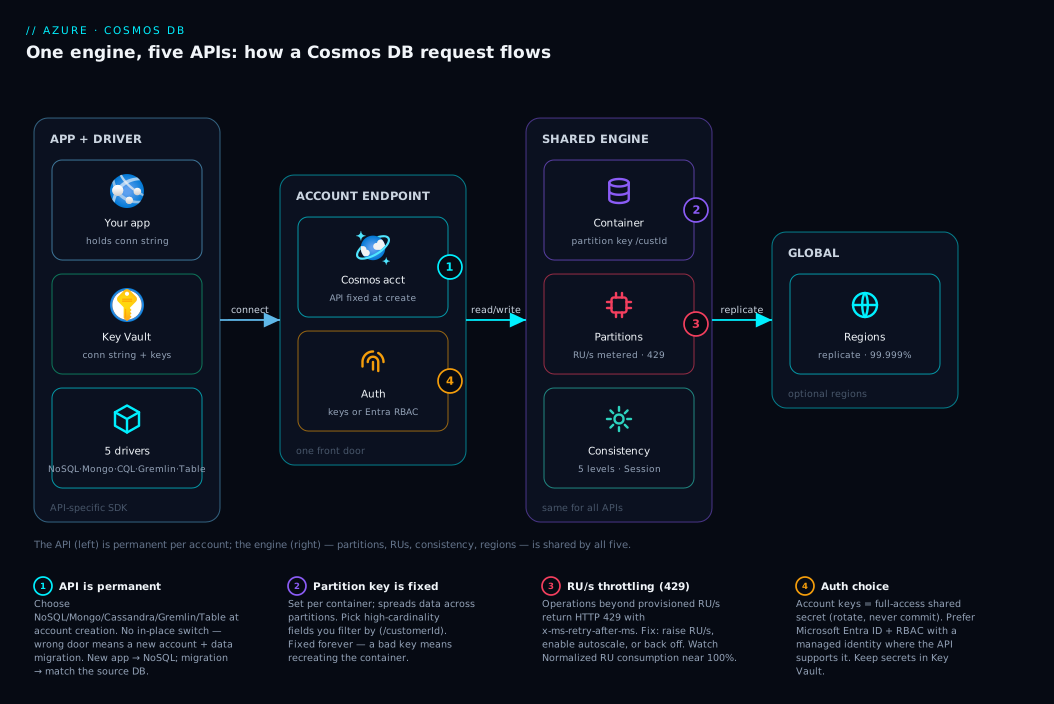
The shape to take away: the left (drivers and protocols) is what you choose at creation and cannot change; the middle and right (partitions, RUs, consistency, regions) behave identically whichever door you walked through.
Real-world scenario
Northwind Retail, a fictional but typical mid-size online retailer in Pune, runs three teams that each hit the API decision differently in one quarter — a clean illustration of why there is no single “best” API.
The catalogue team built a brand-new product-and-orders service. Greenfield, JSON-shaped data (products with nested variants, orders with embedded line items), no legacy drivers. Following the new-app rule, they chose NoSQL, set the orders partition key to /customerId (high cardinality, and most queries filter by customer, so reads stay on one cheap partition), and provisioned 400 RU/s. Total deliberation: ten minutes. Correct and boring — exactly what you want.
The recommendations team needed “customers who bought this also bought…” and “find fraud rings sharing devices and addresses.” They first forced it into NoSQL documents, and the multi-hop queries became unmanageable nested sub-queries. They stepped back, recognised a genuine graph workload, and stood up a separate account on the Gremlin API. With customers and products as vertices and “bought”/“rated” as edges, the recommendation became a one-line traversal. Their whiteboard lesson: the API is per account, so use the right tool per workload — you are allowed more than one account.
The platform team inherited a five-year-old internal analytics app on MongoDB, with dozens of pipelines and a MongoDB-fluent team. Rewriting to NoSQL meant weeks for zero user-visible benefit. They chose Cosmos DB for MongoDB (RU), pointed the existing driver at the new connection string, and connected with near-zero code change. Because the load was bursty (heavy at month-end), the RU/serverless model fit better than a fixed cluster.
The instructive failure was a fourth effort: a junior engineer prototyping notifications picked the Table API because it looked simplest. Two weeks in, the feature needed to query by status, date range, and type — rich filters Table does poorly, being key-value PartitionKey/RowKey lookups. Because the API is permanent, “fixing” it meant a new NoSQL account and a data migration. An hour with the decision tables above would have sent them straight to NoSQL. The wrong door is always paid for later, with interest.
Advantages and disadvantages
The “one engine, five APIs” design is powerful but has real trade-offs. The honest two-column view:
| Advantages | Disadvantages |
|---|---|
| One managed engine: global distribution, backups, SLAs apply to all APIs | The API choice is permanent per account — no in-place switch |
| Migrate existing Mongo/Cassandra/Table apps with near-zero code change | Compatibility APIs implement a subset of the original’s features |
| Same billing (RU/s) and scaling (partition key) to learn once | Easy to pick the wrong door if you think they “compete” on speed |
| NoSQL gets every new feature first, richest SDKs and tooling | Non-NoSQL APIs sometimes lag on the newest engine features |
| Pick the data model that fits (document, graph, wide-column, key-value) | No cross-document JOINs — not a relational replacement |
| Free tier + serverless make it cheap to start and learn | Bad partition key causes hot partitions no API choice can fix |
The advantages dominate when migrating, or when your data clearly fits one model. The disadvantages bite when teams treat the choice casually: permanence turns a five-minute decision into a multi-day migration if wrong. The takeaway: spend ten minutes choosing the right API now — there is no cheap way to change it later.
Hands-on lab
This lab creates a Cosmos DB account on the NoSQL API, adds a database and a container with a partition key, and tears it down. It is free-tier-friendly and runs entirely in Azure Cloud Shell with az.
Step 1 — set variables and create a resource group.
RG="rg-cosmos-lab"
ACCT="cosmoslab$RANDOM"   # account name must be globally unique, lowercase
LOC="centralindia"

az group create --name "$RG" --location "$LOC"
Step 2 — create the account on the NoSQL API. The API is set here and is permanent. NoSQL is the default --kind (GlobalDocumentDB); --enable-free-tier true applies the free tier if you have not used it.
az cosmosdb create \
  --name "$ACCT" \
  --resource-group "$RG" \
  --locations regionName="$LOC" failoverPriority=0 isZoneRedundant=False \
  --default-consistency-level Session \
  --enable-free-tier true
Expected output: a JSON block with "kind": "GlobalDocumentDB" (that is the NoSQL API) and provisioningState ending at Succeeded after a minute or two.
Step 3 — create a database and a container. The container gets the partition key (/customerId) and a throughput of 400 RU/s (the minimum).
az cosmosdb sql database create \
  --account-name "$ACCT" --resource-group "$RG" --name "ShopDB"

az cosmosdb sql container create \
  --account-name "$ACCT" --resource-group "$RG" \
  --database-name "ShopDB" --name "Orders" \
  --partition-key-path "/customerId" --throughput 400
Step 4 — confirm what you built and grab the keys. This shows the API kind and endpoint, and reads the primary connection string (in real apps, keep this in Key Vault, never in code).
az cosmosdb show --name "$ACCT" --resource-group "$RG" \
  --query "{api:kind, endpoint:documentEndpoint, consistency:consistencyPolicy.defaultConsistencyLevel}" -o table

az cosmosdb keys list --name "$ACCT" --resource-group "$RG" \
  --type connection-strings --query "connectionStrings[0].connectionString" -o tsv
Step 5 — the same as Bicep, for source control instead of ad-hoc commands. It declares the account (NoSQL), database, and container with the partition key:
param location string = resourceGroup().location
param accountName string

resource account 'Microsoft.DocumentDB/databaseAccounts@2024-05-15' = {
  name: accountName
  location: location
  kind: 'GlobalDocumentDB'            // NoSQL API
  properties: {
    databaseAccountOfferType: 'Standard'
    enableFreeTier: true
    consistencyPolicy: { defaultConsistencyLevel: 'Session' }
    locations: [ { locationName: location, failoverPriority: 0 } ]
  }
}

resource db 'Microsoft.DocumentDB/databaseAccounts/sqlDatabases@2024-05-15' = {
  parent: account
  name: 'ShopDB'
  properties: { resource: { id: 'ShopDB' } }
}

resource orders 'Microsoft.DocumentDB/databaseAccounts/sqlDatabases/containers@2024-05-15' = {
  parent: db
  name: 'Orders'
  properties: {
    resource: {
      id: 'Orders'
      partitionKey: { paths: [ '/customerId' ], kind: 'Hash' }
    }
    options: { throughput: 400 }
  }
}
Step 6 — tear it down so the lab costs nothing beyond a few minutes:
az group delete --name "$RG" --yes --no-wait
To create a different API, the change is a single flag at account creation — proof the doors are siblings:
| API you want | Key create flag |
|---|---|
| NoSQL | (default) --kind GlobalDocumentDB |
| MongoDB (RU) | --kind MongoDB |
| Cassandra | --capabilities EnableCassandra |
| Gremlin | --capabilities EnableGremlin |
| Table | --capabilities EnableTable |
Common mistakes & troubleshooting
No beginner article is complete without the failure modes. The detail lives in the reference table below; here is the why behind the worst three:
- Picking the API by reputation, not data shape (MongoDB “because everyone uses it” for a new app) inherits a compatibility subset for no gain — go NoSQL unless you reuse MongoDB code or skills.
- Expecting to switch APIs later is the costly one: there is no toggle and no
az ... updateforkind, so a wrong choice means a new account and a full data migration. Choose correctly up front. - A bad partition key (one hot value, like
/country = "India"for an India-only app) saturates one partition while you pay for the rest — and the key is fixed per container, so the fix is a new container with a higher-cardinality key plus a migration.
The compact reference for these and the rest:
| # | Symptom | Likely cause | Confirm | Fix |
|---|---|---|---|---|
| 1 | Wrong-feeling API after building | Chose by reputation, not data | az cosmosdb show --query kind |
Recreate on correct API + migrate |
| 2 | “How do I switch the API?” | API is permanent | No update for kind exists |
New account + migrate |
| 3 | One partition hot, rest idle | Low-cardinality partition key | Normalized RU consumption metric | New container, better key, migrate |
| 4 | Operations failing under load | RU/s too low → throttling | HTTP 429 + retry-after header | Raise RU/s / autoscale / back off |
| 5 | Queries need cross-doc JOINs | Relational data in Cosmos | Repeated JOIN needs | Denormalise, or use Azure SQL DB |
| 6 | Multi-hop queries slow/ugly | Graph data in documents | Deep nested sub-queries | Use Gremlin API |
| 7 | Leaked / over-permissive access | Key in code or config | grep repo for AccountKey= |
Key Vault + Entra ID RBAC |
Best practices
- Default to NoSQL for anything new. Deviate only for a real migration (match the source DB) or a real graph workload (Gremlin).
- Make the API a documented decision. Write down why — it is permanent and the next engineer will ask.
- Pick the partition key for cardinality and access patterns. Favour high-cardinality fields you filter by (
/customerId,/tenantId); avoid few-value or hot keys. - One account per workload, not one for everything. The API is per account, so a document app and a graph app belong in separate accounts.
- Start with autoscale or serverless unless load is steady and predictable — it guards against both 429 throttling and paying for idle capacity.
- Keep consistency at Session unless you have a specific reason; relax to Eventual per-request only where stale reads are fine.
- Store the connection string in Key Vault; prefer Entra ID auth (managed identity + RBAC) over account keys where the SDK supports it.
- Model for your queries, not normalisation — embed data you read together, reference data you update independently.
- Stay on official, recent SDKs/drivers — they implement retry-on-429 and connection reuse for you.
- Tag the account and set a budget alert so an experiment does not quietly run up RU/s charges.
Security notes
Security is identical across the APIs because it is an engine feature — easy to get right once.
Authentication. Account keys (primary/secondary) are full-access shared secrets in the connection string — convenient but coarse; rotate them, never commit them. Microsoft Entra ID with RBAC is the better path where supported (notably NoSQL): assign data-plane roles to a managed identity, so there is no secret to leak and access is least-privilege. Prefer Entra ID; fall back to keys only where required.
Network isolation. The account defaults to a public endpoint. Lock it down with a firewall (allowed IP ranges) and, for production, a private endpoint so traffic stays on the Azure backbone — the pattern in Azure Private Endpoint vs Service Endpoint: Secure PaaS Access. You can also disable public network access entirely.
Encryption and secrets. Data is encrypted at rest automatically (Microsoft-managed keys by default; customer-managed keys via Key Vault if you must control the key) and in transit over TLS. Keep the connection string in Key Vault (Azure Key Vault: Secrets, Keys and Certificates Done Right), referenced at runtime rather than baked into images.
The security checklist at a glance:
| Control | Default | Recommended for production |
|---|---|---|
| Auth | Account keys | Entra ID + RBAC (NoSQL); rotate keys otherwise |
| Network | Public endpoint | Firewall + private endpoint, disable public access |
| Encryption at rest | On (Microsoft-managed key) | On; CMK via Key Vault if required |
| Secret storage | Connection string in app config | Connection string in Key Vault |
| Transport | TLS | TLS (enforced) |
Cost & sizing
Cost is another shared place: with one exception, all APIs bill the same way. Two things drive the bill — throughput (RU/s) and storage (GB) — plus egress if you replicate across regions.
Two capacity modes. Provisioned throughput reserves RU/s (minimum 400 per container, ~100 shared) and you pay around the clock — best for steady load, and pairs with autoscale (scales between 10% and 100% of a max). Serverless reserves nothing; you pay per request — best for spiky, low, or unpredictable traffic and for learning. The mode is fixed at creation, so think about traffic shape up front.
The free tier gives the first 1000 RU/s and 25 GB free, one account per subscription — enough for small apps and all the learning here. (MongoDB vCore has its own free/low-cost tier and bills by cluster — the one exception.)
Rough figures to set expectations (always check the live Azure pricing calculator for your region):
| Setup | Rough monthly cost | Good for |
|---|---|---|
| Free tier (≤1000 RU/s, ≤25 GB) | ₹0 / $0 | Learning, small apps, demos |
| Serverless, light traffic | A few hundred ₹ / a few $ | Dev, low/spiky workloads |
| Provisioned 400 RU/s, single region | Low hundreds ₹ / ~tens of $ | Steady small production app |
| Autoscale up to 4000 RU/s, single region | Scales with usage | Variable production load |
| Multi-region (replicate) | Multiplies by region count + egress | Global apps, HA |
Beginner sizing rules: start on the free tier; outgrow it onto serverless for spiky traffic and autoscale for steady-but-variable; commit to fixed provisioned RU/s only when load is predictable enough to right-size. Watch the Normalized RU consumption metric — near 100% means you are about to be throttled. For keeping Azure spend in check generally, see Azure FinOps and Cost Management: Controlling Cloud Spend at Scale.
Interview & exam questions
These map to AZ-900 (Azure Fundamentals) and DP-900 (Azure Data Fundamentals), where the API choice is a recurring topic.
1. What does the “API” in Azure Cosmos DB select? The wire protocol, query language, SDKs/drivers, and data model you use to talk to the database. All APIs share one globally distributed engine with the same billing and scaling — the API is the front door, not a different database.
2. Can you change an account’s API after creation? No — it is fixed at creation. To move to a different API you create a new account and migrate the data and queries.
3. Which API should a brand-new document app choose, and why? NoSQL (Core) — the native API with the fullest features, richest SDKs, and best tooling, and it gets new engine features first. The other APIs exist mainly for compatibility with existing ecosystems.
4. When would you choose MongoDB or Cassandra over NoSQL? When migrating an existing MongoDB or Cassandra app — the matching API lets your existing drivers and queries work with near-zero code change, avoiding a rewrite.
5. What is the difference between Cosmos DB for MongoDB (RU) and (vCore)? RU is the MongoDB wire protocol over the Cosmos DB engine, billed in request units with partition-key scaling. vCore is a managed MongoDB-compatible service billed by cluster size, suited to large steady workloads and offering native vector search.
6. What workload justifies the Gremlin API? Graph workloads — data dominated by relationships and multi-hop traversals (fraud rings, social networks, recommendations, dependency graphs). Gremlin makes “who is connected to whom, N hops away” a first-class query.
7. What is a request unit (RU)? An abstract currency metering throughput across all APIs, blending CPU, memory, and IOPS. A small point read is ~1 RU; queries and writes cost more. You provision RU/s or pay per request with serverless.
8. What does a 429 mean and how do you handle it? Your operations exceeded the provisioned RU/s and were throttled. Respect the x-ms-retry-after-ms header (the SDK does this automatically), and fix it by raising RU/s or enabling autoscale.
9. Why does the partition key matter so much? It determines how data and traffic spread across physical partitions. A high-cardinality, evenly accessed key scales smoothly; a hot key creates a bottleneck. It is fixed per container, so a bad choice means recreating it.
10. What is the default consistency level and is it a good choice? Session is the default and is the right balance for most applications — it guarantees you read your own writes within a session while staying fast and available. You can choose stricter (Strong) or looser (Eventual) globally or per request.
11. Is Cosmos DB a replacement for Azure SQL Database? No. Cosmos DB is a NoSQL service with no cross-document JOINs. For heavily relational, JOIN-rich data with strong integrity, Azure SQL Database is the better fit.
12. Which API is the natural upgrade path from Azure Table storage? The Table API. It exposes the same key-value entity model with PartitionKey/RowKey, so an app on Table storage can move to globally distributed Cosmos DB with minimal change.
Quick check
- In one sentence, what does choosing a Cosmos DB API decide, and what does it not decide?
- You are building a brand-new app with JSON-shaped data and no existing database. Which API, and why?
- True or false: you can switch a Cosmos DB account from the Cassandra API to NoSQL in the portal later.
- Name the three concepts that work identically across all five APIs.
- Your app gets HTTP 429 responses under load. What does that mean, and name one fix.
Answers
- It decides the protocol, query language, SDKs/drivers, and data model (the front door); it does not decide the underlying engine, billing (RU/s), partition-key scaling, or consistency — those are shared.
- NoSQL — it is the native API with the fullest features and best tooling, and document data fits it directly; there is no migration reason to pick a compatibility API.
- False. The API is permanent per account; switching requires a new account and a data migration.
- The partition key (scaling), the request unit / RU/s (throughput and billing), and the consistency level (read freshness). (Account/database/container structure is also shared.)
- It means you exceeded your provisioned RU/s and were throttled; fix by raising RU/s, enabling autoscale, or honouring the retry-after header to back off.
Glossary
- API (Cosmos DB) — The protocol, query language, SDKs, and data model you talk to an account with. Chosen at creation; permanent.
- Account — The top-level Cosmos DB resource; carries the API choice, regions, and default consistency.
- Database — A namespace inside an account that groups containers (a “keyspace” in Cassandra).
- Container — Where items live and where the partition key and RU/s are set; a collection (Mongo), table (Cassandra/Table), or graph (Gremlin).
- Item — A single record: document (NoSQL/Mongo), row (Cassandra), vertex/edge (Gremlin), or entity (Table).
- NoSQL (Core) API — The native, document-oriented API with a SQL-like language; the default and most feature-complete.
- MongoDB API — A MongoDB-wire-compatible surface; RU (request-unit-billed) and vCore (cluster-billed) flavours.
- Cassandra API — A CQL-compatible surface for wide-column, schema-on-write data.
- Gremlin API — A graph API (vertices and edges) using traversals, for relationship-heavy data.
- Table API — A key-value API compatible with Azure Table storage, with global distribution.
- Partition key — The field whose value spreads data across physical partitions; determines scale and hot spots; fixed per container.
- Request Unit (RU/s) — The throughput currency metering operations across all APIs (except Mongo vCore); ~1 RU for a small point read.
- Consistency level — How fresh a read must be; five levels from Strong to Eventual, default Session.
- Provisioned vs serverless — Reserve RU/s (steady load) or pay per request (spiky/low load); set at account creation.
- 429 Too Many Requests — The throttling response when operations exceed provisioned RU/s; respect retry-after and raise capacity.
Next steps
- Get comfortable with the resource model your account lives in: Azure Resource Hierarchy Explained: Subscriptions, Resource Groups and Resources.
- See how the Table API’s roots compare to its storage sibling in Azure Storage Account Fundamentals: Blobs, Files, Queues and Tables.
- Wire an event-driven app to read and write Cosmos DB with Azure Functions Triggers and Bindings for Beginners: Connecting Code to Events Without Boilerplate.
- Lock the account down for production with Azure Private Endpoint vs Service Endpoint: Secure PaaS Access and Azure Key Vault: Secrets, Keys and Certificates Done Right.
- Keep the bill in check as you scale with Azure FinOps and Cost Management: Controlling Cloud Spend at Scale.