You created an Azure subscription, deployed a few resources, and now a quiet question follows you around: is any of this actually secure? You have storage accounts, maybe a virtual network, a Key Vault, perhaps a VM — and no single place that tells you which ones are misconfigured, exposed, or drifting from a sane baseline. Microsoft Defender for Cloud is that place. Its free, always-on layer — Foundational Cloud Security Posture Management (CSPM) — reads the configuration of every resource in your subscription, compares it against a curated baseline (the Microsoft Cloud Security Benchmark), and hands you two things: a prioritised list of security recommendations and a single percentage, your Secure Score, that summarises how much of that baseline you currently pass.
The trap is that most people enable Defender for Cloud wrong on the first day — they either accidentally turn on the paid plans (and get a bill), or turn on nothing useful because they registered it on the wrong scope and never see a score. Foundational CSPM is free, it is agentless (it reads resource metadata through Azure Resource Manager — nothing is installed on your VMs), and it is the single highest-leverage thing you can switch on in a new tenant. This guide is the careful first-week walk-through: what it is, what it is not, and exactly how to turn it on in the portal, with the az CLI, and as Bicep infrastructure-as-code, then validate that it actually works.
By the end you will have Foundational CSPM enabled at the right scope, a Secure Score you understand (and know how to not panic about), recommendations sorted by impact, continuous export wired to a log workspace for history, and a clean teardown. You will also know the precise line between free posture management and the paid Defender plans, so a charge never surprises you.
What problem this solves
A fresh Azure estate is insecure by accumulation, not by intent. Nobody decides to leave a storage account open to the public internet, allow TLS 1.0, skip purge protection on a Key Vault, or open RDP to 0.0.0.0/0 in a network security group. These happen one quickstart at a time — a tutorial that says “allow all networks for now,” a default left unchanged, a port opened to test something and never closed. Individually each is small. Collectively they are exactly the misconfigurations that breaches walk through. Without a posture tool, you have no inventory of these mistakes and no way to know whether last week’s deployment made things better or worse.
What breaks without it is visibility and prioritisation. You can read every resource by hand, but you will not catch the subtle ones (an unencrypted disk, an identity with no MFA, a subscription missing Defender plans), and you cannot rank them. When an auditor, a client questionnaire, or your own conscience asks “what’s our security posture?”, the honest answer without CSPM is “I don’t know.” With Foundational CSPM the answer is a number, a trend line, and a list you can work down.
Who hits this: every team that owns an Azure subscription and hasn’t yet stood up a security function — startups, solo architects, app teams handed a subscription, anyone preparing for SC-900 or AZ-500 who needs to see posture management rather than read about it. It is also the foundation larger programs sit on: governance with Azure Policy effects (Deny, Audit, Modify, DeployIfNotExists) builds on the same benchmark, and a Zero Trust architecture blueprint assumes you can measure where you stand. It is the cheapest, fastest first step, and it is free — no subscription should run without it.
Learning objectives
By the end of this article you can:
- Explain what Foundational CSPM is, what it assesses, and the exact line between it (free) and the paid Defender CSPM plan and Defender plans (per-resource billing).
- Enable Defender for Cloud’s free CSPM on a subscription in the Azure portal, with the
azCLI, and as a Bicep template — and pick the right scope (subscription vs management group). - Read your first Secure Score correctly — understanding that it is a percentage of weighted controls passed, not a count of resources — and know why it starts blank for up to ~24 hours.
- Sort security recommendations by impact, understand healthy/unhealthy/not-applicable states, and remediate a real one (closing a public storage account) end to end.
- Wire up continuous export to a Log Analytics workspace so you keep posture history and can feed Microsoft Sentinel later.
- Verify the deployment with concrete checks (
az security pricing list, the Inventory and Environment settings blades) and recognise the common first-week failure modes. - Tear the lab down cleanly and explain what stays free versus what would incur cost if you upgraded.
Prerequisites & where this fits
You need an Azure subscription you can administer and an Azure account with at least the Security Admin or Owner role on that subscription (enabling pricing tiers and connectors requires write permission at the scope). You should be comfortable opening the Azure portal, running az in Cloud Shell (or a local install authenticated with az login), and reading JSON output. Light familiarity with core resources — a storage account, a Key Vault, a virtual network — helps because those are what CSPM will assess and what the lab uses.
Here is the role-and-scope picture so you grant the right access and turn it on at the right level:
| You want to… | Minimum role | At this scope | Why |
|---|---|---|---|
| View Secure Score & recommendations | Security Reader | Subscription | Read-only posture access |
| Enable/disable CSPM & Defender plans | Security Admin | Subscription | Write to security pricing/settings |
| Remediate a resource (e.g. fix storage) | Contributor on that resource | Resource / RG | Recommendations point at your resources |
| Enable across many subscriptions at once | Owner | Management group | Inherits the setting to all child subs |
| Configure continuous export | Security Admin + Log Analytics Contributor | Subscription + workspace | Creates the export rule and writes logs |
Where this fits: Defender for Cloud is the posture and workload-protection layer of Azure security, and Foundational CSPM is its free posture floor. It complements Azure Policy for governance at scale (the benchmark is delivered as a policy initiative) and the Azure shared responsibility model by service (CSPM covers your half), and it is enabled on the Azure management group hierarchy once you outgrow a single subscription.
Core concepts
A handful of clear definitions make every step below obvious.
Defender for Cloud is two things in one product. It is a CSPM tool (configuration assessment, Secure Score, recommendations — are my resources set up safely?) and a CWPP — Cloud Workload Protection Platform (runtime threat-detection alerts — is something attacking me right now?). The CSPM side has a free tier (Foundational CSPM) and a paid tier (Defender CSPM); the CWPP side is entirely paid, sold as Defender plans per resource type. This week you turn on only the free Foundational CSPM — it is literally free (no charge for assessment, Secure Score, recommendations or inventory) and agentless: it reads resource configuration through Azure Resource Manager (ARM) metadata, installs nothing on your VMs, and evaluates the shape of resources (is encryption on, is public access off, is MFA enforced), never their contents.
The Microsoft Cloud Security Benchmark (MCSB) is the ruler. Every recommendation maps to a control in the MCSB, Microsoft’s curated set of security best practices (aligned to CIS, NIST and PCI). Out of the box this benchmark is the default security policy that Foundational CSPM assesses against. You can later add regulatory standards, but on day one the MCSB is what scores you.
Secure Score is a percentage of weighted controls passed — not a resource count. Recommendations are grouped into security controls (e.g. “Enable MFA,” “Encrypt data in transit”). Each control has a maximum point value; you earn its points when all in-scope resources for that control are healthy, and partial points scale with the fraction of healthy resources. Your Secure Score is the sum of points earned across all controls divided by the total available, shown as a percentage and a “X of Y points” figure. This is why fixing one high-value control (like MFA) can move the score more than fixing dozens of low-value findings — and why a brand-new subscription with three resources can show a surprisingly low percentage.
A recommendation has a health state and an owner. Each resource a recommendation applies to is Healthy (passes), Unhealthy (fails — needs action), or Not applicable. Recommendations carry a severity (High / Medium / Low) and most carry remediation steps, sometimes a one-click Fix or a DeployIfNotExists automation. You drive your score by turning unhealthy resources healthy.
The vocabulary in one table
| Term | One-line definition | Free in Foundational CSPM? |
|---|---|---|
| Defender for Cloud | Azure’s posture + workload-protection product | The CSPM posture layer is free |
| Foundational CSPM | Free, agentless configuration assessment | Yes |
| Defender CSPM | Paid plan: attack paths, agentless scanning, governance | No (per-billed) |
| Defender plans | Paid CWPP threat detection per resource type | No (per-resource) |
| MCSB | Microsoft Cloud Security Benchmark — the default ruleset | Yes |
| Secure Score | % of weighted security controls passed | Yes |
| Recommendation | One assessable best-practice check on a resource | Yes |
| Security control | A group of related recommendations with a point value | Yes |
| Inventory | Asset list of all monitored resources + their posture | Yes |
| Continuous export | Stream recommendations/score to LAW or Event Hub | Yes (you pay only for the destination) |
| Environment settings | Where you enable plans per subscription/MG | Yes |
What Foundational CSPM gives you (and what it doesn’t)
The most important first-week skill is knowing the boundary — switch on everything free and nothing that bills you by surprise. The line runs straight through the product:
| Capability | Foundational CSPM (free) | Defender CSPM (paid) | A Defender plan (paid) |
|---|---|---|---|
| Secure Score | Yes | Yes | n/a |
| Security recommendations vs MCSB | Yes | Yes | n/a |
| Asset Inventory | Yes | Yes | n/a |
| Continuous export (to LAW/Event Hub) | Yes | Yes | Yes |
| Compliance dashboard (MCSB only) | Yes | + extra standards | n/a |
| Attack path analysis | No | Yes | n/a |
| Cloud security graph / risk hunting | No | Yes | n/a |
| Agentless machine/secret scanning | No | Yes | n/a |
| Threat detection alerts (e.g. brute force) | No | No | Yes |
| Just-in-time VM access, file integrity | No | No | Yes (Servers plan) |
| Billing model | ₹0 | per billable resource / month | per protected resource / month |
Read it this way: free CSPM tells you what is misconfigured and how secure you are. It does not tell you how an attacker would chain those misconfigurations (Defender CSPM’s attack-path graph), nor alert you when something is being attacked (the Defender plans). For a first week — and for many small estates indefinitely — the free layer is enough.
One subtlety: enabling free CSPM is sometimes described as “Defender for Cloud is now on.” True for posture — but the Defender plans stay Off and should in a free lab. The portal nudges you toward an “Enable all plans” button; resist it unless you intend to pay. The lab below sets pricing explicitly so nothing turns on by accident.
Scope: where you turn it on
Defender for Cloud settings live on a scope — a subscription or, above it, a management group — and this choice decides whether coverage scales as the estate grows. Subscription scope applies CSPM to exactly that subscription (fine for a lab). Management group scope applies the setting and default policy to every subscription beneath it, including ones you create later — how organisations avoid the classic gap where a new subscription runs unscored for months.
| Scope | What it covers | New subs auto-covered? | Best for |
|---|---|---|---|
| Single subscription | That subscription only | No | Lab, demo, one team |
| Management group | All child subscriptions | Yes (inherited) | Any org with >1 subscription |
| Tenant root group | Entire tenant | Yes | Central security team baseline |
Rule of thumb: one subscription → enable at the subscription (migrate to a management group when you get a second); an existing hierarchy → enable at the management group so inheritance does the work. The lab uses subscription scope for simplicity; the troubleshooting section covers the “new subscription landed unscored” failure that comes from getting this wrong.
Reading your Secure Score without panicking
When CSPM first populates, your score might read 28% and the instinct is alarm. Don’t. A low initial score is normal and useful: it is the gap between your estate and a strict baseline, not a grade on whether you’ll be breached tomorrow. Three facts keep it in perspective:
| What you might think | What is actually true |
|---|---|
| “X% means X% of my resources are insecure” | It is X% of weighted controls passed; one missing MFA control can cost many points |
| “I must hit 100%” | 100% means every MCSB control fully satisfied — most production estates run in the 50–80% range and that’s healthy |
| “Fix the most findings first” | Fix the highest Max score controls first — impact, not count, moves the number |
| “The score is broken — it’s blank” | The first assessment can take up to ~24h; blank ≠ broken |
The right move on day one is to open Secure Score → controls, sort by Max score descending, and start at the top. Controls like enabling MFA, encrypting data in transit, and restricting open network access carry the most points and map to a handful of concrete fixes. Working top-down turns the percentage faster and closes the riskiest gaps first. (If the score refuses to move even after fixing items, see Defender CSPM Secure Score not improving.)
Architecture at a glance
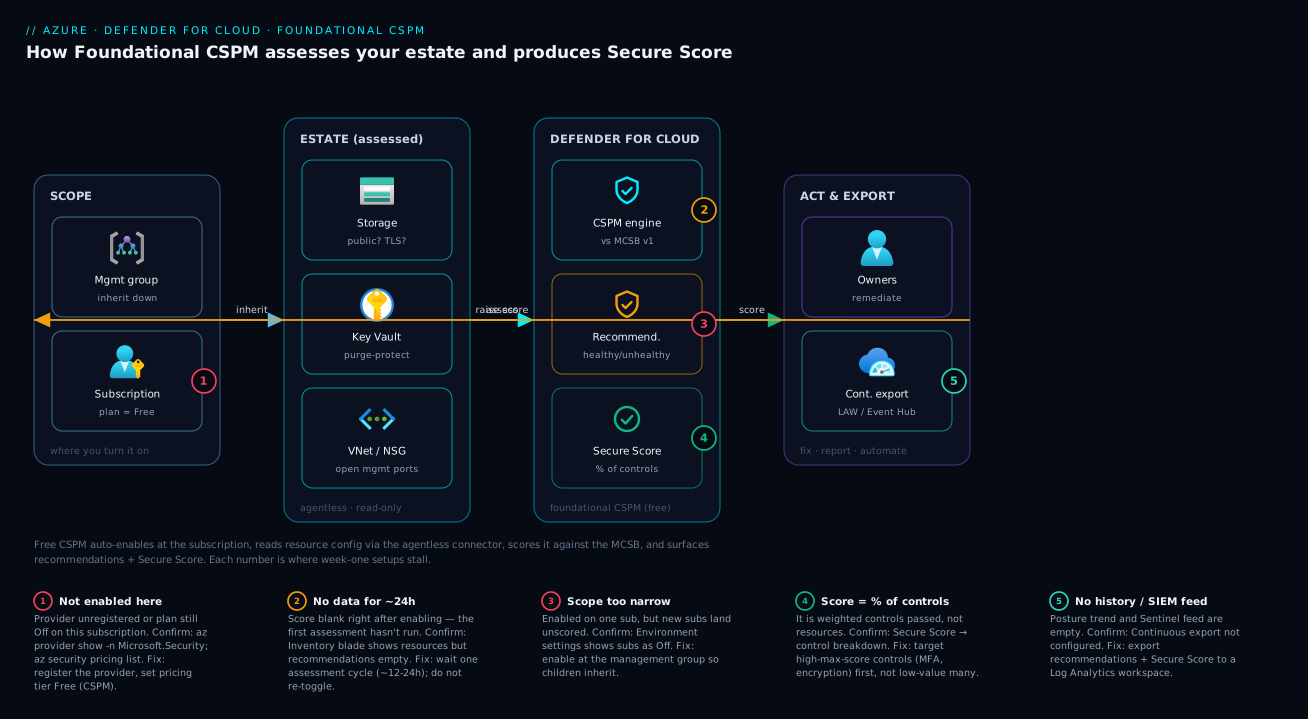
Foundational CSPM is a read-then-score loop laid over your estate. Trace it left to right. On the left is the scope where you flip the switch — a subscription, or a management group whose setting inherits down to every child subscription. From that scope, Defender for Cloud’s agentless connector reads the configuration of every resource in the estate — storage accounts (is public access on? is TLS modern?), Key Vaults (is purge protection set?), virtual networks and NSGs (are management ports open to the internet?) — entirely through Azure Resource Manager, with no agent installed and no access to your data.
Those readings flow into the CSPM engine, which evaluates each resource against the Microsoft Cloud Security Benchmark, marks each as healthy or unhealthy, and rolls the results up into security recommendations and a single Secure Score. On the right, you act: resource owners remediate the unhealthy items (raising the score), and continuous export streams the recommendations and score to a Log Analytics workspace (or Event Hub) so you keep history and can feed Microsoft Sentinel later. The dashed arrow back to the scope is the loop you live in all week — fix something, the next assessment cycle re-reads it, the score climbs. The numbered badges mark exactly where first-week setups stall: the plan never enabled on a subscription, the empty score before the first assessment, scope set too narrow, the score misread as a resource count, and no history because export was skipped.
Real-world scenario
Lumora Retail is a 30-person e-commerce startup. They ran for eight months on one Azure subscription with no security function: a couple of App Services, a SQL database, three storage accounts (one serving product images publicly; two holding order exports and backups, also left public from the same copy-pasted quickstart), a Key Vault, and a VNet whose NSG still had RDP open to 0.0.0.0/0 from a long-ago “let me just check the VM” moment. A prospective enterprise customer sent a security questionnaire. Lumora’s lead engineer, Aditi, had no answers.
She spent fifteen minutes enabling Foundational CSPM: open Defender for Cloud → Environment settings → select the subscription, set the CSPM plan to On (free), leave every paid Defender plan Off, save. The provider registered, and she went home. The next morning the Secure Score read 31% with 22 recommendations.
The recommendations were brutally clarifying. Top by severity: two storage accounts allowing public blob access (the order exports — a genuine data-exposure issue), a management port open to the internet (the RDP rule), a SQL server without auditing, Key Vault without purge protection, and a subscription with no Defender plans (informational, expected for free posture). Sorted by control Max score, the biggest movers were the network-exposure and encryption controls.
Aditi worked top-down. She used each recommendation’s Fix action to disable public access on the two non-image storage accounts (the image account she deliberately marked as an exemption with a justification). She tightened the NSG to allow RDP only from the office IP, and enabled SQL auditing and Key Vault purge protection with two az commands each. By the next assessment cycle the score had climbed to 68% — and she could now show the trend, having wired continuous export to a Log Analytics workspace. When the questionnaire asked “do you have continuous security posture monitoring?”, the answer became “yes — here’s our Secure Score, its 30-day trend, and our remediation log.” Total spend: ₹0 for CSPM, a few rupees a day for ingestion. The exposed-data fix alone justified the exercise.
Advantages and disadvantages
| Advantages | Disadvantages |
|---|---|
| Free — zero cost for assessment, score, recommendations | No threat detection (no runtime alerts) — that needs paid plans |
| Agentless — nothing to install, no VM footprint | No attack-path analysis or security graph (Defender CSPM only) |
| Fast to enable — minutes, across portal/CLI/Bicep | First assessment can lag up to ~24h — not instant gratification |
| Single Secure Score — one number leadership understands | Score can be demotivating if misread as a resource count |
| Prioritised, actionable recommendations with fixes | Some recommendations need paid plans to even appear |
| Inherits via management groups — scales to new subs | No agentless secret/vuln scanning at the free tier |
| Built on the MCSB — maps to CIS/NIST/PCI | Compliance dashboard is MCSB-only until you add standards (some paid) |
When the free tier is the right call: a new or small estate, a lab, exam prep, or any subscription where you want the posture floor and prioritised fixes. When you outgrow it: once production workloads warrant runtime protection (internet-facing VMs, sensitive SQL, public containers), the per-resource Defender plans and Defender CSPM’s attack-path graph start paying for themselves. The discipline is start free, fix the gaps, upgrade deliberately — never the reverse.
Hands-on lab
This is the centrepiece. You will enable Foundational CSPM end to end, three ways — the portal, the az CLI, and Bicep — then validate it, remediate a real finding, set up export, and tear everything down. Everything here is free except a few rupees of Log Analytics ingestion in the optional export step. The CLI path is the most reproducible.
Prerequisites for the lab
| Need | Detail |
|---|---|
| Subscription | One you can administer |
| Role | Security Admin or Owner at the subscription |
| Tooling | Azure portal, or az CLI ≥ 2.55 (az version) authenticated via az login |
| Region | Any (for the demo storage account; e.g. centralindia) |
| Time | ~15 minutes to enable + validate; ~24h for the first full score |
Set shell variables once (CLI path):
# Pick your subscription and a lab resource group
export SUB_ID="$(az account show --query id -o tsv)"
export RG="rg-cspm-lab"
export LOC="centralindia"
az account set --subscription "$SUB_ID"
echo "Working in subscription: $SUB_ID"
Expected output: your subscription GUID echoed back, confirming context.
Part A — Enable Foundational CSPM in the portal
- In the Azure portal, search for and open Microsoft Defender for Cloud. Expected: the Overview dashboard loads (it may say “Get started” if nothing is enabled yet).
- In the left menu under Management, click Environment settings. Expected: a tree of your management groups and subscriptions.
- Select your subscription row. Expected: the Defender plans page for that subscription opens, listing plan rows (Servers, Storage, etc.) and, at the top, the CSPM plan.
- Find the Cloud Security Posture Management (CSPM) plan at the top. Set its toggle to On. Leave the plan selection on the Foundational CSPM (Free) option — do not switch it to Defender CSPM, and leave every other plan (Servers, Storage, Databases, etc.) toggled Off. Expected: the CSPM row shows On / Free; all paid plans show Off.
- Click Save at the top. Expected: a “Settings saved successfully” notification. Behind the scenes Azure registers the
Microsoft.Securityresource provider if it isn’t already. - Go to Environment settings → your subscription → Security policy. Expected: the Microsoft Cloud Security Benchmark is shown as the Default assigned policy — this is the ruleset you’ll be scored against. You don’t need to change anything.
- Return to Overview. Expected: the Secure Score tile may show “Calculating” or be blank for now, and Inventory will begin to populate with your resources. The first full assessment can take up to ~24 hours; this is normal.
That’s the entire enable step in the portal — one toggle and a save. The rest of the value comes from acting on what it produces.
Part B — Enable Foundational CSPM with the az CLI
The CLI is the reproducible path and the one to script. Defender for Cloud plans are managed under az security pricing. The CSPM plan’s name is CloudPosture; setting its tier to Free is exactly Foundational CSPM.
-
Register the provider (idempotent — safe to re-run):
az provider register --namespace Microsoft.Security
# Watch until it reports Registered (can take a minute)
az provider show --namespace Microsoft.Security --query registrationState -o tsv
Expected: eventually prints
Registered. If it printsRegistering, wait and re-run theshow. -
Enable Foundational CSPM by setting the
CloudPostureplan to the Free tier:az security pricing create --name CloudPosture --tier FreeExpected: a JSON object with
"pricingTier": "Free"forCloudPosture. That is Foundational CSPM, on, at no cost. -
Confirm every paid plan is Off (so nothing bills you). List all plans and their tiers:
az security pricing list \
  --query "value[].{plan:name, tier:pricingTier}" -o table
Expected:
CloudPostureshowsFree; the others (VirtualMachines,StorageAccounts,SqlServers,KeyVaults,Containers, etc.) should showFreeas well — meaning their paid protection is not enabled. (For non-CSPM plans,Free= the paid Defender plan is off.) If any readsStandard, that plan is paid; turn it off withaz security pricing create --name <Plan> --tier Freeunless you intend to pay. -
Read your Secure Score from the CLI (it may be empty on the first day):
az security secure-scores list \
  --query "[].{name:displayName, current:score.current, max:score.max, pct:score.percentage}" \
  -o table
Expected: a row named ASC score (the overall Secure Score) once the first assessment has run, with
current,max, andpct. Blank early on is expected. -
List your top recommendations to see what to fix (once populated):
az security assessment list \
  --query "[?status.code=='Unhealthy'].{name:displayName, severity:metadata.severity, status:status.code}" \
  -o table
Expected: a table of unhealthy assessments with their severity. Sort your work by severity High first, then by the control max score in the portal.
Part C — Enable Foundational CSPM with Bicep
For repeatable, reviewed infrastructure-as-code, model the pricing at the subscription scope. This declares the CSPM plan as Free — drift-proof and re-deployable.
// cspm.bicep — deploy at subscription scope:
//   az deployment sub create --location centralindia --template-file cspm.bicep
targetScope = 'subscription'

@description('Foundational CSPM (free) for this subscription.')
resource cspm 'Microsoft.Security/pricings@2024-01-01' = {
  name: 'CloudPosture'
  properties: {
    pricingTier: 'Free'
  }
}

output cspmTier string = cspm.properties.pricingTier
Deploy and validate:
# Subscription-scoped deployment (note: 'sub create', not 'group create')
az deployment sub create \
  --location "$LOC" \
  --name enable-cspm \
  --template-file cspm.bicep
Expected: a successful deployment with provisioningState: Succeeded and output cspmTier = Free. Re-running it is a no-op (idempotent), which is the whole point of IaC.
To keep paid plans explicitly off in the same template (defensive, so a teammate can’t quietly flip one on outside code), declare them too:
// Pin common Defender plans to Free (off) alongside CSPM.
var offPlans = [
  'VirtualMachines'
  'StorageAccounts'
  'SqlServers'
  'KeyVaults'
  'Containers'
]

resource paidOff 'Microsoft.Security/pricings@2024-01-01' = [for p in offPlans: {
  name: p
  properties: {
    pricingTier: 'Free'
  }
}]
Part D — Validate it end to end
Don’t trust the toggle — prove it with these checks, whichever path you used:
| # | Check | Command / portal path | Pass criteria |
|---|---|---|---|
| 1 | Provider registered | az provider show -n Microsoft.Security --query registrationState -o tsv |
Registered |
| 2 | CSPM is Free/on | az security pricing show -n CloudPosture --query pricingTier -o tsv |
Free |
| 3 | No paid plans on | az security pricing list --query "value[?pricingTier=='Standard'].name" -o tsv |
empty (no output) |
| 4 | Default policy is MCSB | Environment settings → sub → Security policy | “Microsoft Cloud Security Benchmark” = Default |
| 5 | Inventory populating | Defender for Cloud → Inventory | your resources listed |
| 6 | Score present (≤24h) | az security secure-scores show -n ascScore --query "score.percentage" -o tsv |
a number (after first assessment) |
If checks 1–4 pass, CSPM is correctly enabled even if 5–6 are still warming up.
Part E — Remediate one real recommendation (close a public storage account)
Make the score move by fixing something concrete. We’ll create a deliberately misconfigured storage account, let CSPM flag it, then fix it.
-
Create a lab resource group and a public-blob storage account (the misconfiguration):
az group create --name "$RG" --location "$LOC"

STG="stcspmlab$RANDOM"
az storage account create \
  --name "$STG" --resource-group "$RG" --location "$LOC" \
  --sku Standard_LRS \
  --allow-blob-public-access true \
  --min-tls-version TLS1_0
echo "Created $STG with public access ON and TLS1_0 (intentionally bad)"
Expected: a storage account created with
allowBlobPublicAccess: trueandminimumTlsVersion: TLS1_0— two findings CSPM will raise (public access and weak TLS). -
Wait for the next assessment, then confirm CSPM sees it. In the portal: Recommendations → search “storage” → you should find “Storage accounts should prevent public access” (or similar) listing your account as Unhealthy. Via CLI:
az security assessment list \
  --query "[?contains(displayName,'public') && status.code=='Unhealthy'].displayName" -o tsv
Expected: the public-access recommendation appears once assessed.
-
Remediate — disable public blob access and require modern TLS:
az storage account update --name "$STG" --resource-group "$RG" \
  --allow-blob-public-access false \
  --min-tls-version TLS1_2
Expected: the account updates to
allowBlobPublicAccess: false,minimumTlsVersion: TLS1_2. At the next assessment cycle the recommendation flips that resource to Healthy and your Secure Score ticks up for that control. -
(Optional) Exemption pattern. If a finding is intentional (e.g. a storage account that must serve public images), don’t ignore it silently — create an exemption with a justification in Recommendations → the recommendation → Exempt, so it’s documented and excluded from your score honestly rather than dragging it down.
Part F — (Optional) Wire continuous export for history
The free CSPM keeps a rolling view, but to retain a trend and feed Sentinel later, export to a Log Analytics workspace. You pay only for the workspace ingestion (a few rupees/day at lab scale).
# 1) Create a small Log Analytics workspace
az monitor log-analytics workspace create \
  --resource-group "$RG" --workspace-name "law-cspm-lab" --location "$LOC"

WORKSPACE_ID=$(az monitor log-analytics workspace show \
  --resource-group "$RG" --workspace-name "law-cspm-lab" --query id -o tsv)

# 2) Create a continuous-export rule for recommendations + secure score
az security automation create \
  --name "export-cspm-to-law" \
  --resource-group "$RG" \
  --location "$LOC" \
  --scopes "/subscriptions/$SUB_ID" \
  --sources '[{"eventSource":"Assessments"},{"eventSource":"SecureScores"}]' \
  --actions "[{\"actionType\":\"Workspace\",\"workspaceResourceId\":\"$WORKSPACE_ID\"}]"
Expected: an automation resource named export-cspm-to-law. Within a cycle, the SecurityRecommendation and SecureScores tables in the workspace begin to fill. (You can also configure this point-and-click under Environment settings → Continuous export.)
Part G — Teardown
Leave nothing behind. CSPM itself is free, so you can keep it on; remove only the lab resources, and optionally set CSPM back to off.
# Delete the lab resource group (storage + workspace + export rule)
az group delete --name "$RG" --yes --no-wait

# Optional: turn Foundational CSPM back off on the subscription
#   (Only do this if you don't want posture monitoring; it's free to keep on.)
# az security pricing create --name CloudPosture --tier Free   # 'Free' IS off-paid; to fully disable CSPM, toggle in the portal.
Expected: the resource group deletes asynchronously. Foundational CSPM costs nothing to keep enabled — most people leave it on.
Common mistakes & troubleshooting
The first week has a small, predictable set of failure modes. Match your symptom and apply the fix.
| # | Symptom | Root cause | How to confirm | Fix |
|---|---|---|---|---|
| 1 | Score/recommendations blank after enabling | First assessment hasn’t run yet (≤24h) | Inventory shows resources but Recommendations empty | Wait one cycle; do not re-toggle the plan |
| 2 | “It’s not on this subscription” | Plan still Off, or wrong subscription selected | az security pricing show -n CloudPosture ≠ set; az account show |
Set tier Free; az account set to the right sub |
| 3 | New subscription is unscored | CSPM enabled at subscription, not management group | Environment settings shows new sub as Off | Enable at the management group so it inherits |
| 4 | az security pricing errors out |
Microsoft.Security provider not registered |
az provider show -n Microsoft.Security = NotRegistered |
az provider register --namespace Microsoft.Security |
| 5 | Got an unexpected bill | A paid Defender plan (Standard) got turned on | az security pricing list shows a plan as Standard |
Set that plan back to Free; review “Enable all plans” prompt |
| 6 | “Access denied” enabling plans | Insufficient role at scope | Your role is below Security Admin | Get Security Admin/Owner on the subscription |
| 7 | A recommendation you expect never appears | It requires a paid Defender plan to surface | Recommendation tied to a plan that’s Off | Either accept (free scope) or enable that plan |
| 8 | Score won’t move after fixes | Assessment lag, or fixed only some resources for a control | Control still partial in Secure Score breakdown | Fix all in-scope resources; wait a cycle; see Secure Score not improving |
| 9 | Continuous export shows no data | Export rule scope/sources wrong, or workspace mismatch | LAW SecurityRecommendation table empty |
Recreate export with Assessments/SecureScores sources to the correct workspace |
| 10 | Can’t see Secure Score at all | Only Security Reader missing, or viewing wrong scope | You have no role on the subscription | Grant Security Reader at minimum |
One note that saves the most confusion: Free is the tier name for “off-paid” on the non-CSPM plans — there is no Off keyword in az security pricing, so Free means that paid plan is disabled. Always finish onboarding by listing pricing and confirming nothing reads Standard you didn’t intend.
Best practices
- Enable at the management group, not the subscription, the moment you have (or expect) more than one subscription — inheritance closes the “new sub runs unscored” gap permanently.
- Keep Foundational CSPM on, always. It’s free and agentless; there is no scenario where a subscription benefits from posture blindness.
- Explicitly pin paid plans off in code (Bicep
Freeon each plan) so a teammate can’t quietly enable a billable plan outside source control. - Work the score top-down by control Max score, not by finding count — impact moves the number and closes the riskiest gaps first.
- Use exemptions with justifications for intentional configurations (e.g. a deliberately public image bucket) instead of ignoring findings — your score stays honest and auditable.
- Wire continuous export to a Log Analytics workspace early so you accumulate posture history and can plug into Microsoft Sentinel later without a gap.
- Re-check
az security pricing listafter every onboarding to confirm no plan drifted toStandardunintentionally. - Assign Security Reader broadly, Security Admin narrowly — let everyone see posture; restrict who can change plans.
- Treat recommendations as a backlog, not a fire — a fresh low score is expected; steady upward trend is the real signal.
- Map recommendations to owners — the resource owner remediates; CSPM only points. Use the (free-tier) recommendation owner/grace-period fields where available.
- Don’t enable paid plans “just in case” — upgrade deliberately when a specific workload warrants runtime protection or attack-path analysis.
Security notes
Foundational CSPM is itself a least-privilege, low-blast-radius tool, but a few points matter. It is read-only and agentless — it assesses configuration through ARM and never installs software on your VMs or reads inside your data, so enabling it does not expand your attack surface. Changing CSPM (pricing, policy, export) requires Security Admin or Owner; viewing needs only Security Reader — grant viewing widely and changing narrowly. The recommendations it produces are precisely the controls that cut real exposure: closing public storage and network ports, enforcing TLS 1.2+, enabling encryption, requiring MFA, and protecting Key Vaults with purge protection and soft delete. Act on the High severity items first for the fastest risk reduction. If you export to a workspace, treat it as sensitive — it now maps your weaknesses — and protect it with RBAC and, ideally, private access. Finally, the free tier deliberately omits threat detection and attack-path analysis; do not mistake a clean Secure Score for “we’d detect an attack” — detection is a separate, paid capability.
Cost & sizing
The headline: Foundational CSPM is free. There is no per-resource, per-subscription, or per-assessment charge for the posture layer — the Secure Score, recommendations, inventory, and the MCSB compliance view all cost nothing. The only money in this article appears in two optional places.
| Item | Cost | Notes |
|---|---|---|
| Foundational CSPM (posture) | ₹0 | Free, any number of resources/subscriptions |
| Secure Score, recommendations, inventory | ₹0 | Included in free CSPM |
| Defender CSPM (paid posture) | per billable resource / month | Adds attack paths, agentless scanning, governance |
| Defender plans (CWPP) | per protected resource / month | Servers, Storage, SQL, Containers, etc. — each billed separately |
| Continuous export rule | ₹0 for the rule | You pay only the destination |
| Log Analytics ingestion (export target) | per GB ingested + retention | Lab scale = a few ₹/day; first 5 GB-ish/month often within free grant |
| Lab storage account | a few ₹ if it stores data | Empty account ≈ negligible; delete in teardown |
Sizing guidance: for the free tier there is nothing to size — it scales to your whole estate at no cost. The only sizing decision is the export workspace: pick a sensible retention (30–90 days is plenty for posture history); Log Analytics bills by GB ingested, and posture export volume is small, so this is rupees, not thousands. When you consider paid plans, size them by which workloads truly need runtime protection — typically internet-facing VMs, sensitive SQL, and public containers — not everything. Start free, prove value, upgrade narrowly.
Interview & exam questions
Q1. What is the difference between Foundational CSPM and Defender CSPM? Foundational CSPM is the free, agentless posture layer: Secure Score, recommendations against the MCSB, and inventory. Defender CSPM is a paid plan that adds attack-path analysis, the cloud security graph, agentless machine/secret scanning, and governance features. Both are CSPM; only the foundational tier is free. (SC-900, AZ-500)
Q2. Is Foundational CSPM agent-based or agentless, and what does it assess? It is agentless — it reads resource configuration through Azure Resource Manager and installs nothing on your VMs. It assesses the security posture of resources (encryption, public access, network exposure, identity settings) against the Microsoft Cloud Security Benchmark, not the data inside them.
Q3. What is the Microsoft Cloud Security Benchmark (MCSB)? It is Microsoft’s curated set of security best-practice controls, aligned to CIS, NIST and PCI, applied as the default security policy in Defender for Cloud. Every recommendation maps to an MCSB control, and your Secure Score is measured against it.
Q4. How is Secure Score calculated? Recommendations are grouped into security controls, each with a maximum point value. You earn a control’s points when all in-scope resources are healthy (partial points scale with the healthy fraction). Secure Score is total points earned ÷ total available, shown as a percentage. It reflects weighted controls passed, not a raw resource count.
Q5. You enabled CSPM but the Secure Score is blank. Is it broken? No. The first assessment can take up to ~24 hours. A blank or “Calculating” score immediately after enabling is expected; confirm Inventory is populating and wait one cycle. Re-toggling the plan does not speed it up.
Q6. Where do you enable Defender for Cloud plans, and at what scopes? Under Environment settings, per subscription or per management group. Enabling at a management group inherits the setting to all child subscriptions, including future ones — the recommended approach for multi-subscription estates.
Q7. What’s the az command to enable Foundational CSPM, and what’s the plan name?
az security pricing create --name CloudPosture --tier Free. The CSPM plan is named CloudPosture; its Free tier is Foundational CSPM.
Q8. A new subscription in your tenant shows no Secure Score. Why? CSPM was likely enabled at the subscription scope rather than the management group, so the new subscription was never covered. Enable CSPM at the management group so inheritance covers new subscriptions automatically.
Q9. How do you handle a recommendation that flags an intentional configuration? Create an exemption with a documented justification (rather than ignoring it). The resource is excluded from the score transparently and auditably, keeping the score honest.
Q10. What does Foundational CSPM NOT give you? It does not provide threat detection / runtime alerts (those require paid Defender plans) nor attack-path analysis / security graph / agentless scanning (those require Defender CSPM). It is posture assessment only.
Q11. How do you keep posture history and feed a SIEM? Configure continuous export to a Log Analytics workspace (or Event Hub). The export rule is free; you pay only for the destination’s ingestion/retention. The workspace can then feed Microsoft Sentinel.
Q12. What role lets a user change Defender for Cloud plans versus just view the score? Security Admin (or Owner) is required to enable/disable plans and policies; Security Reader is enough to view Secure Score and recommendations. Grant viewing broadly and changing narrowly.
Quick check
- Is Foundational CSPM free, and is it agent-based or agentless?
- What does Secure Score actually measure — resources or controls?
- Which
azcommand and plan name enable Foundational CSPM? - Why might your Secure Score be blank right after enabling?
- At which scope should you enable CSPM so new subscriptions are covered automatically?
Answers
- Yes, it is free, and it is agentless — it reads resource configuration via ARM and installs nothing.
- It measures the percentage of weighted security controls passed, not a count of resources.
az security pricing create --name CloudPosture --tier Free— the plan isCloudPosture, tier Free.- The first assessment can take up to ~24 hours; a blank score immediately after enabling is normal — wait a cycle, don’t re-toggle.
- The management group scope, so the setting inherits to all child subscriptions, including future ones.
Glossary
- Defender for Cloud — Azure’s cloud security product combining posture management (CSPM) and workload protection (CWPP).
- Foundational CSPM — the free, agentless posture layer: Secure Score, recommendations, inventory.
- Defender CSPM — the paid posture plan adding attack paths, the security graph, and agentless scanning.
- Defender plan — a paid per-resource-type workload-protection plan (Servers, Storage, SQL, etc.) providing threat detection.
- CWPP — Cloud Workload Protection Platform; the runtime threat-detection half of Defender for Cloud.
- MCSB (Microsoft Cloud Security Benchmark) — the default best-practice control set CSPM scores against, aligned to CIS/NIST/PCI.
- Secure Score — a percentage of weighted security controls passed across your monitored estate.
- Security control — a group of related recommendations carrying a maximum point value toward the score.
- Recommendation — a single assessable best-practice check applied to resources, with healthy/unhealthy states.
- Health state — a resource’s status for a recommendation: Healthy, Unhealthy, or Not applicable.
- Inventory — the asset list of all monitored resources and their posture in Defender for Cloud.
- Continuous export — a rule that streams recommendations and Secure Score to Log Analytics or Event Hub.
- Environment settings — the blade where Defender plans are enabled per subscription or management group.
- Agentless — assessment performed via Azure Resource Manager metadata with no software installed on resources.
- Exemption — a documented exclusion of a resource/recommendation from the score for an intentional configuration.
Next steps
- When the score won’t budge despite fixes, work through the Defender CSPM Secure Score not improving diagnosis.
- Enforce the same baseline preventively with Azure Policy effects: Deny, Audit, Modify, DeployIfNotExists.
- Set the right enable scope using the Azure management group hierarchy design fundamentals.
- Understand which half of security is yours to fix in the Azure shared responsibility model by service.
- Adopt the identity pattern CSPM nudges you toward with system- vs user-assigned managed identities.
- Feed your exported posture data into a broader Zero Trust architecture blueprint.