A media company runs about sixty internal HTTP microservices — image transcoders, webhook receivers, an RSS importer, a dozen admin back-ends — and the platform team just did the math on the bill: most of those services field a few hundred requests a day and sit idle the rest of the time, yet each holds two warm replicas around the clock across three clusters. That is a permanent baseline of 360 pods doing nothing for 22 hours a day. The mandate from the head of platform is blunt: “stop paying for idle, but do not make me babysit a separate serverless stack per cloud.” The answer is Knative Serving — a Kubernetes-native layer that scales each HTTP workload to zero when traffic stops, cold-starts it in roughly a second when a request arrives, versions every deploy as an immutable revision, and lets you shift traffic between revisions by percentage. This guide stands it up end to end with the Kourier ingress, runs a real service through scale-to-zero and a canary split, and wires it into the identity, secrets, security, and CI tooling a platform team actually operates with.
Knative Serving gives you three things plain Deployments do not: scale-to-zero (the Deployment’s minReplicas floor is 1, never 0), request-driven autoscaling that reacts to concurrent in-flight requests rather than lagging CPU, and revisions — each change to your code or config becomes an immutable, individually-addressable version you can roll traffic onto gradually and roll back instantly. Kourier is the lightweight ingress we pair it with: a single-purpose Envoy-based gateway that implements Knative’s routing contract without dragging in a full service mesh. That keeps the moving parts few, which is the whole point of the head of platform’s ask.
Prerequisites
- A Kubernetes cluster on v1.28+ with at least 6 vCPU / 12 GiB schedulable (AKS, EKS, GKE, or on-prem — Knative is cloud-neutral, which is why it answers the multi-cloud part of the mandate).
kubectlv1.28+ configured against the cluster, plus cluster-admin for the install.- The Knative CLI
knv1.14+ (brew install knative/client/knor download the release binary). - A wildcard DNS record you can point at the ingress load balancer (e.g.
*.knative.kloudvin.dev), or freedom to usesslip.iofor a lab. - An OCI registry your nodes can pull from (GHCR, ECR, ACR, Harbor), and an image to deploy.
cert-manageralready installed if you want automatic TLS (covered in step 6).
Target topology
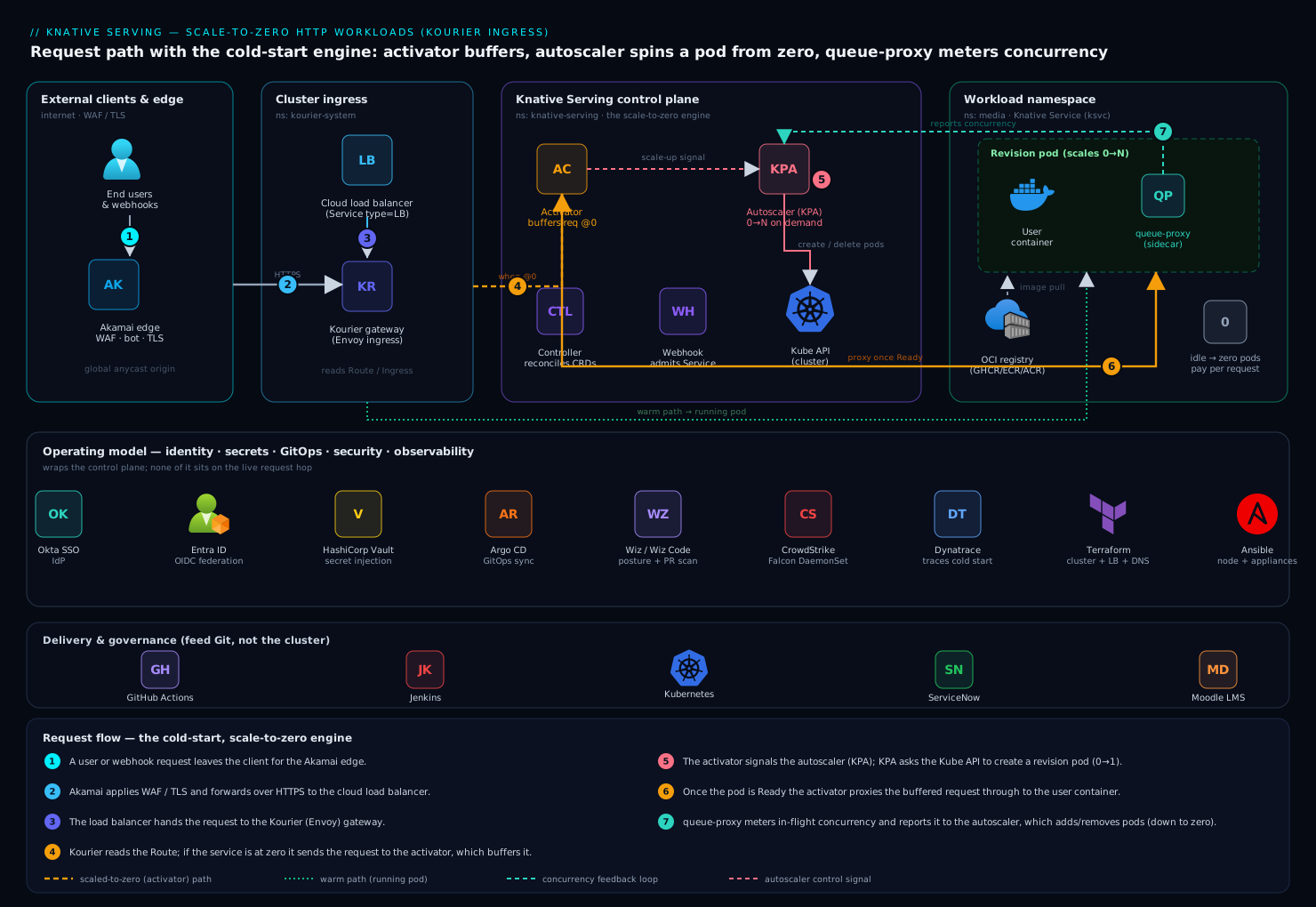
The request path is deliberately short. External clients hit Akamai at the edge for TLS termination, global anycast, and WAF/bot protection, then traffic lands on the cloud load balancer fronting Kourier. Kourier consults the Knative Route and Ingress objects and forwards the request — either straight to a running pod, or to the activator when the target service is scaled to zero. The activator buffers the request, signals the autoscaler (KPA) to spin up a pod, holds the connection until the pod is Ready, then proxies it through. Each user pod runs your container next to the queue-proxy sidecar, which measures concurrency and reports it back to the autoscaler. That feedback loop — queue-proxy counts in-flight requests, autoscaler adds or removes pods, activator covers the zero-to-one gap — is the engine that makes scale-to-zero work without dropping the first request.
Around that core sits the operating model: Okta federated to Microsoft Entra ID gates who can reach the cluster API and the admin services; HashiCorp Vault injects per-service secrets so nothing sensitive lives in a Kubernetes Secret; Argo CD reconciles the Knative Service manifests from Git; Wiz and Wiz Code scan posture and the manifests themselves; CrowdStrike Falcon watches the nodes at runtime; and Dynatrace traces the cold-start path so you can see the activator hop.
1. Install the Knative Serving core
Install the CRDs first, then the core controllers. Pin the version — never track a floating latest for a control-plane component.
export KNATIVE_VERSION="v1.14.0"

# 1a. Custom Resource Definitions
kubectl apply -f "https://github.com/knative/serving/releases/download/knative-${KNATIVE_VERSION}/serving-crds.yaml"

# 1b. Core components (controller, autoscaler, activator, webhook)
kubectl apply -f "https://github.com/knative/serving/releases/download/knative-${KNATIVE_VERSION}/serving-core.yaml"
Wait for the control plane to come up. The webhook in particular must be Ready before any Service you create will admit.
kubectl rollout status deployment/controller  -n knative-serving --timeout=180s
kubectl rollout status deployment/activator   -n knative-serving --timeout=180s
kubectl rollout status deployment/autoscaler  -n knative-serving --timeout=180s
kubectl rollout status deployment/webhook     -n knative-serving --timeout=180s

kubectl get pods -n knative-serving
You should see activator, autoscaler, controller, and webhook all Running. The activator and autoscaler are the two that make this more than a Deployment — keep an eye on them.
2. Install and wire up the Kourier ingress
Knative ships no ingress of its own; you choose one. We use Kourier for its small footprint. Install it, then tell Knative to use it via the config-network ConfigMap — this single field is the wiring that is easy to forget, and without it Routes never program.
# 2a. Install Kourier (matched to the Knative minor version)
kubectl apply -f "https://github.com/knative/net-kourier/releases/download/knative-${KNATIVE_VERSION}/kourier.yaml"

# 2b. Tell Knative Serving to use Kourier as its ingress class
kubectl patch configmap/config-network \
  --namespace knative-serving \
  --type merge \
  --patch '{"data":{"ingress-class":"kourier.ingress.networking.knative.dev"}}'

kubectl rollout status deployment/net-kourier-controller -n knative-serving --timeout=180s
The Kourier gateway is exposed as a LoadBalancer Service in the kourier-system namespace. Grab its external address — this is what your DNS and Akamai origin point at.
kubectl get service kourier -n kourier-system \
  -o jsonpath='{.status.loadBalancer.ingress[0].ip}{.status.loadBalancer.ingress[0].hostname}'
echo
3. Configure DNS for routing
Knative routes by hostname (<service>.<namespace>.<domain>), so it needs a base domain and DNS that resolves the wildcard to the Kourier load balancer. For production, set your real domain in the config-domain ConfigMap and create a wildcard A/CNAME at your DNS provider.
# Production: set the real base domain
kubectl patch configmap/config-domain \
  --namespace knative-serving \
  --type merge \
  --patch '{"data":{"knative.kloudvin.dev":""}}'
Then create the wildcard record (conceptually *.knative.kloudvin.dev -> <kourier-lb-address>) at your DNS provider, and point the Akamai edge property’s origin at the Kourier load balancer so external traffic terminates TLS and passes the WAF before it reaches the cluster.
For a quick lab with no real DNS, use the sslip.io magic-DNS install instead, which encodes the LB IP into the hostname:
# Lab only: magic DNS via sslip.io (skip the config-domain patch above)
kubectl apply -f "https://github.com/knative/serving/releases/download/knative-${KNATIVE_VERSION}/serving-default-domain.yaml"
4. Deploy your first scale-to-zero service
Now the payoff. Define a Knative Service (kind Service, API serving.knative.dev/v1 — not a core Service) declaratively so Argo CD can own it. The annotations are where the autoscaling behavior lives.
# transcoder-service.yaml
apiVersion: serving.knative.dev/v1
kind: Service
metadata:
  name: image-transcoder
  namespace: media
spec:
  template:
    metadata:
      annotations:
        # Concurrency-based KPA: scale on in-flight requests, not CPU
        autoscaling.knative.dev/class: "kpa.autoscaling.knative.dev"
        autoscaling.knative.dev/metric: "concurrency"
        # Aim for ~10 concurrent requests per pod
        autoscaling.knative.dev/target: "10"
        # Allow true scale-to-zero (this is the default floor; set explicitly)
        autoscaling.knative.dev/min-scale: "0"
        # Cap the blast radius
        autoscaling.knative.dev/max-scale: "20"
        # Keep a scaled-to-zero pod warm for 60s before tearing down
        autoscaling.knative.dev/scale-to-zero-pod-retention-period: "60s"
    spec:
      containerConcurrency: 0          # 0 = no hard cap; rely on the target above
      timeoutSeconds: 300
      containers:
        - image: ghcr.io/kloudvin/image-transcoder:1.4.2
          ports:
            - containerPort: 8080       # Knative routes to a single port
          resources:
            requests:
              cpu: "250m"
              memory: "256Mi"
            limits:
              memory: "512Mi"
          env:
            - name: LOG_LEVEL
              value: "info"
Apply it (in a GitOps flow Argo CD does this; the imperative form is shown for the first run):
kubectl apply -f transcoder-service.yaml

# Watch the Service reconcile to Ready and print its URL
kubectl get ksvc image-transcoder -n media --watch
Once READY is True, kn shows the URL and the active revision:
kn service describe image-transcoder -n media
# URL:     https://image-transcoder.media.knative.kloudvin.dev
# Revision: image-transcoder-00001 (current @100%)
5. Watch it scale to zero — and back
This is the behavior you are buying. With no traffic, the autoscaler drains the service to zero pods. Send one request and the activator catches it, triggers a cold start, and proxies it through.
# After ~60-90s of no traffic, the pod count drops to zero:
kubectl get pods -n media -l serving.knative.dev/service=image-transcoder
# (no resources found — this is the win)

# Hit the URL; the first request cold-starts a pod (the activator path):
URL=$(kn service describe image-transcoder -n media -o jsonpath='{.status.url}')
time curl -sS "${URL}/healthz"
# real ~1.1s on the cold request, then a pod appears:

kubectl get pods -n media -l serving.knative.dev/service=image-transcoder
# image-transcoder-00001-deployment-xxxxx   2/2   Running   (your container + queue-proxy)
Drive concurrent load to watch the autoscaler add pods toward the target: 10:
# 50 concurrent requests for 30s — expect ~5 pods to appear (50 / target 10)
hey -z 30s -c 50 "${URL}/transcode?demo=1"
kubectl get pods -n media -l serving.knative.dev/service=image-transcoder -w
When the load stops, the autoscaler scales back down through the retention window to zero. You are now paying only for actual request-seconds.
6. Terminate TLS at the cluster (Knative + cert-manager)
Even with Akamai terminating TLS at the edge, you want end-to-end encryption to the gateway. Knative integrates with cert-manager to auto-issue per-domain certificates. Install the Knative cert-manager integration controller and point it at a ClusterIssuer.
# Knative's cert-manager integration (net-certmanager)
kubectl apply -f "https://github.com/knative/net-certmanager/releases/download/knative-${KNATIVE_VERSION}/release.yaml"

# Turn on auto-TLS and redirect HTTP->HTTPS
kubectl patch configmap/config-network -n knative-serving --type merge \
  --patch '{"data":{"auto-tls":"Enabled","http-protocol":"Redirected"}}'
Reference your issuer (assumes a letsencrypt-dns01 ClusterIssuer already exists, solving the DNS-01 challenge against the same provider hosting your wildcard):
kubectl patch configmap/config-certmanager -n knative-serving --type merge \
  --patch '{"data":{"issuerRef":"kind: ClusterIssuer\nname: letsencrypt-dns01\n"}}'
Knative now provisions a certificate per route and serves HTTPS; Akamai re-encrypts to this origin rather than terminating in the clear.
7. Wire in the operating model (identity, secrets, GitOps, security)
The control plane is running; now make it operable the way the platform team actually runs things. Each tool earns its place:
- Okta + Microsoft Entra ID — workforce SSO. Okta is the IdP; engineers authenticate against it and it federates over OIDC to Entra ID, which backs the cluster’s API-server OIDC config and the admin services’ ingress auth. So reaching
kubectlor an internal admin route requires a live Okta session and the right Entra group — no static kubeconfig tokens floating around. - HashiCorp Vault — secrets injection. Instead of mounting a Kubernetes
Secret, the Vault Agent sidecar (or the Secrets Store CSI driver) authenticates to Vault with the pod’s ServiceAccount via the Kubernetes auth method and writes short-lived, leased secrets (registry creds, DB passwords, signing keys) into the container at start. Annotate the KnativeServicetemplate so the sidecar injects:
      annotations:
        vault.hashicorp.com/agent-inject: "true"
        vault.hashicorp.com/role: "media-transcoder"
        vault.hashicorp.com/agent-inject-secret-db: "secret/data/media/transcoder"
- Argo CD — GitOps reconciliation. The Knative
ServiceYAML lives in Git; Argo CD continuously syncs it to the cluster, so agit revertis your rollback and drift is auto-corrected. The CI side (build, scan, push image, bump the tag) runs in GitHub Actions for the app repos and Jenkins for a few legacy pipelines; both only ever update the image tag in Git and let Argo CD do the deploy — nokubectl applyfrom CI. - Terraform + Ansible — the cluster itself (node pools, the Kourier
LoadBalancer, DNS records, theClusterIssuer) is provisioned by Terraform, while Ansible handles node-level config and bootstraps the few virtual appliances that sit alongside the cluster (the on-prem load balancer and a legacy SFTP gateway some webhook services still depend on). - Wiz / Wiz Code — Wiz runs agentless cloud posture and attack-path analysis across the cluster and its cloud account, alerting if a Knative service is accidentally exposed publicly or a node drifts out of compliance; Wiz Code scans the Knative manifests and container images in the pull request, before merge, so a misconfiguration never reaches Argo CD.
- CrowdStrike Falcon — the Falcon sensor runs as a DaemonSet on every node, giving runtime threat detection on the workloads (including the short-lived scale-from-zero pods) and feeding the SOC.
- Dynatrace — OneAgent instruments the nodes and the queue-proxy path, so a distributed trace shows the activator hop on cold starts explicitly — invaluable for telling “the service is slow” apart from “the service was scaled to zero and cold-started.” Davis anomaly detection flags cold-start latency regressions on its own.
- ServiceNow — promoting a service to a shared production namespace passes through a ServiceNow change request; a Wiz critical finding or a sustained cold-start SLO breach auto-raises a ServiceNow incident so there is a ticket, not just an alert.
A note on Moodle: the platform team publishes the internal “deploying to Knative” enablement course and the runbook for this stack in the company’s Moodle LMS, and that Moodle app is itself a perfect scale-to-zero candidate — it sees bursty traffic around onboarding and sits idle overnight, so it runs as a Knative service here too.
8. Split traffic between revisions (canary)
Revisions are the other half of the value. Every change to the Service mints a new immutable revision; you decide what share of traffic each gets. Deploy a new image version and hold it at 0% first.
# Roll out v1.5.0 but keep all traffic on the current revision (dark launch)
kn service update image-transcoder -n media \
  --image ghcr.io/kloudvin/image-transcoder:1.5.0 \
  --revision-name image-transcoder-v150 \
  --traffic image-transcoder-00001=100 \
  --traffic image-transcoder-v150=0
Send 10% to the new revision, watch your Dynatrace error-rate and latency for that revision, then ramp:
# Canary: 10% to the new revision
kn service update image-transcoder -n media \
  --traffic image-transcoder-00001=90 \
  --traffic image-transcoder-v150=10

# Looks healthy — go to 100% on the new revision
kn service update image-transcoder -n media \
  --traffic image-transcoder-v150=100
In the GitOps flow the same shift is expressed as spec.traffic[] percentages in the Git manifest and applied by Argo CD; kn is shown here for the operator’s mental model.
Validation
Confirm the install and the behavior, not just that pods are Running.
# Control plane healthy
kubectl get pods -n knative-serving
kubectl get pods -n kourier-system

# Ingress wiring is correct (ingress-class must be Kourier)
kubectl get configmap config-network -n knative-serving -o jsonpath='{.data.ingress-class}'; echo

# The service is Ready and has a URL
kn service list -n media

# Scale-to-zero actually happens: after idle, zero pods
kubectl get pods -n media -l serving.knative.dev/service=image-transcoder

# Cold start serves correctly (expect 200 and ~1s on the first hit)
curl -sS -o /dev/null -w "%{http_code}  %{time_total}s\n" "${URL}/healthz"

# Traffic split is what you set it to
kn revisions list -s image-transcoder -n media
A green run is: Kourier ingress-class set, the ksvc READY=True, zero pods at idle, a 200 on the cold request, and the revision traffic percentages matching your intent.
Rollback / teardown
Rolling back a bad deploy is a traffic shift, not a redeploy — point 100% back at the known-good revision, which is still there because revisions are immutable:
kn service update image-transcoder -n media \
  --traffic image-transcoder-00001=100 \
  --traffic image-transcoder-v150=0
In GitOps, that is a git revert of the manifest and Argo CD reconciles it.
To remove a single service, or tear the whole stack down cleanly (reverse install order — Kourier, then core, then CRDs last so finalizers can run):
# Remove one service
kn service delete image-transcoder -n media

# Full teardown
kubectl delete -f "https://github.com/knative/net-kourier/releases/download/knative-${KNATIVE_VERSION}/kourier.yaml"
kubectl delete -f "https://github.com/knative/serving/releases/download/knative-${KNATIVE_VERSION}/serving-core.yaml"
kubectl delete -f "https://github.com/knative/serving/releases/download/knative-${KNATIVE_VERSION}/serving-crds.yaml"
Common pitfalls
ingress-classnot set. The single most common failure: you install Kourier but skip theconfig-networkpatch in step 2, soRoutesnever program and every service staysUnknown/IngressNotConfigured. Checkconfig-network’singress-classfirst when routing is broken.- Wildcard DNS missing or stale. If
*.knative.kloudvin.devdoes not resolve to the Kourier LB, theksvcgoesReadybut the URL is unreachable. Verify withdig +short image-transcoder.media.knative.kloudvin.dev. - Wrong container port. Knative routes to exactly one port; if your app listens on something other than what
ports.containerPortdeclares (and isn’t the default 8080), readiness probes fail silently and the revision never goesReady. - Cold-start latency surprises. A heavy JVM or a 2 GB image makes the zero-to-one gap multi-second. For latency-sensitive services set
min-scale: "1"to keep one warm pod (you trade some scale-to-zero savings for predictability), or slim the image. containerConcurrencyset too low. Setting a hard cap of1serializes every request and forces aggressive pod fan-out; leave it0and tune the softautoscaling targetinstead unless your app is genuinely single-threaded.- Mismatched component versions. Kourier, net-certmanager, and serving must share the Knative minor version. Mixing
v1.14core withv1.12Kourier produces subtle routing breakage. Pin them all toKNATIVE_VERSION.
Security notes
Keep the data-plane surface small and the identity path strict. Run user workloads in their own namespaces with NetworkPolicy allowing ingress only from the kourier-system and knative-serving namespaces, so a scaled-up pod cannot be reached except through the gateway. Enforce the restricted Pod Security Standard on workload namespaces — Knative containers run fine non-root and read-only-root. Keep secrets out of manifests entirely: HashiCorp Vault injects them at runtime, and Wiz Code fails the pull request if a literal secret or an over-broad ServiceAccount slips into a Knative manifest. Human access to the cluster API and to internal admin routes is gated by Okta → Entra ID SSO, so there are no long-lived kubeconfig credentials to leak, and CrowdStrike Falcon provides runtime detection on the nodes including the ephemeral cold-start pods. Front everything external with Akamai for WAF and TLS so request-flood and injection patterns are dropped before they reach the activator.
Cost notes
Scale-to-zero is the headline saving: idle services drop to zero pods, so the 360-pod always-on baseline from the opening collapses to near-zero compute at night and on weekends — you pay for request-seconds, not for warm capacity. Tune the scale-to-zero-pod-retention-period to balance cost against cold-start frequency (longer retention means fewer cold starts but more idle pod-minutes). Set a sane max-scale on every service so a traffic spike or a retry storm cannot fan a service out across the whole cluster and blow the node-autoscaler bill. Keep one warm pod (min-scale: "1") only on the handful of latency-critical services that genuinely need it, and let the long tail of low-traffic back-ends ride at zero. Finally, watch real utilization in Dynatrace and feed the per-namespace cost view into the platform team’s showback so each owning team sees what their services actually cost now that idle is free.